10 Best Online Agile Tools For Project Management In 2026

10 Best Agile Tools List


The best agile tools help you plan, schedule, and execute sprints smoothly to keep your team focused and productive with less hassle. Without the right tool, you'll struggle to monitor team velocity, identify potential bottlenecks, and communicate with stakeholders.
I've used my 15 years of experience in project management to evaluate 35+ agile tools. Read my analysis of each tool, key features, and use cases below. I'll help you find the right tool that lets you easily remove blockers for your team, improve visibility and collaboration on your software development projects, and track team workloads.
Why Trust Our Software Recommendations
Our team has been testing and reviewing software since 2012. As project managers ourselves, we know how difficult—and important—it is to choose the right software.
For this guide, we evaluated tools using hands-on testing and independent research, scoring tools using our selection criteria. We also draw on insights from industry thought leaders and practicing project management experts.
Our reviews reflect our human editorial judgment, not a sales pitch.
Expert reviewers:
Agile Tools Comparison Table
This comparison table summarizes pricing details for my top agile tools selections:
| Tool | Best For | Trial Info | Price | ||
|---|---|---|---|---|---|
| 1 | Best with customizable AI-powered workflows | Free plan + 14-day free trial available | From $9/user/month (billed annually) | Website | |
| 2 | Best for advanced resource management | 14-day free trial + free demo available | From $10/user/month (billed annually) | Website | |
| 3 | Best for scaling organizations | Free plan + 14-day free trial + free demo available | From $10/user/month (billed annually) | Website | |
| 4 | Best for backlog prioritization & release management | 15-day free trial | From $1/user/month (12 user minimum) | Website | |
| 5 | Best agile tool with Kanban boards | Free trial + free plan + free demo available | From $13/user/month (billed annually) | Website | |
| 6 | Best for visual sprint planning | Free plan + free demo available | From $9/user/month (billed annually) | Website | |
| 7 | Best for building custom agile workflows | 30-day free trial + free demo available | From $24/user/month | Website | |
| 8 | Best for card-based task lists | 14-day free trial | From $5/user/month (billed annually) | Website | |
| 9 | Best for story, epic, and milestone organization | Free plan + 14-day free trial + free demo available | From $8.50/user/month (billed annually) | Website | |
| 10 | Best for software development for agile teams | Free plan + 14-day free trial available | From $8.48/user/month | Website |


The Best Agile Tools Overviews
Although there are dozens of great agile PM tools out there, here’s a detailed review of each agile project management tool that made it onto my list:

Best with customizable AI-powered workflows
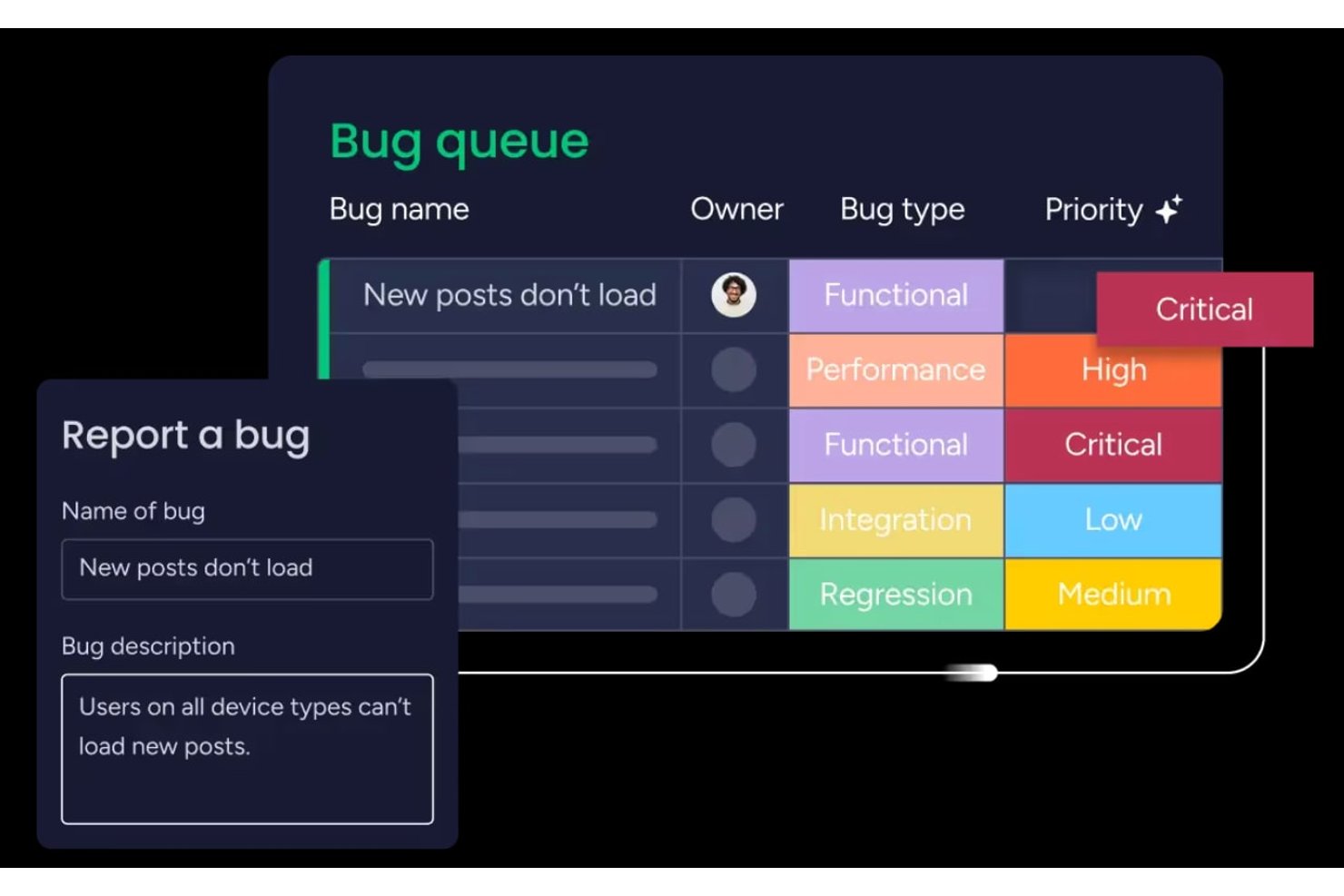
monday AI Workspace is a highly configurable work management platform that combines agile boards, sprint planning, backlog management, and AI-powered workflow automation across development and cross-functional teams.
Who Is monday AI Workspace Best For?
It's a strong fit for mid-sized to enterprise product and development teams that need agile project management alongside cross-functional visibility in a single platform.
Why I Picked monday AI Workspace
monday AI Workspace earns its spot on my shortlist because the AI workflow builder genuinely changes how sprint cycles run. I use it to trigger automations based on task status changes, which keeps board updates from falling on individual team members. The AI sprint summary is another feature I rely on, pulling auto-generated recaps directly from sprint activity so retrospectives start with real data, not manual notes.
monday AI Workspace Key Features
- Sprint management boards: Teams can run iterative sprints, track commitments, and set sprint goals using configurable workflows.
- Hierarchy support for epics and stories: Organize work with nested epics, user stories, tasks, and subtasks, linking dependencies as needed.
- Agile performance dashboards: Visualize burndown charts, velocity metrics, and cumulative flow diagrams in real time.
- Portfolio and roadmap views: Plan releases, manage multiple teams, and visualize project timelines across portfolios.
monday AI Workspace Integrations
monday AI Workspace offers 200+ native integrations, including Jira, GitHub, Slack, Google Workspace, Microsoft Teams, Salesforce, Zendesk, GitLab, Bitbucket, and Gmail. An API is available for custom integrations.
Pros and Cons
Pros:
- Built-in agile dashboards with burndown charts
- Multi-level hierarchy for epics and stories
- Automated sprint boards with AI recommendations
Cons:
- Limitation on custom board views per user
- Lacks advanced SAFe or LeSS modules
New Product Updates from monday AI Workspace
monday AI Workspace Adds Human Approval Routing
monday AI Workspace adds a human-in-the-loop approval block to AI Workflows, sending approval requests and routing workflow paths based on responses. For more information, visit monday AI Workspace's official site.

Celoxis
Best for advanced resource management

Celoxis is an enterprise project portfolio management (PPM) platform that supports agile and hybrid project delivery with sprint planning, Kanban boards, Gantt scheduling, resource capacity planning, risk tracking, and real-time dashboards.
Celoxis is a strong fit for mid-size to enterprise teams managing multiple projects across departments that require portfolio visibility along with agile delivery.
Why I Picked Celoxis
I picked Celoxis as one of the best agile tools because its resource management goes well beyond basic assignment. The interactive workload chart lets my team see allocation across every active project simultaneously, so we can catch overloads before they derail a sprint. What I find especially useful is the skill-based allocation combined with capacity planning that compares planned vs. actual effort in real time. Celoxis also accounts for exceptions like vacations and part-time schedules automatically, which means sprint resourcing stays accurate without manual recalculation every cycle.
Celoxis Key Features
- Kanban boards: Visualize and manage sprint tasks across customizable columns with drag-and-drop card movement.
- Interactive Gantt chart: Adjust task timelines and dependencies in real time, with automatic schedule updates when changes are made.
- Inter-project dependency tracking: Link tasks across multiple projects and update schedules automatically when timelines shift.
- Integrated time tracking: Log hours directly against tasks and sprints using built-in timesheets with approval workflows.
Celoxis Integrations
Celoxis offers native integrations with Jira, Salesforce, Trello, Zendesk, Okta, Microsoft Project, Slack, Outlook, Google Drive, and more, with an API available for custom integrations.
Pros and Cons
Pros:
- Supports waterfall, hybrid, and agile workflows
- Offers both cloud and on-premise deployment
- Built-in what-if scenario and trend analysis
Cons:
- Steep learning curve for teams
- Mobile app lacks full desktop feature parity

Wrike
Best for scaling organizations

Wrike is an award-winning collection of agile tools for project management suitable for teams of five or more. This highly configurable agile project management software allows users to customize workflows, dashboards, and reports.
Wrike’s simple interface enables users to switch between Kanban boards, interactive drag-and-drop Gantt charts, and workload views to visualize priorities. Wrike features a number of easy-to-use agile templates, backlog management functionalities, spaces for collaboration and feedback, and agile reporting and analytics. Other features include agile folder organization and automated task management.
Wrike’s features can be configured for each individual team’s needs, and the tool also offers a variety of different yet specific solutions depending on the type of team or organization, including solutions for marketing teams and professional service teams.
The software offers more than 400 pre-built native integrations, including popular file management software from Microsoft, Google, and Dropbox, along with sales and marketing software from Salesforce and Marketo.
Pros and Cons
Pros:
- Community feedback voting for roadmap features
- Loads of configurable features
- Holistic, comprehensive task modeling
Cons:
- Commenting system could be better
- Not tailored for small organizations
New Product Updates from Wrike

Wrike Adds Quick Search to Table View
Wrike adds Quick Search to Table View with full-table search across titles, descriptions, and fields, plus highlighted matches. This helps users find tasks faster in large tables. For more information, visit Wrike’s official site.
Best for backlog prioritization & release management
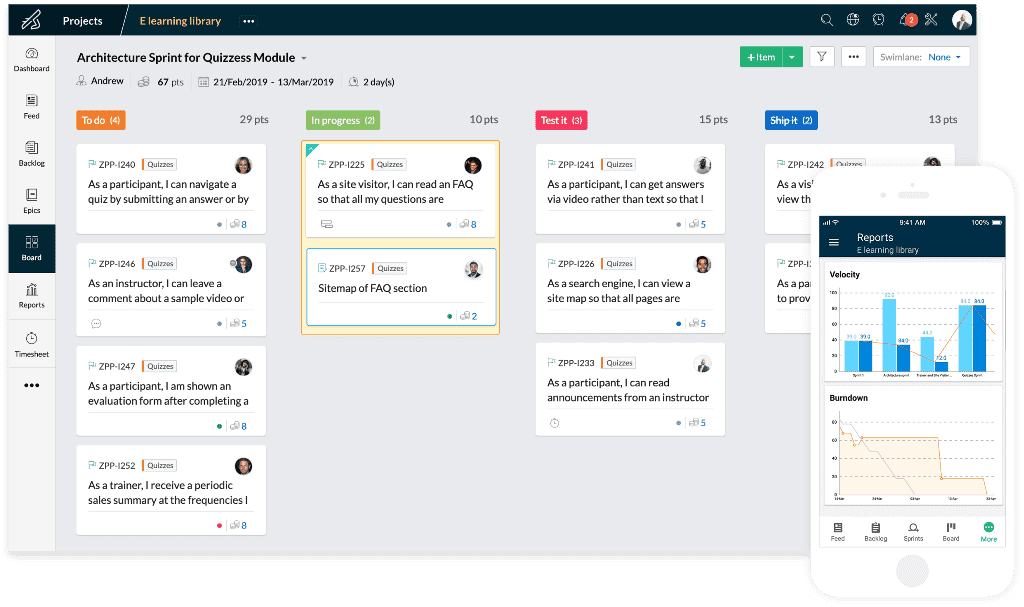
Uncertainty is one of the few certainties in business. Zoho recognized the need for a tool that helps teams embrace change. Zoho Sprints is a product management tool that empowers agile teams to plan, track, and ship the best products to their customers. Whether you are a seasoned agile practitioner or just starting out, Zoho Sprints can fit your needs.
Zoho Sprints helps product teams maintain an organized product backlog and simplifies sprint planning. The drag and drop planning interface allows scrum teams to move work items from the product backlog to the sprint backlog with ease. In keeping with the pioneering spirit of agile, their Scrum Board is highly customizable.
With Zoho Sprints, teams can stay release-ready at all times. From planning to deployment, the tool helps teams navigate the interdependencies of their release cycles. Product managers can track the progress of their epics, sprints, and releases through customizable reports and dashboards. Actionable insights from velocity charts, burnup and burndown reports, and cumulative flow diagrams help teams iterate sprint planning.
Communication and collaboration are crucial in every aspect of life, and they're especially critical when you're working with cross-functional teams. With Zoho Sprints, product teams can collaborate within the context of their work through features like built-in chat, virtual meetings, and an interactive project feed.
Zoho Sprints integrates well with popular code repository management tools like GitHub, GitLab, Bitbucket. DevOps teams can also automate their CI/CD pipelines by integrating with developer tools like Jenkins and Azure DevOps. Teams can leverage webhooks and APIs to build their integrations or browse through a growing library of apps listed on Zoho's marketplace.
The pricing for Zoho Sprints starts at $6 per user (billed monthly). They also offer a free trial and a free forever plan for up to 3 users.
Pros and Cons
Pros:
- Easily turn feed messages into a work item
- Easily schedule meetings for sprint reviews and daily stand-ups
- Robust customization options
Cons:
- WIP settings in Premier plan only
- Doesn’t integrate well with other Zoho apps
- No cumulative by-project timesheets for a user
New Product Updates from Zoho Sprints
Zoho Sprints Adds Dashboard View for Custom Modules
Zoho Sprints adds a Dashboard view for custom modules with charts and tables for visualizing module records. This gives teams a clearer way to review custom data. For more information, visit Zoho Sprints’ official site.
 .
.
Best agile tool with Kanban boards
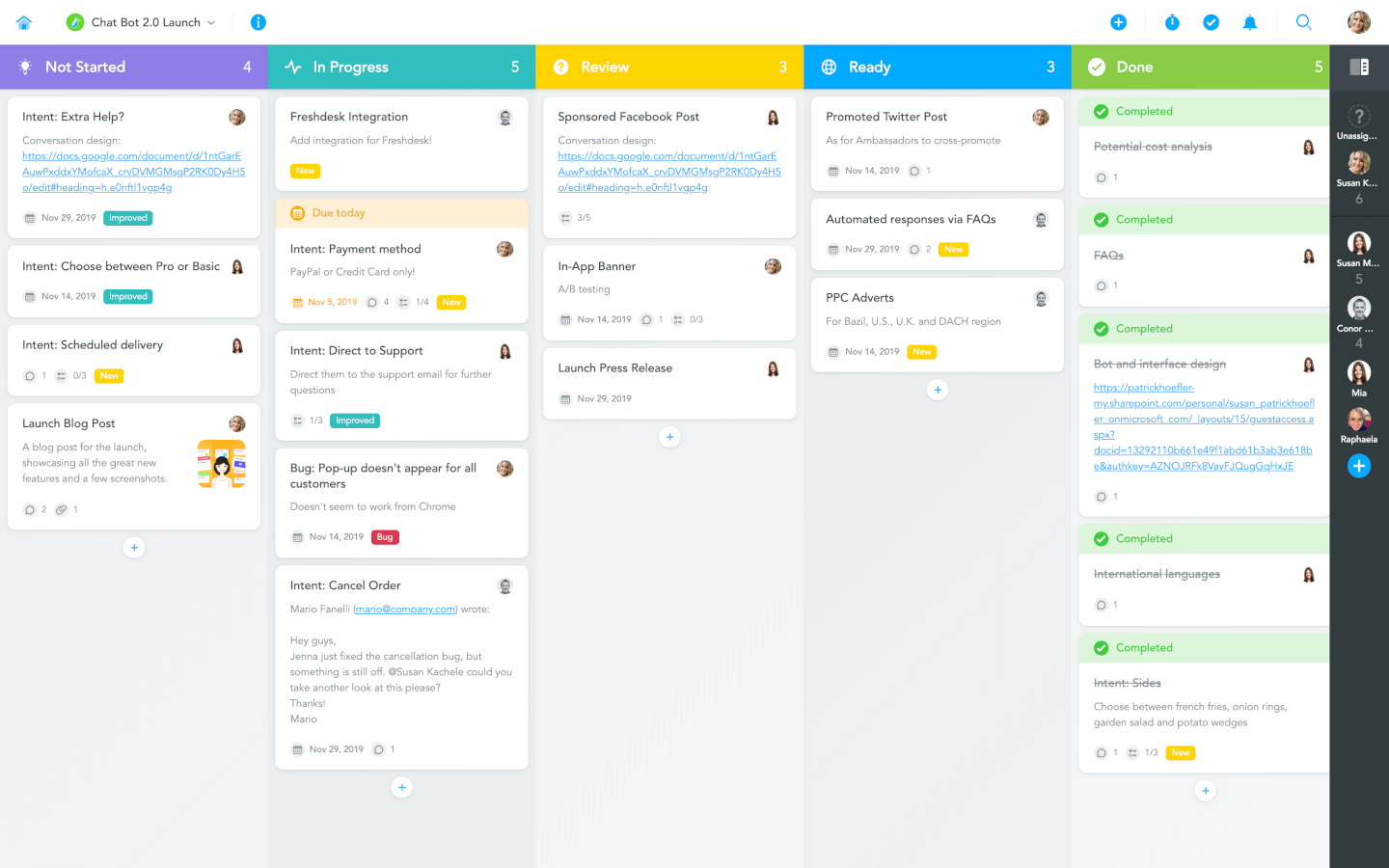
MeisterTask is a beautifully designed and incredibly intuitive Kanban tool. Its Kanban boards can be customized to fit any workflow, from software sprints to sales funnels, and from editorial calendars to your company’s onboarding process. Teams can collaborate on one simple platform, where they can communicate, work together on tasks, and easily track the time they spend on them.
With MeisterTask, you can not only visualize processes but also automate them in various ways. Creating recurring tasks, adding predefined checklists, notifying stakeholders when a task is completed, or ensuring that tasks are assigned and tagged correctly when they are moved to a specific section — all of this can be done automatically. Larger teams will find MeisterTask’s sophisticated roles and permissions management as well as the insights gained through various statistics and reports particularly useful.
MeisterTask offers an extensive online help center, free webinars for new users, and fast email support in case you need to talk to a real person. However, thanks to MeisterTask’s focus on simplicity, even companies who are just getting started on their journey to digital organization are usually able to get productive within minutes after signing up.
MeisterTask integrates with the mind mapping app MindMeister where you can brainstorm and plan with a mind map and then export it onto a Kanban board. MeisterTask comes readily integrated with popular tools such as Slack, Microsoft Teams, GitHub, Zendesk, Harvest, and various email apps. In addition to these native integrations, you can use Zapier or IFTTT to connect your projects with hundreds of other tools.
MeisterTask costs from $8.25/user/month. They also offer a free plan with limited functionality.
Pros and Cons
Pros:
- Easy to create and assign tasks
- Useful, user-friendly dashboard
- Great mobile app
Cons:
- Does not interface with Gmail
- Lack of internal calendar

ClickUp
Best for visual sprint planning
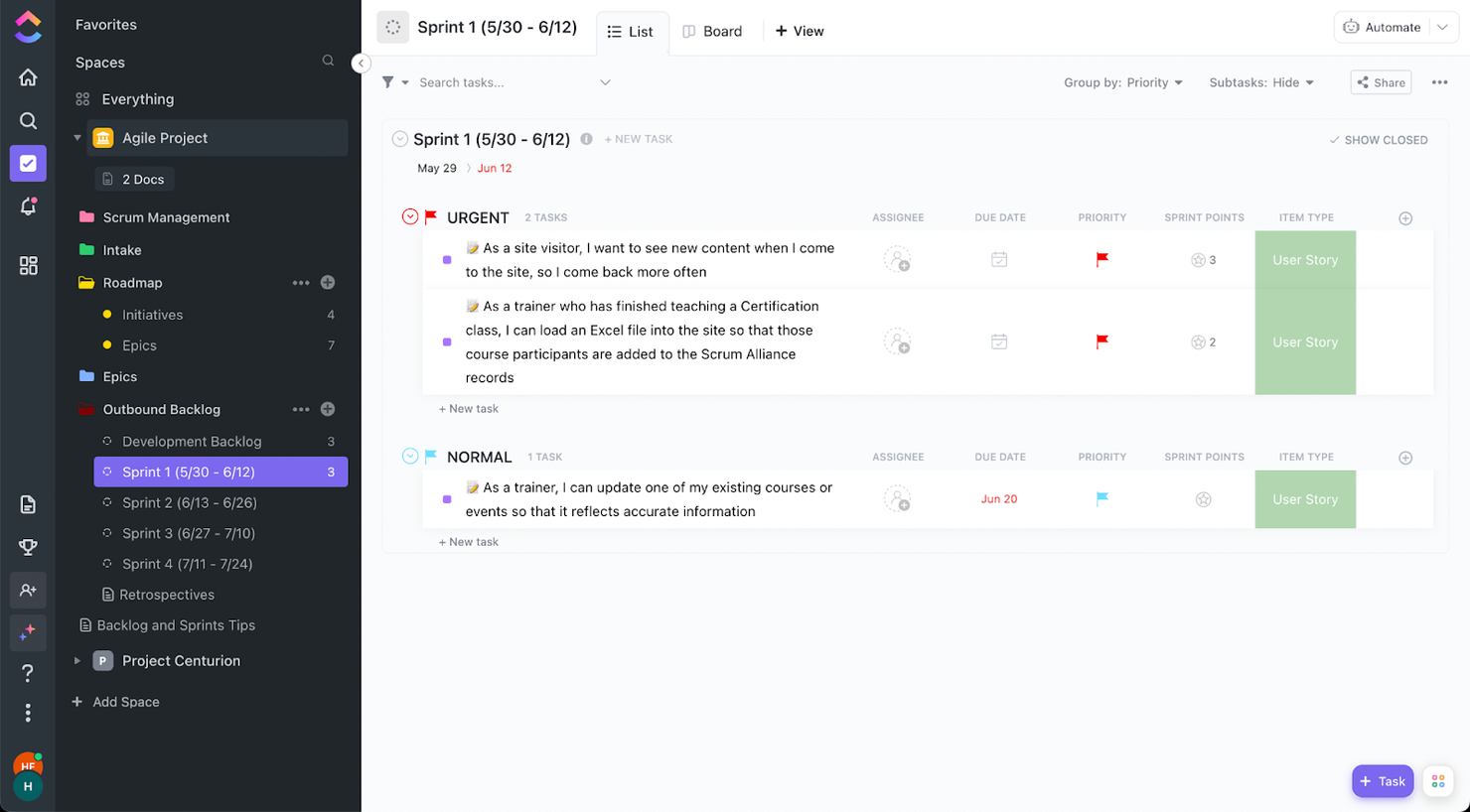
ClickUp is a project management tool that can be customized to fit a plethora of use cases and needs. Agile project management is not the exception.
Among the features, you will like for agile projects is the automation of task assignments and agile dashboards. If a task is not completed during a sprint, you can set up your workflow so that the activity is pushed automatically to the next sprint.
Also, ClickUp has many customizable visual features, including a color-coded folder structure, the ability to add emojis in any text field, and custom-color fields. These features will make it easy for you to navigate through your project, see which items need your attention, and keep track of sprint progress.
ClickUp offers native integrations with Slack, G Suite, Dropbox, and many more tools, as well as over 1,000+ integrations through Zapier.
Note: Remember to enable sprints from the ClickApps settings module so you can create separate lists for sprints.
ClickUp is free with limited storage for an unlimited number of users. Paid plans start at $5/user/month and offer a free trial.
Pros and Cons
Pros:
- Sprint workflow automation
- Organized folder structure
- Custom colors for any field
Cons:
- Time-consuming customization
New Product Updates from ClickUp
ClickUp Adds Meetings Hub, Super Agent Templates, and ZoomInfo Integration
ClickUp adds a searchable Meetings Hub, new ways to clone and template Super Agents, and a ZoomInfo integration through the App Center. These updates improve meeting retrieval, agent reuse, and access to sales intelligence. For more information, visit ClickUp’s official site.
Kintone
Best for building custom agile workflows

Kintone is an agile project management tool used by teams at Volvo, Japan Airlines, Shiseido, LiveWell Colorado, and over 23,000 organizations worldwide. Their unique approach to project and task management lets you build a wide variety of customizable “apps” using a flexible drag-and-drop interface that lets you easily make changes and improvements to your apps as you go.
Apps can be built either from scratch, using templates, or from existing spreadsheets for data management, business processes, and workflow purposes. Kintone apps can be customized for project management, sales CRM, customer databases, expense reports, shared to-do lists, equipment management, product feedback, and much more.
Kintone lets you build agile project management apps by dragging and dropping elements that you want to see onto the page: rich text fields, date fields, drop-down menus, number fields with built-in calculations, spaces for attachments, user or group selection menus, related data from other apps, tables, and more. Your agile project management solution can look and work however you want it to.
What makes Kintone particularly great for agile project management is that it empowers project managers to track all facets of their project, from individual tasks and project data to workflows and communication—and then use their findings to rapidly improve their processes as they go. Because the end-users are also the app designers, feedback loops are instant, continuous, and actionable.
Kintone lets you expand its capabilities with both free native plugins built by the Kintone team as well as integrations with other tools like Slack, Gmail, Google Calendar, Outlook, Tableau, Dropbox, Salesforce, HubSpot, Eventbrite, WordPress, QuickBooks, MailChimp, and many more through a paid plan with Zapier or via API integrations.
Kintone costs $24/user/month with a minimum requirement of 5 users. They offer a 30-day free trial (no credit card required) and discounted prices for nonprofits and educators. Kintone’s team also offers a free custom app build as part of the free trial process.
Pros and Cons
Pros:
- Data is easy to pull and manipulate into good looking reports
- Admin accounts have access to tons of customization tools
- Flexible pricing that includes special deals for schools and NPOs
Cons:
- No native templates for common project types or documents
- Limited to 5GB/user storage on every pricing tier
- No single-user plan available (minimum 5 users)

Trello
Best for card-based task lists
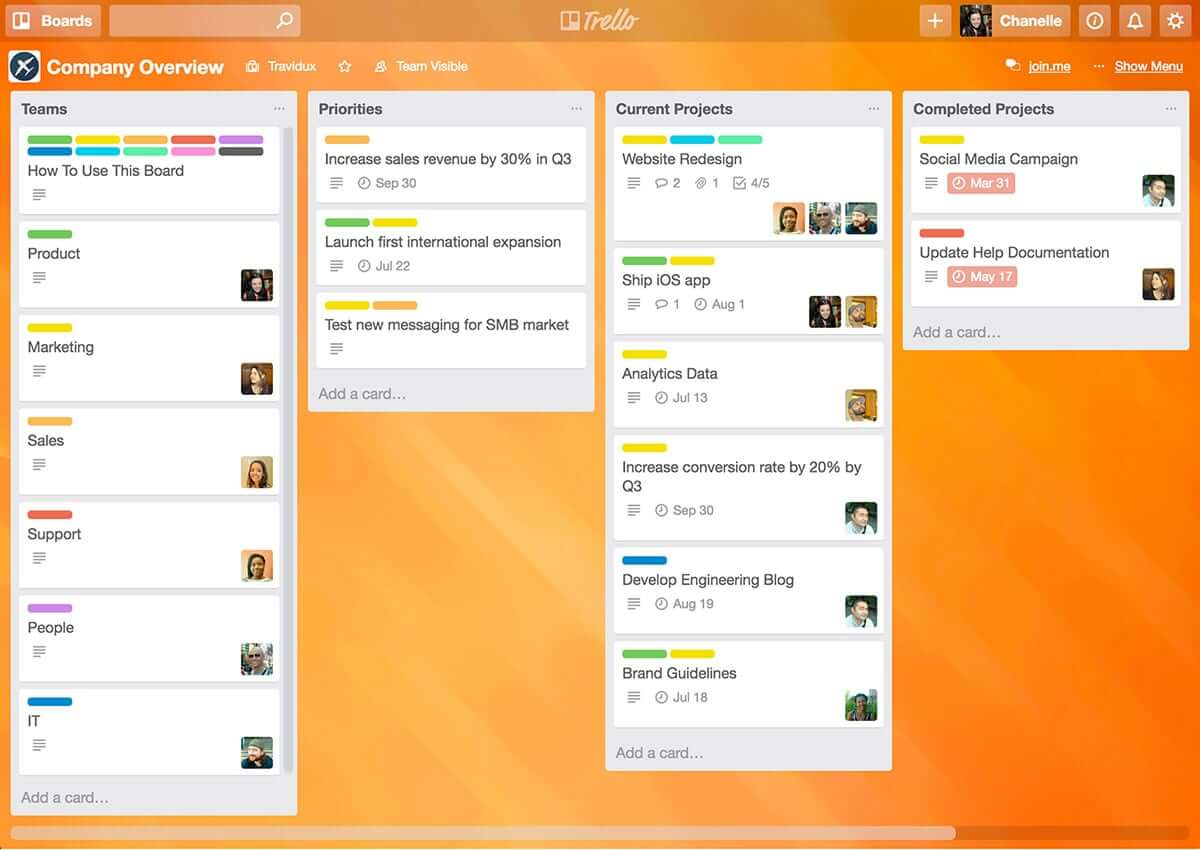
Trello is a simple but powerful agile Kanban tool. If you’re looking for an easy entry into the world of agile tools, Trello is a great option as it’s one of the easiest agile tools to learn and it’s free (or at least it’s freemium!) and has to be considered one of the best free agile tools because it’s so intuitive and simple to use.
Being simple also means that it’s also limited in features and functionality. Out of the box, with the free version, Trello has task management and team collaboration, but it’s pretty limited.
For richer functionality you have to start paying for it – The Business class version gives you app integrations or “Power-Ups" which enable you to bolt on additional functionality such as Github integration, SalesForce, Slack, Gantt charts, timesheets, reporting, and analytics.
Trello is a free agile tool but paid versions cost $9.99/user/month.
Pros and Cons
Pros:
- Color coding of cards according to priority
- Vast capability to customize each card
- Excellent communication and collaboration tracking
Cons:
- No native support for calendar integrations
- Not well suited for large or overly complicated projects
- Board management customization could be improved

Shortcut
Best for story, epic, and milestone organization

Shortcut is an online project management tool designed with software teams in mind. It helps you manage tasks, track progress, and collaborate more effectively. With its roots in agile methodologies, Shortcut focuses on flexibility and efficiency, making it easier for your team to manage projects, sprints, and releases.
One of the key features of Shortcut is its support for agile workflows through its stories, epics, and milestones features. Stories allow your team to break down tasks into manageable pieces, while epics help group related stories together for bigger goals. Milestones give you an easy way to track project phases and major deadlines. This structure gives your team clear visibility into progress and priorities at every level of the project.
Shortcut also provides burndown charts and iteration planning tools, which are vital for teams working in sprints. With burndown charts, you can monitor how much work remains in your sprint and make adjustments as needed. The iteration planning tools let you organize and adjust work on the go, ensuring your team is always ready for the next sprint.
Integrations include Slack, GitHub, GitLab, Figma, Codestream, Bitbucket, Notion, Loom, Dailybot, Plecto, LinearB, Lambda Test, Testlodge, Google Calendar, Sentry, FireHydrant, and Vanta.
Pros and Cons
Pros:
- Automates and manages workflows
- Provides clear visualization of project progress
- Supports real-time collaboration
Cons:
- Fewer options for teams not using Agile, Scrum, or Kanban methodologies
- May be too feature-rich for less complex projects

Jira
Best for software development for agile teams

Jira is a household name, and arguably the big daddy in the world of agile tools. What started out as a bug and issue tracking system is now complete with features to make Jira a fully-fledged agile tool offering fully-featured task management with agile task boards, team collaboration, and reporting.
With Jira you can manage a variety of different projects (e.g. Scrum, Kanban, Traditional project management for non-development projects), and Jira is flexible in how it can be configured allowing for unique workflows and processes so you’re able to use an out-of-the-box workflow or create one to match the way your team works.
The power of Jira is its flexibility and integrations. With the suite of other Atlassian tools, including Confluence and HipChat you can connect Jira to Bitbucket or GitHub and provide your team with end-to-end traceability, from backlog to deployment. With more than 2,000 add-ons in the Atlassian Marketplace, you can find just about any customization and extension for Jira to fit just about any use case.
Pros and Cons
Pros:
- Houses all historical works for future reference
- Can create tasks, sub-tasks, spikes, and epics
- Single view for all user stories
Cons:
- No mass-editing and scripting (rename a whole set of labels, etc.)
- Needs better linking within stories and tasks
- Limited collaboration features
Other Agile Tools
Here are some other tools that did not make it to the top but are still worth your consideration.
- Nutcache
For flexibility to various agile methodologies
- Taiga.io
Agile tool for user experience and interface
- Planview AdaptiveWork
For hybrid methodologies
- Easy8
For built-in financial management features
- ProjectManager
Agile reporting tool
- Favro
For team collaboration
- Businessmap
For project portfolio software
- Ravetree
For enterprises
- SAM9000
For AI-powered agile features
- Miro
For a highly flexible whiteboard platform
- Smartsheet
For managing agile workflows
- Hubstaff
For project tracking
- Hive
For flexible views
- Lucidspark
For agile planning on an infinite canvas
- airfocus
For prioritizing agile projects
- GoodDay
For blending flexibility with structure
- Yanado
For team productivity
- Forecast
For Scrum methodologies
- Scoro
For general business management software
- Hygger
For making product roadmaps
- Zenhub
For integration with GitHub
- OpenProject
For open source agile project management software
- Kanbanchi
For integration with Google Drive
- Conceptboard
For keeping teams in sync across time zones and departments
- GoodDay
For tracking work in progress
- AgileCRM
One of the few agile tools not designed for software dev teams—this is a CRM, project management, marketing, and customer support tool combined into one and designed to support agile practices across a variety of industries
- GitScrum
A simple low-cost agile management software for growing businesses
- Hansoft
For portfolio and product backlog management tools
- Phabricator
For code reviews and testing


How I Evaluate Agile Tools
I look at every agile tool in two passes: first, whether it can actually run a sprint—backlog, boards, burndowns—then what sets it apart for scaled teams or engineering-heavy workflows.
Core Functionality (Table Stakes For This List)
When I'm selecting tools for my list, I rank each one on a scale from 0 (does not offer the functionality) to 5 (excels in this area) for each core functionality listed below. Then, I calculate the tool's total score into a percentage. Each tool needs to achieve a minimum total score of 65% to be considered for inclusion.
- Backlog Management: I evaluate how each tool handles backlog creation, ranking, and grooming—like dragging stories into priority order before sprint planning or bulk-editing story points across an epic.
- Sprint Planning & Execution: Each tool should let teams define sprint goals, set capacity, and commit to a scope of work, similar to how Jira and Azure DevOps structure their sprint workflows.
- Agile Boards (Scrum/Kanban): I look for configurable boards with custom columns, WIP limits, and swimlanes—the kind of setup a team needs to run Kanban for ops work and Scrum for product delivery side by side.
- Agile Reporting & Metrics: The tool should offer burndown charts, velocity tracking, and cumulative flow diagrams so a Scrum Master can spot scope creep mid-sprint or a PMO director can compare velocity across squads.
- User Story & Epic Hierarchy: I check whether work items support multi-level structures—epics containing features containing stories—with dependency links that surface blockers across teams.
- Release & Roadmap Planning: Teams need to map sprints to releases and visualize delivery timelines, so I look for version management and roadmap views that connect daily sprint work to quarterly goals.
Once I have a list of tools that meet this criteria, I consider what sets each platform apart.
Differentiating Factors (What Sets Vendors Apart)
Here's how I compare and contrast different vendors:
Standout Features
Developer tool integrations matter a lot here. A two-way sync between your board and GitHub or GitLab means commits and pull requests automatically update story status—no manual tab-switching. Workflow automation is another area I evaluate closely, since rules that auto-assign stories or transition cards on merge save Scrum Masters hours of housekeeping each sprint. For larger organizations, I also check whether the tool natively supports scaled frameworks like SAFe, where teams need shared backlogs and program increment planning across multiple squads.
Beyond Features
Scalability is one of the first things I evaluate. A tool that works for a single Scrum team of eight may fall apart when you're coordinating 20 squads across a portfolio. Pricing structure matters just as much—some vendors lock sprint reporting or advanced boards behind enterprise tiers, which changes the math for mid-size teams. I also consider security and compliance posture, especially SSO support, role-based permissions, and audit logging, since PMO directors in regulated industries need those controls before they'll even run a pilot.
How to Choose Agile Tools
It’s easy to get bogged down in long feature lists and complex pricing structures. To help you stay focused as you work through your unique software selection process, here’s a checklist of factors to keep in mind:
| Factor | What to Consider |
|---|---|
| Scalability | Ensure the tool grows with your team’s needs. Look for features like project capacity, advanced reporting, and support for large teams as your workflows expand. |
| Integrations | Check that the tool connects seamlessly with platforms you already use, such as Jira, Slack, or Trello, to streamline your workflow. |
| Customizability | Choose tools that let you tailor workflows, dashboards, and reports to align with your team’s specific processes and goals. |
| Ease of Use | The interface should be intuitive so your team can adopt the tool quickly without steep learning curves or extensive training. |
| Budget | Look for transparent pricing that fits your financial constraints, whether that’s a flat fee, per-user cost, or scalable tiered plans. |
| Security Safeguards | Prioritize tools with features like data encryption, role-based access, and compliance with standards like ISO or GDPR to protect sensitive information. |
| Collaboration Features | Make sure the tool offers real-time collaboration features, such as team boards, shared task views, and commenting, to keep everyone aligned. |
| Reporting Capabilities | Look for built-in analytics or reporting to track team performance, task progress, and deadlines effectively. |
Trends in Agile Tools
In my research, I sourced countless product updates, press releases, and release logs from different agile tool vendors. Here are some of the emerging trends I’m keeping an eye on:
- AI-Driven Insights: Tools are using AI to analyze team performance, predict bottlenecks, and offer suggestions for improving workflows. For example, some platforms provide sprint planning recommendations based on historical data.
- Advanced Sprint Retrospectives: Retrospective tools are becoming more interactive, offering analytics and visual insights to help teams identify patterns and improve future sprints. Vendors are adding templates, polls, and sentiment tracking to make retrospectives more effective.
- Focus on Hybrid Workflows: Tools are catering to both agile and non-agile teams by supporting hybrid workflows. For example, platforms now let users switch between Kanban, Gantt, and list views to accommodate varying project needs.
- Real-Time Collaboration Features: Agile collaboration tools are doubling down on live collaboration with features like in-app whiteboards, real-time task editing, and live commenting to keep teams aligned without switching tools.
- Sustainability Tracking: Some vendors are now incorporating features to track sustainability metrics within projects, such as energy usage, waste, or resource consumption, aligning agile practices with organizational sustainability goals.
What are Agile Tools?
Agile tools are a type of project management software that help teams manage projects using agile methods like Scrum or Kanban. These tools give you features like task boards, backlog tracking, sprint planning, and updates on progress. Project managers, developers, and product teams use agile tools (or specific Scrum tools) to keep work organized, adapt quickly to changes, and communicate better.
If you need to keep projects moving smoothly and respond fast when things change, agile project management software makes that a lot easier.
Features of Agile Tools
When selecting agile tools, keep an eye out for the following key features:
- Sprint planning: Allows teams to plan, prioritize, and assign tasks for each sprint to ensure goals are clear and achievable.
- Kanban boards: Visualize workflows and task progress, helping teams manage work-in-progress and identify bottlenecks. Find more Kanban software and Trello alternatives here.
- Burndown charts: Tracks remaining work against time to help teams measure progress and predict sprint completion.
- Backlog management: Organizes and prioritizes tasks, user stories, and issues to keep the project aligned with goals.
- Velocity tracking: Analyzes team performance across sprints to help plan workloads and set realistic expectations. Use agile tracking tools to calculate and track velocity.
- Real-time collaboration: Lets team members work together through live updates, task edits, and comments.
- Custom workflows: Allows teams to tailor task stages and processes to match their specific project needs.
- Dependency mapping: Highlights relationships between tasks to ensure critical dependencies are managed effectively.
- Retrospective tools: Provides structured ways to evaluate completed sprints and identify areas for improvement.
- Resource allocation: Helps assign team members to tasks while balancing workloads and avoiding overcommitment.
Benefits of Agile Tools
Implementing agile tools provides several benefits for your team and your business. Here are a few you can look forward to:
- Improved team collaboration: Enables real-time communication and task sharing so everyone stays aligned on project goals.
- Faster project delivery: Helps teams break work into sprints and track progress to meet deadlines efficiently.
- Better task prioritization: Features like backlog management let teams focus on high-value tasks and reduce wasted effort.
- Enhanced visibility: Tools like Kanban boards and burndown charts provide clear insights into task progress and bottlenecks.
- Increased flexibility: Customizable workflows allow teams to adjust processes to fit project requirements and changes.
- Data-driven decisions: Analytics and reporting features help teams track performance and identify areas for improvement.
- Balanced workloads: Resource allocation tools ensure team members aren’t overworked, improving productivity and morale.
Costs & Pricing of Agile Tools
Selecting agile tools requires an understanding of the various pricing models and plans available. Costs vary based on features, team size, add-ons, and more. The table below summarizes common plans, their average prices, and typical features included in agile tool solutions:
Plan Comparison Table for Agile Tools
| Plan Type | Average Price | Common Features |
|---|---|---|
| Free Plan | $0/user/month | Basic task tracking, Kanban boards, limited integrations, and team collaboration tools |
| Personal Plan | $5-$15/user/month | Task management, custom workflows, backlog organization, limited reporting, and priority support |
| Business Plan | $15-$35/user/month | Sprint planning, advanced reporting, resource allocation, dependency mapping, and integrations with third-party tools |
| Enterprise Plan | $35+/user/month | Advanced security features, role-based permissions, scalability for large teams, customizable analytics, and dedicated support |
Agile Tools Frequently Asked Questions
Find answers to common questions other people ask about this topic.
Is agile better than waterfall?
You wouldn’t be the first person to ask this question, as this is one of those big debates among the project management community. And rather than saying if one is better than the other, both have types of project that they are best suited for.
A waterfall methodology will need you to define requirements at the beginning of the project and then run the project from beginning to end. An agile methodology focuses more on smaller chunks of work and iteration that is constantly being fed with feedback from the client.
Therefore, you need to analyze the type of project that you are running and decide which methodology is best suited for it. If you are managing a development project, you’ll probably lean on agile. A social media marketing campaign will probably benefit from a waterfall approach.
What is an agile methodology?
Agile isn’t actually a methodology at all, but a set of principles for developing software. The principles of agile are:
- Individuals and interactions over processes and tools
- Working software over comprehensive documentation
- Customer collaboration over contract negotiation
- Responding to change over following a plan
Examples of agile methodologies are Scrum, Kanban, Scrumban, and lean. While all of them follow these principles, they offer a unique twist on how to approach the work.
What is the Scrum methodology?
Agile tools are a type of project management software that help teams manage projects using agile methods like Scrum or Kanban.Scrum is a methodology with a set of principles and a process to improve delivery. In software development, Scrum is one of the most popular frameworks applying the principles of agile. It includes a set of Scrum ceremonies and roles to support the process. The goal is to improve communication, teamwork and speed of development. Sprints, Scrums (or stand-up meetings), retrospectives, backlogs, and burndowns are all parts of Scrum.
What is the SAFe framework?
Formally introduced in 2007, the Scaled Agile Framework (SAFe) is a system for implementing agile, lean, and DevOps practices at scale. It can be used by organizations that are using agile frameworks such as Scrum or lean, or for organizations that are looking for a way to scale their DevOps processes to support the organization.
What are the tools used in agile methodologies?
Tools for agile methodologies can be used in various ways depending on how you’re carrying out your agile-oriented approach. Your tools might include:
- Backlogs: Prioritize and re-prioritize user stories and bugs with drag-and-drop backlog cards.
- Kanban or Scrum boards: Visualize all the user stories with cards displaying the tasks, assignees, and statuses in a sprint.
- Task swim lanes or columns: Separate epics, assignees, projects, and more by moving drag-and-drop cards across lanes.
- Workflows: Create custom workflows that update issues automatically based on specific events. See workflow diagram software.
- Sprints: Use the backlog to estimate stories and set sprint tasks and priorities for sprints.
- Daily Scrums or standups: Use the dashboard to get a snapshot of progress in order to prepare for Scrums or standups.
- Burndown chart: Manage project progress by tracking the total work remaining in the sprint or epic.
- Velocity chart: Track your team’s velocity and make accurate forecasts by tracking the amount of work completed in each sprint.
- Agile software development tools: Development platforms like Jira, GitHub, and Linx.
Is Jira the best agile tool?
No. I believe Jira (Part of Atlassian) is the most popular, but not the best. Mainly because the tool was not designed for agile. It was originally meant as an issue tracking tool for software developers, and it later became a project management tool.
Unfortunately, there is no definitive answer to this question since everyone’s needs are different. Therefore, the best agile tool will be the one that has the features you need.