

10 Best Project Management Dashboard Software For 2026

Best Project Management Dashboard Tools


Without project management dashboard software, it's difficult to effectively visualize and manage project progress and performance—spreadsheets just don't cut it. But with so many different software solutions available, finding the right option is tough.
I'll help make your choice easy by sharing my personal experiences using dozens of different project dashboard tools and shortlisting my picks for the best software options available on the market.
Why Trust Our Software Recommendations
Our team has been testing and reviewing software since 2012. As project managers ourselves, we know how difficult—and important—it is to choose the right software.
For this guide, we evaluated tools using hands-on testing and independent research, scoring tools using our selection criteria. We also draw on insights from industry thought leaders and practicing project management experts.
Our reviews reflect our human editorial judgment, not a sales pitch.
Expert reviewers:
Compare Software Specs Side-by-Side
Here’s a convenient table you can use to compare each tool’s specs side-by-side.
| Tool | Best For | Trial Info | Price | ||
|---|---|---|---|---|---|
| 1 | Best for customizable project dashboards | 14-day free trial | From $19.90/user/month (billed annually) | Website | |
| 2 | Best for cross-team collaboration | 14-day free trial | From $10/user/month (billed annually) | Website | |
| 3 | Best for portfolio management capabilities | Free plan available | From $9/user/month (billed annually) | Website | |
| 4 | Best for visualizing key metrics | Free demo available | Pricing upon request | Website | |
| 5 | Best for meeting-ready portfolio dashboards | Free trial + demo | From $15/user/month | Website | |
| 6 | Best for PMO portfolio governance dashboards | Not available | From $20/user/month (billed annually) | Website | |
| 7 | Best project dashboards with time tracking/timesheets built-in | Free plan + free demo available | From $7/user/month (billed annually) | Website | |
| 8 | Best for controlled external dashboard access | 14-day free trial + free demo available | From $8/user/month (billed annually) | Website | |
| 9 | Best for user-friendly Gantt charts | Free plan available | Pricing upon request | Website | |
| 10 | Best for agencies and consultancies | Free 7-day trial available | From $9/user/month (billed annually) | Website |


Best Project Management Dashboard Tools
Here’s a brief overview of each of the project management dashboard software and its standout features.

Scoro
Best for customizable project dashboards

Scoro is a project management dashboard platform that brings together project tracking, resource planning, time management, and financial tools in one workspace.
Who Is Scoro Best For?
Scoro is a good fit for professional services teams—like agencies and consultancies—that need a single platform to manage projects, track time, and monitor financials.
Why I Picked Scoro
Scoro earns its spot as one of the best on my shortlist because of the depth of its dashboard customization. You're not rearranging tiles—you can build role-specific dashboards using widgets and metrics that pull live data across projects, time tracking, invoices, and expenses. A project manager's dashboard looks completely different from a finance director's, and both update in real time without anyone manually refreshing a report. I like that each widget is expandable, so you can drill from a high-level KPI view directly into the underlying report without leaving the dashboard. That kind of depth, tied to Scoro's pre-built report templates covering profitability, utilization, and revenue, means my team can go from a quick status check to a detailed project financial breakdown in a few clicks.
Scoro Key Features
- Gantt chart view: Visualize project timelines and task dependencies using color-coded bars that update as work progresses.
- Resource bookings: Tentatively reserve team members' time before a project kicks off, with drag-and-drop adjustments and automatic booking creation from project quotes.
- Utilization heatmap: View each team member's workload in a color-coded heatmap that flags overbooking and available capacity at a glance.
- Time tracking: Log hours against tasks and projects using a built-in timer, manual entry, or calendar-based time logging.
Scoro Integrations
Scoro offers native integrations with Xero, QuickBooks, Zapier, Google Calendar, Outlook, Slack, and more. An API is available for custom integrations.
New Product Updates from Scoro

Scoro Adds Time Mobile App and ELI Improvements
Scoro adds the Scoro Time mobile app for iOS/Android to track time anywhere and expands ELI with attachments, smarter filtering, and trigger-based actions. For more information, visit Scoro's official site.

Wrike
Best for cross-team collaboration

Wrike is a project management dashboard platform that brings together task management, workflow automation, resource planning, and real-time reporting in a single workspace.
Who Is Wrike Best For?
Wrike is a good fit for mid-size to enterprise teams that need to coordinate work across multiple departments like product, engineering, and marketing.
Why I Picked Wrike
I picked Wrike because it handles work that spans multiple teams. The cross-tagging feature enables cross-team collaboration: a single task or folder can exist in both a product team's project and a marketing team's campaign, so nothing gets siloed or duplicated. I also like Wrike's cross-functional dashboards, which let each team view the same underlying data through their own lens. When my team is coordinating a product launch across engineering, design, and marketing, everyone stays aligned without needing to chase status updates.
Wrike Key Features
- Gantt chart view: Visualize project timelines, task dependencies, and milestones in an interactive drag-and-drop Gantt chart.
- Resource bookings: Reserve time from specific team members or job roles and check their availability before assigning work.
- Custom request forms: Build dynamic intake forms that automatically generate tasks, projects, or workflows when submitted.
- Wrike Copilot: An AI assistant that surfaces risks, prioritizes projects, and answers queries directly within your workspace.
Wrike Integrations
Wrike offers hundreds of integrations through its built-in integrations and marketplace, including tools like Google Workspace, Microsoft 365, Salesforce, and Slack. It also supports Zapier and provides an API for custom integrations.
New Product Updates from Wrike

Wrike Adds Quick Search to Table View
Wrike adds Quick Search to Table View with full-table search across titles, descriptions, and fields, plus highlighted matches. This helps users find tasks faster in large tables. For more information, visit Wrike’s official site.

Best for portfolio management capabilities
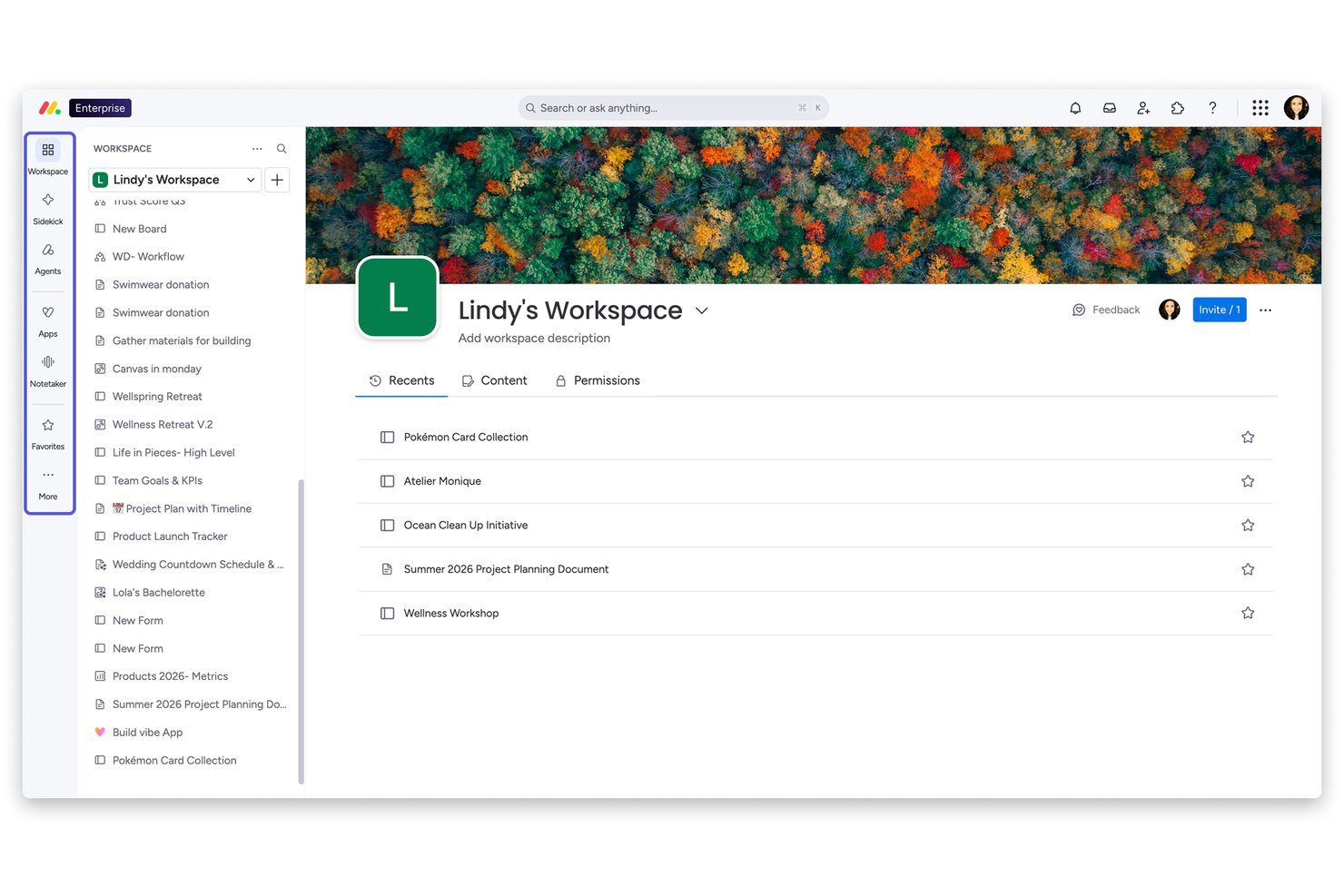
monday AI Workspace is an AI-powered work management platform that combines customizable project dashboards, multi-view project tracking, portfolio oversight, resource management, and automated reporting across teams and workstreams.
Who Is monday AI Workspace Best For?
It's a strong fit for mid-size to enterprise teams running multiple concurrent projects who need portfolio-level visibility across departments and workstreams.
Why I Picked monday AI Workspace
I picked monday AI Workspace as one of the best because its Enterprise-tier portfolio management delivers cross-project visibility in a way most tools don't. I can connect multiple projects into a unified portfolio dashboard and pull real-time health snapshots that surface risks, dependency delays, and alignment gaps across every active initiative. The AI-powered risk detection layer is what I find most useful: it flags problems before they escalate, not after.
monday AI Workspace Key Features
- Customizable dashboard builder: Build visual dashboards with drag-and-drop widgets for charts, timelines, and metrics.
- Live workload and resource views: Monitor team assignments and adjust capacity using built-in workload and resource heatmaps.
- Automated alerts and triggers: Set up notifications based on KPI thresholds, due dates, or project changes.
- Role-based permissions: Control access to boards, dashboards, and data with advanced user and group permission settings.
monday AI Workspace Integrations
monday AI Workspace offers hundreds of native integrations, including Slack, Jira, Salesforce, GitHub, Google Drive, Microsoft 365, Zoom, Dropbox, HubSpot, and Trello. It also supports Zapier and provides an API for custom integrations.
Pros and Cons
Pros:
- Highly configurable widgets for executive reporting
- AI flags risks before they become blockers
- Portfolio-level dashboards with cross-project health scoring
Cons:
- Dashboard setup can be time-consuming at scale
- Advanced dashboard features locked behind Enterprise tier
New Product Updates from monday AI Workspace
monday AI Workspace Adds Human Approval Routing
monday AI Workspace adds a human-in-the-loop approval block to AI Workflows, sending approval requests and routing workflow paths based on responses. For more information, visit monday AI Workspace's official site.

Best for visualizing key metrics

Screendragon is a project management dashboard platform that brings together workflow automation, customizable dashboards, resource management, and real-time analytics for teams managing complex projects.
Who Is Screendragon Best For?
Screendragon is a strong fit for mid-to-large marketing, agency, and creative teams that need to manage multi-layered projects with complex workflows and approval processes.
Why I Picked Screendragon
I picked Screendragon because its dashboard and reporting tools surface the metrics that matter to project teams. The personalized dashboards let you track status updates and milestones in real time, pulling from your own data sets without any manual intervention—so when I need a live read on where a campaign or workflow stands, it's right there. I also like the custom report builder, which allows you to configure reports around the specific KPIs your team or leadership cares about, rather than working around a fixed set of charts. The resource and capacity planning views provide a clear picture of team bandwidth across weekly and monthly snapshots, so you're not just tracking task progress—you're seeing the full operational picture in one place.
Screendragon Key Features
- Visual workflow builder: Design workflows from scratch using a no-code drag-and-drop editor, or start from pre-built templates with custom process logic applied.
- Digital approval workflow management: Capture decisions, comments, and markups centrally, with side-by-side version comparison and an automated audit trail.
- Dynamic custom forms: Build intake forms with custom fields, language, and layout, then connect them directly to a sequence of automated workflow steps.
- Auto-assignment and skill-based scheduling: Automatically assign team members to projects based on availability and skillset, with task dependencies that adjust timelines when changes occur.
Screendragon Integrations
Screendragon offers native integrations with Microsoft 365, Google Workspace, Slack, Jira, Salesforce, Workfront, and SAP. An API is available for custom integrations.
New Product Updates from Screendragon
Screendragon Unveils New AI Hub
Screendragon introduced AI Hub, a new capability that lets teams build and manage AI agents directly within workflows. The update helps marketing teams automate tasks, maintain governance controls, and scale AI-driven operations more efficiently. For more information, visit Screendragon's official site.
Best for meeting-ready portfolio dashboards
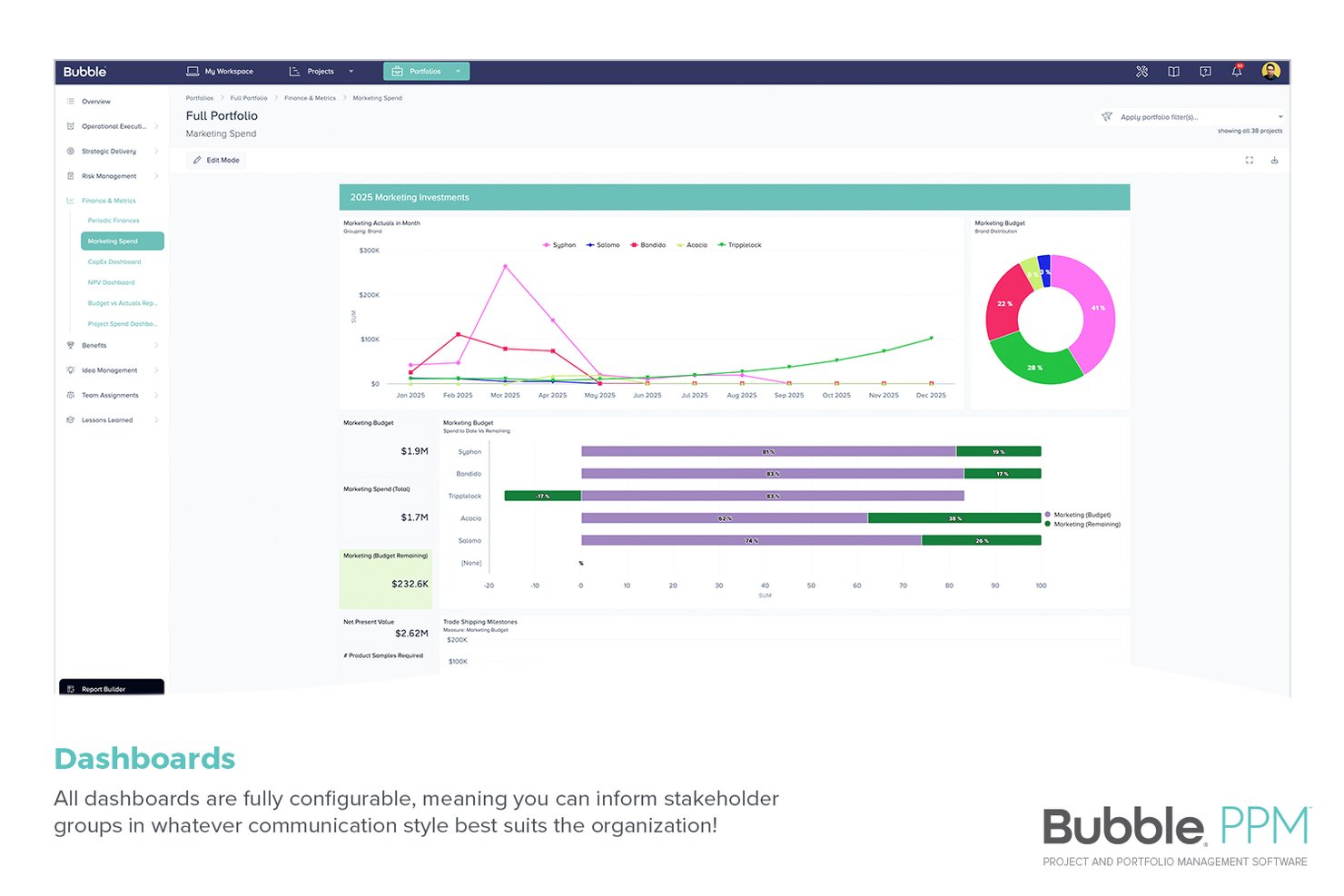
Bubble PPM is a project portfolio management platform with configurable portfolio dashboards, KPI tracking, scorecards, budget monitoring, risk logs, and Gantt charts designed for enterprise-level portfolio oversight.
Who Is Bubble PPM Best For?
It's a strong fit for mid-size to large organizations, particularly PMOs, portfolio leaders, and project delivery teams that need to present project, program, and portfolio data to different stakeholder groups without rebuilding reports for each one.
Why I Picked Bubble PPM
Bubble PPM earns its spot on my shortlist because its portfolio dashboards are genuinely built for the boardroom. I like how dashboard tiles roll up project data from project to program to portfolio level automatically, so I can walk into an executive meeting with live KPI metrics, budget burn, and risk status already consolidated in one view. The configurable scorecards let me tailor exactly what leadership sees, down to the specific commercial, technical, or strategic dimensions that matter most to them.
Bubble PPM Key Features
- Roll-up reporting: Aggregate data from related projects so that program and portfolio dashboards automatically reflect trends, such as risk, across everything beneath them.
- Period-based progress tracking: Record and report accomplishments, progress, and planned activities for a given reporting period, keeping review meetings focused.
- Baseline metric tracking: Embed key metrics directly in dashboards and track them against a baseline to spot drift before it becomes a problem.
- One-click exports: Download any dashboard as a what-you-see-is-what-you-get PDF or PowerPoint for instant, presentation-ready sharing.
Bubble PPM Integrations
Bubble PPM offers native integrations with Jira, Salesforce, SAP, Outlook, Power BI, and Microsoft Dynamics, and provides an API and webhook support for custom integrations.
Pros and Cons
Pros:
- Automated reporting saves time
- Configurable scorecards across multiple dimensions
- Portfolio data rolls up automatically across levels
Cons:
- Requires guided setup, not instantly self-serve
- No native Kanban or burndown chart views

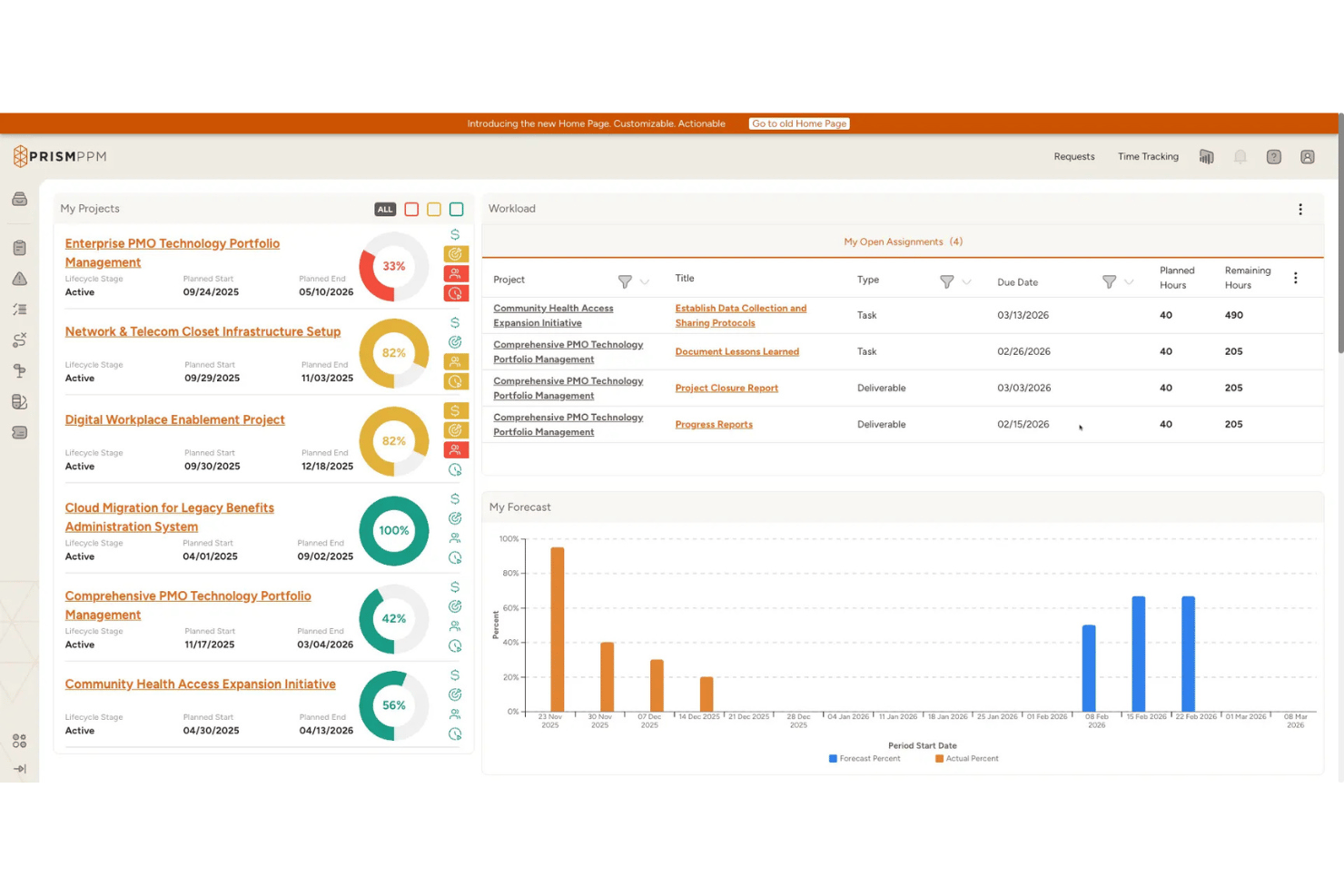
Prism PPM is an enterprise project portfolio management platform built specifically for PMOs, offering portfolio-level dashboards, resource capacity planning, governance workflows, and multi-tier reporting through embedded analytics, Power BI, and Databricks Connect.
Who Is Prism PPM Best For?
Prism PPM is a strong fit for enterprise PMOs that need structured portfolio governance, multi-tier reporting, and executive dashboards across a large, complex project landscape.
Why I Picked Prism PPM
Prism PPM earns its spot on my shortlist because it's purpose-built for PMO portfolio governance in a way that general project tools simply aren't. I love how its portfolio-level dashboards roll up health scores, budget burn, and delivery risk across every active project into a single consolidated view, giving PMO leaders exactly what they need without manual aggregation. The Business Value Assessment tool adds another layer I find genuinely useful: it lets you weight and prioritize projects against strategic criteria before they even hit the roadmap.
Prism PPM Key Features
- Resource capacity forecasting: Models future resource demand against availability using skills-based filtering, What-If scenarios, and automated workload alerts.
- Jira bidirectional sync: Connects Prism PPM to Jira in real time so Agile teams stay in their native tool while PMO leaders maintain portfolio-level visibility.
- Risk register: A built-in log for tracking project risks, assigning mitigation actions, and surfacing exposure across the portfolio dashboard.
- Agentic AI portfolio briefs: Automatically generates persona-aligned portfolio summaries, data hygiene analysis, and AI-driven risk evaluations on Business and Enterprise tiers.
Prism PPM Integrations
Prism PPM offers 10 documented native integrations, including Jira, Microsoft Project, Power BI, Azure Databricks, SharePoint, OneDrive, Outlook, Google Drive, Box, and Dropbox. Its open API supports custom integrations, while Excel import and export supports data exchange.
Pros and Cons
Pros:
- Agentic AI auto-generates portfolio briefs
- Exceptional resource capacity and workload forecasting
- Built specifically for portfolio governance dashboards
Cons:
- Requires minimum ten paid manager licenses
- Dashboard data refreshes on a scheduled basis

ClickUp
Best project dashboards with time tracking/timesheets built-in

ClickUp is a project management dashboard platform that brings together customizable dashboards, task management, time tracking, and reporting for teams managing complex projects.
Who Is ClickUp Best For?
ClickUp is a good fit for mid-sized to large tech and digital teams that need a single platform to manage projects, track time, and report on progress across multiple workstreams.
Why I Picked ClickUp
ClickUp is one of my top picks because I love how its dashboards and time tracking actually talk to each other. Most tools make you stitch those two things together yourself. With ClickUp, time logged on tasks flows directly into timesheet cards on your dashboards—so when I'm reviewing sprint delivery or billable hours, everything is already there. I also like the Timesheets Hub, where you can submit, approve, and lock hours without leaving the platform, which keeps billing data clean and audit-ready.
ClickUp Key Features
- Workload view: See each team member's assigned tasks and capacity across a set time period to spot overallocation before it becomes a problem.
- Goals: Set high-level objectives and link them directly to tasks so progress updates automatically as work gets done.
- Gantt chart view: Plan project timelines, visualize task dependencies, and adjust schedules with a drag-and-drop interface.
- Automations: Set trigger-based rules to automatically update task statuses, reassign work, or send notifications when conditions are met.
ClickUp Integrations
ClickUp offers 50+ native integrations, including Slack, Google Drive, Microsoft Teams, GitHub, GitLab, Zoom, Dropbox, OneDrive, Outlook, and Zendesk. It also connects with Zapier and provides an API for custom integrations.
New Product Updates from ClickUp
ClickUp Adds Meetings Hub, Super Agent Templates, and ZoomInfo Integration
ClickUp adds a searchable Meetings Hub, new ways to clone and template Super Agents, and a ZoomInfo integration through the App Center. These updates improve meeting retrieval, agent reuse, and access to sales intelligence. For more information, visit ClickUp’s official site.

Workzone
Best for controlled external dashboard access
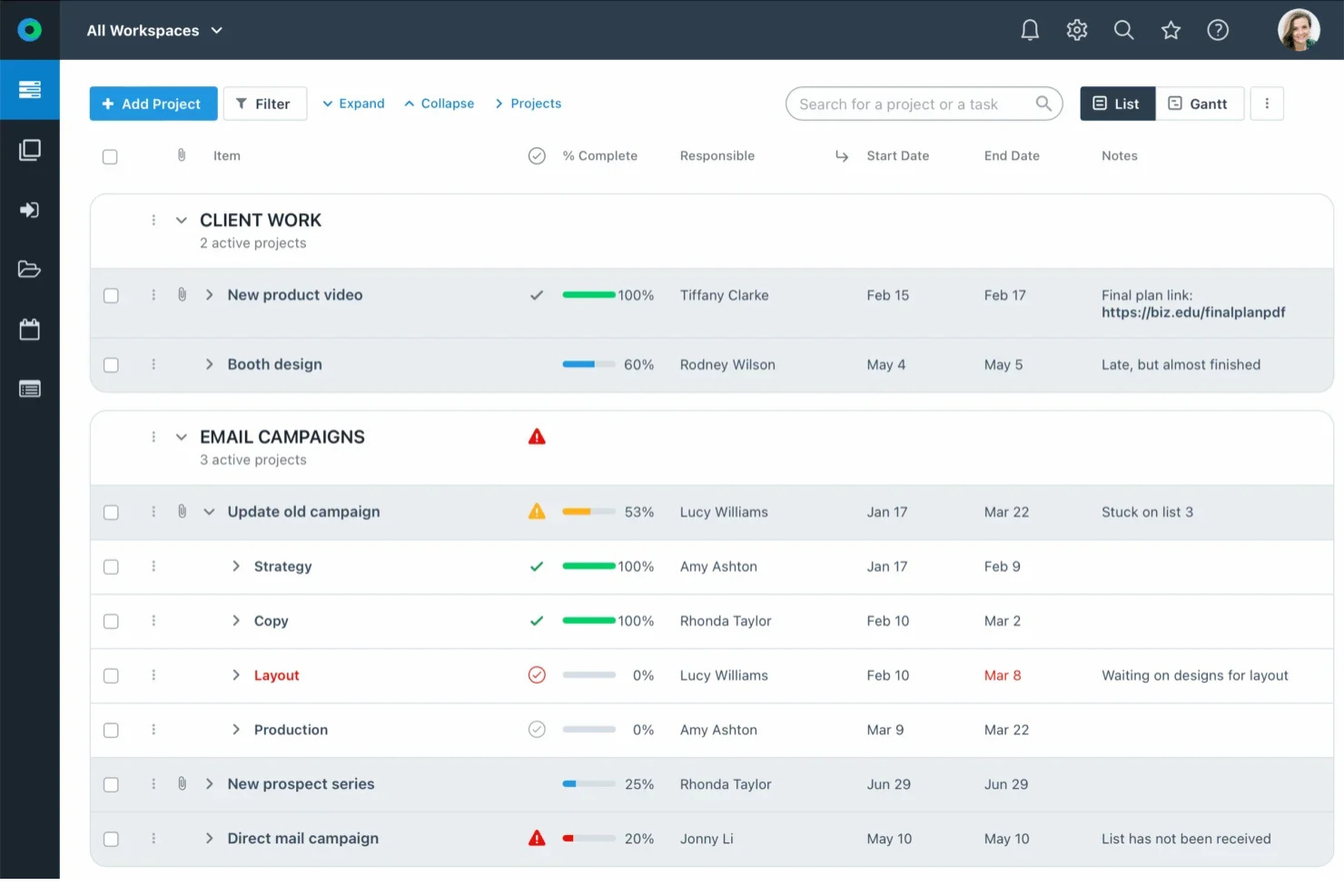
Workzone is a project management dashboard platform that gives teams portfolio-level visibility, task tracking, Gantt charts, and role-based access controls across projects and departments.
Who Is Workzone Best For?
Workzone is a good fit for mid-sized teams in marketing, agencies, and operations who manage multiple concurrent projects with external stakeholders or clients.
Why I Picked Workzone
I picked Workzone as one of the best for client-specific dashboard access controls because of how granular and flexible its permission system actually is. In practice, my team can assign external stakeholders as partner users, free collaborators, or guest reviewers, each with a different level of visibility into the dashboard and project data. That means a client sees only what's relevant to their work, not the internal tasks or other client projects sitting in the same workspace. Workzone's department-specific sites add another layer, letting you build fully customizable views per client or team without any overlap.
Workzone Key Features
- Portfolio dashboard: View all active projects in a single dashboard with real-time status indicators and drill-down access to individual tasks.
- Gantt chart view: Visualize project timelines, milestones, and task sequences with an interactive Gantt chart.
- Task dependencies: Link tasks so that changes to one automatically flag downstream impacts across the project.
- Workload report: See how work is distributed across team members to identify overallocation before it becomes a problem.
Workzone Integrations
Workzone offers native integrations with Microsoft Teams, Slack, Google Drive, and OneDrive. It also connects with Zapier and has a REST API for custom integrations.
Pros and Cons
Pros:
- Quarterly check-ins with dedicated success manager
- Cross-project dashboard with real-time status
- Visual workload cues show team capacity
Cons:
- No native mobile app available
- Reporting tools lack deeper customization options
New Product Updates from Workzone

Workzone Enterprise Adds Multi-Stage Approval Workflows
Workzone Enterprise now includes Approval Workflows, enabling multi-stage document approvals to standardize complex processes and reduce manual effort. For more information, visit Workzone's official site.
 .
.
Lucen
Best for user-friendly Gantt charts

Office Timeline is a project management dashboard add-in for PowerPoint that lets you create, customize, and present Gantt charts and timelines directly within your slides.
Who Is Office Timeline Best For?
Office Timeline is a good fit for project managers and business professionals who regularly present project status and timelines to stakeholders using Microsoft PowerPoint.
Why I Picked Office Timeline
Office Timeline earns its spot on my shortlist because of how well it removes the friction from building Gantt charts for executive presentations. I picked it specifically for its drag-and-drop visual editor, which lets me move tasks and milestones around a Gantt chart without touching a data table. When a project slips by two weeks, I can shift the entire chart in seconds. I also like the swimlane feature, which lets me group tasks by team or phase on a single slide—so stakeholders can see cross-functional dependencies without needing to dig into a project management tool.
Office Timeline Key Features
- Planned vs. actual tracking: Compare your original project schedule against real progress directly on the Gantt chart to surface delays at a glance.
- Dependencies and critical path visualization: Map task dependencies and highlight the critical path so you can see which delays will actually impact your delivery date.
- Ready-made timeline and Gantt templates: Choose from a library of pre-built templates for common project types—IT, pharma, roadmaps, and more—to skip the blank-slide setup.
- Task assignment: Assign individual tasks to team members directly on the timeline so ownership is visible without switching to a separate tool.
Office Timeline Integrations
Office Timeline offers native integration with Microsoft PowerPoint and supports importing data from Microsoft Project, Excel, and Smartsheet. An API for custom integrations is not clearly documented.

Best for agencies and consultancies
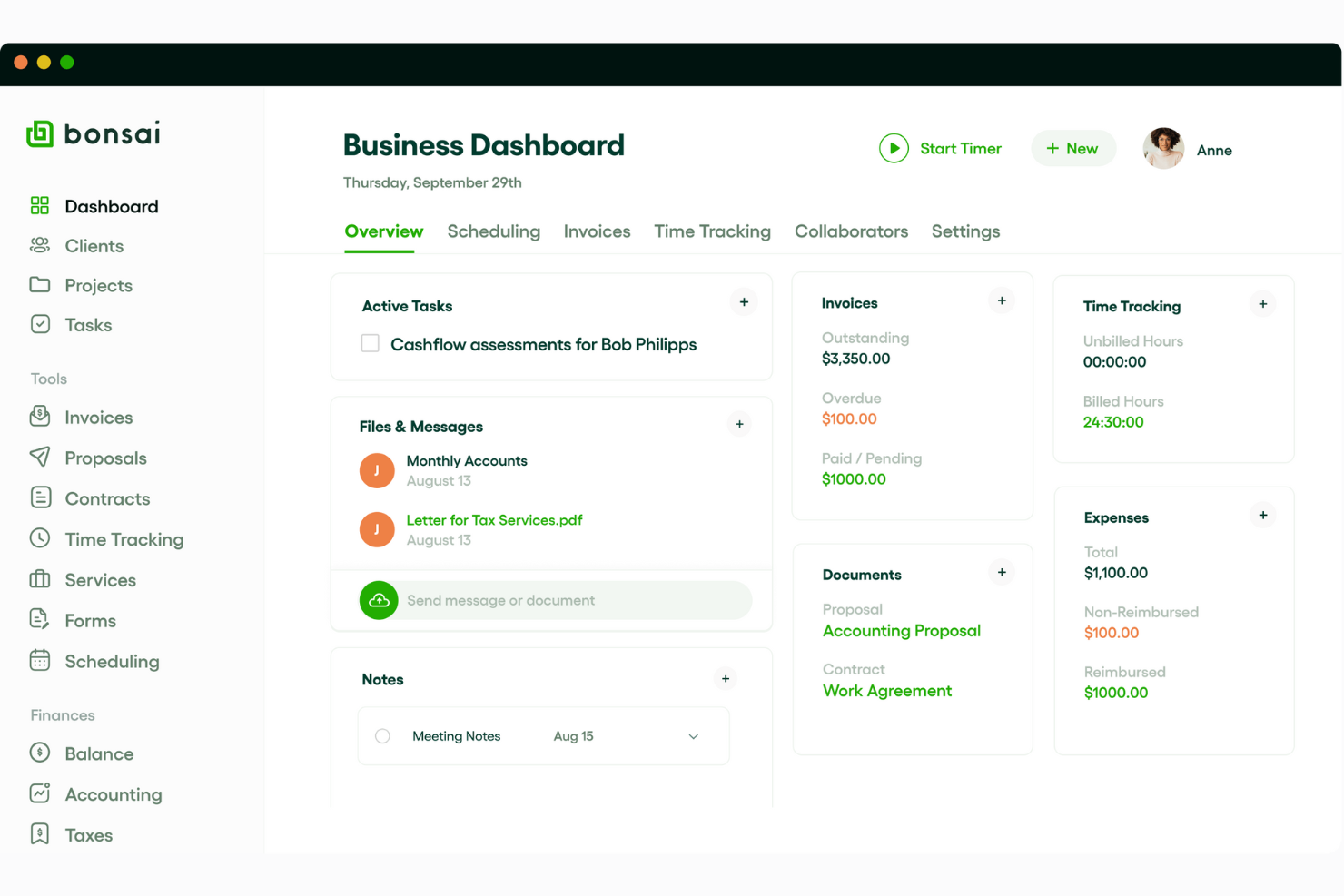
Bonsai Agency Software is a project management dashboard platform designed for agencies and consultancies, combining project tracking, client management, time tracking, and invoicing in one workspace.
Who Is Bonsai Agency Software Best For?
Bonsai Agency Software is a strong fit for small to mid-sized agencies and consultancies that need to manage client projects, contracts, and billing in one place.
Why I Picked Bonsai Agency Software
Bonsai Agency Software is on my shortlist because it mirrors the workflow of a client-facing agency. I appreciate that real-time budget and margin tracking updates the moment a booking is placed, letting my team catch scope creep before it becomes a billing problem. The resource planning dashboard shows live capacity across the team and accounts for part-timers and time off, reducing guesswork when scheduling across multiple client projects. I also use the estimated vs. actual hours reporting to identify where projects are running over and adjust resourcing before the next sprint.
Bonsai Agency Software Key Features
- Task views: Switch between Kanban board, Gantt chart, and calendar views to track project progress across different planning horizons.
- Integrated task timer: Start timers directly from individual tasks; logged time is assigned to the correct project.
- Tentative allocations: Assign resources to potential projects with placeholder bookings that can be adjusted as project scope is confirmed.
- Automatic timesheet generation: Generate timesheets based on scheduled tasks and project allocations without manual data entry.
Bonsai Agency Software Integrations
Bonsai Agency Software offers native integrations with Google Calendar, QuickBooks, and Zapier. An API is available for custom integrations.
Other Project Management Dashboard Software
Here are a few more that didn’t make the top list, but which are worth considering if you didn’t find the right fit above.
- Nutcache
Agile sprint planning dashboards
- Birdview
With over 250 pre-built reports and dashboards
- Jira Service Management
ITSM software with task tracking & data visualizations built-in
- Stackfield
For encrypted portfolio tracking
- Miro
For flexible, customizable dashboards
- Smartsheet
For a spreadsheet-like interface
- Celoxis
Enterprise-class features for dynamic dashboards
- Hive
For automated workflow processes
- Zoho Projects
Project management dashboard with multiple reporting options
- Accelo
Dynamic dashboards for professional services
- Zoho Analytics
For its self-service data preparation and management module
- GoodDay
For diverse task visualization
- TaskRay
For Salesforce-native data security
- PathPro
For community-driven management and feedback
- Asana
Gamified dashboard for employee engagement (graphics & animations)
- Basecamp
Dashboard for real-time issue tracking
- Forecast
Dashboard software to manage your projects, resources, and finances in one
- ProjectManager
Reporting tools dashboard
- Trello
Kanban-style dashboard
- Microsoft Project
User-friendly option for users already in the MS ecosystem


Related Reviews
If you still haven’t found what you’re looking for, check out these other tools that we’ve tested and evaluated:
- Project Management Software
- Resource Management Software
- Workflow Automation Software
- Time Tracking Software
- Task Management Software
- Collaboration Tools
- Gantt Chart Makers
- Productivity Tools
How I Evaluate Project Management Dashboard Software
I split my evaluation into two layers: core capabilities a PMO lead or portfolio manager needs to function day-to-day, and the differentiators that make one tool a stronger fit than another.
Core Functionality (Table Stakes For This List)
When I'm selecting tools for my list, I rank each one on a scale from 0 (does not offer the functionality) to 5 (excels in this area) for each core functionality listed below. Then, I calculate the tool's total score into a percentage. Each tool needs to achieve a minimum total score of 65% to be considered for inclusion.
- Customizable Dashboard Views: I look for drag-and-drop layout builders where you can tailor widgets, charts, and filters to match specific projects, teams, or stakeholder audiences.
- Real-Time Data Visualization: Live-updating Gantt charts, Kanban boards, and burndown charts matter here—I check whether visuals refresh automatically or require manual syncing.
- Multi-Project Portfolio Dashboards: Portfolio managers need a single view that rolls up health, progress, and budget data across projects, so I evaluate how well each tool aggregates cross-project metrics.
- KPI & Metric Tracking: I look for configurable widgets that let you monitor task completion rates, budget burn, timeline adherence, and resource utilization—not just preset counters.
- Reporting & Export Options: Stakeholder updates shouldn't require extra work, so I check for exportable reports in formats like PDF and CSV, plus shareable links or scheduled distributions.
- Integrations With PM Tools: Most teams already run on tools like Jira, Asana, or monday.com, so I evaluate native integrations, API access, and iPaaS support for syncing project data into dashboards.
Once I have a list of tools that meet the criteria, I consider what sets each platform apart.
Differentiating Factors (What Sets Vendors Apart)
Here's how I compare and contrast different vendors:
Standout Features
Predictive analytics is a major differentiator. Tools that can flag a likely sprint delay or budget overrun before it happens give delivery leads time to course-correct. I also look for resource capacity heatmaps that show workload distribution across teams, making it easy to spot overallocation mid-cycle. Executive stakeholder views matter just as much—read-only dashboard links or guest access let leadership check project health without needing a paid seat or a walkthrough.
Beyond Features
Integration ecosystem depth is one of the first things I evaluate. A dashboard tool is only as useful as the data flowing into it, so I check whether it connects natively with the PM and collaboration tools your team already uses. Pricing transparency also plays a big role—I look at whether viewer or guest seats are included or charged separately, since most dashboards serve more consumers than creators. Time-to-value matters too. Tools with prebuilt templates for Agile or Waterfall projects get teams producing usable dashboards faster than starting from a blank canvas.
How to Choose Project Management Dashboard Tools
It’s easy to get bogged down in long feature lists and complex pricing structures. To help you stay focused as you work through your unique software selection process, here’s a checklist of factors to keep in mind:
| Factor | What to Consider |
|---|---|
| Scalability | Make sure the tool can grow with your team. Consider whether it can handle added users and larger projects without compromising performance or costing too much. |
| Integrations | Look for compatibility with software your team already uses, like Slack, Google Workspace, or Asana, to avoid disrupting workflows. |
| Customizability | Check whether the tool lets you tailor your dashboards, reports, and permissions to fit your team’s unique needs and preferences. |
| Ease of Use | Pick a tool that’s intuitive for your team to adopt. Avoid ones with steep learning curves so everyone can stay focused on project goals instead of tool training. |
| Budget | Assess whether the pricing fits your budget. Be mindful of hidden costs, like add-ons or per-user fees, to avoid going over budget. |
| Security Safeguards | Verify the tool’s security protocols, like data encryption and user access controls, especially if you're handling sensitive information. |
| Real-Time Tracking | Make sure the software provides up-to-the-minute updates on project progress, so you can make informed decisions with the latest data. |
| Collaboration Features | Look for tools that support real-time chats, file sharing, and comments. These features keep your team connected and on the same page. |
Trends in Project Management Dashboard Software
Here are some of the emerging trends in project management dashboard software that I’m keeping an eye on:
- AI-driven insights: Many dashboard tools now offer AI capabilities for tasks like analyzing project data, helping predict roadblocks, and recommending task priorities. For example, AI can suggest optimal timelines based on previous project performance.
- Real-time resource allocation: Instant updates to your dashboard mean you can see who’s working on what at any given time, which helps you reduce overlap and resource conflicts. You'll be able to make immediate adjustments to workload distribution, even on teams working on multiple projects.
- Personalized user dashboards: Role-specific task management dashboards are becoming more popular, as they allow you to adapt views and data to individual team members’ needs. Each user—whether in finance, project management, or design—sees only the most relevant information to keep them focused on their priorities.
- Integrated feedback loops: Feedback tools within project status boards let teams respond more quickly to changing project requirements. For instance, PMO reporting dashboards now allow team members to provide input directly within tasks. This minimizes delays and keeps feedback centralized and visible.
- Advanced visualization tools: More dashboard software and specialized tools, such as agile dashboard software, now include customizable charts, graphs, and data views to help users visualize complex project data in one place. For example, a project financial dashboard might show budget insights alongside progress indicators to give stakeholders a clear and immediate view of project health.
What is Project Management Dashboard Software?
Project management dashboard software is a tool that provides an at-a-glance view of key performance indicators and status updates for projects. It consolidates and visualizes data related to project progress, deadlines, resource allocation, and more, so you and your team can monitor and manage project health and performance.
Project management dashboard tools typically feature customizable dashboards, instant data updates, and integrations with other project management tools. This helps facilitate efficient tracking, decision-making, and communication within project teams.
Features of Project Management Software Dashboard Software
When selecting project management dashboard tools, keep an eye out for the following key features:
- Real-time updates and live data: This feature provides instant visibility into project progress, which lets teams make informed, timely decisions. Your dashboards should update as work is completed, so you're tracking the most up-to-date data at any given time.
- Customizable views: The tool should allow users to personalize dashboards. This is especially useful for PMO portfolio dashboards where different teams need specific data views tailored to their roles. For agencies, dashboards with custom branding is another way teams may need to customize views to make them look professional.
- Drag-and-drop interface: This features lets you easily reorder tasks and data on the dashboard in order to simplify task management.
- Task assignment and tracking: This feature lets users assign tasks and monitor their progress on a dashboard management system, which makes it easy to oversee who’s doing what.
- KPI tracking: The tool should display relevant metrics and help teams monitor whether they’re on track to meet project goals. This is also helpful when it comes to issue management—the dashboard should help you flag issues and bottlenecks and make adjustments before they become major problems.
- Budget tracking: This helps you keep an eye on costs and expenses and compare them against budget limits. This is especially valuable if you oversee multiple project financials. You should be able to compare planned budget vs actuals and make changes to keep the project on budget.
- Project timelines: The tool should allow you to visualize deadlines and phases, which helps keep teams aware of project pacing.
- Resource allocation: The tool should show how team members and resources are distributed across projects. You should be able to keep an eye on individual team member workloads and adjust assignments based on availability and capacity.
- Collaboration tools: The software should come with chat, file sharing, and comments capabilities.
- Reporting capabilities: The tool should be able to automatically generate reports on project metrics. This is ideal when you need to regularly share updates with stakeholders.
Benefits of Project Management Software Dashboard Software
Whether you're managing a single project or juggling multiple timelines, project dashboard software helps you maintain clarity and control across the board. Implementing project management dashboard tools provides several benefits for your team and your business. Here are a few you can look forward to:
- Improved visibility: With a centralized view of tasks and metrics, everyone on the team can see project updates and milestones.
- Improved accountability: Task assignments and tracking within management dashboard software keeps team members responsible for their work and makes it easy to track task completion.
- Better decision-making: Real-time data and KPI tracking in an executive project portfolio dashboard allow you to adjust plans based on current project insights and make sure teams are making well-informed choices.
- Simplified resource management: Clear resource allocation visuals on tools dashboards make it easy to balance workloads and avoid overloading team members, particularly on larger projects.
- Time savings: Automated reports and customizable views within dashboard project management software reduce the time spent gathering data, so your team can stay focused on core tasks.
- Increased collaboration: Built-in chat, comments, and file-sharing options allow your team to communicate in context directly within the online dashboard software. This fosters stronger teamwork.
- Budget control: Expense tracking and budget comparisons in business dashboard tools help teams stay on budget.
Costs & Pricing for Project Management Dashboard Software
The table below summarizes common plans, their average prices, and typical features included in project management dashboard tools:
| Plan Type | Average Price | Common Features |
|---|---|---|
| Free Plan | $0 | Basic task tracking, limited user access, simple dashboards, and basic reporting. |
| Personal Plan | $5-$25/user/month | Task tracking, project timelines, custom views, limited integrations, and basic analytics. |
| Business Plan | $30-$50/user/month | Team collaboration, advanced dashboards, resource management, automation options, and extensive integrations. |
| Enterprise Plan | $60-$100+/user/month | Customizable dashboards, dedicated support, enterprise-grade security, advanced reporting, and API access. |
Project Management Dashboard FAQ
Find answers to common questions about this topic.
What is a project management dashboard?
A project management dashboard is a digital tool that shows how your projects are going. It should provide real-time updates on overall project progress and the progress of each project component.
Project management dashboards help you make use of data. The dashboard template you wind up choosing for your project depends on what you need to see and how you’d like to manage the data
What are the types of dashboards?
Here are seven of the most popular project dashboards. You should be able to find templates for them in most project management tools.
- Revenue and customer display
- Customer satisfaction
- Sales performance
- Cash management
- Recruitment and hiring
- Web analytics
- Procurement
What should a project dashboard have?
The best project management software dashboard will be customizable enough to feature the information that you find most useful. This might include blocks of visual or text data for project tracking, task status, project timelines, resource management, and tools to track time spent or time needed.
Why is it important to have real-time data and updates?
Having real-time data and updates is essential for effective project management and decision-making, as it allows teams to respond quickly to changes, maintain accuracy, and ensure alignment across projects. Using a dashboard design software can simplify this process by centralizing data and keeping everyone informed.
Why Real-Time Data Matters:
- Instant project status: With a project status dashboard template, teams can view current metrics and project progress at a glance, as well as make sure everyone is aligned and can quickly address issues.
- Improved decision-making: Real-time data allows you to make informed choices based on the latest insights. The best performance dashboard can highlight key performance indicators (KPIs) that are essential for strategic decisions.
- Better collaboration: Teams working with both enterprise and small business dashboard software can share updates easily, which improves coordination and minimizes communication gaps.
- Improved monitoring: A dashboard creator software allows businesses to customize what they track, so it’s easy to monitor critical data and swiftly react to changes.
- Cost efficiency: Cheap dashboard software can provide small businesses with high-value insights without a hefty price tag, so they stay competitive without overspending.
How can project management dashboards be used for team workload monitoring and cost tracking?
Project management dashboards are invaluable for team workload monitoring and cost tracking. They provide a centralized view where you can oversee resources effectively and maintain budget control. By using one of the best project management dashboards, teams can stay informed and agile in their decision-making.
How Dashboards Help with Workload and Cost Management
- Visualized workload allocation: The best data dashboard software can display workload distribution across team members and help you see who is overloaded or underutilized. This tool on the dashboard makes it easier to rebalance tasks and optimize team productivity.
- Real-time cost tracking: Dashboards allow teams to monitor expenses in real-time and compare current costs against budgets. With the right dashboard tool, you can spot overspending early and adjust accordingly.
- Performance analytics: The best dashboards software should include performance metrics that help you track time and budget efficiency. This is essential for staying on target and identifying areas for improvement.
- Customizable views for small businesses: Dashboard software for small business typically offers templates that small teams can tailor to monitor specific workload and cost metrics. This helps make sure they stay within budget without compromising team capacity.
Can project management dashboard software be used for issue management?
Yes, project management dashboard software is highly effective for issue management. It offers a streamlined approach to tracking, prioritizing, and resolving project issues as they arise. With real-time insights and organized displays, dashboards help teams stay on top of problems and minimize project disruptions.
How Dashboards Support Issue Management
- Centralized issue tracking: Dashboards provide a single view for tracking all reported issues, so team members can see what needs attention and you can prevent issues from slipping through the cracks.
- Prioritization and status updates: Using the best project management dashboard, teams can categorize issues by priority and update their status in real-time. This helps everyone understand which problems need immediate attention.
- Detailed issue metrics: Dashboards can display metrics like issue severity, response time, and resolution rates. You’ll get insights into how efficiently the team is handling problems.
- Automated alerts and notifications: Many dashboards include alerts and notify relevant team members when an issue is assigned, escalated, or resolved. This keeps everyone informed and responsive.
By integrating project management dashboard software into your issue management processes, you can address problems proactively, maintain better communication, and improve project outcomes.
What's Next?
If you're in the process of researching project management dashboard software, connect with a SoftwareSelect advisor for free recommendations.
You fill out a form and have a quick chat where they get into the specifics of your needs. Then you'll get a shortlist of software to review. They'll even support you through the entire buying process, including price negotiations.