
10 Best Wrike Competitors And Alternatives: Reviewed in 2026

10 Best Wrike Alternative Shortlist
We take an in-depth look at the pros & cons of the following tools in this review:


The best Wrike alternatives offer faster onboarding, fewer configuration headaches, and less maintenance—without sacrificing the features teams actually use. While Wrike excels in enterprise-grade reporting and workload planning, it can feel bloated or overly complex for teams that just need to get projects moving.
For many teams, the challenge with Wrike isn’t what it can do—it’s what it takes to get there. From its steep setup process to the rigid folder-based hierarchy and add-on pricing model, Wrike often requires admin support just to maintain momentum. If your team is spending more time customizing views and managing permissions than executing work, it might be time to switch.
I’ve tested and reviewed dozens of project management tools and used Wrike across large and small teams. In this guide, I break down the best Wrike alternatives available today—highlighting which tools simplify workflows, reduce configuration overhead, and better match the pace of how modern teams work.
Why You Can Trust Us
We’ve been testing and reviewing project management software since 2012. As project managers ourselves, we know how critical and difficult it is to make the right decision when selecting software.
We invest in deep research to help our audience make better software purchasing decisions. We’ve tested more than 2,000 tools for different project management use cases and written over 1,000 comprehensive software reviews. Learn how we stay transparent & our software review methodology.
10 Best Wrike Alternative Comparison Chart
Here is a table where you can compare all the alternatives we just covered in the overviews
| Tool | Best For | Trial Info | Price | ||
|---|---|---|---|---|---|
| 1 | Best for customizable intake & approval processes | 14-day free trial available | Pricing upon request | Website | |
| 2 | Best Wrike alternative for growing marketing & agency teams | Free demo available | Pricing upon request | Website | |
| 3 | Best Wrike alternative for teams that want a spreadsheet-like interface | 30-day free trial available | From $9/user/month (billed annually) | Website | |
| 4 | Best for task automation and customization | Free plan available | From $4/user/month (billed annually) | Website | |
| 5 | Best Wrike alternative for detailed team scheduling | 14-day free trial + free demo available | From $10/user/month (billed annually) | Website | |
| 6 | Best Wrike alternative for ease of use & short learning curve | Free plan available | From $9/seat/month (billed annually) | Website | |
| 7 | Best Wrike alternative for cutting costs for similar features | Free plan + free demo available | From $7/user/month (billed annually) | Website | |
| 8 | Best for industry-specific templates | 14-day free trial + free demo available | From $8/user/month (billed annually) | Website | |
| 9 | Best for integration of ideation and task management | Free plan available | From $13/user/month (billed annually) | Website | |
| 10 | Best for comprehensive project management with an intuitive, user-friendly interface | Free demo available | Pricing upon request | Website |


-

Accelo
Visit WebsiteThis is an aggregated rating for this tool including ratings from Crozdesk users and ratings from other sites.4.4 -
Wrike
Visit WebsiteThis is an aggregated rating for this tool including ratings from Crozdesk users and ratings from other sites.4.2 -
Forecast
Visit WebsiteThis is an aggregated rating for this tool including ratings from Crozdesk users and ratings from other sites.4.6




10 Best Wrike Alternatives Compared
The best Wrike alternatives offer cleaner user interfaces, easier setup, and often more flexible pricing—especially for teams that don’t need all of Wrike’s complexity. Whether you’re looking for simpler collaboration, faster onboarding, or tools better suited to Agile workflows, there are excellent platforms that can deliver what Wrike may be missing.
While Wrike is known for its robust features, it can feel overwhelming for teams that prioritize ease of use or need more customization without added bulk. If your current tool is slowing you down or getting in the way of visibility, it might be time to consider switching.
I’ve spent years testing and reviewing project management software—including Wrike and dozens of its competitors. In this guide, I’ll walk you through the best Wrike alternatives available today, with clear insights into how each one performs and what kind of teams it’s best suited for.
Next in this Wrike review, we’re looking over the pros and cons, trial info, pricing, and expert opinion for every Wrike alternative. We’ve also gone over why each pick might be a better choice for your team and project requirements.

RoboHead is a project management platform built for in-house marketing and creative teams to handle everything from project requests through execution and feedback loops in one place. It gives teams a structured way to capture work intake, assign tasks, track progress, and keep all creative deliverables organized so you can focus on doing your work without losing context in scattered tools.
Why I Picked RoboHead
I picked RoboHead because it tailors core project management capabilities specifically to the way creative and marketing teams work, giving you tools that align with how your team plans and reviews work rather than forcing a generic workflow on you. Its customizable project request forms let you capture the exact details you need up front and route work to the right people without added back-and-forth. Built-in review and approval workflows keep feedback centralized and tied to assets so you don’t lose track of versions or comments.
RoboHead Key Features
Aside from the features I highlighted above, RoboHead also provides a range of other capabilities that support your team’s project management needs:
- Team Management: RoboHead allows you to allocate resources effectively and manage permissions to ensure that the right team members have access to the appropriate information.
- Reporting and Analytics: Gain insights into your project's progress with custom reporting tools that help you track performance and make informed decisions.
- Creative Collaboration: With integration capabilities for Adobe Creative Cloud, your team can seamlessly provide feedback on various creative files, ensuring that everyone is on the same page.
- Customizable Project Templates: Create and reuse structured project plans to standardize how work starts and progresses, saving setup time on recurring project types.
RoboHead Integrations
Integrations include Slack, Google Drive, Microsoft Teams, Adobe Creative Cloud, Power BI, Tableau, Salesforce, Dropbox, and Box. An API is available for custom integrations.
Pros and Cons
Pros:
- Customizable workflows enhance team-specific project management.
- Project request feature streamlines project initiation process.
- Team management tools facilitate effective collaboration.
Cons:
- Interface can feel dated compared to newer creative tools.
- Mobile experience can fall short for on-the-go reviewing.

Best Wrike alternative for growing marketing & agency teams

Why Screendragon is a great Wrike alternative
Screendragon and Wrike share some functionalities regarding creative workflow management. However, Screendragon differs by providing more advanced features for project, resource, and workflow management. Screendragon is better suited to growing agencies and marketing teams that require additional flexibility from project management software. It offers an integrated solution so users can work fluidly, rather than jumping between different modules or views to get the job done—a common downside of Hive. Screendragon’s UX is also user-friendly, offering customization with personalized dashboards, project status views, and permission levels with a low learning curve that former Wrike users would appreciate.

Best Wrike alternative for teams that want a spreadsheet-like interface

Why Smartsheet is a great Wrike alternative
Smartsheet has similar features to Wrike so the main difference between the two lies in the interface. Smartsheet resembles classic spreadsheets which some users might already be used to but, in the end, it’s all a matter of personal preference so make sure you test Smartsheet with your team before making the switch.
Smartsheet can help you manage projects, automate processes, and scale up to enterprise-level programs and portfolios.
New Product Updates from Smartsheet

Smartsheet Adds Direct Data Import to Existing Sheets
Smartsheet introduces direct data import to existing sheets in table view. This update lets you import CSV, XLS, and XLSX files directly into sheets, reducing manual work and speeding up data setup. For more information, visit Smartsheet's official site.

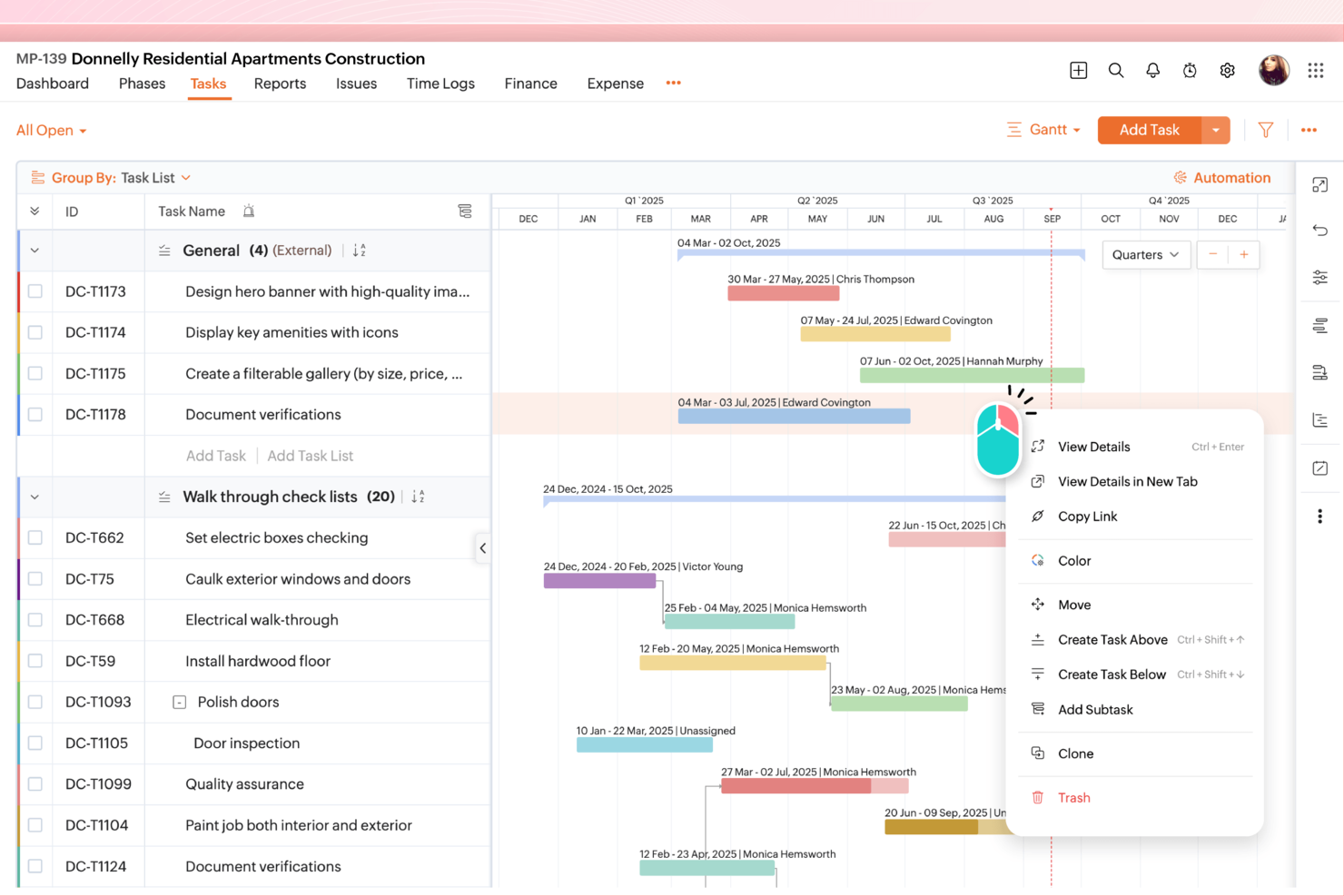
For those seeking a Wrike alternative, Zoho Projects offers a compelling project management solution that caters to industries ranging from construction to software development. Your team can benefit from its user-friendly interface and comprehensive suite of features designed to enhance collaboration, task management, and ensure data privacy. Whether you're looking to tackle complex project timelines or foster better communication within your team, Zoho Projects addresses these challenges with its versatile capabilities.
Why I Picked Zoho Projects
I picked Zoho Projects as a Wrike alternative because of its strong emphasis on user privacy and task automation features. With Zoho Projects, you can automate routine tasks using a simple drag-and-drop interface, saving time and allowing your team to focus on more critical work. Additionally, the platform provides robust project customization options, enabling you to tailor workflows and fields to meet your specific requirements. These features align well with the needs of businesses seeking a flexible and secure project management solution.
Zoho Projects Key Features
In addition to its automation and customization capabilities, Zoho Projects offers several other features that make it a strong Wrike alternative.
- Task Management: You and your team can organize tasks with dependencies and Gantt charts to visualize project timelines.
- Time Tracking: Keep track of hours spent on tasks to manage budgets and improve efficiency.
- Issue Tracking: Identify and resolve project issues quickly to maintain project momentum.
- Team Collaboration: Utilize in-app chat and document management to enhance communication and document sharing.
Zoho Projects Integrations
Integrations include Zoho CRM, Slack, GitHub, Google Drive, Dropbox, Microsoft Teams, Zapier, Bitbucket, Box, and Microsoft Office 365.
Pros and Cons
Pros:
- Built in time tracking tools
- Flexible project customization options
- Strong task automation capabilities
Cons:
- Fewer advanced collaboration features
- Interface learning curve for beginners
New Product Updates from Zoho Projects

Zoho Projects Infinity Unveiled
Zoho Projects introduces Zoho Projects Infinity with custom modules, reports, dashboards, and enhanced AI capabilities. These updates improve flexibility, visibility, and automation across project workflows. For more information, visit Zoho Projects' official site.
 .
.

Why Productive is a great Wrike alternative
Productive is a project management and productivity tool that helps businesses manage their projects, clients, and teams. It's designed to be a comprehensive solution for project management, time tracking, and invoicing, making it a great option for agencies and professional service providers. Productive enables teams to efficiently create and manage schedules, assigning tasks and deadlines to individuals or groups. Its comprehensive time tracking capabilities allow team members to monitor their productivity, track billable hours, and gain insights into resource allocation. With its emphasis on optimizing team schedules, accurate time tracking, and detailed work tracking, Productive empowers organizations to streamline project management processes, boost productivity, and achieve successful outcomes.
New Product Updates from Productive

Productive Introduces Resource Request Feature
Productive introduces a resource request feature that helps teams request and allocate resources more efficiently. For more information, visit Productive's official site.

Best Wrike alternative for ease of use & short learning curve

Why monday.com is a great Wrike alternative
monday.com excels when it comes to usability. If you’re making the switch from Wrike to this project management app, you can rest assured that your team will learn how to use it in a matter of hours. You can also make use of the superior customization options to let your team members adapt their workspace to their liking. monday.com also has a comparable free plan to Wrike, for those interested.
New Product Updates from monday.com

monday.com's AI Blocks Now Available to All Users
monday.com AI Blocks are now available to all users, enabling teams to integrate AI directly into workflows. This rollout helps automate tasks and improve productivity across projects. For more information, visit monday.com's official site.


Why ClickUp is a great Wrike alternative
Think of ClickUp as a Wrike copy at a fraction of the price with robust project management features like advanced task management, time tracking, and resource management. This makes the app more suitable for small teams, freelancers, and startups who don’t need advanced reporting or forecasting. ClickUp also has a more expansive free version of their tool.
New Product Updates from ClickUp

ClickUp Enhances Task Management and Introduces AI Notetaker
ClickUp introduces an AI Notetaker for meetings and improves task type management in views. These updates help teams capture meeting insights automatically and organize work more efficiently. For more information, visit ClickUp’s official site.

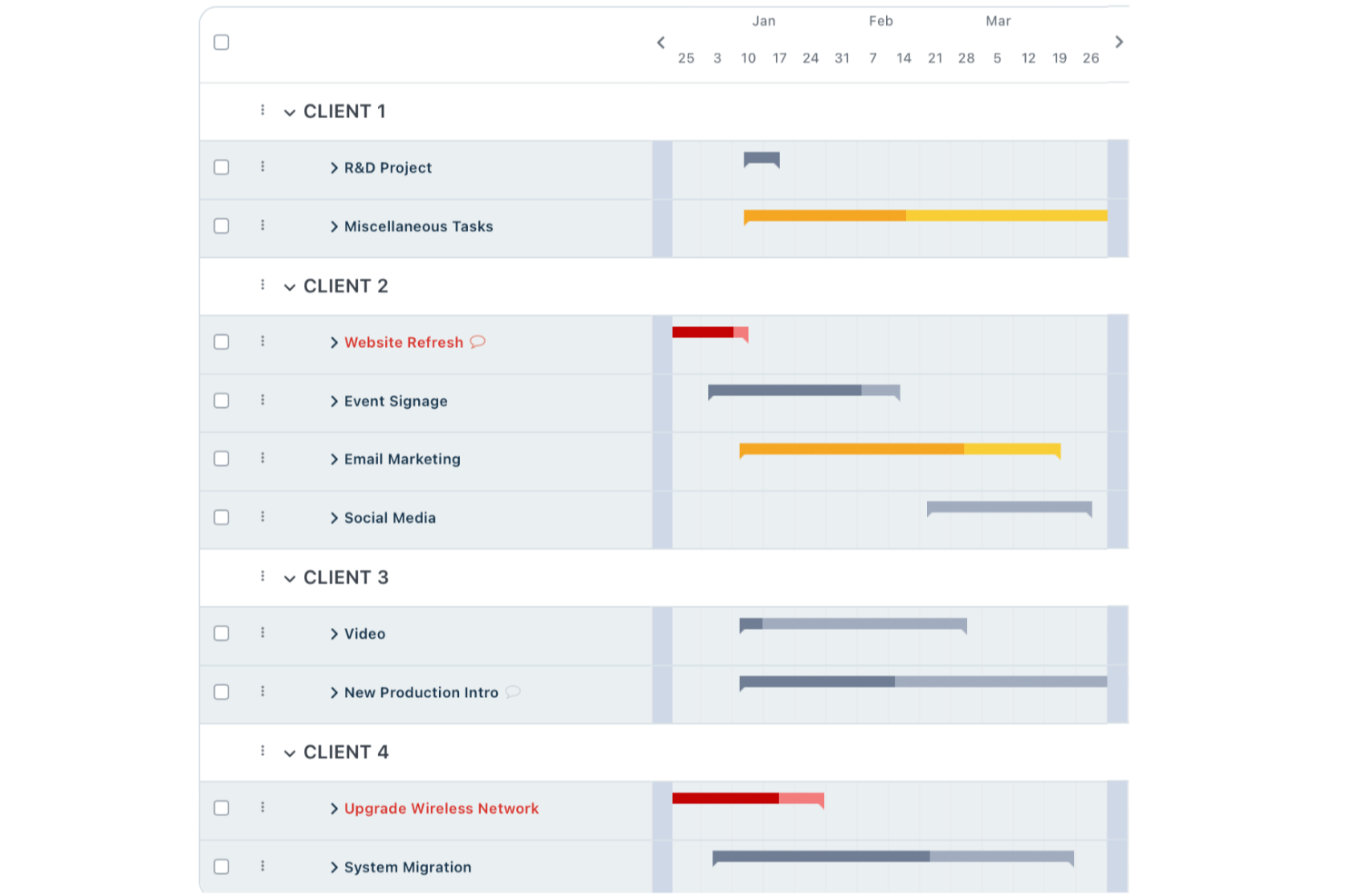
For teams seeking a Wrike alternative, Workzone offers a pragmatic solution by focusing on the essentials of project management, making it ideal for marketing, operations, and IT teams. It addresses the challenges of managing complex projects by providing clarity and organization, helping teams streamline their workflows without the clutter. With its emphasis on real-time visibility and collaboration, Workzone ensures that your team stays connected and informed, making it a compelling choice for those looking to enhance their project management capabilities.
Why I Picked Workzone
I picked Workzone as a Wrike alternative because it excels in simplifying project management through its project lifecycle management and intake organization features. The project request forms and document proofing tools are particularly useful for teams looking to improve their project intake and approval processes. Workzone also stands out with its strong collaboration tools, allowing teams to share project status and feedback seamlessly. These features address the common struggle of managing numerous time-sensitive projects with multiple stakeholders, making Workzone a reliable option for teams seeking structure and efficiency.
Workzone Key Features
In addition to its project lifecycle management and collaboration tools, Workzone offers several other features that make it a strong Wrike alternative:
- Pre-Built Reports: Provides workload and budget management insights, helping your team stay on top of project metrics.
- Industry-Specific Templates: Offers over 1,000 templates to facilitate quick project launches tailored to your industry needs.
- Centralized Requests: Streamlines request handling and approval processes, ensuring all project inputs are organized and easily accessible.
- Unlimited Training and Support: Ensures your team has access to quick assistance and training, enhancing user experience and adoption.
Workzone Integrations
Integrations include Slack, Microsoft Teams, Google Drive, Salesforce, Dropbox, Box, OneDrive, QuickBooks, Outlook, and Gmail.
Pros and Cons
Pros:
- Structured request and workload management
- Built-in document proofing and approvals
- Strong project visibility and tracking
Cons:
- Mobile experience weaker than desktop
- Smaller integration ecosystem than competitors

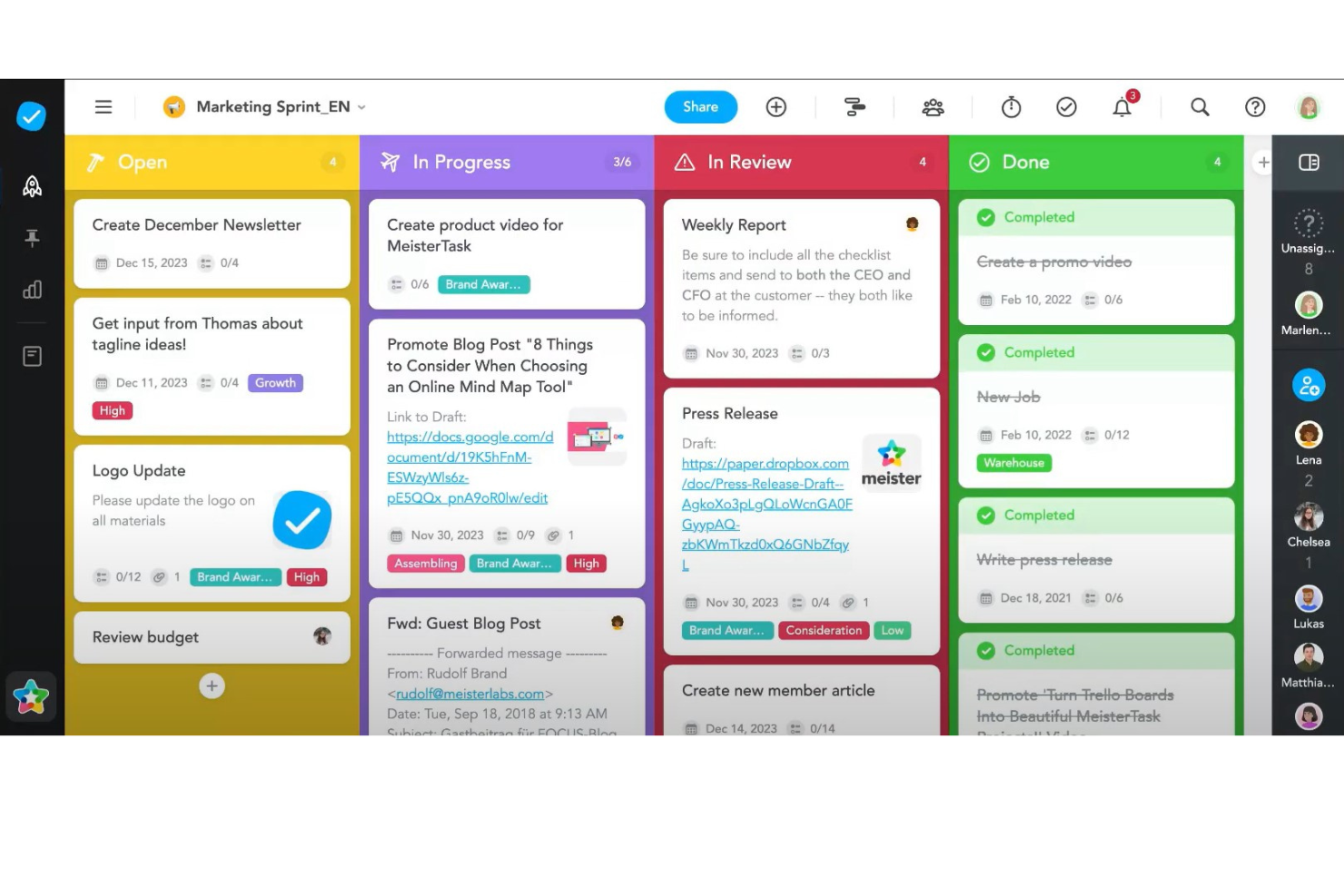
Why MeisterTask is a great Wrike alternative
MeisterTask distinguishes itself as a formidable competitor to Wrike in the project management software market through its intuitive, visually appealing interface and unique focus on collaboration and flexibility. What sets MeisterTask apart are its niche features like the Mind Map integration, which allows users to brainstorm, plan, and then directly convert ideas into actionable tasks within the same ecosystem. This seamless integration between ideation and task management is particularly valuable for creative and strategic planning processes, offering a distinct advantage over competitors.

Parallax
Best for comprehensive project management with an intuitive, user-friendly interface

Why Parallax is a great Wrike alternative
Parallax is a project management tool that's designed to help teams collaborate and manage their work in a more efficient way. It's a cloud-based software that offers a range of features, including task management, time tracking, and reporting. It's a great alternative to Wrike, especially for small to medium-sized businesses that need a simple, straightforward tool to manage their projects. It also stands out for its user-friendly interface. Unlike some other project management tools out there, Parallax doesn't overwhelm you with a ton of features that you might not need. Instead, it focuses on providing the essential tools that teams need to manage their work effectively. Plus, it's really easy to get started with Parallax. You don't need any special training or technical skills to use it.
Other Wrike Alternatives
Here are some additional Wrike alternatives that didn’t make it onto my shortlist, but are still worth checking out:
- Ravetree
Wrike alternative for agencies and professional service providers
- nTask Manager
For customer support services
- Pneumatic Workflow
For streamlining digital projects
- Height
For a user-friendly interface
- Quire
For breaking down complex projects
- Hive
Wrike alternative for bringing all of your communication in a single place
- Scoro
For project management with built-in KPI tracking
- Accelo
Wrike alternative with complete client management
- Celoxis
Wrike alternative for advanced project cost and performance analysis
- Bonsai Agency Software
For in-platform project billing and invoicing


What Are Wrike Alternatives?
Wrike alternatives are project management tools that replicate many of Wrike’s core features—such as task tracking, collaboration, and workflow automation—but offer different interfaces, pricing models, and specializations.
Businesses turn to these alternatives when they seek more intuitive design, better integrations, lower cost, or a platform that’s easier to scale. Ideal for teams frustrated by Wrike’s complexity or looking for a fresh start, these tools help improve efficiency and adaptability in managing projects.
About Wrike
Wrike is a project management solution that specializes in cross-departmental communications and hand-crafted template documents that would benefit any fast-paced creative team. Within the app, you can build out their Spaces, Folders, Projects, Tasks, and Subtasks as you see fit.
Additionally, users can lean on Blueprints (self-developed) or Templates (developed by Wrike) to speed up the process by which new items are entered into the workflow system. It also has an intuitive custom request form builder that lets you build project request forms. And with share-by-link access, external clients can fill out, as well. Wrike has a mobile app to work on the go and is very integration friendly. It connects with over 150 apps like Google Docs, Microsoft programs, Amazon services, and many more.
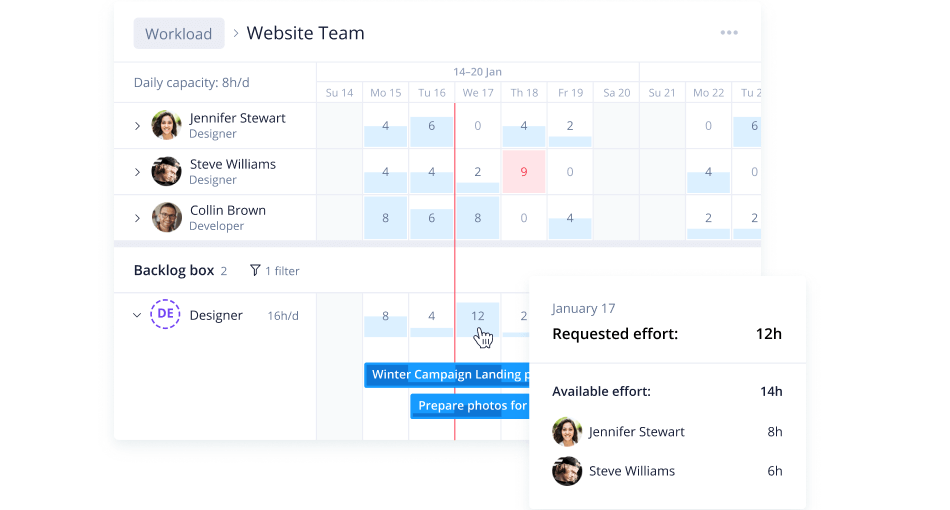
Wrike’s custom reports and analytics will allow you to easily forecast potential risks so your team can adjust course and plan accordingly. Its dashboards are highly visual, offering instantly digestible information. On top of it, detailed notifications can help you adjust your portfolio quickly and minimize revenue loss.
With a simple user interface, Wrike helps managers envision upcoming projects, easily see what risks need mitigation, and manage resources to account for shortfalls. The most customizable and configurable risk management software on the market, Wrike enables cross-departmental collaboration in real-time, helping teams communicate potential risks and work together to solve them. While Wrike is very user-friendly, you can also avail of the dedicated help center with interactive training, videos, a ‘getting started’ guide, and a thriving community.
Wrike lets you start for free with a 14-day trial of Wrike’s more advanced features and customization. Paid plans start at $9.80/user/month.
Why Might You Need A Wrike Alternative?
You want other features to streamline complex projects
While Wrike’s features are generally suited for all kinds of teams, the tool doesn’t help you get paid, unless you get the enterprise plan. This makes this project management software far from ideal for freelancers, a small team or small businesses who are looking to reduce the number of apps they use (and pay for).
You’re looking for something more suitable for your budget
Wrike was designed with enterprise companies in mind. Small and medium businesses might find the costs of getting Wrike monthly to exceed their budget. Paid plans are made even more expensive by their optional add-ons: Wrike for marketers, Wrike for professional services, and each expansion’s subsequent performance (BI support) variety.
You need different integrations
Compared to its competitors (like Smartsheet, Teamwork or Jira), Wrike offers just a couple of integrations with apps like Salesforce, MS Project, Trello, or Microsoft Teams. For other tools you might be using, there’s Wrike Integrate to help you create your own integration but you won’t find out-of-the-box with common project management platforms like Asana, Basecamp, or Airtable.
You want a more user-friendly interface
Top Wrike alternatives like monday.com or ClickUp have colorful, user-friendly interfaces. Wrike’s UI is quite different from theirs and from other communication and task management tools that your team might be used to. Wrike’s learning curve can be steep, with poor usability being a consistent reviewer complaint.
How To Choose A Wrike Alternative
It’s easy to get bogged down in long feature lists and complex pricing structures. To help you stay focused as you work through your unique software selection process, here’s a checklist of factors to keep in mind:
| Factor | What to Consider |
|---|---|
| Scalability | Ensure the tool can grow with your team. Look for solutions that support increasing projects and users. |
| Integrations | Check if the software connects with tools you already use, like Slack, Google Workspace, or Salesforce. |
| Customizability | You need to tailor workflows and dashboards. Choose a tool that lets you adjust features to fit your needs. |
| Ease of Use | Your team should be able to quickly understand and use the tool without extensive training. |
| Budget | Consider not just the initial cost but also future expenses. Look for flexible pricing that fits your budget. |
| Security Safeguards | Ensure the solution offers strong data protection features, like encryption and compliance with regulations. |
| Customer Support | Reliable support is crucial. Opt for a service with 24/7 availability and multiple contact options. |
| Performance | Assess how the tool handles tasks. It should operate smoothly without lag during high workloads. |
Honestly, it's a lot to digest—and there's a lot of pressure to get it right so I'd suggest using our project management software advisory service to help you shortlist project manager tools that'll be a good fit for you and your organization's specific needs.
Key Features For A Viable Wrike Alternative
Here are some of the key features of wrike alternative, to help you contrast and compare what alternative solutions offer:
- Customizable Dashboards: You can tailor your workspace to suit your team's needs and enhance project transparency. Look for an alternative that allows for drag-and-drop customization of dashboards, offering real-time data visualization and easy sharing to keep stakeholders aligned.
- Proofing and Comparison Mode: This feature lets you review and compare different versions of files side by side, helping you easily spot changes. Ensure the alternative includes advanced proofing tools with annotation capabilities, version tracking, and integrations with design software for seamless collaboration.
- Task Management: Create tasks and subtasks effortlessly, allowing for a more organized workflow. A good alternative should offer intuitive task creation, support for dependencies, and prioritization options to handle both simple and complex workflows effectively.
- Time Tracking: Track time spent on tasks to better manage resources and deadlines. Choose an alternative that integrates time tracking with billing and reporting, providing detailed insights into time allocation without needing a separate tool.
- Workload Management: This helps you allocate tasks efficiently based on team members' availability and workload. Look for dynamic workload management features that provide real-time updates and allow for easy reallocation of tasks to prevent bottlenecks.
- Integration Support: Connect with various third-party applications to streamline your processes. Ensure the alternative supports key integrations with your current tech stack or provides an open API for custom connections to maintain seamless workflows.
- Detailed Reports: Generate reports that offer insights into your projects, aiding in informed decision-making. An alternative should provide highly customizable reporting options with visual elements like charts and graphs, allowing you to tailor insights to different audiences.
- Scalable Project Structures: Adjust project sizes and structures to fit your team’s requirements as they evolve. Look for a tool that supports scalability without complexity, offering hierarchical structures, sub-projects, and cross-project linking for flexibility as your needs grow.
When exploring alternatives to Wrike, focus on tools that offer flexibility, advanced collaboration features, and scalability to support your team’s evolving needs. Prioritize solutions with intuitive interfaces, seamless integrations, and innovative capabilities that enhance productivity and streamline workflows.
What's Next?
If you're in the process of researching wrike alternative, connect with a SoftwareSelect advisor for free recommendations.
You fill out a form and have a quick chat where they get into the specifics of your needs. Then you'll get a shortlist of software to review. They'll even support you through the entire buying process, including price negotiations.