

10 Best Hive Competitors and Alternatives: Reviewed in 2026

Best Hive Alternative Shortlist


The best Hive alternatives are easier to navigate, offer additional features you need that Hive doesn't include, and are more aligned with your scaling business and budgetary needs. With the right alternative to Hive, you'll be able to foster better collaboration amongst the project team, complete work on time and on budget, and deliver impactful projects.
I've used my 15+ years of experience managing projects at agencies and larger organizations to test a variety of Hive alternatives and determine the best options to help you keep track of your projects and tasks and deliver work that exceeds the expectations of your clients and stakeholders. In my reviews below, I highlight strengths and key differences, pros and cons, and ideal use cases.
Why Trust Our Software Recommendations
Our team has been testing and reviewing software since 2012. As project managers ourselves, we know how difficult—and important—it is to choose the right software.
For this guide, we evaluated tools using hands-on testing and independent research, scoring tools using our selection criteria. We also draw on insights from industry thought leaders and practicing project management experts.
Our reviews reflect our human editorial judgment, not a sales pitch.
Expert reviewers:
What Are Hive Alternatives?
Hive alternatives are project management and team collaboration tools that do what Hive does, but with their own mix of features, formats, and pricing. Project managers, team leads, and anyone juggling lots of tasks can use them to organize work, track progress, and keep everyone aligned. You’ll find different options for customization, integrations, and budgets so you can pick the one that actually fits your workflow and team size.
About Hive
Hive is one of the newer project management tools on the market. It was founded in 2015 by co-founders John Furneaux and Eric Typaldos.
The tool is part project management and part AI. It brings together features like task management automation, custom workflows, templates, messaging, and collaboration under one roof.
This project management platform has dashboards to help you navigate tasks, reporting, and communications.
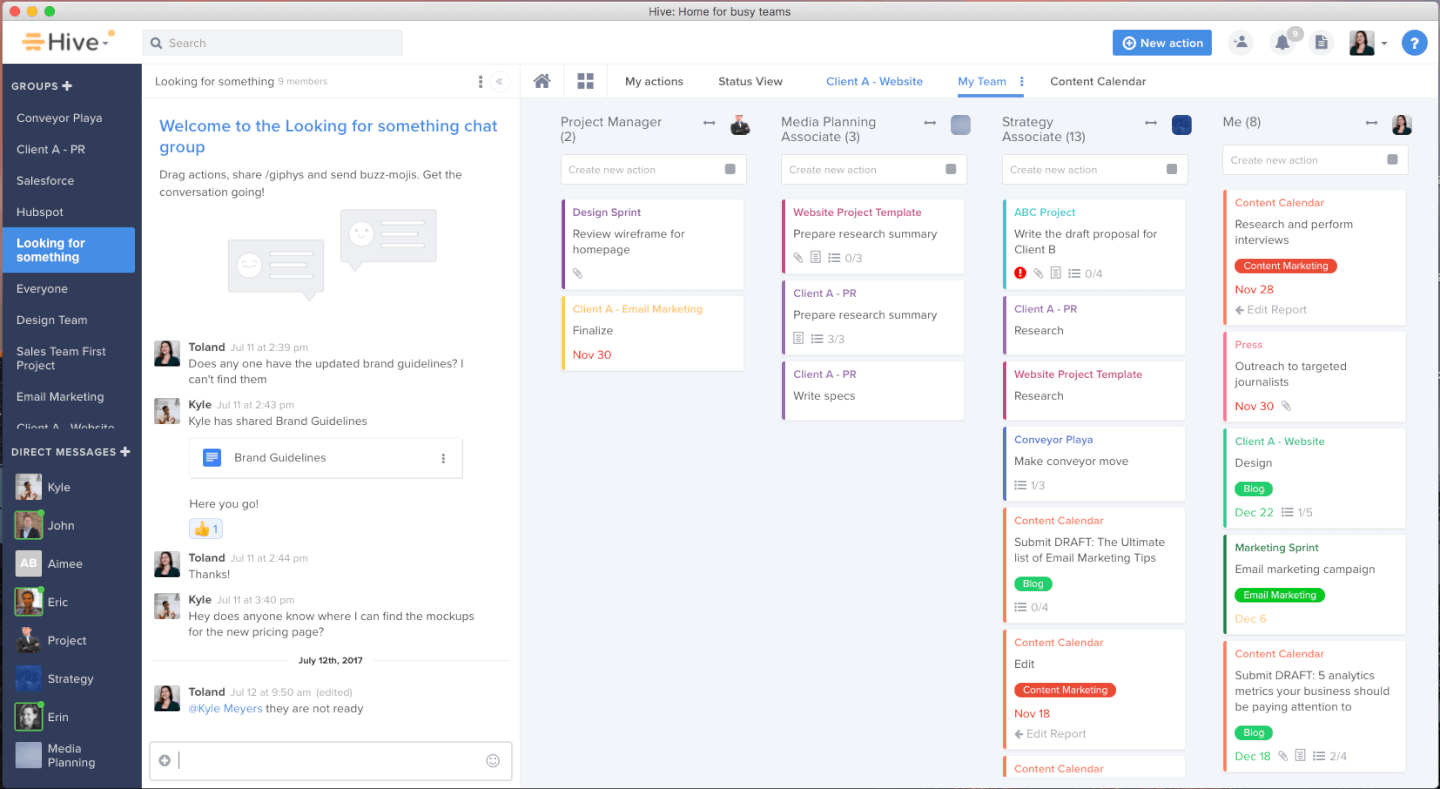
First, these dashboards are modern, colorful and easy to navigate with drag-and-drop items like task cards and reporting widgets. Then, portfolio dashboards can provide metrics into what your team is doing and how the big picture projects are coming together. Finally, personal dashboards can track individual productivity levels and workflow patterns.
Hive’s automated workflow processes help you alleviate the administrative burden of basic tagging and communication tasks. Even newbies can easily follow the conversational pattern for setting up custom workflows and automating routine processes. This can support accurate dashboard metrics, as it relies less on manual input that is prone to error.
In addition, you’ll have access to flexible project views like Kanban boards, Gantt charts, portfolios, tables, calendar views, and summary views. A flexible toolset covers everything you need to digitize your workspace, including customizable forms, project templates, proofing and approval systems, and automations.
Hive offers over a dozen native third-party integrations with tools like Microsoft Teams, Google Workspace, JIRA, and Salesforce. Additionally, you can unlock more connections with a paid plan through Zapier (costs extra).
Hive starts at $18/user/month on a monthly plan and offers a 14-day free trial.
Hive Alternatives Comparison Table
Use this comparison table to quickly compare the Hive alternatives covered above.
| Tool | Best For | Trial Info | Price | ||
|---|---|---|---|---|---|
| 1 | Best for agile design and marketing teams | Free plan available; 14-day free trial | From $10/user/month (billed annually) | Website | |
| 2 | Best for connecting work to 850+ app integrations | Free plan available; 14-day free trial | From $9/user/month (billed annually) | Website | |
| 3 | Best for breaking projects into unlimited subtasks | Free plan + 30-day free trial available | From $7.65/user/month (billed annually) | Website | |
| 4 | Best for professional services resource planning | Free demo available | Pricing upon request | Website | |
| 5 | Best for tracking tasks across cross-functional teams | Free plan available | From $10.99/user/month (billed annually) | Website | |
| 6 | Best for similar features at a lower price | Free plan available | From $7/user/month (billed annually) | Website | |
| 7 | Best for project-to-invoice KPI visibility | 14-day free trial | From $17/user/month | Website | |
| 8 | Best for enterprise financial and portfolio tracking | 14-day free trial + free demo available | From $10/user/month (billed annually) | Website | |
| 9 | Best for client work billed by time and margin | Free demo available | Pricing upon request | Website | |
| 10 | Best for growing marketing and agency teams | Free demo available | Pricing upon request | Website |


10 Best Hive Alternatives Compared
To find the Hive alternative that suits your project team best, I’ve covered pros and cons, trial info, pricing, and expert opinion for 10 options that you can consider.

Wrike
Best for agile design and marketing teams
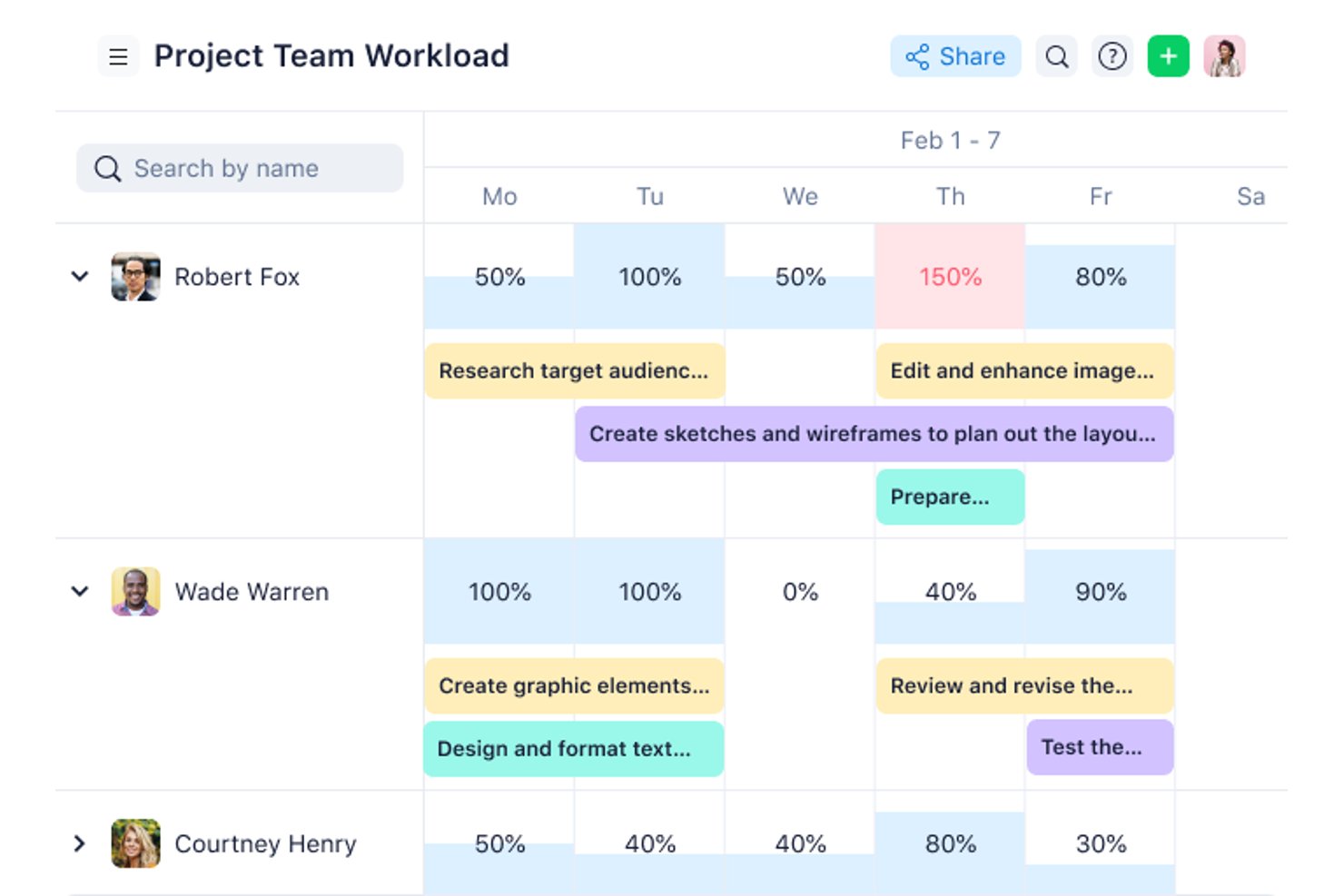
Wrike is a project management platform for cross-functional digital teams that need to coordinate tasks, deadlines, and approvals while keeping changing work visible across projects.
Who Is Wrike Best For?
Wrike suits design and marketing teams that need flexible workflows to coordinate creative projects, review cycles, and shifting campaign deadlines.
Why I Picked Wrike
I picked Wrike as a Hive alternative for “Best for agile design and marketing teams.” I like its proofing tools for gathering comments on creative assets and its approval workflows for tracking campaign sign-offs. Custom workflows let my team adjust project stages when briefs or launch dates change.
Wrike Key Features
- Gantt charts: View tasks, milestones, and dependencies on a project timeline.
- Workload charts: Review assignments and team capacity across projects.
- Custom dashboards: Track project data with configurable widgets.
- Time tracking: Record time directly on tasks.
Wrike Integrations
Wrike’s apps and integrations directory lists 60 options, including Slack, Google Workspace, Microsoft 365, Salesforce, Jira, Google Sheets, Miro, and Microsoft Teams. Wrike also supports Zapier and provides an API for custom integrations.
Pros and Cons
Pros:
- Workload charts reveal capacity across projects
- Gantt dependencies expose schedule impact
- Creative proofing keeps asset feedback contextual
Cons:
- Crowded interface obscures work across projects
- Workspace structures take care to configure
New Product Updates from Wrike
Wrike Adds Klaxoon MCP Integration
Wrike’s Klaxoon MCP integration is now generally available, enabling AI agents to navigate between Wrike tasks and attached whiteboards, read task context, and manage whiteboard attachments via API. For more information, visit Wrike's official site.

Best for connecting work to 850+ app integrations
For product and operations teams managing shifting priorities, monday AI Workspace combines project planning, task tracking, and team coordination in a configurable work management platform.
Who Is monday AI Workspace Best For?
It suits cross-functional product and operations teams that need to connect project work across 850+ app integrations.
Why I Picked monday AI Workspace
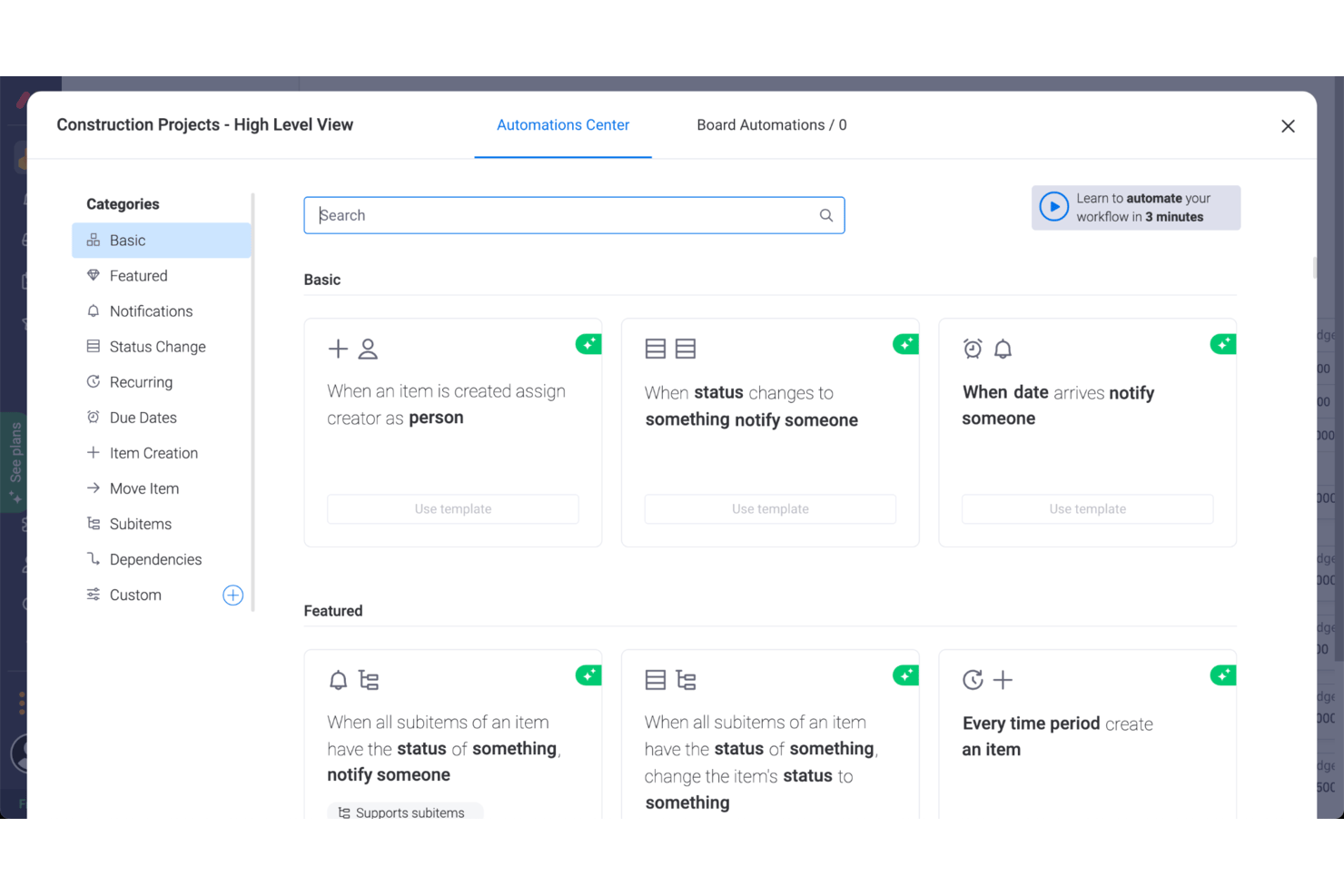
I picked monday AI Workspace for this Best Hive Competitors And Alternatives: Reviewed list because it’s “Best for connecting work to 850+ app integrations.” I like how teams can connect tools such as Slack and GitHub to work boards, then use automation recipes to trigger status changes as work moves. That keeps product and engineering handoffs visible without manually copying every update.
monday AI Workspace Key Features
- Gantt view: Map tasks across a timeline and track project dates.
- Task dependencies: Link tasks to show which work must happen first.
- Dashboards: Combine project data into customizable visual summaries.
- Kanban view: Move tasks across columns as their workflow status changes.
monday AI Workspace Integrations
monday AI Workspace offers access to 850+ integrations and apps, including Slack, GitHub, GitLab, Salesforce, HubSpot, Gmail, Google Calendar, Outlook, Microsoft Teams, and Zapier. monday.com also provides a GraphQL API for custom integrations.
Pros and Cons
Pros:
- Task updates keep ownership visible
- Cross-board dashboards clarify portfolio progress
- Configurable boards fit changing team workflows
Cons:
- Complex dependencies lack critical-path scheduling
- Large boards can lag or freeze
New Product Updates from monday AI Workspace
monday AI Workspace Adds Human Approval Routing
monday AI Workspace adds a human-in-the-loop approval block to AI Workflows, sending approval requests and routing workflow paths based on responses. For more information, visit monday AI Workspace's official site.

Quire
Best for breaking projects into unlimited subtasks
Quire is a project management platform for product and engineering teams that need to coordinate plans, track work, and keep shifting priorities visible across projects.
Who Is Quire Best For?
Product and engineering teams that need to coordinate complex work across projects and keep changing priorities visible.
Why I Picked Quire
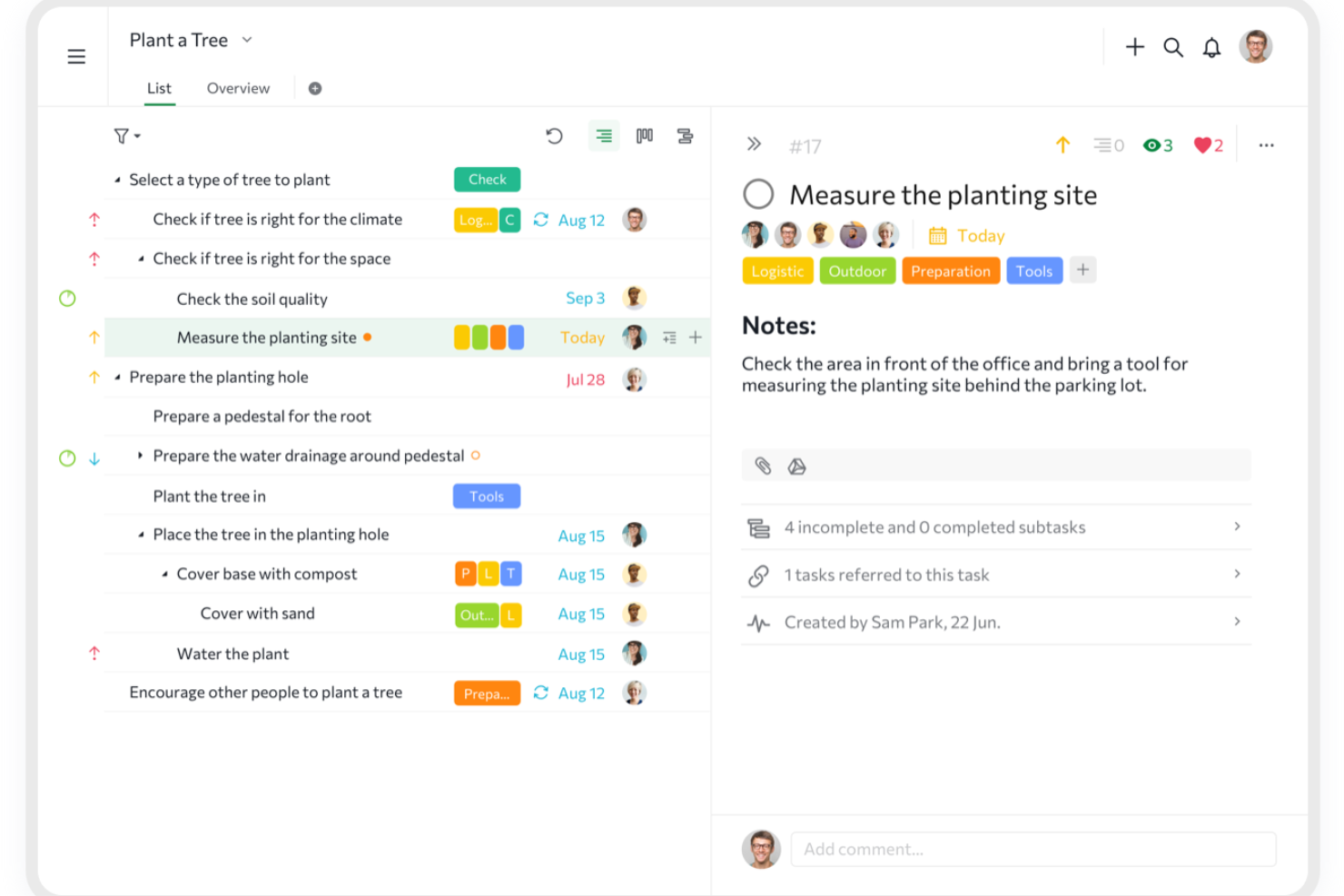
I picked Quire because its nested task tree fits the USP, Best for breaking projects into unlimited subtasks. I can split a product launch into workstreams and smaller deliverables, assign task owners, and switch to a Kanban board to track execution, making Quire a useful Hive alternative when plans need deep decomposition.
Quire Key Features
- Timeline view: Schedule tasks and view project dates along a timeline.
- Calendar view: See dated tasks and deadlines on a calendar.
- Task reminders: Set notifications for tasks ahead of their deadlines.
- Recurring tasks: Schedule tasks to repeat on a set cadence.
Quire Integrations
Quire offers integrations with Google Drive, Dropbox, Box, OneDrive, Microsoft Teams, Slack, GitHub, and Google Calendar, including two-way Google Calendar sync on the Premium plan. Its app directory also lists Zapier, and Quire provides an API for custom integrations.
Pros and Cons
Pros:
- Task-linked comments keep decisions beside deliverables
- Tree, Kanban, and timeline views support execution
- Deep task trees keep complex work legible
Cons:
- Offline work pauses until connectivity returns
- Reporting offers limited time and performance insight
New Product Updates from Quire
Quire Adds Custom Field Locking and Comment Reaction API Support
Quire adds custom field locking and API support for reading and setting emoji reactions on comments. These updates give teams more control over field data and expand comment interaction options for developers. For more information, visit Quire’s official site.
 .
.
Kantata
Best for professional services resource planning
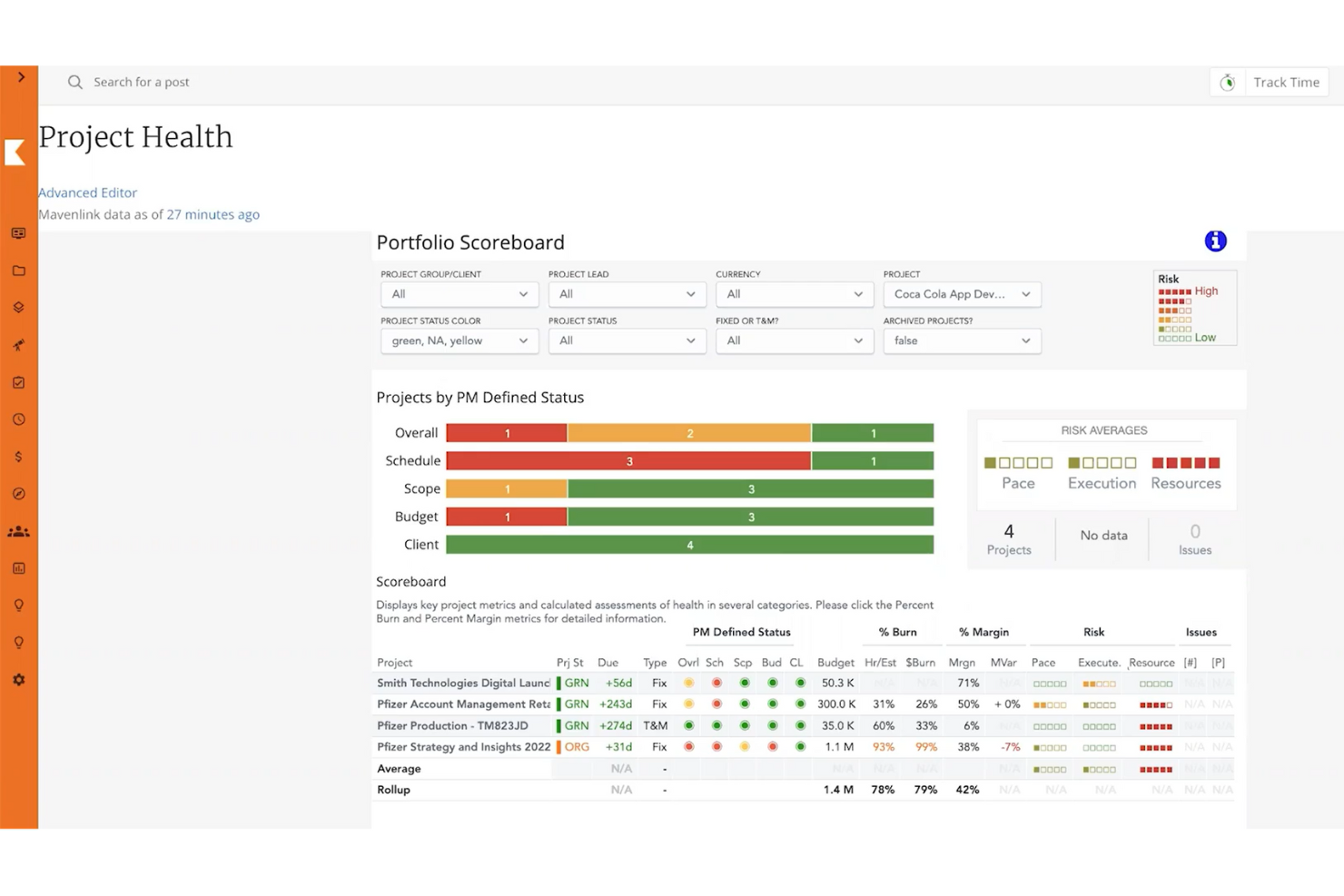
Kantata is a professional services automation platform for consulting and client-service teams, helping coordinate project delivery, people, and financials across client engagements.
Who Is Kantata Best For?
Kantata suits professional services firms that need to match consultants’ skills and availability to client project demand.
Why I Picked Kantata
I picked Kantata as a Hive alternative because it’s best for professional services resource planning. I like how its resource management helps match consultants’ skills and availability to project demand. Capacity and utilization views help me spot staffing gaps before they affect client engagement plans.
Kantata Key Features
- Project and portfolio management: View project details alongside consolidated portfolio data.
- Time and expense tracking: Record billable time and expenses across clients and projects.
- Project financials: Monitor project costs, financial targets, and burn.
- Kantata Pulse: Collect client and employee feedback during project delivery.
Kantata Integrations
Kantata advertises 1,200+ prebuilt connectors and documents integrations with Salesforce, Jira, Slack, Google Workspace, QuickBooks, HubSpot, BambooHR, Concur, and Sage Intacct; availability can vary by product and setup. It supports APIs for custom integrations and connects with Zapier.
Pros and Cons
Pros:
- Utilization and margin reports support delivery decisions
- Project and financial data share one view
- Skill-based staffing forecasts expose capacity gaps
Cons:
- Slow page loads interrupt project workflows
- Routine updates can require too many clicks
New Product Updates from Kantata

Kantata Adds Access Group Change History
Kantata adds Access Groups History, letting account administrators track changes to group details, membership, and permissions in Recent History. The update also makes these events available through the Subscribed Events API for broader monitoring. For more information, visit Kantata’s official site.
 .
.
Asana
Best for tracking tasks across cross-functional teams
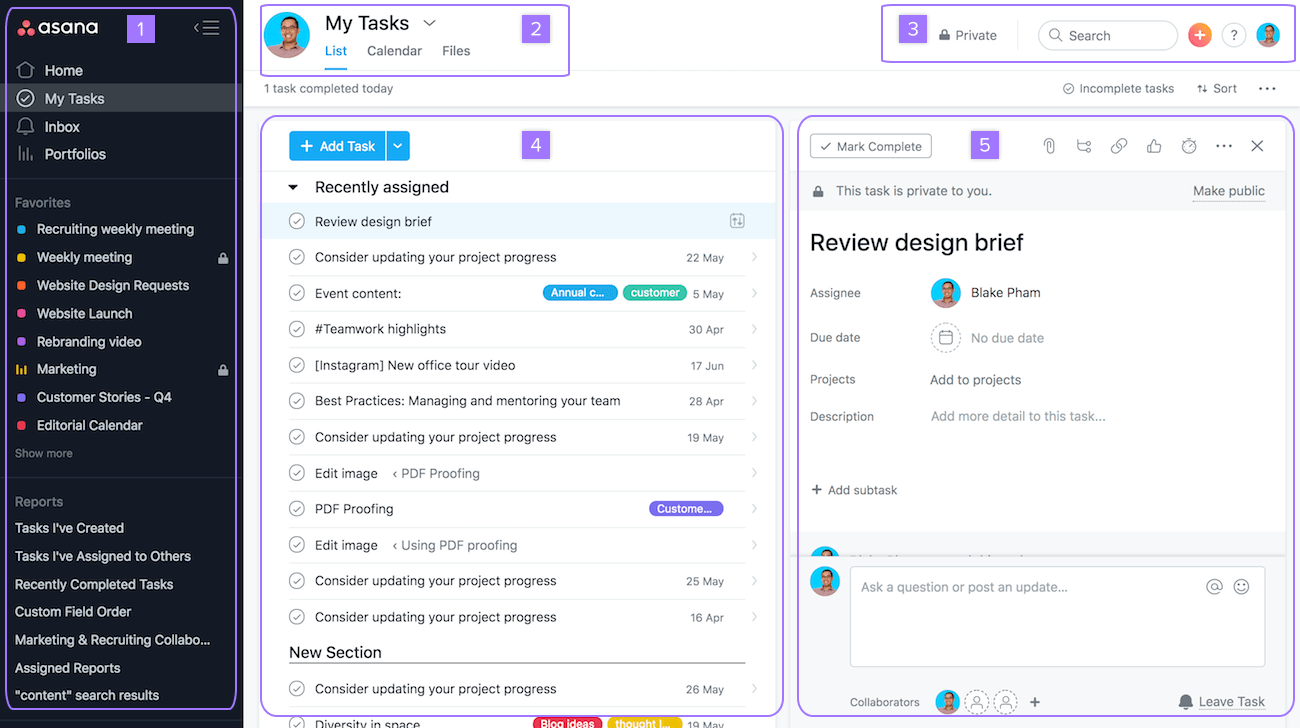
For product, engineering, and design teams juggling shifting priorities, Asana is a work management platform that brings project plans, tasks, and coordination into one shared workspace.
Who Is Asana Best For?
Asana suits project managers who need to assign and monitor work across departments while keeping owners and deadlines visible.
Why I Picked Asana
I picked Asana because it’s best for tracking tasks across cross-functional teams. I like how teams can assign tasks to clear owners, set due dates, and map dependencies, so product, design, and engineering can see who’s waiting on what. Shared project views help me track handoffs without losing task-level detail.
Asana Key Features
- Custom fields: Add details such as priority, status, or effort to tasks.
- Rules: Automate actions when tasks meet specified conditions.
- Forms: Collect project requests in a structured format.
- Portfolios: Group projects and review their status in one place.
Asana Integrations
Asana’s app directory lists integrations with Slack, Google Drive, Microsoft Teams, Jira Cloud, Salesforce, GitHub, and Zapier. Asana also provides an API for custom integrations.
Pros and Cons
Pros:
- Forms and rules standardize project intake
- Multi-homing keeps shared tasks aligned
- Dependencies clarify cross-team handoffs
Cons:
- No native technical sprint tools
- Busy projects can trigger notification overload
- Tasks allow only one assignee

ClickUp
Best for similar features at a lower price

ClickUp brings tasks, docs, goals, and team collaboration into customizable workflows, helping tech teams coordinate dependencies and adapt as project priorities change.
Who Is ClickUp Best For?
ClickUp suits tech project managers who want broad work-management capabilities for cross-functional delivery without a high per-seat cost.
Why I Picked ClickUp
I picked ClickUp as a Hive alternative because it brings task dependencies and customizable statuses into project workflows. I also like that teams can connect project tasks with Docs and Goals, keeping delivery details and targets in one workspace. It’s a fit for “Best for similar features at a lower price.”
ClickUp Key Features
- Multiple project views: Switch between List, Board, Calendar, Gantt, and Timeline views.
- Workflow automations: Set triggers and actions for recurring task updates.
- Time tracking: Log time against tasks and review timesheets.
- Dashboards: Create reports from project data with customizable cards.
ClickUp Integrations
ClickUp documents native integrations with Slack, GitHub, GitLab, Bitbucket, Azure DevOps, Google Drive, Google Calendar, Microsoft Teams, Zoom, and Zapier. It also offers a public API and webhooks for custom integrations.
Pros and Cons
Pros:
- Gantt and timeline views expose cross-team dependencies
- Docs and goals connect tasks to targets
- Custom statuses and dependencies clarify handoffs
Cons:
- Large projects can trigger slow loading
- Extensive setup can overwhelm new team members
New Product Updates from ClickUp
ClickUp Adds Meetings Hub, Super Agent Templates, and ZoomInfo Integration
ClickUp adds a searchable Meetings Hub, new ways to clone and template Super Agents, and a ZoomInfo integration through the App Center. These updates improve meeting retrieval, agent reuse, and access to sales intelligence. For more information, visit ClickUp’s official site.

Scoro
Best for project-to-invoice KPI visibility
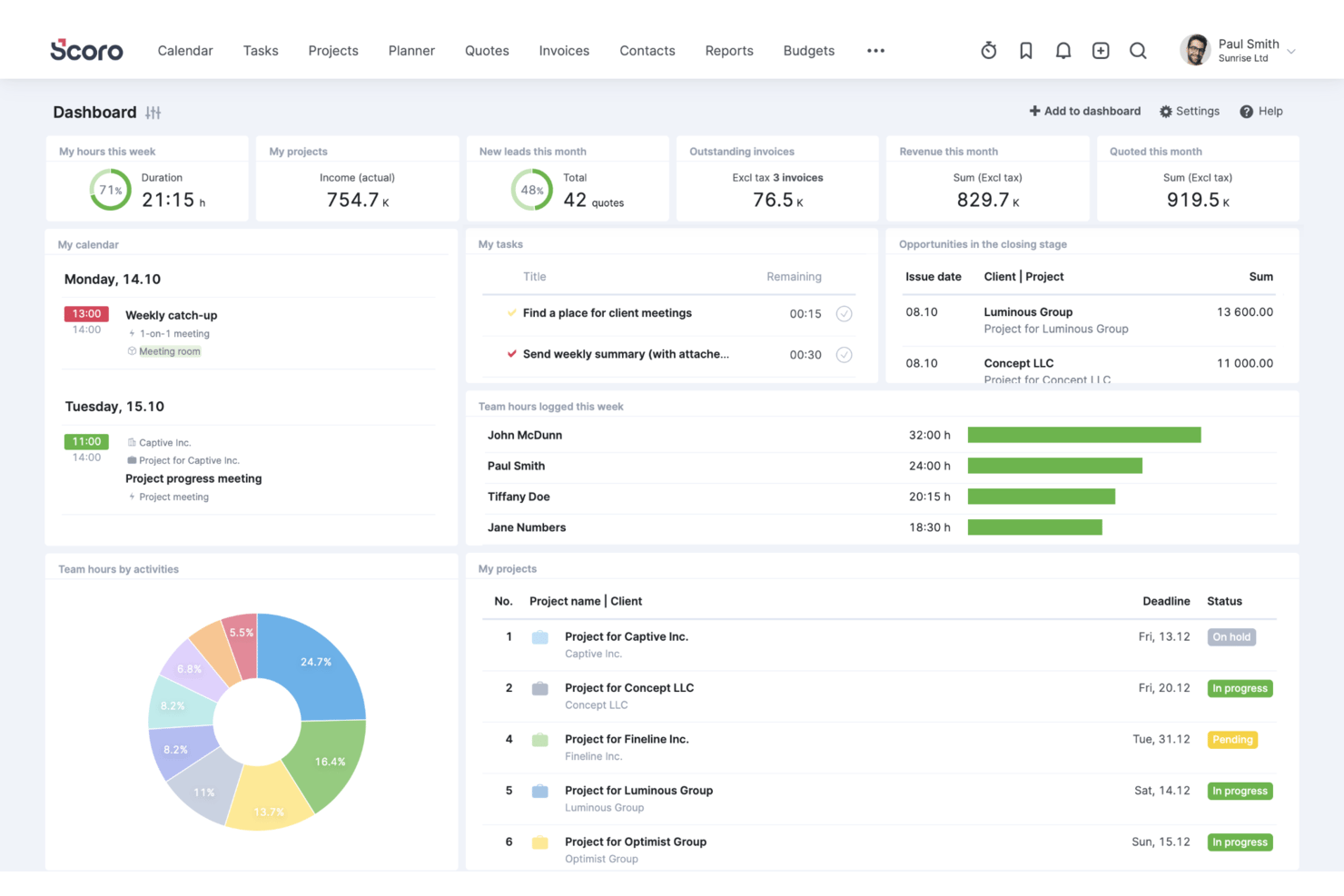
Scoro is work management software for professional services firms, helping agencies and consultancies plan projects, coordinate teams, track work, and manage client delivery in one system.
Who Is Scoro Best For?
Scoro suits agency and consulting project managers who need to connect delivery performance with budgets, utilization, and invoicing.
Why I Picked Scoro
I picked Scoro because it links project delivery with budgets, utilization, and invoicing rather than stopping at task status. Tracking project budgets and team utilization alongside invoices gives me project-to-invoice KPI visibility, such as spotting budget pressure while work is underway. That makes it a relevant Hive alternative when I need to review delivery health alongside financial outcomes.
Scoro Key Features
- Project templates: Create projects with predefined tasks and milestones.
- Gantt charts: View project timelines and progress, then share charts with stakeholders.
- CRM and pipeline: Track sales opportunities before they become projects.
- Integrations: Connect Scoro with tools including Google, Microsoft, Dropbox, and Salesforce.
Scoro Integrations
Scoro offers 40+ native integrations, including Salesforce, BambooHR, and Google Calendar. It also supports Zapier and provides an API for custom integrations.
Pros and Cons
Pros:
- Links estimates, tasks, time, and billing
- Shows utilization and profitability alongside project status
- Connects project delivery with budgets and invoices
Cons:
- Mobile app lacks full project dashboards
- Project setup and task creation feel cumbersome
New Product Updates from Scoro

Scoro Adds Time Mobile App and ELI Improvements
Scoro adds the Scoro Time mobile app for iOS/Android to track time anywhere and expands ELI with attachments, smarter filtering, and trigger-based actions. For more information, visit Scoro's official site.

Celoxis
Best for enterprise financial and portfolio tracking
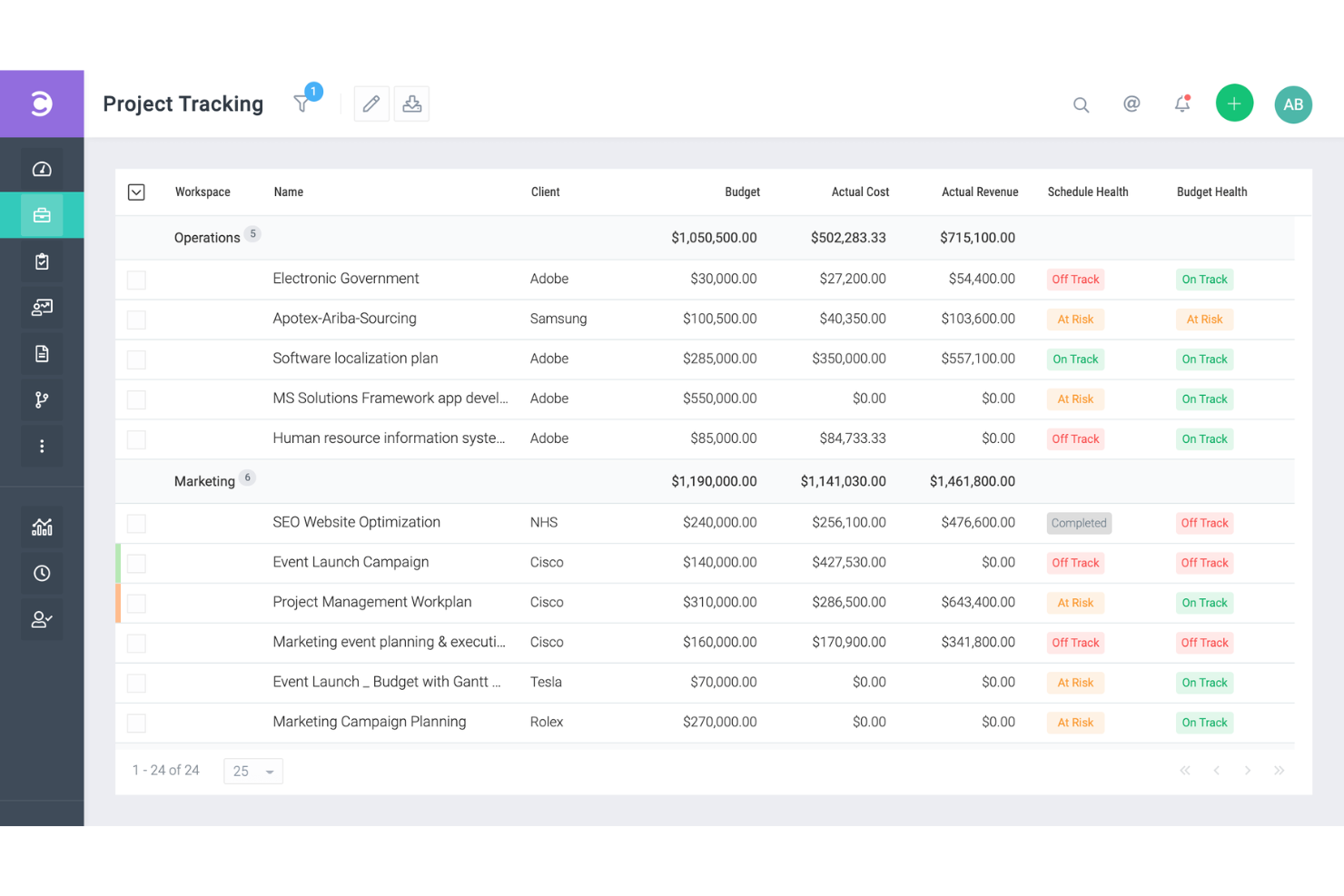
Celoxis is a project management platform for growing and enterprise teams that need to coordinate schedules, resources, and dependencies across complex work while keeping stakeholders aligned.
Who Is Celoxis Best For?
PMO leaders at midsize and large organizations who need portfolio-level financial oversight alongside project planning will find Celoxis a good fit.
Why I Picked Celoxis
I picked Celoxis for enterprise financial and portfolio tracking because it connects project plans with budget and cost data. I like that its financial tracking covers planned versus actual costs, while portfolio dashboards help me monitor project health and milestones across workstreams. That makes it easier to spot budget variances before they affect delivery.
Celoxis Key Features
- Interactive Gantt charts: View project schedules, dependencies, and baselines on a timeline.
- Timesheets: Record time against project tasks.
- Capacity planning: Review resource availability and allocation across projects.
- Workflow automation: Set rules to automate task updates and actions.
Celoxis Integrations
Celoxis offers 21 native integrations, including Jira, Azure DevOps, GitHub, Microsoft 365, Google Drive, Slack, Salesforce, QuickBooks Online, and Trello. It also connects with Zapier and provides a REST API for custom integrations.
Pros and Cons
Pros:
- Portfolio views reveal workload and project risks
- Gantt charts map dependencies and critical paths
- Tracks budgets against actual project costs
Cons:
- Advanced reports require setup and configuration
- Dense interface slows routine navigation

Accelo
Best for client work billed by time and margin
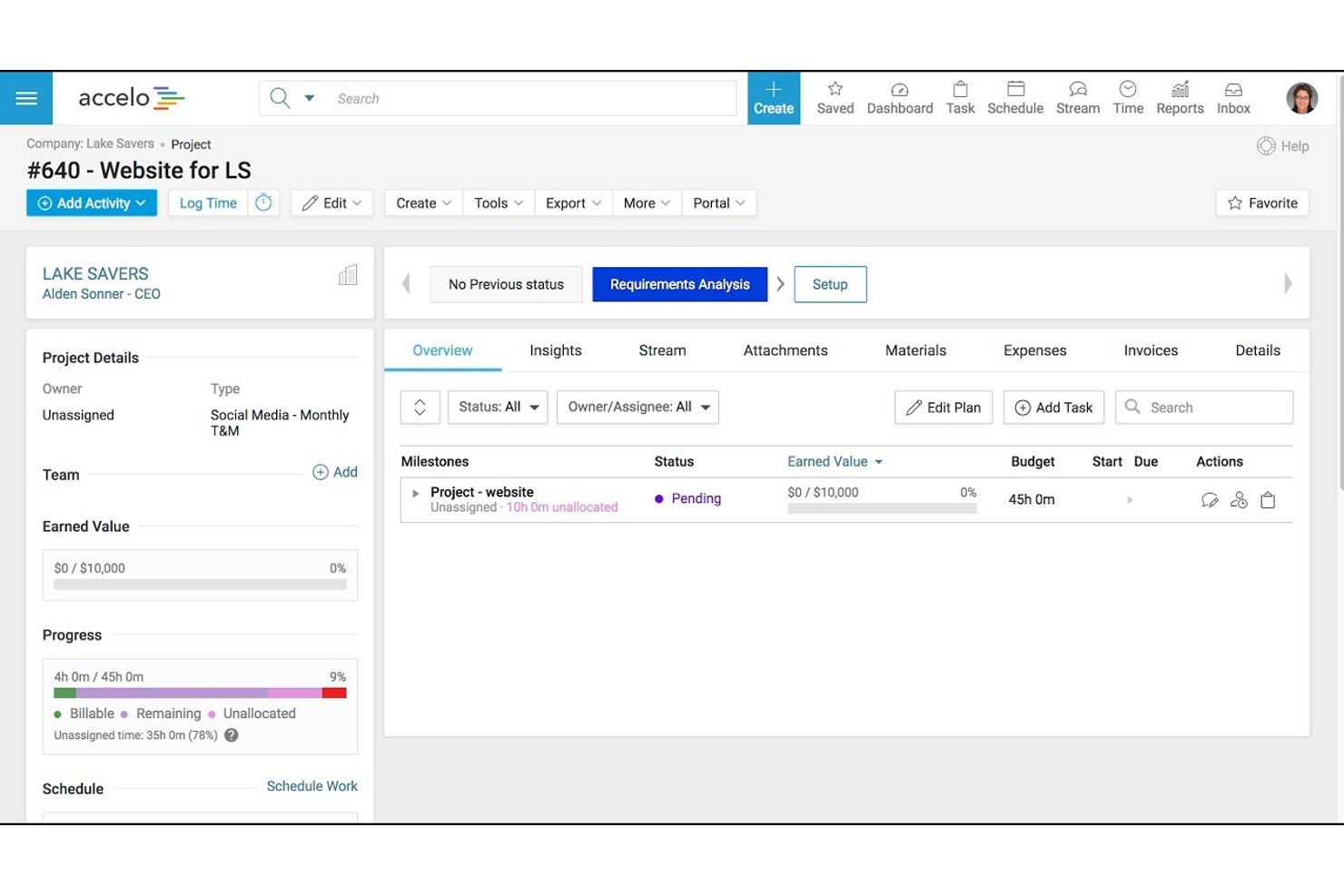
Accelo is a professional services automation platform for client-facing teams, connecting project delivery and client work to help agencies and consultancies coordinate engagements and track progress.
Who Is Accelo Best For?
Accelo suits agencies and consultancies that need to manage client engagements, billable time, and project margins in one workflow.
Why I Picked Accelo
I picked Accelo for “Best for client work billed by time and margin” work. Its project tracking connects logged time and billable hours to project budgets, helping me spot when an engagement is running over its planned effort. Accelo also ties client work to billing, so I can track delivery and margin in the same workflow.
Accelo Key Features
- Gantt charts: Build project plans with drag-and-drop scheduling.
- Client portal: Share project updates and collaborate with clients.
- Email capture: Automatically capture emails for project collaboration.
- Project templates: Create projects from reusable templates.
Accelo Integrations
Accelo lists 25 integrations, including HubSpot, Salesforce, Jira, Google Workspace, Microsoft 365, QuickBooks, Xero, Slack, and Zapier. It also offers a RESTful API and Forms API for custom integrations.
Pros and Cons
Pros:
- Supports reusable estimates and project templates
- Keeps client emails and project activity together
- Links billable hours to budgets and margins
Cons:
- Setup and dense workflows slow adoption
- Reports can be difficult to simplify
New Product Updates from Accelo

Accelo Rebuilds Mobile App for Project and Time Management
Accelo rebuilds its mobile app with task management, new work creation, and mobile timesheets for Forecast customers. This helps teams keep project and time data current while working away from a desktop. For more information, visit Accelo’s official site.

Screendragon
Best for growing marketing and agency teams
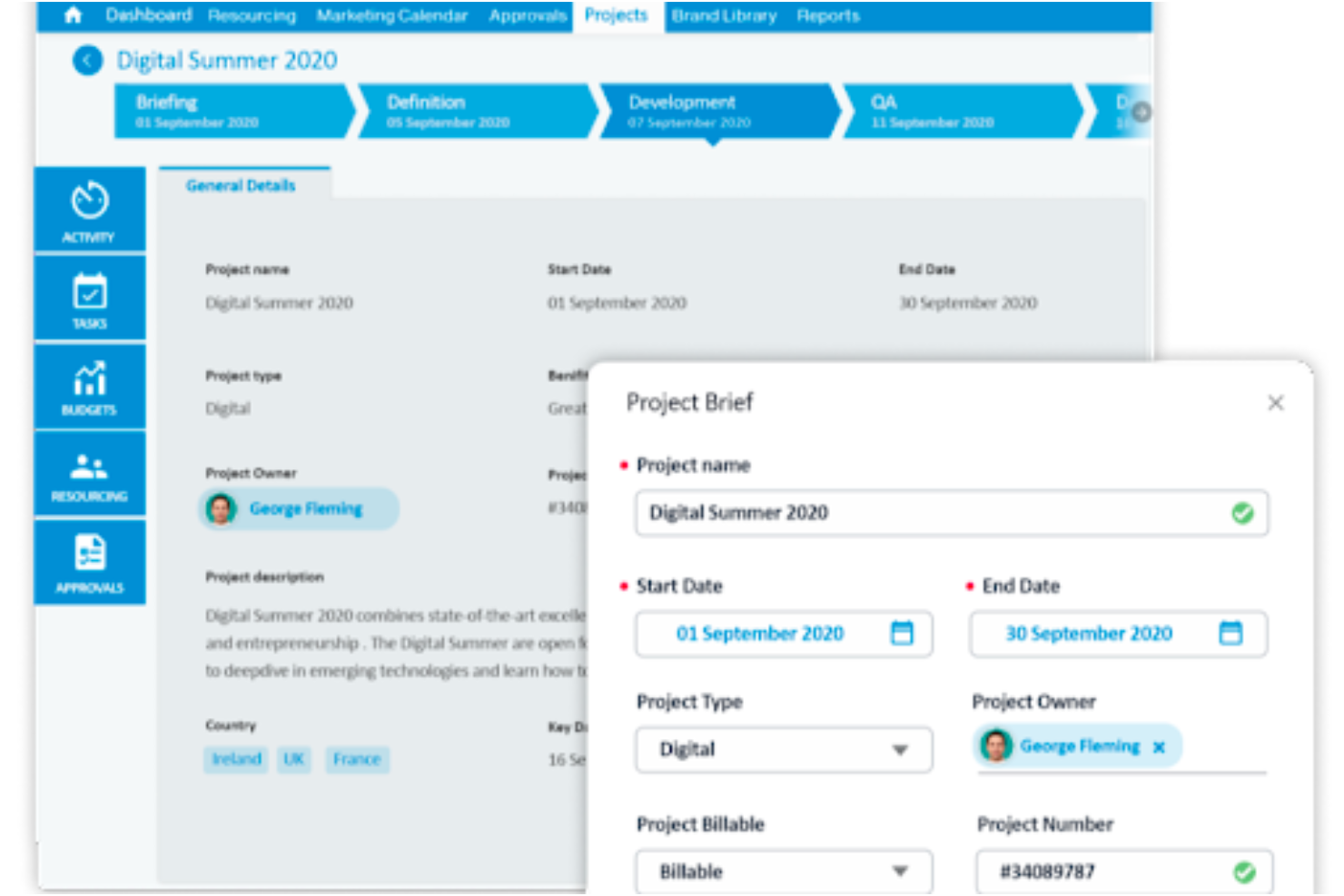
Screendragon is a work management platform for marketing teams and agencies that need to coordinate campaign tasks, creative approvals, and deadlines across growing workloads.
Who Is Screendragon Best For?
Screendragon suits marketing operations and agency delivery leads who need a shared system to manage work across expanding teams.
Why I Picked Screendragon
I picked Screendragon as a Hive alternative because it’s built for Best for growing marketing and agency teams. I like how it brings campaign tasks, creative approvals, and deadlines into one shared work management platform. That gives marketing teams a place to coordinate reviews and keep campaign work moving as workloads grow.
Screendragon Key Features
- Resource and capacity planning: Forecast demand and assign work by skills, availability, and team capacity.
- Budget tracking: Track planned and actual spend against budgets.
- Custom dashboards: View real-time milestones, budgets, and KPI data.
- Integrations: Connect with tools such as Jira, Google Drive, and SAP.
Screendragon Integrations
Screendragon lists pre-built integrations with Aprimo, HubSpot, Microsoft Teams, Microsoft Power BI, Sitecore, Ziflow, Vidmob, Brandfolder, Smartsheet, and Workato. It also offers a REST API and a connection manager for custom integrations.
Pros and Cons
Pros:
- Resource forecasts connect with budget tracking
- Approval trails keep creative reviews traceable
- Configurable workflows fit agency processes
Cons:
- Multiple approvals can slow complex projects
- Complex setup takes time to configure
New Product Updates from Screendragon
Screendragon Unveils New AI Hub
Screendragon introduced AI Hub, a new capability that lets teams build and manage AI agents directly within workflows. The update helps marketing teams automate tasks, maintain governance controls, and scale AI-driven operations more efficiently. For more information, visit Screendragon's official site.
Other Hive Alternatives
Here are some additional Hive alternatives that didn’t make it onto my shortlist, but which are still worth checking out.
- Resource Guru
For capacity planning across teams
- GoodDay
For building a workspace around your workflow
- Smartsheet
For spreadsheet-style project tracking
- Zoho Projects
For Zoho ecosystem project tracking
- Teamwork.com
For client work with built-in time billing
- MeisterTask
For turning mind maps into tracked tasks
- Ravetree
For billable team resource planning
- Rocketlane
For client-facing delivery teams
- Workzone
For portfolio-wide deadline visibility
- Bonsai Agency Software
For live budget and margin tracking


How I Evaluate Hive Alternatives
I evaluate Hive alternatives in two layers: the baseline a tool must hit to manage real projects, and the differentiators like intake forms or portfolio views that set the best fits apart.
Core Functionality (Table Stakes For This List)
When I'm selecting tools for my list, I rank each one on a scale from 0 (does not offer the functionality) to 5 (excels in this area) for each core functionality listed below. Then, I calculate the tool's total score into a percentage. Each tool needs to achieve a minimum total score of 75% to be considered for inclusion.
- Multiple Project Views: I check whether you can switch between Kanban, Gantt, calendar, timeline, and list views so teams can pick the layout that fits their workflow.
- Task & Subtask Management: Setting up task hierarchies with dependencies, assignees, and due dates matters—especially when a single sprint has dozens of moving pieces.
- Team Collaboration Tools: I look for in-context comments, @mentions, file sharing, and ideally built-in chat so conversations stay tied to the work instead of scattered across apps.
- Workflow Automation: I evaluate whether the tool lets you build rules like auto-assigning tasks when a status changes or triggering notifications when a deadline is approaching.
- Time & Resource Tracking: Workload views and time logging help project managers spot over-allocated team members before burnout hits, so I look at how granular these features are.
- Reporting & Dashboards: Customizable dashboards that pull metrics across multiple projects give leadership the visibility they need without requiring manual status updates every week.
Once I have a list of tools that meet this criteria, I consider what sets each platform apart.
Differentiating Factors (What Sets Vendors Apart)
Here's how I compare and contrast different vendors:
Standout Features
I look for built-in form and intake management that routes requests directly into projects—this saves teams from manually triaging emails or Slack messages. Portfolio management is another separator, letting PMO leads track health across multiple initiatives from a single view. For agency teams, I evaluate whether a tool offers client and guest access so external stakeholders can review work without occupying a paid seat.
Beyond Features
Pricing structure matters a lot when switching from Hive—I check whether per-user costs stay reasonable as your team scales, and whether a free tier exists for smaller groups still evaluating the tool. Integration depth is equally important. A PM platform that syncs with Slack, Google Drive, and GitHub keeps your existing stack intact instead of forcing workarounds. I also evaluate onboarding support, specifically whether the vendor provides import wizards and templates that shorten the migration timeline from weeks to days.
Wie ich Hive-Alternativen bewerte
Ich bewerte Hive-Alternativen auf zwei Ebenen: anhand der Grundanforderungen, die ein Tool zur Verwaltung echter Projekte erfüllen muss, und anhand von Unterscheidungsmerkmalen wie Aufnahmeformularen oder Portfolioansichten, die die am besten geeigneten Lösungen hervorheben.
Kernfunktionen (Grundvoraussetzungen für diese Liste)
Bei der Auswahl der Tools für meine Liste bewerte ich jedes Tool für jede der unten aufgeführten Kernfunktionen auf einer Skala von 0 (bietet die Funktion nicht) bis 5 (zeichnet sich in diesem Bereich aus). Anschließend rechne ich die Gesamtpunktzahl des Tools in einen Prozentsatz um. Jedes Tool muss eine Mindestgesamtpunktzahl von 75 % erreichen, um für die Aufnahme berücksichtigt zu werden.
- Mehrere Projektansichten: Ich prüfe, ob man zwischen Kanban-, Gantt-, Kalender-, Zeitachsen- und Listenansichten wechseln kann, damit Teams das Layout auswählen können, das zu ihrem Arbeitsablauf passt.
- Aufgaben- und Unteraufgabenverwaltung: Das Einrichten von Aufgabenhierarchien mit Abhängigkeiten, Verantwortlichen und Fälligkeitsdaten ist wichtig – insbesondere wenn ein einzelner Sprint Dutzende voneinander abhängiger Aufgaben umfasst.
- Tools für die Teamzusammenarbeit: Ich achte auf kontextbezogene Kommentare, @Erwähnungen, Dateifreigaben und idealerweise einen integrierten Chat, damit Gespräche mit der Arbeit verknüpft bleiben, anstatt sich über verschiedene Apps zu verteilen.
- Workflow-Automatisierung: Ich bewerte, ob das Tool den Aufbau von Regeln ermöglicht, etwa das automatische Zuweisen von Aufgaben bei einer Statusänderung oder das Auslösen von Benachrichtigungen, wenn eine Frist näher rückt.
- Zeiterfassung und Ressourcenplanung: Auslastungsansichten und Zeiterfassung helfen Projektmanagern, überlastete Teammitglieder zu erkennen, bevor es zum Burnout kommt. Daher achte ich darauf, wie detailliert diese Funktionen sind.
- Berichte und Dashboards: Anpassbare Dashboards, die Kennzahlen aus mehreren Projekten zusammenführen, geben Führungskräften die benötigte Übersicht, ohne dass jede Woche manuelle Statusaktualisierungen erforderlich sind.
Sobald ich eine Liste von Tools zusammengestellt habe, die diese Kriterien erfüllen, prüfe ich, wodurch sich die einzelnen Plattformen voneinander unterscheiden.
Unterscheidungsmerkmale (Was Anbieter voneinander abhebt)
So vergleiche ich die verschiedenen Anbieter miteinander:
Hervorstechende Funktionen
Ich achte auf integriertes Formular- und Anfrage-Management, das Anfragen direkt in Projekte weiterleitet – so müssen Teams E-Mails oder Slack-Nachrichten nicht manuell vorsortieren. Das Portfoliomanagement ist ein weiteres Unterscheidungsmerkmal, mit dem PMO-Leitungen den Zustand mehrerer Initiativen in einer einzigen Ansicht verfolgen können. Bei Agenturteams prüfe ich, ob ein Tool Kunden- und Gastzugriff bietet, damit externe Beteiligte die Arbeit überprüfen können, ohne einen kostenpflichtigen Nutzerplatz zu belegen.
Über die Funktionen hinaus
Die Preisstruktur ist beim Wechsel von Hive besonders wichtig – ich prüfe, ob die Kosten pro Nutzer bei wachsendem Team angemessen bleiben und ob es einen kostenlosen Tarif für kleinere Gruppen gibt, die das Tool noch prüfen. Die Integrationstiefe ist ebenso wichtig. Eine PM-Plattform, die mit Slack, Google Drive und GitHub synchronisiert wird, hält den bestehenden Technologiestack intakt, anstatt Workarounds zu erzwingen. Außerdem bewerte ich die Unterstützung bei der Einführung, insbesondere ob der Anbieter Importassistenten und Vorlagen bereitstellt, die den Migrationszeitraum von Wochen auf Tage verkürzen.
Why Might You Need a Hive Alternative?
You need to connect Hive to other tools you’re already using
Hive offers all the basic integrations. If you need industry-specific ones to really bring all tools under one hood, consider looking over the list of integrations Hive competitors provide first.
You want different features to streamline complex projects
Hive doesn’t yet come with an invoicing module. So whether you want to bill your clients or keep track of accounting data, other alternatives will help you get paid for your projects with just a couple of clicks.
You’re looking to reduce costs
Hive isn’t the most expensive solution on the market, but there are cheaper alternatives that provide the exact same features under a different user interface.
Key Features for a Viable Hive Alternative
Advanced time tracking
A time tracking module isn’t a must for project management tools but it’s a viable asset to your projects. Hive provides different time tracking options, timesheets, and real-time reporting for your team members you don’t want to miss when switching to an alternative.
An intuitive interface
Hive mimics Slack’s UI, making it extra easy for new users to get used to working in Hive. Good news is there are other project management apps with a low learning curve out there. Each has its own particularities that make it more suitable for certain users who’ve worked within a similar interface organization before.
Team collaboration
It’s difficult to find the best alternative with better collaboration features. So the teamwork solutions you’re considering need to have at least the communication options you’re using on a daily basis.
Customization options for analytics
You can access and customize over 50 interactive dashboards that make use of machine learning to provide realistic insights of your team’s activity. If you’re considering scaling up your team and projects, you’ll need reporting capabilities at a portfolio management level.
What's Next?
If you're in the process of researching hive alternative, connect with a SoftwareSelect advisor for free recommendations.
You fill out a form and have a quick chat where they get into the specifics of your needs. Then you'll get a shortlist of software to review. They'll even support you through the entire buying process, including price negotiations.