


Filestage Review: Pros, Cons, Features & Pricing



Filestage is a workflow management software built around content review and approval—giving teams a structured way to collect feedback, manage revision rounds, and get sign-off on creative assets. It's worth considering if your team is losing time to scattered email threads and disconnected feedback. When compared to Ziflow, it offers a more intuitive review experience that's faster to set up and easier for external stakeholders to use without a learning curve.
Filestage Evaluation Summary

- From $199/month
- 30-day free trial + free plan + free demo available
Why Trust Our Software Recommendations
Our team has been testing and reviewing software since 2012. As project managers ourselves, we know how difficult—and important—it is to choose the right software.
For this guide, we evaluated tools using hands-on testing and independent research, scoring tools using our selection criteria. We also draw on insights from industry thought leaders and practicing project management experts.
Our reviews reflect our human editorial judgment, not a sales pitch.
Expert reviewers:
Filestage Overview
Filestage excels in simplifying feedback and approval processes, making it a standout choice for teams that need efficient collaboration.
pros
-
You can review and approve files easily with a clean, intuitive interface.
-
Your team can leave precise feedback using visual annotations and comment threads.
-
You can manage multiple projects and reviewers without confusion or clutter.
cons
-
You may experience slower loading times with large or complex files.
-
Your team might need time to adjust to advanced workflow settings.
-
You can’t fully customize notifications and approval stages to match all team needs.
Is Filestage Right For Your Needs?
Who Would be a Good Fit for Filestage?
Filestage is ideal for marketing teams in advertising and media industries where fast-paced collaboration is crucial. Its intuitive interface and efficient feedback tools help you manage content reviews smoothly, ensuring your team stays aligned and productive.
-
Creative Agencies
Filestage simplifies client feedback on visual projects, making it a great choice for agencies handling multiple campaigns.
-
Marketing Departments
It streamlines the approval process for marketing materials, helping your team to keep projects on track.
-
Video Production
With Filestage, you can easily manage video reviews and approvals, essential for production teams needing timely feedback.
-
Graphic Design Teams
Its visual annotation tools make it perfect for design teams needing precise feedback on artwork.
-
Publishing Companies
Filestage aids in managing editorial reviews and approvals, crucial for publishing workflows.
-
Freelancers
The platform helps freelancers manage client feedback efficiently, saving time and improving client satisfaction.
Who Would be a Bad Fit for Filestage?
Filestage may not suit small businesses or teams with minimal content review needs, as its robust features could be more than you require. If your team only occasionally needs to gather feedback, the investment in a comprehensive tool like Filestage might not justify the returns compared to simpler alternatives.
-
Small Startups
For startups with limited content review tasks, Filestage’s advanced features might be overkill.
-
Solo Entrepreneurs
If you’re a solo entrepreneur with minimal collaboration needs, Filestage’s capabilities might go underutilized.
-
Non-Creative Industries
Industries focused on non-visual content might not benefit from Filestage’s visual feedback tools.
-
Occasional Users
Teams that rarely engage in content reviews may find the platform’s features excessive.
-
Low Budget Teams
Filestage’s pricing could be a barrier for teams with tight budgets not needing its full suite.
-
Traditional Offices
Offices relying on in-person feedback might not need an online proofing tool like Filestage.
Our Review Methodology
How We Test & Score Tools
We’ve spent years building, refining, and improving our software testing and scoring system. The rubric is designed to capture the nuances of software selection and what makes a tool effective, focusing on critical aspects of the decision-making process.
Below, you can see exactly how our testing and scoring works across seven criteria. It allows us to provide an unbiased evaluation of the software based on core functionality, standout features, ease of use, onboarding, customer support, integrations, customer reviews, and value for money.
Core Functionality (25% of final scoring)
The starting point of our evaluation is always the core functionality of the tool. Does it have the basic features and functions that a user would expect to see? Are any of those core features locked to higher-tiered pricing plans? At its core, we expect a tool to stand up against the baseline capabilities of its competitors.
Standout Features (25% of final scoring)
Next, we evaluate uncommon standout features that go above and beyond the core functionality typically found in tools of its kind. A high score reflects specialized or unique features that make the product faster, more efficient, or offer additional value to the user.
We also evaluate how easy it is to integrate with other tools typically found in the tech stack to expand the functionality and utility of the software. Tools offering plentiful native integrations, 3rd party connections, and API access to build custom integrations score best.
Ease of Use (10% of final scoring)
We consider how quick and easy it is to execute the tasks defined in the core functionality using the tool. High scoring software is well designed, intuitive to use, offers mobile apps, provides templates, and makes relatively complex tasks seem simple.
Onboarding (10% of final scoring)
We know how important rapid team adoption is for a new platform, so we evaluate how easy it is to learn and use a tool with minimal training. We evaluate how quickly a team member can get set up and start using the tool with no experience. High scoring solutions indicate little or no support is required.
Customer Support (10% of final scoring)
We review how quick and easy it is to get unstuck and find help by phone, live chat, or knowledge base. Tools and companies that provide real-time support score best, while chatbots score worst.
Customer Reviews (10% of final scoring)
Beyond our own testing and evaluation, we consider the net promoter score from current and past customers. We review their likelihood, given the option, to choose the tool again for the core functionality. A high scoring software reflects a high net promoter score from current or past customers.
Value for Money (10% of final scoring)
Lastly, in consideration of all the other criteria, we review the average price of entry level plans against the core features and consider the value of the other evaluation criteria. Software that delivers more, for less, will score higher.
Core Features
Visual Annotations
You can mark up files directly with comments and notes, making it easy for your team to provide clear feedback on visuals.
Version Control
Filestage tracks revisions and allows you to compare different versions, ensuring you stay on top of changes.
Approval Workflows
Set up custom workflows to streamline the approval process, so your team knows what needs attention and when.
Task Management
Assign tasks directly within the platform, keeping your review process organized and efficient.
Comment Threads
Engage in threaded conversations, allowing your team to discuss feedback in a focused manner.
File Sharing
Easily share files with stakeholders for review, ensuring everyone has access to the latest versions.

Standout Features
Customizable Branding
You can brand the platform with your own logo and colors, providing a consistent brand experience for your clients.
Real-Time Collaboration
Collaborate with your team in real-time, allowing for immediate feedback and faster project turnaround.
Ease of Use
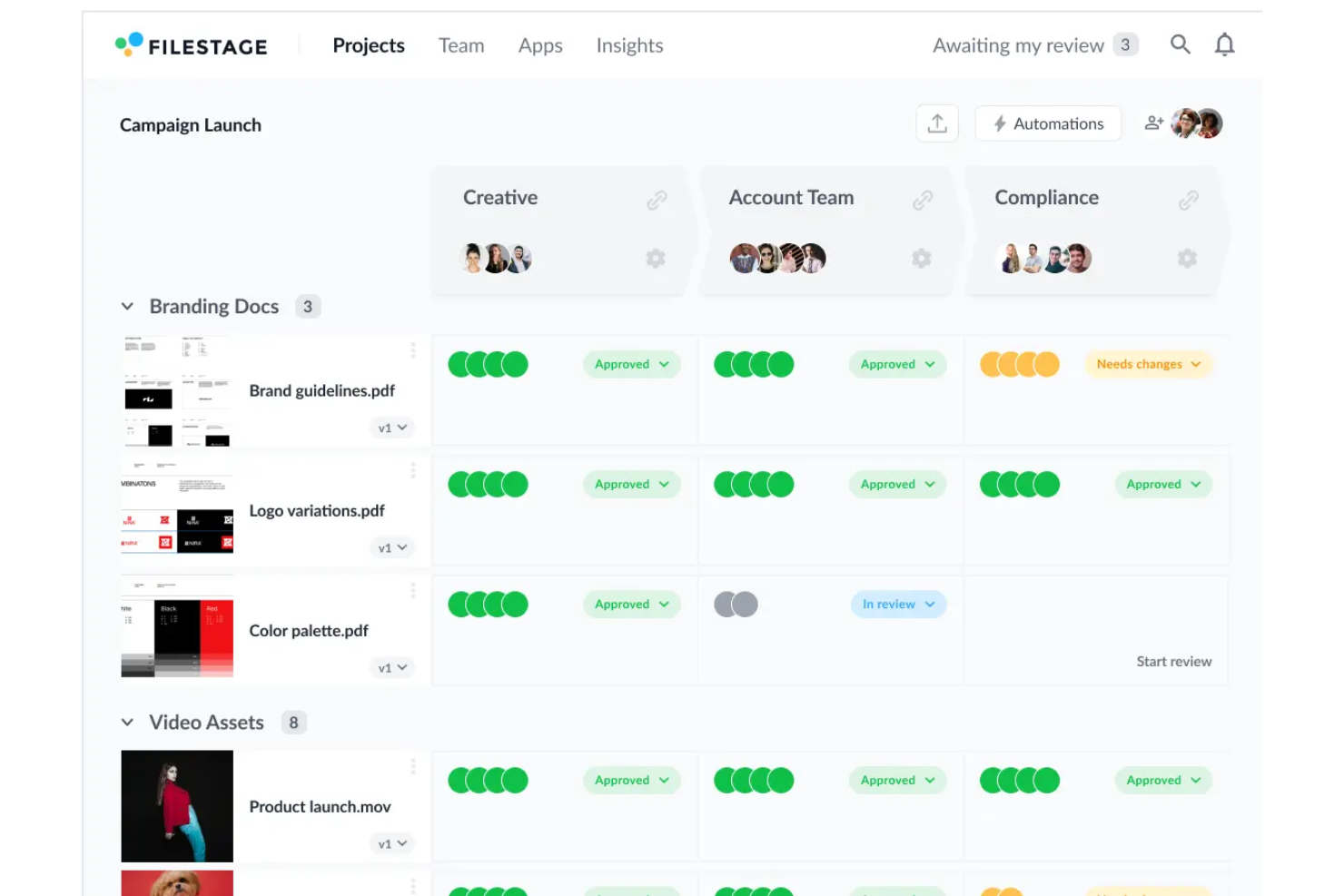
Filestage stands out for its clean, intuitive interface that makes reviewing and approving content simple for all users. You can drag and drop files, leave comments directly on assets, and track feedback in real time without confusion. Its minimal learning curve and organized layout help your team collaborate efficiently and stay focused on creative work.

Onboarding
Filestage makes getting started smooth with a short setup process and clear in-app guides. You can upload files, invite reviewers, and begin collecting feedback within minutes. Users appreciate the step-by-step tutorials, helpful tooltips, and responsive support team that make adoption easy. Its intuitive interface ensures your team sees value right away without a steep learning curve.
Customer Support
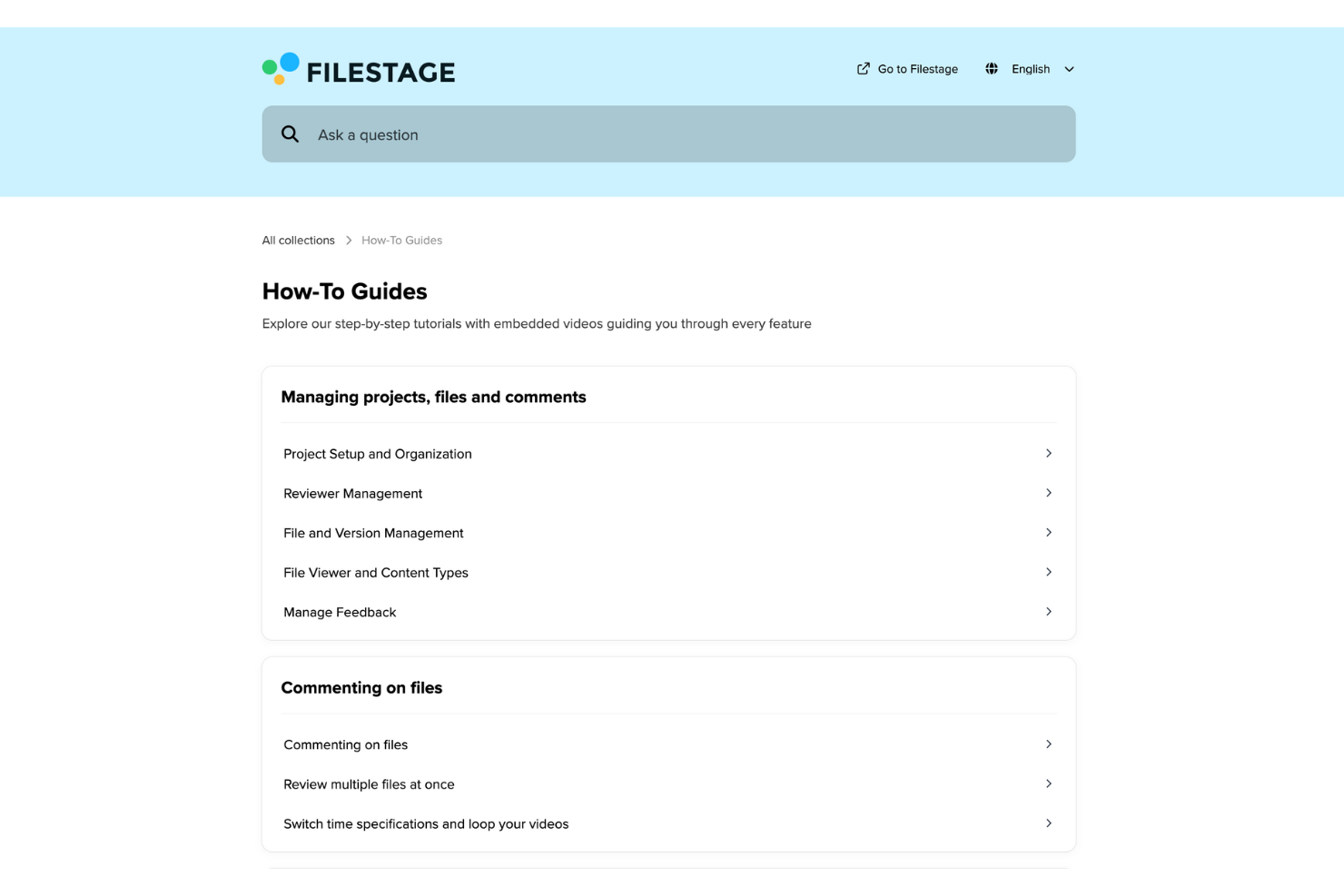
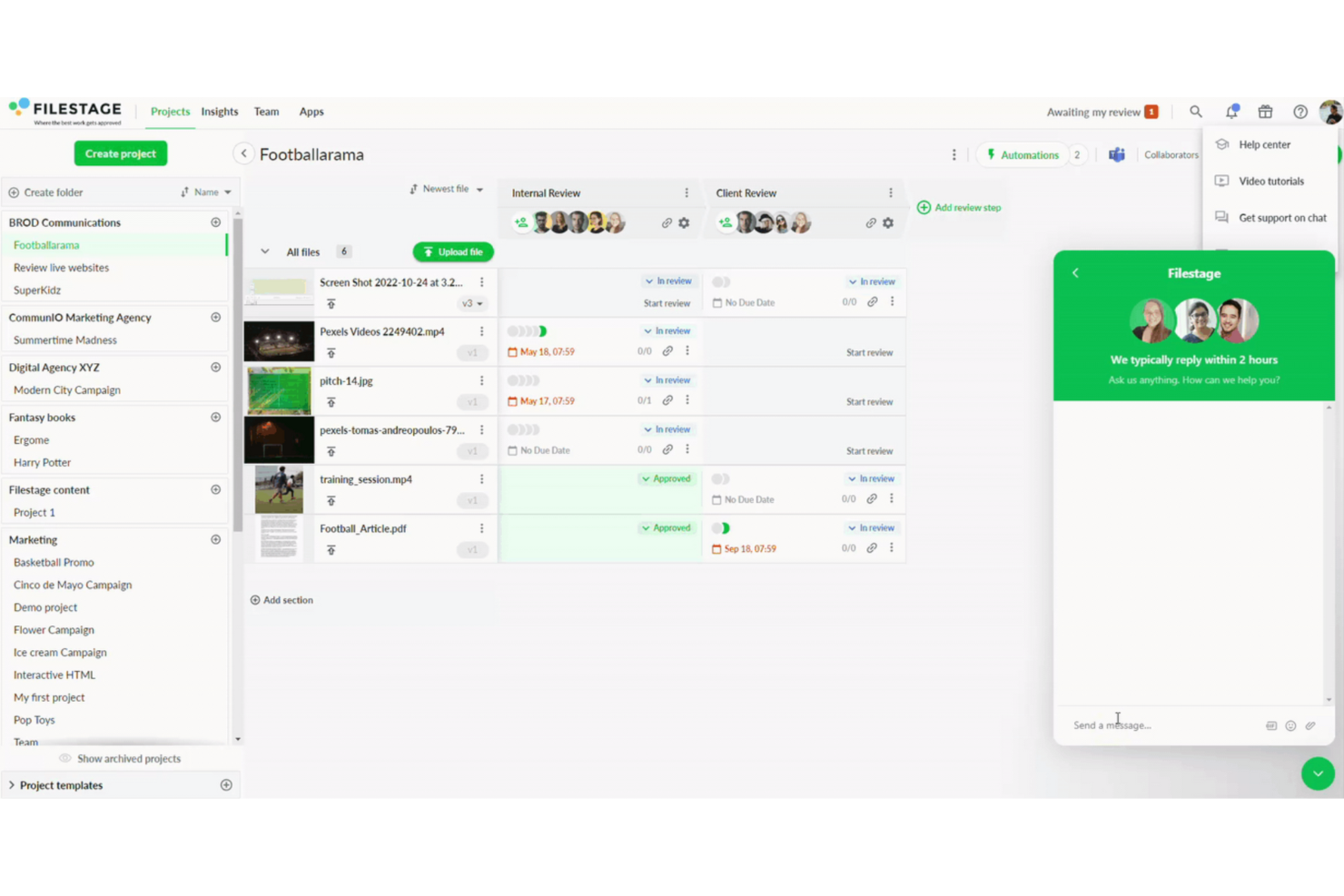
Filestage offers dependable customer support with a solid reputation for responsiveness. Users appreciate the accessible help resources and prompt assistance, making it easier for your team to resolve issues quickly. Whether you’re dealing with technical challenges or need guidance on features, Filestage’s support team ensures you can keep your projects moving forward without unnecessary delays.
Integrations
Integrations include Asana, monday.com, Jira, ClickUp, Basecamp, Trello, Wrike, Slack, Microsoft Teams, Adobe Premiere Pro, Google Drive, and Zapier.

Value for Money
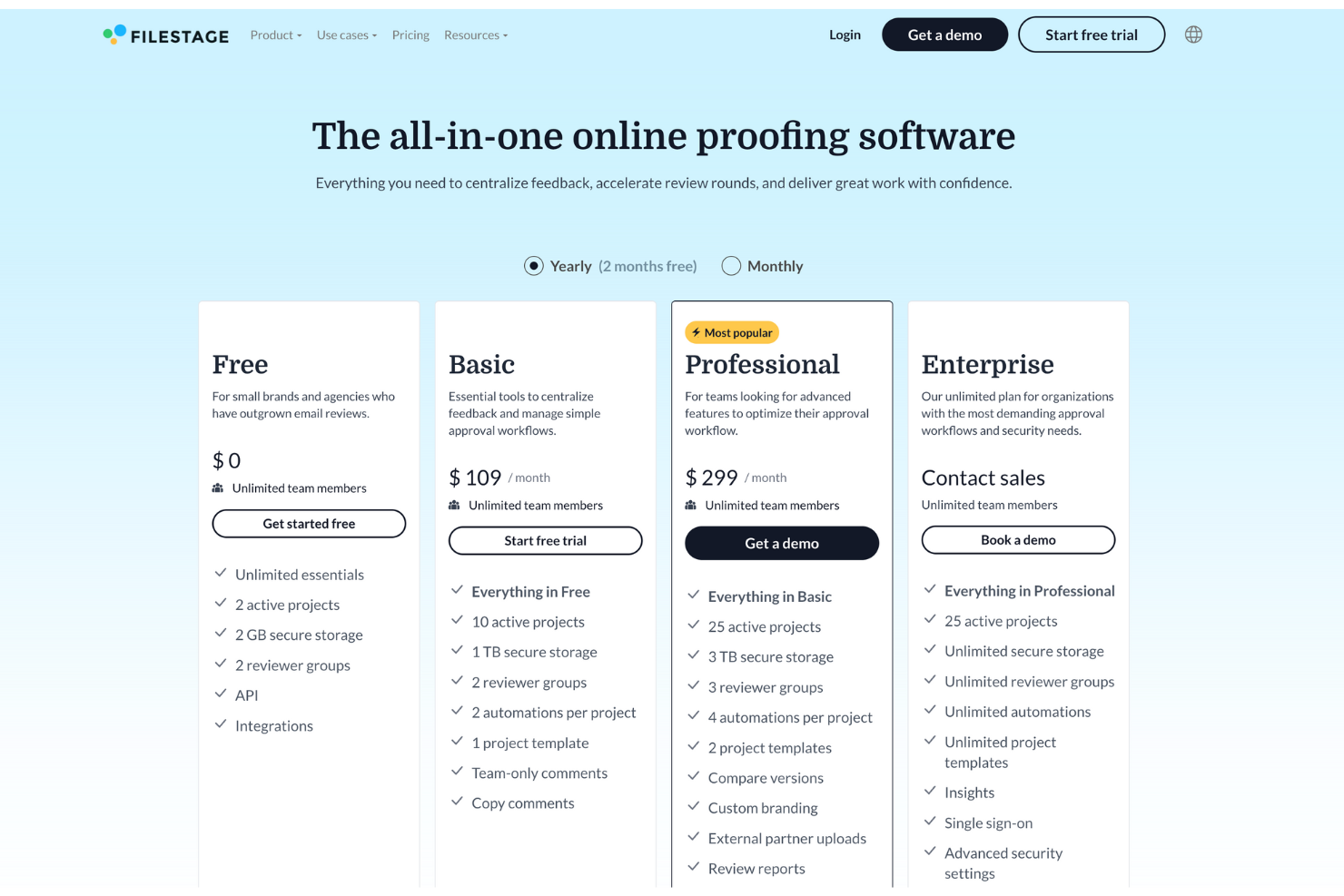
Filestage pricing delivers solid value by offering powerful proofing tools, unlimited reviewers, and intuitive collaboration features across tiers. Users appreciate the platform’s flexibility, from free access for small teams to enterprise-grade controls for large organizations. It balances affordability and scalability, making it ideal for creative and marketing teams managing high-volume reviews.
- Free: Basic review tools for individuals and small teams.
- Basic: Adds unlimited files, comments, and version tracking.
- Professional: Includes branding options and advanced workflow automation.
- Enterprise: Custom solutions with dedicated support and enhanced security.
Filestage Specs
- A/B Testing
- Energy Production Estimates
- Geo-filtering
- Inventory Tracking
- Materials Library
- Media Streaming
- SCORM
- SEO
- Shading Analysis
Filestage FAQs
What types of files can I review and approve with Filestage?
Is Filestage suitable for large teams and enterprises?
Can Filestage be integrated with other project management tools?
How does Filestage handle version control and revisions?
Does Filestage offer a mobile app or mobile accessibility?
What kind of customer support does Filestage provide?
Are there any training or onboarding resources available for new Filestage users?
Can I set different permission levels for team members in Filestage?
Filestage Company Overview & History
Filestage is an online proofing platform founded by Niklas Dorn, Maël Frize, and Simon Kontschak, headquartered in Stuttgart, Germany. The company began by helping creative teams review video assets with inline commenting and has since expanded to support documents, images, audio, and more. It has raised a Series A round and is trusted by brands and agencies across regulated industries.
Filestage Major Milestones
- 2014: Filestage founded in Stuttgart, Germany.
- 2020s: Expanded support for multiple media types (images, documents, audio).
- 2021: Raised $3.4 million in Series A funding.
- 2025: Serves over 2.3 million users in 212 countries worldwide.
What's Next?
Want to connect with other digital project managers to share resources and best practices? Join our membership community and get access to 100+ templates, samples, and examples and connect with 100s of other digital project managers in Slack.