

2026 İçin Seçilen En İyi 10 Proje Yönetimi Yazılımı

10 En İyi Proje Yönetimi Yazılımları Kısa Listesi


Proje yönetimi yazılımı, ekibinizin çalışmaları planlamasına, görevleri atamasına, son tarihleri takip etmesine ve ilerlemeyi tek bir yerden raporlamasına yardımcı olur. Çoğu ücretli planın kullanıcı başına aylık maliyeti 7–25 ABD dolarıdır ve ekibiniz yazılımı gerçekten kullanmaya başladığında, bir projenin durumunu kontrol etmek için bir dizi Slack mesajını okumak yerine kontrol paneline göz atmanız yeterli olur.
20 yıldır büyük ölçekli ajans projelerini yönetiyor ve birçok farklı PM aracı kullanıyorum. İşin zor kısmının, çoğunun özellik listesinde aynı görünmesine rağmen genellikle farklı çalışma türleri için geliştirilmiş olmaları olduğunu biliyorum. Bazıları ayrıntılı zaman çizelgeleri ve kaynak planlaması içeren karmaşık projeler için tasarlanırken, diğerleri yoğun çalışan bir ekip genelinde basit görev takibi için daha uygundur.
Seçim yapmanıza yardımcı olmak için 40’tan fazla aracı kullandım, test ettim ve karşılaştırdım; görev takibini, zaman çizelgesi görünümlerini, ekip iş birliğini, iş yükü yönetimini ve raporlamayı değerlendirdim. Her ürünün kimler için en uygun olduğuna dair açıklamayla birlikte en iyi seçimlerim burada.
Why Trust Our Software Recommendations
Our team has been testing and reviewing software since 2012. As project managers ourselves, we know how difficult—and important—it is to choose the right software.
For this guide, we evaluated tools using hands-on testing and independent research, scoring tools using our selection criteria. We also draw on insights from industry thought leaders and practicing project management experts.
Our reviews reflect our human editorial judgment, not a sales pitch.
Expert reviewers:
Proje Yönetimi Araçlarının Video İncelemesi
En iyi proje yönetimi araçları hakkındaki videomuzu izleyin:

Proje Yönetimi Araçları Karşılaştırma Tablosu
| Tool | Best For | Trial Info | Price | ||
|---|---|---|---|---|---|
| 1 | Best for cross-functional enterprise delivery | Free plan + 14-day trial + demo available | From $10/user/month (billed annually) | Website | |
| 2 | Best for customizable dashboards | 30-day free trial + demo available | From $9/user/month (billed annually) | Website | |
| 3 | Best for agency projects and budgeting | 14-day free trial | From $10/user/month (billed annually) | Website | |
| 4 | Best for project forecasting | 30-day free trial available | From $7/resource/month | Website | |
| 5 | Best with AI-powered resource optimization | Free plan + 14-day trial available | From $9/user/month (billed annually) | Website | |
| 6 | Best for built-in PPM with live BI-grade reporting | 14-day free trial | From $10/user/month (billed annually) | Website | |
| 7 | Best for collaborative project management | Free plan + 14-day trial + demo available | From $5/user/month | Website | |
| 8 | Best for agencies streamlining sales to delivery | 14-day free trial + demo available | From $29/user/month | Website | |
| 9 | Best for client portal integration | 14-day free trial | From €5.50/active project/month (minimum 15 projects) | Website | |
| 10 | Best for integration with Zoho Suite | Free plan + 15-day trial + demo available | Pricing upon request | Website |


En İyi Proje Yönetimi Yazılımları İncelemeleri
En iyi proje yönetimi yazılımları hakkında kapsamlı incelemem ve analizim burada. Her aracın özelliklerini ve işlevlerini, artılarını ve eksilerini ele alarak projeleriniz için yeteneklerini ve uygunluğunu daha iyi anlamanıza yardımcı olacağım.

Wrike
Best for cross-functional enterprise delivery
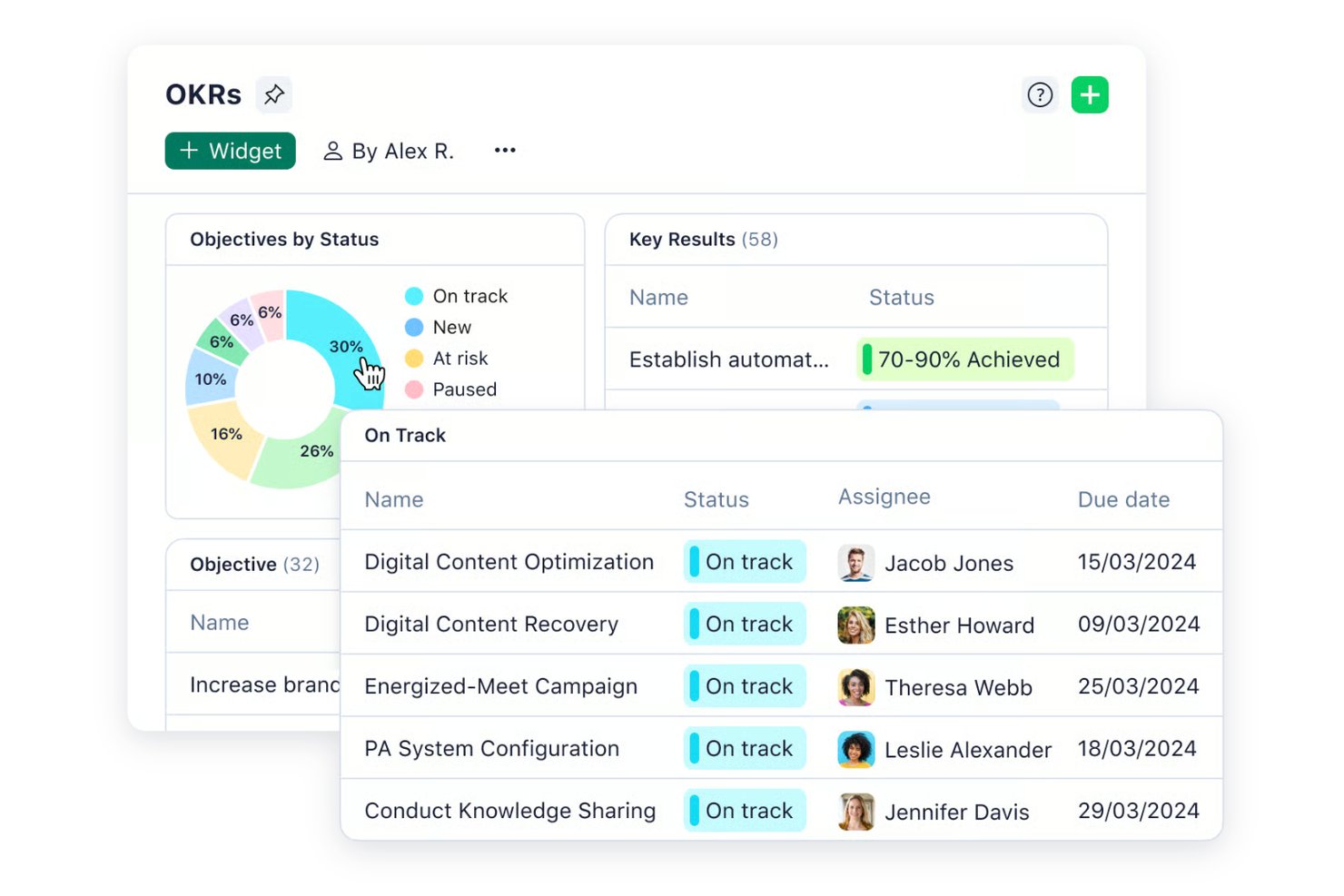
Wrike is a project management platform built for teams in fast-paced industries who need customizable workflows, advanced resource planning, and real-time collaboration to keep complex projects on track.
Who Is Wrike Best For?
Wrike is a strong fit for mid-size to enterprise teams managing multiple concurrent projects across cross-functional departments like marketing, product, and professional services.
Why I Picked Wrike
Wrike earns its spot on my shortlist because it handles the kind of project complexity that most tools start to buckle under. I particularly like the cross-project portfolio management view, which lets my team track dependencies and workloads across multiple large initiatives at once—without jumping between separate tools. Resource bookings let me reserve capacity by team member or job role and estimate hours against actual availability, so I can catch overallocation before it becomes a problem. The effort management feature also helps when scoping tasks, since I can flag how demanding a piece of work is before assigning it, which makes forecasting delivery timelines much more accurate at scale.
Wrike Key Features
- Custom project views: Toggle between Gantt, Kanban, Board, Calendar, and Chart views to visualize project progress in the format that works best for your team.
- Scrum boards: Manage Agile sprints with shared Scrum boards, backlog prioritization, and real-time progress tracking.
- Custom request forms: Build dynamic intake forms that automatically generate tasks, projects, and workflows when submitted.
- Proofing and approvals: Mark up and approve 30+ file types, including video and HTML, directly within tasks.
Wrike Integrations
Integrations include Microsoft Teams, Salesforce, Google Drive, Adobe Creative Cloud, Zoom, Power BI, Tableau, QuickBooks, Miro, and Microsoft SharePoint.
Pros and Cons
Pros:
- Right-click context menus allow you to do more with fewer clicks
- AI features are available in all plans at no extra cost
- Worldclass onboarding through video walkthroughs
Cons:
- 2FA is locked behind the enterprise plan
- Some integrations require higher-tier plans or a paid add-on
New Product Updates from Wrike

Wrike Redesigns Workspace Search With New Filters
Wrike introduces a redesigned Workspace Search interface with recent search shortcuts, item type and location filters, and parent-task context. These updates help users find relevant work items and navigate search results efficiently. For more information, visit Wrike’s official site.
Best for customizable dashboards
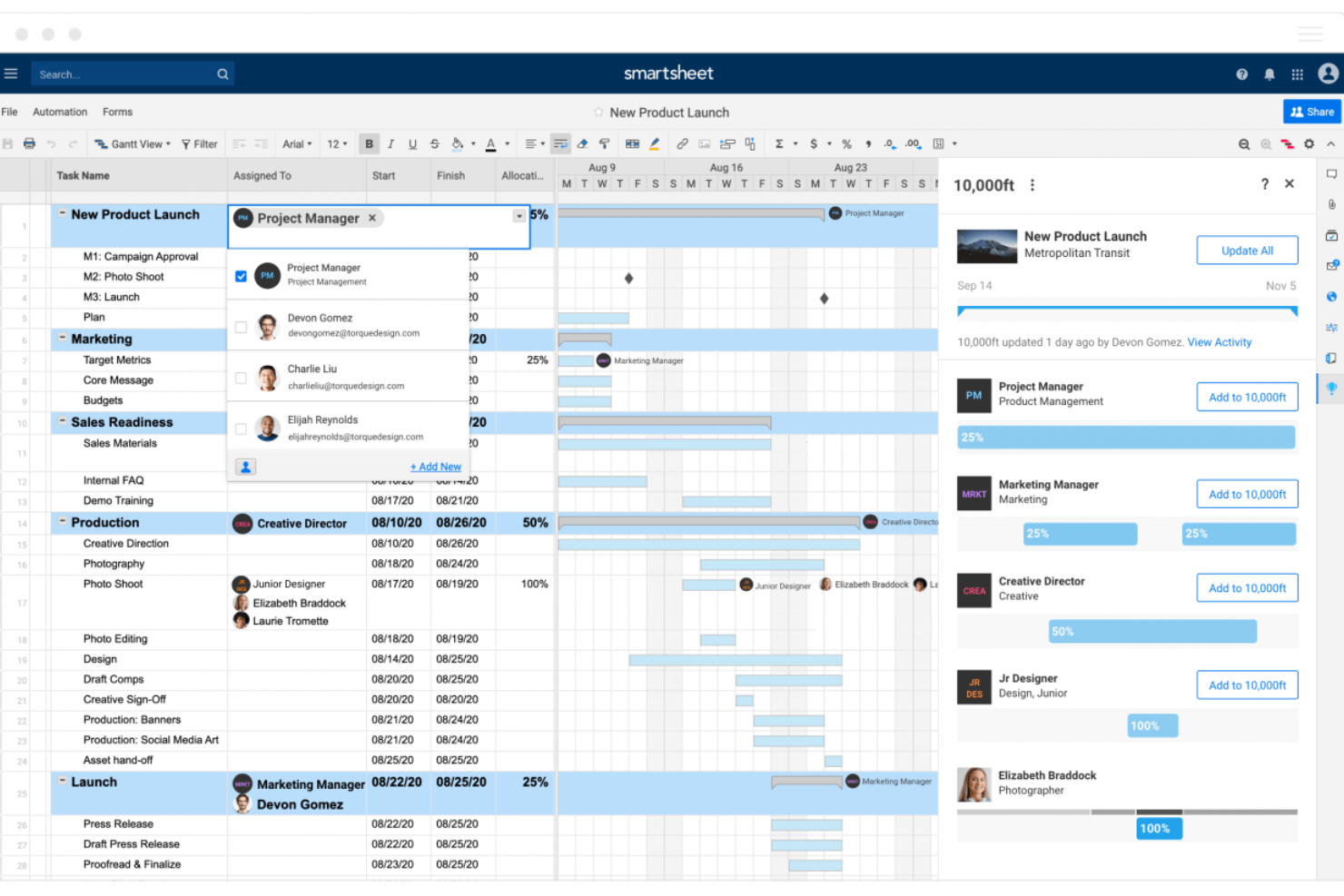
Smartsheet is a project management platform built for teams who need flexible planning, real-time collaboration, and visibility across complex projects, making it popular with organizations in tech, marketing, and operations looking to manage work at scale.
Who Is Smartsheet Best For?
Smartsheet is a strong fit for mid-size to enterprise teams in project management, operations, and IT who need to coordinate work across multiple departments or workstreams.
Why I Picked Smartsheet
I picked Smartsheet as one of the best because of how much control it gives you over dashboard design and data presentation. You can build dashboards from scratch using a drag-and-drop widget system—pulling in metric, chart, report, and web content widgets, then resizing and repositioning them on a grid. I like that you can apply custom hex color codes to individual widgets, set dashboard-wide themes, and even create and export custom themes to share across your organization. That level of visual consistency matters when you're presenting project status to executives or stakeholders who need to read a dashboard at a glance. The automatic 10-minute refresh on published dashboards keeps stakeholder data current without manual updates.
Smartsheet Key Features
- Gantt chart view: Visualize project timelines, set dependencies between tasks, and adjust schedules by dragging and dropping bars directly on the chart.
- Automated workflows: Set up no-code automation rules to trigger alerts, approval requests, or row updates based on conditions you define in your sheets.
- Resource management: View team capacity across projects, allocate work by role or individual, and track time logged against planned hours.
- Baseline tracking: Capture a snapshot of your original project plan and compare it against current progress to measure schedule and budget variance.
Smartsheet Integrations
Integrations include Adobe, AWS, Box, DocuSign, Dropbox, Google, Power BI, SAP, Jira, and Microsoft.
Pros and Cons
Pros:
- Facilitates collaborative project management
- Allows for automation of tasks
- Can tailor the tool to specific project management needs
Cons:
- Not ideal for simpler project management needs
- Lacks built-in time tracking
New Product Updates from Smartsheet

Smartsheet Adds Non-Plan User Management in Admin Center
Smartsheet adds a Non plan users tab to the Seat types and true-up page in Admin Center. This lets system admins review non-plan users and add them to the plan or remove them from the organization in one place. For more information, visit Smartsheet’s official site.

Best for agency projects and budgeting
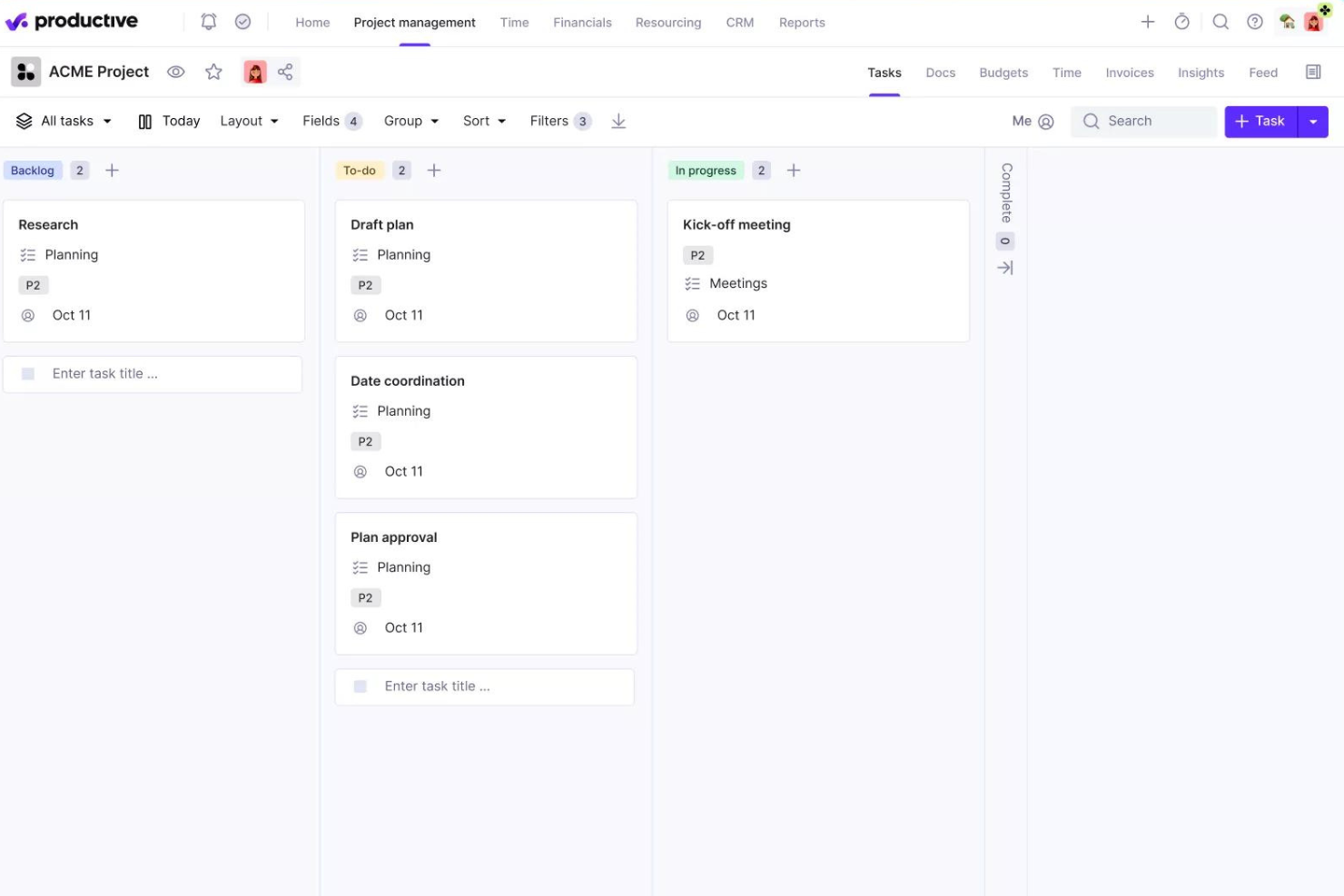
Productive is a project management platform built for agencies and service businesses that need to manage projects, budgets, resources, and profitability in one place.
Who Is Productive Best For?
Productive is a strong fit for digital agencies, creative studios, and consulting firms that need to track project delivery and financial performance together.
Why I Picked Productive
Productive earns its spot on my shortlist because it connects project delivery and financial performance in a way most project management tools simply don't. I love that every hour my team logs against a project updates the budget in real time—so I can see profitability without waiting on a monthly finance report. The budget overrun alerts are useful; I can set custom thresholds so the team is notified before a project burns through its budget, not after. For agency work, the ability to split large projects into separate budget phases helps manage long-running client retainers.
Productive Key Features
- Multiple project views: Switch between Gantt, Kanban board, timeline, calendar, list, and table views depending on how your team prefers to work.
- Resource scheduling: See team capacity, balance workloads, and manage time off requests directly within the resource planner.
- Project templates: Duplicate full project setups—including tasks, subtasks, descriptions, and assignees—to spin up new client projects faster.
- Automated workflows: Trigger actions like creating invoices or sending Slack messages based on project activity, without manual follow-up.
Productive Integrations
Integrations include Jira, HubSpot, Xero, Google Calendar, Sage, Gmail, Microsoft Outlook, Slack, BugHerd, and QuickBooks.
Pros and Cons
Pros:
- Integrated financial management and reporting
- User-friendly interface that simplifies task management
- Robust resource planning and tracking
Cons:
- Initial setup can be time-consuming
- Could have more integrations
New Product Updates from Productive
Productive Adds Email and Calendar Integrations for Agents
Productive adds Gmail, Outlook, Google Calendar, and Outlook Calendar connectors for its AI agents. These integrations let agents manage emails and create calendar events directly within Productive. For more information, visit Productive’s official site.

Runn
Best for project forecasting

Runn is a real-time resource and project management tool designed to help teams plan, track, and forecast their projects efficiently.
Why I picked Runn: I like its real-time project forecasting capabilities. You can anticipate future capacity for your entire company, specific teams, or individual members, allowing you to plan ahead with confidence. This foresight helps in identifying potential bottlenecks and ensures that your team isn't overbooked, leading to more balanced workloads and timely project deliveries.
Runn's ability to manage tentative projects also stood out to me. This feature lets you plan out potential projects and see how they might impact your workload and financials. By comparing different scenarios, you can make informed decisions about which projects to pursue, ensuring that your resources are optimally utilized without overcommitting.
Runn Standout Features & Integrations
Features include the capacity to set custom work hours for each team member, accommodating flexible schedules and part-time roles. Runn also allows you to manage time off and holidays, preventing scheduling conflicts. Additionally, you can tag your team with specific skills, locations, or other attributes, making it easier to find the right person for each task.
Integrations include ADP Workforce Now, AlexisHR, BambooHR, CharlieHR, HiBob, Workday, Clockify, Harvest, and Jira.
Pros and Cons
Pros:
- Users can customize dashboards
- Good project forecasting capabilities
- Provides a high-level view of project timelines and phases
Cons:
- Lacks advanced automation features
- Could offer more robust task management features

Best with AI-powered resource optimization
monday AI Workspace is a configurable, AI-native work management platform that spans project planning, task tracking, resource allocation, and workflow automation across a broad library of customizable boards, views, and templates.
Who Is monday AI Workspace Best For?
monday AI Workspace suits cross-functional teams at mid-size to enterprise companies that manage multiple concurrent projects across departments like marketing, product, IT, and operations.
Why I Picked monday AI Workspace
monday AI Workspace earns its spot on my shortlist because of how it handles resource allocation at the AI level. I use the workload view to see capacity across my team in real time, and monday's AI surfaces assignment recommendations based on project context, not just who has open calendar slots. I also rely on its AI-powered risk detection to catch dependency conflicts before they turn into missed deadlines.
monday AI Workspace Key Features
- Custom board templates: Choose from over 200 templates for specialized workflows in project management, CRM, marketing, and operations.
- Portfolio-level dashboards: Build cross-project, real-time dashboards with 80+ customizable widgets for tracking progress and KPIs.
- Integrated workdocs: Create and share collaborative documents directly connected to project boards and tasks for ongoing documentation.
- Multi-view project boards: Switch between Kanban, Gantt, Timeline, Calendar, and Table views to visualize work however your team prefers.
monday AI Workspace Integrations
monday AI Workspace offers hundreds of native integrations through its built-in integrations and marketplace, including Slack, Salesforce, HubSpot, Google Drive, Zoom, Microsoft Teams, Jira, GitHub, Trello, and Dropbox. It also supports Zapier and provides an API for custom integrations.
Pros and Cons
Pros:
- Board templates suit specialized workflows by department
- Workload view visualizes team capacity by project
- AI automatically flags project risks in real time
Cons:
- Portfolio dashboards require higher-tier plans
- Subtasks limited to one layer deep
New Product Updates from monday AI Workspace
monday AI Workspace Adds Human Approval Routing
monday AI Workspace adds a human-in-the-loop approval block to AI Workflows, sending approval requests and routing workflow paths based on responses. For more information, visit monday AI Workspace's official site.

Celoxis
Best for built-in PPM with live BI-grade reporting
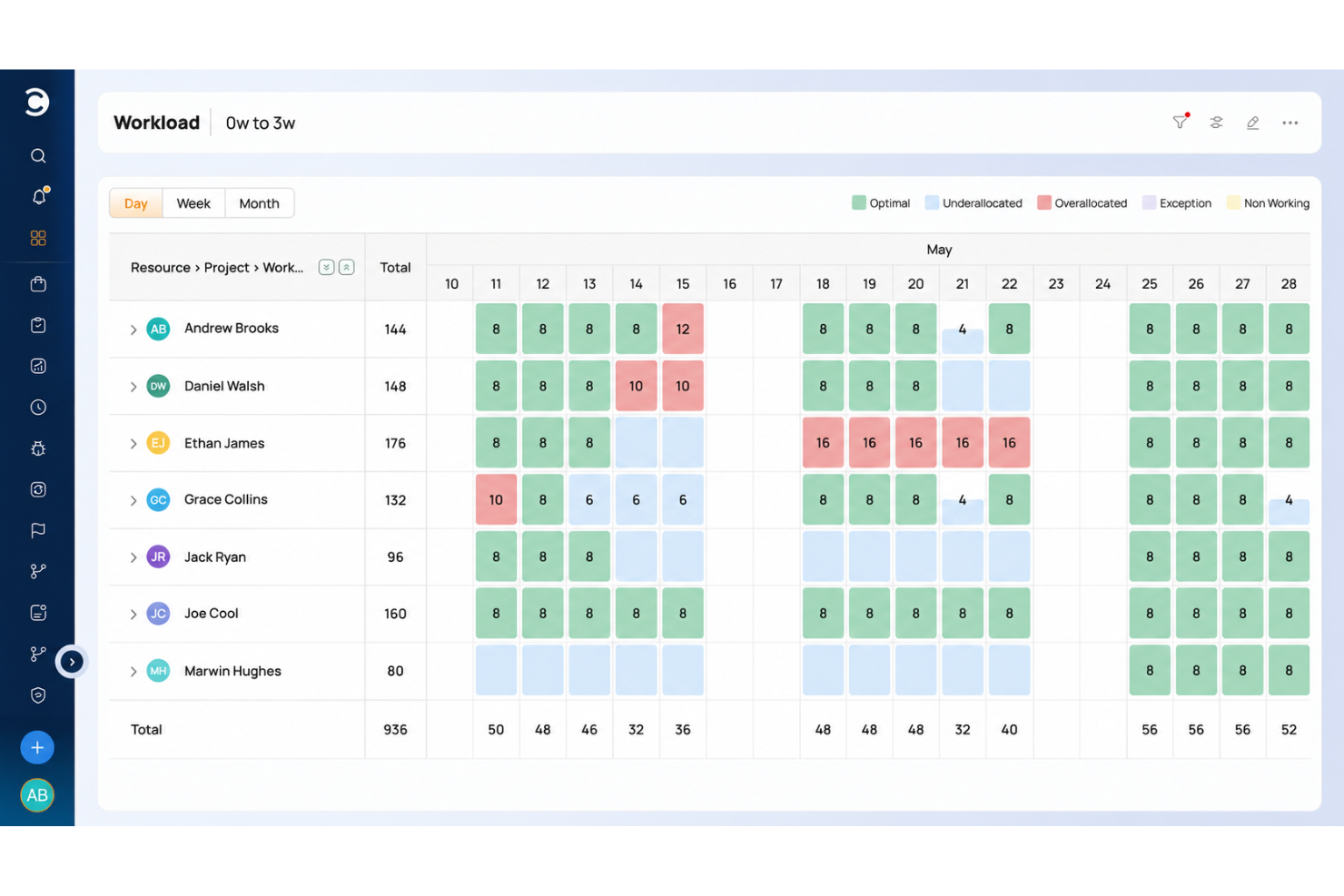
Celoxis is a project and portfolio management platform with interactive Gantt scheduling, cross-project resource and capacity planning, time and budget tracking, and live BI-grade reporting across projects and portfolios.
Who Is Celoxis Best For?
Celoxis is a strong fit for project managers and team leads who need portfolio-level control with built-in PPM, resource planning, and live BI-grade reporting across multiple concurrent projects.
Why I Picked Celoxis
I picked Celoxis as one of the best because it handles built-in PPM and live BI-grade reporting without needing a separate analytics layer. I love how the interactive Gantt connects directly to portfolio-level dashboards, so when a task slips, the impact shows up in earned-value metrics like CPI and SPI right away. The Resource Load view also lets me compare proposed work against active projects before committing capacity.
Celoxis Key Features
- Built-in risk and issue tracking: Log, monitor, and manage risks, issues, change requests, and bugs using built-in RAID log apps tied directly to your projects.
- Client portal: Give external stakeholders access to permitted projects, tasks, discussions, and reports through a branded, permission-controlled portal.
- Timesheet approvals: Configure multi-level approval chains for submitted time, with reminders for missing entries and policies to limit hours to task allocations.
- Scrum support: Set up product backlogs, sprint tasks, user stories, and Story Points alongside burndown reports within the same platform as your Gantt-based projects.
Celoxis Integrations
Celoxis offers 400+ app connections, including native integrations with Microsoft Project, Jira, Azure DevOps, Google Drive, Salesforce, QuickBooks Online, and Harvest. It also supports a REST API and Zapier.
Pros and Cons
Pros:
- Offers a portfolio-level view with real-time dashboards
- Highly customizable and flexible for scaling organizations
- Advanced reporting and analytics, including AI forecasting
Cons:
- No mobile app available
- May not be suitable for small teams or organizations with fewer than 5 employees
Hive
Best for collaborative project management

Hive is a project management platform built for teams in fast-paced industries who need flexible task tracking, real-time collaboration, and customizable workflows to keep projects moving and everyone aligned.
Who Is Hive Best For?
Hive is a good fit for mid-sized teams in marketing, operations, and creative industries who need a central workspace to manage projects and collaborate in real time.
Why I Picked Hive
Hive is one of my top picks because I love how it keeps collaboration woven into the actual work, not bolted on as an afterthought. My team uses Hive Notes to co-edit meeting docs in real time, then convert action items into tracked tasks without switching context. I also rely on the proofing and approvals feature—marking up files and routing them for sign-off directly inside a project card eliminates many back-and-forth emails. The native in-app chat tied to specific action cards means conversations stay attached to the work they're about, so nothing gets lost.
Hive Key Features
- Multiple project views: Switch between Kanban, Gantt, timeline, calendar, and portfolio views to match how your team tracks work.
- Resourcing: Assign team members to projects and visualize their availability across the full project lifecycle.
- Workflow automation: Build custom automated workflows to handle repeatable tasks like status updates, handoffs, and reminders.
- Form intakes: Collect incoming work requests through shareable forms that feed directly into your Hive projects.
Hive Integrations
Integrations include Google Drive, Google Calendar, Dropbox, QuickBooks, Zoom, Microsoft OneDrive, Microsoft Teams, Outlook Calendar, Jira, and Slack.
Pros and Cons
Pros:
- Easy to integrate with other tools
- Great all-in-one option for SMBs
- Excellent built-in communication features
Cons:
- Mobile version limited in functionality
- Reporting functions could be expanded
Copper
Best for agencies streamlining sales to delivery
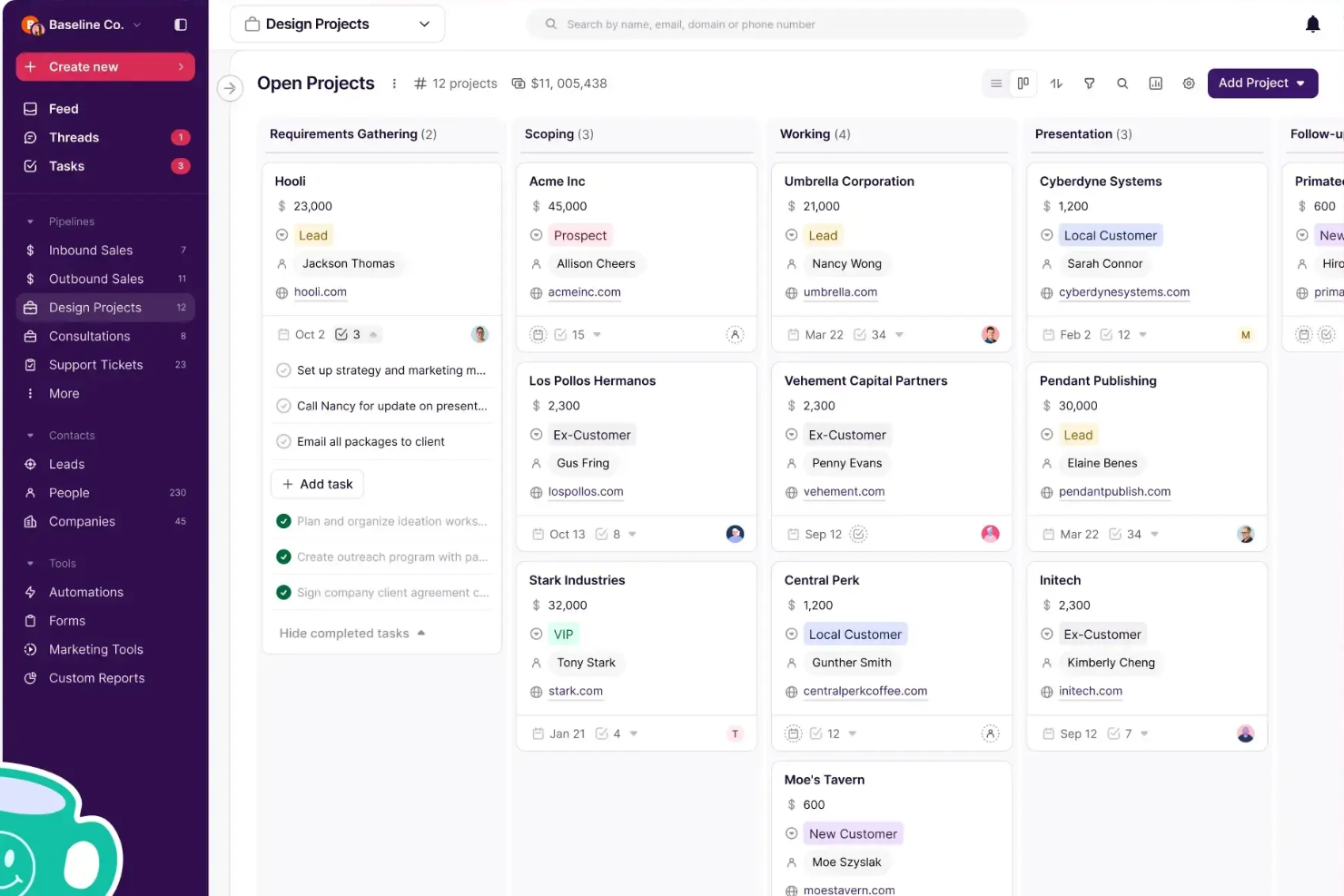
Copper is a CRM platform designed for small to midsize businesses that want to manage client relationships and sales activities alongside project tasks, helping teams keep customer data and project progress connected in one place.
Who Is Copper Best For?
Copper is a strong fit for agencies and service-based businesses that need to manage client relationships and project delivery within a single platform.
Why I Picked Copper
I picked Copper as one of the best because of how it handles the sales-to-delivery handoff that trips up so many agencies. When a deal closes, you can duplicate it directly into a project pipeline—no handoff doc, no re-entering client details, no briefing a separate tool. The client context your sales team built up just carries over. I also like the pipeline automations, which let you trigger task creation or send emails automatically as a project moves through stages, so nothing gets dropped between kickoff and delivery. For agencies running both new business and active client work, having those two workflows in one place—with a shared activity feed your whole team can see—makes a real operational difference.
Copper Key Features
- Contact and relationship tracking: Store and organize all client contact details, communication history, and relationship context in a single record.
- Custom reporting: Build custom reports to track team activity, revenue projections, and client trends across your pipeline.
- Email series and automation: Set up automated email sequences that trigger based on pipeline stage changes or form submissions.
- Mobile app: Log calls and SMS automatically from your phone so client interactions are captured without manual data entry.
Copper Integrations
Integrations include Gmail, Google Calendar, Google Drive, Mailchimp, Google Sheets, LinkedIn, RingCentral, DocuSign, QuickBooks, and Dropbox.
Pros and Cons
Pros:
- Integrates CRM and project management
- Chrome extension brings tools into Gmail, Calendar, LinkedIn, and more
- Ideal for Google Workspace-based client teams
Cons:
- Does not connect to Microsoft 365, Outlook, or other email platforms
- Could offer more robust project management features, like resourcing

Ziggu
Best for client portal integration
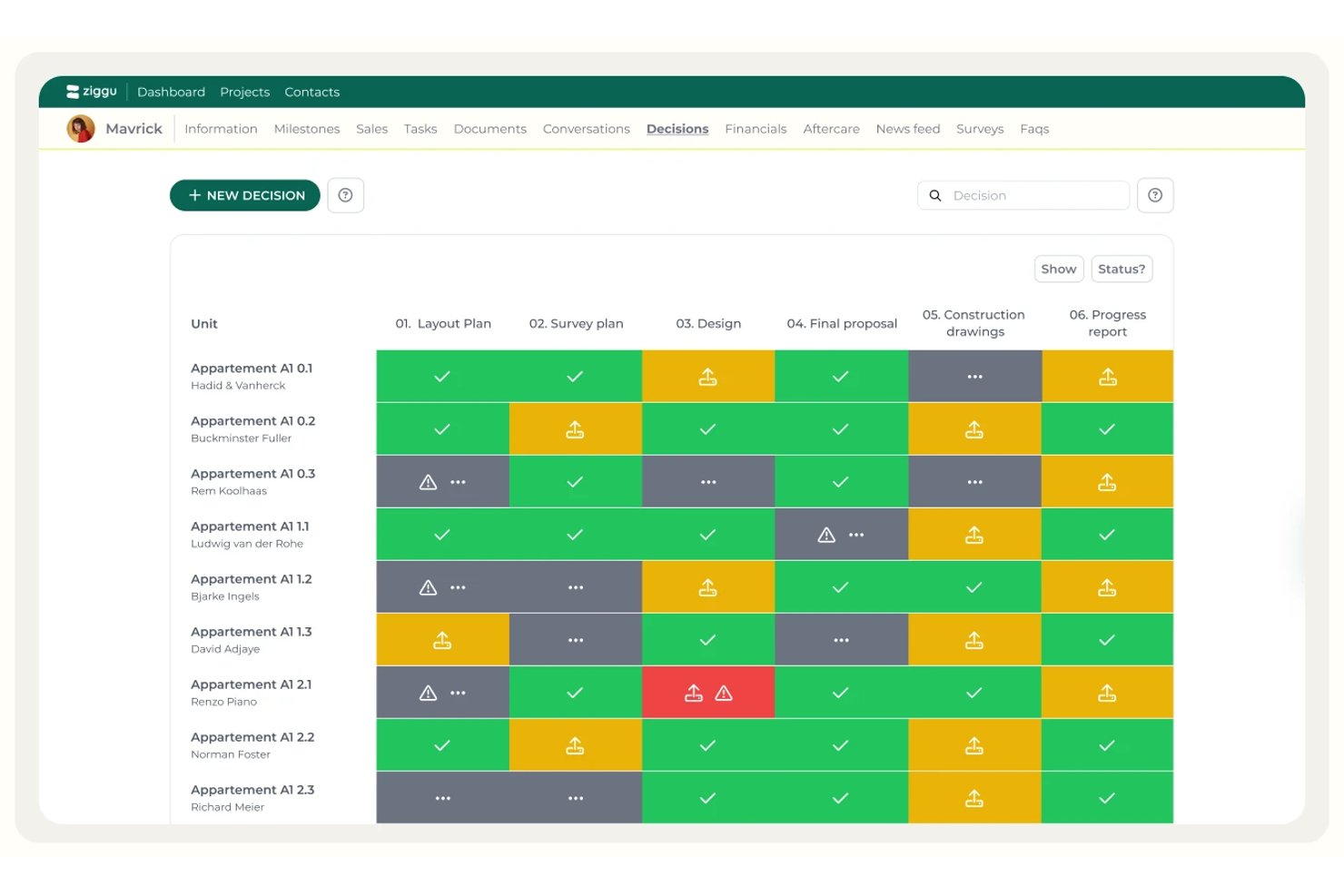
Ziggu is a client portal and project coordination platform built for construction and property development teams, combining milestone-based planning, task management, document sharing, and client approvals in one place.
Who Is Ziggu Best For?
Ziggu is built for construction and property development teams that need a structured client portal to manage approvals, documents, and decisions across multiple active projects.
Why I Picked Ziggu
I picked Ziggu as one of the best because of how it handles client portal integration in construction and property development projects. I love the Decisions & Approvals module specifically: you upload multiple proposals, clients compare and sign off digitally, and every approval gets a timestamped audit trail automatically. The milestone-driven workflow templates are equally impressive, auto-releasing tasks and documents to the right parties the moment a project phase activates.
Ziggu Key Features
- Branded client portal: Clients get a secure, personalized portal to track project progress, view documents, and communicate with your team without email.
- Conversations inbox: Per-project communication threads with read receipts, internal private notes, and status indicators keep client and team exchanges organized.
- Milestone-triggered workflow templates: Reusable project templates automatically release tasks, messages, and documents to the right parties when a milestone is activated.
- Option lists: Clients select from priced finishes or add-ons directly in their portal, with financial impact updated in real time.
Ziggu Integrations
Ziggu offers 13+ integrations, including Microsoft SharePoint, Google Drive, Dropbox, Salesforce, Power BI, Archisnapper, and LetsBuild. Its public REST API supports custom integrations.
Pros and Cons
Pros:
- Milestone templates automate repetitive project workflows
- Decisions and approvals provide timestamped audit trails
- Branded client portal centralizes client communication
Cons:
- Lacks resource and workload management features
- No Gantt, Kanban, or calendar project views

Best for integration with Zoho Suite
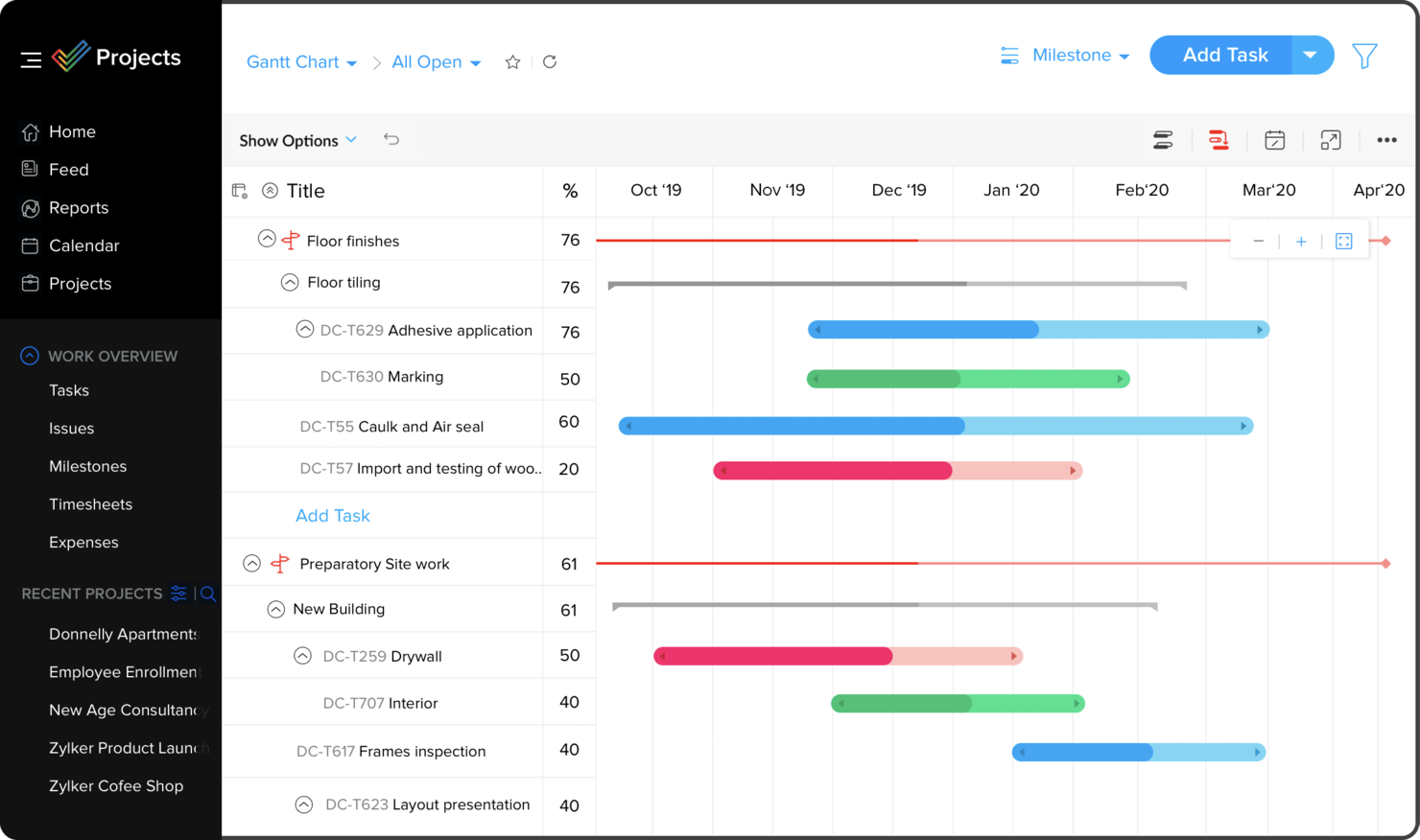
Zoho Projects is a cloud-based project management platform for teams and businesses needing to organize tasks, track progress, and collaborate on complex projects.
Who Is Zoho Projects Best For?
Zoho Projects is a great fit for small to mid-sized businesses already using Zoho tools that need project management built into their existing workflows.
Why I Picked Zoho Projects
I picked Zoho Projects as one of the best because of how naturally it fits into a broader Zoho ecosystem. My team uses Zoho CRM alongside Projects, and the two-way sync means that when a deal closes in CRM, we can spin up a project immediately without re-entering any data. I also like the Zoho Books and Invoice integration—time logs from Projects feed directly into invoices, so billing clients based on actual hours tracked is a one-click process. The integration with Zoho People is another feature I rely on, since it pulls in approved leave requests automatically and prevents me from assigning tasks to someone who's out of office.
Zoho Projects Key Features
- Gantt chart: Visualize project timelines, set task dependencies, and reschedule tasks directly from the chart view.
- Blueprint workflow automation: Design step-by-step task workflows that automatically update fields, assign users, and trigger alerts as statuses change.
- Resource management: View each team member's workload in real time and reassign tasks when someone is over- or under-allocated.
- Project baseline tracking: Capture a snapshot of your project plan at any point and compare it against actual progress to spot schedule deviations early.
Zoho Projects Integrations
Integrations include Zoho CRM, Zoho Desk, Zoho People, Zoho Books, Zoho Analytics, Google Calendar, Microsoft Teams, Dropbox, GitHub, and Slack.
Pros and Cons
Pros:
- Time-track multiple tasks at once
- Easy workflow automations
- Unlimited number of projects
Cons:
- Lack of file type export options
- Does not integrate with Quickbooks
New Product Updates from Zoho Projects
Zoho Projects Adds CodeX Scripts for Custom Modules
Zoho Projects now supports CodeX Scripts for custom modules, enabling conditional logic and rules for creating, updating, and deleting records. For more information, visit Zoho Projects' official site.
 .
Diğer Proje Yönetimi Yazılımları
Kısa listeme giremeyen ancak yine de göz atmaya değer bazı ek proje yönetimi yazılımı seçenekleri şunlardır:
- Quire
For task breakdown
- ClickUp
For replacing multiple separate tools
- Resource Guru
For preventing over-allocation
- Quickbase
For platform versatility
- Bubble PPM
For portfolio management
- Microsoft Project
For teams using Microsoft 365
- FigJam
For creative collaboration
- Rocketlane
Client portals for sharing insights
- Dock
For customer collaboration management
- Plaky
For cost-effective project management
- MeisterTask
For simple project management
- Nifty
For milestone tracking
- Kintone
For custom applications
- Forecast
For early detection of project budget risks
- Backlog
For software developers
- Workzone
For comprehensive project visibility
- ProofHub
For organizing via board and table views
- Shortcut
For uniting planning and development
- Teamwork.com
For remote teams
- awork
UI for usability & intuitiveness
- Jira
For cross-team project tracking
- Adobe Workfront
For customizable project templates
- Bonsai Agency Software
For end-to-end agency projects
- Confluence
For software managers
- Nutcache
For advanced time tracking
- Basecamp
For centralized project docs
- FunctionFox
For creatives
- Deltek Replicon Time
For intelligent project time capture
- Polaris PSA By Replicon
For real-time project insights
- Planview AdaptiveWork
For enterprise resource planning


İlgili PM Yazılımı Rehberleri
Yaygın sektörlere, iş senaryolarına ve en sık karşılaşılan bazı ek gereksinimlere dayalı olarak farklı PM çözümü türleri hakkında daha özel bazı rehberleri burada bulabilirsiniz:
Sektöre özel:
Yaygın işletme ihtiyaçları:
Proje Yönetimi Yazılımı Nedir?
Proje yönetimi yazılımı, kullanıcıların projeleri daha verimli bir şekilde tamamlamak için çalışmaları planlamasına, düzenlemesine, atamasına ve takip etmesine yardımcı olan dijital bir araçtır.
Kullanıcıların görevleri planlamasına, son teslim tarihleri belirlemesine, kaynakları tahsis etmesine, bütçeleri yönetmesine ve verimli bir şekilde iletişim kurmasına olanak tanır. Temel görev takibinden karmaşık, çok aşamalı projelere kadar web tabanlı proje yönetimi yazılımı, sektörler genelinde koordinasyonu, hesap verebilirliği ve yürütmeyi geliştirmek için bilgileri merkezileştirir ve rutinleri otomatikleştirir.
How I Evaluate Project Management Software
I split my evaluation into three parts, giving the most weight to core functionality: assign tasks, track deadlines, and spot blocked work. Next, I look for differentiators such as portfolio visibility or automation rules. Finally, I consider what sits beyond features, including onboarding, support, and pricing value.
Core Functionality (Table Stakes For This List)
When I'm selecting tools for my list, I score each one on a scale from 0 (does not offer the functionality) to 5 (excels in this area) for each core functionality listed below. I then convert the total into a percentage to help assess each tool's overall fit, with extra weight on any functionalities I’ve deemed essential.
- Task & Project Tracking (Essential): I look for task assignments, statuses, due dates, and dependencies, such as linking design approval to an engineering handoff.
- Scheduling & Timelines (Essential): I assess whether calendar or Gantt views make milestone dates and dependencies visible, and let teams adjust plans when delivery dates shift.
- Team Collaboration: I check for project-linked comments, mentions, notifications, and file sharing that keep decisions and handoffs attached to the work.
- Resource & Workload Management: I look for workload views that show who owns tasks across projects and help spot over-allocation before deadlines slip.
- Reporting & Progress Tracking: I evaluate dashboards and reports for clear views of project status, overdue work, milestones, and progress across workstreams.
Once I have a list of tools that meet the criteria, I consider what sets each platform apart.
Differentiating Factors (What Sets Vendors Apart)
Here's how I compare and contrast different vendors:
Standout Features
I look for automation engines that go beyond simple notifications. The best ones let you trigger task reassignments or status changes based on conditions—like auto-escalating a blocked task when a dependency misses its due date. Portfolio-level dashboards matter just as much, because project managers juggling multiple workstreams need a single view to compare progress and risk across projects without opening each one. I also evaluate native time tracking tied directly to tasks, since it feeds into budget and profitability reporting without requiring a separate tool.
Beyond Features
I evaluate whether a tool scales from a small team to an enterprise rollout without forcing a costly plan jump just to unlock admin controls or multiple workspaces. Tech stack connectivity matters just as much—I check for two-way sync with tools like Slack, Jira, and Google Workspace, since one-way pushes create data silos fast. I also look at onboarding support, especially migration paths from legacy tools and dedicated success resources for multi-team deployments.
Proje Yönetimi Yazılımı Nasıl Seçilir?
Açık konuşmak gerekirse, çoğu PM aracı neyse ki temel özellikleri kapsar: görevler, son teslim tarihleri, yorumlar ve bir tür zaman çizelgesi. Farklar, bir aracın ekibinizin çalışma biçimine ne kadar iyi uyum sağladığında ortaya çıkar.
Bu konuyu PM araçlarını seçme rehberimde daha ayrıntılı ele alıyorum, ancak en yaygın senaryolardan birkaçını ve hangi araçları önereceğimi aşağıda bulabilirsiniz:
- Karmaşık, birden çok ekibi içeren projeler. Departmanlar arasındaki bağımlılıkları koordine ediyor veya bir proje portföyünü yönetiyorsanız güçlü zaman çizelgesi görünümlerine ve projeler arası raporlamaya ihtiyacınız vardır. Wrike, Smartsheet ve Celoxis bunun için geliştirilmiştir.
- Ajans ve müşteri çalışmaları. Bütçeler, faturalandırılabilir saatler ve kârlılık en az son teslim tarihleri kadar önemliyse görevlere ve bütçelere bağlı zaman takibi sunan araçları arayın. Productive bunu iyi yapar ve Copper, satıştan teslimata geçişi birbirine bağlar.
- Kaynak yoğun planlama. En büyük sorununuz gelecek ay kimin müsait olduğunu bilmekse kapasite ve tahmin görünümlerine öncelik verin. Runn ve monday AI Workspace bu konuda öne çıkar.
- Daha hafif, iş birliğine dayalı çalışmalar. Ekibinizin çoğunlukla görevleri, notları ve onayları tek bir yerde paylaşması gerekiyorsa daha basit bir araç (Hive buna iyi bir örnektir) kullanıma daha kolay uyarlanır ve amaçlarınız için gayet iyi çalışır. Bu durumda Notion kullanan bazı ekipler de tanıyorum.
Karar vermeden önce bunları kontrol edin:
- Gerçek iş akışınızı test edin. Deneme süresi boyunca tarih değişikliği de dahil olmak üzere gerçek bir proje oluşturun ve aracın size ne kadar yeniden çalışma yaptırdığını görün.
- Gerçekte ihtiyaç duyacağınız raporlamayı deneyin. Paydaşlara gönderdiğiniz durum güncellemesini oluşturun ve bunun ne kadar sürdüğüne bakın...birkaç dakikadan uzun sürüyorsa kullanılmayacaktır.
- Ajans işi yapıyorsanız müşteri ve konuk erişimini kontrol edin. Müşterilerin veya yüklenicilerin görünürlüğe ihtiyacı varsa her şeyi açığa çıkarmadan bir projenin bir bölümünü paylaşabildiğinizden emin olun.
- Temel güvenlik özelliklerini doğrulayın. Aktarım sırasında ve bekleme durumunda şifreleme ile ISO 27001 veya SOC 2 gibi sertifikaları arayın. AB verileriyle çalışıyorsanız verilerinizin nerede barındırıldığını sorun. Ayrıca bazı sağlayıcıların barındırma konumunu seçmenize izin verdiğini gördüm; sormayı unutmayın.
Özellikler
Aradığım PM yazılımı özellikleri ve her birinin ekibiniz için gerçekte ne yaptığı aşağıda yer alıyor. Yapay zekâ artık bunların çoğuna entegre edilmiştir; ayrı bir ürün olarak satılmak veya konumlandırılmak yerine, bu nedenle gerçekten fayda sağladığı alanları belirttim.
- Görev yönetimi: Görevler oluşturun, sorumlular atayın, son tarihleri belirleyin ve durumu takip edin. Alt görevler ve bağımlılıklar, büyük işleri adımlara ayırmanıza ve işlerin doğru sırayla gerçekleşmesini sağlamanıza olanak tanır. Artık birçok araç toplantı notlarını veya proje özetini başlangıç niteliğinde bir görev listesine dönüştürebiliyor; bu da kurulum için gereken zamanı büyük ölçüde azaltıyor.
- Gantt şemaları ve zaman çizelgeleri: Takvimdeki her görevi gösteren görsel bir plan. İyi araçlar, bir tarih değiştiğinde sonraki tüm öğeleri ayarlar; böylece planın tamamını elle düzeltmeniz gerekmez. Bazıları artık görevler gerçekten gecikmeden önce gecikme riski taşıyan görevleri işaretliyor.
- İş birliği: Doğrudan görevlere eklenmiş yorumlar, @bahsetmeler ve dosya paylaşımı sayesinde konuşmalar e-postada veya Slack'te kaybolmak yerine işin yanında kalır. Yoğun bir projeye hızlıca yetişmek için yapay zekâ tarafından oluşturulan ileti dizisi özetlerini de kullanışlı buluyorum.
- İş yükü yönetimi: Her kişinin kendisine atanmış işlerini mevcut zamanına göre gösterir. Bu, kontrol ettiğim ilk özellik; çünkü son teslim tarihi kaçırılmadan önce aşırı yüklenmiş bir ekip arkadaşını fark etmenin en kolay yoludur. Yapay zekâ, kapasiteye göre yeni işi kimin üstlenmesi gerektiğini önermeye başlıyor.
- Raporlama ve gösterge panoları: Genellikle aynı anda birden çok proje genelinde ilerlemeyi, gecikmiş işleri ve kilometre taşlarını takip edin. Sıfırdan bir rapor oluşturmak yerine “programın gerisinde ne var?” gibi basit bir soru sorup yanıt alabileceğim araçları seviyorum.
- Zaman takibi: Saatleri görevlere veya projelere kaydeder. Müşterilere fatura kesiyorsanız veya bir projenin bütçe dahilinde kalıp kalmadığını görmeniz gerekiyorsa bu özellik vazgeçilmezdir.
- Portföy görünümleri: Tüm projeleriniz genelinde ilerlemeyi, riski ve kaynak kullanımını karşılaştıran tek bir görünüm. Aynı anda çok sayıda projeyle ilgilenen PMO'lar ve yöneticiler için özellikle kullanışlıdır.
- Müşteri erişimi: Müşterilerin veya yüklenicilerin tüm çalışma alanınıza erişmeden bir projenin kendileriyle ilgili bölümünü görmesine veya onaylamasına olanak tanır. Durum e-postalarını azaltır ve şirket içi görüşmeleri gizli tutar.
Maliyetler ve Fiyatlandırma
Ücretli planların çoğu kullanıcı başına aylık 7–25 $ tutarındadır; bu nedenle diğer kurumsal SaaS çözümleriyle karşılaştırıldığında fiyat aralığı gerçekten geniş değildir. Maliyetler büyük ölçüde ekip büyüklüğüne göre değişir, ancak eklentiler ve depolama da genellikle fiyata eklenebilir. Bu tablo, sizi nelerin beklediğini gösterir:
Proje Yönetimi Yazılımları için Plan Karşılaştırma Tablosu
| Plan Türü | Ortalama Fiyat | Yaygın Özellikler |
|---|---|---|
| Ücretsiz | $0 | Görev yönetimi, temel raporlama, sınırlı kullanıcı erişimi, sınırlı depolama |
| Temel | $7 - $15 kullanıcı başına/aylık | Gelişmiş görev yönetimi, proje şablonları, dosya paylaşımı, temel entegrasyonlar, Ücretsiz planın tüm özellikleri |
| Orta Düzey | $20 - $30 kullanıcı başına/aylık | Gelişmiş raporlama, özelleştirilebilir panolar, daha fazla kullanıcı ve depolama, ek entegrasyonlar, Temel planın tüm özellikleri |
| Gelişmiş | $30+ kullanıcı başına/aylık | Kaynak yönetimi, gelişmiş güvenlik, öncelikli destek, API erişimi, özelleştirilebilir özellikler, Orta Düzey planın tüm özellikleri |
Avantajlar
Proje yönetimi yazılımı araçlarını uygulamak, ekibiniz ve işletmeniz için çeşitli avantajlar sağlayabilir. İşte yararlanmayı bekleyebileceğiniz birkaç avantaj:
- Gelişmiş İş Birliği: Proje yönetimi araçları, iletişim, dosya paylaşımı ve güncellemeler için merkezi bir platform sunarak ekip çalışmasını teşvik eder. Bu, iletişimi kolaylaştırır ve herkesin aynı doğrultuda ilerlemesini sağlar.
- Geliştirilmiş Proje Planlaması: Planlama, kaynak tahsisi ve kilometre taşı takibi gibi güçlü özellikler, kullanıcıların gerçekçi ve ulaşılabilir proje planları oluşturmasına yardımcı olur.
- Daha İyi Kaynak Yönetimi: Kullanıcılar, insanların ve malzemelerin verimli kullanımını sağlamak için uygunluğu izleyebilir, iş yüklerini yönetebilir ve aşırı kaynak tahsisinden kaçınabilir.
- Gelişmiş Risk Yönetimi: Risk değerlendirmesi, takibi ve müdahale planlaması için yerleşik araçlar, ekiplerin olası proje aksamalarını en aza indirmesine yardımcı olur.
- Veriye Dayalı Karar Alma: Gerçek zamanlı veriler ve analizler, ölçümleri izleyerek, eğilimleri fark ederek ve zamanında düzenlemeler yaparak bilinçli kararları destekler.
Proje Yönetimi Yazılımlarındaki Eğilimler
Araştırmam sırasında farklı proje yönetimi yazılımı sağlayıcılarından sayısız ürün güncellemesi, basın bülteni ve sürüm günlüğü inceledim. İşte takip ettiğim yeni ortaya çıkan eğilimlerden bazıları:
- Yapay Zekâ Destekli Kaynak Tahmini: Artık daha fazla araç, kaynak ihtiyaçlarını tahmin etmek için yapay zekâ kullanıyor; bu da ekiplerin personel ve bütçeleri daha doğru şekilde tahsis etmesine yardımcı oluyor. İş yükü dengeleme ve talep tahmini, verimliliği artırmak ve tükenmişliği önlemek için standart hâle geliyor.
- Hibrit Çalışmaya Uyum: Platformlar, eşzamansız iletişim, sanal çalışma alanları ve uyarlanabilir iş akışları da dâhil olmak üzere hem uzaktan proje yönetimi hem de ofis içi proje yönetimi için destek ekliyor.
- Risk Yönetimi için Senaryo Planlaması: Gelişmiş araçlar artık kullanıcıların bütçe değişiklikleri veya gecikmeler gibi değişkenlere dayalı sonuçları modellemesine olanak tanıyor. Bu, ekiplerin riskleri erken fark etmesine ve planları zamanında ayarlamasına yardımcı oluyor; karmaşık zaman çizelgeleri veya tedarik zinciri sorunları için ideal bir yaklaşım sunuyor.
- Entegre Finansal Takip: Artık daha fazla platform, proje iş akışlarına finansal takip özelliklerini dâhil ediyor. Bu sayede ekipler, ayrı muhasebe araçlarına güvenmeden birden fazla projenin yürütüldüğü, maliyetlere duyarlı işletmelerde bütçeleri, giderleri ve kârları yönetebiliyor.
- Sürdürülebilirlik Ölçümleri: Bazı araçlar artık karbon takibi ve sürdürülebilirlik analizleri içeren panolar sunuyor. Bunlar, ekiplerin kurumsal sosyal sorumluluk ve çevresel hedeflere ulaşmak için enerji kullanımını, atıkları ve emisyonları ölçmesine yardımcı oluyor.
Proje Yönetimi Yazılımı Hakkında SSS
Proje yönetimi yazılımı hakkında bana yöneltilen sık sorulan sorulardan bazıları şunlardır.
Ekibimin yeni proje yönetimi yazılımını benimsemesini nasıl sağlayabilirim?
Seçim sürecine ekibinizi erkenden dâhil edin ve avantajları açıkça anlatın. Uygulamalı eğitim verin ve soruları yanıtlayacak bir “öncü” belirleyin. Çekirdek bir grupla başlayın, geri bildirim toplayın ve tüm ekibe geçmeden önce yaklaşımınızı geliştirin. Zaman tasarrufu veya daha iyi iş birliği gibi hızlı kazanımları kutlamak, sürekli kullanımı teşvik eder.
Proje yönetimi yazılımını seçerken hangi hatalardan kaçınmalıyım?
Bir aracı yalnızca popüler olduğu için seçmeyin; ekibinizin ihtiyaçlarına ve iş akışlarına odaklanın. Kurulum ve eğitim süresini hafife almaktan kaçının ve değerlendirme sırasında ekibinizin görüşlerini göz ardı etmeyin. Entegrasyon kontrollerini atlamak veya güvenlik özelliklerini incelemeyi ihmal etmek, ileride benimseme sorunlarına ya da veri risklerine yol açabilir.
Proje yönetimi yazılımını metodolojime göre mi seçmeliyim?
Evet, Agile, Scrum veya Waterfall gibi tercih ettiğiniz metodolojiyi destekleyen bir yazılım seçmeniz en iyisidir. Bazı araçlar belirli yaklaşımlar için tasarlanırken diğerleri daha esnektir. Platformun ekibinizin süreçlerini, terminolojisini ve raporlama ihtiyaçlarını karşılayabildiğinden emin olun.
Ekibim için yeni proje yönetimi yazılımını nasıl kullanıma sunarım?
Net hedefler belirleyerek ve ekibinizin iş akışı ihtiyaçlarını ortaya koyarak başlayın. Bu gereksinimlerle örtüşen bir yazılım seçin. Ardından verileri içe aktarın veya yeni projeler oluşturun ve yerleşik kılavuzları ya da eğitimleri kullanarak ekibinizi eğitin. Rolleri atayın, izinleri belirleyin ve ekibinizin kullandığı diğer araçlarla entegrasyonları yapılandırın. Daha sorunsuz bir kullanıma sunma süreci için benimsenme durumunu izleyin ve ayarları ve iş akışlarını düzenlemek üzere geri bildirim toplayın.
Proje yönetimi yazılımını diğer araçlarıma nasıl bağlarım?
Çoğu proje yönetimi yazılımı, yerleşik entegrasyonları veya Zapier gibi üçüncü taraf bağlayıcıları kullanarak Slack, Google Drive ve Microsoft Teams gibi popüler uygulamalara bağlanır. Genellikle ayarlardan hesaplarınızı bağlar, ardından görevlerin veya dosyaların sistemler arasında nasıl eşitleneceğine ilişkin kurallar belirlersiniz. Bu, iş akışlarını otomatikleştirmeye yardımcı olur ve ekibinizin çalışmalarını tek bir yerde sürdürmesini sağlar.
Verileri bir proje yönetimi aracından diğerine taşıyabilir miyim?
Evet, önde gelen proje yönetimi yazılımlarının çoğu veri içe aktarma özellikleri sunarak görevleri, kullanıcıları, ekleri ve proje geçmişlerini taşımanıza olanak tanır. CSV içe aktarma seçeneklerini, doğrudan entegrasyonları veya sağlayıcı tarafından sunulan özel taşıma araçlarını kontrol edin. Bazı şirketler, önemli bilgileri kaybetmeden verilerinizi aktarmanıza yardımcı olmak için kullanıma alıştırma desteği veya hizmetleri de sunar.
Ekibim büyüdükçe proje yönetimi yazılımını nasıl ölçeklendirebilirim?
Özelleştirilebilir izinler, gelişmiş kullanıcı rolleri ve birden fazla projeyi veya portföyü yönetme olanağı sunan platformları arayın. Ekip büyüdükçe yazılımın artan depolama alanını, kapsamlı raporlamayı ve ekibinizin ihtiyaç duyacağı entegrasyonları desteklediğinden emin olun. Kullanıcı sayısı veya gelişmiş özellikler arttıkça maliyetler genellikle yükseldiği için fiyatlandırma kademelerini ve eklentileri inceleyin.