

10 Best PMO AI Tools Reviewed in 2026

10 Best PMO AI Tools Shortlist


Managing projects can be tough. You juggle timelines, resources, and expectations, all while trying to keep your team on track. That's where Project Management Office (PMO) AI tools come in. They help you automate tedious task assignments, predict project trends, and allocate resources more effectively, letting you focus on what really matters.
I've spent time testing and reviewing these tools, so you can trust my insights. In this article, I'll share my top picks for PMO AI tools that can make your job easier. You'll find detailed comparisons and insights into their unique AI features, helping you choose the best fit for your team. Let's dive in and find the right solution for your project management needs.
Why Trust Our Software Recommendations
Our team has been testing and reviewing software since 2012. As project managers ourselves, we know how difficult—and important—it is to choose the right software.
For this guide, we evaluated tools using hands-on testing and independent research, scoring tools using our selection criteria. We also draw on insights from industry thought leaders and practicing project management experts.
Our reviews reflect our human editorial judgment, not a sales pitch.
Expert reviewers:
PMO AI Tools Comparison Table
This comparison table summarizes pricing details for my top PMO AI tool selections.
| Tool | Best For | Trial Info | Price | ||
|---|---|---|---|---|---|
| 1 | Best for AI-powered portfolio planning | 14-day free trial | From $10/user/month (billed annually) | Website | |
| 2 | Best for AI-driven risk identification | Free plan available | From $9/user/month (billed annually) | Website | |
| 3 | Best for no-code automation | 14-day free trial | From $10/user/month (billed annually) | Website | |
| 4 | Best for enterprise project management | 14-day free trial + free plan + free demo available | From $39.97/month (billed annually) | Website | |
| 5 | Best for project profitability tracking | 14-day free trial + free demo available | From $9.99/user/month (billed annually) | Website | |
| 6 | Best for remote team collaboration | 30-day free trial | From $15/user/month | Website | |
| 7 | Best for task automation | Free plan available | From $29/user/month (billed annually) | Website | |
| 8 | Best for agile project management | Free trial available | Pricing upon request | Website | |
| 9 | Best for resource allocation | 14-day free trial | Pricing upon request | Website | |
| 10 | Best for scenario planning | Free demo available | From $600/user/month (billed annually) | Website |


Best PMO AI Tool Reviews
Below are my detailed summaries of the best PMO AI tools that made it onto my shortlist. My reviews offer a detailed look at the key features, pros & cons, integrations, and ideal use cases of each tool to help you find the best one for you.

Celoxis
Best for AI-powered portfolio planning

Celoxis is a project portfolio management platform that combines AI-assisted planning, resource management, project intake, financial tracking, and portfolio reporting to help PMOs manage complex project portfolios from a single workspace.
Who Is Celoxis Best For?
Celoxis is a strong fit for mid-sized to enterprise PMOs that oversee multiple projects and need AI-powered insights alongside portfolio planning, resource management, and executive reporting.
Why I Picked Celoxis
I picked Celoxis because its built-in AI assistant, Lex, helps PMOs turn project data into actionable insights without digging through dashboards. Teams can ask questions in natural language, summarize portfolio performance, identify potential risks, and surface key project information more quickly. I also like that these AI capabilities are built into a mature portfolio management platform, so project intake, resource planning, budgets, and reporting all work together instead of relying on separate AI tools.
Celoxis Key Features
- Lex AI assistant: Ask project questions in natural language, generate summaries, and surface portfolio insights using built-in AI.
- Resource workload charts: Monitor team capacity and resource allocation across multiple active projects.
- Custom portfolio dashboards: Build executive dashboards that track budgets, KPIs, milestones, and portfolio performance.
- Risk and issue tracking: Manage project risks through configurable workflows, automated tracking, and centralized reporting.
Celoxis Integrations
Celoxis integrates with Jira, Azure DevOps, Google Drive, Microsoft Project, QuickBooks Online, and Salesforce. It also supports Zapier and provides a REST API for custom integrations.
Pros and Cons
Pros:
- Strong portfolio and resource visibility
- AI simplifies portfolio analysis
- Cloud and on-premise deployment
Cons:
- Interface takes time to learn
- Mobile app is feature-limited

Best for AI-driven risk identification
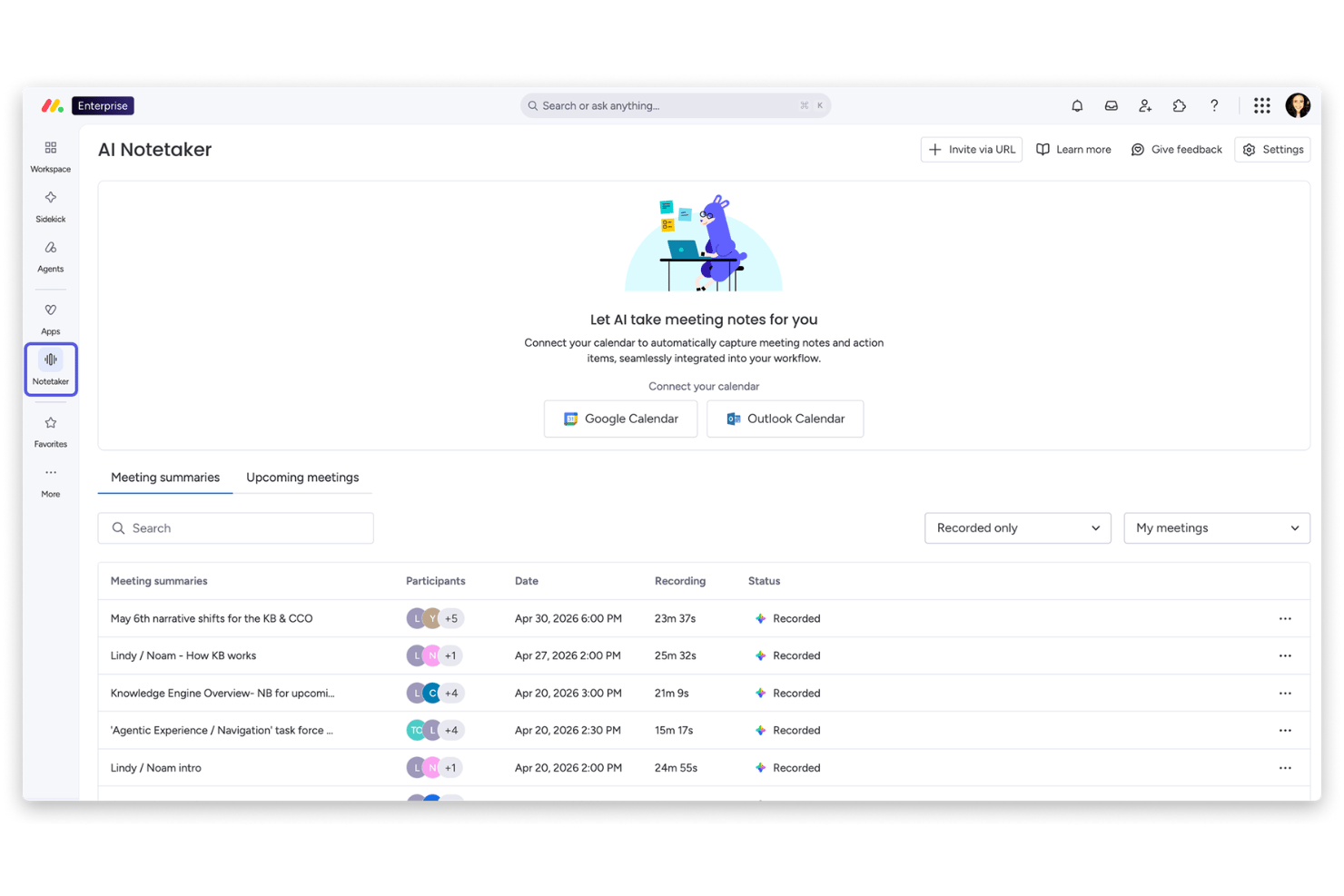
monday AI Workspace is a work management platform that combines AI-driven portfolio oversight, automated risk identification, resource management, cross-project dependency tracking, and executive reporting across multi-project environments.
Who Is monday AI Workspace Best For?
It's a strong fit for enterprise PMO teams managing large, multi-project portfolios who need AI-powered risk visibility without leaving their core work management platform.
Why I Picked monday AI Workspace
I picked monday AI Workspace because of how its Portfolio Risk Insights feature works in practice. Every day, the AI scans each project board for patterns like repeated vendor delays or timeline slippage, then generates a ranked risk list across the entire portfolio. That means I can spot a cascading dependency issue before it hits a delivery date, not after.
monday AI Workspace Key Features
- AI-powered reporting and dashboards: Automatically generates live portfolio dashboards, project health summaries, and executive reports.
- Resource management module: Offers skills-based allocation, workload balancing, and multi-project capacity planning.
- Native integrations with execution tools: Connects with Jira, Salesforce, Microsoft Teams, Slack, and other systems for unified project data.
- Custom AI workflow builder: Lets teams create AI-driven automations and workflow agents tailored to PMO-specific processes.
monday AI Workspace Integrations
monday AI Workspace offers hundreds of native integrations, including Jira, Salesforce, Slack, Microsoft Teams, GitHub, HubSpot, Google Workspace, ServiceNow, Dropbox, and Zoom. It supports Zapier and provides an API for custom integrations.
Pros and Cons
Pros:
- Custom AI workflow builder for PMO processes
- Multi-board dashboards consolidate cross-project data
- AI generates daily ranked portfolio risk insights
Cons:
- Scenario simulation is limited versus PPM leaders
- Advanced portfolio features only on Enterprise
New Product Updates from monday AI Workspace
monday AI Workspace Adds Human Approval Routing
monday AI Workspace adds a human-in-the-loop approval block to AI Workflows, sending approval requests and routing workflow paths based on responses. For more information, visit monday AI Workspace's official site.

Wrike
Best for no-code automation
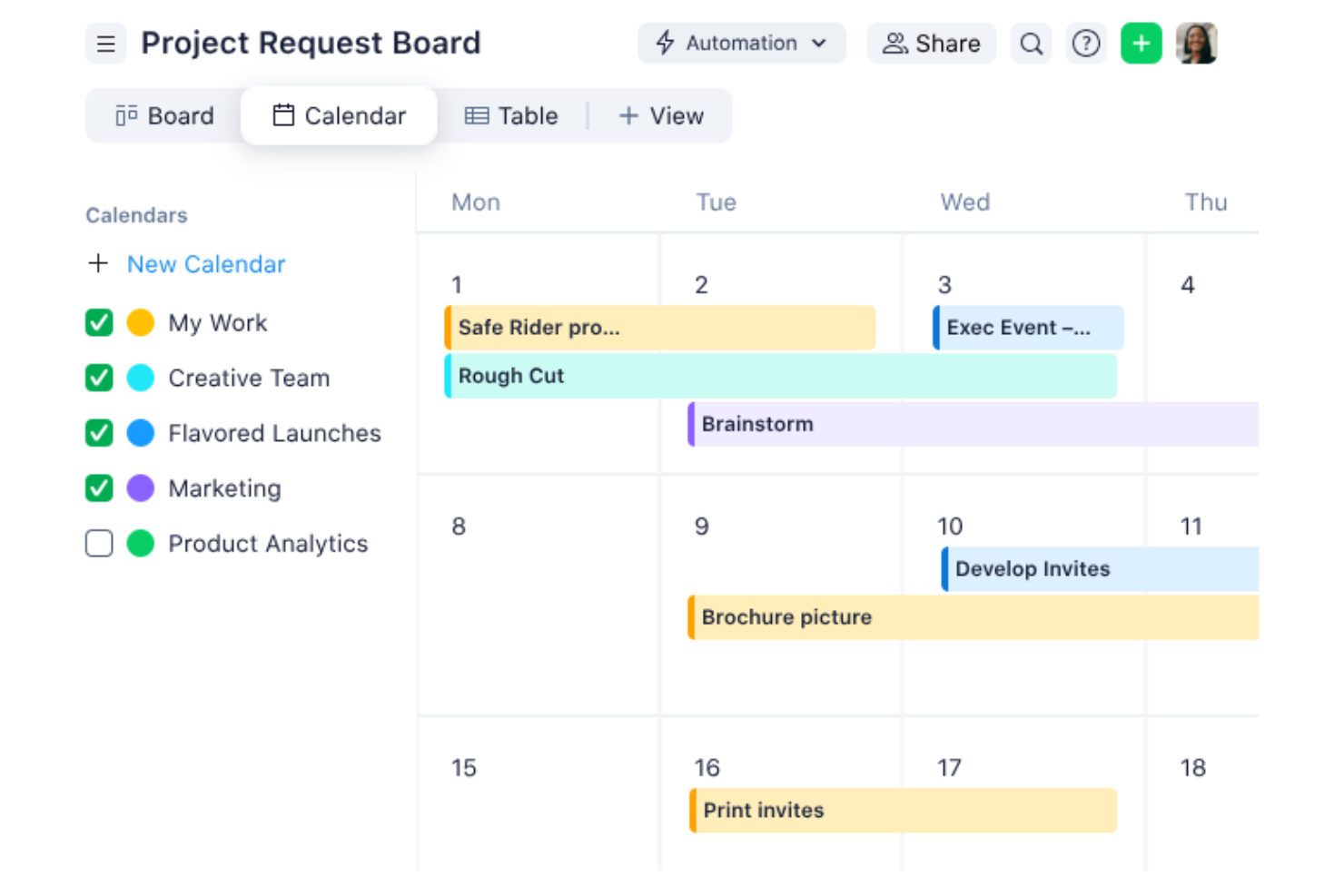
Navigating the complexities of project management becomes seamless with Wrike, a tool designed for teams who value efficiency and collaboration. Ideal for businesses aiming to optimize their project management office (PMO) operations, Wrike leverages automation and AI to minimize routine tasks, allowing your team to focus on strategic objectives. Whether you're in retail, manufacturing, or entertainment, Wrike offers solutions that address common challenges like workflow bottlenecks and communication gaps.
Why I Picked Wrike
I chose Wrike for its standout AI-driven project planning capabilities, which cater specifically to PMO needs. The platform's generative AI assists in creating comprehensive project plans and offers real-time analytics to track project progress. Additionally, Wrike's no-code automation feature streamlines repetitive tasks, freeing up your team’s time for more critical activities. These functionalities are particularly beneficial for teams seeking to enhance productivity and maintain a clear overview of their projects.
Wrike Key Features
In addition to its AI-driven planning and automation, Wrike offers several other features that enhance its utility as a PMO tool.
- Customizable Dashboards: Tailor your project view to suit your team's needs, ensuring everyone stays on the same page.
- In-Platform Communication: Facilitate seamless communication within your team without the need to switch between different tools.
- Time Tracking: Monitor and manage your team's time effectively to ensure project timelines are met.
- Project Blueprints: Utilize pre-defined templates to kickstart your projects and maintain consistency across various initiatives.
Wrike Integrations
Integrations include QuickBooks, Jira, MS Teams, Salesforce, Adobe Creative Cloud, Microsoft Office 365, Google Workspace, Slack, Dropbox, and Box.
Pros and Cons
Pros:
- Time tracking features available
- In-platform communication reduces the need for external tools
- Customizable dashboards
Cons:
- Project timeline tracking may benefit from enhanced features
- Resource tracking and document storage could be improved
New Product Updates from Wrike

Wrike Adds Quick Search to Table View
Wrike adds Quick Search to Table View with full-table search across titles, descriptions, and fields, plus highlighted matches. This helps users find tasks faster in large tables. For more information, visit Wrike’s official site.

Best for enterprise project management

ProProfs Project is a project management tool tailored for enterprises seeking to manage complex projects with ease. It serves large teams and organizations, providing automation, time tracking, and reporting features for task scheduling, resource allocation, and project tracking.
Why I picked ProProfs Project: ProProfs Project offers AI capabilities that improve enterprise project management through intelligent scheduling and automated task allocation. Your team can use AI to predict project timelines and manage resources efficiently.
The software's AI-driven analytics provide insights into project performance, ensuring alignment with business goals. These features make it ideal for enterprises handling multiple projects simultaneously.
Standout features & integrations:
Features include time tracking that helps you stay on deadline, task prioritization tools that ensure teams focus on key deliverables, and collaborative workspaces that facilitate team communication and collaboration.
Integrations include Google Drive, Dropbox, QuickBooks, FreshBooks, Box, Outlook, Slack, Trello, Basecamp, and Zapier.
Pros and Cons
Pros:
- Provides project performance insights
- Offers AI-driven task scheduling
- Handles complex enterprise projects
Cons:
- May require training for new users
- Limited customization for reports

Teamwork
Best for project profitability tracking

Teamwork is project management software designed for teams that need to track project profitability and manage resources efficiently. It serves project managers and teams focused on optimizing delivery and financial outcomes, offering tools for time tracking, budgeting, and workload visibility.
Why I picked Teamwork: Teamwork excels in tracking because its reporting and time-tracking tools help teams monitor billable hours, budget usage, and client work profitability. Its financial reports and workload visibility allow teams to understand margins and manage resources effectively.
Standout features & integrations:
Features include time-tracking tools that help you monitor billable hours, task management features that keep your team organized, and client access features that enable transparency and collaboration with stakeholders.
Integrations include Slack, Google Drive, Dropbox, HubSpot, QuickBooks, Xero, Zapier, Microsoft Teams, Outlook, and Trello.
Pros and Cons
Pros:
- Supports client collaboration
- Offers detailed cost analysis
- Tracks project profitability effectively
Cons:
- Limited customization for dashboards
- Requires setup for financial tracking

Best for remote team collaboration

ProjectManager is a cloud-based project management tool designed for PMOs to improve productivity and collaboration. It supports planning, tracking, and reporting with AI-generated summaries that assist decision-making. It works well for remote teams managing projects across time zones.
Why I picked ProjectManager: ProjectManager excels in remote team collaboration by integrating AI-driven insights that offer project summaries and recommendations. Its AI capabilities help your team make informed decisions quickly.
You can utilize features like real-time dashboards and workflow automation to keep everyone on the same page. The tool’s integration of critical path management ensures that your projects stay on track, even when team members are dispersed.
Standout features & integrations:
Features include real-time dashboards that provide instant visibility into project progress, Kanban boards for managing tasks efficiently, and workflow automation that reduces manual work, freeing up your team to focus on high-impact tasks.
Integrations include Gantt charts, portfolio dashboards, workload tracking, task comments, and file sharing with unlimited storage, helping teams coordinate from different locations.
Pros and Cons
Pros:
- Includes real-time dashboards
- Offers AI-driven project insights
- Supports remote team collaboration
Cons:
- Limited customization options for reports
- May require training for new users


Motion is an AI project management tool designed to boost team productivity by automating tasks and predicting project timelines. It is designed for teams wanting to reduce manual coordination, with AI engines that handle timeline updates and capacity adjustments.
Why I picked Motion: Motion excels in task automation, offering AI roles like an Executive Assistant and Project Manager to handle specific productivity areas. Its AI capabilities allow your team to automate project planning and visualize timelines and milestones with Gantt charts, reducing manual work. You also benefit from features like an AI assistant that simplifies scheduling.
Standout features & integrations:
Features include intelligent dashboards that show productivity trends, automatic dependency handling, and AI-driven capacity planning that redistributes workloads as tasks change.
Integrations include Google Calendar, Slack, Trello, Asana, Jira, Microsoft Teams, Outlook, Zoom, Salesforce, and HubSpot.
Pros and Cons
Pros:
- Offers excellent onboarding support
- Provides detailed productivity insights
- Automates task prioritization
Cons:
- May require a learning curve for new users
- Limited customization options


Digital.ai is an agile project management platform designed for teams that need to adapt quickly to changing project requirements. Its main users are agile teams focused on improving workflow efficiencies, using AI to improve project tracking and predictive analytics.
Why I picked Digital.ai: Digital.ai stands out for its AI-driven capabilities that support agile methodologies, offering tools like AI-enhanced sprint planning and backlog prioritization. It helps your team predict project outcomes and adjust plans dynamically.
The platform’s AI analytics tool provides insights into team performance, ensuring that your project stays on track. These features make it a great choice for teams focused on agile project management.
Standout features & integrations:
Features include customizable workflows that adapt to your team's processes, real-time reporting that keeps everyone informed, and sprint retrospectives that help your team learn and improve continuously.
Integrations include Jira, Salesforce, ServiceNow, Microsoft Teams, Slack, GitHub, Jenkins, Azure DevOps, Confluence, and Bitbucket.
Pros and Cons
Pros:
- Provides real-time project insights
- Offers AI-enhanced sprint planning
- Supports agile methodologies
Cons:
- Limited customization for reporting
- May require initial setup time


Forecast App is a project management tool designed for teams that need precise resource allocation and project forecasting. It uses AI to optimize resource management and predict project outcomes, making it ideal for project managers who want to improve efficiency and planning accuracy.
Why I picked Forecast App: Forecast App's AI capabilities are central to its resource allocation, using machine learning to predict project timelines and resource needs. It offers insights into team utilization and helps you make data-driven decisions. The tool's AI-driven financial insights support budgeting and cost management. These features make it perfect for teams that need to manage resources effectively.
Standout features & integrations:
Features include time tracking that ensures project timelines stay on course, project budgeting that helps manage finances, and task management that keeps your team organized and focused on priorities.
Integrations include Jira, Slack, QuickBooks, Xero, Salesforce, HubSpot, Trello, Asana, Microsoft Teams, and Google Calendar.
Pros and Cons
Pros:
- Facilitates accurate project forecasting
- Offers detailed financial insights
- Provides AI-driven resource optimization
Cons:
- Requires setup time for customization
- May have a steep learning curve


Meisterplan is a project portfolio management tool designed for businesses looking to optimize their project planning and execution. Its main users are project managers and teams who need to visualize and manage resources effectively, using AI-driven scenario planning to forecast outcomes and allocate resources.
Why I picked Meisterplan: Its scenario planning tools use AI-driven analytics to show how different project decisions affect resources and timelines. Teams can compare alternatives and anticipate constraints, making it valuable for organizations needing structured, forward-looking planning.
Standout features & integrations:
Features include drag-and-drop project scheduling, capacity planning to manage workloads, and customizable dashboards for portfolio visibility.
Integrations include Jira, Microsoft Project, Smartsheet, Excel, SAP, ServiceNow, Salesforce, Trello, Asana, and Google Workspace.
Pros and Cons
Pros:
- Provides customizable dashboards
- Offers predictive resource analytics
- Supports detailed scenario planning
Cons:
- Requires initial setup and configuration
- Higher price point for smaller teams
Other PMO AI Tools
Here are some additional PMO AI tool options that didn’t make it onto my shortlist, but are still worth checking out:


How I Evaluate PMO AI Tools
Every tool on this list needs to deliver AI that actually moves the needle for PMO teams—think surfacing portfolio risks before a steering committee meeting, not just rebranding dashboards as "intelligent." I split my evaluation into core functionality every PMO AI tool must have to qualify and the differentiating factors that separate good options from great ones.
Core Functionality (Table Stakes For This List)
When I'm selecting tools for my list, I rank each one on a scale from 0 (does not offer the functionality) to 5 (excels in this area) for each core functionality listed below. Then, I calculate the tool's total score into a percentage. Each tool needs to achieve a minimum total score of 65% to be considered for inclusion.
- AI-Driven Project Insights: I look for AI that analyzes project data and surfaces predictions on timelines, budgets, or outcomes—not just static charts repackaged with an AI label.
- Portfolio-Level Management: The tool should support multi-project visibility, governance, and dependency tracking so PMO leads can prioritize across an entire portfolio.
- Automated Status Reporting: I evaluate whether AI can synthesize project data into exec-ready summaries, like generating a weekly portfolio digest without manual copy-pasting.
- AI Resource Optimization: Smart resource allocation matters here—tools like Smartsheet or Planview that suggest staffing moves based on capacity and skills score well.
- Predictive Risk Detection: I check whether the AI proactively flags at-risk projects with clear reasoning, rather than just offering a manual risk register.
- AI Assistant or Copilot: A conversational interface for querying portfolio data, drafting artifacts, or automating routine tasks adds real day-to-day value for PMO teams.
Once I have a list of tools that meet this criteria, I consider what sets each platform apart.
Differentiating Factors (What Sets Vendors Apart)
Here's how I compare and contrast different vendors:
Standout Features
Scenario simulation is a major differentiator—I look for tools that let PMO leaders model what happens if a project gets delayed or a key resource shifts before committing. Cross-tool data aggregation matters just as much, since most PMOs run execution across Jira, Asana, or Azure DevOps and need a unified portfolio view without manual consolidation. I also check whether AI can auto-generate artifacts like project charters or meeting summaries from raw inputs, saving hours of admin work each week.
Beyond Features
AI transparency matters a lot in this space—I evaluate whether a tool explains how it arrives at its predictions and whether PMO leads can override or adjust AI recommendations. Integration depth is equally important, since a PMO AI tool that can't pull live data from Jira, Azure DevOps, or your ERP is just another silo. I also consider implementation support, because rolling out AI-driven portfolio management across a PMO requires real change management, not just a knowledge base link.
How to Choose PMO AI Tools
It’s easy to get bogged down in long feature lists and complex pricing structures. To help you stay focused as you work through your unique software selection process, here’s a checklist of factors to keep in mind:
| Factor | What to Consider |
| Scalability | Can the tool grow with your team? Consider future needs like increased project volume or team size, and whether the tool can handle these changes. |
| Integrations | Does it integrate with your existing systems? Check if it supports your current tools, like CRM, ERP, or communication platforms, to avoid workflow disruptions. |
| Customizability | Can you tailor it to fit your processes? Look for options to modify dashboards, workflows, and reports to align with your team's unique workflows. |
| Ease of use | Is the tool intuitive for your team? A steep learning curve can slow down adoption, so prioritize user-friendly interfaces and straightforward navigation. |
| Implementation and onboarding | How quickly can you get started? Evaluate the resources needed for setup and training, including available support and documentation. |
| Cost | Does it fit your budget? Compare pricing models, including user-based fees and annual discounts, to ensure it aligns with your financial constraints. |
| Security safeguards | Are your data protected? Check for compliance with industry standards like GDPR or ISO, and verify encryption and access controls. |
| Support availability | Will you have access to help when needed? Consider support hours, response times, and the availability of dedicated account managers or technical support. |
What Are PMO AI Tools?
PMO stands for Project Management Office. This refers to the team or department responsible for setting project standards, overseeing processes, and ensuring projects align with organizational goals.
PMO AI tools are project management solutions enhanced with artificial intelligence to improve project planning, execution, and oversight. They’re typically used by project managers and PMO teams to increase efficiency and accuracy in managing projects. Features like predictive analytics, automated scheduling, and resource optimization support better decision-making and stronger project alignment. These tools provide significant value by improving productivity and helping teams deliver more consistent project outcomes.
Features
When selecting PMO AI tools, keep an eye out for the following key features:
- Predictive analytics: Provides forecasts on project outcomes and resource needs, helping teams make informed decisions.
- Automated scheduling: Automatically adjusts project timelines based on changes, reducing the need for manual status updates.
- Resource optimization: Analyzes team capacity and allocates resources efficiently, ensuring projects stay on track.
- AI-driven insights: Offers data-driven recommendations to improve project planning and execution.
- Scenario planning: Allows teams to simulate different project strategies and assess potential impacts before implementation.
- Real-time reporting: Provides up-to-date project status and performance metrics, facilitating timely decision-making.
- Task automation: Automates repetitive tasks, freeing up team members to focus on high-impact activities.
- Customizable dashboards: Let users tailor views to display relevant project data, improving monitoring and oversight.
- Risk management: Identifies potential project risks and suggests mitigation strategies to avoid bottlenecks.
- Budget management: Tracks project expenses and provides insights to help manage financial resources effectively.
Benefits
Implementing PMO AI tools provides several benefits for your team and your business. Here are a few you can look forward to:
- Improved decision-making: AI-driven insights help your team make informed choices, reducing guesswork and enhancing project outcomes.
- Increased efficiency: Automated scheduling and task management free up time, allowing your team to focus on more strategic tasks.
- Improved resource management: Optimized resource allocation ensures that your team is always working at peak capacity without overloading anyone.
- Better risk management: AI tools identify potential risks early, giving you time to address issues before they affect project timelines.
- Accurate forecasting: Predictive analytics provide reliable projections for project timelines and budgets, minimizing surprises down the road.
- Real-time visibility: Up-to-date reporting keeps everyone informed, making it easier to track progress and adjust plans as needed.
- Customized insights: Customizable dashboards let you tailor data views to meet your specific project needs, improving oversight and control.
Costs & Pricing
Selecting PMO AI tools requires an understanding of the various pricing models and plans available. Costs vary based on features, team size, add-ons, and more. The table below summarizes common plans, their average prices, and typical features included in PMO AI tools solutions:
Plan Comparison Table for PMO AI Tools
| Plan Type | Average Price | Common Features |
| Free Plan | $0 | Basic task management, limited reporting, and community support. |
| Personal Plan | $10-$2600/user/month | Task management, basic reporting, and email support. |
| Business Plan | $30-$800 user/month | Advanced reporting, resource allocation, team collaboration, and chat support. |
| Enterprise Plan | $80-$3100/user/month | Custom dashboards, AI-driven insights, dedicated support, and improved security. |
PMO AI Tools FAQs
Here are some answers to common questions about PMO AI tools:
How do PMO AI tools integrate with existing systems?
Yes, PMO AI tools can integrate with existing systems, such as CRM, ERP, and communication platforms. Before purchasing, verify that the tool is compatible with your current systems to prevent workflow disruptions. Look for integration capabilities with popular tools like Salesforce, Slack, or Microsoft Teams. This ensures a smoother transition and helps maintain your team’s productivity.
Can PMO AI tools handle multiple projects simultaneously?
Yes, most PMO AI tools are designed to manage multiple projects at once. They help you track project timelines, resource allocations, and budgets across various projects. Use features like dashboards and reporting to get an overview of all ongoing projects. This capability is essential for teams managing multiple projects simultaneously.
Are PMO AI tools suitable for small teams?
Yes, PMO AI tools can be suitable for small teams and startups, depending on the tool’s scalability and pricing. Some tools offer plans tailored for smaller teams with fewer features at a lower cost. Focus on ease of use and essential features, such as task management and reporting. This ensures that even a small team can benefit from the tool without unnecessary complexity.
How can AI improve project forecasting in PMO tools?
AI improves project forecasting by analyzing historical data and predicting future project outcomes. It helps identify potential risks and resource needs, allowing you to make informed decisions. Use AI-driven insights to adjust project timelines and budgets proactively. This leads to more accurate forecasting and better project management.
What should I consider when migrating to a PMO AI tool?
When migrating to a PMO AI tool, consider the ease of onboarding, available training resources, and support services. Ensure the tool offers tutorials, webinars, and a responsive support team. Evaluate how the tool integrates with your current systems and the time required for data migration. This preparation helps ensure a smooth transition and quick adoption by your team.