
10 Best Project Management Software Picked For 2026

10 Best Project Management Software Shortlist
Here's my pick of the 10 best software from the 40 tools reviewed.


The best project management software helps you plan projects, track progress, manage budgets, and collaborate with your team all in one place. Without it, you’re forced to rely on disconnected tools—like spreadsheets, emails, or Slack threads—which makes it harder to manage timelines, prevent scope creep, and keep your team aligned.
After 20 years of experience managing large-scale projects across various agencies and over a decade of writing software reviews, I understand what to prioritize when evaluating project management tools for performance, usability, and scalability. I've tested and compared more than 40 tools to identify those that truly streamline project delivery.
In this guide, you’ll find reliable, purpose-built software that supports planning, tracking, and communication throughout the entire project lifecycle. Each review includes key features, pros and cons, and what makes the tool stand out, so you can choose the software that best aligns with your workflows and management style.
Why Trust Our Project Management Software Reviews
We’ve been testing and reviewing project management software since 2012. As project managers ourselves, we know how critical and difficult it is to make the right decision when selecting software.
We invest in deep research to help our audience make better software purchasing decisions. We’ve tested more than 2,000 tools for different project management use cases and written over 1,000 comprehensive software reviews. Learn how we stay transparent & our project management review methodology.
Best Project Management Tools Comparison Chart
This comparison chart summarizes pricing details for my top project management software selections to help you find the best one for your budget and business needs.
| Tool | Best For | Trial Info | Price | ||
|---|---|---|---|---|---|
| 1 | Best for large projects and scaling | Free plan + free demo + 14-day free trial available | From $10/user/month (billed annually) | Website | |
| 2 | Best for workflow automation | Free plan available | From $9/seat/month (billed annually) | Website | |
| 3 | Best for simplified planning and workflows | 14-day free trial + free demo available | From $10/user/month (billed annually) | Website | |
| 4 | Best for customizable dashboards | Free trial + free demo available | From $9/member/month (billed annually) | Website | |
| 5 | Best for customizable project templates | Free demo available | Pricing upon request | Website | |
| 6 | Best for end-to-end agency projects | Free 7-day trial available | From $9/user/month (billed annually) | Website | |
| 7 | Best for agency projects and budgeting | 14-day free trial available | From $10/user/month (billed annually) | Website | |
| 8 | Best for intelligent project time capture | Free trial + demo available | From $6/user/month | Website | |
| 9 | Best for integration with Zoho Suite | Free plan + free demo available + 15-day free trial | From $4/user/month (billed annually) | Website | |
| 10 | Best for collaborative project management | Free plan available | From $1/user/month (billed annually) | Website |


-

Insightful
Visit WebsiteThis is an aggregated rating for this tool including ratings from Crozdesk users and ratings from other sites.4.8 -
Accelo
Visit WebsiteThis is an aggregated rating for this tool including ratings from Crozdesk users and ratings from other sites.4.4 -
Forecast
Visit WebsiteThis is an aggregated rating for this tool including ratings from Crozdesk users and ratings from other sites.4.6




Best Project Management Software Reviews
Here’s my in-depth review and analysis of the best project management software. I’ll walk you through pros and cons, features and functionality, to help guide you to a better understanding of each tool’s capabilities and suitability for your projects.

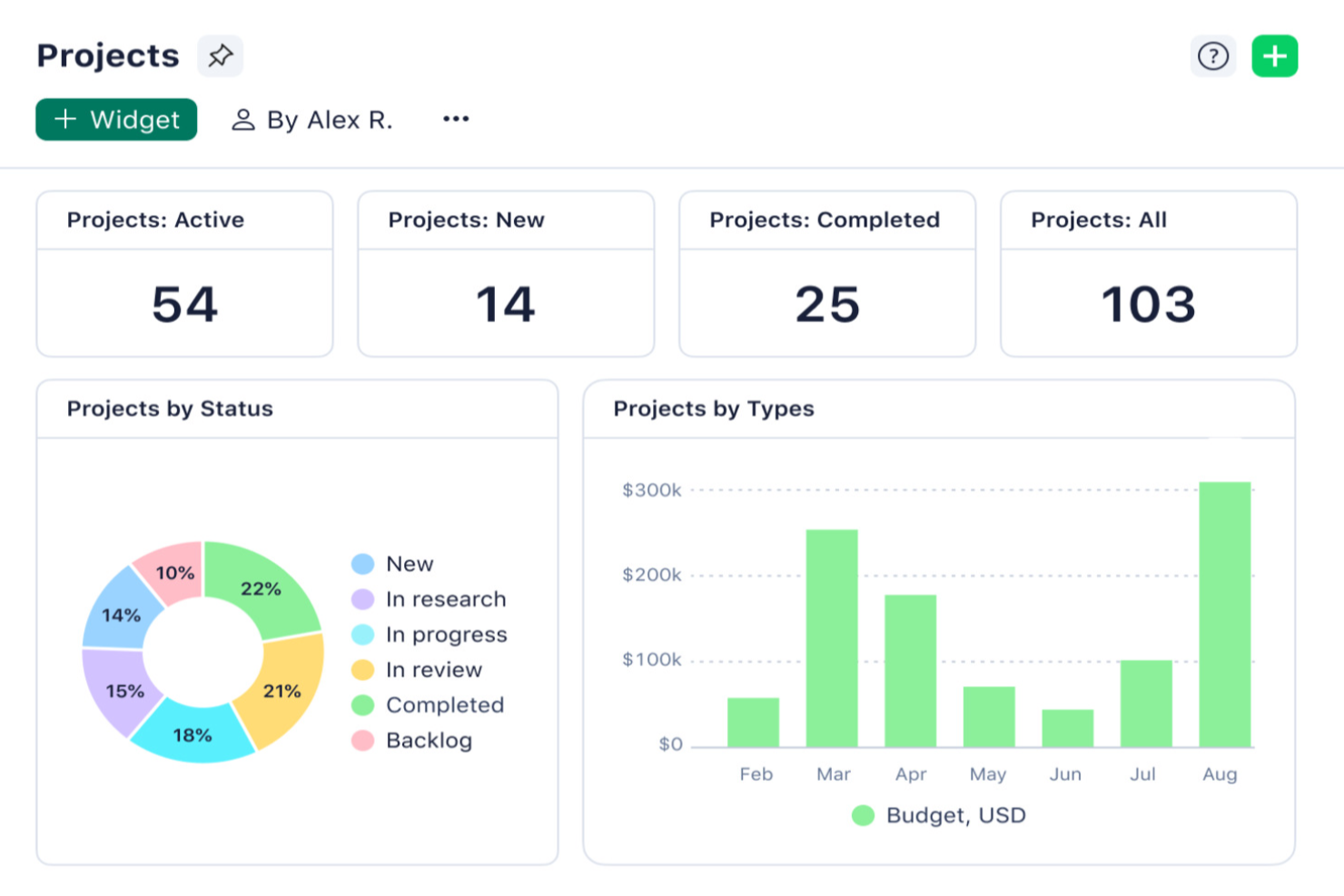
Wrike is a project management platform built for teams in fast-paced industries who need customizable workflows, advanced resource planning, and real-time collaboration to keep complex projects on track.
Who Is Wrike Best For?
Wrike is a strong fit for mid-size to enterprise teams managing multiple concurrent projects across cross-functional departments like marketing, product, and professional services.
Why I Picked Wrike
Wrike earns its spot on my shortlist because it handles the kind of project complexity that most tools start to buckle under. I particularly like the cross-project portfolio management view, which lets my team track dependencies and workloads across multiple large initiatives at once—without jumping between separate tools. Resource bookings let me reserve capacity by team member or job role and estimate hours against actual availability, so I can catch overallocation before it becomes a problem. The effort management feature also helps when scoping tasks, since I can flag how demanding a piece of work is before assigning it, which makes forecasting delivery timelines much more accurate at scale.
Wrike Key Features
- Custom project views: Toggle between Gantt, Kanban, Board, Calendar, and Chart views to visualize project progress in the format that works best for your team.
- Scrum boards: Manage Agile sprints with shared Scrum boards, backlog prioritization, and real-time progress tracking.
- Custom request forms: Build dynamic intake forms that automatically generate tasks, projects, and workflows when submitted.
- Wrike Copilot: An AI assistant that answers queries, flags project risks, and surfaces priority insights directly within your workspace.
Wrike Integrations
Integrations include Microsoft Teams, Salesforce, Google Drive, Adobe Creative Cloud, Zoom, Power BI, Tableau, QuickBooks, Miro, and Microsoft SharePoint.
Pros and Cons
Pros:
- Worldclass onboarding through video walkthroughs
- Right-click context menus allow you to do more with fewer clicks
- AI features are available in all plans at no extra cost
Cons:
- Integrations come at an extra cost, regardless of the plan
- 2FA is locked behind the enterprise plan
New Product Updates from Wrike

Streamlining Workspaces with New Updates
Wrike announces custom space templates, AI Agents in Wrike Labs, and a new Guage widget to improve project management. For more information, visit Wrike's official site.

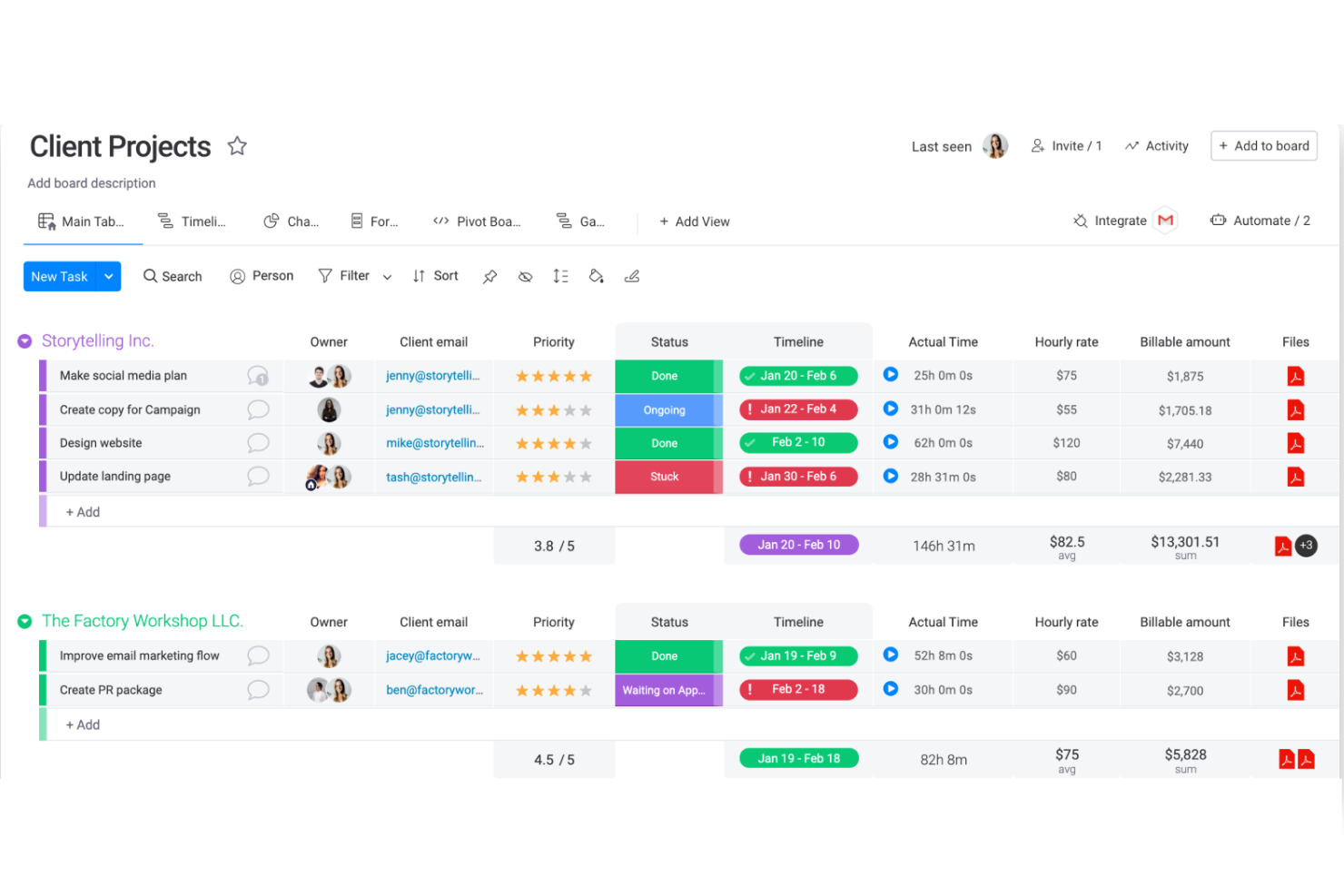
monday.com gives teams in tech, marketing, and operations a flexible platform to organize projects, manage tasks, and keep everyone aligned as work moves from planning to delivery.
Who Is monday.com Best For?
monday.com is a good fit for mid-sized to enterprise teams that need a customizable system for managing multiple projects across departments like product, marketing, and operations.
Why I Picked monday.com
monday.com earns its spot as one of the best on my shortlist because its no-code automation builder is one of the most flexible I've used. I can set up triggers like "when a task status changes to Done, assign the next task to a specific person and notify the stakeholder"—all without writing a single line of code. I also like how monday.com lets you automate across boards, so when a dependency in one project updates, connected boards update to reflect that change. That kind of cross-board automation is what keeps large, multi-team projects from falling apart at the handoff points.
monday.com Key Features
- Multiple project views: Switch between Gantt, Kanban, calendar, and timeline views to match how your team tracks work.
- Customizable dashboards: Build real-time dashboards that pull data from multiple boards to give stakeholders a clear project overview.
- Task dependencies: Link tasks so that when one item is delayed, connected tasks update to reflect the updated timeline.
- Workload management: See how work is distributed across team members and reassign tasks from the workload view.
monday.com Integrations
Integrations include Salesforce, QuickBooks, HubSpot, Zendesk, Active Directory, GitHub, GitLab, Slack, Gmail, and Microsoft Teams.
Pros and Cons
Pros:
- Automations are easy to create and require no coding
- Easy to connect to other tools via integrations library
- Huge focus on collaboration
Cons:
- Some views have trouble auto-updating
- The Gantt view cannot be used to build a project from scratch
New Product Updates from monday.com

monday.com Enhances Governance With AI Spend and Activity Logs
monday.com introduces AI governance with user limits and scheduled cleaning activity logs. These updates help teams control AI usage costs and maintain better visibility into system actions for compliance. For more information, visit monday.com’s official site.

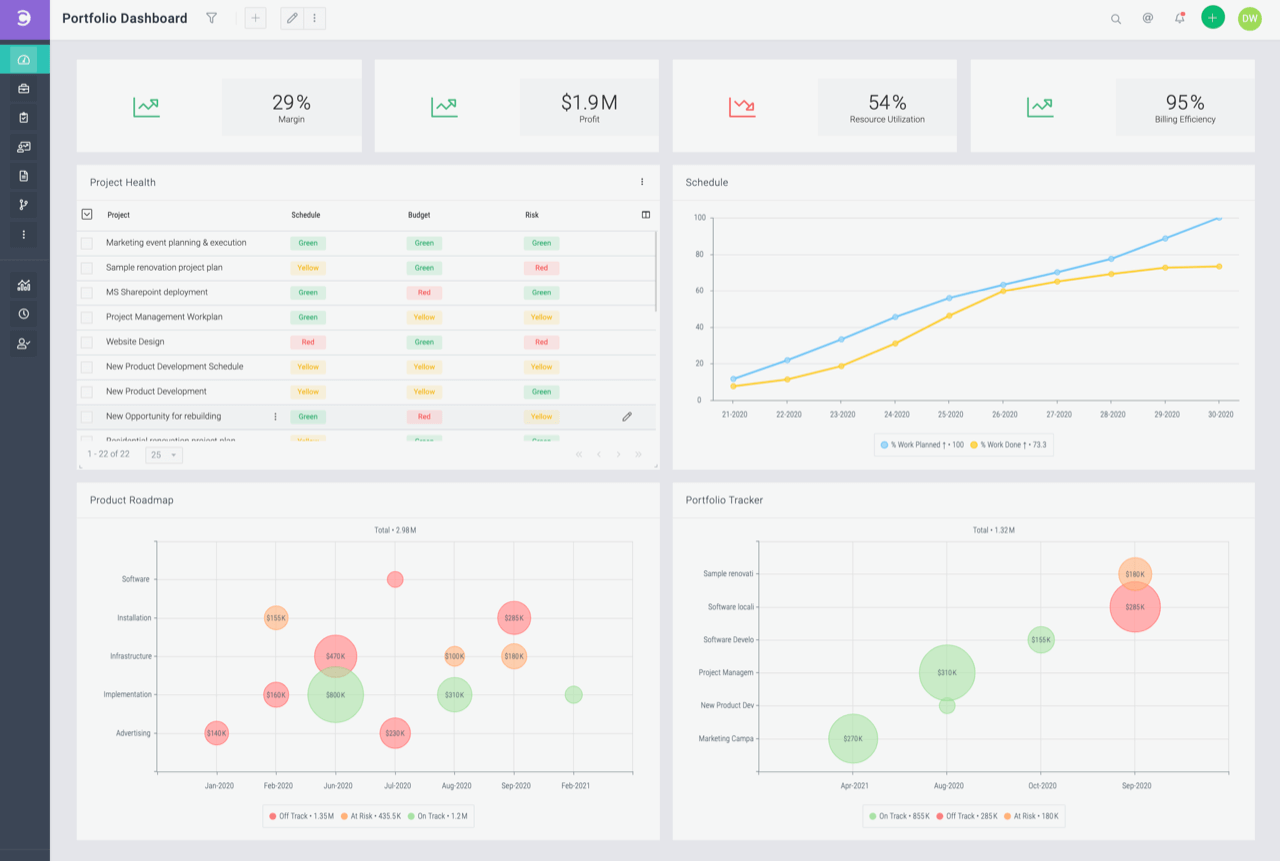
Celoxis is a project management platform built for teams and organizations that need to manage complex projects, track resources, and automate workflows across multiple departments or client projects.
Who Is Celoxis Best For?
Celoxis is a good fit for mid-size to large teams that need a centralized platform to manage multiple projects, resources, and stakeholders at once.
Why I Picked Celoxis
I picked Celoxis as one of the best because of how well it handles planning complexity without making the process feel heavy. The interactive Gantt chart automatically adjusts to changes in real time—so when a dependency shifts, the schedule updates without me having to manually rework the whole plan. I also like the built-in workflow apps for tracking risks, issues, change requests, and bugs alongside the project itself, which means my team isn't juggling separate spreadsheets for each. The custom routing rules and escalation policies in those workflows keep the right people informed at the right time, without any extra setup.
Celoxis Key Features
- Project accounting: Track budget spend, revenue forecasting, and profit margins across projects and portfolios in real time.
- Resource capacity planning: View team availability, assign work based on skills, and get instant alerts when someone is overloaded.
- Portfolio management dashboard: Monitor progress, budgets, and risks across multiple projects in a single customizable view.
- Client portal: Share project updates, files, and discussions with clients through a free, customizable portal built into the platform.
Celoxis Integrations
Integrations include Microsoft Project, Microsoft Excel, Google Drive, Outlook, Salesforce, Jira, QuickBooks Online, Slack, Trello, and Okta.
Pros and Cons
Pros:
- Offers a portfolio-level view with real-time dashboards
- Highly customizable and flexible for scaling organizations
- Advanced reporting and analytics, including AI forecasting
Cons:
- No mobile app available
- May not be suitable for small teams or organizations with fewer than 5 employees

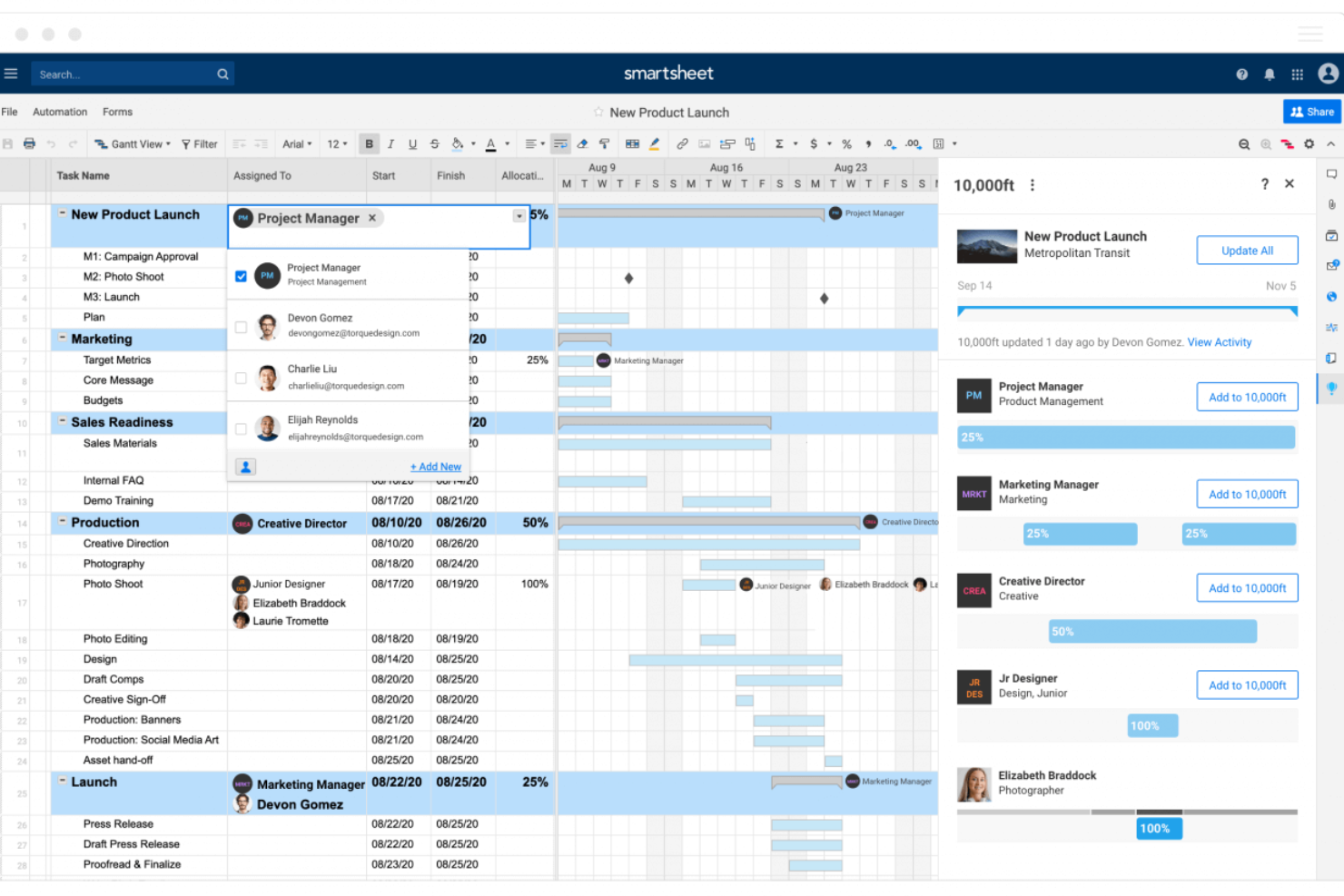
Smartsheet is a project management platform built for teams who need flexible planning, real-time collaboration, and visibility across complex projects, making it popular with organizations in tech, marketing, and operations looking to manage work at scale.
Who Is Smartsheet Best For?
Smartsheet is a strong fit for mid-size to enterprise teams in project management, operations, and IT who need to coordinate work across multiple departments or workstreams.
Why I Picked Smartsheet
I picked Smartsheet as one of the best because of how much control it gives you over dashboard design and data presentation. You can build dashboards from scratch using a drag-and-drop widget system—pulling in metric, chart, report, and web content widgets, then resizing and repositioning them on a grid. I like that you can apply custom hex color codes to individual widgets, set dashboard-wide themes, and even create and export custom themes to share across your organization. That level of visual consistency matters when you're presenting project status to executives or stakeholders who need to read a dashboard at a glance. The automatic 10-minute refresh on published dashboards keeps stakeholder data current without manual updates.
Smartsheet Key Features
- Gantt chart view: Visualize project timelines, set dependencies between tasks, and adjust schedules by dragging and dropping bars directly on the chart.
- Automated workflows: Set up no-code automation rules to trigger alerts, approval requests, or row updates based on conditions you define in your sheets.
- Resource management: View team capacity across projects, allocate work by role or individual, and track time logged against planned hours.
- Baseline tracking: Capture a snapshot of your original project plan and compare it against current progress to measure schedule and budget variance.
Smartsheet Integrations
Integrations include Adobe, AWS, Box, DocuSign, Dropbox, Google, Power BI, SAP, Jira, and Microsoft.
Pros and Cons
Pros:
- Facilitates collaborative project management
- Allows for automation of tasks
- Can tailor the tool to specific project management needs
Cons:
- Not ideal for simpler project management needs
- Lacks built-in time tracking
New Product Updates from Smartsheet

Smartsheet Adds Direct Data Import to Existing Sheets
Smartsheet introduces direct data import to existing sheets in table view. This update lets you import CSV, XLS, and XLSX files directly into sheets, reducing manual work and speeding up data setup. For more information, visit Smartsheet's official site.

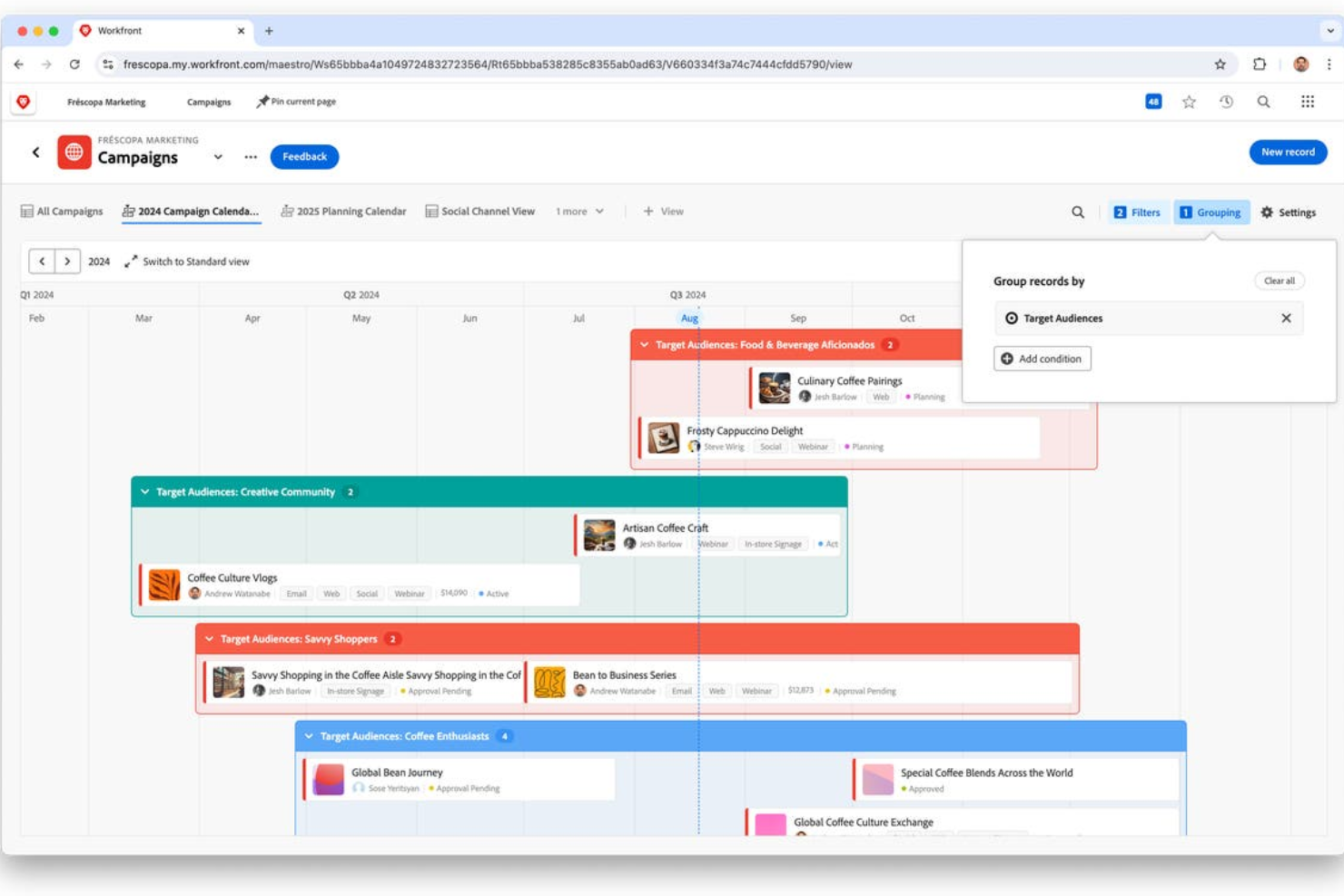
Adobe Workfront is a project management platform built for enterprise teams who need to manage complex workflows, coordinate cross-functional projects, and gain real-time visibility into work across departments.
Who Is Adobe Workfront Best For?
Adobe Workfront is a strong fit for large enterprises and marketing operations teams managing high volumes of work across multiple departments.
Why I Picked Adobe Workfront
Adobe Workfront earns its spot on my shortlist because of how well it handles customizable project templates at an enterprise scale. I particularly like the blueprints feature—Workfront ships with a curated library of ready-to-deploy templates for common use cases like digital asset production, IT organization setup, and services delivery plans. When my team needs to spin up a new campaign project, we're not starting from scratch. We pull a blueprint, adjust the task structure and settings to match our process, and save it as a reusable "starter" project. The automated workflow templates layer on top of that, letting us lock in review stages, approval sequences, and stakeholder permissions so the same process runs consistently every time.
Adobe Workfront Key Features
- Resource capacity planning: Track team utilization and forecast staffing needs to balance workloads across projects and individuals.
- Digital proofing: Review, annotate, and approve creative assets directly within Workfront using built-in proofing tools.
- Custom dashboards and reporting: Build visual dashboards with configurable report widgets and export data to BI tools or data lakes.
- Work request management: Create a centralized intake channel with custom forms that automatically route requests to the right team.
Adobe Workfront Integrations
Integrations include Adobe Experience Manager Assets, Adobe Creative Cloud, Adobe Express, Frame.io, GenStudio for Performance Marketing, Slack, Microsoft Teams, Figma, Marketo Engage, and Acrobat Sign.
Pros and Cons
Pros:
- Customizable dashboards and reports
- Integration with BI tools like Tableau and Power BI
- Supports various project methodologies
Cons:
- Integration setup can be time-consuming
- No AI forecasting or predictive analytics

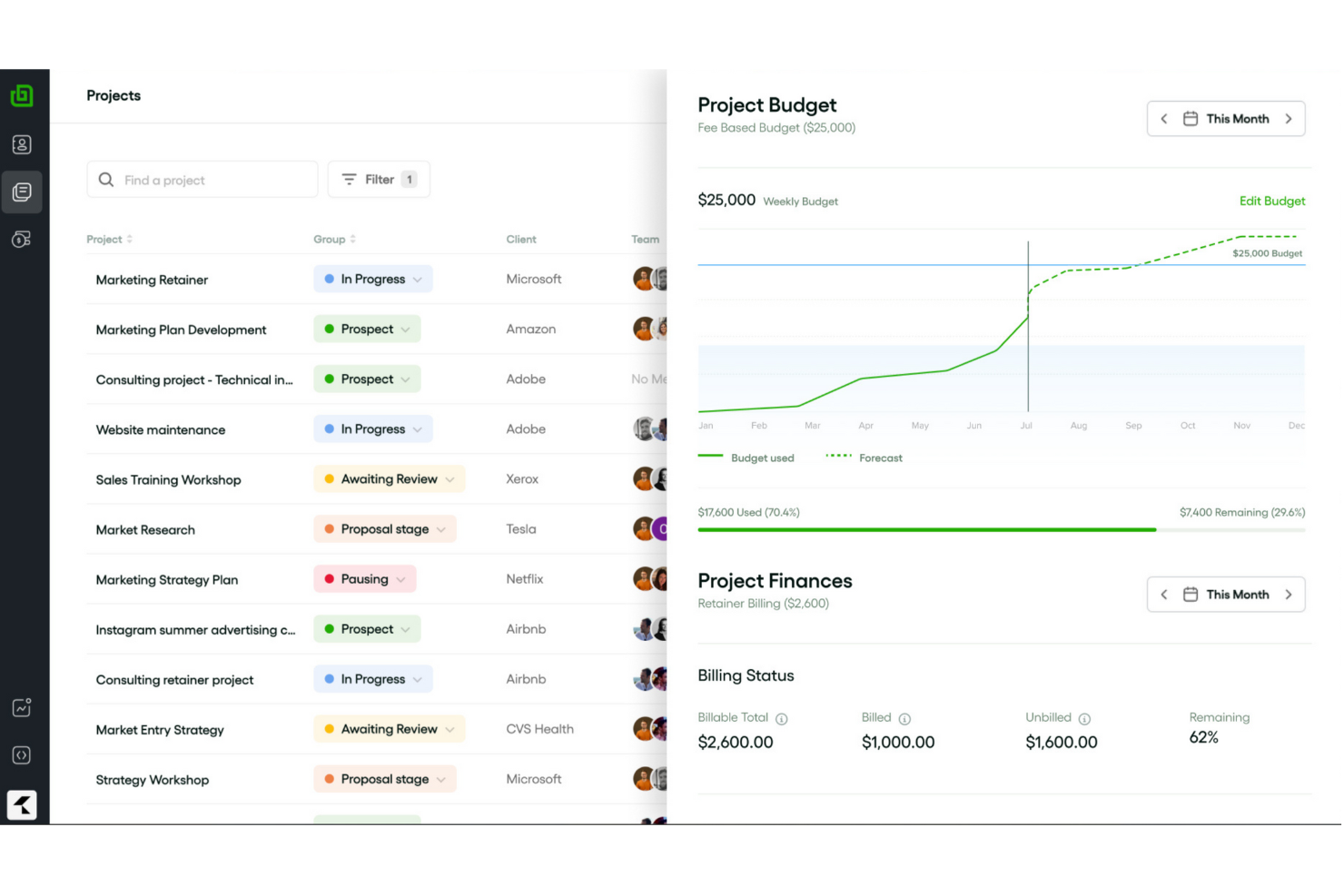
Bonsai Agency Software gives creative agencies and consultancies a unified workspace to manage projects, collaborate with clients, track time, and handle billing—all in one place.
Who Is Bonsai Agency Software Best For?
Bonsai Agency Software is a strong fit for small to mid-sized agencies—creative, marketing, or consulting—that need to manage client work, projects, and finances in one tool.
Why I Picked Bonsai Agency Software
Bonsai Agency Software earns its spot on my shortlist because it covers the full arc of an agency project—from scoping and resource allocation through to time tracking and budget reporting—without needing a separate tool for each stage. I particularly like the real-time budget and margin tracking, which updates the moment a booking is placed, so my team can catch scope creep before it becomes a problem. The integrated task timer lets us log hours directly from tasks, and those hours feed straight into project budget reports. That kind of tight connection between task execution and financial visibility is what makes Bonsai genuinely useful for end-to-end agency project management.
Bonsai Agency Software Key Features
- Task estimates: Add time estimates to tasks and run reports comparing estimated vs. actual hours to spot overruns and improve future planning.
- Live capacity tracking: See team utilization in real time as you schedule, with automatic adjustments for part-time staff and public holidays.
- Task views: Switch between Kanban, Gantt, and calendar views to track task progress and visualize project timelines.
- Tentative allocations: Assign resources to potential projects with placeholder bookings that can be adjusted as project scope is confirmed.
Bonsai Agency Software Integrations
Integrations include Stripe and Zoom.
Pros and Cons
Pros:
- Client portal helps manage multiple clients
- Offers high-quality customizable templates
- Automation for tasks like recurring invoices
Cons:
- May not be best for scaling operations
- Lack of advanced features

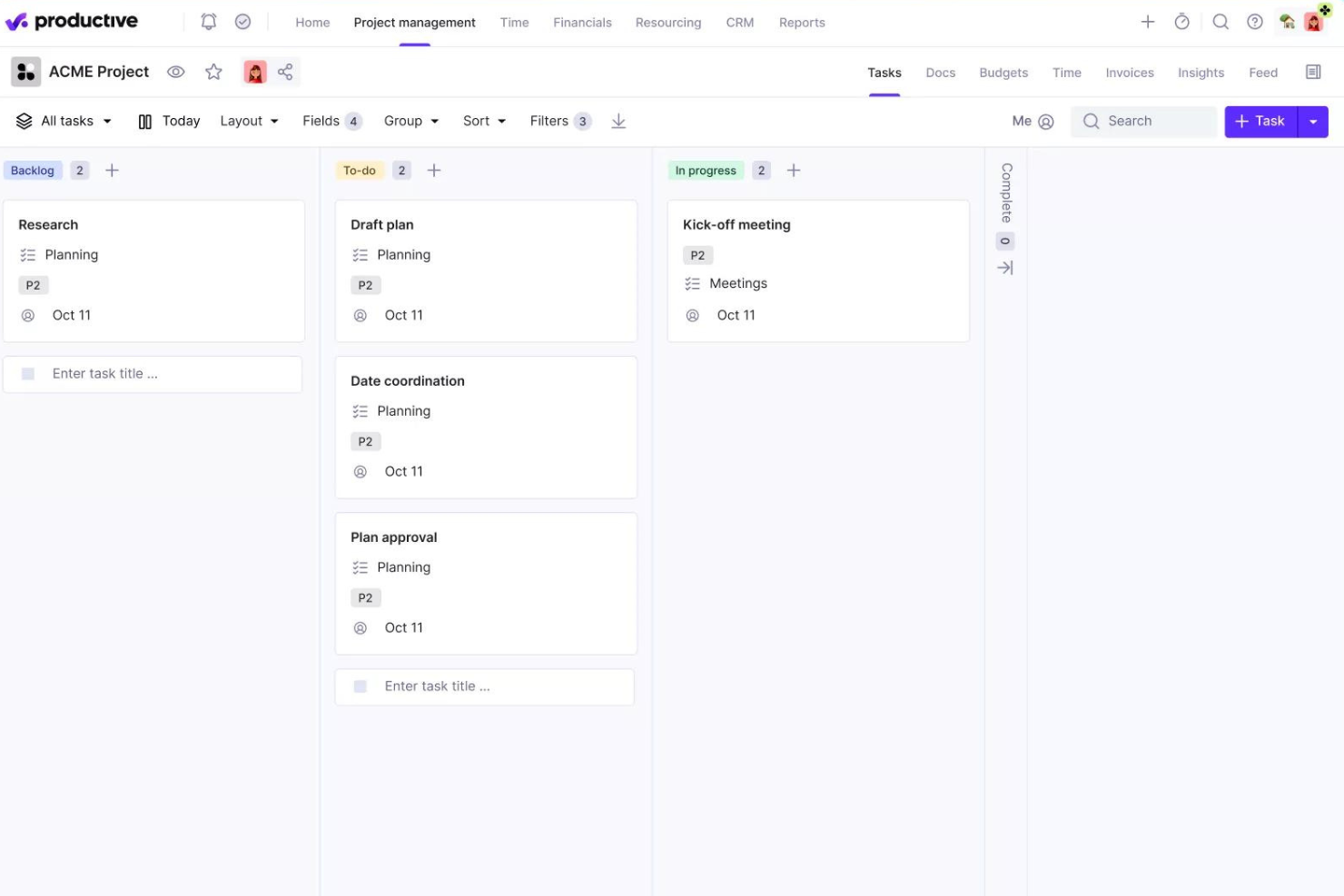
Productive is a project management platform built for agencies and service businesses that need to manage projects, budgets, resources, and profitability in one place.
Who Is Productive Best For?
Productive is a strong fit for digital agencies, creative studios, and consulting firms that need to track project delivery and financial performance together.
Why I Picked Productive
Productive earns its spot on my shortlist because it connects project delivery and financial performance in a way most project management tools simply don't. I love that every hour my team logs against a project updates the budget in real time—so I can see profitability without waiting on a monthly finance report. The budget overrun alerts are useful; I can set custom thresholds so the team is notified before a project burns through its budget, not after. For agency work, the ability to split large projects into separate budget phases helps manage long-running client retainers.
Productive Key Features
- Multiple project views: Switch between Gantt, Kanban board, timeline, calendar, list, and table views depending on how your team prefers to work.
- Resource scheduling: See team capacity, balance workloads, and manage time off requests directly within the resource planner.
- Project templates: Duplicate full project setups—including tasks, subtasks, descriptions, and assignees—to spin up new client projects faster.
- Automated workflows: Trigger actions like creating invoices or sending Slack messages based on project activity, without manual follow-up.
Productive Integrations
Integrations include Jira, HubSpot, Xero, Google Calendar, Sage, Gmail, Microsoft Outlook, Slack, BugHerd, and QuickBooks.
Pros and Cons
Pros:
- Integrated financial management and reporting
- User-friendly interface that simplifies task management
- Robust resource planning and tracking
Cons:
- Initial setup can be time-consuming
- Could have more integrations
New Product Updates from Productive

Productive Introduces Resource Request Feature
Productive introduces a resource request feature that helps teams request and allocate resources more efficiently. For more information, visit Productive's official site.


Deltek Replicon Time is a project time tracking platform for professional services teams and organizations that need precise project costing, resource allocation, and real-time visibility into project hours and budgets.
Who Is Deltek Replicon Time Best For?
Deltek Replicon Time is a strong fit for professional services firms—like consulting, IT services, and staffing agencies—that bill clients by the hour and need accurate project time data.
Why I Picked Deltek Replicon Time
I picked Deltek Replicon Time as one of the best because of how it handles intelligent project time capture through ZeroTime™. This feature automatically pulls time data from 100+ work apps—think Jira, Slack, or GitHub—so my team doesn't have to manually reconstruct their hours at the end of the week. I also like the AI-powered timesheet validation, which flags anomalies and missing entries before they become billing errors. The estimated vs. actual cost comparison gives project managers a live read on budget burn without having to export data into a separate tool.
Deltek Replicon Time Key Features
- Global labor compliance tracking: Monitor compliance with labor laws across 145+ jurisdictions in 75+ countries, covering pay, overtime, breaks, and leave rules.
- CloudClock time capture: Record time and attendance via a dedicated cloud-based time clock device, alongside web and mobile options.
- Custom reports and dashboards: Build tailored reports and connect to Tableau and Power BI for project time, costs, and workforce data.
- Expense tracking: Log and manage project-related expenses alongside time data for accurate billing and reimbursement.
Deltek Replicon Time Integrations
Integrations include SAP, Oracle, ADP, QuickBooks, Microsoft Dynamics, Salesforce, Jira, Slack, Tableau, and Power BI.
Pros and Cons
Pros:
- Offers flexible approval workflows
- Real-time updates make project monitoring easier
- Detailed time tracking helps manage client billing
Cons:
- Mobile app is less robust than the desktop version
- Setting up new tasks and configuring the system can be complex

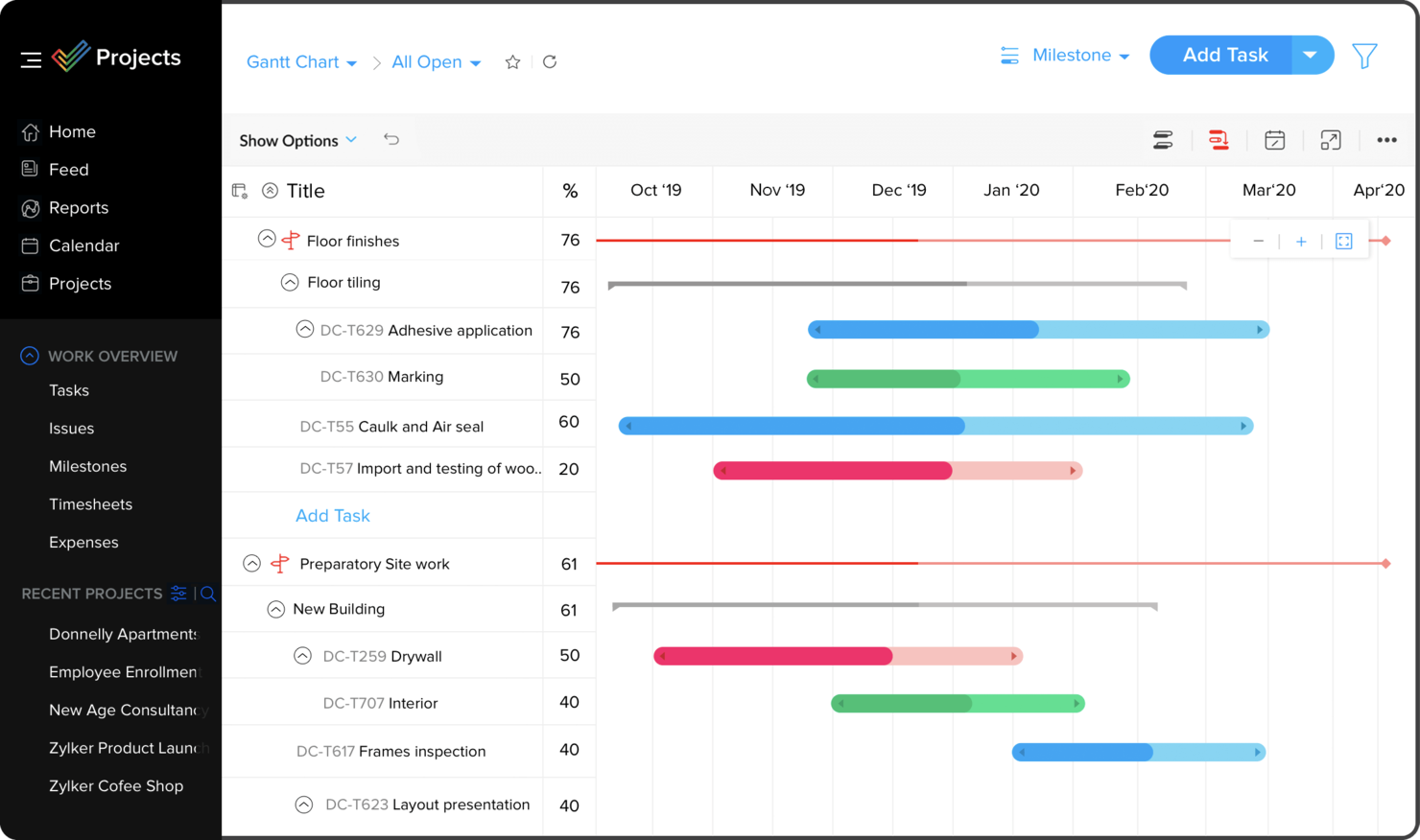
Zoho Projects is a cloud-based project management platform for teams and businesses needing to organize tasks, track progress, and collaborate on complex projects.
Who Is Zoho Projects Best For?
Zoho Projects is a great fit for small to mid-sized businesses already using Zoho tools that need project management built into their existing workflows.
Why I Picked Zoho Projects
I picked Zoho Projects as one of the best because of how naturally it fits into a broader Zoho ecosystem. My team uses Zoho CRM alongside Projects, and the two-way sync means that when a deal closes in CRM, we can spin up a project immediately without re-entering any data. I also like the Zoho Books and Invoice integration—time logs from Projects feed directly into invoices, so billing clients based on actual hours tracked is a one-click process. The integration with Zoho People is another feature I rely on, since it pulls in approved leave requests automatically and prevents me from assigning tasks to someone who's out of office.
Zoho Projects Key Features
- Gantt chart: Visualize project timelines, set task dependencies, and reschedule tasks directly from the chart view.
- Blueprint workflow automation: Design step-by-step task workflows that automatically update fields, assign users, and trigger alerts as statuses change.
- Resource management: View each team member's workload in real time and reassign tasks when someone is over- or under-allocated.
- Project baseline tracking: Capture a snapshot of your project plan at any point and compare it against actual progress to spot schedule deviations early.
Zoho Projects Integrations
Integrations include Zoho CRM, Zoho Desk, Zoho People, Zoho Books, Zoho Analytics, Google Calendar, Microsoft Teams, Dropbox, GitHub, and Slack.
Pros and Cons
Pros:
- Time-track multiple tasks at once
- Easy workflow automations
- Unlimited number of projects
Cons:
- Lack of file type export options
- Does not integrate with Quickbooks


Hive is a project management platform built for teams in fast-paced industries who need flexible task tracking, real-time collaboration, and customizable workflows to keep projects moving and everyone aligned.
Who Is Hive Best For?
Hive is a good fit for mid-sized teams in marketing, operations, and creative industries who need a central workspace to manage projects and collaborate in real time.
Why I Picked Hive
Hive is one of my top picks because I love how it keeps collaboration woven into the actual work, not bolted on as an afterthought. My team uses Hive Notes to co-edit meeting docs in real time, then convert action items into tracked tasks without switching context. I also rely on the proofing and approvals feature—marking up files and routing them for sign-off directly inside a project card eliminates many back-and-forth emails. The native in-app chat tied to specific action cards means conversations stay attached to the work they're about, so nothing gets lost.
Hive Key Features
- Multiple project views: Switch between Kanban, Gantt, timeline, calendar, and portfolio views to match how your team tracks work.
- Resourcing: Assign team members to projects and visualize their availability across the full project lifecycle.
- Workflow automation: Build custom automated workflows to handle repeatable tasks like status updates, handoffs, and reminders.
- Form intakes: Collect incoming work requests through shareable forms that feed directly into your Hive projects.
Hive Integrations
Integrations include Google Drive, Google Calendar, Dropbox, QuickBooks, Zoom, Microsoft OneDrive, Microsoft Teams, Outlook Calendar, Jira, and Slack.
Pros and Cons
Pros:
- Easy to integrate with other tools
- Great all-in-one option for SMBs
- Excellent built-in communication features
Cons:
- Mobile version limited in functionality
- Reporting functions could be expanded
New Product Updates from Hive

Hive Launches AI-Powered Buzz Mail
Hive introduces Buzz Mail, an AI-driven email organizer that prioritizes messages and suggests personalized replies. For more information, visit Hive's official site.
 .
.Other Project Management Software
Here are some additional project management software options that didn’t make it onto my shortlist, but are still worth checking out:
- Workzone
For comprehensive project visibility
- Copper
For agencies streamlining sales to delivery
- Resource Guru
For preventing over-allocation
- Quire
For task breakdown
- ClickUp
For replacing multiple separate tools
- Quickbase
For platform versatility
- Project.co
For client-facing projects
- Bubble PPM
For portfolio management
- Microsoft Project
For teams using Microsoft 365
- FigJam
For creative collaboration
- Dock
For customer collaboration management
- Nifty
For milestone tracking
- MeisterTask
For simple project management
- Kintone
For custom applications
- Teamwork.com
For remote teams
- awork
UI for usability & intuitiveness
- Jira
For cross-team project tracking
- ProofHub
For organizing via board and table views
- Planview AdaptiveWork
For enterprise resource planning
- PSOhub
For integrating project management with CRM
- ProjectManager
For real-time project tracking and insights
- Confluence
For software managers
- FunctionFox
For creatives
- Tempo Portfolio Manager
For complex projects
- Basecamp
For centralized project docs
- Runn
For project forecasting
- Easy Projects
For project profitability tracking
- Nutcache
For advanced time tracking
- Ravetree
For client service businesses
- nTask Manager
For managing multiple projects on a centralized platform


Other Types Of Project Management Software
Check out our list of project management tools we've identified and tested with particular features or for specific industry use cases.
Project Management Software for:
- Agile
- Architects
- Construction
- Consultants
- Creative
- Design
- Enterprise
- Free
- Freelancers
- Healthcare
- Individuals
- MacOs Users
- Marketing
- Manufacturing
- Remote teams
- Small Business
- Startups
Project Management Software with:
- Client Portals
- Agile Tracking
- Google Calendar Integrations
- Invoicing
- On-Premise Deployment
- Visual planning
Video Walkthrough of Project Management Tools
Check out our video on the top project management tools:


Selection Criteria for Project Management Software
When selecting the best project management software to include on this list, I considered common buyer needs and pain points like managing complex workflows and ensuring collaboration across departments. I also used the following framework to keep my evaluation structured and fair:
Core Functionality (25% of total score)
To be considered for inclusion on this list, each solution had to fulfill these common use cases:
- Creating and managing tasks
- Assigning tasks to team members
- Tracking project progress
- Setting and monitoring deadlines
- Collaborating on projects
Additional Standout Features (25% of total score)
To help further narrow down the competition, I also looked for unique features, such as:
- AI-driven task prioritization
- Seamless integration with other business tools
- Customizable workflow automation
- Real-time reporting and analytics
- Industry-specific templates
Usability (10% of total score)
To get a sense of the usability of each system, I considered the following:
- An intuitive and well-designed interface
- A minimal learning curve for new users
- Responsive performance for large projects
- Mobile and desktop accessibility
- Clear and easy navigation
Onboarding (10% of total score)
To evaluate the onboarding experience for each platform, I considered the following:
- Step-by-step onboarding guides
- Interactive product tours
- A library of video tutorials and documentation
- Customizable templates to get started quickly
- Regular webinars or live training sessions
Customer Support (10% of total score)
To assess each software provider’s customer support services, I considered the following:
- 24/7 support channels
- A detailed and up-to-date knowledge base
- Live chat support for real-time assistance
- Timely responses to support tickets
- Access to a community forum for peer support
Value For Money (10% of total score)
To evaluate the value for money of each platform, I considered the following:
- Transparent and flexible pricing plans
- Essential features included in the base plan
- Scalable options for growing teams
- Cost balanced with functionality and performance
- A free trial or money-back guarantee
Customer Reviews (10% of total score)
To get a sense of overall customer satisfaction, I considered the following when reading customer reviews:
- Ease of use highlighted in user feedback
- Emphasis on tool reliability
- Mentions of exceptional customer support
- Consistent updates and feature improvements
- Overall value based on user sentiment
How to Choose Project Management Software
It’s easy to get bogged down in long feature lists and complex pricing structures. To help you stay focused as you work through your software selection process, here’s a checklist of factors to keep in mind:
| Factor | What to Consider |
| Scalability | Ensure the software can grow with your team by handling increased projects, users, and data without a performance drop. |
| Integrations | Look for tools that connect seamlessly with apps your team already uses, like Slack, Zoom, or Salesforce. |
| Customizability | Check if you can tailor workflows, dashboards, and reports to match your team’s unique processes. |
| Ease of Use | Choose a platform that’s intuitive, minimizes training time, and boosts adoption across your team. |
| Budget | Factor in upfront costs, ongoing fees, and hidden charges. Choose software that offers strong value for its price. |
| Security Safeguards | Prioritize tools with strong encryption, user permissions, and compliance with industry standards to protect your data. |
| Collaboration Tools | Look for features like real-time editing, comments, and shared dashboards to streamline team communication. |
| Support Options | Consider the availability of live chat, phone support, or help centers to resolve issues quickly. |
It's a lot to digest—and there's a lot of pressure to get it right—so I suggest using our project management software advisory service to help shortlist tools that fit your organization’s needs.
Trends in Project Management Software
In my research, I sourced countless product updates, press releases, and release logs from different project management software vendors. Here are some of the emerging trends I’m keeping an eye on:
- AI-Powered Resource Forecasting: More tools now use AI to predict resource needs, which helps teams allocate staff and budgets more accurately. Workload balancing and demand forecasting are becoming standard to boost efficiency and avoid burnout.
- Hybrid Work Adaptability: Platforms are adding support for both remote project management and in-office project management, including async communication, virtual workspaces, and adaptable workflows.
- Scenario Planning for Risk Management: Advanced tools now let users model outcomes based on variables like budget shifts or delays. This helps teams spot risks and adjust plans early, which is ideal for complex timelines or supply chain issues.
- Embedded Financial Tracking: More platforms now include financial tracking within project workflows. This allows teams to manage budgets, expenses, and profits across multi-project, cost-sensitive businesses without relying on separate accounting tools.
- Sustainability Metrics: Some tools now offer dashboards with carbon tracking and sustainability analytics. These help teams measure energy use, waste, and emissions to meet CSR and environmental goals.
What is Project Management Software?
Project management software is a digital tool that helps users plan, organize, assign, and track work to complete projects more efficiently.
It lets users schedule tasks, set deadlines, allocate resources, manage budgets, and communicate efficiently. From basic task tracking to complex, multi-phase projects. Web based project management software centralizes information and automates routines to enhance coordination, accountability, and execution across industries.
Features of Project Management Software
When selecting project management software, keep an eye out for the following key features:
- Task management: Create, assign, and track tasks for yourself and your team. Project management software lets you break big projects into bite-sized chunks, so no detail slips through the cracks. You can set deadlines, add descriptions, and check off completed work to keep everything organized and moving forward.
- Collaboration tools: Communicate and share updates directly within your project workspace. With built-in chat, comment threads, or file sharing, you can collaborate with teammates in real time—avoiding endless email chains and making it easy to keep everyone on the same page.
- Time tracking: Log hours spent on specific tasks or entire projects. This helps you see where your time goes, set more accurate project estimates, and make sure deadlines (and actual effort) line up. It’s particularly handy for freelancers or teams that bill by the hour.
- Resource management: Allocate people, tools, and budgets efficiently. Resource management features help you avoid overallocation, spot pinch points before they cause problems, and ensure everyone has what they need to get work done without burnout or bottlenecks.
- Document management: Store, organize, and access project documents in one central spot. Instead of hunting for files in random email threads, you can keep everything—from proposals to meeting notes—right where your team needs it, with version control and permissions for extra security.
- Gantt charts and timelines: Visualize your project’s schedule and dependencies with easy-to-read charts. Gantt charts let you see how tasks overlap, spot risks, and shift timelines as needed—all with a quick drag-and-drop.
- Reporting and analytics: Generate reports on project progress, resource usage, deadlines, and more. These insights help you spot trends, measure success, and make data-driven decisions so you can improve future projects.
- Integration capabilities: Connect your project management software to other apps you use, like email, calendar, or file storage services. This cuts down time spent switching between tools and keeps your workflow seamless.
Common Project Management Software AI Features
Beyond the standard project management software features listed above, many of these solutions are incorporating AI with features like:
- Automated scheduling: AI analyzes workloads and priorities to suggest the best meeting times or project deadlines. It takes into account everyone’s availability and task dependencies, saving you from back-and-forth calendar gymnastics.
- Predictive project analytics: By examining historical data, AI forecasts potential risks or delays before they become major issues. You get heads-up alerts and recommendations, so you can address problems proactively—not after they blow up.
- Natural language processing for task creation: Just type or speak your project needs, and AI will automatically create, categorize, and assign tasks. This speeds up planning when you’re juggling lots of details.
- Resource optimization: AI monitors your team’s workload and skillsets, then recommends how to distribute tasks most efficiently. That way, you make the most of everyone’s strengths and avoid both burnout and boredom.
- Insightful reporting: AI sifts through all your project data to surface the most important insights, trends, and bottlenecks. You get clear, actionable summaries without having to dig through piles of numbers.
- Smart document management: AI organizes and tags your project documents, making it easier to find what you need instantly—even if you forgot the exact file name. This keeps everyone out of “upload/download purgatory.”
Benefits of Project Management Software
Implementing project management software tools can provide several benefits for your team and your business. Here are a few you can look forward to:
- Enhanced Collaboration: Project management tools foster teamwork by offering a central platform for communication, file sharing, and updates. This streamlines communication and keeps everyone aligned.
- Improved Project Planning: Strong planning features—like scheduling, resource allocation, and milestone tracking—help users build realistic, achievable project plans.
- Better Resource Management: Users can monitor availability, manage workloads, and avoid over-allocation to ensure efficient use of people and materials.
- Enhanced Risk Management: Built-in tools for risk assessment, tracking, and response planning help teams minimize potential project disruptions.
- Data-Driven Decision-Making: Real-time data and analytics support informed decisions by tracking metrics, spotting trends, and making timely adjustments.
Costs & Pricing for Project Management Software
Selecting project management software requires an understanding of the various pricing models and plans available. Costs vary based on features, team size, add-ons, and more. The table below summarizes common plans, their average prices, and typical features included in project management software solutions:
Plan Comparison Table for PM Software
| Plan Type | Average Price | Common Features |
|---|---|---|
| Free | $0 | Task management, basic reporting, limited user access, limited storage |
| Basic | $7 - $15 per user/month | Enhanced task management, project templates, file sharing, basic integrations, all features of Free plan |
| Intermediate | $20 - $30 per user/month | Advanced reporting, customizable dashboards, more users and storage, additional integrations, all features of Basic plan |
| Advanced | $30+ per user/month | Resource management, advanced security, premium support, API access, customizable features, all features of Intermediate plan |
As a rule of thumb, smaller teams or those new to project management should start with a Basic or Free plan for essential features without added complexity. As your team grows or needs change, upgrading to Intermediate or Advanced plans unlocks more tools and advanced customization.
Common stages where your company may want to upgrade include:
- Team Expansion: Hiring more staff or forming new teams may exceed user limits in the current plan.
- More Projects: Managing multiple projects at once often requires advanced features and greater data capacity.
- Advanced Features: Needing tools like enhanced reporting or stronger security can justify moving to a higher pricing tier.
- Storage Needs: More project files may require increased storage and better file management.
- Client Management: Growing client bases often demand advanced client tools found in higher-tier plans.
Project Management Software FAQs
Here are some of the frequently asked questions I receive about project management software.
How can I get my team to adopt new project management software?
Involve your team early in the selection process and explain the benefits clearly. Offer hands-on training and assign a “champion” to answer questions. Start with a core group, gather feedback, and refine your approach before a full rollout. Celebrating quick wins—like time saved or better collaboration—encourages ongoing use.
What mistakes should I avoid when choosing project management software?
Don’t pick a tool just because it’s popular—focus on your team’s needs and workflows. Avoid underestimating setup and training time, and don’t ignore your team’s input during evaluation. Skipping integration checks or neglecting to review security features can lead to adoption issues or data risks down the line.
Should I pick project management software based on my methodology?
Yes, it’s best to select software that supports your preferred methodology, like Agile, Scrum, or Waterfall. Some tools are designed for specific approaches, while others are more flexible. Make sure the platform can handle your team’s process, terminology, and reporting needs.
How do I roll out new project management software for my team?
Start by setting clear goals and outlining your team’s workflow needs. Pick a software that matches those requirements. Next, import data or set up new projects, and train your team using built-in guides or tutorials. Assign roles, set permissions, and configure integrations with other tools your team uses. Monitor adoption and gather feedback to adjust settings and workflows for a smoother rollout.
How do I connect project management software with my other tools?
Most project management software connects with popular apps like Slack, Google Drive, and Microsoft Teams using built-in integrations or third-party connectors like Zapier. You’ll usually link your accounts in settings, then set rules for how tasks or files sync between systems. This helps automate workflows and keeps your team working in one place.
Can I migrate data from one project management tool to another?
Yes, most leading project management software offers data import features, letting you bring over tasks, users, attachments, and project histories. Check for CSV import options, direct integrations, or dedicated migration tools provided by the vendor. Some companies also offer onboarding support or services to help you transfer data without losing important information.
How do I scale project management software as my team grows?
Look for platforms with customizable permissions, advanced user roles, and the ability to manage multiple projects or portfolios. Make sure the software supports increased storage, robust reporting, and integrations your team will need as it grows. Review pricing tiers and add-ons, since costs often rise with more users or advanced features.
Security and Data Privacy Within Project Management Software
Security and data privacy are critical in online task management tools to protect sensitive information, comply with regulations, and build trust. They also help prevent unauthorized access, maintain data integrity, ensure business continuity, and reduce internal and external threats.
Therefore, improper security measures mean that data is vulnerable to unauthorized access, theft, or breaches, which can potentially lead to significant financial and reputational damage.

Here are some of the security features you can expect to see:
- Compliance with European standards: GDPR revolutionized how SaaS companies manage customer data privacy. Most now rely on major hosting providers like Amazon and use globally distributed servers to meet regional compliance requirements.
- Data encryption: Data encryption keeps your information hidden from 3rd parties, both in transit and at rest. This means your information is protected while being sent or stored.
- Security certifications: Expect the vendor to be certified in ISO 27001, SOC2 Type I, Type II, CSA STAR, or similar credentials.
Some vendors are more transparent than others about their security and privacy practices, but all should have them in place. If the details aren’t clear, be sure to ask during your demo call.
What's Next?
Choosing a project management software can be tough. If you need more information about a specific use case, you can always schedule a demo with the vendor to see how the tool might address your challenges.
The Digital Project Manager has tons of useful content to help you win at work! You can stay up to date by subscribing to the Insiders Newsletter. New content and interesting PM-related conversations will drop into your inbox every week.