

10 Mejores Software de Gestión de Proyectos Seleccionados para 2026

10 Mejor Lista Resumida de Software de Gestión de Proyectos


El mejor software de gestión de proyectos te ayuda a planificar proyectos, hacer seguimiento del progreso, gestionar presupuestos y colaborar con tu equipo, todo en un solo lugar. Sin él, te ves obligado a depender de herramientas desconectadas, como hojas de cálculo, emails o hilos de Slack, lo que dificulta la gestión de los plazos, evitar el aumento del alcance y mantener alineado a tu equipo.
Con 20 años de experiencia gestionando proyectos a gran escala en diversas agencias y más de una década escribiendo reseñas de software, entiendo qué es prioritario al evaluar herramientas de gestión de proyectos por su rendimiento, facilidad de uso y escalabilidad. He probado y comparado más de 40 herramientas para identificar aquellas que realmente optimizan la entrega de proyectos.
En esta guía, encontrarás software fiable y diseñado para apoyar la planificación, el seguimiento y la comunicación durante todo el ciclo de vida del proyecto. Cada reseña incluye características clave, ventajas y desventajas, y lo que hace que cada herramienta destaque, para que puedas elegir la que mejor se adapta a tu forma de trabajar y gestionar.
Por Qué Puedes Confiar en Nuestras Reseñas de Software de Gestión de Proyectos
Hemos estado probando y reseñando software de gestión de proyectos desde 2012. Como gestores de proyectos, sabemos lo fundamental y complicado que es tomar la decisión correcta al elegir un software.
Invertimos en una investigación exhaustiva para ayudar a nuestra audiencia a tomar mejores decisiones de compra de software. Hemos probado más de 2.000 herramientas para diferentes casos de uso y escrito más de 1.000 reseñas completas de software. Descubre cómo nos mantenemos transparentes y nuestra metodología de revisión de software de gestión de proyectos.
Cuadro Comparativo de los Mejores Herramientas de Gestión de Proyectos
Este cuadro resumen compara los detalles de precios de mis principales selecciones de software de gestión de proyectos para ayudarte a encontrar el que mejor se adapte a tu presupuesto y necesidades empresariales.
| Tool | Best For | Trial Info | Price | ||
|---|---|---|---|---|---|
| 1 | Óptima para optimización de recursos con IA | Prueba gratuita de 14 días | Desde $10/usuario/mes | Website | |
| 2 | Ideal para grandes proyectos y escalabilidad | 14 días de prueba gratis | Desde $9.80/usuario/mes | Website | |
| 3 | Mejor para una planificación y flujos de trabajo simplificados | Prueba gratuita de 30 días | Desde $25/usuario/mes | Website | |
| 4 | Ideal para paneles personalizables | Prueba gratis de 30 días | Desde $9/usuario/mes | Website | |
| 5 | Ideal para la previsión de proyectos | Prueba gratuita disponible | Desde $7/usuario/mes (facturado anualmente) | Website | |
| 6 | Mejor para la gestión colaborativa de proyectos | 14 días de prueba gratis | Desde $16/usuario/mes | Website | |
| 7 | Ideal para agencias que desean agilizar el proceso de ventas a entrega | Prueba gratuita de 14 días + demo gratis disponible | Desde $9/usuario/mes (facturación anual) | Website | |
| 8 | Mejor para la integración con Zoho Suite | Prueba gratuita de 10 días | Desde $5/usuario/mes con facturación anual. Versión freemium disponible. | Website | |
| 9 | Mejor para una visibilidad completa del proyecto | Demostración gratuita | Desde $24/usuario/mes (facturado anualmente) | Website | |
| 10 | Ideal para sustituir varias herramientas separadas | Plan gratuito + demo gratis disponible | Gratis para siempre con planes de pago desde $9/usuario/mes | Website |


-

Celoxis
Visit WebsiteThis rating combines scores from multiple user review sites to reflect overall customer sentiment about the product.4.5 -
Smartsheet
Visit WebsiteThis rating combines scores from multiple user review sites to reflect overall customer sentiment about the product.4.5 -
Accelo
Visit WebsiteThis rating combines scores from multiple user review sites to reflect overall customer sentiment about the product.4.4



Reseñas de los Mejores Programas de Gestión de Proyectos
Aquí tienes mi análisis en profundidad y reseña de los mejores programas de gestión de proyectos. Te guiaré por ventajas y desventajas, características y funcionalidad, para ayudarte a comprender mejor las capacidades y adecuación de cada herramienta para tus proyectos.

Óptima para optimización de recursos con IA
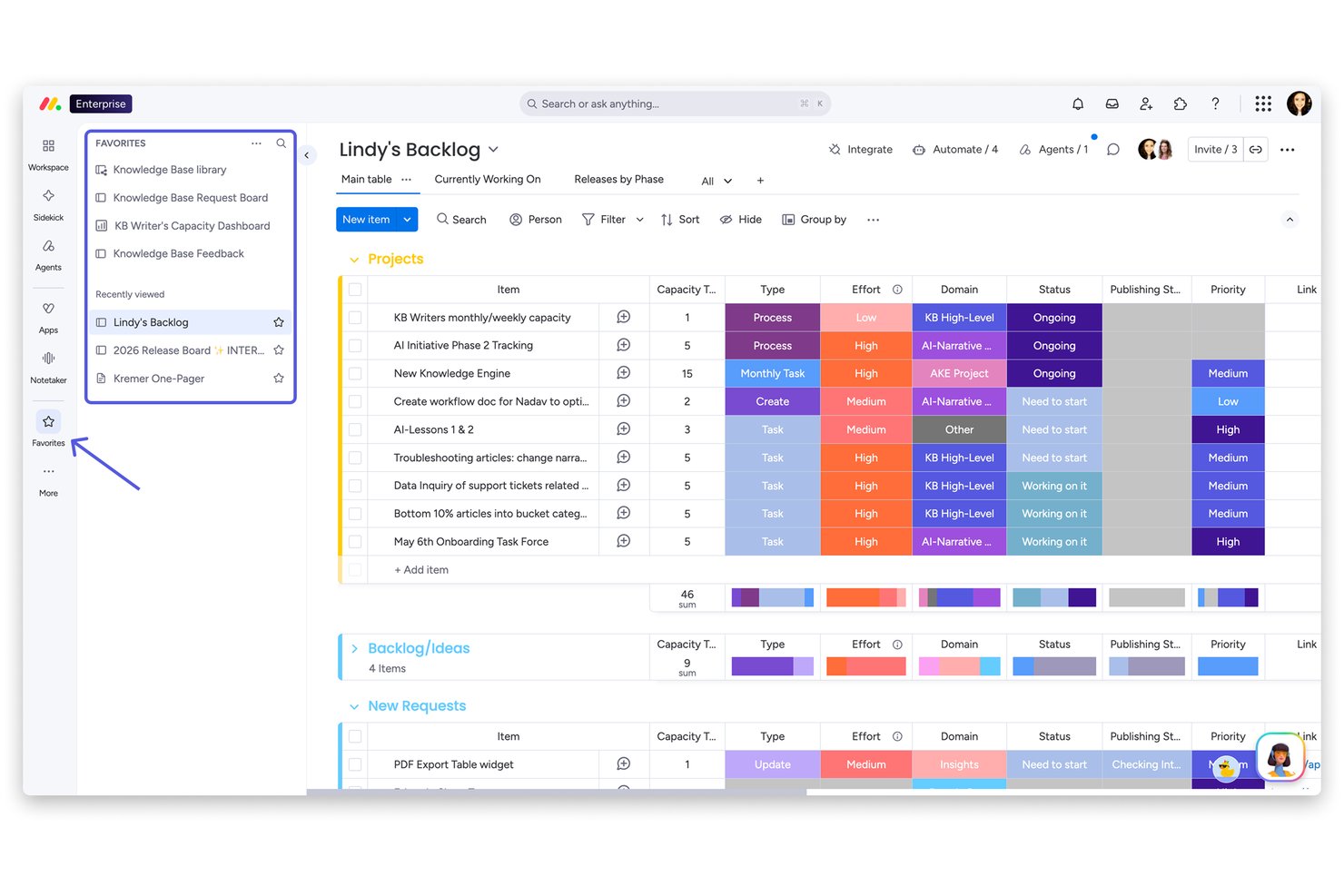
monday AI Work Platform es una plataforma de gestión de trabajo configurable y nativa de IA que abarca la planificación de proyectos, el seguimiento de tareas, la asignación de recursos y la automatización de flujos de trabajo a través de una amplia biblioteca de tableros, vistas y plantillas personalizables.
¿Para quién es monday AI Work Platform?
monday AI Work Platform es ideal para equipos multifuncionales en empresas medianas a grandes que manejan múltiples proyectos concurrentes en departamentos como marketing, producto, TI y operaciones.
Por qué elegí monday AI Work Platform
monday AI Work Platform se gana su lugar en mi lista porque gestiona la asignación de recursos a nivel de IA. Uso la vista de carga de trabajo para ver la capacidad de mi equipo en tiempo real, y la IA de monday sugiere recomendaciones de asignación basadas en el contexto del proyecto, no solo en quién tiene huecos en el calendario. También confío en su detección de riesgos impulsada por IA para identificar conflictos de dependencias antes de que se conviertan en plazos incumplidos.
Características clave de monday AI Work Platform
- Plantillas de tableros personalizadas: Elija entre más de 200 plantillas para flujos de trabajo especializados en gestión de proyectos, CRM, marketing y operaciones.
- Paneles a nivel de portafolio: Cree paneles en tiempo real, cruzados por proyectos, con más de 80 widgets personalizables para el seguimiento de avances y KPIs.
- Workdocs integrados: Cree y comparta documentos colaborativos directamente vinculados a los tableros y tareas del proyecto para documentación continua.
- Tableros de proyectos con múltiples vistas: Cambie entre las vistas de Kanban, Gantt, cronograma, calendario y tabla para visualizar el trabajo como lo prefiera su equipo.
Integraciones de monday AI Work Platform
monday AI Work Platform ofrece cientos de integraciones nativas a través de sus integraciones incorporadas y su marketplace, incluyendo Slack, Salesforce, HubSpot, Google Drive, Zoom, Microsoft Teams, Jira, GitHub, Trello y Dropbox. También es compatible con Zapier y dispone de una API para integraciones personalizadas.
Pros and Cons
Pros:
- La IA identifica automáticamente riesgos en tiempo real para los proyectos
- La vista de carga de trabajo visualiza la capacidad del equipo por proyecto
- Las plantillas de tableros se adaptan a flujos de trabajo especializados por departamento
Cons:
- Las subtareas están limitadas a un solo nivel de profundidad
- Los paneles de portafolio requieren planes de nivel superior
New Product Updates from monday AI Workspace
monday AI Workspace Adds Human Approval Routing
monday AI Workspace adds a human-in-the-loop approval block to AI Workflows, sending approval requests and routing workflow paths based on responses. For more information, visit monday AI Workspace's official site.
 .
.
Wrike
Ideal para grandes proyectos y escalabilidad
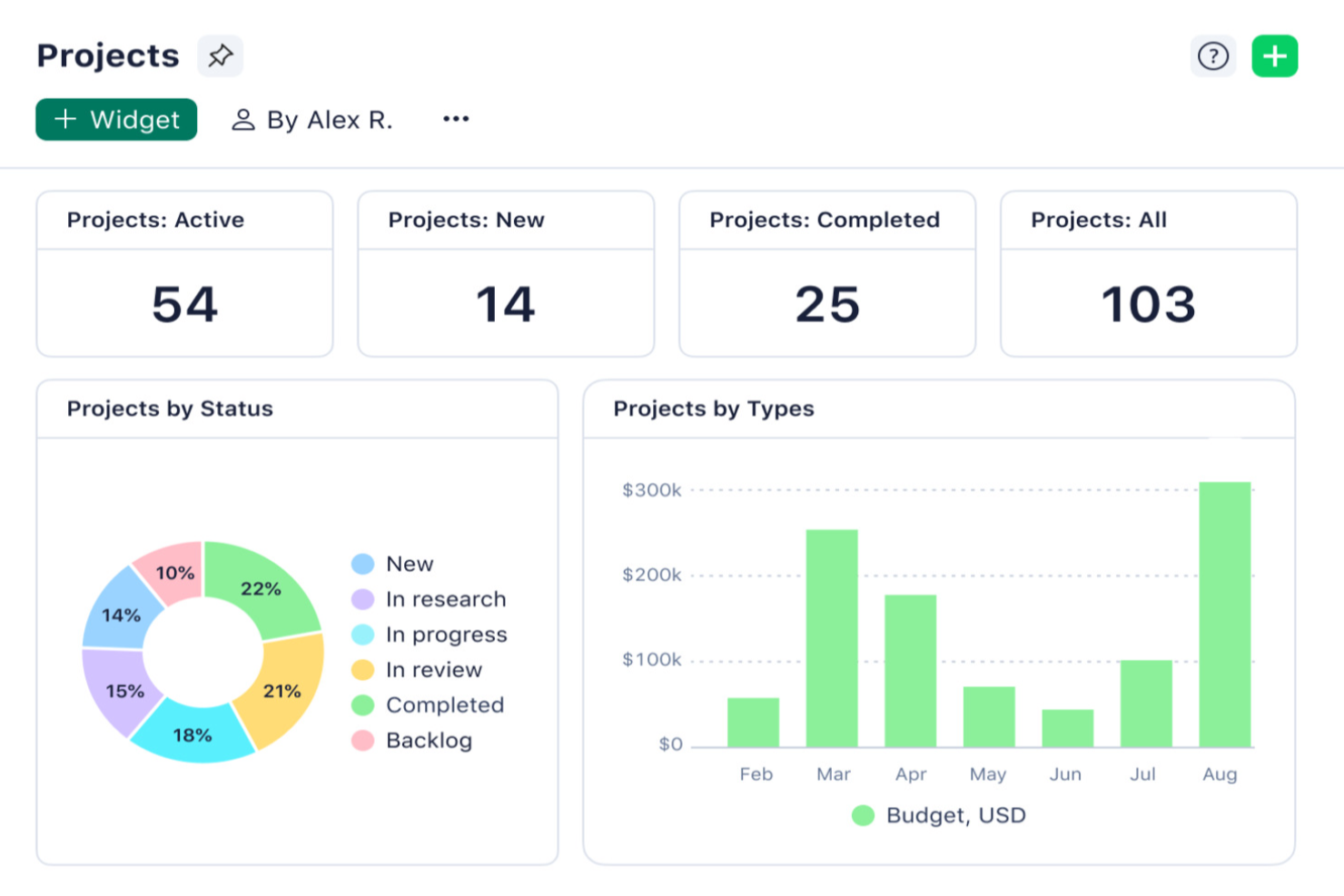
Wrike es una plataforma de gestión de proyectos diseñada para equipos en industrias de ritmo acelerado que necesitan flujos de trabajo personalizables, planificación avanzada de recursos y colaboración en tiempo real para mantener proyectos complejos en marcha.
¿Para Quién es Mejor Wrike?
Wrike es ideal para equipos medianos a grandes que gestionan múltiples proyectos simultáneos en departamentos interfuncionales como marketing, producto y servicios profesionales.
Por Qué Elegí Wrike
Wrike se gana su lugar en mi lista porque maneja el tipo de complejidad de proyectos ante la que la mayoría de herramientas empieza a tener problemas. Me gusta especialmente la vista de gestión de portafolios entre proyectos, que permite a mi equipo seguir las dependencias y cargas de trabajo a través de varias iniciativas grandes a la vez, sin tener que cambiar entre diferentes herramientas. Las reservas de recursos me permiten asignar capacidad por miembro del equipo o rol de trabajo y estimar horas en función de la disponibilidad real, así puedo detectar sobrecargas antes de que se conviertan en un problema. La función de gestión del esfuerzo también es útil al definir tareas, ya que puedo indicar lo exigente que es un trabajo antes de asignarlo, lo que hace las estimaciones de entregas mucho más precisas a gran escala.
Funciones Clave de Wrike
- Vistas personalizadas de proyecto: Alterna entre vistas de Gantt, Kanban, Panel, Calendario y Gráfica para visualizar el avance del proyecto en el formato que mejor se adapte a tu equipo.
- Tableros Scrum: Gestiona sprints ágiles con tableros Scrum compartidos, priorización del backlog y seguimiento del progreso en tiempo real.
- Formularios de solicitud personalizados: Crea formularios dinámicos de captación que generan automáticamente tareas, proyectos y flujos de trabajo al enviarse.
- Wrike Copilot: Un asistente de IA que responde preguntas, alerta sobre riesgos en el proyecto y muestra información prioritaria directamente en tu espacio de trabajo.
Integraciones de Wrike
Las integraciones incluyen Microsoft Teams, Salesforce, Google Drive, Adobe Creative Cloud, Zoom, Power BI, Tableau, QuickBooks, Miro y Microsoft SharePoint.
Pros and Cons
Pros:
- Los menús contextuales de clic derecho permiten hacer más con menos clics
- Las funciones de IA están disponibles en todos los planes sin costo adicional
- Incorporación de nivel mundial a través de videos explicativos
Cons:
- La autenticación en dos pasos (2FA) está disponible solo en el plan empresarial
- Las integraciones tienen un coste adicional, sin importar el plan
New Product Updates from Wrike

Wrike Inbox Adds Search and Notification Filters
Wrike Inbox adds search across Incoming, Sent, and Archive, along with filters for Approvals and @mentions. The update helps users find specific notifications faster and apply bulk actions only to matched results. For more information, visit Wrike’s official site.
 .
.
Celoxis
Mejor para una planificación y flujos de trabajo simplificados
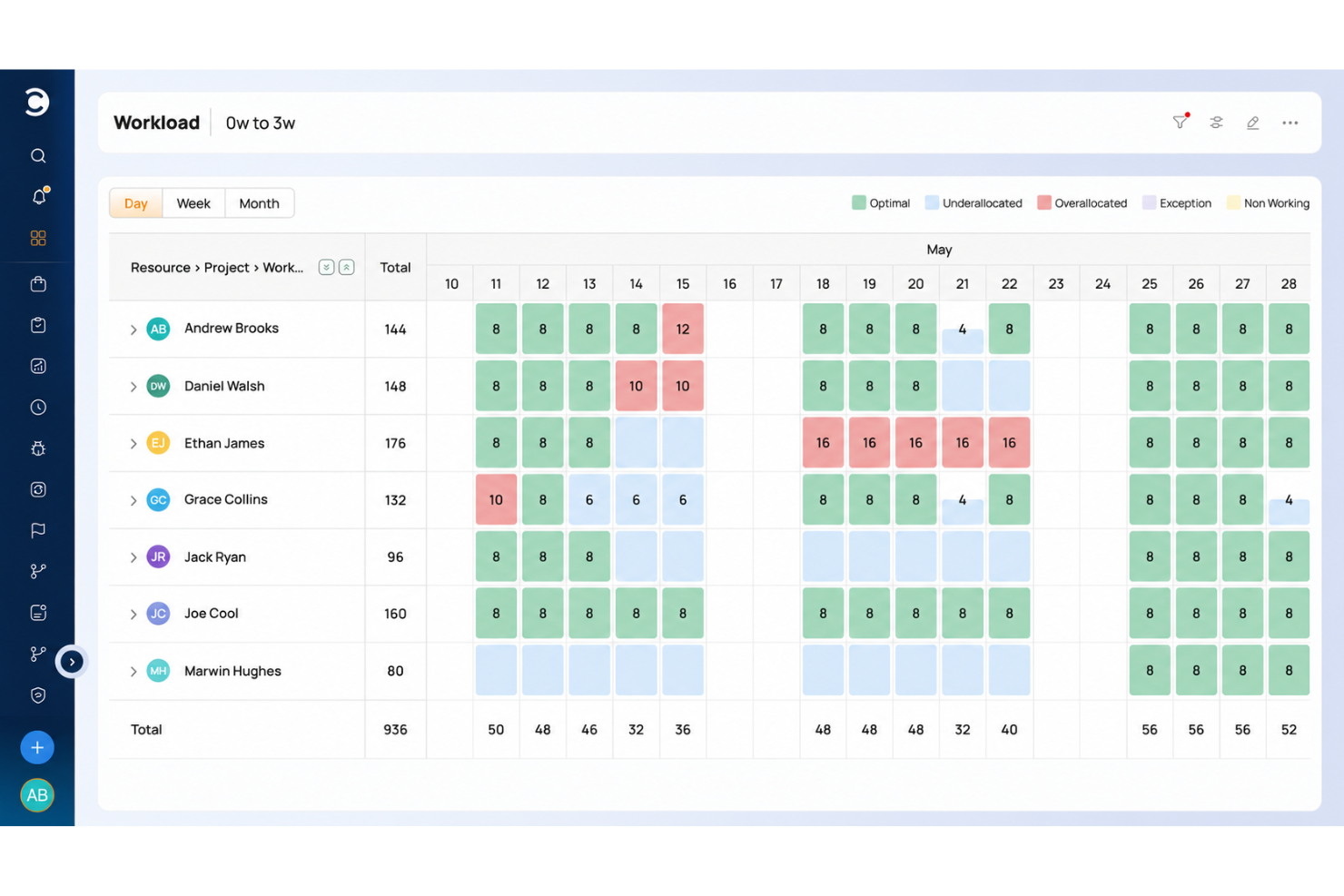
Celoxis es una plataforma de gestión de proyectos diseñada para equipos y organizaciones que necesitan gestionar proyectos complejos, realizar el seguimiento de recursos y automatizar flujos de trabajo en varios departamentos o proyectos de clientes.
¿Para quién es mejor Celoxis?
Celoxis es ideal para equipos medianos o grandes que requieren una plataforma centralizada para gestionar varios proyectos, recursos y partes interesadas simultáneamente.
Por qué elegí Celoxis
Elegí Celoxis como uno de los mejores por la forma en que gestiona la complejidad de la planificación sin que el proceso se sienta pesado. El diagrama de Gantt interactivo se ajusta automáticamente a los cambios en tiempo real; así, cuando se modifica una dependencia, el cronograma se actualiza sin que tenga que rehacer manualmente todo el plan. También me gustan las aplicaciones integradas de flujo de trabajo para realizar el seguimiento de riesgos, incidencias, solicitudes de cambio y errores junto con el propio proyecto, lo que significa que mi equipo no necesita manejar hojas de cálculo separadas para cada uno. Las reglas de enrutamiento personalizadas y las políticas de escalamiento en esos flujos de trabajo mantienen informadas a las personas correctas en el momento adecuado, sin necesidad de configuración adicional.
Funciones clave de Celoxis
- Contabilidad de proyectos: Realiza el seguimiento del gasto presupuestario, la previsión de ingresos y los márgenes de beneficio en proyectos y carteras en tiempo real.
- Planificación de capacidad de recursos: Visualiza la disponibilidad del equipo, asigna tareas según habilidades y recibe alertas instantáneas cuando alguien está sobrecargado.
- Panel de gestión de portafolio: Supervisa el progreso, presupuestos y riesgos de varios proyectos en una sola vista personalizable.
- Portal para clientes: Comparte actualizaciones, archivos y debates del proyecto con los clientes mediante un portal gratuito y personalizable incorporado en la plataforma.
Integraciones de Celoxis
Las integraciones incluyen Microsoft Project, Microsoft Excel, Google Drive, Outlook, Salesforce, Jira, QuickBooks Online, Slack, Trello y Okta.
Pros and Cons
Pros:
- Informes y análisis avanzados, incluyendo previsión con IA
- Altamente personalizable y flexible para organizaciones en crecimiento
- Ofrece una visión a nivel de portafolio con paneles en tiempo real
Cons:
- Puede no ser adecuado para equipos pequeños u organizaciones con menos de 5 empleados
- No dispone de aplicación móvil

Ideal para paneles personalizables
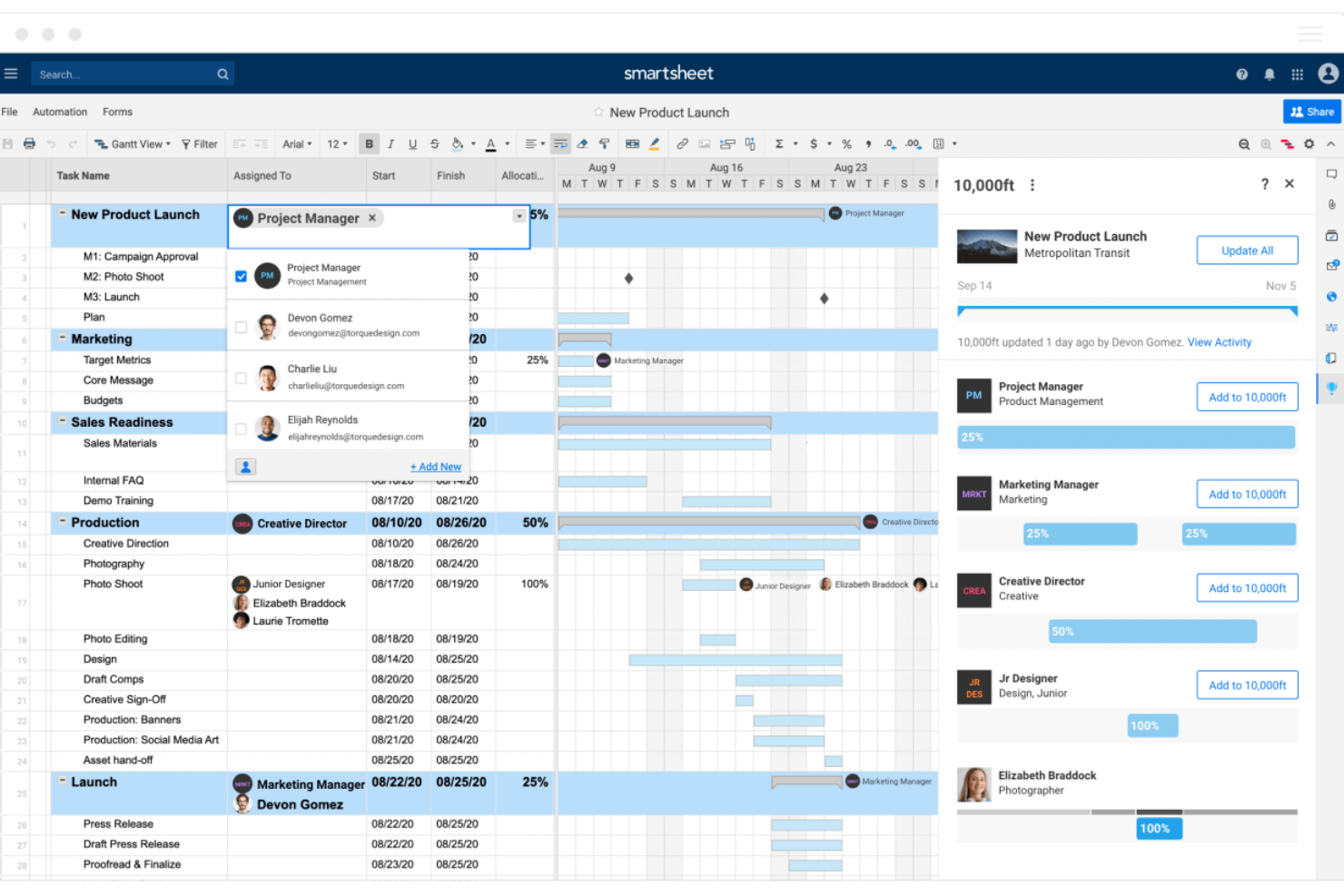
Smartsheet es una plataforma de gestión de proyectos diseñada para equipos que necesitan una planificación flexible, colaboración en tiempo real y visibilidad en proyectos complejos, lo que la hace popular entre organizaciones de tecnología, marketing y operaciones que buscan gestionar el trabajo a gran escala.
¿Para quién es mejor Smartsheet?
Smartsheet es una excelente opción para equipos de tamaño medio a empresarial en gestión de proyectos, operaciones y TI que necesitan coordinar el trabajo entre varios departamentos o flujos de trabajo.
Por qué elegí Smartsheet
Elegí Smartsheet como una de las mejores por el control que ofrece sobre el diseño del panel y la presentación de datos. Puedes construir tableros desde cero utilizando un sistema de widgets de arrastrar y soltar: incorporando widgets de métricas, gráficos, informes y contenido web, luego redimensionándolos y reposicionándolos en una cuadrícula. Me gusta que puedes aplicar códigos de color hexadecimal personalizados a widgets individuales, establecer temas para todo el tablero e incluso crear y exportar temas personalizados para compartir en toda la organización. Ese nivel de consistencia visual es importante cuando presentas el estado de un proyecto ante ejecutivos o partes interesadas que necesitan interpretar el tablero rápidamente. La actualización automática cada 10 minutos en tableros publicados mantiene los datos de los interesados actualizados sin intervenciones manuales.
Características clave de Smartsheet
- Vista de diagrama de Gantt: Visualiza cronogramas de proyectos, establece dependencias entre tareas y ajusta calendarios arrastrando y soltando las barras directamente en el gráfico.
- Flujos de trabajo automatizados: Configura reglas de automatización sin código para activar alertas, solicitudes de aprobación o actualizaciones de filas según las condiciones que determines en tus hojas.
- Gestión de recursos: Visualiza la capacidad del equipo a lo largo de los proyectos, asigna trabajo por rol o persona y haz seguimiento del tiempo registrado frente al planificado.
- Seguimiento de línea base: Captura una instantánea de tu plan de proyecto original y compárala contra el progreso actual para medir la variación en el cronograma y el presupuesto.
Integraciones de Smartsheet
Incluye integraciones con Adobe, AWS, Box, DocuSign, Dropbox, Google, Power BI, SAP, Jira y Microsoft.
Pros and Cons
Pros:
- Se puede adaptar la herramienta a necesidades específicas de gestión de proyectos
- Permite la automatización de tareas
- Facilita la gestión de proyectos colaborativos
Cons:
- Carece de seguimiento de tiempo integrado
- No es ideal para necesidades de gestión de proyectos más simples
New Product Updates from Smartsheet
Smartsheet Adds Smart Assist for Sheets on Mobile
Smartsheet now offers Smart Assist inside mobile sheets on iOS and Android, providing AI sheet status readouts, summaries, and drafted updates while helping surface assigned and overdue work. For more information, visit Smartsheet's official site.

Runn
Ideal para la previsión de proyectos

Runn es una herramienta de gestión de recursos y proyectos en tiempo real diseñada para ayudar a los equipos a planificar, supervisar y prever sus proyectos de manera eficiente.
Por qué elegí Runn: Me gustan sus capacidades de previsión de proyectos en tiempo real. Puedes anticipar la capacidad futura de toda tu empresa, equipos específicos o miembros individuales, lo que te permite planificar con confianza. Esta visión anticipada ayuda a identificar posibles cuellos de botella y asegura que tu equipo no esté sobrecargado, lo que resulta en cargas de trabajo más equilibradas y entregas de proyectos a tiempo.
La capacidad de Runn para gestionar proyectos tentativos también me llamó la atención. Esta funcionalidad te permite planificar proyectos potenciales y ver cómo afectarían tu carga de trabajo y tus finanzas. Al comparar distintos escenarios, puedes tomar decisiones informadas sobre qué proyectos llevar a cabo, asegurando así que tus recursos se utilicen de forma óptima sin sobrecomprometerse.
Funciones e Integraciones Destacadas de Runn
Funciones incluyen la capacidad de establecer horarios personalizados para cada miembro del equipo, adaptándose a horarios flexibles y roles a tiempo parcial. Runn también permite gestionar ausencias y días festivos, evitando conflictos de programación. Además, puedes etiquetar a tu equipo con habilidades específicas, ubicaciones u otros atributos, facilitando encontrar a la persona adecuada para cada tarea.
Integraciones incluyen ADP Workforce Now, AlexisHR, BambooHR, CharlieHR, HiBob, Workday, Clockify, Harvest y Jira.
Pros and Cons
Pros:
- Proporciona una visión general de los cronogramas y fases de los proyectos
- Buenas capacidades de previsión de proyectos
- Los usuarios pueden personalizar los paneles de control
Cons:
- Podría ofrecer funcionalidades más robustas para la gestión de tareas
- Faltan funciones de automatización avanzadas
Hive
Mejor para la gestión colaborativa de proyectos

Hive es una plataforma de gestión de proyectos diseñada para equipos en industrias de ritmo acelerado que necesitan un seguimiento flexible de tareas, colaboración en tiempo real y flujos de trabajo personalizables para mantener los proyectos avanzando y a todos alineados.
¿Para quién es mejor Hive?
Hive es una buena opción para equipos de tamaño mediano en marketing, operaciones e industrias creativas que necesitan un espacio de trabajo centralizado para gestionar proyectos y colaborar en tiempo real.
Por qué elegí Hive
Hive es una de mis principales opciones porque me encanta cómo integra la colaboración dentro del trabajo real, no simplemente agregada después. Mi equipo utiliza Hive Notes para coeditar documentos de reuniones en tiempo real, y luego convierte los puntos de acción en tareas rastreadas sin cambiar de contexto. También confío en la función de revisiones y aprobaciones: marcar archivos y enviarlos para aprobación directamente dentro de una tarjeta de proyecto elimina muchos correos electrónicos innecesarios. El chat nativo de la aplicación, vinculado a tarjetas de acción específicas, asegura que las conversaciones se mantengan conectadas al trabajo del que tratan, por lo que nada se pierde.
Funciones clave de Hive
- Múltiples vistas de proyecto: Cambia entre vistas de Kanban, Gantt, cronograma, calendario y portafolio para adaptarte a la manera en que tu equipo da seguimiento al trabajo.
- Asignación de recursos: Asigna miembros del equipo a proyectos y visualiza su disponibilidad a lo largo de todo el ciclo de vida del proyecto.
- Automatización de flujos de trabajo: Crea flujos de trabajo automatizados personalizados para manejar tareas repetitivas como actualizaciones de estado, entregas y recordatorios.
- Recopilación de formularios: Recoge solicitudes de trabajo entrantes mediante formularios compartibles que se integran directamente en tus proyectos de Hive.
Integraciones de Hive
Las integraciones incluyen Google Drive, Google Calendar, Dropbox, QuickBooks, Zoom, Microsoft OneDrive, Microsoft Teams, Outlook Calendar, Jira y Slack.
Pros and Cons
Pros:
- Fácil de integrar con otras herramientas
- Gran opción todo en uno para pymes
- Excelentes funciones de comunicación integradas
Cons:
- La versión móvil tiene funcionalidad limitada
- Las funciones de informes podrían ampliarse
Copper
Ideal para agencias que desean agilizar el proceso de ventas a entrega
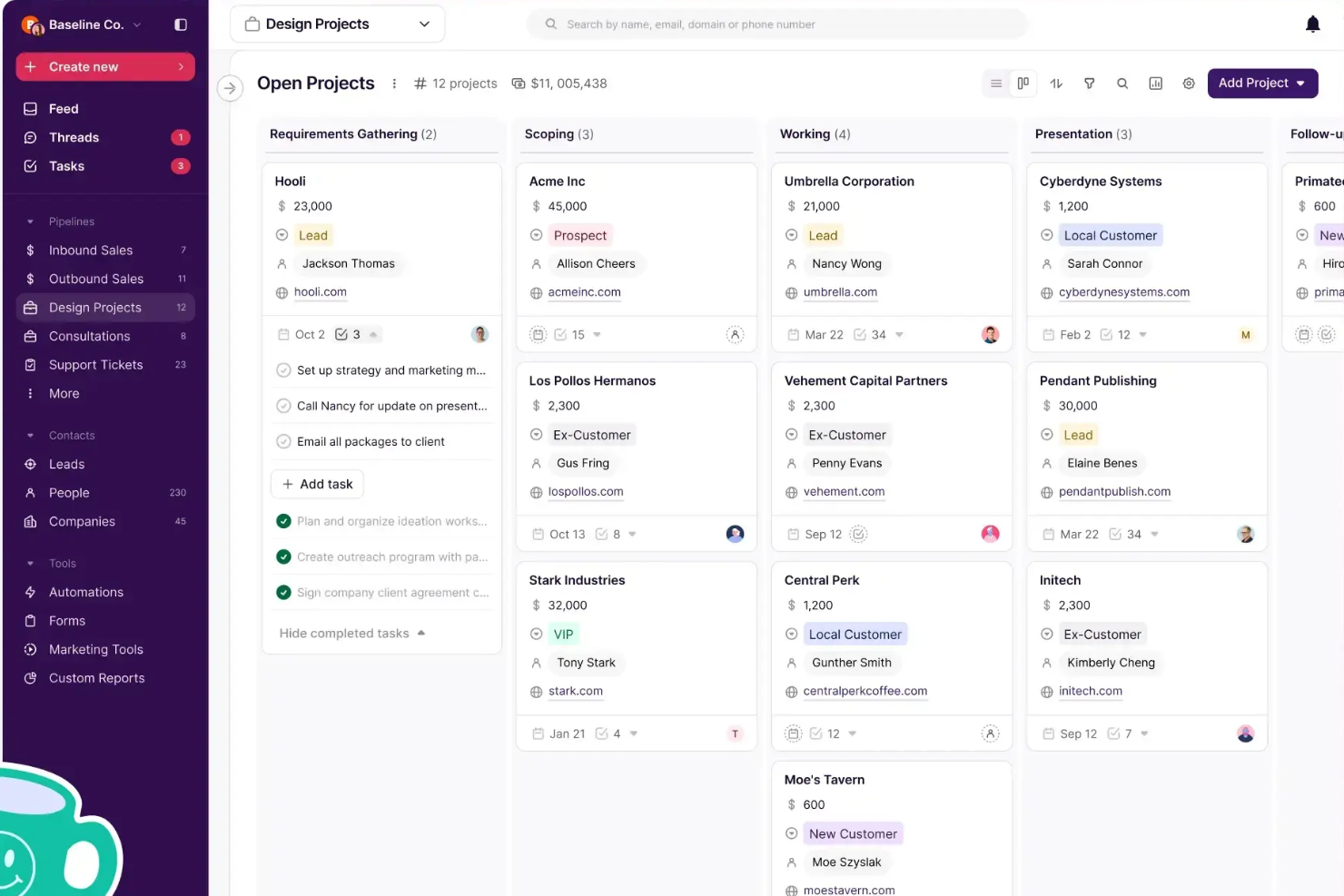
Copper es una plataforma CRM diseñada para pequeñas y medianas empresas que desean gestionar relaciones con clientes y actividades de ventas junto con tareas de proyectos, ayudando a los equipos a mantener los datos de los clientes y el progreso de los proyectos conectados en un solo lugar.
¿Para quién es mejor Copper?
Copper es una excelente opción para agencias y empresas de servicios que necesitan gestionar las relaciones con clientes y la entrega de proyectos dentro de una misma plataforma.
Por qué elegí Copper
Elegí Copper como uno de los mejores por la forma en que gestiona la transición de ventas a entrega, que suele ser un problema para muchas agencias. Cuando se cierra un trato, puedes duplicarlo directamente en un flujo de proyectos—sin documentos de traspaso, sin volver a ingresar los detalles del cliente, sin tener que informar a otra herramienta. El contexto que tu equipo de ventas ha recopilado sobre el cliente simplemente se transfiere. También me gustan las automatizaciones del pipeline, que permiten activar la creación de tareas o el envío de correos electrónicos automáticamente a medida que un proyecto avanza por las etapas, asegurando que nada se pierda entre el inicio y la entrega. Para las agencias que gestionan tanto nuevos negocios como trabajo con clientes activos, tener esos dos flujos de trabajo en un solo lugar—con un feed de actividad compartido visible para todo el equipo—marca una verdadera diferencia operativa.
Características clave de Copper
- Seguimiento de contactos y relaciones: Almacena y organiza todos los detalles de contacto, historial de comunicaciones y contexto de relación de los clientes en un solo registro.
- Informes personalizados: Crea informes personalizados para hacer seguimiento de la actividad del equipo, proyecciones de ingresos y tendencias de clientes en tu flujo de trabajo.
- Series y automatización de correos electrónicos: Configura secuencias de correos automáticos que se disparan según cambios de etapa en el pipeline o envíos de formularios.
- Aplicación móvil: Registra llamadas y SMS automáticamente desde tu teléfono para que las interacciones con los clientes se capturen sin ingreso manual de datos.
Integraciones de Copper
Las integraciones incluyen Gmail, Google Calendar, Google Drive, Mailchimp, Google Sheets, LinkedIn, RingCentral, DocuSign, QuickBooks y Dropbox.
Pros and Cons
Pros:
- Ideal para equipos de clientes que usan Google Workspace
- La extensión de Chrome lleva las herramientas a Gmail, Calendar, LinkedIn y más
- Integra CRM y gestión de proyectos
Cons:
- Podría ofrecer funciones de gestión de proyectos más robustas, como asignación de recursos
- No se conecta con Microsoft 365, Outlook ni otras plataformas de correo electrónico

Mejor para la integración con Zoho Suite

Zoho Projects es una plataforma de gestión de proyectos basada en la nube para equipos y empresas que necesitan organizar tareas, hacer seguimiento del progreso y colaborar en proyectos complejos.
¿Para quién es mejor Zoho Projects?
Zoho Projects es ideal para pequeñas y medianas empresas que ya utilizan herramientas de Zoho y necesitan la gestión de proyectos integrada en sus flujos de trabajo existentes.
Por qué elegí Zoho Projects
Elegí Zoho Projects como uno de los mejores por lo bien que se integra en un ecosistema más amplio de Zoho. Mi equipo utiliza Zoho CRM junto con Projects, y la sincronización bidireccional significa que cuando se cierra un trato en CRM, podemos crear un proyecto inmediatamente sin volver a ingresar datos. También me gusta la integración con Zoho Books e Invoice: los registros de tiempo de Projects se transfieren directamente a las facturas, por lo que facturar a los clientes según las horas reales registradas es un proceso de un solo clic. La integración con Zoho People es otra función en la que confío, ya que incorpora automáticamente las solicitudes de ausencia aprobadas y evita que asigne tareas a alguien que esté fuera de la oficina.
Características clave de Zoho Projects
- Diagrama de Gantt: Visualiza las cronologías de los proyectos, establece dependencias entre tareas y reprograma tareas directamente desde la vista de diagrama.
- Automatización de flujos de trabajo mediante Blueprint: Diseña flujos de trabajo paso a paso para tareas que actualizan automáticamente los campos, asignan usuarios y activan alertas conforme cambian los estados.
- Gestión de recursos: Consulta la carga de trabajo de cada miembro del equipo en tiempo real y reasigna tareas cuando alguien tenga una carga excesiva o insuficiente.
- Seguimiento de la línea base del proyecto: Captura una instantánea de tu plan de proyecto en cualquier momento y compárala con el progreso real para detectar desviaciones en la planificación desde el principio.
Integraciones de Zoho Projects
Las integraciones incluyen Zoho CRM, Zoho Desk, Zoho People, Zoho Books, Zoho Analytics, Google Calendar, Microsoft Teams, Dropbox, GitHub y Slack.
Pros and Cons
Pros:
- Registrar el tiempo de múltiples tareas a la vez
- Automatizaciones de flujo de trabajo sencillas
- Número ilimitado de proyectos
Cons:
- Faltan opciones de exportación de tipos de archivos
- No se integra con Quickbooks
New Product Updates from Zoho Projects

Zoho Projects Adds Time Log Grid View for Faster Tracking
Zoho Projects adds Time Log Grid View, a unified interactive grid for logging and reviewing hours across tasks and issues, helping teams enter time faster and identify work patterns more easily. For more information, visit Zoho Projects’ official site.
 .
.
Workzone
Mejor para una visibilidad completa del proyecto
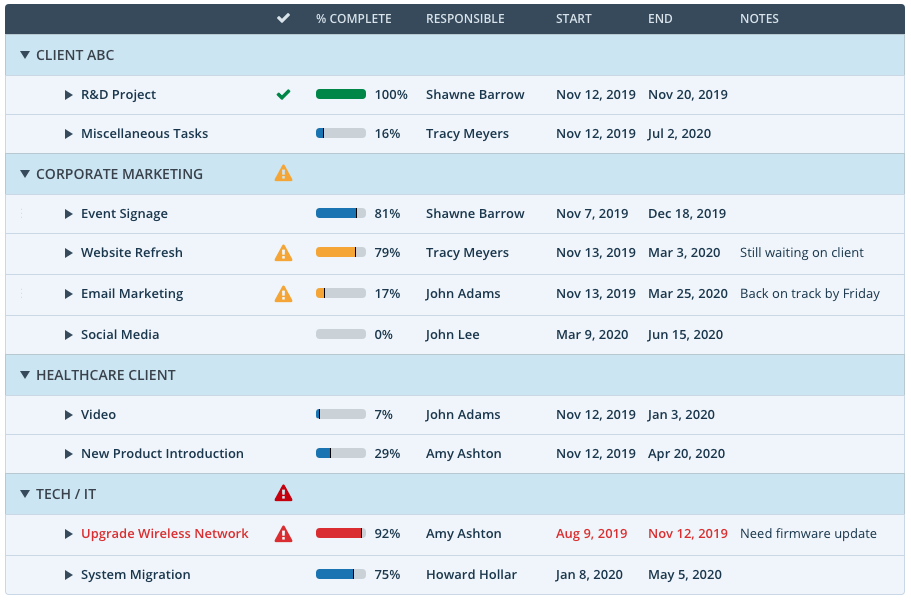
Workzone es una plataforma de gestión de proyectos diseñada para equipos de marketing, operaciones y agencias que necesitan gestionar proyectos complejos, coordinar tareas entre departamentos y mantener a todos alineados con herramientas claras de seguimiento y colaboración en proyectos.
¿Para quién es mejor Workzone?
Workzone es una excelente opción para equipos de tamaño mediano en marketing, creatividad y operaciones que requieren supervisión estructurada de proyectos a través de múltiples flujos de trabajo concurrentes.
Por qué elegí Workzone
Workzone merece su lugar en mi lista corta por la forma en que gestiona la visibilidad entre varios proyectos a la vez. Me gusta especialmente el panel que abarca desde el portafolio hasta el nivel de tarea, que me permite ver el estado de cada proyecto de un vistazo y profundizar en tareas específicas sin tener que cambiar de vista. Cuando dirijo una reunión de revisión de estado, ese único panel hace el trabajo pesado: los indicadores con código de colores destacan inmediatamente el trabajo atrasado o vencido. Las funciones de gestión de carga de trabajo e informes en tiempo real completan el paquete, ayudando a identificar problemas de capacidad antes de que provoquen retrasos en las entregas.
Características clave de Workzone
- Revisión creativa: Revisa y marca activos creativos directamente en la plataforma, con retroalimentación centralizada para reducir las rondas de revisión.
- Captura centralizada de solicitudes: Recibe el trabajo entrante mediante un formulario estandarizado para que cada proyecto comience con los detalles correctos desde el principio.
- Plantillas de proyectos: Crea y reutiliza plantillas adaptadas a flujos de trabajo específicos para que los proyectos recurrentes se lancen de manera consistente sin configuraciones manuales.
- Vista de diagrama de Gantt: Visualiza secuencias de tareas, dependencias y cronogramas en un solo gráfico para seguir el avance de los proyectos a través de los diferentes flujos de trabajo.
Integraciones de Workzone
Las integraciones incluyen Box, Dropbox, Everhour, Freshbooks, Github, Google Drive, Harvest, HubSpot, Jira y Microsoft Office 365.
Pros and Cons
Pros:
- Visibilidad de portafolio a tarea con filtrado robusto
- Colaboración inteligente para que no tengas que buscar comentarios
- Fácil creación de plantillas a partir de proyectos existentes
Cons:
- Las tareas retrasadas afectan negativamente a las tareas independientes en la línea de tiempo
- No hay herramienta de marcado para videos
- Las vistas de cascada y tablero están separadas
New Product Updates from Workzone

Workzone Adds Forecasts to Project Baselines
Workzone adds Forecasts to Project Baselines for Enterprise users, comparing baseline snapshots with current project schedules. The feature helps teams anticipate project outcomes and identify potential scope, schedule, or cost overruns earlier. For more information, visit Workzone’s official site.
 .
.
ClickUp
Ideal para sustituir varias herramientas separadas
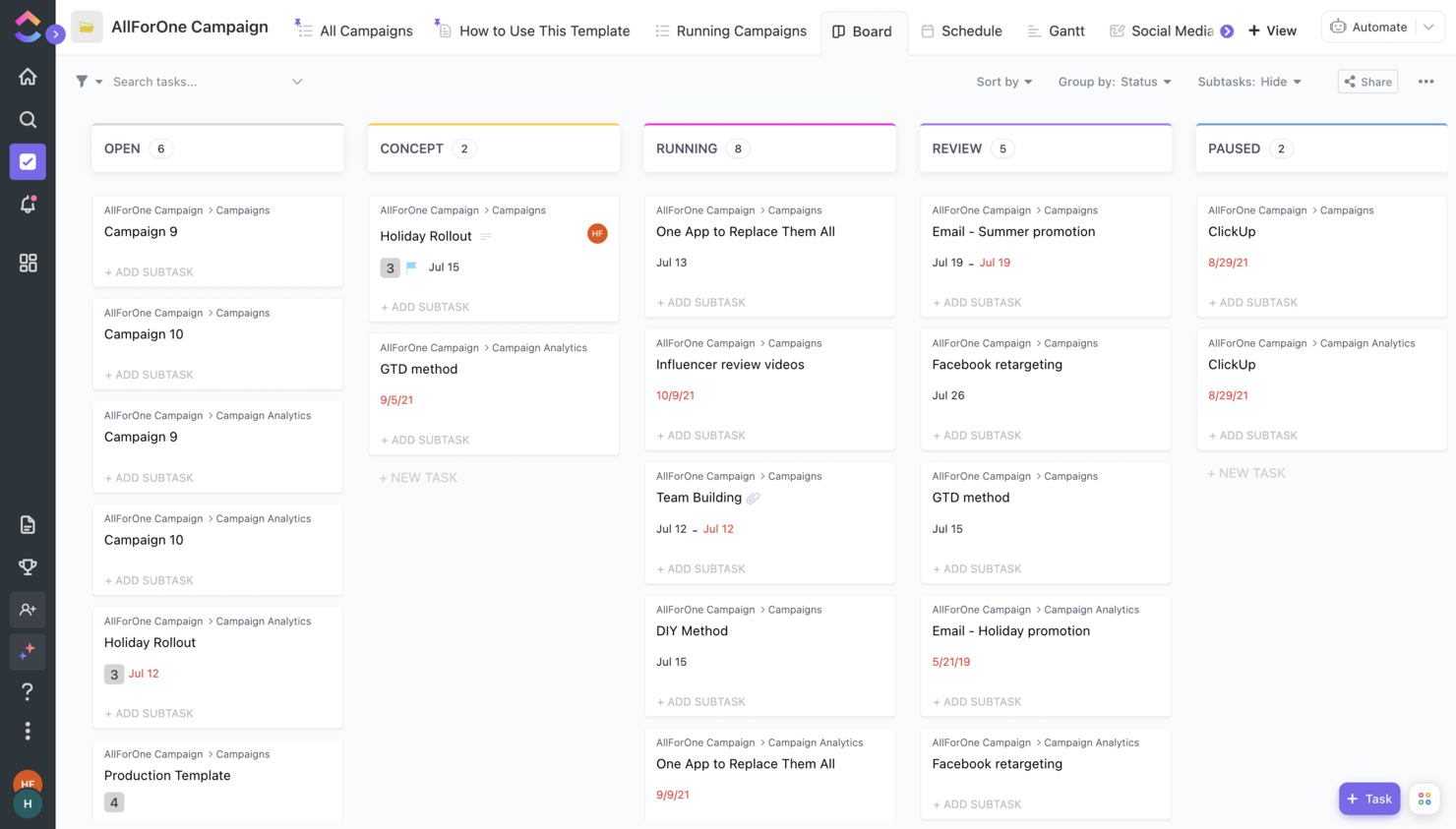
ClickUp reúne la gestión de proyectos, documentos, objetivos y chat en una sola plataforma, lo que la convierte en una excelente opción para equipos cansados de usar varias herramientas diferentes. Es especialmente útil para equipos tecnológicos y digitales que buscan centralizar el trabajo, automatizar procesos y mantener todo—desde tareas hasta bases de conocimiento—en un único espacio de trabajo. Si quieres reducir los cambios de contexto y unificar tus flujos de trabajo, ClickUp ofrece una solución flexible que se adapta a una amplia variedad de necesidades de proyectos.
Por qué elegí ClickUp
Lo que distingue a ClickUp es su capacidad para combinar la gestión de proyectos, la documentación y la comunicación del equipo en un solo lugar. Puedes gestionar tareas, crear y compartir documentos e incluso chatear con tu equipo sin cambiar de plataforma. Elegí ClickUp porque permite a los equipos reemplazar herramientas separadas para wikis, seguimiento de objetivos y pizarras blancas por un único espacio de trabajo personalizable. Este enfoque ayuda a reducir la dispersión de herramientas y mantiene toda la información de tus proyectos conectada.
Funciones clave de ClickUp
Otras funciones de ClickUp que vale la pena destacar incluyen:
- Tableros personalizados: Crea tableros visuales para seguir métricas de proyectos, carga de trabajo y progreso.
- Constructor de automatizaciones: Configura automatizaciones personalizadas para manejar acciones y actualizaciones de tareas repetitivas.
- Mapas mentales: Crea mapas mentales visuales para hacer lluvias de ideas y organizar la estructura del proyecto.
- Tomador de notas con IA: Utiliza IA para tomar notas durante reuniones y mejorar la documentación.
Integraciones de ClickUp
Las integraciones incluyen conexiones nativas con Slack, HubSpot, TogglTrack, Figma, Loom, Sentry, G Suite, Dropbox, Clockify y Calendly. Además, puedes conectar con más de 1,000 aplicaciones usando una suscripción de pago con Zapier. Por último, si tienes la capacidad de hacer integraciones personalizadas, existe una API pública que puedes usar para ello.
Pros and Cons
Pros:
- Excelente base de conocimientos con artículos y tutoriales útiles.
- Precio bajo en comparación con la cantidad de funciones que ofrece.
- Rendimiento mejorado tras la última actualización a ClickUp 3.0
Cons:
- La versión gratuita pasa a solo lectura al alcanzar los límites.
- La IA está disponible por un costo adicional, sin importar el plan.
New Product Updates from ClickUp
ClickUp Adds Custom Fields, Slack Imports, and AI Notes
ClickUp adds Custom Fields by task type, Slack history imports into existing ClickUp locations, and in-meeting chat capture for AI Notetaker. These updates make it easier to organize task data, migrate Slack conversations, and keep more complete meeting records. For more information, visit ClickUp’s official site.
 .
.Otros Programas de Gestión de Proyectos
Aquí tienes algunas opciones adicionales de software de gestión de proyectos que no entraron en mi selección principal, pero que aún vale la pena revisar:
- Resource Guru
Ideal para prevenir la sobreasignación
- Quickbase
Ideal por su versatilidad de plataforma
- Bubble PPM
Ideal para la gestión de portafolios
- Microsoft Project
Mejor opción para equipos que utilizan Microsoft 365
- FigJam
Ideal para la colaboración creativa
- Dock
Ideal para la gestión de colaboración con clientes
- MeisterTask
Ideal para gestión de proyectos sencilla
- Nifty
Mejor para el seguimiento de hitos
- Plaky
Ideal para una gestión de proyectos rentable
- Kintone
Ideal para aplicaciones personalizadas
- Forecast
Ideal para la detección temprana de riesgos presupuestarios en proyectos
- Backlog
Ideal para desarrolladores de software
- ProofHub
Ideal para organizar con vistas de tablero y tabla
- Shortcut
Ideal para unir la planificación y el desarrollo
- Teamwork.com
Ideal para equipos remotos
- awork
La mejor interfaz para facilidad de uso e intuición
- Jira
Ideal para el seguimiento de proyectos entre equipos
- Nutcache
Ideal para seguimiento avanzado de tiempo
- Basecamp
Ideal para centralizar la documentación de proyectos
- FunctionFox
La mejor opción para creativos
- Planview AdaptiveWork
Mejor para la planificación de recursos empresariales
- Polaris PSA By Replicon
Ideal para obtener información en tiempo real sobre los proyectos
- Deltek Replicon Time
Mejor para la captación inteligente del tiempo de proyectos
- Adobe Workfront
Ideal para plantillas de proyectos personalizables
- PSOhub
Ideal para integrar la gestión de proyectos con CRM
- ProjectManager
El mejor para el seguimiento e información de proyectos en tiempo real
- Confluence
Mejor para gestores de software
- Moovila
El mejor software de gestión de proyectos para funciones de puntuación de proyectos
- Tempo Portfolio Manager
Mejor para proyectos complejos
- Easy Projects
Ideal para el seguimiento de la rentabilidad de proyectos


Otros Tipos de Software de Gestión de Proyectos
Consulta nuestra lista de herramientas de gestión de proyectos que hemos identificado y probado por sus características particulares o para usos específicos por sector.
Software de Gestión de Proyectos para:
- Ágil
- Arquitectos
- Construcción
- Consultores
- Creativos
- Diseño
- Empresas
- Gratis
- Freelancers
- Salud
- Individuos
- Usuarios de MacOs
- Marketing
- Manufactura
- Equipos remotos
- Pequeñas empresas
- Startups
Software de gestión de proyectos con:
- Portales para clientes
- Seguimiento ágil
- Integraciones con Google Calendar
- Facturación
- Implementación local
- Planificación visual
Recorrido en video de herramientas de gestión de proyectos
Mira nuestro video sobre las mejores herramientas de gestión de proyectos:


Cómo Evalúo el Software de Gestión de Proyectos
Evalúo las herramientas en dos niveles: las capacidades principales, como la gestión de tareas y la programación con diagramas de Gantt, que toda herramienta seria de gestión de proyectos necesita, y los diferenciadores que hacen que una sea más adecuada que otra.
Funcionalidad Principal (Requisitos Mínimos para Esta Lista)
Estas capacidades principales sirven como criterios de aceptación para la inclusión en mi lista de software de gestión de proyectos:
- Gestión de Tareas y Flujos de Trabajo: Evalúo cómo cada herramienta gestiona la creación de tareas, subtareas, estados personalizados y etapas del flujo de trabajo, como mover una solicitud de diseño desde la recepción hasta la revisión y el lanzamiento.
- Planificación y Programación de Proyectos: Aquí son importantes los diagramas de Gantt, los hitos y el mapeo de dependencias. Busco herramientas que te permitan visualizar la línea de tiempo completa de un proyecto y ajustarla cuando cambian las fechas.
- Múltiples Vistas de Proyecto: Reviso si puedes alternar entre vistas Kanban, de lista, de cronograma y de calendario sobre el mismo conjunto de datos sin duplicar trabajo ni perder contexto.
- Herramientas de Colaboración en Equipo: Busco comentarios, @menciones y compartición de archivos dentro del contexto de la tarea. Tu equipo no debería tener que salir de la plataforma para discutir una entrega.
- Gestión de Recursos y Carga de Trabajo: Las vistas de carga de trabajo que muestran quién está sobrecargado y quién tiene capacidad son indispensables. Busco herramientas de asignación que funcionen en varios proyectos a la vez.
- Informes y Tableros: Evalúo si los tableros muestran la verdadera salud del proyecto (por ejemplo, horas consumidas, avance de hitos, bloqueos) en vez de métricas de vanidad que no se pueden aprovechar.
Puntúo a cada proveedor en una escala del 0 (no ofrece la funcionalidad) al 5 (destaca en este aspecto) para cada criterio.
Los proveedores deben lograr una puntuación media mínima para ser considerados en mi lista. A partir de ahí, analizo qué diferencia a cada plataforma.
Factores Diferenciadores (Qué Distingue a los Proveedores)
Una vez que he elaborado mi lista, así es como contrasto y comparo diferentes proveedores en el ámbito del software de gestión de proyectos:
Características Destacadas
La automatización de flujos de trabajo realmente destaca. Analizo si las herramientas ofrecen reglas sin código para reducir tareas repetitivas, como la asignación automática de trabajo según la etapa del proyecto. El control de tiempo y presupuesto integrados también es clave para equipos que necesitan monitorear horas o aspectos financieros del proyecto directamente en el espacio de trabajo. Funcionalidades avanzadas de colaboración, como acceso para clientes o aprobaciones integradas, pueden ser un factor decisivo para agencias o proyectos entre empresas. Por último, la asistencia potenciada por IA, especialmente para automatizar actualizaciones de estado o identificar riesgos del proyecto, está tomando cada vez más importancia para equipos grandes o dinámicos.
Más Allá de las Funcionalidades
El ecosistema de integraciones importa mucho aquí. Verifico si una plataforma se conecta de forma nativa con herramientas como Slack, Jira, GitHub y Google Drive. Un software de gestión de proyectos que opera aislado genera más trabajo, no menos. La escalabilidad es otro factor que valoro cuidadosamente; una herramienta que funciona para un equipo de 10 personas, pero colapsa con una oficina de gestión de proyectos de 200 personas, no te servirá por mucho tiempo. También considero la compatibilidad con metodologías, es decir, si la plataforma soporta enfoques ágiles, en cascada o híbridos sin imponer un único marco de trabajo a tu equipo.
Cómo elegir software de gestión de proyectos
Es fácil perderse entre largas listas de funciones y estructuras de precios complejas. Para ayudarte a mantener el enfoque durante el proceso de selección de software, aquí tienes una lista de factores a tener en cuenta:
| Factor | Qué considerar |
| Escalabilidad | Asegúrate de que el software pueda crecer junto con tu equipo al gestionar un mayor número de proyectos, usuarios y datos sin pérdida de rendimiento. |
| Integraciones | Busca herramientas que se conecten fácilmente con aplicaciones que tu equipo ya utiliza, como Slack, Zoom o Salesforce. |
| Personalización | Verifica si puedes adaptar los flujos de trabajo, paneles y reportes para coincidir con los procesos únicos de tu equipo. |
| Facilidad de uso | Elige una plataforma intuitiva, que minimice el tiempo de capacitación y fomente la adopción en todo tu equipo. |
| Presupuesto | Considera los costos iniciales, tarifas recurrentes y cargos ocultos. Elige software que ofrezca un buen valor por su precio. |
| Medidas de seguridad | Prioriza herramientas con cifrado robusto, permisos de usuario y cumplimiento con estándares de la industria para proteger tus datos. |
| Herramientas de colaboración | Revisa funciones como edición en tiempo real, comentarios y paneles compartidos para facilitar la comunicación del equipo. |
| Opciones de soporte | Ten en cuenta la disponibilidad de chat en vivo, soporte telefónico o centros de ayuda para resolver problemas rápidamente. |
Es mucho para analizar—y una gran responsabilidad acertar—por eso te sugiero usar nuestro servicio de asesoría de software de gestión de proyectos para ayudarte a seleccionar herramientas que se ajusten a las necesidades de tu organización.
Tendencias en el software de gestión de proyectos
En mi investigación, revisé innumerables actualizaciones de productos, comunicados de prensa y registros de versiones de diferentes proveedores de software de gestión de proyectos. Estas son algunas de las tendencias emergentes que estoy observando:
- Pronósticos de recursos con IA: Cada vez más herramientas utilizan IA para predecir necesidades de recursos, lo que ayuda a los equipos a asignar personal y presupuestos con mayor precisión. El equilibrio en la carga de trabajo y la previsión de la demanda se están convirtiendo en estándares para aumentar la eficiencia y evitar el agotamiento.
- Adaptabilidad al trabajo híbrido: Las plataformas están agregando soporte tanto para la gestión remota de proyectos como para la gestión en oficina, incluyendo comunicación asíncrona, espacios de trabajo virtuales y flujos de trabajo adaptables.
- Planificación de escenarios para la gestión de riesgos: Las herramientas avanzadas ahora permiten a los usuarios modelar resultados en función de variables como cambios en el presupuesto o retrasos. Esto ayuda a los equipos a detectar riesgos y ajustar planes con antelación, lo cual es ideal para cronogramas complejos o problemas en la cadena de suministro.
- Seguimiento financiero integrado: Más plataformas ahora incluyen seguimiento financiero dentro de los flujos de trabajo del proyecto. Esto permite a los equipos gestionar presupuestos, gastos y ganancias en negocios multiproyecto y sensibles a los costos sin depender de herramientas contables separadas.
- Métricas de sostenibilidad: Algunas herramientas ya ofrecen paneles con seguimiento de carbono y análisis de sostenibilidad. Ayudan a los equipos a medir el consumo de energía, residuos y emisiones para cumplir con metas de RSC y medioambiente.
¿Qué es el software de gestión de proyectos?
El software de gestión de proyectos es una herramienta digital que ayuda a los usuarios a planificar, organizar, asignar y hacer seguimiento del trabajo para completar proyectos de manera más eficiente.
Permite programar tareas, establecer plazos, asignar recursos, gestionar presupuestos y comunicarse de manera eficaz. Desde el seguimiento básico de tareas hasta proyectos complejos y de múltiples fases. El software de gestión de proyectos basado en la web centraliza la información y automatiza rutinas para mejorar la coordinación, la responsabilidad y la ejecución en diferentes industrias.
Características del software de gestión de proyectos
Al elegir un software de gestión de proyectos, ten en cuenta las siguientes características clave:
- Gestión de tareas: Crea, asigna y haz seguimiento de tareas para ti y tu equipo. El software de gestión de proyectos te permite dividir grandes proyectos en partes manejables, para que ningún detalle se pase por alto. Puedes establecer fechas límite, añadir descripciones y marcar el trabajo completado para mantener todo organizado y en movimiento.
- Herramientas de colaboración: Comunícate y comparte actualizaciones directamente dentro de tu espacio de trabajo del proyecto. Con chat integrado, hilos de comentarios o intercambio de archivos, puedes colaborar con tus compañeros en tiempo real—evitando interminables cadenas de correos y haciendo más fácil que todos estén en la misma sintonía.
- Seguimiento del tiempo: Registra las horas dedicadas a tareas o proyectos específicos. Esto te ayuda a ver en qué se emplea el tiempo, establecer estimaciones más precisas y asegurarte de que las fechas límite (y el esfuerzo real) coinciden. Es especialmente útil para autónomos o equipos que facturan por hora.
- Gestión de recursos: Asigna personas, herramientas y presupuestos de manera eficiente. Las funcionalidades de gestión de recursos te ayudan a evitar sobreasignaciones, detectar cuellos de botella antes de que causen problemas y asegurar que todos tengan lo necesario para trabajar sin sobrecargas o bloqueos.
- Gestión de documentos: Almacena, organiza y accede a los documentos del proyecto en un solo lugar centralizado. En lugar de buscar archivos en cadenas de correos aleatorios, puedes guardar todo—desde propuestas hasta notas de reuniones—justo donde tu equipo lo necesita, con control de versiones y permisos para mayor seguridad.
- Gráficas de Gantt y cronogramas: Visualiza el calendario y las dependencias de tu proyecto con gráficos fáciles de leer. Las gráficas de Gantt te permiten ver cómo se superponen las tareas, identificar riesgos y ajustar los plazos según sea necesario—todo con simples movimientos de arrastrar y soltar.
- Informes y análisis: Genera informes sobre el progreso del proyecto, uso de recursos, plazos y más. Estas percepciones te ayudan a detectar tendencias, medir el éxito y tomar decisiones basadas en datos para mejorar futuros proyectos.
- Capacidades de integración: Conecta tu software de gestión de proyectos con otras aplicaciones que usas, como correo electrónico, calendarios o servicios de almacenamiento de archivos. Esto reduce el tiempo perdido cambiando entre herramientas y mantiene tu flujo de trabajo ininterrumpido.
Funciones comunes de IA en software de gestión de proyectos
Más allá de las funciones estándar mencionadas arriba, muchas de estas soluciones están incorporando inteligencia artificial con características como:
- Programación automática: La IA analiza cargas de trabajo y prioridades para sugerir los mejores momentos para reuniones o fechas límite de proyectos. Tiene en cuenta la disponibilidad de todos y las dependencias de tareas, ahorrándote interminables ajustes de calendario.
- Análisis predictivo de proyectos: Analizando datos históricos, la IA predice posibles riesgos o retrasos antes de que se conviertan en problemas importantes. Recibes alertas y recomendaciones anticipadas, para que puedas abordar los problemas de forma proactiva y no después de que empeoren.
- Procesamiento de lenguaje natural para la creación de tareas: Solo tienes que escribir o decir tus necesidades del proyecto, y la IA creará, categorizará y asignará tareas automáticamente. Esto agiliza la planificación cuando gestionas muchos detalles.
- Optimización de recursos: La IA supervisa la carga de trabajo y las habilidades de tu equipo, y luego recomienda cómo distribuir tareas de la manera más eficiente. Así aprovechas al máximo las fortalezas de todos y evitas tanto el agotamiento como el aburrimiento.
- Informes inteligentes: La IA revisa todos tus datos de proyectos para destacar los hallazgos, tendencias y cuellos de botella más importantes. Obtienes resúmenes claros y accionables sin tener que revisar montones de cifras.
- Gestión inteligente de documentos: La IA organiza y etiqueta los documentos de tu proyecto, haciendo más sencillo encontrar lo que necesitas al instante—aunque hayas olvidado el nombre exacto del archivo. Así, todos evitan el "limbo upload/download".
Beneficios del software de gestión de proyectos
La implementación de herramientas de software de gestión de proyectos puede brindar varios beneficios para tu equipo y tu empresa. Aquí algunos a los que puedes aspirar:
- Colaboración mejorada: Las herramientas de gestión de proyectos fomentan el trabajo en equipo al ofrecer una plataforma central para la comunicación, el intercambio de archivos y actualizaciones. Esto agiliza la comunicación y mantiene a todos alineados.
- Mejor planificación de proyectos: Las sólidas funciones de planificación—como cronogramas, asignación de recursos y seguimiento de hitos—ayudan a los usuarios a construir planes de proyecto realistas y alcanzables.
- Mejor gestión de recursos: Los usuarios pueden monitorizar la disponibilidad, gestionar cargas de trabajo y evitar la sobreasignación para optimizar el uso de personas y materiales.
- Mejor gestión de riesgos: Las herramientas integradas para la evaluación, seguimiento y planificación de la respuesta ante riesgos ayudan a los equipos a minimizar posibles interrupciones del proyecto.
- Toma de decisiones basada en datos: Los datos e informes en tiempo real apoyan decisiones informadas al hacer seguimiento de métricas, identificar tendencias y hacer ajustes oportunos.
Costos y precios del software de gestión de proyectos
Seleccionar un software de gestión de proyectos requiere comprender los diversos modelos y planes de precios disponibles. Los costos varían según las funciones, el tamaño del equipo, los complementos y más. La siguiente tabla resume los planes más comunes, sus precios promedio y las funciones típicas incluidas en las soluciones de software de gestión de proyectos:
Tabla comparativa de planes para software de gestión de proyectos
| Tipo de plan | Precio promedio | Funciones comunes |
|---|---|---|
| Gratis | $0 | Gestión de tareas, informes básicos, acceso de usuario limitado, almacenamiento limitado |
| Básico | $7 - $15 por usuario/mes | Gestión de tareas mejorada, plantillas de proyectos, uso compartido de archivos, integraciones básicas, todas las funciones del plan Gratis |
| Intermedio | $20 - $30 por usuario/mes | Informes avanzados, paneles personalizables, más usuarios y almacenamiento, integraciones adicionales, todas las funciones del plan Básico |
| Avanzado | $30+ por usuario/mes | Gestión de recursos, seguridad avanzada, soporte premium, acceso a API, funciones personalizables, todas las funciones del plan Intermedio |
Como regla general, los equipos pequeños o aquellos que son nuevos en la gestión de proyectos deberían comenzar con un plan Básico o Gratis para obtener las funciones esenciales sin complejidad añadida. A medida que tu equipo crezca o cambien las necesidades, actualizar a planes Intermedio o Avanzado desbloquea más herramientas y personalización avanzada.
Las etapas más comunes en las que tu empresa podría querer actualizar incluyen:
- Expansión del equipo: Contratar más personal o formar nuevos equipos puede superar el límite de usuarios del plan actual.
- Más proyectos: Gestionar varios proyectos simultáneamente a menudo requiere funciones avanzadas y una mayor capacidad de datos.
- Funcionalidades avanzadas: La necesidad de herramientas como informes avanzados o una mayor seguridad puede justificar pasar a un plan de precio superior.
- Necesidades de almacenamiento: Más archivos de proyectos pueden requerir mayor almacenamiento y mejor gestión de archivos.
- Gestión de clientes: Una base de clientes en crecimiento suele requerir herramientas avanzadas que se encuentran en planes de nivel superior.
Preguntas frecuentes sobre software de gestión de proyectos
Aquí tienes algunas de las preguntas que más recibo sobre el software de gestión de proyectos.
¿Cómo logro que mi equipo adopte un nuevo software de gestión de proyectos?
Involucra a tu equipo desde el principio en el proceso de selección y explica claramente los beneficios. Ofrece formación práctica y asigna un “líder” para responder dudas. Comienza con un grupo núcleo, recoge sus comentarios y ajusta tu enfoque antes de implementarlo por completo. Celebrar logros rápidos—como el tiempo ahorrado o una mejor colaboración—fomenta el uso continuo.
¿Qué errores debería evitar al elegir un software de gestión de proyectos?
No elijas una herramienta solo porque sea popular: céntrate en las necesidades y flujos de trabajo de tu equipo. Evita subestimar el tiempo de configuración y capacitación, y no ignores la opinión de tu equipo durante la evaluación. Saltarse las comprobaciones de integración o no revisar las características de seguridad puede provocar problemas de adopción o riesgos de datos más adelante.
¿Debo elegir el software de gestión de proyectos en función de mi metodología?
Sí, es mejor seleccionar un software que respalde tu metodología preferida, como Ágil, Scrum o Waterfall. Algunas herramientas están diseñadas para enfoques específicos, mientras que otras son más flexibles. Asegúrate de que la plataforma pueda manejar el proceso, la terminología y las necesidades de informes de tu equipo.
¿Cómo implemento un nuevo software de gestión de proyectos para mi equipo?
Comienza estableciendo objetivos claros y definiendo las necesidades de flujo de trabajo de tu equipo. Elige un software que se ajuste a esos requisitos. A continuación, importa los datos o configura nuevos proyectos, y capacita a tu equipo utilizando guías o tutoriales incorporados. Asigna roles, establece permisos y configura integraciones con otras herramientas que utilice tu equipo. Supervisa la adopción y recoge comentarios para ajustar la configuración y los flujos de trabajo para una implementación más fluida.
¿Cómo conecto el software de gestión de proyectos con mis otras herramientas?
La mayoría de los programas de gestión de proyectos se integran con aplicaciones populares como Slack, Google Drive y Microsoft Teams mediante integraciones incorporadas o conectores de terceros como Zapier. Normalmente, solo tienes que vincular tus cuentas en la configuración y luego establecer reglas para sincronizar tareas o archivos entre sistemas. Esto ayuda a automatizar los flujos de trabajo y mantiene a tu equipo trabajando en un solo lugar.
¿Puedo migrar datos de una herramienta de gestión de proyectos a otra?
Sí, la mayoría de los software líderes de gestión de proyectos ofrecen funciones de importación de datos, lo que te permite transferir tareas, usuarios, archivos adjuntos e historiales de proyectos. Busca opciones de importación CSV, integraciones directas o herramientas de migración dedicadas que ofrezca el proveedor. Algunas empresas también brindan soporte o servicios de incorporación para ayudarte a transferir los datos sin perder información importante.
¿Cómo escalo el software de gestión de proyectos a medida que mi equipo crece?
Elige plataformas con permisos personalizables, roles de usuario avanzados y la capacidad de gestionar múltiples proyectos o carteras. Asegúrate de que el software soporte mayor almacenamiento, informes sólidos e integraciones que tu equipo necesitará a medida que crezca. Revisa los planes de precios y complementos, ya que los costos suelen aumentar con más usuarios o funciones avanzadas.
Seguridad y privacidad de los datos en el software de gestión de proyectos
La seguridad y privacidad de los datos son esenciales en las herramientas de gestión de tareas en línea para proteger información sensible, cumplir normativas y generar confianza. También ayudan a prevenir accesos no autorizados, mantener la integridad de los datos, asegurar la continuidad del negocio y reducir amenazas internas y externas.
Por lo tanto, unas medidas de seguridad inadecuadas significan que los datos están expuestos a accesos no autorizados, robos o brechas, lo que puede provocar daños financieros y de reputación significativos.

A continuación, algunas de las funciones de seguridad que puedes encontrar:
- Cumplimiento con estándares europeos: El RGPD revolucionó la manera en que las empresas SaaS gestionan la privacidad de los datos de los clientes. La mayoría ahora depende de grandes proveedores de hosting como Amazon y utiliza servidores distribuidos globalmente para cumplir los requisitos normativos por región.

- Cifrado de datos: El cifrado mantiene tu información oculta ante terceros, tanto en tránsito como en reposo. Esto significa que tu información está protegida mientras se envía o almacena.
- Certificaciones de seguridad: Espera que el proveedor tenga certificaciones en ISO 27001, SOC2 Tipo I, Tipo II, CSA STAR u otros credenciales similares.
Algunos proveedores son más transparentes que otros sobre sus prácticas de seguridad y privacidad, pero todos deben contar con ellas. Si los detalles no son claros, asegúrate de consultarlo durante tu llamada de demostración.
¿Qué sigue?
Elegir un software de gestión de proyectos puede ser complicado. Si necesitas más información acerca de un caso de uso concreto, siempre puedes programar una demostración con el proveedor para ver cómo la herramienta puede resolver tus retos.
¡The Digital Project Manager tiene toneladas de contenido útil para ayudarte a destacar en el trabajo! Puedes mantenerte al día suscribiéndote al boletín Insiders. Cada semana llegarán a tu bandeja de entrada nuevo contenido y conversaciones interesantes relacionadas con la gestión de proyectos.