10 beste verktøy for prosjektstyring for små bedrifter 2026

10 Kortliste over den beste prosjektstyringsprogramvaren for små bedrifter


Den beste prosjektstyringsprogramvaren for små bedrifter hjelper deg med å organisere oppgaver, sette tidsfrister, tildele ansvar og sørge for at alle er på samme side. Uten det riktige verktøyet ender du opp med å håndtere endeløse e-posttråder eller spredte regneark, og du vil få problemer med å følge fremdriften, dele filer og kommunisere med teamet ditt.
Jeg har jobbet som prosjektleder i byråer og på små team i over 20 år, og jeg vet hvordan det riktige verktøyet kan få prosjekter til å flyte bedre, redusere stress og frigjøre tid slik at du kan fokusere på strategisk arbeid. Her er mine utvalgte alternativer for den beste prosjektstyringsprogramvaren for små bedrifter, slik at du kan håndtere viktige prosjektstyringsutfordringer og finne den løsningen som passer best for teamene, prosjektene og virksomheten din.
Why Trust Our Software Recommendations
Our team has been testing and reviewing software since 2012. As project managers ourselves, we know how difficult—and important—it is to choose the right software.
For this guide, we evaluated tools using hands-on testing and independent research, scoring tools using our selection criteria. We also draw on insights from industry thought leaders and practicing project management experts.
Our reviews reflect our human editorial judgment, not a sales pitch.
Expert reviewers:
Sammenligningstabell: Prosjektstyringsverktøy for små bedrifter
Sammenlign priser og viktige spesifikasjoner for mine beste prosjektstyringsverktøy for små bedrifter i tabellen nedenfor.
| Tool | Best For | Trial Info | Price | ||
|---|---|---|---|---|---|
| 1 | Best for flexibility and integrations | Free plan available | From $9/user/month (billed annually) | Website | |
| 2 | Best flexible work allocation tools | Free plan + 15-day free trial + free demo available | From $4/user/month (billed annually) | Website | |
| 3 | Best for no-code dynamic work management | 30-day free trial | From $35/user/month (billed annually) | Website | |
| 4 | Best for complex project breakdowns | Free plan + 30-day free trial available | From $7.65/user/month (billed annually) | Website | |
| 5 | Best for brainstorming, ideation, and task management | Free trial + free plan + free demo available | From $13/user/month (billed annually) | Website | |
| 6 | Best for customizable team workflows | Free plan available | From $9/user/month (billed annually) | Website | |
| 7 | Best for managing clients and tasks in one hub | Free plan + 14-day free trial + free demo available | From $79/user/month (billed annually) | Website | |
| 8 | Best for goal setting and OKR tracking | Free plan available | From $10.99/user/month (billed annually) | Website | |
| 9 | Best for project management beginners | 30-day free trial + free demo available | From $25/month (billed annually) | Website | |
| 10 | Best for real-time project tracking and insights | 30-day free trial | From $15/user/month (billed annually) | Website |


Anmeldelser av den beste prosjektstyringsprogramvaren for små bedrifter
Her er en kort beskrivelse av hver av de beste programvareløsningene for småbedriftsstyring som kom med på listen min, sammen med skjermbilder, viktige funksjoner og de beste bruksområdene.

Best for flexibility and integrations
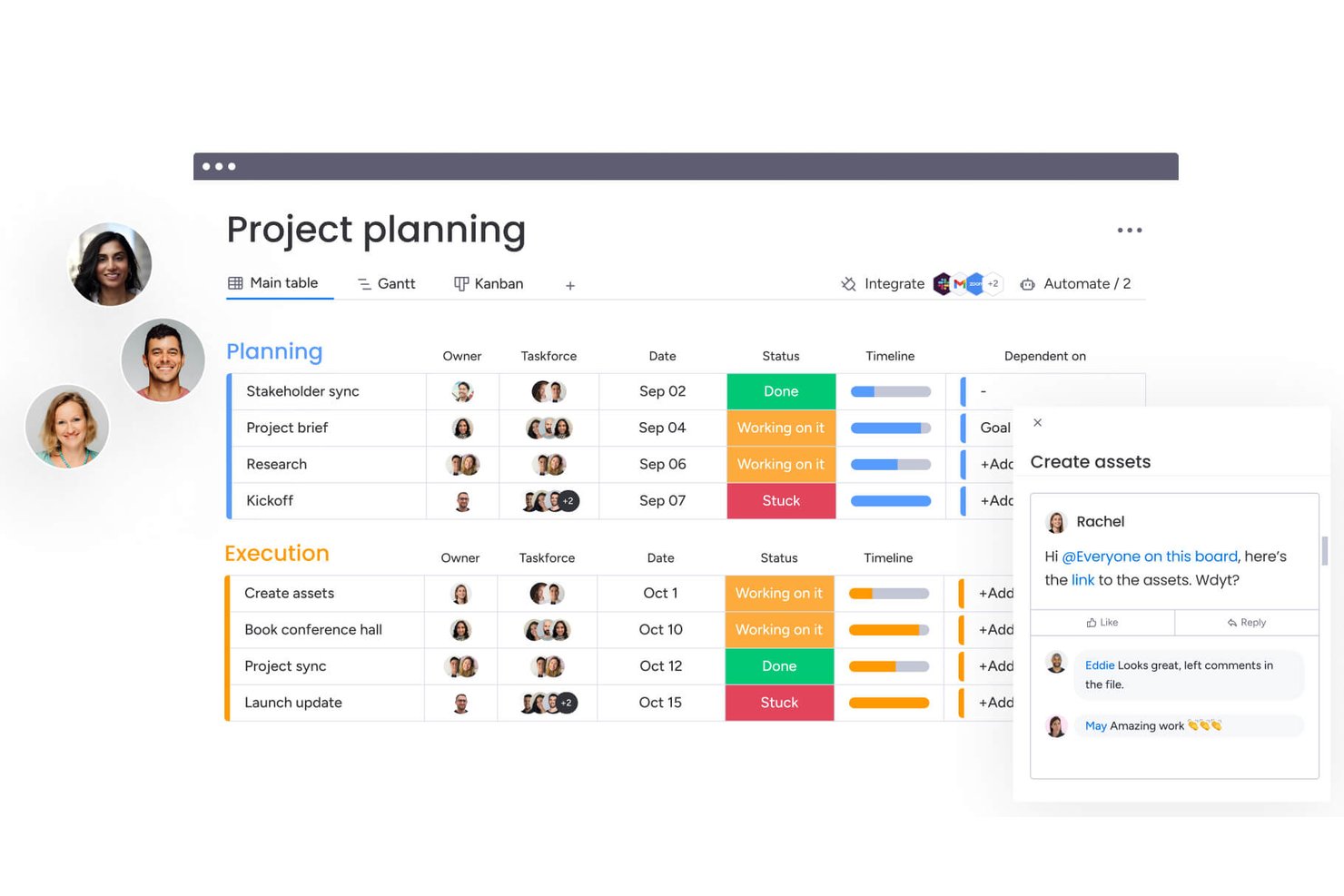
monday AI Workspace is a project management platform that combines customizable boards, visual planning views, no-code automation, and an integrations hub spanning 850+ apps.
Who Is monday AI Workspace Best For?
monday AI Workspace suits small business owners and team leads who need a highly adaptable project tracking setup without leaning on technical staff to get it running.
Why I Picked monday AI Workspace
monday AI Workspace earns its spot on my shortlist because no-code automation and a 850+ app integration hub let small teams build connected workflows without needing a developer. I especially like how the automation builder handles real work: when a task's status changes to "Done," it can auto-notify a client, move the item to a new group, and assign a follow-up task in one rule. The shareable boards feature also lets you give clients a clean, permission-controlled view of project progress without exposing your internal columns.
monday AI Workspace Key Features
- Status columns: Customizable status fields let you set and update task states across every board, giving your whole team a shared view of where work stands.
- 200+ templates: Pre-built board templates cover use cases from marketing to IT, so you can get a project up and running without building from scratch.
- Guest access: Invite external collaborators—like clients or contractors—to specific boards only, keeping internal work separate from what they can see.
- Time tracking column: A built-in start/stop timer on the Pro plan logs hours directly on each task, with manual entry and a rollup from sub-items to the parent item.
monday AI Workspace Integrations
monday AI Workspace offers 850+ integrations and apps, including Slack, Gmail, Google Calendar, Microsoft Teams, HubSpot, QuickBooks, GitHub, and Dropbox. It also supports custom connections through its API/SDK and Zapier.
Pros and Cons
Pros:
- Templates help teams launch projects faster
- Task updates keep files and decisions together
- Boards adapt to changing workflows
Cons:
- Dashboards and reports need deliberate setup
- Timeline and automation tools require upgrades
New Product Updates from monday AI Workspace
monday AI Workspace Adds Human Approval Routing
monday AI Workspace adds a human-in-the-loop approval block to AI Workflows, sending approval requests and routing workflow paths based on responses. For more information, visit monday AI Workspace's official site.

Best flexible work allocation tools
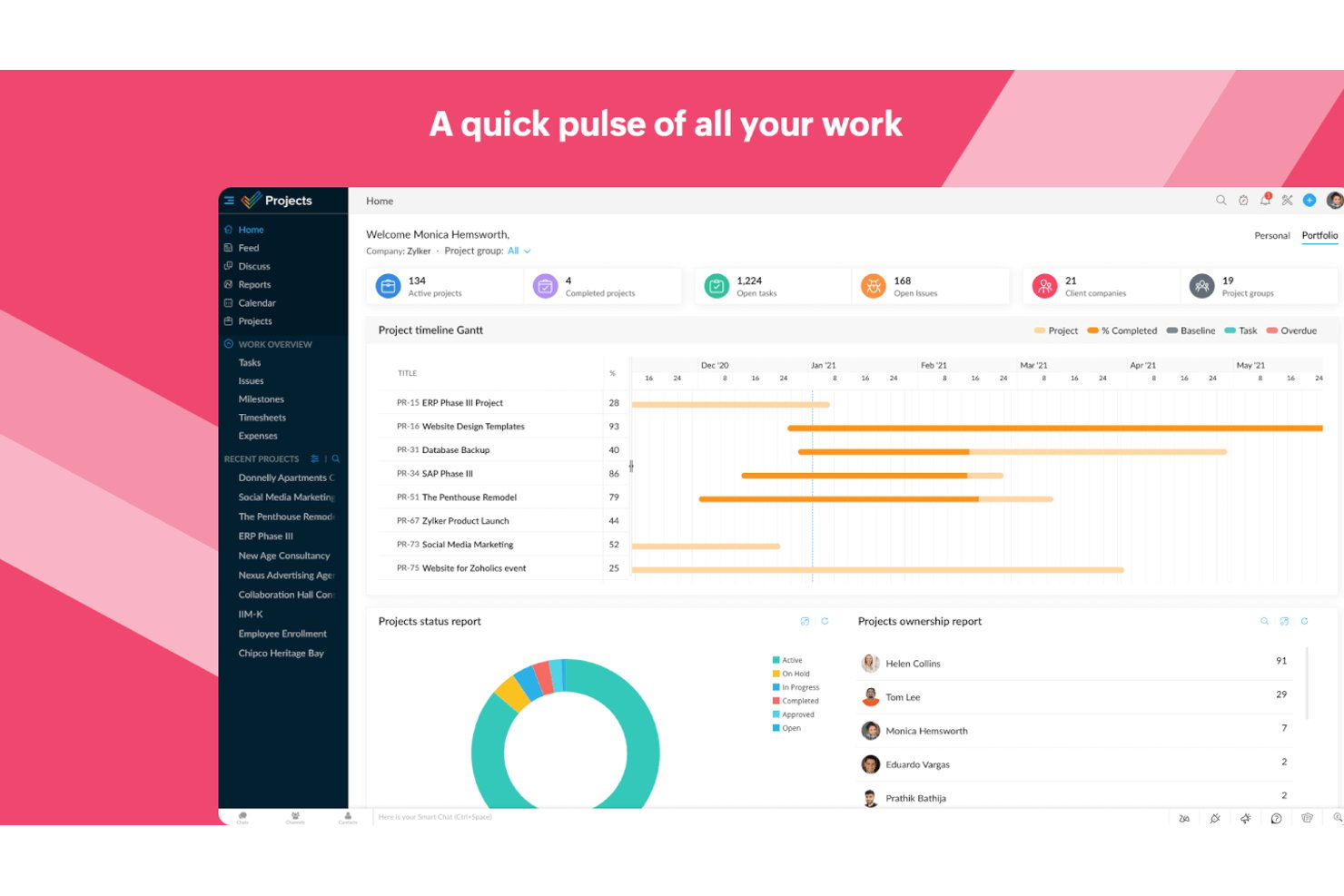
Zoho Projects is a project management platform for small teams that brings together task tracking, Gantt charts, resource management, time tracking, and workflow automation in one place.
Who Is Zoho Projects Best For?
Zoho Projects is a strong fit for small teams already in the Zoho ecosystem who need to manage workloads, track time, and keep projects moving without paying enterprise-level prices.
Why I Picked Zoho Projects
Zoho Projects earns its spot on my shortlist because its resource management tools give small teams a genuinely clear picture of who's carrying too much work before it becomes a problem. I like that you can view planned versus actual hours per person and reassign tasks directly from the workload report. The Zoho People integration goes a step further, letting you check staff availability before you assign anything, so you're not guessing who has capacity.
Zoho Projects Key Features
- Task blueprints: Define approval stages and assign team members to specific workflow steps to keep tasks moving through a structured process.
- Built-in time tracking: Log billable and non-billable hours directly on tasks using timers or manual entry, then push approved timesheets to Zoho Invoice or Books.
- Automation builder: Set up workflow rules, business rules, and SLAs that trigger actions or escalations automatically when task conditions are met.
- Cross-project reporting: Pull task, issue, and budget data across multiple projects into a single report to track overall team performance and spending.
Zoho Projects Integrations
Zoho Projects offers 20+ native integrations, including Zoho CRM, Zoho Books, Zoho Invoice, Zoho People, Google Sheets, Microsoft Teams, Slack, GitHub, and Figma. It also supports more than 50 marketplace integrations and Zapier.
Pros and Cons
Pros:
- Gantt dependencies clarify shifting deadlines
- Planned-versus-actual hours guide reassignments
- Workload reports expose overloaded teammates
Cons:
- Dense screens can obscure routine actions
- Project setup can require repetitive team configuration
New Product Updates from Zoho Projects
Zoho Projects Adds CodeX Scripts for Custom Modules
Zoho Projects now supports CodeX Scripts for custom modules, enabling conditional logic and rules for creating, updating, and deleting records. For more information, visit Zoho Projects' official site.
 .
.
Best for no-code dynamic work management
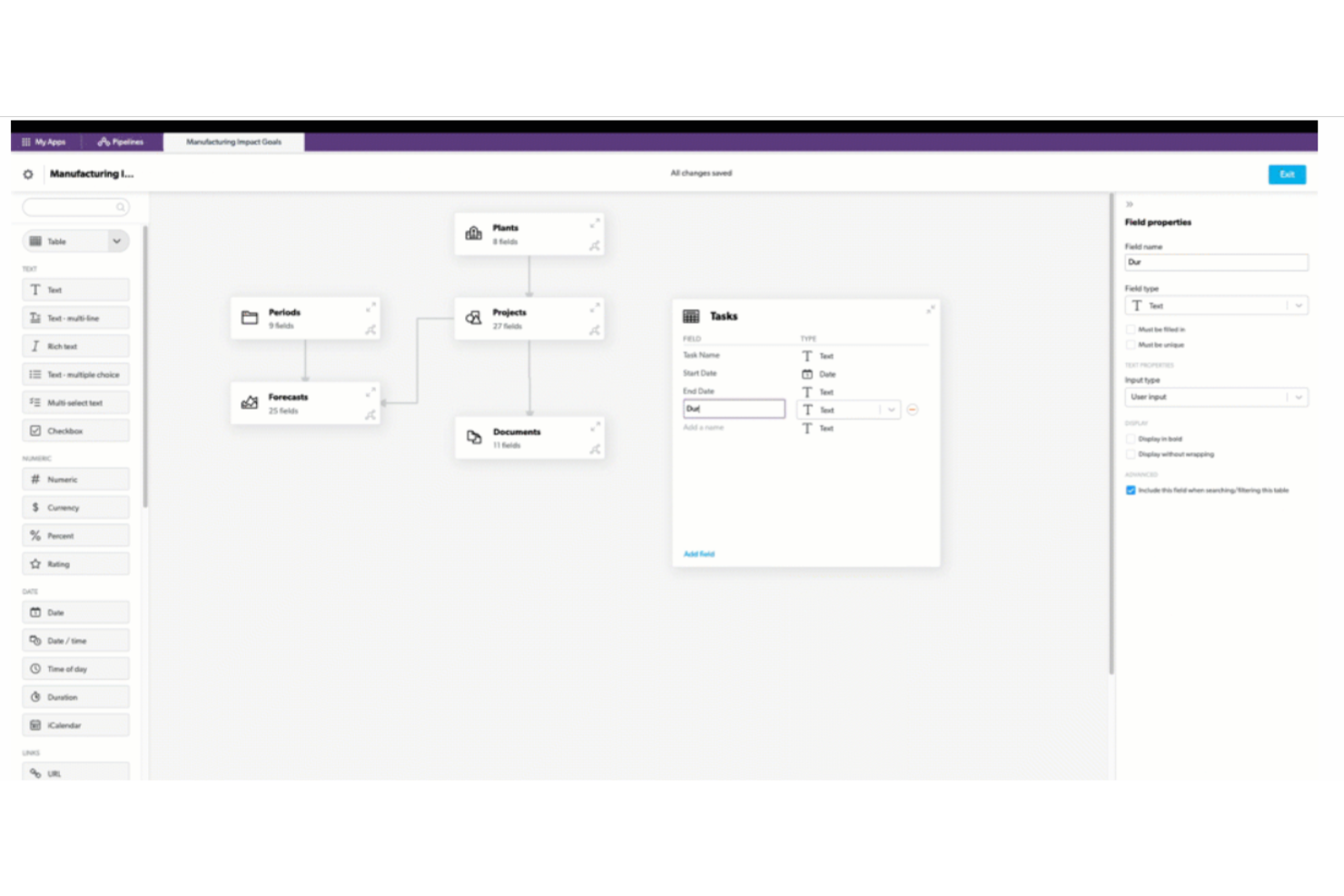
Quickbase is a no-code app-building platform that lets teams design custom project management workflows, automate task routing, and track work across multiple projects through configurable dashboards, reports, and views.
Who Is Quickbase Best For?
Quickbase is a strong fit for small teams in operations-heavy industries—like construction, field services, or healthcare—that need to replace scattered spreadsheets with a custom-built workflow app.
Why I Picked Quickbase
I picked Quickbase as one of the best because it lets small teams replace a tangle of spreadsheets with a custom-built workflow app without writing a single line of code. I especially like the AI Workflows feature, which lets you describe a process in plain language and have Quickbase build the automation for you. The Project Management Starter App template also gives teams a real head start, with task assignment, stage gates, and approval routing already wired together.
Quickbase Key Features
- Quickbase Pipelines: A drag-and-drop visual workflow designer that connects Quickbase apps to external tools like Slack, QuickBooks, and Jira.
- Role-based permissions: Access controls can be set at the app, form, or field level to manage what each team member sees and edits.
- Real-time dashboards: Personalized dashboards surface live project data, portfolio risk, and resource load across all active work.
- App template library: The Quickbase Exchange offers pre-built templates for project management, time tracking, and field operations that teams can deploy and adapt.
Quickbase Integrations
Quickbase offers 40+ pre-built integration channels, including Slack, Microsoft Teams, QuickBooks, Google, Dropbox, Salesforce, Jira, and Procore. It also provides RESTful APIs and Connected Tables for custom integrations and synchronized data.
Pros and Cons
Pros:
- Dashboards show portfolio risks and resource loads
- Templates consolidate scattered project spreadsheets
- Custom apps fit unusual project workflows
Cons:
- Cluttered screens complicate day-to-day collaboration
- Teams must configure apps before tracking work

Quire
Best for complex project breakdowns
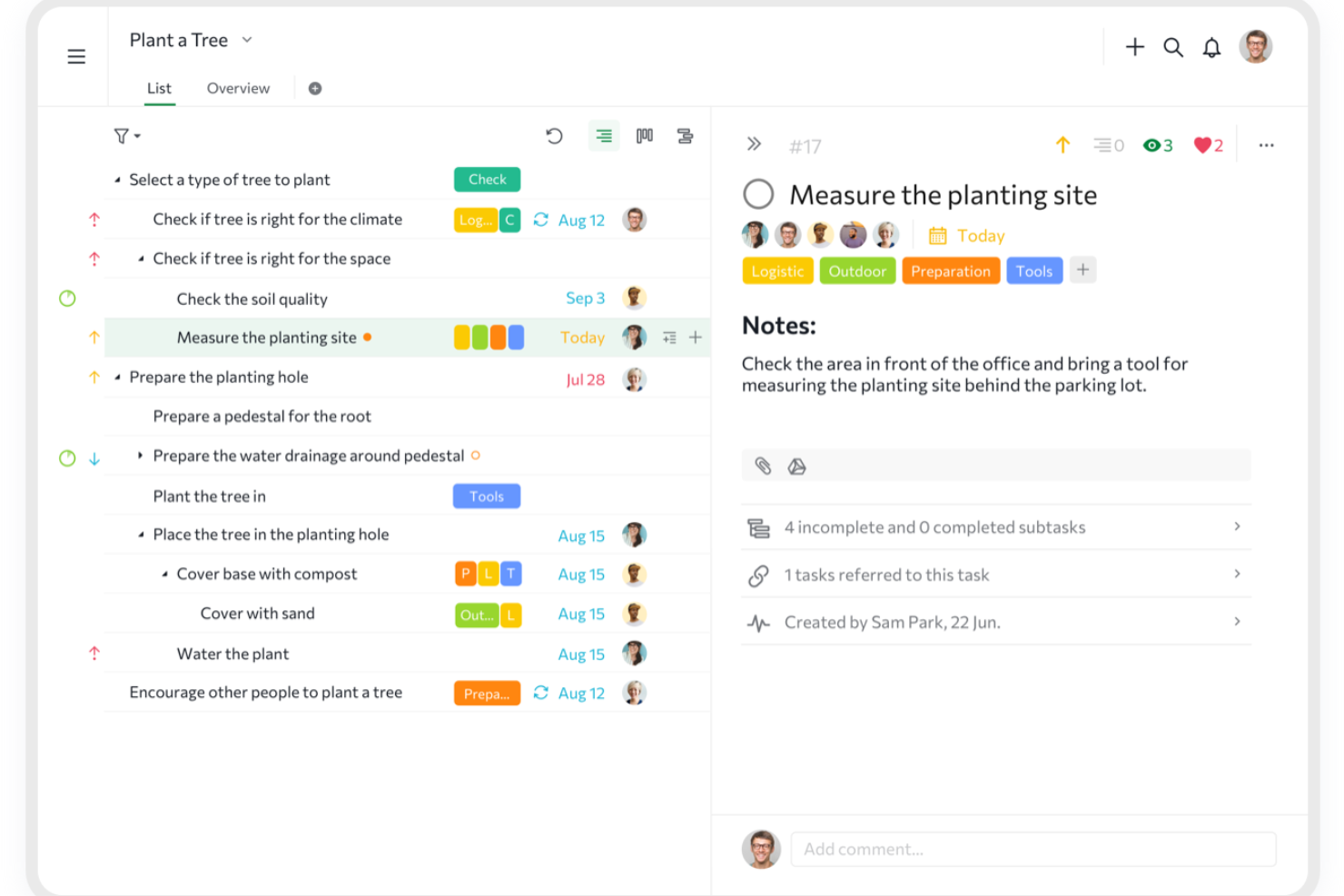
Quire is a project management tool built around unlimited nested task hierarchies, combining list, Kanban, timeline, and dashboard views with built-in collaboration features like chat channels, Documents, and cross-project tracking.
Who Is Quire Best For?
Quire is a strong fit for small business operations managers and team leads who need to break large projects into deeply layered tasks without paying enterprise-level prices.
Why I Picked Quire
I picked Quire as one of the best because its unlimited nested task hierarchy is genuinely unlike anything else at this price point. You can break a project into tasks, subtasks, and sub-subtasks as many levels deep as your work demands, which makes it especially useful when a single deliverable has a dozen moving parts underneath it. I also love the Smart Folders feature, which pulls tasks from multiple projects into one view so nothing slips through the cracks across workstreams.
Quire Key Features
- Built-in chat channels: Each project gets dedicated chat channels so team conversations stay attached to the work, not buried in email.
- Public share links: Generate view-only project links for clients or stakeholders, no account required, with an optional expiry date.
- Time tracking with Pomodoro timer: Log hours directly in tasks using a stopwatch or Pomodoro timer, with time reports available on paid plans.
- 20+ project templates: A free template gallery covers use cases from agile projects to risk registers, so your team can get up and running fast.
Quire Integrations
Quire offers native integrations with Google Drive, Microsoft OneDrive, Microsoft Teams, Slack, GitHub, Dropbox, Box, and Google Calendar. It also supports custom connections through its REST API and Zapier.
Pros and Cons
Pros:
- Comments and chat keep team discussions near tasks
- Switching between outline and Kanban is easy
- Deep task trees clarify complex project breakdowns
Cons:
- Mobile work depends on reliable connectivity
- No native visual automation rule builder
New Product Updates from Quire
Quire Adds Custom Field Locking and Comment Reaction API Support
Quire adds custom field locking and API support for reading and setting emoji reactions on comments. These updates give teams more control over field data and expand comment interaction options for developers. For more information, visit Quire’s official site.
 .
.
Best for brainstorming, ideation, and task management

MeisterTask is a Kanban-based project management tool that combines task tracking, team collaboration, automation, and notes in one workspace.
Who Is MeisterTask Best For?
MeisterTask suits small teams that want an intuitive Kanban-based workspace combining task tracking, notes, and automation without a steep learning curve.
Why I Picked MeisterTask
I picked MeisterTask as one of the best because its MindMeister integration genuinely supports brainstorming and ideation in a way most task tools don't bother with. You can attach mind maps directly to tasks and turn a mind-map branch into a task in one click, which makes it easy to move from idea to execution without switching contexts. The no-code automation builder on Pro plans also handles repetitive handoffs automatically, like moving tasks between projects or triggering notifications.
MeisterTask Key Features
- Task relationships: Mark tasks as related, duplicate, blocked, or blocking so your team can see dependencies directly on the board.
- Email-to-task conversion: Turn incoming Gmail or Outlook emails into tasks without leaving your inbox.
- Built-in time tracking: Log time on any task with a timer or manual entry on every plan, including the free tier.
- Template gallery: Choose from 60+ ready-made project templates, including agile boards, budget trackers, and resource planning, available on all plans.
MeisterTask Integrations
MeisterTask offers native integrations with Google Workspace, Slack, Microsoft Teams, MindMeister, Google Drive, Dropbox, GitHub, and Zendesk. Pro includes an API for custom integrations, and MeisterTask also supports Zapier, Pabbly Connect, Unito, and Integrately.
Pros and Cons
Pros:
- Task relationships clarify blocked work
- Templates help small teams start organized
- Mind maps turn ideas into assigned tasks
Cons:
- Limited board controls frustrate changing workflows
- Timeline planning requires higher-tier access

ClickUp
Best for customizable team workflows
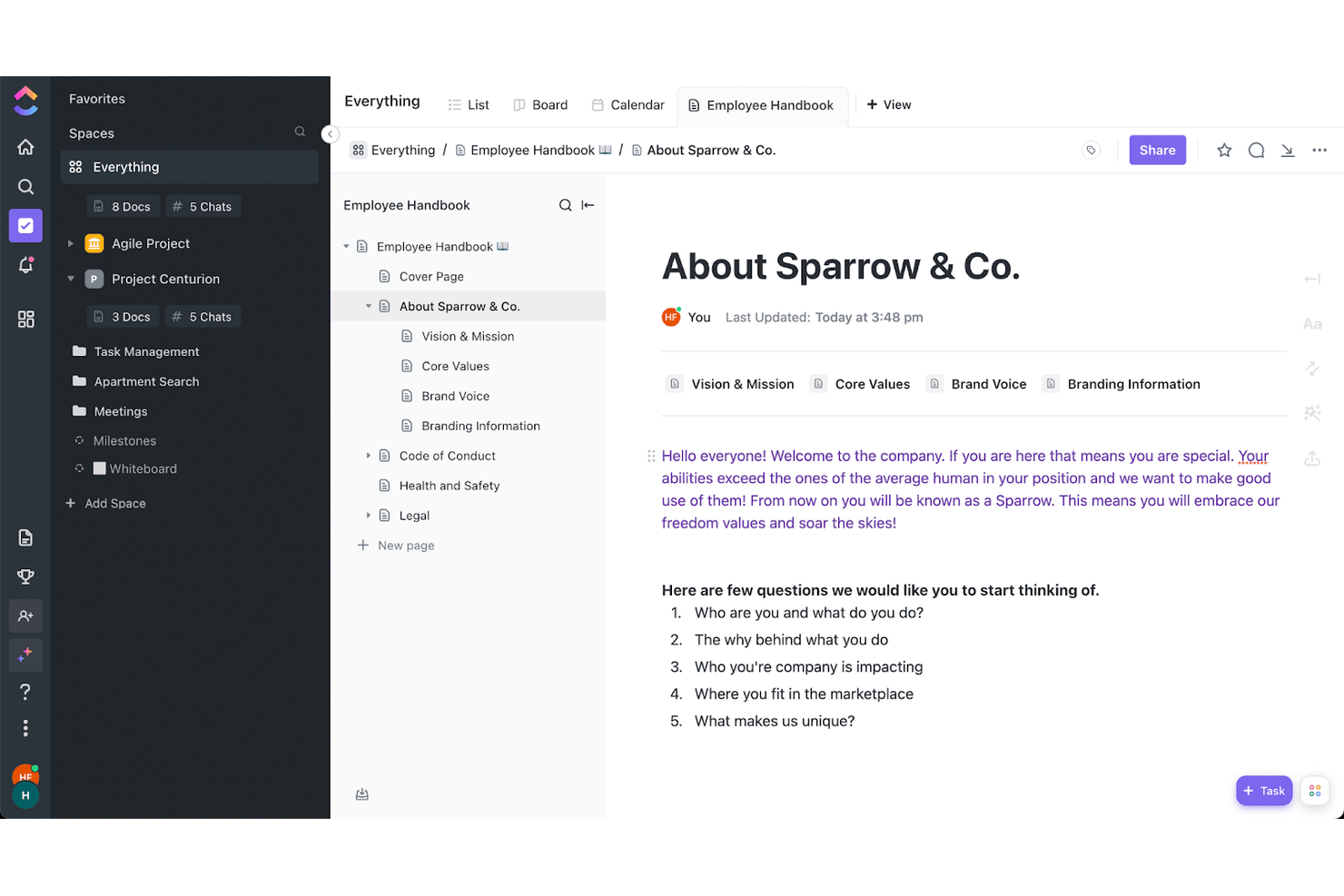
ClickUp is a project management platform that brings task tracking, visual planning views, docs, time tracking, and team collaboration into a single, highly customizable workspace.
Who Is ClickUp Best For?
ClickUp is a strong fit for small teams that need one platform to handle tasks, docs, time tracking, and client reporting without paying for multiple tools.
Why I Picked ClickUp
ClickUp earns its spot on my shortlist because the sheer depth of customization it offers small teams is unlike anything else at this price point. I love that you can build your workspace exactly how your team thinks, whether that's a Kanban board for sprint work, a Gantt with dependency tracking for client projects, or a Mind Map for planning. The "When → Then" automation builder also lets you set up task routing and status updates without writing a single line of code.
ClickUp Key Features
- Native time tracking: Log hours directly on tasks with built-in timers, mark time as billable, set hourly rates, and submit weekly timesheets for manager approval.
- Client-facing dashboards: Share live project dashboards externally with granular permissions, so clients can view progress without needing a ClickUp login.
- 1,000+ integrations: Connect ClickUp to tools like Slack, GitHub, HubSpot, Figma, and Google Drive directly from the integrations hub.
- Collaborative docs and wikis: Create and edit documents inside ClickUp, link them to tasks, and use them as a shared knowledge base for your team.
ClickUp Integrations
ClickUp offers more than 1,000 native integrations, including Slack, Google Drive, HubSpot, GitHub, Figma, Google Calendar, and Microsoft Teams. It also supports custom integrations through its API and Zapier.
Pros and Cons
Pros:
- Flexible views support changing project plans
- Billable time and approvals suit freelancers
- Unlimited tasks keep small teams organized
Cons:
- Large workspaces can suffer dashboard lag
- Busy interface overwhelms first-time users
New Product Updates from ClickUp
ClickUp Adds Meetings Hub, Super Agent Templates, and ZoomInfo Integration
ClickUp adds a searchable Meetings Hub, new ways to clone and template Super Agents, and a ZoomInfo integration through the App Center. These updates improve meeting retrieval, agent reuse, and access to sales intelligence. For more information, visit ClickUp’s official site.
Nifty
Best for managing clients and tasks in one hub
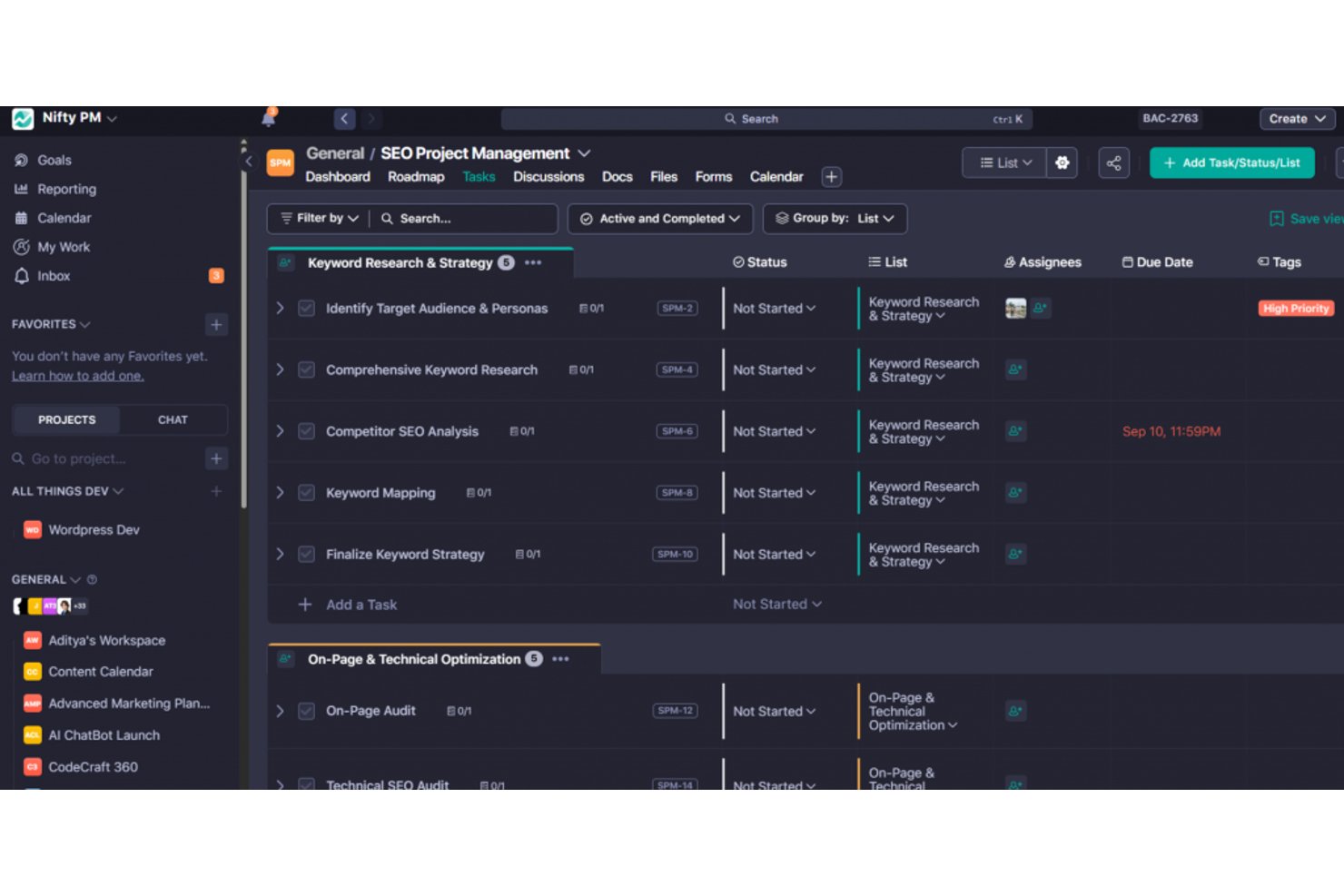
Nifty is a project management platform that brings tasks, milestones, roadmaps, team chat, docs, and client access together in a single workspace.
Who Is Nifty Best For?
Nifty is a strong fit for freelancers and small teams that need to manage client work and internal tasks without juggling multiple tools.
Why I Picked Nifty
I've included Nifty in my top picks because it's one of the few tools that genuinely keeps client work and internal tasks in the same place without forcing you to stitch together separate tools. I particularly like how guest access works: clients join specific projects, stay hidden from internal milestones, and can even be assigned tasks or sign off via a "Guest Approval" status. Public progress links let clients track delivery without needing an account at all.
Nifty Key Features
- Milestone tracking: Set project milestones with automatic progress rollup so you can see delivery status at a glance across every project.
- AI Workflow Builder: Describe a project in plain language and Nifty generates the task lists, statuses, custom fields, and views for you.
- Time tracking and billable hours: Log time per task or team member, track costs, and export timesheets to CSV or PDF directly from the platform.
- No-code automation builder: Create if/then rules with preset templates to automatically assign tasks, set due dates, post messages, or move work when trigger conditions are met.
Nifty Integrations
Nifty offers native integrations with Slack, Google Drive and Calendar, Microsoft 365, Zoom, Webex, Harvest, Miro, Typeform, and Figma. It also supports an open API and Zapier.
Pros and Cons
Pros:
- Templates and imports speed small-team setup
- Clients see only invited project work
- Tasks, milestones, and dependencies stay connected
Cons:
- Notifications are unreliable, and reports lack detail
- Reviewers report bugs affecting task reliability

Asana
Best for goal setting and OKR tracking
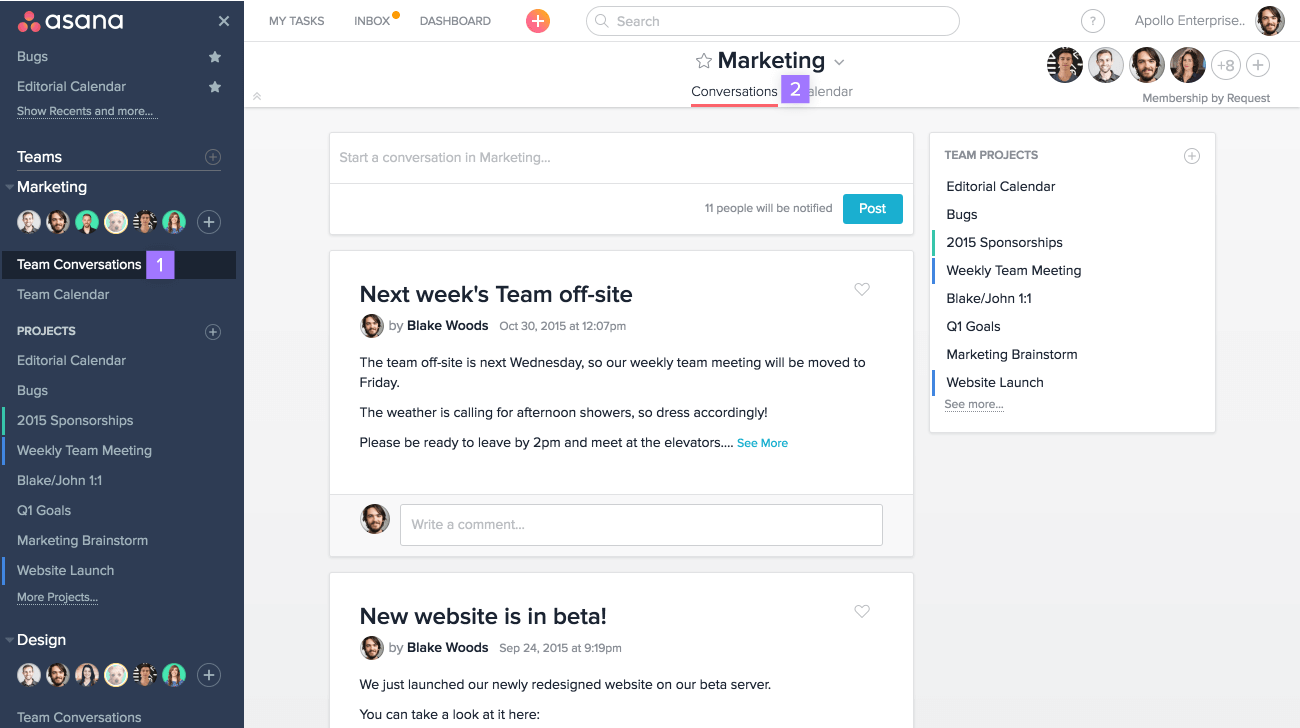
Asana is a project management platform that combines task tracking, goal setting, workflow automation, and cross-functional reporting in one workspace.
Who Is Asana Best For?
Asana fits small business owners and operations managers who need to connect day-to-day work to bigger company goals, especially teams running OKRs across departments.
Why I Picked Asana
Asana earns its spot on my shortlist because its goal-setting infrastructure goes deeper than what most project management tools offer. I particularly like how Goals connect directly to live projects and portfolios, so progress updates automatically as work moves forward rather than requiring manual check-ins. You can structure OKRs at the company, team, or individual level, with sub-goals rolling up into parent goals across quarterly or custom time periods.
Asana Key Features
- Multi-homing: Assign a single task to multiple projects at once, so work stays visible across teams without duplication.
- Automation rules: Trigger automatic actions based on task changes, due dates, or form submissions to cut down on manual follow-up.
- Pre-built templates: Choose from ready-made project templates across marketing, HR, IT, and operations to get new projects running quickly.
- Unlimited free guests: Invite external collaborators on Starter and above without adding paid seats.
Asana Integrations
Asana lists 100+ integrations, including Slack, Microsoft Teams, Google Drive, Microsoft 365, Jira Cloud, Azure DevOps, GitHub, HubSpot, and Salesforce. It also offers a public API and Zapier connectivity.
Pros and Cons
Pros:
- Automations cut repetitive project administration
- Task assignments reduce follow-up chasing
- Goals connect directly to live project progress
Cons:
- Frequent notifications can clutter team inboxes
- Goals and portfolios require higher-tier plans

Basecamp
Best for project management beginners
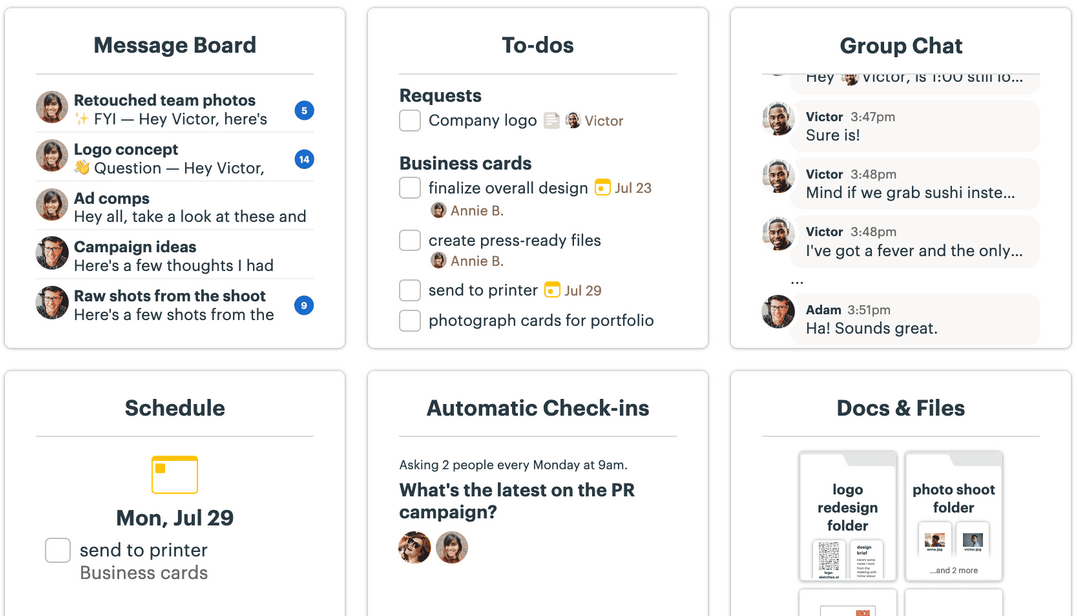
Basecamp is a project management platform for small teams that brings to-do lists, kanban boards, messaging, file storage, and client collaboration tools together in one shared workspace.
Who Is Basecamp Best For?
Basecamp is a great fit for freelancers, solopreneurs, and small teams who are new to project management tools and want one place to handle tasks, files, and client communication without a steep learning curve.
Why I Picked Basecamp
I've included Basecamp in my top picks because it's genuinely built for teams who are new to project management software and need something that works without a manual. I love how every project gets its own page where to-do lists, a kanban-style Card Table, and a group chat all live together, so there's no hunting across tabs. Hill Charts are what really set it apart: instead of a complex status report, you drag a dot to show whether work is still being figured out or just getting done.
Basecamp Key Features
- Client visibility controls: Set what clients see on a project-by-project basis, hiding internal to-dos or unfinished work before sharing.
- Campfire chat: A group chat tool built into each project so your team can have quick conversations without leaving Basecamp.
- Automatic Check-ins: Recurring questions sent to your team on a schedule to replace stand-up meetings and keep everyone aligned.
- Docs & Files: A built-in document and file storage area with version tracking and support for linked content from Google Docs, Dropbox, and Figma.
Basecamp Integrations
Basecamp supports integrations with Google Drive and Docs, Dropbox, Figma, Zoom, Microsoft Teams, Harvest, Toggl, and Clockify. It also offers a public API, CLI, Unito, and Zapier.
Pros and Cons
Pros:
- Client visibility controls suit small service teams
- Tasks, files, and conversations stay together
- Teams get projects running with little training
Cons:
- Limited reporting makes portfolio oversight harder
- No dependencies or priorities for complex work

Best for real-time project tracking and insights
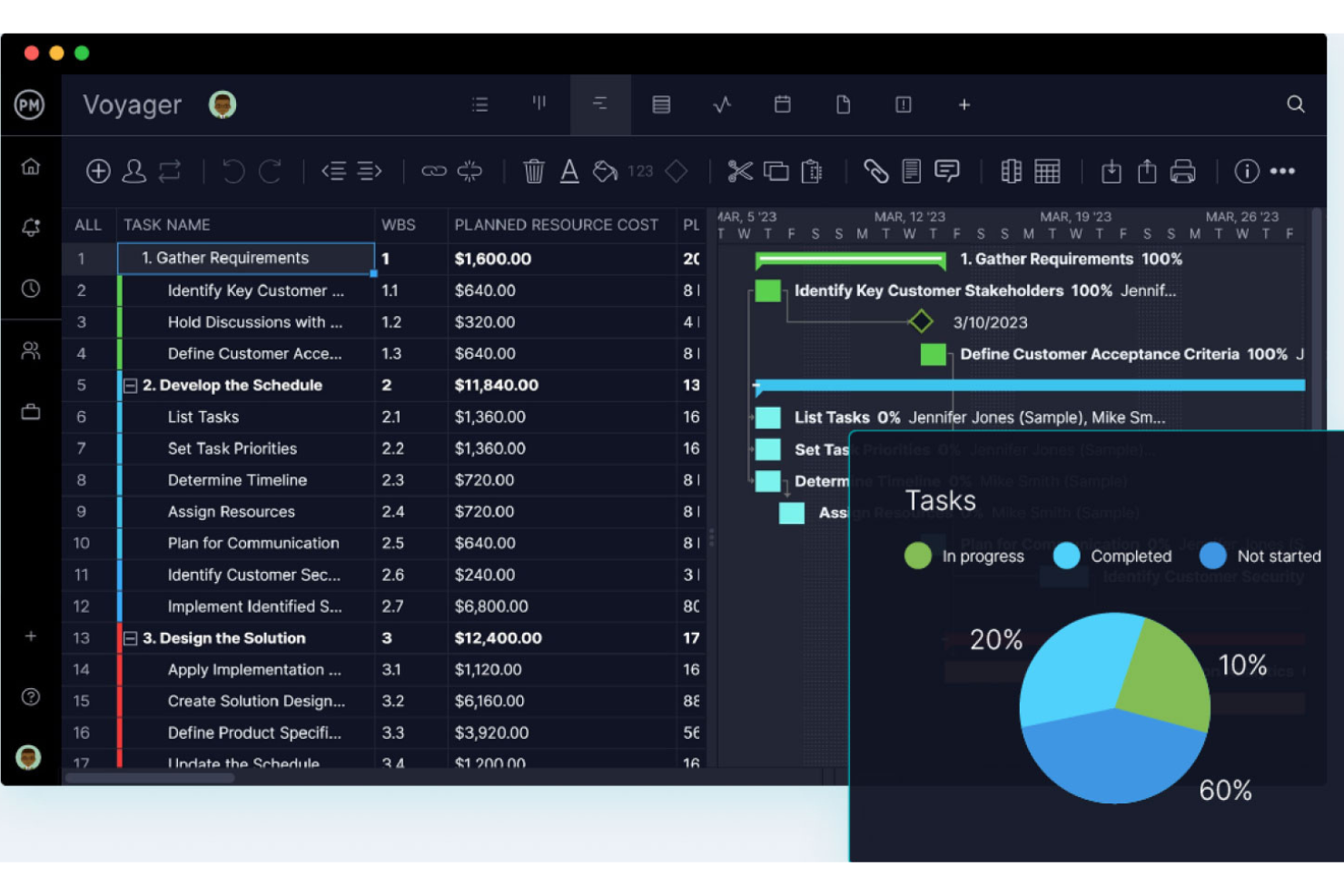
ProjectManager is a project management platform for small teams that brings together Gantt charts, Kanban boards, real-time dashboards, time tracking, and reporting in one centralized workspace.
Who Is ProjectManager Best For?
ProjectManager is a strong fit for small teams that need to track multiple projects at once and want real-time visibility into progress, workload, and costs without building dashboards from scratch.
Why I Picked ProjectManager
I picked ProjectManager as one of the best because its automatic dashboards give small teams real-time visibility into project health, workload, and costs without any manual setup. I love that you can track planned versus actual progress across tasks and see critical path in the Gantt view, so schedule slippage gets caught early. Portfolio dashboards roll multiple projects into a single view, which I find genuinely useful when juggling several workstreams at once.
ProjectManager Key Features
- Multiple project views: Switch between Gantt, List, Sheet, Board, and Calendar views on any plan, with changes syncing across all views in real time.
- Unlimited free guest licenses: Share read-only project access with clients or stakeholders on every plan at no extra cost.
- Workload and resource management: See how work is distributed across your team so you can reassign tasks before deadlines slip.
- 75+ pre-built templates: Start projects quickly using ready-made templates for IT plans, sprints, risk tracking, and more.
ProjectManager Integrations
ProjectManager offers integrations with Slack, Microsoft Teams, QuickBooks Online, Jira, Google Drive, Microsoft 365, and Azure DevOps, plus 1,000+ apps through Zapier. Its public API is available on every plan for custom integrations.
Pros and Cons
Pros:
- Five synced views support different team workflows
- Gantt baselines reveal schedule slippage early
- Automatic dashboards surface project health and workload
Cons:
- Client access is limited to read-only guests
- Automation and full timesheets require higher plans
Annen prosjektstyringsprogramvare for små bedrifter
Her er noen flere prosjektstyringsverktøy for små bedrifter som ikke kom med på kortlisten min, men som likevel er verdt å vurdere.
- Hive
For AI-assisted project setup and tracking
- GoodDay
For task-tied time logs and billable rates
- Wrike
For remote schedule and workload management
- Celoxis
For cross-project portfolio reporting
- Trello
For free Kanban boards with automation
- Ravetree
For project management in an all-in-one platform
- Hubstaff Tasks
Easy Agile project management
- Plaky
For visual task management
- TeamGantt
For easy, low-cost Gantt charts
- Lark Suite
For all-in-one team collaboration at no cost


Relatert prosjektstyringsprogramvare
Hvis du fortsatt ikke har funnet det du leter etter her, kan du se nærmere på disse andre relaterte verktøyene som vi har testet og vurdert:
- Prosjektstyringsprogramvare
- Ressursstyringsprogramvare
- Oppgavestyringsprogramvare
- Samarbeidsverktøy
- Programvare for prosjektoppfølging
- Programvare for prosjektplanlegging
- Prosjektstyringsprogramvare for ideelle organisasjoner
- Prosjektstyringsprogramvare med avhengigheter
- Prosjektstyringsprogramvare for små team
- Prosjektstyringsprogramvare for Windows
- Prosjektstyringsprogramvare for Mac
- Billetteringssystem for prosjektstyring
- Juridisk prosjektstyringsprogramvare
- Prosjektstyringsprogramvare for oppstartsbedrifter
- Prosjektstyring for fjernteam
How I Evaluate Project Management Software for Small Business
I split my evaluation into two layers—core baseline criteria every tool must clear, and differentiators like client guest access or native time tracking that actually matter to small teams.
Core Functionality (Table Stakes For This List)
When I'm selecting tools for my list, I rank each one on a scale from 0 (does not offer the functionality) to 5 (excels in this area) for each core functionality listed below. Then, I calculate the tool's total score into a percentage. Each tool needs to achieve a minimum total score of 65% to be considered for inclusion.
- Task & Project Management: I evaluate how each tool handles task creation, subtasks, dependencies, and custom statuses—things like mapping a product launch across design, dev, and QA workstreams.
- Multiple Project Views: Whether it's a Kanban board for a sprint or a Gantt chart for a client rollout, I look for at least two functional views that teams can switch between.
- Team Collaboration Tools: I check for in-context communication features like task-level comments, @mentions, and file attachments so conversations stay tied to the work itself.
- Workload & Resource Tracking: Small teams stretch thin fast, so I look for visibility into who's assigned what—visual workload views or capacity indicators that flag overallocation.
- Reporting & Dashboards: I evaluate whether the tool surfaces project health metrics like task completion rates and overdue items through dashboards a team lead can share in a status meeting.
- SMB-Friendly Pricing & Scalability: Pricing needs to make sense for a five-person startup and still work as the team grows to 30, so I look for free tiers or affordable entry plans with core features unlocked.
Once I have a list of tools that meet this criteria, I consider what sets each platform apart.
Differentiating Factors (What Sets Vendors Apart)
Here's how I compare and contrast different vendors:
Standout Features
No-code automation is a big one—I look for tools that let you auto-assign tasks or trigger status updates when a deliverable moves stages, saving small teams hours of manual upkeep each week. Time tracking tied directly to tasks also matters, especially for agency leads billing clients by the hour. Client or guest access can be a deciding factor for service-based businesses that need to share project progress with external stakeholders without adding paid seats.
Beyond Features
I evaluate how quickly a small team can go from signup to running their first project. Self-serve onboarding with guided setup and templates means you're not waiting on a sales call to get started. Integration coverage matters just as much—I check for native connections with tools like Google Workspace, Slack, and QuickBooks, since small businesses rarely have the bandwidth to build custom workarounds. Pricing transparency is another factor I weigh, looking for clear per-user costs with no surprise paywalls gating core features on lower tiers.
Slik velger du prosjektstyringsprogramvare for små bedrifter
Når du lager en kortliste, tester og velger prosjektstyringsprogramvare for små bedrifter, bør du vurdere følgende:
- Hvilket problem prøver du å løse? Begynn med å identifisere mangelen på prosjektstyringsfunksjonalitet du prøver å dekke, slik at du får klarhet i hvilke funksjoner og hvilken funksjonalitet prosjektstyringsprogramvaren må tilby. Som liten bedrift er det også lurt å være bevisst på problemene du ikke prøver å løse – du vil ikke ende opp med å betale for funksjoner og funksjonalitet du ikke trenger.
- Hvem trenger å bruke det? For å vurdere kostnader og krav bør du tenke på hvem som skal bruke programvaren, og hvor mange lisenser du trenger. Vurder om det bare er prosjektlederne dine eller hele organisasjonen som trenger tilgang. Vurder om du bør prioritere brukervennlighet for alle eller hastighet for de mest erfarne brukerne av prosjektstyringsprogramvaren.
- Hvilke andre verktøy må det fungere sammen med? Avklar hvilke verktøy du erstatter, hvilke verktøy som skal beholdes, og hvilke verktøy du trenger å integrere med, for eksempel regnskapsprogramvare, programvare for kundedatabase eller HR-programvare. Du kan også velge å erstatte flere verktøy med ett samlet prosjektstyringsverktøy, for eksempel prosjektstyringsprogramvare med CRM-funksjonalitet.
- Hvilke resultater er viktige? Vurder hvilket resultat programvaren må levere for å regnes som vellykket. Tenk på hvilken kapasitet du ønsker å oppnå, hva du vil forbedre, og hvordan du skal måle suksess. Et eksempel på et resultat kan være muligheten til å få bedre innsikt i ytelsen.
- Hvordan vil den fungere i organisasjonen din? Vurder programvarevalget i sammenheng med arbeidsflytene og leveransemetodikken din (f.eks. hvis du hovedsakelig bruker smidige arbeidsmetoder, kan du velge smidig prosjektstyringsprogramvare). Vurder hva som fungerer godt, og hvilke områder som skaper problemer. Husk at alle bedrifter er forskjellige – ikke anta at et verktøy vil fungere i organisasjonen din bare fordi det er populært. Se etter programvare som tilbyr enkle funksjoner og god verdi for den lille bedriften din.
Trender innen prosjektstyringsprogramvare for små bedrifter i 2025
Her har jeg identifisert flere trender som jeg tror vil fortsette å være viktige for små bedrifter og videre, etter hvert som prosjektstyring for små team utvikler seg.
- Integrasjon med AI- og automatiseringsverktøy: Det er en tydelig dreining mot å integrere kunstig intelligens og automatiseringsfunksjoner i prosjektstyringsprogramvare. Disse funksjonene automatiserer repetitive oppgaver, gir prediktiv analyse for bedre beslutningstaking og forbedrer effektiviteten i oppgavehåndteringen.
- Fremveksten av mobil prosjektstyring: Betydningen av mobilapplikasjoner har økt, og oppdateringer fokuserer på å tilby full funksjonalitet på mobile plattformer. Denne trenden imøtekommer behovene til team som trenger tilgang til prosjektstyringsverktøy mens de er på farten.
- Fokus på sikkerhet og samsvar: Etter hvert som programvare for jobb- og oppgavestyring i små bedrifter blir stadig mer sentral i virksomheten, er det økt fokus på å holde data sikre og overholde regelverk som GDPR. Denne trenden er spesielt viktig for små bedrifter, som kanskje ikke har omfattende interne ressurser innen IT-sikkerhet, men som likevel må beskytte sensitive prosjekt- og kundedata.
- Innebygde læringsfunksjoner: Noen verktøy begynner å inkludere innebygde funksjoner for læring og utvikling, for eksempel tilgang til nettbaserte kurs, integrasjon med opplæringsplattformer eller ressurser for kompetanseutvikling knyttet til prosjektstyring.
Hva er prosjektstyringsprogramvare for små bedrifter?
Prosjektstyringsprogramvare for små bedrifter er et verktøy som hjelper små selskaper, team og oppstartsbedrifter med å planlegge, gjennomføre og overvåke prosjekter. Disse verktøyene tilbyr en sentral plattform for prosjektrelaterte aktiviteter, slik at du kan forbedre driften og samarbeidet og holde prosjektene på rett spor. Funksjonene omfatter oppgavehåndtering for små bedrifter, tidslinjeoppfølging, ressursfordeling og budsjettstyring.
De brukes vanligvis av eiere av små bedrifter, teamledere og gründere som må balansere oppgaver, tidsfrister og budsjetter uten for mye kompleksitet. Denne typen prosjektstyringsprogramvare er også vanligvis mer brukervennlig og kostnadseffektiv enn systemer for større virksomheter, noe som gjør den tilgjengelig hvis du har begrensede ressurser.
Funksjoner i prosjektstyringsprogramvare for små bedrifter
Her er noen viktige funksjoner du bør se etter når du velger prosjektstyringsprogramvare som liten bedrift.
- Brukervennlig grensesnitt: Et enkelt og intuitivt design er avgjørende. Dette sørger for at alle teammedlemmer kan navigere i og bruke programvaren effektivt, uavhengig av hvor teknisk dyktige de er.
- Oppgavehåndtering: Gjør det mulig å opprette, tildele og følge opp oppgaver. Denne funksjonen er grunnleggende for å holde prosjekter organiserte og sikre at alle vet hvilket ansvar de har.
- Samarbeidsverktøy: Legger til rette for sømløs kommunikasjon mellom teammedlemmer. Funksjoner som meldinger i appen, fildeling og kommentarfelt er avgjørende for å opprettholde en tydelig og kontinuerlig dialog.
- Tidsregistrering: Gjør det mulig for team å registrere tiden de bruker på oppgaver. Denne prosjektstyringsfunksjonen brukes til fakturering, budsjettering og forståelse av teamets produktivitet.
- Prosjektplanlegging: Tilbyr kalendervisninger og Gantt-diagrammer for å visualisere tidslinjer. Effektiv planlegging er avgjørende for å sikre at prosjektene holder seg på rett spor og at tidsfristene overholdes. Du kan også se nærmere på prosjektstyringsprogramvare med Gantt-diagrammer her.
- Fildeling og filhåndtering: Sentraliserer dokumenter på ett tilgjengelig sted. Dette holder alle prosjektrelaterte filer organiserte og lett tilgjengelige for teammedlemmene.
- Prosjektregnskap: Hjelper med å overvåke prosjektøkonomien. Denne funksjonen er avgjørende for å holde prosjektet innenfor budsjettet og følge med på utgifter og økonomisk fremdrift.
- Tilpassbare rapporter: Genererer skreddersydde rapporter om ulike aspekter ved prosjektet. Denne funksjonen gir innsikt i prosjektets helse, teamets prestasjoner og områder som kan forbedres.
- Tilgjengelighet på mobil: Sørger for at programvaren er tilgjengelig på ulike enheter. Dette er avgjørende for teammedlemmer som trenger tilgang til prosjektinformasjon mens de er på farten.
- Integrasjonsmuligheter: Gjør det mulig for programvaren å koble seg sømløst til andre verktøy, for eksempel e-postverktøyet ditt eller regnskapsprogramvare. Denne funksjonen sikrer en smidig arbeidsflyt og minimerer behovet for flere plattformer.
- Kundehåndtering: Sentraliserer kundekommunikasjon og prosjektrelaterte interaksjoner. Denne funksjonen hjelper team med å håndtere tilbakemeldinger, godkjenninger og kundens forventninger på en effektiv måte.
Planer for små bedrifter, eller systemer for byråadministrasjon, tilbyr vanligvis skalerbare funksjoner som vokser med teamet ditt, kostnadseffektive priser som passer stramme budsjetter, og dedikert støtte for å håndtere eventuelle utfordringer som oppstår. Hvis du derimot er et team på én person, kan det være lurt å se etter personlig prosjektstyringsprogramvare, som prioriterer sterke funksjoner for oppgavehåndtering fremfor skalerbarhet.
Fordeler med prosjektstyringsprogramvare for små team
Her er fem viktige fordeler som skiller seg ut for brukere og organisasjoner.
- Bedre samarbeid: Ved å samle diskusjoner, dokumenter og oppgaver på ett sted kan du sørge for at alle er oppdatert. Dette skaper et samarbeidsmiljø som overskrider geografiske og tidsmessige barrierer.
- Bedre organisering: Denne programvaren lar deg kategorisere oppgaver, sette tidsfrister og følge fremdriften i sanntid, slik at alt er på riktig plass og risikoen for å overse viktige detaljer reduseres betydelig.
- Økt effektivitet: Automatisering av rutineoppgaver og en tydelig veikart for hver prosjektfase betyr at team kan arbeide mer effektivt og fokusere innsatsen der den har størst betydning.
- Bedre ressursstyring: Når du forstår teammedlemmenes tilgjengelighet og arbeidsbelastning, kan du fordele oppgaver på en måte som optimaliserer produktiviteten og forebygger utbrenthet, slik at ressursene brukes effektivt.
- Bedre beslutningstaking: Med tilgang til data i sanntid og tilpassbare rapporter kan du ta strategiske beslutninger basert på nøyaktig informasjon. Dette forbedrer resultatene og hjelper deg med å unngå kostbare feil.
Kostnader og priser for prosjektstyringsprogramvare for små bedrifter
Som en liten bedrift kan det være fristende å velge den billigste prisplanen som er tilgjengelig, og la det være med det. Du kan imidlertid få mest verdi ut av en litt dyrere plan som tilbyr mer omfattende funksjoner.
Her er en oversikt over de generelle prisene og planene du kan forvente å se når du leter etter den riktige prosjektstyringsprogramvaren for deg.
Sammenligningstabell for planer for prosjektstyringsprogramvare for små bedrifter
| Plantype | Gjennomsnittspris | Vanlige funksjoner |
|---|---|---|
| Gratis | $0 | Grunnleggende oppgavehåndtering, begrenset antall brukere, viktige samarbeidsverktøy, tilgang til brukerstøtte fra fellesskapet |
| Grunnleggende | $10 - $20/bruker/måned | Forbedret oppgavehåndtering, utvidet brukertilgang, prosjektmaler, brukerstøtte via e-post |
| Standard | $25 - $35/bruker/måned | Komplette verktøy for prosjektplanlegging, avansert rapportering, integrasjoner med annen programvare, brukerstøtte via telefon |
| Premium/proff | $50 - $65/bruker/måned | Omfattende analysefunksjoner, prioritert brukerstøtte, tilpassede integrasjoner, forbedrede sikkerhetsfunksjoner |
| Bedrift | Tilpasset pris | Tilpassbare funksjoner, dedikert kundeansvarlig, sikkerhet på bedriftsnivå, ubegrensede integrasjoner |
Hvis du har et svært stramt budsjett, finnes det mange gratis verktøy for prosjektstyring som tilbyr viktige funksjoner og kan skaleres i takt med at bedriften vokser.