10 beste programmer for tidsregistrering for produktivitet i 2026

10 Kortliste over den beste programvaren for tidsregistrering


Den beste programvaren for tidsregistrering hjelper deg med å overvåke prosjekttimer, fakturere kunder nøyaktig og administrere teamets produktivitet uten å være avhengig av regneark eller måtte følge opp manuelle timelister. Hvis du sliter med inkonsekvente data fra frilansere, prosjekter som overskrider budsjettet eller unøyaktige fakturaer på grunn av dårlige verktøy for tidsregistrering, er det på tide å oppgradere.
Med 20 års erfaring med å levere digitale prosjekter for merkevarer som Sony, Land Rover og Unilever – og over et tiår med testing av plattformer for tidsregistrering – vet jeg hva som skiller et pålitelig verktøy fra resten. Den riktige løsningen bør integreres med prosjektstyringsverktøyene dine, støtte registrering i sanntid og håndtere både manuell og automatisert registrering.
I denne veiledningen har jeg testet en rekke verktøy og håndplukket 20 ledende plattformer for å hjelpe deg med å finne programvaren for tidsregistrering som passer best til arbeidsflyten din og forbedrer bunnlinjen. Jeg har analysert funksjonene, integrasjonene og prisene til hvert verktøy for å finne ut hva som skiller det fra resten. På denne måten kan du trygt velge verktøyet som passer perfekt til teamets behov.
Why Trust Our Software Recommendations
Our team has been testing and reviewing software since 2012. As project managers ourselves, we know how difficult—and important—it is to choose the right software.
For this guide, we evaluated tools using hands-on testing and independent research, scoring tools using our selection criteria. We also draw on insights from industry thought leaders and practicing project management experts.
Our reviews reflect our human editorial judgment, not a sales pitch.
Expert reviewers:
Sammenligningstabell for programvare for tidsregistrering
Denne sammenligningstabellen oppsummerer prisdetaljene for mine beste utvalgte programmer for tidsregistrering.
| Tool | Best For | Trial Info | Price | ||
|---|---|---|---|---|---|
| 1 | Best GPS time tracking for mobile teams | 14-day free trial | From $29/month (billed annually) | Website | |
| 2 | Best for project time tracking | Free plan available | From $9/user/month (billed annually) | Website | |
| 3 | Best for time-based profitability insights | 14-day free trial | From $10/user/month (billed annually) | Website | |
| 4 | Best for its workload balancing | Free plan + 30-day free trial + free demo available | From $9/user/month (billed annually) | Website | |
| 5 | Best for small teams and businesses | Free plan + 30-day free trial + free demo available | From $6/user/month (billed annually) | Website | |
| 6 | Best for full lifecycle time tracking | Free demo available | Pricing upon request | Website | |
| 7 | Best for offline time tracking accuracy | 14-day free trial + free demo available | From $6.42/user/month (billed annually) | Website | |
| 8 | Best for customizable dashboards | 30-day free trial + free plan available | From $9/user/month (billed annually) | Website | |
| 9 | Best as AI for business | Free demo available | From $8/user/month | Website | |
| 10 | Best time clock for GPS and image tracking | 14-day free trial + free demo available | From $4.99/user/month + $19/month base fee (billed annually) | Website |


Anmeldelser av den beste programvaren for tidsregistrering
Her er en kort oversikt over de beste appene for tidsregistrering, inkludert skjermbilder, fremtredende funksjoner, tilgjengelige integrasjoner og mer.
Best GPS time tracking for mobile teams
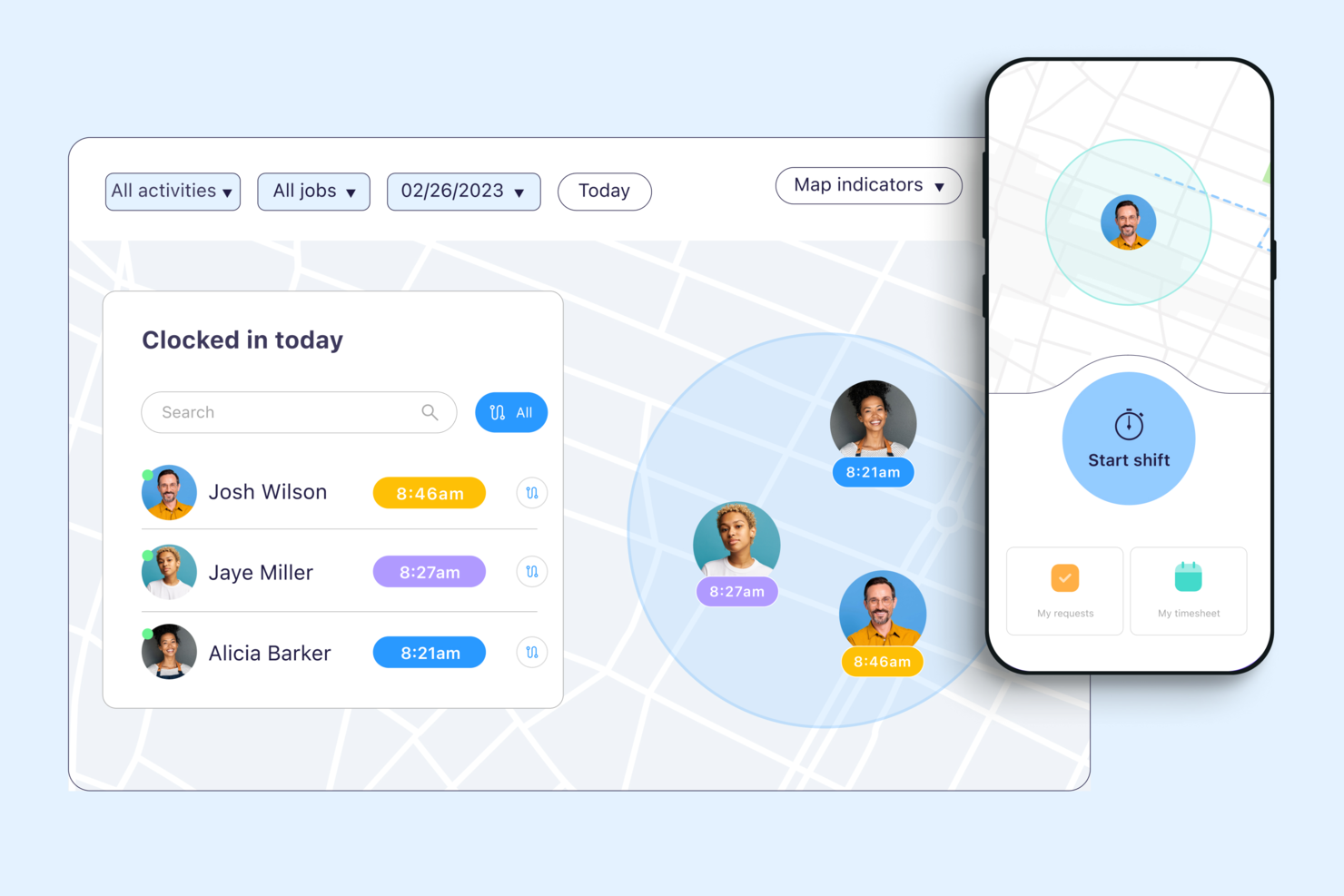
Connecteam is a workforce management platform for companies with deskless or mobile employees who need reliable time tracking, scheduling, and team communication in one place.
Who Is Connecteam Best For?
Connecteam is a great fit for small to mid-sized businesses in field-based industries like construction, retail, and hospitality that manage hourly or shift-based workers.
Why I Picked Connecteam
I picked Connecteam as one of the best because of how well its GPS time tracking features hold up in real field conditions. I particularly like the breadcrumbs feature, which logs an employee's location trail throughout their entire shift—not just at clock-in. That means if you're managing a crew spread across multiple job sites, you can see exactly where each person was and when, without relying on self-reporting. The geofencing feature takes it further by automatically clocking employees out when they leave a designated job site radius, which cuts down on time theft without requiring any manual intervention from managers.
Connecteam Key Features
- Timesheet management: Review, edit, and approve employee timesheets directly in the app before exporting to payroll.
- Job scheduling: Build and assign shifts to specific employees or teams, with visibility into availability and conflicts.
- Overtime tracking: Set custom overtime rules so the system automatically flags hours that exceed defined thresholds.
- Kiosk mode: Let employees clock in and out from a shared device using a PIN, useful for fixed job sites without individual smartphones.
Connecteam Integrations
Integrations include QuickBooks, Gusto, Xero, ADP, Wix, Lightspeed, PrismHR, Square, and BambooHR.
Pros and Cons
Pros:
- Can set specific rules for breaks, overtime, and pay rates
- Ability to track employee locations and set geofenced areas
- Variety of clock-in methods, including mobile app, kiosk, and NFC badges
Cons:
- Setting user roles and permissions can be unintuitive
- Push notifications are sometimes delayed
New Product Updates from Connecteam

Connecteam Expands Break and Timesheet Controls
Connecteam adds flexible break thresholds, personalized policies, auto-end options, a centralized exceptions report, and improved timesheet issue visibility to help teams manage breaks and timesheets more effectively. For more information, visit Connecteam’s official site.
 .
.
Best for project time tracking
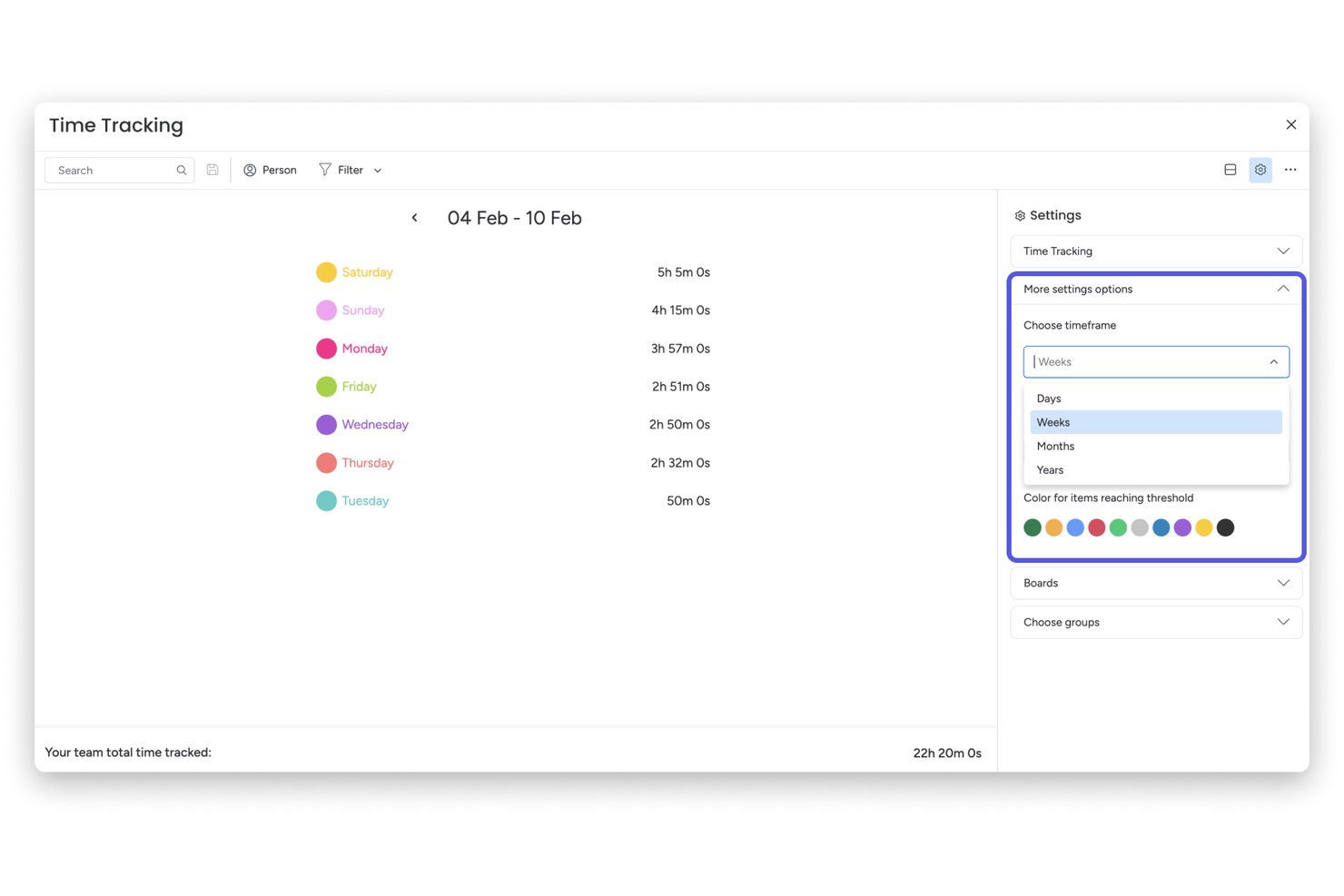
monday AI Workspace is a project management platform with built-in time tracking that lets teams log hours against tasks, monitor project budgets, and view workload capacity across active projects.
Who Is monday AI Workspace Best For?
It's a strong fit for project managers and PMO leads at mid-sized companies who already run their work in monday.com and want time tracking tied directly to their project boards.
Why I Picked monday AI Workspace
I picked monday AI Workspace because the way it embeds time tracking directly into project boards is something I haven't seen done as naturally elsewhere. The Time Tracking Column lets my team start and stop timers from within the same item where they're managing tasks, so logged hours are always tied to real project context. Paired with the Time Tracking Widget on dashboards, I can see effort and burn rates across projects without ever leaving the platform.
monday AI Workspace Key Features
- Customizable boards: Teams can build project boards with columns for status, owners, priorities, and custom metrics.
- Workload view: Visualize each team member’s assigned hours across projects to spot over-allocation or unused capacity.
- Automations: Set up workflow automations for recurring actions like status changes or time tracking reminders.
- Dashboards and reporting: Roll up project and time data into dashboards with widgets for tracking budgets, workloads, and key metrics.
monday AI Workspace Integrations
monday AI Workspace offers hundreds of native integrations, including Slack, Google Workspace, Microsoft 365, Salesforce, Jira, GitHub, Zoom, Dropbox, HubSpot, and Zendesk. It also supports Zapier and provides an API for custom integrations.
Pros and Cons
Pros:
- Time data rolls up into visual dashboards
- Workload visibility across all active projects
- Time tracking tied directly to project tasks
Cons:
- Approval workflows less advanced than dedicated tools
- No automatic background time capture available
New Product Updates from monday AI Workspace
monday AI Workspace Adds Human Approval Routing
monday AI Workspace adds a human-in-the-loop approval block to AI Workflows, sending approval requests and routing workflow paths based on responses. For more information, visit monday AI Workspace's official site.

Best for time-based profitability insights
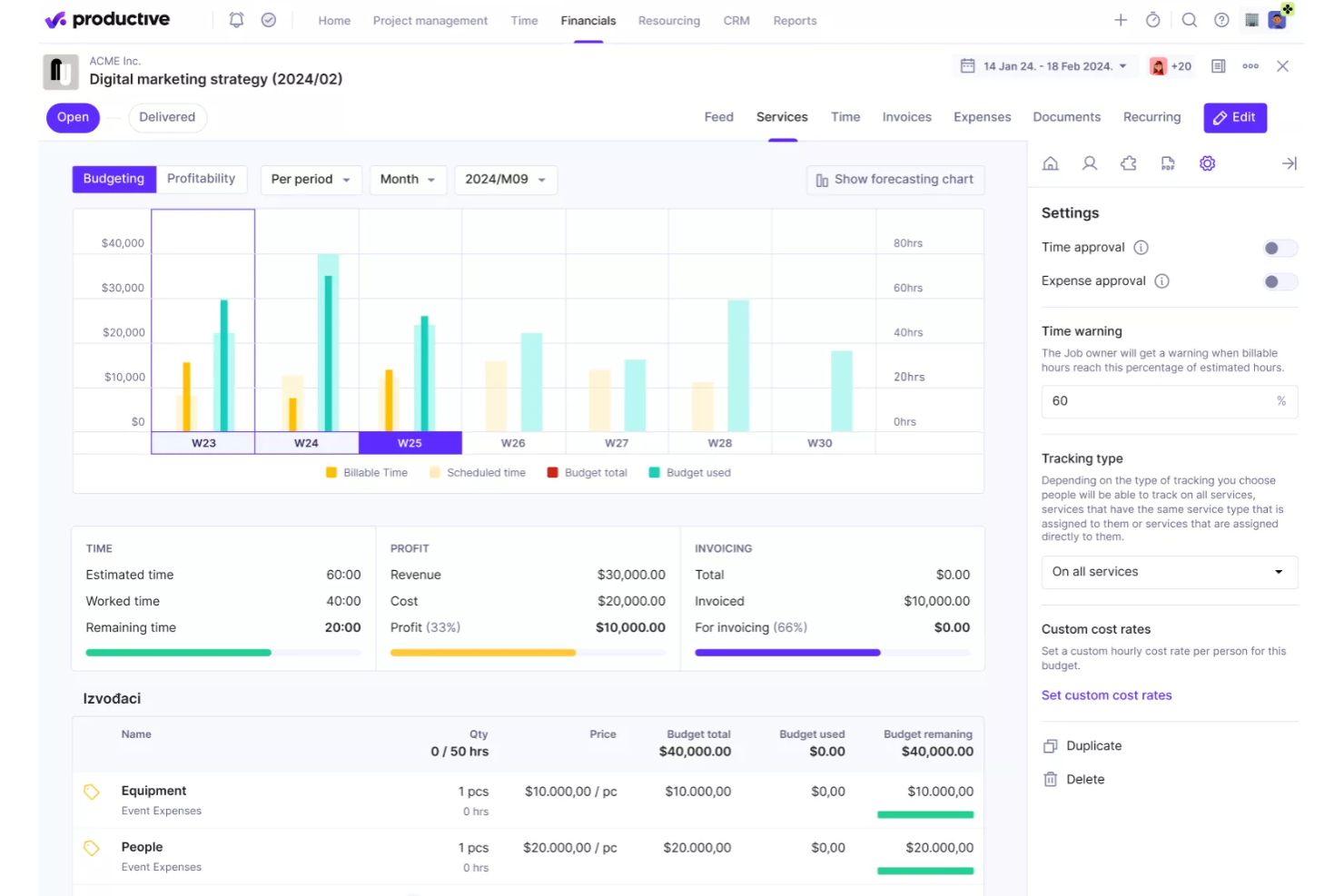
Productive is a project management and time tracking platform built for agencies and service companies that need to connect tracked hours to project budgets, resource planning, and profitability.
Who Is Productive Best For?
Productive is a strong fit for agencies and professional services firms that bill clients by the hour and need visibility into project margins.
Why I Picked Productive
I picked Productive as one of the best because of how directly it connects time tracking to profitability data. Every hour your team logs against a service—billable or non-billable—feeds straight into budget tracking and margin reporting, so you're not waiting on a finance report to know where a project stands. I particularly like the cost of work report, which compares worked time against billable time per resource, giving you a clear picture of where hours are being lost. The AI-powered reporting layer is also genuinely useful—you can ask it to surface profitability per project or utilization by team without building a single custom report from scratch.
Productive Key Features
- Time tracking with timesheets: Log hours manually or with a timer directly against tasks, projects, or services from a centralized timesheet view.
- Resource planning: Schedule team members across projects using a visual capacity planner that shows availability and workload in real time.
- Project budgeting: Set budget limits per project and track spend against them as time and expenses are logged.
- Invoicing: Generate invoices directly from tracked billable hours and send them to clients without leaving the platform.
Productive Integrations
Integrations include Jira, HubSpot, Xero, Google Calendar, Sage, Gmail, Microsoft Outlook, Slack, BugHerd, and QuickBooks.
Pros and Cons
Pros:
- Comprehensive features for financial management and reporting
- Robust resource planning features
- Customizable dashboard and reporting
Cons:
- Limited number of integrations
- Initial setup and onboarding can be time-consuming
New Product Updates from Productive
Productive Adds Voice Dictation, Slack Connector, Proposals, and Overtime
Productive adds voice dictation, a Slack Connector, proposal controls, and overtime tracking. These updates support faster AI interactions, client proposals, and time management. For more information, visit Productive’s official site.
Toggl
Best for its workload balancing

Toggl offers a visual approach to time tracking that helps teams balance workloads and avoid burnout. It’s especially useful for project managers and agencies who need to see team capacity at a glance and reassign tasks quickly. The platform’s workload management features help prevent overbooking and support more predictable project delivery.
Who is Toggl Best For?
Project managers and team leads at small to mid-size knowledge-work organizations that balance workloads across staff and monitor time distribution across assignments.
Why I Picked Toggl
What drew me to Toggl is its focus on workload balancing, which goes beyond basic time tracking. The tool’s Team Dashboard lets you visualize each team member’s capacity and current assignments, making it easier to spot overloads or gaps. I appreciate how the Workload view allows you to reallocate tasks and adjust schedules directly from the dashboard. This makes Toggl Track a strong choice for project managers who need to keep workloads realistic and projects on track.
Toggl Key Features
Some other features that make Toggl useful for time tracking include:
- Billable Rates: Assign different hourly rates to projects or team members for accurate client billing.
- Project and Task Tracking: Organize tracked time by project, client, or specific task for detailed reporting.
- Calendar Integration: Sync tracked time with Google Calendar or Outlook to compare planned versus actual work.
- Automated Reminders: Send notifications to prompt users to start or stop tracking time.
Toggl Integrations
Integrations include Asana, Jira, Google Calendar, Outlook, QuickBooks Online, Salesforce, Slack, Toggl Plan, iCal, and the Toggl API.
Pros and Cons
Pros:
- Workload view visualizes team capacity instantly
- Bulk edit lets you adjust multiple entries
- Browser extension tracks time across web apps
Cons:
- Mobile app lacks full reporting feature
- Limited offline functionality for time entries

actiTIME
Best for small teams and businesses
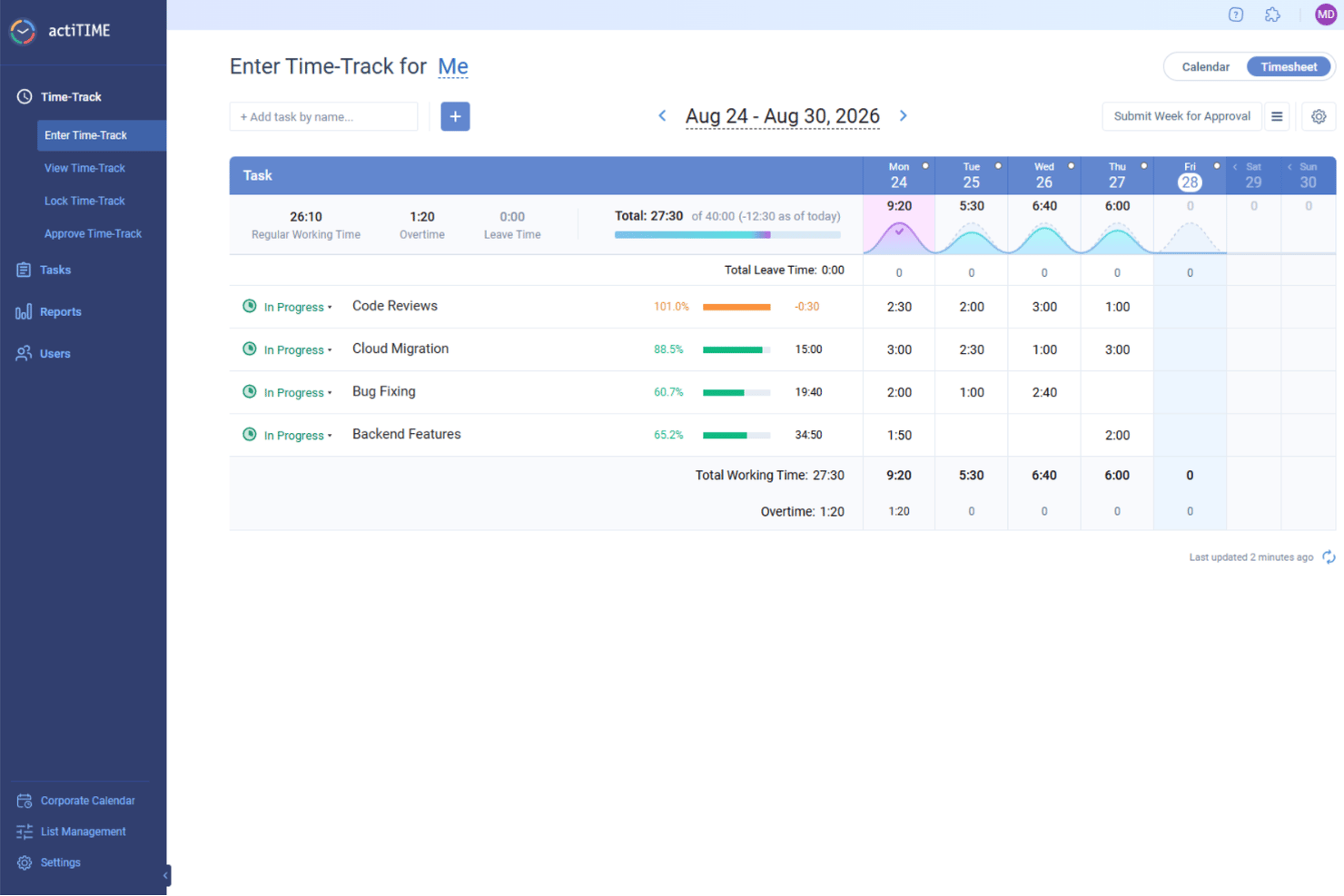
If you’re looking for a time tracking tool built with small teams and businesses in mind, actiTIME is worth a look. It’s designed for teams that need to track hours, manage tasks, and monitor project costs without extra complexity. The platform stands out for its simple setup, flexible reporting, and built-in leave management features.
Who is actiTIME Best For?
Team supervisors and administrators at small businesses that need straightforward time tracking and reporting without complex implementation or dedicated system support.
Why I Picked actiTIME
For small teams and businesses, actiTIME offers a focused set of time tracking features without unnecessary extras. I picked actiTIME because it lets you track time by client, project, or task, making it easy to see where hours are going. The tool also includes built-in leave management, so you can handle absences and vacations alongside regular time tracking. Its reporting tools help small teams monitor project costs and productivity without getting bogged down in complexity.
actiTIME Key Features
Some other features that make actiTIME useful for small teams include:
- Automated Reminders: Sends notifications to remind users to submit timesheets on schedule.
- Customizable Billing Rates: Allows you to set different hourly rates for various clients or projects.
- Mobile App: Lets users track time and manage tasks from their smartphones.
- Integration With QuickBooks: Syncs time tracking data directly with QuickBooks for streamlined accounting.
actiTIME Integrations
Integrations include actiPLANS, Chrome Plugin, QuickBooks, and Time Management Assistant. An API is also available for custom integrations.
Pros and Cons
Pros:
- Provides detailed reporting and data analysis
- Supports fixed and accrual leave policies
- Allows setting hourly budgets and tracking them
Cons:
- Lacks features like geofencing and facial recognition
- Lacks extensive native integrations
New Product Updates from actiTIME

actiTIME Visual Hour Indicator and Time-Track Report Redesign
actiTIME adds a wave-style hour indicator to the Timesheet and Calendar views and refreshes the Time-Track report for smoother navigation and clearer visuals. For more information, visit actiTIME's official site.

Kantata
Best for full lifecycle time tracking
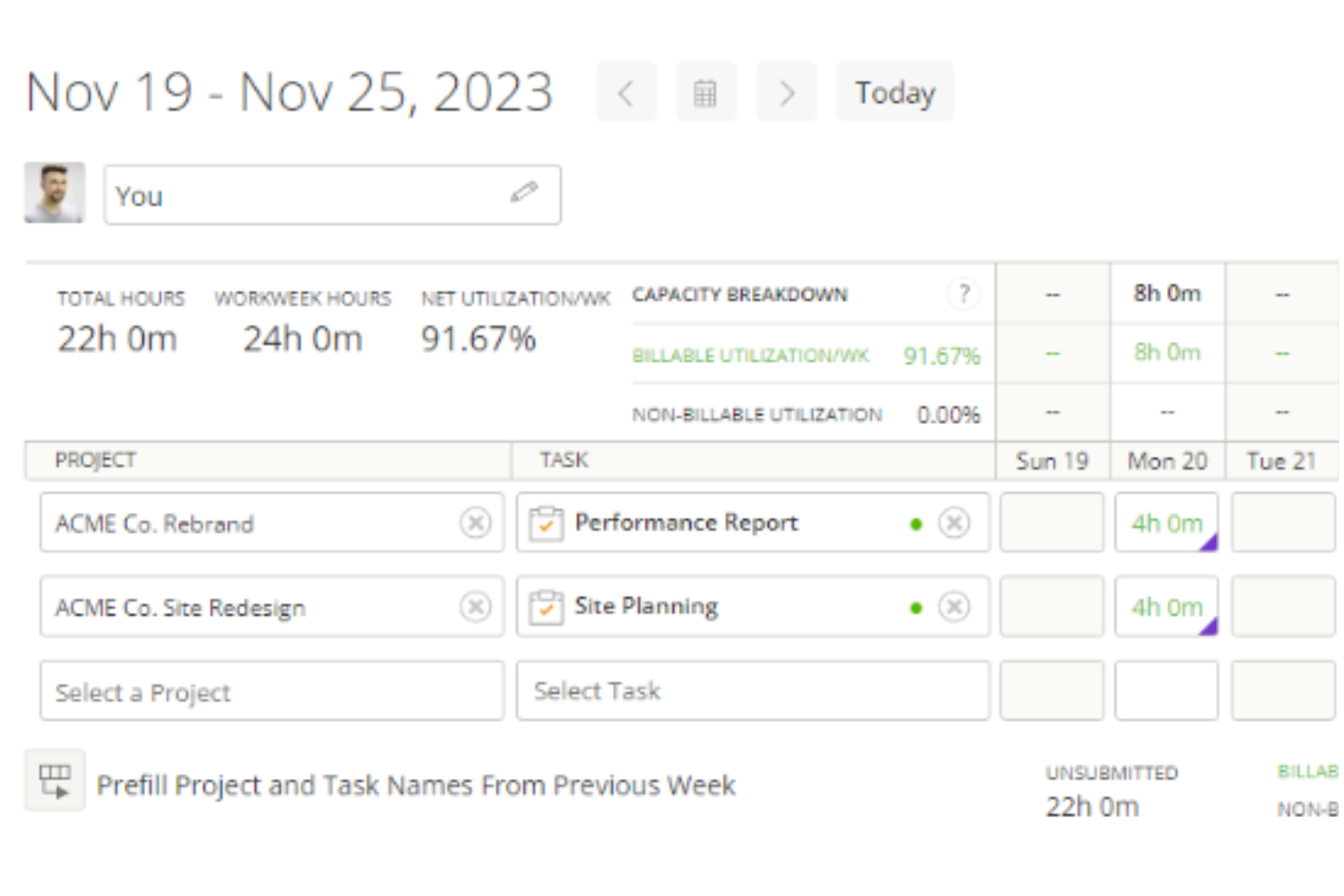
Kantata is a project and resource management platform for professional services teams who need to track time, manage projects, and optimize resources across complex client engagements.
Who Is Kantata Best For?
Kantata is a strong fit for mid-to-large professional services firms—such as consulting, marketing, and IT services companies—that need to manage time and resources across multiple client projects simultaneously.
Why I Picked Kantata
I picked Kantata as one of the best because it's one of the few time tracking tools that connects time data to every other stage of project delivery—from initial scoping through to invoicing. What I love about it is that time and expense tracking isn't a standalone module; it feeds directly into financial management, so my team can see in real time how logged hours are affecting project margins and budget burn. Kantata also has built-in timesheet workflows with automation that takes the friction out of period close—something finance teams on multi-project engagements will really appreciate. On top of that, the business intelligence layer surfaces utilization and fee data across the portfolio, so time tracking becomes an input to actual strategic decisions, not just a compliance exercise.
Kantata Key Features
- Resource management: Assign and adjust team capacity across projects using visual resource planning tools that reflect real-time availability.
- Project forecasting: Model projected costs and timelines against actuals to keep client engagements on track before issues arise.
- Role-based permissions: Control who can view, enter, or approve project data with configurable access settings across teams.
- Client and project dashboards: Monitor project health, milestones, and delivery status from a centralized view across your entire portfolio.
Kantata Integrations
Integrations include Salesforce, NetSuite, Jira, Slack, HubSpot, QuickBooks, Xero, BambooHR, Google Drive, and Microsoft Teams.
Pros and Cons
Pros:
- Admins can enforce rules like required notes or task associations
- Time entries can be reviewed and approved before invoicing
- Users can log time via timers, timesheets, or directly on tasks
Cons:
- Certain time tracking fields may not be fully customizable
- Configuring who can track and approve time may be intricate
New Product Updates from Kantata

Kantata Adds Access Group Change History
Kantata adds Access Groups History, letting account administrators track changes to group details, membership, and permissions in Recent History. The update also makes these events available through the Subscribed Events API for broader monitoring. For more information, visit Kantata’s official site.
 .
.
DeskTime
Best for offline time tracking accuracy
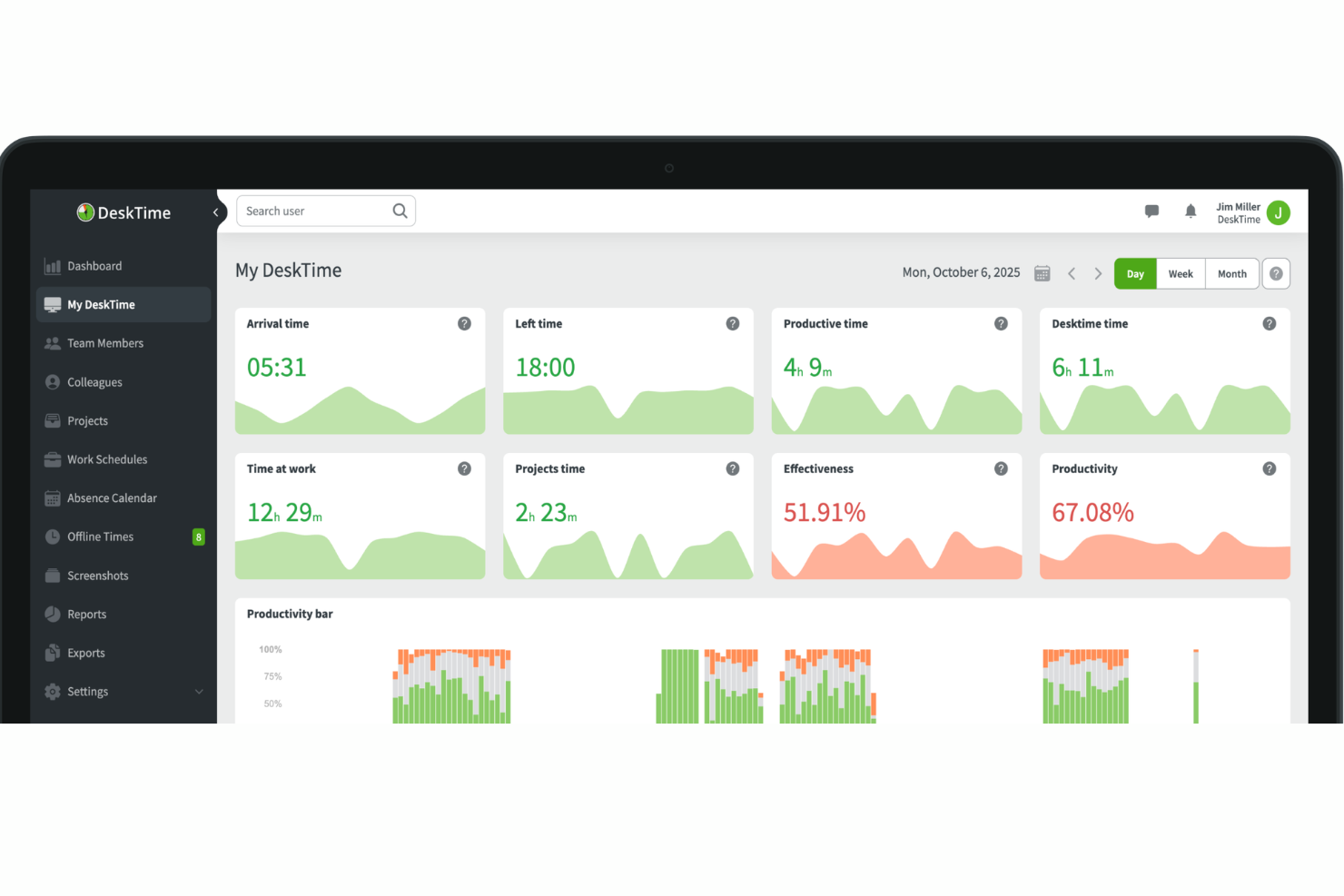
With both automatic desktop tracking and manual time entry, DeskTime is a time tracking platform that captures app, URL, and document activity alongside offline work logged through calendar integrations and manual inputs.
Who Is DeskTime Best For?
DeskTime is a good fit for small to mid-sized teams that need visibility into how working hours are spent across distributed or hybrid setups.
Why I Picked DeskTime
Offline time tracking accuracy is where a lot of tools fall short, and DeskTime handles it better than most. My team is able to log offline time manually, categorized by type (like meetings, calls, or travel), so that time doesn't just disappear from the record. DeskTime also syncs with Google Calendar and Outlook to pull in calendar events automatically, which means scheduled meetings get captured without anyone having to remember to log them after the fact.
DeskTime Key Features
- Pomodoro timer: Built-in work interval timer that alternates focus sessions with short breaks, logged automatically within your tracked time.
- Private time mode: Lets users pause automatic tracking during personal tasks, so those intervals are excluded from productivity reports.
- Shift scheduling: Managers can set expected working hours per employee and compare them against actual logged time.
- Billing rates: Assign hourly rates to team members so tracked project time converts directly into cost calculations.
DeskTime Integrations
DeskTime offers native integrations with Google Calendar, Outlook Calendar, Jira, Asana, GitLab, Trello, and Zapier. DeskTime also provides an API for building custom integrations.
Pros and Cons
Pros:
- Blurs optional screenshots for privacy
- Categorizes sites as productive or unproductive
- Tracks app and URL usage automatically
Cons:
- Software settings lack deep customization
- Limited mobile tracking capabilities
Beebole
Best for customizable dashboards
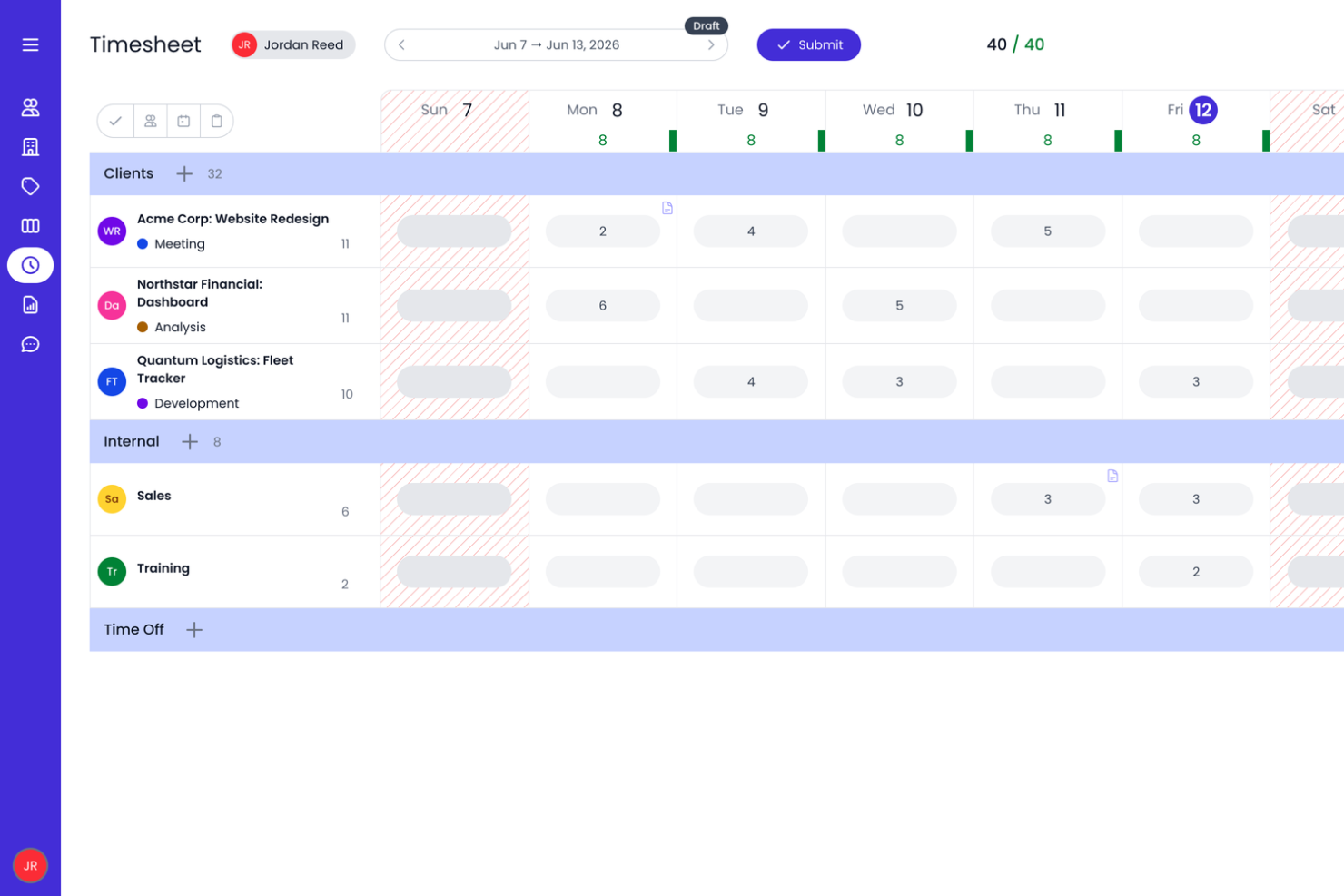
Beebole is a time tracking platform designed for companies that need to monitor project hours, manage team productivity, and generate detailed reports to support billing and resource planning.
Who Is Beebole Best For?
Beebole is a strong fit for mid-sized companies and professional services teams that need flexible time tracking with detailed reporting across projects and departments.
Why I Picked Beebole
Beebole earns its spot on my shortlist because of how much control it gives you over your reporting dashboards. I like that you can save custom reports directly to your dashboard, so when I need a real-time view of project hours, billing status, or budget variance, it's already on the dashboard. The KPI dashboard builder lets you surface exactly the metrics that matter to your team, whether that's tracking profitability across 50 client projects or monitoring overtime by department. Exporting those same reports to Excel or Google Sheets keeps the data available outside the tool. You can also configure billing and cost rates at the person, project, or task level and monitor project budgets as time is logged, giving teams additional visibility into project costs.
Beebole Key Features
- Timesheet approval workflow: Managers can review, approve, or reject submitted timesheets directly within the platform before they're locked for payroll or billing.
- Resource planning and capacity management: Assign work based on team availability and compare scheduled versus worked hours.
- Project budget and profitability tracking: Set billing, cost, or hour budgets and monitor project spending as time is logged.
- Absence and leave management: Track vacation, sick days, and other leave types alongside work hours in a single view.
Beebole Integrations
Integrations include Asana, BambooHR, Google Calendar, Outlook Calendar, Google Sheets, Excel, QuickBooks Online, and an open API for custom integrations.
Pros and Cons
Pros:
- Integrated PTO tracking feature
- You can set different billing rates for clients, projects, and team members
- Ability to track time across various projects and tasks
Cons:
- Free plan is capped at 5 users
- Lacks integrated invoicing

Best as AI for business
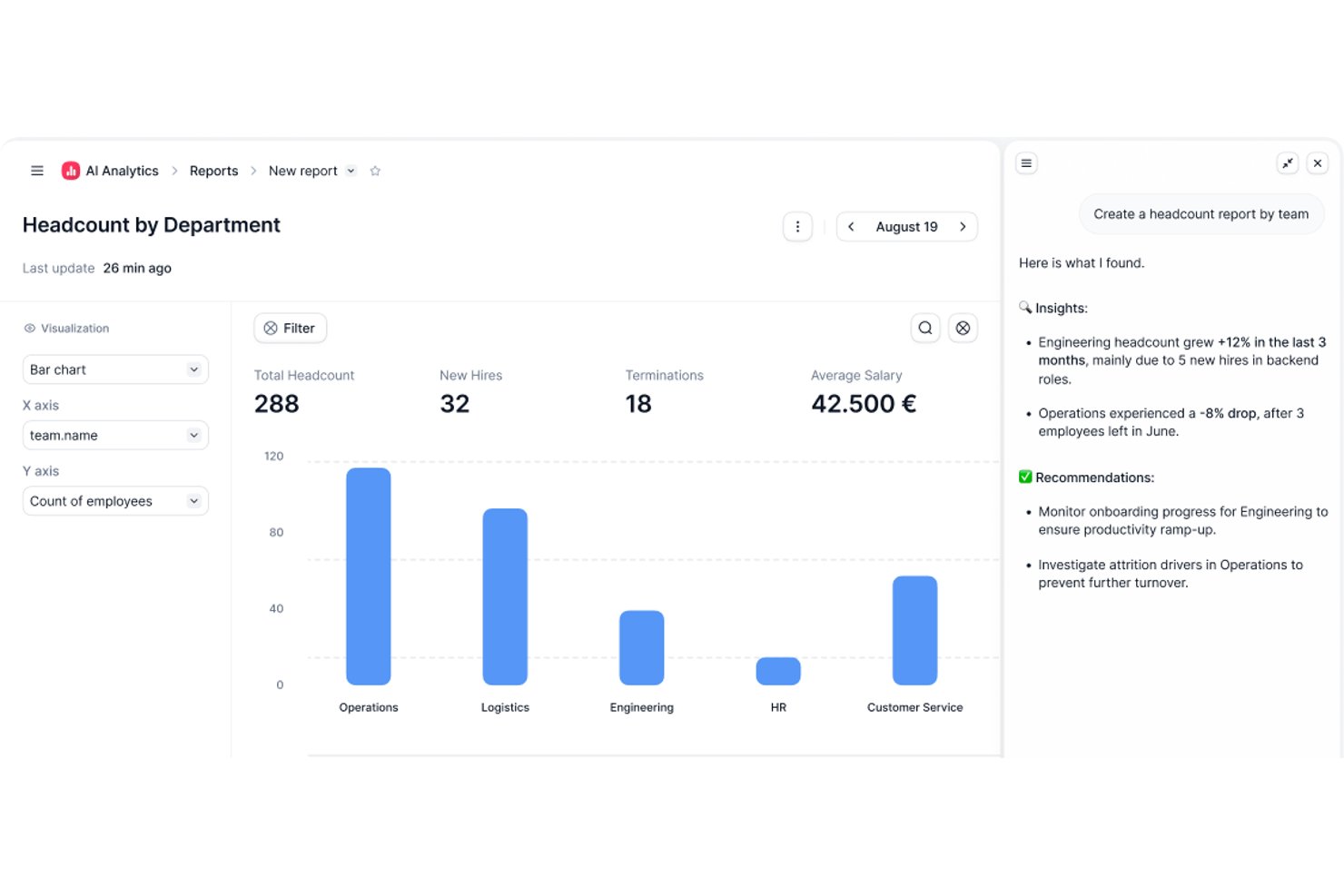
Factorial is an AI-powered HR and time tracking platform that handles time and attendance, shift scheduling, timesheet approvals, and project-based hour tracking across web and mobile.
Who Is Factorial Best For?
Factorial suits HR and payroll administrators at mid-sized companies who need a single platform to manage time tracking, shift scheduling, and payroll workflows.
Why I Picked Factorial
I've included Factorial in my top picks because it's built around AI for business, which means it doesn't just log hours—it actively assists with day-to-day operations like planning timetables, generating reports, and answering employee questions on policies. I especially like how time entries can be recorded at the task level within projects, then rolled up into time-and-materials budgets that surface costs, billable amounts, and profitability in one place. Managers can also transfer approved timesheet hours directly to compensation and sync them with payroll tools like DATEV, cutting out a lot of manual reconciliation.
Factorial Key Features
- Multiple clock-in methods: Employees can log time via QR code, facial recognition, geolocation, the mobile app, or a desktop browser.
- Shift scheduling: Managers can build and adjust team schedules using a drag-and-drop interface, including bulk scheduling and rotating shifts.
- Time-off management: Teams can set custom absence types and policies, with employees submitting requests and managers approving or rejecting them in the platform.
- Offline mobile clock-in: Employees can clock in and out without an internet connection through the Factorial app, as long as they've previously logged in.
Factorial Integrations
Factorial offers marketplace integrations with DATEV LODAS, Sage 200, Microsoft Power BI, Google Workspace, and Slack, plus a public API, webhooks, and SDKs for custom connections. It also supports Zapier.
Pros and Cons
Pros:
- Timesheet approvals support payroll workflows
- Offline mobile clock-ins preserve attendance records
- Task-level entries clarify project labor
Cons:
- Clock-in reminders still require employee discipline
- Advanced time analytics remain limited

Buddy Punch
Best time clock for GPS and image tracking

Buddy Punch is a time tracking platform designed for companies that need to monitor employee hours, manage attendance, and simplify payroll, especially for teams working across multiple locations or in the field.
Who Is Buddy Punch Best For?
Buddy Punch is a good fit for small to mid-sized businesses in industries like construction, retail, and healthcare, where managing hourly workers across multiple job sites is a daily reality.
Why I Picked Buddy Punch
I picked Buddy Punch as one of the best because it layers GPS and image verification directly into the clock-in process. When an employee punches in, Buddy Punch captures their GPS coordinates and can require a selfie photo at the same moment. That lets my team cross-reference location data and a timestamped photo on the same timecard, which is useful when managing field workers across multiple job sites. Additionally, geofencing lets me block punches entirely if someone isn't physically within a defined boundary around a worksite, eliminating reliance on the honor system.
Buddy Punch Key Features
- Drag-and-drop scheduling: Build and publish employee schedules using a visual calendar interface with shift assignment and availability management.
- PTO tracking: Employees can submit time-off requests directly in the platform, and managers can approve or deny them from the same dashboard.
- Automatic overtime alerts: Buddy Punch flags employees who are approaching or have exceeded overtime thresholds before payroll is processed.
- Payroll reporting: Export detailed timesheets in formats compatible with major payroll providers to simplify pay period processing.
Buddy Punch Integrations
Integrations include QuickBooks Online, QuickBooks Desktop, ADP Workforce Now, Gusto, Paychex, Paylocity, Paycor, Rippling, Workday, and Justworks.
Pros and Cons
Pros:
- Offers various exportable reports
- Managers receive notifications for late arrivals or missed shifts
- Versatile clock-in options
Cons:
- Limited language support other than English
- Advanced GPS tracking features are paid add-ons
- Agendrix
For versatile clock-in methods
- Runn
With real-time capacity visibility
- Clockify
For efficient time tracking
- Traqq
For a feature-rich free version
- My Hours
For small teams and freelancers
- TimeCamp
For automatic time tracking
- ClickUp
For its billable time tag
- TMetric
For 7-day activity tracking storage
- Bonsai Agency Software
Integrated time and resource management
- Timesheets.com
For accountants and bookkeepers
- Harvest
For actionable insights
- FunctionFox
For creative teams and agencies
- Deltek Replicon Time
For intelligent time tracking
- ProjectManager
For real-time time monitoring
- Ravetree
For tracking expenses alongside time
- eResource Scheduler
For scheduling with time tracking
- ExakTime
For teams of field employees
- Bill4time
For reporting features
- Actually
Simple time tracking for companies working with projects
- Deel HR
For keeping payroll in sync
- Insightful
For remote team monitoring
- Monitask
For distributed teams
- Resource Guru
For tracking time with resource scheduling
- Smartsheet
For mobile time tracking
- Apploye
For hybrid teams
- Scoro
For detailed time tracking
- ClickTime
For customizable timesheets
- Hubstaff
For distributed teams
- BigTime
For invoicing and billing
- Hive
For project billing tied to task-level time


How I Evaluate Time Tracking Software
I split my evaluation into what a tool must do—log time to projects, handle approvals, and track billable rates—and what makes it the right fit for your specific team or workflow.
Core Functionality (Table Stakes For This List)
When I'm selecting tools for my list, I rank each one on a scale from 0 (does not offer the functionality) to 5 (excels in this area) for each core functionality listed below. Then, I calculate the tool's total score into a percentage. Each tool needs to achieve a minimum total score of 65% to be considered for inclusion.
- Project & Task Time Capture: I check whether you can log hours against specific projects, tasks, and subtasks—via manual entry, running timers, or background tracking—so nothing falls through the cracks during a busy sprint.
- Timesheet Management: A solid approval workflow matters here. I look for submission, review, and locking features that let a PM or team lead sign off on weekly hours before they reach payroll or invoicing.
- Billable Hours & Rate Configuration: Tools need to separate billable from non-billable time and support rate configuration at the user, role, project, or client level—the kind of flexibility an agency juggling multiple retainers relies on daily.
- Budget & Utilization Tracking: I evaluate how well a tool connects logged time back to project budgets and estimates, surfacing burn rate, overages, and per-person utilization so you can spot scope creep before it hits margins.
- Reporting & Analytics: Pre-built reports are a start, but I look for filtering by project, client, team member, and date range plus export options—because stakeholders and finance teams almost always need data in their own format.
- PM Tool Integrations: Whether your team lives in Jira, Asana, Monday, or ClickUp, I evaluate the depth of each integration—especially two-way sync that posts logged time back to tasks without manual re-entry.
Once I have a list of tools that meet the criteria, I consider what sets each platform apart.
Differentiating Factors (What Sets Vendors Apart)
Here's how I compare and contrast different vendors:
Standout Features
Resource and capacity planning is a big one—I look for tools that let you see who's available and assign work based on logged hours and forecasted demand, not guesswork. Automatic time tracking matters too. Background detection or calendar sync fills gaps that manual entry misses, especially on days packed with context-switching. For agency and consulting teams, native invoicing closes the loop between tracked hours and client billing without exporting data to a separate system.
Beyond Features
I pay close attention to team size and use-case fit. A tool built for solo freelancers won't serve a 50-person consulting firm managing retainers, fixed-fee projects, and T&M contracts side by side. Pricing structure matters just as much—I evaluate whether per-user costs stay reasonable as your team grows and whether a free tier lets smaller groups trial the platform properly. For regulated industries or government contractors, I also check for DCAA compliance, SOC 2 certification, and role-based access controls.
Slik velger du programvare for tidsregistrering
Det er lett å gå seg vill i lange funksjonslister og kompliserte prisstrukturer. For å hjelpe deg med å holde fokus mens du går gjennom prosessen med å velge programvare, har vi laget en sjekkliste over faktorer du bør ha i tankene:
| Faktor | Hva du bør vurdere |
| Skalerbarhet | Sørg for at programvaren kan håndtere teamets vekst. Se etter fleksible priser, ubegrenset antall brukere og funksjoner som støtter store team, for eksempel rollebaserte tillatelser og rapportering for virksomheter. |
| Integrasjoner | Velg en løsning som kobles til de eksisterende verktøyene dine, for eksempel programvare for lønn, fakturering, prosjektstyring og HR. Dette reduserer manuell dataregistrering og sørger for sømløse arbeidsflyter. |
| Tilpasningsmuligheter | Teamets behov er unike. Se etter tilpassbare rapporter, justerbare regler for registrering og konfigurerbare tillatelser som kan tilpasses virksomhetens prosesser. |
| Brukervennlighet | Et komplekst system forsinker innføringen. Velg et intuitivt grensesnitt med minimalt oppsett, enkle alternativer for tidsregistrering og en brukervennlig mobilapp for registrering på farten. |
| Budsjett | Sammenlign prisnivåer, skjulte gebyrer og alternativer for gratis prøveperiode. Vurder om verktøyet tar betalt per bruker, per funksjon eller har en fastpris som passer budsjettet ditt. |
| Sikkerhetstiltak | Beskytt sensitive tidslogger og lønnsdata med funksjoner som tofaktorautentisering, rollebaserte tilgangskontroller og kryptert datalagring. |
| Mobil tilgjengelighet | Hvis teamet ditt jobber eksternt eller på stedet, bør du sørge for at programvaren har en god mobilapp med frakoblet registrering, GPS-funksjoner og sømløs synkronisering. |
| Rapportering & analyse | Se etter detaljert innsikt i arbeidstimer, prosjektkostnader og teamets produktivitet. Tilpassbare oversikter og automatiserte rapporter hjelper deg med å ta datadrevne beslutninger. |
Trender innen programvare for tidsregistrering 2026
I undersøkelsen min har jeg hentet inn utallige produktoppdateringer, pressemeldinger og lanseringslogger fra ulike leverandører av programvare for tidsregistrering. Her er noen av de fremvoksende trendene jeg følger med på:
- Mobilapper og geografisk avgrensning: Mobilapper for tidsregistrering i prosjektstyring blir stadig mer populære, særlig med teknologi for geografisk avgrensning. Dette muliggjør automatiske innsjekkinger og stedsbasert registrering for mer nøyaktig tidsregistrering i ulike arbeidssituasjoner.
- Biometrisk identifikasjon: Teknologier som ansiktsgjenkjenning og biometrisk iristeknologi tas i bruk i moderne løsninger for tidsregistrering for bedre brukervennlighet og mer nøyaktig tidsstempling.
- Sporing av energiforbruk: Dette fremvoksende konseptet måler den mentale og fysiske innsatsen som legges ned i arbeidet, og gir innsikt i medarbeidernes engasjement og velvære utover enkel tidsregistrering.
- Integrasjon med bærbar teknologi: Bærbare enheter som smartklokker kan nå registrere arbeidstimer, samtidig som de tilbyr aktivitets- og helseovervåking for å støtte medarbeidernes velvære.
- Avansert KI og automatisering: KI er nå en vanlig og raskt utviklende funksjon i programvare for timelister, og brukes ofte til å automatisere tidsregistrering, forbedre nøyaktigheten og analysere mønstre i tidsbruken.
Hva er programvare for tidsregistrering?
Programvare for tidsregistrering er et digitalt verktøy som overvåker og registrerer hvor mye tid enkeltpersoner eller team bruker på oppgaver, prosjekter, kunder eller aktiviteter.
Den inneholder vanligvis funksjoner som tidtakere, manuell tidsregistrering, timelister, rapportering og fakturering. Disse verktøyene bidrar til å øke produktiviteten, sikre nøyaktig fakturering og gi innsikt som legger til rette for bedre planlegging og ressursbruk. Mange verktøy for tidsregistrering kan også integreres med verktøy for prosjektstyring, lønn og samarbeid for å effektivisere arbeidsflyter og redusere administrativt arbeid.
Funksjoner i programvare for tidsregistrering
Når du velger programvare for tidsregistrering, bør du se etter følgende viktige funksjoner:
- Automatisk tidsregistrering: La programvaren registrere aktiviteten din i bakgrunnen, slik at du slipper å stemple inn og ut manuelt. Dette sørger for at arbeidstimene dine registreres nøyaktig, selv når du glemmer det.
- Manuelle registreringsalternativer: Legg enkelt til eller juster tidsregistreringer for arbeid som er utført uten nett, eller korriger manglende logger, slik at registreringene dine alltid gjenspeiler virkeligheten.
- Kategorisering av prosjekter og oppgaver: Organiser tiden etter kunde, prosjekt eller oppgave for å se nøyaktig hvor timene dine går, og forenkle rapporteringen.
- Registrering av fakturerbar og ikke-fakturerbar tid: Skill mellom fakturerbare og ikke-fakturerbare timer for mer nøyaktig fakturering og bedre innsikt i hvordan tiden din brukes.
- Rapportering og analyse: Generer detaljerte rapporter for å analysere produktivitet, identifisere trender og ta informerte beslutninger om arbeidsflyten din.
- Integrasjoner med andre verktøy: Synkroniser programvaren for tidsregistrering med apper for prosjektstyring, regnskap eller kalender for å effektivisere prosessene dine og unngå dobbeltregistrering.
- Påminnelser og varsler: Konfigurer varsler som minner deg på å registrere tiden eller føre inn registreringer, slik at ingenting blir glemt.
- Mobil tilgang: Registrer timene dine hvor som helst ved hjelp av smarttelefonen eller nettbrettet – perfekt for eksterne team eller alle som er på farten.
Vanlige AI-funksjoner i tidsregistreringsprogramvare
Moderne tidsregistreringsprogramvare inkluderer ofte AI-drevne funksjoner som er utviklet for å gjøre arbeidsflyten enda smidigere:
- Automatisk aktivitetsklassifisering: AI kan analysere aktiviteten din og automatisk kategorisere oppgaver, slik at behovet for manuell sortering reduseres og du sparer tid.
- Smarte forslag til timelister: Basert på arbeidsmønstrene dine kan AI foreslå tidsregistreringer eller fylle ut mangler, slik at du kan fullføre timelistene raskere og mer nøyaktig.
- Produktivitetsinnsikt: AI-drevet analyse fremhever trender, varsler om mulige distraksjoner og gir personlige anbefalinger for å øke effektiviteten din.
- Avviksdeteksjon: Programvaren kan oppdage uvanlige mønstre – som manglende registreringer eller inkonsekvent arbeidstid – og varsle deg slik at du kan gjennomgå dem før de blir et problem.
- Inndata på naturlig språk: Noen verktøy lar deg registrere tid eller oppgaver ved hjelp av enkle tekstkommandoer, noe som gjør prosessen enda mer intuitiv.
Fordeler med tidsregistreringsprogramvare
Implementering av tidsregistreringsprogramvare kan gi flere fordeler for teamet og virksomheten din. Her er noen av fordelene du kan se frem til:
- Bedre nøyaktighet: Registrerer arbeidstimer ned på minuttet for å redusere feil i lønn og fakturering.
- Enklere prosjektfakturering: Registrerer fakturerbar tid per kunde eller prosjekt, slik at du kan fakturere riktig uten å måtte gjette.
- Mindre tidstap: Bidrar til å oppdage uregistrert eller inaktiv tid, slik at du ikke mister fakturerbare timer.
- Mer produktive team: Viser hvor tiden brukes, slik at teamene kan redusere distraksjoner og fokusere på det faktiske arbeidet.
- Mindre administrativt arbeid: Automatiserer timelister, godkjenninger og rapporter, slik at ledere bruker mindre tid på å innhente data.
- Bedre ansvarlighet: Oppbevarer en oversikt over arbeidstimer, slik at eksterne team og feltteam kan holde kursen. Se våre anbefalinger for beste tidsregistreringsprogramvare for eksterne team.
- Bedre kostnadskontroll: Registrerer arbeidskostnader i sanntid, slik at du kan justere budsjettene før de begynner å avvike.
Kostnader og priser for tidsregistreringsprogramvare
Når du velger tidsregistreringsprogramvare, må du forstå de ulike prismodellene og abonnementene som er tilgjengelige. Kostnadene varierer vanligvis etter funksjoner, teamstørrelse, tillegg og mer. Tabellen nedenfor viser vanlige abonnementer, gjennomsnittspriser og vanlige funksjoner som er inkludert i tidsregistreringsverktøy:
Sammenligningstabell for abonnementer for tidsregistreringsprogramvare
| Abonnementstype | Gjennomsnittspris | Vanlige funksjoner |
|---|---|---|
| Grunnleggende/gratis abonnement | Gratis | - Grunnleggende tidsregistrering - Enkle rapporteringsmuligheter - Begrenset antall brukere eller prosjekter |
| Standardabonnement | $5 - $10 per bruker/måned | - Utvidede funksjoner for tidsregistrering - Grunnleggende rapportering og analyse - Integrasjon med annen programvare - Begrenset brukerstøtte |
| Profesjonelt abonnement | $10 - $20 per bruker/måned | - Avansert rapportering og analyse - Full integrasjon med prosjektstyring - Utvidede alternativer for brukerstøtte - Ekstra funksjoner som fakturering og planlegging |
| Premium-/bedriftsabonnement | $20+ per bruker/måned | - Funksjoner som kan tilpasses - Avanserte sikkerhetsalternativer - Prioritert brukerstøtte - Omfattende integrasjoner med forretningssystemer |
Når du har valgt programvare, er det lurt å begynne med en gratis prøveperiode eller et grunnleggende abonnement for å se hvor godt det dekker behovene dine før du oppgraderer til et mer avansert abonnement.
Situasjoner der virksomheten din kanskje bør oppgradere abonnementet, inkluderer:
- Økende teamstørrelse: Når antallet ansatte eller teammedlemmer øker, kan det bli nødvendig med flere brukerlisenser eller mer omfattende administrasjonsfunksjoner.
- Økt prosjektvolum: Når selskapet begynner å håndtere flere prosjekter samtidig, kan det være behov for avansert sporing og rapportering.
- Økte rapporteringsbehov: Etter hvert som selskapet vokser, kan det være behov for mer detaljerte og tilpassbare rapporter for å få bedre innsikt i tidsbruk og ressursfordeling.
- Integrasjonskrav: Med virksomhetsvekst kan det bli større behov for å integrere tidsregistreringsprogramvare med andre systemer, for eksempel lønn, fakturering eller prosjektstyringsplattformer.
- Avanserte funksjoner og automatisering: Etter hvert kan selskapet få behov for mer avanserte funksjoner som automatisk tidsregistrering, avansert analyse og arbeidsflytautomatisering for å forbedre effektivitet og nøyaktighet.
Vanlige spørsmål om tidsregistreringsprogramvare
Finn svar på vanlige spørsmål folk stiller om dette emnet.
Kan tidsregistreringsverktøy integreres med annen prosjektstyringsprogramvare?
Ja, nesten alle moderne tidsregistreringsverktøy integreres med populære plattformer som Asana, Trello, Jira og Slack. Integrasjoner lar deg synkronisere oppgaver, automatisere tidsregistrering og samle rapporteringen på ett sted. Før du velger et verktøy, bør du kontrollere at det støtter direkte integrasjon eller tilbyr et API for prosjektstyringsarbeidsflyten din.
Hva er forskjellen mellom automatisk og manuell tidsregistrering?
Programvare for automatisk tidsregistrering registrerer aktiviteten din i bakgrunnen, mens manuelle verktøy krever at du starter og stopper tidtakere eller registrerer timer. Mange prosjektledere bruker automatiske metoder for å oppnå bedre nøyaktighet, men manuell registrering kan være nyttig for å loggføre arbeid uten nett eller arbeid som ikke utføres digitalt. Ofte er den beste tilnærmingen å kombinere begge deler, slik at teamet kan registrere tiden sin på en enkel måte uansett hvordan de arbeider.
Tilbyr tidsregistreringsprogramvare mobilapper?
Ja, de fleste ledende løsningene for tidsregistrering inkluderer mobilapper for iOS og Android. Med disse kan teamet registrere timer fra hvor som helst, også uten nett, og de er avgjørende for feltarbeid eller eksterne team. Sørg for at appen tilbyr varsler, GPS-sporing og tidtakerfunksjoner for å støtte ansatte som er på farten.
Er det enkelt å registrere tid for kontraktører og frilansere med disse verktøyene?
Ja, de fleste tidsregistreringsverktøy gjør det enkelt å administrere kontraktører og frilansere. Du kan invitere dem som brukere, angi prosjekttilgangen deres og registrere de fakturerbare timene deres separat fra heltidsansatte. På denne måten får du tydelig rapportering for fakturaer og prosjektbudsjetter, uansett hvem som er med i teamet.
Hvor skalerbare er tidsregistreringsløsninger for team i vekst?
De fleste ledende tidsregistreringsverktøy kan enkelt skaleres i takt med teamet ditt. Se etter fleksibel brukeradministrasjon, rimelige prisnivåer og støtte for masseutrulling. Virksomhetsabonnementer inkluderer ofte forbedrede administratorkontroller, API-tilgang og tilpasset brukerstøtte hvis teamet vokser utover grunnleggende behov.
Hvordan kan tidsregistrering bidra til risikostyring?
Tidsregistrering hjelper deg med å oppdage prosjektforsinkelser, overarbeidede teammedlemmer og uventede kostnader tidlig. Ved å gjennomgå reelle data kan du håndtere flaskehalser, omfordele arbeidsmengder og unngå å overskride frister. Tidsregistrering gjør det enklere å holde prosjektet i rute og innenfor budsjettet.
Hvilke rapporteringsverktøy bør jeg se etter i et tidsregistreringsverktøy?
Prosjektledere bruker vanligvis rapporter som viser totalt antall timer per prosjekt, individuelle timelister, fakturerbar kontra ikke-fakturerbar tid og hvor mye tid som ble brukt på hver oppgave eller kunde. Disse rapportene hjelper deg med å oppdage overskridelser, holde arbeidet på rett spor og ta bedre beslutninger om prosjektplanlegging eller fakturering. De fleste verktøy lar deg eksportere eller planlegge disse rapportene for lønn og fakturering.
Hvordan håndterer tidsregistreringsverktøy personvern?
De fleste anerkjente tidsregistreringsverktøy bruker kryptering og sikker skylagring for å holde dataene dine trygge. Se etter alternativer for å begrense brukertilgang, og gå gjennom leverandørens personvernerklæring. For sensitive prosjekter bør du velge plattformer med samsvarssertifiseringer og tydelige standarder for datahåndtering.