

Jeg testet 10 programvarer for automatisering av arbeidsflyter i 2026: Mine toppvalg

10 Beste programvare for arbeidsflytautomatisering


Den beste programvaren for arbeidsflytautomatisering hjelper deg med å koordinere ende-til-ende-prosesser som automatisk utløser handlinger på tvers av flere plattformer basert på betinget logikk og statusendringer i sanntid. Den brukes vanligvis til å klargjøre kontoer i interne systemer, håndtere godkjenningsarbeidsflyter, tildele oppstartsoppgaver til tverrfunksjonelle team og oppdatere CRM-poster. Uten slik programvare kaster team bort timer på arbeid med lav verdi, opplever dårlig kommunikasjon og får forsinkelser i prosjektleveransen.
Gjennom over 20 års praktisk erfaring med å bruke og teste dusinvis av plattformer for arbeidsflytautomatisering som prosjektleder har jeg sett hvor stor forskjell det riktige verktøyet kan gjøre. Fra å redusere manuelle oppgaver til å fremskynde rutinemessige godkjenninger kan den beste programvaren hjelpe deg med å fokusere på strategisk arbeid og kundekommunikasjon i stedet for administrativt merarbeid.
Her er mine beste anbefalinger, basert på testing i virkelige situasjoner. Jeg har fremhevet styrkene til hvert verktøy, slik at du raskt kan finne det som passer best til arbeidsflytene og målene dine.
Why Trust Our Software Recommendations
Our team has been testing and reviewing software since 2012. As project managers ourselves, we know how difficult—and important—it is to choose the right software.
For this guide, we evaluated tools using hands-on testing and independent research, scoring tools using our selection criteria. We also draw on insights from industry thought leaders and practicing project management experts.
Our reviews reflect our human editorial judgment, not a sales pitch.
Expert reviewers:
Sammenligningstabell for programvare for arbeidsflytautomatisering
Denne sammenligningstabellen oppsummerer grunnleggende informasjon om hvert av mine beste valg av programvare for arbeidsflytautomatisering:
| Tool | Best For | Trial Info | Price | ||
|---|---|---|---|---|---|
| 1 | Best for AI-driven project planning | Free plan available | From $9/user/month (billed annually) | Website | |
| 2 | Best for secure client collaboration | Free demo available | From $5,000/year (billed annually) | Website | |
| 3 | Best for no-code AI-powered workflow automation | Free demo available | Pricing upon request | Website | |
| 4 | Best for enterprise workflow customization | Free demo available | $40/user/month | Website | |
| 5 | Best for robust API management capabilities | 30-day free trial | Pricing upon request | Website | |
| 6 | Best with Salesforce document automation | Free demo available | From $399/month (billed annually) | Website | |
| 7 | Best for agency-focused operational insights | 14-day free trial | From $10/user/month (billed annually) | Website | |
| 8 | Best for scaling organizations | 14-day free trial | Pricing upon request | Website | |
| 9 | Best for cross-functional processes | 15-day free trial | From $19/user/month (billed annually) | Website | |
| 10 | Best for custom LLMs | Free trial available + free demo | Pricing upon request | Website |


Anmeldelser av den beste programvaren for arbeidsflytautomatisering
Her er en kort beskrivelse av hver løsning for arbeidsflytautomatisering, med fokus på det beste bruksområdet og de mest bemerkelsesverdige funksjonene til hvert verktøy.

Best for AI-driven project planning
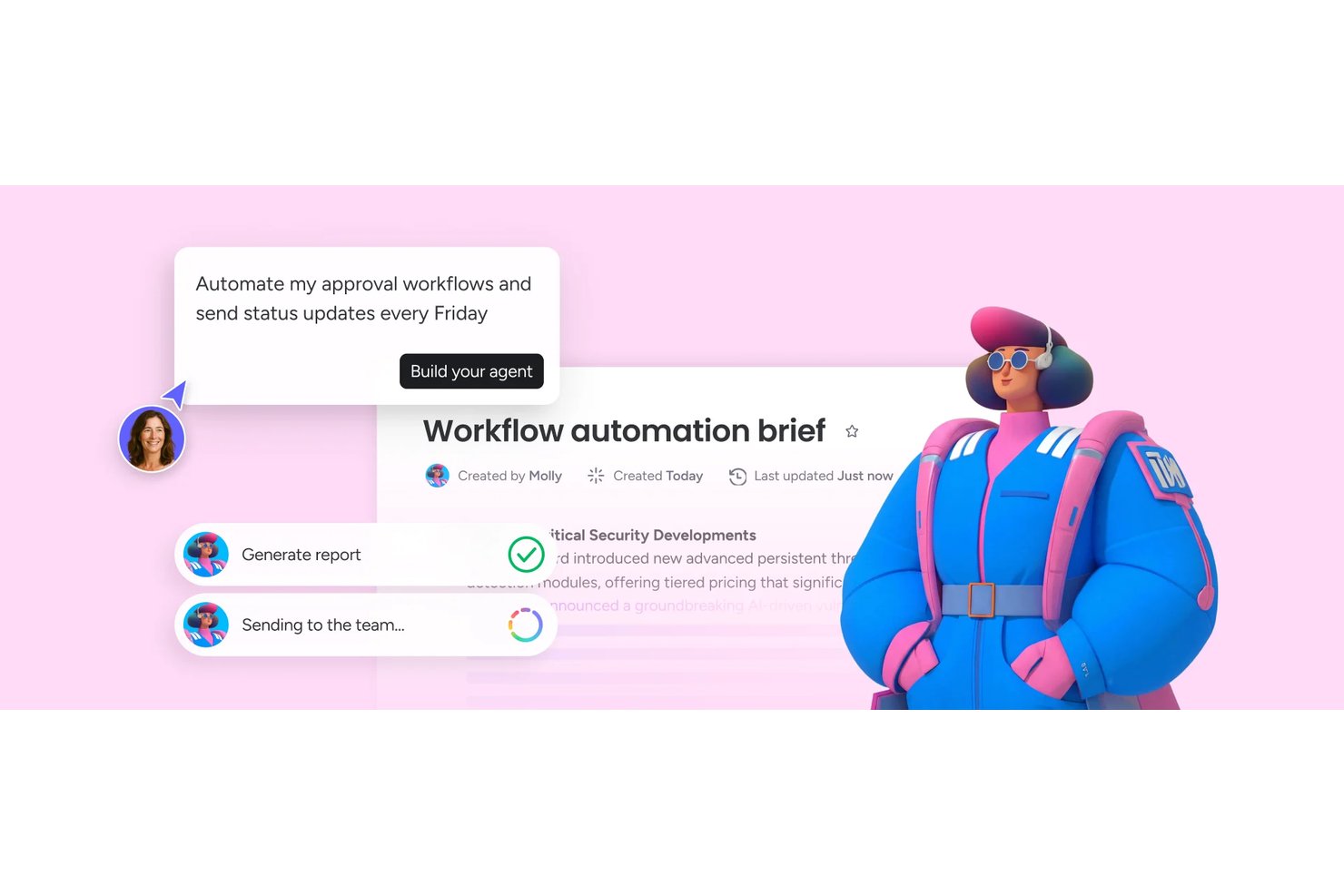
monday AI Workspace is an AI-powered work management platform that combines no-code workflow automation, project planning, task routing, and cross-tool integrations to help teams manage and automate work across projects and departments.
Who Is monday AI Workspace Best For?
It's a strong fit for PMO directors and program managers at mid-to-large organizations coordinating workflows across multiple teams and business functions.
Why I Picked monday AI Workspace
monday AI Workspace earns its spot on my shortlist because its AI planning layer goes well beyond simple task assignments. I particularly like the AI agents that actively surface project risks, update statuses, and route items without waiting for a human to intervene. The AI Workflow Builder (Pro tier and above) lets me orchestrate multi-step automations that connect those agents across boards, so a flagged dependency in one project can trigger a reassignment in another automatically.
monday AI Workspace Key Features
- Visual workflow builder: Design multi-step automations with a drag-and-drop interface and customizable steps.
- Template gallery: Access hundreds of workflow templates categorized by project type and industry.
- Native integration center: Connect boards to over 70 business and collaboration tools with pre-built integrations.
- Custom form builder: Create dynamic intake forms that trigger automated tasks and approvals directly in your workflows.
monday AI Workspace Integrations
monday AI Workspace offers 70+ native integrations, including Slack, Salesforce, HubSpot, Google Workspace, Microsoft Teams, Jira, GitHub, Zoom, Trello, and Zendesk. It also supports Zapier and provides an API for custom integrations.
Pros and Cons
Pros:
- Automations span across boards and portfolios
- No-code workflow builder needs no developer support
- AI agents surface risks without manual input
Cons:
- Advanced AI tools locked behind higher tiers
- Automation runs are capped on lower plans
New Product Updates from monday AI Workspace
monday AI Workspace Adds Human Approval Routing
monday AI Workspace adds a human-in-the-loop approval block to AI Workflows, sending approval requests and routing workflow paths based on responses. For more information, visit monday AI Workspace's official site.

Moxo
Best for secure client collaboration
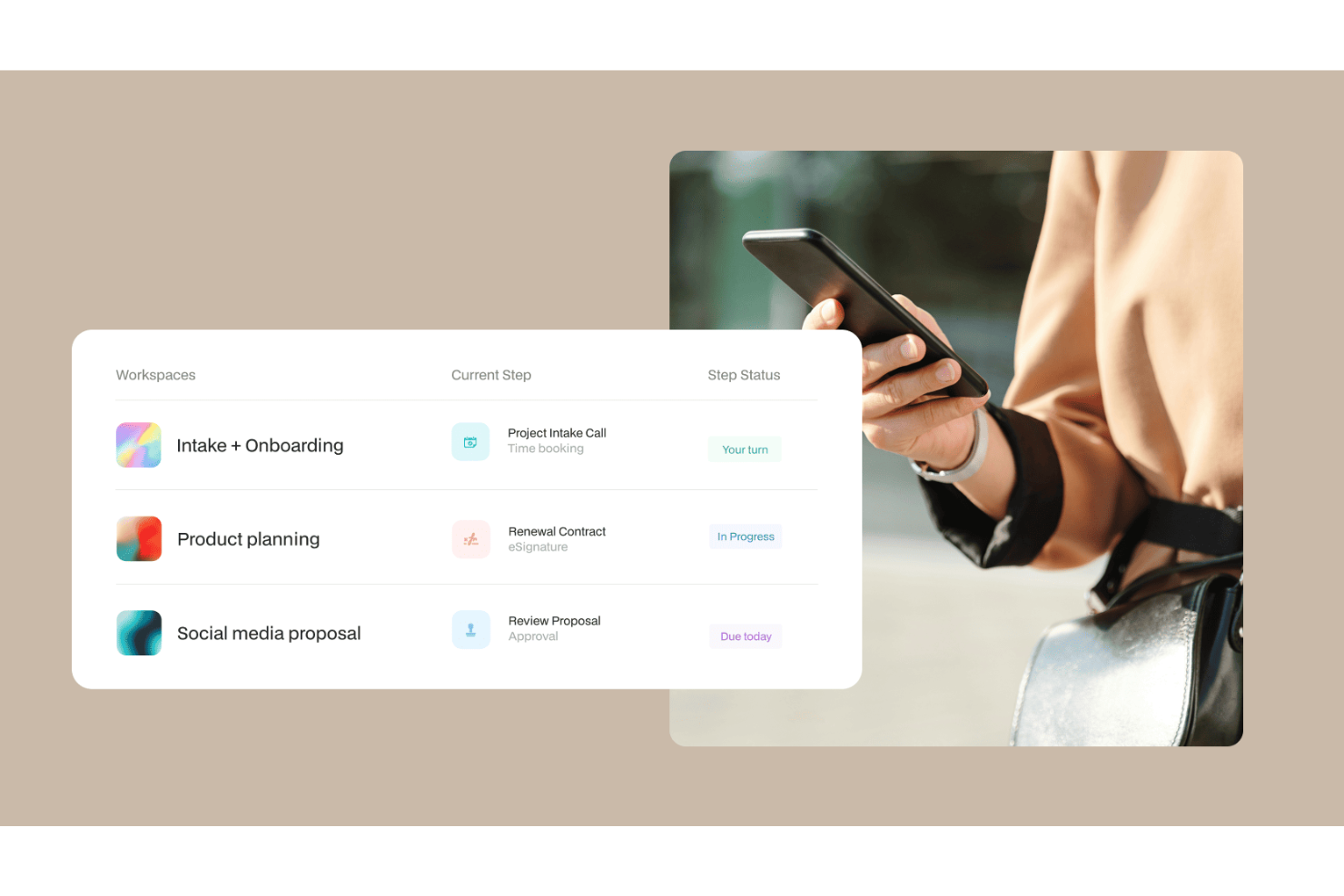
With a workflow automation engine spanning AI agents, multi-step approvals, eSignatures, forms, and conditional branching, Moxo is designed specifically for structured client-facing operations.
Who Is Moxo Best For?
Moxo is a strong fit for professional services teams in finance, legal, and consulting that run structured, high-touch workflows with external clients.
Why I Picked Moxo
I've included Moxo in my top picks because it builds security directly into the collaboration layer, not just the infrastructure. Every client interaction happens inside an encrypted, access-controlled workspace, so sensitive documents, approvals, and messages never float through untracked email threads. I particularly like the audit trail feature, which logs every action across a workflow with timestamped records and up to seven-plus years of retention, which matters a lot in regulated industries like finance and legal.
Moxo Key Features
- AI workflow agents: Deploy AI agents within flows to review documents, prepare summaries, and advise on next steps without manual intervention.
- Conditional branching: Build logic-based decision paths inside workflows so different client responses trigger different follow-up steps automatically.
- eSignature collection: Request legally binding signatures directly inside a workflow step, keeping the signing process part of the structured flow.
- Flow templates: Use pre-built workflow templates from Moxo's template gallery to launch repeatable client processes without building from scratch each time.
Moxo Integrations
Moxo offers data sync connectors with Salesforce, HubSpot, Microsoft Dynamics, Zoho, Wealthbox, Redtail, Filevine, Global Relay, Smarsh, Xero, and Follow Up Boss. It also supports file uploads from Google Drive, Dropbox, Box, and OneDrive, and native calendar integrations with Google Calendar and Outlook. Moxo connects with Zapier and provides a REST API and webhooks for custom integrations.
Pros and Cons
Pros:
- Reusable workflow templates with conditional logic
- SOC 2 Type II and GDPR compliant
- Built-in eSignatures and forms within workflows
Cons:
- Mobile app lags behind desktop experience
- No built-in task time tracking

Best for no-code AI-powered workflow automation

Screendragon is a no-code workflow automation platform designed for marketing and creative operations. It combines project management, resource planning, and approval workflows into one platform, helping teams reduce inefficiencies and focus on high-value work.
Why I Picked Screendragon
I picked Screendragon because it enables teams to build automated workflows tailored to their needs without writing code. Other features include dynamic custom forms and digital approval management, which can help streamline complex processes. I appreciate how it integrates AI and governance rules to make sure your team can focus on high-impact tasks without being bogged down by administrative hurdles.
With advanced permission controls and real-time insights, Screendragon provides the tools necessary for effective management and collaboration, which makes it a standout choice for global brands and agencies.
Screendragon Key Features
Screendragon offers a variety of other features that enhance workflow automation for marketing and creative teams.
- Advanced Reporting: This provides detailed insights into project visibility so you can track progress and performance across various campaigns.
- Integrated Feedback and Approval Tools: These facilitate collaboration by letting team members give and receive feedback directly within the platform and streamlining the approval process.
- Task Management: You can manage tasks, allocate resources, and track time, which helps you make sure all project elements are coordinated efficiently.
- Customizable Dashboards: You can tailor views and data presentation to suit your specific needs. This gives you control over how information is displayed and accessed by your team.
Screendragon Integrations
Integrations include Microsoft Teams, Slack, SharePoint, Power BI, Google Workspace, Workday, Jira, SAP, and thousands of others via API or Zapier.
Pros and Cons
Pros:
- AI agents integrated directly into project workflows
- Built-in resource and budget planning tools
- Highly customizable workflows for complex teams
Cons:
- Complex and not suited for small teams or simple projects
- Time-intensive onboarding may delay initial setup
New Product Updates from Screendragon
Screendragon Unveils New AI Hub
Screendragon introduced AI Hub, a new capability that lets teams build and manage AI agents directly within workflows. The update helps marketing teams automate tasks, maintain governance controls, and scale AI-driven operations more efficiently. For more information, visit Screendragon's official site.

Best for enterprise workflow customization
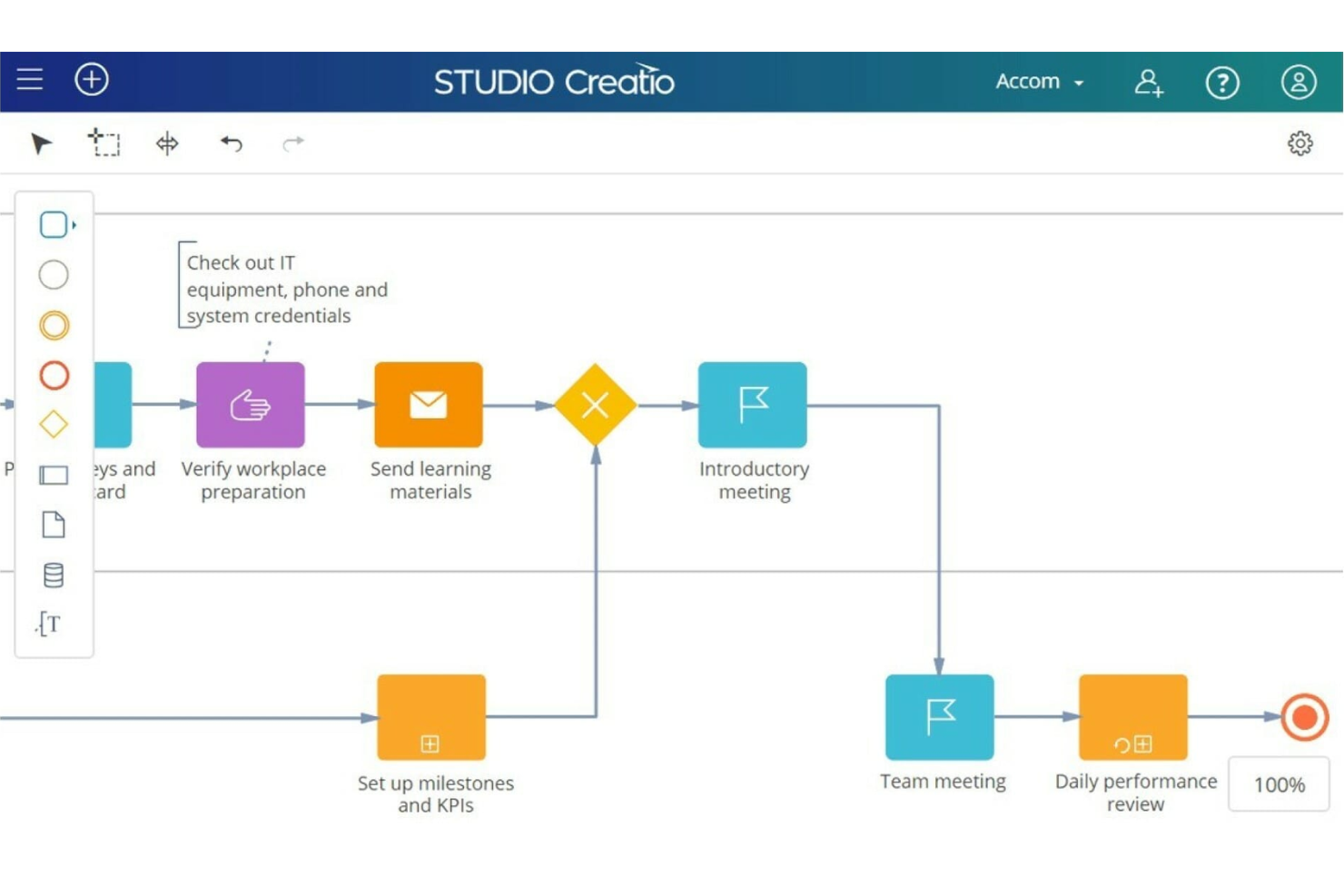
Studio Creatio is a no-code platform that enables businesses to automate workflows and build applications without the need for extensive coding knowledge.
Why I Picked Studio Creatio
The platform is highly customizable, featuring a no-code designer, which includes tools for creating and modifying pages, views, data models, workflows, and integrations within a single workspace. The platform also offers industry-specific solutions for sectors such as banking, credit unions, and insurance.
Studio Creatio's workflow automation software is part of this no-code platform. Users can design, automate, and optimize workflows with an intuitive visual interface that requires no prior programming knowledge. This feature makes the technology accessible to a broad range of professionals to help contribute to the digital transformation of their business.
Studio Creatio Key Features
In addition to customization capabilities, Studio Creatio offers several other features that cater to workflow automation needs.
- AI Tools: You can improve your automation processes with built-in AI technologies that support intelligent algorithms and integration with OpenAI, which keeps your decision-making informed.
- Creatio Marketplace: You can access a wide array of ready-to-use applications and components that can be easily integrated and customized to meet specific business needs.
- Scalability: This offers enterprise-grade scalability that can support a large number of users while maintaining high performance and reliability across workflows.
- BPMN 2.0 Process Designer: This feature lets you automate complex business processes and workflows to streamline operations across various departments.
Studio Creatio Integrations
Integrations include Chat Master, PandaDoc, SharePoint, Jira, Calendly, Zoom, Shopify, Asterisk, Microsoft Teams, Zapier, Quickbooks, and SAP BusinessOne.
Pros and Cons
Pros:
- Support for AI process recommendations
- No-code designer makes it easier to adopt for non-technical users
- Fully customizable platform, adaptable to various use cases
Cons:
- Not ideal for teams looking for a quick-start solution
- May take significant effort planning and designing workflows
New Product Updates from Creatio AI Studio
Creatio Studio Expands AI App-Building Capabilities
Creatio Studio adds expanded AI coding agents, AI-generated pivot tables, and built-in analytics for generated apps. These updates let users build more UI, logic, and reporting components from natural-language prompts. For more information, visit Creatio Studio’s official site.

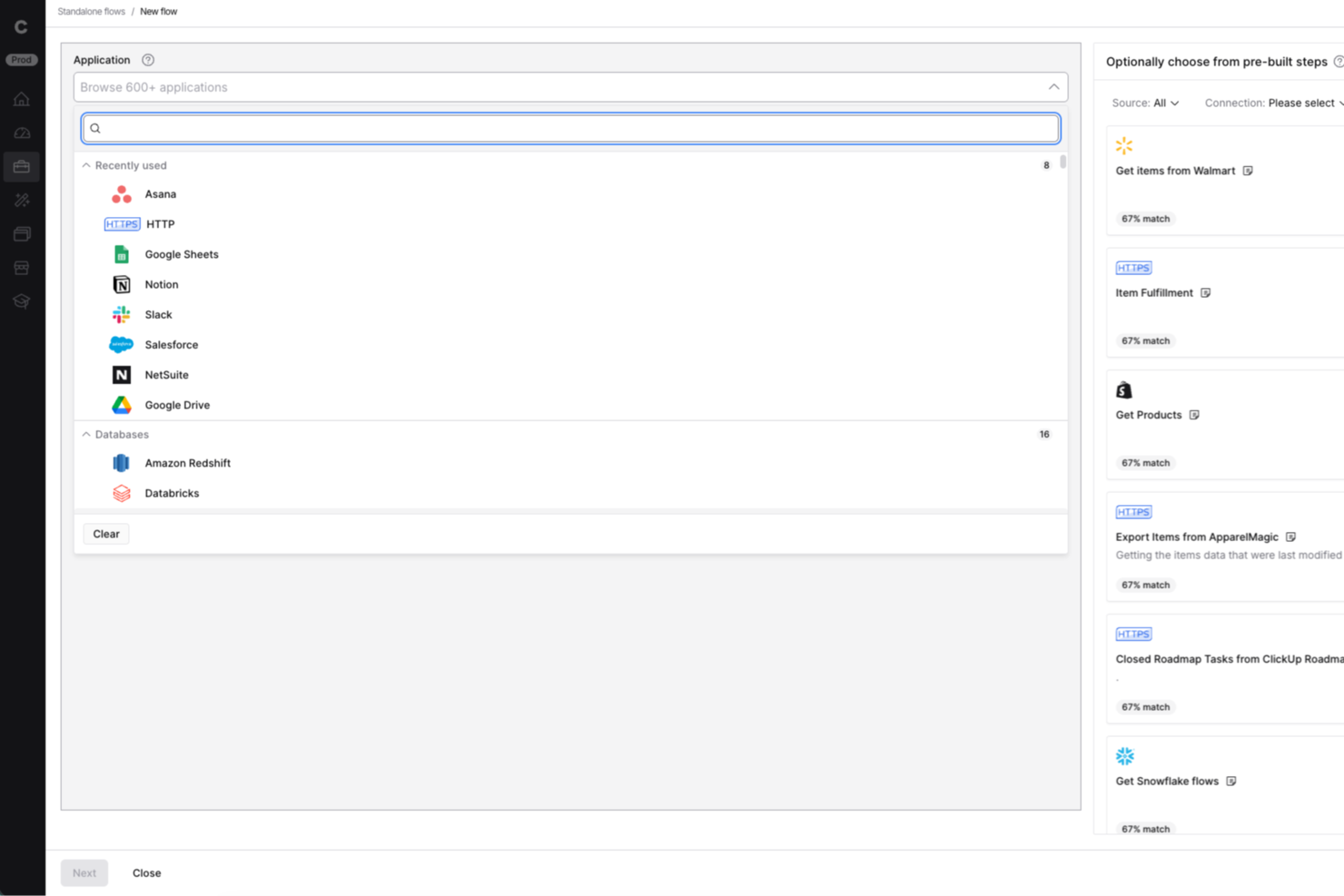
Celigo is an integration and automation platform built for IT teams and business operations leaders who need to connect cloud apps, automate workflows, and manage complex data flows across their organization.
Who Is Celigo Best For?
IT teams and operations leaders at mid-sized to large businesses who need to automate and orchestrate workflows across multiple cloud and on-premises systems.
Why I Picked Celigo
I picked Celigo as one of the best because its API management capabilities let my team build, monitor, and scale integrations with confidence. I use the platform’s API lifecycle tools to create, publish, and secure custom APIs for connecting internal and external systems. The built-in monitoring and analytics help us troubleshoot issues quickly and keep workflows running smoothly.
Celigo Key Features
- Visual flow builder: Design and automate workflows using a drag-and-drop interface.
- Prebuilt integration templates: Deploy ready-made connectors for popular SaaS and on-premises apps.
- Advanced error management: Track, resolve, and retry failed workflow steps from a centralized dashboard.
- Data transformation tools: Map, filter, and transform data between systems without custom code.
Celigo Integrations
Integrations include Salesforce, Microsoft Dynamics 365 Business Central, Oracle NetSuite, Walmart, SAP, Snowflake, Acumatica, Adobe, ADP, and 3PL Central.
Pros and Cons
Pros:
- Includes automated error handling and alerts
- Provides visual workflow builder for integrations
- Enables granular role-based access controls
Cons:
- Limited offline or on-premises deployment options
- Some connectors require additional configuration effort
New Product Updates from Celigo
Celigo Adds SuiteTax and Variant Publishing for Shopify–NetSuite
Celigo adds NetSuite SuiteTax support and variant-level sales channel publishing to its Shopify–NetSuite integration. These updates improve tax handling and give merchants more control over how product variants are published. For more information, visit Celigo’s official site.
 .
.
altaFlow
Best with Salesforce document automation
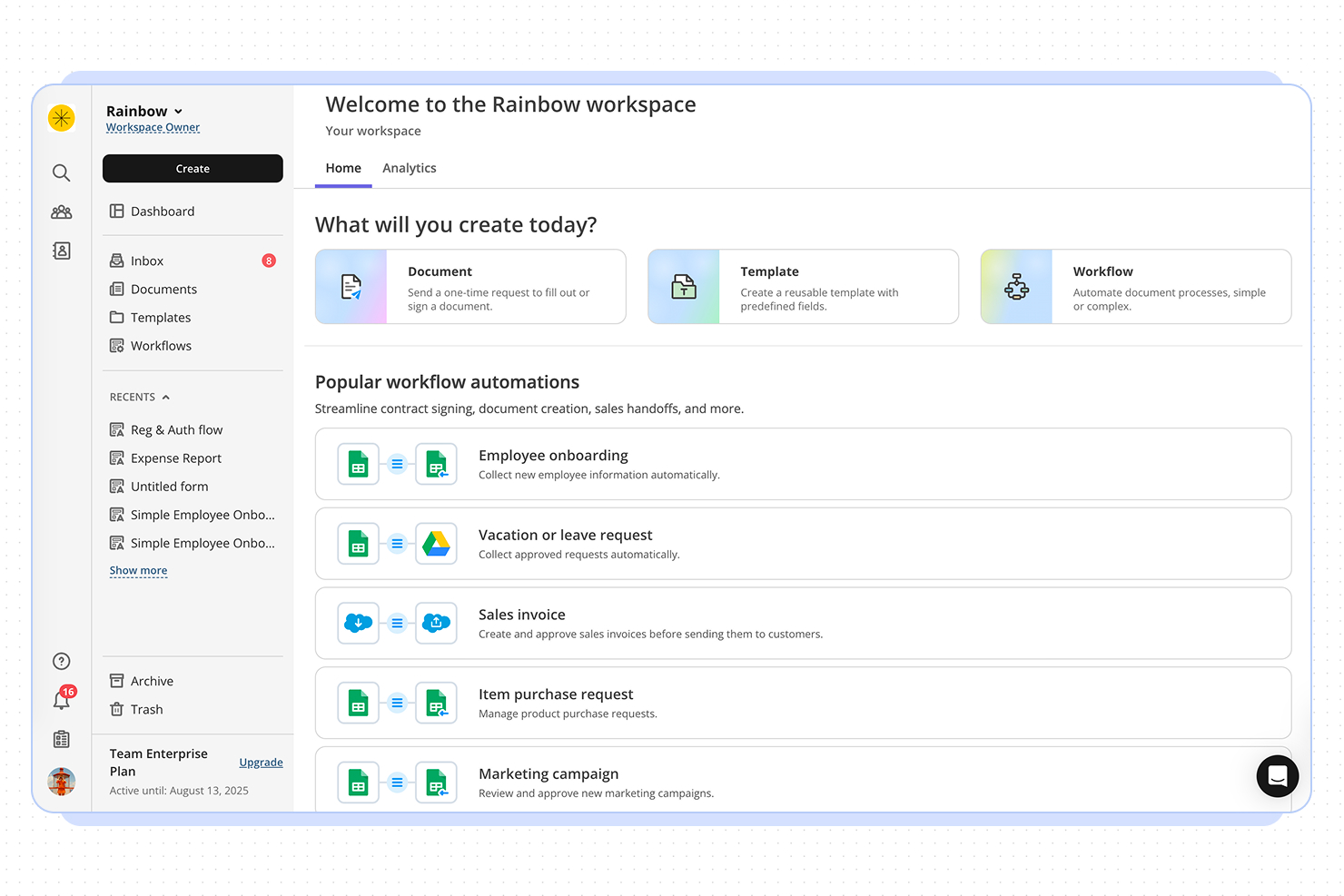
altaFlow offers workflow automation designed for organizations that need advanced document management and CRM integration. It’s a strong fit for teams in regulated industries or those handling complex approval processes. If your business relies on automating document workflows and syncing data across platforms, altaFlow addresses these needs with a focus on compliance and integration.
Who Is altaFlow Best For?
altaFlow is a good fit for mid-sized to large enterprises in regulated industries that need to automate document workflows and integrate tightly with CRM systems.
Why I Picked altaFlow
For teams that need advanced Salesforce document automation, altaFlow stands out in the workflow automation space. I picked it because it offers native document generation and automated workflow triggers directly within Salesforce, which reduces manual steps and keeps processes consistent. The platform also supports dynamic template management, letting users create, update, and distribute documents based on real-time CRM data. This focus on seamless document automation inside Salesforce makes altaFlow a strong choice for organizations that rely on accurate, timely document workflows.
altaFlow Key Features
Some other altaFlow features that support workflow automation include:
- Approval routing: Route documents and tasks to the right stakeholders for review and sign-off based on custom rules.
- Audit trails: Track every action and change within workflows to support compliance and transparency.
- Conditional workflow branching: Set up workflows that adapt dynamically based on data or user input.
- Role-based access controls: Define permissions and access levels for users to ensure sensitive information is only available to authorized team members.
altaFlow Integrations
Integrations include Salesforce, NetSuite, SharePoint, and HubSpot.
Pros and Cons
Pros:
- Custom workflow builder supports complex processes
- Automated document generation from Salesforce records
- Detailed audit trails for compliance tracking
Cons:
- Documentation and support resources are minimal
- No free-forever or trial plan available

Best for agency-focused operational insights
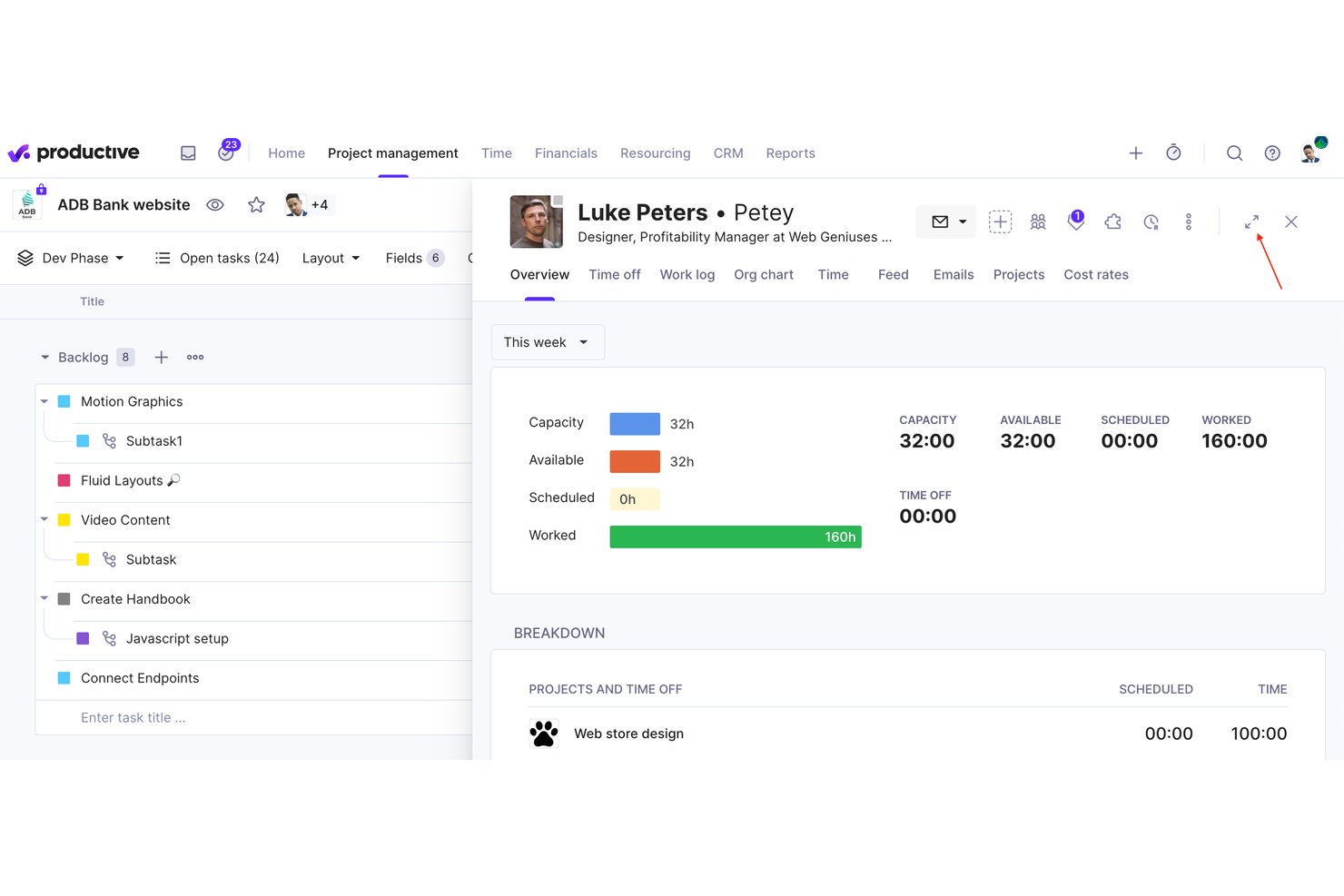
Productive is an agency management platform that combines project management, resource planning, budgeting, invoicing, and no-code workflow automation in a single tool.
Who Is Productive Best For?
Productive is built for digital agencies and consultancies that need to manage projects, resources, and finances without switching between tools.
Why I Picked Productive
Productive earns its spot on my shortlist because it gives agencies real-time profitability data at the project and client level, not just task completion rates. I like how the Scenario Builder lets you model different resourcing or budget situations before committing to them. The no-code Automations module handles recurring workflows like retainer invoicing and budget alerts, so nothing falls through the cracks mid-project.
Productive Key Features
- Resource planning: Build staff schedules and allocate resources across projects using drag-and-drop tools for precise workload management.
- Time tracking: Capture time directly from tasks using web, desktop, or mobile, with timesheet approvals built in.
- Budgeting and invoicing: Create and manage multiple budgets per project, generate invoices, and issue credit notes within the platform.
- Open API and integrations: Connect Productive to 1000+ apps or automate with Zapier, Xero, Slack, BambooHR, and more.
Productive Integrations
Productive offers native integrations with Xero, QuickBooks Online, Exact, BambooHR, Personio, Rippling, Slack, Jira, HubSpot, Google Calendar, and connects with Zapier. An open API is available for custom integrations.
Pros and Cons
Pros:
- Advanced automation for complex agency workflows
- Built-in project, budget, and resource management
- Agency operations insights updated in real time
Cons:
- Less suitable for non-agency businesses
- Advanced features only in higher tiers
New Product Updates from Productive
Productive Adds Voice Dictation, Slack Connector, Proposals, and Overtime
Productive adds voice dictation, a Slack Connector, proposal controls, and overtime tracking. These updates support faster AI interactions, client proposals, and time management. For more information, visit Productive’s official site.

Wrike
Best for scaling organizations

Wrike is a proven work management platform that includes advanced workflow improvement features. The automation engine puts everyday business processes on autopilot, cutting out time-wasting busywork.
Why I Picked Wrike
Wrike is a great fit for scaling organizations because its automation engine makes it easier to manage growing workloads without adding manual effort. As your team expands, repetitive tasks like assigning work, changing task statuses, or sending notifications can become a time sink. Wrike’s rule-based automation lets you build “if-this-then-that” logic into your workflows to help you keep tasks moving even as volume increases.
I also like its AI-powered automation suggestions. As team activity increases, it gets harder to notice where processes are lagging or breaking down. Wrike monitors those patterns and recommends automation rules to improve speed and consistency—something especially valuable when you’re onboarding new team members or launching new projects frequently.
Wrike Key Features
In addition to its scalability, Wrike offers several other features for workflow automation.
- Customizable Workflows: You can tailor workflows to fit your specific processes and make sure automations align perfectly with your team's unique needs.
- Cross-Tagging and Status Updates: You can automate tasks such as cross-tagging and status updates, which minimizes the risk of missing important steps and helps speed up your projects.
- Time Tracking: This lets you keep tabs on how much time is spent on tasks and projects so you can manage resources effectively.
- Calendar Integration: You can sync your tasks and deadlines with popular calendar apps to keep your schedule organized and up-to-date.
Wrike Integrations
Integrations include over 400 cloud and on-premises apps, including CRM, email, chat, file storage, and business intelligence. If you can't find the tool you're looking for, you can build a custom integration using Wrike's API.
Pros and Cons
Pros:
- Automates approval processes
- Highly customizable workflows
- Comprehensive feature set for various project needs
Cons:
- Potential for notification overload if not configured correctly
- The platform takes time to learn
New Product Updates from Wrike
Wrike Adds Klaxoon MCP Integration
Wrike’s Klaxoon MCP integration is now generally available, enabling AI agents to navigate between Wrike tasks and attached whiteboards, read task context, and manage whiteboard attachments via API. For more information, visit Wrike's official site.
Qntrl
Best for cross-functional processes
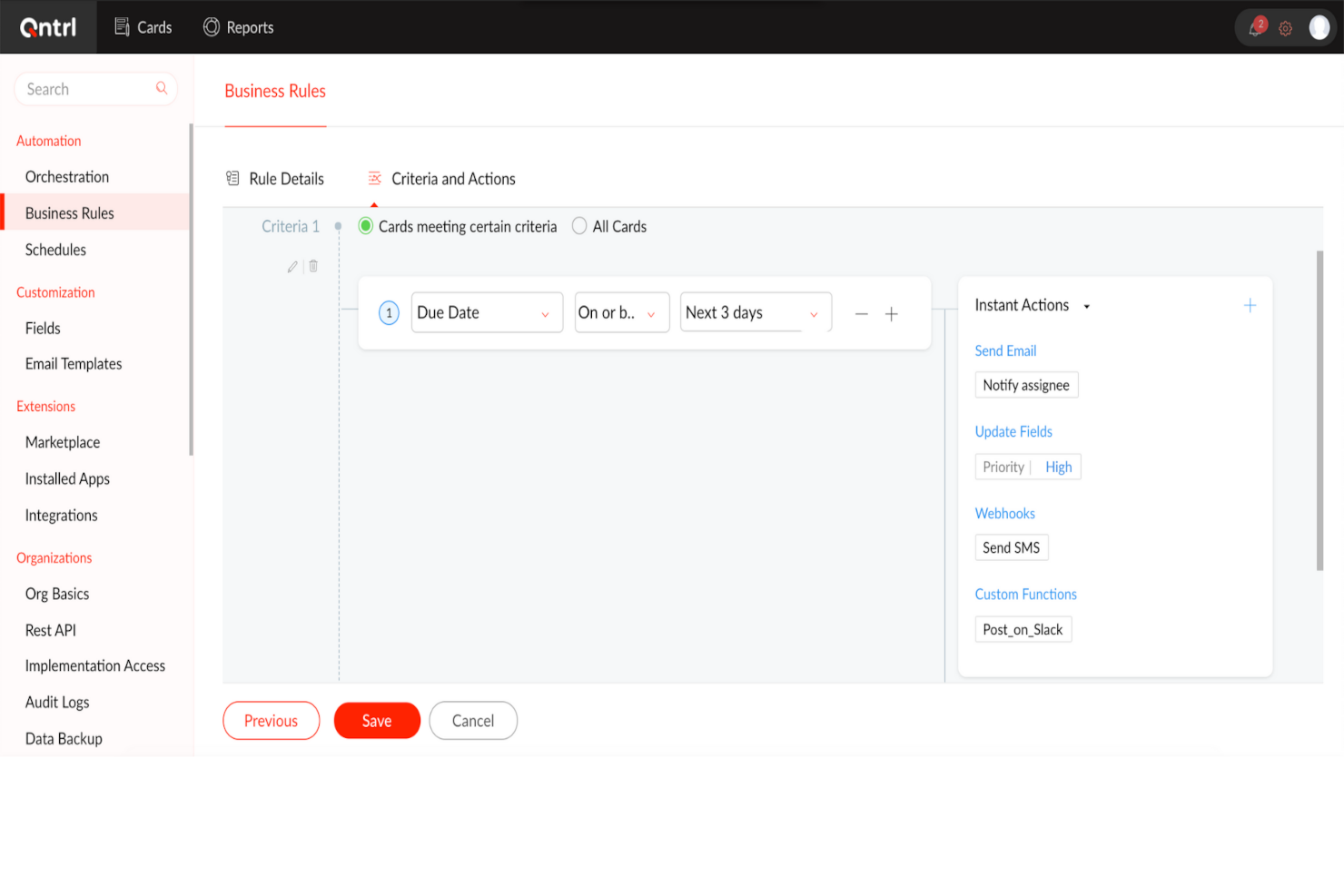
Qntrl is an advanced workflow orchestration software that improves productivity and efficiency in the workplace. At its core, it automates processes across different applications to reduce manual data entry and speed up workflows.
Why I Picked Qntrl
I chose Qntrl for its strength in managing cross-functional processes through features like Blueprint-based process modeling, form-based data capture, and role-based access controls that make sure the right people are involved at the right steps.
Its drag-and-drop workflow builder lets non-technical users quickly configure and launch end-to-end processes, while parallel transitions and stage-wise approvals allow multiple teams to collaborate simultaneously without bottlenecks. With built-in audit trails and customizable notifications, Qntrl keeps cross-departmental stakeholders informed and accountable throughout the workflow lifecycle.
Qntrl Key Features
Qntrl also offers a suite of other workflow automation features.
- Automatic Request Assignment: You can assign requests based on predefined hierarchies or dynamically through APIs to make sure tasks reach the right individuals without manual intervention.
- Post-Stage Automation: This lets you automatically trigger actions after certain stages, such as sending notifications or updating fields, to streamline follow-up tasks.
- Business Rules: You can set specific rules that dictate process behavior to maintain compliance and consistency across workflows.
- Document Generation: You can quickly create and share essential documents like purchase orders or invoices to reduce the time spent on paperwork.
Qntrl Integrations
Integrations include Salesforce, Dropbox, MS Teams, Harvest, Google Sheets, and Slack. You can also create as many custom integrations as you want using Webhooks and its API.
Pros and Cons
Pros:
- Employs robust security protocols
- Advanced automation, like conditional routing
- Extensive integration capabilities, with over 500 connections
Cons:
- More features than necessary for small teams
- Learning curve for more advanced features

TrailHQ
Best for custom LLMs
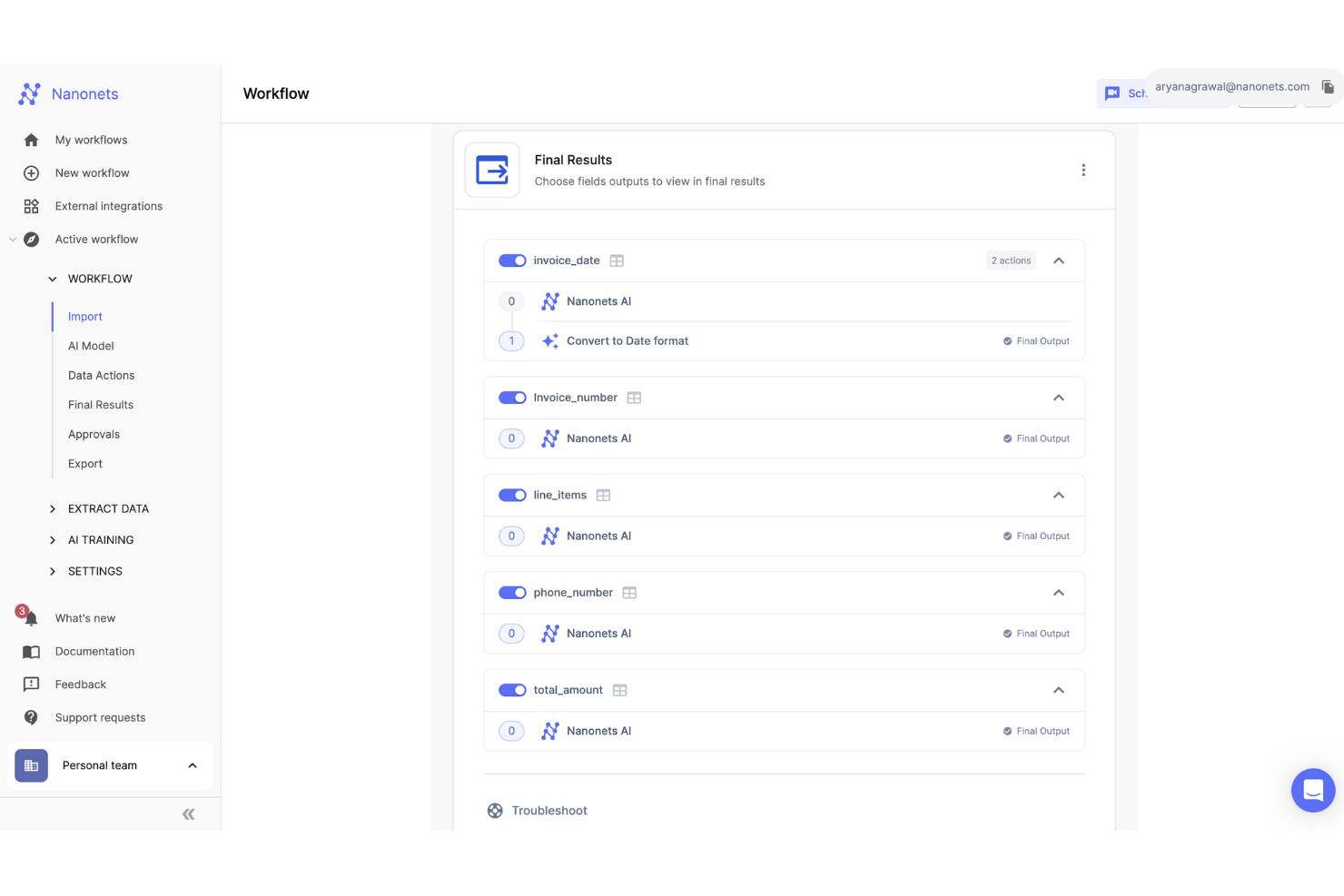
Nanonets is an AI-driven platform that automates the processing of documents and manages workflows across sectors like finance, healthcare, and logistics. It efficiently handles tasks such as data extraction, invoice processing, and accounts payable, minimizing manual labor and reducing processing times.
Why I Picked Nanonets
I chose Nanonets for its AI-driven capabilities that can automate complex workflows using natural language processing, allowing you to manage workflows that interact with various apps and data sources. The platform supports custom Language Learning Models (LLMs) for tailored responses and actions, enhancing workflow customization to meet specific business needs. This lets you design workflows that are automated and adaptive to unique business environments.
Additionally, Nanonets offers a human-in-the-loop feature for manual approvals, providing an extra layer of accuracy in automated workflows. It's also a no-code platform, so you can automate these workflows without coding expertise.
Nanonets Key Features
Nanonets also offers a variety of other features that make it appealing as a workflow automation tool.
- Advanced Optical Character Recognition: This feature lets you convert various document types into editable data, which streamlines document processing tasks.
- Automated Workflows: You can set up workflows that handle repetitive tasks, which frees your team up to focus on more strategic activities.
- Multiple File Upload Options: This lets you upload and process multiple documents simultaneously, which improves efficiency in handling bulk data.
- Data Extraction Capabilities: You can extract data accurately to reduce errors and make sure your workflows maintain high levels of precision.
Nanonets Integrations
Integrations include QuickBooks, Salesforce, Google Sheets, Dropbox, and Zapier.
Pros and Cons
Pros:
- Simple API for easy integration
- Compatible with multiple programming languages
- Data extraction features
Cons:
- Fewer customization options than other tools
- May not be suitable for more extensive machine learning projects with large datasets
Annen programvare for arbeidsflytautomatisering
Her er noen verktøy som ikke nådde helt opp, men som likevel er verdt å vurdere.
- ClickUp
For workflow automation flexibility
- Integrately
For an AI automation builder
- Jira
For agile project management
- Adobe Workfront
For comprehensive project oversight
- Camunda Platform
For high-volume automation
- Bonsai Agency Software
For agency and consultancy workflows
- Kissflow Workflow
For non-technical users
- Next Matter
For complex workflows
- Pneumatic Workflow
For templated workflows
- Boomi Flow
For low-code workflow automation
- Miro
For drag-and-drop workflows
- Jotform Workflows
For no-code workflow building
- Smartsheet
For dynamic workflows
- SysAid
For IT service management
- Hive
For beginners
- Kantata
For professional services
- StreamWork
For creative workflows
- Parabola.io
For automating data-heavy workflows
- DocuWare
For document management
- Make
For visual-first automation


How I Evaluate Workflow Automation Software
I split my evaluation into two layers: the core trigger, routing, and builder capabilities a tool must have, and the differentiators—like AI automation and cross-project logic—that separate the best.
Core Functionality (Table Stakes For This List)
When I'm selecting tools for my list, I rank each one on a scale from 0 (does not offer the functionality) to 5 (excels in this area) for each core functionality listed below. Then, I calculate the tool's total score into a percentage. Each tool needs to achieve a minimum total score of 65% to be considered for inclusion.
- Visual Workflow Builder: I look for a drag-and-drop canvas where you can map out multi-step processes visually, like building a sprint kickoff sequence from intake to task assignment.
- Trigger-Based Automation: Each tool should let you set event-driven triggers—status changes, form submissions, due dates—that kick off actions without manual intervention.
- Conditional Logic & Branching: I evaluate whether a tool supports if/then rules and multi-path branching, like routing a change request to different reviewers based on project tier.
- Task & Approval Routing: The platform should auto-assign tasks and route approvals based on rules you define, including escalation paths when approvers miss their deadlines.
- Third-Party Integrations: I check for native connectors to tools like Jira, Slack, Salesforce, and HubSpot, plus API access and webhook support for custom connections.
- Workflow Templates & Reusability: A solid template library and the ability to clone and adapt workflows across projects matter, especially for PMOs managing recurring delivery processes.
Once I have a list of tools that meet the criteria, I consider what sets each platform apart.
Differentiating Factors (What Sets Vendors Apart)
Here's how I compare and contrast different vendors:
Standout Features
AI-powered automation is a big differentiator. I look for tools that suggest rules based on past behaviour or let you describe a workflow in plain language and generate it automatically. Cross-project dependency handling also matters—program managers need automations that span multiple projects, like triggering a downstream team's tasks when an upstream milestone is marked complete. I also evaluate real-time analytics dashboards that surface cycle times and bottleneck patterns across workflows, giving PMOs the data they need to iterate on their processes.
Beyond Features
Total cost of ownership is something I evaluate closely—automation run limits and per-user fees can quietly inflate costs as your team scales from a single scrum team to an enterprise PMO. Security and compliance also weigh heavily. I check for SOC 2 Type II certification, SSO/SAML support, and role-based access controls, especially for teams in regulated industries handling sensitive project data. Scalability rounds it out—I look at how well a platform performs when you're running hundreds of concurrent automations across a full project portfolio.
Slik velger du programvare for arbeidsflytautomatisering
Det er lett å gå seg vill i lange funksjonslister og kompliserte prismodeller. For å hjelpe deg med å holde fokus mens du går gjennom den unike prosessen din for valg av programvare, får du her en sjekkliste over faktorer du bør ha i bakhodet:
| Faktor | Hva du bør vurdere |
|---|---|
| Skalerbarhet | Forsikre deg om at programvaren kan håndtere økende arbeidsflyter, brukere og kompleksitet etter hvert som virksomheten vokser. Se etter trinnvis prising, funksjoner på bedriftsnivå og ytelsesmålinger for å unngå at du vokser fra systemet. |
| Integrasjoner | Automatiseringsverktøyet bør kobles sømløst til den eksisterende programvarestakken din, inkludert CRM-, ERP- og kommunikasjonsverktøy som Slack eller Microsoft Teams. Opprinnelige integrasjoner og API-støtte er avgjørende. |
| Tilpasningsmuligheter | Velg en løsning som lar deg tilpasse arbeidsflyter til de spesifikke prosessene dine. Dra-og-slipp-verktøy, betinget logikk og skriptbaserte automatiseringsalternativer kan hjelpe deg med å finjustere automatiseringen etter teamets behov. |
| Brukervennlighet | Et brukervennlig grensesnitt med alternativer med lite eller ingen kode gjør det mulig for teamet å opprette og endre arbeidsflyter uten hjelp fra IT-avdelingen. Se etter et enkelt kontrollpanel og et intuitivt oppsett. |
| Budsjett | Ta hensyn til både kostnader på forhånd og langsiktige utgifter som abonnementsavgifter, tillegg og supportkostnader. Noen plattformer tar betalt per bruker, mens andre skalerer basert på automatiseringsvolum. |
| Sikkerhetstiltak | Programvaren bør tilby rollebasert tilgang, datakryptering og samsvar med standarder som GDPR eller SOC 2. Kontroller revisjonslogger og sikkerhetskopieringspolicyer for å beskytte sensitive data i arbeidsflytene. |
| AI- og automatiseringsfunksjoner | Se etter AI-drevet automatisering, prediktiv analyse og smarte utløsere som forbedrer effektiviteten. Funksjoner som automatisk datauttrekking og intelligente beslutninger kan redusere manuelt arbeid. |
| Kundestøtte og pålitelighet | Vurder alternativer for kundestøtte, garantier for oppetid og brukerfora. Et sterkt supportsystem sikrer smidig implementering og minimale avbrudd når problemer oppstår |
Trender innen programvare for arbeidsflytautomatisering i 2025
I researchen min hentet jeg inn utallige produktoppdateringer, pressemeldinger og utgivelseslogger fra ulike leverandører av programvare for arbeidsflytautomatisering. Her er noen av trendene som er på vei frem, og som jeg følger med på:
- AI-drevet prosessoptimalisering: AI brukes nå til å analysere arbeidsflytdata, identifisere ineffektivitet og foreslå forbedringer. Noen verktøy justerer nå automatisk oppgavefordelingen basert på arbeidsbelastningsmønstre eller forutsier forsinkelser før de oppstår.
- Arbeidsflytverktøy uten kode: Mer programvare for intelligent prosessautomatisering forenkler automatisering for ikke-tekniske brukere med dra-og-slipp-verktøy og arbeidsflytmaler. Dette lar team bygge komplekse automatiseringer uten koding eller hjelp fra IT-avdelingen.
- Hyperautomatiseringsstrategier: Virksomheter kombinerer arbeidsflytautomatisering, Robotic Process Automation (RPA), AI og hendelsesstyrte utløsere for å redusere manuelt arbeid på tvers av forretningsprosesser. Dette reduserer menneskelig involvering i repetitive oppgaver som fakturering og introduksjon av nyansatte.
- Styrings- og samsvarskontroller: Etter hvert som automatisering utvides på tvers av bransjer, innføres strengere kontroller for datasikkerhet, revisjon og samsvar. Organisasjoner kan nå håndheve rollebaserte tillatelser, opprettholde detaljerte aktivitetslogger og automatisere rapportering av samsvar.
- Overvåking av arbeidsflyter i sanntid: Virksomheter krever bedre innsyn i automatiserte prosesser med aktive kontrollpaneler, varsler og prediktiv analyse. Overvåking i sanntid hjelper team med å oppdage feil i arbeidsflyter, følge prosesseffektiviteten og gjøre raske justeringer for å unngå flaskehalser.
Hva er programvare for arbeidsflytautomatisering?
Programvare for arbeidsflytautomatisering er et verktøy som automatiserer repetitive oppgaver og flertrinnsprosesser på tvers av apper, team og avdelinger.
Disse plattformene hjelper prosjektledere med å redusere manuelt arbeid ved å automatisere godkjenninger, varsler, tildelinger og dataflytting mellom verktøy. De brukes av team innen drift, markedsføring, IT, HR og mer for å effektivisere daglige arbeidsflyter, redusere forsinkelser og forbedre prosessnøyaktigheten. Enten du videresender forespørsler, planlegger oppgaver eller synkroniserer data mellom plattformer, fjerner programvare for arbeidsflytautomatisering friksjon fra tverrfunksjonelt arbeid.
Typer arbeidsflytautomatisering
Arbeidsflytautomatisering er nyttig i alle bransjer som drar nytte av strømlinjeformede prosesser og større effektivitet. Viktige typer arbeidsflytautomatisering inkluderer:
- Automatisering av markedsføringsarbeidsflyt: Programvare for innholdsarbeidsflyt automatiserer oppgaver som e-postkampanjer, publisering i sosiale medier og pleie av potensielle kunder.
- Automatisering av salgsarbeidsflyt: Programvare for automatisering av forretningsprosesser bidrar til å automatisere håndtering av potensielle kunder, kontraktsgodkjenninger og sporing av salgspipeline.
- Automatisering av arbeidsflyt for kundeservice: Programvare for prosessautomatisering automatiserer tildeling av saker, kundehenvendelser og innsamling av tilbakemeldinger.
- Automatisering av HR-arbeidsflyt: Verktøy for oppgaveautomatisering håndterer introduksjon av ansatte, medarbeidersamtaler og oppgaver knyttet til etterlevelse.
- Automatisering av arbeidsflyt for økonomi: Automatiserer godkjenning av utgifter, fakturering og lønn med verktøy for automatisering av forretningsprosesser.
- Automatisering av IT-arbeidsflyt: Effektiviserer systemoppdateringer, sikkerhetskopieringsprosesser og tjenesteforespørsler gjennom verktøy for IT-prosessautomatisering.
- Automatisering av arbeidsflyt i forsyningskjeden: Bidrar til å automatisere lagerstyring, ordrebehandling og kommunikasjon med leverandører.
- Automatisering av arbeidsflyt i produksjonen: En plattform for prosessautomatisering effektiviserer produksjonsplanlegging, kvalitetskontroller og sporing av vedlikehold.
Funksjoner i programvare for arbeidsflytautomatisering
Når du velger programvare for arbeidsflytautomatisering, bør du se etter disse viktige funksjonene:
- Arbeidsflytbygger med dra og slipp: Du kan utforme og justere prosesser visuelt uten programmering ved å dra elementer inn på et lerret. Dette gjør det raskt og intuitivt å opprette, finjustere og forstå arbeidsflyter.
- Integrasjonsmuligheter: Du kan koble apper og tjenester du allerede bruker (f.eks. CRM-systemer, e-post, databaser og skylagring) til systemet. Dette reduserer behovet for kopiering og innliming samt manuell overføring av informasjon mellom verktøy.
- Betinget logikk: Du kan angi regler slik at programvaren automatisk sender oppgaver videre eller utløser handlinger basert på data, status eller kriterier du definerer. Det hjelper deg med å unngå gjentatte manuelle beslutninger og holder prosessene i gang på en smidig måte.
- Oppgavetildeling og varsler: Dette lar deg tildele oppgaver til de rette teammedlemmene og konfigurere automatiske påminnelser og varsler, slik at alle holder seg på sporet og er oppdatert etter hvert som arbeidsflytene skrider frem.
- Revisjonsspor og rapportering: Du kan spore alle handlinger og endringer i arbeidsflytene dine. Dette er nyttig når du trenger å feilsøke, vurdere produktivitet eller dokumentere etterlevelse.
- Tilpassbare maler: Dette lar deg starte med ferdiglagde arbeidsflytmaler som du kan tilpasse etter behov, og hjelper deg med å komme raskere i gang.
- Brukertillatelser og tilgangskontroll: Du kan angi ulike tilgangsnivåer slik at bare de rette personene kan se eller redigere bestemte arbeidsflyter eller data.
- Mobiltilgang: Dette lar deg administrere og overvåke arbeidsflyter mens du er på farten, slik at du kan godkjenne forespørsler, tildele oppgaver på nytt eller få oppdateringer når som helst og hvor som helst.
Vanlige AI-funksjoner i programvare for arbeidsflytautomatisering
I tillegg til standardfunksjonene i programvare for arbeidsflytautomatisering som er oppført ovenfor, kan programvare for AI-drevet arbeidsflytautomatisering tilby funksjoner som:
- Forutseende oppgavetildeling: Dette AI-verktøyet kan automatisk foreslå eller tildele oppgaver basert på teamets arbeidsvaner, arbeidsmengder og tidsfrister, noe som fjerner behovet for gjetting.
- Automatisert datauttrekking: Denne AI-funksjonen kan skanne e-poster, dokumenter eller bilder, hente ut viktig informasjon og sende den til riktig sted for å redusere manuell dataregistrering og feil.
- Anbefalinger for prosessoptimalisering: Ved hjelp av data fra tidligere aktivitet kan denne AI-funksjonen identifisere flaskehalser, ineffektivitet eller gjentatte feil og gi deg målrettede forslag for å få ting til å gå raskere.
- Naturlig språkbehandling: Du kan kommunisere med AI-funksjonene ved hjelp av dagligdagse formuleringer, noe som gjør automatisering tilgjengelig for alle teammedlemmer.
- Avviksdeteksjon: AI kan kontinuerlig overvåke arbeidsflytaktivitet, flagge oversittede tidsfrister eller uregelmessige mønstre og hjelpe deg med å oppdage problemer før de påvirker produktiviteten.
Noen verktøy er mye mer fleksible og gir mulighet for dypere tilpasning, særlig når det gjelder automatisering og formler. Andre er imidlertid enklere å bruke og har et mer intuitivt grensesnitt.

Fordeler med programvare for arbeidsflytautomatisering
Å ta i bruk programvare for arbeidsflytautomatisering kan gi flere fordeler for teamet og virksomheten din. Her er noen du kan se frem til:
- Raskere oppgavefullføring: Automatiserte arbeidsflyter flytter oppgaver gjennom hvert trinn uten forsinkelser, noe som reduserer flaskehalser og ventetid.
- Færre feil: Automatisering eliminerer manuell dataregistrering og overleveringer, noe som reduserer risikoen for feil og uoverensstemmelser.
- Bedre innsyn i prosessene: Arbeidsflytdiagrammer og sporingsverktøy lar deg se hvor oppgavene befinner seg, slik at det blir enklere å oppdage ineffektivitet.
- Bedre ansvarlighet: Revisjonslogger og rollebasert tilgang sikrer at oppgavene håndteres av de riktige personene, og at handlingene registreres fullstendig.
- Mer konsistente resultater: Standardiserte arbeidsflyter håndhever regler og beste praksis, slik at prosessene kjøres på samme måte hver gang.
- Mindre tid brukt på godkjenninger: Automatiserte godkjenningsflyter sender forespørsler til de riktige personene umiddelbart og utløser de neste trinnene når de er godkjent.
- Enklere skalering: Automatiserte prosesser tilpasser seg etter hvert som teamet vokser, og håndterer mer arbeid uten behov for mer manuell innsats. Vær imidlertid oppmerksom på at hvis du ønsker at løsningen skal kunne skaleres fra automatisering av prosesser i ett prosjekt til gjensidig avhengige arbeidsflyter på tvers av flere systemer, trenger du et annet alternativ. Verktøy for arbeidsflytorkestrering kan hjelpe deg med å håndtere mer komplekse automatiseringer på tvers av systemer og team.
Kostnader og priser for programvare for arbeidsflytautomatisering
Når du velger programvare for arbeidsflytautomatisering, må du ha en forståelse av de ulike prismodellene og abonnementene som er tilgjengelige. Kostnadene varierer basert på funksjoner, teamstørrelse, tillegg og mer. Tabellen nedenfor oppsummerer vanlige abonnementer, gjennomsnittsprisene deres og typiske funksjoner som er inkludert i programvareløsninger for arbeidsflytautomatisering:
Sammenligningstabell for programvare for arbeidsflytautomatisering
| Abonnementsnavn | Pris (per bruker/måned) | Funksjoner |
|---|---|---|
| Gratis | $0 | Grunnleggende automatisering, begrenset antall brukere og arbeidsflyter, grunnleggende integrasjoner |
| Grunnleggende | $10 - $20 | Oppgaveautomatisering, enkel tilpasning av arbeidsflyter, grunnleggende rapportering, begrenset antall brukere og arbeidsflyter |
| Standard | $20 - $50 | Avansert automatisering, tilpasning av arbeidsflyter, rapportering og analyse, integrasjoner, flere brukere |
| Premium | $50 - $100 | Avanserte funksjoner for arbeidsflytautomatisering, tilpassbare arbeidsflyter, avansert rapportering, ubegrenset antall brukere |
Vanlige spørsmål om programvare for automatisering av arbeidsflyt
Finn svar på vanlige spørsmål om dette emnet.
Hvordan automatiserer jeg arbeidsflytene mine?
For å automatisere arbeidsflyter i prosjekter kan du begynne med å lage et arbeidsflytdiagram som tydelig viser hvert trinn, fra opprettelse av oppgaven til fullføring. Identifiser gjentakende handlinger – som oppgavetildelinger, statusoppdateringer eller dokumentdeling – som kan dra nytte av automatisering.
Velg deretter en plattform som støtter automatiseringsfunksjoner. Konfigurer regler som «hvis en oppgave er merket som fullført, skal neste teammedlem varsles» eller «hvis et skjema sendes inn, skal godkjenningsarbeidsflyten utløses». Automatisering av en godkjenningsarbeidsflyt er spesielt nyttig for å redusere forsinkelser og holde arbeidet i gang. Begynn i det små, test grundig og juster etter behov.
Hvordan kan programvare for automatisering av arbeidsflyt integreres med eksisterende CRM-systemer?
Verktøy for automatisering av arbeidsflyt tilbyr ofte omfattende integrasjonsmuligheter med CRM-systemer for å effektivisere prosesser og forbedre dataflyten mellom plattformer. Disse integrasjonene gjør det vanligvis mulig å automatisere oppgaver som dataregistrering, kundeemnesporing og kundekommunikasjon, slik at informasjonen forblir oppdatert på tvers av systemene.
Kan programvare for automatisering av arbeidsflyt tilpasses unike forretningsprosesser?
Ja, mange verktøy for automatisering av arbeidsflyt er utviklet med tilpasning i tankene, slik at de kan dekke de spesifikke behovene til ulike forretningsprosesser. Denne fleksibiliteten gjør det mulig for organisasjoner å tilpasse programvarens funksjonalitet til sine driftskrav, fra tilpassede arbeidsflyter og skjemaer til spesifikke automatiseringsregler.
Hvor skalerbare er disse løsningene når en virksomhet vokser?
Løsninger for automatisering av arbeidsflyt er vanligvis utviklet med tanke på skalerbarhet, slik at virksomheter kan tilpasse seg og vokse uten å vokse fra selve programvaren. Disse plattformene er utformet for å håndtere økende arbeidsmengder og mer komplekse prosesser etter hvert som selskapet ekspanderer. Muligheten til å legge til brukere, integrere flere systemer og automatisere et bredere spekter av oppgaver gjør at verktøyene kan vokse sammen med virksomheten, slik at investeringen forblir lønnsom på lang sikt.
Hvordan påvirker verktøy for automatisering av arbeidsflyt prosjektfrister og ressursallokering?
Verktøy for automatisering av arbeidsflyt fremskynder vanligvis gjentakende oppgaver, reduserer flaskehalser og bidrar til å fordele arbeidet jevnere i teamet. Ved å effektivisere godkjenninger, overleveringer og varsler er det mindre sannsynlig at du går glipp av frister. Funksjoner for ressursplanlegging kan også hjelpe deg med å overvåke arbeidsbelastningen og forhindre over- eller underutnyttelse.
Hvordan får jeg teamet mitt til å ta i bruk nye verktøy for automatisering av arbeidsflyt?
Begynn med tydelig kommunikasjon om fordelene, og tilby praktisk opplæring. Involver viktige teammedlemmer i valg og testing av programvaren, slik at de får større eierskap. Bruk trinnvis innføring og tilby løpende støtte. Fremhev raske gevinster og vis hvordan automatisering reduserer tidkrevende arbeid og gjør jobben enklere.