10 beste verktøy for ressursstyring i 2026 (10+ testet)

10 Beste programvare for ressursstyring – kortliste


Programvare for ressursstyring hjelper deg med å administrere prosjektteamet og andre ressurser, slik at du kan optimalisere teamets tidsbruk og utnyttelse og fullføre prosjekter i tide og innenfor budsjettet. Uten det rette verktøyet vil du møte budsjettbegrensninger, planleggingskonflikter og manglende oversikt over hvem som jobber med hva, eller når de jobber med det.
Gjennom mine år innen prosjektledelse har jeg sett alt som kan gå galt med ressursplanlegging. Verktøy for ressursstyring reduserer tiden og innsatsen som kreves for å løse disse problemene. Derfor er dette mine anbefalinger av den beste programvaren for ressursstyring. Jeg har vurdert hvert verktøy og undersøkt om det kan håndtere vanlige utfordringer innen ressursplanlegging, slik at du kan finne den rette løsningen for prosjektene og teamene dine.
Why Trust Our Software Recommendations
Our team has been testing and reviewing software since 2012. As project managers ourselves, we know how difficult—and important—it is to choose the right software.
For this guide, we evaluated tools using hands-on testing and independent research, scoring tools using our selection criteria. We also draw on insights from industry thought leaders and practicing project management experts.
Our reviews reflect our human editorial judgment, not a sales pitch.
Expert reviewers:
Sammenligningstabell for programvare og verktøy for ressursstyring &
Sammenlign priser og spesifikasjoner for hvert verktøy på kortlisten min nedenfor.
| Tool | Best For | Trial Info | Price | ||
|---|---|---|---|---|---|
| 1 | Best for resourcing with financial visibility | 30-day free trial available | From $7/scheduled user/month | Website | |
| 2 | Best for resource planning & capacity management | 60-day free trial + free demo | Pricing upon request | Website | |
| 3 | Best for multi-departmental complex organisations | Free demo available | Pricing upon request | Website | |
| 4 | Best resource planning and capacity forecasting | 14-day free trial | From $10/user/month (billed annually) | Website | |
| 5 | Best for forecasting team utilization | 14-day free trial | From $17/user/month | Website | |
| 6 | Best for people-centric resourcing | Free demo available | Pricing upon request | Website | |
| 7 | Best for real-time team capacity planning | 30-day free trial | From $7/user/month (billed annually) | Website | |
| 8 | Best for capacity planning on a low per-seat cost | Free plan available | From $6/user/month (billed annually) | Website | |
| 9 | Best for simple workload planning | Free plan available | From $9/user/month (billed annually) | Website | |
| 10 | Best for Microsoft users | 30-day free trial | From $10/user/month (billed annually) | Website |


Anmeldelser av den beste programvaren for ressursstyring
Nedenfor finner du mine valg av den beste programvaren og de beste verktøyene for ressursstyring. Jeg har gitt en detaljert oppsummering av hvert verktøy, inkludert skjermbilder, fremtredende funksjoner, integrasjoner samt noen fordeler og ulemper.

Best for resourcing with financial visibility

Float.com is a resource management software that helps professional services teams allocate, scope, and report on client work to improve their profitability. You get the context and data you need to match the right people to the right projects when resourcing client work.
Why I Picked Float.com
I picked Float for its fast, visual scheduling and delivery insights. You can see utilization, cost, and billable rates at a glance while planning work. Color-coded drag-and-drop allocations, keyboard shortcuts, and hour or percentage views make resource planning intuitive. It also flags conflicts like over-allocations, tentative work, or time off. Float helps teams forecast capacity and track the revenue, cost, and margin impact of resourcing decisions while providing visibility into project delivery and team utilization.
Float.com Key Features
In addition to its standout visual scheduling and real-time capacity tracking, Float offers several other features that can help you with resource management.
- Time Tracking: Your team can log hours directly into the platform, which provides accurate insights into time spent on various tasks and helps you improve project estimations.
- Project Forecasting: Float's forecasting tools let you predict project timelines and budgets, so you have a clear understanding of future resource needs and potential financial outcomes.
- Role and Skill Tracking: People's roles, skills, and availability live in Float and update in real time.
- Financial Insights: Manage project budgets, track margins, forecast revenue, and gain visibility into the financial impact of resource allocation decisions.
Float.com Integrations
Integrations include Google Calendar, Outlook Calendar, Slack, Jira, Asana, Teamwork, and Trello. Float also has a Zapier app that lets connect to a library of 1,000+ apps like your favorite project management systems or your CRM.
Pros and Cons
Pros:
- 24/7 AI chat with weekday human support
- Strong resourcing context and data
- Mobile app for iOS and Android
Cons:
- Time tracking requires you to get a higher plan
- Updating staff/personnel list takes time
New Product Updates from Float.com

Float Adds Rate Cards and Multi-Currency Billing
Float introduced centralized rate cards to standardize bill rates across projects and added multi-currency support to bill clients consistently across regions. For more information, visit Float's official site.
Saviom
Best for resource planning & capacity management
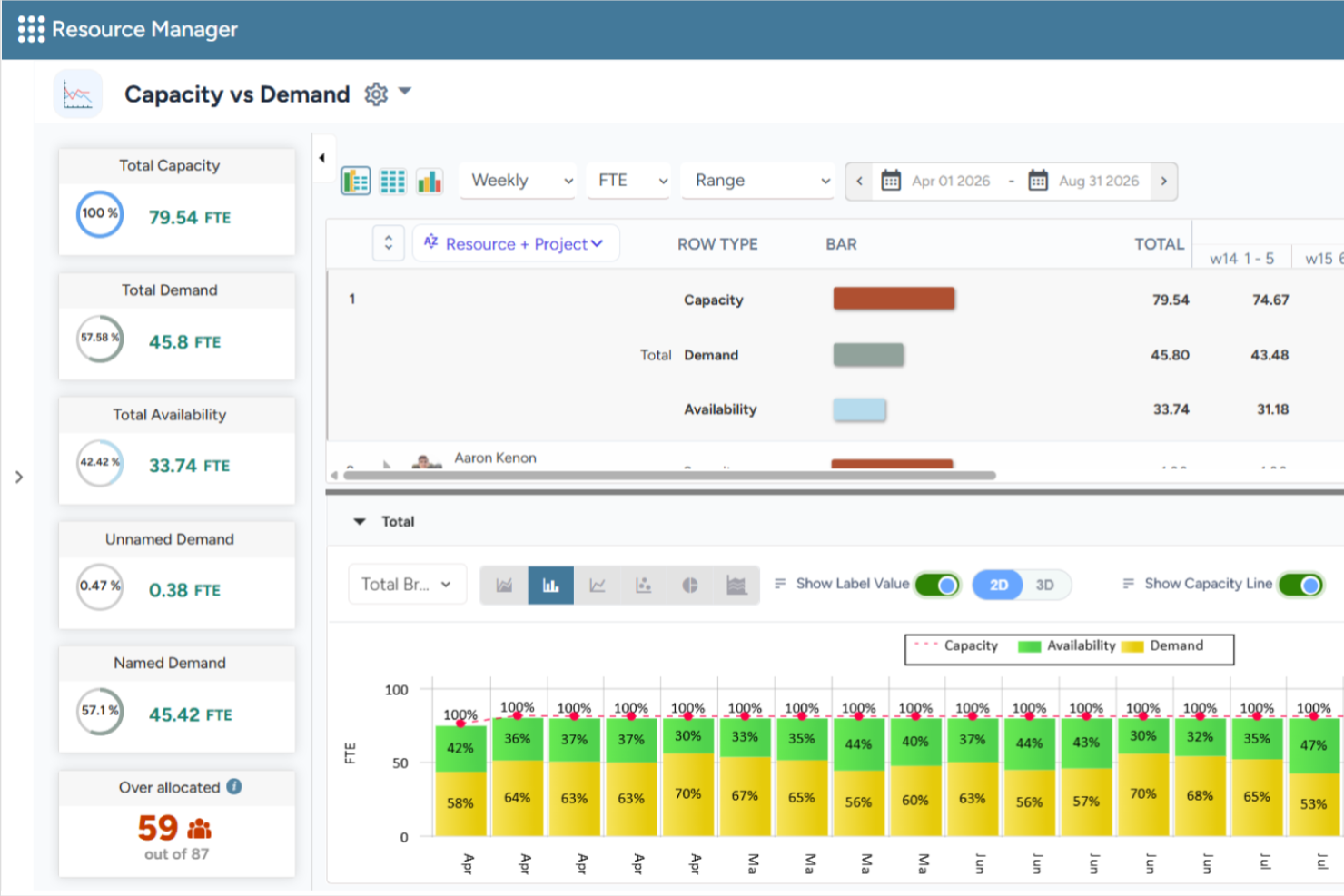
Saviom is a configurable and scalable resource management software built to combat the resourcing challenges across all industries. It can align resource capacity to changing demands for current and future projects in the pipeline. The platform also helps organizations forecast resource demand, optimize utilization, and support long-term workforce planning across complex project portfolios.
Why I Picked Saviom
I chose Saviom for its suite of advanced features, such as multidimensional scheduling, capacity planning, real-time optimization, talent planning, time management, and business intelligence reports. Its configurable software architecture can be customized and scaled up to meet the specific business requirements. Role-specific dashboards also enable various stakeholders to fast-track decision-making across matrix boundaries. I also like that it includes scenario modeling capabilities, allowing teams to compare different resource plans before making changes, as well as resource financial planning tools that help forecast resource costs and support staffing decisions.
Saviom Key Features
In addition to scheduling and forecasting capabilities, Saviom offers several other valuable features for resource management.
- Resource Capacity Planning: Forecast future resource demand, compare it against available capacity, and identify potential shortages or excess capacity before they impact project delivery.
- Scenario Modeling: Compare multiple staffing and project scenarios before applying changes to live resource plans.
- Talent Planning: Proactively address skill shortages, forecast demand, maintain an updated skill inventory, and ensure teams are prepared for current and future projects.
- Reports, Analytics & Dashboards: Access customizable real-time business intelligence reports and dashboards that provide visibility into resource utilization, availability, and key workforce metrics.
Saviom Integrations
Integrations are available with popular business applications, although specific examples aren't mentioned.
Pros and Cons
Pros:
- Flexible real-time reports, analytics, & dashboards
- Highly configurable & customizable resource management
- Multidimensional forecasting and capacity planning
Cons:
- Extensive features mean steep learning curve
- Less suited for small companies
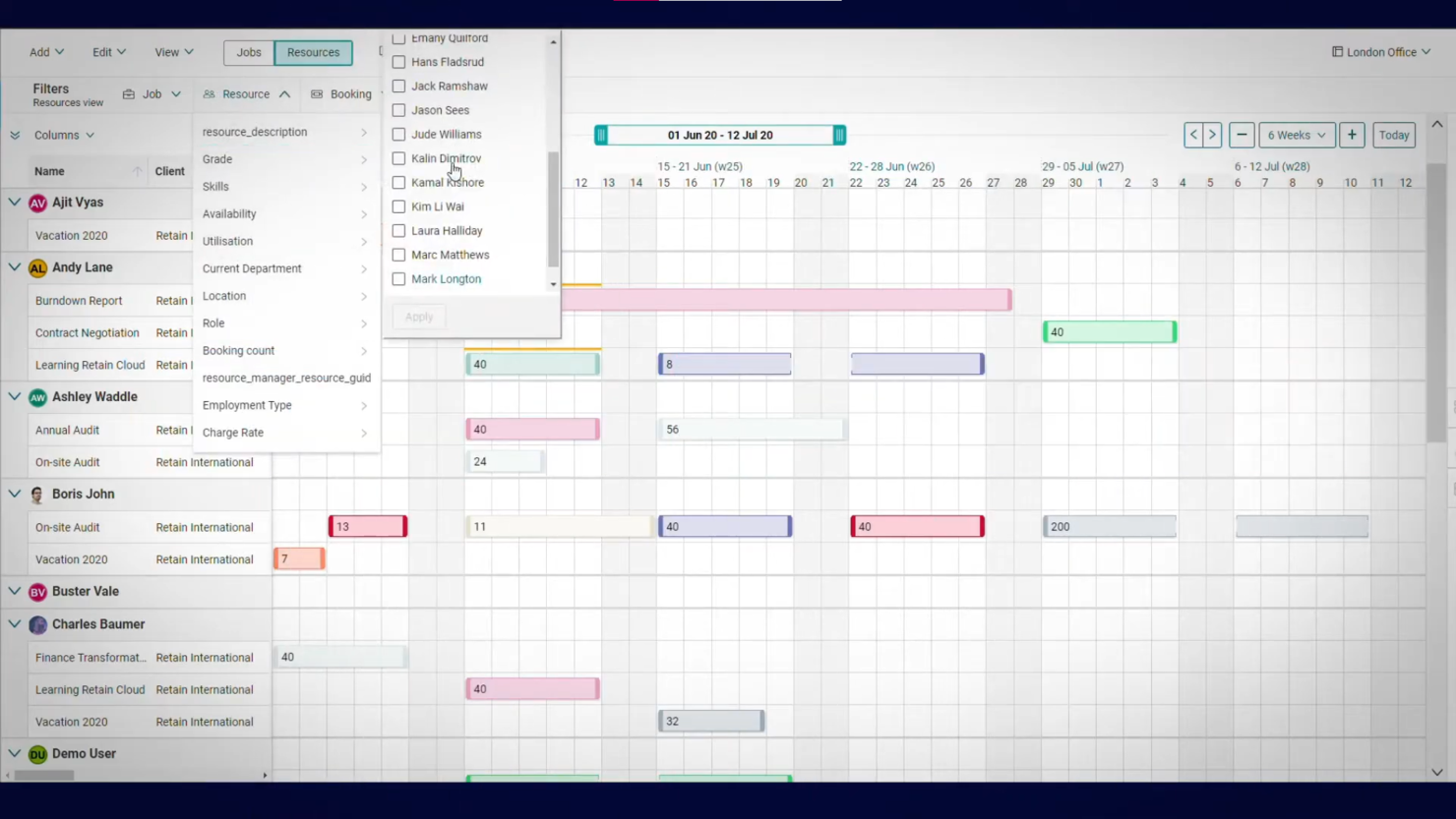
Demand forecasting is key to planning, and this is an area where Retain International stands out. The forecasting dashboard shows you how resource availability will change over time. You can use this information to allocate resources where they are needed most.
Why I Picked Retain: I like how intuitive the software is to use. The different features are simple to navigate, and the reporting and forecasting views make gaining insight easy.
There are both self-hosted and cloud versions of the software. If you choose the former, you’ll need to host the software on your own server. But once it’s up and running, you can still access the tool anywhere via the web or Android and iOS apps.
Retain Standout Features & Integrations
Features include a sophisticated forecasting dashboard that not only visualizes future resource availability but also incorporates scenario planning, allowing managers to model and prepare for potential changes in demand. Its leave management system is also seamlessly integrated with resource scheduling to ensure accurate capacity calculations and avoid unexpected shortfalls.
Integrations are not listed publicly on their site but seem to be available according to their pricing chart.

Best resource planning and capacity forecasting

Productive is a versatile platform that offers tools to simplify planning and team collaboration for agencies. It helps businesses handle multiple workflows and enables efficient tracking and allocation of resources across projects. The platform also caters to teams in service-oriented industries who need precision in resource planning and project delivery.
Why I Picked Productive
Productive provides advanced forecasting tools that help your agency plan and allocate resources effectively. Its capacity planning feature lets you monitor workloads and team availability, helping you make better decisions about upcoming projects.
Moreover, the platform's time tracking and profitability insights give you a clear picture of where resources are being used. You can also adjust schedules and reallocate team members on the go to maintain productivity and balance.
Productive Key Features
There are also several other features that make Productive a strong choice for resource management.
- Time Tracking: This feature lets your team log work hours directly into the system and get precise data for billing and analysis.
- Budget Management: You can manage project budgets with ease, track expenses and revenue, and maintain financial oversight.
- Invoicing: You can create and send invoices directly from the platform, which streamlines the billing process for your projects.
- Task Management: This feature helps you organize tasks with deadlines and priorities and keep your team aligned with project goals.
Productive Integrations
Integrations include Slack, QuickBooks Online, Xero, Zapier, HubSpot, Jira, Microsoft Teams, Google Workspace, Asana, and Trello.
Pros and Cons
Pros:
- Built-in time management can bill multiple business entities
- Plenty of custom tags to choose from
- Quite easy to set up collaborative tasks
Cons:
- Invoicing and quotation features are limited
- Mobile app could be faster/more responsive
New Product Updates from Productive
Productive Adds Voice Dictation, Slack Connector, Proposals, and Overtime
Productive adds voice dictation, a Slack Connector, proposal controls, and overtime tracking. These updates support faster AI interactions, client proposals, and time management. For more information, visit Productive’s official site.

Scoro
Best for forecasting team utilization

Scoro is a resource management software that provides a suite of tools to assist businesses in managing their projects, finances, and resources within a single system.
Why I Picked Scoro
I like the platform's robust features that allow users to plan and prioritize work, distribute tasks with a drag-and-drop planner or Kanban task board, and manage time with shared calendars, timesheets, and a built-in time tracker. Scoro also enables monitoring of billable and non-billable hours and ensures accountability for time spent on client work.
Furthermore, the platform has comprehensive forecasting tools that allow managers to gain a clearer view of current capacity levels, shortages, deadlines, and planned events and vacations. This foresight helps avoid over or under-utilization of staff, leading to better workload balance and increased employee satisfaction.
Scoro Key Features
Scoro offers several other features that cater to your comprehensive resource management needs.
- Task Management: Assign and prioritize tasks based on team skills and availability to ensure the right people are on the right projects.
- Project Tracking: Monitor project progress in real time to keep deadlines and budgets under control.
- Reporting and Analytics: Generate detailed reports to track resource utilization and project performance.
- Collaboration Tools: Centralize team communication and file sharing to reduce back-and-forth emails.
Scoro Integrations
Integrations include HubSpot, Google Calendar, Microsoft Exchange, Xero, QuickBooks, Sage Intacct, Expensify, Stripe, Jira, Slack, Asana, Dropbox, PayPal, and Zapier.
Pros and Cons
Pros:
- AI-powered insights help decision-making
- Comprehensive view of team utilization
- Automated invoices
Cons:
- Limited support for languages other than English
- Learning curve for first time users
New Product Updates from Scoro

Scoro Adds Time Mobile App and ELI Improvements
Scoro adds the Scoro Time mobile app for iOS/Android to track time anywhere and expands ELI with attachments, smarter filtering, and trigger-based actions. For more information, visit Scoro's official site.

Kantata
Best for people-centric resourcing
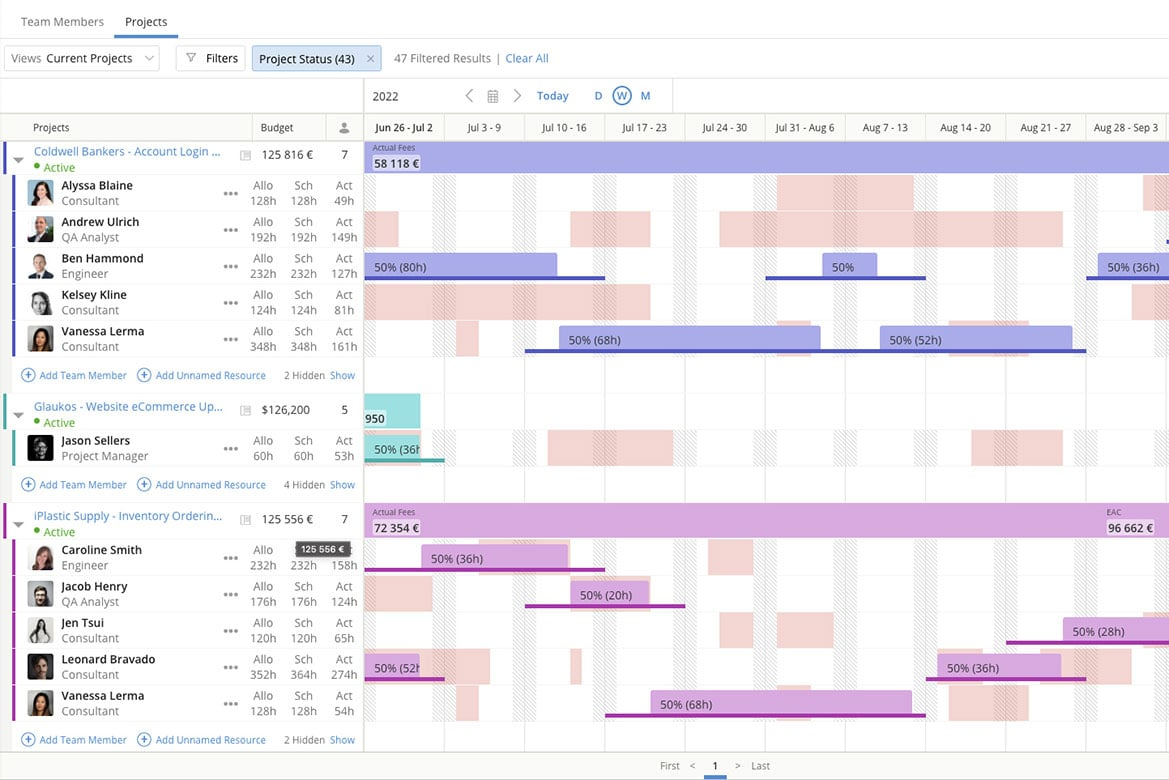
Kantata is a resource management platform built for professional services teams and agencies. Unlike generic tools, it unifies resourcing, financials, and project delivery while keeping people at the center of staffing decisions.
I recently spoke with Daniel Vasilevski, the director & owner of Pro Electrical, about how he uses Kantata with his team. He uses this tool because of the "resource planning dashboard that displays the availability of all team members for different jobs in one interface," he says. "During a large job...a sudden storm triggered 8 urgent callouts across different suburbs," he says. "Using the resource planning dashboard...I could see where each of my 14 electricians was and reassign 4 of them...without derailing the project," he explains. This had major benefits: "This...reduced client wait times from...more than a day down to under four hours. It also saved nearly $3,500 in overtime since the workload was evenly distributed," he says.
Why I Picked Kantata
What appeals to me about Kantata is how its resource management module helps leaders make staffing decisions that prioritize people as much as project needs. The platform provides real-time visibility into capacity and utilization, so you can balance workloads and ensure the right team members are assigned to the right tasks. Its skills-based resource planning also makes it easier to identify gaps, align talent with demand, and create opportunities for employee growth. This people-centric approach not only optimizes efficiency but also supports long-term team engagement.
Kantata Key Features
Kantata offers several other functionalities that make it a valuable tool for resource management.
- Project Time Tracking: This feature lets your team to accurately track time and resources so you can make informed adjustments to project plans.
- Team Collaboration Tools: These tools help improve communication among team members, coordination, and project outcomes.
- Business Intelligence Tools: You get real-time analysis and reporting so you can identify trends and make data-driven decisions.
- Visual Project Planning Tools: This features offers visual representations of tasks and timelines to improve understanding and engagement among your team.
Kantata Integrations
Integrations include Salesforce, SAP, Jira, Xero, BambooHR, Slack, Worday, QuickBooks, HubSpot, and NetSuite.
Pros and Cons
Pros:
- Resourcing fully integrated with master planning
- Good reporting functionality for resource data
- Easy capacity management
Cons:
- Advanced features available only in premier and enterprise plans
- Custom reports can be difficult to create without training
New Product Updates from Kantata

Kantata Adds Access Group Change History
Kantata adds Access Groups History, letting account administrators track changes to group details, membership, and permissions in Recent History. The update also makes these events available through the Subscribed Events API for broader monitoring. For more information, visit Kantata’s official site.
 .
.
Runn
Best for real-time team capacity planning
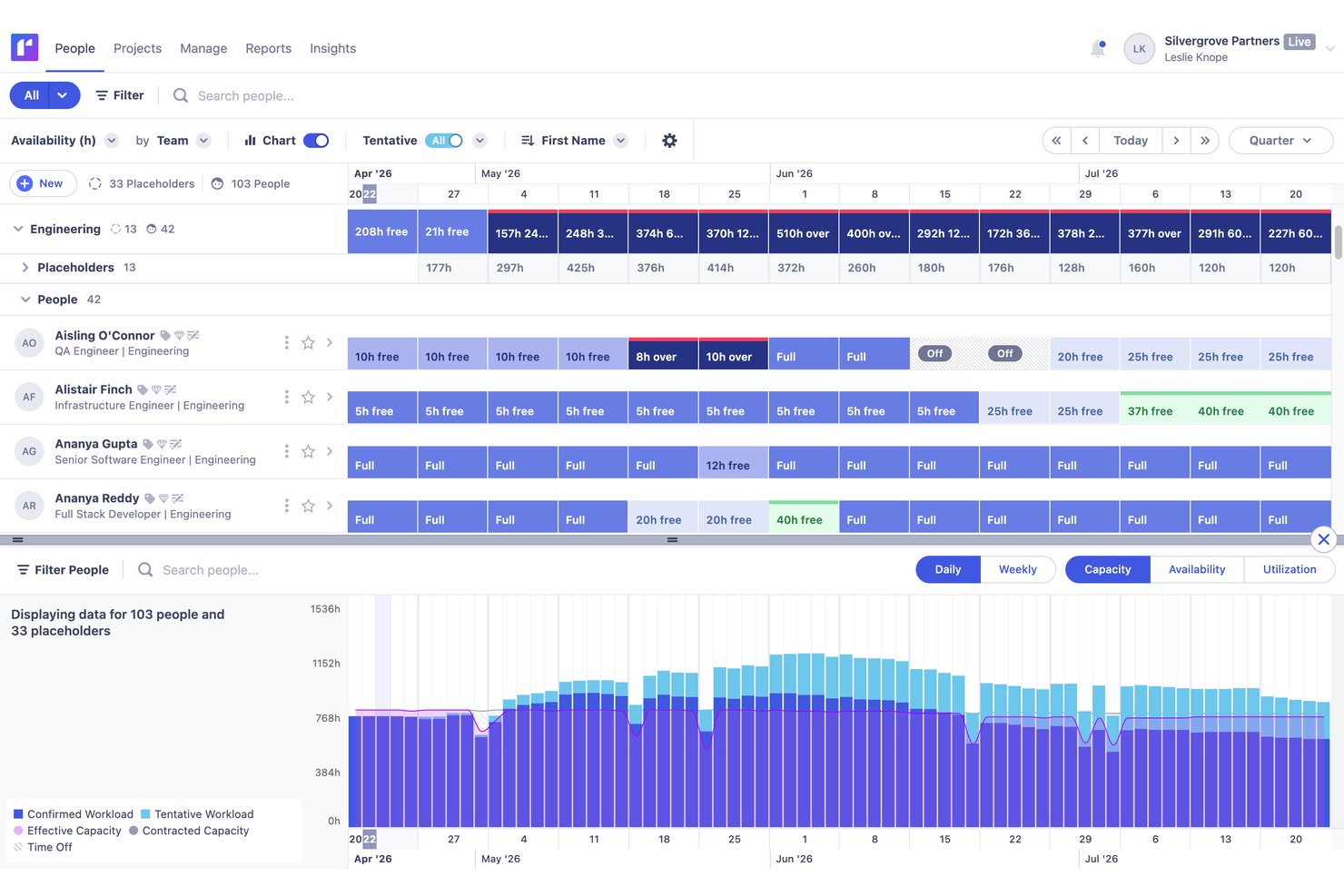
Runn is a resource management platform purpose-built around visual scheduling, real-time capacity planning, utilization tracking, and financial forecasting for project-based teams.
Who Is Runn Best For?
Runn is a strong fit for project-based teams—especially in professional services, agencies, and PMOs—that need a dedicated tool for visual scheduling and real-time capacity planning.
Why I Picked Runn
Runn earns its spot on my shortlist because it's purpose-built for real-time capacity planning in a way that broader project tools simply aren't. I love how Runn's capacity charts surface over- and underallocation the moment you adjust a schedule, so you're never working from stale data. SmartMatch AI is genuinely useful here too, recommending best-fit people based on skills and live availability rather than making you manually cross-reference profiles.
Runn Key Features
- Scenario planning: Create and compare unlimited what-if staffing and project scenarios to evaluate the impact of changes before committing to a plan.
- Native timesheets: Log time daily or weekly, track billable vs. non-billable hours, and compare planned time against actuals to sharpen future forecasts.
- Financial forecasting: Connect resource allocations to budgets, rate cards, and margin projections with support for both fixed-price and time-and-materials billing models.
- Placeholder resources: Add unnamed future hires to your schedule so capacity forecasts reflect real hiring plans, not just your current team.
Runn Integrations
Runn lists 13+ HRIS integrations, including BambooHR, Workday, HiBob, Gusto, and ADP Workforce Now, plus integrations with Harvest, Clockify, and Jira. It also supports custom integrations through its public API and Zapier.
Pros and Cons
Pros:
- AI-powered resource matching based on skills
- Unlimited scenario planning for resource modeling
- Real-time capacity versus demand visibility
Cons:
- Permission controls limited for complex organizations
- No native mobile app available

Teamhood
Best for capacity planning on a low per-seat cost
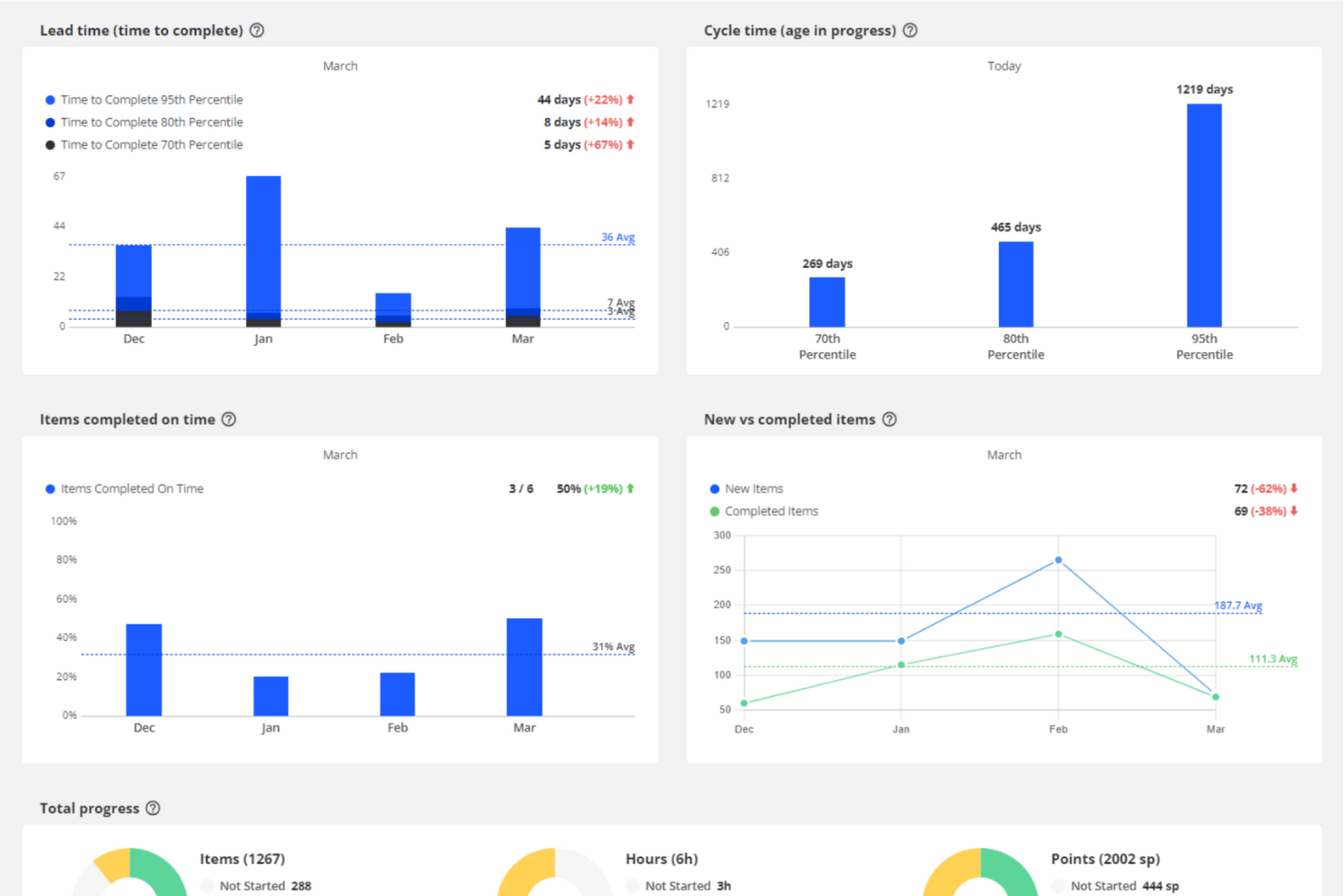
Teamhood is a project and resource management platform that combines capacity planning, visual scheduling, workload balancing, and time tracking across multiple projects simultaneously.
Who Is Teamhood Best For?
Teamhood fits operations managers and team leads at small-to-mid-sized companies running multiple projects simultaneously who need solid capacity planning without paying premium per-seat prices.
Why I Picked Teamhood
I've included Teamhood in my top picks because it puts genuine capacity planning features in a single $6/user/month plan, where most competitors lock this behind tiers costing three times as much. I like how the schedule view shows every project in one place, grouped by person, with red overload indicators that immediately flag who's over capacity across concurrent workstreams. Reserved hours let you hold capacity for an upcoming project before its tasks even exist, which is a practical advantage when you're juggling a pipeline of overlapping work.
Teamhood Key Features
- Gantt dependencies with baseline comparison: Set task dependencies that automatically reschedule follow-on work, and compare the current timeline against a saved baseline to track schedule drift.
- Reserved hours: Block capacity for upcoming projects before any tasks exist, so you can hold time for work that's still in the pipeline.
- Personal page: Each team member gets a view of their open work across all projects, their time off, and four weeks of booked hours compared to their capacity.
- Custom roles and granular permissions: Assign permissions down to specific capacity actions, with access controlled per view across the workspace.
Teamhood Integrations
Teamhood Classic offers five documented native integrations: Google Calendar, Outlook Calendar, Slack, Microsoft Teams, and Azure DevOps. The new Teamhood includes REST API and webhooks, while Classic supports Zapier.
Pros and Cons
Pros:
- Detailed planning adjusts around time off
- Reserved hours protect upcoming project capacity
- Cross-project schedule reveals capacity clashes
Cons:
- Forecasting lacks pipeline or historical projections
- No skills-based resource matching

Best for simple workload planning

monday.com is a flexible work platform that helps teams communicate in context and get a big picture outlook on outstanding projects, available resources, and projected timelines.
The tool also gives you tons of control over your projects via customization. I recently spoke with Ken Sarmadi, a consultant for both monday.com and Asana. "If you're a control freak and want to manage everything down to the finest detail, monday.com is your tool," he says.
Why I Picked monday.com
I chose monday.com primarily for its smart design and straightforward interface. In my opinion, even team members who are lacking resource management experience can quickly get started planning timelines, assigning project ownership, and managing projects. The monday.com app also gives you the flexibility and power to run your team on the go, which I think is a great feature for busy managers. You can organize your daily work, projects, and teams as well as establish workflow automations, share documents, and create Gantt charts for further clarity.
monday.com Key Features
In addition to exceptional workload management capabilities, monday.com offers several other resourcing features.
- Centralized Visibility: This provides a unified platform that provides clarity on resource allocation and helps improve team alignment and communication.
- Performance Tracking: This lets you monitor resource usage so you can refine future project estimates and improve operational efficiency.
- Resource Allocation: monday.com lets you assign resources based on availability and task requirements, as well as offers useful visual tools like Gantt charts.
- Automation: The platform helps improve your processes by letting you automate recurring tasks, notifications about delays, and reallocations for tasks when capacity changes.
monday.com Integrations
Integrations include Slack, Google Calendar, Jira, GitHub, Excel, Google Drive, Gmail, Trello, Dropbox, Typeform, and Zapier.
Pros and Cons
Pros:
- Highly visual dashboards for clear project oversight
- Easily create boards dedicated to operational resource tracking
- Color coded status great for resource overviews
Cons:
- Task filtering can be restrictive and confusing
- Gantt charts locked to mid-level plan
New Product Updates from monday AI Workspace
monday AI Workspace Adds Human Approval Routing
monday AI Workspace adds a human-in-the-loop approval block to AI Workflows, sending approval requests and routing workflow paths based on responses. For more information, visit monday AI Workspace's official site.
Best for Microsoft users

Microsoft Project is a planning and management solution that supports scheduling, task coordination, and resource allocation workflows. You can use it to build project timelines, assign work, and track progress across tasks and milestones. It connects resource, cost, and task data to give you visibility into workload and project health.
Why I Picked Microsoft Project
This tool aligns closely with other Microsoft 365 services such as Excel, Teams, and Outlook, so the interfaces and data flow feel familiar. The scheduling engine handles dependencies, critical paths, and resource leveling so your plans can adapt to change. You’ll see resource capacity, task assignments, and cost impact in the same environment. The reporting and dashboard features help you monitor performance and resource use in context.
Microsoft Project Key Features
Microsoft Project offers several other features that help with resource and project management.
- Task Management Tools: You can break down projects into manageable tasks, set deadlines, and assign responsibilities so everyone stays on track.
- Project Timeline View: This lets you visualize project timelines, monitor progress, and adjust schedules as needed.
- Collaboration Capabilities: By integrating with Microsoft Teams, your team can collaborate in real-time and share updates and documents seamlessly.
- Customizable Reports: You can generate detailed reports that provide insights into project performance and make informed decisions quickly.
Microsoft Project Integrations
Integrations include Excel, Power BI, Teams, SharePoint, Outlook, Office Apps, Power Platform, and Azure.
Pros and Cons
Pros:
- Driver prioritization module for ranking strategies/objectives
- Helpful project template descriptions for guidance
- Can generate a Gantt chart from a spreadsheet
Cons:
- Few customization options
- Limitations on collaboration tools
Andre anmeldelser av programvare for ressursstyring
Hvis du ikke fant det du lette etter ovenfor, finner du her noen flere programvareverktøy som kan passe.
- Rocketlane
For unified collaboration with clients
- ClickUp
Workload views for understanding team capacity
- Forecast
For AI-driven resource optimization
- Anaplan
For scenario planning
- Meisterplan
For role-based resource allocation
- ActiveCollab
For built-in invoicing
- Adobe Workfront
For strategic resource allocation
- Bonsai Agency Software
For workload optimization
- Birdview
For simulating resource loading
- Schedule It
For scheduling work shifts
- Planview AdaptiveWork
Enterprise-grade resource management tool
- elapseit
For its features that support kickstart to invoice
- Polaris PSA By Replicon
For combined PSA and PPM functionality
- PSOhub
RM that integrates with CRMs
- ProjectManager
For resource monitoring via project dashboards
- Parallax
For predictive resource management
- Planview Vantage
For the PMO level
- Mosaic
For capacity planning and headcount forecast
- Apache OFBiz
For commerce-based resource planning
- Silverbucket
For project-based work
- eResource Scheduler
Built-in financial module
- Acuity PPM
For project portfolio resource management
- SAP Job Scheduling and Resource Allocation
For agile project management


Videogjennomgang av verktøy for ressursstyring
Se videoen vår om programvare for ressursstyring!


Relaterte anmeldelser av programvare for ressursstyring
Hvis du fortsatt ikke har funnet det du leter etter her, kan du se nærmere på disse andre relaterte verktøyene som vi har testet og evaluert:
- Programvare for arbeidsflytautomatisering
- Programvare for tidsregistrering
- Programvare for oppgavehåndtering
- Samarbeidsverktøy
- Gantt-diagramverktøy
- Programvare for håndtering av medie- og ressursstyring
- Produktivitetsverktøy
- Programvare for ressursplanlegging
- Gratis programvare for ressursstyring
- Programvare for ressursstyring innen markedsføring
- Programvare for ressursbooking
- Programvare for ressursstyring i byråer
- Programvare med åpen kildekode for ressursstyring
- Nettbasert programvare for ressursplanlegging
- Verktøy for lager- og ressursstyring
How I Evaluate Resource Management Software
I split evaluation into three parts, with core functionality carrying most weight: assign people across projects and show capacity against commitments. Next, I look for standout features such as scenario planning for comparing staffing plans. Finally, I consider onboarding, support, integrations, security, and pricing.
Core Functionality (Table Stakes For This List)
When I'm selecting tools for my list, I score each one on a scale from 0 (does not offer the functionality) to 5 (excels in this area) for each core functionality listed below. I then convert the total into a percentage to help assess each tool's overall fit, with extra weight on any functionalities I’ve deemed essential.
- Resource Scheduling & Allocation (Essential): I look for timelines or calendars that assign people to projects, roles, and tasks across overlapping delivery periods.
- Capacity & Availability (Essential): I check whether teams can compare available hours with committed work and spot upcoming over-allocation.
- Workload Management: I assess team views, heatmaps, and reassignment tools for balancing workloads across simultaneous projects.
- Utilization Tracking: I look for planned-versus-actual reporting, including team, project, and billable or non-billable utilization.
- Forecasting & Demand Planning: I evaluate forecasts that use project plans, pipeline, or historical data to reveal future staffing gaps.
- Skills & Role-Based Matching: I check whether managers can filter or match people by skills, roles, experience, and availability.
Once I have a list of tools that meet the criteria, I consider what sets each platform apart.
Differentiating Factors (What Sets Vendors Apart)
Here's how I compare and contrast different vendors:
Standout Features
Scenario modeling is where I start. I check whether a tool lets me build side-by-side "what-if" staffing plans before locking in assignments—useful when a new project lands and I need to see how pulling someone off one engagement affects three others. I also evaluate financial and margin reporting, specifically whether resource costs and bill rates flow into live project budgets so I can spot margin erosion mid-delivery rather than after the fact. Bench time visibility matters too: I look for dashboards that surface underutilized team members so I can reassign talent before idle time becomes a cost problem.
Beyond Features
I check how well each tool connects to the PM, financial, and HR systems a team already runs. A platform like Resource Guru or Kantata that syncs with your existing stack saves hours of duplicate data entry. I also evaluate onboarding support, because migrating skills inventories, cost rates, and availability rules into a new tool is where most rollouts stall. Finally, I look at whether reporting is configurable enough for different audiences—a PMO director needs portfolio-level utilization views, while an ops manager wants a per-project margin breakdown they can share with a client.
Slik velger du programvare for ressursstyring
Det er lett å gå seg vill i lange funksjonslister og komplekse prisstrukturer. For å hjelpe deg med å holde fokus mens du går gjennom den unike prosessen din for valg av programvare, får du her en sjekkliste over faktorer du bør ha i tankene:
| Faktor | Hva du bør vurdere |
|---|---|
| Skalerbarhet | Forsikre deg om at programvaren kan vokse sammen med teamet ditt. Se etter alternativer som kan håndtere flere ressurser, brukere og prosjekter uten at det går ut over ytelse eller brukervennlighet. |
| Integrasjoner | Kontroller om programvaren integreres sømløst med verktøyene teamet ditt allerede bruker, for eksempel plattformer for prosjektstyring, CRM-systemer eller regnskapsprogramvare. |
| Tilpasningsmuligheter | Velg programvare som lar deg tilpasse arbeidsflyter, tillatelser og rapportering slik at de samsvarer med teamets spesifikke behov og bransjekrav. |
| Brukervennlighet | Velg en plattform med et intuitivt grensesnitt og kort opplæringstid, slik at teamet raskt kan ta den i bruk uten frustrasjon. |
| Budsjett | Forsikre deg om at prisene samsvarer med programvarebudsjettet ditt. Ta hensyn til de totale kostnadene, inkludert abonnementsavgifter, tillegg og potensielle kostnader ved skalering. |
| Sikkerhetstiltak | Prioriter programvare med robuste sikkerhetsfunksjoner som kryptering, tilgangskontroller og regelmessige oppdateringer for å beskytte teamets sensitive data. |
| Alternativer for brukerstøtte | Se etter pålitelig kundestøtte gjennom kanaler som chat, e-post eller telefon, samt tilgang til en kunnskapsbase eller et brukerforum for selvhjelp. |
| Rapporteringsverktøy | Vurder om programvaren tilbyr detaljerte rapporteringsfunksjoner som hjelper deg med å analysere ressursbruken og forbedre effektiviteten over tid. |
Det er verdt å understreke hvorfor integrasjoner er spesielt viktige:
Det finnes alltid begrensninger med disse verktøyene. Noen ganger har du krav som programvaren ikke kan oppfylle uten videre, og det er da folk begynner å se etter integrasjoner eller omveier.

Trender innen programvare for ressursstyring
I researchen min hentet jeg inn utallige produktoppdateringer, pressemeldinger og utgivelseslogger fra ulike leverandører av programvare for ressursstyring. Her er noen av trendene som er på fremmarsj, og som jeg følger med på:
- AI-drevet ressursallokering: Programvareverktøy implementerer AI-funksjoner som kan forutsi bemanningsbehov og tildele ressurser basert på ferdigheter, tilgjengelighet og prosjektprioriteringer. Dette hjelper team med å unngå overbelastning, underutnyttelse og flaskehalser i komplekse prosjekter.
- Scenario planlegging og modellering: Funksjoner for å teste «hva om»-scenarioer blir stadig vanligere. Disse verktøyene lar deg håndtere risiko og justere planer raskt, samt visualisere effekten av endringer som forskyvning av tidsfrister eller omfordeling av ressurser uten å forstyrre aktive prosjekter.
- Kartlegging av ferdigheter og oppfølging av utvikling: Plattformene integrerer funksjoner som lar deg kartlegge teammedlemmenes ferdigheter og følge utviklingen deres over tid. Du kan sørge for at de riktige personene tildeles de riktige oppgavene, og støtte teamets faglige utvikling.
- Innsikt i arbeidsbelastning i sanntid: Direkte oppdaterte oversikter kan gi umiddelbar innsikt i teamets arbeidsbelastning og kapasitet, og erstatte behovet for statiske rapporter. Du kan raskt identifisere ubalanser og justere tildelinger for å holde prosjektene på rett spor.
- Oppfølging av bærekraft og miljø: Verktøy for ressursstyring begynner å tilby funksjoner for oppfølging av bærekraftsmål. Dette kan hjelpe virksomheten din med å redusere avfall og forbedre miljøpåvirkningen.
Hva er programvare for ressursstyring?
Programvare for ressursstyring er et verktøy som hjelper deg med å fordele, planlegge og optimalisere ressurser (som personell, utstyr og materialer) for å støtte prosjektmål og -formål. Hovedformålet er å sørge for at de riktige ressursene er tilgjengelige til riktig tid, i riktig mengde og på riktig sted, slik at prosjektoppgavene kan fullføres innenfor budsjett og tidsplan.
Hvis du leder spesialiserte team, kan du ha behov for en variant, som programvare for ressursstyring innen ingeniørfag, for å administrere teknisk personale, verktøy og tidsfrister i produktutviklings- eller byggeprosjekter.
Funksjoner i programvare for ressursstyring
Når du velger programvare for ressursstyring, bør du se etter følgende nøkkelfunksjoner:
- Ressursplanlegging: Tildel raskt personer, eiendeler eller tidsblokker til ulike prosjekter, slik at teammedlemmene arbeider med de riktige oppgavene til riktig tid.
- Kapasitetsplanlegging: Se med et øyekast hvor mye arbeid teamet ditt kan håndtere, hjelp dem med å unngå utbrenthet ved å sørge for at arbeidsbelastningen er realistisk, og finn muligheter der teammedlemmer er underutnyttet.
- Prosjektoppfølging: Følg enkelt med på hvilke ressurser som er tildelt hvilke prosjekter, hvordan arbeidet utvikler seg, og om tidsfristene holdes, slik at du kan unngå overraskelser senere.
- Visualisering av tidslinjer: Gantt-diagrammer, kalendere eller andre visuelle tidslinjer hjelper deg med å oppdage konflikter, overlapp og teammedlemmenes tilgjengelighet.
- Rapportering av ressursutnyttelse: Sjekk umiddelbart hvor opptatte ressursene dine er, sørg for at ingen er overarbeidet eller underutnyttet, og balanser arbeidsbelastningen på nytt for å unngå utbrenthet.
- Oppfølging av ferdigheter: Hold en oppdatert oversikt over teamets ferdigheter og sertifiseringer, og match personer med prosjekter basert på faktisk kompetanse, ikke bare tilgjengelighet.
- Budsjettstyring: Følg med på kostnadene opp mot prosjekt- eller ressursbudsjetter, ha kontroll på utgiftene, og begrunn hver ressurs med trygghet.
- Tidsregistrering: Registrer arbeidstimer på oppgaver eller prosjekter, forstå faktisk arbeidsinnsats sammenlignet med estimater, og fakturer kunder enkelt samt lag prognoser for fremtidige prosjekter.
- Tilgangskontroller: Bestem hvem som kan se, redigere eller godkjenne ressurstildelinger, slik at sensitiv informasjon holdes trygg og utilsiktede endringer forhindres.
Vanlige AI-funksjoner i programvare for ressursstyring
Utover funksjonene for standard programvare for ressursstyring som er nevnt ovenfor, innlemmer mange av disse løsningene AI-funksjoner som:
- Automatisert ressursallokering: AI analyserer prosjektkrav, tidsfrister og medarbeidernes tilgjengelighet for å foreslå eller automatisk tilordne de best egnede ressursene og redusere behovet for manuelle vurderinger.
- Prediktiv kapasitetsprognostisering: Ved hjelp av historiske data forutsier AI perioder der du kan ha for mange eller for få ressurser, slik at du kan justere ansettelser eller tildelinger før problemer oppstår.
- Smart konfliktdeteksjon: AI oppdager potensielle planleggingskonflikter eller overallokeringer før de blir et problem, og sender proaktive varsler slik at du ligger i forkant av utfordringene.
- Intelligent ferdighetsmatching: AI gjennomgår teamprofilene dine og kobler automatisk de riktige talentene til hvert prosjekt eller hver oppgave.
- Automatisert rapportering: AI-genererte rapporter samler tall for utnyttelse, kapasitet og kostnader, slik at du enkelt kan forstå ressursdataene dine.
Fordeler med programvare for ressursstyring
Her er fem primære fordeler ved å bruke programvare for ressursplanlegging:
- Effektiv ressursallokering: Ved å gi innsikt i ressurstilgjengelighet og arbeidsbelastning hjelper programvare for ressursplanlegging deg med å sikre at ressursene fordeles optimalt, minimere flaskehalser og maksimere produktiviteten.
- Synlighet i sanntid: Med sanntidsoppdateringer om ressursallokering og prosjektfremdrift får du bedre oversikt over prosjekttidslinjer og ressursutnyttelse. Dette lar deg ta informerte beslutninger og gjøre proaktive justeringer.
- Bedre planlegging og prognostisering: Programvare for ressursallokering legger til rette for nøyaktig planlegging og prognostisering ved å analysere historiske data og ressurstrender, slik at du kan forutse fremtidige ressursbehov og fordele ressursene effektivt.
- Bedre samarbeid og kommunikasjon: Ved å samle ressursinformasjon på ett sted og legge til rette for samarbeid mellom teammedlemmer fremmer programvaren bedre kommunikasjon, koordinering og samsvar mellom ressurser og prosjektmål. Dette fører også til bedre prosjektresultater.
- Optimalisert prosjektresultat: Programvare for ressursutnyttelse hjelper deg med å optimalisere prosjektresultatene ved å sikre at de riktige ressursene er tilgjengelige til riktig tid, redusere forsinkelser og øke hastigheten og kvaliteten på prosjektleveransen.
Kostnader og priser for programvare for ressursstyring
Nedenfor finner du en oversikt over vanlige plantyper for programvare for ressursstyring, gjennomsnittsprisene deres og funksjonene som vanligvis er inkludert, slik at du kan finne ut hvilken plantype som passer for deg:
| Plantype | Gjennomsnittspris | Vanlige funksjoner |
|---|---|---|
| Gratis | $0 | Grunnleggende ressursplanlegging, begrenset antall prosjekter, grunnleggende rapportering |
| Grunnleggende | $10 - $20/bruker/måned | Bedre planlegging, tidsregistrering, grunnleggende analyse |
| Profesjonell | $20 - $40/bruker/måned | Avansert ressursplanlegging, samarbeid i sanntid, komplett pakke for prosjektstyring |
| Bedrift | Tilpasset pris | Tilpassede integrasjoner, avanserte sikkerhetsfunksjoner, personlig opplæring og støtte ved oppstart |
Du kan alltid oppgradere planen din ved behov. Vanlige situasjoner der bedriften din kan ønske å oppgradere prisplanen, er blant annet:
- Vekst i teamstørrelsen: Når teamet utvides utover grensene for den nåværende planen, kan du trenge flere brukerlisenser eller plasser.
- Økt prosjektkompleksitet: Når prosjektene blir mer komplekse, trenger du avanserte funksjoner som forbedret rapportering og analyse.
- Behov for bedre støtte: Du kan trenge høyere nivåer av kundestøtte, for eksempel støtte døgnet rundt eller dedikerte kundeansvarlige, for å holde driften i gang og løse problemer raskt.
- Behov for mer lagringsplass: Når lagringskapasiteten i den nåværende planen blir utilstrekkelig etter hvert som du oppretter prosjektfiler, dokumenter og data, må du oppgradere til en plan med mer lagringsplass.
- Integrasjoner og tilpasning: Når du trenger flere integrasjoner med annen programvare eller ønsker tilpasningsmuligheter som bare er tilgjengelige i planer på høyere nivå, må du oppgradere.
Ofte stilte spørsmål om programvare for ressursstyring
Finn svar på vanlige spørsmål om ressursstyring og programvare for ressursstyring.
Kan jeg fortsatt bruke regneark til ressursstyring?
Nei, du bør ikke bruke regneark til ressursstyring fordi det gjør ressursoppfølgingen langsom, manuell og utsatt for feil. Dedikerte verktøy for ressursstyring hjelper deg med å overvåke arbeidsbelastninger, få bedre oversikt og håndtere endringer. Disse plattformene kan også automatisere prosesser som ressursallokering, vise tilgjengelighet med et øyekast og forenkle rapporteringen for deg og teamet ditt.
Kan Jira brukes til ressursstyring, og hvilke begrensninger har det?
Ja, du kan følge oppgaver og tildelinger i Jira, men funksjonene for ressursstyring er begrensede. Det tilbyr ikke innebygde visninger for utnyttelse eller kapasitet, og du må bruke programtillegg eller integrasjoner for mer avansert planlegging. Et spesialisert verktøy for ressursstyring er langt mer effektivt.
Hvordan legger disse programvarealternativene til rette for samarbeid mellom eksterne team?
Verktøy for ressursstyring gir alle en tydelig oversikt over hvem som gjør hva og når. Dette er spesielt nyttig ved fjernarbeid. Funksjoner som delte kalendere, oppdateringer i sanntid og sentralisert kommunikasjon bidrar til å redusere forvirring og holde distribuerte team samkjørte. Teammedlemmer kan enkelt overlevere arbeid til hverandre og følge med på fremdriften.
Finnes det fleksible prisalternativer eller rabatter for ideelle organisasjoner?
Ja, enkelte leverandører av programvare for ressursstyring tilbyr rabatter eller egne prisnivåer for ideelle organisasjoner. Sjekk leverandørenes nettsteder eller kontakt salgsavdelingen direkte for å finne ut om du kvalifiserer, og for å søke på vegne av organisasjonen din.
Hvilke integrasjoner bør jeg se etter i programvare for ressursstyring?
Se etter integrasjoner med verktøyene du allerede bruker, for eksempel prosjektstyringsprogramvare (f.eks. Asana, Trello), kalendere, kommunikasjonsplattformer (f.eks. Slack, Microsoft Teams) og programvare for HR eller tidsregistrering. Integrasjoner kan spare deg for tid, redusere manuelle oppdateringer og gi deg en helhetlig oversikt over ressursenes tilgjengelighet.
Hvordan bidrar programvare for ressursstyring til å forhindre utbrenthet i teamet?
Disse verktøyene lar deg følge med på arbeidsbelastningen, slik at du kan oppdage når noen står i fare for å bli utbrent eller har for mye arbeid. Du kan se allokeringen på tvers av prosjekter, administrere fravær og balansere tildelinger. Tilgang til sanntidsdata hjelper deg med å omfordele oppgaver og fremme sunnere arbeidsvaner i teamet.
Hva er de vanligste feilene ved implementering av programvare for ressursstyring?
Vanlige feil du bør unngå ved implementering av programvare for ressursstyring, er å hoppe over opplæring av teamet, ikke tilpasse innstillingene og unnlate å holde ressursdataene oppdatert. Hvis du heller ikke involverer alle viktige interessenter, kan det føre til lav brukertilslutning. Etabler en tydelig innføring, utpek en ansvarlig og oppdater dataene regelmessig for å få mest mulig ut av verktøyet.
Er det verdt å investere i KI-funksjoner i programvare for ressursstyring?
Ja, det er verdt å investere i KI-funksjoner i programvare for ressursstyring. KI-drevne funksjoner kan automatisere planlegging, prognostisere etterspørsel og foreslå optimal ressursallokering. Hvis teamet ditt håndterer kompleks planlegging eller skiftende prioriteringer, kan KI spare deg for tid og forbedre nøyaktigheten. Sørg for at løsningen passer med arbeidsflytene og bruksområdet ditt, i stedet for å bruke den bare fordi den er trendy.