

10 Best Small Business Client Database Software For 2026

10 Best Client Database Software for Small Businesses Shortlist


The best client database software for small business makes it easy to organize customer data, track every interaction, and streamline client management so you can focus on growing your business and relationships instead of battling spreadsheets and email chaos. Without the right tool, you'll struggle to retain clients, scale your small business, and maintain a good reputation among customers and clients.
Using my 10+ years of experience in operations at small businesses and startups, I’ve tested the leading options myself. Below, I break down key features, pros, and drawbacks so you can quickly find the best fit for your business, save time and stress, and maintain strong relationships with your clients.
Why Trust Our Software Recommendations
Our team has been testing and reviewing software since 2012. As project managers ourselves, we know how difficult—and important—it is to choose the right software.
For this guide, we evaluated tools using hands-on testing and independent research, scoring tools using our selection criteria. We also draw on insights from industry thought leaders and practicing project management experts.
Our reviews reflect our human editorial judgment, not a sales pitch.
Expert reviewers:
Client Database Software for Small Business Comparison Table
This comparison table summarizes pricing details for my top client database software for small business selections:
| Tool | Best For | Trial Info | Price | ||
|---|---|---|---|---|---|
| 1 | Best for simple CRM needs | 14-day free trial | From $18/user/month (billed annually) | Website | |
| 2 | Best for task management features | Free plan available | From $12/user/month | Website | |
| 3 | Best for sales-focused teams | 14-day free trial | From $19/user/month (billed annually) | Website | |
| 4 | Best for social media integration | 14-day free trial | From $24.90/user/month (billed annually) | Website | |
| 5 | Best for Google Workspace users | 14-day free trial | From $12/user/month | Website | |
| 6 | Best for small business marketing | 14-day free trial | From $83/month (billed annually) | Website | |
| 7 | Best for enterprise scalability | 30-day free trial | From $70/user/month | Website | |
| 8 | Best for marketing automation | Free plan available | From $8.99/user/month | Website | |
| 9 | Best for project management integration | 14-day free trial | From $29/user/month (billed annually) | Website | |
| 10 | Best for ease of use | 14-day free trial | From $13/user/month (billed annually) | Website |
Best Client Database Software for Small Businesses Reviews
Below are my detailed summaries of the best client database software for small businesses that made it onto my shortlist. My reviews offer a detailed look at the key features, pros & cons, integrations, and ideal use cases of each tool to help you find the best one for you.

Best for simple CRM needs
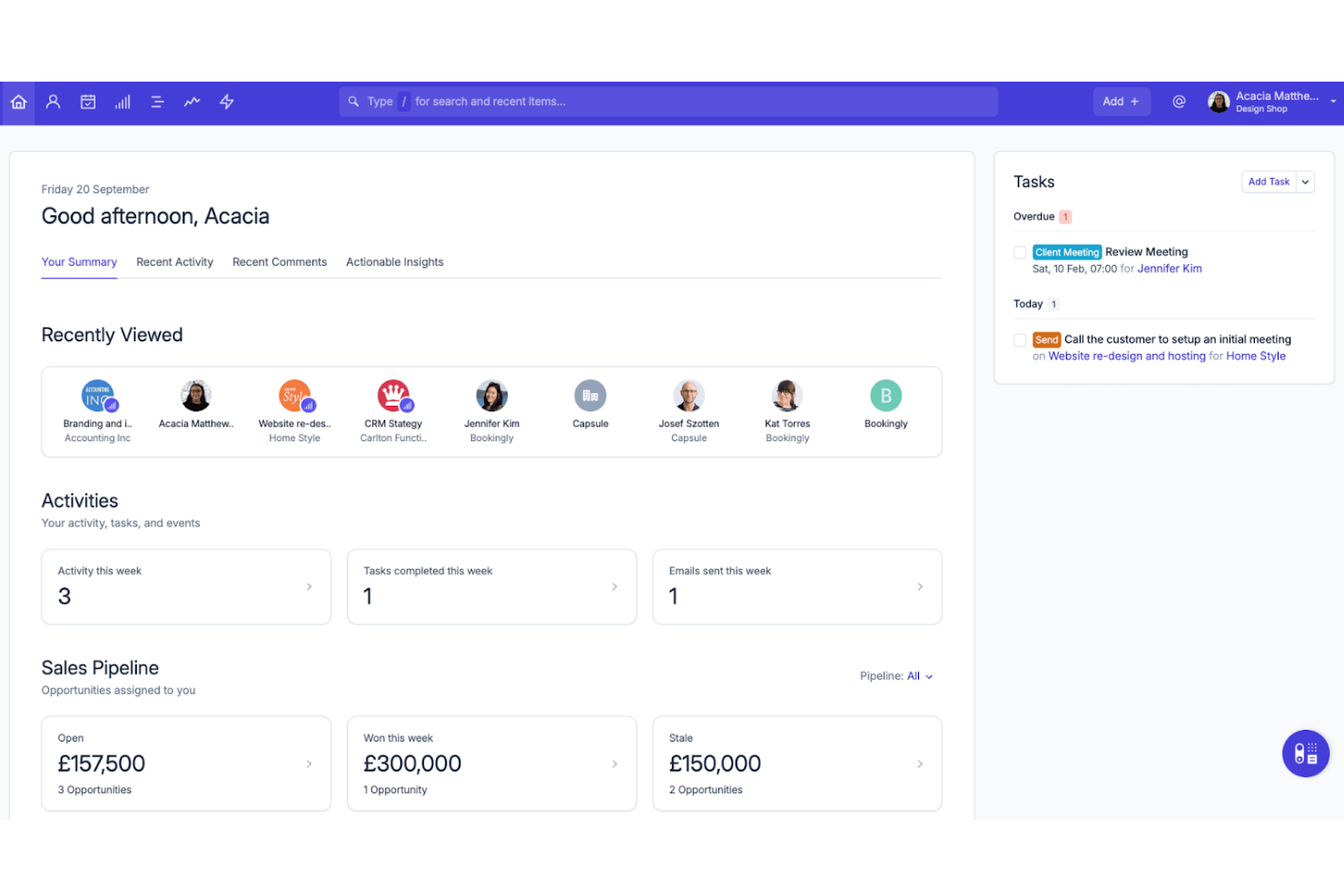
Capsule CRM lands on my shortlist because it does the fundamentals of client tracking exceptionally well without complexity getting in the way.
What stands out is how the contact management is structured for quick lookup, history, and relationship-view—when small businesses need to focus on straightforward sales follow-up, this works. I appreciate how the sales pipeline view and custom fields support simple, tailored workflows without extra noise.
Capsule CRM’s Best For
- Small businesses needing simple client tracking and sales pipelines
- Teams that want basic relationship and activity history
Capsule CRM’s Not Great For
- Organizations with advanced reporting or automation needs
- Businesses managing complex sales processes or large datasets
What sets Capsule CRM apart
Capsule CRM sticks to simple, straightforward sales and client tracking, similar to the way Trello keeps task management focused and minimal. You work with contacts, deals, and activity timelines instead of getting lost in a maze of extras. This feels different from larger platforms like Salesforce, which I find expect you to customize and configure as you go.
Tradeoffs with Capsule CRM
By keeping the CRM simple, Capsule gives up advanced automation and reporting, so teams needing deep analytics or complex workflow rules usually hit a ceiling.
Pros and Cons
Pros:
- Helps organize contacts with tags and filters
- Clean and intuitive interface for small teams
- Easy to set up and start using
Cons:
- Storage limits on lower-tier plans
- No built-in email marketing functionality

ClickUp
Best for task management features

ClickUp lands on my list because its task management features are some of the most robust and flexible I've used for client tracking. When small businesses need a database that goes beyond simple contact storage, ClickUp gives you custom fields, detailed task assignment, and relationship linking to create a tailored client workspace without heavy setup.
What stands out for me is how easily you can connect client records directly to tasks, notes, and conversations in one place. For teams juggling follow-ups, project updates, and client histories, this interconnected setup means you rarely have to dig through different apps to stay on top of client needs.
ClickUp’s Best For
- Small businesses building a custom client tracking tool
- Teams needing client records tied to tasks and docs
ClickUp’s Not Great For
- Companies needing advanced sales pipelines or CRM automation
- Businesses wanting out-of-the-box industry-specific client management
What sets ClickUp apart
ClickUp approaches client management with the mindset of extreme customization. Instead of limiting you to a fixed CRM style, it lets you piece together fields, relationships, and workflows for exactly how your business manages client work. Unlike HubSpot or Salesforce, this means you shape the workspace to fit your process, not the other way around.
I often see this work best when teams want task management and client data tied together, without strict CRM templates.
Tradeoffs with ClickUp
ClickUp optimizes for flexibility, but you sacrifice ready-made CRM reports and advanced deal pipeline tools, so out-of-the-box sales analytics are limited.
Pros and Cons
Pros:
- Includes built-in time tracking features
- Offers multiple task views for flexibility
- Highly customizable to fit your workflow
Cons:
- Advanced features may require higher-tier plans
- Can be overwhelming with numerous features

Best for sales-focused teams

I picked Zendesk Sell for sales-focused teams that need to manage client relationships and track deals without getting bogged down by clunky admin work. When small businesses want a client database that syncs pipeline activity, contacts, and communications in one place, it handles that better than most CRMs I’ve tested. I especially like the built-in activity tracking, which makes follow-ups and sales forecasting less work for everyone.
Teams should choose Zendesk Sell when staying close to changing client needs and sales cycles drives success.
Zendesk Sell’s Best For
- Sales-driven teams that need a focused client database
- Small businesses that manage outbound sales pipelines
Zendesk Sell’s Not Great For
- Teams needing advanced marketing automation
- Businesses wanting industry-specific CRM customization
What Sets Zendesk Sell Apart
Zendesk Sell structures every workflow around the sales pipeline, which simplifies how small businesses track leads and stay organized. Unlike HubSpot, which mixes sales and marketing, Zendesk Sell expects you to focus on sales activity first and everything else second. In practice, this works best when keeping tabs on sales tasks and communications is what actually drives your day-to-day priorities.
Tradeoffs with Zendesk Sell
Zendesk Sell optimizes for sales pipeline tracking, but you lose out on advanced marketing features and broader client engagement tools, so you may need a separate solution for campaigns or relationship marketing.
Pros and Cons
Pros:
- Customizable sales pipelines
- Intuitive interface with easy navigation
- Efficient sales tracking and organization
Cons:
- Customer support lacks phone assistance
- Limited advanced customization options

Nimble
Best for social media integration
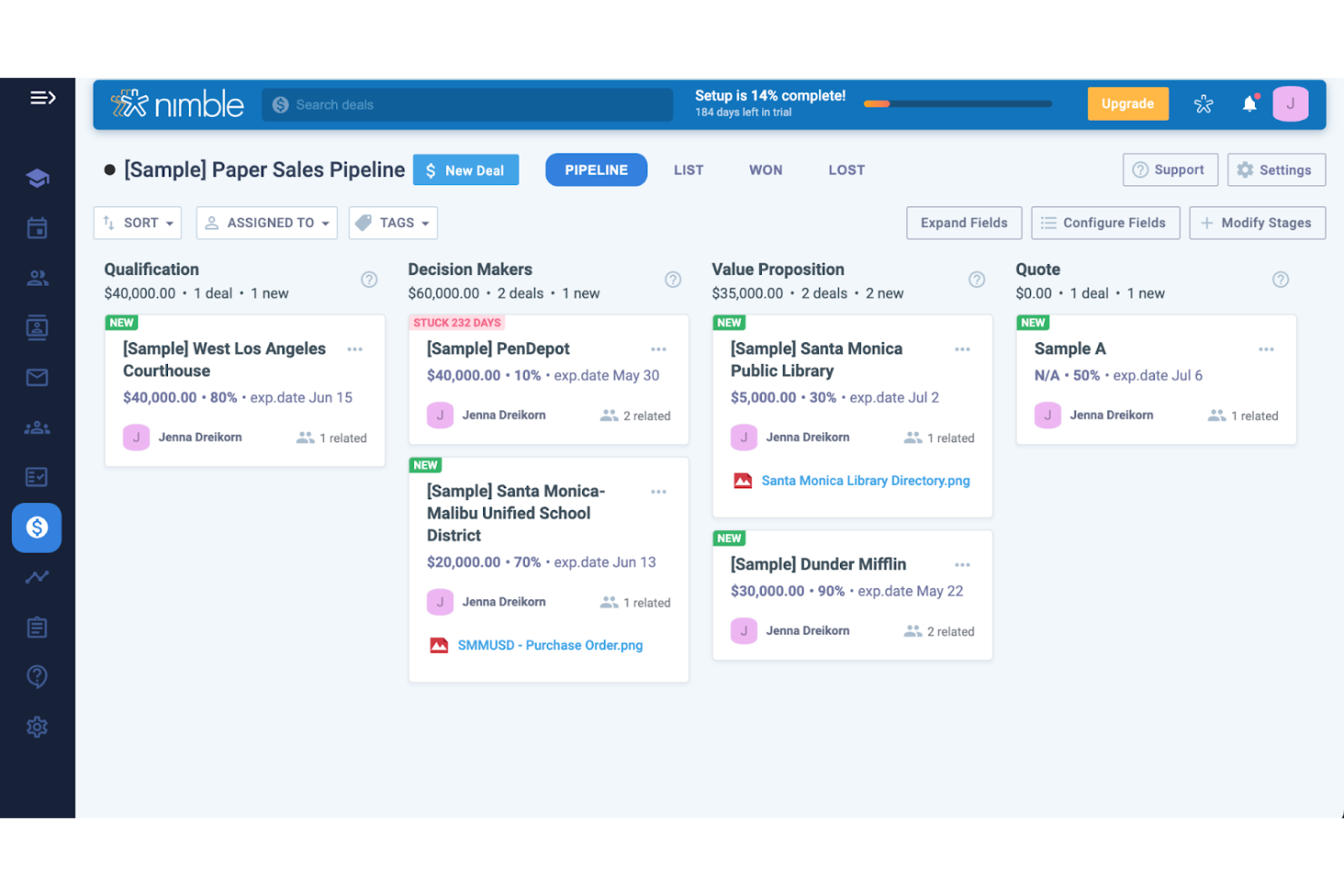
Nimble is on my list because it connects contact database management directly with social media channels, something most client database software overlooks. I’ve used Nimble in teams that lean heavily on LinkedIn, Twitter, and Facebook to build customer relationships, and it automatically pulls and updates contact data from those networks.
What I appreciate most is how Nimble lets you see a client’s full social profile right next to their record, which means you can reference past interactions and get context without switching tools. For anyone whose client base is active on social, this setup is refreshingly direct and keeps outreach personal.
Nimble’s Best For
- Small businesses using social media to build client relationships
- Teams needing unified social and contact insights in one place
Nimble’s Not Great For
- Companies managing high-volume or complex, hierarchical client data
- Teams without a strong social selling component
What sets Nimble apart
Nimble stands out by making social data central to client management, not just an add-on. The platform expects you to interact and engage with contacts through their public social presence alongside traditional CRM activities.
Unlike tools like HubSpot, which separate databases and social feeds, Nimble fuses them so you work from a single profile when researching, updating, or reaching out. This works best when you rely on up-to-date social streams for building and maintaining client relationships.
Tradeoffs with Nimble
Nimble optimizes for integrated social context, but this means its database tools are less suited to advanced segmentation or custom fields. If you need complex structures or reporting, you may hit limits.
Pros and Cons
Pros:
- Lightweight tool that doesn’t overwhelm users
- Combines communication channels in one place
- Easy to set up for small teams
Cons:
- No built-in phone support for customers
- Can’t handle complex workflows effectively

Best for Google Workspace users
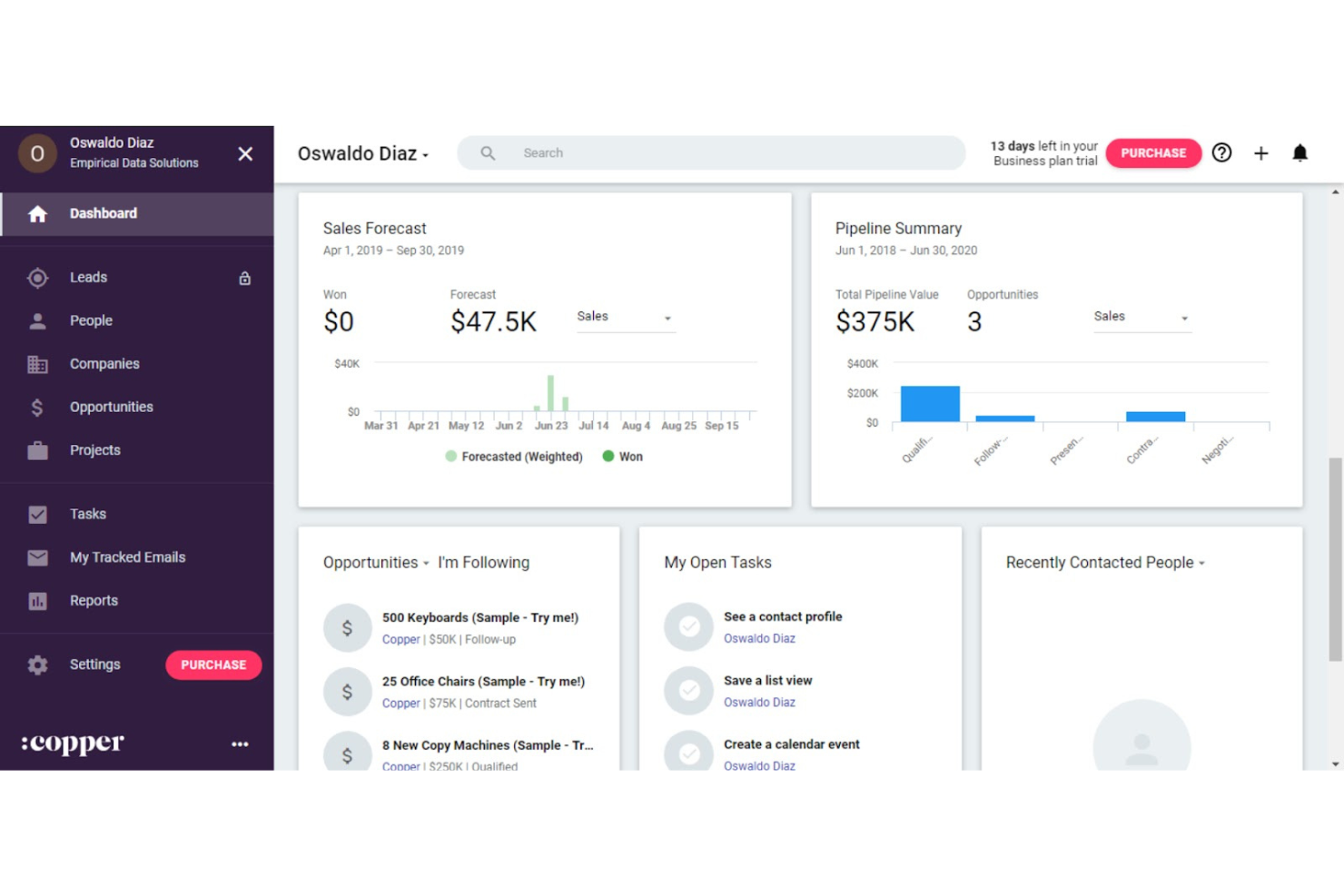
Copper CRM lands on this list because it’s so deeply built for teams working in Google Workspace. If your business lives in Gmail, Sheets, and Drive, Copper feels more like an extension than a separate tool. I appreciate how it lets you auto-capture contacts, track deal activity, and update opportunities straight from your inbox.
What’s unique is how smoothly it links with Google Calendar and automates relationship tracking, keeping your client database up to date without duplicate work.
Copper CRM’s Best For
- Small businesses using Google Workspace as their main platform
- Teams that want automatic contact and opportunity updates in Gmail
Copper CRM’s Not Great For
- Businesses needing advanced custom reporting or analytics
- Companies not committed to Google Workspace tools
What sets Copper CRM apart
Copper stands out by embedding itself right inside Google Workspace, so client tracking happens where you already do your daily work. Unlike Salesforce, which requires you to switch platforms and adapt to a new environment, Copper keeps your sales process visible inside Gmail and Google Calendar. This works well if your workflows are already built around those tools and you want less context-switching.
Tradeoffs with Copper CRM
Copper optimizes for natural fit in Google Workspace, but you lose out on highly advanced reporting or customizable dashboards. If you outgrow basic workflow needs, you might feel boxed in by its limits.
Pros and Cons
Pros:
- Simplifies sales tracking with visual pipelines
- Automates data entry from emails
- Integrates naturally with existing Google tools
Cons:
- Advanced features require higher-tier subscriptions
- Limited custom reports for detailed analysis

Best for small business marketing

Ontraport lands on this list because it brings small business marketing and client database management under one roof, without the typical complexity. I see small teams get the most value when they need reliable contact management, automated follow-ups, and campaign tracking in a single platform.
What I appreciated most during testing is how funnel automation, CRM records, and segmentation all tie together, making life easier, especially, I imagine, for small businesses who want nimble marketing and database workflows.
Ontraport's Best For
- Small businesses that need integrated CRM and marketing automation
- Teams focused on automating client follow-ups and segmentation
Ontraport's Not Great For
- Businesses with complex, multi-department sales structures
- Teams needing deep customization for industry-specific workflows
What sets Ontraport apart
Ontraport is designed for small businesses that want marketing automation and client management tightly woven together. Unlike dedicated CRMs like HubSpot or generalist tools like Airtable, it expects you to build marketing automations and manage your contacts from one place. This works best when you want marketing, email follow-up, and contact data to live inside a single workflow, without bouncing between systems.
Tradeoffs with Ontraport
Ontraport optimizes for easy all-in-one automation, but you lose the depth and complexity you get in tools that handle intricate sales processes or support multi-division needs. If your workflows require granular pipeline controls or tailored, industry-specific workflows, you’ll hit limits fast.
Pros and Cons
Pros:
- Scalable features that grow with your business
- Customizable dashboards to fit your needs
- Flexible automation for various business processes
Cons:
- Complex setup may require time and training
- Steep learning curve for new users


Microsoft Dynamics CRM makes my shortlist because it’s one of the few client database platforms that adapts fast when your business outgrows entry-level tools. I find it’s the best fit when small businesses need something scalable for future growth, with built-in automation and tailored dashboards for sales and customer data. I especially like its custom entity model, so you can shape data structures as client relationships get more complex.
Microsoft Dynamics CRM’s Best For
- Small businesses planning for rapid, long-term growth
- Sales teams handling complex, multi-stage client data
Microsoft Dynamics CRM’s Not Great For
- Solo operators or businesses with simple databases
- Teams looking for a lightweight, low-maintenance tool
What sets Microsoft Dynamics CRM apart
Microsoft Dynamics CRM is shaped for businesses that want their client database to evolve with them. Unlike tools like HubSpot, which favor simple pipelines and lighter sales processes, Dynamics builds on the assumption that teams will want to customize objects, automate complex relationships, and integrate with a wider suite of Microsoft tools. In practice, this feels like working within a framework that expects your needs and data structures to keep scaling as you grow.
Tradeoffs with Microsoft Dynamics CRM
Dynamics optimizes for long-term flexibility and custom setup, but the setup process takes longer and usually requires more admin than with a turnkey CRM.
Pros and Cons
Pros:
- Strong security features for data protection
- Supports complex sales processes effectively
- Offers advanced data analytics tools
Cons:
- Occasional performance issues with large data sets
- Requires significant time to implement fully


Agile CRM earns its spot because of how well it connects client records with its built-in marketing automation. When I tested workflows, I found the drag-and-drop campaign builder practical for targeting contact segments and tracking outcomes. Teams usually reach for Agile CRM once basic spreadsheets stop scaling and timely follow-ups start slipping.
What I appreciate most is its ability to centralize client history while automating emails, web engagement, and follow-up tasks; you can actually see personal touchpoints drive engagement without losing track of conversation context.
Agile CRM’s Best For
- Small businesses needing marketing automation with contact management
- Teams that want to automate personalized follow-ups and campaigns
Agile CRM’s Not Great For
- Businesses needing detailed reporting across multiple business units
- Companies with complex sales workflows or high-volume support queues
What sets Agile CRM apart
Agile CRM takes a marketing-first approach to client management. Instead of focusing just on organizing contacts like HubSpot or Pipedrive, it expects you to blend contact data with targeted campaigns from day one. In practice, this works well if you want relationship tracking tied directly to nurture actions, not managed separately. The automation is woven into daily client interactions, so you see how engagement efforts connect to outcomes.
Tradeoffs with Agile CRM
Agile CRM optimizes for blending contacts and marketing, but that focus means you give up granular sales or operations features. As a result, teams with complex pipelines or heavy service needs hit limits and may need to supplement with other tools.
Pros and Cons
Pros:
- Features web engagement tools for lead capture
- Offers built-in capabilities for direct calls
- Includes lead scoring even on the free plan
Cons:
- Limited customization for advanced workflows
- There can be a steep learning curve for beginners


Insightly makes the cut for me because it links CRM and project management in a way that helps small businesses keep client relationships and project delivery in sync. I see teams using it to move quickly from a sales opportunity to managing related project work in context, with all client details carried over.
What I like most is how the contact database connects directly to project milestones, pipelines, and task assignments. This works best when you want to keep teams on the same page about both project progress and client communication.
Insightly’s Best For
- Small businesses needing unified CRM and project workflow tracking
- Teams managing the full client lifecycle from lead to project
Insightly’s Not Great For
- Companies needing advanced marketing automation features
- Businesses that manage projects outside of a CRM context
What sets Insightly apart
Insightly takes a unique approach by blending contact management and project delivery in one system. It’s built for small businesses that want every client detail linked directly to the tasks and projects serving those clients. Unlike Salesforce, which can feel heavy and siloed, Insightly expects you to manage both sales and delivery in a single workflow.
This works best when you want your pipeline and projects tightly connected so nothing falls through.
Tradeoffs with Insightly
Insightly optimizes for uniting CRM and project work, but you lose depth in marketing automation and customization compared to tools designed purely for those needs. That tradeoff can matter if you expect heavy workflow tailoring or advanced marketing features.
Pros and Cons
Pros:
- Drag-and-drop pipeline management
- Workflow automation reduces manual tasks
- Email tracking for engagement insights
Cons:
- Customer support may require extra fees
- Additional costs for advanced features


Nutshell CRM does an excellent job organizing and searching client data, which I find essential when teams outgrow spreadsheets. You get helpful reporting tools that show client activity and sales trends, and the single-list client view makes it easy to keep everything together as your business scales.
What stands out for me is how quickly you can filter and act on client records without fuss.
Nutshell CRM’s Best For
- Small businesses tracking sales, contacts, and interactions in one place
- Teams needing quick access and action on client records
Nutshell CRM’s Not Great For
- Large companies with advanced customization or automation needs
- Organizations needing deep vertical-specific CRM features
What sets Nutshell CRM apart
Nutshell CRM is designed for small businesses that need a straightforward way to handle client relationships. It leans into making contact management and sales tracking feel intuitive, which is why I suggest it for teams new to CRM software. Unlike Salesforce, which expects you to spend time customizing everything, Nutshell’s approach is to keep things as out-of-the-box as possible so you can focus on the work itself.
Tradeoffs with Nutshell CRM
By optimizing for simplicity and quick setup, you lose out on specialized automation or industry-specific workflows. Teams needing detailed customization won’t find enough control here.
Pros and Cons
Pros:
- Visual sales pipeline aids in tracking
- Effective email automation for campaigns
- Quick setup without extensive customization
Cons:
- No built-in phone dialer functionality
- Advanced reporting options are restricted
Other Client Database Software For Small Business
Here are some additional client database software for small business options that didn’t make it onto my shortlist, but are still worth checking out:
- Bitrix24
For team collaboration
- Salesflare
For automated data entry
- GoodDay
For customizable workspaces
- Less Annoying CRM
For simple CRM needs
- Salesforce CRM
For enterprise customization
- Creatio CRM
For low-code development
- Bigin by Zoho CRM
For micro-businesses
- Zoho CRM
For small business budgets
- Kintone
For custom app creation
- Freshsales
For AI-driven insights
- Pipedrive
For visual sales pipelines
- monday.com
For team project tracking
- Close
For remote sales teams
- GoHighLevel
For agency solutions


How I Evaluate Client Database Software for Small Business
When an agency PM jumps on a client call and needs instant context—past projects, notes, contacts—I evaluate two layers: baseline must-haves and the differentiators that set tools apart.
Core Functionality (Table Stakes For This List)
When I'm selecting tools for my list, I rank each one on a scale from 0 (does not offer the functionality) to 5 (excels in this area) for each core functionality listed below. Then, I calculate the tool's total score into a percentage. Each tool needs to achieve a minimum total score of 65% to be considered for inclusion.
- Centralized Client Records: I look for profiles that store contacts, custom fields, and project history so your team pulls up a full client snapshot in one view.
- Interaction & Communication Tracking: Each tool should log emails, calls, and meeting notes on the client timeline—not buried in a separate inbox or external app.
- Project-Client Linking: I evaluate how directly you can tie a client record to active projects and deliverables—like pulling up all open work for a retainer client.
- Document & File Management: Contracts, SOWs, and briefs should attach to client records with version tracking, so you're never searching shared drives mid-meeting.
- Client Segmentation & Filtering: I check for tags, custom fields, and saved filters that let you sort clients by project status, account type, or engagement tier.
- Small Business Accessibility: Pricing tiers, onboarding effort, and feature availability should suit teams of one to twenty without requiring enterprise-level budgets or setup.
Once I have a list of tools that meet this criteria, I consider what sets each platform apart.
Differentiating Factors (What Sets Vendors Apart)
Here's how I compare and contrast different vendors:
Standout Features
Automated workflow triggers make a real difference—when a project stage changes, the tool should fire off follow-up tasks or client notifications without manual effort. I also look for client portal access, which lets clients check project status and approve deliverables on their own instead of emailing you for updates. Reporting and client insights round things out. Dashboards that surface project profitability and engagement frequency per account help small teams prioritize where to focus.
Beyond Features
Integration support matters a lot here. I check whether a tool connects natively with project management platforms like Asana or Monday and syncs with Gmail or Outlook, since small teams can't afford to manually copy data between systems. Time-to-value is another factor I weigh—tools with CSV import, guided setup, and ready-made templates let a three-person agency get running in a day instead of a week. Pricing transparency also shapes my evaluation, especially whether core features stay accessible on entry-level plans as your team grows.
How to Choose Client Database Software For Small Business
It’s easy to get bogged down in long feature lists and complex pricing structures. To help you stay focused as you work through your unique software selection process, here’s a checklist of factors to keep in mind:
| Factor | What to Consider |
| Scalability | Ensure the software grows with your business. Look for options that support more users and larger datasets without needing a complete overhaul. |
| Integrations | Check if it connects with tools your team already uses, like email platforms or accounting software, to maintain a smooth workflow. |
| Customizability | Determine if you can tailor it to fit your specific business processes, from custom fields to personalized dashboards. |
| Ease of Use | Your team should spend time using the software, not learning it. Opt for interfaces that are intuitive and require minimal training. |
| Budget | Balance features with what you can afford. Consider initial costs and long-term expenses, including upgrades and support. |
| Security Safeguards | Protect your customer data with strong encryption and compliance with regulations like GDPR. Verify the software's security certifications. |
Trends in Client Database Software for Small Businesses
In my research, I sourced countless product updates, press releases, and release logs from different client database software for small business vendors. Here are some of the emerging trends I’m keeping an eye on:
- AI-driven personalization: Vendors are adding AI features to offer personalized suggestions for customer interactions. Tools like Salesforce use AI to analyze customer data and recommend next steps. This helps businesses tailor their strategies to meet individual customer needs effectively.
- Voice recognition integration: Voice commands are becoming more common, allowing users to input data or query the system hands-free. Vendors like Zoho CRM are exploring this feature to enhance user interaction and data entry, making it quicker and more convenient.
- Predictive analytics: More vendors are using predictive analytics to help businesses forecast sales trends and customer behaviors. This trend is useful for planning and strategy, as it enables businesses to anticipate customer needs and adjust their approach accordingly.
- Data privacy enhancements: With increasing data privacy regulations, vendors are focusing on improving security features. Tools like HubSpot CRM are prioritizing secure data handling and compliance with standards like GDPR, ensuring businesses can protect customer information effectively.
- Omnichannel communication: Vendors are integrating multiple communication channels into their platforms, allowing businesses to interact with customers via email, chat, social media, and more. This trend helps maintain consistent communication and meet customers where they are, improving engagement and satisfaction.
What is Client Database Software for Small Businesses?
Client database software for small business is a tool that helps you organize customer details, manage interactions, and track sales in one place. Salespeople, marketers, and customer service reps at small companies use it to keep customer info tidy, follow up on leads, and see a full history of every relationship.
It takes the chaos out of managing customer lists and helps you respond faster, remember important info, and keep everyone on your team in the loop. This is especially useful for small businesses with limited time and resources, in which team members are performing many job duties, managing clients being just one of them.
Features of Client Database Software for Small Businesses
Here are a few of the key features of client database software for small businesses to look out for.
- Contact management: Organizes customer information, purchase history, and preferences in a centralized location, making it easy to access and update.
- Sales tracking: Monitors sales activities, lead generation efforts, and pipeline progress to help teams focus on closing deals effectively.
- Email integration: Connects with your email platform to track communications and manage interactions directly from the CRM, enhancing communication consistency.
- Automation capabilities: Automates repetitive tasks like follow-ups, reminders, and notifications, freeing up time for more strategic work.
- Reporting and analytics: Provides insights into sales performance, customer behavior, and marketing campaigns, aiding in data-driven decision-making.
- Mobile access: Allows users to manage customer data, team tasks, and permissions on the go, ensuring productivity from anywhere.
- Security features: Ensures customer data is protected and complies with privacy regulations like GDPR, safeguarding sensitive information.
- Predictive analytics: Forecasts sales trends and customer needs to help with planning and strategy, ensuring businesses stay ahead of market changes.
- Omnichannel communication: Integrates multiple communication channels, including e-commerce platforms and phone numbers, allowing consistent interaction with customers across platforms.
- Kanban views: Offers a visual approach to managing workflows, making it easy to track tasks, sales funnels, and team priorities at a glance.
- E-signature functionality: Allows teams to send, receive, and store signed documents directly within the CRM, streamlining the contract process and helping deals close faster.
Benefits of Client Database Software for Small Businesses
Implementing client database management software may provide several benefits for your team and your small business. Here are a few you can look forward to:
- Improved organization and data management: Centralizes customer information, making it easier for your team to access and manage data efficiently.
- Enhanced sales productivity: Tracks sales activities and automates follow-ups, helping your team focus on closing deals.
- Better decision-making: Offers reporting and analytics to provide insights that guide strategic business decisions.
- Increased mobility: Provides mobile access to customer data, allowing your team to stay productive while on the move.
- Stronger customer relationships: Integrates communication channels and automates interactions to maintain consistent and personalized engagement with customers.
- Data security: Ensures customer data is protected, aligning with privacy regulations to build trust with your clients.
- Predictive planning: Uses predictive analytics to anticipate customer needs and sales trends, aiding in proactive decision-making.
Costs and Pricing of Client Database Software for Small Businesses
Selecting client database software for any small business requires an understanding of the various pricing models and plans available. Costs vary, from free client management software to enterprise plans that can cost $100s+ a month based on features, team size, add-ons, and more. The table below summarizes common plans, their average prices, and typical features included in client database software for small business solutions:
Plan Comparison Table for Client Database Software for Small Businesses
| Plan Type | Average Price | Common Features |
| Free Plan | $0 | Basic contact management, limited storage, and email support. |
| Personal Plan | $5-$25/user/month | Contact management, email integration, task management, and mobile access. |
| Business Plan | $25-$50/user/month | Advanced reporting, automation features, sales tracking, and integrations. |
| Enterprise Plan | $50-$100/user/month | Customizable dashboards, dedicated support, API access, and enhanced security. |
Client Database Software for Small Businesses FAQs
Here are some answers to common questions about client database software for small businesses:
Can client database software integrate with other tools I use?
Yes, many client database software options can work with other tools you use. They often connect with email services, calendars, and accounting software. Before choosing, check if the software can link up with the tools you already use to make your work smoother.
Is my client information safe with client database software?
Keeping your client information safe is important. Good client database software uses strong security measures to protect your data. Look for software that offers data encryption, regular backups, and follows data protection laws. It’s also smart to use strong passwords and limit who can access the information.
How much does client database software cost for small businesses?
The cost of client database software varies. Some offer free versions with basic features, while others have monthly fees that depend on the features you need and the number of users that will be using the software. It’s best to compare different options to find one that fits your budget and meets your business needs.
How hard is it to switch to a new client database software?
Switching to new software can take some time, but many providers offer help to make it easier. They might have guides, customer support, or services to move your data over. Before switching, plan out the process to avoid any problems and make sure your business keeps running smoothly.
Can client database software help improve my customer relationships?
Yes, using client database software can help you build better relationships with your customers. It keeps all your client information in one place, making it easy to track interactions and follow up. This helps you understand your clients’ needs and provide better service, which can lead to more sales and happier customers.