10 Best Resource Management Software In 2026 (10+ Tested)

10 Best Resource Management Software Shortlist


Resource management software helps you manage your project team and other resources so can optimize your team's time and utilization, and complete projects on time and budget. Without the right tool, you'll run up against budget constraints, scheduling conflicts, and a lack of knowledge about who's working on what or when they're working on it.
In my years in project management, I've seen everything that can go wrong with resourcing. Resource management tools reduce the time and effort needed to resolve those issues. To that end, here are my picks for the best resource management software. I've reviewed each one and assessed whether it can address common resourcing challenges, so you can find the right fit for your projects and teams.
Why Trust Our Software Recommendations
Our team has been testing and reviewing software since 2012. As project managers ourselves, we know how difficult—and important—it is to choose the right software.
For this guide, we evaluated tools using hands-on testing and independent research, scoring tools using our selection criteria. We also draw on insights from industry thought leaders and practicing project management experts.
Our reviews reflect our human editorial judgment, not a sales pitch.
Expert reviewers:
Resource Management Software & Tools Comparison Table
Compare the pricing and specs for each tool on my shortlist below.
| Tool | Best For | Trial Info | Price | ||
|---|---|---|---|---|---|
| 1 | Best for resourcing with financial visibility | 30-day free trial available | From $7/scheduled user/month | Website | |
| 2 | Best for resource planning & capacity management | 60-day free trial + free demo | Pricing upon request | Website | |
| 3 | Best for multi-departmental complex organisations | Free demo available | Pricing upon request | Website | |
| 4 | Best resource planning and capacity forecasting | 14-day free trial + free demo available | From $10/month (billed annually) | Website | |
| 5 | Best for forecasting team utilization | 14-day free trial | From $19.90/user/month (billed annually) | Website | |
| 6 | Best for people-centric resourcing | Free demo available | Pricing upon request | Website | |
| 7 | Best for real-time team capacity planning | 30-day free trial | From $7/user/month (billed annually) | Website | |
| 8 | Best for scalability | Free plan + 14-day free trial + free demo available | From $10/user/month (billed annually) | Website | |
| 9 | Best for capacity planning on a low per-seat cost | Free plan available | From $9.50/license/month (billed annually) | Website | |
| 10 | Best for resource visibility with heatmaps | Free trial available | From $5/user/month (billed annually) | Website |


Best Resource Management Software Reviews
Below, you’ll find my choices for the best resource management software and tools. I’ve provided a detailed summary of each, including screenshots, standout features, integrations, and some pros and cons.

Best for resourcing with financial visibility

Float.com is a resource management software that helps professional services teams allocate, scope, and report on client work to improve their profitability. You get the context and data you need to match the right people to the right projects when resourcing client work.
Why I Picked Float.com
I picked Float for its fast, visual scheduling and delivery insights. You can see utilization, cost, and billable rates at a glance while planning work. Color-coded drag-and-drop allocations, keyboard shortcuts, and hour or percentage views make resource planning intuitive. It also flags conflicts like over-allocations, tentative work, or time off. Float helps teams forecast capacity and track the revenue, cost, and margin impact of resourcing decisions while providing visibility into project delivery and team utilization.
Float.com Key Features
In addition to its standout visual scheduling and real-time capacity tracking, Float offers several other features that can help you with resource management.
- Time Tracking: Your team can log hours directly into the platform, which provides accurate insights into time spent on various tasks and helps you improve project estimations.
- Project Forecasting: Float's forecasting tools let you predict project timelines and budgets, so you have a clear understanding of future resource needs and potential financial outcomes.
- Role and Skill Tracking: People's roles, skills, and availability live in Float and update in real time.
- Financial Insights: Manage project budgets, track margins, forecast revenue, and gain visibility into the financial impact of resource allocation decisions.
Float.com Integrations
Integrations include Google Calendar, Outlook Calendar, Slack, Jira, Asana, Teamwork, and Trello. Float also has a Zapier app that lets connect to a library of 1,000+ apps like your favorite project management systems or your CRM.
Pros and Cons
Pros:
- 24/7 AI chat with weekday human support
- Strong resourcing context and data
- Mobile app for iOS and Android
Cons:
- Time tracking requires you to get a higher plan
- Updating staff/personnel list takes time
New Product Updates from Float.com

Float Adds Rate Cards and Multi-Currency Billing
Float introduced centralized rate cards to standardize bill rates across projects and added multi-currency support to bill clients consistently across regions. For more information, visit Float's official site.
Saviom
Best for resource planning & capacity management
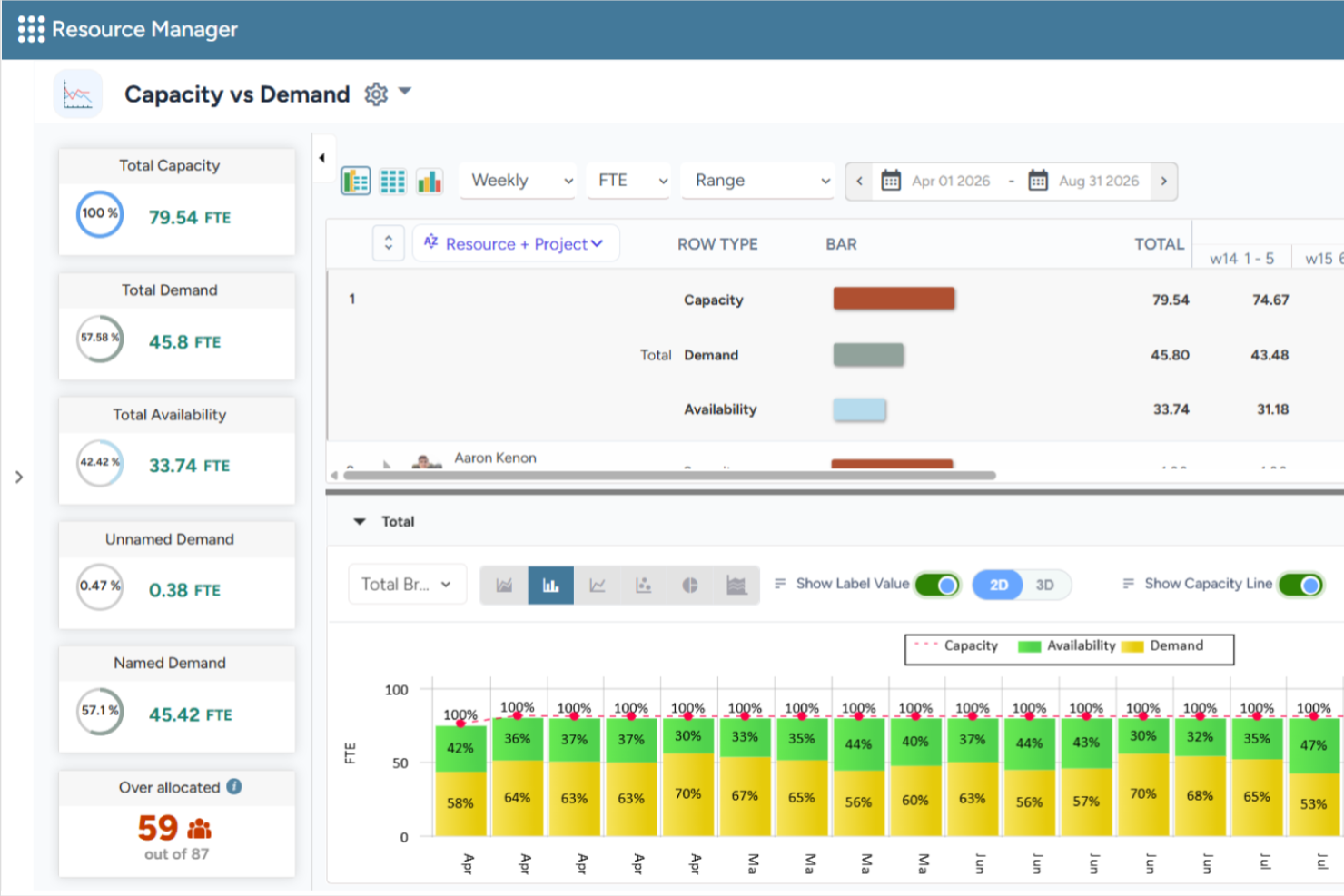
Saviom is a configurable and scalable resource management software built to combat the resourcing challenges across all industries. It can align resource capacity to changing demands for current and future projects in the pipeline. The platform also helps organizations forecast resource demand, optimize utilization, and support long-term workforce planning across complex project portfolios.
Why I Picked Saviom
I chose Saviom for its suite of advanced features, such as multidimensional scheduling, capacity planning, real-time optimization, talent planning, time management, and business intelligence reports. Its configurable software architecture can be customized and scaled up to meet the specific business requirements. Role-specific dashboards also enable various stakeholders to fast-track decision-making across matrix boundaries. I also like that it includes scenario modeling capabilities, allowing teams to compare different resource plans before making changes, as well as resource financial planning tools that help forecast resource costs and support staffing decisions.
Saviom Key Features
In addition to scheduling and forecasting capabilities, Saviom offers several other valuable features for resource management.
- Resource Capacity Planning: Forecast future resource demand, compare it against available capacity, and identify potential shortages or excess capacity before they impact project delivery.
- Scenario Modeling: Compare multiple staffing and project scenarios before applying changes to live resource plans.
- Talent Planning: Proactively address skill shortages, forecast demand, maintain an updated skill inventory, and ensure teams are prepared for current and future projects.
- Reports, Analytics & Dashboards: Access customizable real-time business intelligence reports and dashboards that provide visibility into resource utilization, availability, and key workforce metrics.
Saviom Integrations
Integrations are available with popular business applications, although specific examples aren't mentioned.
Pros and Cons
Pros:
- Flexible real-time reports, analytics, & dashboards
- Highly configurable & customizable resource management
- Multidimensional forecasting and capacity planning
Cons:
- Extensive features mean steep learning curve
- Less suited for small companies
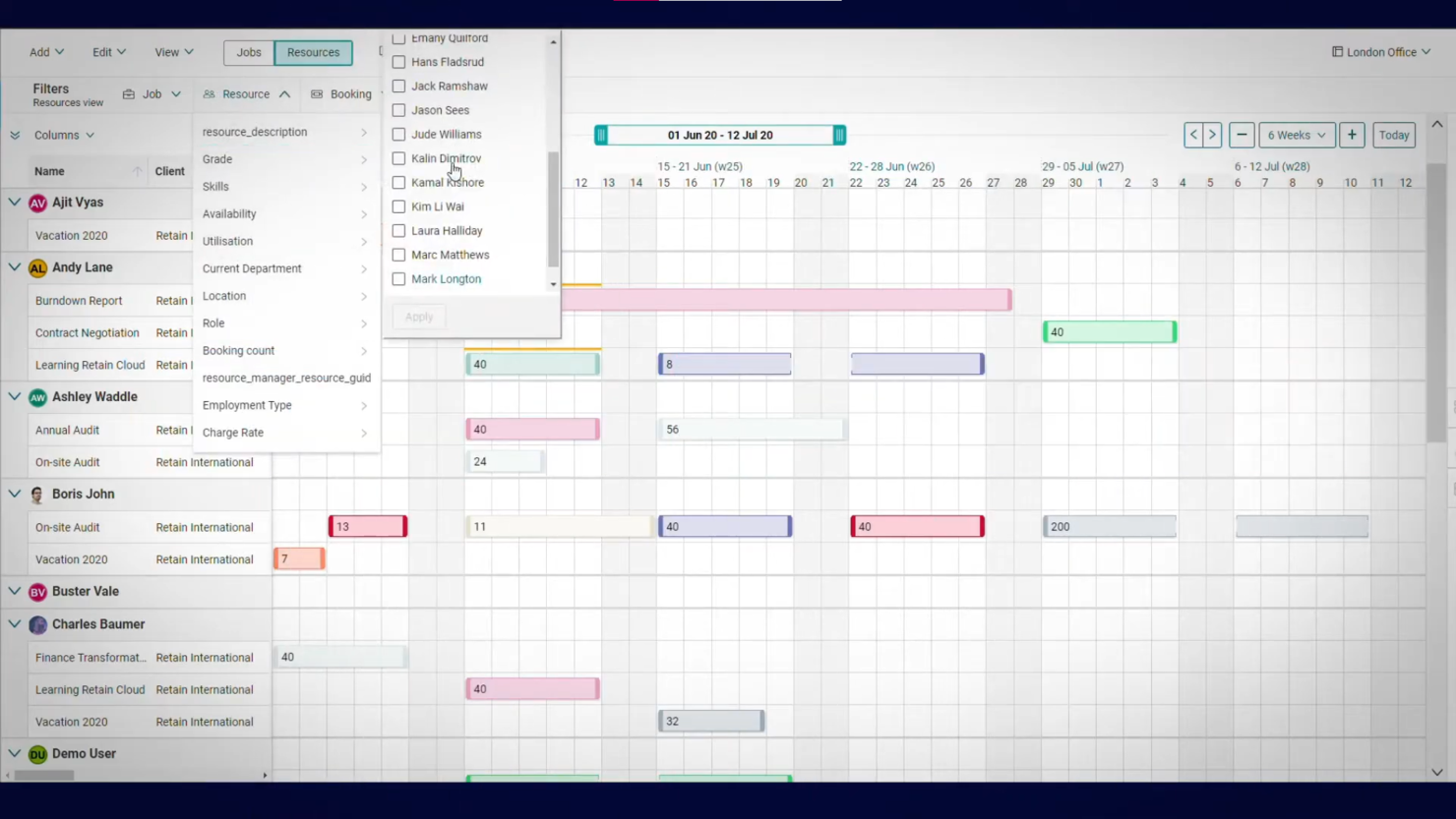
Demand forecasting is key to planning, and this is an area where Retain International stands out. The forecasting dashboard shows you how resource availability will change over time. You can use this information to allocate resources where they are needed most.
Why I Picked Retain: I like how intuitive the software is to use. The different features are simple to navigate, and the reporting and forecasting views make gaining insight easy.
There are both self-hosted and cloud versions of the software. If you choose the former, you’ll need to host the software on your own server. But once it’s up and running, you can still access the tool anywhere via the web or Android and iOS apps.
Retain Standout Features & Integrations
Features include a sophisticated forecasting dashboard that not only visualizes future resource availability but also incorporates scenario planning, allowing managers to model and prepare for potential changes in demand. Its leave management system is also seamlessly integrated with resource scheduling to ensure accurate capacity calculations and avoid unexpected shortfalls.
Integrations are not listed publicly on their site but seem to be available according to their pricing chart.

Best resource planning and capacity forecasting

Productive is a versatile platform that offers tools to simplify planning and team collaboration for agencies. It helps businesses handle multiple workflows and enables efficient tracking and allocation of resources across projects. The platform also caters to teams in service-oriented industries who need precision in resource planning and project delivery.
Why I Picked Productive
Productive provides advanced forecasting tools that help your agency plan and allocate resources effectively. Its capacity planning feature lets you monitor workloads and team availability, helping you make better decisions about upcoming projects.
Moreover, the platform's time tracking and profitability insights give you a clear picture of where resources are being used. You can also adjust schedules and reallocate team members on the go to maintain productivity and balance.
Productive Key Features
There are also several other features that make Productive a strong choice for resource management.
- Time Tracking: This feature lets your team log work hours directly into the system and get precise data for billing and analysis.
- Budget Management: You can manage project budgets with ease, track expenses and revenue, and maintain financial oversight.
- Invoicing: You can create and send invoices directly from the platform, which streamlines the billing process for your projects.
- Task Management: This feature helps you organize tasks with deadlines and priorities and keep your team aligned with project goals.
Productive Integrations
Integrations include Slack, QuickBooks Online, Xero, Zapier, HubSpot, Jira, Microsoft Teams, Google Workspace, Asana, and Trello.
Pros and Cons
Pros:
- Built-in time management can bill multiple business entities
- Plenty of custom tags to choose from
- Quite easy to set up collaborative tasks
Cons:
- Invoicing and quotation features are limited
- Mobile app could be faster/more responsive
New Product Updates from Productive
Productive Adds Voice Dictation, Slack Connector, Proposals, and Overtime
Productive adds voice dictation, a Slack Connector, proposal controls, and overtime tracking. These updates support faster AI interactions, client proposals, and time management. For more information, visit Productive’s official site.

Scoro
Best for forecasting team utilization

Scoro is a resource management software that provides a suite of tools to assist businesses in managing their projects, finances, and resources within a single system.
Why I Picked Scoro
I like the platform's robust features that allow users to plan and prioritize work, distribute tasks with a drag-and-drop planner or Kanban task board, and manage time with shared calendars, timesheets, and a built-in time tracker. Scoro also enables monitoring of billable and non-billable hours and ensures accountability for time spent on client work.
Furthermore, the platform has comprehensive forecasting tools that allow managers to gain a clearer view of current capacity levels, shortages, deadlines, and planned events and vacations. This foresight helps avoid over or under-utilization of staff, leading to better workload balance and increased employee satisfaction.
Scoro Key Features
Scoro offers several other features that cater to your comprehensive resource management needs.
- Task Management: Assign and prioritize tasks based on team skills and availability to ensure the right people are on the right projects.
- Project Tracking: Monitor project progress in real time to keep deadlines and budgets under control.
- Reporting and Analytics: Generate detailed reports to track resource utilization and project performance.
- Collaboration Tools: Centralize team communication and file sharing to reduce back-and-forth emails.
Scoro Integrations
Integrations include HubSpot, Google Calendar, Microsoft Exchange, Xero, QuickBooks, Sage Intacct, Expensify, Stripe, Jira, Slack, Asana, Dropbox, PayPal, and Zapier.
Pros and Cons
Pros:
- AI-powered insights help decision-making
- Comprehensive view of team utilization
- Automated invoices
Cons:
- Limited support for languages other than English
- Learning curve for first time users
New Product Updates from Scoro

Scoro Adds Time Mobile App and ELI Improvements
Scoro adds the Scoro Time mobile app for iOS/Android to track time anywhere and expands ELI with attachments, smarter filtering, and trigger-based actions. For more information, visit Scoro's official site.

Kantata
Best for people-centric resourcing
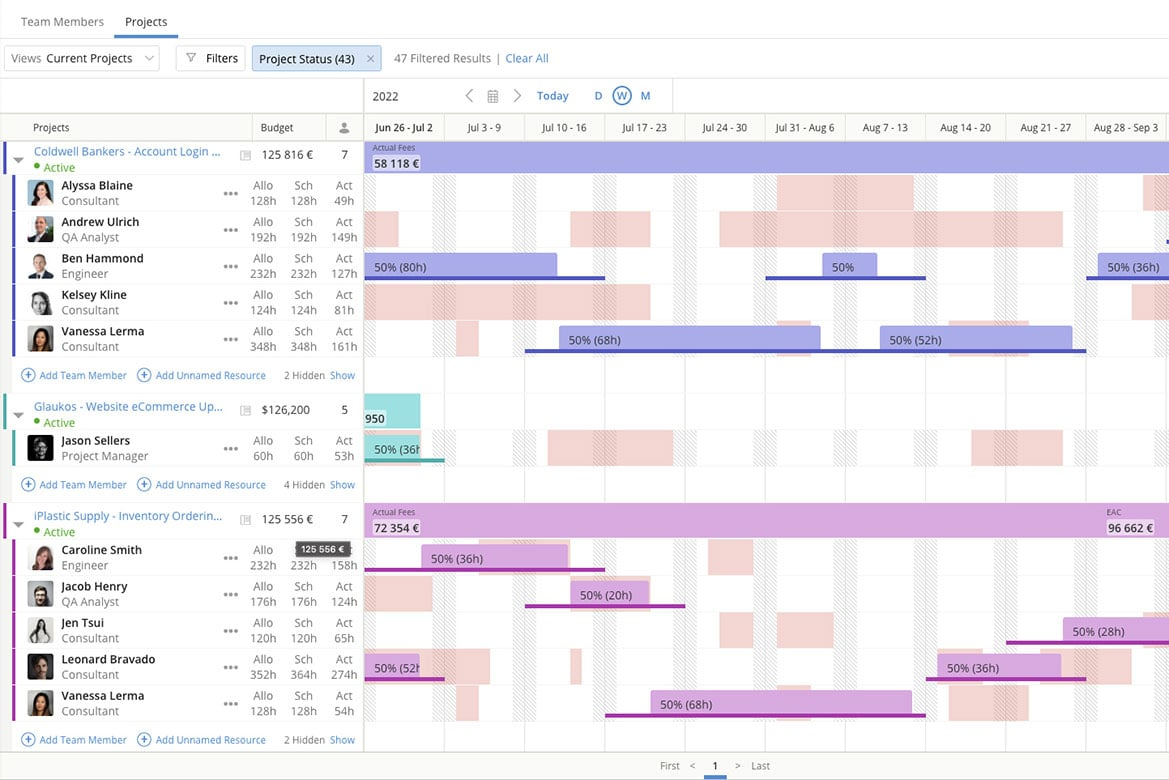
Kantata is a resource management platform built for professional services teams and agencies. Unlike generic tools, it unifies resourcing, financials, and project delivery while keeping people at the center of staffing decisions.
I recently spoke with Daniel Vasilevski, the director & owner of Pro Electrical, about how he uses Kantata with his team. He uses this tool because of the "resource planning dashboard that displays the availability of all team members for different jobs in one interface," he says. "During a large job...a sudden storm triggered 8 urgent callouts across different suburbs," he says. "Using the resource planning dashboard...I could see where each of my 14 electricians was and reassign 4 of them...without derailing the project," he explains. This had major benefits: "This...reduced client wait times from...more than a day down to under four hours. It also saved nearly $3,500 in overtime since the workload was evenly distributed," he says.
Why I Picked Kantata
What appeals to me about Kantata is how its resource management module helps leaders make staffing decisions that prioritize people as much as project needs. The platform provides real-time visibility into capacity and utilization, so you can balance workloads and ensure the right team members are assigned to the right tasks. Its skills-based resource planning also makes it easier to identify gaps, align talent with demand, and create opportunities for employee growth. This people-centric approach not only optimizes efficiency but also supports long-term team engagement.
Kantata Key Features
Kantata offers several other functionalities that make it a valuable tool for resource management.
- Project Time Tracking: This feature lets your team to accurately track time and resources so you can make informed adjustments to project plans.
- Team Collaboration Tools: These tools help improve communication among team members, coordination, and project outcomes.
- Business Intelligence Tools: You get real-time analysis and reporting so you can identify trends and make data-driven decisions.
- Visual Project Planning Tools: This features offers visual representations of tasks and timelines to improve understanding and engagement among your team.
Kantata Integrations
Integrations include Salesforce, SAP, Jira, Xero, BambooHR, Slack, Worday, QuickBooks, HubSpot, and NetSuite.
Pros and Cons
Pros:
- Resourcing fully integrated with master planning
- Good reporting functionality for resource data
- Easy capacity management
Cons:
- Advanced features available only in premier and enterprise plans
- Custom reports can be difficult to create without training
New Product Updates from Kantata

Kantata Adds Access Group Change History
Kantata adds Access Groups History, letting account administrators track changes to group details, membership, and permissions in Recent History. The update also makes these events available through the Subscribed Events API for broader monitoring. For more information, visit Kantata’s official site.
 .
.
Runn
Best for real-time team capacity planning
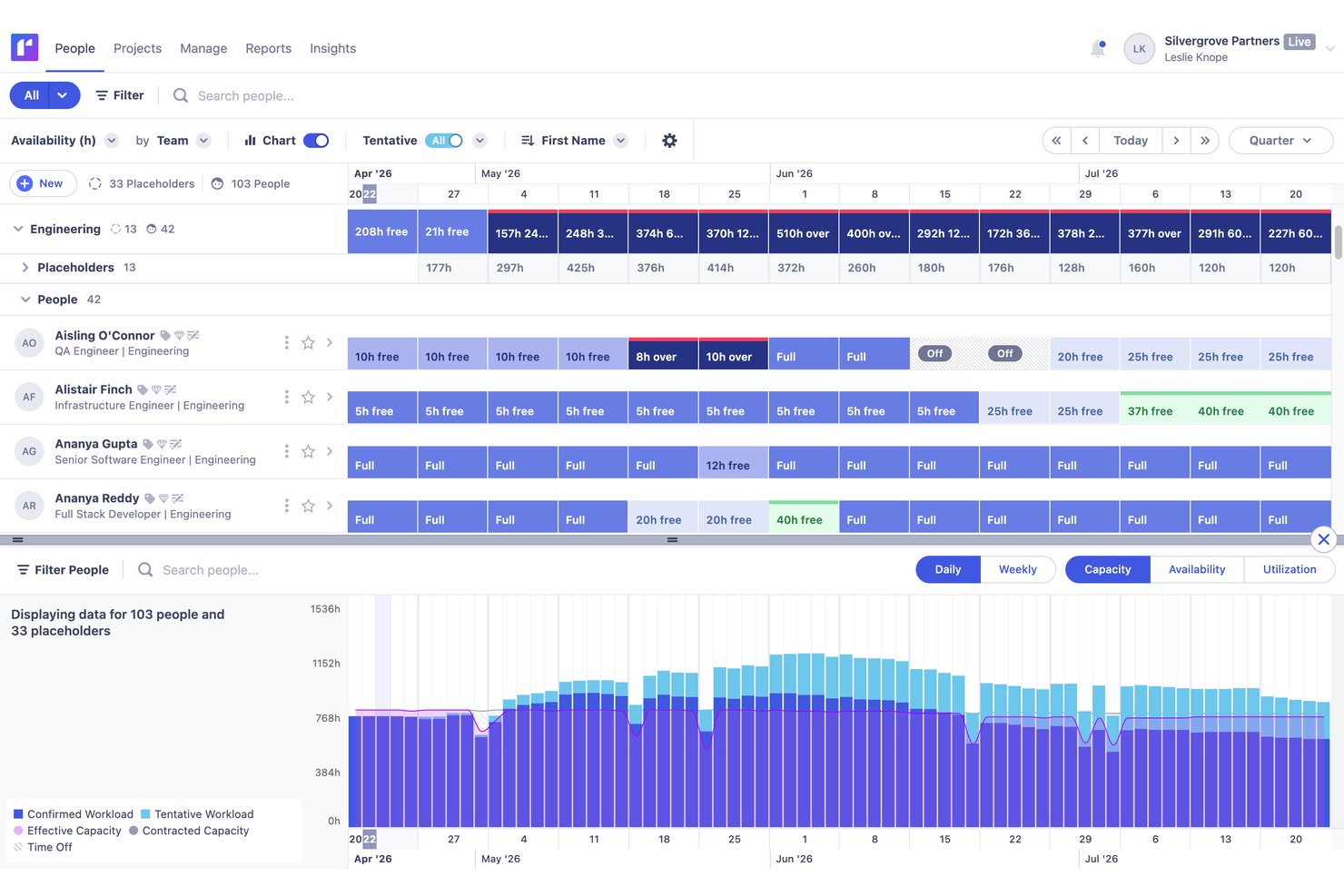
Runn is a resource management platform purpose-built around visual scheduling, real-time capacity planning, utilization tracking, and financial forecasting for project-based teams.
Who Is Runn Best For?
Runn is a strong fit for project-based teams—especially in professional services, agencies, and PMOs—that need a dedicated tool for visual scheduling and real-time capacity planning.
Why I Picked Runn
Runn earns its spot on my shortlist because it's purpose-built for real-time capacity planning in a way that broader project tools simply aren't. I love how Runn's capacity charts surface over- and underallocation the moment you adjust a schedule, so you're never working from stale data. SmartMatch AI is genuinely useful here too, recommending best-fit people based on skills and live availability rather than making you manually cross-reference profiles.
Runn Key Features
- Scenario planning: Create and compare unlimited what-if staffing and project scenarios to evaluate the impact of changes before committing to a plan.
- Native timesheets: Log time daily or weekly, track billable vs. non-billable hours, and compare planned time against actuals to sharpen future forecasts.
- Financial forecasting: Connect resource allocations to budgets, rate cards, and margin projections with support for both fixed-price and time-and-materials billing models.
- Placeholder resources: Add unnamed future hires to your schedule so capacity forecasts reflect real hiring plans, not just your current team.
Runn Integrations
Runn lists 13+ HRIS integrations, including BambooHR, Workday, HiBob, Gusto, and ADP Workforce Now, plus integrations with Harvest, Clockify, and Jira. It also supports custom integrations through its public API and Zapier.
Pros and Cons
Pros:
- AI-powered resource matching based on skills
- Unlimited scenario planning for resource modeling
- Real-time capacity versus demand visibility
Cons:
- Permission controls limited for complex organizations
- No native mobile app available

Wrike
Best for scalability

Wrike is an award-winning resource management software trusted by 20,000+ organizations worldwide. It's suitable for teams with anywhere from five members to an unlimited number of team members, making it easily scalable. It’s highly configurable and lets you customize workflows, dashboards, reports, request forms, and more.
According to Danilo Coviello, Founder of Espresso Translations, Wrike has been helpful in managing multiple projects at his translation agency, "We were juggling 15 projects and were always concerned with capacity allocation. Timelines that would be ruined by bottlenecks are now caught by me...project delays were reduced by 40% because I detect overloads in advance."
Why I Picked Wrike
Wrike has earned a spot on this list because of its interface and navigation with distinct spaces, folders, and tasks. This makes it useful for small and large organizations, and it can scale with you as your company grows. You can toggle quickly between the home screen and timesheets, dashboards, calendars, reports, and a stream for notifications and messages. I also like that it has a robust requests and approvals flow, which lets you standardize incoming work requests and track approval processes efficiently.
Additionally, the platform’s Datahub centralizes and consolidates data across multiple sources, so teams can make more informed, data-driven decisions. Timesheets also provide an easy way to track employee hours and project time allocation, which helps you optimize resource utilization and bill accurately.
Wrike Key Features
Wrike offers several other features that improve your ability to manage your team and resources.
- Time Tracking: This feature lets you monitor how much time your team spends on tasks, get insights into productivity, and help you manage deadlines more effectively.
- Project Templates: With customizable project templates, you can streamline your workflow and quickly set up new projects with predefined structures that suit your specific needs.
- Collaborative Proofing: This tool lets team members review and annotate documents and designs directly within Wrike, and it helps improve communication and speed up the approval process.
- Real-Time Reporting: You can generate real-time reports that give you a clear overview of project progress and resource allocation for better decision-making and strategic planning.
Wrike Integrations
Integrations include 400+ pre-built native integrations, including integrations with the most popular file management software from Microsoft, Google, and Dropbox, along with sales and marketing software from Salesforce and Marketo.
Pros and Cons
Pros:
- Building custom dashboards is great for highly specific resource tracking
- Good variety of dashboard views to accommodate different user needs
- Resource request and approvals are easy and well organized
Cons:
- Best resource tools limited to the higher level plans
- No time tracking with the free version of the tool
New Product Updates from Wrike

Wrike Adds Quick Search to Table View
Wrike adds Quick Search to Table View with full-table search across titles, descriptions, and fields, plus highlighted matches. This helps users find tasks faster in large tables. For more information, visit Wrike’s official site.

Teamhood
Best for capacity planning on a low per-seat cost
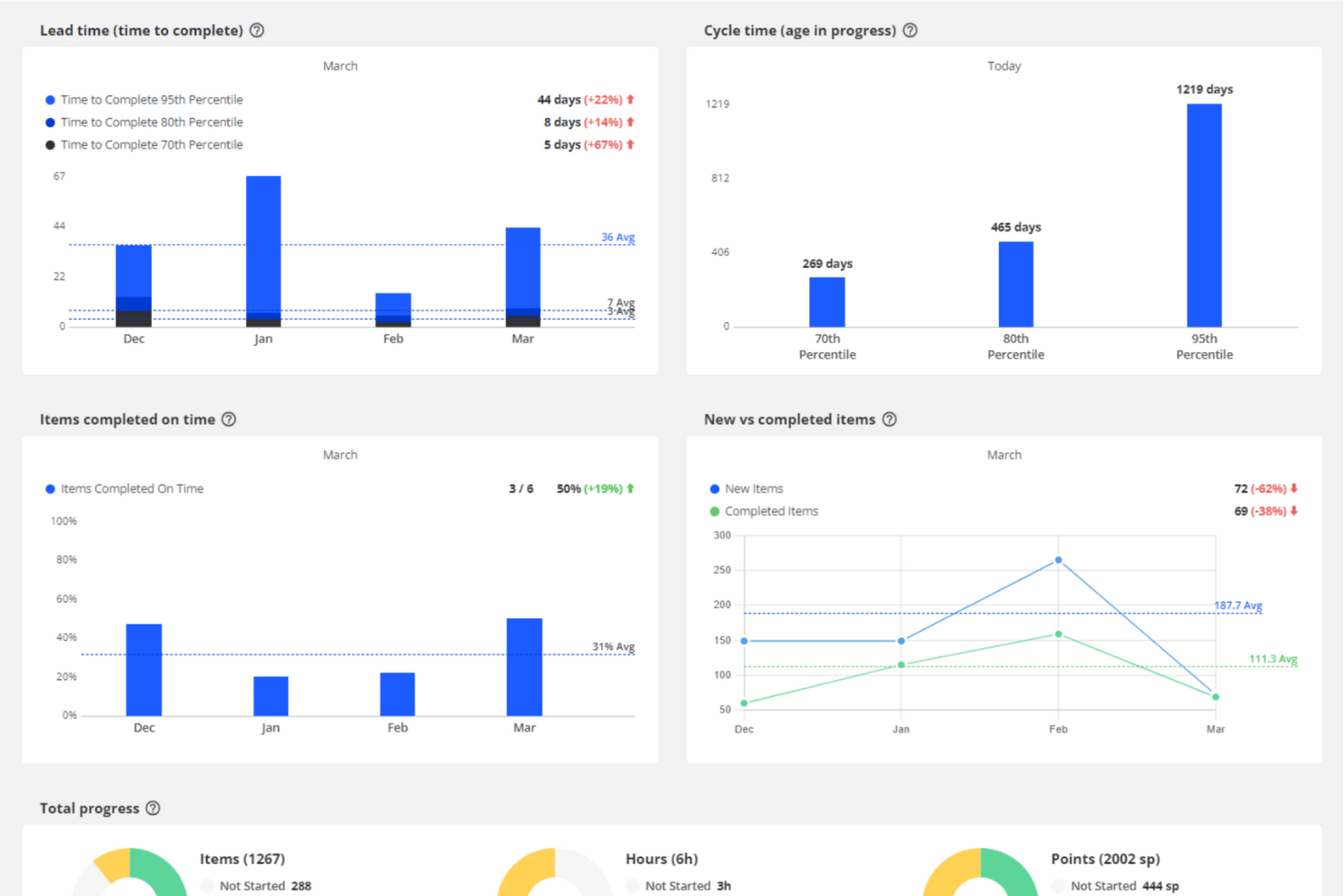
Teamhood is a project and resource management platform that combines capacity planning, visual scheduling, workload balancing, and time tracking across multiple projects simultaneously.
Who Is Teamhood Best For?
Teamhood fits operations managers and team leads at small-to-mid-sized companies running multiple projects simultaneously who need solid capacity planning without paying premium per-seat prices.
Why I Picked Teamhood
I've included Teamhood in my top picks because it puts genuine capacity planning features in a single $6/user/month plan, where most competitors lock this behind tiers costing three times as much. I like how the schedule view shows every project in one place, grouped by person, with red overload indicators that immediately flag who's over capacity across concurrent workstreams. Reserved hours let you hold capacity for an upcoming project before its tasks even exist, which is a practical advantage when you're juggling a pipeline of overlapping work.
Teamhood Key Features
- Gantt dependencies with baseline comparison: Set task dependencies that automatically reschedule follow-on work, and compare the current timeline against a saved baseline to track schedule drift.
- Reserved hours: Block capacity for upcoming projects before any tasks exist, so you can hold time for work that's still in the pipeline.
- Personal page: Each team member gets a view of their open work across all projects, their time off, and four weeks of booked hours compared to their capacity.
- Custom roles and granular permissions: Assign permissions down to specific capacity actions, with access controlled per view across the workspace.
Teamhood Integrations
Teamhood Classic offers five documented native integrations: Google Calendar, Outlook Calendar, Slack, Microsoft Teams, and Azure DevOps. The new Teamhood includes REST API and webhooks, while Classic supports Zapier.
Pros and Cons
Pros:
- Detailed planning adjusts around time off
- Reserved hours protect upcoming project capacity
- Cross-project schedule reveals capacity clashes
Cons:
- Forecasting lacks pipeline or historical projections
- No skills-based resource matching

Best for resource visibility with heatmaps

Resource Guru is a resource management software designed to help teams schedule, plan, and track time across projects and resources. It caters to industries like agencies, construction, engineering, and IT, offering a centralized platform for coordinating people, equipment, and meeting spaces.
I recently spoke with Trond Nyland, the CEO and owner of Todus.no AS, about his use of Resource Guru "to assign tasks to several e-commerce and real estate projects." To him, "what stood out was how easy it was to see who was available at a glance." This had a few benefits for his team. "It helped us meet deadlines without putting too much stress on the team," he says.
Why I Picked Resource Guru
I chose Resource Guru for its mix of flexibility and accuracy in scheduling. The platform handles people, equipment, and meeting rooms in a single view, making it easier to plan across different resource types without juggling multiple tools. Advanced custom fields and filters mean you can tailor the setup to reflect skills, locations, or other attributes, while approval workflows and clash management features reduce the risk of double-booking or overlooked requests.
What really sets Resource Guru apart for me is its focus on visibility. The heatmap views give you an instant read on availability, so you can see at a glance where capacity is tight or underused. Personalized dashboards and daily summary emails keep the right information in front of each team member so you can make quick, confident resourcing decisions without drowning in data.
Resource Guru Key Features
In addition to resource scheduling and time tracking, Resource Guru has several other features that can help with resource management efficiency.
- Calendar View: This feature provides a visual overview of all scheduled projects and tasks, so you can quickly assess team availability and project timelines.
- Custom Fields: You can tailor Resource Guru to fit your specific needs by adding custom fields to categorize and manage resources according to your unique criteria.
- Project Reporting: Get insights into project performance with detailed reports that help you analyze resource utilization and project progress.
- Leave Management: You can easily manage and track team members' time off and plan around absences without disrupting project workflows.
Resource Guru Integrations
Integrations include Google Sheets, Jira Software, Smartsheet, Asana, monday.com, Basecamp, Microsoft Outlook, Clockify, Google Calendar, Slack, Microsoft Teams, and Teamwork.
Pros and Cons
Pros:
- Heatmaps for quick capacity insights
- Daily resource summary emails
- Comprehensive resource usage reporting tools
Cons:
- Limited reporting depth compared to larger enterprise tools
- Unable to sort resources by experience level
New Product Updates from Resource Guru

Resource Guru Adds More Control Over Calendar Sync
Resource Guru adds more control over Google and Outlook Calendar sync, including source calendar selection and destination calendar options. These updates help users manage external events and Resource Guru bookings with less clutter. For more information, visit Resource Guru’s official site.
 .
.Other Resource Management Software Reviews
If you didn’t find what you were looking for above, here are a few more software tools that might fit the bill.
- monday AI Workspace
For simple workload planning
- Microsoft Project
For Microsoft users
- Rocketlane
For unified collaboration with clients
- ClickUp
Workload views for understanding team capacity
- Forecast
For AI-driven resource optimization
- Anaplan
For scenario planning
- Meisterplan
For role-based resource allocation
- ActiveCollab
For built-in invoicing
- Bonsai Agency Software
For workload optimization
- Birdview
For simulating resource loading
- Schedule It
For scheduling work shifts
- Planview AdaptiveWork
Enterprise-grade resource management tool
- elapseit
For its features that support kickstart to invoice
- Polaris PSA By Replicon
For combined PSA and PPM functionality
- Adobe Workfront
For strategic resource allocation
- PSOhub
RM that integrates with CRMs
- ProjectManager
For resource monitoring via project dashboards
- Parallax
For predictive resource management
- Planview Vantage
For the PMO level
- Mosaic
For capacity planning and headcount forecast
- Apache OFBiz
For commerce-based resource planning
- Silverbucket
For project-based work
- eResource Scheduler
Built-in financial module


Video Walkthrough of Resource Management Tools
Check out our video on resource management software!


Related Resource Management Software Reviews
If you still haven't found what you're looking for here, check out these other related tools that we've tested and evaluated:
- Workflow Automation Software
- Time Tracking Software
- Task Management Software
- Collaboration Tools
- Gantt Chart Maker
- Media Resource Management Software
- Productivity Tools
- Resource Scheduling Software
- Free Resource Management Software
- Marketing Resource Management Software
- Resource Booking Software
- Agency Resource Management Software
- Open Source Resource Management Software
- Web-based Resource Scheduling Software
- Inventory Resource Management Tools
How I Evaluate Resource Management Software
I split evaluation into three parts, with core functionality carrying most weight: assign people across projects and show capacity against commitments. Next, I look for standout features such as scenario planning for comparing staffing plans. Finally, I consider onboarding, support, integrations, security, and pricing.
Core Functionality (Table Stakes For This List)
When I'm selecting tools for my list, I score each one on a scale from 0 (does not offer the functionality) to 5 (excels in this area) for each core functionality listed below. I then convert the total into a percentage to help assess each tool's overall fit, with extra weight on any functionalities I’ve deemed essential.
- Resource Scheduling & Allocation (Essential): I look for timelines or calendars that assign people to projects, roles, and tasks across overlapping delivery periods.
- Capacity & Availability (Essential): I check whether teams can compare available hours with committed work and spot upcoming over-allocation.
- Workload Management: I assess team views, heatmaps, and reassignment tools for balancing workloads across simultaneous projects.
- Utilization Tracking: I look for planned-versus-actual reporting, including team, project, and billable or non-billable utilization.
- Forecasting & Demand Planning: I evaluate forecasts that use project plans, pipeline, or historical data to reveal future staffing gaps.
- Skills & Role-Based Matching: I check whether managers can filter or match people by skills, roles, experience, and availability.
Once I have a list of tools that meet the criteria, I consider what sets each platform apart.
Differentiating Factors (What Sets Vendors Apart)
Here's how I compare and contrast different vendors:
Standout Features
Scenario modeling is where I start. I check whether a tool lets me build side-by-side "what-if" staffing plans before locking in assignments—useful when a new project lands and I need to see how pulling someone off one engagement affects three others. I also evaluate financial and margin reporting, specifically whether resource costs and bill rates flow into live project budgets so I can spot margin erosion mid-delivery rather than after the fact. Bench time visibility matters too: I look for dashboards that surface underutilized team members so I can reassign talent before idle time becomes a cost problem.
Beyond Features
I check how well each tool connects to the PM, financial, and HR systems a team already runs. A platform like Resource Guru or Kantata that syncs with your existing stack saves hours of duplicate data entry. I also evaluate onboarding support, because migrating skills inventories, cost rates, and availability rules into a new tool is where most rollouts stall. Finally, I look at whether reporting is configurable enough for different audiences—a PMO director needs portfolio-level utilization views, while an ops manager wants a per-project margin breakdown they can share with a client.
How to Choose Resource Management Software
It’s easy to get bogged down in long feature lists and complex pricing structures. To help you stay focused as you work through your unique software selection process, here’s a checklist of factors to keep in mind:
| Factor | What to Consider |
|---|---|
| Scalability | Make sure the software can grow with your team. Look for options that can handle increasing resources, users, and projects without sacrificing performance or usability. |
| Integrations | Check whether the software integrates seamlessly with the tools your team already uses, like project management platforms, CRMs, or accounting software. |
| Customizability | Choose software that lets you tailor your workflows, permissions, and reporting to match your team’s specific needs and industry requirements. |
| Ease of Use | Opt for a platform with an intuitive interface and minimal learning curve so your team can adopt it quickly without frustration. |
| Budget | Make sure the pricing aligns with your software budget. Consider total costs, including subscription fees, add-ons, and potential scaling costs. |
| Security Safeguards | Prioritize software with robust security features like encryption, access controls, and regular updates to protect your team’s sensitive data. |
| Support Options | Look for reliable customer support through channels like chat, email, or phone, as well as access to a knowledge base or community forum for self-help. |
| Reporting Tools | Assess whether the software offers detailed reporting features to help you analyze resource usage and improve efficiency over time. |
It's worth emphasizing why integrations are especially important:
There are always limitations with these tools. Sometimes you have must-have requirements that the software can’t meet natively, and that’s when people start looking for integrations or workarounds.

Trends in Resource Management Software
In my research, I sourced countless product updates, press releases, and release logs from different resource management software vendors. Here are some of the emerging trends I’m keeping an eye on:
- AI-driven resource allocation: Software tools are implementing AI features that can predict staffing needs and assign resources based on skill sets, availability, and project priorities. This helps teams avoid overallocation, underutilization, and bottlenecks in complex projects.
- Scenario planning and modeling: Features for testing “what-if” scenarios are becoming standard. These tools allow you to manage risks and adjust plans quickly, and to visualize the impact of changes like shifting deadlines or reallocating resources without disrupting active projects.
- Skill mapping and development tracking: Platforms are integrating features that allow you to map team members’ skills and track their growth over time. You'll be able to make sure the right people are assigned to the right tasks and support the team's professional development.
- Real-time workload insights: Live dashboards can provide instant visibility into team workloads and capacity, as well as replace the need for static reports. You can quickly identify imbalances and adjust assignments to keep projects running smoothly.
- Sustainability and environmental tracking: Resource management tools are beginning to offer features for tracking sustainability metrics. This can help your business reduce waste and improve environmental impact.
What is Resource Management Software?
Resource management software is a tool that helps you allocate, schedule, and optimize resources (like personnel, equipment, and materials) to support project goals and objectives. The primary purpose is to make sure the right resources are available at the right time, in the right quantities, and in the right locations to complete project tasks within the budget and schedule.
If you lead specialized teams, you may need a variant, like engineering resource management software, for managing technical staff, tools, and deadlines in product development or construction projects.
Features of Resource Management Software
When selecting resource management software, keep an eye out for the following key features:
- Resource scheduling: Quickly allocate people, assets, or time blocks to different projects, so team members work on the right items at the right time.
- Capacity planning: See at a glance how much work your team can handle, help them avoid burnout by making sure workloads are realistic, and spot opportunities where team members are under-utilized.
- Project tracking: Easily monitor which resources are assigned to which projects, how work is progressing, and if deadlines are on track so you can avoid surprises down the road.
- Timeline visualization: Gantt charts, calendars, or other visual timelines help you spot conflicts, overlaps, and team member availability.
- Utilization reporting: Instantly check how busy your resources are, make sure no one is overworked or under-utilized, and rebalance workloads to avoid burnout.
- Skill tracking: Keep an updated inventory of your team's skills and certifications and match people to projects based on real expertise, not just availability.
- Budget management: Track spend against project or resource budgets, stay on top of costs, and justify every resource with confidence.
- Time tracking: Log hours worked on tasks or projects, understand actual effort versus estimates, and easily bill clients and forecast future projects.
- Permission controls: Set who can view, edit, or approve resource assignments to keep sensitive information safe and prevent accidental changes.
Common Resource Management Software AI Features
Beyond the standard resource management software features listed above, many of these solutions are incorporating AI features like:
- Automated resource allocation: AI analyzes project requirements, deadlines, and staff availability to suggest or automatically assign the best-fit resources and reduce manual guesswork.
- Predictive capacity forecasting: Using historical data, AI predicts periods when you might be over- or under-resourced, so you can adjust hiring or assignments before issues arise.
- Smart conflict detection: AI spots potential scheduling conflicts or overallocations before they become headaches and sends proactive alerts so you stay ahead of problems.
- Intelligent skills matching: AI reviews your team’s profiles and automatically pairs the right talents with each project or task.
- Automated reporting: AI-generated reports pull together utilization, capacity, and cost figures, so you can easily make sense of your resource data.
Benefits of Resource Management Software
Here are five primary benefits of using resource planner software:
- Efficient resource allocation: By providing insights into resource availability and workload, resources planning software helps you make sure resources are allocated optimally, minimize bottlenecks, and maximize productivity.
- Real-time visibility: With real-time updates on resource allocation and project progress, you'll have better visibility into project timelines and resource utilization. This lets you make informed decisions and proactive adjustments.
- Improved planning and forecasting: Resource allocation programs facilitate accurate planning and forecasting by analyzing historical data and resource trends, helping you anticipate future resource needs and allocate resources effectively.
- Better collaboration and communication: By centralizing resource information and allowing for collaboration among team members, the software fosters better communication, coordination, and alignment of resources with project goals. This also leads to improved project outcomes.
- Optimized project performance: Resource utilization software helps you optimize project performance by making sure the right resources are available at the right time, reducing delays, and increasing project delivery speed and quality.
Resource Management Software Costs & Pricing
Below is a breakdown of common resource management software plan types, their average prices, and the features typically included to help you determine which type of plan is right for you:
| Plan Type | Average Price | Common Features |
|---|---|---|
| Free | $0 | Basic resource scheduling, limited projects, basic reporting |
| Basic | $10 - $20/user/month | Better scheduling, time tracking, basic analytics |
| Professional | $20 - $40/user/month | Advanced resource planning, real-time collaboration, full project management suite |
| Enterprise | Custom Pricing | Custom integrations, advanced security features, personalized onboarding and support |
You can always upgrade your plan if necessary. Common stages where your company may want to upgrade your pricing plan include:
- Growth in team size: When the team expands beyond the limits of the current plan, you might need additional user licenses or seats.
- Increased project complexity: When projects become more complex, you'll require advanced features such as improved reporting and analytics.
- Need for better support: You might require higher levels of customer support, such as 24/7 support or dedicated account managers, to keep things running smoothly and resolve issues quickly.
- Demand for more storage: When your current plan’s storage capacity becomes insufficient as you create project files, documents, and data, you'll need to upgrade to a plan with more storage.
- Integrations and customization: When you need more integrations with other software or require customization options that are only available in higher-tier plans, you'll need to upgrade.
Resource Management Software Frequently Asked Questions
Find answers to common questions about resource management and resource management software.
Can I still use spreadsheets for resource management?
No, you shouldn’t use spreadsheets for resource management because it makes resource tracking slow, manual, and error-prone. Dedicated resource management tools help you monitor workloads, get more visibility, and manage changes. These platforms can also automate processes like resource allocation, show availability at a glance, and simplify reporting for you and your team.
Can Jira be used for resource management, and what are its limitations?
Yes, you can track tasks and assignments in Jira, but its resource management features are limited. It doesn’t provide built-in views for utilization or capacity, and you’ll have to use plugins or integrations for more advanced planning. A specialized resource management tool is much more effective.
How do these software options facilitate collaboration between remote teams?
Resource management tools give everyone a clear view of who’s doing what and when. This is especially useful for remote work. Features like shared calendars, real-time updates, and centralized communication help reduce confusion and keep distributed teams aligned. Team members can easily handoff work to each other and keep track of progress.
Are there flexible pricing options or discounts for non-profits?
Yes, some resource management software vendors offer non-profit discounts or special pricing tiers. Check vendor websites or contact sales directly to find out if you’re eligible and to apply on behalf of your organization.
What integrations should I look for in resource management software?
Look for integrations with tools you already use, like project management software (e.g. Asana, Trello), calendars, communication platforms (e.g. Slack, Microsoft Teams), and HR or time-tracking software. Integrations can save you time, reduce manual updates, and give you a holistic view of resource availability.
How does resource management software help prevent team burnout?
These tools let you track workloads so you can spot when someone’s at risk of burnout or has too much work on their plate. You’re able to see allocation across projects, manage time off, and balance assignments. Having access to real-time data helps you redistribute tasks and promote healthier work habits for your team.
What are the most common mistakes when implementing resource management software?
Common mistakes you should avoid when implementing resource management software include skipping team training, not customizing settings, and failing to keep resource data updated. Also, not involving all key stakeholders can lead to poor adoption. Set up clear onboarding, assign ownership, and update data regularly to get the most from your tool.
Is it worth investing in AI features for resource management software?
Yes, it’s worth investing in AI features for resource management software. AI-powered features can automate scheduling, forecast demand, and suggest optimal resource allocation. If your team deals with complex scheduling or shifting priorities, AI can save you time and improve accuracy. Make sure it aligns with your workflows and use case, instead of just using it because it’s trendy.