10 beste gratis programvarer for ressursstyring i 2026

10 Kortliste over den beste gratis programvaren for ressursstyring


Sliter du med å finne ut hvem som jobber med hvilke prosjekter, prioritere arbeid for teamet ditt eller overholde prosjektfrister, men har ikke råd til å investere i avansert programvare? Det finnes mange gratis verktøy for ressursstyring for team og organisasjoner med begrenset budsjett.
Her er mine anbefalinger av den beste gratis programvaren for ressursstyring på markedet, sammen med notater om min personlige erfaring med hvert verktøy, slik at du enklere kan velge det som passer best.
Hvorfor du kan stole på våre programvareanbefalinger
Teamet vårt har testet og anmeldt programvare siden 2012. Vi er selv prosjektledere, så vi vet hvor vanskelig og hvor viktig det er å velge riktig programvare.
I denne guiden har vi vurdert verktøyene gjennom praktisk testing og uavhengig research og gitt dem poeng ut fra våre utvelgelseskriterier. Vi bygger også på innsikt fra ledende eksperter i bransjen og erfarne prosjektledere.
Anmeldelsene våre bygger på vår egen redaksjonelle vurdering. De er ikke et salgsargument.
Ekspertanmeldere:
Sammenligningstabell for gratis programvare for ressursstyring
Denne sammenligningstabellen oppsummerer prisopplysningene for mine beste utvalgte gratis verktøy for ressursstyring:
| Tool | Best For | Trial Info | Price | ||
|---|---|---|---|---|---|
| 1 | Best for visual workload management | Free plan + 14-day trial available | From $9/user/month (billed annually) | Website | |
| 2 | Best for multiple resource views | Free plan + 14-day trial available | From $10/user/month (billed annually) | Website | |
| 3 | Best for capturing time in project apps | Free plan + 7-day free trial available | From $4.99/user/month | Website | |
| 4 | Best for testing capacity planning | Free plan + free trial + free demo available | From $12/user/month | Website | |
| 5 | Best for connecting projects to resource apps | Free plan available | From $10.99/user/month (billed annually) | Website | |
| 6 | Best for carrying bookings into timesheets | Free plan available | From $11.95/month | Website | |
| 7 | Best for matching skills to assignments | 14-day free trial | From $5.27/resource/year (billed annually) | Website | |
| 8 | Best for utilization and overtime reporting | Free plan + 14-day free trial + free demo available | From $2/user/month | Website | |
| 9 | Best for hiring from project pipelines | 30-day free trial | From $9.50/user/month (billed annually) | Website | |
| 10 | Best for profitable resource management | Free trial available | From $7/scheduled user/month | Website |


Oversikt over den beste gratis programvaren for ressursstyring
Her er en kort beskrivelse av hvert av de gratis verktøyene for ressursstyring på listen min. Jeg har tatt med hva hvert verktøy er best til, samt skjermbilder som viser noen av funksjonene.

Best for visual workload management
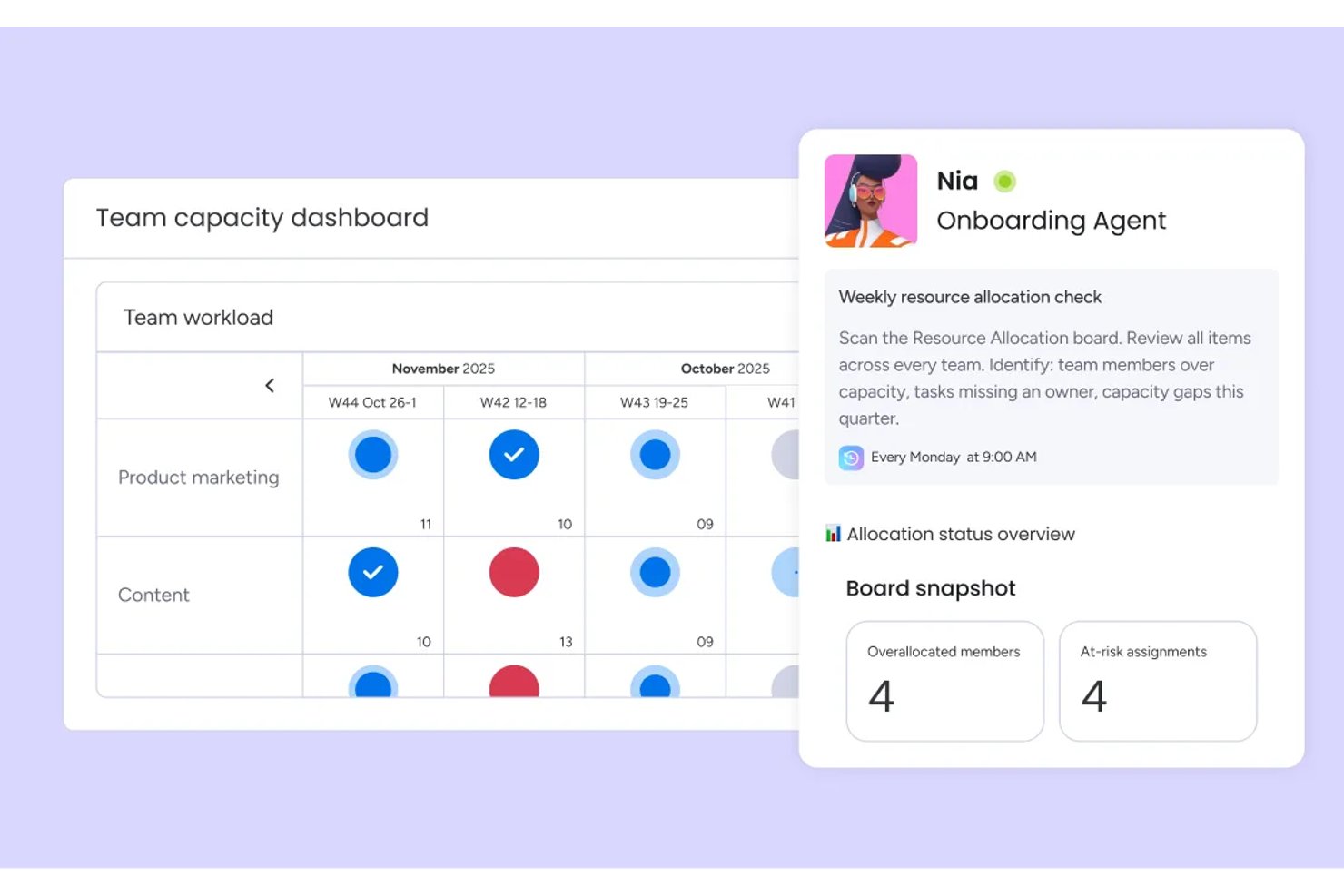
monday AI Workspace is a no-code work management platform that combines board-based task assignment, workload views, Gantt and timeline scheduling, and AI-assisted automation to help teams plan, allocate, and track resources across projects.
Who Is monday AI Workspace Best For?
It's a strong fit for project managers and operations leads at growing teams who need a visual, flexible way to manage workloads across multiple concurrent projects.
Why I Picked monday AI Workspace
monday AI Workspace earns its spot on my shortlist because I genuinely appreciate how its Workload view makes capacity problems impossible to miss. Color-coded bars turn red the moment a team member is over-allocated, so I can rebalance assignments before things go sideways. I also use the drag-and-drop Timeline view to shift tasks across weeks without ever leaving the scheduling screen.
monday AI Workspace Key Features
- Skills and role tagging: Assign tags for skills, roles, or certifications to match the right resource with the right work.
- Multi-project dashboards: View consolidated resource data and status updates from multiple projects on shareable custom dashboards.
- Leave and PTO management: Track time off directly in the system, automatically updating capacity and preventing scheduling conflicts.
- Native time tracking column: Log actual hours worked per task with a dedicated column, making utilization reporting easier.
monday AI Workspace Integrations
monday AI Workspace offers hundreds of native integrations through its built-in integrations and marketplace, including Slack, Salesforce, HubSpot, Google Workspace, Microsoft Teams, Jira, Asana, Trello, GitHub, and Zoom. It also supports Zapier and provides an API for custom integrations.
What's Free?
monday AI Workspace offers a free-forever plan for up to 2 seats, with access to up to 3 boards, basic docs, and 200+ templates. Key features like automation, time tracking, advanced reporting, and integrations are locked behind paid plans, so the free tier works best for individuals or very small teams doing light project tracking.
Pros and Cons
Pros:
- AI-assisted automations reduce manual scheduling work
- Drag-and-drop timeline spans multiple projects
- Workload view catches over-allocations instantly
Cons:
- Time tracking locked behind paid tiers
- Free plan caps at only two seats
New Product Updates from monday AI Workspace
monday AI Workspace Adds Human Approval Routing
monday AI Workspace adds a human-in-the-loop approval block to AI Workflows, sending approval requests and routing workflow paths based on responses. For more information, visit monday AI Workspace's official site.

Wrike
Best for multiple resource views
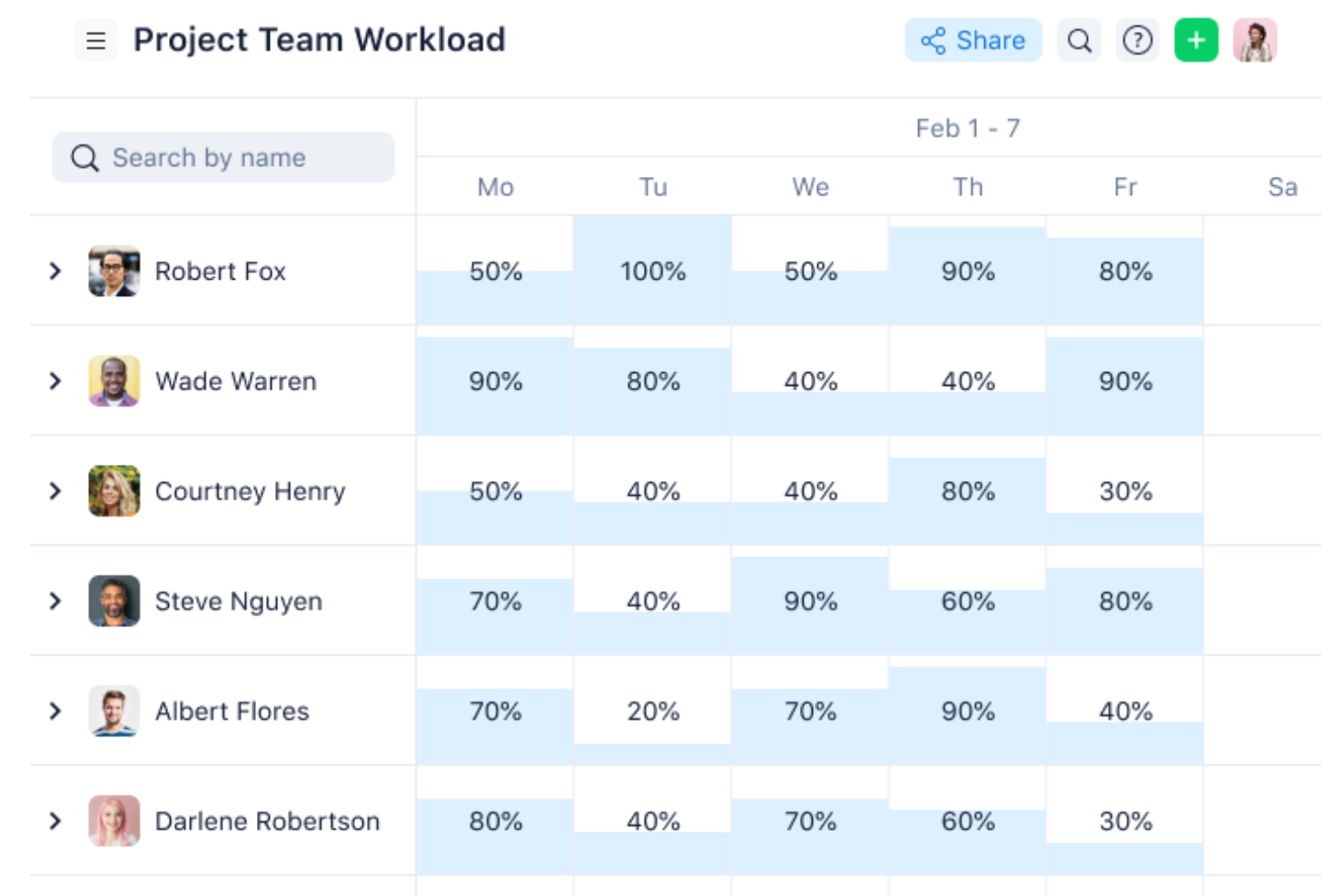
Wrike is a project and resource management platform with task scheduling, effort bookings, and multi-project workload views; its Workload charts and Resources view require Business or higher, not the free plan.
Who Is Wrike Best For?
Wrike suits project and resource managers coordinating concurrent projects who need multiple workload views; its Workload charts and Resources view require Business or higher.
Why I Picked Wrike
I rate Wrike “Best for multiple resource views” because its Workload charts flag overcapacity, while Resources view compares scheduled effort across up to 100 projects. Those resource views require Business or higher, so Wrike’s Free plan doesn’t provide these core resource-management tools.
Wrike Key Features
- Work schedules: Record PTO, non-working days, and capacity changes.
- Time tracking: Log project time from Business; Wrike doesn’t calculate billing or profitability.
- Budgeting: Compare planned and actual costs from Pinnacle.
- Free plan limits: Includes unlimited users, 2 GB of storage, and 200 active tasks, but no Workload charts or Resources view.
Wrike Integrations
Wrike offers 400+ pre-built native integrations, including Slack, Jira, Google Calendar, and Tableau. It also provides an open REST API and Wrike Integrate for custom connections and workflow automation.
What's Free?
Wrike has a free-forever plan with unlimited users, 2 GB of storage, and 200 active tasks. It excludes Workload charts and the Resources view; a 14-day free trial is also available.
Pros and Cons
Pros:
- Drag-and-drop scheduling supports quick rebalancing
- Color coding flags overloaded team members
- Multiple views reveal cross-project workload
Cons:
- Advanced capacity planning requires higher tiers
- Free plan excludes core resource views
New Product Updates from Wrike

Wrike Redesigns AI Agent Builder
Wrike redesigns its AI Agent Builder with a side-by-side setup, Scopes, sentence-style triggers and actions, and clearer filters. These changes make it easier to configure, test, and manage agent behavior. For more information, visit Wrike’s official site.

Clockify
Best for capturing time in project apps
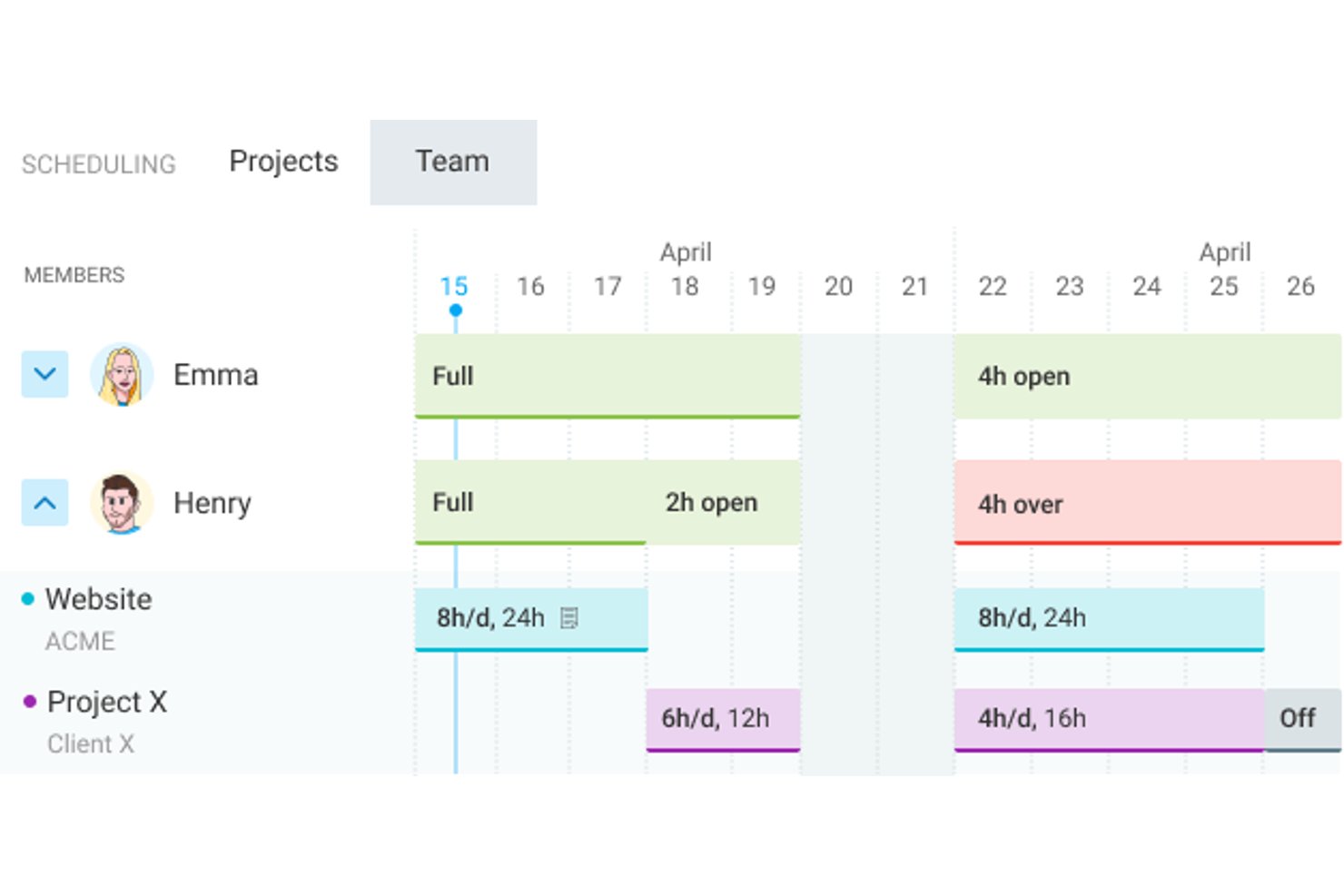
Clockify is a time-tracking platform with paid resource-planning features for scheduling project assignments, viewing team capacity, and comparing scheduled with tracked hours; its free plan doesn’t include resource scheduling.
Who Is Clockify Best For?
Clockify suits project managers in tech and digital teams who want to capture work hours directly from project and development apps.
Why I Picked Clockify
I picked Clockify as “Best for capturing time in project apps” because its browser tools can start timers from Jira issues and GitHub issues. The free plan supports up to five active users and unlimited time tracking, giving small teams a way to record actual project hours. Resource schedules and capacity views require Pro or Enterprise, so free users can track work but can’t plan assignments in Clockify.
Clockify Key Features
- Time-off policies: Standard and higher plans support vacation, sick leave, holiday requests, approvals, and balances.
- Project forecasting: Pro and higher plans forecast project performance using estimates, tracked hours, and scheduled hours.
- Timesheet approvals: Standard and higher plans let managers review and approve submitted timesheets.
- Budget alerts: Pro and higher plans track project budgets and estimates, with alerts as projects approach their limits.
Clockify Integrations
Clockify has native integrations with Jira, GitHub, Azure DevOps, Asana, Google Calendar, Outlook, and Google Sheets. It also offers a REST API and webhooks for custom integrations.
What’s Free?
Clockify has a free-forever plan for up to five active users with unlimited time tracking. Resource scheduling and capacity views aren’t included, so you’ll need a paid plan to plan assignments in Clockify.
Pros and Cons
Pros:
- Straightforward time entry helps capture actual hours
- Timeline assignments support quick schedule adjustments
- Reports reveal workload distribution across projects
Cons:
- Eight-week schedule limits longer-range planning
- Free tier excludes scheduling and capacity views

ClickUp
Best for testing capacity planning
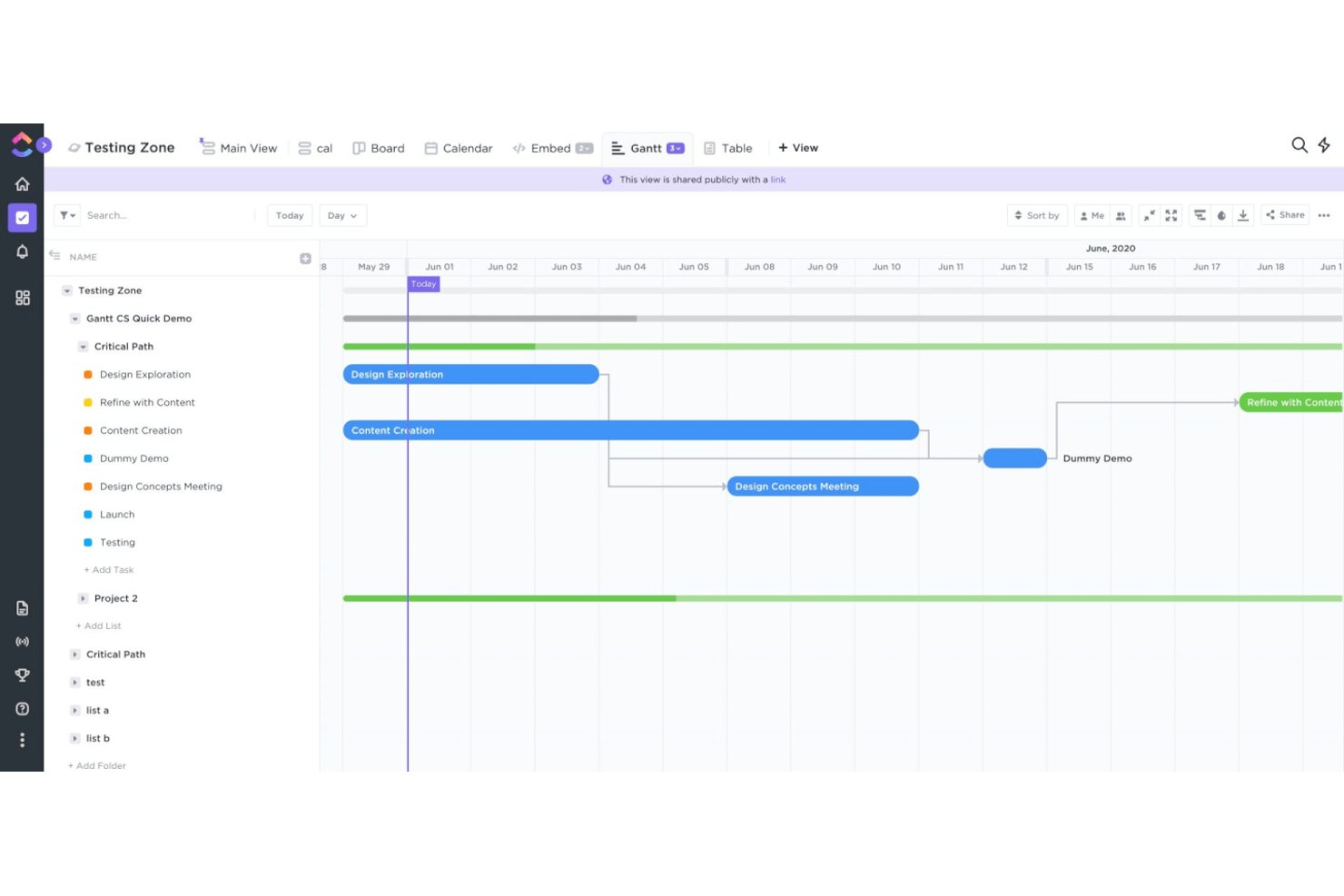
ClickUp is resource management software with a free plan, combining task assignment and scheduling with Workload views that compare estimated work against team capacity.
Who Is ClickUp Best For?
Project managers coordinating product, engineering, and design work can use ClickUp to keep delivery tasks and team assignments in one workspace.
Why I Picked ClickUp
I picked ClickUp for “Best for testing capacity planning” because Workload view compares assigned work with capacity by day, week, or month. I can review estimates as a percentage of capacity, then drag tasks to change dates or reassign them when a product sprint overloads an engineer. The free plan includes 60 Workload uses, but they don’t reset.
ClickUp Key Features
- Task dependencies: Mark tasks as blocking or waiting on other tasks.
- Time tracking: Log time with a timer or manual entries, then add notes and tags.
- Work schedules: Set the Workspace’s default working days and hours.
- Resources Dashboard card: Add a free card to view resource information on a Dashboard.
ClickUp Integrations
ClickUp lists 50+ native integrations, including Google Calendar, Slack, Microsoft Teams, and GitHub. Its API and webhooks support custom connections.
What’s Free?
ClickUp has a free-forever plan with unlimited users, but its Workload view is limited to 60 uses that don’t reset.
Pros and Cons
Pros:
- Shared views help track cross-team projects
- Drag tasks to change dates or assignees
- Workload compares estimates with capacity over time
Cons:
- Time-off tracking and utilization cards require upgrades
- Free Workload access ends after 60 uses
New Product Updates from ClickUp
ClickUp Adds Meetings Hub, Super Agent Templates, and ZoomInfo Integration
ClickUp adds a searchable Meetings Hub, new ways to clone and template Super Agents, and a ZoomInfo integration through the App Center. These updates improve meeting retrieval, agent reuse, and access to sales intelligence. For more information, visit ClickUp’s official site.

Asana
Best for connecting projects to resource apps
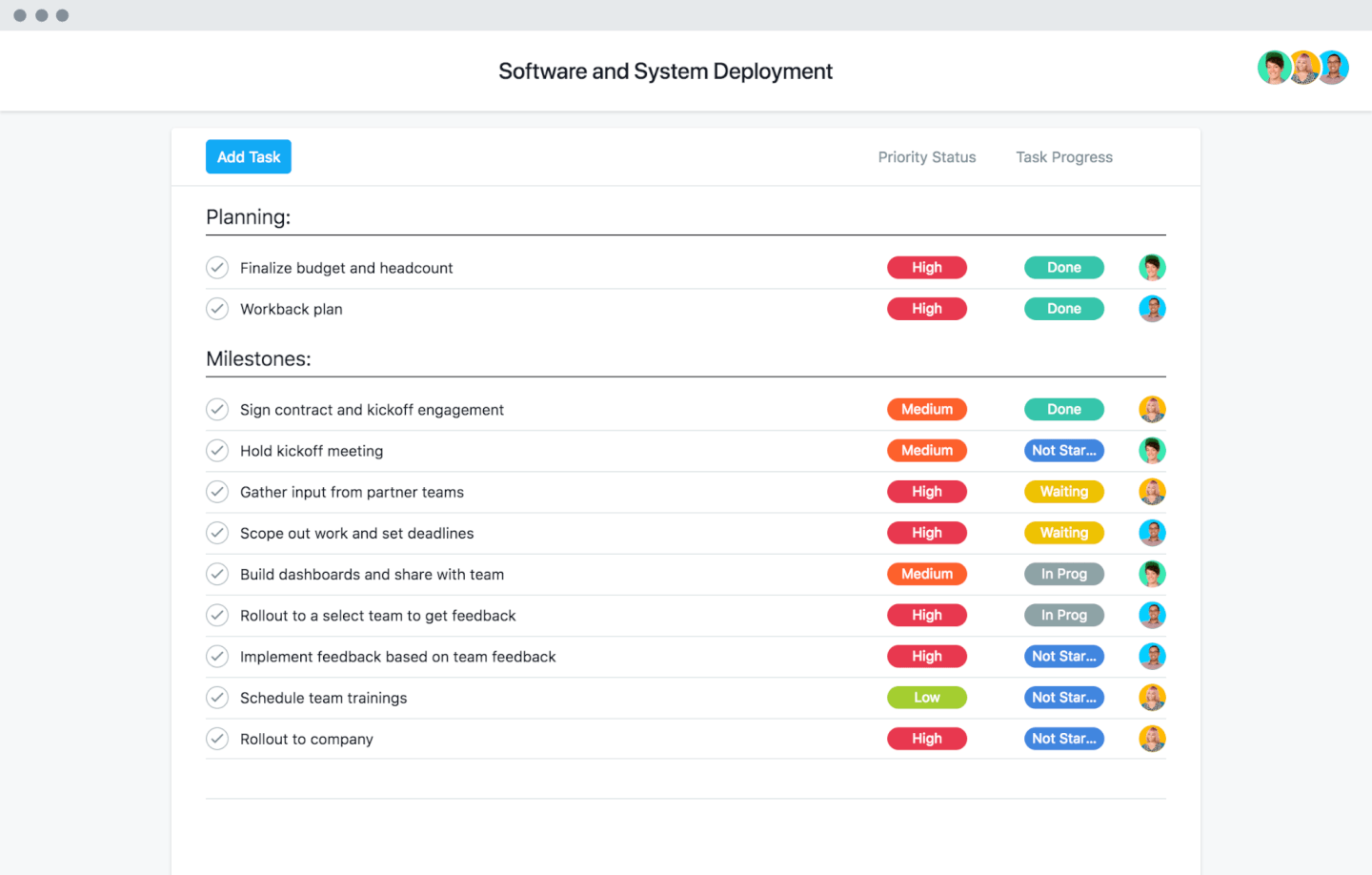
Asana combines project and resource management, with workload views, cross-project capacity planning, and task allocation on paid tiers; its free Personal plan supports projects and tasks but excludes Workload and capacity planning.
Who Is Asana Best For?
Asana suits project managers in cross-functional tech teams who want project work connected to resource-planning apps and can use paid workload features.
Why I Picked Asana
I picked Asana for connecting projects to resource apps: Float can turn Asana project data into a capacity timeline, while Mosaic imports employee, project, and task data for planning. Asana’s Portfolio Workload adds cross-project visibility on Advanced, but the free Personal plan lacks Workload and capacity planning, so free resource management is limited.
Asana Key Features
- Task assignments: Assign tasks to owners and set due dates.
- Timeline and Gantt views: Map task dates, dependencies, and milestones.
- Work request forms: Collect requests and turn submissions into project tasks.
- Custom fields: Track details such as priority, status, or effort.
Asana Integrations
Asana lists 100+ free integrations, including marketplace integrations with Float and Mosaic for connecting project and task data to resource-planning workflows. It also offers an API for custom integrations.
What’s Free?
Asana’s Personal plan is free forever for up to two users and includes unlimited tasks, projects, and 100+ integrations. It doesn’t include Workload or capacity planning, so resource management features require a paid plan.
Pros and Cons
Pros:
- Effort-based capacity views flag over-allocation
- Portfolio views reveal cross-project workload
- Named task owners clarify responsibility
Cons:
- Two-seat limit restricts team resource coordination
- Free Personal excludes workload and capacity planning
Avaza
Best for carrying bookings into timesheets
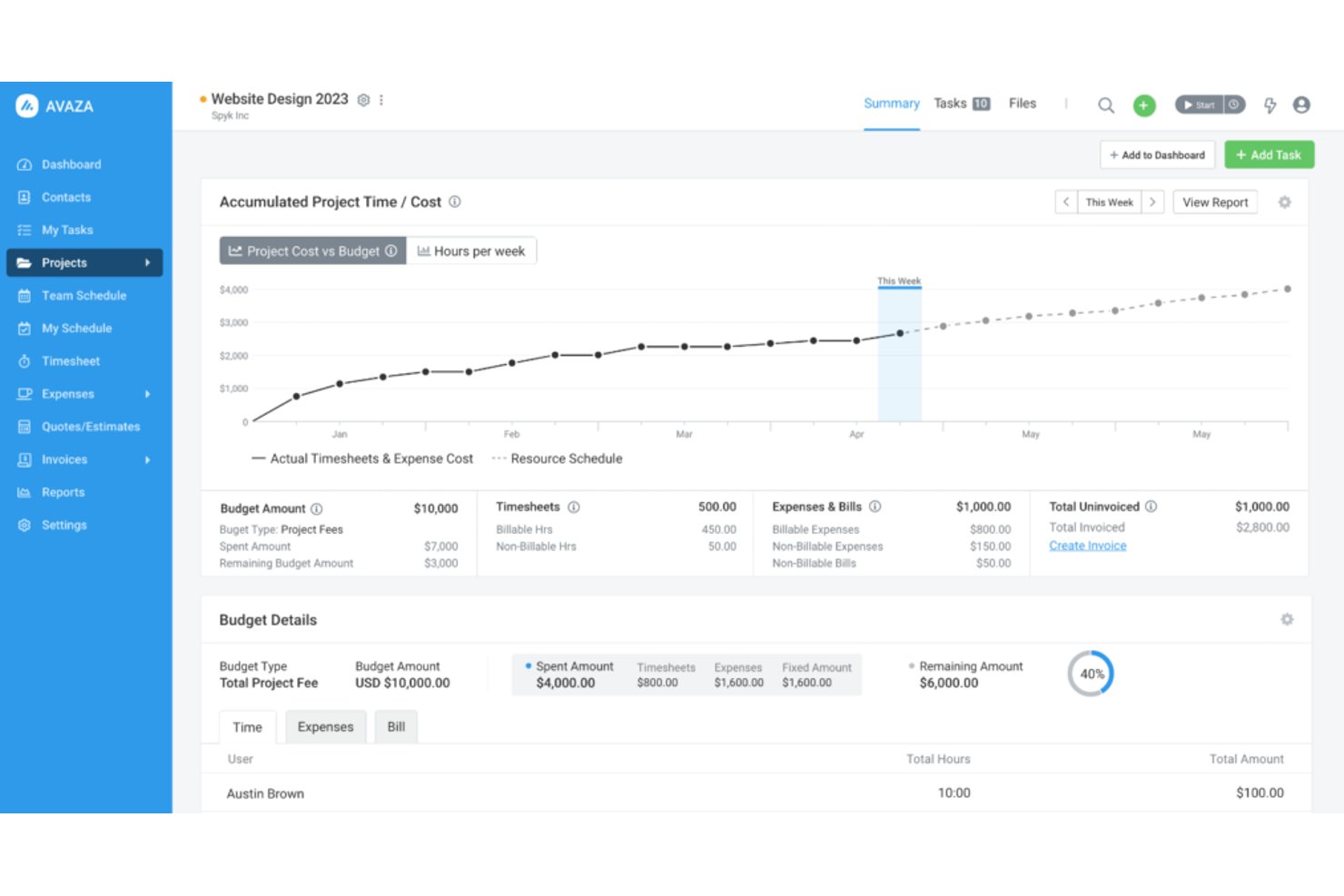
Avaza is a free resource management platform with project scheduling, capacity views, and time tracking; its free plan includes one Scheduling User, and the broader platform also covers expenses and invoicing.
Who Is Avaza Best For?
Avaza suits resource managers at professional-services firms who want project bookings to carry into timesheets and support billable-work tracking.
Why I Picked Avaza
I picked Avaza for its “Best for carrying bookings into timesheets” focus: scheduled bookings appear in the timesheet day view and can become time entries. I also use scheduled-versus-tracked hours to spot gaps between planned and actual effort. The free plan includes one Scheduling User and five active projects.
Avaza Key Features
- Skill and tag filters: Filter schedules by skills, expertise, location, department, or job title.
- Team and project views: Review bookings by person or project, with filters for customers and project categories.
- Leave and working hours: Set individual working hours, leave, and account-wide public holidays to inform availability.
- Schedule Details report: Group and filter booking hours, costs, and billable amounts across a selected date range.
Avaza Integrations
Avaza provides a calendar feed for Google Calendar and Outlook, plus a REST API and Zapier connectivity to 7,000+ apps. Native integrations include GitHub, Xero, and QuickBooks Online.
What’s Free?
Avaza offers a free plan, not just a time-limited trial. It includes one Scheduling User and up to five active projects.
Pros and Cons
Pros:
- Availability filters help compare project allocations
- Scheduled bookings can become timesheet entries
- Utilization reports clarify billable workload and delivery
Cons:
- Reviewers report cumbersome resource booking workflows
- Free plan schedules only one user

Ganttic
Best for matching skills to assignments
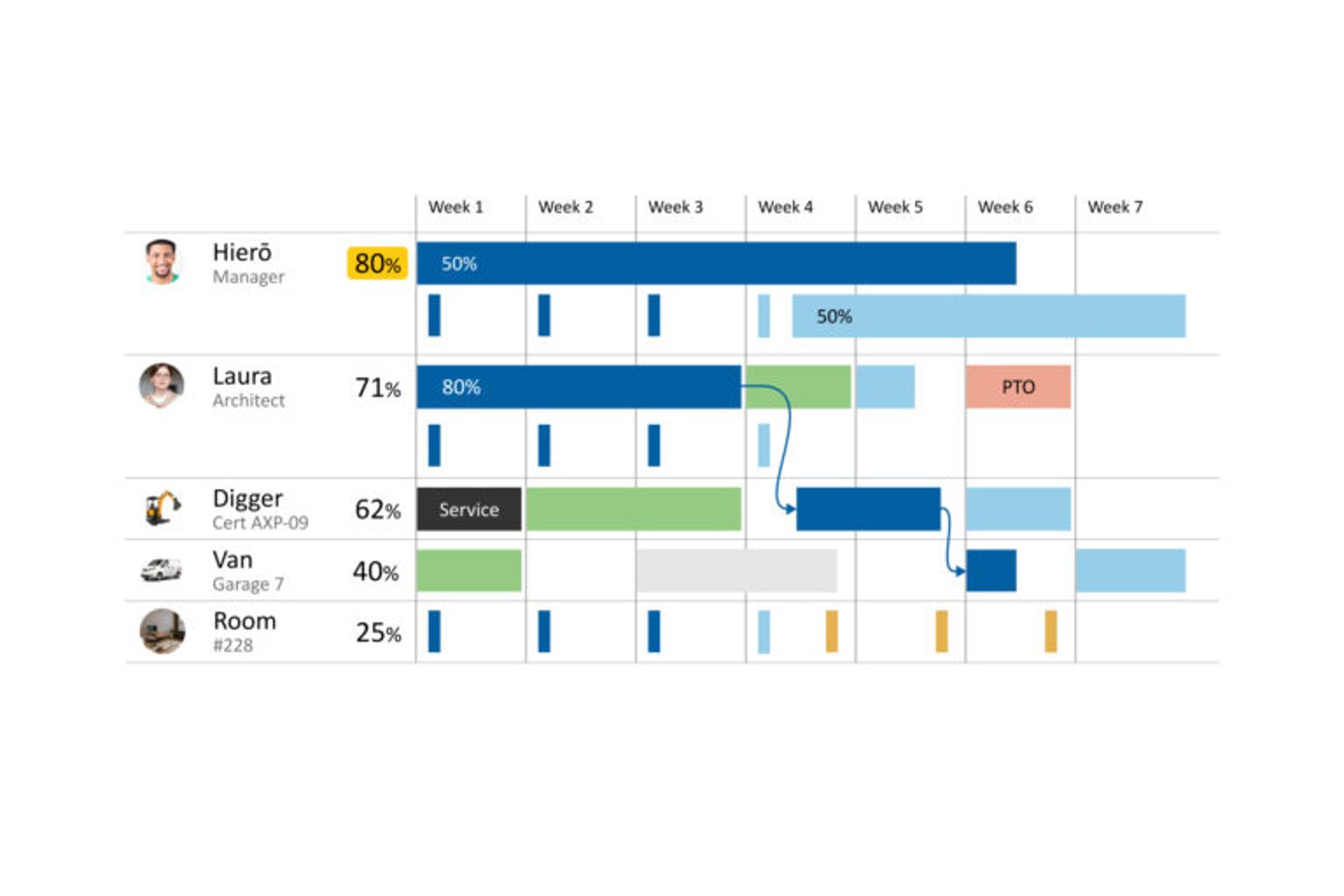
Ganttic is free resource management software for scheduling people and equipment across projects, with Gantt and Kanban views, utilization tracking, time-off planning, and reports.
Who Is Ganttic Best For?
Ganttic is a good fit for resource and operations managers who need to match staff skills to project requirements and balance capacity across concurrent work.
Why I Picked Ganttic
I picked Ganttic for matching skills to assignments: I can record resource skills and task requirements in custom fields, then filter for people whose skills and availability fit the work. I can schedule those matches on Gantt views and check utilization across projects. Its ongoing free plan supports up to 10 resources and unlimited users, though it warns about overloads without blocking overlapping bookings.
Ganttic Key Features
- Time-off scheduling: Add recurring or one-time leave, breaks, and equipment maintenance to resource timelines.
- Calendar sync: Sync resource calendars with Google Calendar or Outlook in one or two directions.
- Task dependencies: Link tasks to show which work must finish before another task begins.
- Report exports: Export resource, task, or project reports as CSV or PDF.
Ganttic Integrations
Native integrations include Google Calendar and Microsoft Outlook Calendar, with one- or two-way sync. Ganttic also integrates with Microsoft Project, supports Zapier, and offers API access on paid plans.
What's Free?
Ganttic has an ongoing free plan for up to 10 resources and unlimited users. It warns about overloaded schedules but doesn’t block overlapping bookings.
Pros and Cons
Pros:
- Group schedules by departments and custom fields
- See availability across concurrent projects
- Match skills and task requirements
Cons:
- Free planner stops at ten resources
- Overlapping bookings need manual oversight

Teamdeck
Best for utilization and overtime reporting
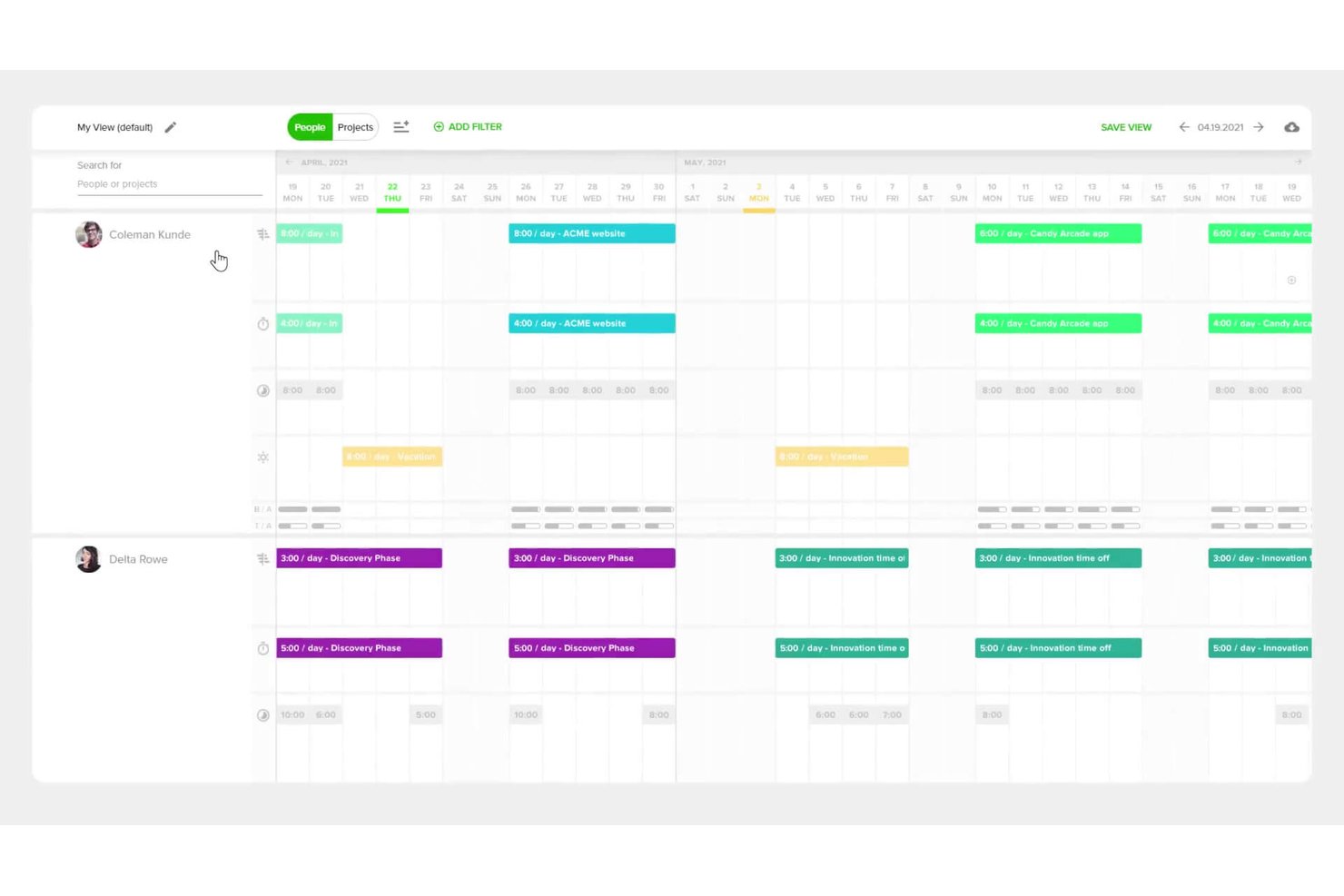
Teamdeck is a resource management platform with a free Startup Plan for up to two full members, covering project scheduling, availability and leave tracking, timesheets, and reporting.
Who Is Teamdeck Best For?
Resource managers and project leads at small digital teams can use Teamdeck to coordinate assignments and monitor availability across concurrent projects.
Why I Picked Teamdeck
I picked Teamdeck as Best for utilization and overtime reporting. Its free Startup Plan includes scheduling and reporting for up to two Full Members. The Team Utilization Report shows booking time, availability, utilization, and overtime, while red Calendar indicators flag overbooking or recorded overtime.
Teamdeck Key Features
- Vacation requests: Team members can submit time-off requests for manager approval.
- Recurring availability: Set daily availability to repeat on selected days through an end date.
- Tags: Label bookings, timesheet entries, and projects, then use tags to filter information.
- Mobile time tracking: Start and stop time recording in the mobile app, with timesheets synced to Teamdeck.
Teamdeck Integrations
Teamdeck lists native integrations with Google Calendar, Slack, Sage HR, and Podio. Its REST API with webhooks and Zapier are also documented; API access and built-in integrations are Business Plan features, while Startup Plan access to Zapier isn’t specified.
What’s Free?
Teamdeck offers a free Startup Plan for up to two Full Members, with scheduling, availability and leave tracking, timesheets, and reporting; it also offers a 14-day free trial. Built-in integrations and API access are Business Plan features, and Zapier access on the Startup Plan isn’t specified.
Pros and Cons
Pros:
- Reviewers praise quick workload adjustments
- Calendar shows assignments across concurrent projects
- Utilization reports expose overtime and availability
Cons:
- Reviewers flag report accuracy and flexibility
- Free plan stops at two full members

Best for hiring from project pipelines
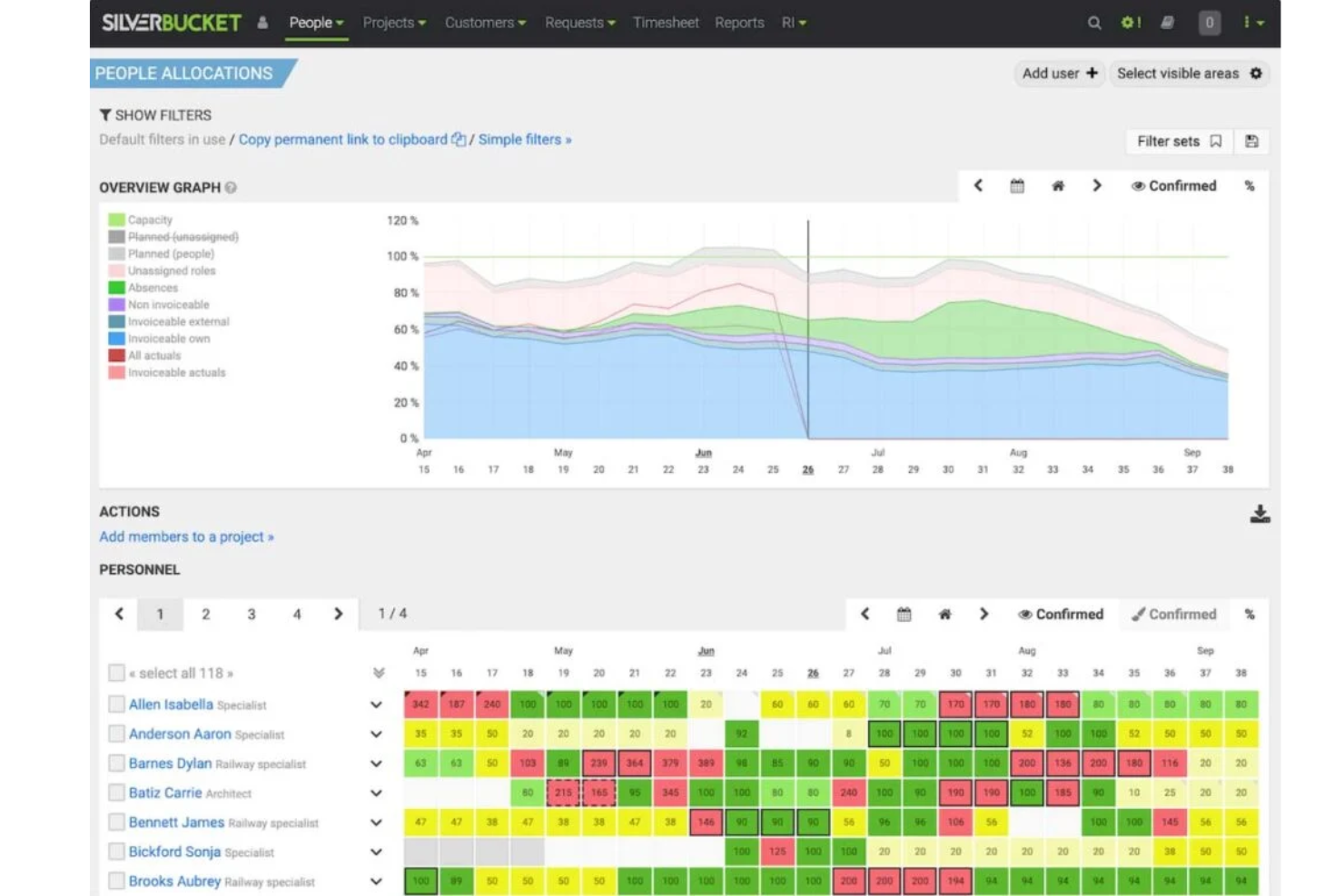
EG Silverbucket is a resource management platform with a 30-day free trial, offering people and role allocation, Gantt-based planning, capacity views, scenario planning, and utilization reporting; it has no ongoing free plan.
Who Is Silverbucket Best For?
Silverbucket suits resource managers and project leads at project-driven firms; its niche is Best for hiring from project pipelines, with capacity and hiring forecasts tied to incoming work.
Why I Picked Silverbucket
I rate Silverbucket as Best for hiring from project pipelines because scenario planning lets me model unconfirmed projects and spot capacity gaps before committing work. I can compare pipeline scenarios, track tentative allocations, and use forecast demand to plan hiring. Its 30-day trial is free, but there’s no ongoing free plan.
Silverbucket Key Features
- Interactive Gantt timeline: Plan project tasks against resource availability.
- Resourcing requests: Submit resource needs for owners to review and match with available people.
- Skill-based matching: Compare candidates using availability, competencies, and role criteria.
- Utilization reports: Review current and future team utilization and compare actual hours with allocations.
Silverbucket Integrations
Silverbucket connects with Power BI for live dashboards and Excel for scheduled exports. Its REST API supports custom integrations and inbound and outbound data flows; bulk imports are available through CSV and XLSX templates.
What’s Free?
Silverbucket offers a 30-day free trial, not a free-forever plan. Pricing is available upon request.
Pros and Cons
Pros:
- Straightforward allocations across multiple projects
- Scenario planning helps forecast hiring needs
- Clear visibility into team capacity and conflicts
Cons:
- Utilization reports offer limited customization
- No lasting free plan for ongoing use

Float.com
Best for profitable resource management
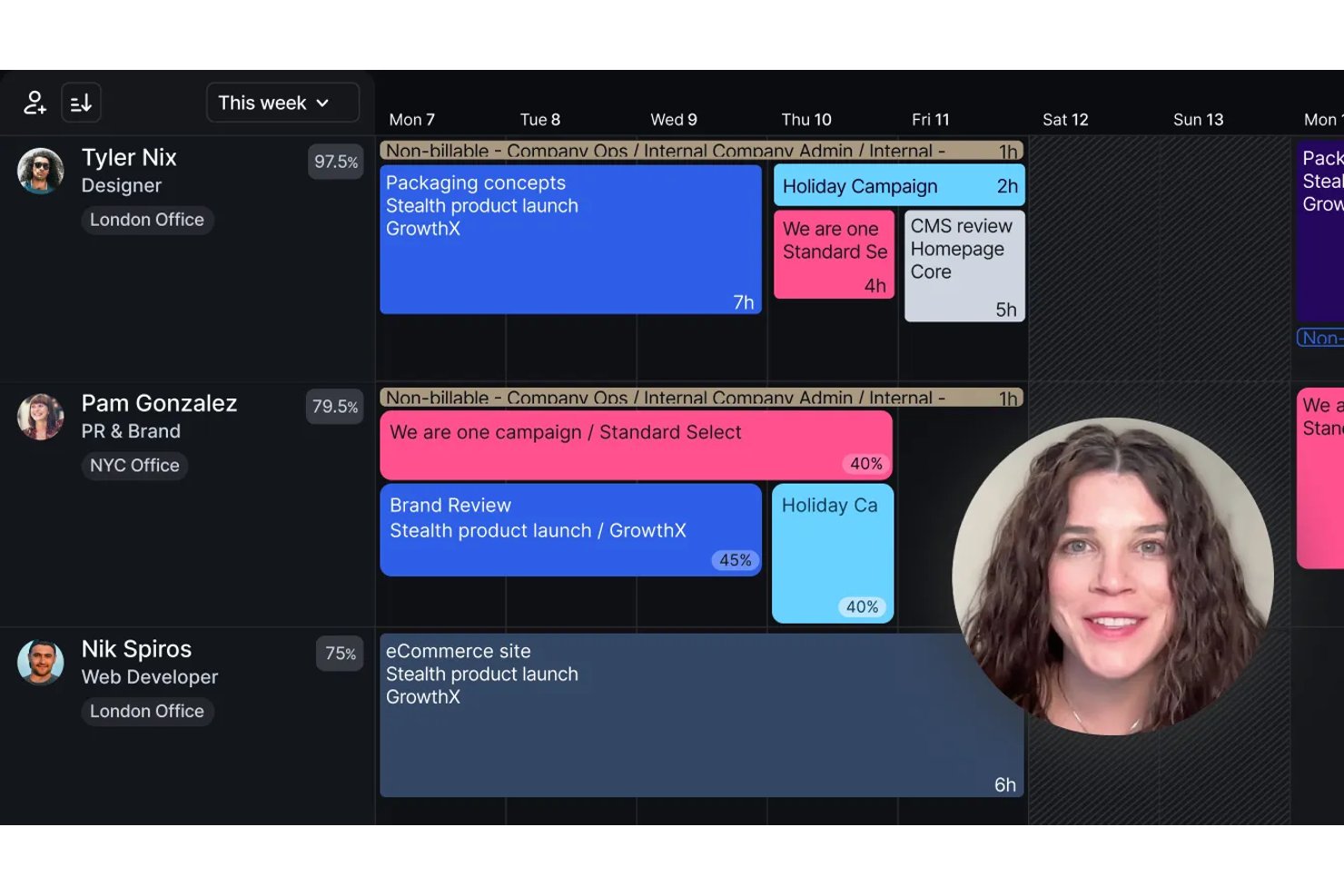
Float is resource management software for scheduling people across projects, planning capacity, tracking time and costs, and monitoring utilization; it offers a 30-day trial rather than a permanent free plan.
Who Is Float Best For?
Float is a good fit for resource and project managers at project-based teams balancing staffing capacity with project budgets and margins.
Why I Picked Float
I picked Float for its focus on keeping staffing plans tied to project margins, not just availability. I like that scenario planning compares timelines, roles, and budgets, while live utilization and over-capacity signals help me spot when to rebalance work. One caveat for this free-software list: Float offers a 30-day Pro trial, not a permanent free plan.
Float Key Features
- Project phases and milestones: Organize project work into phases, milestones, and tasks.
- Time-off approvals: Set leave policies and approval workflows for team members.
- Role and skill tags: Label people by role, skills, seniority, or location.
- Prefilled timesheets: Pro users can populate timesheets from scheduled allocations.
Float Integrations
Float has native integrations with Google Calendar, Outlook Calendar, and Slack. It also integrates with Jira, Asana, ClickUp, Linear, and Trello through Zapier, and offers a REST API for custom integrations.
What's Free?
Float offers a 30-day Pro trial, not a free-forever plan. The free access ends after the trial.
Pros and Cons
Pros:
- Drag-and-drop changes support quick rebalancing
- Cross-project views help prevent conflicts
- Visual schedules expose capacity gaps
Cons:
- Reports offer limited historical depth and customization
- No permanent free plan
New Product Updates from Float.com

Float Adds Rate Cards and Multi-Currency Billing
Float introduced centralized rate cards to standardize bill rates across projects and added multi-currency support to bill clients consistently across regions. For more information, visit Float's official site.
Annen gratis programvare for ressursstyring
Her er noen verktøy som ikke kom med blant de 20 beste, men som er verdt å se nærmere på hvis du ikke fant det riktige alternativet ovenfor.
- GoodDay
For start to paid workload planning
- OpenProject
For on-premises resource planning
- Toggle Plan
For capacity planning around time off


Relaterte anmeldelser
Se nærmere på disse verktøyene som er nært knyttet til programvare for prosjektstyring, og som vi har testet og evaluert:
- Programvare for ressursstyring
- Programvare for arbeidsflytstyring
- Programvare for tidsregistrering
- Programvare for oppgavestyring
- Samhandlingsverktøy
- Produktivitetsverktøy
- Programvare for ressursplanlegging
- Programvare for ressursstyring for byråer
- Kalenderverktøy for prosjektstyring og planlegging
- Programvare med åpen kildekode for ressursstyring
- Alternativer til Redmine
- Gratis programvare for prosjektstyring
- Programvare for medie- og ressursstyring
How I Evaluate Free Resource Management Software
First, I define what counts as free. A qualifying plan stays free indefinitely, not just for a trial, and supports ongoing resource management, even if users or features are capped. From there, I weigh core functionality most, including cross-project assignments and workload visibility; standout features, like capacity heatmaps; and free-tier scalability.
Core Functionality (Table Stakes For This List)
In addition to my free plan requirements, I use a scoring system to select tools for my list. I score each one on a scale from 0 (does not offer the functionality) to 5 (excels in this area) for each core functionality listed below, based on what's available on the free plan. I then convert the total into a percentage to help assess each tool's overall fit, with extra weight on any functionalities I've deemed essential.
- Resource Scheduling & Allocation (Essential): I look for a timeline or calendar that shows who’s assigned to each project and makes schedule changes easy to track.
- Capacity & Workload Views: I check whether workload views reveal over- or under-allocation, such as when several projects need the same designer.
- Availability & Time-Off Tracking: I look for scheduling views that account for time off and holidays when planning work across the team.
- Multi-Project Resource Views: I evaluate whether one view shows assignments across concurrent projects, so team leads can spot competing demands.
- Utilization Reporting: I check for basic summaries of allocation or utilization by person or project to help teams review workload balance.
Once I have a list of tools that meet the criteria, I consider what sets each platform apart.
Differentiating Factors (What Sets Vendors Apart)
Here's how I compare and contrast different vendors:
Standout Features
Color-coded heatmaps are the first thing I check. A quick visual showing who's overloaded and who has room saves me from clicking through individual profiles. I also look for custom working hours and calendar support, since a team split across time zones or mixed full-time and part-time schedules needs capacity math that reflects real availability. Drag-and-drop rebalancing matters too. When a conflict surfaces mid-sprint, I want to reassign hours on the timeline without rebuilding the plan.
Beyond Features
I check whether free plans cap integrations with existing project or calendar tools, since siloed resource data leads to double-bookings fast. Team size limits matter too. Most free tiers restrict users, so I look at whether contractors or guests count against that cap before recommending a tool to agency teams. I also evaluate export options, because if you can't pull utilization data into a client report or leadership deck, the planning work stays trapped inside the tool.
Slik velger du gratis programvare for ressursstyring
Her er noen faktorer du bør ha i tankene når du velger et gratis verktøy for ressursstyring:
| Faktor | Hva du bør vurdere |
|---|---|
| Omfanget av gratistilbudet | Vurder hva som er inkludert i gratisversjonen av programvaren. Se etter begrensninger som brukergrenser, lagringsstørrelse eller manglende funksjoner for å sikre at den dekker teamets grunnleggende behov. |
| Skalerbarhet | Vurder om programvaren kan vokse sammen med teamet ditt. Verktøy som tilbyr betalte abonnementer eller modulære oppgraderinger, gjør at du slipper å bytte plattform senere. |
| Integrasjoner | Sørg for at programvaren integreres med verktøyene du allerede bruker, som Slack, Google Workspace eller Trello, for å effektivisere arbeidsflytene dine. |
| Brukervennlighet | Et brukervennlig grensesnitt reduserer læringskurven. Velg verktøy med intuitive dashbord og rask opplæring for teamet ditt. |
| Tilpasning | Se etter funksjoner som tilpassede arbeidsflyter, etiketter eller dashbord som tilpasses teamets unike prosesser. |
| Samarbeid | Se etter funksjoner som delte kalendere, sanntidsoppdateringer og oppgavetildelinger for å holde teamet samkjørt. |
| Rapportering | Velg programvare som tilbyr tydelig og handlingsrettet innsikt gjennom visuelle rapporter eller dashbord, også i gratisabonnementet. |
| Støttealternativer | Gratisverktøy mangler ofte kundestøtte. Se etter selvbetjeningsressurser som kunnskapsbaser, fora eller veiledninger for å hjelpe teamet med å feilsøke problemer. |
Hva er gratis programvare for ressursstyring?
Gratis programvare for ressursstyring viser til verktøy som lar deg planlegge, fordele og optimalisere ressurser uten at du pådrar deg kostnader for selve programvaren. Disse løsningene er spesielt verdifulle for små og mellomstore bedrifter, ideelle organisasjoner og oppstartsbedrifter med begrensede budsjetter.
Gratis programvare for ressursstyring omfatter vanligvis funksjoner som planlegging av prosjekter og ressurser, oppgavetildeling, tidsregistrering og samarbeidsverktøy. Denne typen verktøy har ofte begrensninger på funksjoner, lagringsplass eller antall brukere sammenlignet med betalingsversjonene, men tilbyr likevel verdifulle muligheter for team som ønsker kostnadseffektive måter å forbedre prosessene for prosjekt- og ressursstyring på.
Funksjoner i gratis programvare for ressursstyring
La oss se nærmere på funksjonene som vanligvis finnes i programvare for ressursstyring, og hvilke som vanligvis er inkludert i gratis- og betalingsabonnementer.
Funksjoner som vanligvis finnes i gratis programvare for ressursstyring
- Grunnleggende planleggingsverktøy: Lar deg tildele ressurser til oppgaver og prosjekter med dra-og-slipp-funksjonalitet.
- Sporing av ressurstilgjengelighet: Gjør det enklere å følge med på hvilke teammedlemmer eller ressurser som er tilgjengelige for nåværende eller fremtidige oppgaver.
- Enkel rapportering: Gir grunnleggende innsikt i ressursutnyttelse og ressursfordeling, slik at du kan sikre at ressursene brukes effektivt.
- Integrasjon med vanlige verktøy: Kobler til populære plattformer som Google Calendar eller Slack for å effektivisere arbeidsflytene.
- Mobiltilgang: Gjør det mulig å sjekke tidsplaner eller oppgaver på farten via mobilapper.
- Verktøy for teamsamarbeid: Inkluderer delte kalendere og oppgavetavler for å holde alle informert og samkjørt.
- Brukeradministrasjon: Lar deg legge til eller fjerne brukere og tildele roller for å kontrollere hvem som får tilgang til bestemte ressurser, for eksempel innen IT-tjenester.
Funksjoner som vanligvis finnes i betalt programvare for ressursstyring
- Avanserte prognoseverktøy: Gjør det mulig å forutsi fremtidige ressursbehov basert på historiske data og prosjektporteføljer.
- Tilpassbare dashbord: Gir skreddersydde visninger og måleverdier som passer individuelle team- eller forretningsbehov.
- Detaljert analyse: Gir dyptgående innsikt i ressursytelse, kostnader og utnyttelse for bedre beslutningstaking.
- Rollebaserte tillatelser: Gir sikker tilgang ved å begrense funksjoner eller synlighet av data basert på brukerroller.
- Automatiseringsmuligheter: Reduserer repetitive oppgaver som omfordeling av ressurser eller utløsning av varsler.
- Integrasjon med avanserte verktøy: Kobler til avanserte plattformer som CRM-systemer, regnskapsprogramvare eller ERP-løsninger.
- Tidsregistrering og fakturering: Registrerer fakturerbare timer og integreres direkte med faktureringsverktøy for fakturering av kunder.
- Prioritert støtte: Garanterer raskere responstider og tilgang til dedikerte supportteam for feilsøking.
Fordeler med gratis ressursstyringsprogramvare
Implementering av gratis ressursstyringsprogramvare gir flere fordeler for teamet og virksomheten din. Her er noen av fordelene du kan se frem til:
- Kostnadsbesparelser: Få viktige verktøy for ressursstyring uten å øke kostnadene, noe som gjør det ideelt for små team eller oppstartsbedrifter.
- Bedre organisering: Bruk funksjoner for planlegging og oppgavestyring til å holde prosjekter og ressurser samlet på ett sted, noe som reduserer forvirring.
- Bedre oversikt over ressurser: Følg med på hvem som er tilgjengelig og hva det arbeides med, slik at du unngår overbooking eller underutnyttelse av teammedlemmer.
- Enkelt samarbeid: Delte kalendere og teamverktøy gjør det enkelt for alle å holde seg oppdatert.
- Rask oppstart: Mange gratis verktøy har brukervennlige grensesnitt og maler som lar deg komme i gang med minimal innsats.
- Grunnleggende integrasjoner: Koble til populære verktøy som Google Kalender eller Slack, slik at løsningen passer inn i den eksisterende arbeidsflyten din.
- Tilgang på farten: Mobilapper lar deg sjekke tidsplaner og administrere oppgaver hvor som helst, slik at du og teamet ditt kan holde produktiviteten oppe.
Les mer: Ser du etter en måte å administrere lagerressurser på? Se hele listen vår over programvare for lagerressursstyring.
Kostnader & priser for gratis ressursstyringsprogramvare
Jeg forstår at du kom til denne artikkelen på jakt etter de beste alternativene for ressursstyringsprogramvare som er tilgjengelige gratis. Siden gratisabonnementer imidlertid bare tilbyr begrensede funksjoner, er det en god sjanse for at du må oppgradere abonnementet ditt senere.
Tabellen nedenfor oppsummerer vanlige abonnementer, gjennomsnittsprisene deres og typiske funksjoner som er inkludert i løsninger for ressursstyringsprogramvare:
Sammenligningstabell for abonnementer på ressursstyringsprogramvare
| Abonnementstype | Gjennomsnittspris | Vanlige funksjoner |
|---|---|---|
| Gratisabonnement | $0 | Grunnleggende planleggingsverktøy, sporing av ressurstilgjengelighet, enkel rapportering og funksjoner for teamsamarbeid. |
| Personlig abonnement | $5–$25/bruker/måned | Avansert planlegging, integrasjoner med tredjepartsverktøy, tilpassede visninger og tilgang til mobilapp. |
| Bedriftsabonnement | $25–$50/bruker/måned | Detaljert analyse, tidsregistrering, rollebaserte tillatelser og tilpassbare oversikter. |
| Virksomhetsabonnement | $50–$100+/bruker/måned | Avansert prognostisering, automatiseringsfunksjoner, prioritert brukerstøtte og integrasjoner på virksomhetsnivå. |
Vanlige spørsmål om gratis programvare for ressursstyring
Finn svar på vanlige spørsmål andre stiller om dette emnet.
Hva er den beste programvaren for ressursstyring?
Den beste programvaren for ressursstyring er den som hjelper deg med å få mest mulig ut av ressursene du har tilgjengelig. For noen team betyr dette ansatte som er medlemmer av prosjektteam. For andre inkluderer dette frilansere og andre eksterne bidragsytere.
Prøv å finne et verktøy som lar deg se på alle ressursene som er viktige for deg, på ett sted. I denne listen over den beste programvaren for ressursstyring finner du mange alternativer å vurdere hvis du er klar til å gå over til betalte verktøy.
Hvilke viktige funksjoner bør jeg se etter i programvare for ressursstyring?
Det meste av programvaren for ressursstyring har lignende funksjoner. Men siden verktøyene på denne listen er gratis, er det lite sannsynlig at du får tilgang til alle. Når du velger programvare, bør du vurdere hvilke funksjoner som er viktigst for teamet ditt, og prioritere dem.
- Oppgavestyring: Programvare for ressursstyring har vanligvis funksjonalitet for oppgavestyring. Dette kan omfatte muligheten til å opprette oppgaver, tildele dem til teammedlemmer, angi avhengigheter og opprette underoppgaver. Det er perfekt for fjernteam.
- Prosjektsporing: Sporing gir en fullstendig oversikt over hvordan et prosjekt utvikler seg. Du kan følge med på alle oppgavene i et bestemt prosjekt og hvor mye tid og penger du har brukt på hver av dem.
- Flere visninger: Gantt-diagrammer, kalendervisninger og Kanban-tavler gir innsikt i og oversikt over arbeidet virksomheten din utfører. Dette hjelper deg med å administrere prosjektressurser mer effektivt.
- Tidsregistrering: Noen av verktøyene på denne listen hjelper ansatte med å registrere tiden de bruker på et bestemt prosjekt. Andre verktøy integreres med programvare for tidsregistrering for å tilby den samme funksjonaliteten.
- Prognoser: Prognoser anslår hvilke ressurser som kreves for å fullføre et prosjekt. Dette kan vise om et prosjekt følger planen eller overskrider budsjettet.
Hva er fordelene med programvare for ressursstyring?
Bruk av ressursstyring kan gi flere fordeler:
- Viser nåværende ressursfordeling
- Hjelper deg med å fastslå den reelle ressurskapasiteten
- Sporer ressursutnyttelsen
- Forutsier fremtidig ressurstilgjengelighet
- Reduserer unødvendig nedetid
- Forbedrer beslutninger om ansettelser