2026’da Küçük İşletmeler İçin En İyi 10 Proje Yönetimi Aracı

10 Küçük İşletmeler İçin En İyi Proje Yönetimi Yazılımları Kısa Listesi


Küçük işletmeler için en iyi proje yönetimi yazılımı; görevleri düzenlemenize, son tarihler belirlemenize, sorumluluklar atamanıza ve herkesin aynı bilgilerden haberdar olmasını sağlamanıza yardımcı olur. Doğru araç olmadan, sonsuz e-posta yazışmaları veya dağınık elektronik tablolar arasında sürekli gidip gelmek zorunda kalır; ilerlemeyi takip etmekte, dosya paylaşmakta ve ekibinizle iletişim kurmakta zorlanırsınız.
Acentelerde ve küçük ekiplerde 20 yılı aşkın süredir proje yöneticisi olarak çalıştım; doğru aracın projelerin daha sorunsuz ilerlemesini sağlayabileceğini, stresi azaltabileceğini ve stratejik çalışmalara odaklanmanız için zaman kazandırabileceğini biliyorum. Temel proje yönetimi zorluklarını ele almanıza ve ekipleriniz, projeleriniz ve işletmeniz için doğru seçeneği bulmanıza yardımcı olmak amacıyla küçük işletmeler için en iyi proje yönetimi yazılımları arasından seçtiklerim burada.
Why Trust Our Software Recommendations
Our team has been testing and reviewing software since 2012. As project managers ourselves, we know how difficult—and important—it is to choose the right software.
For this guide, we evaluated tools using hands-on testing and independent research, scoring tools using our selection criteria. We also draw on insights from industry thought leaders and practicing project management experts.
Our reviews reflect our human editorial judgment, not a sales pitch.
Expert reviewers:
Karşılaştırma Tablosu: Küçük İşletmeler İçin Proje Yönetimi Araçları
Aşağıdaki tabloda, küçük işletmeler için en iyi proje yönetimi araçları arasından seçtiklerimin fiyatlarını ve temel özelliklerini karşılaştırın.
Score legend (out of 5)
- Excellent 4.5–5
- Good 4–4.4
- Average 3–3.9
- Below average 2–2.9
- Poor 1–1.9
| Tool | Starting Price | Website | |||||||
|---|---|---|---|---|---|---|---|---|---|
| Best for flexibility and integrations | 3.7 out of 5 | 4 | 4 | 4 | 4 | 2 | 4 | $9/user/month Free plan + 14-day trial available | Book Demo |
| Best flexible work allocation tools | 4.2 out of 5 | 5 | 5 | 4 | 4 | 4 | 3 | Pricing upon request Free plan + 15-day trial + demo available | Website |
| Best for no-code dynamic work management | 2.5 out of 5 | 3 | 4 | 2 | 4 | 1 | 1 | $35/user/month 30-day free trial | Website |
| Best for complex project breakdowns | 4.3 out of 5 | 4 | 5 | 4 | 4 | 5 | 4 | $7.65/user/month Free plan + 30-day free trial available | Website |
| Best for brainstorming, ideation, and task management | 3.8 out of 5 | 4 | 4 | 4 | 3 | 4 | 4 | €17.50/user/month Free plan + 14-day free trial available | Website |
| Best for managing clients and tasks in one hub | 4.5 out of 5 | 5 | 5 | 4 | 4 | 4 | 5 | $10/user/month Free plan + 14-day free trial available | Website |
| Best for goal setting and OKR tracking | 4.0 out of 5 | 4 | 5 | 4 | 4 | 3 | 4 | $10.99/user/month Free plan + trial + demo available | Website |
| Best for project management beginners | 4.0 out of 5 | 4 | 3 | 5 | 3 | 5 | 4 | $25/month Free plan + 30-day free trial + free demo available | Website |
| Best for real-time project tracking and insights | 4.2 out of 5 | 5 | 5 | 4 | 5 | 2 | 4 | $15/user/month 30-day free trial + demo available | Website |
| Best for customizable team workflows | 4.2 out of 5 | 5 | 5 | 4 | 4 | 4 | 3 | $12/user/month Free plan + free demo available | Book Demo |
Küçük İşletmeler İçin En İyi Proje Yönetimi Yazılımları İncelemeleri
Listeme giren en iyi küçük işletme yönetimi yazılımlarının her biri hakkında ekran görüntüleri, temel özellikleri ve en uygun kullanım alanlarıyla birlikte kısa bir açıklamayı burada bulabilirsiniz.

Best for flexibility and integrations
monday AI Workspace is a project management platform that combines customizable boards, visual planning views, no-code automation, and an integrations hub spanning 850+ apps.
Who Is monday AI Workspace Best For?
monday AI Workspace suits small business owners and team leads who need a highly adaptable project tracking setup without leaning on technical staff to get it running.
Why I Picked monday AI Workspace
monday AI Workspace earns its spot on my shortlist because no-code automation and a 850+ app integration hub let small teams build connected workflows without needing a developer. I especially like how the automation builder handles real work: when a task's status changes to "Done," it can auto-notify a client, move the item to a new group, and assign a follow-up task in one rule. The shareable boards feature also lets you give clients a clean, permission-controlled view of project progress without exposing your internal columns.
monday AI Workspace Key Features
- Status columns: Customizable status fields let you set and update task states across every board, giving your whole team a shared view of where work stands.
- 200+ templates: Pre-built board templates cover use cases from marketing to IT, so you can get a project up and running without building from scratch.
- Guest access: Invite external collaborators—like clients or contractors—to specific boards only, keeping internal work separate from what they can see.
- Time tracking column: A built-in start/stop timer on the Pro plan logs hours directly on each task, with manual entry and a rollup from sub-items to the parent item.
monday AI Workspace Integrations
monday AI Workspace offers 850+ integrations and apps, including Slack, Gmail, Google Calendar, Microsoft Teams, HubSpot, QuickBooks, GitHub, and Dropbox. It also supports custom connections through its API/SDK and Zapier.
Pros and Cons
Pros:
- Templates help teams launch projects faster
- Task updates keep files and decisions together
- Boards adapt to changing workflows
Cons:
- Dashboards and reports need deliberate setup
- Timeline and automation tools require upgrades
New Product Updates from monday AI Workspace
monday AI Workspace Adds Human Approval Routing
monday AI Workspace adds a human-in-the-loop approval block to AI Workflows, sending approval requests and routing workflow paths based on responses. For more information, visit monday AI Workspace's official site.
 .

Best flexible work allocation tools
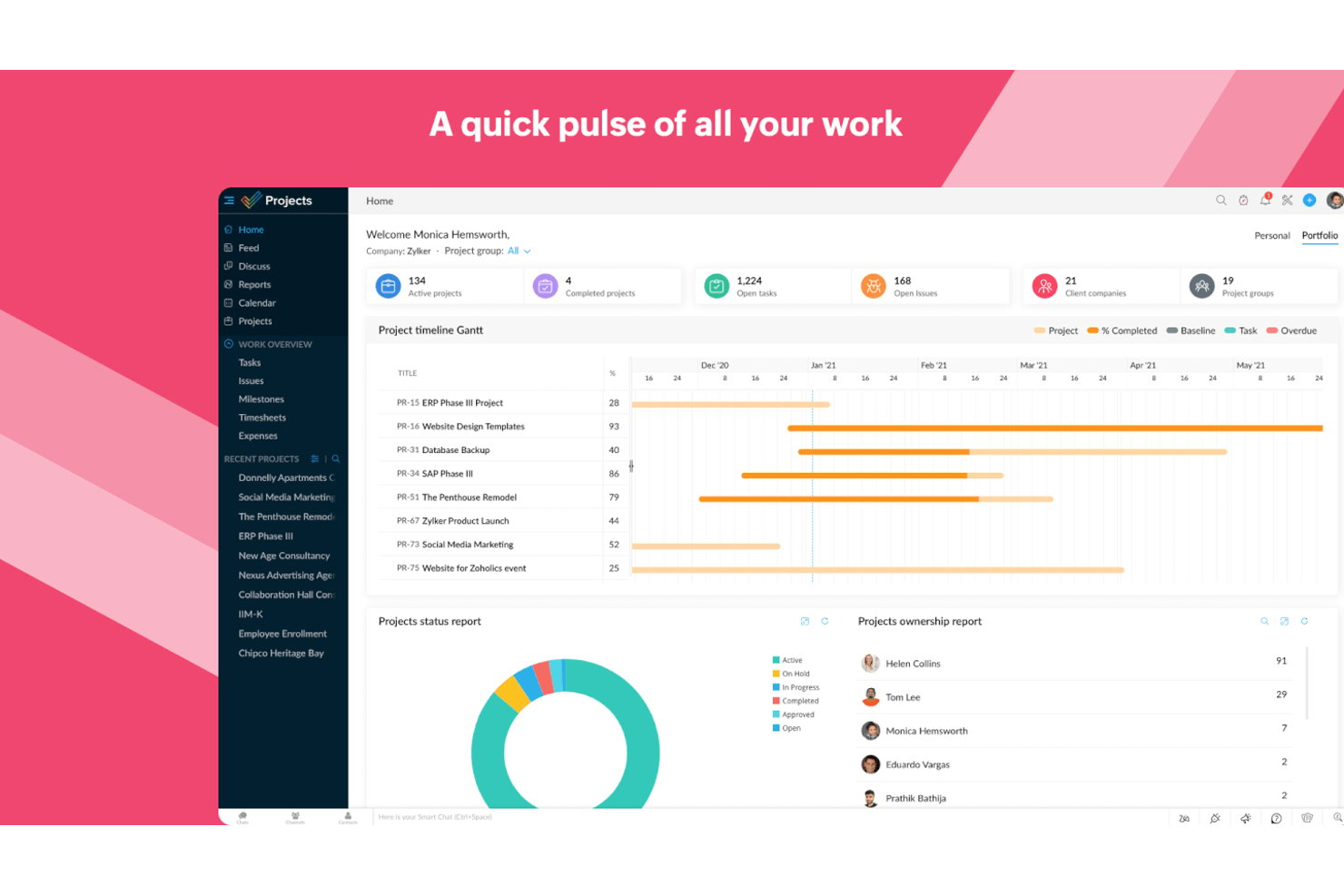
Zoho Projects is a project management platform for small teams that brings together task tracking, Gantt charts, resource management, time tracking, and workflow automation in one place.
Who Is Zoho Projects Best For?
Zoho Projects is a strong fit for small teams already in the Zoho ecosystem who need to manage workloads, track time, and keep projects moving without paying enterprise-level prices.
Why I Picked Zoho Projects
Zoho Projects earns its spot on my shortlist because its resource management tools give small teams a genuinely clear picture of who's carrying too much work before it becomes a problem. I like that you can view planned versus actual hours per person and reassign tasks directly from the workload report. The Zoho People integration goes a step further, letting you check staff availability before you assign anything, so you're not guessing who has capacity.
Zoho Projects Key Features
- Task blueprints: Define approval stages and assign team members to specific workflow steps to keep tasks moving through a structured process.
- Built-in time tracking: Log billable and non-billable hours directly on tasks using timers or manual entry, then push approved timesheets to Zoho Invoice or Books.
- Automation builder: Set up workflow rules, business rules, and SLAs that trigger actions or escalations automatically when task conditions are met.
- Cross-project reporting: Pull task, issue, and budget data across multiple projects into a single report to track overall team performance and spending.
Zoho Projects Integrations
Zoho Projects offers 20+ native integrations, including Zoho CRM, Zoho Books, Zoho Invoice, Zoho People, Google Sheets, Microsoft Teams, Slack, GitHub, and Figma. It also supports more than 50 marketplace integrations and Zapier.
Pros and Cons
Pros:
- Gantt dependencies clarify shifting deadlines
- Planned-versus-actual hours guide reassignments
- Workload reports expose overloaded teammates
Cons:
- Dense screens can obscure routine actions
- Project setup can require repetitive team configuration
New Product Updates from Zoho Projects
Zoho Projects Adds CodeX Scripts for Custom Modules
Zoho Projects now supports CodeX Scripts for custom modules, enabling conditional logic and rules for creating, updating, and deleting records. For more information, visit Zoho Projects' official site.
 .

Best for no-code dynamic work management
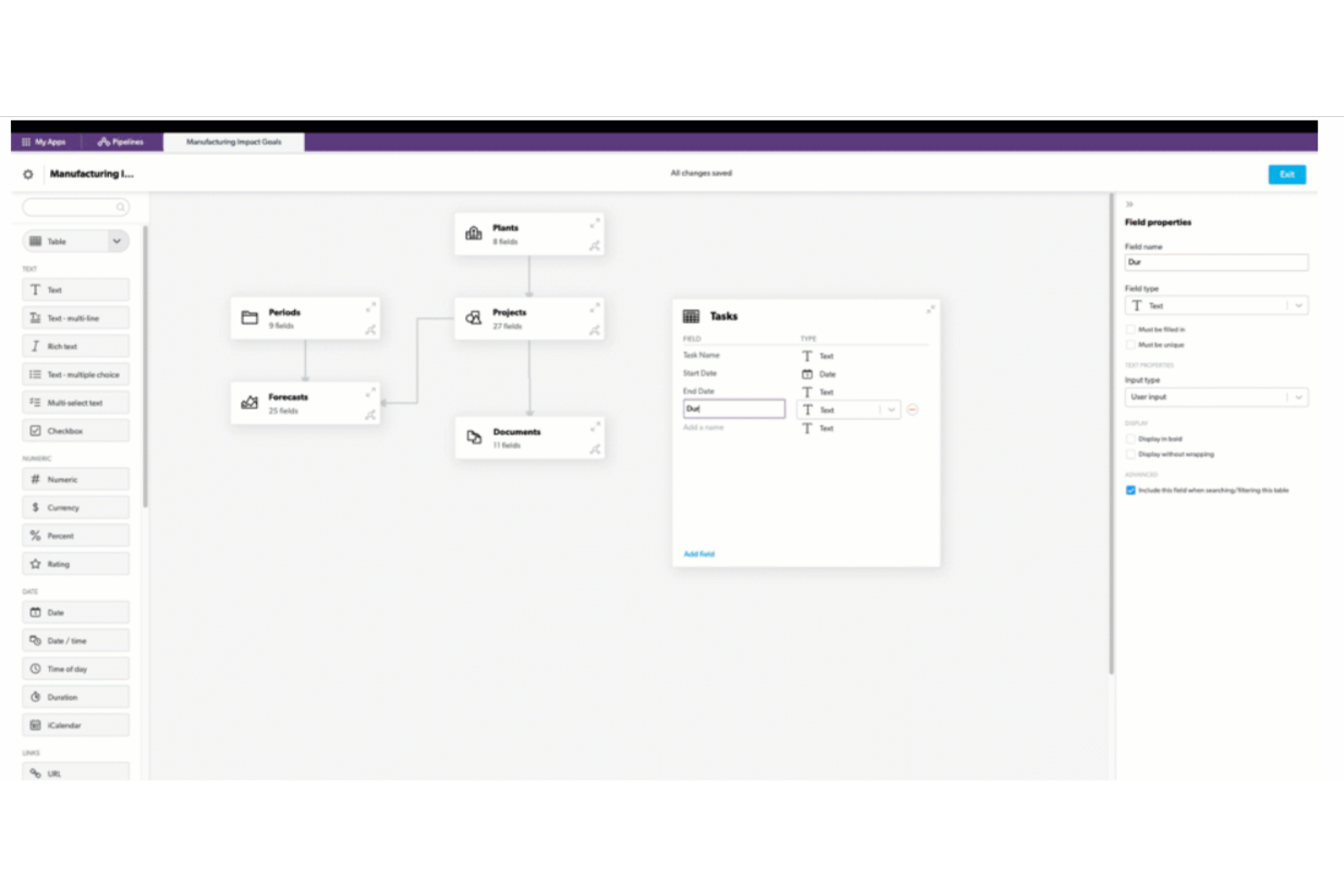
Quickbase is a no-code app-building platform that lets teams design custom project management workflows, automate task routing, and track work across multiple projects through configurable dashboards, reports, and views.
Who Is Quickbase Best For?
Quickbase is a strong fit for small teams in operations-heavy industries—like construction, field services, or healthcare—that need to replace scattered spreadsheets with a custom-built workflow app.
Why I Picked Quickbase
I picked Quickbase as one of the best because it lets small teams replace a tangle of spreadsheets with a custom-built workflow app without writing a single line of code. I especially like the AI Workflows feature, which lets you describe a process in plain language and have Quickbase build the automation for you. The Project Management Starter App template also gives teams a real head start, with task assignment, stage gates, and approval routing already wired together.
Quickbase Key Features
- Quickbase Pipelines: A drag-and-drop visual workflow designer that connects Quickbase apps to external tools like Slack, QuickBooks, and Jira.
- Role-based permissions: Access controls can be set at the app, form, or field level to manage what each team member sees and edits.
- Real-time dashboards: Personalized dashboards surface live project data, portfolio risk, and resource load across all active work.
- App template library: The Quickbase Exchange offers pre-built templates for project management, time tracking, and field operations that teams can deploy and adapt.
Quickbase Integrations
Quickbase offers 40+ pre-built integration channels, including Slack, Microsoft Teams, QuickBooks, Google, Dropbox, Salesforce, Jira, and Procore. It also provides RESTful APIs and Connected Tables for custom integrations and synchronized data.
Pros and Cons
Pros:
- Dashboards show portfolio risks and resource loads
- Templates consolidate scattered project spreadsheets
- Custom apps fit unusual project workflows
Cons:
- Cluttered screens complicate day-to-day collaboration
- Teams must configure apps before tracking work

Quire
Best for complex project breakdowns
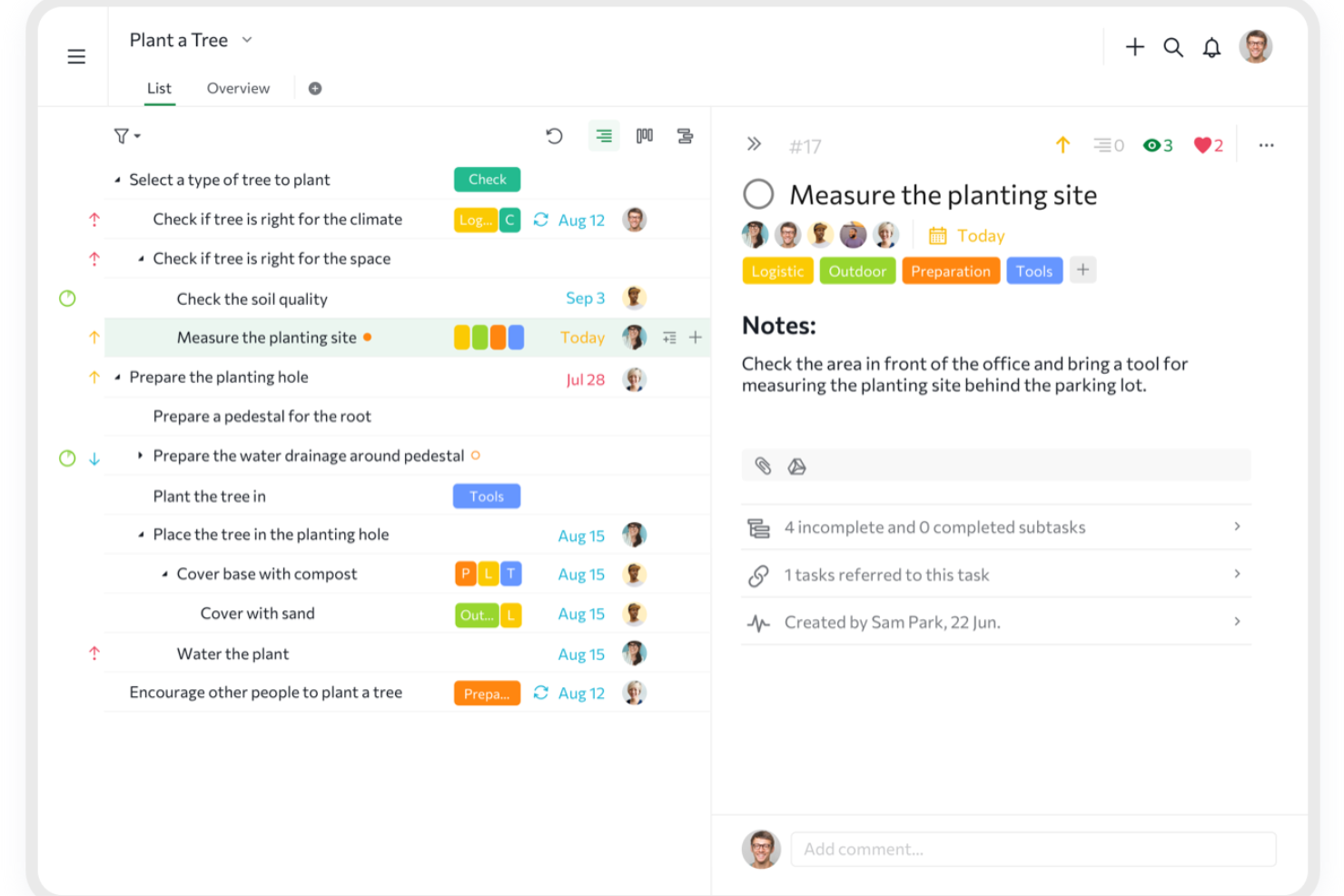
Quire is a project management tool built around unlimited nested task hierarchies, combining list, Kanban, timeline, and dashboard views with built-in collaboration features like chat channels, Documents, and cross-project tracking.
Who Is Quire Best For?
Quire is a strong fit for small business operations managers and team leads who need to break large projects into deeply layered tasks without paying enterprise-level prices.
Why I Picked Quire
I picked Quire as one of the best because its unlimited nested task hierarchy is genuinely unlike anything else at this price point. You can break a project into tasks, subtasks, and sub-subtasks as many levels deep as your work demands, which makes it especially useful when a single deliverable has a dozen moving parts underneath it. I also love the Smart Folders feature, which pulls tasks from multiple projects into one view so nothing slips through the cracks across workstreams.
Quire Key Features
- Built-in chat channels: Each project gets dedicated chat channels so team conversations stay attached to the work, not buried in email.
- Public share links: Generate view-only project links for clients or stakeholders, no account required, with an optional expiry date.
- Time tracking with Pomodoro timer: Log hours directly in tasks using a stopwatch or Pomodoro timer, with time reports available on paid plans.
- 20+ project templates: A free template gallery covers use cases from agile projects to risk registers, so your team can get up and running fast.
Quire Integrations
Quire offers native integrations with Google Drive, Microsoft OneDrive, Microsoft Teams, Slack, GitHub, Dropbox, Box, and Google Calendar. It also supports custom connections through its REST API and Zapier.
Pros and Cons
Pros:
- Comments and chat keep team discussions near tasks
- Switching between outline and Kanban is easy
- Deep task trees clarify complex project breakdowns
Cons:
- Mobile work depends on reliable connectivity
- No native visual automation rule builder
New Product Updates from Quire
Quire Adds Custom Field Locking and Comment Reaction API Support
Quire adds custom field locking and API support for reading and setting emoji reactions on comments. These updates give teams more control over field data and expand comment interaction options for developers. For more information, visit Quire’s official site.
 .
Best for brainstorming, ideation, and task management

MeisterTask is a Kanban-based project management tool that combines task tracking, team collaboration, automation, and notes in one workspace.
Who Is MeisterTask Best For?
MeisterTask suits small teams that want an intuitive Kanban-based workspace combining task tracking, notes, and automation without a steep learning curve.
Why I Picked MeisterTask
I picked MeisterTask as one of the best because its MindMeister integration genuinely supports brainstorming and ideation in a way most task tools don't bother with. You can attach mind maps directly to tasks and turn a mind-map branch into a task in one click, which makes it easy to move from idea to execution without switching contexts. The no-code automation builder on Pro plans also handles repetitive handoffs automatically, like moving tasks between projects or triggering notifications.
MeisterTask Key Features
- Task relationships: Mark tasks as related, duplicate, blocked, or blocking so your team can see dependencies directly on the board.
- Email-to-task conversion: Turn incoming Gmail or Outlook emails into tasks without leaving your inbox.
- Built-in time tracking: Log time on any task with a timer or manual entry on every plan, including the free tier.
- Template gallery: Choose from 60+ ready-made project templates, including agile boards, budget trackers, and resource planning, available on all plans.
MeisterTask Integrations
MeisterTask offers native integrations with Google Workspace, Slack, Microsoft Teams, MindMeister, Google Drive, Dropbox, GitHub, and Zendesk. Pro includes an API for custom integrations, and MeisterTask also supports Zapier, Pabbly Connect, Unito, and Integrately.
Pros and Cons
Pros:
- Task relationships clarify blocked work
- Templates help small teams start organized
- Mind maps turn ideas into assigned tasks
Cons:
- Limited board controls frustrate changing workflows
- Timeline planning requires higher-tier access
Nifty
Best for managing clients and tasks in one hub
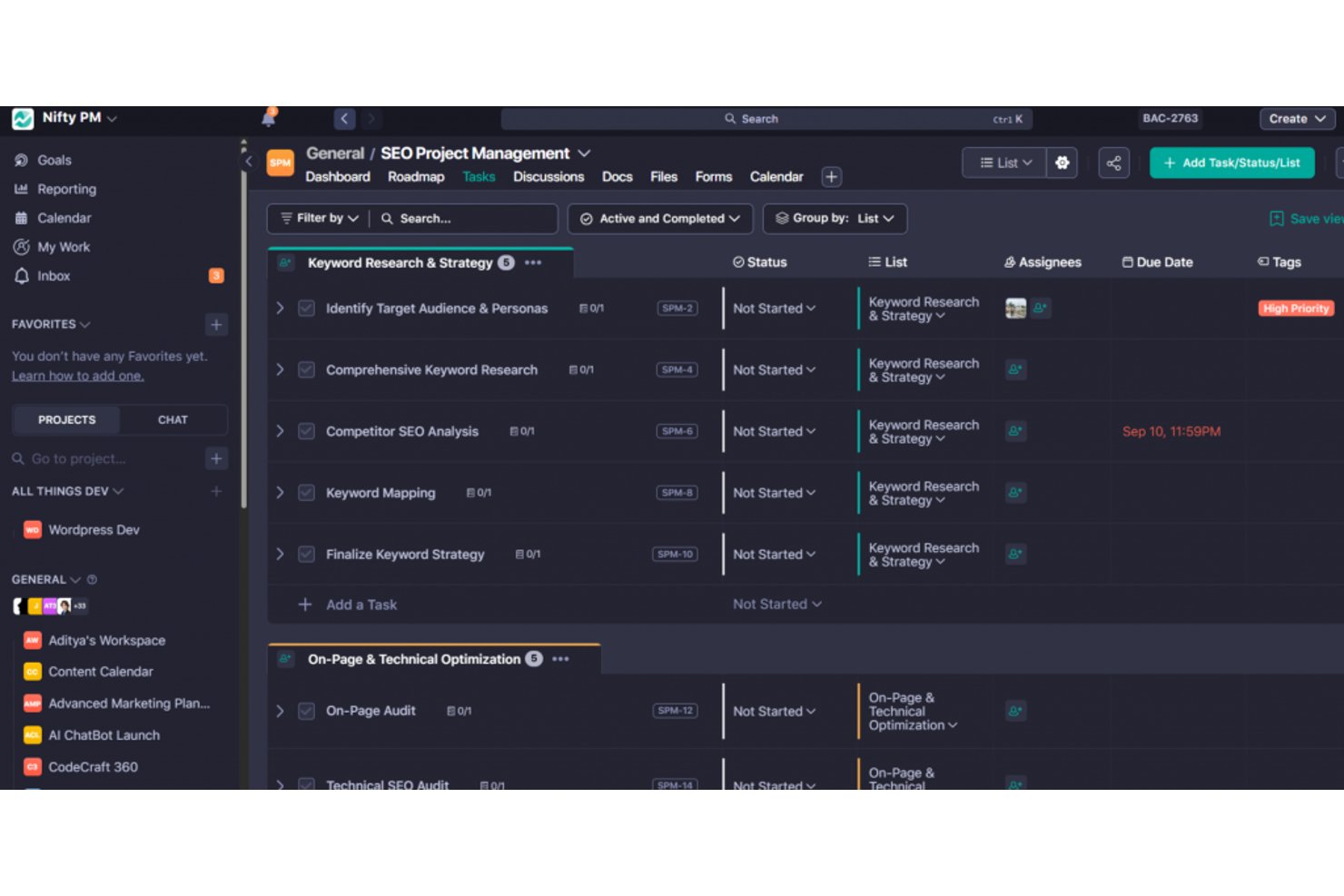
Nifty is a project management platform that brings tasks, milestones, roadmaps, team chat, docs, and client access together in a single workspace.
Who Is Nifty Best For?
Nifty is a strong fit for freelancers and small teams that need to manage client work and internal tasks without juggling multiple tools.
Why I Picked Nifty
I've included Nifty in my top picks because it's one of the few tools that genuinely keeps client work and internal tasks in the same place without forcing you to stitch together separate tools. I particularly like how guest access works: clients join specific projects, stay hidden from internal milestones, and can even be assigned tasks or sign off via a "Guest Approval" status. Public progress links let clients track delivery without needing an account at all.
Nifty Key Features
- Milestone tracking: Set project milestones with automatic progress rollup so you can see delivery status at a glance across every project.
- AI Workflow Builder: Describe a project in plain language and Nifty generates the task lists, statuses, custom fields, and views for you.
- Time tracking and billable hours: Log time per task or team member, track costs, and export timesheets to CSV or PDF directly from the platform.
- No-code automation builder: Create if/then rules with preset templates to automatically assign tasks, set due dates, post messages, or move work when trigger conditions are met.
Nifty Integrations
Nifty offers native integrations with Slack, Google Drive and Calendar, Microsoft 365, Zoom, Webex, Harvest, Miro, Typeform, and Figma. It also supports an open API and Zapier.
Pros and Cons
Pros:
- Templates and imports speed small-team setup
- Clients see only invited project work
- Tasks, milestones, and dependencies stay connected
Cons:
- Notifications are unreliable, and reports lack detail
- Reviewers report bugs affecting task reliability
Asana
Best for goal setting and OKR tracking
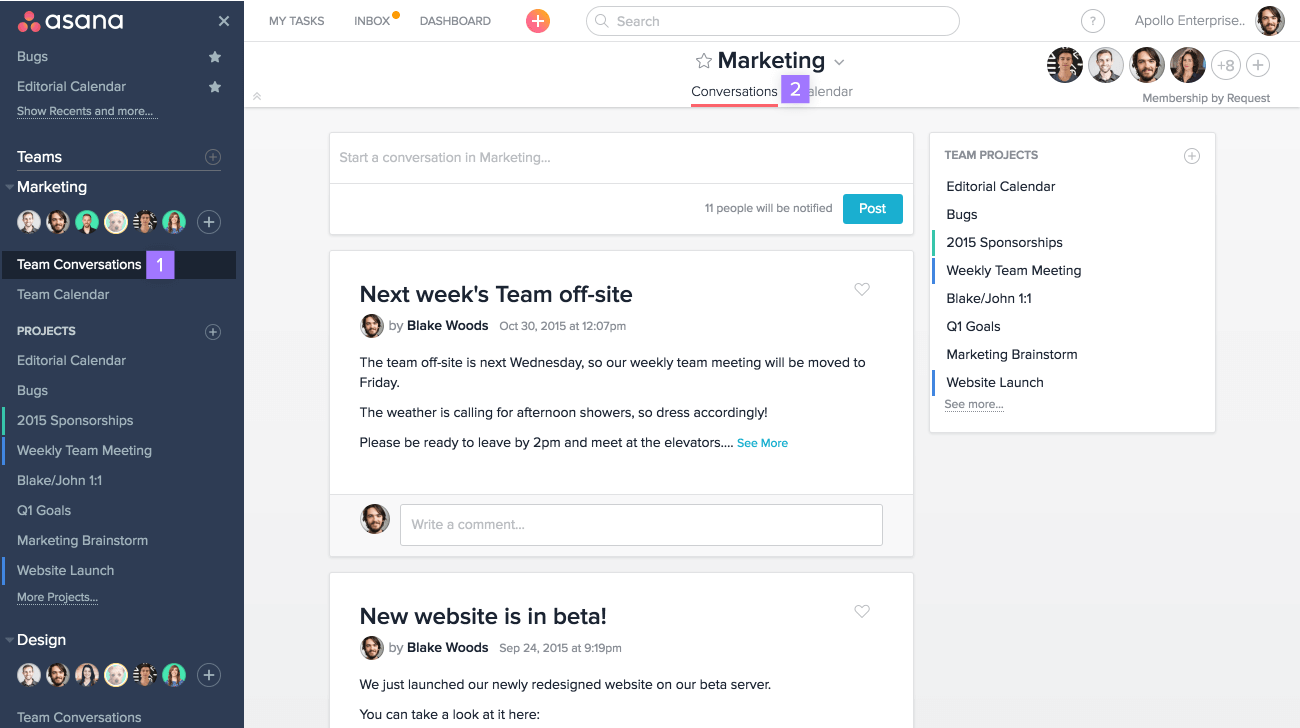
Asana is a project management platform that combines task tracking, goal setting, workflow automation, and cross-functional reporting in one workspace.
Who Is Asana Best For?
Asana fits small business owners and operations managers who need to connect day-to-day work to bigger company goals, especially teams running OKRs across departments.
Why I Picked Asana
Asana earns its spot on my shortlist because its goal-setting infrastructure goes deeper than what most project management tools offer. I particularly like how Goals connect directly to live projects and portfolios, so progress updates automatically as work moves forward rather than requiring manual check-ins. You can structure OKRs at the company, team, or individual level, with sub-goals rolling up into parent goals across quarterly or custom time periods.
Asana Key Features
- Multi-homing: Assign a single task to multiple projects at once, so work stays visible across teams without duplication.
- Automation rules: Trigger automatic actions based on task changes, due dates, or form submissions to cut down on manual follow-up.
- Pre-built templates: Choose from ready-made project templates across marketing, HR, IT, and operations to get new projects running quickly.
- Unlimited free guests: Invite external collaborators on Starter and above without adding paid seats.
Asana Integrations
Asana lists 100+ integrations, including Slack, Microsoft Teams, Google Drive, Microsoft 365, Jira Cloud, Azure DevOps, GitHub, HubSpot, and Salesforce. It also offers a public API and Zapier connectivity.
Pros and Cons
Pros:
- Automations cut repetitive project administration
- Task assignments reduce follow-up chasing
- Goals connect directly to live project progress
Cons:
- Frequent notifications can clutter team inboxes
- Goals and portfolios require higher-tier plans

Basecamp
Best for project management beginners
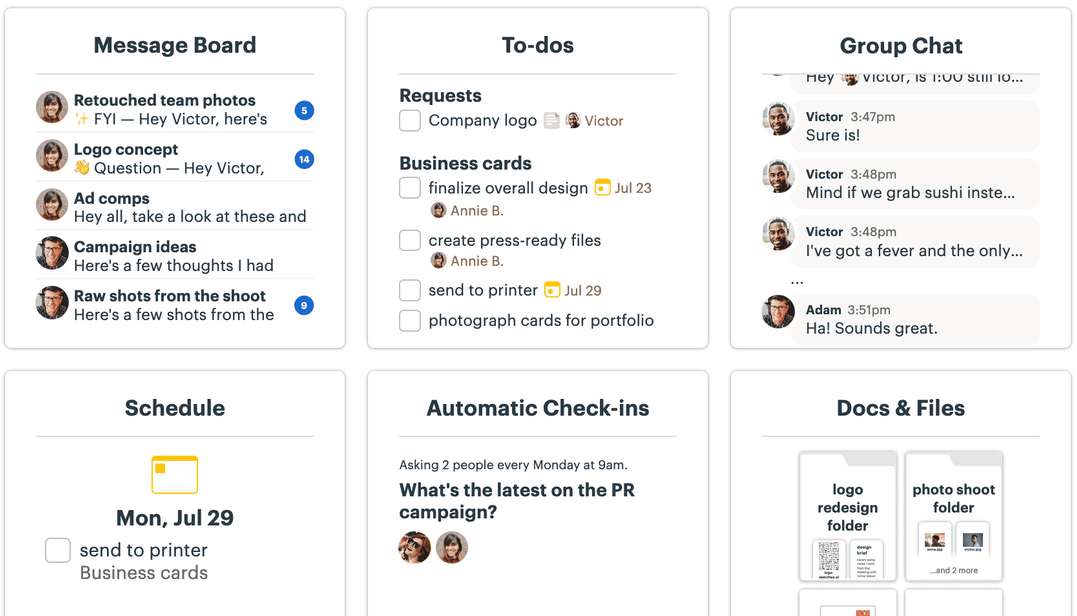
Basecamp is a project management platform for small teams that brings to-do lists, kanban boards, messaging, file storage, and client collaboration tools together in one shared workspace.
Who Is Basecamp Best For?
Basecamp is a great fit for freelancers, solopreneurs, and small teams who are new to project management tools and want one place to handle tasks, files, and client communication without a steep learning curve.
Why I Picked Basecamp
I've included Basecamp in my top picks because it's genuinely built for teams who are new to project management software and need something that works without a manual. I love how every project gets its own page where to-do lists, a kanban-style Card Table, and a group chat all live together, so there's no hunting across tabs. Hill Charts are what really set it apart: instead of a complex status report, you drag a dot to show whether work is still being figured out or just getting done.
Basecamp Key Features
- Client visibility controls: Set what clients see on a project-by-project basis, hiding internal to-dos or unfinished work before sharing.
- Campfire chat: A group chat tool built into each project so your team can have quick conversations without leaving Basecamp.
- Automatic Check-ins: Recurring questions sent to your team on a schedule to replace stand-up meetings and keep everyone aligned.
- Docs & Files: A built-in document and file storage area with version tracking and support for linked content from Google Docs, Dropbox, and Figma.
Basecamp Integrations
Basecamp supports integrations with Google Drive and Docs, Dropbox, Figma, Zoom, Microsoft Teams, Harvest, Toggl, and Clockify. It also offers a public API, CLI, Unito, and Zapier.
Pros and Cons
Pros:
- Client visibility controls suit small service teams
- Tasks, files, and conversations stay together
- Teams get projects running with little training
Cons:
- Limited reporting makes portfolio oversight harder
- No dependencies or priorities for complex work

Best for real-time project tracking and insights
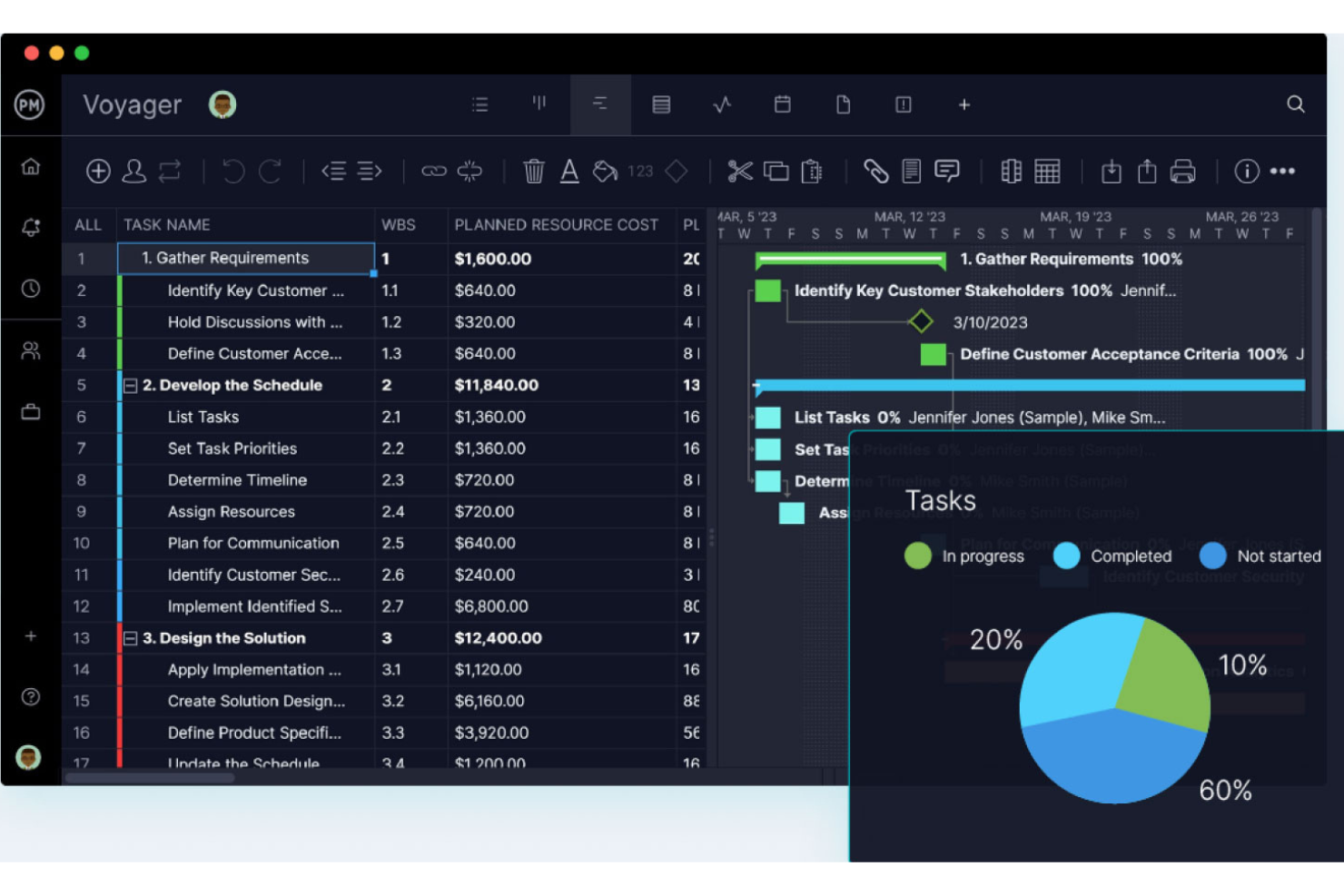
ProjectManager is a project management platform for small teams that brings together Gantt charts, Kanban boards, real-time dashboards, time tracking, and reporting in one centralized workspace.
Who Is ProjectManager Best For?
ProjectManager is a strong fit for small teams that need to track multiple projects at once and want real-time visibility into progress, workload, and costs without building dashboards from scratch.
Why I Picked ProjectManager
I picked ProjectManager as one of the best because its automatic dashboards give small teams real-time visibility into project health, workload, and costs without any manual setup. I love that you can track planned versus actual progress across tasks and see critical path in the Gantt view, so schedule slippage gets caught early. Portfolio dashboards roll multiple projects into a single view, which I find genuinely useful when juggling several workstreams at once.
ProjectManager Key Features
- Multiple project views: Switch between Gantt, List, Sheet, Board, and Calendar views on any plan, with changes syncing across all views in real time.
- Unlimited free guest licenses: Share read-only project access with clients or stakeholders on every plan at no extra cost.
- Workload and resource management: See how work is distributed across your team so you can reassign tasks before deadlines slip.
- 75+ pre-built templates: Start projects quickly using ready-made templates for IT plans, sprints, risk tracking, and more.
ProjectManager Integrations
ProjectManager offers integrations with Slack, Microsoft Teams, QuickBooks Online, Jira, Google Drive, Microsoft 365, and Azure DevOps, plus 1,000+ apps through Zapier. Its public API is available on every plan for custom integrations.
Pros and Cons
Pros:
- Five synced views support different team workflows
- Gantt baselines reveal schedule slippage early
- Automatic dashboards surface project health and workload
Cons:
- Client access is limited to read-only guests
- Automation and full timesheets require higher plans

ClickUp
Best for customizable team workflows
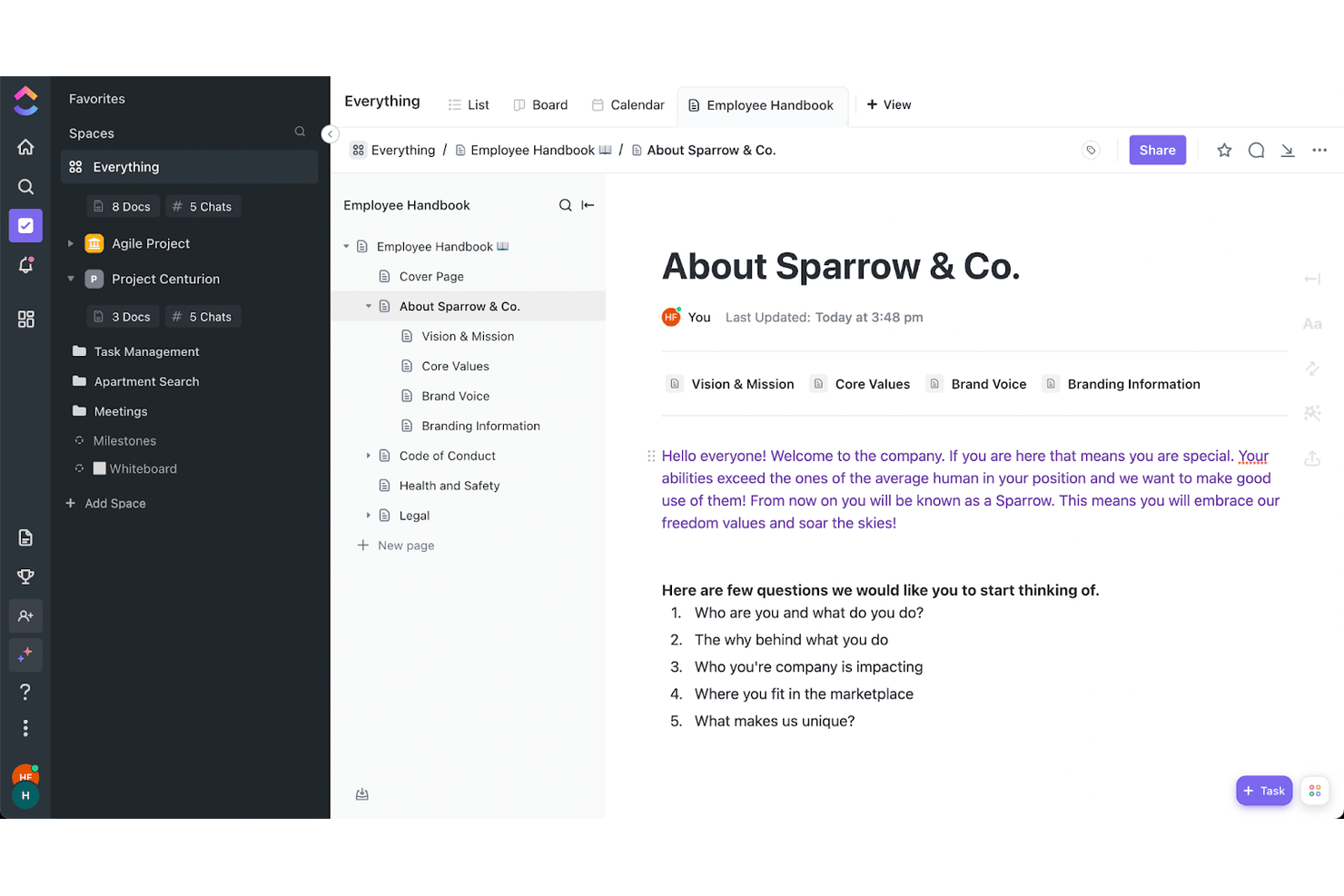
ClickUp is a project management platform that brings task tracking, visual planning views, docs, time tracking, and team collaboration into a single, highly customizable workspace.
Who Is ClickUp Best For?
ClickUp is a strong fit for small teams that need one platform to handle tasks, docs, time tracking, and client reporting without paying for multiple tools.
Why I Picked ClickUp
ClickUp earns its spot on my shortlist because the sheer depth of customization it offers small teams is unlike anything else at this price point. I love that you can build your workspace exactly how your team thinks, whether that's a Kanban board for sprint work, a Gantt with dependency tracking for client projects, or a Mind Map for planning. The "When → Then" automation builder also lets you set up task routing and status updates without writing a single line of code.
ClickUp Key Features
- Native time tracking: Log hours directly on tasks with built-in timers, mark time as billable, set hourly rates, and submit weekly timesheets for manager approval.
- Client-facing dashboards: Share live project dashboards externally with granular permissions, so clients can view progress without needing a ClickUp login.
- 1,000+ integrations: Connect ClickUp to tools like Slack, GitHub, HubSpot, Figma, and Google Drive directly from the integrations hub.
- Collaborative docs and wikis: Create and edit documents inside ClickUp, link them to tasks, and use them as a shared knowledge base for your team.
ClickUp Integrations
ClickUp offers more than 1,000 native integrations, including Slack, Google Drive, HubSpot, GitHub, Figma, Google Calendar, and Microsoft Teams. It also supports custom integrations through its API and Zapier.
Pros and Cons
Pros:
- Flexible views support changing project plans
- Billable time and approvals suit freelancers
- Unlimited tasks keep small teams organized
Cons:
- Large workspaces can suffer dashboard lag
- Busy interface overwhelms first-time users
New Product Updates from ClickUp
ClickUp Adds List Automations, Time Off Scheduling, and Org Charts
ClickUp adds template-based List automations, personal time off scheduling, a unified picker, automatic task date syncing, and Org Charts. These updates help teams automate project setup, manage availability, and organize work. For more information, visit ClickUp’s official site.
 .
Küçük İşletmeler İçin Diğer Proje Yönetimi Yazılımları
Kısa listeme girmeyen ancak değerlendirmenize değer birkaç küçük işletme proje yönetimi aracı daha burada.
- Hive
For AI-assisted project setup and tracking
- GoodDay
For task-tied time logs and billable rates
- Wrike
For remote schedule and workload management
- Celoxis
For cross-project portfolio reporting
- Trello
For free Kanban boards with automation
- Ravetree
For project management in an all-in-one platform
- Hubstaff Tasks
Easy Agile project management
- Plaky
For visual task management
- TeamGantt
For easy, low-cost Gantt charts
- Lark Suite
For all-in-one team collaboration at no cost


İlgili Proje Yönetimi Yazılımları
Burada hâlâ aradığınızı bulamadıysanız, test edip değerlendirdiğimiz şu diğer ilgili araçlara göz atın:
- Proje Yönetimi Yazılımı
- Kaynak Yönetimi Yazılımı
- Görev Yönetimi Yazılımı
- İş Birliği Araçları
- Proje Takip Yazılımı
- Proje Planlama Yazılımı
- Kâr Amacı Gütmeyen Kuruluşlar İçin Proje Yönetimi Yazılımı
- Bağımlılıklara Sahip Proje Yönetimi Yazılımı
- Küçük İşletmeler İçin Proje Yönetimi Yazılımı
- Windows İçin Proje Yönetimi Yazılımı
- Mac İçin Proje Yönetimi Yazılımı
- Proje Yönetimi Biletleme Sistemi
- Hukuk Projeleri Yönetimi Yazılımı
- Girişimler İçin Proje Yönetimi Yazılımı
- Uzaktan Çalışan Ekipler İçin Proje Yönetimi
How I Evaluate Project Management Software for Small Businesses
I split my evaluation into three parts. First, I give the most weight to assigning tasks, tracking deadlines, and seeing project progress at a glance. Next, I consider differentiators like client portals or no-code automation; finally, I look beyond features at onboarding, responsive support, and small-team pricing.
Core Functionality (Table Stakes For This List)
When I'm selecting tools for my list, I score each one on a scale from 0 (does not offer the functionality) to 5 (excels in this area) for each core functionality listed below. I then convert the total into a percentage to help assess each tool's overall fit, with extra weight on any functionalities I’ve deemed essential.
- Task & Project Tracking (Essential): I look for clear owners, due dates, subtasks, and dependencies so a small team can track a client launch from kickoff to handoff.
- Visual Planning (Essential): Can teams switch between board, calendar, and timeline views to plan a shifting campaign schedule without rebuilding the work?
- Team Collaboration: I check for task comments, file sharing, and @mentions that keep feedback and project context together.
- Progress Visibility: I look for project summaries or dashboards that show what’s on track, blocked, or nearing a deadline across active work.
- Small-Team Pricing: I consider whether plan options suit a small business budget and team size as project needs change.
- Ease Of Setup: Can a team use templates, create a project, and invite members in one short session without dedicated admin support?
Once I have a list of tools that meet the criteria, I consider what sets each platform apart.
Differentiating Factors (What Sets Vendors Apart)
Here's how I compare and contrast different vendors:
Standout Features
I look for no-code automation builders that let a small team set up rules—like auto-assigning a task when a status changes—without needing a dedicated admin. Client-facing portals also matter: if your team manages external deliverables, sharing a read-only board beats sending status update emails. I also evaluate pre-built templates, checking whether they map to real workflows like a product launch or client onboarding rather than offering a blank canvas with a label.
Beyond Features
I check whether a tool's mobile app supports real task updates and approvals—not just push notifications—since small business owners often juggle client sites and desk work in the same day. I also evaluate onboarding support like in-app walkthroughs or live chat, because a team of five rarely has someone to own a rollout. Role-based permissions and guest access matter too, especially for agencies sharing deliverables with clients inside the same workspace.
Küçük İşletmeler İçin Proje Yönetimi Yazılımı Nasıl Seçilir?
Küçük işletmeler için proje yönetimi yazılımı seçeneklerini değerlendirirken, deneme sürümlerini kullanırken ve seçim yaparken aşağıdakileri göz önünde bulundurun:
- Hangi sorunu çözmeye çalışıyorsunuz? Proje yönetimi yazılımının sunması gereken özellikleri ve işlevleri netleştirmek için, doldurmaya çalıştığınız proje yönetimi özelliği eksikliğini belirleyerek başlayın. Küçük bir işletme olarak, çözmeye çalışmadığınız sorunların da farkında olmanız iyi bir fikirdir; ihtiyacınız olmayan özellikler ve işlevler için ödeme yapmak istemezsiniz.
- Kimlerin kullanması gerekecek? Maliyetleri ve gereksinimleri değerlendirmek için yazılımı kimlerin kullanacağını ve kaç lisansa ihtiyaç duyacağınızı göz önünde bulundurun. Erişime yalnızca proje yöneticilerinizin mi yoksa tüm kuruluşun mu ihtiyaç duyacağını değerlendirin. Herkes için kullanım kolaylığına mı yoksa proje yönetimi yazılımını yoğun kullanan kişileriniz için hıza mı öncelik vermeniz gerektiğini düşünün.
- Hangi diğer araçlarla birlikte çalışması gerekiyor? Hangi araçları değiştirdiğinizi, hangi araçların kullanılmaya devam edeceğini ve muhasebe, müşteri veritabanı yazılımı veya İK yazılımı gibi hangi araçlarla entegrasyon kurmanız gerektiğini netleştirin. Birden fazla aracı tek bir konsolide proje yönetimi aracıyla (örneğin CRM özelliklerine sahip proje yönetimi yazılımı) değiştirmeye de karar verebilirsiniz.
- Hangi sonuçlar önemli? Başarılı kabul edilebilmesi için yazılımın sunması gereken sonucu göz önünde bulundurun. Hangi yetkinliği kazanmak, neyi geliştirmek istediğinizi ve başarıyı nasıl ölçeceğinizi düşünün. Örneğin sonuç, performans hakkında daha fazla görünürlük elde etme becerisi olabilir.
- Kuruluşunuz içinde nasıl çalışır? Yazılım seçimini iş akışlarınız ve teslim metodolojinizle birlikte değerlendirin (örneğin, ağırlıklı olarak çevik çalışma yöntemlerini kullanıyorsanız çevik proje yönetimi yazılımını tercih edebilirsiniz). Nelerin iyi çalıştığını ve sorunlara neden olan alanları değerlendirin. Her işletmenin farklı olduğunu unutmayın; bir araç popüler diye kuruluşunuzda da işe yarayacağını varsaymayın. Küçük işletmeniz için anlaşılır özellikler ve iyi bir değer sunan yazılımları arayın.
2025'te Küçük İşletmeler İçin Proje Yönetimi Yazılımındaki Eğilimler
Burada, küçük ekipler için proje yönetimi geliştikçe küçük işletmeler ve ötesi için önemli olmaya devam edeceğine inandığım çeşitli eğilimleri belirledim.
- Yapay zekâ ve otomasyon araçlarıyla entegrasyon: Proje yönetimi yazılımlarına yapay zekâ ve otomasyon özelliklerinin dâhil edilmesine doğru belirgin bir geçiş yaşanıyor. Bu özellikler tekrarlayan görevleri otomatikleştirir, daha iyi karar verme için öngörücü analizler sunar ve görev yönetimi verimliliğini artırır.
- Mobil proje yönetiminin yükselişi: Mobil uygulamaların önemi arttı ve güncellemeler mobil platformlarda tam işlevsellik sunmaya odaklanıyor. Bu eğilim, hareket hâlindeyken proje yönetimi araçlarına erişmesi gereken ekiplerin ihtiyaçlarını karşılıyor.
- Güvenlik ve uyumluluğa vurgu: Küçük işletmeler için iş yönetimi yazılımları iş operasyonlarının daha merkezi bir parçası hâline geldikçe, verilerin güvende tutulmasına ve GDPR gibi düzenlemelere uyulmasına daha fazla önem veriliyor. Bu eğilim, kapsamlı şirket içi BT güvenliği kaynaklarına sahip olmayabilecek ancak hassas proje ve müşteri verilerini koruması gereken küçük işletmeler için özellikle önemlidir.
- Yerleşik öğrenme özellikleri: Bazı araçlar, çevrim içi kurslara erişim, eğitim platformlarıyla entegrasyon veya proje yönetimiyle ilgili beceri geliştirme kaynakları gibi yerleşik öğrenme ve gelişim özelliklerini dâhil etmeye başlıyor.
Küçük İşletmeler İçin Proje Yönetimi Yazılımı Nedir?
Küçük işletmeler için proje yönetimi yazılımı, küçük şirketlerin, ekiplerin ve girişimlerin projeleri planlamasına, yürütmesine ve izlemesine yardımcı olan bir araçtır. Bu araçlar, operasyonları ve iş birliğini geliştirmenize ve projeleri planlandığı şekilde ilerletmenize yardımcı olmak için projeyle ilgili faaliyetler için merkezi bir platform sağlar. Özellikler arasında küçük işletmeler için görev yönetimi, zaman çizelgesi takibi, kaynak tahsisi ve bütçe yönetimi yer alır.
Bunlar genellikle görevleri, son teslim tarihlerini ve bütçeleri çok fazla karmaşıklık olmadan dengelemesi gereken küçük işletme sahipleri, ekip liderleri ve girişim kurucuları tarafından kullanılır. Bu tür proje yönetimi yazılımları genellikle kurumsal sistemlere kıyasla daha kullanıcı dostu ve uygun maliyetlidir; bu da sınırlı kaynaklara sahipseniz bunları erişilebilir kılar.
Küçük İşletmeler İçin Proje Yönetimi Yazılımının Özellikleri
Küçük bir işletme olarak proje yönetimi yazılımı seçerken aramanız gereken bazı kritik özellikler şunlardır.
- Kullanıcı dostu arayüz: Basit ve sezgisel bir tasarım hayati önem taşır. Bu, teknik bilgi düzeylerinden bağımsız olarak tüm ekip üyelerinin yazılımda verimli bir şekilde gezinebilmesini ve yazılımı kullanabilmesini sağlar.
- Görev yönetimi: Görevlerin oluşturulmasına, atanmasına ve izlenmesine olanak tanır. Bu özellik, projeleri düzenli tutmak ve herkesin sorumluluklarını bilmesini sağlamak için temeldir.
- İş birliği araçları: Ekip üyeleri arasındaki iletişimi kesintisiz hâle getirir. Uygulama içi mesajlaşma, dosya paylaşımı ve yorum bölümleri gibi özellikler, açık ve sürekli diyaloğu sürdürmek için kritik öneme sahiptir.
- Zaman takibi: Ekiplerin görevler için harcanan zamanı kaydetmesine olanak tanır. Bu proje yönetimi özelliği faturalandırma, bütçeleme ve ekip verimliliğini anlamak için kullanılır.
- Proje planlama: Zaman çizelgelerini görselleştirmek için takvim görünümleri ve Gantt çizelgeleri sunar. Etkili planlama, projelerin planlandığı şekilde ilerlemesini ve son teslim tarihlerine uyulmasını sağlamanın anahtarıdır. Ayrıca Gantt çizelgelerine sahip proje yönetimi yazılımlarına buradan göz atabilirsiniz.
- Dosya paylaşımı ve yönetimi: Belgeleri erişilebilir tek bir konumda merkezileştirir. Bu, projeyle ilgili tüm dosyaları düzenli ve ekip üyelerinin kolayca erişebileceği durumda tutar.
- Proje muhasebesi: Proje mali durumunun izlenmesine yardımcı olur. Bu özellik, projenin bütçe dâhilinde kalması ve harcamalarla mali ilerlemenin takip edilmesi için gereklidir.
- Özelleştirilebilir raporlar: Projenin çeşitli yönleri hakkında amaca göre uyarlanmış raporlar oluşturur. Bu özellik, proje durumu, ekip performansı ve iyileştirme alanları hakkında içgörüler sağlar.
- Mobil erişilebilirlik: Yazılıma çeşitli cihazlardan erişilebilmesini sağlar. Bu, proje bilgilerine hareket hâlindeyken erişmesi gereken ekip üyeleri için kritik öneme sahiptir.
- Entegrasyon özellikleri: Yazılımın e-postanız veya muhasebe yazılımınız gibi diğer araçlarla sorunsuz bir şekilde bağlantı kurmasını sağlar. Bu özellik, sorunsuz bir iş akışı sağlar ve birden fazla platforma duyulan ihtiyacı en aza indirir.
- Müşteri yönetimi: Müşteri iletişimlerini ve projeyle ilgili etkileşimleri merkezileştirir. Bu özellik, ekiplerin geri bildirimleri, onayları ve müşteri beklentilerini verimli bir şekilde yönetmesine yardımcı olur.
Küçük işletmelere yönelik planlar veya ajans yönetim sistemleri, genellikle ekibinizle birlikte büyüyen ölçeklenebilir özellikler, kısıtlı bütçelere uygun maliyet etkin fiyatlandırma ve ortaya çıkabilecek zorlukların üstesinden gelmenize yardımcı olacak özel destek sunar. Ancak tek kişilik bir ekipseniz, ölçeklenebilirlikten ziyade güçlü görev yönetimi özelliklerine öncelik veren kişisel proje yönetimi yazılımlarını tercih etmek isteyebilirsiniz.
Küçük Ekipler İçin Proje Yönetimi Yazılımının Faydaları
Kullanıcılar ve kuruluşlar açısından öne çıkan beş temel fayda şunlardır.
- Gelişmiş iş birliği: Görüşmeleri, belgeleri ve görevleri merkezi bir yerde toplayarak herkesin aynı bilgilerden haberdar olmasını sağlayabilirsiniz. Bu, coğrafi ve zamansal engelleri aşan iş birlikçi bir ortam oluşturur.
- Geliştirilmiş organizasyon: Bu yazılım, görevleri kategorilere ayırmanıza, son teslim tarihleri belirlemenize ve ilerlemeyi gerçek zamanlı olarak izlemenize olanak tanır. Böylece her şeyin olması gereken yerde olduğundan emin olur ve önemli ayrıntıların gözden kaçırılması riskini önemli ölçüde azaltırsınız.
- Artan verimlilik: Rutin görevlerin otomatikleştirilmesi ve her proje aşaması için net bir yol haritası sunulması, ekiplerin daha verimli çalışmasını ve çabalarını en çok önem taşıyan alanlara odaklamasını sağlar.
- Daha iyi kaynak yönetimi: Ekip üyelerinin uygunluk durumunu ve iş yükünü anlamak, görevleri üretkenliği en üst düzeye çıkaracak ve tükenmişliği önleyecek şekilde dağıtmanıza olanak tanır; böylece kaynaklar verimli kullanılır.
- Geliştirilmiş karar alma: Gerçek zamanlı verilere ve özelleştirilebilir raporlara erişim sayesinde doğru bilgilere dayalı stratejik kararlar alabilirsiniz. Bu, sonuçları iyileştirir ve maliyetli hatalardan kaçınmanıza yardımcı olur.
Küçük İşletmeler İçin Proje Yönetimi Yazılımı Maliyetleri ve Fiyatlandırması
Küçük bir işletme olarak, mevcut en ucuz fiyatlandırma planını seçip işi tamamlamak cazip gelebilir. Ancak daha kapsamlı özellikler sunan, biraz daha pahalı bir plandan aslında daha fazla değer elde edebilirsiniz.
Size uygun proje yönetimi yazılımını ararken karşılaşabileceğiniz genel fiyatları ve planları aşağıda bulabilirsiniz.
Küçük İşletmeler İçin Proje Yönetimi Yazılımı Plan Karşılaştırma Tablosu
| Plan Türü | Ortalama Fiyat | Yaygın Özellikler |
|---|---|---|
| Ücretsiz | $0 | Temel görev yönetimi, sınırlı kullanıcı sayısı, temel iş birliği araçları, topluluk desteğine erişim |
| Temel | $10 - $20/kullanıcı/ay | Gelişmiş görev yönetimi, genişletilmiş kullanıcı erişimi, proje şablonları, e-posta desteği |
| Standart | $25 - $35/kullanıcı/ay | Tam kapsamlı proje planlama araçları, gelişmiş raporlama, diğer yazılımlarla entegrasyonlar, telefon desteği |
| Premium/Pro | $50 - $65/kullanıcı/ay | Kapsamlı analizler, öncelikli destek, özel entegrasyonlar, artırılmış güvenlik özellikleri |
| Kurumsal | Özel Fiyatlandırma | Özelleştirilebilir özellikler, özel hesap yöneticisi, kurumsal düzeyde güvenlik, sınırsız entegrasyon |
Bütçeniz gerçekten kısıtlıysa, temel özellikler sunan ve işletmeniz büyüdükçe onunla birlikte ölçeklenebilen pek çok ücretsiz proje yönetimi yazılımı aracı bulunmaktadır.