

10 Best Project Scheduling Software I Tried In 2026

10 Best Project Scheduling Software Shortlist


Project scheduling software is designed to help project managers create accurate timelines, allocate resources efficiently, and keep project delivery on track. It solves common pain points like shifting deadlines, resource bottlenecks, and unclear task dependencies—giving you more control and visibility over every phase of the project.
At The Digital Project Manager, I’ve independently tested and reviewed dozens of project scheduling tools to find the ones that actually make a difference in real-world workflows. I looked at how well each platform handles dependencies, resource planning, milestone tracking, and flexibility across different team sizes and project types.
In this guide, I’ll walk you through the top project scheduling software tools available today. Whether you're managing waterfall-style plans or juggling multiple deadlines in an Agile environment, you’ll find an option here that fits your team and goals.
Why Trust Our Project Scheduling Software Reviews
We’ve been testing and reviewing project scheduling software since 2012. As project managers, we know how critical and difficult it is to choose the right software.
We invest in deep research to help our audience make better software purchasing decisions. We’ve tested over 2,000 tools for different project management use cases and written over 1,000 comprehensive software reviews. Learn how we stay transparent & our project scheduling review methodology.
Best Project Scheduling Software Comparison Chart
Compare specs for each of my picks with this table.
| Tool | Best For | Trial Info | Price | ||
|---|---|---|---|---|---|
| 1 | Best for real-time visibility into team capacity | 14-day free trial + free demo available | From $10/month (billed annually) | Website | |
| 2 | Best for professional service providers | 14-day free trial + free demo available | From $19.90/user/month (billed annually) | Website | |
| 3 | Best for people-centric scheduling | Not available | Pricing upon request | Website | |
| 4 | Best for visual project tracking | Free plan available | From $9/user/month (billed annually) | Website | |
| 5 | Best for onboarding project scheduling | Free trial + free demo available | From $19/user/month (billed annually) | Website | |
| 6 | Best for integration options | 15-day free trial + free plan + free demo available | From $4/user/month (billed annually) | Website | |
| 7 | Best for team members along with physical assets | 30-day free trial | From $4.16/user/month (billed annually) | Website | |
| 8 | Best for scaling organizations | Free plan available | From $10/user/month (billed annually) | Website | |
| 9 | Best for AI-driven scheduling | Free demo available | Pricing upon request | Website | |
| 10 | Best for Gantt charts | 30-day free trial | From $10/user/month (billed annually) | Website |


-

Accelo
Visit WebsiteThis is an aggregated rating for this tool including ratings from Crozdesk users and ratings from other sites.4.4 -
Wrike
Visit WebsiteThis is an aggregated rating for this tool including ratings from Crozdesk users and ratings from other sites.4.3 -
monday.com
Visit WebsiteThis is an aggregated rating for this tool including ratings from Crozdesk users and ratings from other sites.4.6



Best Project Scheduling Software Reviews
Let’s go into each tool—I’ve summarized how each can help you deliver successful projects.


Productive is a comprehensive, all-in-one work management software for agencies. It covers project management, resource scheduling, time tracking, budgeting, and collaboration.
Why I picked Productive: This software is intuitive, easy to use, and designed specifically with agencies in mind, all of which are reasons why I decided to add it to my list. Not only can you manage your project schedules using the timeline and calendar views, but you can also effectively allocate your resources and manage your project budgets. I also appreciate that work can be assigned based on capacity, skills, and other factors.
Time tracking is built into the platform, helping you understand how long specific tasks take so you can plan better in the future. I found this to be super helpful for accurate billing and invoicing. Speaking of which, billing is also included in the platform. In my opinion, it's a robust all-in-one solution.
Productive Standout Features & Integrations
Features include a Forecasting Tool that allows agencies to predict project timelines and resource availability based on real-time data. Moreover, its Scheduling Assistant suggests optimal project timelines based on staff capacity, workload trends, and task dependencies. The platform also supports conditional scheduling, which allows teams to create flexible timelines that adapt based on milestone completions or external factors.
Integrations include Dropbox, Exact, Jira, Outlook, Microsoft Calendar, Slack, QuickBooks, and Xero. A Zapier integration is also available, which can unlock more integrations with a paid account.
Pros and Cons
Pros:
- Client guest accounts are free
- All-in-one solution for work management
- Allocate resources based on skills and availability
Cons:
- Roles and user rights could be more customizable
- Webhooks locked to higher paid plans
New Product Updates from Productive

Productive 5.0 Introduces AI Agents and Workflow Automation
Productive 5.0 introduces AI Agents, Skills, Connectors, an upgraded AI Assistant, and a new AI-powered Notetaker. These updates help teams automate workflows, manage tasks more efficiently, and connect AI across business operations and external tools. For more information, visit Productive’s official site.


Scoro is a work management software with features for managing your projects, finances, and resources all from the same system. It's well-suited to the needs of professional services businesses.
Why I picked Scoro: This platform earned its spot on my list because of how comprehensive its feature suite is, and also because of its features that cater specifically to agencies, consultancies, and other professional service providers. These include time tracking for billable and non-billable hours as well as quote and billing management, plus retainer management for recurring clients and projects.
As for project scheduling, users can create Gantt charts to manage resources, timelines, and projects in a single view. You can also set up fixed fees, timelines, and materials to ensure you stay within established scopes of work. For projects your team will repeat, you can create templates to easily re-use for simplified schedule management.
Scoro Standout Features & Integrations
Features include a project margin tracking feature that provides real-time visibility into the profitability of projects by analyzing budgets, costs, and revenue at a granular level. The tool also offers an automated late fee calculation for invoicing that ensures accurate billing while saving time on manual adjustments, especially for recurring clients.
Integrations include Xero, QuickBooks, Sage Intacct, Microsoft Exchange, Expensify, Stripe, Google Calendar, Jira, Slack, Asana, Dropbox, PayPal, and more.
Pros and Cons
Pros:
- Designed specifically for professional service providers
- Templated projects speed up scheduling
- Drag-and-drop sales forecasting feature
Cons:
- Comprehensive, comes with a learning curve
- Mobile app lacks certain functionality
New Product Updates from Scoro

Scoro Adds Revenue Models, Forecasting, and Sage Intacct Updates
Scoro adds project revenue models, updated forecasting metrics, and Sage Intacct integration improvements for better financial management. These updates help teams track revenue based on contract types, improve project forecasting, and streamline accounting workflows. For more information, visit Scoro’s official site.


For those seeking a project scheduling software that truly aligns with your team's needs, Kantata offers a dynamic suite of tools designed to improve project oversight and resource management. Ideal for businesses across consulting, IT services, and professional sectors, Kantata provides real-time insights and control, allowing you to navigate complex projects with precision. By facilitating efficient resource allocation and integrating seamlessly with existing platforms, Kantata helps you tackle challenges in project visibility and management, making it a trusted ally in enhancing project delivery.
Why I Picked Kantata
I picked Kantata for its focus on people-centric scheduling, which is crucial for optimizing team performance and project success. Kantata's resource allocation feature allows your team to manage both allocated and scheduled hours effectively, ensuring that each member's workload aligns with their availability. The Task-Level Scheduling capability further enhances this by letting project managers adjust hours at the task level, optimizing team utilization and preventing burnout. Additionally, the Resource Center offers a comprehensive view of resource schedules across projects, aiding in effective workload management and ensuring that projects progress smoothly.
Kantata Key Features
In addition to its people-centric scheduling capabilities, Kantata offers a range of features that can enhance your project management experience.
- Real-Time Collaboration Tools: These tools allow your team members to work together seamlessly, sharing updates and feedback instantly to keep everyone aligned.
- Customizable Reporting: You can tailor reports to your specific needs, providing insights into project progress, resource allocation, and financial performance.
- Time and Expense Tracking: This feature helps you monitor and manage project costs and time investments, ensuring projects stay within budget and on schedule.
- Integration with Platforms: Kantata integrates with popular platforms like Salesforce and Slack, allowing you to maintain your existing workflows while enhancing project management capabilities.
Kantata Integrations
- Integrations include Salesforce, MuleSoft, Workato, Google Workspace, QuickBooks, HubSpot, Jira, Microsoft Teams, Slack, and NetSuite.
Pros and Cons
Pros:
- AI-driven resource management optimizes team utilization and forecasting.
- Comprehensive reporting features support detailed project analysis.
- Advanced people-first resource scheduling
Cons:
- Some users find the interface less intuitive for complex tasks.
- Mobile functionality is limited and needs improvement.
New Product Updates from Kantata
Kantata Adds Expertise Agent and AI Workflow Capabilitiesfessional Services
Kantata has added Expertise Agent and new AI capabilities to automate project and resource management workflows. These updates help teams analyze risks, generate insights, and manage professional services operations faster. For more information, visit Kantata’s official site.
 .
.
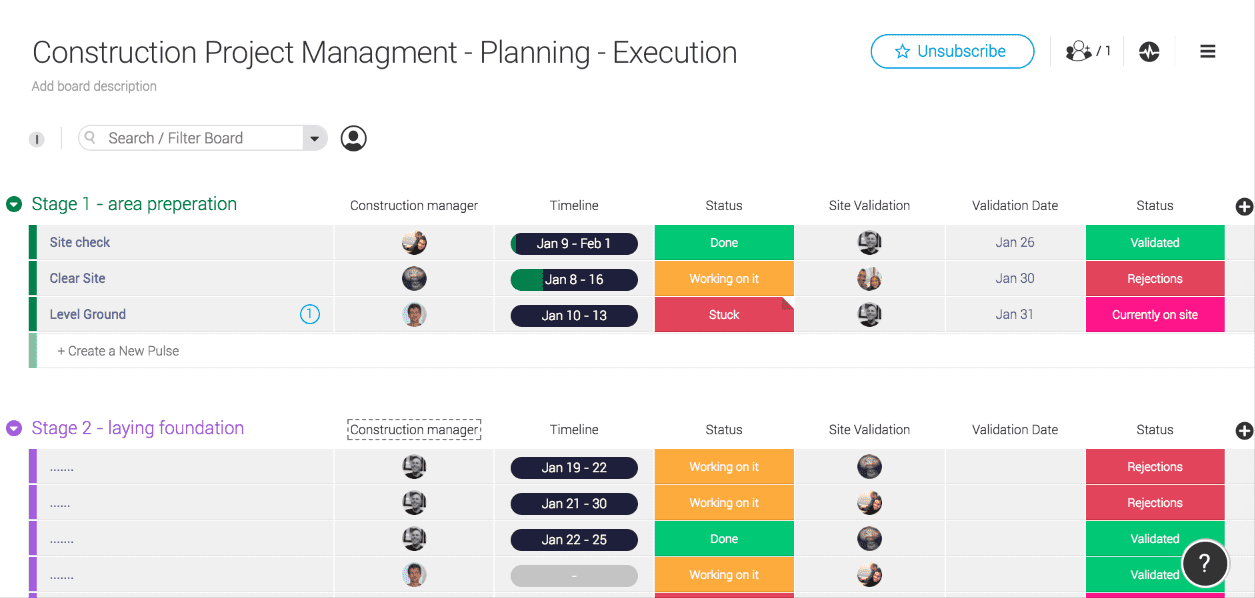
monday.com is a project management platform with intuitive collaboration features that are easy to learn and quickly understand. It’s a highly customizable tool that helps you clarify the sequence of work and see the progress and status of your projects at a glance. Fred Baker, a consultant who regularly implements monday.com with teams, highlights one of its strongest points: “The integration of automations in Monday makes it intuitive for setting up task triggers.” This flexibility helps teams streamline workflows and reduce repetitive manual updates.
Why I picked monday.com: Most of the project scheduling features in monday.com are in the “timeline” feature—this is where you can plan projects, set deadlines, assign team members, break down tasks, and set dependencies. I find it super handy that you can reassign tasks by simply clicking and dragging. I also like that you can view your timelines as spreadsheets, as lists, on a map, on a Kanban board, and other views.
With monday.com you can create summary charts and export and share project plans in a variety of formats (XML, PDF, etc). Apart from that, the platform enables big-picture views using reporting dashboards that collect data from multiple boards, allowing better progress tracking. In my opinion, all of this is helpful for being more data-driven in your business.
All said and done, monday.com technically doesn’t enable you to make Gantt charts in the very traditional sense (nor can you import or export MPP files). However, it’s a flexible, intuitive schedule management software tool that helps you see where tasks are bottlenecking, understand who’s currently working on what, etc. What’s more, the customizable fields and the drag-and-drop functionality makes it easy to quickly set up and start using. So for those reasons, I decided to include it in my roundup.
monday.com Standout Features & Integrations
Features include a timeline overlap view that allows users to see task overlaps and dependencies across multiple projects. The platform also offers a timeline zoom functionality that allows users to view schedules at various levels of granularity, from hourly breakdowns to long-term project overviews.
Integrations include apps like Slack, Excel, Google Drive, Gmail, Google Calendar, Jira, GitHub, Trello, Dropbox, Typeform, and thousands more accessible via Zapier.
Pros and Cons
Pros:
- Resource scheduling tools included
- Easy to use calendar and task scheduling
- Colorful, graphically pleasant schedule interface
Cons:
- Complicated pricing structure
- Steep learning curve for beginners
New Product Updates from monday.com

monday.com Adds Managed Columns Across Boards
monday.com adds Managed Column to let teams standardize and reuse column labels across multiple boards from a single source of truth. The update helps organizations maintain consistency, clarity, and centralized control at scale. For more information, visit monday.com’s official site.

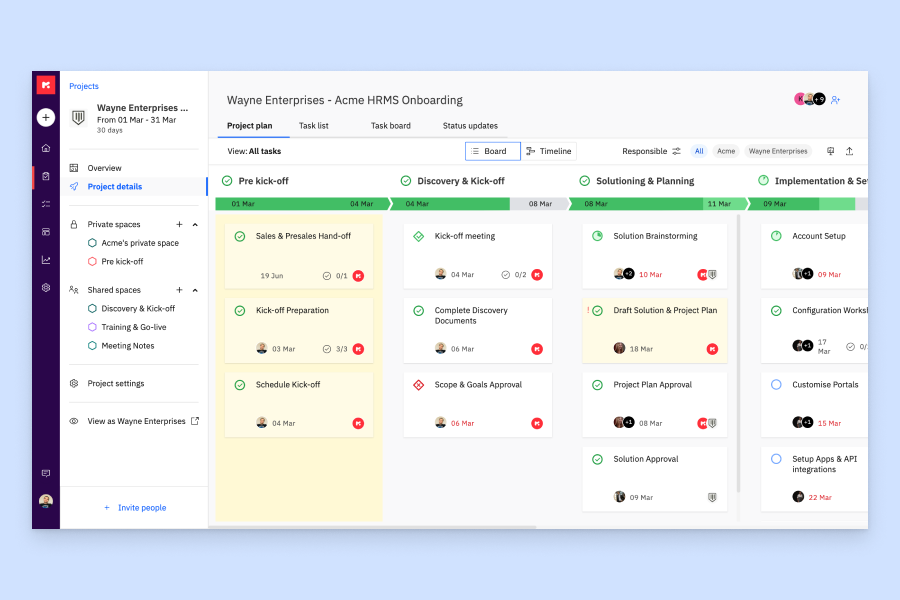
Rocketlane combines project scheduling, task management, and client collaboration tools into a single platform designed around structured service delivery and implementation workflows.
Who Is Rocketlane Best For?
Rocketlane is a strong fit for customer success, implementation, and professional services teams at B2B SaaS companies managing structured client onboarding.
Why I Picked Rocketlane
I picked Rocketlane as one of the best for onboarding project scheduling because it's built specifically around the rhythms of post-sale delivery, not generic task work. What I find most useful is the Nitro Project Architect, which converts a SOW directly into a phased, milestone-based project plan so my team starts from a structured schedule instead of a blank page. I also like that milestone pacing is built into the delivery view, which lets me spot drift against key go-live dates before it becomes a real problem.
Rocketlane Key Features
- Gantt chart scheduling: Visualize task sequences, dependencies, and timelines across the full project in a drag-and-drop Gantt view.
- Resource planning: Assign team members to tasks based on capacity and view workload distribution across active projects.
- Project baseline tracking: Capture the original project plan and compare it against live progress to measure schedule variance.
- Sprint planning: Organize work into time-boxed sprints to manage delivery in iterative cycles within a project.
Rocketlane Integrations
Rocketlane offers a small set of native integrations, including Slack, Salesforce, Jira, HubSpot, Google Calendar, and Outlook Calendar, and it also supports Snowflake data sharing. It connects with Zapier and Workato for broader app connectivity, and provides an API for custom integrations.
Pros and Cons
Pros:
- AI-powered resource matching by skill and availability
- Client portal with real-time task visibility
- Built-in templates for recurring onboarding projects
Cons:
- Mobile app has limited functionality
- Reporting filters lack advanced flexibility
New Product Updates from Rocketlane

Rocketlane Introduces Governance and Workforce Agents
Rocketlane introduces Governance Agents and Workforce Agents to automate delivery processes and recurring tasks. These updates help teams enforce rules and streamline project execution. For more information, visit Rocketlane’s official site.
 .
.
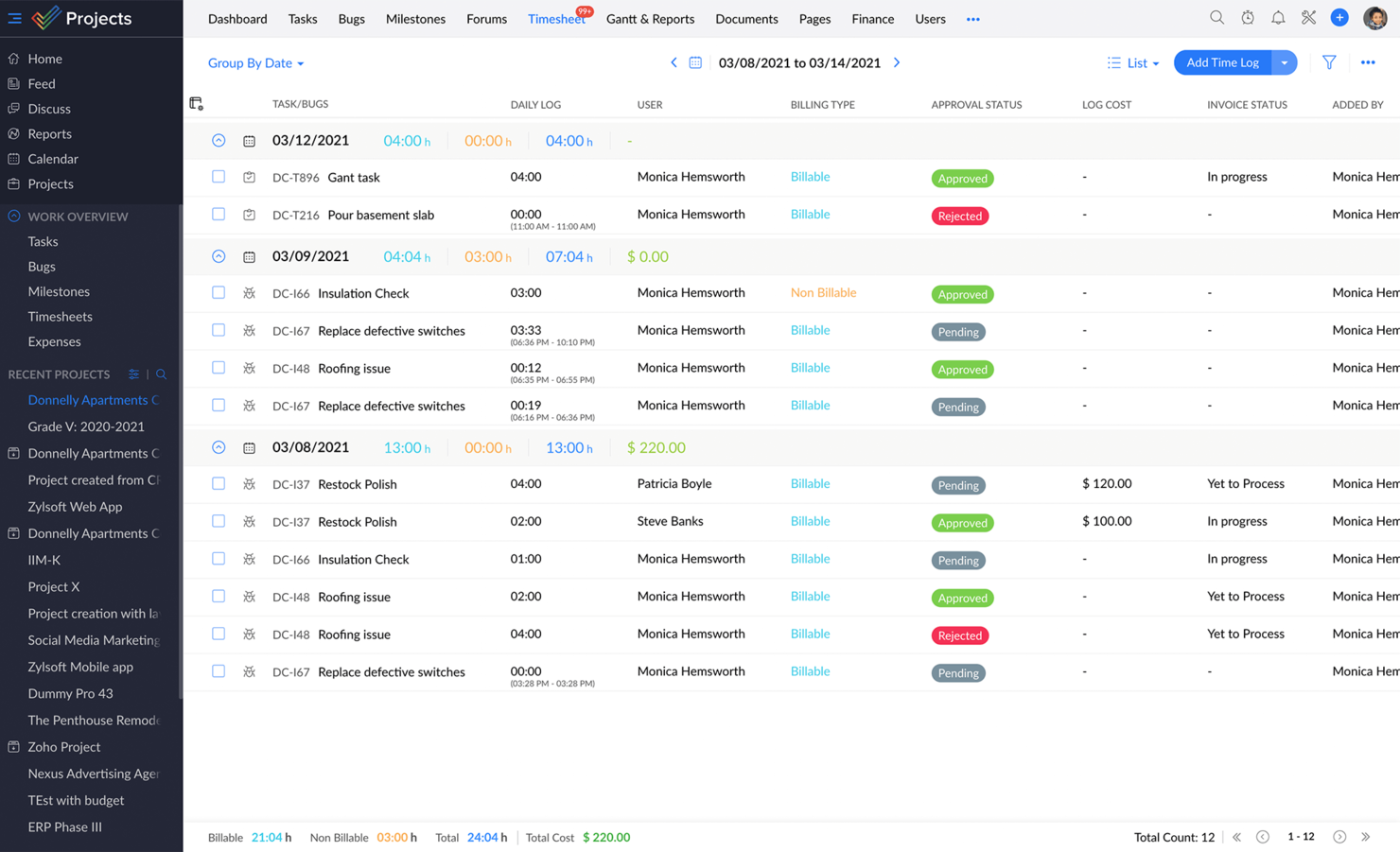
Zoho Projects is a project management and project scheduling software from Zoho. It offers flexibility and customizations to suit the needs of traditional project managers as well as agile teams.
Why I picked Zoho Projects: I chose this software because it has multiple ways of viewing information, like lists, Kanban, or Gantt charts. With task tags and custom views and filters, you can organize your tasks and find them with ease. In addition to timeline planning, you can plan your resources effectively with the drag-and-drop resource utilization module.
I like how easy it is to keep everyone in the loop right inside Projects via inbuilt chat, forums, and comments, or take the social route with the project portal feed. Add to that the integrated advanced analytics capabilities to generate more than 50 types of charts and reports.
The colorful dashboards are also fully customizable so that users can make Zoho Projects their own. The interface and modules are highly customizable. All aspects of the UI from theme colors to arrangement and visibility of the various modules can be changed to suit a user’s preferences. I really appreciate all of these customization options.
Zoho projects also offer free onboarding for customers and a comprehensive online help guide for all users, which I found to be super useful. The platform stands out in cases where there are multiple hand-offs involved. It is especially popular among IT companies, consultants, and education organizations.
Zoho Projects Standout Features & Integrations
Features include a blueprint feature that enables users to design and automate custom workflows, ensuring consistency and efficiency in managing task handoffs and approvals. Additionally, Zoho Projects’ integrated social collaboration tools, including project portal feeds and forums, foster smooth communication and engagement among team members.
Integrations. Being part of Zoho’s ecosystem allows Projects to connect to several of Zoho’s own services such as Zoho Books, Zoho CRM, and Zoho’s finance suite. The new Zoho marketplace allows 3rd party integrations as well.
Pros and Cons
Pros:
- Time-track multiple tasks at once
- Robust communication features
- Easy workflow automation
- Unlimited number of projects
Cons:
- Lacks some file type export options
- Lacks some reporting features
- Does not integrate with Quickbooks
New Product Updates from Zoho Projects

Zoho Projects Adds User Custom Fields and Layouts
Zoho Projects adds user custom fields to capture more user details and tailor the invite form, plus quicker access to the Users module via left navigation. For more information, visit Zoho Projects' official site.
 .
.
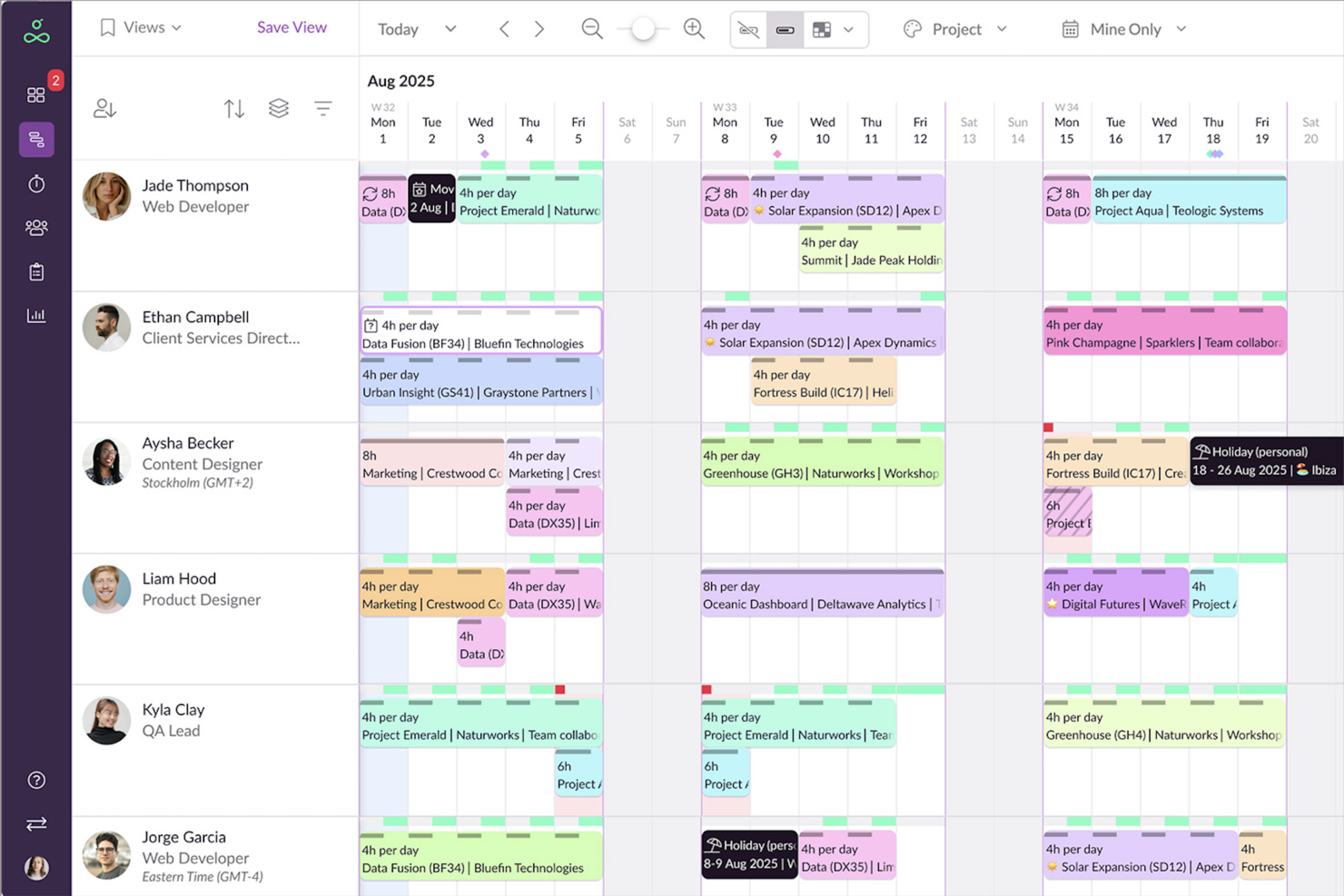
Resource Guru is project scheduling software that brings people, equipment, and meeting rooms together in a single, color-coded calendar. It’s designed for teams in industries like agencies, engineering, construction, and IT who need a clear view of all resources to prevent double-booking and keep projects on track.
Why I picked Resource Guru: I chose Resource Guru for its ability to manage every type of resource in one place. You can schedule team members alongside physical assets, while the leave management feature automatically accounts for vacations and absences in your plans. I also like its capacity planning and forecasting tools, which give you a forward-looking view of workloads so you can address bottlenecks before they impact delivery. This mix of visibility and proactive planning makes it a strong fit for busy, multi-project teams.
Resource Guru Standout Features & Integrations
Features include timesheets for tracking hours on projects, meeting room booking tools for efficient space management, and resource utilization reports to monitor billable vs. non-billable time.
Integrations include Google Calendar, Microsoft Outlook, Slack, Salesforce, Microsoft Teams, Trello, Zoom, Asana, Jira Software, Basecamp, monday.com, and Smartsheet.
Pros and Cons
Pros:
- Powerful resource filters
- Clash management capabilities to prevent overbooking
- Availability bar feature for capacity planning
Cons:
- No copy-paste of resource tasks
- Integrations are mainly via Zapier, rather than as native integrations
New Product Updates from Resource Guru

Resource Guru Launches Asana Integration
Resource Guru now integrates with Asana to enhance task scheduling by providing insights into availability and skills. For more information, visit Resource Guru's official site.
 .
.
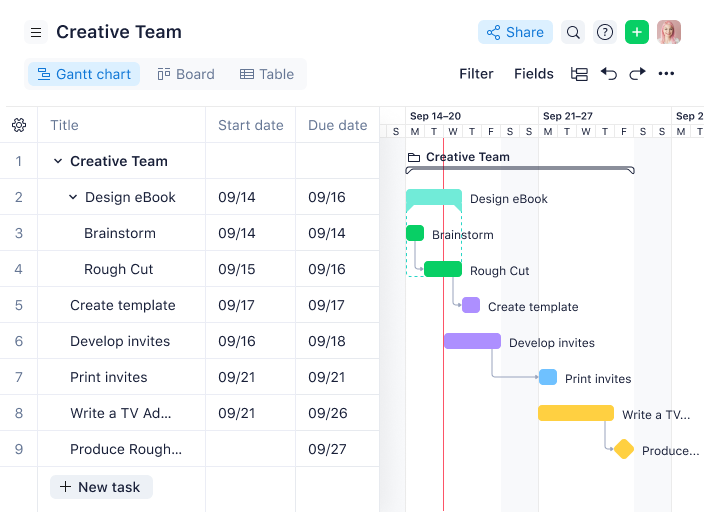
Wrike is an award-winning, easy-to-use project scheduling software trusted by 20,000+ organizations worldwide. It's suitable for teams with anywhere from five members to an unlimited number of team members. The tool is highly configurable and allows users to customize workflows, dashboards, reports, request forms, and more.
For example, Manuel Villa, President & Founder at VIA Technology, has used Wrike to successfully manage large-scale technical projects: “As someone who's led VIA Technology through major IT implementations including the City of San Antonio's SAP rollout, I've found Wrike excels at handling complex technical projects with multiple stakeholders. When we managed the Homeless Management Information Systems project, Wrike's approval workflows prevented costly miscommunications between city departments and our technical teams.”
Why I Picked Wrike: Wrike’s simple project scheduling software enables users to plan and schedule projects on Kanban boards, interactive drag-and-drop Gantt charts, or traditional workload views, as well as switch between them. Wrike also features task lists, subtasks, calendars, and real-time collaboration. Unlock advanced insights with performance reporting tools, time tracking, and more.
Wrike has an easy-to-use, intuitive interface and navigation with distinct spaces, folders, and tasks. Toggle quickly between the home screen and timesheets, dashboards, calendars, reports, and the activity stream. Wrike has a dedicated help center with interactive training, videos, a ‘Getting Started’ guide, and a thriving community.
Wrike Standout Features & Integrations
Features include a blueprint feature that allows users to create reusable project templates to ensure consistency and save time when managing recurring projects. Furthermore, Wrike's proofing and approval tools are tailored for creative teams, offering in-platform feedback on files, images, and videos to reduce revision cycles and improve collaboration.
Integrations include 400+ pre-built native integrations, including integrations with the most popular file management software from Microsoft, Google, and Dropbox, along with sales and marketing software from Salesforce and Marketo.
Pros and Cons
Pros:
- Plenty of collaboration features, from proofing tools to @-tagging
- User-friendly, visually appealing Gantt chart schedules
- The free plan is good for basic task list scheduling
Cons:
- Time tracking only included in Business and Enterprise plans
- Full scheduling capabilities have a bit of a learning curve
- Subtask management and scheduling is limited to paid plans
New Product Updates from Wrike

Wrike Adds Branding and Short Links for Request Forms
Wrike has added form branding and shorter public links to improve how teams create and share Request Forms. These updates allow users to customize forms with logos and themes, remove Wrike branding, and create cleaner links for external requests. For more information, visit Wrike’s official site.
 .
.
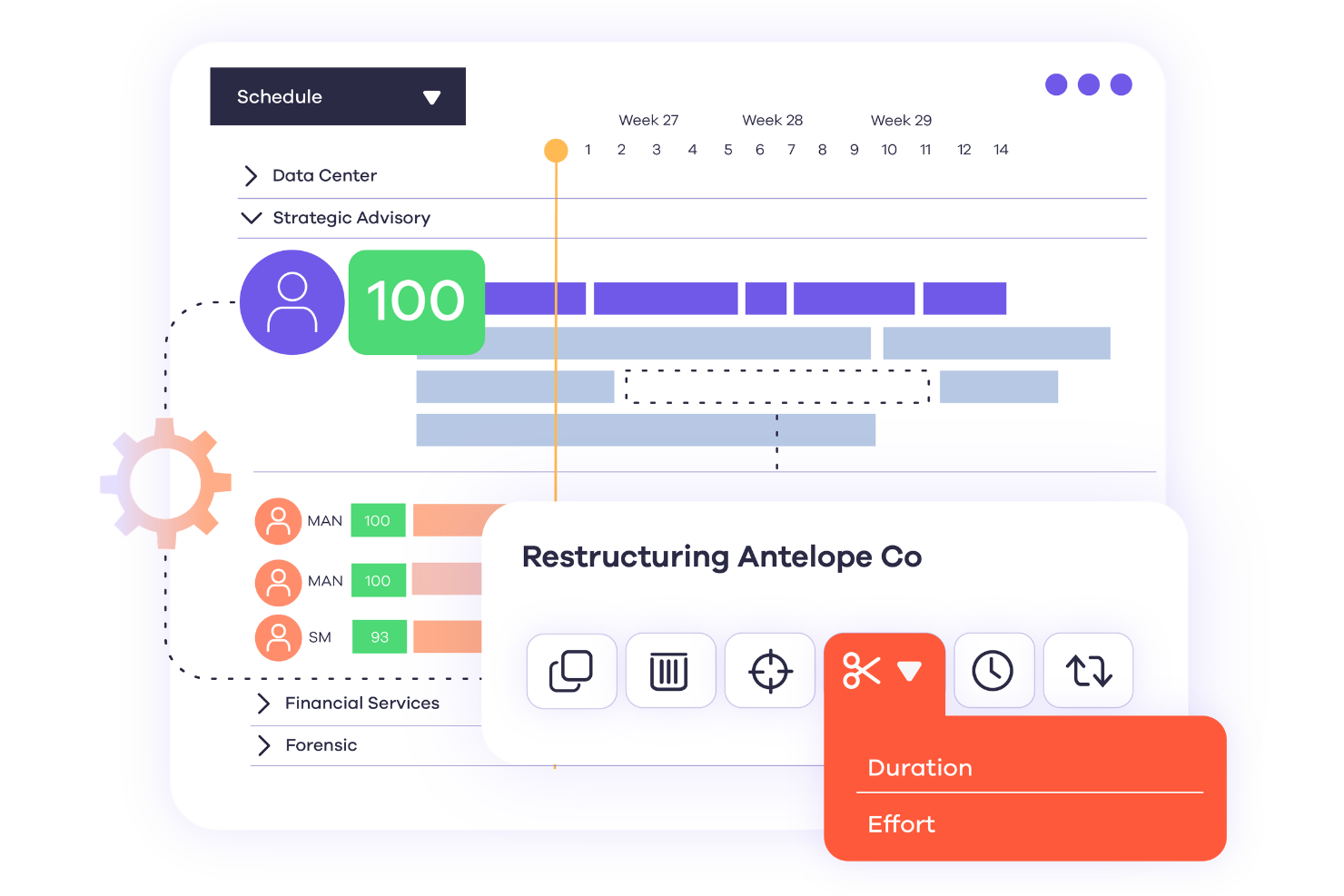
Dayshape is an AI-driven resource management platform designed to meet the complex needs of large professional services firms. If you're looking to improve your team's project scheduling capabilities, Dayshape might be the right fit. It addresses the challenges of resource allocation and project financial tracking, offering tools that transform intricate data into actionable insights, which can significantly improve decision-making and project outcomes.
Why I Picked Dayshape
I picked Dayshape for its advanced AI-driven scheduling and real-time project financial tracking. These features collectively offer a solution for optimizing resource allocation, which is important for project scheduling. Dayshape's AI scheduling processes thousands of options per second, facilitating effective project management and strategic hiring. The real-time financial tracking ensures you have up-to-date insights into project budgets, aiding in financial decision-making.
Dayshape Key Features
In addition to its AI scheduling and financial tracking, Dayshape offers several other features that improve project scheduling:
- Gantt Chart Scheduler: Provides a visual representation of project timelines and resource allocations, making it easier to plan and adjust schedules.
- Budgeting Tools: Allows simultaneous budget creation and team assembly, helping to avoid overruns and maximize project profitability.
- Customizable Reporting: Offers dynamic reporting tools and dashboards that can be tailored to your firm's needs, promoting transparency and informed decision-making.
- Automated Notifications: Improves project quality through early issue detection, ensuring timely interventions and maintaining project timelines.
Dayshape Integrations
Integrations include Workday, SAP, Salesforce, Oracle PeopleSoft, Microsoft Dynamics 365, Wolters Kluwer, Deltek, and more.
Pros and Cons
Pros:
- Customizable dashboards for project and financial data
- Scenario modeling for resource and project planning
- Automated budgeting controls with approval workflows
Cons:
- Complex features may require extensive onboarding
- Limited public documentation for self-setup


Microsoft Project is a project management software built over 35 years ago to help you keep track of all your work.
Why I picked Microsoft Project: I like that this software can be purchased with Office 365 (which many companies use) or as a stand-alone item. Microsoft Project has the honed functionality of an Excel file with scheduling-specific tools for project management pros, which makes it friendly and approachable, in my opinion.
If you need project scheduling help, try the intuitive and robust Gantt chart generator to navigate product timelines. And for adapting to our current needs, MS Project is available in both cloud-based and on-premise options, which I definitely think is worth mentioning.
MS Project Standout Features & Integrations
Features include portfolio modeling, which helps organizations evaluate and prioritize projects based on strategic goals and resource constraints. Furthermore, the tool's coauthoring capabilities enable real-time collaboration on project schedules, allowing multiple team members to work simultaneously and stay aligned on timelines.
Integrations include other Microsoft software, like Outlook, Excel, Skype, and more.
Pros and Cons
Pros:
- Easy integration with other Microsoft software
- Driver prioritization module for ranking strategies/objectives
- Helpful project template descriptions for guidance
- Can generate a Gantt chart from a spreadsheet
Cons:
- Few customization options
- Steep learning curve
- Limitations on collaboration tools
Other Project Scheduling Software
Here are a few more project scheduling software tools that didn’t make my top 15, but which are worth your consideration.
- Nifty
For milestone tracking
- Forecast
For mid-sized agencies and consultancies
- ActiveCollab
For small teams
- Jira
For software teams
- Office Timeline
Visual scheduling for PowerPoint
- Birdview
For professional services
- Adobe Workfront
Robust feature set
- ProjectManager
For real-time dashboards
- Parallax
For forecasting scheduling needs
- Runn
For real-time planning
- Planview Vantage
For international enterprises
- Ravetree
For all-in-one project scheduling
- Silverbucket
For project timelines
- Miro
For visual innovation workspaces
- ClickUp
For centralized project scheduling
- Smartsheet
For aligning resources and teams
- ClickTime
For time tracking
- Hive
For various teams sizes
- Workzone
For granular project permissions
- Celoxis
For project scheduling with AI
- Accelo
For dynamic scheduling adjustments
- Screendragon
For automated resource scheduling
- Bonsai Agency Software
For time and resource planning
- GoodDay
For customizable workflows
- Hub Planner by Milient
For resource management
- TaskRay
For Salesforce-native project scheduling
- Paymo
For freelancers
- Ganttic
Project scheduling tool for organizations with large resource pools
- Teamwork.com
For team workload management
- FunctionFox
For creative businesses and teams


Related Project Management Reviews
If you still haven't found what you're looking for here, check out these other project management tool reviews we've curated for you:
- Project Management Software
- Resource Management Software
- Workflow Automation Software
- Time Tracking Software
- Task Management Software
- Collaboration Tools
How I Evaluate Project Scheduling Software
I split my evaluation into two layers: the baseline a tool must clear to qualify—think Gantt charts and dependency tracking—and the differentiators that separate a good fit from a great one.
Core Functionality (Table Stakes for This List)
These core capabilities serve as the acceptance criteria for inclusion on my list of project scheduling software:
- Gantt & Timeline Views: I check whether the Gantt chart is interactive enough to drag tasks, adjust durations, and group by phase—not just a static visual.
- Task Dependencies & Milestones: Every tool needs to support at least the four standard dependency types so you can model real sequencing, not just ordered task lists.
- Resource Scheduling & Allocation: I look for workload views that show who's overbooked before you commit to a timeline, not just a name next to a task.
- Baseline & Critical Path Tracking: I evaluate whether you can save a baseline, compare it against current progress, and see the critical path highlighted clearly.
- Calendar & Capacity Management: Working calendars with holidays, shifts, and time zones matter—especially for teams scheduling across regions or managing field crews.
- Schedule Collaboration & Notifications: I look for real-time updates and configurable alerts so distributed teams catch schedule changes without chasing down a status report.
I rank each vendor on a scale from 0 (does not offer the functionality) to 5 (excels in this area) for each criterion.
Vendors need to achieve a minimum average score to be considered for inclusion on my list. From there, I consider what sets each platform apart.
Differentiating Factors (What Sets Vendors Apart)
Once I've curated my list, here's how I contrast and compare different vendors in the project scheduling software space:
Standout Features
Portfolio views make it easier to manage multiple projects and spot cross-project risks, while AI-powered auto-scheduling and what-if scenario planning help avoid bottlenecks before they threaten critical delivery. I also compare how tightly each tool integrates time tracking, so actual hours feed directly into project forecasts, and whether the platform offers mobile or offline access for field teams who need real-time updates at the job site.
Beyond Features
Integrations matter here. I evaluate whether a tool connects natively to Jira, Slack, or Teams, and whether it syncs with ERP or finance systems, since schedule data rarely lives in isolation. Pricing structure is another key factor; I check whether vendors offer free viewer seats for stakeholders who only need read access. I also consider how quickly teams can get started, including import support from MS Project or Primavera and whether pre-built templates match your industry.
How To Choose Project Scheduling Software
It’s easy to get bogged down in long feature lists and complex pricing structures. To help you stay focused as you work through your unique software selection process, here’s a checklist of factors to keep in mind:
| Factor | What to Consider |
|---|---|
| Scalability | Make sure the software can grow with your team. Look for features like unlimited projects, user role expansions, and workload balancing. |
| Integrations | The software should connect with your existing tools, such as CRM, accounting, or communication platforms like Slack or Microsoft Teams. |
| Customizability | Choose a solution that lets you tailor workflows, task views, and reports to fit your team’s processes and industry-specific needs. |
| Ease of Use | A simple, intuitive interface reduces the learning curve. Features like drag-and-drop scheduling and visual dashboards can improve the user experience. |
| Budget | Consider both upfront and long-term costs. Look for transparent pricing, free trials, and whether core features are locked behind premium plans. |
| Security Safeguards | Protect your data with features like role-based permissions, two-factor authentication, and compliance with industry standards like GDPR or SOC 2. |
| Collaboration Tools | Make sure your team can work together via real-time updates, task comments, file sharing, and automated notifications. |
| Mobile Accessibility | If your team works remotely, a strong mobile app with full functionality lets you manage schedules on the go. |
Trends in Project Scheduling Software
Here are four key project scheduling software trends that I believe will keep developing throughout the year:
- AI-driven insights and automation: Artificial intelligence is increasingly common in project tools. Top platforms like Microsoft Project and Asana use predictive analytics to flag risks and resource bottlenecks early. AI also streamlines resource allocation, personalizes task prioritization, and frees up time for strategic work.
- Workflow automation and customization: Demand for workflow automation and custom project setups is growing. Tools like monday.com and Airtable let teams build tailored workflows, automate tasks, and set custom triggers—streamlining processes and ensuring consistency across projects.
- Advanced visualization tools for clarity: Visualization tools help teams understand project data at a glance. Platforms like ClickUp offer Gantt charts, Kanban boards, mind maps, and timelines to track progress, manage dependencies, and adjust plans quickly for better communication and decisions.
- Dynamic scheduling capabilities: This trend highlights real-time scheduling tools that adapt to changes like resource shifts or delays. Features such as drag-and-drop interfaces improve task visibility, while an AI scheduling assistant can automatically adjust priorities to keep projects agile and minimize downtime.
What Is Project Scheduling Software?
Project scheduling software is a tool that helps teams visually plan, organize, and manage project timelines, tasks, and resources.
With drag-and-drop features for assigning tasks, managing dependencies, and setting deadlines, it streamlines project planning across the entire lifecycle. This clarity ensures everyone—from team members to stakeholders—stays aligned on priorities, timelines, and deliverables.
Features of Project Scheduling Software
When selecting project scheduling software, keep an eye out for the following key features:
- Task management: Easily create, assign, and prioritize tasks so you and your team know exactly what needs to be done, by whom, and when. This centralizes your workflow and keeps everyone on track.
- Gantt charts: Visualize your project timeline with interactive Gantt charts that show task dependencies, durations, and deadlines. You can quickly see progress and spot potential bottlenecks before they become real headaches.
- Resource allocation: Allocate your team’s time, skills, and tools efficiently. You’ll see who’s available, who’s swamped, and where you might need extra hands, making sure no one’s overbooked or underutilized.
- Dependency tracking: Link tasks that depend on each other and set rules so that delays don’t cause chaos. This ensures that if something changes, your schedule automatically adjusts to keep the project running smoothly.
- Calendar integration: Connect the software with your calendar apps so you never miss a deadline or meeting. This gives you a consolidated view of upcoming milestones and keeps schedules in sync.
- Milestone tracking: Set and monitor major project milestones. These checkpoints help you break big goals into manageable chunks and celebrate progress along the way.
- Collaboration tools: Communicate with your team through built-in chat, comments, and file sharing. Everyone stays updated, questions get answered faster, and feedback flows naturally.
- Time tracking: Log hours worked on each task. This not only helps manage deadlines but also gives you insight into how time is being spent (and possibly, where it’s disappearing).
- Reporting and analytics: Generate detailed reports that summarize project progress, completion rates, and resource usage. This visibility helps you make informed decisions and keep stakeholders in the loop.
Common Project Scheduling Software AI Features
Beyond the standard project scheduling software features listed above, many of these solutions are incorporating AI with features like:
- Automated scheduling: Let AI recommend or even build schedules for you by analyzing project requirements, team availability, and deadlines. This saves you time and helps avoid human error.
- Task prioritization: AI evaluates deadlines, dependencies, and workloads to automatically adjust task priorities as situations evolve, helping you stay focused on what matters most.
- Resource optimization: The software analyzes team strengths, current assignments, and availability to smartly allocate resources, so you get the right person on the right task at the right time.
- Predictive analytics: AI forecasts potential risks and delays by examining trends and past project data, giving you a heads-up to proactively address issues before they disrupt your schedule.
Benefits of Project Scheduling Software
Here are the primary benefits that project scheduling software offers:
- Streamlined task management: Project scheduling software allows you to easily assign and track tasks. This provides a clear overview of the project at hand, so each team member knows their role and responsibilities.
- Better collaboration: With advanced collaboration features, software can foster communication so ideas can flow freely among team members. This helps with innovation and teamwork.
- Accurate forecasting: The software's predictive analytics can help you foresee potential risks or delays with tasks so you can proactively mitigate potential setbacks and deliver projects on time.
- Increased productivity: By automating routine tasks, the software frees up your time so you can focus on strategic facets of the project, so you can get more done and increase overall productivity.
- Real-time visibility: The software should provide real-time updates, which helps everyone stay in sync. This transparency also builds trust among team members and stakeholders.
Costs & Pricing For Project Scheduling Software
Below is a table summarizing my research into the different plan options and their pricing for project scheduling software:
| Plan Name | Price (per user/month) | Features |
|---|---|---|
| Free | $0 | Basic scheduling, limited users and projects, basic reporting |
| Basic | $10 - $20 | Task scheduling, simple reporting, basic integrations, limited users and projects |
| Standard | $20 - $50 | Advanced task scheduling, resource management, reporting and analytics, integrations, multiple users/projects |
| Premium | $50 - $100 | Advanced project management features, customizable scheduling options, advanced reporting, unlimited users/projects |
Common stages where your company may want to upgrade your pricing plan include:
- Increased project volume: As your organization manages more simultaneous projects, the need for advanced scheduling and management features might require you to upgrade your plan.
- Team expansion: As you hire more employees or collaborate with more freelancers, you might need to scale your plan to support additional users and access more collaboration tools and permission settings.
- Advanced reporting and analytics: You might want to upgrade for access to advanced reporting features.
- Integration needs: As your business grows, the need to integrate project scheduling software with your other systems (CRM, ERP) increases. Higher pricing tiers often help with this via comprehensive integration options.
- Better customer support and training: If you're at a critical growth stage, you might require premium support, dedicated account management, and personalized training, which are often included in higher pricing tiers.
New & Noteworthy Product Updates
Below you’ll find my release notes and take on the latest and greatest project scheduling software product updates. See what’s new across web, desktop, and mobile—what’s hot, what’s not, and why it matters for your scheduling workflows.
Q1 2025 Project Scheduling Software Updates
monday.com Update Notes
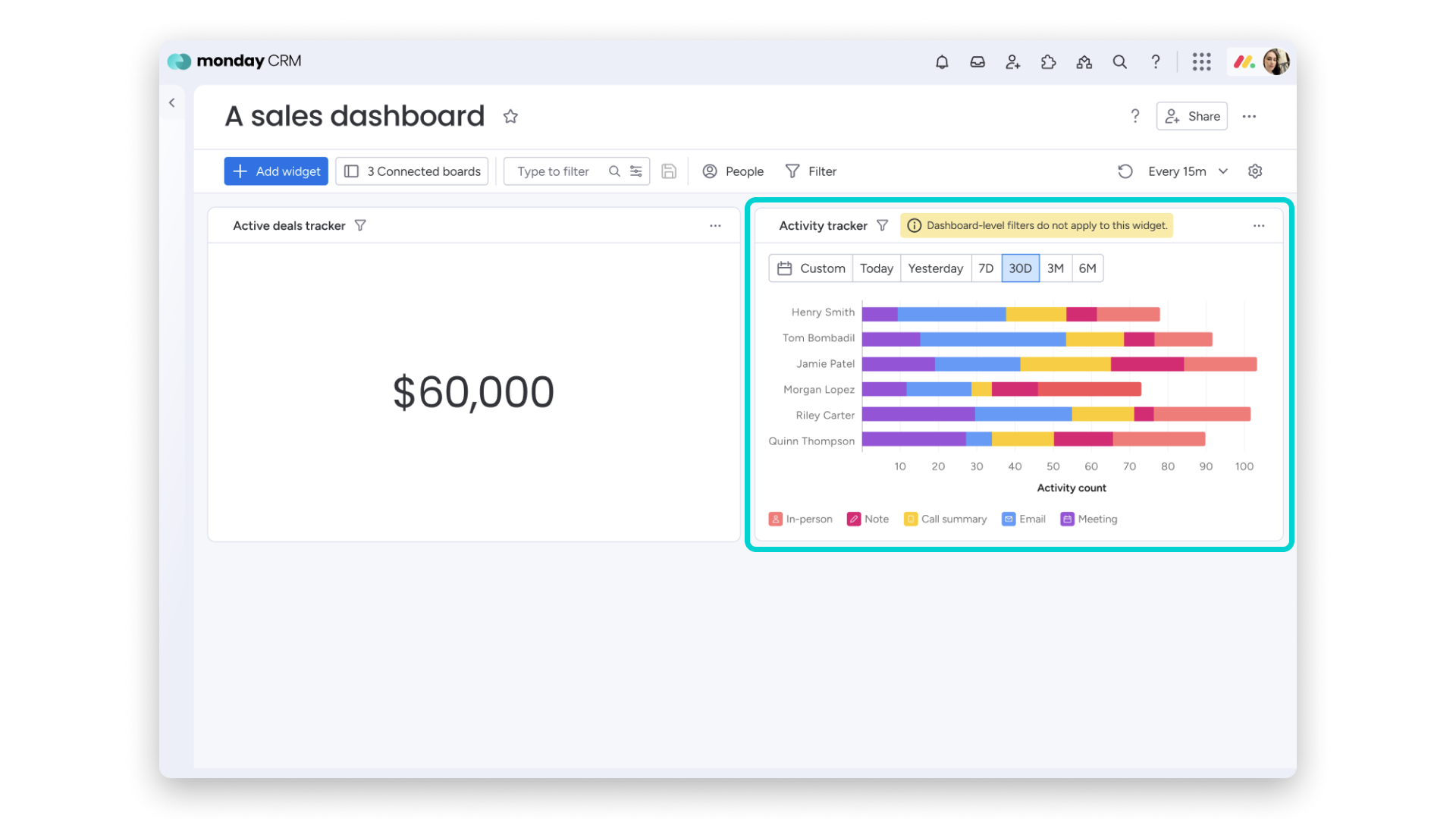
monday.com CRM's new activity tracker widget gives sales managers a visual overview of reps' emails and logged activities, pulling data directly from CRM boards to support data-driven decisions and deal prioritization.
Managers can view interactions by rep, spot trends, and uncover gaps. Customizable axes, chart types, and filters make it easy to track performance and guide coaching. Ideal for sales leaders and CRM admins.
Verdict: Hot! Accurate performance tracking can be difficult, so anything that makes it easier is a great improvement.
Kantata Update Notes
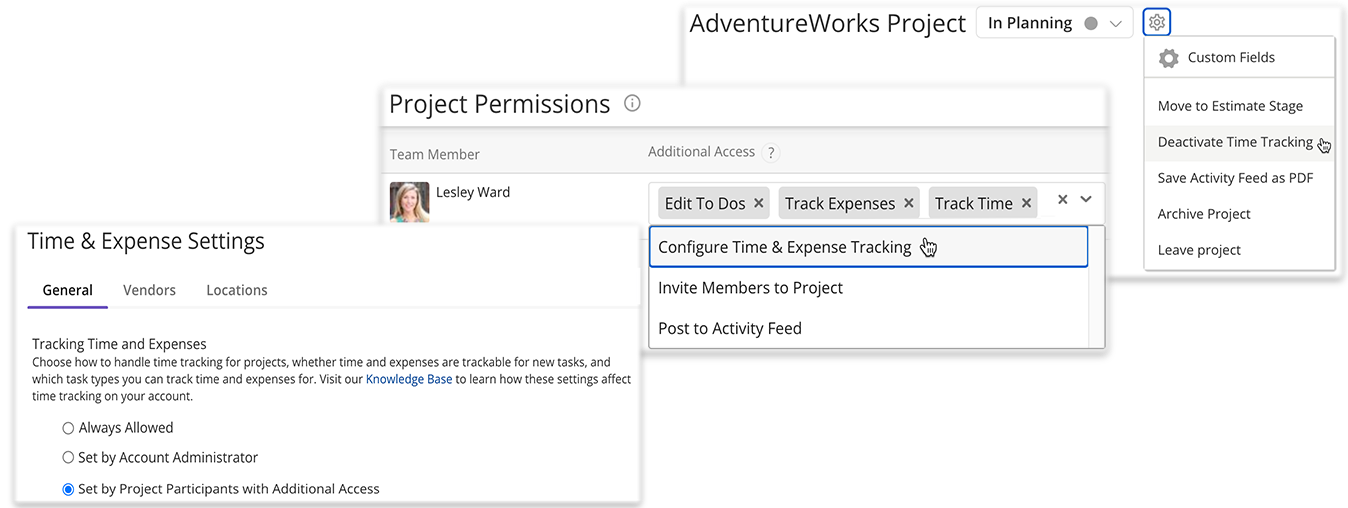
In March 2025, Kantata added customizable pulse survey responses, letting users choose response scales and preview surveys before sending.
It also expanded time tracking settings—project leads can now control who can adjust time tracking at both the project and task levels, improving accountability and reporting accuracy.
These updates are especially useful for project managers, HR teams, and resource planners.
Verdict: Not. These improvements are great and will prove useful, but they aren't exactly innovative.
Check out Kantata's most recent pricing information.
Resource Guru Update Notes
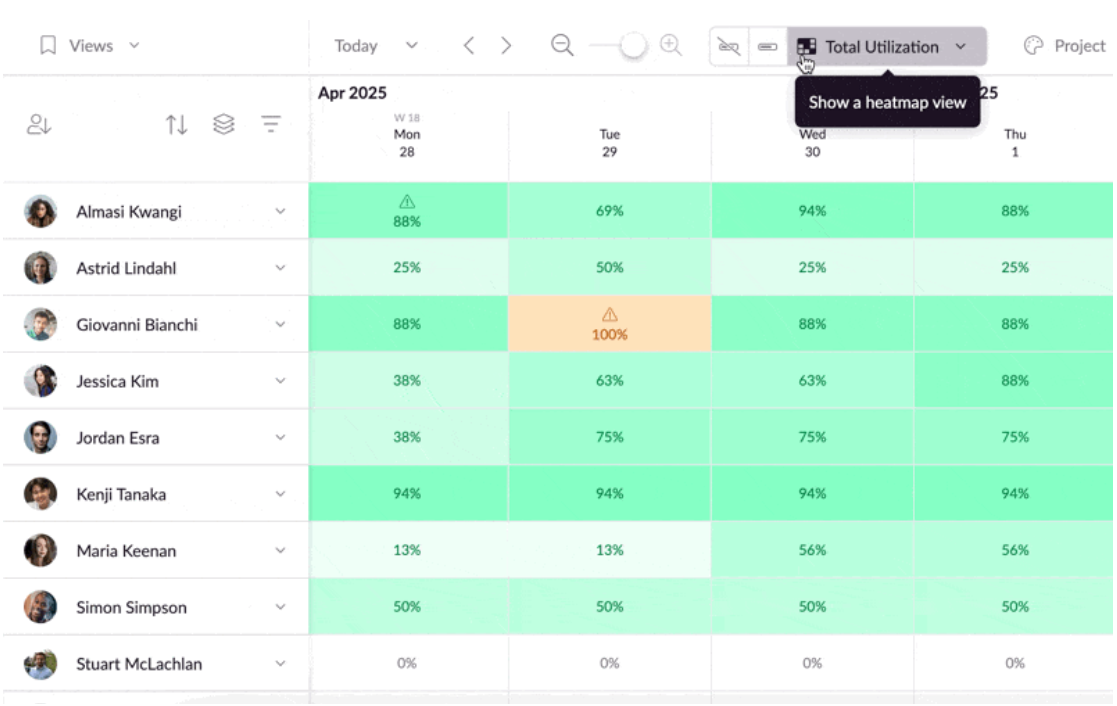
Resource Guru’s new heatmap views provide a color-coded snapshot of team capacity, making it easy to spot under- or overbooked members. Choose from total utilization, billable utilization, or hours available to quickly identify and resolve bottlenecks.
The billable view highlights revenue-generating work, helping teams boost profitability by focusing efforts where they matter most.
Ideal for project managers, ops leads, and agency teams juggling multiple clients.
Verdict: Hot! Features like this make it easier to see utilization at a glance and adjust quickly if needed to prevent bottlenecks and delays.
Check out Resource Guru's most recent pricing information.
Scoro Update Notes
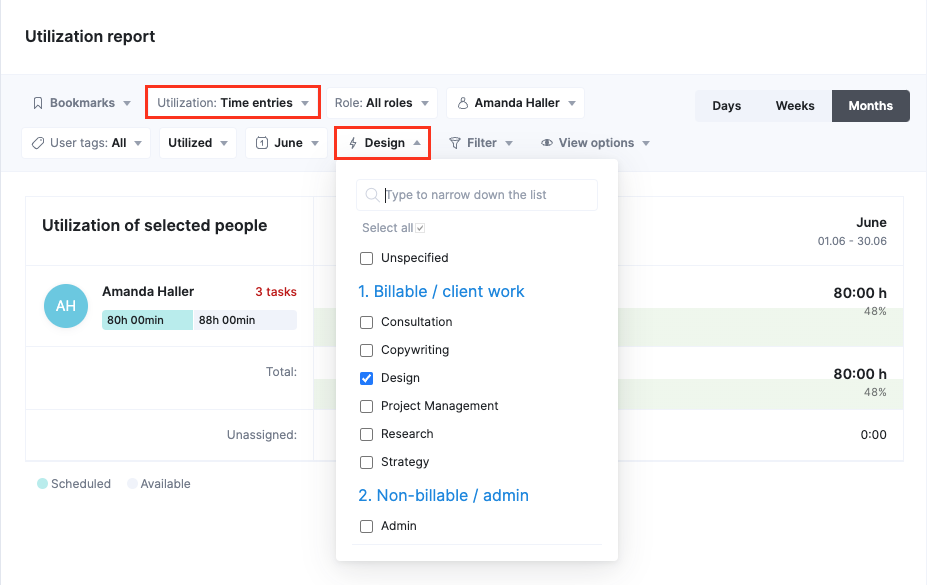
Scoro’s latest update enhances work management tools with clearer time-off visibility in the planner—striped yellow highlights mark unavailable hours, and icons reveal more details. Recurring events now cap at 10 years from the start date to reduce data clutter.
Utilization reports also got a fix: filters now reflect each time entry’s actual activity type, improving data accuracy for tracking productivity and resource use. Great for project managers and analysts who rely on precise reporting.
Verdict: Not. While these are solid improvements, there's not much that's new and noteworthy here.
Zoho Projects Update Notes
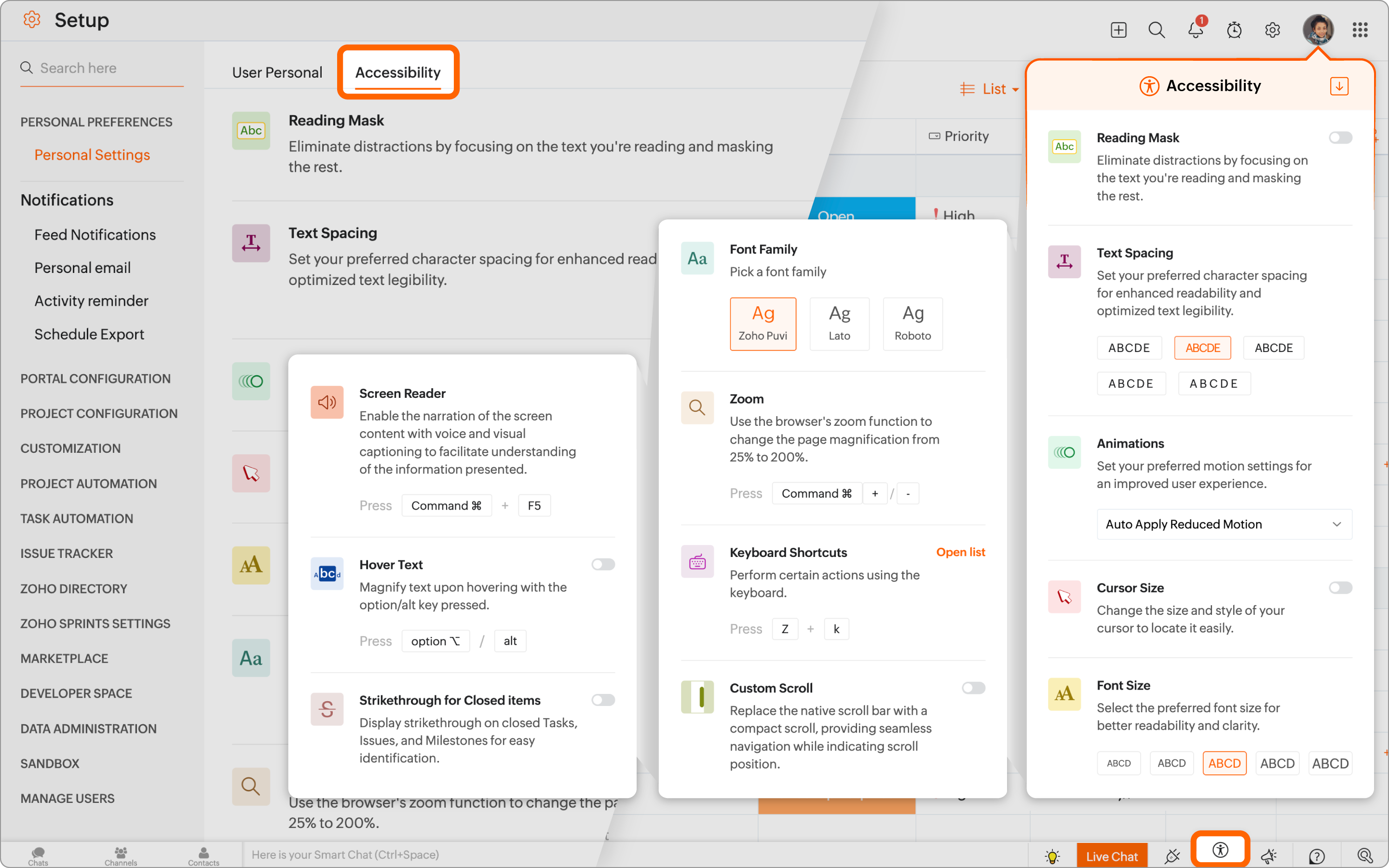
Zoho Projects now offers a suite of accessibility features to support users with visual, auditory, or sensory needs. These can be configured from personal settings, the quick access toolbar, or the sign-out page.
New tools include a reading mask, customizable text spacing, animation controls, and adjustable cursor and font settings. Users also get keyboard shortcuts, zoom, and a custom scroll bar for easier navigation.
Ideal for teams that value inclusive digital experiences.
Verdict: Hot! These features mean everyone on your team can be their most productive selves.
Check out Zoho Project's most recent pricing information.
Miro Update Notes
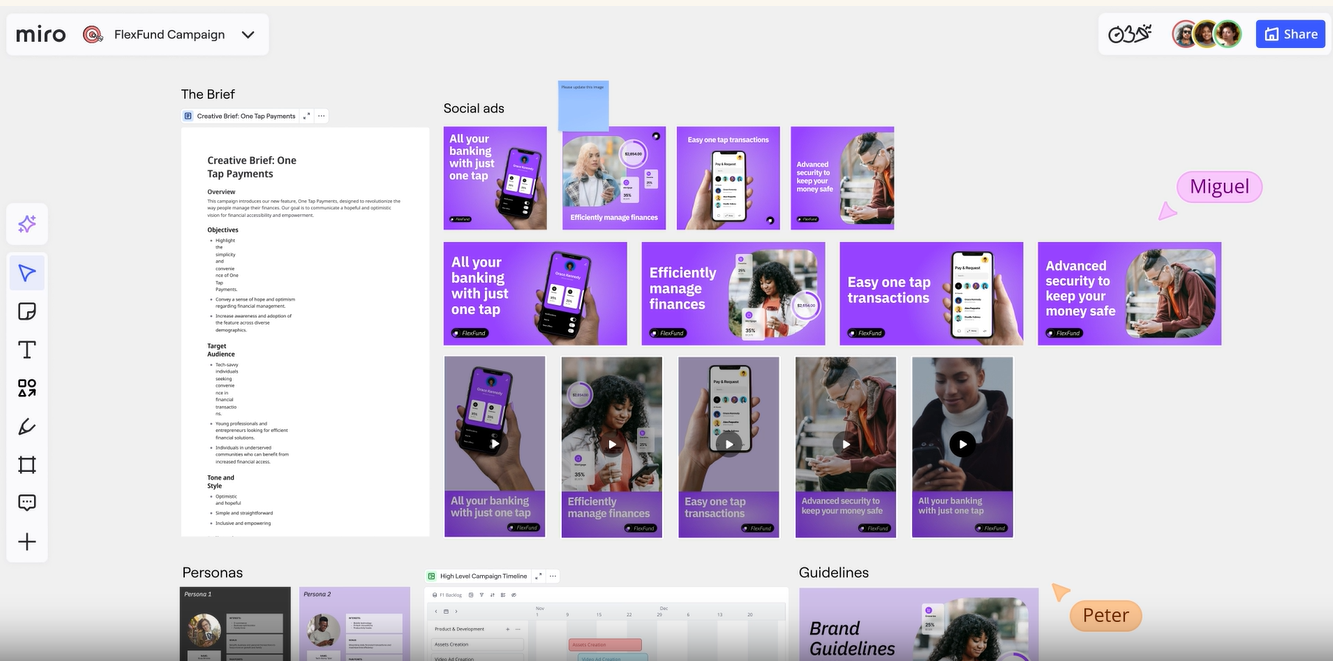
Miro’s latest updates boost creativity, workflows, and performance. Two standout integrations—Amazon Bedrock for AI image generation and Adobe Express (beta) for in-platform design—enhance visual collaboration.
The refreshed template library features a new design and intelligent templates with tools like Miro AI, video calling, and Sidekicks. New widgets, including Dot Voting and People Widget, improve team interaction.
Other updates include improved team organization in Spaces, @mentions in Docs, and clearer sticky note sizing—ideal for users managing complex, multi-board projects.
Verdict: Hot! The integration with Adobe Express will reduce context switching, improve collaboration, and make your team more productive.
ClickUp Update Notes
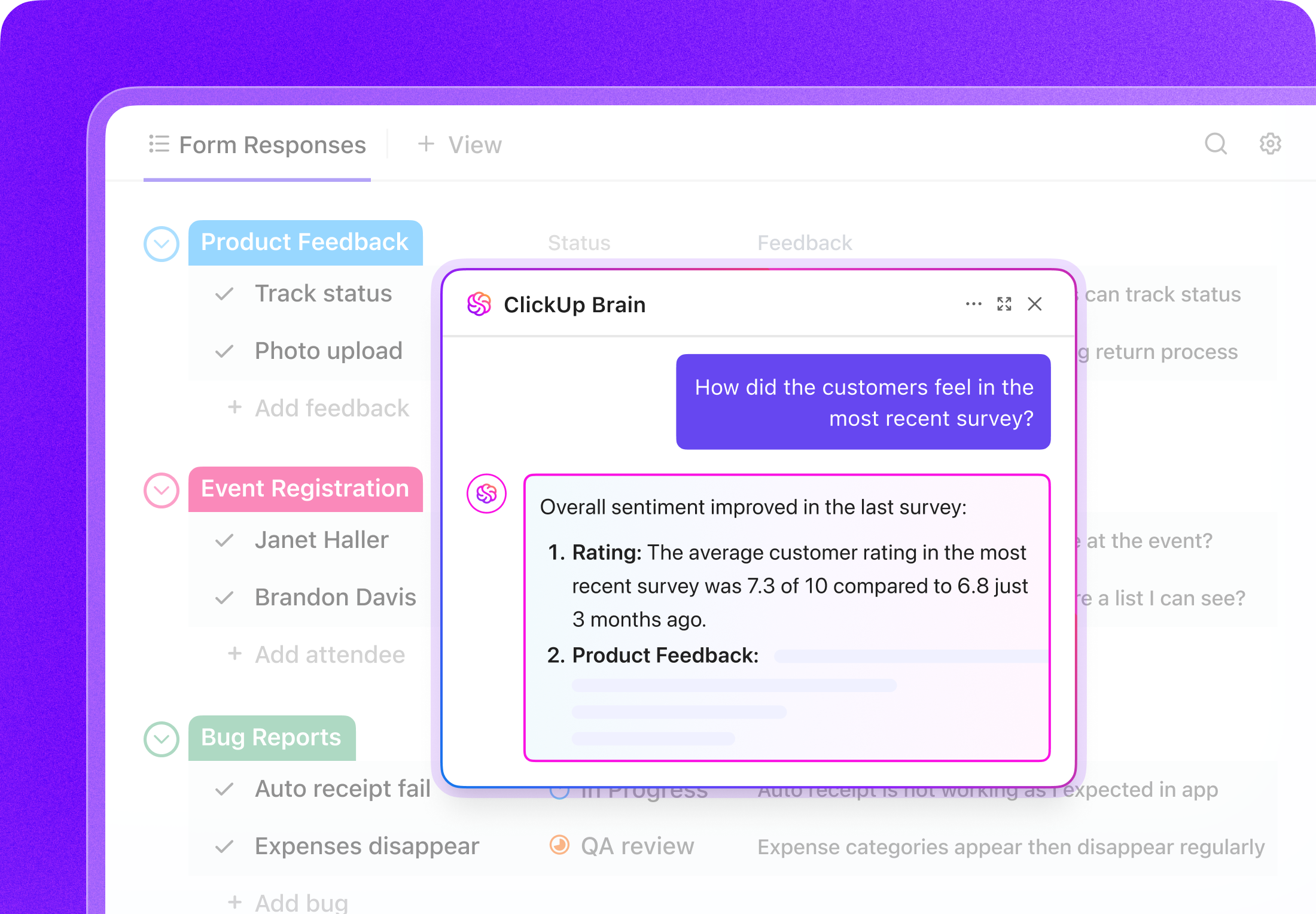
ClickUp latest form updates improve collaboration with connected data, centralized feedback, and AI-powered insights.
New info blocks and question descriptions help guide respondents with clear instructions and visuals, while the new forms hub lets users manage all forms in one place. Ideal for project managers, team leads, and mobile-first teams.
Verdict: Hot! AI features that can improve productivity and speed up your processes are always a win.
Check out ClickUp's most recent pricing information.
Project Scheduling Software Frequently Asked Questions
Find answers to common questions other people ask about this topic.
How do project scheduling tools help manage resource conflicts or overallocation?
Project scheduling tools make it much easier to identify and resolve resource conflicts or overallocation before they derail your project. Most tools provide visual dashboards or workload charts to show each team member’s current assignments and capacity. If someone is scheduled for overlapping tasks or too many hours, the tool will flag this so you can quickly redistribute tasks or adjust deadlines. Some platforms even offer automatic resource leveling or suggest alternative assignments based on staff availability. This proactive approach helps you balance work fairly, reduce burnout, and avoid missed deadlines due to overworked team members.
What should I look for when evaluating project scheduling software for my team?
Look for software that matches your team’s size, workflow, and complexity of your projects. Key features to consider include easy drag-and-drop scheduling, strong support for dependencies, real-time collaboration, customizable views (like Gantt, calendar, and Kanban), and robust reporting. Integrations with your existing tools—such as Slack, Google Workspace, or Microsoft Teams—streamline adoption. Make sure the software scales as your projects grow and offers mobile access if your team works remotely. Always invite a few team members to test drive any tool before you decide, ensuring it fits your team’s needs and comfort level.
Can project scheduling software automate project updates and reminders for my team?
Yes, automation is a core benefit of most project scheduling software. These platforms let you set up automatic updates, notifications, and deadline reminders for both you and your team. You can trigger alerts when tasks are due, overdue, or when key milestones are approaching. Many tools allow you to customize which events prompt notifications or generate summary reports. This reduces manual follow-up and keeps everyone aware of current priorities without extra effort from you. Team members can also update progress themselves, with changes instantly visible to everyone involved.
What are some common project scheduling techniques?
Common project scheduling techniques include tools and approaches like Gantt charts, which map tasks and dependencies over a timeline; the critical path method (CPM), which helps you identify the most important sequence of tasks for on-time delivery; and Kanban boards, which visualize work as it moves through stages. Some managers use calendars, milestones, or sprints (for agile teams) to further organize tasks. These techniques help break complex projects into manageable steps, clarify who’s responsible for what, and make it easier to spot delays or bottlenecks early.
What are common challenges in creating a project schedule?
Project managers often struggle with accurate time estimates, shifting priorities, last-minute changes, and resource constraints. It’s easy to underestimate how long tasks will take or miss dependencies that affect the whole timeline. Stakeholder input or scope changes can also disrupt your schedule. You can manage these issues by involving your team in planning, regularly reviewing progress, and building buffer time into your project. Keeping communication open ensures that risks or delays are identified early, letting you adjust the schedule before problems escalate.
How user-friendly are project scheduling tools for non-technical team members?
Most modern project scheduling tools are built with simplicity in mind, using intuitive interfaces like drag-and-drop, color coding, and templates to make setup and updates easy. Many solutions offer onboarding guides, short explainer videos, or live chat support to get everyone started confidently. If your team is brand new to scheduling tools, consider setting up a short training session or sharing best practices to get people up to speed. The goal is for every team member, regardless of technical background, to update their tasks and access schedules without confusion.
Can project scheduling tools support agile and scrum methodologies effectively?
Yes, many project scheduling tools provide robust support for agile and scrum methodologies. They include features like sprint planning boards, customizable workflows, product backlogs, and burndown charts to track team velocity and progress. Most let you switch views between timeline (Gantt), list, Kanban, and agile boards, so you can tailor the tool to your team’s hybrid or changing needs. Effective scheduling tools help teams plan sprints, assign story points, and handle cross-functional collaboration, all while making it easier to review performance and quickly adapt to change.
How can integrations with collaboration tools enhance project scheduling?
Integrating your scheduling software with collaboration tools—like Slack, Microsoft Teams, or Google Workspace—streamlines communication and updates. Tasks, comments, and deadline reminders can be shared automatically across platforms, reducing manual work and making sure nothing gets lost in email. You’ll have a single source of truth for schedules, with real-time syncing ensuring that changes are visible to everyone. Integrations make it easier to attach files, collect feedback, and coordinate meetings directly from your schedule, keeping team members aligned without needing to switch between apps.
What's Next?
The Digital Project Manager has tons of useful content to help you win at work! You can stay up to date by subscribing to the Insiders Newsletter. New content and interesting PM-related conversations will drop into your inbox every week.