



Scoro vs. Accelo: Comparison & Expert Reviews For 2026



Choosing between Accelo and Scoro isn’t straightforward. These project management and professional services automation tools overlap in key features but serve different business priorities. They tackle efficiency from different angles: Scoro offers an all-in-one business management hub, while Accelo shines in automating client-facing operations and service workflows.
In this article, I’ll walk you through what each platform delivers so you can make the right call for your team.
Scoro vs. Accelo: An Overview
Scoro


Accelo

Why Trust Our Software Recommendations
Our team has been testing and reviewing software since 2012. As project managers ourselves, we know how difficult—and important—it is to choose the right software.
For this guide, we evaluated tools using hands-on testing and independent research, scoring tools using our selection criteria. We also draw on insights from industry thought leaders and practicing project management experts.
Our reviews reflect our human editorial judgment, not a sales pitch.
Expert reviewers:
Scoro vs. Accelo Pricing Comparison
| Scoro | Accelo | |
|---|---|---|
| Free Trial | 14-day free trial | Free demo available |
| Pricing | From $19.90/user/month (billed annually) | Pricing upon request |
Scoro vs. Accelo Pricing & Hidden Costs
Scoro uses a per-seat, modular, mix-and-match approach based on core apps that unlocks more flexibility as you add more core apps to your subscription, and the addition of a free trial allows you to test the software out before committing. The main extra cost comes from onboarding: small teams can onboard themselves for free, while larger teams may need Assisted, Professional, or Premier onboarding packages.
Accelo uses quote-based pricing for its Professional, Business, and Advanced plans, meaning costs vary by team size and required features. While no hidden fees are listed, you should expect potential onboarding or implementation costs and higher pricing for automation-heavy features in upper tiers. Because Accelo’s pricing is custom, buyers need to compare quotes carefully and decide whether they need advanced workflow capabilities or can keep costs lower with simpler requirements.
Scoro vs. Accelo Feature Comparison
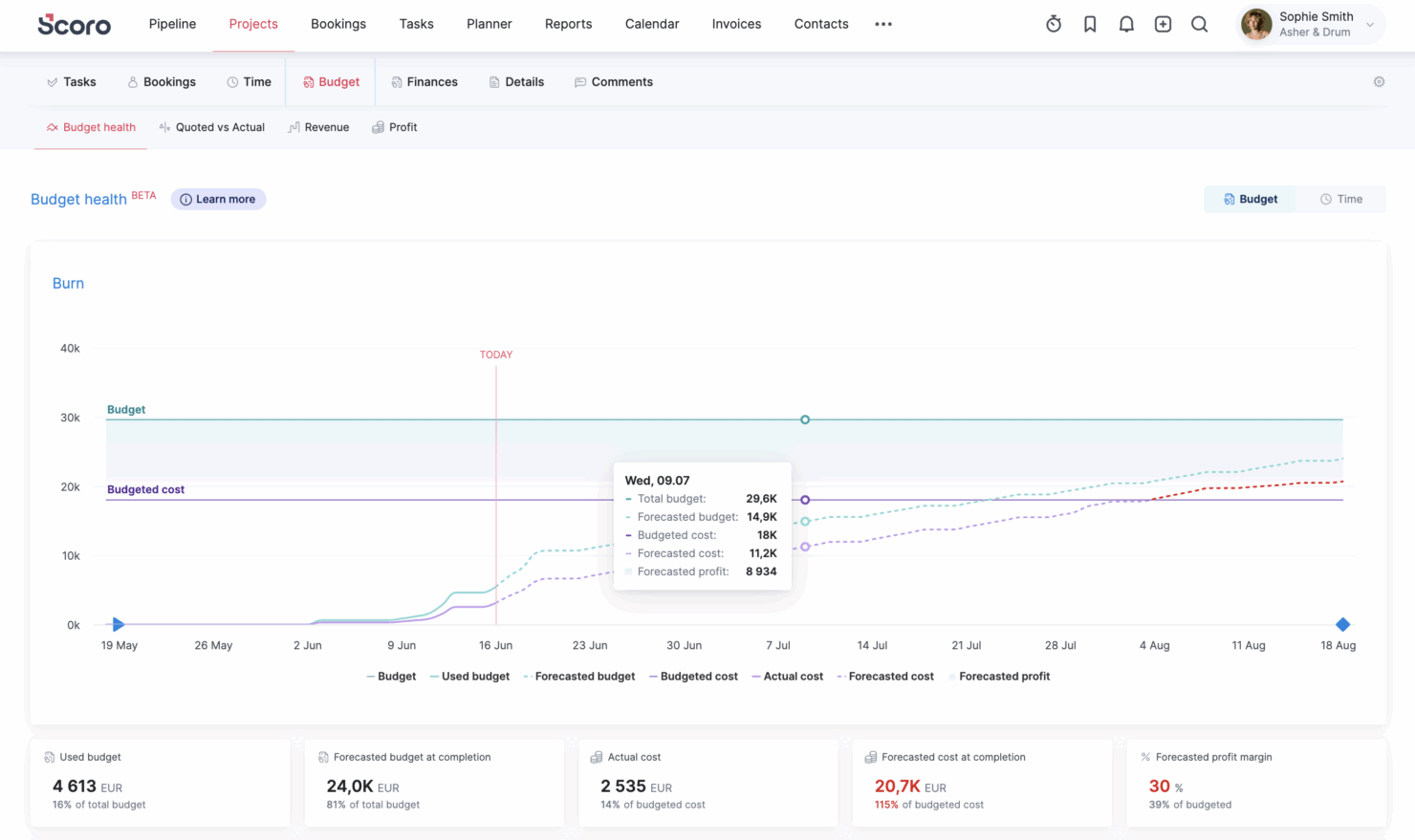
Accelo unifies your project management, CRM, time tracking, and billing into a single hub, which means no more switching between different tools just to track one client project. The platform takes over your most mundane admin work by assigning tasks, tracking projects as they unfold, and keeping client communications organized. With Scoro, you can tailor nearly every element to match how your team works. The dashboards are Scoro’s standout feature because they display live updates across your business operations, letting you track project spending, monitor sales progress, and manage your team’s time with precision.
| Scoro | Accelo | |
|---|---|---|
| API | ||
| Billing/Invoicing | ||
| Budgeting | ||
| CRM Integration | ||
| Dashboards | ||
| Data Export | ||
| Data Import | ||
| Document Management | ||
| Expense Tracking | ||
| External Integrations | ||
| Financial Analysis | ||
| Forecasting | ||
| Gantt Charts | ||
| Inventory Tracking | ||
| Multi-Currency | ||
| Multi-User | ||
| Notifications | ||
| Project Management | ||
| Resource Management | ||
| Scheduling | ||
| Status Notifications | ||
| Task Scheduling/Tracking | ||
| Time Management | ||
| Workflow Management |
Scoro vs. Accelo Integrations
| Integration | Scoro | Accelo |
|---|---|---|
| Slack | ✅ | ❌ |
| QuickBooks | ✅ | ✅ |
| Xero | ✅ | ✅ |
| Salesforce | ✅ | ✅ |
| HubSpot | ✅ | ✅ |
| Google Workspace | ✅ | ✅ |
| Microsoft Teams | ❌ | ✅ |
| Trello | ❌ | ❌ |
| API | ✅ | ✅ |
| Zapier | ✅ | ✅ |
Accelo and Scoro slot right into your existing tech stack, eliminating those 30-minute stretches of copying data between tabs that eat up your workday. Both systems connect directly with your everyday essentials like Salesforce, QuickBooks, Xero, HubSpot, and Zapier, keeping your CRM data, accounting, and workflow tools in perfect sync.
Scoro vs. Accelo Security, Compliance & Reliability
| Factor | Scoro | Accelo |
|---|---|---|
| Data Encryption | Scoro uses industry-standard encryption protocols to protect data at rest and in transit. | Accelo employs end-to-end encryption to safeguard user data during transmission. |
| Regulatory Compliance | Scoro complies with GDPR and offers features for managing data privacy rights. | Accelo adheres to GDPR and CCPA and maintains user data privacy and compliance. |
| Access Controls | Scoro provides customizable role-based access controls that let you secure sensitive information. | Accelo offers flexible role-based access permissions for protecting confidential data. |
| Uptime Guarantee | Scoro offers a 99.95% uptime SLA and reliable access to its platform. | Accelo guarantees high availability and reliable uptime for uninterrupted service. |
| Backup & Recovery | Scoro implements automated daily backups for data security and recovery. | Accelo conducts regular backups and provides a robust disaster recovery plan. |
Scoro and Accelo both prioritize security and compliance and offer strong encryption and regulatory adherence. Assess your specific compliance needs and evaluate how each platform's security measures align with your organization's data protection requirements.
Scoro vs. Accelo Ease of Use
| Factor | Scoro | Accelo |
|---|---|---|
| User Interface | Clean, intuitive dashboard with a modern design. Some initial overwhelm due to numerous customization options. | Accelo provides a user-friendly interface with customizable dashboards and easy navigation. UI sometimes feels cluttered. |
| Onboarding Experience | Scoro provides comprehensive tutorials and resources to help new users get started. | Accelo offers guided setup wizards and in-app tips to ease the onboarding process. |
| Customization | Scoro lets you customize workflows and reports to suit your needs. | Accelo lets you customize project templates and task lists. |
| Setup Process | Scoro’s setup process is straightforward, which minimizes downtime for new implementations. | Accelo’s setup is seamless, and its integrations simplify initial configurations. |
| Support | Scoro provides responsive customer support with a dedicated knowledge base and support forms. | Accelo offers support through various channels, including email and community support. |
Scoro’s intuitive dashboard simplifies navigation, but its extensive customization options can be overwhelming initially. Accelo offers easy setup and customizable templates, but you’ll need to invest some time into mastering the interface completely.
Scoro vs Accelo: Pros & Cons
Scoro
- Excellent multi-entity and multi-currency support for international businesses.
- Deep two-way accounting integrations.
- Scoro is highly-customizable with different permission sets, user-based menus, and settings.
- User interface can feel cluttered for new users (although this can be fixed by creating simplified views via permission sets).
- Some users find the learning curve steep for advanced features.
- Lack of built-in chat/messaging and weaker real-time collaboration features compared to others.
Accelo
- Unifies operations in one platform, from project management and resource management, to CRM, billing, and time tracking.
- Automates billable time capture, expense tracking, and invoicing workflows, and provides real-time visibility into budgets, utilization, and margins.
- Adaptable to a wide range of service-based business models, including fixed-fee projects, ongoing retainers, or both.
- Accelo packs a lot of information into each screen, which can be overwhelming at first and may add to the learning curve for teams used to lightweight tools.
- While standard reports cover most use cases, teams with niche metrics or complex multi-project views may find themselves wanting more flexibility.
- While the mobile app allows time logging and basic project viewing, full project management and resource planning still require the web version.
Best Use Cases for Scoro and Accelo
Scoro
- Agencies Scoro connects the sales pipeline, creative delivery, and billing in one place, so agencies can quote, resource, and invoice client work without switching tools.
- Consultancies Scoro's quoting matrix breaks down deliverables by role, hours, and cost, giving consultancies real-time margin and utilization visibility across multi-entity, multi-currency operations.
- Architecture FIrms Scoro ties project phases, budgets, and time tracking together so architecture firms can monitor scope creep and protect fee-based project margins in real time.
- IT Services With Jira integration and effortless time logging from calendars or tasks, Scoro gives IT consultancies clear visibility into billable utilization, project profit, and progress as work gets delivered.
- Event Management Scoro handles multi-currency event quoting, purchase orders for vendors, and phase-based Gantt planning, so event agencies can track supplier costs and protect margins across simultaneous productions.
- Engineering FIrms Scoro unifies resourcing, cost tracking, and reporting across teams and offices, helping engineering firms forecast capacity and keep multi-phase projects profitable.
- Software Development Through native Jira sync, Scoro lets developers keep working in their existing tools while worklogs flow back automatically for accurate reporting, invoicing, and profitability tracking.
Accelo
- Engineering and Architectural Firms Firms with multi-phase, highly structured projects benefit from Accelo’s configurable workflows and milestone tracking. Its ability to connect project resource management, budget burn, and time tracking gives engineering leaders a clearer sense of whether each phase is pacing toward its goals.
- IT Services & Consulting Firms IT and technology service providers often operate with recurring contracts, SLAs, and consulting projects running in parallel. Accelo’s real-time visibility into workloads, profitability, and contract performance helps leaders make better decisions about staffing, utilization, and whether a project is veering off plan.
- Marketing, Advertising, and Creative Agencies Agencies that manage a mix of campaign work, production schedules, and recurring client support appreciate how Accelo automates time capture, client updates, and budget alerts. The platform helps recover billable hours that often slip through the cracks and reduces the administrative load that creative teams typically struggle with.
- Managed Service Providers Benefit from Accelo’s ability to join ticketing, quoting, invoicing, and project management in one platform, streamlining workflows and saving significant time.
- Legal and Financial Advisory Practices The platform’s robust billing, retainer management, and reporting features help maintain compliance and client transparency.
- Accounting & Business Consulting Firms Consulting teams often rely on strong coordination between sales, delivery, and finance. Accelo’s integrated sales pipelines, scopes, and delivery workflows help reduce friction during handoffs and ensure actual work matches what was sold, making invoicing cleaner and client communication smoother.
Who Should Use Scoro, and Who Should Use Accelo?
Accelo is built for growing professional services organizations between 20 and 200 employees who need to run client projects efficiently while reducing admin headaches that eat into their day. From marketing agencies to IT consultants, I love that Accelo puts its CRM, project tracking, timesheets, and invoicing under one roof. It cuts admin time, gives clients clearer updates, and makes sure you bill for every minute you’ve earned. Tired of cobbling together your sales pipeline, project work, and billing? Want client relationships that stick around for years? Then Accelo is your answer.
Contrast that with Scoro, which is ideal for businesses looking for an all-in-one solution that combines project and financial management with full reporting and customization. Larger teams or companies managing multiple business functions will appreciate Scoro’s depth of control over budgets, resources, and sales pipelines. If your business demands granular performance insights and the capacity to tailor workflows considerably, Scoro’s robust platform will meet your needs. Both tools thrive in professional services, but with various focal points that fit with diverse operational aims.
Differences Between Scoro and Accelo
| Scoro | Accelo | |
|---|---|---|
| Automation Capabilities | Basic collaboration automation. Manual updates are more common. | Strong automation across sales, projects, and billing. |
| Customization | Highly customizable but more complex to set up. | More plug-and-play with easier onboarding. |
| Financial Features | Strong financials: margins, budgets, costs, profitability reports. | Solid billing & invoicing, but less granular cost/margin analytics. |
| Resource Management | Robust capacity forecasting and long-term resource visibility. | Real-time workload scheduling; best for fast-paced client work. |
| Visit ScoroOpens new window | Visit AcceloOpens new window |
Similarities Between Scoro and Accelo
| CRM Features | Each platform offers integrated CRM capabilities, allowing you to handle client information and conversations in one system. |
|---|---|
| Invoicing | Both platforms offer multi-channel invoicing and billing, simplifying financial operations for service-based enterprises. |
| Project Management | Both provide full project management capabilities such as task assignment, progress tracking, and project templates to improve team processes. |
| Reporting | Both platforms provide customizable reporting and dashboards for monitoring key performance indicators and business data. |
| Security | Both platforms offer multi-channel invoicing and billing, simplifying financial operations for service-based enterprises. |
| Visit ScoroOpens new window Visit AcceloOpens new window | |