

10 Best AI Scheduling Assistant Reviewed in 2026

Best AI Scheduling Assistant Shortlist


The best AI scheduling assistants help manage your calendar via artificial intelligence and can automatically coordinate meetings, find time slots, reschedule, and integrate with your calendar. Without the right tools, you'll lose time to conflicts, time zone issues, and long email chains, and run into double-bookings and extra manual admin tasks.
I’ve used my experience in project management and 3+ years of testing software to review dozens of tools and curate my list of the best AI scheduling assistant software. Each of my recommendations will help you better manage remote teams and complex calendars, eliminate friction, and free up focus time. I’ll share my top picks for scheduling assistants with a clear look at what makes each one useful.
Why Trust Our Software Recommendations
Our team has been testing and reviewing software since 2012. As project managers ourselves, we know how difficult—and important—it is to choose the right software.
For this guide, we evaluated tools using hands-on testing and independent research, scoring tools using our selection criteria. We also draw on insights from industry thought leaders and practicing project management experts.
Our reviews reflect our human editorial judgment, not a sales pitch.
Expert reviewers:
AI Scheduling Assistant Comparison Table
This comparison table summarizes pricing details for my top AI scheduling assistant selections:
| Tool | Best For | Trial Info | Price | ||
|---|---|---|---|---|---|
| 1 | Best for auto scheduling features | 14-day free trial | From $29/month (billed annually) | Website | |
| 2 | Best for AI-powered risk identification | Free plan available | From $9/user/month (billed annually) | Website | |
| 3 | Best for integration options | 7-day free trial | From $19/user/month | Website | |
| 4 | Best simple calendar tool | Free plan available | From $29 (single payment) | Website | |
| 5 | Best for task automation | 7-day free trial | From $4.60/user/month (billed annually) | Website | |
| 6 | Best for dynamic scheduling | Free trial available | From $19/seat/month (billed annually) | Website | |
| 7 | Best for team coordination | Free plan available | From $10/seat/month | Website | |
| 8 | Best for remote teams | Free trial available | Pricing upon request | Website | |
| 9 | Best task-focused scheduling | Free plan available and 7-day free trial | From $5/month (billed annually) | Website | |
| 10 | Best for personal productivity | 14-day free trial | From $9.95/month (billed annually) | Website |

Best AI Scheduling Assistant Reviews
Below are my detailed summaries of the best AI scheduling assistants that made it onto my shortlist. My reviews offer a detailed look at the key features, pros & cons, integrations, and ideal use cases of each tool to help you find the best one for your team.

Best for auto scheduling features

Connecteam is a workforce management platform that offers AI-powered scheduling, shift planning, time tracking, and team communication tools for businesses managing hourly and shift-based teams.
Who Is Connecteam Best For?
Connecteam is a strong fit for operations managers and team leads in industries like retail, hospitality, and field services who need to schedule large groups of hourly or shift-based workers.
Why I Picked Connecteam
Connecteam earns its spot on my shortlist because of how well its auto scheduling feature handles the complexity of shift-based workforce management. The AI looks at employee availability, approved time-off requests, role qualifications, and shift coverage requirements all at once—then fills every open slot in seconds. I like that it also factors in fairness, distributing unpopular shifts evenly across the team rather than defaulting to the same people every time. On top of that, the built-in conflict detection flags overtime, rest period violations, and overlapping shifts before you publish, so you're not manually hunting for errors after the fact.
Connecteam Key Features
- Multi-location scheduling: Build and manage separate schedules for different locations and teams without additional fees, with cross-schedule conflict detection built in.
- Open shifts: Post unassigned shifts that employees can claim on a first-come, first-served basis, with optional manager approval before the shift is confirmed.
- Shift tasks and sub-tasks: Attach tasks directly to individual shifts, assign them to specific employees or entire teams, and track completion in real time.
- Planned vs. actual hours reporting: Export a comparison of scheduled hours against actual hours worked to support payroll accuracy and labor cost analysis.
Connecteam Integrations
Connecteam offers native integrations with QuickBooks, Gusto, Xero, ADP, Lightspeed POS, PrismHR, Square, BambooHR, Accu-Time Systems (Beta), Synel (Beta), Shopify, Clover, Wix, and connects with Zapier. An API is available for custom integrations.
Pros and Cons
Pros:
- Shift swaps update schedules automatically
- Real-time updates notify schedule changes
- Automated scheduling optimizes roles availability
Cons:
- Advanced reporting features may feel less robust
- Limited native integrations versus competitors
New Product Updates from Connecteam

Connecteam Expands Break and Timesheet Controls
Connecteam adds flexible break thresholds, personalized policies, auto-end options, a centralized exceptions report, and improved timesheet issue visibility to help teams manage breaks and timesheets more effectively. For more information, visit Connecteam’s official site.
 .
.
Best for AI-powered risk identification
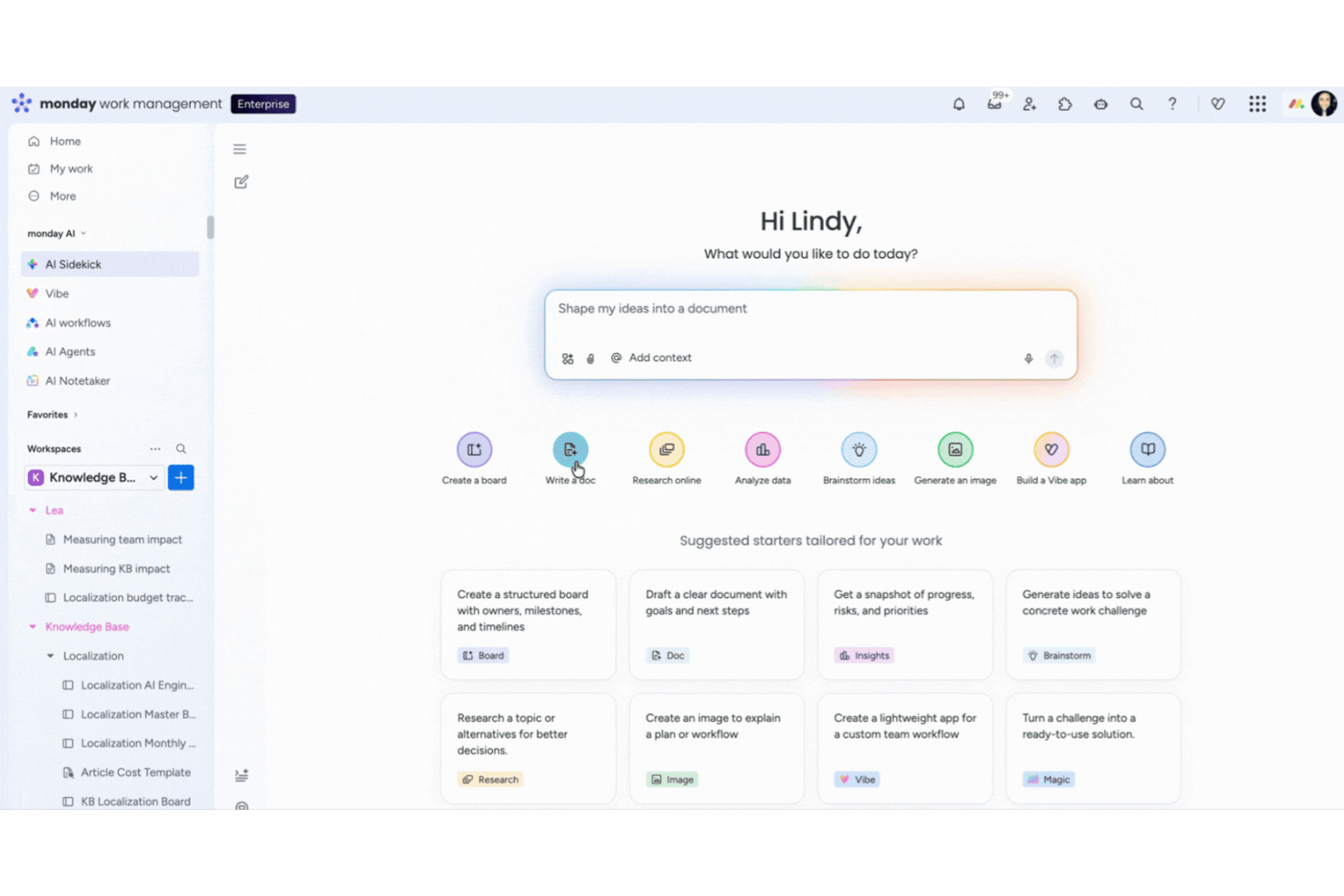
monday AI Workspace is an AI-powered work management platform that brings together autonomous task scheduling, real-time dependency tracking, risk identification, and calendar coordination in a single workspace.
Who Is monday AI Workspace Best For?
It's a strong fit for project managers and PMO teams in mid-size to enterprise tech organizations managing multiple concurrent projects with complex dependencies.
Why I Picked monday AI Workspace
I picked monday AI Workspace because it's one of the few platforms where AI actively monitors your project data rather than waiting for you to notice a problem. Its agents scan dependencies continuously and flag tasks that are behind schedule or stuck in approval queues in real time. I also rely on its anomaly detection layer, which catches unusual workload spikes before they cascade into missed milestones across the broader project timeline.
monday AI Workspace Key Features
- AI-powered meeting notetaker: Joins calls, transcribes conversations, summarizes discussions, and sends action items to boards automatically.
- No-code workflow automation builder: Lets teams build and trigger custom automated workflows across projects and teams without writing code.
- Conversational AI assistant (Sidekick): Accepts natural language commands to create, edit, or reschedule tasks and meetings from any device.
- Native two-way calendar sync: Keeps Google and Outlook calendars in sync with project boards and task timelines in real time.
monday AI Workspace Integrations
monday AI Workspace offers hundreds of native integrations, including Google Calendar, Outlook, Gmail, Zoom, Microsoft Teams, GitHub, and Slack. It provides an API for custom integrations and connects with Zapier.
Pros and Cons
Pros:
- Handles dependency-based rescheduling automatically
- Automates meeting scheduling across teams
- Flags at-risk tasks in real time
Cons:
- AI-generated updates may require manual review
- Advanced workload management sometimes lags
New Product Updates from monday AI Workspace
monday AI Workspace Adds Human Approval Routing
monday AI Workspace adds a human-in-the-loop approval block to AI Workflows, sending approval requests and routing workflow paths based on responses. For more information, visit monday AI Workspace's official site.

Akiflow
Best for integration options

Akiflow is an AI scheduling assistant that brings together calendar management, task consolidation, and integrations with popular productivity tools for centralized scheduling.
Who Is Akiflow Best For?
Akiflow is a good fit for individual professionals and project managers who work across multiple tools and need a single place to manage their schedule and tasks.
Why I Picked Akiflow
I picked Akiflow as one of the best because its integration depth is hard to replicate in a single scheduling tool. It connects with over 3,000 tools through its Universal Inbox, pulling tasks from Slack, Gmail, Jira, Asana, Linear, and more into one consolidated view. So when a Slack message or a Jira issue arrives, I can turn it into a scheduled task without leaving Akiflow. Two-way sync with Google Calendar and Outlook keeps my calendar accurate across the platforms my team uses.
Akiflow Key Features
- AI time blocking: Automatically schedule tasks into your calendar based on priority, deadlines, and available time slots.
- Command bar: A quick-access command interface lets you create, schedule, and reschedule tasks without switching between apps.
- Daily planner view: A focused daily agenda view surfaces your most important tasks and meetings in a single, prioritized layout.
- Recurring task scheduling: Set tasks to repeat on custom schedules so routine work gets automatically placed on your calendar.
Akiflow Integrations
Akiflow offers native integrations with Google Calendar, Outlook, Slack, Asana, Todoist, Trello, Gmail, and Linear, and connects with Zapier.
Pros and Cons
Pros:
- Efficient for managing multiple calendars
- Quick command for fast task entry
- Centralizes tasks from multiple tools
Cons:
- No team assignment or shared boards
- Doesn’t include native scheduling for external appointments

TidyCal
Best simple calendar tool

TidyCal is an AI-powered scheduling assistant that lets you automate meeting bookings, sync multiple calendars, and manage availability through a simple online interface.
Who Is TidyCal Best For?
TidyCal suits freelancers, solopreneurs, and small teams who need a no-fuss way to manage bookings without a steep learning curve.
Why I Picked TidyCal
TidyCal is on my shortlist because it reduces scheduling to what most people need. I love that you get a live booking page the moment you create an account—no configuration maze, no onboarding checklist to work through. The booking type setup is fast: I can define a meeting type, set my availability, and share a link in under five minutes. The AI features (available on paid plans) layer on smart scheduling without making the tool feel bloated or complicated.
TidyCal Key Features
- Automated reminders: Send automated email and SMS reminders to reduce no-shows before scheduled meetings.
- Session packages and bundles: Create pre-paid session packs (e.g., 5-packs or 10-packs) that clients purchase upfront before booking individual sessions.
- Recurring subscriptions: Set up subscription-based booking types so clients are charged automatically on a recurring schedule.
- Payment collection: Connect Stripe or PayPal to collect payment at the time of booking, before a session begins.
TidyCal Integrations
TidyCal offers native integrations with Google Calendar, Microsoft Outlook Calendar, and Apple Calendar, and connects with Zapier. An API supports custom integrations.
Pros and Cons
Pros:
- Simple user interface
- Allows for buffer times
- Automatic time zone detection
Cons:
- Lacks detailed analytics
- May not suit large teams

TimeHero
Best for task automation

TimeHero is an AI scheduling assistant that automates task planning, manages team calendars, and integrates with your existing workflow tools.
Who Is TimeHero Best For?
TimeHero is a good fit for small to mid-sized teams who need AI-driven task scheduling without manually managing every calendar block.
Why I Picked TimeHero
TimeHero earns its spot as one of the best on my shortlist because of how it handles task automation at a level most scheduling tools don't touch. What I find most useful is the autonomous recurring task feature—instead of just repeating a task on a fixed date, TimeHero finds the best available slot within a given timeframe and schedules it there automatically. I also like the automatic risk detection, which flags tasks that are drifting too close to their due date with little room left to reschedule. When a meeting gets added last minute, TimeHero doesn't wait for you to manually shuffle things around—it replans your day on its own.
TimeHero Key Features
- Workload and capacity tracking: View how your time and your team's time is allocated across past, present, and future planned work.
- Project workflow templates: Launch recurring project types using templates that auto-schedule tasks across the team based on start and due dates.
- Proactive time tracking: Start a timer directly from your task plan and log time against scheduled work, with timesheets comparing estimated vs. actual hours.
- Guest and reviewer accounts: Share filtered project views with external stakeholders, letting them see relevant tasks, due dates, and files without full account access.
TimeHero Integrations
TimeHero offers native integrations with Google Calendar, Microsoft Outlook, and Slack. It also connects with Zapier and provides an API for custom integrations.
Pros and Cons
Pros:
- Adapts to calendar changes
- Supports recurring tasks
- Predictive task management
Cons:
- Interface can feel cluttered
- Real-time updates aren’t always immediate

Motion
Best for dynamic scheduling

Motion is an AI scheduling assistant that combines automated calendar management, intelligent task prioritization, and meeting scheduling for individuals and teams.
Who Is Motion Best For?
Motion is a good fit for busy professionals and small teams who manage high task volumes and need their schedule automatically organized around shifting priorities.
Why I Picked Motion
Motion earns its spot on my shortlist because it handles dynamic scheduling—it doesn't just block time on your calendar, it continuously re-optimizes your entire day as things change. I really like the AI Calendar Assistant's ability to reprioritize and reschedule tasks automatically when a meeting runs long or a new urgent task lands. My team doesn't need to manually reshuffle the plan every time something shifts. The distinction between "do date" and "due date" is also genuinely useful—Motion flags at-risk tasks days in advance rather than surfacing the problem the morning something is due.
Motion Key Features
- AI Meeting Assistant: Set preferred meeting windows, daily meeting limits, and custom booking page availability to protect focus time.
- AI Workflows: Automate repeatable project sequences and SOPs so work passes between team members without manual handoffs.
- AI Meeting Notetaker: Automatically capture meeting notes and summaries so nothing discussed gets lost after a call.
- AI capacity planning: Balance team workload across projects by matching available time against active tasks and deadlines.
Motion Integrations
Motion offers native integrations with Google Calendar and Microsoft Outlook Calendar. An API is available for custom integrations.
Pros and Cons
Pros:
- Reduces manual calendar adjustments
- Offers detailed time analytics
- Adapts to last-minute changes
Cons:
- No offline mode
- Can feel rigid if you prefer manual control

Reclaim
Best for team coordination

Reclaim is an AI scheduling assistant that automates calendar management, prioritizes tasks, and coordinates meetings for individuals and teams.
Who Is Reclaim Best For?
Reclaim is a good fit for teams and knowledge workers who need to balance deep work, meetings, and collaborative scheduling across shared calendars.
Why I Picked Reclaim
Reclaim earns its spot as one of the best on my shortlist because of how well it handles team coordination through AI-driven scheduling. I particularly like the Team Scheduling Links feature, which lets my team share availability across multiple people at once—no back-and-forth needed to find a time that works. Reclaim also syncs tasks and habits directly into the calendar, so when a teammate books time with me, it's working around real commitments, not just blocked-off slots.
Reclaim Key Features
- AI task scheduling: Reclaim automatically blocks time on your calendar for tasks, splits large projects into work sessions, and reschedules them when meetings conflict.
- AI habits: Set recurring routines—like a daily standup prep or weekly review—and Reclaim finds and defends time for them automatically around your existing schedule.
- Smart buffer time: Reclaim auto-schedules decompression time and travel time before and after meetings, including automatic color-coding and Slack status updates.
- No-meeting days: Designate specific days as meeting-free, and Reclaim enforces that protection by automatically declining or rescheduling conflicting invites.
Reclaim Integrations
Reclaim offers native integrations with Google Calendar and Slack, and provides an API for custom integrations.
Pros and Cons
Pros:
- Enhances team collaboration
- Break management features
- Predictive calendar adjustments
Cons:
- Not suited to those who want manual control
- Setup may be time-consuming


Clara is an AI scheduling assistant that automates meeting coordination, calendar management, and rescheduling through email-based interactions for teams needing advanced scheduling support.
Who Is Clara Best For?
Clara suits remote teams that coordinate meetings across time zones and want to avoid manual back-and-forth.
Why I Picked Clara
I chose Clara because it fits naturally into how remote teams communicate. I love that it works entirely through email—you just cc Clara on a thread, and it reads the conversation, checks availability across all participants, proposes times, and sends the calendar invite. There's no scheduling link to share or new tool to onboard. For distributed teams coordinating across time zones, Clara also handles follow-ups automatically when someone doesn't respond, which I find genuinely useful when you're working asynchronously.
Clara Key Features
- Focus block protection: Clara respects designated focus blocks in your calendar and avoids scheduling meetings during those times.
- Buffer time rules: Set travel or transition buffers between meetings, and Clara automatically factors them into every scheduling decision.
- Meeting type customization: Define distinct meeting types with specific durations, locations, or conferencing links, and Clara applies the right settings each time.
- Escalation control: Clara only loops you in when a scheduling situation requires your input, handling everything else on its own.
Clara Integrations
Clara integrates natively with Google Calendar and Microsoft Outlook Calendar, and provides an API for custom integrations.
Pros and Cons
Pros:
- Provides executive assistant backup
- Minimizes email back-and-forth
- Operates 24/7 for global teams
Cons:
- Slight delays compared to fully automated tools
- Relies heavily on email-based workflows


Trevor AI is an AI scheduling assistant that lets you organize tasks, prioritize your to-do list, and time-block work directly onto your calendar.
Who Is Trevor AI Best For?
Trevor AI is a good fit for individual contributors and freelancers who need to manage a high volume of tasks alongside a busy calendar.
Why I Picked Trevor AI
Trevor AI earns its spot on my shortlist because of how directly it connects your task list to your calendar. What I find most useful is the Smart Scheduling Queue—you add tasks to a prioritized queue, and Trevor proactively suggests time blocks for them, even in bulk. The personal AI model is another feature I keep coming back to: it adapts to your scheduling patterns over time, so duration predictions and time-slot suggestions get sharper with each planning session. Focus Mode adds another layer by breaking a scheduled task into five steps and pairing it with a timer, so you're not just blocking time—you're actually working through it.
Trevor AI Key Features
- Drag-and-drop scheduling: Manually drag tasks from your to-do list directly onto your calendar to assign them a specific time slot.
- Multi-list task management: Organize tasks across multiple lists and view them all in a single unified sidebar alongside your calendar.
- Recurring tasks: Set tasks to repeat on a schedule so they automatically reappear in your task list without manual re-entry.
- Daily planner view: Review all scheduled tasks and calendar events together in a single day view to track what's planned.
Trevor AI Integrations
Trevor AI offers native integrations with Google Calendar, Outlook Calendar, and Apple Calendar.
Pros and Cons
Pros:
- Supports multiple calendar accounts
- Personalized AI scheduling model
- Effective time-blocking capabilities
Cons:
- Occasional syncing delays
- Limited customization options


SkedPal is an AI scheduling assistant that automatically organizes tasks, prioritizes to-dos, and syncs with your calendar to help you manage your daily workload.
Who Is SkedPal Best For?
SkedPal suits individual professionals and freelancers who need to manage personal task loads and keep their schedules organized.
Why I Picked SkedPal
SkedPal earns its spot on my shortlist because of how well it handles the gap between having a to-do list and actually getting things done. I love the natural-language scheduling approach—instead of manually dragging tasks onto a calendar, you tell SkedPal something like "find time for this project before May 10th" and it builds the time blocks for you. The Outline feature is also genuinely useful for capturing every open loop in your work and personal life in one place, which prevents anything from slipping through. When priorities shift mid-week, the auto-scheduler recalculates your entire plan with one click instead of making you rearrange everything by hand.
SkedPal Key Features
- Time maps: Define your preferred working hours for different types of tasks so SkedPal only schedules work during the times you've set aside for it.
- Prioritization board: Rank tasks by importance so the auto-scheduler knows which items to place first when building your daily plan.
- Routines and habits planning: Schedule recurring tasks and habits as part of your regular plan so they get time-blocked alongside one-off work.
- Status Tracker: Monitor your current activity in real time and watch your schedule adjust automatically as your day unfolds.
SkedPal Integrations
SkedPal offers native integrations with Google Calendar, Outlook Calendar, and Apple Calendar. An API is available for custom integrations.
Pros and Cons
Pros:
- Mobile app availability
- Supports routine goal setting
- Flexible time blocking
Cons:
- Can feel overengineered
- May require frequent adjustments
Other AI Scheduling Assistants
Here are some additional AI scheduling assistant options that didn’t make it onto my shortlist, but are still worth checking out:
- Scheduler AI
For small businesses
- Sidekick AI
For email scheduling
- Katch AI
For meeting requests
- Carly AI
With multilingual scheduling support
- Acuity Scheduling
For appointment booking
- ClickUp
For task management
- Calendly
For simple meeting setup
- Google Calendar
For universal accessibility
- Lindy
For personalized scheduling
- Notion Calendar
For customizable planning
- Kronologic
For sales teams
- Kalendar AI
For lead generation


How I Evaluate AI Scheduling Assistants
Any tool can suggest a due date—I look for AI that reschedules dependencies when a deadline slips and rebalances workloads without manual effort. I split my evaluation into two layers: the core functionality a tool needs to qualify and the differentiating factors that set the best options apart.
Core Functionality (Table Stakes For This List)
When I'm selecting tools for my list, I rank each one on a scale from 0 (does not offer the functionality) to 5 (excels in this area) for each core functionality listed below. Then, I calculate the tool's total score into a percentage. Each tool needs to achieve a minimum total score of 65% to be considered for inclusion.
- AI-Driven Auto-Scheduling: I look for tools that place tasks and meetings on the calendar autonomously—factoring in priorities, deadlines, and dependencies rather than just suggesting a time slot.
- Dynamic Rescheduling: When a predecessor task slips, I check whether downstream work and meetings cascade automatically or whether a PM has to manually drag every item.
- Workload & Capacity Intelligence: I evaluate how well the tool detects overallocation—like flagging when a developer is booked at 140% before a sprint deadline—and whether it suggests reassignment.
- Calendar & PM Tool Integrations: Bidirectional sync with Google Calendar, Outlook, and platforms like Jira or Asana matters here. I look for real-time data flow, not overnight batch syncs.
- Predictive Deadline Forecasting: I check whether the AI projects realistic completion dates using velocity and historical patterns, and whether it surfaces at-risk milestones early enough to act.
- Natural Language Task Input: I evaluate whether you can type or speak something like "schedule a design review with the frontend team next Tuesday" and get a usable task with the right assignee and date.
Once I have a list of tools that meet the criteria, I consider what sets each platform apart.
Differentiating Factors (What Sets Vendors Apart)
Here's how I compare and contrast different vendors:
Standout Features
Scenario simulation is a major differentiator—I look for tools that let you model a delayed handoff or added scope and preview how the rest of the timeline shifts before committing. Cross-project prioritization also matters when PMs juggle multiple workstreams. The strongest tools surface what each person should tackle next across all active projects, not just one. Focus time protection rounds this out by letting the AI block deep-work windows around key deliverables and push back on meeting creep automatically.
Beyond Features
AI trust and explainability matters a lot here—I want to see why the tool rescheduled a task or reassigned work, not just that it did. Data privacy is equally important since these tools ingest calendar, task, and meeting data. I check whether vendors offer clear policies on model training opt-outs and data residency options. Time-to-value also shapes my evaluation. A tool that needs weeks of historical data before its AI delivers useful suggestions is a harder sell than one that starts adding value within days of connecting your project boards.
How to Choose AI Scheduling Assistant
It’s easy to get bogged down in long feature lists and complex pricing structures. To help you stay focused as you work through your unique software selection process, here’s a checklist of factors to keep in mind:
| Factor | What to Consider |
|---|---|
| Scalability | Can the tool grow with your team? Consider if it can handle more users, meetings, and data as your organization expands. Look for options that offer flexible plans or easy upgrades. |
| Integrations | Does it connect with your current tools? Check if it integrates with your existing calendars, communication platforms, and project management or CRM software to ensure a smooth workflow and avoid manual data entry. |
| Customizability | Can you tailor it to fit your needs? Evaluate if the tool allows you to customize scheduling rules, notifications, and user preferences. This flexibility can help align the tool with your team's specific workflows. |
| Ease of Use | Is it user-friendly? Ensure the interface is intuitive and easy to navigate for all team members. A complicated tool might lead to frustration and decreased adoption. |
| Implementation and Onboarding | How quickly can you get started? Consider the resources and time needed for setup and training. Look for vendors that offer comprehensive onboarding support, such as tutorials and customer success teams, or even AI-powered personal assistant features to facilitate a smooth transition. |
| Cost | Is it within your budget? Compare the pricing plans and see what features are included at each level. Be aware of hidden costs or additional fees for premium features that might not fit your budget. |
| Security Safeguards | Does it protect your data? Ensure the tool complies with industry-standard security practices and offers features like data encryption and user access controls to protect sensitive information. |
| Support Availability | Can you get help when needed? Check the vendor's customer support options, such as live chat, phone support, and response times, to ensure you have access to assistance when you encounter issues or have questions. |
What Is an AI Scheduling Assistant?
An AI scheduling assistant is software that helps automate the process of setting up meetings and appointments.
These tools help boost productivity by taking care of the scheduling process so you can focus on more important tasks. They’re often used by managers, executives, and admin staff to save time and avoid scheduling conflicts. Features like automated booking, calendar syncing, and reminders make it easier to stay on schedule and avoid missed meetings.
Features of AI Scheduling Assistants
When selecting an AI scheduling assistant, keep an eye out for the following key features:
- Automated scheduling: Automatically organizes meetings based on participants' availability, reducing the need for back-and-forth emails.
- Calendar syncing: Integrates with existing calendar app solutions to ensure schedules are always up-to-date and conflicts are minimized.
- Time zone support: Adjusts meeting times for participants in different time zones, which makes it easier to coordinate global teams.
- Task prioritization: Helps users focus on important tasks by automatically scheduling them during optimal times.
- Customizable booking pages: Allows users to create personalized scheduling links for easy appointment setting.
- Meeting reminders: Sends automated notifications to participants before meetings to reduce the risk of missed appointments.
- Predictive scheduling: Adjusts and reschedules tasks based on changing priorities and new tasks using smart algorithms.
- Integration with collaboration tools: Connects with platforms like Slack and Zoom to streamline communication and AI meeting setups.
- Security safeguards: Protects sensitive information with data encryption and user access controls.
- Analytics and insights: Provides detailed reports on time usage to help users optimize their schedules and productivity.
- AI agents and virtual assistant features: Offer hands-free help and real-time suggestions for better scheduling decisions.
Benefits of AI Scheduling Assistants
Implementing an AI scheduling assistant can provide several benefits for your team and your business. Here are a few you can look forward to:
- Time savings: Automates scheduling tasks, which allows your team to focus on more important work.
- Reduced conflicts: Syncs calendars and manages availability to minimize scheduling overlaps and missed meetings.
- Enhanced productivity: Prioritizes tasks and allocates time for focused work, which boosts overall efficiency.
- Improved coordination: Supports global teams by adjusting for time zones and integrating with collaboration tools.
- Increased flexibility: Adapts to last-minute changes and reschedules tasks to keep your team agile.
- Data-driven insights: Offers analytics on time usage to help you optimize schedules and improve workflow.
- Better communication: Sends reminders and updates to ensure everyone is informed and prepared for meetings.
- Personal assistant features: Provide users with intelligent recommendations that help manage both to-do list items and meetings.
Costs and Pricing of AI Scheduling Assistants
Selecting an AI scheduling assistant requires an understanding of the various pricing models and plans available. Costs vary based on features, team size, add-ons, and more. The table below summarizes common plans, their average prices, and typical features included in AI scheduling assistant solutions:
Plan Comparison Table for AI Scheduling Assistants
| Plan Type | Average Price | Common Features |
|---|---|---|
| Free Plan | $0 | Basic scheduling, limited calendar sync, and essential reminders |
| Personal Plan | $5 - $25/user/month | Advanced scheduling options, full calendar sync, customizable booking pages, and task prioritization |
| Business Plan | $25 - $50/user/month | Team collaboration tools, integration with third-party apps, detailed analytics, and enhanced security features |
| Enterprise Plan | $50+/user/month | Customizable solutions, dedicated support, advanced security, safeguards, and large-scale integration capabilities |
AI Scheduling Assistant FAQs
Here are some answers to common questions about AI scheduling assistant:
How can AI be used for scheduling?
AI can help with scheduling by adding tasks to your calendar, fixing conflicts, and grouping similar tasks into time blocks. It can even analyze your to-do list and recommend the best times to complete each task. This cuts down on context-switching and makes it easier to stay focused. Before making a switch, check if the tool works with what you already use.
What is the best AI for scheduling?
The best AI scheduling tool depends on what you need. Some are great for building daily schedules, while others focus on setting up meetings. Look at features like time blocking, calendar syncing, natural language processing, and what other users say to find the right fit for you and your team.
What is the purpose of a scheduling assistant?
A scheduling assistant helps you manage and organize appointments, meetings, and events. It connects with your email and calendar app to schedule things efficiently, using AI-powered suggestions to save time and reduce friction.
Does Microsoft have an AI scheduler?
Yes, Microsoft offers an AI scheduler called Scheduler that uses natural language to set up meetings. It works with Outlook to automate scheduling and cut down on manual back-and-forth.
How do AI scheduling assistants handle time zones?
AI scheduling assistants automatically adjust meeting times for people in different time zones. This ensures everyone gets the right meeting invite and helps avoid conflicts, making it easier to coordinate with global teams.
Can AI scheduling assistants integrate with collaboration tools?
Yes, many AI scheduling assistants work with tools like Slack, Zoom, and Microsoft Teams. Others go further by integrating with CRM platforms and using AI agents to analyze team data for better scheduling decisions. This makes it easy to set up meetings and keep communication clear, which helps your team stay connected and on track.