

10 Best Free AI Project Management Tools Reviewed in 2026

Best Free AI Project Management Tools Shortlist


Trying to find the right AI tool to help you run your projects on a tight budget is a juggling act. Tight deadlines, limited resources, and the need for team coordination all add to the pressure.
Here are my picks for the best free AI project management tools that offer innovative and useful AI features for organizing tasks, boosting collaboration, and keeping projects on track, without added costs. I’ve reviewed and evaluated each tool and provided my honest opinion below.
Why Trust Our Software Recommendations
Our team has been testing and reviewing software since 2012. As project managers ourselves, we know how difficult—and important—it is to choose the right software.
For this guide, we evaluated tools using hands-on testing and independent research, scoring tools using our selection criteria. We also draw on insights from industry thought leaders and practicing project management experts.
Our reviews reflect our human editorial judgment, not a sales pitch.
Expert reviewers:
Free AI Project Management Tools Comparison Table
Here are the base costs for each of the tools that made it onto my shortlist:
| Tool | Best For | Trial Info | Price | ||
|---|---|---|---|---|---|
| 1 | Best for visualizing project progress | Free plan + 14-day trial available | From $9/user/month (billed annually) | Website | |
| 2 | Best for AI-assisted project workflows | 14-day free trial | Pricing upon request | Website | |
| 3 | Best for small teams | Free plan + 15-day free trial + free demo available | From $4/user/month (billed annually) | Website | |
| 4 | Best for interactive Gantt chart scheduling | 14-day free trial + free demo available | From $7/user/month (billed annually) | Website | |
| 5 | Best for AI-driven insights | Free plan + 14-day trial + demo available | From $5/user/month (billed annually) | Website | |
| 6 | Best for canvas-based AI project planning | Free plan + 14-day free trial available | From $8/user/month (billed annually) | Website | |
| 7 | Best for docs, tasks, and wikis in one workspace | Free plan + Free trial available | From $10/user/month | Website | |
| 8 | Best for AI-edited docs in free workspaces | Free plan + free trial + free demo available | From $12/user/month | Website | |
| 9 | Best for AI-generated plans in remote teams | Free plan available | From $20/month | Website | |
| 10 | Best for AI-generated project plans and WBS | Free plan available; 14-day free trial | From $3/user/month | Website |


Best Free AI Project Management Tool Reviews
Here are my in-depth summaries of each free AI project management tool that made my list. I cover features, pros and cons, integrations, and use cases to help you choose the right fit. Some tools offer a fully free version, while others provide a limited-time free trial—I’ve included a note on what’s free in each review.

Best for visualizing project progress

monday.com is a flexible project management platform designed for teams in tech, marketing, and operations who want to organize work, automate tasks with AI, and keep projects moving forward with clear visibility.
Who Is monday.com Best For?
monday.com is a good fit for cross-functional teams in mid-sized companies who need a centralized place to manage projects across product, engineering, and marketing.
Why I Picked monday.com
monday.com earns its spot on my shortlist because of how well it handles project visibility at every level. I love the customizable dashboards that pull live data from across boards, letting my team see task status, workload distribution, and milestone progress all in one place without digging through individual project views. The AI-powered risk analyzer is useful—it proactively flags tasks approaching their deadlines and surfaces dependencies that could derail delivery. The portfolio management view connects multiple projects into a single high-level picture, making it easy to see which are on track and which aren't.
monday.com Key Features
- AI task generation: Automatically breaks down project goals into actionable tasks using AI based on a project brief or description.
- Gantt chart view: Displays project timelines, task durations, and dependencies in a drag-and-drop Gantt format.
- Workload management: Shows each team member's assigned tasks and capacity across projects to help balance work distribution.
- Automations builder: Lets you set up no-code trigger-and-action rules to handle recurring task updates, notifications, and status changes.
monday.com Integrations
Integrations include Salesforce, QuickBooks, HubSpot, Zendesk, Active Directory, GitHub, GitLab, Slack, Gmail, and Microsoft Teams.
What's Free?
monday.com offers a free-forever plan for up to 2 users. This plan includes up to 3 boards, limited integrations, and basic features suitable for small teams or individuals.
Pros and Cons
Pros:
- Enterprise-grade security and compliance
- Extensive third-party app integrations
- Highly customizable visual project boards
Cons:
- Complex workflows need learning time
- Automation limits per pricing tier
New Product Updates from monday AI Workspace
monday AI Workspace Adds Human Approval Routing
monday AI Workspace adds a human-in-the-loop approval block to AI Workflows, sending approval requests and routing workflow paths based on responses. For more information, visit monday AI Workspace's official site.

Wrike
Best for AI-assisted project workflows

Wrike gives project managers and cross-functional teams a flexible workspace with built-in AI features to help organize tasks, manage deadlines, and collaborate on projects without the usual manual busywork.
Who Is Wrike Best For?
Wrike is a good fit for mid-size to enterprise teams in tech, marketing, and professional services who need structured project workflows with AI-assisted planning and execution.
Why I Picked Wrike
I selected Wrike for its ability to combine core project tracking with accessible AI functionality across every pricing tier, including its free offering. On the no-cost plan, you get immediate access to AI Essentials, which handles content drafting, comment summaries, onboarding assistance, Whiteboard AI, and mobile inbox prioritization, alongside Wrike’s Model Context Protocol (MCP) Server to connect workspace data directly to external AI models. For teams that choose to upgrade, higher tiers unlock advanced automation like Wrike Copilot, an AI agent builder, and natural language generation for intake forms and automation rules.
Wrike Key Features
- AI Content Drafting and Editing: Generates initial task descriptions, writes project briefs, refines prose tone, and fixes grammar within task items.
- Smart Comment Summaries: Condenses lengthy discussion threads across complex project tasks into concise, key action items.
- Whiteboard AI: Assists in brainstorming sessions by transforming ideas into actionable task cards directly on visual digital canvases.
- Mobile Inbox Prioritization: Uses AI to automatically sort and highlight urgent notifications on mobile devices.
Wrike Integrations
Integrations include Salesforce, Microsoft Teams, Google Drive, Microsoft SharePoint, Zoom, Adobe Creative Cloud, QuickBooks, Power BI, Tableau, and Miro.
What's Free?
Wrike offers a free-forever plan with unlimited users and 2 GB of storage per account, alongside a 14-day trial of paid features with no credit card required.
Pros and Cons
Pros:
- Generative AI drafts and edits
- Predicts project risks proactively
- Suggests task prioritization automatically
Cons:
- Advanced AI requires paid plan
- Predictions need accurate project data
New Product Updates from Wrike

Wrike Redesigns AI Agent Builder
Wrike redesigns its AI Agent Builder with a side-by-side setup, Scopes, sentence-style triggers and actions, and clearer filters. These changes make it easier to configure, test, and manage agent behavior. For more information, visit Wrike’s official site.

Best for small teams
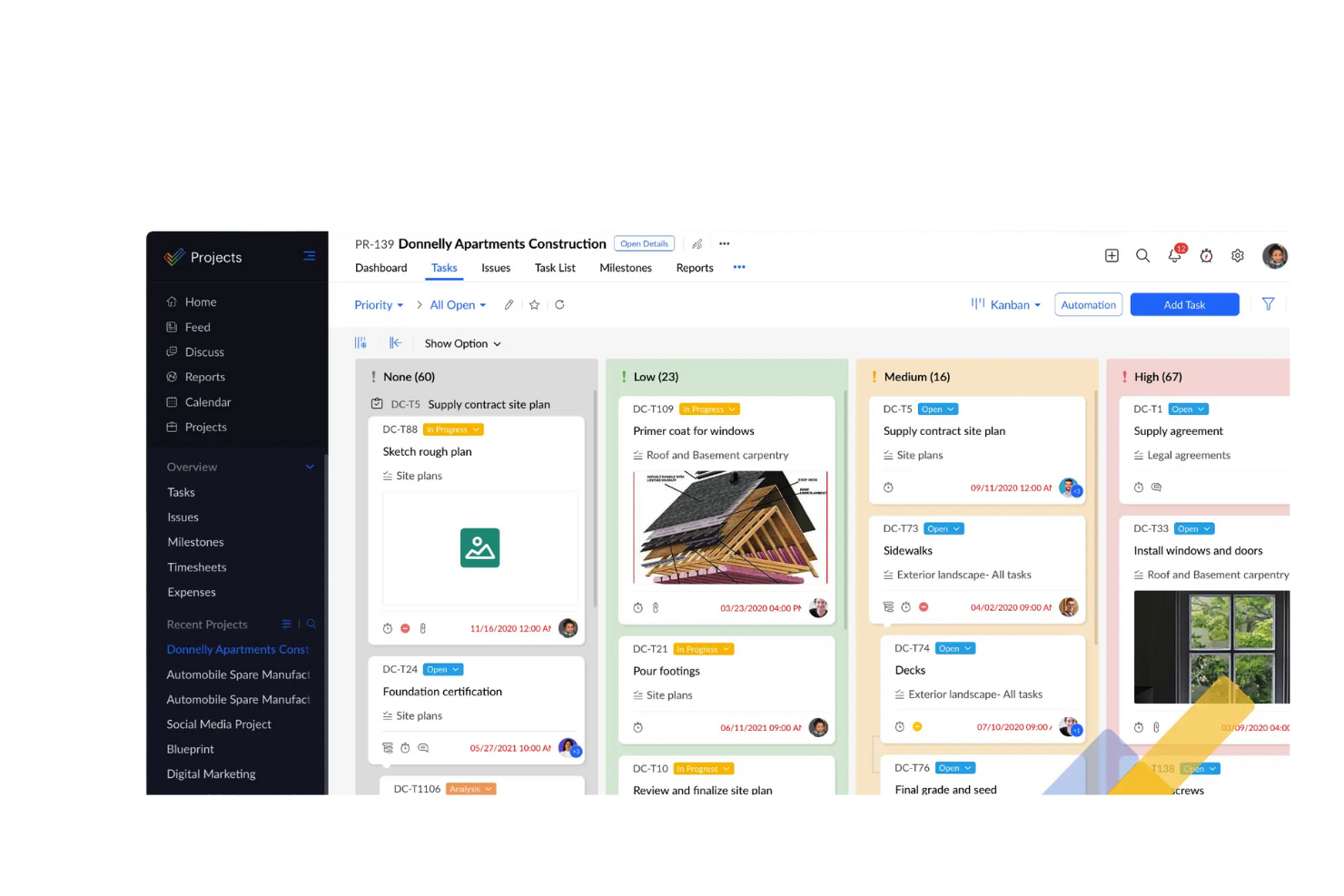
Zoho Projects gives tech teams and small businesses a free way to organize tasks, track progress, and use AI-powered features to manage projects with less manual effort.
Who Is Zoho Projects Best For?
Zoho Projects is a strong fit for small teams that need a structured, feature-rich project management tool without a large budget.
Why I Picked Zoho Projects
I picked Zoho Projects as one of the best because it gives small teams a genuinely capable free plan without forcing them to upgrade just to get things done. The free tier supports up to 5 users and includes Gantt charts, task management, and even the Zoho MCP Server, which connects AI models to your project data so they can read context and take actions from natural language prompts. On the paid Premium plan, Zia adds AI-powered task creation, summaries, and insights that help small teams move faster without needing a dedicated project coordinator. I also like that the free plan includes workflow automation (50 executions/month), so even a lean team can automate routine status updates or notifications from day one.
Zoho Projects Key Features
- Time tracking: Log hours directly on tasks and generate timesheets to monitor where your team's time is going.
- Issue tracker: Create, assign, and prioritize bugs or blockers so nothing slips through during a sprint or release cycle.
- Project templates: Start new projects from pre-built templates to skip repetitive setup work.
- Resource utilization chart: View workload distribution across team members to spot over-allocation before it becomes a problem.
Zoho Projects Integrations
Integrations include Zoho CRM, Zoho Desk, Zoho Analytics, Zoho People, Google Calendar, Microsoft Teams, Slack, Dropbox, GitHub, and Jira.
What's Free?
Zoho Projects offers a free-forever plan for up to 3 users and 2 projects. The free plan includes basic task management features but limits access to advanced tools and most integrations.
Pros and Cons
Pros:
- Offers project templates
- Includes issue tracking
- Suitable for small teams
Cons:
- May require setup time
- Limited customization options
New Product Updates from Zoho Projects
Zoho Projects Adds CodeX Scripts for Custom Modules
Zoho Projects now supports CodeX Scripts for custom modules, enabling conditional logic and rules for creating, updating, and deleting records. For more information, visit Zoho Projects' official site.
 .

GanttPRO
Best for interactive Gantt chart scheduling

GanttPRO is project management software that lets you map out projects using drag-and-drop Gantt charts, manage resources, assign tasks, set dependencies, and export timelines for your team.
Who Is GanttPRO Best For?
GanttPRO is a good fit for project managers and team leads who need visual timeline planning without a steep learning curve.
Why I Picked GanttPRO
GanttPRO is one of my top picks because I love how its interactive Gantt charts handle scheduling in real time. My team can drag and drop tasks to shift dates, and the auto-scheduling feature instantly recalculates dependent tasks and timelines. When a sprint slips or a deadline changes, I don't have to manually update every downstream task. I also rely on the critical path feature, which highlights exactly which tasks will affect the final delivery date if they run late.
GanttPRO Key Features
- Task assignment and roles: Assign tasks to specific team members, set roles, and define access levels directly within the project timeline.
- Baseline tracking: Save a project baseline to compare your original plan against actual progress as work moves forward.
- Board view: Switch from Gantt chart to a Kanban-style board view to manage tasks by status without leaving the platform.
- Time tracking: Log time spent on individual tasks directly in GanttPRO to monitor effort against your project schedule.
GanttPRO Integrations
GanttPRO offers native integrations with Jira Cloud, Google Drive, Slack, and Microsoft Teams. It provides an API for custom integrations.
What's Free?
GanttPRO offers a 14-day free trial with access to all premium features and no credit card required. There is no free-forever plan—after the trial, a paid subscription is needed to continue using the software.
Pros and Cons
Pros:
- Interactive drag-and-drop Gantt chart scheduling
- Built-in resource workload and capacity visualization
- Exports timelines as PDF, PNG, and XML
Cons:
- No built-in budgeting or cost tracking tools
- Interface centered primarily around Gantt view
Hive
Best for AI-driven insights

Hive is a project management platform built for teams in fast-paced industries who want to automate workflows, manage tasks, and leverage AI to keep projects on track without extra manual effort.
Who Is Hive Best For?
Hive is a strong fit for small to mid-sized teams in creative, marketing, or tech environments who need a flexible project management tool with built-in AI capabilities.
Why I Picked Hive
Hive earns its spot on my shortlist because of how well its AI features translate raw project data into actionable insights. I particularly like HiveMind, the platform's built-in AI assistant, which my team uses to auto-generate action items, summarize project status, and draft content directly inside tasks. I also rely on Hive's analytics dashboards to surface workload imbalances across team members before they become blockers. That combination of predictive insight and in-context AI assistance distinguishes it from more basic free project management tools.
Hive Key Features
- Multiple project views: Switch between Gantt, Kanban, calendar, and table views to match how your team tracks work.
- Time tracking: Log hours directly on tasks and use built-in timesheets to monitor team capacity.
- Proofing and approvals: Upload files and collect feedback with annotation tools built into the platform.
- Resourcing: View team availability and assign work based on current workload across active projects.
Hive Integrations
Integrations include Google Drive, Google Calendar, Dropbox, QuickBooks, Zoom, Microsoft OneDrive, Microsoft Teams, Outlook Calendar, Jira, and Slack.
What's Free?
Hive offers a free-forever plan for up to 2 users with unlimited tasks and projects. Some advanced features and integrations are only available on paid plans.
Pros and Cons
Pros:
- Customizable project templates
- Built-in email feature
- AI-driven project insights
Cons:
- Limited offline access
- Restrictions on user numbers

Miro
Best for canvas-based AI project planning
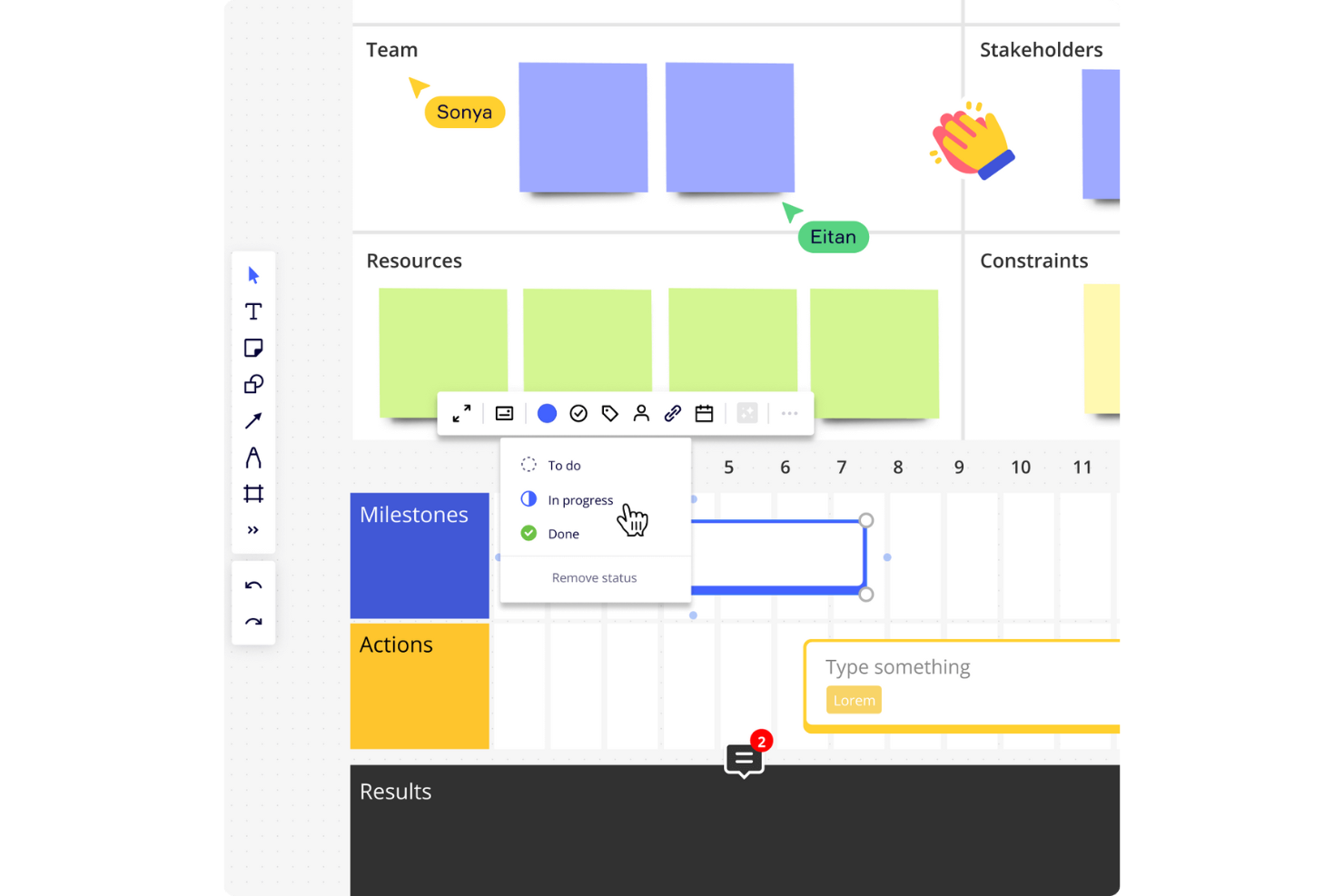
Miro is a visual project management platform with a free AI-enabled plan, combining a shared canvas, Kanban, Timeline, and Table boards with AI summaries and prompt-generated boards.
Who Is Miro Best For?
Product and design teams coordinating discovery and cross-functional workshops can use Miro to turn shared input into project plans.
Why I Picked Miro
I picked Miro as Best for canvas-based AI project planning because Sidekick can turn discovery notes into Kanban or Timeline boards. Catch-up summarizes board changes and action items before a status review. The free plan includes these AI tools, but its three-editable-board cap and limited credits constrain ongoing project tracking.
Miro Key Features
- Live co-editing: Team members can edit the same canvas in real time.
- Comments and mentions: Add comments and @mention teammates on boards.
- Template library: Choose from more than 7,000 Miro and community templates.
- Integrations: Connect Miro with more than 250 apps, including Microsoft, Slack, Google, and Adobe.
Miro Integrations
Miro offers 250+ integrations, including Microsoft, Slack, Google, and Adobe. Jira and Asana integrations start on Starter; Business adds two-way sync with Jira, Asana, Linear, ClickUp, and Azure DevOps.
What's Free?
Miro offers a free-forever plan with AI tools, but limits each team to three editable boards and provides limited AI credits.
Pros and Cons
Pros:
- Kanban and Timeline support visual tracking
- AI turns board notes into plans
- Live co-editing keeps workshops aligned
Cons:
- Large boards can lag and clutter
- Three editable boards constrain ongoing projects
New Product Updates from Miro
Miro Adds Japan Data Residency for Enterprise Customers
Miro has introduced Japan data residency for enterprise customers, offering in-region storage for production data, backups, and metadata, plus in-region compute infrastructure. For more information, visit Miro's official site.
Notion
Best for docs, tasks, and wikis in one workspace

Notion is a project management workspace with task databases, subtasks, dependencies, and board, timeline, calendar, and other views, plus AI-assisted planning and summaries that are limited to a trial on its free plan.
Who Is Notion Best For?
Notion suits freelancers and solo project leads who want to manage tasks alongside project briefs and documentation in one customizable workspace.
Why I Picked Notion
I picked Notion for its “Best for docs, tasks, and wikis in one workspace” focus, with project databases that support subtasks, dependencies, and board or timeline views. I like keeping a project brief beside assigned tasks and status details. Notion AI can draft plans and summarize notes, but Free access is a limited trial, so I wouldn’t rely on it for ongoing AI work.
Notion Key Features
- Request forms: Collect project requests with basic forms on the Free plan.
- Comments and mentions: Discuss work and notify collaborators on pages.
- Project templates: Browse templates for roadmaps, issue tracking, and planning.
- AI Meeting Notes: Transcribe and summarize meetings, with limited trial access on Free.
Notion Integrations
Notion integrations include Slack, Google Drive, GitHub, Figma, Jira, Asana, and Amplitude; premium connections and database syncs require Business. Notion also supports a public API, webhooks, and Zapier.
What’s Free?
Notion has a free-forever plan, but AI features are limited to a trial on Free, so ongoing AI use isn’t included.
Pros and Cons
Pros:
- Templates speed up project workspace setup
- Flexible databases support multiple tracking views
- Project briefs live beside assigned tasks
Cons:
- Shared workspaces hit a 1,000-block cap
- Free AI access ends after limited trial
ClickUp
Best for AI-edited docs in free workspaces
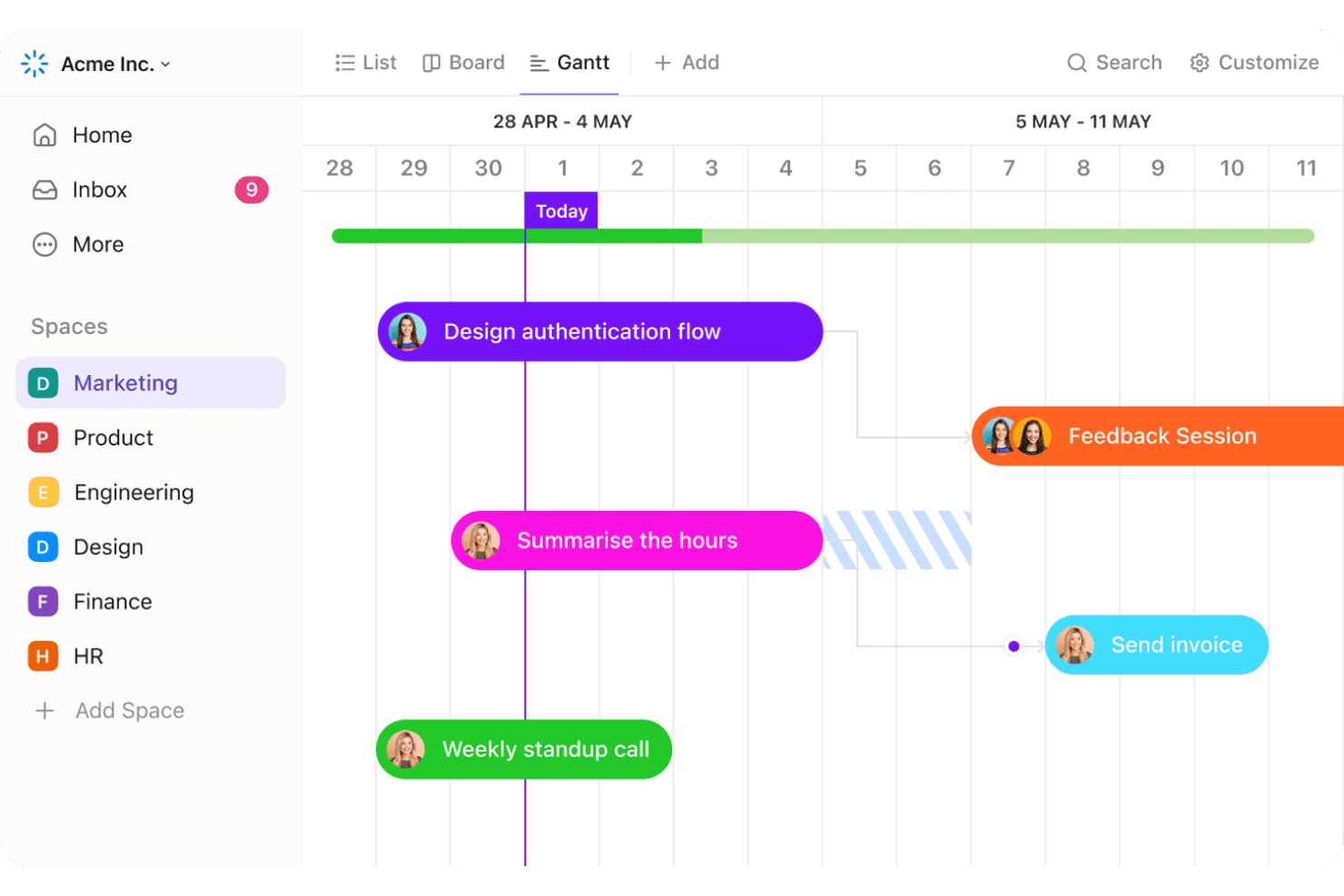
ClickUp is a project management platform for task tracking, collaboration, Docs, and AI-assisted writing, summaries, and task creation; its free plan includes a limited AI credit trial.
Who Is ClickUp Best For?
ClickUp suits small businesses and team leads coordinating cross-functional projects who want shared tasks and Docs in one free workspace.
Why I Picked ClickUp
I picked ClickUp because it’s Best for AI-edited docs in free workspaces. In Docs, I can select text for Brain to improve, summarize, or rewrite, then use inline comments to turn feedback into tasks. The Doc sidebar also pulls out action items, though free AI access relies on a limited 500-credit workspace trial.
ClickUp Key Features
- Unlimited tasks and members: Create tasks and invite team members on the free plan.
- List, Board, and Calendar views: Track work in three free project views.
- Sprint management and time tracking: Organize sprint work and record time on tasks.
- Automations: Run up to 100 automation actions per workspace each month.
ClickUp Integrations
ClickUp offers 50+ native integrations, including Slack, GitHub, GitLab, Google Drive, Microsoft Teams, Figma, Zoom, and Google Calendar; some require a paid plan. It also supports a public API and Zapier.
What’s Free?
ClickUp offers a free-forever plan with unlimited tasks and members. Brain AI access is limited to a 500-credit workspace trial, not unlimited AI use.
Pros and Cons
Pros:
- Comments and assignments support team coordination
- AI edits Docs and extracts action items
- Unlimited free tasks and members
Cons:
- Workspace setup can overwhelm new teams
- Free AI credits may not renew
New Product Updates from ClickUp
ClickUp Adds Meetings Hub, Super Agent Templates, and ZoomInfo Integration
ClickUp adds a searchable Meetings Hub, new ways to clone and template Super Agents, and a ZoomInfo integration through the App Center. These updates improve meeting retrieval, agent reuse, and access to sales intelligence. For more information, visit ClickUp’s official site.

Taskade
Best for AI-generated plans in remote teams

Taskade is an AI project management platform with task tracking, collaborative workspaces, multiple project views, and prompt-generated plans, though its Free plan starts with zero AI credits.
Who Is Taskade Best For?
Taskade suits small remote teams that need shared task views and collaboration, though its Free plan’s AI tools require earned or purchased credits.
Why I Picked Taskade
I picked Taskade for AI-generated plans in remote teams because its AI Project Plan Generator turns a short brief into sequenced phases, tasks, owners, dependencies, and risk mitigations. AI Project Studio can also build a project from prompts and source material. One caveat: the Free plan starts with zero AI credits, so you’ll need to earn or buy credits to generate plans.
Taskade Key Features
- Project views: Switch between List, Board, Table, Mind Map, Docs, and Calendar views.
- Task details: Add subtasks, assignees, due dates, reminders, comments, and custom fields.
- Team collaboration: Edit projects in real time and use chat, comments, and @mentions.
- Project imports and exports: Import from tools like Trello or Asana, then export projects as CSV, Markdown, PDF, images, or plain text.
Taskade Integrations
Taskade lists 166 integrations, including Google Workspace, Microsoft 365 and Teams, Jira, Linear, Trello, Asana, ClickUp, GitHub, Zoom, and Zapier. Free access is limited to standard connectors; premium connectors and the REST API require paid plans.
What's Free?
Taskade offers a free plan rather than a time-limited trial, with up to two people and 10 automation runs per month. It starts with zero AI credits, and free users get standard integrations only; premium connectors require a paid plan.
Pros and Cons
Pros:
- Supports real-time editing, comments, and team chat
- Switches between six views on shared project data
- Generates phased plans with tasks and risk mitigations
Cons:
- Two-member cap limits remote team collaboration
- Free plan starts with zero AI credits

Best for AI-generated project plans and WBS
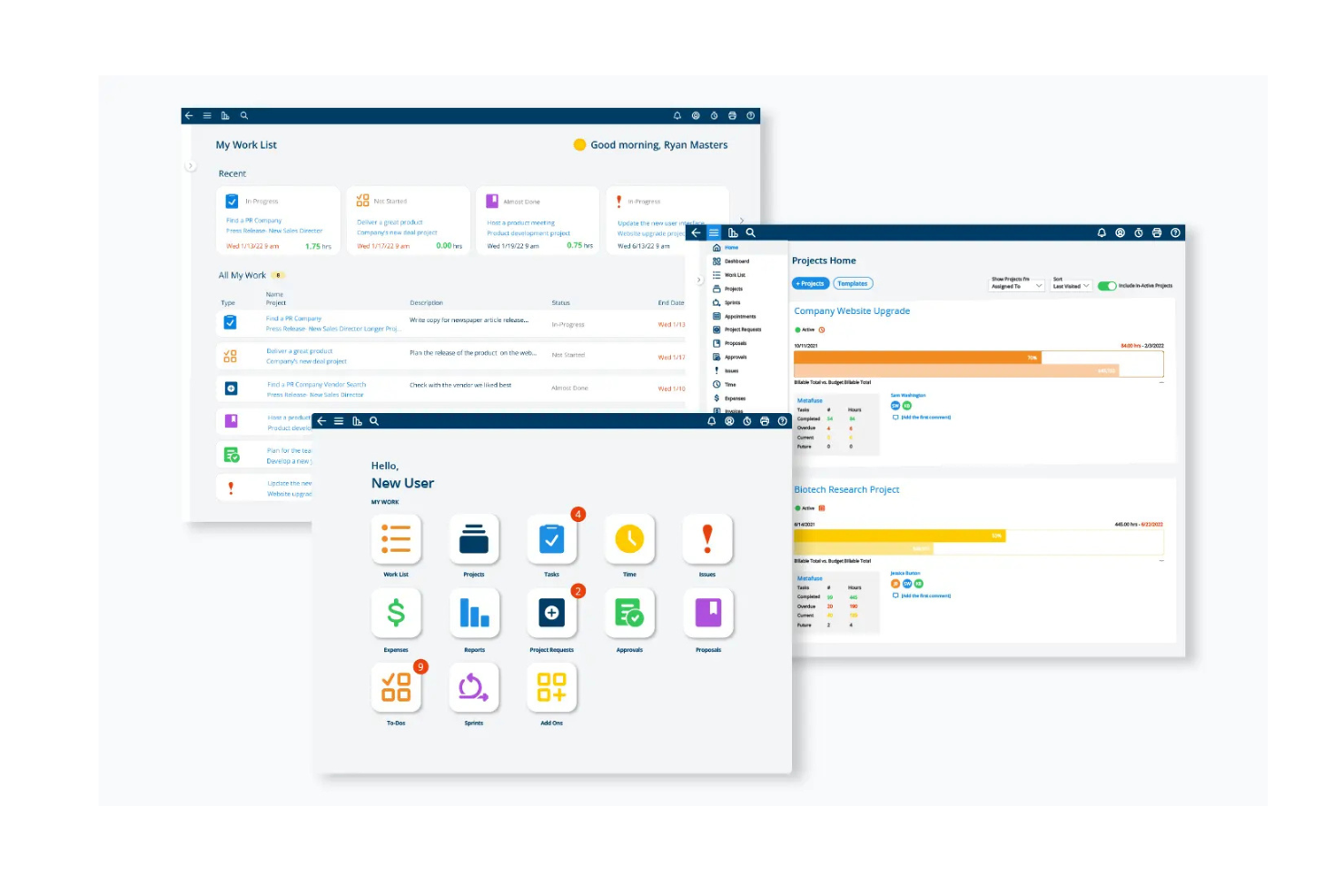
Project Insight is a project management platform with a free tier for up to three users, combining AI project templates and WBS creation with intelligent scheduling, task management, dashboards, and Gantt and Kanban views.
Who Is Project Insight Best For?
Project Insight suits PMO-oriented project managers who need AI-generated project plans, work breakdown structures, and structured scheduling.
Why I Picked Project Insight
I picked Project Insight as Best for AI-generated project plans and WBS because its AI turns project context into a draft with phases, tasks, milestones, roles, and dependencies. Intelligent Scheduling adjusts dependent dates and flags delays or overloaded team members as plans change.
Project Insight Key Features
- Project views: Free includes more than 20 views, including Gantt charts, Kanban boards, and task lists.
- Dashboards and reporting: View project information through dashboards and reports.
- Document management: Store and manage project documents in the platform.
- Comments and activity: Free includes unlimited comments and activity.
Project Insight Integrations
Project Insight documents two-way integrations with Jira Software, Azure DevOps, Salesforce, NetSuite, HubSpot, and ServiceNow. It also lists an API for custom connections.
What’s Free?
Project Insight offers a free-forever plan for up to three users. The user limit is the main restriction noted.
Pros and Cons
Pros:
- Free includes Gantt, Kanban, and task views
- Intelligent Scheduling flags delays and overloads
- AI drafts WBS plans with dependencies
Cons:
- No AI-generated project status summaries
- Three-user limit restricts team collaboration
Other Free AI Project Management Tools
Here are some additional AI project management tools options that also offer free plans or trials. If you didn’t find what you were looking for above, check these out:
- Bitrix24
For integrated CRM and project tracking
- Basecamp
For connecting AI assistants to project work
- Jira
For agile teams outgrowing spreadsheets
- MeisterTask
For one-click AI project status updates
- Airtable
For database-style project tracking
- Nifty
For milestone-driven project planning
- Linear
For engineering-team issue tracking with free AI
- GoodDay
For customizable free team workspaces
- Odoo
For modular business app integration
- Plane
For open-source self-hosted project tracking


How I Evaluate Free AI Project Management Tools
First, I define what counts as free. A qualifying tool has a free-forever plan with usable AI, not just a trial, and lets teams create and assign project tasks; I note usage limits. Then I weigh core functionality most, like assigning tasks and tracking progress; standout features, like meeting-note summaries; and beyond features, like room to grow.
Core Functionality (Table Stakes For This List)
In addition to my free plan requirements, I use a scoring system to select tools for my list. I score each one on a scale from 0 (does not offer the functionality) to 5 (excels in this area) for each core functionality listed below, based on what's available on the free plan. I then convert the total into a percentage to help assess each tool's overall fit, with extra weight on any functionalities I've deemed essential.
- Task & Project Creation (Essential): I look for multiple projects, assignable tasks, due dates, and enough structure to map a real launch or sprint.
- AI Summaries: I assess whether AI can turn task activity into a useful status recap, surfacing completed work, blockers, and next steps.
- AI Planning Suggestions: I look for prompts that draft task lists or timelines, then consider whether suggested sequencing fits dependencies and delivery dates.
- Team Collaboration: I check whether free users can assign work and discuss tasks, keeping handoffs and decisions attached to a shared project.
- Visual Progress Tracking: I assess whether a board, list, or timeline makes ownership, status, and slippage easy to scan across workstreams.
Once I have a list of tools that meet the criteria, I consider what sets each platform apart.
Differentiating Factors (What Sets Vendors Apart)
Here's how I compare and contrast different vendors:
Standout Features
I look for natural language task entry that lets you type something like "launch prep meeting Friday with three subtasks" and get a structured task back. That alone cuts setup time on a Monday morning. I also evaluate template libraries, since a free Gantt or sprint template from tools like Asana or ClickUp can save hours of planning from scratch. Third-party integrations matter too; I check whether free plans connect to Slack or Google Workspace so updates stay centralized without manual copy-pasting across apps.
Beyond Features
I check whether free plans let you export tasks as CSV or through an API, because teams evaluating multiple tools need an exit path that doesn't trap their data. Onboarding ease matters just as much; a solo PM or startup can't afford a week of setup, so I look for in-app guidance, community forums, and templates that deliver value on day one. I also evaluate each vendor's free-tier user and storage limits to gauge how long a growing team can operate before hitting a paywall.
How to Choose a Free AI Project Management Tool
Complex features and pricing tiers can make it tough to see what a free AI project management tool actually offers. To help you stay on track while choosing the right software, here are a few key factors to consider:
| Factor | What to Consider |
|---|---|
| Free Offer Scope | Check what's included in the free plan. Look for limitations on features, users, and projects to make sure it meets your team's needs without unexpected costs. |
| Scalability | Make sure the tool can grow with your team. Consider whether it offers paid plans with features that support larger projects and more users as your team expands |
| Integrations | Verify if the tool connects with other software you use. Integrations with tools like Slack, Google Workspace, or Trello can enhance productivity by streamlining workflows |
| Ease of Use | Evaluate the user interface and learning curve. A tool that's easy to navigate will save your team time and reduce training requirements |
| Customization | Determine if you can tailor the tool to fit your workflow. Customizable dashboards, workflows, and reports can help align the tool with your team's processes. |
| Support Options | Consider the level of support provided. Access to chat, email, or phone support can be crucial, especially when you're getting started or facing technical issues |
| Security | Assess the security measures in place. For teams handling sensitive data, features like encryption and compliance with data regulations are essential. |
| Mobile Access | Check if the tool has a mobile app or mobile-friendly site. This allows team members to manage projects on the go and increases flexibility and responsiveness |
What Are Free AI Project Management Tools?
Free AI project management tools are software platforms that help teams plan, track, and manage work more efficiently with AI capabilities. They usually offer free plans or trials with basic features also found in task management software, like task tracking, team collaboration, and reporting.
These tools are useful for project managers, team leads, and freelancers who need to stay on top of tasks and deadlines. With features like task automation, real-time updates, and integration with other apps, they make it easier to manage workloads and keep everyone in sync.
Features of Free AI Project Management Tools
Here are the features commonly found in AI project management tools, and which ones are usually included in free vs. paid plans.
Typically Free AI Project Management Tools Features
- Task management: Allows you to create and assign tasks and helps teams stay organized and on track.
- Collaboration tools: Provides chat and file-sharing capabilities to facilitate team communication and coordination.
- Project tracking: Helps monitor progress and deadlines to make sure projects are completed on time.
- Basic reporting: Offers simple reports to track project metrics and team performance.
- Integration support: Connects with popular apps like Slack and Google Drive to improve functionality and streamline workflows.
- Kanban boards: Visualize tasks and workflows to improve project management and task prioritization.
- Time tracking: Allows teams to log hours spent on tasks, which helps with productivity analysis.
- Document management: Stores and shares project-related documents to keep all team members informed.
Typically Paid AI Project Management Tools Features
- Advanced reporting: Provides detailed analytics and insights to help you make data-driven decisions.
- Custom workflows: Allows for the creation of tailored processes to fit specific business needs.
- Resource management: Optimizes the allocation of team resources to improve efficiency and productivity.
- Portfolio management: Offers tools to let you manage multiple projects simultaneously and have an overview of all project activities.
- Automation tools: Streamlines repetitive tasks and processes to save time and reduce errors.
- Gantt charts: Provides detailed project timelines and dependencies to improve planning and execution.
- Role-based permissions: Controls access to sensitive information and features to keep data safe and secure.
- AI-driven insights: Uses artificial intelligence to provide recommendations and predictions for project success.
Benefits of Free AI Project Management Tools
Implementing free AI project management tools provides several benefits for your team and your business. Here are a few you can look forward to:
- Cost savings: Access essential project management features without spending money, which makes it ideal for teams with tight budgets.
- Better collaboration: Use built-in chat and file-sharing tools to improve communication and teamwork among remote or distributed teams.
- Increased organization: Manage tasks and deadlines effectively, keep projects on track, and reduce the risk of missed deadlines.
- Flexibility: Customize workflows and dashboards to fit your team's needs, even with free versions, to maintain alignment with your processes.
- Integration ease: Connect with popular apps to expand functionality and create a more cohesive workflow without additional costs.
- Time management: Track time spent on tasks to identify inefficiencies and improve productivity without needing to invest in extra tools.
- Scalability: Start with a free plan and transition to paid features as your team grows, which lets you gradually expand without immediate financial commitment.
Costs and Pricing of Free AI Project Management Tools
I realize you came to this article looking for the best AI project management tools options that are available for free. However, since free plans only offer limited features, there's a good chance you'll need to scale your plan up in the future.
The table below summarizes common plans, their average prices, and typical features included in AI project management tools solutions:
Plan Comparison Table for AI Project Management Tools
| Plan Type | Average Price | Common Features |
|---|---|---|
| Free Plan | $0 | Task management, basic collaboration tools, limited project tracking, and basic reporting. |
| Personal Plan | $5 - $15/user/month | Advanced task management, better collaboration features, more integrations, and time tracking. |
| Business Plan | $15 - $25/user/month | Custom workflows, detailed reporting and analytics, resource management, and priority support. |
| Enterprise Plan | $25 - $50/user/month | Advanced security features, comprehensive portfolio management, dedicated account management, and full customization options. |
Free AI Project Management Tools FAQs
Here are some answers to common questions about free AI project management tools:
How can I choose the right free AI project management tool?
Start by identifying your team’s specific needs and goals. Consider the features you require, such as task management, collaboration, and reporting. Evaluate the free plan’s limitations, like user or project caps, and make sure the tool can scale with your team. Test multiple options to find the best fit.
Are free AI project management tools secure?
Most free AI project management tools provide basic security features like encryption and user authentication. However, free plans may lack advanced security options available in paid versions. Assess the security measures offered and make sure they meet your team’s requirements for data protection.
Can I integrate free AI project management tools with other software?
Yes, many free AI project management tools offer integrations with popular apps like Slack, Google Workspace, and Trello. Check the specific integrations available in the free plan to make sure the tool you choose is compatible with existing tools, as some integrations might be restricted to paid plans.
How do free AI project management tools handle data storage?
Free AI project management tools generally offer limited storage capacity. Monitor your data usage and consider upgrading if your storage needs exceed the free plan’s limits. Some tools provide options to integrate with external storage solutions like Google Drive or Dropbox.
What support options are available for free AI project management tools?
Support options for free AI project management tools typically include access to online resources like FAQs, community forums, and basic email support. Live chat and phone support are often reserved for paid plans. Evaluate the available support to make sure it meets your team’s needs.
Do free AI project management tools offer mobile access?
Many free AI project management tools provide mobile apps or mobile-friendly websites so you can manage projects on the go. Check if the free plan includes mobile access and if the app supports the features you need to stay productive away from your desk.