

10 Best AI Task Management Software Reviewed in 2026

Best AI Task Management Software Shortlist


Managing tasks can be overwhelming, especially when juggling multiple projects and deadlines. You might find yourself drowning in spreadsheets and sticky notes, trying to keep track of your to-do list. That's where AI task management software comes in. These tools help you organize, prioritize, and automate tasks, freeing up your time for what really matters.
In my experience, AI tools can transform how your team works by reducing manual effort and increasing efficiency. I've tested and reviewed various software to bring you an unbiased look at the best options available. In this listicle, you'll find insights into each tool's features, benefits, and unique selling points. Whether you're a project manager or part of a small team, there's something here to help you succeed.
Why Trust Our Software Recommendations
Our team has been testing and reviewing software since 2012. As project managers ourselves, we know how difficult—and important—it is to choose the right software.
For this guide, we evaluated tools using hands-on testing and independent research, scoring tools using our selection criteria. We also draw on insights from industry thought leaders and practicing project management experts.
Our reviews reflect our human editorial judgment, not a sales pitch.
Expert reviewers:
AI Task Management Software Comparison Table
This comparison table summarizes pricing details for my top AI task management software selections.
| Tool | Best For | Trial Info | Price | ||
|---|---|---|---|---|---|
| 1 | Best for AI-driven task insights | Free plan available; 14-day free trial | From $9/user/month (billed annually) | Website | |
| 2 | Best for agile project management | Free trial + free plan + free demo available | From $13/user/month (billed annually) | Website | |
| 3 | Best for collaborative mind mapping | Free plan available | From $10/user/month (billed annually) | Website | |
| 4 | Best for team collaboration | Free plan available | From $10.99/user/month (billed annually) | Website | |
| 5 | Best for automated task scheduling | 7-day free trial | From $4.60/user/month (billed annually) | Website | |
| 6 | Best for intuitive task automation | Free trial available | From $19/seat/month (billed annually) | Website | |
| 7 | Best for smart calendar integration | Free plan available | From $10/seat/month | Website | |
| 8 | Best for time blocking | Free plan available and 7-day free trial | From $5/month (billed annually) | Website | |
| 9 | Best for voice-activated task management | Free demo available | From $79.99/year (billed annually) | Website | |
| 10 | Best for IT professionals | 30-day free trial available | Pricing upon request | Website |

Best AI Task Management Software Reviews
Below are my detailed summaries of the best AI task management software that made it onto my shortlist. My reviews offer a detailed look at the key features, pros & cons, integrations, and ideal use cases of each tool to help you find the best one for you.

Best for AI-driven task insights
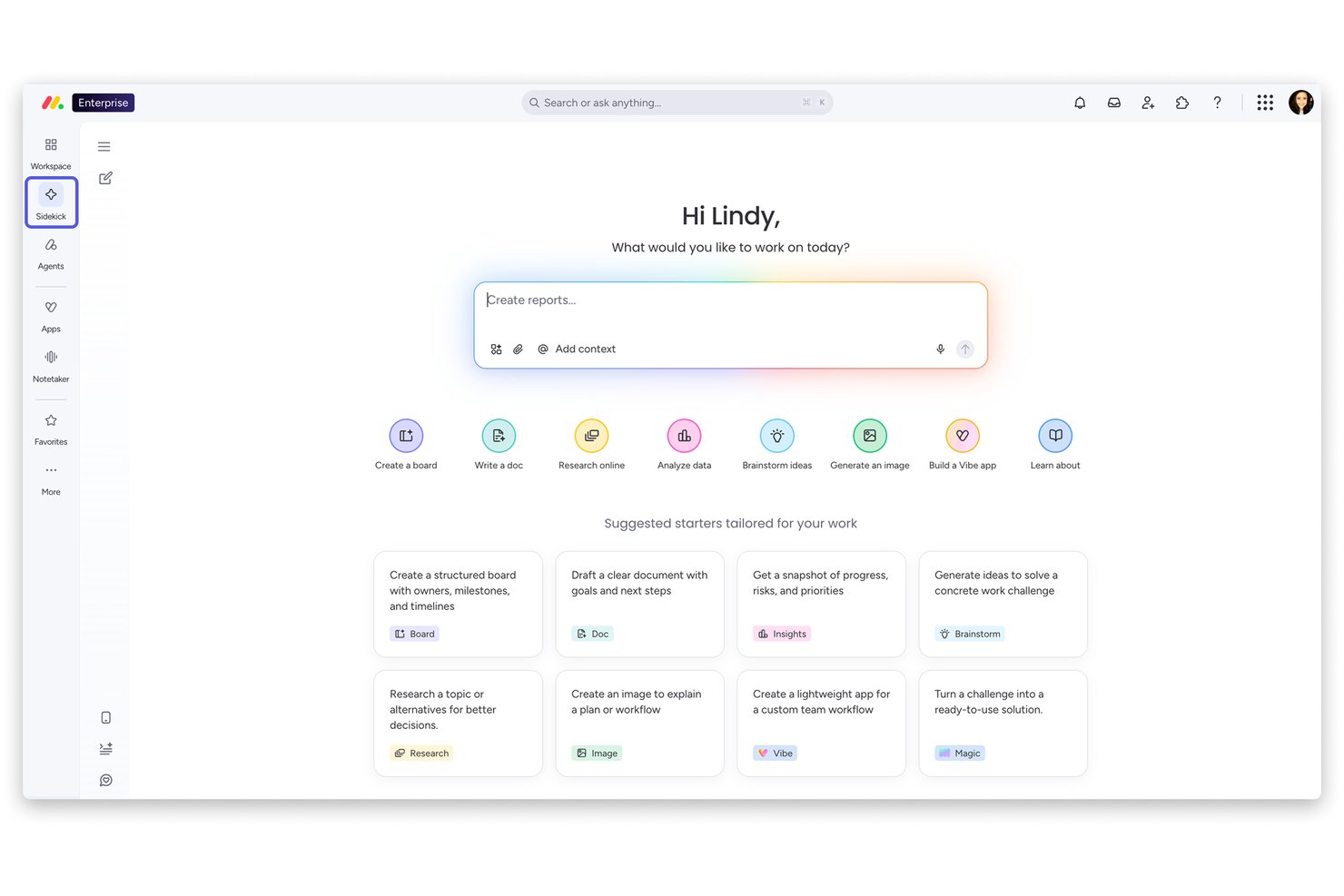
monday AI Workspace is an AI-powered work management platform that combines autonomous AI agents, predictive risk monitoring, smart task automation, and generative reporting across projects, portfolios, and cross-functional teams.
Who Is monday AI Workspace Best For?
It's a strong fit for mid-size to enterprise teams that need AI-driven oversight across multiple concurrent projects, especially in tech, product, and cross-functional environments.
Why I Picked monday AI Workspace
monday AI Workspace earns its spot on my shortlist because of how proactively it surfaces risk before it becomes a problem. I love that its predictive risk engine continuously scans task statuses, dependencies, and team conversations to flag issues in real time, rather than waiting for a missed deadline to trigger a conversation. The Sidekick AI assistant then connects the dots, giving me context-aware recommendations on what to act on next.
monday AI Workspace Key Features
- Custom AI agent builder: Lets you create and configure AI agents for recurring project workflows.
- AI meeting-to-task automation: Transcribes meetings and converts decisions directly into assigned tasks on your boards.
- Cross-project dependency mapping: Visualizes and tracks dependencies between tasks and projects using AI.
- Role-based access controls: Supports granular permissions for AI-generated data, automations, and project boards.
monday AI Workspace Integrations
monday AI Workspace offers hundreds of native integrations, including Slack, Google Workspace, Microsoft 365, Salesforce, Jira, GitHub, Zoom, Dropbox, HubSpot, and Zendesk. It also supports Zapier and provides an API for custom integrations.
Pros and Cons
Pros:
- Sidekick AI generates project summaries on demand
- Predictive risk alerts surface blockers early
- AI agents automate end-to-end task workflows
Cons:
- Heavy board structure slows initial project setup
- AI recommendations lack granular explainability
New Product Updates from monday AI Workspace
monday AI Workspace Adds Human Approval Routing
monday AI Workspace adds a human-in-the-loop approval block to AI Workflows, sending approval requests and routing workflow paths based on responses. For more information, visit monday AI Workspace's official site.

Best for agile project management

MeisterTask is a collaborative task management tool designed for teams that follow agile methodologies. It helps users organize tasks, manage projects, and enhance team collaboration through visual project boards.
Why I picked MeisterTask: MeisterTask is ideal for agile project management with features like Kanban-style boards, customizable workflows, and time tracking. Your team can easily track progress with project timelines and automatic task updates. It also provides a simple interface for managing tasks and projects. In my experience, these features make MeisterTask a strong choice for teams focused on agile practices.
Standout features & integrations:
Features include customizable project boards that adapt to your workflow. You can set up recurring tasks that automatically populate your boards. MeisterTask also offers detailed task tracking with tags and due dates to keep your team organized.
Integrations include Slack, Microsoft Teams, Google Drive, Dropbox, GitHub, Zendesk, Outlook, and Zapier.
Pros and Cons
Pros:
- Automatic task updates
- WIP limits available to help identify bottlenecks early
- Customizable Kanban project boards
Cons:
- May not suit all project types
- Limited advanced reporting

Taskade
Best for collaborative mind mapping

Taskade is a collaborative productivity tool aimed at teams who need a versatile workspace for project management and communication. It serves users by providing tools for task management, mind mapping, and real-time collaboration.
Why I picked Taskade: Taskade is known for its collaborative mind mapping capabilities, which make it ideal for brainstorming sessions and visual project planning. It allows your team to create dynamic mind maps that evolve with your projects. Features like real-time editing, video conferencing, and task tracking ensure that everyone stays on the same page. In my experience, these tools facilitate a more interactive and engaging workflow.
Standout features & integrations:
Features include real-time collaboration, video conferencing, and task management. You can create mind maps that link directly to tasks, allowing for smoother transitions from planning to execution. The platform's design encourages creativity and adaptability in your project workflows.
Integrations include Google Drive, Slack, Zapier, Trello, GitHub, Microsoft Teams, and Evernote.
Pros and Cons
Pros:
- AI assistant can generate templates and restructure notes
- Users can tag nodes with hashtags for quick filtering
- Real-time collaboration allows for dynamic brainstorming
Cons:
- View switching can take time to master for users
- Potential for feature creep as the platform evolves

Asana
Best for team collaboration

Asana is a project management tool designed for teams that need to coordinate work and track projects in a shared space. It serves businesses by providing task management, workflow automation, and project tracking capabilities.
Why I picked Asana: Asana is tailored for team collaboration, offering features like task assignments, progress tracking, and project timelines. Your team can benefit from its ability to create workspaces and organize tasks by project. The timeline feature helps visualize project schedules, ensuring everyone stays informed. In my experience, Asana's focus on collaboration makes it ideal for teams aiming to enhance their productivity.
Standout features & integrations:
Features include custom project templates, workload management, and portfolio tracking. These tools help your team manage multiple projects and ensure resources are allocated effectively. Additionally, Asana offers a user-friendly interface that supports efficient project navigation.
Integrations include Slack, Microsoft Teams, Google Workspace, Dropbox, Salesforce, Zoom, GitHub, Zapier, Trello, and Mailchimp.
Pros and Cons
Pros:
- Customizable project templates
- Shared workspace for project visibility
- In-context communication features
Cons:
- Potential for information silos without dedicated usage
- Overwhelming interface and features for new users

TimeHero
Best for automated task scheduling

Timehero is a task management tool aimed at teams and individuals who need to automate their scheduling processes. It helps users by automatically planning tasks around their existing schedules and deadlines, optimizing time management.
Why I picked Timehero: Timehero excels in automated task scheduling, providing features that adjust tasks based on changing priorities and deadlines. Your team can benefit from its ability to dynamically reschedule tasks as new ones are added. With features like predictive scheduling and calendar syncing, it ensures that you never miss a deadline. In my experience, Timehero's automation capabilities make it a valuable tool for anyone looking to enhance their time management.
Standout features & integrations:
Features include predictive scheduling, which anticipates task completion times based on your workload. You can set recurring tasks that automatically integrate into your schedule. The tool also offers real-time updates, so you're always in the loop with your team's progress.
Integrations include Google Calendar, Zoom, Slack, Trello, Office 365, Gmail, Evernote, Jira, Hubspot CRM, and Asana.
Pros and Cons
Pros:
- Focus time allocation
- Predictive duration estimates for task planning
- Automated task rescheduling
Cons:
- May not suit all workflows
- Accuracy depends on user input

Motion
Best for intuitive task automation

Motion is a productivity platform that provides an "Agentic Work Suite," designed to enhance team efficiency through AI. Its primary users are teams aiming to optimize operations. Key business functions include project management, automated task handling, and sales support.
Why I picked Motion: Motion excels at intuitive task automation, making it a standout choice for teams looking to reduce manual workload. Its AI-driven features, such as automated scheduling and task prioritization, cater to those who seek efficiency. Users can benefit from its ability to handle repetitive tasks, allowing them to focus more on strategic activities. The platform's design is user-friendly, making it accessible for teams of all sizes.
Standout features & integrations:
Features include automatic task prioritization, smart scheduling, and AI-driven project management. These features help your team focus on important tasks, reduce decision fatigue, and improve overall productivity. In my experience, these functionalities are key in managing complex workflows.
Integrations include Google Calendar, Outlook, Slack, Zoom, Microsoft Teams, Salesforce, and HubSpot.
Pros and Cons
Pros:
- Email-to-task automation feature
- AI workflows builder to turn unstructured information into projects
- Automatic prioritization and scheduling
Cons:
- Potential over-automation for some tasks
- Privacy concerns for some employees

Reclaim
Best for smart calendar integration

Reclaim is a task and calendar management tool designed for professionals and teams looking to optimize their schedules. It helps users by automatically scheduling tasks around existing calendar events, ensuring efficient use of time.
Why I picked Reclaim: Reclaim is distinguished by its smart calendar integration, which automatically aligns tasks with your schedule. It allows you to set priorities and adjust task durations based on your availability. The built-in notification system keeps you updated on schedule changes and upcoming deadlines. In my experience, these features make Reclaim an ideal choice for those who need precise control over their schedules.
Standout features & integrations:
Features include intelligent time blocking, where tasks automatically adjust to fit your schedule. You can also set focus time to minimize distractions and boost productivity. Additionally, Reclaim offers flexible task prioritization to help you manage your workload.
Integrations include Google Tasks, Outlook, Slack, Zoom, Microsoft Teams, Asana, Trello, Jira, Todoist, and Zapier.
Pros and Cons
Pros:
- Automatic addition of flexible breaks between meetings
- Dynamic rescheduling and conflict resolution
- AI-powered time blocking
Cons:
- Requires calendar access
- Lack of up-to-date input will result in a flawed schedule


Trevor AI is a productivity tool designed for individuals and teams who need to optimize their schedules through effective time management. It helps users by providing time blocking and task prioritization features to ensure efficient use of time.
Why I picked Trevor AI: Trevor AI is known for its effective time blocking capabilities, allowing you to allocate specific time slots for tasks. It automatically adjusts your schedule based on task priorities and deadlines. You can easily drag and drop tasks into your calendar, making it simple to manage your day. Upgrading to the Pro Plan unlocks advanced scheduling options and deeper integrations. In my experience, these features make Trevor AI a great choice for those looking to enhance their time management skills.
Standout features & integrations:
Features include drag-and-drop task scheduling, which simplifies the process of organizing your day. You can set task reminders to keep you on track throughout the day. Trevor AI also offers a clean and intuitive interface that supports quick task adjustments.
Integrations include Google Calendar, Outlook, Todoist, Microsoft 365, Google Tasks, and Microsoft To Do.
Pros and Cons
Pros:
- AI suggestions for rescheduling overdue tasks
- Platform features facilitate deep work
- AI-powered plan my day feature to schedule multiple tasks at once
Cons:
- Focus on Google and Outlook calendars
- Minimalist reporting and analytics


EchoPal is a voice-powered task management tool designed for professionals who prefer managing tasks through natural language. It helps users refine their workflow by providing voice and chat controls for task management.
Why I picked EchoPal: EchoPal excels in voice-activated task management, letting you manage your task list through voice commands and chat inputs. It features multi-step intelligence that automates complex workflows by understanding dependencies and making context-aware decisions. The tool also includes emotional intelligence, monitoring user stress levels to adjust workflows accordingly. In my experience, these features make EchoPal a unique option for those who value voice integration.
Standout features & integrations:
Features include emotional intelligence, which helps manage stress by adjusting tasks. The tool also supports multi-step workflows, allowing for complex task automation. Additionally, EchoPal offers accessibility features to cater to various user needs.
Integrations include Trello, Jira, Google Calendar, Linear, Slack, Gmail, Asana, Google Workspace, Windows, and Outlook.
Pros and Cons
Pros:
- AI has context awareness
- Initiate multi-step, cross-tool workflows with a single voice command
- Natural language understanding for voice command functionality
Cons:
- Limited to voice and chat inputs
- May require learning for voice commands

Atera
Best for IT professionals

Atera is a remote monitoring and management (RMM) software designed for IT professionals and managed service providers (MSPs). It offers tools to monitor, manage, and support IT networks, helping users efficiently handle IT tasks and client support. You can also categorize assets, alerts, and tickets to simplify workflows and maintain better organization.
Why I picked Atera: Atera is tailored for IT professionals with features like remote monitoring, auto-scheduling, automated patch management, and network discovery. Your team can efficiently manage IT assets and provide remote support with ease. It also features built-in ticketing systems that facilitate client communication. In my experience, Atera's focus on IT management needs makes it a valuable tool for service providers.
Standout features & integrations:
Features include real-time alerts, which notify you of any issues in your network. You can automate routine tasks like patch management to save time. Atera also provides reporting tools to help you analyze performance and make informed decisions.
Integrations include Google Identity Providers, Azure AD, Okta, Zapier, Microsoft Teams, Slack, HubSpot, Salesforce, Dropbox, SAP Business One, OneDrive, and Google Drive.
Pros and Cons
Pros:
- IT automation profiles and execution of scripts
- Automated patch discovery, approval, and deployment
- Broad IT management tools
Cons:
- Support response time variability
- Requires technical knowledge


How I Evaluate AI Task Management Software
Every tool on this list needs to do more than slap an AI label on basic automations—I look for platforms where AI actually drives decisions like prioritizing tasks, predicting delays, or auto-assigning work based on capacity. I split my evaluation into two layers: the core functionality a tool must have to qualify and the differentiating factors that separate good options from great ones.
Core Functionality (Table Stakes For This List)
When I'm selecting tools for my list, I rank each one on a scale from 0 (does not offer the functionality) to 5 (excels in this area) for each core functionality listed below. Then, I calculate the tool's total score into a percentage. Each tool needs to achieve a minimum total score of 65% to be considered for inclusion.
- AI-Driven Task Automation: I check whether the tool can auto-create and assign tasks from inputs like meeting notes, chat messages, or project briefs rather than requiring manual entry for every item.
- Intelligent Task Prioritization: Each tool should rank or reorder tasks using AI based on factors like deadlines, dependencies, and impact—not just let users drag and drop manually.
- Predictive Project Insights: I look for AI that forecasts completion dates, flags at-risk milestones, or surfaces workload imbalances before they cause missed deadlines across sprints or delivery cycles.
- Generative Summaries & Updates: The platform should produce useful AI-generated content like standup recaps, task descriptions, or weekly status reports that save PMs from writing them from scratch.
- Smart Resource Allocation: I evaluate whether AI recommends task assignments based on team members' capacity, skill sets, or past performance rather than leaving managers to guess who's available.
- Workflow & Tool Integrations: The tool needs to connect with platforms teams already use—like Slack, Jira, GitHub, or Google Workspace—and trigger AI actions across those connected systems.
Once I have a list of tools that meet this criteria, I consider what sets each platform apart.
Differentiating Factors (What Sets Vendors Apart)
Here's how I compare and contrast different vendors:
Standout Features
AI meeting-to-task conversion is a big differentiator—tools that pull action items from a recorded standup or planning call and turn them into assigned tasks save PMs hours of post-meeting cleanup. I also look for cross-project dependency mapping, where AI detects hidden links between workstreams that manual tracking would miss. Custom AI agents stand out for teams running repeatable workflows like sprint triaging or release approvals, letting PMs automate decisions they'd otherwise handle one by one.
Beyond Features
AI transparency matters a lot to me—I check whether a tool explains why it made a recommendation or reprioritized a task, since PMs need to justify those decisions to stakeholders. Data security is equally important, especially around whether customer project data is used to train third-party models. I also evaluate onboarding and adoption support, because rolling out AI-powered workflows to a team of skeptical engineers or designers requires more than a help center article. Guided setup, prompt libraries, and template galleries make a real difference in time-to-value.
How to Choose AI Task Management Software
It’s easy to get bogged down in long feature lists and complex pricing structures. To help you stay focused as you work through your unique software selection process, here’s a checklist of factors to keep in mind:
| Factor | What to Consider |
|---|---|
| Scalability | Can the software grow with your team? Consider whether it supports increasing users and larger projects without losing performance. Look for tiered pricing plans that align with growth. |
| Integrations | Does the software connect with your existing tools? Ensure it offers native integrations with your key platforms like Slack, Google Workspace, or Trello. Avoid tools that require workarounds. |
| Customizability | Can you tailor the software to fit your workflows? Check if it allows custom fields, views, and templates. Beware of rigid systems that limit flexibility. |
| Ease of use | Is the interface intuitive for your team? Prioritize tools with a simple design and minimal learning curve. Avoid complex setups that require extensive training. |
| Implementation and onboarding | How quickly can you get started? Look for software with guided onboarding, tutorials, and support. Evaluate the availability of resources like templates and product tours. |
| Cost | Does the pricing fit your budget? Compare costs against features offered. Watch for hidden fees and ensure the ROI justifies the expense. |
| Security safeguards | Is your data protected? Check for features like encryption, two-factor authentication, and regular security audits. Don’t compromise on data security for cost savings. |
What Is AI Task Management Software?
AI task management software is a digital tool that helps automate and organize tasks using artificial intelligence. Professionals like project managers, team leaders, and freelancers typically use these tools to boost productivity and improve workflow efficiency. Automated scheduling, task prioritization, and integration capabilities help users manage workloads, set priorities, and keep track of progress. Overall, these tools save time and reduce manual effort, allowing users to focus on more strategic tasks.
Features
When selecting AI task management software, keep an eye out for the following key features:
- Automated scheduling: Automatically plans tasks around your existing schedule, saving time and reducing manual input.
- Task prioritization: Uses AI to determine which tasks are most important, helping you focus on what matters most.
- Integration capabilities: Connect with other tools like calendars and communication apps to create a unified workflow.
- Voice command functionality: Allows you to manage tasks through voice input, providing hands-free convenience.
- Customizable dashboards: Let you tailor the interface to fit your specific workflow needs, enhancing usability.
- Real-time analytics: Provide insights into productivity and task progress, helping you make informed decisions.
- Time blocking: Allocates specific time slots for tasks, improving focus and time management.
- Collaboration tools: Facilitate team communication and task sharing, enhancing teamwork and project coordination.
Benefits
Implementing AI task management software provides several benefits for your team and your business. Here are a few you can look forward to:
- Increased productivity: Automated scheduling and task prioritization help you focus on important tasks, reducing time spent on manual planning.
- Enhanced collaboration: Integration with communication tools and shared dashboards facilitates teamwork and project coordination.
- Better time management: Features like time blocking and reminders ensure tasks are completed on schedule, improving overall efficiency.
- Improved decision-making: Real-time analytics offer insights into task progress and productivity, helping you make informed choices.
- Reduced stress: Automating routine tasks and using voice commands minimizes workload pressure, allowing you to concentrate on strategic activities.
Costs and Pricing of AI Task Management Software
Selecting AI task management software requires an understanding of the various pricing models and plans available. Costs vary based on features, team size, add-ons, and more. The table below summarizes common plans, their average prices, and typical features included in AI task management software solutions:
Plan Comparison Table for AI Task Management Software
| Plan Type | Average Price | Common Features |
|---|---|---|
| Free Plan | $0 | Basic task management, limited integrations, and community support. |
| Basic Plan | $4-$20/user/month | Task prioritization, calendar sync, and basic collaboration tools. |
| Business Plan | $10-$25/user/month | Advanced analytics, team collaboration, and custom workflows. |
| Enterprise Plan | +$25/user/month - Custom pricing | Dedicated support, advanced security, and full integration capabilities. |
AI Task Management Software FAQs
Here are some answers to common questions about AI task management software:
How does AI task management software work?
AI task management software uses artificial intelligence to automate and optimize task scheduling and prioritization. It analyzes your calendar, deadlines, and task dependencies to suggest the best way to allocate your time. This helps you focus on what’s important without manually planning every detail. By learning from your past behavior, it can improve over time, making your workflow more efficient.
Can AI task management software integrate with my existing tools?
Yes, most AI task management software can integrate with popular tools like Google Calendar, Slack, and Trello. These integrations help create a unified workflow by syncing tasks and communications across platforms. Before purchasing, check the integration options to ensure compatibility with your current tools.
Is AI task management software secure?
Yes, reputable AI task management software includes security features like data encryption and two-factor authentication. When choosing a tool, look for those that comply with industry standards and offer regular security updates. It’s also wise to review their privacy policy to understand how your data is handled.
How can AI task management software improve team collaboration?
AI task management software enhances collaboration by providing shared dashboards, real-time updates, and communication tools. It allows team members to assign tasks, track progress, and share files in one place. This centralized approach reduces miscommunication and keeps everyone aligned on project goals.