

10 Best Orangescrum Alternatives in 2026

Best Orangescrum Alternatives Shortlist


The best Orangescrum alternatives give you flexible boards, clear workflows, and detailed reporting—everything you need in scrum software when Orangescrum isn’t quite meeting your team’s needs. If you’re comparing agile tools, you’re probably searching for ways to manage backlogs, sprints, and cross-team collaboration with less hassle. This guide spotlights scrum software that stands out for customization, integrations, and tracking—helping you spot which platform fits your delivery style and project complexity. You’ll find options geared for everything from simple task lists to intricate project schedules, so you can pick the scrum solution that helps your team deliver.
What Is Orangescrum?
Orangescrum is a project and task management platform built for teams using scrum or agile frameworks. It lets you organize projects with boards, sprints, and backlogs to track progress and priorities. You’ll get tools for assigning tasks, logging time, managing documentation, and monitoring workload. Orangescrum is used by teams who want a structured, flexible way to manage project delivery and improve cross-team collaboration.
Orangescrum Alternatives Comparison Table
This comparison table summarizes pricing details for my top Orangescrum alternative selections:
| Tool | Best For | Trial Info | Price | ||
|---|---|---|---|---|---|
| 1 | Best agile boards for complex development teams | Free plan + 7-day free trial available | From $8.48/user/month | Website | |
| 2 | Best for customizable task hierarchies | Free plan + free trial + free demo available | From $12/user/month | Website | |
| 3 | Best spreadsheet-style project planning | 30-day free trial | From $9/user/month (billed annually) | Website | |
| 4 | Best native messaging and action cards integration | Free plan + 14-day trial + demo available | From $5/user/month (billed annually) | Website | |
| 5 | Best cross-project reporting dashboards | Free plan + 14-day free trial + free demo available | From $10/user/month (billed annually) | Website | |
| 6 | Best milestone tracking with flexible views | Free plan + 14-day free trial available | From $10/user/month (billed annually) | Website | |
| 7 | Best for visual timeline and dependency mapping | Free plan + trial + demo available | From $10.99/user/month (billed annually) | Website | |
| 8 | Best for in-app proofing and document review | 14-day free trial | From $45/month (billed annually) | Website | |
| 9 | Best open-source solution with self-hosting | Free plan available; 14-day free trial available for Enterprise Cloud and on-premises | From €5.95/user/month (billed annually) | Website | |
| 10 | Best built-in time tracking for client projects | Free plan + 14-day trial + demo available | From $9.99/user/month (billed annually) | Website |


Why Trust Our Software Recommendations
Our team has been testing and reviewing software since 2012. As project managers ourselves, we know how difficult—and important—it is to choose the right software.
For this guide, we evaluated tools using hands-on testing and independent research, scoring tools using our selection criteria. We also draw on insights from industry thought leaders and practicing project management experts.
Our reviews reflect our human editorial judgment, not a sales pitch.
Expert reviewers:
Best Orangescrum Alternatives Reviews
Below are my detailed summaries of the best Orangescrum alternatives that made it onto my shortlist. My reviews offer a detailed look at the features, best use cases, and integrations of each platform to help you find the best one for you.

Jira
Best agile boards for complex development teams
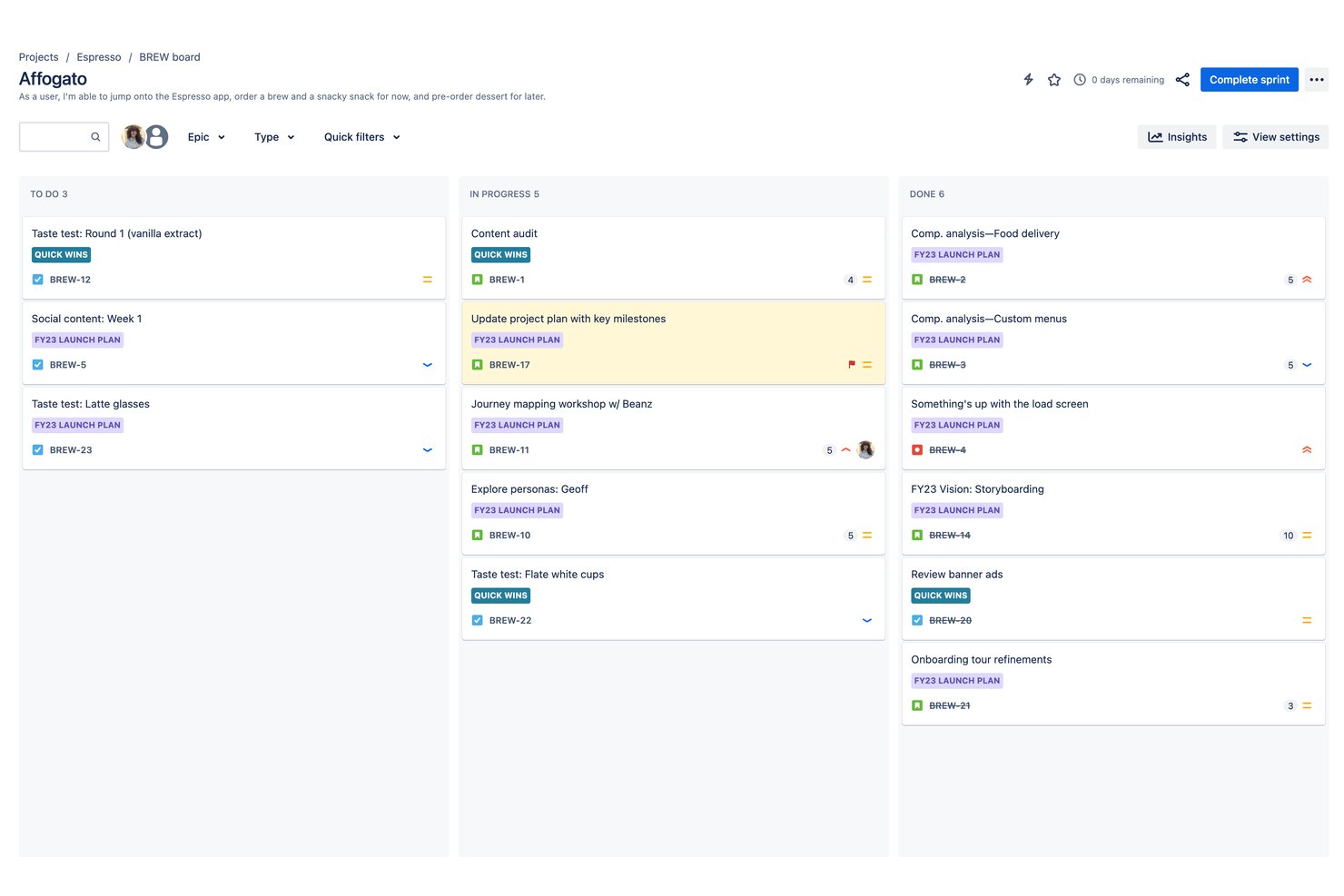
Jira is an agile project management platform built for software development and engineering teams that need customizable Scrum and Kanban boards, sprint planning, and cross-project dependency tracking at scale.
Who Is Jira Best For?
Jira is a natural fit for mid-size to enterprise engineering and product teams that run structured agile delivery across multiple squads or workstreams.
Why Jira Is a Good Orangescrum Alternative
I picked Jira as one of the best because its Scrum boards are genuinely built for complexity, not just simplicity. My team uses sprint backlogs, velocity reports, and customizable workflows to define exactly how each issue moves through delivery. Advanced Roadmaps then lets us track dependencies across multiple epics and squads simultaneously, which is where most project tools fall short.
Jira Key Features
- Customizable workflows: Create and adapt workflows for any unique process or project in your organization.
- Marketplace app integrations: Extend functionality with thousands of add-ons for test management, reporting, and time tracking.
- Role-based permissions: Set granular access and data visibility controls for projects, issues, and admin actions.
- Automation rules: Set up no-code triggers and actions to automate assignments, notifications, and repetitive tasks.
Jira Integrations
Jira offers native integrations with Confluence, Bitbucket, GitHub, Microsoft Teams, Slack, Google Drive, Dropbox, Trello, Zendesk, and Salesforce. An API is available for custom integrations, and it connects with Zapier.
Pros and Cons
Pros:
- Advanced Roadmaps tracks cross-squad dependencies
- Highly customizable issue types and workflows
- Deep sprint planning and velocity reporting
Cons:
- Reporting depth needs paid add-ons
- Setup complexity is high for new admins

ClickUp
Best for customizable task hierarchies
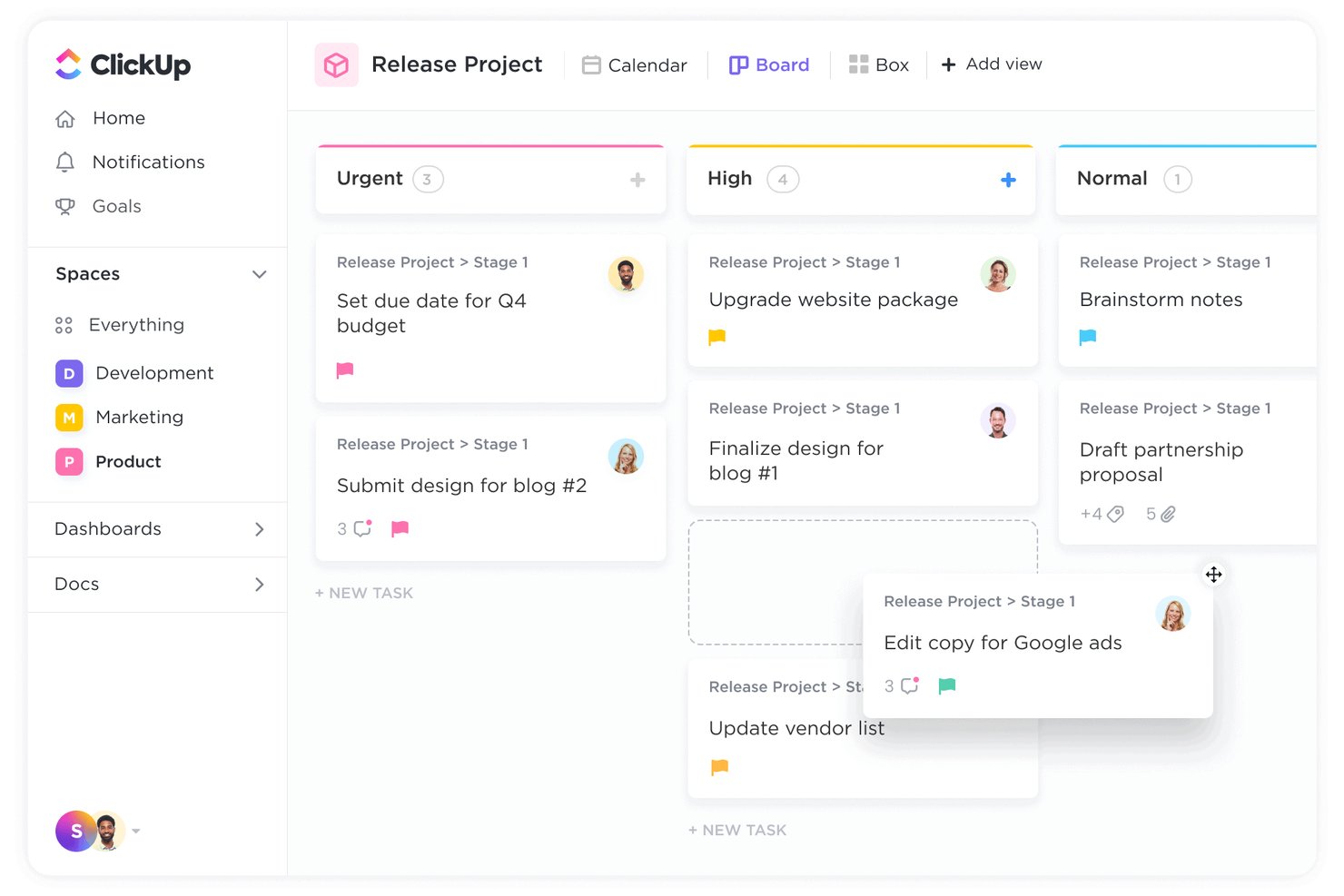
ClickUp is an all-in-one project management platform built for teams that need more flexibility than Orangescrum offers, combining task management, agile sprint planning, time tracking, and reporting in a single, highly configurable workspace.
Who Is ClickUp Best For?
ClickUp suits mid-sized to enterprise tech teams that manage multiple concurrent projects and need deep workflow customization across product, engineering, and design functions.
Why ClickUp Is a Good Orangescrum Alternative
I've included ClickUp in my top picks because its task hierarchy is unlike anything Orangescrum offers: Spaces, Folders, Lists, Tasks, and Subtasks create a nesting structure I can adapt to any workflow. I assign custom statuses, fields, and dependencies at every level, so a sprint ticket for engineering looks completely different from a design review task, even within the same project. Cross-project task linking lets me surface dependencies across workstreams without losing context.
ClickUp Key Features
- In-app chat: Message teammates directly from within any workspace, list, or task without switching tabs.
- Native time tracking: Log hours and add time estimates right on each task, with timesheets and reporting built in.
- Proofing and annotation tools: Leave visual feedback directly on images, PDFs, and documents for creative reviews.
- Portfolio dashboards: Roll up multiple projects into executive-level dashboards with real-time status and workload widgets.
ClickUp Integrations
ClickUp offers 50+ native integrations, including GitHub, GitLab, Slack, Zoom, Google Drive, OneDrive, Dropbox, Microsoft Teams, Zendesk, and Bitbucket. It connects with Zapier and provides an API for custom integrations.
Pros and Cons
Pros:
- No-code automation rules across any workflow
- Sprint and backlog views built in natively
- Granular task hierarchy with unlimited nesting levels
Cons:
- Mobile app lacks full desktop feature parity
- Setup complexity grows quickly with large teams
New Product Updates from ClickUp
ClickUp Adds Meetings Hub, Super Agent Templates, and ZoomInfo Integration
ClickUp adds a searchable Meetings Hub, new ways to clone and template Super Agents, and a ZoomInfo integration through the App Center. These updates improve meeting retrieval, agent reuse, and access to sales intelligence. For more information, visit ClickUp’s official site.

Best spreadsheet-style project planning
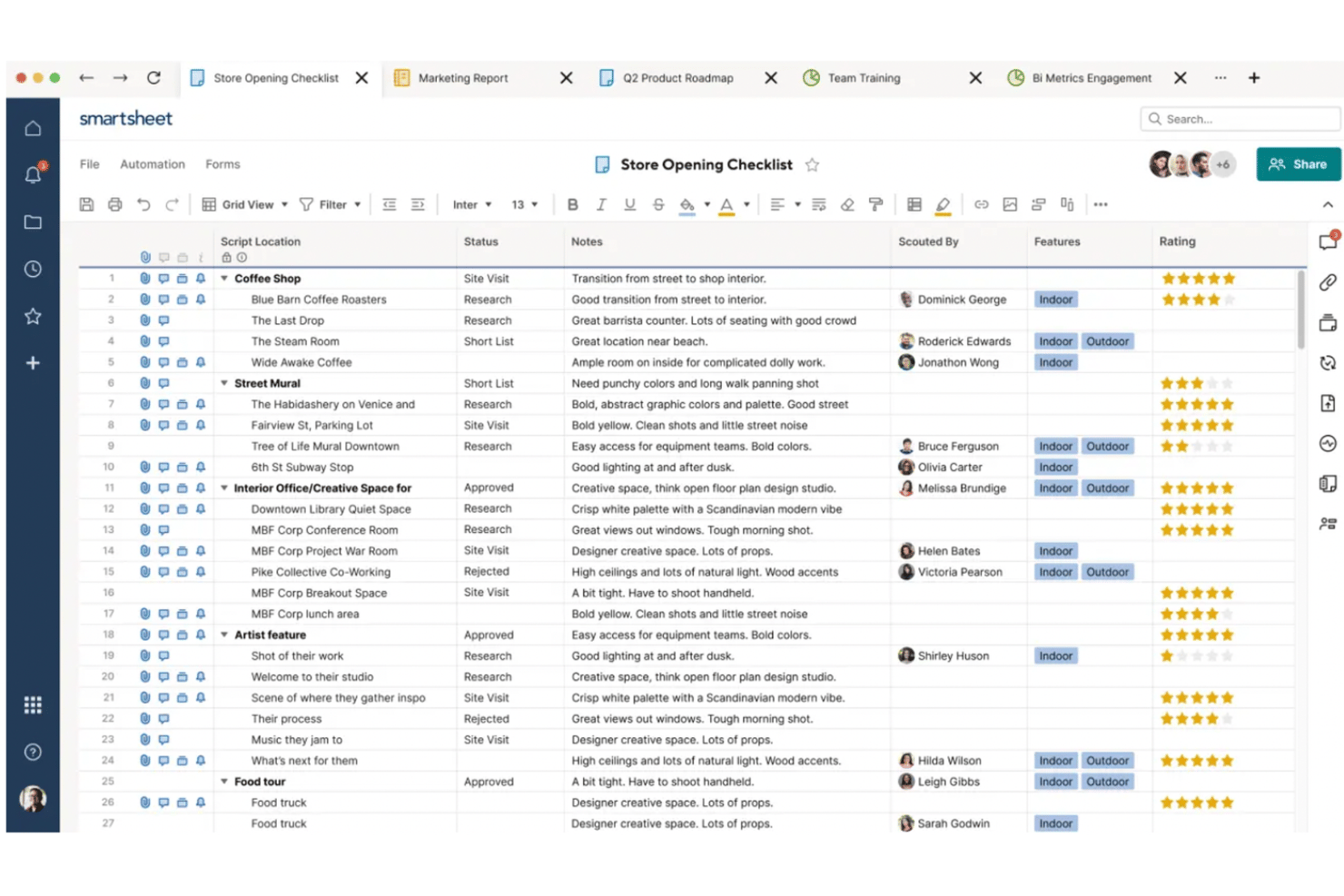
Smartsheet is a grid-based project management platform that gives project managers and PMO teams a structured, spreadsheet-style workspace for planning work, tracking dependencies, and managing resources across multiple concurrent projects.
Who Is Smartsheet Best For?
Smartsheet fits mid-size to enterprise teams that already work in spreadsheets and want to add project tracking, automation, and portfolio visibility without switching paradigms.
Why Smartsheet Is a Good Orangescrum Alternative
I picked Smartsheet as one of the best because its grid-based interface lets my team build project plans that feel like spreadsheets but behave like full project management systems. I can define task dependencies, apply cross-sheet formulas, and watch changes cascade across related rows in real time. Control Center is the feature I rely on most: it lets me push a standardized project template across dozens of active projects at once, without touching each sheet individually.
Smartsheet Key Features
- Multiple project views: Switch between Gantt, board, calendar, timeline, and grid views to monitor work in your preferred format.
- Automated workflows: Build multi-step automations for status updates, notifications, and custom business rules without code.
- Resource management add-on: Assign, schedule, and reallocate team members across projects to balance workload and resolve conflicts.
- AI dashboard builder: Use AI to quickly generate project dashboards from your sheet data for fast reporting and visualization.
Smartsheet Integrations
Smartsheet offers native integrations with Jira, Microsoft Teams, Slack, Salesforce, Google Drive, DocuSign, and Box, and is available on Zapier. An API is available for custom integrations.
Pros and Cons
Pros:
- Control Center scales templates across many projects
- Cross-sheet formulas work across multiple projects
- Grid view mirrors familiar spreadsheet behaviour
Cons:
- No built-in time tracking on base plans
- Resource management requires a paid add-on
New Product Updates from Smartsheet

Smartsheet Adds Non-Plan User Management in Admin Center
Smartsheet adds a Non plan users tab to the Seat types and true-up page in Admin Center. This lets system admins review non-plan users and add them to the plan or remove them from the organization in one place. For more information, visit Smartsheet’s official site.
Hive
Best native messaging and action cards integration
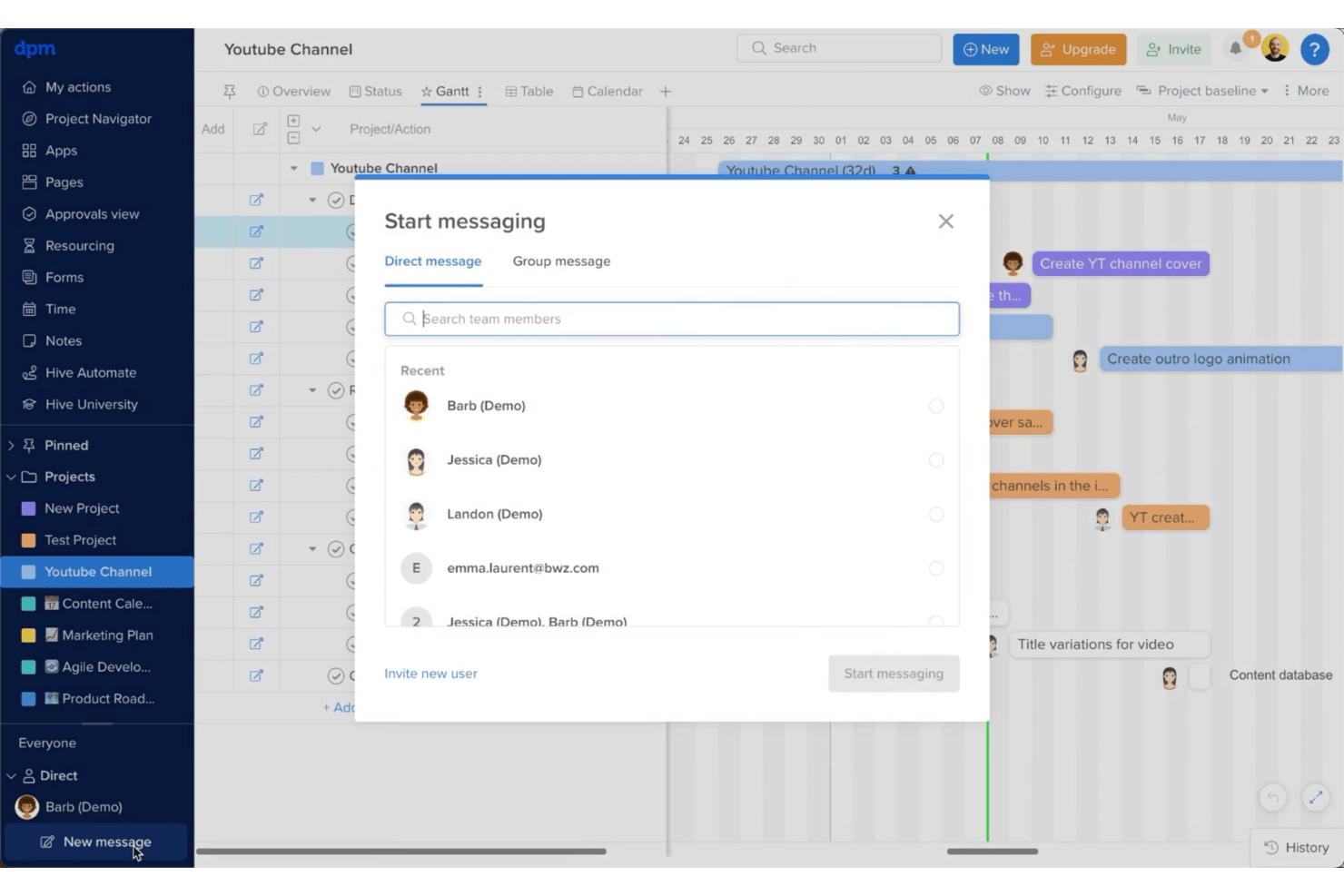
Hive is a project management platform for cross-functional teams that combines task tracking, multiple project views, and built-in team messaging in a single workspace.
Who Is Hive Best For?
Hive is a strong fit for small to mid-sized teams that need project management and team communication in one place, without juggling multiple tools.
Why Hive Is a Good Orangescrum Alternative
I picked Hive because its native messaging lives directly alongside action cards, so my team can turn a conversation into an assigned, trackable task without switching apps. In practice, that means a quick chat thread becomes a task with a due date, assignee, and status in seconds. I also appreciate that Hive Notes supports real-time co-editing, so documents and updates live in the same workspace as the tasks they relate to.
Hive Key Features
- Multiple project views: Switch between Kanban, Gantt, calendar, list, and table views for flexible project visualization.
- Built-in time tracking: Log hours on tasks using native timers and generate timesheet reports.
- Custom fields and labels: Create tailored fields and tagging structures to match your team’s workflow.
- Portfolio management: Track progress, status, and priorities across multiple projects in a unified dashboard.
Hive Integrations
Hive offers native integrations with Slack, Zoom, Google Drive, Microsoft OneDrive, Box, Jira, Salesforce, Dropbox, GitHub, and Zapier. An API is available for custom integrations.
Pros and Cons
Pros:
- Real-time document co-editing within the workspace
- Supports Gantt, portfolio, and workload views
- Native messaging built directly into tasks
Cons:
- Reporting dashboards offer limited customization options
- Mobile app lacks full desktop functionality

Wrike
Best cross-project reporting dashboards
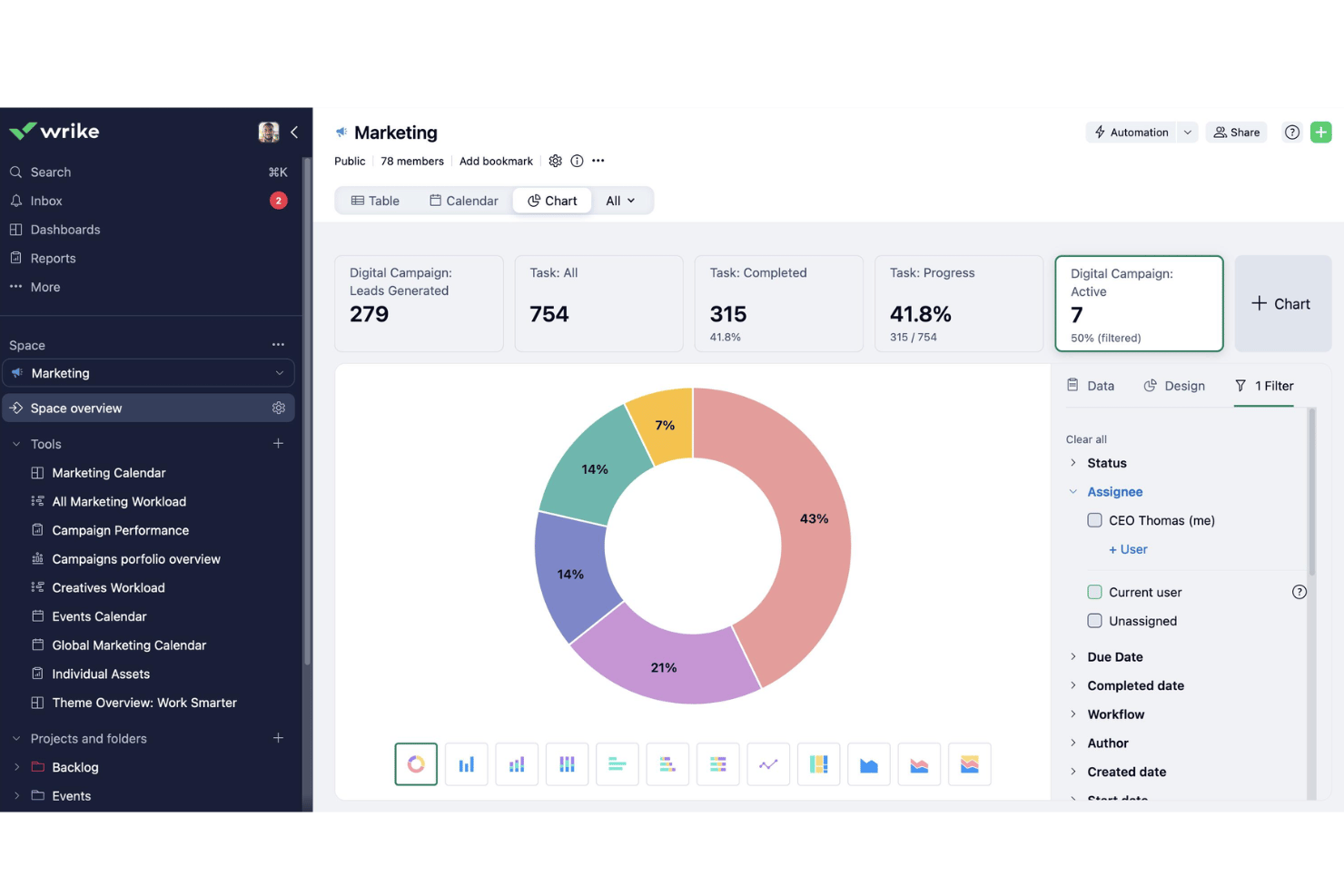
Wrike is a work management platform built for cross-functional teams that need to coordinate complex, multi-project work with custom workflows, resource planning, and detailed reporting across every active initiative.
Who Is Wrike Best For?
Wrike is a strong fit for mid-size to enterprise teams managing multiple concurrent projects across product, engineering, and operations.
Why Wrike Is a Good Orangescrum Alternative
I've included Wrike in my top picks because its cross-project reporting dashboards are genuinely in a class of their own. I can build fully custom dashboards that pull live data across every active project simultaneously, tracking task status, time logged, and team workload in one view. The advanced reporting and BI tools let me slice that data by project, assignee, or date range, then export it for stakeholder reviews without rebuilding anything from scratch each time.
Wrike Key Features
- Wrike Whiteboard: Collaborate visually on brainstorming, mapping workflows, and capturing action items in real time.
- Custom item types: Define and manage work your way with custom task and project structures tailored to each team.
- Two-way sync with Jira and GitHub: Keep development, product, and project teams aligned with bi-directional real-time updates.
- No-code workflow automation: Set up rule-based automations to support common processes and reduce manual task updates.
Wrike Integrations
Wrike offers hundreds of integrations through its built-in integrations and marketplace, including tools like Google Workspace, Microsoft 365, Salesforce, Slack, Jira, GitHub, Dropbox, Box, Zoom, and Adobe Creative Cloud. It also supports Zapier and provides an API for custom integrations.
Pros and Cons
Pros:
- Highly customizable workflows without writing code
- Interactive Gantt chart available
- Cross-project dashboards with real-time data rollups
Cons:
- Gantt chart view unavailable on Team plan
- Custom fields locked behind Enterprise tier
New Product Updates from Wrike

Wrike Redesigns AI Agent Builder
Wrike redesigns its AI Agent Builder with a side-by-side setup, Scopes, sentence-style triggers and actions, and clearer filters. These changes make it easier to configure, test, and manage agent behavior. For more information, visit Wrike’s official site.
Nifty
Best milestone tracking with flexible views
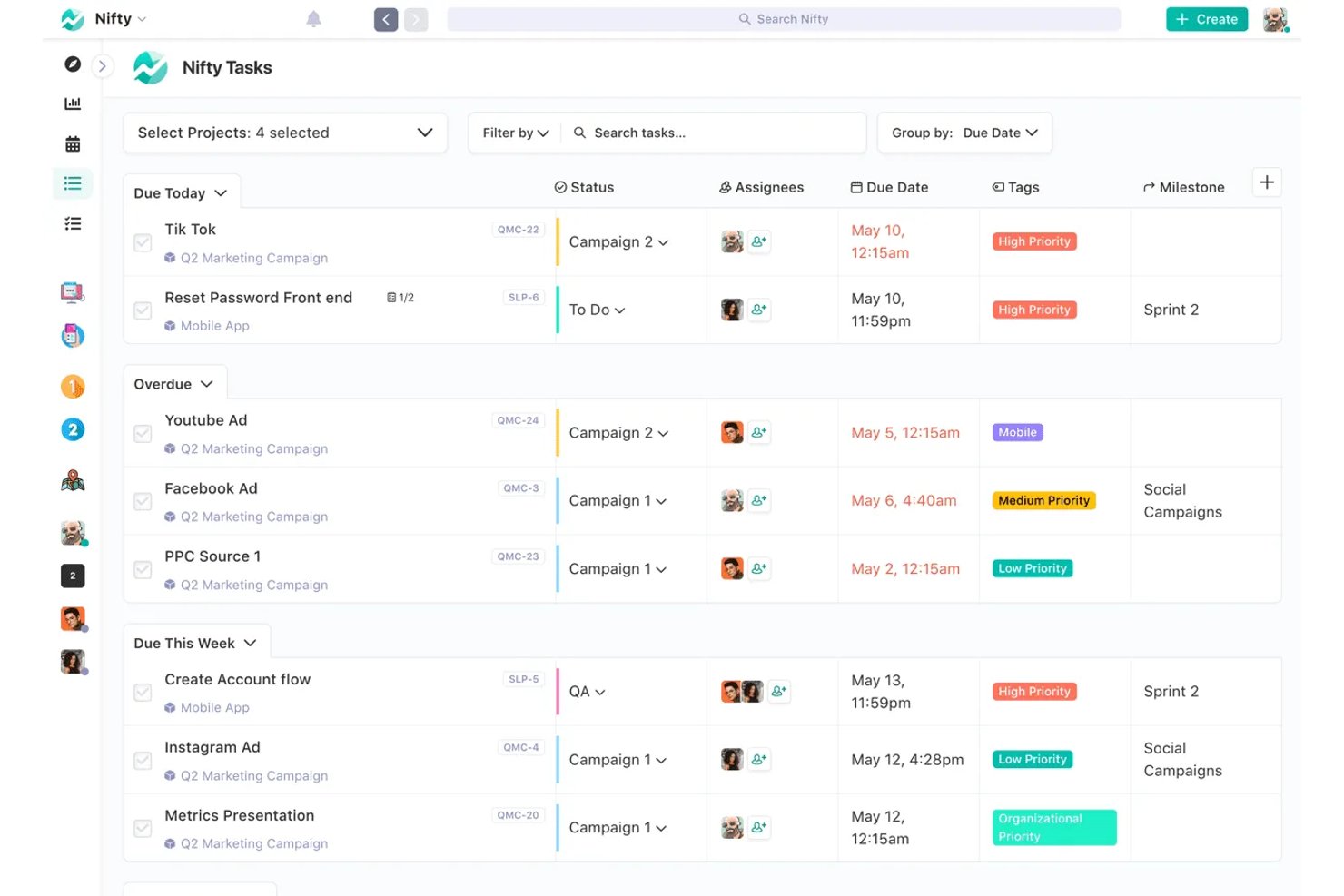
Nifty is an all-in-one project management platform built for cross-functional teams who need to coordinate tasks, milestones, docs, and team communication from a single workspace instead of switching between multiple tools.
Who Is Nifty Best For?
Nifty is a strong fit for small-to-mid-sized teams and agencies managing client projects that require clear milestone visibility alongside day-to-day task execution.
Why Nifty Is a Good Orangescrum Alternative
I picked Nifty as one of the best because its milestone tracking goes beyond a basic timeline. Progress rolls up automatically from linked tasks, so I can see exactly how close a milestone is to completion without any manual updates. I also appreciate being able to switch between Kanban, List, Timeline, Calendar, and Swimlane views on the same project, which makes it easy to adapt how I'm looking at work depending on what the sprint or delivery phase calls for.
Nifty Key Features
- Orbit AI assistant: Use prompts to automate project setup, task generation, and document drafting directly within your workspace.
- Team workloads view: See resource allocation and capacity indicators for individuals and teams across all projects.
- In-app discussions: Start threaded chat conversations that stay linked to projects or tasks for clear, contextual team communication.
- Native form builder: Create intake forms that automatically generate tasks, docs, or projects from external submissions.
Nifty Integrations
Nifty offers native integrations with Slack, Google Drive, Zoom, GitHub, Microsoft OneDrive, and Dropbox. Zapier and an API are also available for custom integrations.
Pros and Cons
Pros:
- Built-in docs, chat, and task management
- Five-plus project views in one workspace
- Automatic milestone rollup from linked tasks
Cons:
- Mobile app lags behind the desktop
- Reporting depth limited for larger teams

Asana
Best for visual timeline and dependency mapping
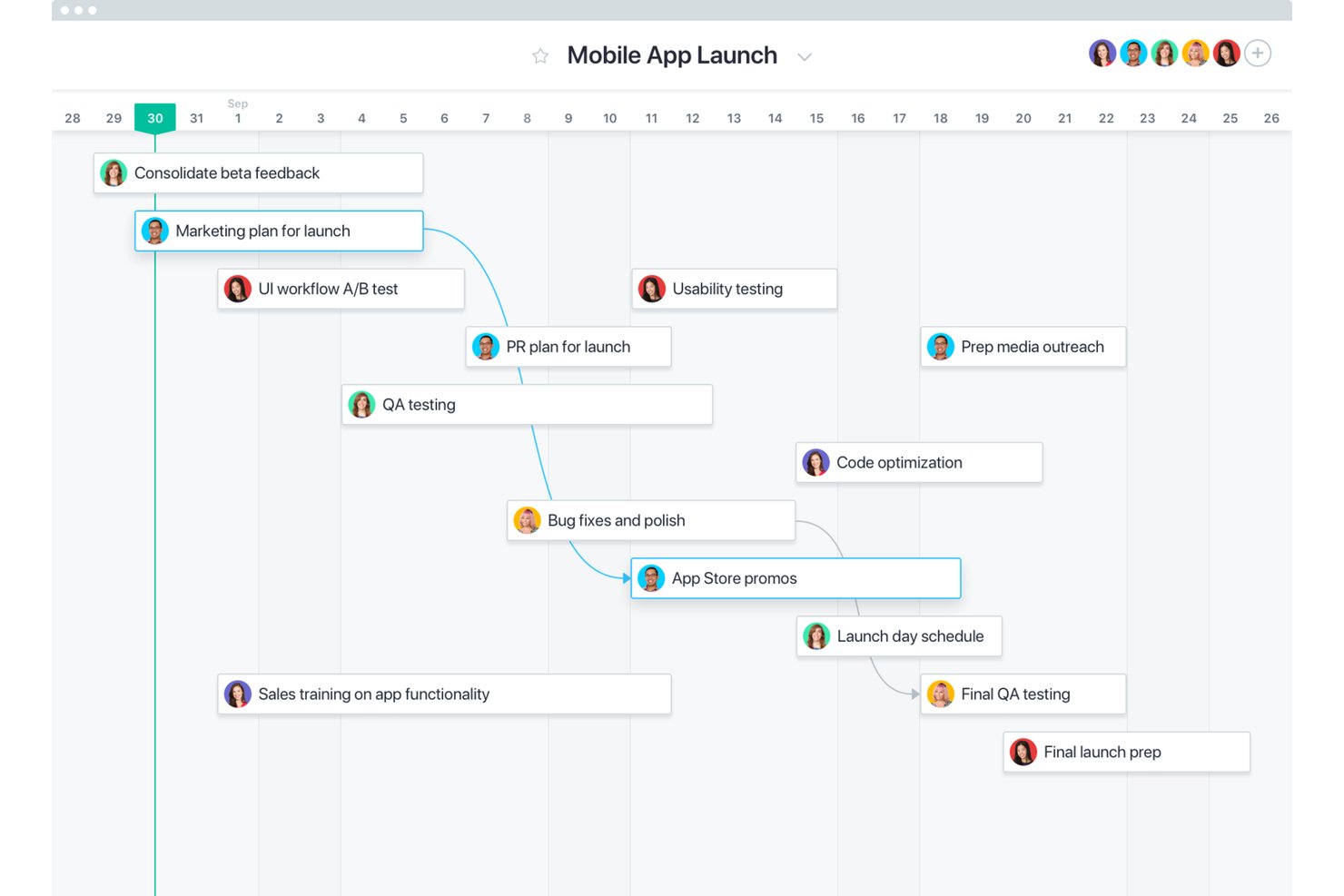
Asana is a work management platform built for cross-functional teams who need to coordinate tasks, track project progress, and manage workloads across multiple concurrent initiatives without losing visibility or control.
Who Is Asana Best For?
Asana is a strong fit for PMO directors and team leads at mid-size to enterprise companies managing multiple workstreams across product, engineering, and design.
Why Asana Is a Good Orangescrum Alternative
Asana earns its spot on my shortlist because of how well its Timeline view handles dependency mapping across complex, multi-team projects. I can link tasks across different projects, set dependencies, and immediately see how a delay in one workstream cascades through the schedule. The Critical Path feature (on Advanced plans) highlights exactly which tasks are blocking delivery, so I'm never guessing where the bottleneck is.
Asana Key Features
- No-code automation: Build workflow automations for task assignment, status changes, and notifications to reduce manual updates.
- Portfolio dashboards: Monitor progress and health across multiple projects from a single portfolio view.
- Resource workload views: Visualize team capacity and allocations to avoid overburdening any individual or group.
- Proofing and annotation: Mark up images, PDFs, or design files directly within tasks to support feedback on creative assets.
Asana Integrations
Asana offers 200+ native integrations, including Slack, Microsoft Teams, Google Drive, Dropbox, Zoom, Jira Cloud, GitHub, Salesforce, Figma, and Adobe Creative Cloud. It also supports Zapier and provides an API for custom integrations.
Pros and Cons
Pros:
- Free plan supports unlimited tasks and projects
- No-code automations reduce repetitive admin tasks
- Timeline view handles cross-project dependencies well
Cons:
- No self-hosted or open-source deployment option
- Reporting locked behind Advanced tier plans
ProofHub
Best for in-app proofing and document review
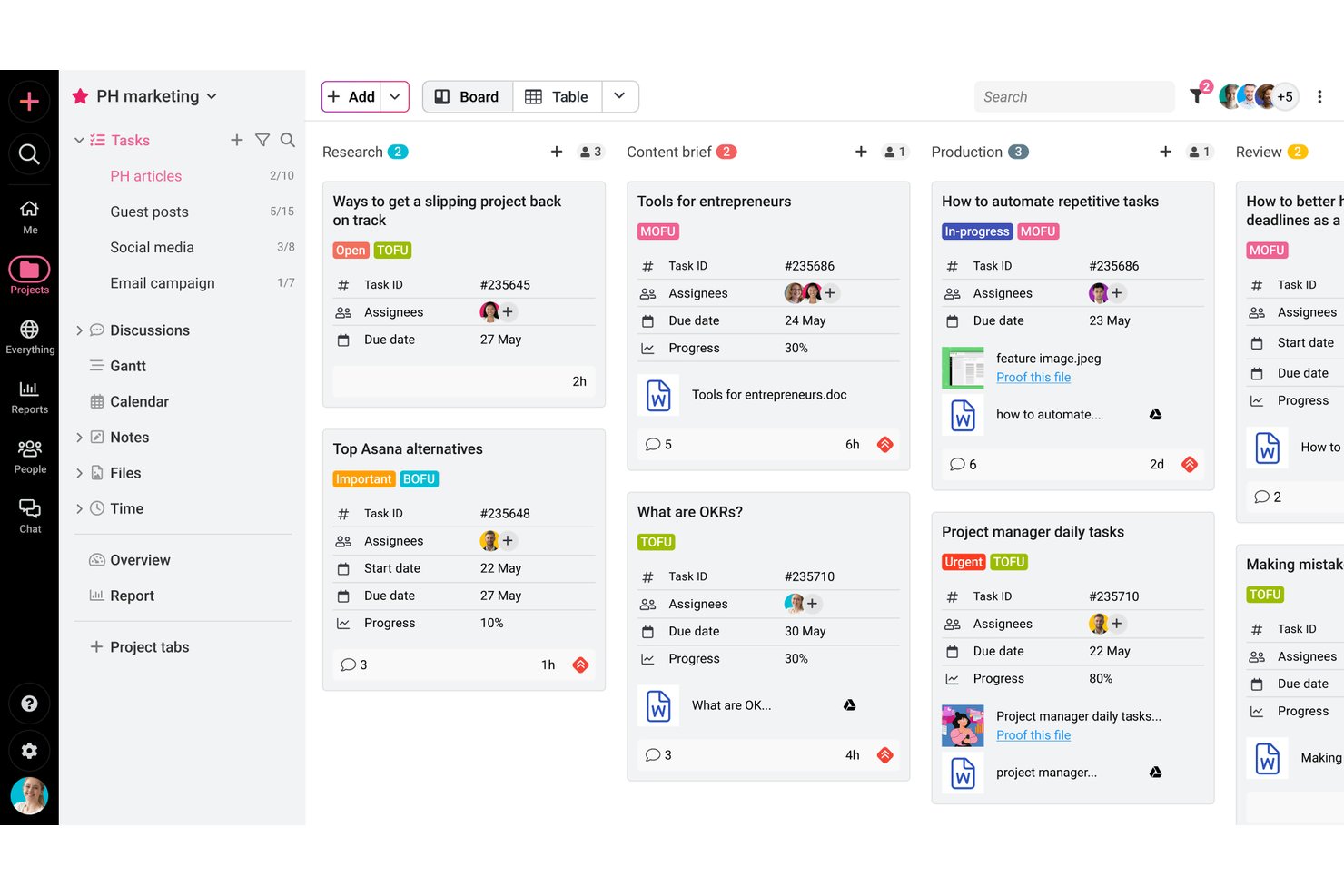
ProofHub is an all-in-one project management and team collaboration platform built for PMs and cross-functional teams who need task tracking, Gantt charts, time logging, and structured file review in a single flat-rate workspace.
Who Is ProofHub Best For?
ProofHub is a strong fit for small to mid-sized teams and agencies that manage creative or client-facing projects and want to keep everyone on a single platform.
Why ProofHub Is a Good Orangescrum Alternative
I've included ProofHub in my top picks because its built-in proofing tool genuinely sets it apart. When my team reviews a design or document, we leave markup annotations and inline comments directly on the file, track version history, and send formal approvals, all without leaving the platform. That kind of structured review loop replaces what would otherwise be a messy chain of emails or Slack screenshots, and Orangescrum simply doesn't offer anything close to it natively.
ProofHub Key Features
- Gantt chart planning: Visualize project timelines, set task dependencies, and identify roadblocks using interactive Gantt charts.
- Project templates: Create reusable templates for repeatable workflows and faster project setup.
- Custom roles and permissions: Configure detailed access controls for users and clients to manage visibility and participation.
- Integrated time tracking: Log billable or non-billable hours directly on tasks and export timesheets for invoicing.
ProofHub Integrations
ProofHub offers native integrations with Google Drive, Dropbox, Box, OneDrive, and supports custom integrations through its API.
Pros and Cons
Pros:
- Time tracking with billable hour categorization
- Gantt and Kanban views included natively
- Built-in proofing with markup annotation tools
Cons:
- Workflow automation options are fairly basic
- Reporting dashboards are limited in depth

Best open-source solution with self-hosting
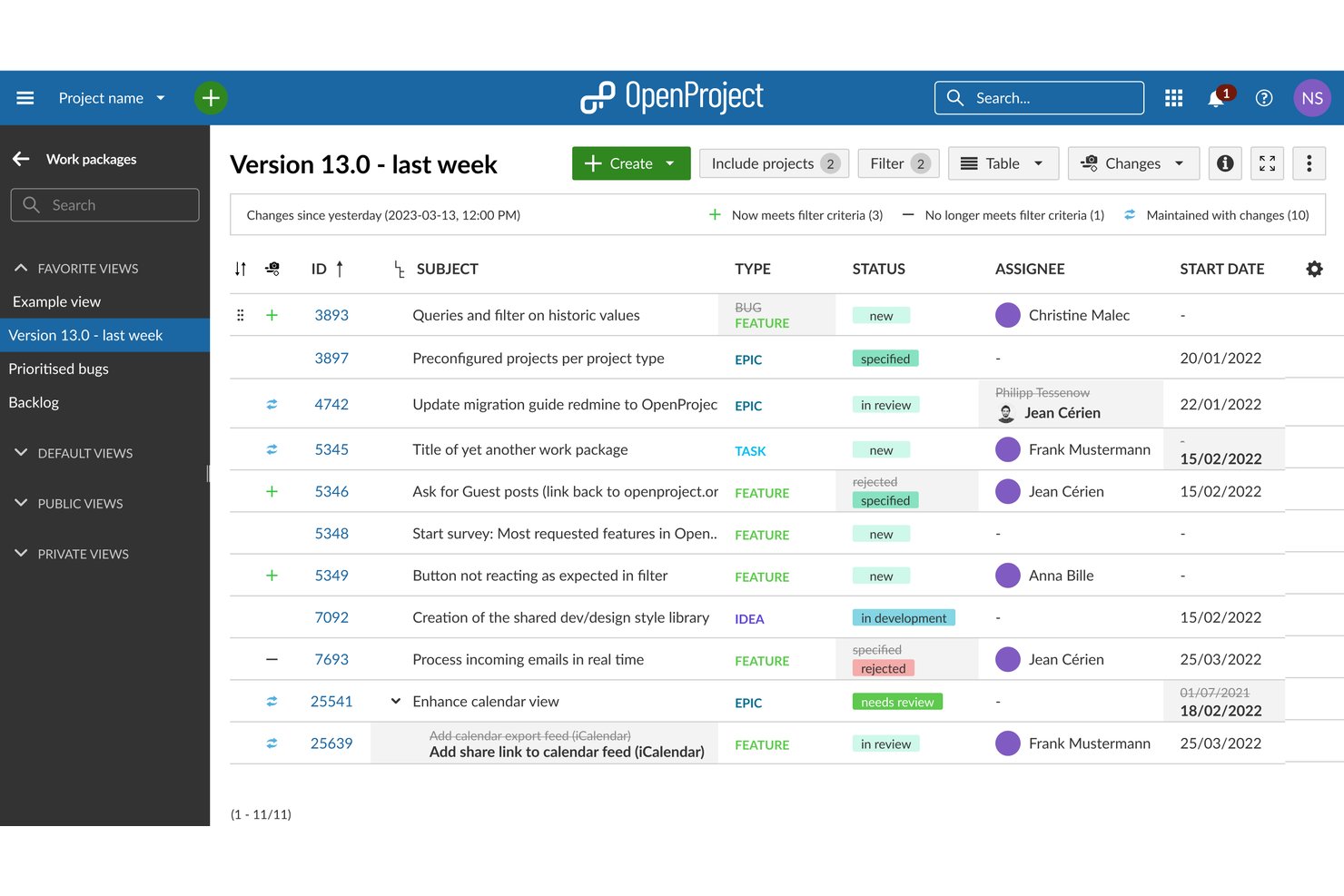
OpenProject is an open-source project management platform for teams that need Scrum boards, Gantt charts, and time tracking without relying on a proprietary SaaS system—giving you full control over your data and infrastructure.
Who Is OpenProject Best For?
OpenProject is a strong fit for engineering and IT teams at mid-size organizations that require self-hosted infrastructure due to security, compliance, or data sovereignty requirements.
Why OpenProject Is a Good Orangescrum Alternative
I've included OpenProject in my top picks because it's the only tool on this list where you can run the full project management stack on your own infrastructure, completely free. With the Community edition, my team gets Scrum boards, Gantt charts, work package hierarchies with dependencies, and time tracking without a per-user fee or a vendor controlling our data. When compliance or internal security policies rule out SaaS tools, OpenProject's self-hosted GPL v3 edition removes that blocker entirely.
OpenProject Key Features
- Agile boards: Create and manage Scrum or Kanban boards to run sprints, manage backlogs, and track sprint progress visually.
- Work package hierarchies: Organize tasks into nested work packages, phases, and milestones for complex, multi-phase projects.
- Nextcloud integration: Attach, access, and manage documents directly from integrated Nextcloud file storage in your project workspace.
- Meetings module: Prepare agendas, record decisions, and link action items to work packages within structured meeting records.
OpenProject Integrations
OpenProject offers native integrations with Nextcloud, GitHub, GitLab, Microsoft OneDrive, and SharePoint. An API is available for custom integrations.
Pros and Cons
Pros:
- Built-in meeting agenda module
- Native Scrum and Kanban board support
- Full self-hosting with open-source codebase
Cons:
- Setup and maintenance require technical expertise
- Limited native third-party app integrations

Teamwork.com
Best built-in time tracking for client projects
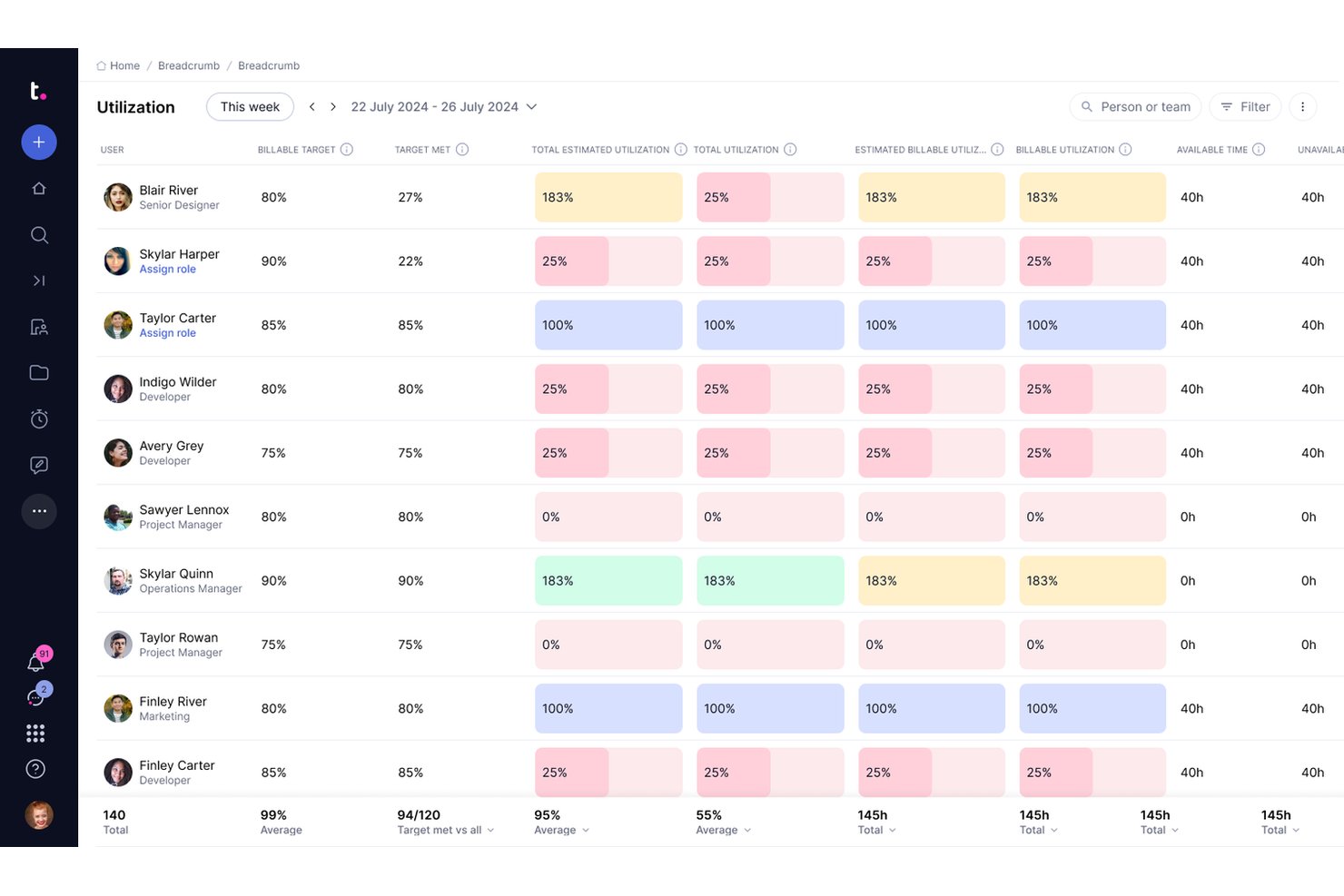
Teamwork.com is a project management platform built for agencies and client services teams that need to manage tasks, track billable time, and report on project profitability all in one place.
Who Is Teamwork.com Best For?
It's a strong fit for mid-sized agencies and professional services firms that bill clients by the hour and need project delivery tied directly to budgets.
Why Teamwork.com Is a Good Orangescrum Alternative
I picked Teamwork.com because its time tracking goes far beyond simple hour logging. You can set billable rates by user, role, task, or project, then generate invoices directly from logged hours without exporting to a separate tool. I also appreciate the real-time profitability view, which shows whether a project is tracking over budget before it wraps, not after.
Teamwork.com Key Features
- Workload planning: Visualize individual and team capacity across projects to prevent overallocation.
- No-code workflow automations: Set up automated task assignments, notifications, and status changes without scripting.
- Portfolio dashboards: Track progress, budgets, and risks across all projects in a single executive view.
- Role-based permissions: Control access to tasks, projects, and client data for different team members and stakeholders.
Teamwork.com Integrations
Teamwork.com offers native integrations with Slack, Google Drive, Dropbox, HubSpot, Xero, QuickBooks, Microsoft Teams, and Zapier. An API is also available for custom integrations.
Pros and Cons
Pros:
- Granular billable rate controls per user
- Dedicated client portal for external access
- Native invoicing tied to tracked hours
Cons:
- Advanced reporting locked to higher plans
- Interface feels cluttered for smaller teams
Other Orangescrum Alternatives
Here are some additional Orangescrum alternative options that didn’t make it onto my shortlist, but are still worth checking out:
- Zoho Projects
Automation tools for recurring tasks
- monday.com
For custom agile workflow builders
- Basecamp
For centralized team communication
- Paymo
For project-based client invoicing
- Nutcache
For integrated expense and budget tracking
- Celoxis
For customizable portfolio-level reporting
- Trello
Card-based project visualization
- Microsoft Project
For advanced schedule and resource modeling
- GanttPRO
Interactive Gantt chart interface
- Airtable
Database-style project organization


How I Evaluate Orangescrum Alternatives
I start by checking whether a tool covers the basics Orangescrum handles—task dependencies, sprint boards, time logging, and workload views. From there, I look at differentiators like automation depth, proofing tools, and portfolio rollups.
Core Functionality (Table Stakes For This List)
When I'm selecting tools for my list, I rank each one on a scale from 0 (does not offer the functionality) to 5 (excels in this area) for each core functionality listed below. Then, I calculate the tool's total score as a percentage. Each tool needs to achieve a minimum total score of 75% to be considered for inclusion.
- Task Management: I look for subtasks, dependencies, and custom fields—like linking a design task to a dev sprint so nothing slips through handoffs.
- Multiple Project Views: Teams need Kanban, list, Gantt, and calendar views at minimum so PMs and engineers can each track work their preferred way.
- Time Tracking: I check for built-in timers, manual entry, and timesheet reports, especially when logging billable hours across client projects.
- Team Collaboration: Comments and file sharing should live on the task itself so distributed teams aren't bouncing between apps for context.
- Resource Management: I evaluate workload views and capacity indicators to see how well a tool flags overallocated team members across concurrent sprints.
- Reporting & Dashboards: Configurable dashboards matter—I look for tools that let you build reports on sprint velocity, task status, and time spent.
Once I have a list of tools that meet the criteria, I consider what sets each platform apart.
Differentiating Factors (What Sets Vendors Apart)
Here's how I compare and contrast different vendors:
Standout Features
No-code automations are a big differentiator. I look for tools that let PMs build rules—like auto-assigning QA tasks when a dev task moves to "done"—without needing engineering help. Portfolio rollups also matter when you're reporting across multiple initiatives, since directors need a single view of status, budgets, and risks. I check for in-app proofing and annotation too, which saves creative teams from exporting assets to separate review tools.
Beyond Features
Deployment flexibility matters here because Orangescrum is one of the few tools offering self-hosted and open-source options. I check whether alternatives provide cloud and on-premise hosting for teams with data residency requirements. Integration depth is another factor—I look for native connectors to GitHub, Slack, and Google Drive, plus an open API for custom builds. Pricing transparency counts too, especially whether time tracking or reporting features get locked behind higher tiers.
Why Look For An Orangescrum Alternative?
While Orangescrum is a solid choice of scrum software, there are several reasons why growing teams and small businesses seek out alternative solutions based on user reviews. You might be looking for an Orangescrum alternative because…
- Needing deeper portfolio and program management views across agile methodologies
- Wanting a more user-friendly project management tool with customizable templates and custom workflow options
- Looking for more third-party app integrations to connect your CRM or ERP
- Requiring advanced PMO-level reporting, roadmap visibility, and project tracking dashboards
- Preferring stronger onboarding and responsive customer support
- Needing deployment options beyond cloud-based SaaS, such as open-source software
If any of these sound like you, you’ve come to the right place. My list contains several scrum software options that are better suited for teams facing these challenges with Orangescrum and looking for alternative solutions.
Orangescrum Key Features
Here are some of the key features of Orangescrum to help you contrast and compare what alternative work management solutions offer:
- Task management: Organize, assign, and prioritize tasks using subtasks, due dates, dependencies, and statuses to keep complex projects on track.
- Multiple project views: Switch between Kanban boards, task lists, and Gantt charts so your team can visualize work in the way that best fits their workflow.
- Time tracking: Track time manually or with built-in timers, link time entries to tasks or projects, and handle invoicing with timesheet reports for clear productivity insights.
- Resource management: View team workload, optimize resource allocation based on capacity, and identify resource bottlenecks during project planning.
- Team collaboration: Comment on tasks, tag teammates, use document sharing and file sharing, and centralize communication within an all-in-one workspace.
- Reporting and dashboards: Build customizable dashboards and pull reports on project progress, time allocation, or team performance to give stakeholders real-time insights.
- Workflow automations: Set up automation rules to handle repetitive actions, such as bug tracking updates, issue tracking assignments, or sending notifications for increased efficiency.
- Document management: Attach project files directly to tasks, maintain file version history, and ensure everyone is working from the latest documents.
- Sprint and backlog management: Plan, run, and track sprints using backlogs and story points to support agile teams with clear visibility.
- Role-based permissions: Control access to projects and information by assigning permission levels based on roles, improving data security and oversight.