

10 Best Enterprise Project Management Software Of 2026

10 Best Enterprise Project Management Software Shortlist


Managing project workflows across large teams gets tangled quickly when daily tasks lose sight of organizational goals. I led enterprise projects for over 20 years, so I know how quickly missing portfolio visibility creates isolated teams and delayed deliverables.
I evaluated dozens of tools that manage resource allocation, user permissions, and multi-team dependencies to find options that work. Read on to see my top enterprise project management software picks for your team.
Why Trust Our Software Recommendations
Our team has been testing and reviewing software since 2012. As project managers ourselves, we know how difficult—and important—it is to choose the right software.
For this guide, we evaluated tools using hands-on testing and independent research, scoring tools using our selection criteria. We also draw on insights from industry thought leaders and practicing project management experts.
Our reviews reflect our human editorial judgment, not a sales pitch.
Expert reviewers:
Enterprise Project Management Software Comparison Table
This comparison table summarizes pricing details for my top enterprise project management software selections:
| Tool | Best For | Trial Info | Price | ||
|---|---|---|---|---|---|
| 1 | Best for project profitability tracking | Free trial available | From $10/user/month (billed annually) | Website | |
| 2 | Best for scalability | 14-day free trial | Pricing upon request | Website | |
| 3 | Best for resource scheduling | Free demo available | Pricing upon request | Website | |
| 4 | Best for global remote teams | 14-day free trial | From $10/user/month (billed annually) | Website | |
| 5 | Best for data protection | Free plan available | From $9/user/month (billed annually) | Website | |
| 6 | Best for strategy-to-execution portfolio planning | Free trial available | From $10/user/month (billed annually) | Website | |
| 7 | Best for large-scale CPM scheduling | Free demo available | From $125/user/month | Website | |
| 8 | Best for multi-currency portfolio financials | Free demo available | Pricing upon request | Website | |
| 9 | Best for enterprise portfolio-to-strategy alignment | Free demo available | Pricing upon request | Website | |
| 10 | Best for turnkey PPM with scenario planning | Free demo available | Pricing upon request | Website |


Best Enterprise Project Management Software Reviews
Here are my detailed descriptions for each tool so you can differentiate and pick the right one for your needs.

Best for project profitability tracking
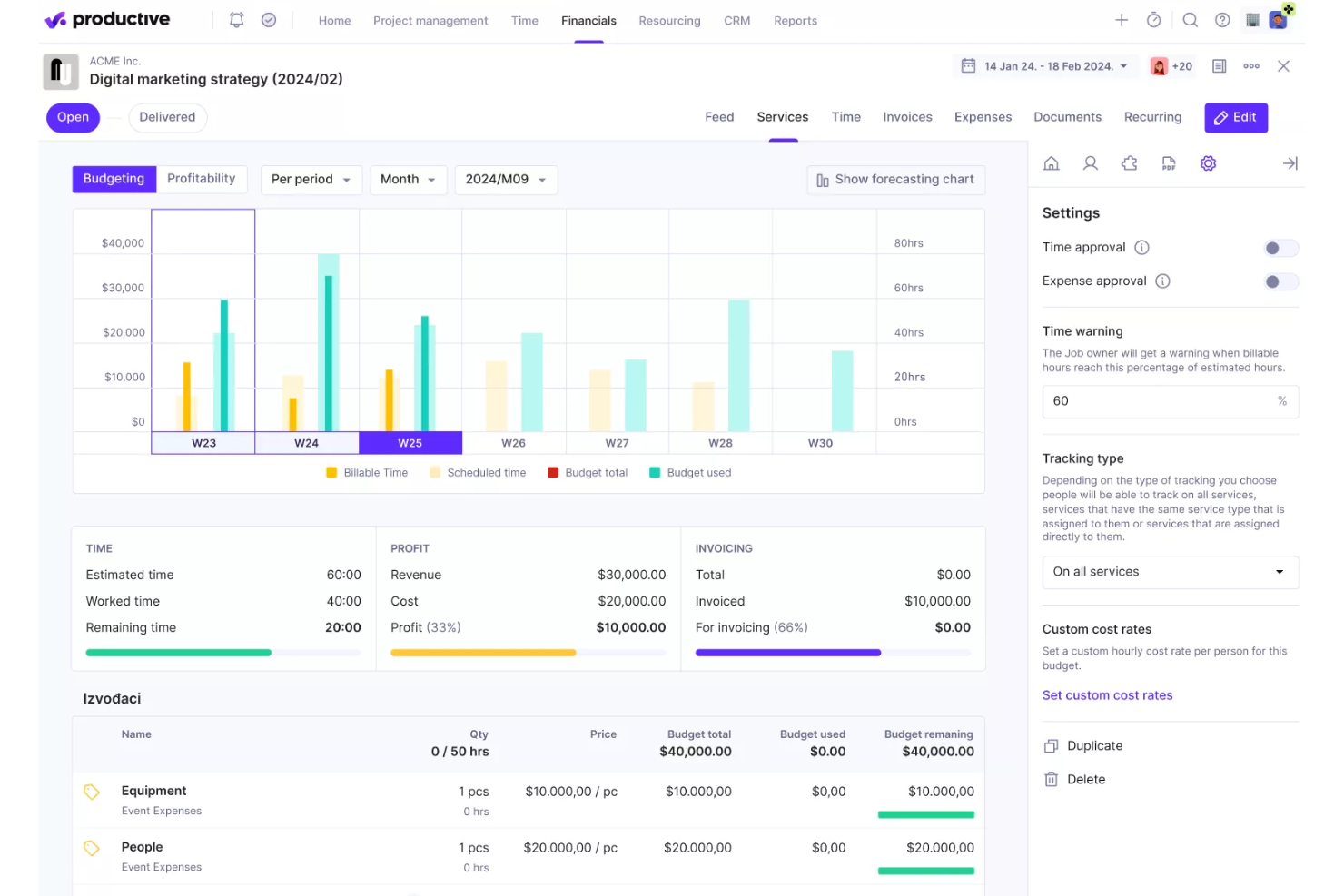
Productive is an agency-focused project management and professional services automation platform that brings together resource planning, time tracking, budgeting, invoicing, and financial forecasting in a single system.
Who Is Productive Best For?
Productive is a strong fit for agencies and professional services firms that need to manage project finances, billable time, and team utilization in one place.
Why I Picked Productive
I picked Productive as one of the best because its approach to project profitability is more granular than most PM tools offer. It tracks margin at the level of individual services, clients, and team members, not just at the project level. Features like overhead calculation and revenue recognition give finance-minded teams a clear picture of where money is actually made or lost across active work.
Productive Key Features
- Resource planning and scheduling: Organize workloads and forecast team utilization across client projects in a single calendar view.
- Time tracking with approval flows: Log billable and non-billable hours and enable multi-level approval processes directly in the platform.
- Automated invoicing: Generate and send customizable invoices based on tracked project work, expenses, and rates.
- SOC 2 Type II compliance: Meet enterprise security standards with enforced single sign-on, audit logs, and centralized permissions management.
Productive Integrations
Productive offers native integrations with Xero, QuickBooks, Slack, Jira, HubSpot, BambooHR, and Google Calendar. Zapier and an API are also available for custom integrations.
Pros and Cons
Pros:
- Combines resourcing and billing in one tool
- Built-in financial reporting across all projects
- Tracks profitability at service and client level
Cons:
- Limited reporting customization options
- Limited portfolio-level governance for large enterprises
New Product Updates from Productive
Productive Adds Voice Dictation, Slack Connector, Proposals, and Overtime
Productive adds voice dictation, a Slack Connector, proposal controls, and overtime tracking. These updates support faster AI interactions, client proposals, and time management. For more information, visit Productive’s official site.

Wrike
Best for scalability
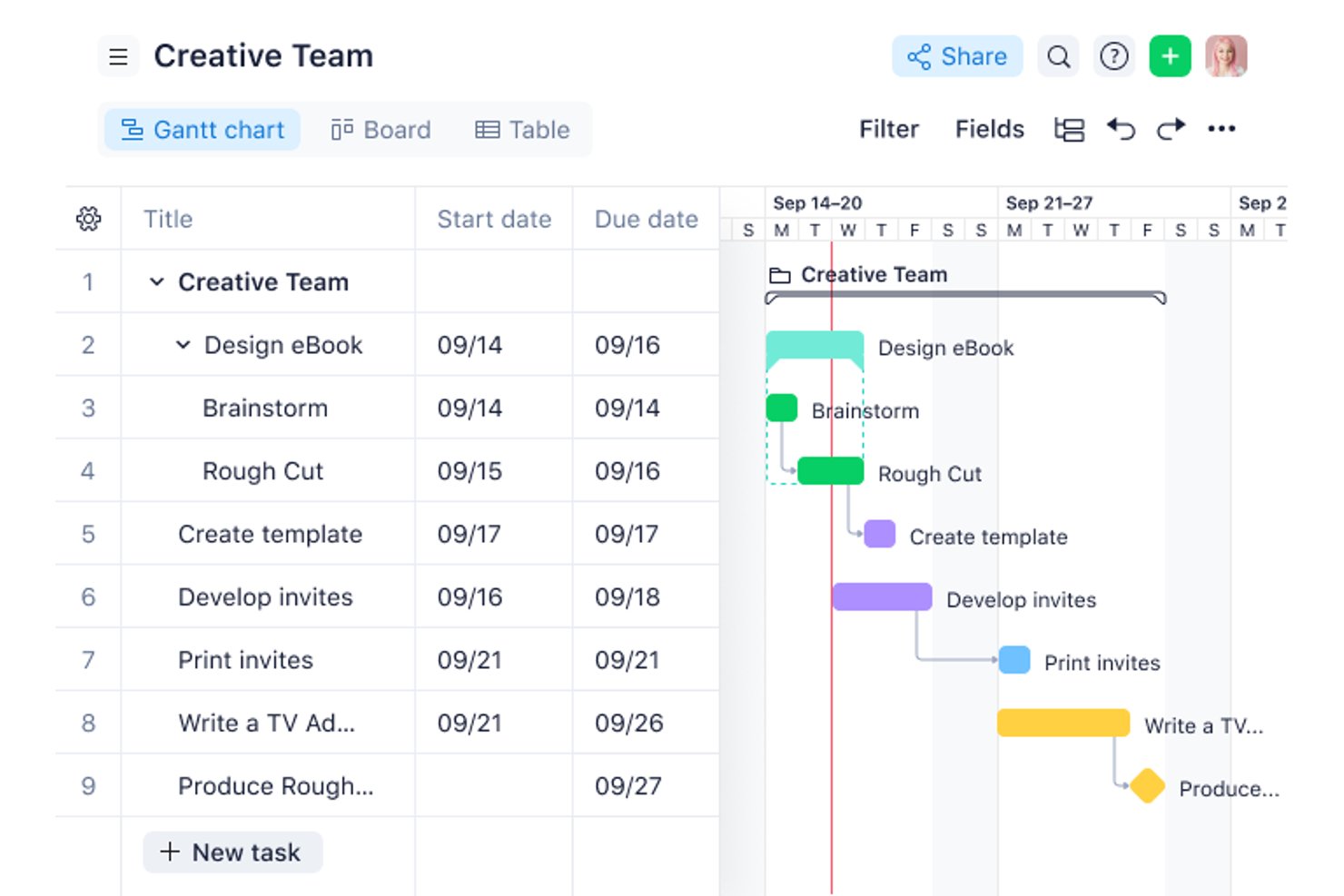
Wrike is an enterprise work management platform that combines portfolio management, resource and capacity planning, workflow automation, and cross-project reporting in a single governed environment.
Who Is Wrike Best For?
Wrike is a strong fit for PMO directors and portfolio leaders at mid-to-large enterprises managing complex, cross-functional workstreams across multiple departments.
Why I Picked Wrike
Wrike earns its spot on my shortlist because it's one of the few platforms that genuinely holds up as organizations scale from 50 to 5,000+ users. I particularly like how the subscription architecture grows with headcount in defined seat groups rather than forcing a disruptive platform migration. At the Apex tier, Wrike Integrate and Wrike Two-Way Sync are bundled natively, which means I can connect the platform to an existing ERP, HRIS, and dev toolchain without custom build work.
Wrike Key Features
- Portfolio roll-up reporting: Consolidates multiple project statuses, milestones, and KPIs in a unified dashboard.
- Granular role-based permission controls: Allows administrators to set detailed access levels for users and teams.
- Custom request forms: Automates intake and routing of new project or task requests across departments.
- Audit-ready activity logs: Captures and timestamps every project action for compliance and oversight.
Wrike Integrations
Wrike offers hundreds of integrations through its built-in integrations and marketplace, including tools like Google Workspace, Microsoft 365, Salesforce, Jira, Slack, GitHub, and Zoom. It also supports Zapier and provides an API for custom integrations.
Pros and Cons
Pros:
- Highly configurable approval and review workflows
- Strong portfolio-level visibility across projects
- Scales across large multi-team organizations
Cons:
- Mobile app lags behind desktop experience
- Reporting setup requires significant admin time
New Product Updates from Wrike

Wrike Redesigns AI Agent Builder
Wrike redesigns its AI Agent Builder with a side-by-side setup, Scopes, sentence-style triggers and actions, and clearer filters. These changes make it easier to configure, test, and manage agent behavior. For more information, visit Wrike’s official site.

Best for resource scheduling
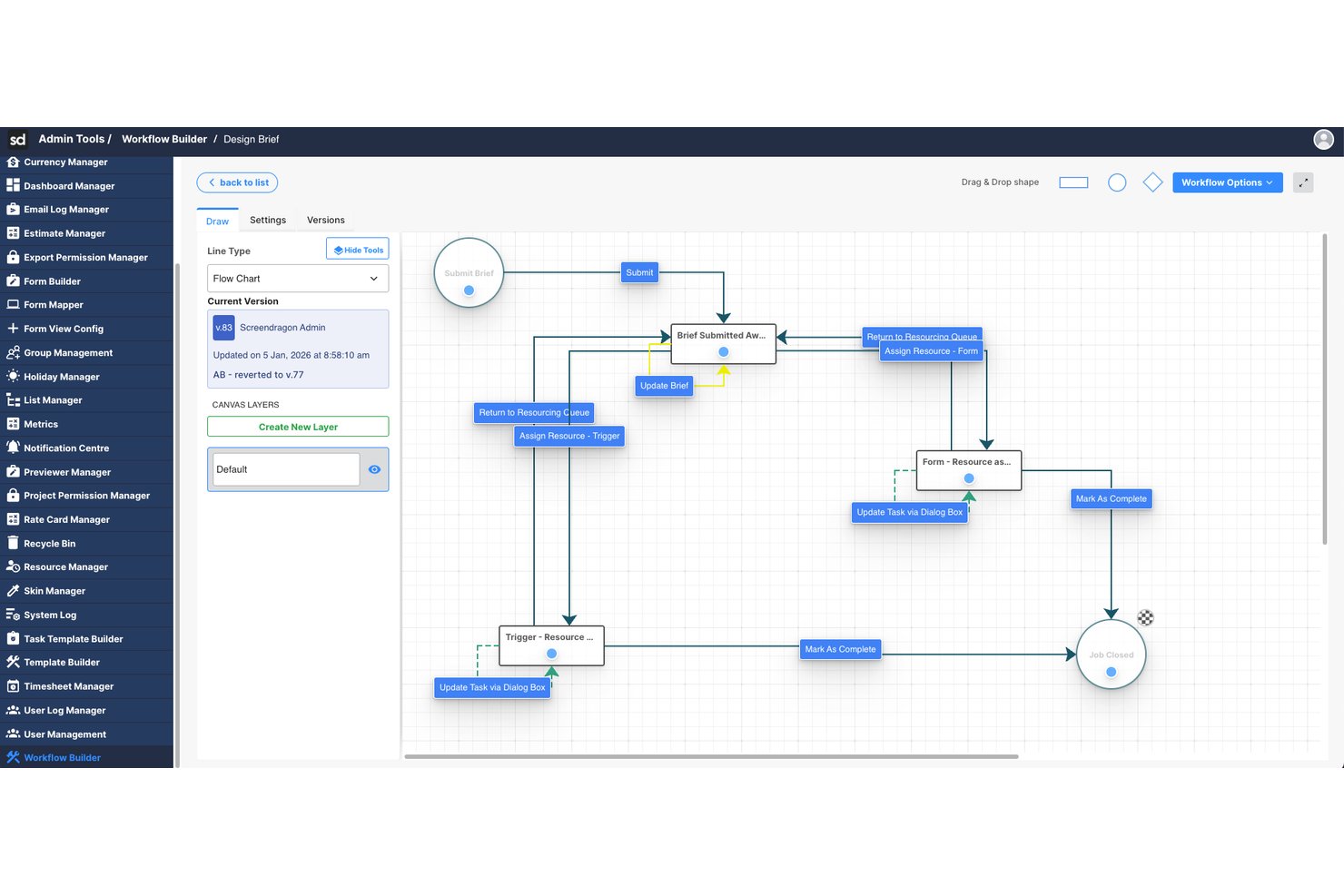
Screendragon is an enterprise work management platform that combines project and portfolio management, workflow automation, resource scheduling, budget tracking, and approvals in a single configurable system built for large marketing and agency teams.
Who Is Screendragon Best For?
Screendragon is a strong fit for enterprise marketing teams and in-house agencies managing high volumes of work across multiple brands, regions, or client accounts.
Why I Picked Screendragon
Screendragon earns its spot as one of the best on my shortlist because of how tightly its resource scheduling connects to live project data. I love the heatmap capacity view, which shows exactly where team members are over-allocated before a project even kicks off. I'm also able to forecast demand and balance workloads across teams in the same platform where work is being executed, without bouncing between a separate resourcing tool and a project tracker.
Screendragon Key Features
- No-code workflow builder: Design and automate multi-step approvals and project processes using a drag-and-drop interface.
- Custom dashboard reporting: Create real-time dashboards that aggregate portfolio, project, and resource data for different user roles.
- Enterprise-grade permissions: Set role-based and field-level access controls to safeguard sensitive project and financial information.
- Native DAM and ERP integrations: Connect to systems like Aprimo, SAP, and Salesforce without custom development.
Screendragon Integrations
Screendragon offers native integrations with SAP, Salesforce, Workday, Adobe Creative Cloud, Microsoft 365, Slack, and Jira. It also provides an API for custom integrations.
Pros and Cons
Pros:
- Purpose-built for large marketing operations teams
- No-code workflow builder for complex approvals
- Visual heatmaps for enterprise capacity planning
Cons:
- Steep initial setup for complex configurations
- Not designed for agile software development teams
New Product Updates from Screendragon
Screendragon Unveils New AI Hub
Screendragon introduced AI Hub, a new capability that lets teams build and manage AI agents directly within workflows. The update helps marketing teams automate tasks, maintain governance controls, and scale AI-driven operations more efficiently. For more information, visit Screendragon's official site.

Celoxis
Best for global remote teams
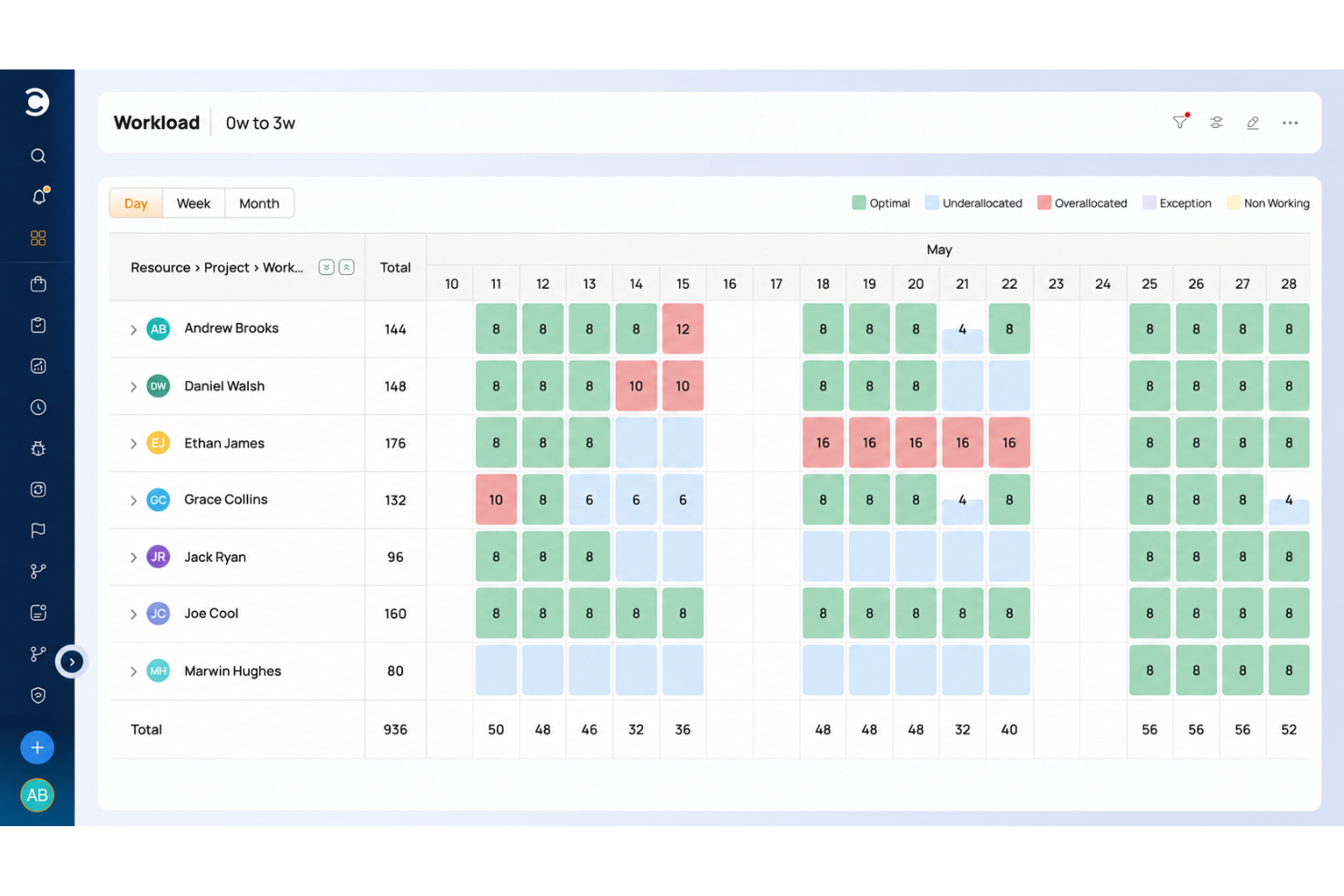
Celoxis is an enterprise PPM platform that combines portfolio management, resource capacity planning, BI-grade reporting, budget tracking, and project intake management in a single tool.
Who Is Celoxis Best For?
Celoxis is a strong fit for PMO directors and portfolio managers at mid-to-large enterprises running 10 or more concurrent projects across distributed teams.
Why I Picked Celoxis
Celoxis earns its spot on my shortlist because of how it handles resource scheduling across globally distributed teams. I like that you can define working hours, shifts, and time-off per individual team member, so capacity planning reflects real availability across time zones rather than generic headcount. The real-time dashboard sync means a PM in Singapore sees the same project state as a stakeholder in London the moment something changes, which keeps cross-regional execution honest.
Celoxis Key Features
- Interactive Gantt charts: Plan and visualize complex project schedules with automatic task adjustment and real-time sync.
- BI-grade dashboards: Build and customize fully interactive dashboards that pull data from across the entire project portfolio.
- Advanced intake management: Centralize project requests and approvals with configurable forms and workflow automation.
- Role-based permissions: Control user access, approvals, and data views through customizable permission sets at the project and portfolio level.
Celoxis Integrations
Celoxis offers native integrations with Jira, Salesforce, QuickBooks, Azure DevOps, Slack, Google Workspace, and Microsoft Project. It connects with Zapier and provides an API for custom integrations.
Pros and Cons
Pros:
- Built-in budget and cost tracking tools
- Detailed portfolio reporting across projects
- Strong cross-timezone resource scheduling
Cons:
- Setup requires significant configuration time
- UI feels dated compared to modern competitors

Best for data protection
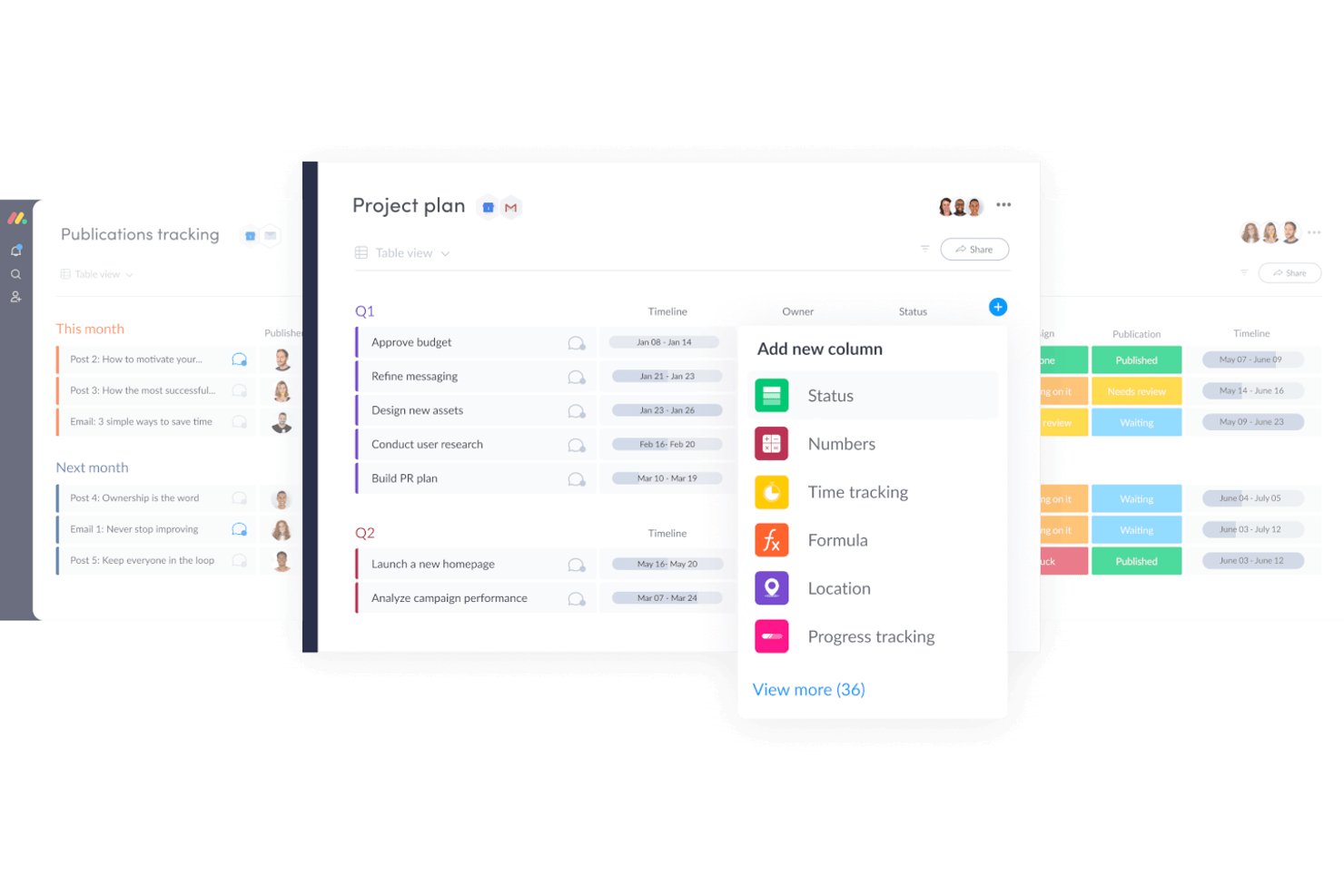
monday AI Workspace is an AI-powered work management platform that combines project tracking, portfolio management, workflow automation, and enterprise governance tools across cross-functional teams.
Who Is monday AI Workspace Best For?
It's a strong fit for enterprise PMO teams and cross-functional program managers who need to coordinate large-scale work across multiple departments under strict data governance requirements.
Why I Picked monday AI Workspace
monday AI Workspace earns its spot on my shortlist because of how seriously it handles data governance at the enterprise level. I particularly like the Bring Your Own Key (BYOK) encryption, which lets organizations retain full control over their data keys, and the advanced audit log API that gives security teams a detailed record of every user action across the platform. What seals it for me is that monday AI's models don't train on customer data, which matters a lot when you're running sensitive project portfolios through an AI-assisted workspace.
monday AI Workspace Key Features
- Portfolio management dashboards: Create unified, real-time views of projects, programs, and dependencies.
- Resource capacity planning: Track workloads and team utilization across multiple portfolios and timeframes.
- Customizable reporting and analytics: Build interactive dashboards with filters and cross-project KPIs for leadership visibility.
- Workflow automation builder: Automate repetitive project actions and status updates with no-code, rule-based triggers.
monday AI Workspace Integrations
monday AI Workspace offers hundreds of native integrations and marketplace apps, including Salesforce, Jira, Slack, HubSpot, Google Workspace, Zendesk, Microsoft Teams, Dropbox, GitHub, and Outlook. It supports Zapier and provides an API for custom integrations.
Pros and Cons
Pros:
- Highly flexible views for mixed delivery methods
- AI auto-generates project status summaries
- BYOK encryption for enterprise-grade data control
Cons:
- Reporting customization gets complex at portfolio scale
- Advanced financial tracking requires third-party tools
New Product Updates from monday AI Workspace
monday AI Workspace Adds Human Approval Routing
monday AI Workspace adds a human-in-the-loop approval block to AI Workflows, sending approval requests and routing workflow paths based on responses. For more information, visit monday AI Workspace's official site.
OnePlan
Best for strategy-to-execution portfolio planning


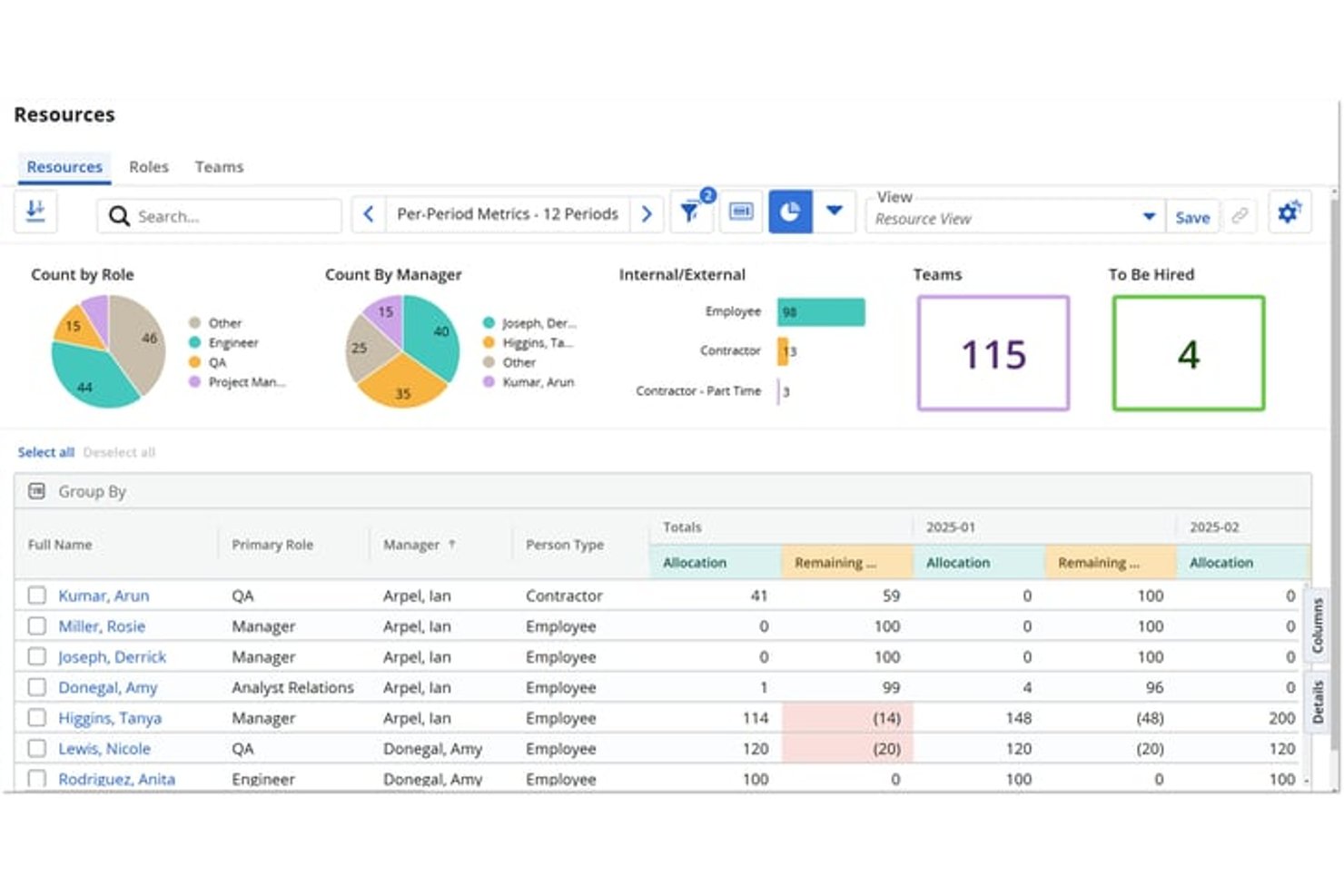
Broadcom Clarity is Broadcom's strategic portfolio management platform, built to handle enterprise-scale portfolio planning, multi-currency financial management, resource capacity planning, and roadmapping across large, complex investment hierarchies.
Who Is Broadcom Clarity Best For?
Broadcom Clarity is a strong fit for enterprise PMO leaders and IT portfolio managers who need to govern large, complex investment portfolios across multiple business units.
Why I Picked Broadcom Clarity
Broadcom Clarity earns its spot on my shortlist because no other tool handles multi-currency portfolio financials with the same depth. I'm talking about actual transaction-level currency conversion using transaction-date exchange rates, cost plans tied directly to funded investments, and a Non-Labor Cost Module that rolls everything into a single consolidated view. If your portfolio spans business units across different countries and your CFO needs clean, reconciled numbers, Clarity's financial layer covers it in a way that most project tools simply don't approach.
Broadcom Clarity Key Features
- Strategic roadmapping: Visual roadmaps link directly to funded investments, with dependency tracking and near real-time sync to underlying project data.
- Staffing workspace: Matches resources to open roles based on skills and availability, supporting capacity planning across the full portfolio.
- Scenario planning: Drag-and-drop what-if modelling lets you compare portfolio scenarios before committing to a plan or reallocation decision.
- OBS-based access control: Organizational Breakdown Structure security governs role- and hierarchy-based data access across the entire platform.
Broadcom Clarity Integrations
Clarity offers native ConnectALL integrations with Jira, Microsoft Azure DevOps, Microsoft Project, Salesforce, ServiceNow, and Rally. It also supports a Universal Adapter, REST, SOAP, XOG, and OData for custom integrations and external BI tools.
Pros and Cons
Pros:
- Skills and availability-based resource matching
- Scenario planning tools built into roadmaps
- Multi-currency financials tracked at transaction level
Cons:
- User interface feels outdated for many teams
- Agile project management requires Rally add-on
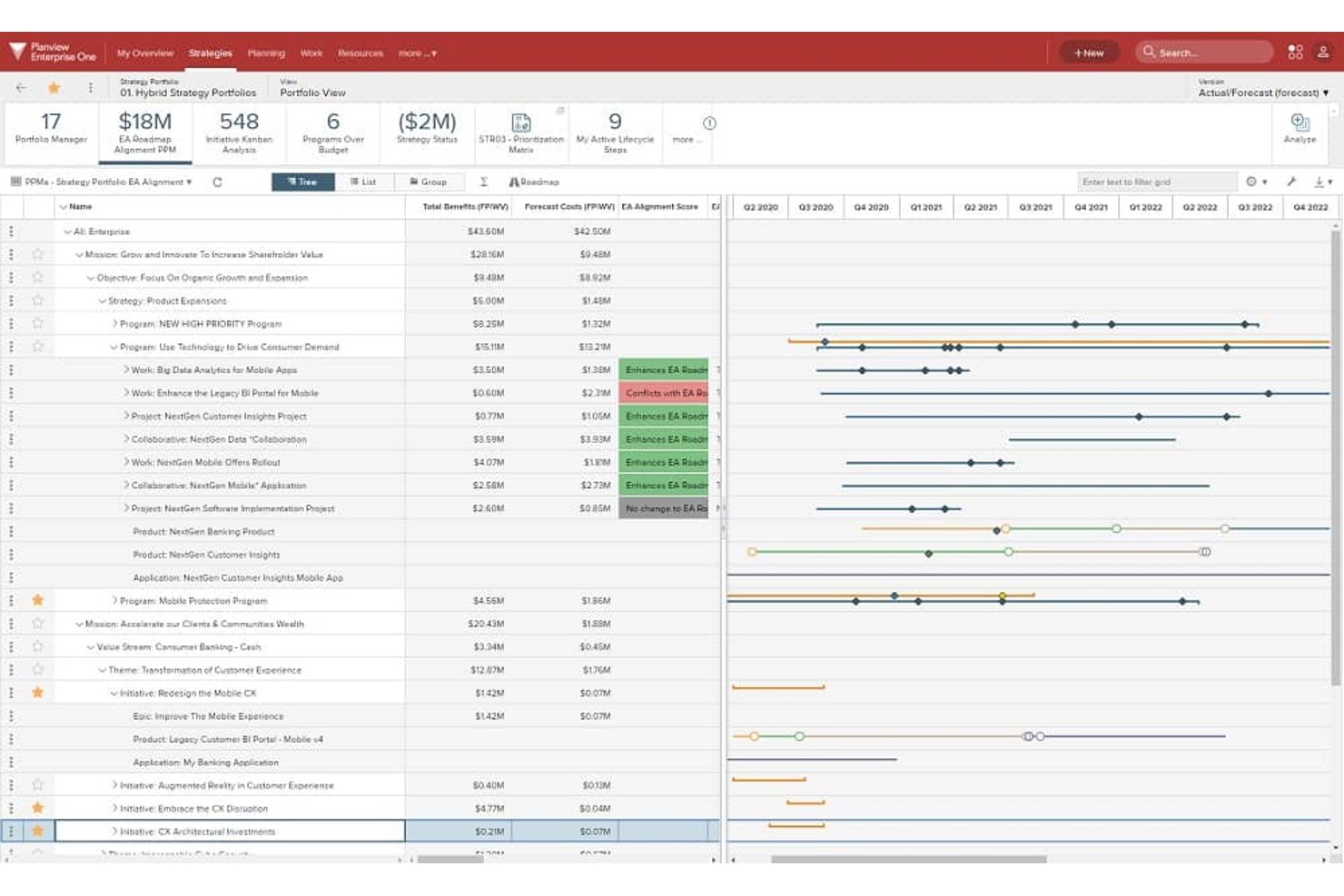
Planview Portfolios is an enterprise portfolio management platform that connects strategic planning, investment prioritization, resource capacity, and hybrid project execution across large, complex organizations.
Who Is Planview Portfolios Best For?
Planview Portfolios is built for enterprise PMO leaders and portfolio managers who need to connect strategic planning directly to funded investments across large, multi-division organizations.
Why I Picked Planview Portfolios
Planview Portfolios earns its spot on my list because no other tool ties funded investments back to strategic objectives as directly as this one does. I love how its roadmapping and OKR features let you trace a capital investment all the way from a business objective down to individual programs across multiple divisions, which is exactly what large organizations like Corning needed when unifying 12 divisions into one portfolio view. Its scenario planning tools are equally impressive, letting you compare staffing, timing, and prioritization options before committing budget.
Planview Portfolios Key Features
- Demand management: A centralized intake system that captures, tracks, and evaluates project ideas and requests before they enter the portfolio.
- Hybrid work delivery: A single instance supports Lean-Agile, collaborative, and waterfall delivery methods with unified portfolio reporting across all of them.
- 200+ out-of-the-box reports: Pre-built portfolio reports and visualizations covering strategy, programs, projects, resources, and technology.
- Planview Anvi AI: A conversational AI assistant that lets you query portfolio data in natural language and surfaces real-time risk signals from status updates.
Planview Portfolios Integrations
Planview Portfolios documents integrations with 12+ systems, including SAP, Oracle ERP, Salesforce, Workday, ServiceNow, Atlassian, Microsoft, NetSuite, and Apptio. Planview Hub connects toolchains such as Jira and Azure DevOps.
Pros and Cons
Pros:
- Scenario planning for staffing and investments
- 200-plus portfolio and resource management reports
- Connects portfolio strategy to project execution
Cons:
- Complex implementations often require outside services
- Cross-module data exchange can cause friction

Planisware
Best for turnkey PPM with scenario planning
Other Enterprise Project Management Software
Here are a few more enterprise project management software that didn’t make the top list, but which are worth your consideration.
- Zoho Projects
For easy customization
- Quickbase
For standardized, automated workflows
- Miro
For visual collaboration
- Workzone
For pre-built reports
- Scoro
For comprehensive project oversight
- Jira Enterprise
For multi-site change management and testing
- Smartsheet
For spreadsheet-based project management
- ClickUp
For AI-driven governance and audit trails
- Triskell
For multi-scenario portfolio what-if planning
- ServiceNow Strategic Portfolio Management
For IT-native portfolio strategy alignment


Related Project Management Software Reviews
If you still haven't found what you're looking for here, check out these other project management tool reviews we've curated for you:
- Project Management Software
- Enterprise Project Management Dashboards
- PR Project Management Software
- Resource Management Software
- Workflow Automation Software
- Time Tracking Software
- Task Management Software
- Collaboration Tools
- Capital Project Management Software


How I Evaluate Enterprise Project Management Software
I split my evaluation into three parts, giving the most weight to core functionality: coordinate projects across teams, track shared capacity, and surface portfolio risks. Next, I look for standout features like scenario planning to model resource shifts. Finally, I consider beyond-feature factors such as onboarding support and pricing as teams grow.
Core Functionality (Table Stakes For This List)
When I'm selecting tools for my list, I score each one on a scale from 0 (does not offer the functionality) to 5 (excels in this area) for each core functionality listed below. I then convert the total into a percentage to help assess each tool's overall fit, with extra weight on any functionalities I’ve deemed essential.
- Portfolio & Program Management (Essential): I look for a shared view to compare priorities, milestones, and risks across programs before a dependency slips.
- Resource Management (Essential): I assess whether managers can forecast capacity across projects and spot conflicts when several teams need the same specialist.
- Reporting & Dashboards: I check for configurable, role-based views that let leaders drill into project status, risks, and performance across the portfolio.
- Access Controls: I look for permissions that reflect real organizational roles, so teams can share project data while limiting sensitive information.
- Workflow & Scheduling: I evaluate how well teams can map dependencies, milestones, and schedules across large projects with multiple workstreams.
- Enterprise Integrations: I check for connections or API access to sync project data with finance, ERP, or CRM systems for unified reporting.
Once I have a list of tools that meet the criteria, I consider what sets each platform apart.
Differentiating Factors (What Sets Vendors Apart)
Here's how I compare and contrast different vendors:
Standout Features
I evaluate scenario planning tools closely because modeling a resource shift or reprioritization before committing prevents costly mid-flight corrections. AI-powered forecasting adds another layer here—I check whether the platform flags timeline risks or capacity bottlenecks early enough to act, not just after a milestone slips. I also look at financial and earned value tracking, since connecting budget burn to delivery progress is how PMO leaders justify decisions to leadership.
Beyond Features
I check whether a vendor's licensing model stays predictable as teams grow—some charge per-user while others bundle by tier, and add-on modules for resource planning or advanced reporting can quietly inflate costs. Security posture matters just as much; I look for SOC 2 or ISO 27001 certifications and data residency options, especially for organizations operating across multiple regions. I also evaluate how much configuration and change management a rollout demands, since a platform that requires six months of migration work can stall adoption before a single project ships.
What is Enterprise Project Management Software?
While standard project management tools focus on task tracking for small teams, enterprise project management software must support complex multi-project portfolios, strict data governance, and cross-departmental alignment.
Three core capabilities set enterprise software apart from basic PM tools:
- Company-Wide Portfolio Oversight: The software combines data from every team into executive dashboards, tracks dependencies between different projects, and measures progress toward major company goals.
- Bank-Grade Security & Governance: It includes advanced security features like Single Sign-On (SSO via Okta/SAML), automated user access controls (SCIM), role-based access control (RBAC), audit logging, and strict compliance standards (SOC 2 Type II, ISO 27001, HIPAA).
- Deep Enterprise Stack Integration: Enterprise software cannot exist in a silo. It requires native, bi-directional sync capabilities with core enterprise stacks, including ERP accounting software (SAP, Oracle), CRM platforms (Salesforce), IT service hubs (ServiceNow), and developer tools (Jira).
EPM vs. EPPM: What’s the Difference?
| Category | Enterprise Project Management (EPM) | Enterprise Project Portfolio Management (EPPM) |
|---|---|---|
| Primary Focus | Executing projects efficiently (on time, on budget). | Maximizing the ROI and strategic value of all business investments. |
| Core Question | "How do we deliver this project on time, within budget, and to spec?" | "Are we investing our tech budget into the right products and platforms?" |
| Key Features | Gantt charts, Kanban boards, sprint backlogs, task dependencies, status reports. | Executive roadmaps, "what-if" scenario modelling, project scoring frameworks. |
| Financials & KPIs | Project Burn Rate: Tracking project-level hours logged, milestone payments, and task costs. | Portfolio ROI: Allocating annual capital budgets and evaluating overall return on investment. |
| Primary Users | Project Managers, Team Leads, Department Heads. | C-Suite Executives, PMO Directors, Strategy Directors. |
How to Choose Enterprise Project Management Software
To find the right enterprise project management software for your team, you need to evaluate your organization's specific operational needs. I recommend focusing on five key evaluation factors to narrow down your options quickly.
| Evaluation Factor | What to Look For |
|---|---|
| Enterprise Security & Compliance | SSO (Okta/SAML), SCIM user provisioning, BYOK encryption, SOC 2 Type II, ISO 27001, and enterprise audit logs. |
| Scalability & Resource Management | Resource capacity allocation across 100+ concurrent projects, cross-department workload tracking, and multi-team planning. |
| Integrations & Custom APIs | Native connectors for ERPs (SAP, NetSuite), CRMs (Salesforce), and dev stacks (Jira), plus REST APIs for custom workflows. |
| Feature Depth & Customization | Multi-tiered portfolio roll-up dashboards, dynamic Gantt/Kanban views, custom fields, and automated multi-step approval routing. |
| Measurable ROI & Governance | Live project margin forecasting, multi-currency budget roll-ups, and executive-level portfolio health visibility. |
Choosing Enterprise Project Management Software Based on Your Project Methodology
Your project delivery methodology dictates the specific software features and visual tracking views your team needs. Selecting a platform that aligns with your delivery approach ensures higher user adoption and consistent execution.
- Agile methodology: Software engineering and product design teams need platforms that support iterative sprints, backlog grooming, and burndown charts. I suggest picking platforms like Jira or ClickUp that offer native story point estimation and bug tracking.
- Waterfall methodology: Construction, manufacturing, and hardware projects require strict linear phases and dependencies. Look for software with dynamic Gantt charts, baselining, and critical path analysis, such as Microsoft Project or Planview.
- Hybrid methodology: Creative agencies, professional services, and marketing departments often mix iterative execution with strict client deadlines. I recommend flexible platforms like Wrike or monday.com that let users switch between Kanban boards, timelines, and spreadsheet views.
Trends In Enterprise Project Management Software
Here are some up-and-coming advancements that can help you pick what project management platform to use.
- Better security and compliance: Software like monday.com has placed a strong emphasis on security features, such as SCIM provisioning and panic modes for account lockdowns in case of compromised credentials, indicating a trend towards heightened security and compliance measures.
- Customizable workflows and dynamic scheduling: Tools like Wrike and LiquidPlanner offer highly customizable workflows and dynamic project scheduling that allow you to adapt to changing circumstances and make real-time adjustments. This caters to the need for flexibility in project planning and execution.
- Advanced resource and time management: Features focusing on resource allocation, time tracking, and optimization, as highlighted by Wrike, suggest a trend towards sophisticated resource and time management functionalities that can help with efficient project execution.
If you’re overseeing large-scale initiatives, the right software will make it much easier to juggle goals, deadlines, and resources, adapting to your industry’s unique needs. You can also opt for tools specific to your industry (e.g. real estate project management software or manufacturing project management software).
Features of Enterprise Project Management Software
Look for these critical capabilities when evaluating enterprise platforms. You can use this feature list as a core requirements checklist before purchasing new software.
- Portfolio management: High-level dashboards to track multiple project streams against core business goals. Leadership can link active department initiatives directly to company objectives and review progress across all teams.
- Resource capacity planning: Capacity tools to monitor team workloads and prevent burnout across departments during any phase of the project lifecycle. You can view overallocation in real time and reassign tasks to balance team capacity.
- Enterprise security: Essential governance controls like single sign-on (SSO), role-based permissions, and compliance certifications (like SOC 2 or FedRAMP). These enterprise-level security features ensure your project data adheres to enterprise compliance standards.
- Advanced automation and AI risk detection: Custom workflow triggers and AI-driven risk detection that minimize manual oversight. Built-in tools analyze project timelines, enhance backlog management, and trigger automated workflows for task handoffs.
- Customizable dashboards and reports: Tailored visual reporting tools, including custom fields and dynamic request forms, that fit the specific monitoring needs of your stakeholders. Custom dashboards deliver real-time data on overall project health, resource allocation, and budget burn rates using advanced business intelligence.
- Dynamic scheduling and visual planning: Interactive Gantt charts and Kanban boards for visual project planning and timeline tracking in agile frameworks like Scrum. These tools help managers set realistic schedules, align with their chosen project management methodology, assign task dependencies, manage sprint planning, and adjust project scope quickly.
- Real-time collaboration tools: Centralized spaces for team communication, cross-tagging, direct task commenting, and document sharing. These features help remote and cross-functional teams work together without relying on long email threads.
- Integrated time and expense tracking: Time tracking features that log hours spent on specific project deliverables. Built-in timers deliver accurate client billing data, support overall financial management, highlight operational friction points, and keep project budgets on track.
- Software ecosystem integrations: Third-party integrations that connect your project platform directly with external software. Look for pre-built connectors for CRM platforms, Adobe Creative Cloud, accounting software, HR systems, and communication tools.
Benefits of Enterprise Project Management Software
Here are five primary benefits of leveraging enterprise IT management software:
- Improved project visibility: Offers a comprehensive overview of all project activities, timelines, Gantt charts, time tracking, and resource management. This visibility allows you to handle capacity planning and resource allocation to make informed decisions, foresee potential bottlenecks, stay on track, and maintain long-term scalability.
- Enhanced team collaboration: Facilitates communication and collaboration among cross-functional teams, regardless of their geographical locations. By providing a centralized platform for discussions, document sharing, and resource scheduling, team members align OKRs, monitor key performance indicators (KPIs), and work cohesively towards project goals.
- Optimized workflow and task automation: Automates routine tasks and uses workflow automation to simplify processes, which reduces manual effort and the risk of human error. Integrating with central ERP systems provides valuable work intelligence, allowing teams to focus on higher-value activities that contribute directly to project success.
- Risk management and mitigation: Helps identify, assess, and address project risks proactively. Through early detection and action, project managers can minimize the impact of risks on the project’s timeline and budget.
- Data-driven decision-making: Provides access to real-time data, analytics, integrations, and reports, so you can make decisions based on the latest project information. This access to accurate and up-to-date data supports better strategic planning, resource planning, and risk assessment, improving the overall quality and success rate of projects.
Costs & Pricing For Enterprise Project Management Software
If you're part of a large enterprise seeking comprehensive project oversight, there's a plan tailored for every scenario.
Plan Comparison Table For Enterprise Project Management Software
| Plan Option | Average Price | Common Features Included |
|---|---|---|
| Basic | $10 - $20 /user/month | Task and project management, basic reporting, limited integrations, and access for a small team of users |
| Standard | $25 - $35 /user/month | Enhanced project tracking, more integrations, collaboration tools, and support for a larger team |
| Professional | $50 - $75 /user/month | Advanced reporting and analytics, unlimited projects, priority support, and extensive integration options |
| Enterprise | Custom Pricing | Customizable features, advanced security options, dedicated support, and training for large organizations |
| Free | $0 | Basic task management, limited projects, and essential collaboration tools for testing whether the tool is the right fit |
Consider starting with a free or basic plan to understand the enterprise management solution's functionality and then scale up as your needs grow and become more complex.
Enterprise Project Management Software FAQs
Find answers to commonly asked questions about this topic.
What is the difference between project management tools and enterprise project management software?
Project management tools typically focus on execution-level task management, team collaboration, and basic project schedules for small-to-midsize teams. Enterprise project management software scales across an entire organization, offering enterprise portfolio management (PPM), resource capacity forecasting across thousands of users, multi-currency budget roll-ups, and advanced security compliance like SOC 2 and SSO.
How Do You Integrate Enterprise Project Management Software with an ERP?
Integrating enterprise project management software with an ERP system (e.g., SAP or NetSuite) connects project progress directly to your company’s financials. You can connect them in three ways:
-
Pre-Built Connectors: Out-of-the-box integrations supplied by software vendors for quick setup.
-
APIs: Custom code that lets the two systems share data automatically.
-
Integration Tools: Enterprise middleware platforms like Workato or Zapier Enterprise that pass data safely between tools.
Connecting these systems gives you real-time budget tracking, faster client billing, and clear visibility into costs across departments without entering data twice.
Why is enterprise project management software critical for large organizations?
Enterprise project management software centralizes fragmented workflows across multiple departments. It provides leadership with real-time portfolio health visibility, prevents team burnout through enterprise resource planning, automates complex approval handoffs, and ensures all project data complies with corporate data governance policies.