

What is Resource Management? Types, Techniques, & Tools

Definition: Resource management helps teams balance workloads, timelines, budgets, and project priorities with better visibility into capacity and availability.
Core Techniques: Techniques like allocation, scheduling, forecasting, and capacity planning help teams use resources more effectively.
Helpful Tools: Resource management tools and software make it easier to plan work, track capacity, and prevent bottlenecks.
Common Challenges: Most resource management problems stem from poor visibility, unrealistic timelines, or shifting priorities.
Every project competes for the same limited resources: time, budget, and people.
Without a clear resource management process, it’s easy to overload top performers, create scheduling conflicts, and lose visibility into team capacity. I’ve seen even well-planned projects go sideways simply because nobody had a reliable way to track who was available and what they were actually working on.
In this guide, I’ll break down what resource management is, the key techniques project teams use, and the tools that help you allocate work more effectively.
What is Resource Management?
Resource management is the process of planning, scheduling, and allocating the people, budget, time, and tools needed to complete a project successfully.
In simple terms, it helps you answer questions like:
- Who’s available to work?
- What resources do we need?
- When are those resources needed?
- Do we have enough capacity to deliver the project on time?
Good resource management helps project managers avoid overloaded teams, scheduling conflicts, missed deadlines, and budget overruns.
Example:
Imagine you’re managing a website redesign project. You’ll need to coordinate designers, developers, content writers, software tools, and budget across multiple phases of work. Resource management helps you make sure the right people are available at the right time—and that nobody is double-booked or sitting idle.
Common Types of Project Resources
The main types of resources in project management include:
- Human resources: Employees, freelancers, contractors, consultants, or any labor required to complete project tasks
- Time: Team availability, project timelines, deadlines, and working hours
- Budget: The money allocated to complete the project
- Equipment and tools: Software, hardware, machinery, vehicles, or specialized tools needed for delivery
- Materials and supplies: Physical materials or inventory required to execute the work
Depending on your industry, certain resources may be more critical than others. For example, construction projects rely heavily on machinery and materials, while software projects are typically more dependent on team capacity and specialized skills.
Who Uses Resource Management?
Resource management is used across almost every industry where teams, budgets, and timelines need to be coordinated. It’s especially important for:
- Project managers managing timelines, workloads, and delivery.
- Resource managers overseeing team capacity and staffing.
- Operations teams balancing business priorities and utilization.
- IT teams allocating technical staff, infrastructure, and software resources.
- Professional services firms managing billable hours and client work.
- Construction teams coordinating labor, machinery, and materials.
- Marketing and creative agencies scheduling designers, writers, and campaign work.
- Manufacturing teams planning equipment, inventory, and production capacity.
Whether you’re managing people, budgets, equipment, or time, the goal is the same: make sure resources are used efficiently without creating bottlenecks or burnout.
Why Is Resource Management Important?
Strong resource management is important because it gives you the visibility you need to plan work realistically and balance workloads across projects. If your team constantly feels overloaded, misses deadlines, or struggles shifting priorities, poor resource management is often the root cause.
Benefits of Effective Resource Management
- Improves utilization and capacity visibility: Helps managers understand team availability, workloads, skills, and capacity so work can be assigned more efficiently.
- Prevents burnout and improves productivity: Makes it easier to spot overloaded team members before workloads become unsustainable (leading to more productive, engaged, satisfied team members).
- Supports more realistic project planning: Gives teams a clearer understanding of timelines, dependencies, staffing needs, and resource constraints, ensuring the right resources are available when they’re needed.
- Reduces scheduling conflicts and bottlenecks: Prevents double-booking and resource bottlenecks across projects
- Improves budget control and profitability: Helps organizations allocate resources more efficiently, reduce unnecessary costs, and optimize billable utilization.
- Enables more accurate forecasting: Makes it easier to plan for future hiring, project demand, and resource needs.
- Improves cross-team coordination: Gives stakeholders visibility into priorities, dependencies, and resource availability across departments.
Resource Management Techniques
Certain resource management techniques help you make smarter decisions about how work gets assigned, scheduled, and prioritized so your projects stay realistic and your team stays productive.
Below, I’ll walk through some of the most common resource management techniques and how they’re used in practice.
Resource Utilization
Resource utilization measures how much of a resource’s available time is being used for productive project work.
Tracking utilization metrics helps you understand whether team members are underutilized, overloaded, or operating at sustainable capacity. This makes it easier to balance workloads and improve staffing decisions across projects.
Example:
If a designer is spending 90% of their time on project work for several weeks straight, that may indicate a risk of burnout or a need for additional support.
Resource Loading
Resource loading estimates how much work team members can realistically handle within a fixed project timeline.
This technique compares assigned work against available capacity so you can identify overloaded resources before work begins. In practice, most employees shouldn’t be scheduled at 100% capacity because meetings, PTO, administrative work, and interruptions reduce actual availability.
Example:
A developer with a 40-hour workweek may only have 24–30 hours available for focused project work.
Resource Estimation
Resource estimation determines the people, time, and effort required to complete a project successfully. You can approach estimation in two main ways:
- Bottom-up estimation: You estimate the hours required for each task or deliverable individually.
- Top-down estimation: You allocate resources based on overall project constraints like budget, deadlines, or staffing limits.
Example:
If you’re launching a new website, you might estimate how many hours your designers, developers, and content writers will each need to complete their portion of the work.
Resource Allocation
Resource allocation helps you assign the right people to the right work based on skills, availability, and project priorities.
To allocate resources effectively, you’ll typically need to:
- Identify the skills required for each task
- Estimate the effort involved (number of hours, for example)
- Match work to available team members based on capacity
Example:
You might assign a senior engineer to a complex system integration while assigning lower-risk maintenance work to junior developers.
Learn more about resource allocation methods in project management.

Resource Scheduling
Resource scheduling helps you determine when team members should work on specific tasks or projects.
Unlike traditional project scheduling, this technique prioritizes actual resource availability when building timelines. If key resources aren’t available when work is planned to start, you may need to adjust project schedules accordingly.
Example:
If your lead designer is unavailable for the next two weeks, you may need to delay design-related tasks until they have capacity.
Resource Optimization
Resource optimization helps you balance resource demand with available capacity, so your team can work as efficiently as possible without becoming overloaded.
The goal is to help you complete projects within budget and timeline constraints while making the best use of available resources.
Example:
If your marketing team is overloaded during a product launch, you might shift lower-priority work to another quarter, redistribute tasks across departments, or bring in freelancers temporarily to balance demand with available capacity.
Two common resource optimization techniques are:
- Resource leveling
- Resource smoothing
Resource Leveling
Resource leveling is a type of resource optimization technique that helps you adjust project timelines when resources are overallocated.
If multiple projects require the same people at the same time, you may need to delay tasks or redistribute work to create a more realistic schedule.
Example:
If the same developer is assigned to two high-priority deliverables due on the same day, you may need to move one deadline to avoid overloading them.
Common resource leveling methods include:
- Critical path method (CPM)
- Critical chain method (CCM)
- Fast tracking
- Resource crashing
Resource Smoothing
Resource smoothing is also a type of resource optimization technique. It helps you balance workloads without changing fixed project deadlines.
Instead of adjusting the project timeline (like in resource leveling), you reduce resource strain by redistributing work, adjusting assignments, or increasing efficiency while staying within existing schedule constraints.
Example:
You might bring in a contractor or assign a more experienced team member to complete work faster during a high-demand period.
Resource Forecasting
Resource forecasting predicts future resource needs based on upcoming projects, workload trends, and business demand.
Forecasting gives you better visibility into future hiring needs, skill gaps, budget requirements, and team capacity so you can plan ahead instead of reacting at the last minute.
Example:
If you expect several large client projects next quarter, forecasting can help you determine whether you’ll need additional freelancers or full-time hires.
To improve forecasting accuracy, you can:
- Compare planned vs. actual project costs
- Review utilization trends
- Analyze project performance data
- Use forecasting and analytics software
Discover the top project forecasting tools.
Capacity Planning
Capacity planning determines whether your team has enough available capacity to complete current and upcoming project work.
By comparing available resources against forecasted demand, you can identify potential staffing shortages, overloaded teams, or future hiring needs before they impact delivery.
Example:
If your development team is already close to full capacity, capacity planning can help you decide whether you need to hire contractors, delay lower-priority work, or extend project timelines before taking on another large project.
Learn more about workload capacity planning.
Resource Management Process Step-by-Step
Once a project begins, you’ll need to continuously balance workloads, monitor capacity, and adjust resources as priorities shift (and you'll likely use the above techniques at different stages). The project resource management process gives you a structured way to plan, assign, and manage resources throughout the project lifecycle.
Here’s what that process typically looks like, with examples for a product launch scenario:
1. Resource Planning
The first step is determining what resources you’ll need to complete the project. Resource planning usually includes identifying:
- Required roles and skill sets
- Estimated project budget
- Tools, software, or equipment needed
- Project timelines, project constraints, and capacity requirements
At this stage, you may also create planning documents like work breakdown structures (WBS), project schedules, or resource plan visualizations to map out the work.
Example:
A product launch may require marketers, designers, developers, sales enablement teams, and customer support resources at different stages of the rollout.
2. Estimate and Allocate Resources
Next, you’ll estimate how much effort the project requires and start assigning resources to specific tasks. This involves:
- Estimating task duration
- Reviewing team and resource availability
- Matching work to the right skill sets
- Balancing workloads across teams
Example:
You might assign your senior designer to product messaging and launch assets while allocating technical implementation work to developers with platform-specific expertise.
3. Acquire Resources
Once you understand your resource requirements, you may discover gaps in capacity, expertise, or availability.
Depending on your organization, you may need to:
- Hire contractors or freelancers
- Request additional budget
- Reassign internal team members
- Purchase software, equipment, or materials
Example:
If your internal content team doesn’t have enough bandwidth to support launch-week deliverables, you might bring in freelance copywriters to help manage the workload.
4. Manage and Support the Team
As the project moves forward, you’ll need to monitor team morale, maintain clear communication, and create an environment where people feel comfortable raising concerns about workload, timelines, or blockers before they become larger problems. Consider:
- Checking in regularly with team members
- Providing constructive feedback
- Preventing burnout and unsustainable workloads
- Encouraging open communication
- Adjusting expectations when priorities shift
Example:
During product launch, your marketing team may start feeling overwhelmed as deadlines approach and last-minute stakeholder requests increase. Regular check-ins can help you identify stress points early and rebalance workloads before burnout impacts delivery.
5. Continuously Monitor and Adjust Resources
Even with strong planning, project needs will change over time. As deadlines shift, priorities evolve, or unexpected issues arise, you’ll need to continuously evaluate whether resources are still aligned with the work that needs to be done. This can involve:
- Reallocating work
- Adjusting schedules
- Adding resources
- Reprioritizing deliverables
- Reforecasting capacity
Example:
If stakeholder feedback late in the launch process creates additional design revisions, you may need to redistribute work across the creative team or bring in temporary support to avoid delaying the launch.
Resource Management Best Practices
Here are a few best practices that can help you manage resources more effectively:
- Build buffer time into your plans: Projects almost always take longer than expected. When you create schedules or estimate workloads, give your team realistic breathing room for meetings, revisions, unexpected issues, and shifting priorities.
- Document your assumptions early: Clearly document the assumptions behind your timelines, staffing plans, and level-of-effort estimates. This makes it much easier to align with stakeholders and explain resource decisions later if project scope changes.
- Avoid planning at 100% capacity: In my experience, fully allocated teams burn out quickly and leave no room for unexpected work. Most employees need flexibility for meetings, admin work, support requests, and interruptions throughout the week.
- Review workloads regularly: Resource management isn’t a set-it-and-forget-it process. Regular check-ins help you spot overloaded team members, shifting priorities, or resource bottlenecks before they impact delivery.
- Use historical project data when possible: Reviewing past timelines, utilization rates, and project performance can help you create more accurate forecasts and avoid repeating estimation mistakes.
- Prioritize communication and transparency: Your team should feel comfortable raising concerns about workload, deadlines, or competing priorities early. Small resource issues become much harder to solve when communication breaks down.
- Use resource management software to improve visibility: The right tools can help you track workloads, forecast capacity, manage schedules, and identify resource conflicts before they create larger project risks.
Common Resource Management Challenges (And How to Solve Them)
Here are some of the most common issues teams run into—and how you can address them before they impact delivery.
1. Overallocation And Employee Burnout
One of the biggest resource management challenges is assigning too much work to the same people.
This often happens when managers don’t have clear visibility into workloads across projects, causing high-performing team members to become overloaded over time.
Example:
Your lead designer is supporting multiple projects simultaneously and starts missing deadlines because their workload exceeds realistic capacity.
How To Solve It
- Monitor workloads and utilization regularly
- Avoid planning at 100% capacity
- Rebalance assignments across the team
- Use resource scheduling tools to identify conflicts early
- Encourage team members to raise workload concerns proactively
2. Limited Visibility Into Team Capacity
It’s difficult to make realistic project decisions when you can’t clearly see who’s available, what work is already assigned, or where bottlenecks exist.
Without visibility into capacity, teams often commit to more work than they can realistically deliver.
Example:
A new project gets approved without realizing several key team members are already fully booked for the next month.
How To Solve It
- Maintain up-to-date resource calendars
- Use workload management or resource planning tools
- Conduct regular capacity reviews
- Centralize project and staffing information in one system
3. Frequent Priority Changes
Shifting priorities can disrupt schedules, overload teams, and create confusion about what work should take precedence.
This is especially common in fast-moving organizations where urgent requests constantly compete with planned project work.
Example:
An urgent stakeholder request forces your team to pause planned work halfway through a project, delaying multiple deliverables and creating scheduling conflicts.
How To Solve It
- Establish a clear prioritization process
- Reassess resource allocations regularly
- Build contingency time into schedules
- Communicate changes quickly across teams and stakeholders
5 Tools for Managing Resources
The tools you use can have a major impact on how effectively you manage resources across projects. Some tools help you plan long-term capacity and timelines, while others give you day-to-day visibility into workloads, task progress, and team availability.
Here are some of my favorites:
Resource Management Plans
A resource management plan outlines how you’ll allocate, schedule, and manage resources throughout a project. These plans help you document:
- Team roles and responsibilities
- Resource requirements
- Staffing plans
- Capacity assumptions
- Project constraints
Use for:
- Managing large or complex projects
- Getting stakeholder alignment on staffing and capacity
- Coordinating multiple teams or departments
- Getting clearer visibility into resource assumptions and constraints
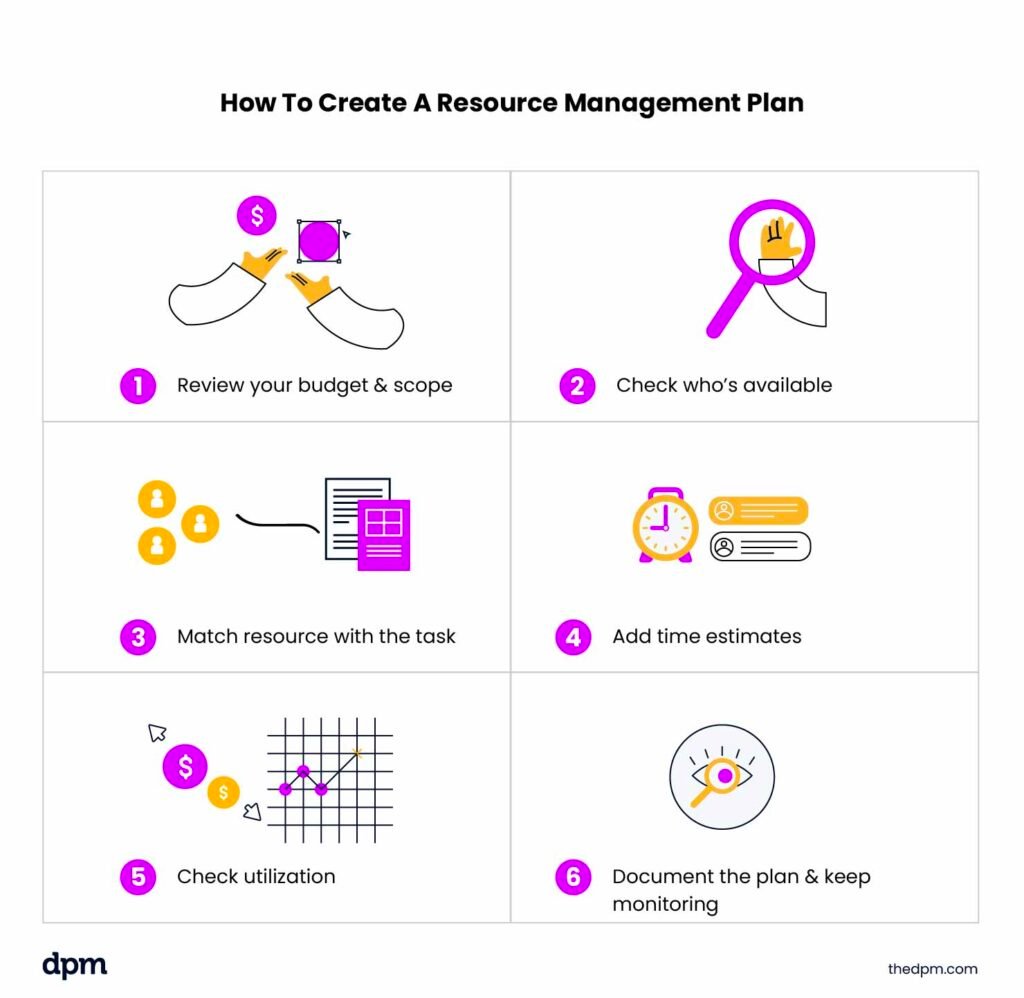
Resource Calendars
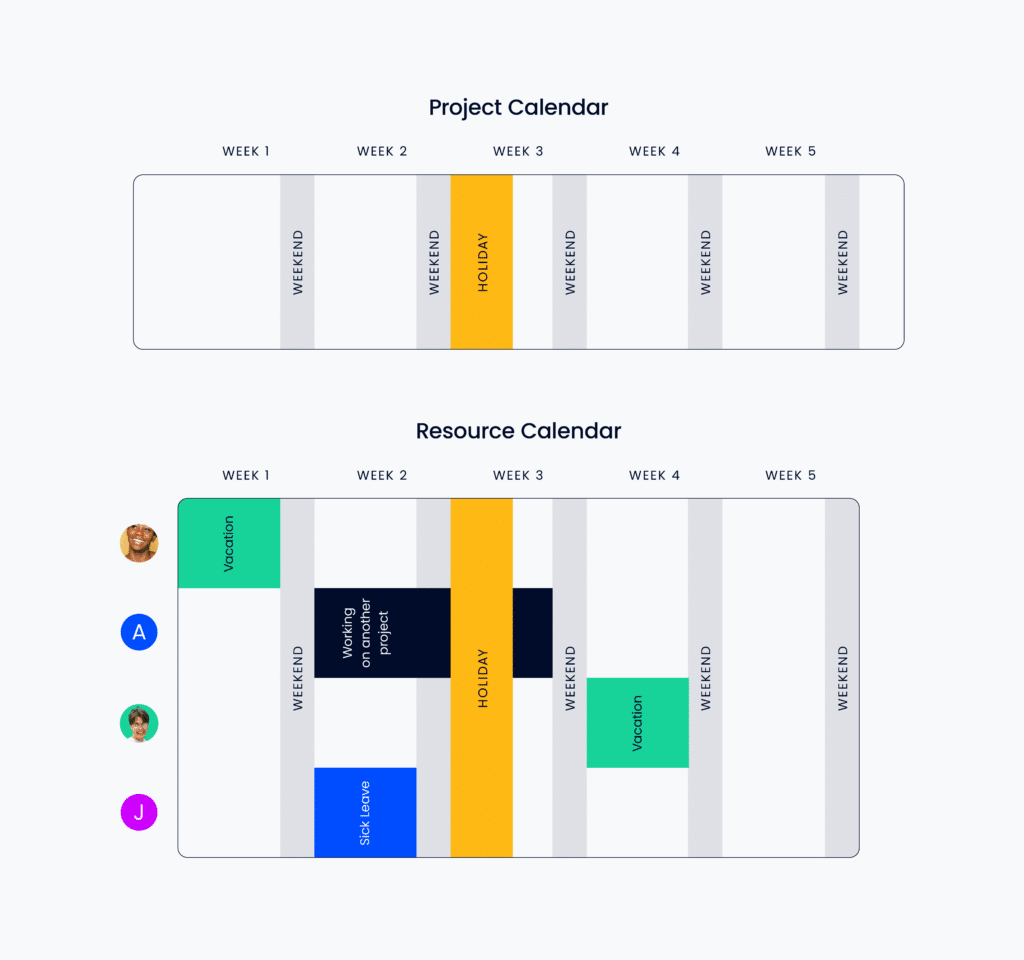
Resource calendars show team availability (including working hours, PTO, absences, and assignments) so you can schedule work more realistically. Project managers should create resource calendars at the beginning of a project and update them regularly as the project progresses and new information is learned.
Use for:
- Managing shared resources across multiple projects
- Coordinating work across departments
- Visibility into team availability
- Reducing scheduling conflicts and overbooking
Resource Breakdown Structures
A resource breakdown structure organizes project resources into a hierarchical structure so you can clearly see everything required to complete the work.
Unlike a work breakdown structure (WBS), which focuses on project tasks, an RBS focuses on the resources needed to complete those tasks, including:
- People
- Budget
- Equipment
- Software
- Materials
Use for:
- Planning large or resource-intensive projects
- Getting visibility into resource dependencies
- Identifying staffing or budget gaps early
- Managing projects involving multiple resource types
Gantt Charts and Project Timelines
Gantt charts and project timelines help you visualize project schedules, deadlines, dependencies, and resource assignments over time, making it easier to track project progress, identify conflicts, understand dependencies, and adjust timelines with priorities.
Use for:
- Managing deadline-driven projects
- Coordinating work across multiple teams
- Getting visibility into task dependencies
- Tracking long-term project schedules
- Managing sequential project phases
Kanban Boards
Kanban boards help you visualize work in progress and monitor task flow across your team. Tasks are usually organized into columns like “to do,” “in-progress,” “review,” and “completed.”
Use for:
- Managing Agile or iterative workflows
- Getting real-time visibility into work progress
- Frequently reprioritizing tasks
- Limiting work in progress (WIP)
- Managing ongoing operational work instead of fixed project phases
Software For Managing Resources
Resource management software is the easiest way to manage your people and assets more effectively and accomplish initiatives more quickly.
The best software for your team depends on your workflows, project complexity, and the specific resource management challenges you’re trying to solve. Below are some of the most common types of resource management software and what they’re typically used for.
- Resource management software: End-to-end resource management platforms help you plan capacity, allocate resources, schedule work, balance workloads, and track team utilization across projects.
- Forecasting software: Forecasting tools help you predict future resource demand, identify capacity gaps, and plan hiring or staffing needs more proactively.
Here's a shortlist of some of the top resource management software out there:
Clicks on the links below may earn a commission, which supports our independent testing and review of software and services. Learn more about how we stay transparent.


There are also resource management solutions designed for specific use cases:
- Marketing resource management software: Designed for marketing and creative teams that need help managing campaigns, approvals, content workflows, and creative resources.
- Agency resource management software: Built for agencies that need to manage billable utilization, client workloads, project timelines, and resource allocation across multiple accounts.
- Professional services resource management software: Built for consulting firms and professional services organizations that need to manage staffing, billable hours, project delivery, and resource utilization.
- Enterprise resource management software: Designed for large organizations that need visibility into resources, budgets, staffing, and operations across multiple departments or business units.
- Construction resource management software: Helps construction teams manage labor, equipment, materials, scheduling, and job-site resource coordination.
- IT resource management software: Helps IT teams manage technical staff, infrastructure, software assets, support workloads, and project capacity.
Read More: Why Use Resource Management Software?
Resource Management Frequently Asked Questions
Who is responsible for resource management?
The responsibility of resource management is often shared across multiple roles, including project managers, resource managers, operations leaders, department heads, and team leads. In smaller organizations, project managers may handle resource management directly, while larger companies often have dedicated resource management teams.
How can you tell if your resource management process is working?
Strong resource management usually leads to more balanced workloads, fewer scheduling conflicts, improved project delivery, and better visibility into team capacity. Common performance indicators include resource utilization rates, project completion timelines, employee workload distribution, and overall project profitability.
What’s the difference between resource management and resource planning?
Resource planning focuses on identifying the resources you’ll need before work begins, while resource management is the ongoing, end-to-end process of allocating, scheduling, monitoring, and adjusting those resources throughout the project lifecycle. Resource planning is part of resource management.
How do remote or distributed teams manage resources effectively?
Remote teams often rely on resource management software, shared calendars, workload dashboards, and regular check-ins to maintain visibility into team capacity and project progress. Clear communication and centralized planning tools become especially important when teams work across different locations or time zones.
What causes resource overallocation?
Resource overallocation usually happens when team members are assigned more work than they can realistically complete within a given timeframe. This often results from limited visibility into workloads, unrealistic timelines, poor forecasting, or frequent priority changes across projects.
What’s the difference between resource allocation and resource scheduling?
Resource allocation focuses on assigning the right resources to the right work based on skills and capacity. Resource scheduling focuses on determining when those resources will complete the work based on availability, timelines, and project priorities.
Who is responsible for resource management?
The responsibility of resource management is often shared across multiple roles, including project managers, resource managers, operations leaders, department heads, and team leads. In smaller organizations, project managers may handle resource management directly, while larger companies often have dedicated resource management teams.
How can you tell if your resource management process is working?
Strong resource management usually leads to more balanced workloads, fewer scheduling conflicts, improved project delivery, and better visibility into team capacity. Common performance indicators include resource utilization rates, project completion timelines, employee workload distribution, and overall project profitability.
What’s the difference between resource management and resource planning?
Resource planning focuses on identifying the resources you’ll need before work begins, while resource management is the ongoing, end-to-end process of allocating, scheduling, monitoring, and adjusting those resources throughout the project lifecycle. Resource planning is part of resource management.
How do remote or distributed teams manage resources effectively?
Remote teams often rely on resource management software, shared calendars, workload dashboards, and regular check-ins to maintain visibility into team capacity and project progress. Clear communication and centralized planning tools become especially important when teams work across different locations or time zones.
What causes resource overallocation?
Resource overallocation usually happens when team members are assigned more work than they can realistically complete within a given timeframe. This often results from limited visibility into workloads, unrealistic timelines, poor forecasting, or frequent priority changes across projects.
What’s the difference between resource allocation and resource scheduling?
Resource allocation focuses on assigning the right resources to the right work based on skills and capacity. Resource scheduling focuses on determining when those resources will complete the work based on availability, timelines, and project priorities.
Start Managing Resources More Strategically
If you’re ready to improve how your team plans and manages resources, start by exploring the right resource management software and workflows for your organization. Check out this resource management software demo guide to help you make an informed decision.


