

What Is Capacity Planning? Strategies, Benefits, & Process


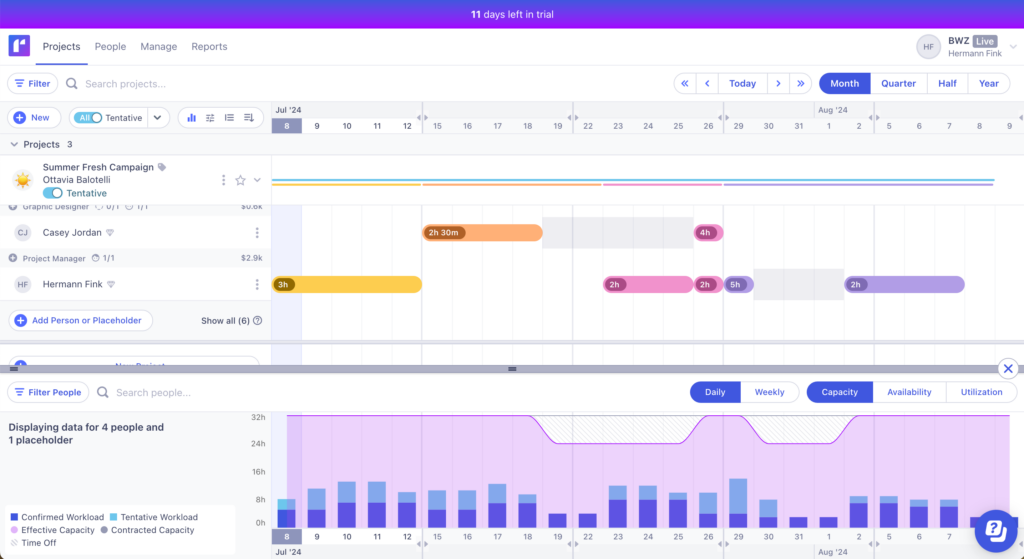
Capacity planning is assessing how much time team members have available to meet customer demands, and then making decisions on how to address any gaps. This is typically done using capacity planning software or resource management software.
While we often lack decision-making authority in our project manager roles, participating in capacity planning is one way for us to have a positive impact on our teams and the business. Let's take a look at your role in this process as a project manager.
What Is Capacity Planning?
Capacity planning is the process of assessing and allocating resources (like personnel, time, and budget) to make sure your organization has the capacity to meet current and future demand and successfully execute projects within any specified constraints.

The goal of capacity planning is to predict whether your existing supply of resources will be sufficient to achieve project objectives. You’ll need to consider resource availability for both physical resources and the people who will work on the project. Evaluate whether team members have the bandwidth and skills to execute the work.
Capacity Planning vs. Resource Planning
Resource planning is a subset of capacity planning. Capacity planning provides a strategic overview of a project, and resource planning deals with the details of resource allocation and utilization.
Capacity planning aims to make sure the project has the necessary resources to deliver a successful project. Resource planning, however, focuses on identifying and allocating the resources needed for a project and then managing those resources.
Capacity Planning Strategies
Once you’ve calculated expected supply and demand, you can employ three types of capacity planning strategies:
- Lag strategy: Only maintain enough resources to meet real-time demand. If a new project comes up, you
hirebeg, borrow, and steal to meet the needs of that project. The time it takes to find a resource can slow production capacity (i.e. there’s a lag). - Lead strategy: Maintaining excess capacity to meet expected demand. This lets you respond quickly to new stakeholder requests, but if your forecasted demand is not realized, you risk negatively impacting profitability and the bottom line.
- Match strategy: A hybrid approach in which you frequently revise demand forecasts in response to new capacity requirements. You then hire incrementally to meet expected demand.


Capacity Planning Process
There are four key steps in the capacity planning process. Let's work through them with an example:
- Imagine you're leading a team of data engineers to acquire and ingest data records onto a large analytics platform.
- These records span various work streams and need to be ingested weekly.
- Your stakeholders are planning next quarter’s budget and want to know of any changes to staffing costs.
1. Assess Supply
To calculate your existing resource capacity, answer the following questions:
- How many data engineers are performing this work today?
- How many hours per week do they have available to dedicate to this project?
Let’s say you have a team of 10 data engineers that are each dedicated to this project full-time. It might be tempting to calculate resource capacity as 10 data engineers ✖ 40 hours/week, for a total of 400 hours.
Realistically, these people won’t be spending 8 hours a day on project work. What about meetings and coffee breaks? Resource utilization of 5 hours/day is probably more reasonable.
Your supply is therefore 10 data engineers ✖ 5 hours/day ✖ 5 days/week = 250 hours/week.

2. Forecast Demand
Next, you’ll need to forecast demand, which you can do with the following questions:
- How many work streams do you have today? How many work streams do you expect to add in the next quarter?
- Today, how many records do you acquire and ingest weekly within each workstream? Do you expect that number to increase in the next quarter for any of your existing workstreams? How many records do you expect for new workstreams?
- How long does it take you to acquire and ingest these records? (For simplicity, calculate a rate based on a certain number of records. Let’s say 10,000.)
| Workstream | Number of Records to Acquire and Ingest Weekly | Number of Hours to Acquire & Ingest 10,000 Records | Estimated Hours Per Week |
|---|---|---|---|
| Finance | 500,000 | 2 | 100 |
| Retail | 200,000 | 4 | 80 |
| Pharmaceuticals | 175,000 | 4 | 70 |
| Facilities (forecasted) | 100,000 | 2.5 | 25 |
| Total: 4 | Total: 975,000 | Total: 12.5 | Total: 275 |
Supply vs. demand gap = 250 hours/week ➖ 275 hours/week = -25 hours/week.
3. Determine Capacity Planning Strategy
You’ve determined that project demand exceeds capacity by 25 hours/week. Now, you have to decide what you’re going to do about it.
If your budget permits, it might be worth adopting a lead strategy. Hire 1 full-time employee now to buy you some lead time in advance of the upcoming need.
What if your stakeholders refuse and/or the money isn’t there? You’ve got a couple options:
- Prioritize across the four workstreams based on available capacity. You’ll have to cut something because you won’t be able to support everything
- Focus on optimization of existing operations. You may have noticed that the retail and pharmaceuticals workstreams take longer to acquire and ingest data than either the finance or the projected facilities workstreams. So:
- Could you automate onboarding to increase throughput?
- Could you configure an acquisition checklist to streamline information gathering?
If you highlight the impacts of failing to pursue projects that are lower priority AND use metrics to demonstrate your existing workflow is becoming more efficient, you may be able to make the case for adopting a lead strategy in future quarters.
4. Monitor & Adjust
Once you’ve selected a strategy, you need to continuously monitor workloads, project demand, and team performance to make sure your plan remains realistic.
Use these activities to adjust capacity and keep work aligned with business priorities:
- Track actual workload: Compare forecasted hours against the time your team actually spends acquiring and ingesting records each week. This helps identify inaccurate estimates and emerging workload trends.
- Monitor changing demand: New workstreams, larger datasets, or shifting stakeholder priorities can increase required capacity. Review forecasts regularly so you can respond before bottlenecks develop.
- Reallocate resources: If one workstream becomes overloaded while another slows down, redistribute work to balance utilization, and maintain delivery timelines.
- Measure optimization efforts: Track whether process improvements are reducing effort over time. For example, automation initiatives or standardized onboarding checklists may decrease the number of hours required per 10,000 records.
- Communicate updates to stakeholders: Share changes in capacity, staffing needs, or delivery expectations early. Regular reporting helps stakeholders make informed budgeting and prioritization decisions.
Let’s say your team automated part of the retail data ingestion workflow. As a result, the time to acquire and ingest 10,000 retail records decreases from 4 hours to 3 hours.
That reduces the retail workstream effort from 80 hours/week to 60 hours/week, lowering total weekly demand from 275 hours to 255 hours.
Your updated supply vs. demand gap is now:
250 hours/week ➖ 255 hours/week = -5 hours/week.
You still have a resource gap, but the optimization effort reduced the shortfall without requiring an additional hire. Monitoring trends over time helps you decide whether process improvements, workload prioritization, or staffing changes are necessary.
Types of Capacity Planning
When you’re embarking on capacity planning for your organization, consider the full spectrum of organizational needs, which may require multiple types of capacity planning:
- Workforce capacity planning assesses whether you have the appropriate workforce (in terms of size and skillset) to complete your organization’s expected volume of work.
- Tool capacity planning analyzes whether your organization has the appropriate supplies (e.g. software or other equipment) to deliver services to customers.
- Product capacity planning considers products or other resources needed to generate deliverables (e.g. if you are selling a product, do you have enough widgets of that product in stock?).
Benefits of Capacity Planning
Here are some of the benefits you'll get from effective capacity planning:
- Balanced workloads: Capacity planning helps distribute work evenly so employees stay productive without becoming overloaded or underutilized. This improves engagement, reduces burnout, and keeps projects moving at a sustainable pace.
- Optimized resource utilization: You can match the right people to the right work based on availability, skills, and priorities. This prevents wasted capacity and makes sure resources contribute maximum value to business goals.
- Accurate forecasting: Forecasting demand and adjusting capacity in real time helps respond quickly to changing priorities and incoming requests. This reduces delays and prevents missed business opportunities.
- Higher profitability: Efficient resource allocation minimizes downtime, reduces unnecessary labor costs, and improves billable utilization. You can complete more work with existing resources while protecting profit margins.
- Better decision-making: Capacity planning provides data-driven insights into workloads, timelines, and team performance. You can use this information to make informed staffing, budgeting, and prioritization decisions.
- Improved flexibility: Teams can adapt more easily to scope changes, shifting deadlines, or unexpected requests when they have visibility into available capacity. This makes it easier to respond to business needs without disrupting ongoing work.
- Skill gap visibility: Capacity planning reveals skill shortages and areas where additional training or hiring may be necessary. Managers can proactively address capability gaps before they affect project delivery.
- Realistic project timelines: Understanding team availability and workload capacity helps set achievable deadlines. This improves stakeholder expectations and reduces the likelihood of missed milestones.
- Process bottleneck identification: Conducting capacity planning helps uncover inefficiencies and bottlenecks within existing workflows. You can use these insights to improve processes and remove obstacles that slow delivery.
When To Do Capacity Planning
Ideally, you want to reach a stage of organizational maturity where you are performing capacity planning on a continuous basis. Until then, it’s good to take a refreshed look at key moments in project planning, such as:
- Strategic planning at the end of a quarter or fiscal year (as you look ahead to the next quarter or fiscal year)
- In advance of an upcoming new project or portfolio of projects that you expect will materially change your resource outlook or current capacity
Capacity Planning Best Practices
There are a few resource planning best practices you should have up your sleeve to ensure effective capacity planning:
- Confirm your project scope: This may sound obvious, but it’s important. Be crystal clear about what your project’s all about. Lay out the scope, goals, and what you’re aiming to deliver. Confirm expectations and deliverables with stakeholders.
- Look at past projects: Take a peek at old project data. See what worked, what didn’t, and use those lessons to get a leg up on your resource estimates.
- Dig deeper in your team assessment: Make sure team member skills align with project requirements, and get an understanding of team workload and availability. Find out what people are interested in working on. You’ll have a better outcome if you can match assignments to what people are passionate about.
- Get your tech in order: Use capacity planning software to make your life easier. These tools help you plan resources, tweak plans, and stay on top of progress. Watch how your project’s rolling along and keep an eye on resource use. Be ready to shuffle things around if the project takes an unexpected turn.
- Don't skip the retro: Once your project’s in the bag, take a look back. Ask your team for input on what worked and what didn’t. Use those lessons to make your next project even smoother.
Common Capacity Planning Challenges
Use this table to identify common capacity planning challenges and practical ways to address them:
| Challenge | Strategies to Overcome It |
|---|---|
| Inaccurate forecasting | Use historical project data, workload trends, and stakeholder input to improve forecasting accuracy. Review forecasts regularly to account for changing priorities or business conditions. |
| Limited resource visibility | Centralize resource schedules, workloads, and availability in a shared planning tool so project managers can identify gaps or overallocations. |
| Overallocation and burnout | Monitor utilization rates consistently and rebalance workloads before team members become overwhelmed. Build buffer time into project schedules to reduce pressure. |
| Rapidly changing priorities | Reassess capacity plans frequently to reflect new requests, shifting deadlines, or changing business objectives. Prioritize work based on strategic value and available capacity. |
| Skill shortages | Identify capability gaps early and invest in training, cross-functional collaboration, or strategic hiring to strengthen team coverage. |
| Poor cross-team communication | Establish regular planning reviews with stakeholders, department leaders, and project teams to align expectations around timelines, priorities, and staffing needs. |
| Lack of real-time data | Use resource management or project portfolio management tools that provide live updates on workloads, utilization, and project progress. |
| Unrealistic stakeholder expectations | Use capacity planning data to support timeline estimates, justify staffing requests, and communicate tradeoffs when demand exceeds available resources. |
| Dependency bottlenecks | Map project dependencies during planning to identify areas where delays in one team or workflow could impact overall delivery timelines. |
| Resistance to process changes | Involve team members in planning discussions and clearly communicate how capacity planning improves workloads, delivery predictability, and business outcomes. |
How To Do Capacity Planning In Agile
As you’ve been reading this article, you may have been asking yourself: “what about agile capacity planning?”
Consider that sprint planning is a mini version of capacity planning! Every sprint (which can range from 2-6 weeks in duration), the team evaluates the demand for project work (tickets) against the available resources to execute those tickets. You’re using a matching strategy to continuously reassess demand.
Rather than matching on a two-week cadence, which may be excessive, I’d recommend performing capacity planning via a quarterly roadmapping or OKR setting process.
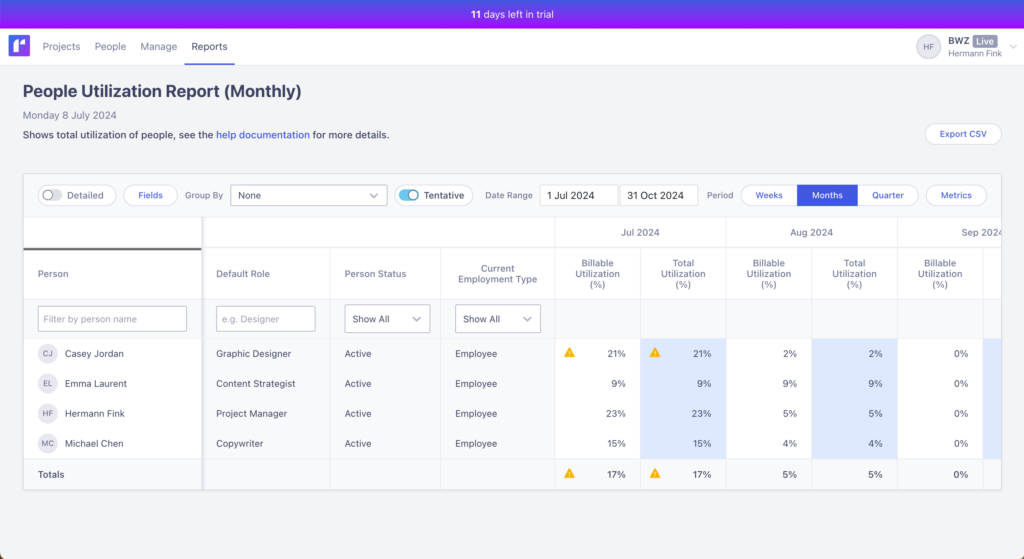
Focus on using the products you intend to develop as a way to forecast your resource needs during this period of time. Then, adjust hiring plans based on your chosen strategy (lagging, leading, or matching) to meet those needs.
What’s Next?
Want to connect with other digital project managers to share resources and best practices? Join our membership community and get access to 100+ templates, samples, and examples and connect with 100s of other digital project managers in Slack.


