

Resource Leveling in Project Management: A Complete Guide


Resource leveling helps project managers resolve scheduling conflicts when team members, equipment, or other resources are needed for multiple tasks at the same time. By adjusting task schedules to match resource availability, you can prevent overallocation and create a more realistic project timeline.
This guide covers when to use resource leveling, the techniques involved, and how to apply it to your projects.
What Is Resource Leveling?
Resource leveling is the process of rescheduling project tasks to match resource demand with availability. For example, if a developer is assigned to two overlapping tasks, you can move the lower-priority task to a time when they're available.

This approach prevents overallocation but may change the project's critical path or extend its completion date. Resource management software can help identify these conflicts and adjust schedules accordingly.
When To Use Resource Leveling
Use resource leveling when:
- Required resources have limited availability. Say a DevOps engineer can work on a software development project for only one week. You adjust the resource schedule to accommodate his availability.
- Required resources have to be shared. Say a quality assurance officer has to split his time between two production lines. You adjust the QA monitoring and inspection schedules for the two lines to accommodate the QA officer’s availability.
- Required resources are available in limited quantities. Say a construction project requires two cranes but has only one and no way to get an additional crane. You reorganize the project schedule so that the higher-priority task uses the crane first.
- Required resources are over-allocated. Say two overlapping activities need the project’s structural engineer. You reschedule the lower-priority inspection activity so that the structural engineer can perform the higher-priority inspection activity first.
- Resource usage must be level. Say an activity has an estimated duration of five days, with Developer A working 16 hours for three days and no work for two days. After resource leveling, Developer A works eight hours per day for six days, extending the activity duration by one day.
Mathematically, the adjustment looks like this:
16 hours/day x 3 days = 48 hours = 8 hours/day x 6 days

Resource Leveling Techniques
Several project scheduling techniques can help you manage resource constraints, adjust workloads, and minimize delays. The right approach depends on your resource availability, task dependencies, and project deadlines.
1. Critical Path Method (CPM)
The critical path method identifies the longest sequence of dependent tasks that determines your project's minimum duration.
It helps you identify which tasks have scheduling flexibility and which delays could affect the project deadline. This is especially useful when deciding which activities to reschedule during resource leveling.

2. Fast Tracking
Fast tracking involves performing tasks in parallel that would normally happen sequentially.
It can help recover time lost during resource leveling, but it also increases the risk of resource conflicts and rework. Use it only when tasks can safely overlap and sufficient resources are available.
3. Crashing
Crashing shortens the project schedule by adding resources to critical tasks, such as assigning additional team members or approving overtime.
This can help offset delays caused by resource constraints, but it typically increases costs and only works when additional resources can reduce task duration.
4. Critical Chain Method (CCPM)
The critical chain method builds resource availability into project scheduling and uses time buffers to manage uncertainty.
Unlike the critical path method, which focuses primarily on task dependencies and durations, critical chain scheduling accounts for resource limitations that could delay project activities.
4 Benefits Of Resource Leveling
Resource leveling helps project managers make better use of available resources while creating more realistic schedules. Its main benefits include:
- More efficient resource use: Makes better use of existing team members and equipment, reducing the need for additional resources when scheduling adjustments can resolve conflicts.
- Realistic scheduling: Accounts for resource availability during project planning, helping you create achievable schedules and avoid unexpected delays.
- Balanced workloads: Prevents resource overallocation by distributing tasks according to availability and capacity.
- More predictable project delivery: Ensures resources are scheduled when needed, reducing conflicts that could disrupt project progress.
Limitations Of Resource Leveling
- It cannot be used in situations when there is no flexibility in project scheduling. Resource leveling accommodates conflicts by rescheduling activities and extending the critical path. You cannot perform resource leveling when you are not allowed to do that.
- It changes the project schedule. In projects where losing time means significant costs or losses, planning the schedule around resource availability can be costly. A better approach is to bring in additional resources instead of waiting around for existing resources to become available.
Resource Leveling Example
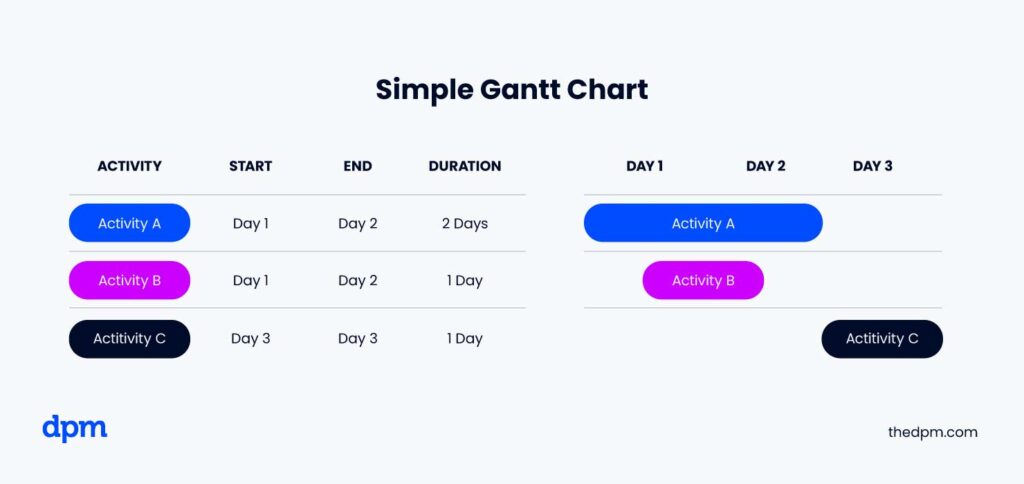
Suppose you have a simple project that has three component activities—Activity A, Activity B, and Activity C—with the following dependencies and estimated duration:
- Activity A, two days, has to start for Activity B to start
- Activity B, one day, has to finish for Activity A to finish
- Activity C, one day, can start after Activity A and B finish
As it is, the project has an estimated duration of three days.
Below is a representation of the project on a simple Gantt chart.
However, your team members have limited availability. Roger can only work four hours per day, while Greg is available for three hours. The original schedule also assigns Roger and Minerva to overlapping activities, creating resource conflicts.

To resolve these conflicts, you must reschedule activities based on each team member's availability while respecting task dependencies.
And here is your new Gantt chart.
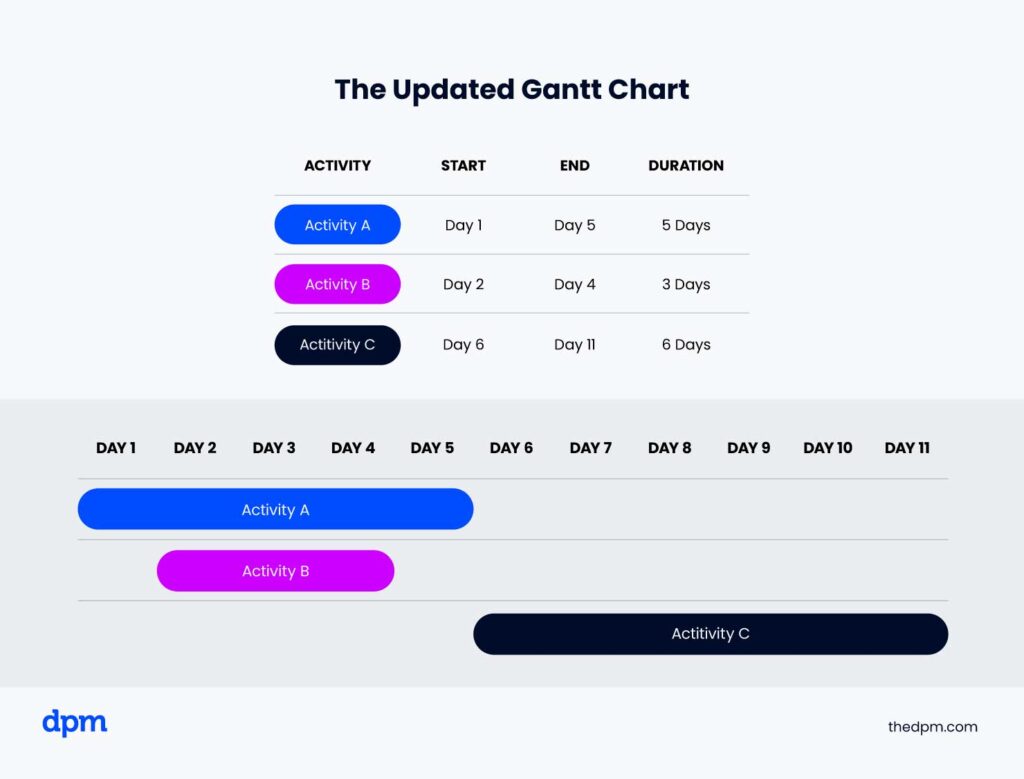
After resource leveling, the project takes 11 days instead of three. Although the timeline is longer, the revised schedule accounts for resource availability and avoids overloading team members.
Resource Leveling vs Smoothing
Resource leveling and resource smoothing both help project managers balance workloads and manage resource constraints. The key difference is how they affect the project schedule.
| Factor | Resource Leveling | Resource Smoothing |
|---|---|---|
| Main priority | Resource availability | Project deadlines |
| Scheduling approach | Reschedules tasks based on available resources | Adjusts tasks within available float (slack) |
| Project timeline | May extend the completion date | Keeps the completion date unchanged |
| Critical path | May change the critical path | Does not change the critical path |
| Best used when | Resources are limited or overallocated | Deadlines are fixed and tasks have scheduling flexibility |
For example, if a developer is assigned overlapping tasks, resource leveling may delay one task until they're available, even if it extends the project. Resource smoothing would shift tasks only within the available slack to avoid changing the deadline.
For a more detailed comparison, see our guide to resource leveling vs resource smoothing.
How to Do Resource Leveling
Resource leveling involves reviewing your project schedule, identifying resource conflicts, and adjusting tasks to match availability. Follow these five steps to create a more realistic schedule.
1. Break Down Your Project Schedule
Divide your project timeline into manageable intervals, such as days or weeks, depending on the project's complexity.
Identify which tasks are scheduled for each interval, their estimated durations, and any dependencies that affect when work can begin.
2. Identify Resource Requirements and Availability
For each scheduled task, determine which team members, equipment, or materials are needed and compare those requirements with actual availability.
Consider working hours, planned absences, and commitments to other projects. This helps you identify where resource demand exceeds capacity.
3. Identify and Resolve Scheduling Conflicts
Look for overlapping tasks that require the same limited resources. When a conflict occurs, consider moving one task to another available time slot.
Make sure any adjustments respect task dependencies and don't create additional conflicts elsewhere in the schedule.
4. Prioritize Competing Tasks
When multiple tasks compete for the same resources, determine which should take priority based on deadlines, dependencies, and project importance.
Tasks on the critical path generally require closer attention because delays can affect the project's completion date.
5. Adjust and Review the Schedule
Assign available resources to higher-priority tasks and reschedule others as needed. Then review the updated timeline to identify any remaining conflicts.
Repeat the process until resource demand aligns with availability. Check whether your adjustments have changed the critical path or project completion date, and communicate significant changes to stakeholders.

Popular Resource Leveling Tools
Here are some resource leveling techniques and tools you can use as you're carrying out this process on your projects.
- Use Gantt charts. As you saw in the example I outlined above, Gantt charts are super handy for visualizing tasks and finish dates or project durations, as well as identifying dependencies that impact resource demand and allocation.
- Use project management tools such as project management software (for managing all aspects of projects) or resource management software (drills down on managing and planning resources), which provide views of resources and allocation. They often come with algorithms that automatically resolve scheduling conflicts according to criteria that you designate.
- Identify the critical path (aka the critical path method, or CPM). Because resource leveling may lead to a change in a project’s critical path, it's important to know exactly what it looks like in advance. This way, you can alert the client or stakeholders early if the critical path (and the project completion date or project deadline) might change.
5 Resource Leveling Best Practices
- Continuously monitor resource allocation: Resource leveling is not a 'one-and-done' situation. Keep monitoring your methods of resource allocation for conflicts throughout the project (ex. last minute requests on other projects, unexpected absences like sick days, etc.)
- Aim to distribute work evenly: As much as you can, try to spread work out evenly amongst the team members. This will avoid burning out certain team members or leaving others with nothing to do.
- Be transparent about changes: When you need to make changes to timelines or who is allocated to a task, keep both the stakeholders and team informed.
- Have a back up plan: If a specific team member isn't available, or you absolutely cannot move a deadline, have a plan B—assign the work to a different team member, crash the schedule, etc.
- Create a feedback loop: In addition to monitoring your team's workloads through a software tool, make sure you're talking to them regularly about their workload. Sometimes you'll uncover details that aren't reflected in the software (ex. other projects that weren't entered in the software, etc.)
What's Next?
Have more questions about resource leveling? Join the conversation in Slack with 100's of other digital project managers with DPM Membership!


