

7 Resource Management Techniques (With Examples)

Managing resources efficiently is like threading a needle—get it right, and the whole project comes together seamlessly. It's more than just allocating tasks, it's about understanding capacities, dependencies, nuances, and potential impacts on your project.
Here are seven resource management techniques and how to put them into practice.
What Are Resource Management Techniques?
Resource management is the process of identifying, allocating, and overseeing everything your team needs to deliver a project. Unlike project planning, which defines the what and when, resource management focuses on the who, with what, and at what cost. The five core resource types are:

- People - team members, contractors, and subject matter experts
- Budget - the financial resources allocated to the project
- Equipment - hardware, machinery, or specialized assets
- Time - finite and non-renewable
- Tools - the project management software your team uses to collaborate and deliver
Why Resource Management is Critical
Today's projects span multiple teams, time zones, and working styles, making resource management harder than ever. Four challenges stand out:
- Cross-functional complexity — When people are pulled from different departments, capacity planning becomes a shared problem with competing priorities.
- Capacity constraints — Without visibility into availability, over-allocation and bottlenecks follow.
- Context switching — Excessive multitasking costs teams up to 40% of their productivity (APA).
- Hybrid and remote work — Distributed teams make resource imbalances harder to spot before they cause damage.
The human stakes are high too. Burned-out employees are 63% more likely to take sick days (Gallup). Strong resource planning and workload management are among the most effective ways to protect both your project and your team.

7 Resource Management Techniques
Let's dive deeper into each of these resource management skills and technique, understanding its essence and its application in our day-to-day management tasks.
- Resource Forecasting
- Resource Planning
- Resource Allocation
- Resource Scheduling
- Resource Leveling
- Resource Utilization
- Resource Smoothing
1. Resource Forecasting
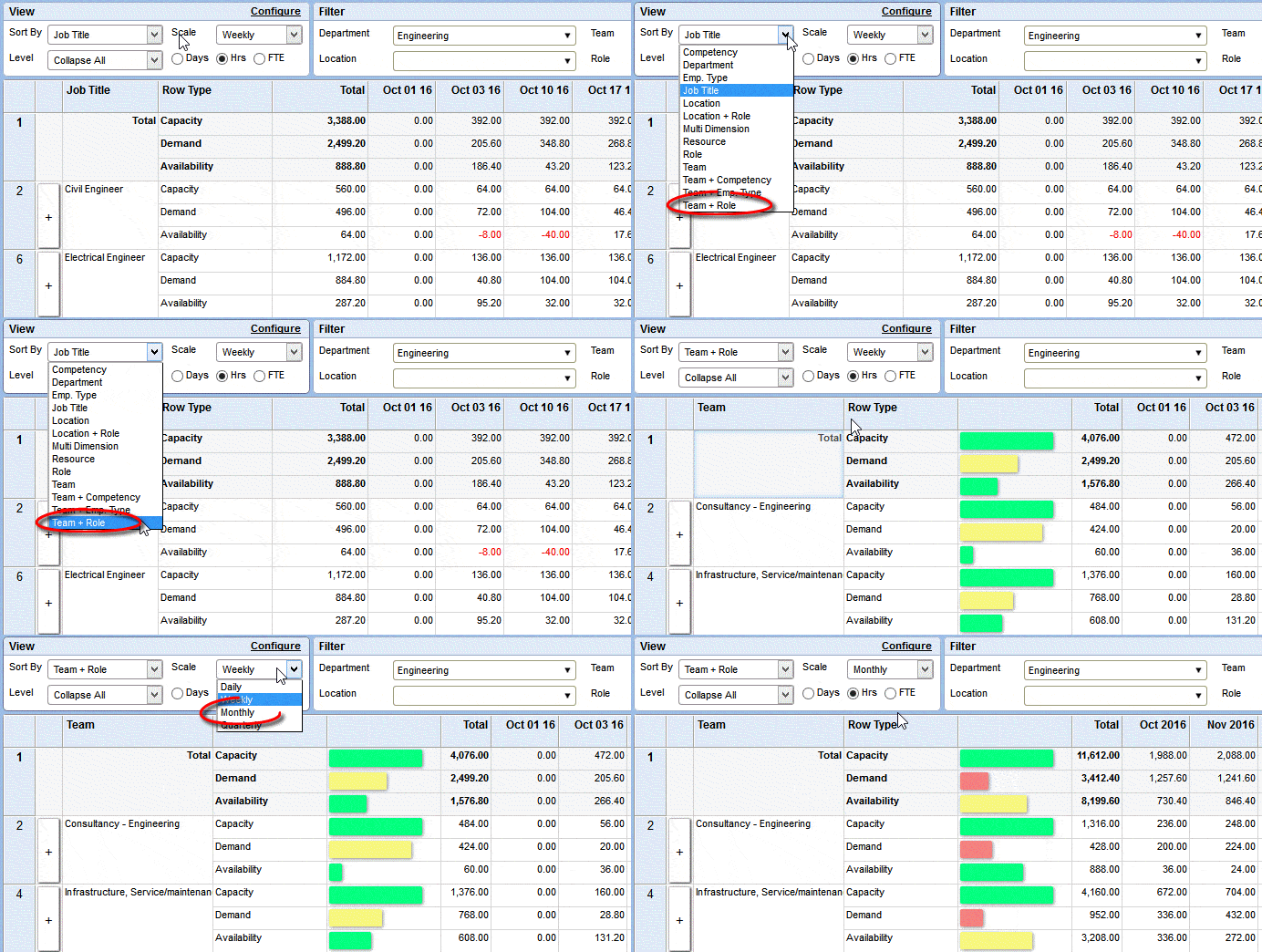
Resource forecasting is the process of estimating the resources required for a project in its future stages. By examining past projects, current trends, and team capacities, resource forecasting allows you to anticipate needs and avoid potential pitfalls, ensuring you're not caught off-guard when demands surge or shift.
It also allows you to set a preliminary idea of the required resources, helping with budget estimations and ensuring you don't get halfway through the project only to realize you're short-staffed or that you over-allocated your project team.
Example: Imagine you're working on a website redesign that will last three months. Using project forecasting software, you sit down and estimate the type and quantity of resources you'll need. This might involve predicting the number of designers for visuals, backend developers, and web copy content writers (who might be freelancers or full-timers).
How to apply it:
- Pull data from 2–3 comparable past projects — note team size, timelines, and where things got stuck.
- Use that as your baseline, then adjust for anything different about this project: new tools, unfamiliar scope, or a smaller team.
- Break your resource needs down by project phase, so gaps are visible early rather than urgent later.
- Set a recurring check-in — weekly or biweekly — to update your forecast as scope or priorities shift.
Read more about forecasting and capacity and resource planning best practices in our capacity management best practices guide.
2. Resource Planning
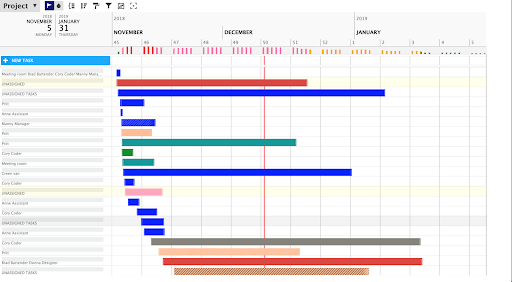
Resource planning involves determining which types of resources (human, technical, financial) are needed, when, and in what quantities.
You can then compare your resource management plan against resource capacity to ensure that all project stages have the requisite resources, and that you aren’t burning out your team by giving them more work than they have capacity.
This isn't a one-off workflow. Regular check-ins and adjustments to your resource plans are vital as projects evolve.
Example: Let's say you're about to roll out a new software product. Resource planning would involve listing down every task (like software testing, marketing, and user training) and then matching them with the resources available. One way to streamline this process is to use a Gantt chart maker.
How to apply it:
- List every task or project phase, then identify what type of resource each one needs such as people, tools, or budget.
- Cross-reference against your team's actual capacity to spot over-allocation before it happens.
- Use a resource planning template or capacity planning tool to speed up the process and keep everything in one place.
- Revisit your plan at key project milestones — resource needs shift as projects evolve, and your plan should too.
3. Resource Allocation
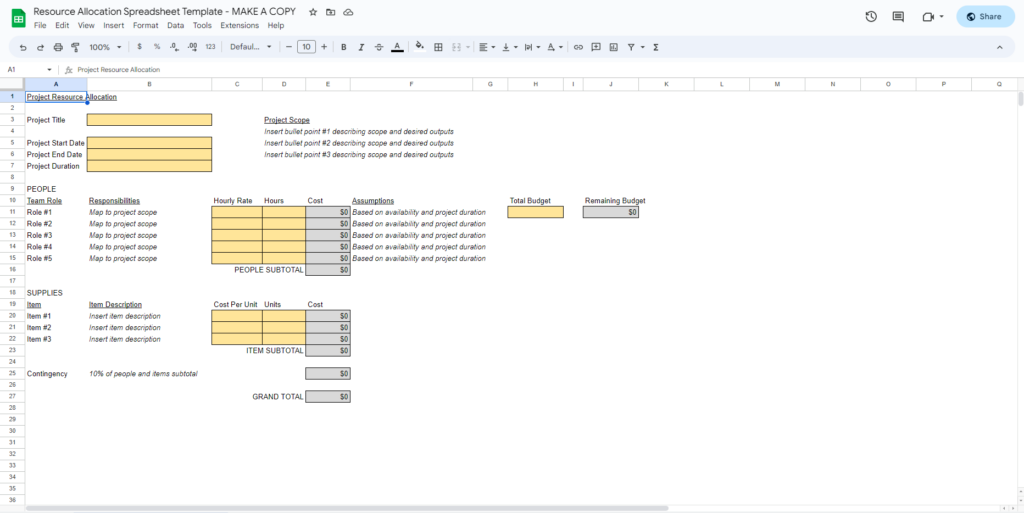
Resource allocation is the assignment of resources to specific tasks or phases of your project.
Here, it's essential to recognize the strengths and limitations of your team and tools. Assigning team members to tasks based on their skillset and availability keeps them motivated, keeps morale high, and, again, prevents burnout and resource wastage.
Example: Consider the example of resource allocation for a digital marketing campaign. After planning, you need a graphic designer, a social media manager, and a content writer. Allocating marketing resources would mean assigning specific tasks to each of these roles—perhaps the graphic designer is responsible for creating blog graphics and social media images. At the same time, the content writer handles blog posts and social captions.
How to apply it:
- Match tasks to team members based on skill set first, availability second — the right person for the job matters more than who has the most free time.
- Check for conflicts before confirming assignments — is anyone already stretched across multiple projects?
- Use resource allocation software or a simple spreadsheet to document who owns what, so nothing falls through the cracks.
- Watch for signs of imbalance as work gets underway. If one person is consistently overloaded while others have capacity, reallocate early.
4. Resource Scheduling
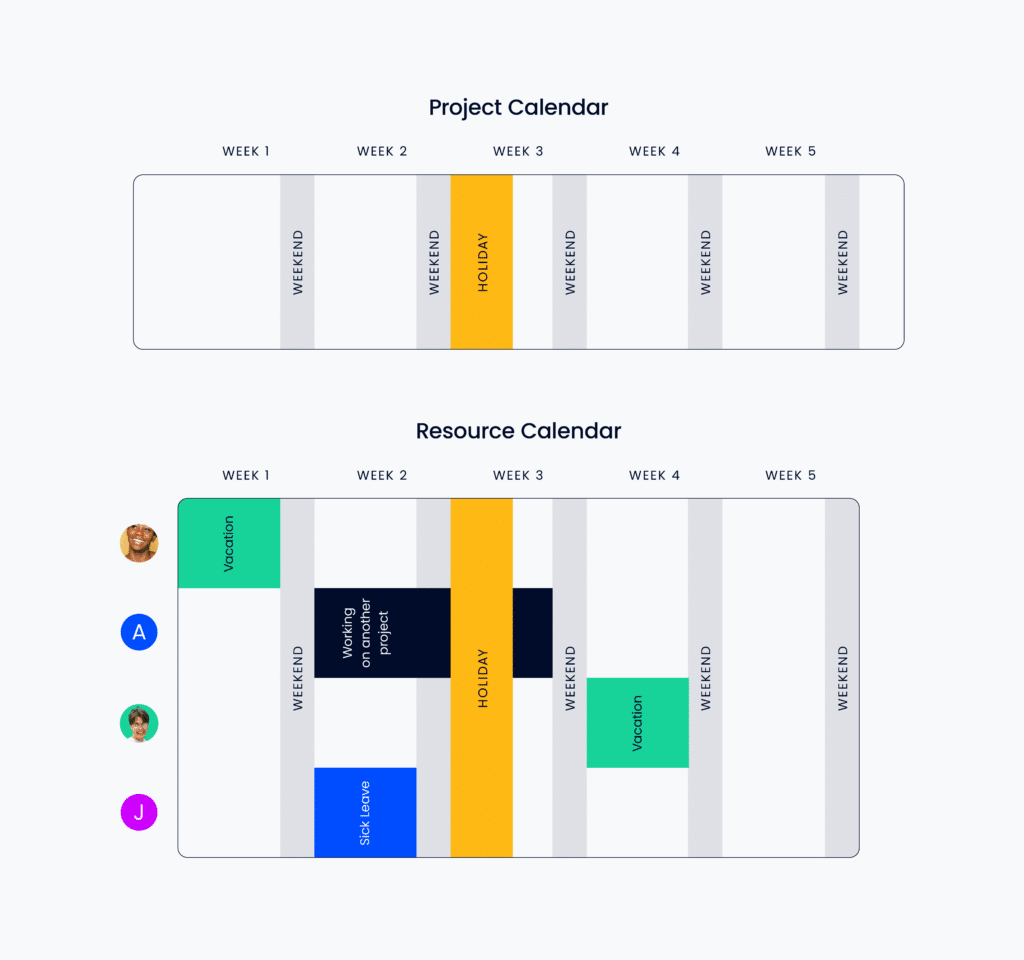
Resource scheduling builds upon allocation by plotting assignments out on a calendar and detailing when and where each resource will be used. At this stage, you’ll likely use tools like Gantt charts or resource schedulers to visualize the timeline of your resources, ensuring no overlaps or idle periods.
Example: You're developing a new mobile app. Resource scheduling in this context could involve ensuring that UI/UX designers complete their work before developers begin coding. This way, the developers aren't waiting around for design assets, and designers aren't rushed to churn out last-minute changes.
How to apply it:
- Once resources are assigned, plot each one on a timeline — a Gantt chart or resource scheduler works well for this.
- Look for dependencies: identify which tasks need to finish before others can start, and sequence assignments accordingly.
- Check for overlaps — if the same person is scheduled for two things at once, something needs to shift.
- Flag any idle periods where resources are sitting unused between tasks, and adjust the schedule to keep things moving efficiently.
5. Resource Leveling
Resource leveling is the process of adjusting the timelines and deadlines for project tasks and activities so they can be completed by the available resources. This technique is only possible when your project schedule is flexible (if it’s not, you’d need to find other available resources who can take care of the task or deliverables, i.e. conduct resource smoothing, but more on that later).
By doing so, you avoid overwhelming certain team members with unrealistic deadlines. According to Tim Green, COO at GoTeamUp, “The key benefit here is the prevention of resource burnout, leading to a more harmonious and productive work environment.” This helps ensure consistent productivity and happier, more balanced teams.
The key benefit here is the prevention of resource burnout, leading to a more harmonious and productive work environment.

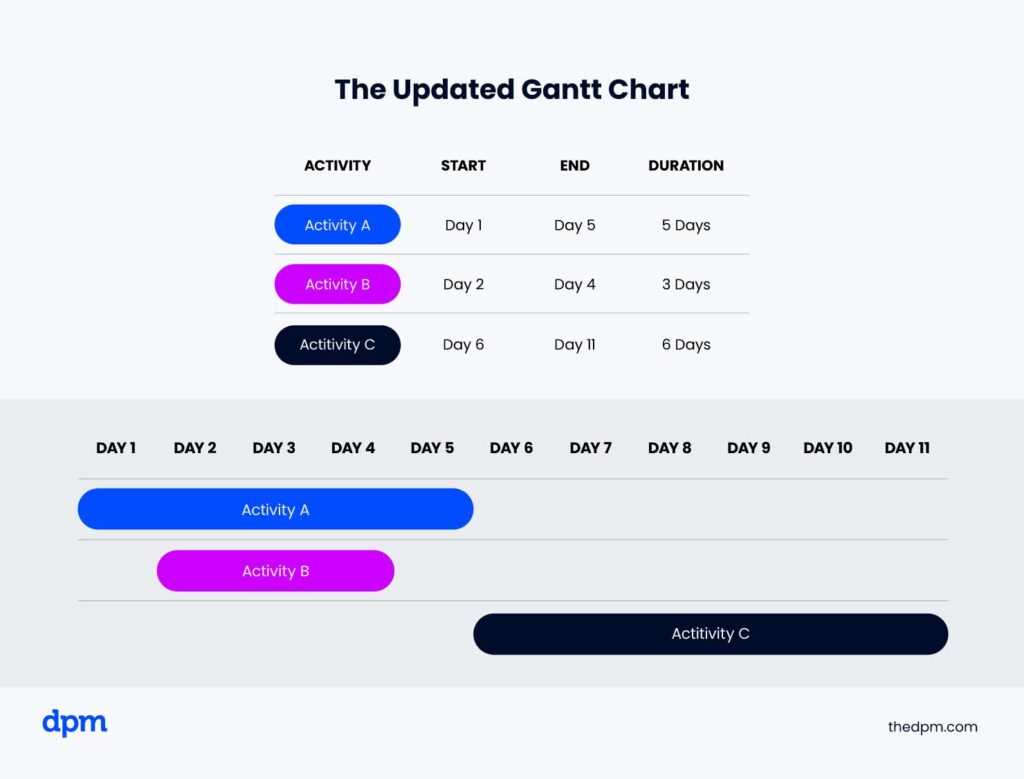
Example: In the midst of a product launch, you notice your graphic designer isn’t available to complete a task you thought they would be available for. Resource leveling would mean changing the start and end dates of that task to days when your graphic designer is available.
To demonstrate how this works, here is a resource leveling example with two Gantt charts showing the before and after results of the process.
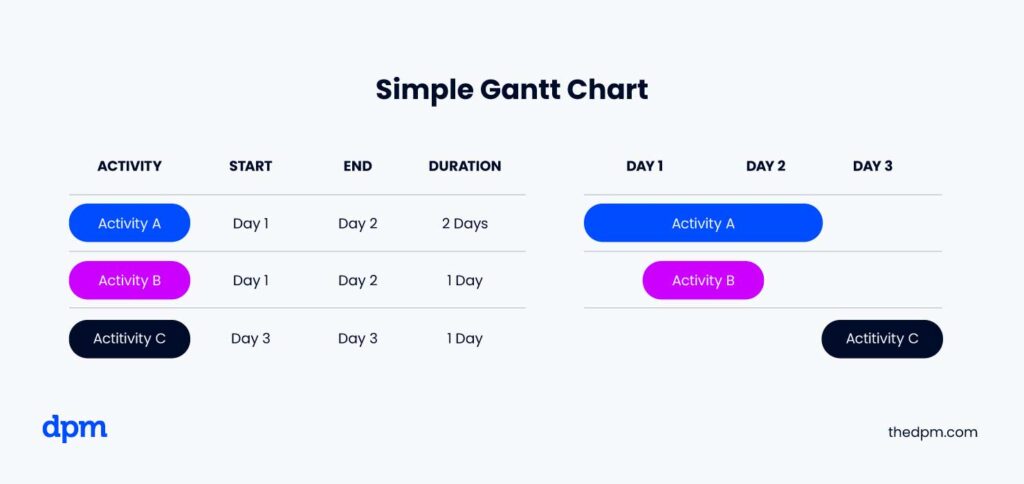
And here's what our Gantt chart looks like after resource leveling.
How to apply it:
- Identify any team members who are over-allocated and flag which tasks are driving the overload.
- Check if your schedule has flexibility — if deadlines can move, adjust task timelines to match actual availability rather than forcing an unrealistic pace.
- If the schedule can't flex, that's resource smoothing (covered next).
- Redistribute work gradually rather than in large chunks, so the adjustment doesn't create a new bottleneck elsewhere.
6. Resource Utilization
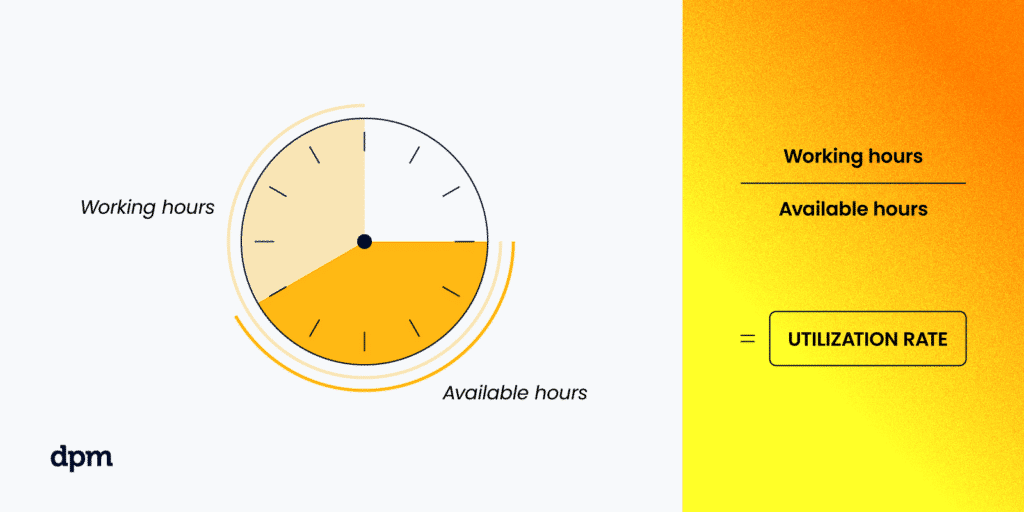
Resource utilization involves understanding how effectively allocated resources are being put to work. By monitoring utilization metrics like billable vs. non-billable hours or resource availability ratios, you can gauge the efficiency of your resource deployment. If you're spotting underutilized resources, it's an opportunity to recalibrate and ensure maximum productivity. This “...can lead to significant cost savings,” argues Tim Green.
Example: After launching an online course, you notice that while most of your team is fully engaged, your videographer, initially hired for course content, has some free time. Resource utilization would involve capitalizing on this availability by creating promotional video content for the course, ensuring you're getting the most value out of every team member.
How to apply it:
- Track billable vs. non-billable hours regularly using time tracking software.
- Review utilization metrics at a team and individual level to spot who's overloaded and who has capacity to spare.
- If someone is underutilized, look for adjacent tasks that match their skills before assuming there's nothing for them to do.
- Set a target utilization rate for your team and use it as a benchmark — too low signals inefficiency, too high signals burnout risk.
7. Resource Smoothing
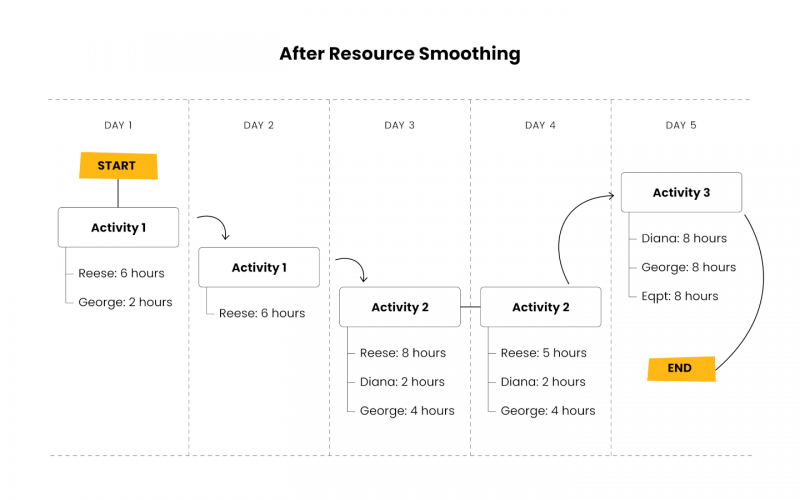
Resource smoothing is the process of adjusting resource usage when your project timeline isn’t flexible. Unlike with resource leveling, you can’t just adjust the due date of the task or deliverable. Instead, you might need to ramp up resources to meet a tight deadline.
The main advantage is a more flexible and adaptable project schedule, allowing for better response[s] to changes or unforeseen circumstances.
You’ll still hit your project deadline, but the schedule (i.e. which task happens when and by whom it’s done) has enough flex that you can adjust it to address changes in personnel or resource availability.
Example: You're overseeing an e-commerce platform overhaul with a looming, inflexible deadline. However, you have some additional budget to bring on an additional developer, or maybe assign the work to a more senior developer who can work faster.
Here's a before and after showing the result of the resource smoothing process.

Here's what the project schedule would look like after resource smoothing.
How to apply it:
- Confirm the deadline is truly fixed before applying resource smoothing — if there's any timeline flexibility, resource leveling is the better starting point.
- Identify which tasks within the schedule have flex — even with a hard deadline, individual task sequences can often be adjusted.
- Look at your options for ramping up: an additional hire, a freelancer, or reassigning work to a more senior team member who can move faster.
- Check your budget before committing — bringing on extra resources has a cost, and it's worth confirming the tradeoff is worth it before pulling the trigger.
What's Next?
Have other resource management techniques that have worked for you, or maybe you're looking for more ideas? Become a member and join the conversation in Slack with 1000+ other digital project managers. You’ll also get access to 100+ templates, examples, and samples for project documents like a resource management plan.
If you're looking to upskill and stay ahead of the game, consider taking one of these top resource management courses for project leaders.


