

What is a Resource Management Plan & How to Create One

What Is A Resource Management Plan?
A resource management plan outlines how resources will be allocated, scheduled, and managed throughout the project life cycle to successfully deliver the project scope.
It identifies which resources are needed, when they are needed, and how they will be used throughout delivery. Resources may include team members, budget, equipment, materials, and other assets responsible for resource management across the project.
What Is A Resource Management Plan For?
Resource management plans serve a few critical functions on projects and facilitate:

- Accessibility: Project team members, as well as project and resource managers, can edit and revise parts of the resource plan.
- Transparency: Resource management plans allow every project manager in an organization to see what is going on and schedule resources based on other managers’ plans and their own needs. They're also used to keep track of information such as the whereabouts of equipment or team member status.
- Accuracy: Project management plans and resource plans should be updated in real-time, so project managers have up-to-date and accurate information when making decisions.
Resource Management Plan Template [Download]
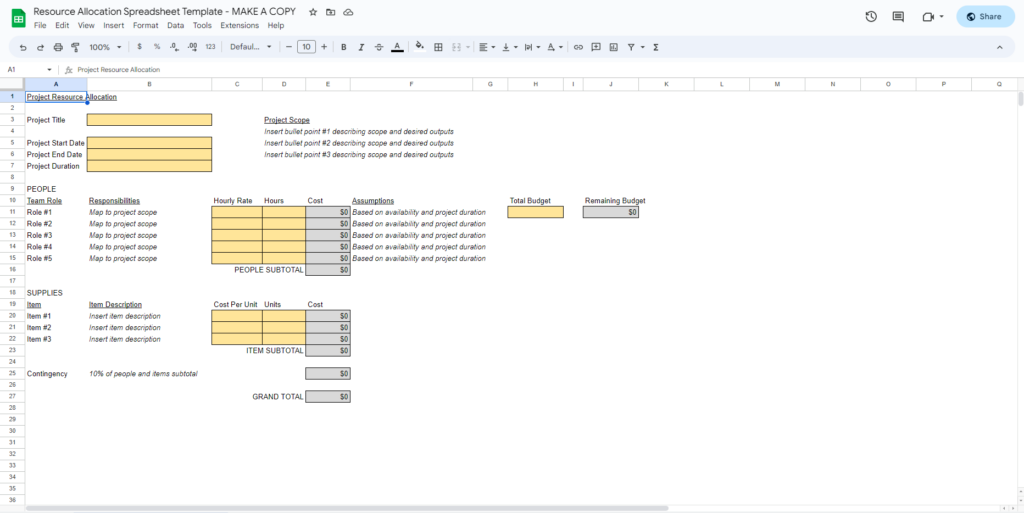
This allocation spreadsheet will make it easy to keep track of hourly rates for your team members and associated costs. It's in a Google Sheets format, but you can easily import a copy into Excel if you prefer. Just select File and then either "Make a copy" or "Download."
What To Include In A Resource Management Plan
These are the essential elements to include in your resource management plan:
1. Responsibility Assignments
Clearly define ownership, responsibilities, approvals, and deliverables across the project team. Many teams use a RACI chart to clarify who is responsible, accountable, consulted, and informed throughout delivery.
Employees and managers can also use project management software to estimate the duration of a specific task, assign specific roles, and generate a manageable schedule.
2. Resource Estimates
Estimate the people, time, budget, tools, and skills required to complete the project successfully. This includes evaluating team capacity, identifying skill gaps, and determining whether additional hiring or outsourcing is needed.
We recommend using a resource scheduling software to manage one or more of these elements including team capacity, skills, and tools/equipment.

3. Resource Management Charts
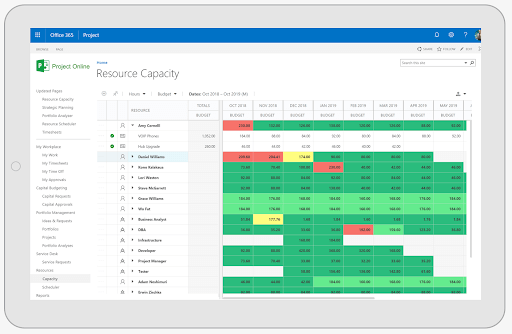
Duration and histogram charts help you and your project team get a better picture of how the resources you're planning to use fit the schedule. Histograms assist project managers with flagging and resolving problems with overallocation before they become issues. Many project scheduling tools simplify this process by offering built-in options to generate resource management reports and charts.
4. Project Dependencies
A project dependency occurs when a team member can't complete their tasks without the completion of a prior task or another resource.
A resource dependency occurs when a task requires one specific team member to complete, but that person is not available. If a task can be completed by multiple team members, it is not resource-dependent.
5. Alternatives
Selecting alternative methods, plans, and technologies is always important when putting together a resource management plan.
Having multiple alternatives can positively influence your costs, timeline, and the reliability of the project. These alternative approaches can be reviewed and stitched together for the most efficient resource planning.
Why Are Resource Management Plans Important?
Resource management is important for the following reasons:
1. More Accurate Project Timelines
Including a detailed timeline helps take the guesswork out of the project timeline and provides an accurate project schedule for managers and teams to measure milestones and project progress. This helps project managers set expectations that are favorable to the stakeholders and clients.
2. Increased Employee And Team Satisfaction
By quantifying the work an employee is able to do, project managers can make better, strategic decisions regarding who takes part in a project and when. This is a key resource management skill, and it results in a more realistic and manageable workload for team members. Team members can easily become overworked, just as resources can be overused. This can have long-term side effects: stress at work can affect sleep, health, and overall job satisfaction.
With effective resource management, project managers can pinpoint where a project is lacking and provide more insight into whether the “resource pool” is sufficient or whether to bring on a temporary hire.
3. Accurate Resource Estimates
Resource management plans make sure companies and businesses are effectively using the resources that they have and creating a balanced workload.
With a good resource management plan, project estimates become easier to come up with. Project managers are able to break down where to allocate resources in terms of associated costs and budget, and then better calculate costs and project margins. It can also help them plan resources for multiple projects that will be completed simultaneously.
4. Improved Project Flow
A resource management plan provides transparent information to all stakeholders, which improves accountability and keeps team members informed on what they are working on and when. This speeds up transitions between project phases.
5. Improved Transparency & Communication
Project resource management plans solve some of the most common challenges in resource management, including:
- Projects competing for resources
- Lack of communication on roles and responsibilities
- Misalignment with resource availability due to poor project capacity planning (which differs from resource planning)
Keeping resource management plans accessible to all project managers and team members in an organization ensures everyone has an overview of current resource usage and that everyone is working from the same information when resolving conflicts.
How To Create A Resource Management Plan
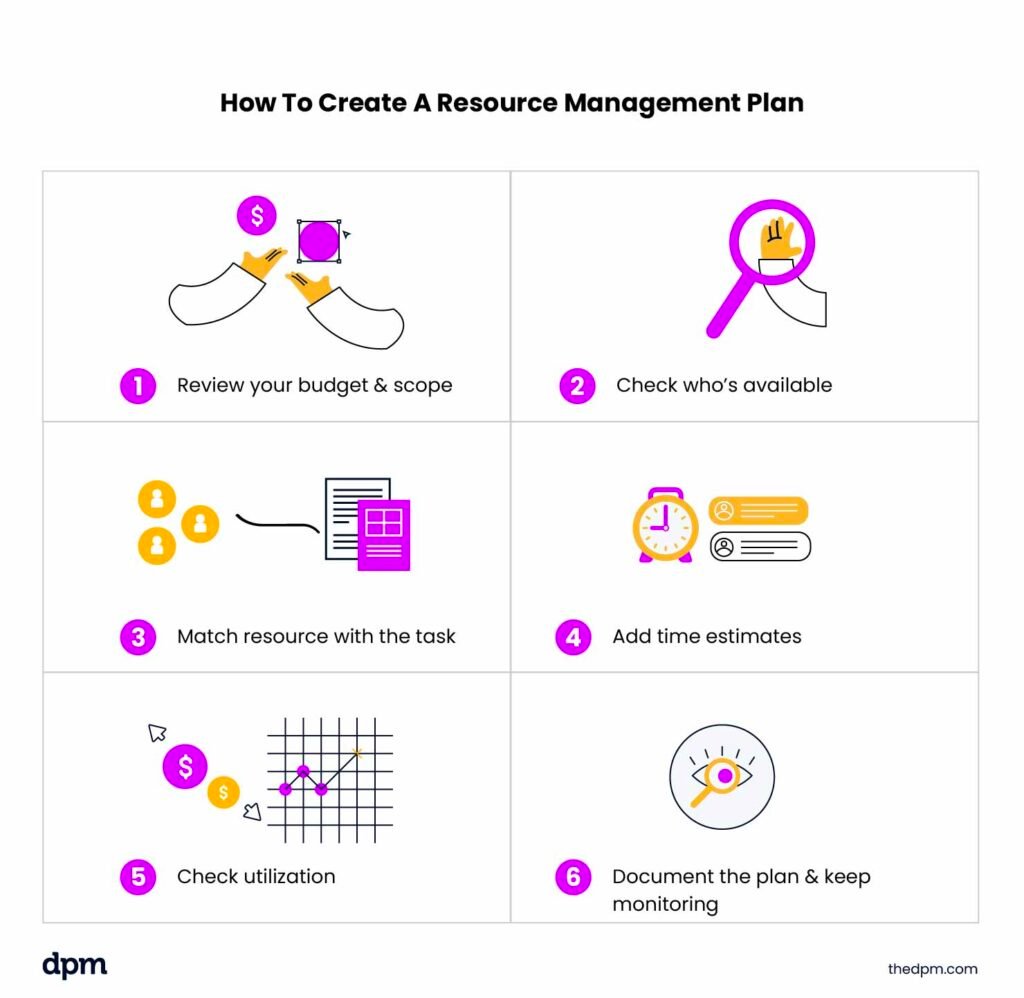
Follow these key steps for creating a resource management plan:
- Define resource needs: Review your project scope and budget to identify the people, skills, tools, and materials you’ll need to complete the work successfully (e.g., developers, designers, contractors, or equipment).
- Review team capacity: Check what your team members are currently working on and how much availability they realistically have before assigning new tasks. A resource scheduling tool can help you identify conflicts or overallocation early.
- Assign resources: Match tasks to team members based on their availability, experience, and skill sets. For example, you might have a junior designer handle production work while a senior designer reviews final deliverables.
- Estimate effort: Meet with your team to discuss timelines, workloads, and realistic time estimates for major tasks or deliverables (e.g., estimating how many hours are needed for design, QA, or development work).
- Monitor workloads: Review utilization rates regularly to make sure nobody is overloaded or underutilized throughout the project. Many teams avoid scheduling team members at 100% capacity to leave room for meetings, revisions, and unexpected work.
- Track and adjust: Document your plan using resource management software or capacity planning software, and continue updating it as priorities, timelines, or resource availability change throughout the project life cycle.
Resource Management Plan Examples
Resource management plans are specific documents found in various forms, usually within a software application or Excel doc.
Gantt Chart Resource Plan
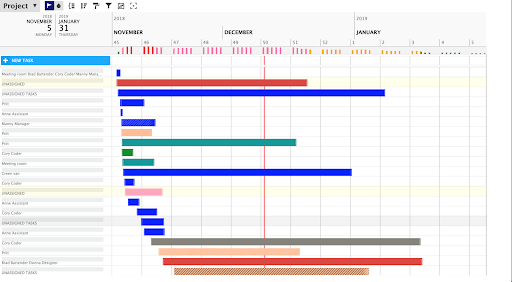
Here's an example of what your resource plan might look like as a Gantt chart. Rather than having task names along the vertical axis, you'll use team member names instead. The bars represent which tasks team members will be working on, usually measured in days. Check out our Gantt chart project plan template to help you visualize your entire project's timeline.
Spreadsheet Resource Plan
Another example is the spreadsheet below. This is a similar approach to what's used in our allocation spreadsheet in the template section. Here, you track team member hours and hourly rates, which allows you to see how you're tracking against budget.
This can help you with decision-making about which team members will work on the project and on which tasks (ex. you might opt for a designer with a cheaper hourly rate for smaller budget projects).
Resource Management Plan Best Practices
Here are a few resource planning best practices to keep in mind as you're creating your plan.
1. Consider Budget
If resources are essentially unlimited on your project, you can allocate resources to tasks with an emphasis on “getting it done,” rather than being stingy with resources to conserve budget.
If your project budget is tighter, you'll need to allocate tasks to resources and use a more conservative approach to resource allocation. You'll also need to keep a closer eye on utilization. There are a variety of utilization metrics that are useful in understanding whether resources are fully optimized.
2. Keep Past Resource Plan Data To Analyze
Saving data from previous or similar projects aids project resource planning for future projects. Previous data should be recorded and analyzed, including changes made, reallocation of resources, tasks, and time spent.
3. Use Resource Management Software
Proper resource management software tools offer more accessibility and collaboration for the whole team. While spreadsheets may be a cost-effective option for tracking resources, it isn't always the best option for larger teams. If you need a low-cost option, there are plenty of free resource management tools or open-source resource management software on the market.
Tools For Resource Planning
Incorporating resource allocation software can also assist with some of the common challenges of resource planning by:
- Allowing for in-app communication in order to keep track of team communication and changes made to plans
- Providing real-time updates and changes
- Saving your company from having to incorporate custom charts or expensive ERPs
Here's my list of the best resource management software to help you start your search:
Clicks on the links below may earn a commission, which supports our independent testing and review of software and services. Learn more about how we stay transparent.


What's Next?
Have more questions about resource management plans? Join the conversation in Slack with 100s of other digital project managers with DPM Membership!
Ready to improve how you manage your project resources? Check out these top resource management courses.


