

What is Resource Allocation? Key Steps & Template


Strategic resource allocation helps avoid missed deadlines, burned-out teams, and wasted budget by aligning the right resources and people to the right work at the right time. I’ve seen well-planned projects unravel when workloads, capacity, and priorities aren’t managed (this is especially true when you aren't using resource management software).
This guide breaks down how to allocate resources effectively, improve utilization, and keep work moving without overloading your project team.
What Is Resource Allocation?
Resource allocation is the process of assigning and distributing the available project resources to meet the requirements for completing projects on time successfully.

As part of the broader resource management process, you'll allocate team member's skills and capabilities (as well as other resources like tools, financial resources, and physical resources) to execute project tasks and milestones on time and meet deliverables.
Who Is Responsible for Resource Allocation?
The project manager is usually responsible for allocating resources on their own project. In larger organizations, they share that job with a few other roles.
- Project managers: Define what the project needs, request people, and assign them to tasks.
- Resource managers: Approve requests and balance people across projects so nobody is overbooked.
- Team leads and functional managers: Decide which person on their team fits the work, based on skills and current workload.
- PMO and leadership: Set portfolio priorities and settle conflicts when two projects need the same people.
On smaller teams, I'd expect one project manager to wear most of these hats. Either way, involve team leads early, since they know who can take on the work.
How to Allocate Resources
Here are the resource allocation process steps to follow for your projects:
1. Determine Scope and Objectives
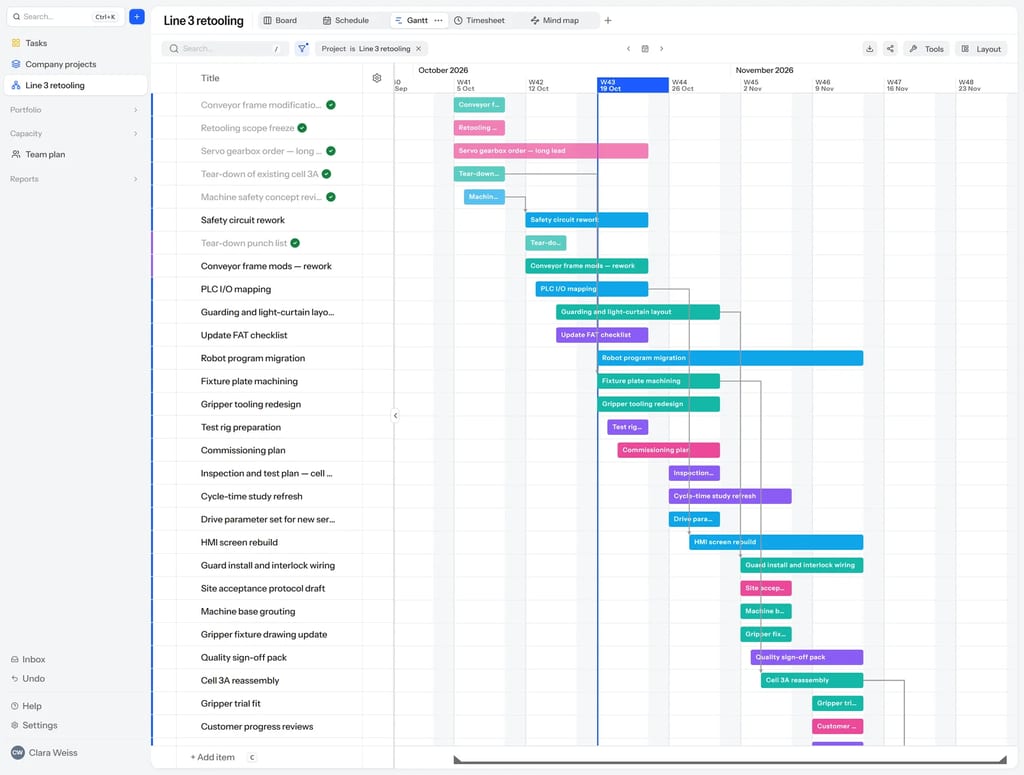
Start by defining your project objectives, project requirements, deliverables, workflows, project timelines, and stakeholders. You'll need to break tasks down into smaller sub-tasks and identify any dependencies between them. This will help you figure out what resources are required.

2. Determine Required Resources
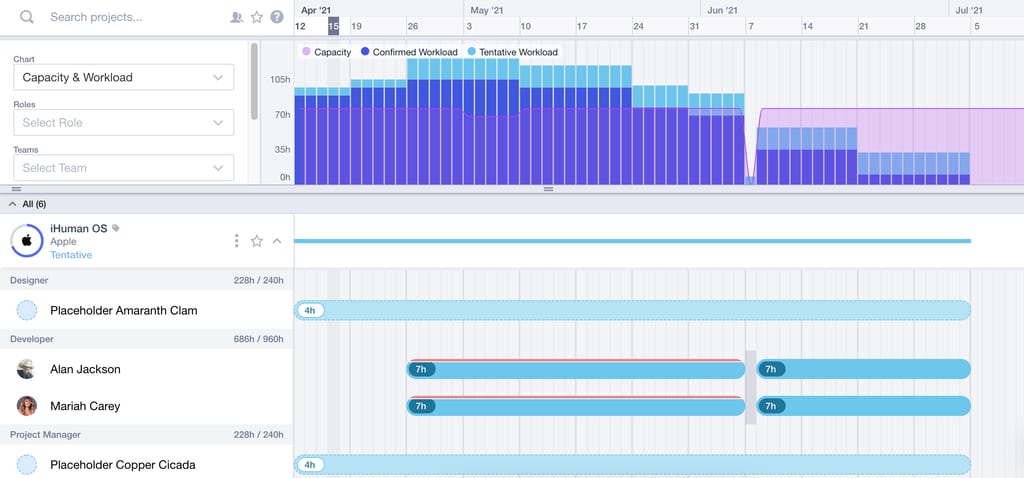
Next, determine the skills and capabilities that are required to complete the work that you outlined in the previous step. If you have the required skills and capabilities already available in-house, match them to specific team members. If not, you may need to outsource work or bring in freelancers.
3. Determine Available Resources

If you've got multiple projects on the go, your required resources may already be allocated elsewhere. Check resource availability and whether the team members or capabilities you need are occupied with other work.
If they are, you have a few options:
- Reprioritize their existing work to make room for the new work
- Allocate a more junior team member and have the team member you originally wanted to allocate check their work
- Cross-train a team member on the skill or capability required
- Enlist a freelancer or contractor
If resources aren't available when needed, it can delay your timeline, increase your budget, and jeopardize your entire project scope. This is why it's crucial to have a plan B in place.
4. Schedule and Assign Resources to Tasks
After assessing availability of resources, you can schedule and assign resources to specific project tasks using a resource scheduling tool. Create a detailed resource management plan or schedule that outlines the allocation of resources over the project duration.
Distribute resources in a way that maintains a balanced workload and optimizes productivity. This also helps with informed decision-making and avoids overcommitting or underutilizing resources, which might lead to bottlenecks on the project and team burnout.
5. Track Progress, Utilization, and Capacity

Once you've assigned resources, continually monitor and track metrics like resource utilization and project progress. You can also track and calculate resource capacity (best done using capacity planning software, which can automate this for you in many cases) to avoid overloading individuals or teams.
This will help identify blockages and maintain optimal productivity levels without overburdening them.
6. Re-Evaluate and Adjust as Needed
As projects progress and circumstances change, re-evaluate resource allocation and adjust accordingly. Remain flexible and adaptable to optimize utilization and address resource allocation challenges or changes as they arise.
Resource Allocation Spreadsheet Template
A resource allocation template can help you create clarity and visibility. You can use it alongside your resource scheduling software to monitor and track resources.
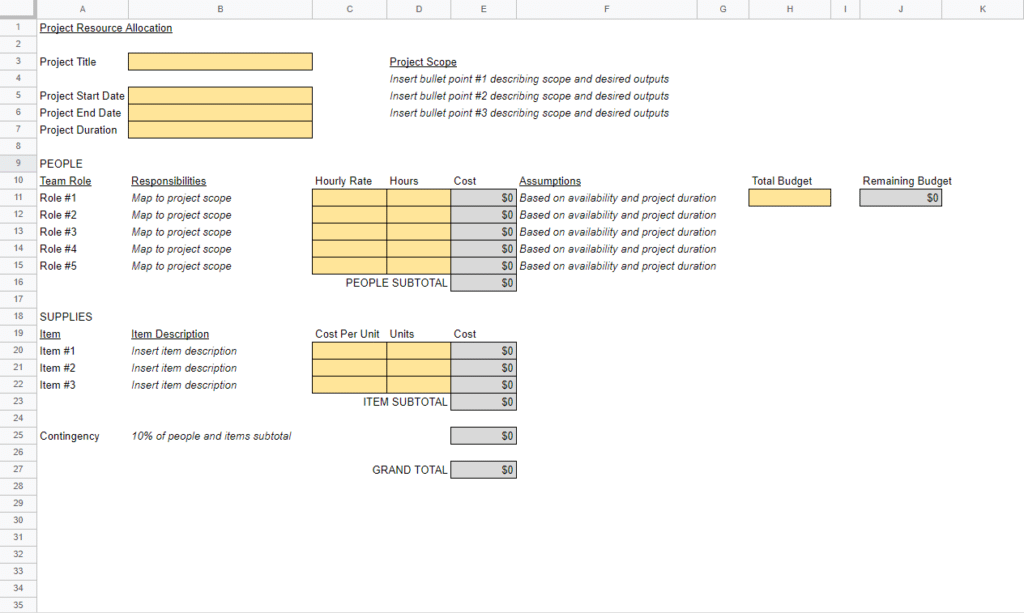
Quick tips for using the template:
- Make a copy before downloading the template.
- Formatting: cells shaded in yellow (e.g. project start date) require your input; cells shaded in gray auto-calculate based on the information you enter.
- Adding team resources: Insert additional rows above the subtotal rows.
- The assumptions column: Use this to track whether human resources are full-time.
- The resource plan sets contingency at 10%: If you'd like to use a different percentage, adjust the formula.
- Use the template's "Remaining Budget" counter to track the project budget.
Resource Allocation Example
Let's say, as a resource allocation example, a software company hires your agency to redesign its customer portal in 12 weeks. Your team includes a UX designer, two front-end developers, a back-end developer, a QA tester, and a content strategist. Your budget allows up to 40 freelance hours.
- Determine scope and objectives: Break the portal into deliverables, like the login flow, dashboard, account settings, and help center. Map dependencies, since development can't start on the dashboard until the UX designer finishes wireframes.
- Determine required resources: List the skills each deliverable needs. The help center needs content strategy, the dashboard needs front-end and back-end work, and every deliverable needs QA. You also need accessibility testing, which nobody on the team has done before.
- Determine available resources: Check bookings across your other projects. You'll find one front-end developer is tied up on another launch until week four, and the content strategist has a week of planned leave in week eight.
- Schedule and assign resources to tasks: Put the available front-end developer on the login flow first, then bring in the second developer for the dashboard in week four. Move help center content to weeks five through seven, and use freelance hours for accessibility testing.
- Track progress, utilization, and capacity: Review hours and utilization every week in your resource management tool. If the back-end developer hits 95% for two weeks running, that's your cue to step in before quality slips.
- Re-evaluate and adjust as needed: In week six, the client adds a billing page. Rather than overload the team, you push account settings to week ten and shift QA time to cover the new work.
Resource Allocation Best Practices
The best resource allocation practices protect your scarcest people, leave room for surprises, and keep everyone focused. Here are the habits I'd build into every project.
- Allocate your scarcest skills first: Every team has a few people everyone needs, like a senior developer or your only accessibility specialist. Book them before anyone else, then plan the rest of the project around their availability.
- Book people to about 80% capacity: Meetings, admin, and support requests eat into every week. Leaving 20% open gives you room to absorb small delays without pulling someone off another project.
- Start with roles, then add names: Plan the project with placeholder roles like "senior designer" before you pick specific people. It keeps you focused on what the work needs, not on who happens to be free.
- Avoid small, scattered allocations: Booking someone at 10% across five projects sounds efficient, but they lose hours to context switching. I'd keep most people on two or three projects, with a clear primary one.
- Plan allocations with the people doing the work: Review assignments with team leads and the team members themselves before you lock them in. They'll spot unrealistic estimates and hidden commitments you won't see in a scheduling tool.
- Keep reallocation decisions visible: When you move someone between projects, update the schedule and tell everyone affected the same day. Quiet changes erode trust and leave other project managers planning around people they no longer have.
Benefits of Resource Allocation
Effective resource allocation offers numerous benefits for organizations. Let's explore some of the key advantages:
- Increased productivity: Resource allocation helps makes sure your resources can work optimally to achieve the desired project outcomes.
- Reduced waste: Proper allocation helps save your company money for other initiatives.
- Improved resourcing clarity: Resource allocation provides visibility into your resourcing, which helps keep everyone on the same page.
- Increased morale: Effective allocation sets the team up to succeed, which helps to increase performance and buy-in, as well as reduce absenteeism and turnover.
- Decreased turnover: With proper resource allocation, projects experience lower turnover rates, which means higher resource availability.
- More project success: When resource are optimally allocated, you'll see increased resource efficiency, higher success rates, and improved project profitability and ROI.
Challenges with Resources Allocation
Here are some challenges you might run into when you're allocating resources:
| Challenge | How to Overcome It |
|---|---|
| Skill sets and capability shortages | Build resource contingency plans, cross-train team members, and maintain a skills inventory so you can quickly identify backup resources when turnover or staffing changes occur. |
| Skill and leadership gaps | Invest in leadership development, training, and mentorship programs to strengthen project oversight and close resource gaps before they impact delivery timelines. |
| Scope creep | Establish a clear change management process with documented approvals, impact assessments, and resource reviews to prevent uncontrolled changes from disrupting workloads and timelines. |
| Conflicting priorities | Create shared visibility into project priorities, align stakeholders early, and use centralized project management software to reduce miscommunication and prevent resource conflicts. |
| Poor project support | Secure executive buy-in early by clearly communicating project goals, business value, resource requirements, and risks associated with underfunding or deprioritization. |
| Budget constraints | Prioritize high-impact work, improve resource utilization tracking, and use forecasting tools to allocate limited budgets more strategically without overcommitting teams. |
Recommended Tools for Resource Allocation
Here are my picks for the best tools to help you track and optimize project resources:
Clicks on the links below may earn a commission, which supports our independent testing and review of software and services. Learn more about how we stay transparent.


Resource Allocation for Agile Projects
Resource allocation in agile environments requires more flexibility, collaboration, and ongoing adjustment than traditional resource planning approaches:
| Typical Resource Allocation | Agile Resource Allocation |
|---|---|
| Resources are assigned based on fixed project plans and timelines. | Resources are adjusted continuously based on sprint priorities and changing workloads. |
| Teams are often organized around departments or specialized roles. | Cross-functional teams work collaboratively across multiple skill sets. |
| Creating a resource allocation plan is done upfront at the start of the project. | Resource allocation is reviewed and refined throughout each sprint or iteration. |
| Project managers focus heavily on long-term forecasting and scheduling. | Agile teams prioritize adaptability, velocity, and short-term capacity planning. |
| Changes to scope or priorities can require significant reallocation efforts. | Teams are structured to respond to changing priorities and customer feedback. |
| Individual utilization is often closely tracked to maximize efficiency. | Team collaboration, sustainable workloads, and delivery outcomes take priority over individual utilization rates. |
| Success is measured by delivering against a predefined plan. | Success is measured by delivering incremental value and responding effectively to change. |
Resource Allocation FAQs
What’s the Difference Between Resource Allocation and Resource Scheduling?
Resource allocation decides which people and resources go to which project or task. Resource scheduling sets exactly when they’ll do the work, down to the day or hour. I think of allocation as the “who” and scheduling as the “when.” You’ll usually allocate first, then build your schedule around those choices.
What’s the Difference Between Resource Allocation and Resource Utilization?
Resource allocation is the act of assigning people to work. Resource utilization measures how much of their available time they spend on that work. If you allocate a developer full time but they lose half the week to meetings, their utilization is only 50%. Allocation is the plan, and utilization shows how it played out.
What Is Overallocation, and How Do You Fix It?
Overallocation happens when someone is booked for more hours than they have, like 50 hours of work in a 40-hour week. To fix it, shift tasks to someone with spare capacity, push back deadlines that have slack, or bring in a freelancer. Resource leveling gives you a structured way to do this.
How Often Should You Review Resource Allocation?
I’d review allocation every week on active projects, ideally in a short resourcing meeting with other project managers and team leads. Look at the next two to four weeks in detail. Also revisit allocations whenever scope changes, someone leaves the team, or a new project lands.
Put the Right People on the Right Work
Good allocation gets easier with practice, and our free newsletter and membership give you templates, tools, and weekly insights to sharpen your planning. You'll also learn from delivery leaders who balance teams across competing projects every day.


