

What Is a Kanban Board? How It Works & 3 Examples

A Kanban board is a simple visual system for managing tasks, projects, and workflows. It shows what needs to be done, what’s being worked on, and what’s finished, usually using columns like To Do, In Progress, and Done.
Kanban boards are especially useful when work is spread across emails, spreadsheets, chat messages, and meetings. Instead of guessing what’s blocked or who owns a task, teams can see the status of work in one centralized view.
In this guide, you’ll learn what a Kanban board is, how it works, see examples, and learn the basic elements. I’ve used Kanban workflows across website projects, production teams, and operational processes over the past 10+ years, and I’ll break down the practical approaches that actually work.

What is a Kanban Board?
A Kanban board is a workflow management system that helps teams visualize work as it moves through different stages of completion. Tasks are represented as cards and moved across columns that reflect the current status of work, such as Backlog, In Progress, Review, and Done.
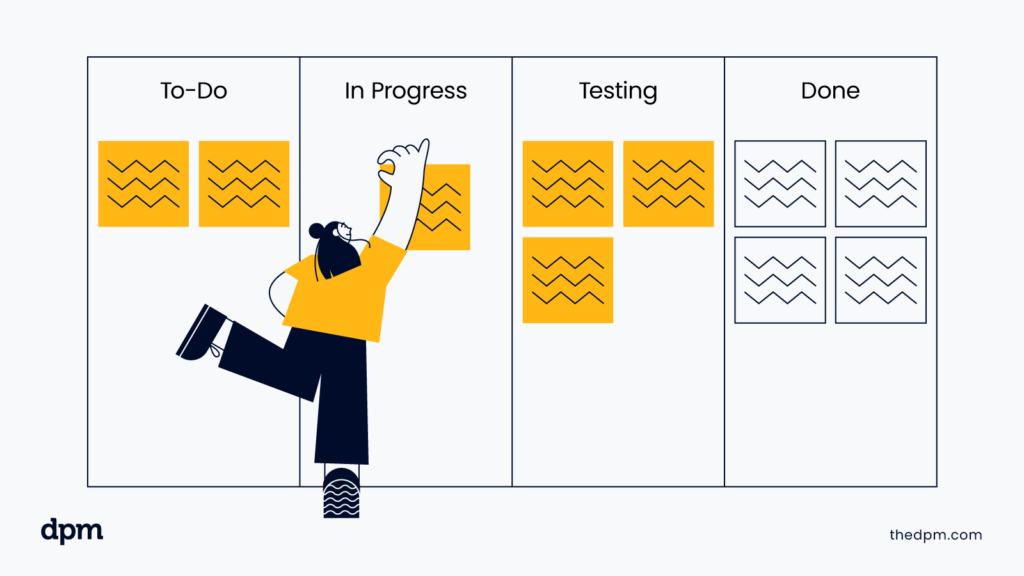
Unlike static to-do lists, Kanban boards provide a real-time view of workload, priorities, and blockers. They can be made either digitally using Kanban software or physically, usually using a large whiteboard and sticky notes, for example.
What Is Kanban and Who Is It For?

Kanban is a workflow management methodology focused on improving how work moves through a process. Teams use Kanban to visualize tasks, manage workloads, reduce bottlenecks, and continuously improve delivery.
Kanban is built around a few core principles:
- Visualize work: Make tasks, priorities, and progress visible to the entire team
- Limit work in progress (WIP): Reduce multitasking by controlling how many tasks are active at once
- Focus on flow: Keep work moving steadily instead of letting tasks pile up
- Identify bottlenecks early: Quickly spot blocked or overloaded stages in the workflow
- Continuously improve: Optimize workflows over time based on real team performance
Kanban originated in lean manufacturing and later became widely adopted in Agile and DevOps workflows because of its flexibility and focus on continuous delivery.
Today, Kanban boards are extremely popular and used across software development, operations, marketing, product management, and creative teams to improve collaboration and project visibility.
3 Examples of Kanban Boards Done Well
Whether a Kanban board is on a whiteboard in your bedroom or a highly-complex enterprise software tool, Kanban can help you see at-a-glance what is happening now, what is left to happen and what has already occurred.
Let’s jump in on some examples of how people use Kanban boards in real-life work management that you can borrow from:
1. Product Release Roadmap for a SaaS Team
Digital product managers and software development teams often swear by their Kanban boards. At this point, pretty much every agile development tool has Kanban board functionality, and every team I have worked on historically has leveraged a Kanban board.
Regardless of which methodology the team is working with, a Kanban board can be helpful in keeping people informed, visualizing the work process, and, in some cases, even helping keep stakeholders informed on your roadmap and next steps.
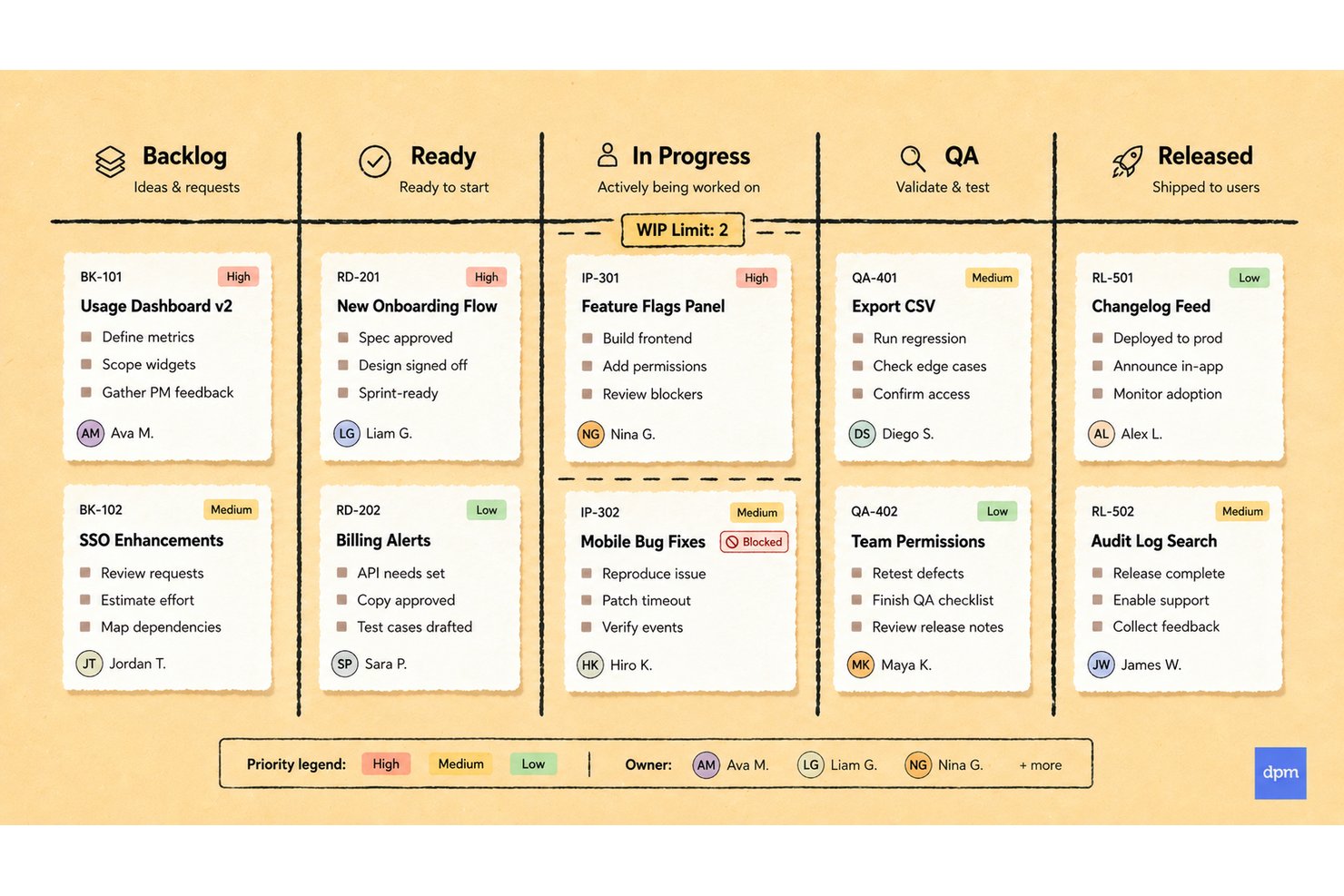
Note: Especially important to product development is the careful consideration of the size of tasks that are shown on the same board. In many cases, a task hierarchy may be used to “roll-up” more detailed items into larger, more strategic units of work.
In most cases, the smaller tasks will be on the Kanban board for the development team, and the higher-level bigger items that those smaller tasks contribute to will be reflected on a separate board for management and stakeholder use as a roadmap.

2. A Detailed Marketing Campaign Tracker
One thing I’ve consistently seen with marketing teams is how quickly work becomes difficult to track once approvals, content revisions, launch dates, and stakeholder feedback start piling up across emails and chat threads. Kanban boards give teams a much clearer operational view of what’s waiting for feedback, what’s blocked, what’s approved, and what’s already live.
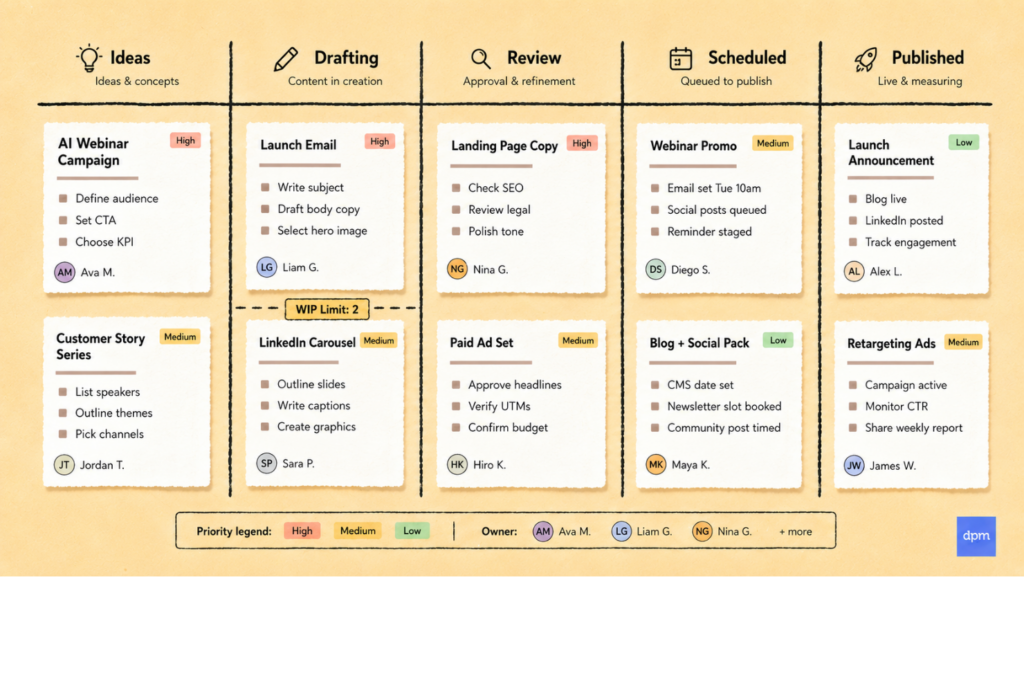
That flexibility is a big reason tools like Asana and monday.com have embraced Kanban-style workflows alongside calendars, timelines, and broader project management features.
Learn more about how to use Kanban for project management here.
3. An IT Support Ticket Queue
IT support uses To Do, In Progress, Waiting on User, and Resolved columns. Team leads quickly prioritize urgent tickets, assign them, and visualize response backlogs to keep users satisfied.
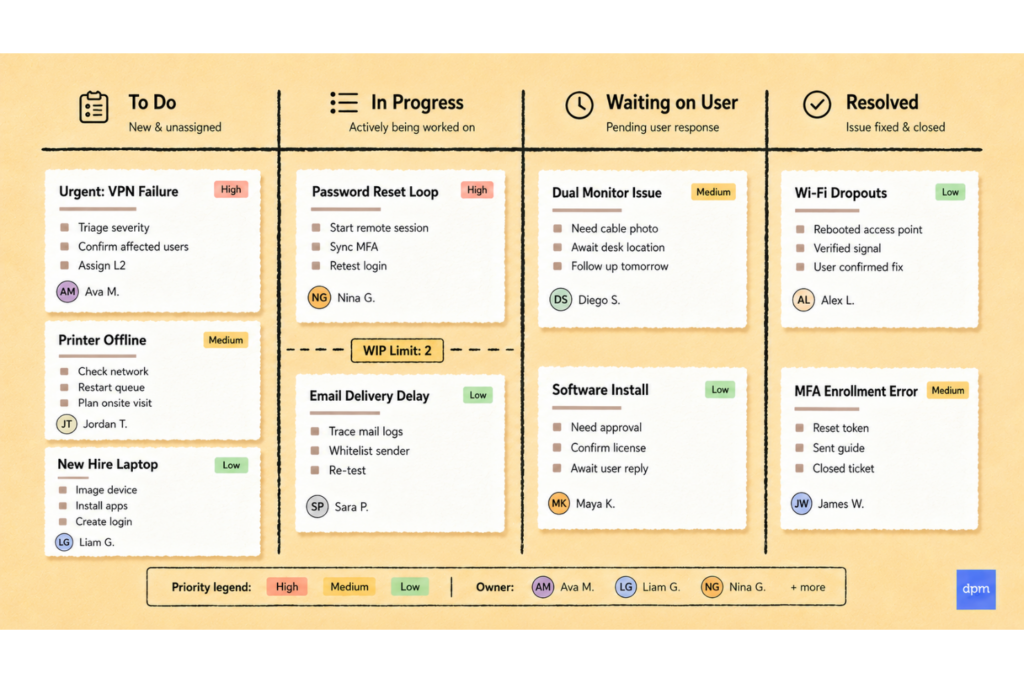
Find more Kanban examples here.
Elements of Kanban Boards
Kanban boards are an incredibly helpful tool for visualizing workflows and managing tasks effectively.
Kanban boards are composed of three main elements:
- Cards
- Columns
- WIP limits (limits to work in progress)
Cards
In Kanban boards, cards represent individual tasks that need to be completed. Each card represents a unique, specific task. Tasks may vary in size and complexity across the use of Kanban boards.
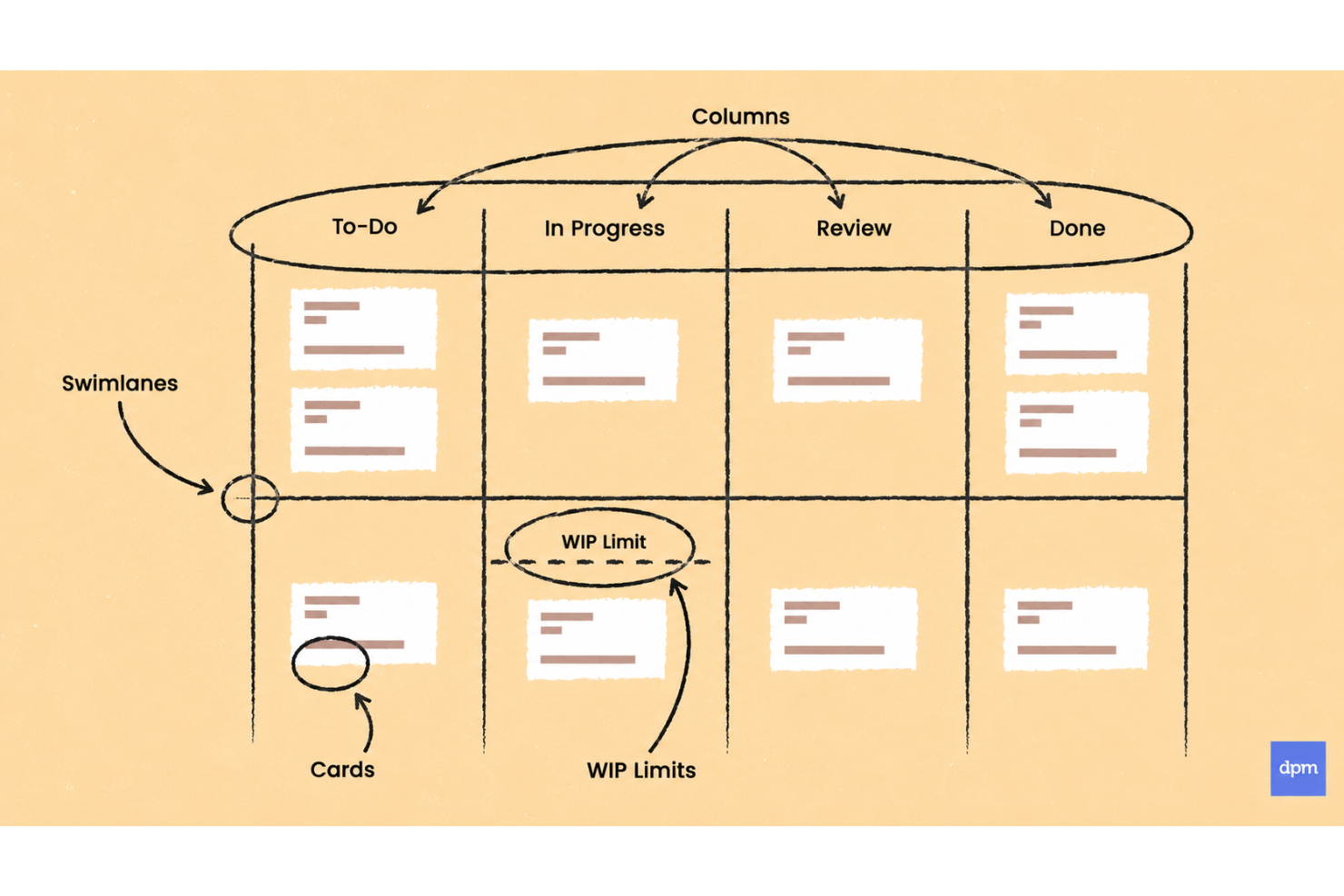
For example, a high-level Kanban board might have a card for “launch new website” but the board that is being used to manage that website launch might have multiple cards for the various elements, all the way down to “select brand colors for homepage,” “test animations on product pages,” or “insert product marketing copy to new product pages.”
Regardless of the level of granularity, cards are to represent a portion of the project or operations work to be done. Cards can be in the form of a virtual card on a virtual or online Kanban board, or as simple as a sticky note on an office wall.
Columns
Every Kanban board contains at least three columns: To Do, Work In Progress (WIP), and Done. From there, teams usually add more stages to reflect how work actually moves through their process and where things tend to get... delayed.
Common columns might include:
- Review
- Testing
- Approval
- Ready to Publish
- Blocked
- Ready for Launch
In my experience, the most useful Kanban boards are the ones that mirror reality closely enough that the team instantly understands where work stands and where it’s getting stuck. For example, my personal wedding planning board included a “Final Payment” column, mostly because wedding vendors have an incredible ability to remember invoices at exactly 8:03 AM on a Tuesday.
WIP Limits
Work in progress limits, or WIP limits, are limits placed on items that are in-progress, meaning that if a WIP limit is implemented, only that number of items can be considered in-progress at any given time.
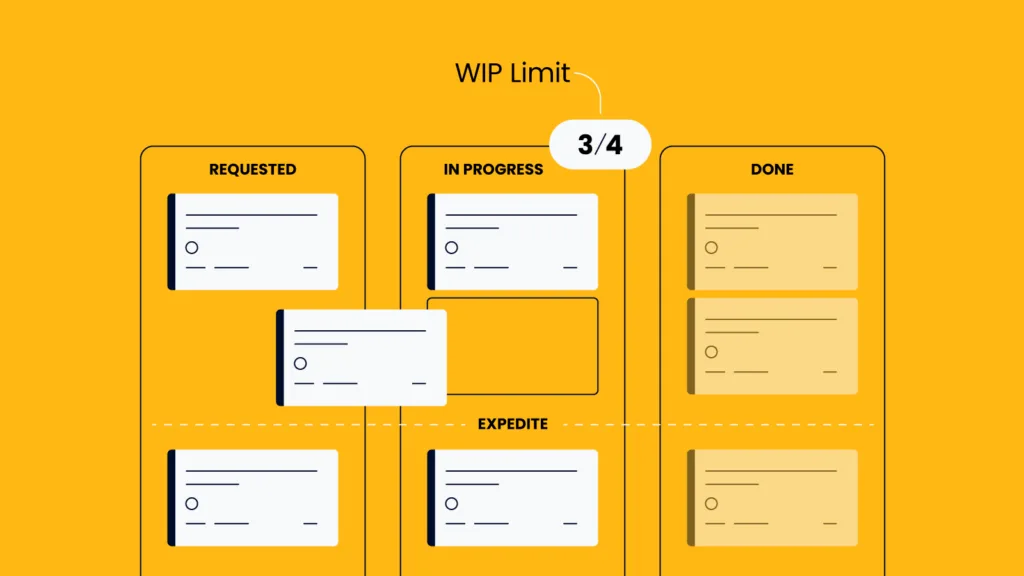
WIP limits are not necessarily a requirement of a Kanban board itself (the visual board), but are an essential element of the Kanban methodology. WIP limits set boundaries for how much work can be in progress at any given time and encourages teams to work together to finish what they start before moving on to other work.
A general rule for a team’s WIP limit is: # of contributors + 1. This doesn’t include management-only personnel. This means, only n+1 Kanban cards can be in the in-progress status at any time.
If someone is stalled and wants to bring something new into the in-progress column, they need to first help another team member move what is already in-progress to done—known as swarm to solve.
Benefits of Kanban Boards
A Kanban board does one very useful thing right away:
1. Everyone can see the work
It shows everyone what’s happening, what’s stuck, where they can jump in to help, and what’s done.
That means the whole team can quickly see:
- What still needs to happen
- What’s currently being worked on
- What’s blocked
- What has already been completed
And yes, watching tasks move into the “Done” column does deliver a small but very real morale boost.
2. Blockers become harder to hide
When work is spread across emails, chats, docs, meetings, and someone’s brain from last Tuesday, blockers are easy to miss.
If five tasks are sitting in “Review” and nothing is moving forward, the board basically raises its hand and says: “Hello. Something is wrong here.”
That visibility helps teams spot delays earlier, fix problems faster, and avoid discovering issues only when the deadline is already breathing down everyone’s neck.
3. Measurable metrics
Another benefit of Kanban boards in operations work is being able to measure metrics such as the lead time expected to complete a task. Cycle time and lead time can be derived if a consistent process is observed over time.
Kanban Board Vs Scrum Boards
The Kanban vs Scrum debate is age-old, and often misunderstood. Scrum is an agile project management methodology focused on quick feedback through short iterations.
Kanban on the other hand is both a methodology and a specific tool. Though they solve different problems, they can actually work together surprisingly well.
Here’s the simplest way I explain it after years of seeing teams mix the two together:
| Kanban | Scrum |
|---|---|
| Focuses on continuous workflow | Focuses on fixed-length sprints |
| Prioritizes flow and limiting WIP | Prioritizes sprint planning and iteration goals |
| Work moves continuously | Work is grouped into timeboxed cycles |
| Flexible priorities | Priorities are locked during a sprint |
| No required roles | Includes defined roles like Scrum Master and Product Owner |
| Visualized with Kanban boards | Often uses Scrum boards during sprints |
One thing that confuses teams is that a Kanban board can absolutely exist inside a Scrum workflow. In practice, many Scrum teams use Kanban-style boards to track sprint tasks moving from backlog to in progress to done.
The easiest way to think about it is:
- Scrum defines how the team plans and executes work
- Kanban boards visualize the work as it happens
In other words, Scrum is the operating rhythm, while the Kanban board is the visibility layer that helps everyone see what’s moving, what’s blocked, and what still needs attention before the sprint ends.
Kanban vs Gantt Chartt
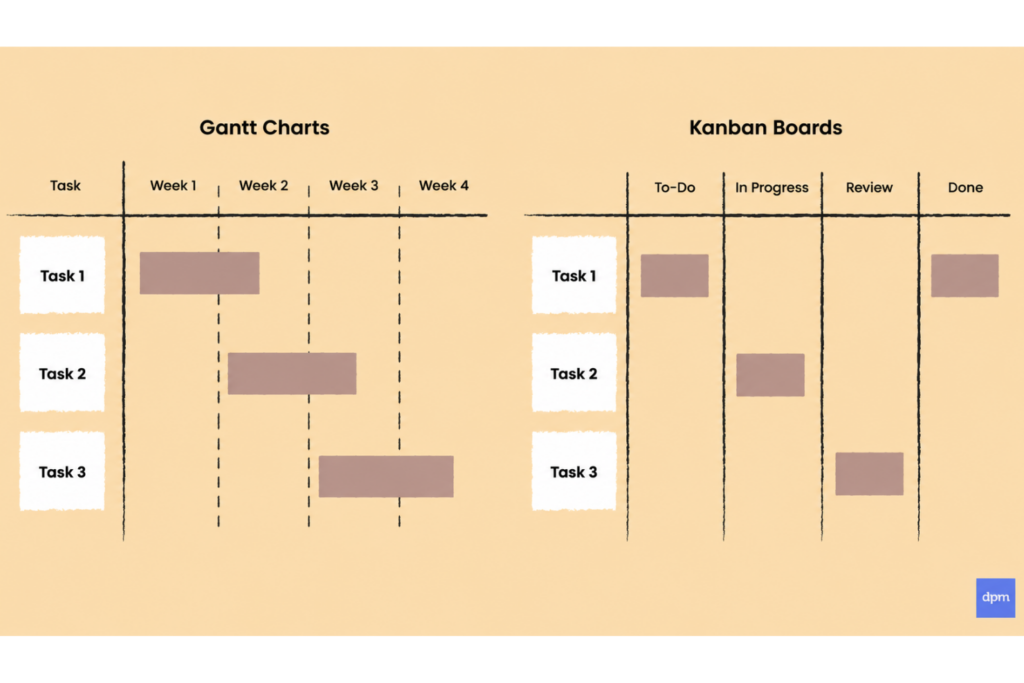
It’s important to understand that a Kanban board does not replace a Gantt chart. Instead, it serves a slightly different purpose. A Kanban board is far more specific than a Gantt chart in that it shows the actual activities team members are undertaking to complete a task.
While a Gantt chart gives a more holistic project overview to illustrate deadlines or timelines, Kanban boards are based around specific iterations or sprints within the projects.
Kanban Board FAQs
These questions come up constantly among teams that are either new to kanban or trying to get more out of a board they’ve already set up:
Can you create a kanban board with an Excel Template?
Are there any free kanban tools?
How many columns should a kanban board have?
How do I set WIP Limits?
Can kanban boards work for remote or distributed teams?
Let’s get started!
Don’t forget to subscribe to The Digital Project Manager newsletter to stay up-to-date on all things project management, including new and emerging trends in methodologies and tools. See you there!




