

The Most Practical WBS Guide For Digital Project Teams


A work breakdown structure (WBS) is a project planning tool that breaks a project into smaller, manageable pieces so teams can see what needs to be delivered, who owns each piece, and how the work connects. Most are organized around either deliverables or project phases.
In this guide, I'll cover what a WBS is, its key components and types, real examples, how to build one step by step, and how to use it day-to-day, plus a free template to get you started.
What Is A Work Breakdown Structure (WBS)?
A work breakdown structure (WBS) is a way to visualize an entire project’s tasks, phases, deliverables, and dependencies. It organizes a project into smaller pieces so teams can clearly define deliverables, assign ownership, estimate effort, and track progress throughout the project lifecycle.
The WBS visualizes project outcomes, the sequence of required activities, and project deliverables. Project managers use a WBS to scope projects, assign responsibilities, estimate effort, and track progress. It helps stakeholders to understand what work is part of project delivery. Work that isn’t in the WBS isn’t in the project.

Types of Work Breakdown Structures
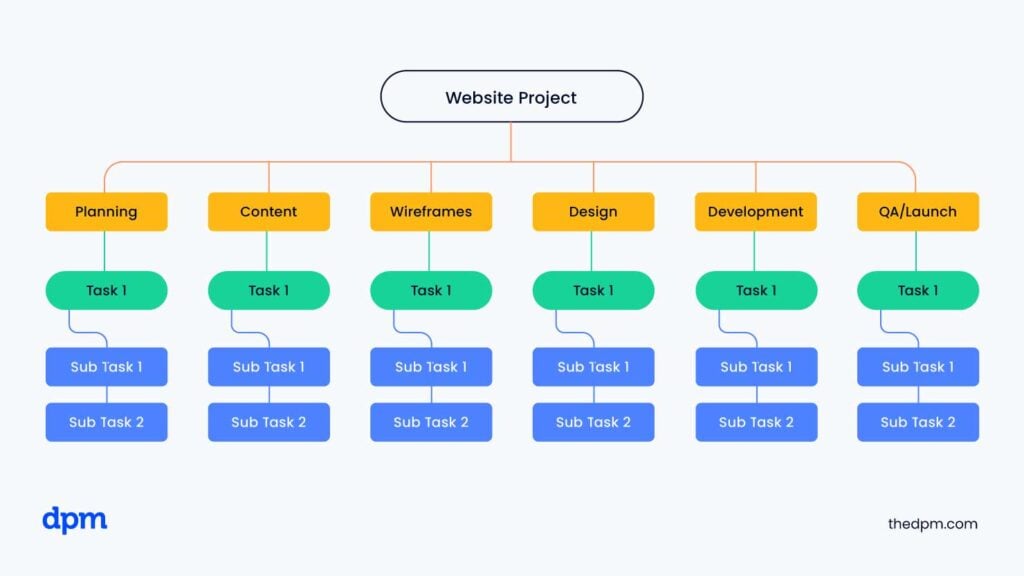
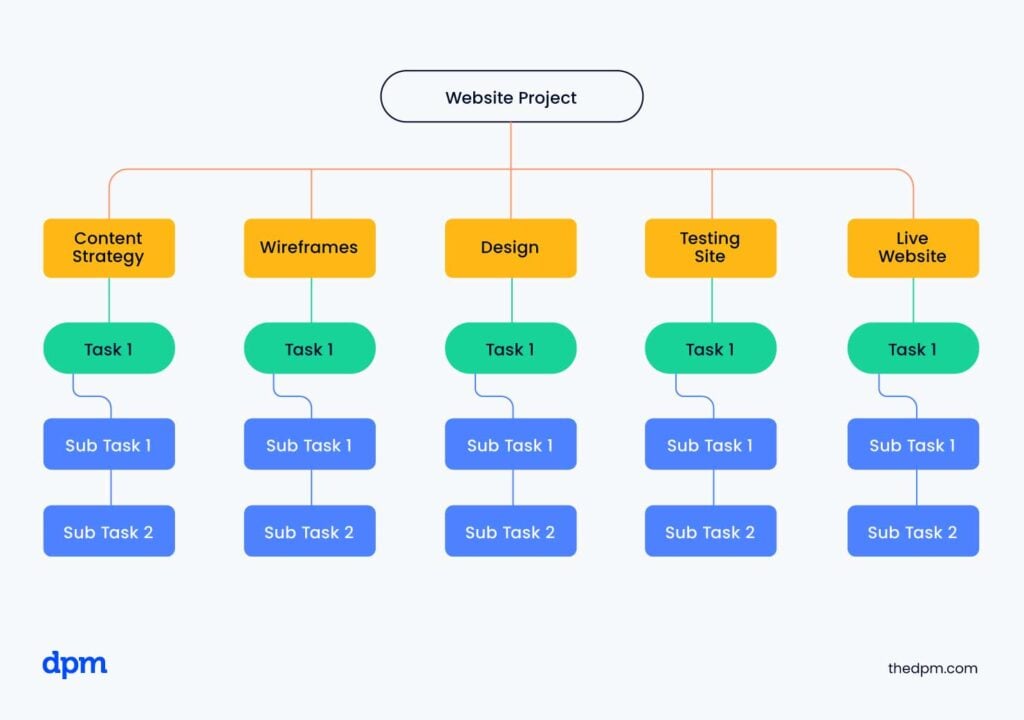
It’s worth noting that there are two ways of creating a WBS—either most commonly with deliverables or alternatively by project phases.
- Deliverable-oriented work breakdown structure: Also known as entity-oriented, noun-oriented, or product-oriented. This is most common.
- Phase-based work breakdown structure: Focused instead around the tasks required to complete those deliverables. The other names for this that you might come across are activity-oriented, task- oriented, verb-oriented, or process-oriented.
For most digital, software, and cross-functional projects, a deliverable-oriented WBS is usually the better choice. It keeps teams focused on outcomes rather than disconnected activities, making it easier to manage scope, align stakeholders, and track progress across product, engineering, design, and operations teams.
What a Work Breakdown Structure Looks Like
Here’s what it often looks like:
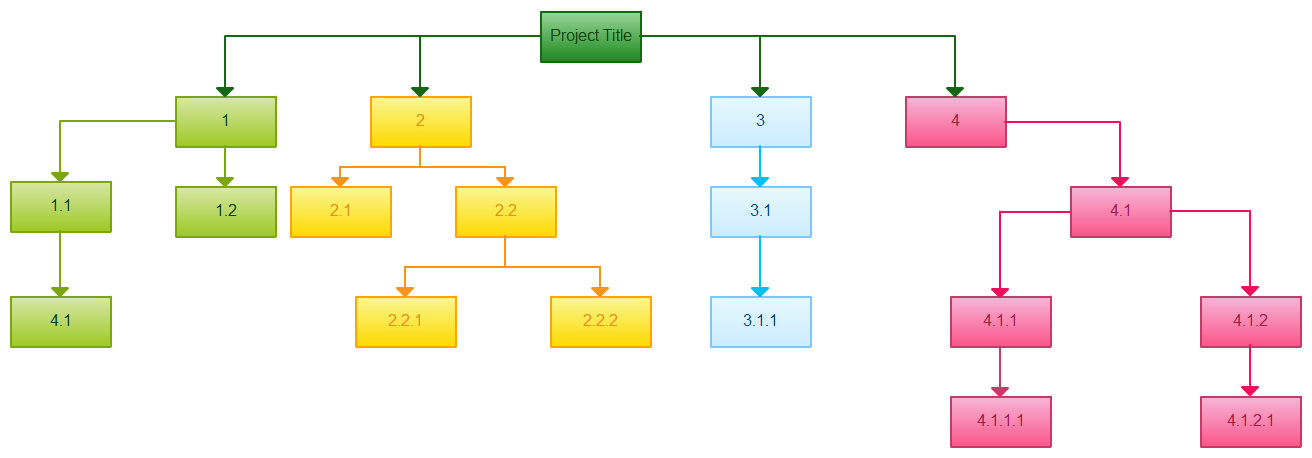
As you move down the hierarchy, the work becomes more specific and easier to estimate, assign, schedule, and monitor. A well-structured WBS also helps teams identify task dependencies early, reducing the risk of missed work, overlapping responsibilities, and unrealistic timelines.
Key Work Breakdown Structure Terms
Before diving deeper, here are a few key terms you’ll see throughout this guide:
- Baseline: The approved version of a project’s scope, schedule, or budget used to measure performance and progress.
- Milestone: A significant checkpoint or completion point in the project schedule, such as stakeholder approval or the end of a major phase.
- Critical Path: The sequence of dependent tasks that determines the shortest possible timeline for completing the project. Delays to critical path activities directly impact the project delivery date.
WBS vs. Project Schedule vs. Gantt Chart
A work breakdown structure is often confused with a project schedule or Gantt chart, but they serve different purposes. A WBS defines what work needs to be completed, while a project schedule defines when that work will happen and in what sequence. Gantt charts build on the WBS by mapping tasks, durations, milestones, and dependencies across a timeline.
Why Is a Work Breakdown Structure Important?
A WBS keeps your project grounded in reality. Without one, scope creep sets in fast—teams miss deliverables, timelines slip, and no one agrees on what "done" looks like. With a solid WBS, you can estimate effort accurately, assign ownership clearly, and catch gaps before they become blockers. For tech and digital teams juggling product, engineering, and design work, it's often the difference between a controlled delivery and a chaotic one.
Use this breakdown to understand what you gain—and what you risk—when it comes to using a WBS:
| Factor | With a WBS | Without a WBS |
|---|---|---|
| Scope control | Clear boundaries prevent unplanned work | Scope creep goes undetected until it's costly |
| Effort estimation | Tasks are granular enough to estimate accurately | Estimates are vague and regularly missed |
| Accountability | Each deliverable has a clear owner | Ownership is ambiguous across team members |
| Dependency tracking | Teams can map blockers before they hit | Dependencies surface only after delays occur |
| Stakeholder alignment | Everyone references the same project structure | Stakeholders hold conflicting views of scope |
Examples of Work Breakdown Structures
Seeing how a work breakdown structure looks in action helps clarify how you can use it on your projects. Here are three strong WBS examples to guide your approach:
Software Product Launch Breakdown
Break down work into planning, build, user testing, launch prep, and post-launch support. Each level expands into tasks like requirements gathering, feature coding, writing test cases, crafting release notes, and planning support documentation.

Website Redesign Project Structure
Start with major phases like discovery, design, development, and deployment. Detail activities under each: stakeholder interviews, wireframes, front-end updates, CMS setup, user acceptance testing, and site migration.

Learning Management System Implementation
Divide into needs analysis, system selection, integration, content migration, training, and rollout. Then drill into steps like stakeholder sign-off, vendor demos, data mapping, training session scheduling, and go-live monitoring.


How Detailed Should a WBS Be?
A WBS decomposes larger chunks of project work into smaller tasks. But, what’s the right level of detail to break down?
Like Goldilocks, you want to seek a happy medium. Too much detail, and your WBS will be unwieldy and difficult to manage. Too little detail, and your WBS will lack the information you need to manage your project successfully.
A good rule of thumb: If managing the work package takes more effort than completing the work itself, you’ve probably over-decomposed your WBS. The goal is clarity and accountability—not creating administrative overhead your team won’t maintain.
Aim for three levels of detail in your WBS, but no more than four levels. Like with other project management documentation, how you craft your WBS will vary based on organizational best practices and whether you’re running a complex project.
Key Components of a Work Breakdown Structure
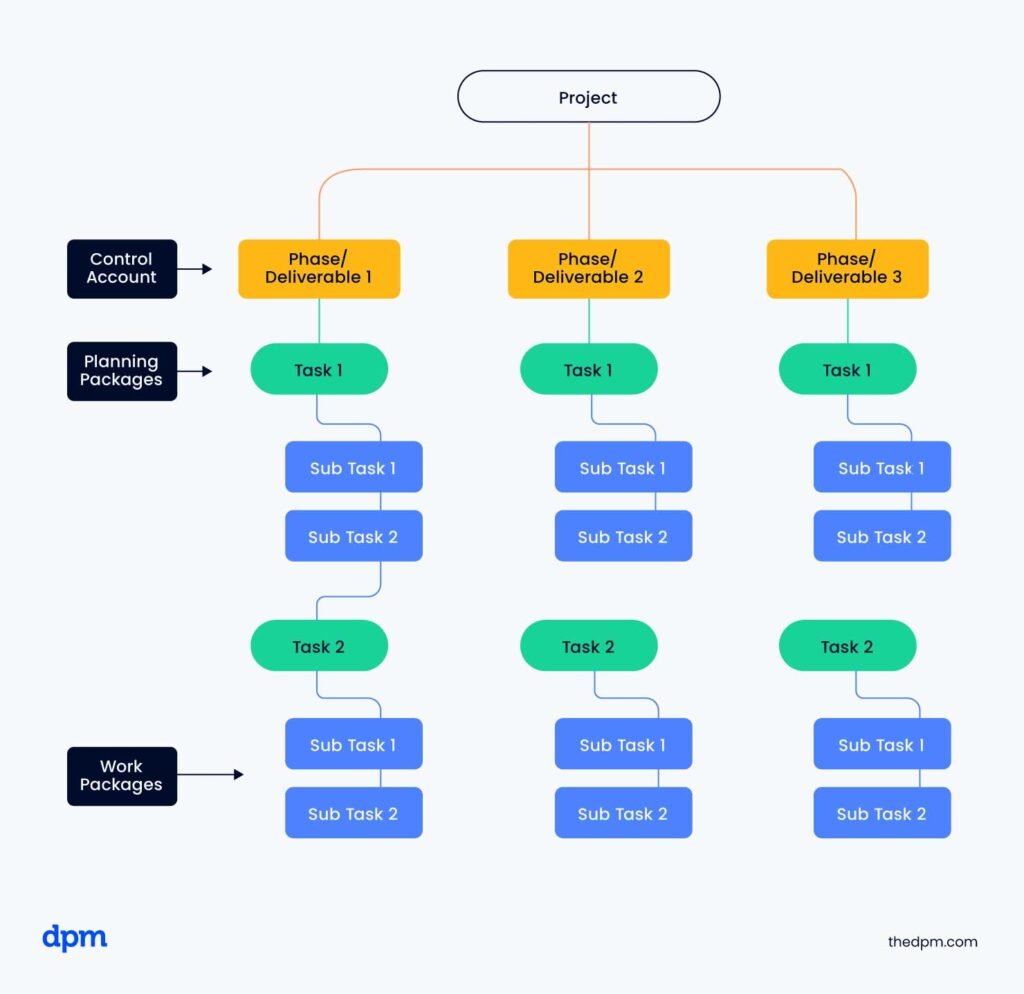
Understanding the core components of a work breakdown structure helps you build a project plan that’s actually useful during execution—not just one that looks organized during kickoff. Each element plays a specific role in helping teams define scope, organize work, assign accountability, and track progress.
Deliverables
Deliverables are the tangible outputs your project is expected to produce. These can include documents, systems, features, approvals, or completed phases of work. Most modern project teams structure a WBS around deliverables rather than activities because it keeps the focus on outcomes instead of disconnected tasks.
For example: “Completed onboarding workflow” is a stronger WBS element than “design onboarding screens,” because it reflects the final output the team is working toward.
Work Packages
Work packages are the lowest level of a WBS. This is where the work becomes specific enough to assign, schedule, and manage. A work package groups together related activities that contribute to a deliverable.
Examples of work packages might include:
- Build login API
- Configure CRM integration
- Write onboarding email copy
If work packages are too broad, estimates become unreliable and accountability becomes unclear. If they’re too granular, the WBS becomes difficult to maintain.
Control Accounts
Control accounts are management points within the WBS where scope, schedule, and cost are tracked together. They sit above work packages and help project managers monitor progress across larger portions of work.
For example, a software implementation project might use a control account for “User Authentication System,” with multiple work packages underneath it for design, development, testing, and deployment.
Planning Packages
Planning packages are placeholders used to group related work that hasn’t been fully defined yet. They help teams account for future work while leaving room for additional planning and decomposition later in the project lifecycle.
Planning packages are especially useful in complex or fast-moving projects where not every requirement is known upfront.
Hierarchical Structure
A WBS uses a parent-child hierarchy to organize work from high-level deliverables down into increasingly detailed components. The top level represents the overall project, while lower levels break work into phases, deliverables, control accounts, and work packages.
This structure helps teams understand how individual tasks connect to broader project outcomes and makes large projects easier to manage.
Decomposition
Decomposition is the process of breaking high-level deliverables into smaller components. Project managers continue decomposing work until each work package is clear enough to estimate, assign, and track effectively.
For example, a deliverable like “Website Redesign” might decompose into:
- UX research
- Wireframes
- Front-end development
- CMS migration
- QA testing
The goal is to break work down enough to create clarity without creating unnecessary administrative overhead.
Scope Definition (100% Rule)
One of the most important WBS principles is the 100% rule. This states that the WBS should capture 100% of the approved project scope—no more and no less.
Every deliverable, work package, and task should roll up to the overall project scope without gaps or overlaps. If work isn’t included in the WBS, it shouldn’t be considered part of the project.
For example: If a mobile app localization effort isn’t included in the WBS, teams may incorrectly assume translation work is covered elsewhere.
This rule helps reduce scope creep, duplicate work, and stakeholder confusion.
WBS Codes
WBS codes are the numbering system used to identify each element within the structure. Codes like 1.0, 1.2, or 1.2.3 make it easier to reference work packages in schedules, budgets, status reports, and stakeholder discussions.
These identifiers become increasingly valuable on large or cross-functional projects where teams need a consistent way to track related work.
Milestones
Milestones represent major checkpoints or completion points within the project. Unlike work packages, milestones don’t contain work themselves—they indicate that a significant deliverable or phase has been completed.
Examples might include:
- Stakeholder approval complete
- Design signoff complete
- MVP launch complete
Connecting milestones to your WBS helps keep project reporting tied to actual deliverables and progress.
Dependencies
Dependencies define the relationships between deliverables and work packages. They identify which activities must be completed before other work can begin.
For example: Front-end development may depend on approved UX designs, content migration may depend on CMS configuration, or an API integration may require security review approval before deployment can begin.
Mapping dependencies early helps teams identify bottlenecks, sequence work accurately, and reduce scheduling conflicts later in the project.
WBS Dictionary
A WBS dictionary is a supporting document that defines each element in the WBS in more detail. It typically includes:
- Descriptions
- Assigned owners
- Acceptance criteria (e.g. given-when-then acceptance criteria)
- Estimated effort
- Dependencies
- Timelines
- Associated deliverables
Without a WBS dictionary, your WBS is often just a list of labels. The dictionary provides the context teams need to execute the work consistently.
A WBS dictionary is especially useful on distributed or cross-functional teams where assumptions and unclear ownership can easily create delivery issues.
How to Create a Work Breakdown Structure
A strong WBS doesn’t just organize tasks—it becomes the foundation for scope planning, scheduling, resourcing, budgeting, and project tracking throughout delivery. Follow these steps to create a crystal-clear WBS:
1. Define The Project Scope And Deliverables
Before building your WBS, review foundational project documents like the project charter, statement of work (SOW), requirements documentation, and stakeholder approvals. These documents help define scope boundaries, deliverables, and success criteria early.
Start by identifying the major deliverables your project is expected to produce. These should represent the outcomes, systems, approvals, or outputs required to complete the project successfully.
This stage is all about scope clarity. Before building your WBS, make sure you’ve aligned on:
- What’s in scope
- What’s out of scope
- Who owns each deliverable
- What “complete” looks like
- How scope changes will be reviewed and approved
If your scope is unclear at this stage, that uncertainty will carry into your schedule, budget, and resource plan.
I find WBS software especially useful during planning workshops because it’s much easier for cross-functional teams to review a visual tree than parse a spreadsheet.
2. Break Deliverables Into Smaller Work Packages
Once your deliverables are defined, you break them down into what’s called work packages. Continue decomposing the work until each package is specific enough to estimate, assign, schedule, and execute effectively.
For example, a deliverable like “Website Redesign” might break down into:
- UX research
- Wireframes
- Front-end development
- CMS migration
- QA testing
As a general rule, work packages should represent at least several hours of effort but shouldn’t become so granular that the WBS becomes difficult to maintain.
3. Sequence The Work And Identify Dependencies
After decomposing the work, organize tasks into the order they’ll need to happen. This is where dependencies become critical.
For example:
- Front-end development may depend on approved wireframes
- Content migration may depend on CMS configuration
- QA testing may depend on feature completion
Mapping dependencies early helps you identify bottlenecks, reduce scheduling conflicts, and build a more realistic delivery timeline.
4. Estimate Effort And Allocate Resources
Once the structure is in place, estimate the level of effort required for each work package. Collaborate with the people performing the work whenever possible—accurate estimates rarely happen in isolation.
At this stage, you (or your resource manager) should also:
- Identify required skill sets
- Assign owners (considering resource availability)
- Review team capacity
- Flag potential over-allocation issues
A well-structured WBS makes resource management and planning significantly easier because work is already organized into defined units.
Use this table to understand how WBS structure shapes resource decisions at each level:
| WBS Level | Example Element | Resource Planning Activity |
|---|---|---|
| Level 1 | Full project | Overall headcount and budget allocation |
| Level 2 | Feature development phase | Team assignment by discipline |
| Level 3 | Front-end build | Individual contributor hours estimated |
| Level 4 | Build navigation component | Specific developer assigned, effort confirmed |
5. Build The Project Schedule
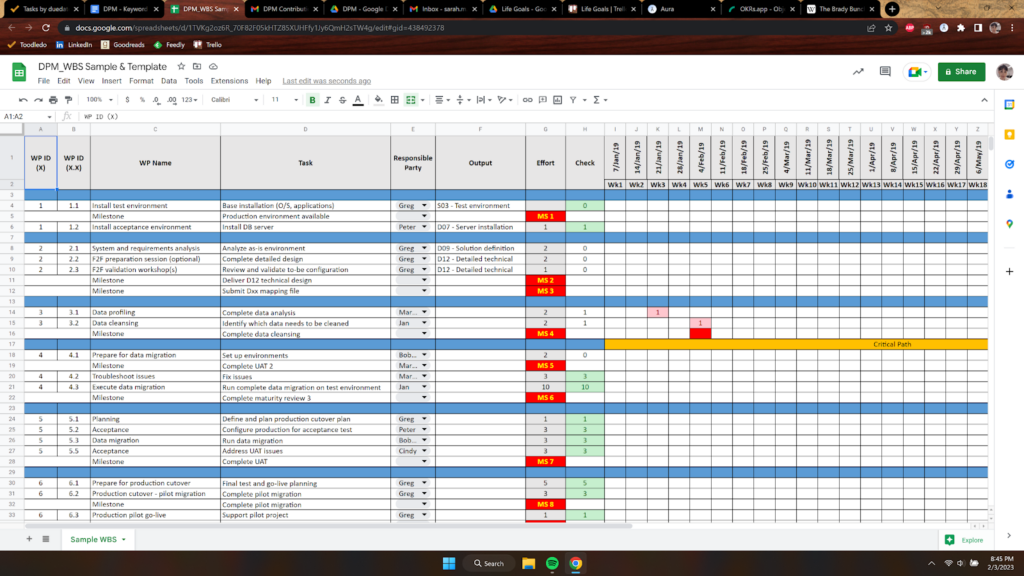
Your WBS becomes the foundation of your project schedule. Each work package can now be translated into scheduled tasks with durations, dependencies, owners, and deadlines.
When building your schedule:
- Assign realistic durations
- Sequence tasks logically
- Identify the critical path
- Validate milestone timing
- Confirm delivery expectations with stakeholders
A schedule built from a detailed WBS is far more reliable than one created from high-level assumptions alone.
6. Establish The Project Baseline
Once the scope, schedule, and budget are approved, establish your project baseline. This becomes the reference point you’ll use to measure performance throughout the project lifecycle.
Your WBS directly supports:
- The scope baseline
- The schedule baseline
- The cost baseline
Any approved change to project scope should first be reflected in the WBS before updating schedules or budgets. If stakeholders approve a new reporting dashboard mid-project, the WBS and schedule baseline should both be updated before work begins.
Use this table to see how the three baselines connect to your WBS:
| Baseline Type | What It Tracks | WBS Connection |
|---|---|---|
| Scope baseline | Approved deliverables and work packages | Directly derived from the WBS |
| Schedule baseline | Approved start and end dates | Built from WBS work packages and dependencies |
| Cost baseline | Approved budget by work package | Rolled up from WBS-level cost estimates |
7. Review The Plan With Stakeholders And The Project Team
Before execution begins, review the completed WBS and project plan with your team and stakeholders to confirm alignment and gain buy-in.
If your team doesn’t agree with the task estimates in the WBS, then you won’t be successful executing against it. Make sure you take the time to review the work breakdown structure with your team to promote alignment and accountability.
This review helps validate:
- Deliverable completeness
- Sequencing logic
- Staffing assumptions
- Schedule feasibility
- Ownership clarity
Catching gaps early is significantly easier than trying to correct them during delivery.
How to Use a Work Breakdown Structure
A WBS only pays off if you keep using it after kickoff. Use it for these six jobs:
1. Keep It Visible
Pin the one-page view (levels 1 and 2) in your project hub, your status template, and your kickoff deck. Keep the level 3 and 4 detail for the team. If people can't find the WBS in ten seconds, it won't get used.
2. Make It Your Scope Gut-Check
When a request lands, ask one question: is it in the WBS? If it is, it's planned work. If it isn't, it's a change request, not a favor. Log it, size it, and show what moves. “Yes, and here's what it displaces” goes down far better than a flat no.
3. Report by Deliverable, Not by Task
Executives don't want to hear that 47 tickets are in progress; they want to know whether the checkout flow is done. Roll status up to the deliverable level. To avoid the dreaded “90% done” that lasts three weeks, try the 0/100 rule: a work package is 0% complete until it's finished, then 100%. It's blunt, but it's honest.
4. Check Capacity Work Package by Work Package
Every work package has an owner, so you can see who's overloaded before it turns into a crisis. If one developer owns five work packages due the same week, that's a conversation to have now, not on the Thursday night before launch.
5. Update the WBS Before the Schedule
When a change is approved, revise the WBS first, then the schedule and budget. If you only update the schedule, the WBS stops being the source of truth and the 100% rule quietly breaks.
6. Close the Loop When the Project Ends
Compare estimated and actual effort by work package. The gaps show you where your estimates run hot or cold. Then save the cleaned-up WBS as a template for the next similar project, so you start with a head start instead of a blank page.
Work Breakdown Structure Template
To get you started, here is a free downloadable WBS template. To edit the file, download it as an XLSX file and use it within Google Sheets or Excel. The file also includes a sample WBS that you can use as a model.

Project Management Platforms
Project management platforms with native hierarchy support let you turn your WBS directly into an actionable delivery plan. When your work packages live inside the same tool your team uses for execution, there’s far less risk of the WBS drifting out of sync with actual project work.
These platforms are especially useful for:
- Ownership tracking
- Milestone management
- Dependency mapping
- Resource planning
- Progress reporting
Frequently Asked Questions About Work Breakdown Structures
These are the questions I hear most from project managers who are either building their first WBS or trying to get more out of the ones they already have:
Who Uses a WBS?
Project managers, PMOs, and project teams use a work breakdown structure to define, assign, and track project work. Project managers build and maintain it, while tech leads, designers, and QA use it to confirm work packages and sanity-check estimates. Resource managers use it to plan capacity, finance teams use it to roll up the cost baseline, and executives, clients, and vendors use its top levels to agree on scope and follow deliverables.
The WBS has roots in government and defense programs and is standard in construction and engineering. It’s equally useful in software, marketing, and agency projects, anywhere work spans multiple disciplines.
Should I use a work breakdown structure or a Gantt chart?
Like most things, the answer is: it depends.
When To Use A WBS
A WBS breaks down what you are building into smaller, more manageable components. It shows what work you are doing on a project. Therefore, the WBS is useful for scope control, including change management.
When To Use A Gantt Chart
By contrast, a Gantt chart shows when you are doing the work. Use your WBS as the basis for your Gantt chart to track tasks across time. The Gantt chart shows the start and finish date of each task, their dependencies, and their relationship to each other. You use a Gantt chart for schedule control.
Are a WBS and the critical path method the same thing?
The critical path is the list of core project activities that must be completed to deliver the project within the triple constraints (time, budget, and scope.) If the critical path slips, then your project will see an adverse impact in one of these three areas.
The WBS hierarchically organizes project activities and deliverables, not just the critical path activities.
When in the project life cycle should I create the WBS?
It’s important to create the WBS during the project planning phase, as it helps you gain understanding of the work required to execute the project. The WBS is also a key input into the project schedule, budget, and risk management plan, all of which are needed earlier in the project life cycle.
Can I use a work breakdown structure on agile projects?
Yes, a WBS works well alongside agile delivery when you use it at the right level. Define your high-level deliverables and work packages in the WBS, then let sprint planning handle task-level decomposition. This gives you full scope visibility without over-constraining your team. Many digital product teams use this hybrid approach to satisfy stakeholder reporting needs while keeping execution flexible.
How do I handle scope changes after the WBS is baselined?
Every approved scope change should trigger an update to the WBS before work begins. That means revising affected work packages, updating the WBS dictionary, and re-baselining if the change is significant enough. Skipping this step is one of the fastest ways to lose control of your project. I’d recommend treating the WBS update as a required step in your change control checklist—not an optional follow-up.
Who should be involved in building a work breakdown structure?
The project manager typically leads WBS development, but the best results come from involving the people who will actually do the work. That means pulling in tech leads, designers, QA, and any other key contributors during the decomposition process. On a platform migration project, for example, your infrastructure team will identify work packages your PM would never think to include. Their input turns a top-down outline into a plan the whole team trusts.
Level Up Your Project Delivery and WBS Skills
If you want exclusive resources, practical WBS templates, and a global network to master work breakdown structure in real projects, join The Digital Project Manager Community.


