
32 Best Approval Workflow Software Solutions In 2026

20 Best Approval Workflow Software Shortlist
Here’s the shortlist of the best approval workflow software that I’ll cover in more detail below:


The best approval workflow software streamlines how your team submits, reviews, and signs-off on assets, documents, and decisions, so nothing gets stuck in limbo. These tools replace messy email chains and unclear sign-off processes with structured workflows, automated reminders, and clear accountability.
I've used my 10 years of experience leading digital projects across government, healthcare, retail, and transit to test more than 30 approval workflow tools. I'll cover which ones actually reduce back-and-forth and speed up decision-making. I’ve worked with teams where slow approvals caused costly delays, and I’ve seen how the right tool can prevent that.
In this guide, I’ll walk you through the top approval workflow software based on hands-on testing. I’ve highlighted how each one helps you formalize approvals, keep projects moving, and eliminate approval-related bottlenecks.
Why Trust Our Software Reviews
We’ve been testing and reviewing approval workflow software since 2012. As project managers ourselves, we know how critical and difficult it is to make the right decision when selecting software.
We invest in deep research to help our audience make better software purchasing decisions. We’ve tested more than 2,000 tools for different project management use cases and written over 1,000 comprehensive software reviews. Learn how we stay transparent & our project management review methodology.
Compare Software Specs Side-by-Side
Compare pricing and specs for each of my picks for the best approval workflow software so you can fit the right fit for your budget and business needs.
| Tool | Best For | Trial Info | Price | ||
|---|---|---|---|---|---|
| 1 | Best for approval audit trails | Free demo available | Pricing upon request | Website | |
| 2 | Best with bi-directional CRM data sync | Free demo available | From $399/month (billed annually) | Website | |
| 3 | Best for approval forms and boards | Free plan available | From $9/seat/month (billed annually) | Website | |
| 4 | Best for approval automations | Free plan + free demo + 14-day free trial available | From $10/user/month (billed annually) + add-on fee | Website | |
| 5 | Best for multi-stage creative approvals | Free plan available | From $169/month (billed annually) | Website | |
| 6 | Best for creative asset approvals | Free plan available | From $10/month (billed annually) | Website | |
| 7 | Best for structured task approvals | 30-day free trial + free plan available | From $7.65/member/month (billed annually) | Website | |
| 8 | Best for no-code workflow creation | Free plan available | From $19.50/month (billed annually) | Website | |
| 9 | Best for internal approvals | Free plan available | From $1/user/month (billed annually) | Website | |
| 10 | Best for creative teams | Free trial available | From $199/month (billed annually) | Website | |
| 11 | Best for marketing operations | Free demo available | Pricing upon request | Website | |
| 12 | Best for its drag-and-drop builder | 14-day free trial + free demo available | Pricing upon request | Website | |
| 13 | Best for unlimited reviewers | 30-day free trial + free plan + free demo available | From $199/month | Website | |
| 14 | Best for routine approvals | Free demo available | Pricing upon request | Website | |
| 15 | Best for agencies and professional services | Free plan + free demo available | From $9/user/month (billed annually) | Website | |
| 16 | Best for workflows within client portals | Free plan available | From $200/month | Website | |
| 17 | Best for custom approval workflows | Free demo available | From $2,500/month | Website | |
| 18 | Best for CRM and project approvals | Free trial + free demo available | From $29/user/month | Website | |
| 19 | Best for streamlining approvals | 7-day free trial available | From $99/month (unlimited users) | Website | |
| 20 | Best for experienced workflow builders | 14-day free trial available | From $30/user/month | Website |


-

Accelo
Visit WebsiteThis is an aggregated rating for this tool including ratings from Crozdesk users and ratings from other sites.4.4 -
Wrike
Visit WebsiteThis is an aggregated rating for this tool including ratings from Crozdesk users and ratings from other sites.4.2 -
Forecast
Visit WebsiteThis is an aggregated rating for this tool including ratings from Crozdesk users and ratings from other sites.4.6



Best Approval Workflow Software Reviews
Below, you’ll find my choices for the best approval workflow software. I’ve provided a detailed summary of each, including screenshots, standout features, integrations, and some pros and cons.

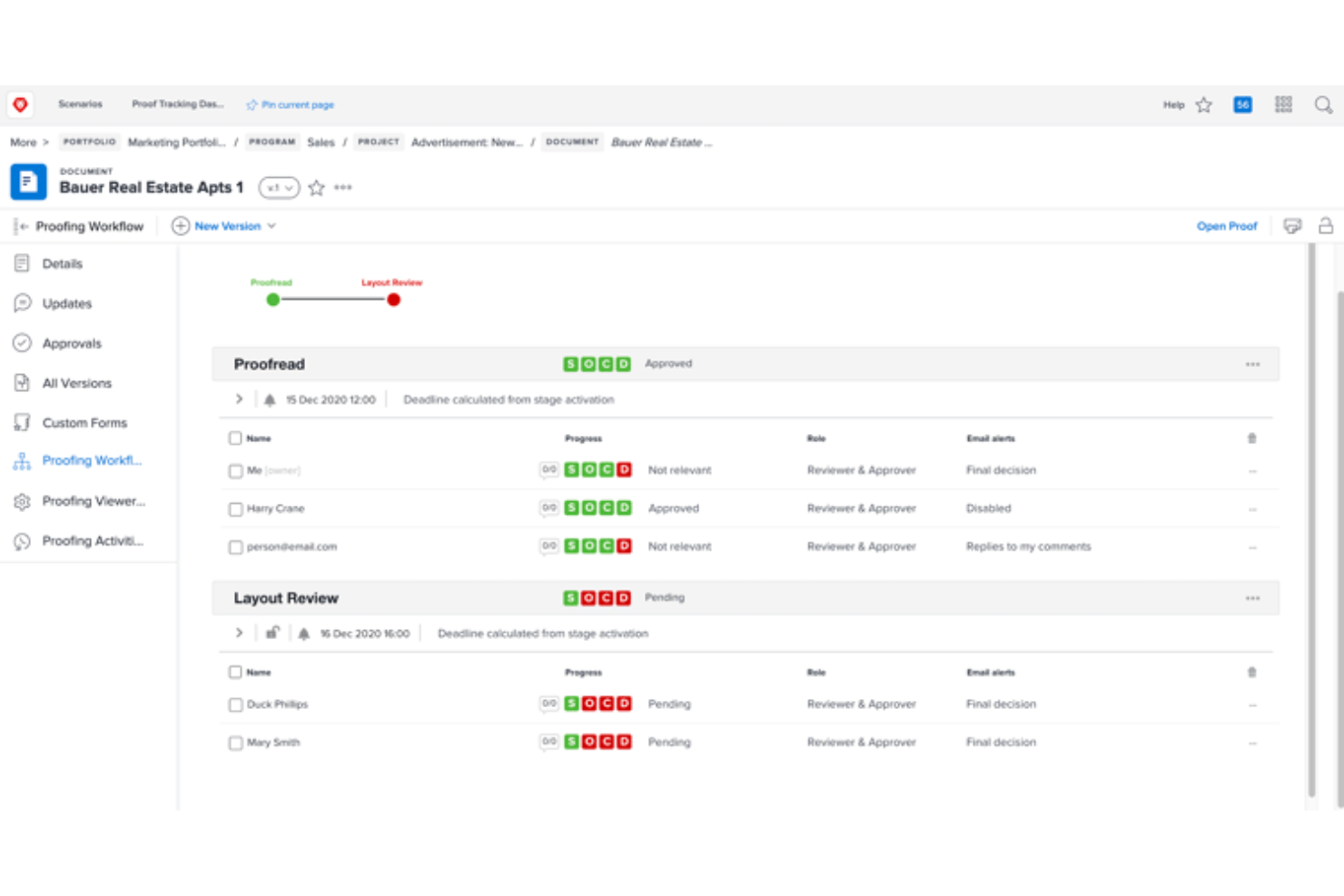
Adobe Workfront is a project management platform built for teams in marketing, IT, and enterprise environments who need to manage complex approval workflows, centralize project communication, and ensure work progresses across departments.
Who Is Adobe Workfront Best For?
Adobe Workfront is a strong fit for enterprise teams in marketing, IT, and operations who need structured, scalable project management across multiple departments.
Why I Picked Adobe Workfront
Adobe Workfront earns its spot on my shortlist because of how seriously it takes approval accountability. I particularly like the enterprise-grade audit trails that log every decision, comment, version change, and timestamp across the entire approval lifecycle—this is critical in regulated industries or for high-stakes content sign-offs. I also use the multi-stage approval workflows to set up sequential or parallel review stages with clear role-based permissions, so the right stakeholders are always reviewing at the right time. Additionally, the integration with Frame.io means my team can handle video and rich media reviews inside the same workflow, without jumping between tools to track who approved what.
Adobe Workfront Key Features
- Online proofing: Centralize content feedback across diverse file types using markup tools for collaborative, consolidated reviews.
- Request queues: Consolidate incoming work requests into a single intake channel with automated routing to the right team members.
- Resource management: Forecast team availability, estimate capacity costs, and allocate resources across projects using filters and calculations.
- AI Assistant: Query project data, summarize documents, and create tasks or projects using a natural language conversational interface.
Adobe Workfront Integrations
Integrations include Adobe Experience Manager Assets, Adobe Creative Cloud, Adobe Express, Frame.io, GenStudio for Performance Marketing, Slack, Microsoft Teams, Figma, Acrobat Sign, and Adobe Analytics.
Pros and Cons
Pros:
- Reuse templates across multiple projects
- Built-in scenario planning and forecasting
- Capture project history for future reference
Cons:
- Performance may lag with large data sets
- May feel overly complex for simple workflows
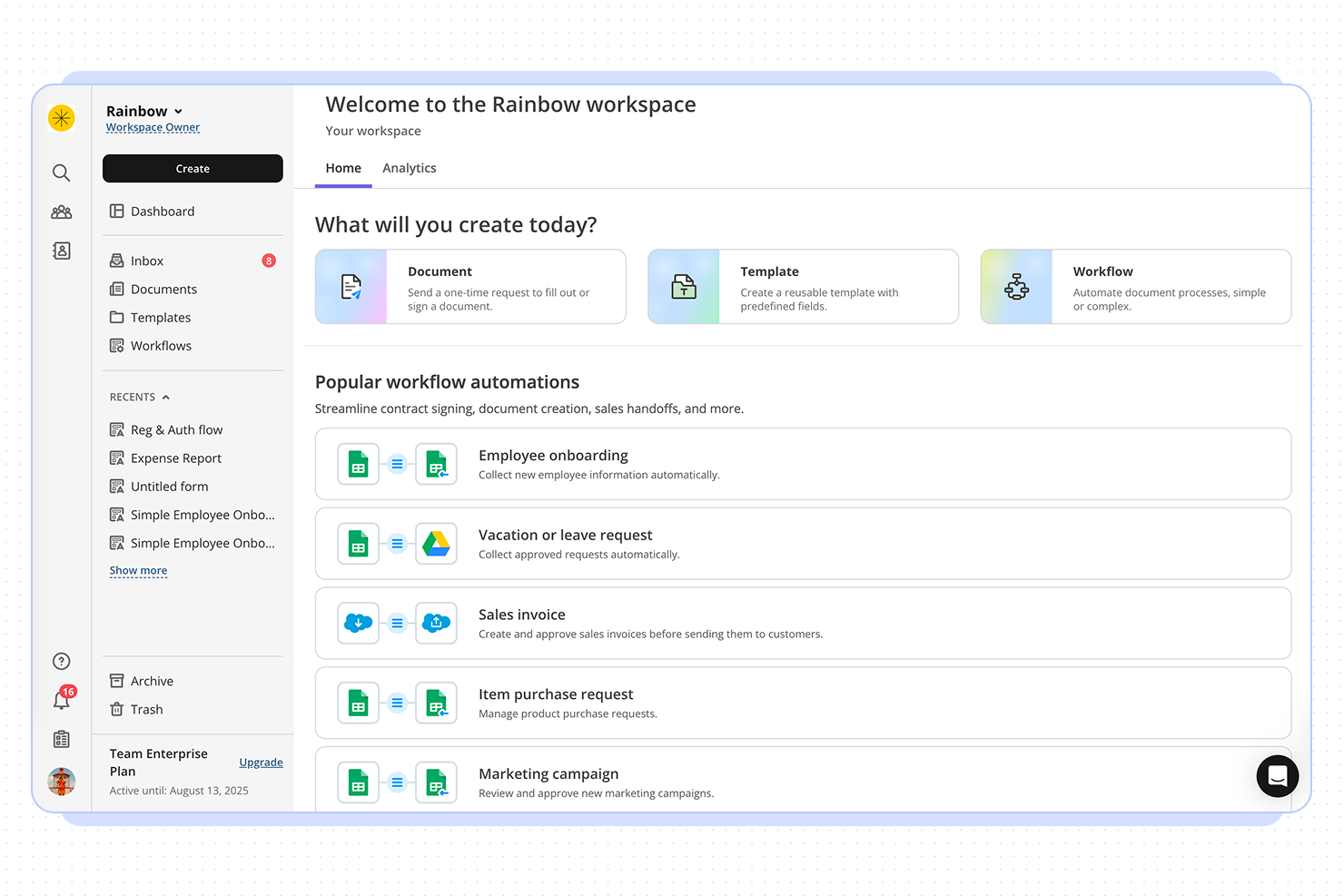
altaFlow is a workflow automation platform that helps project managers and teams streamline complex approval processes, automate document routing, and ensure compliance across multiple business systems.
Who Is altaFlow Best For?
altaFlow is a strong fit for mid-sized to enterprise teams that run approval-heavy processes across sales, operations, and finance functions.
Why I Picked altaFlow
altaFlow earns its spot on my shortlist because of how it handles the gap between document workflows and CRM data. Most approval tools treat the CRM as a destination—you finish a workflow, then someone manually updates the record. With altaFlow, the sync runs both ways: it pulls live Salesforce data into contracts and approval packets on generation, then writes signed document data, status updates, and timestamps back to the CRM automatically once a workflow completes. I also like the no-code conditional routing, which lets you set approval paths based on deal size, department, or risk level without touching a developer.
altaFlow Key Features
- Automated document routing: Route documents to the right approvers based on predefined rules, roles, or workflow triggers.
- Audit trail logging: Track every action taken on a document, including views, edits, approvals, and rejections, with timestamps.
- E-signature collection: Collect legally binding signatures directly within approval workflows without switching to a separate tool.
- Role-based access controls: Restrict document visibility and editing permissions based on team member roles or approval stage.
altaFlow Integrations
Integrations include Salesforce, NetSuite, SharePoint, Google Drive, OneDrive, Slack, Microsoft Teams, HubSpot, Microsoft Dynamics 365, and Box.
Pros and Cons
Pros:
- SOC 2, HIPAA, and GDPR compliance
- No-code workflow builder for approvals
- Supports multi-level and parallel approvals
Cons:
- API access only on premium plans
- Fewer prebuilt templates than some competitors


monday.com gives project managers in tech and digital teams a flexible platform to build, automate, and track approval workflows, making it easier to manage sign-offs, document reviews, and stakeholder feedback in one place.
Who Is monday.com Best For?
monday.com is a good fit for cross-functional teams in mid-size to enterprise tech companies that need a visual, customizable way to manage approvals across multiple projects and departments.
Why I Picked monday.com
monday.com earns its spot as one of the best on my shortlist because of how well its approval forms and boards work together as a single, connected system. I like that you can build a no-code intake form with conditional logic—so submitters only see the questions relevant to their request—and have responses land directly on a board where reviewers can act on them. From there, automations handle the routing: when a status column changes to "Pending Approval," the right reviewer is notified. I've found the Project Requests and Approvals template especially useful as a starting point, since it comes pre-wired with embedded forms, status tracking, and deadline reminders out of the box.
monday.com Key Features
- Approval status columns: Track where each request stands using customizable status labels like "In Review," "Approved," or "Rejected" directly on your board.
- Workload view: See reviewer capacity across your team to avoid bottlenecks when multiple approval requests are assigned simultaneously.
- Guest access: Invite external stakeholders—like clients or vendors—to review and approve items without giving them full account access.
- Audit log: View a timestamped record of every status change, comment, and update made to an approval item for accountability and compliance tracking.
monday.com Integrations
Integrations include Salesforce, QuickBooks, HubSpot, Zendesk, Active Directory, GitHub, GitLab, Slack, Gmail, and Microsoft Teams.
Pros and Cons
Pros:
- Highly customizable workflows
- Extensive integration options
- Built-in task tracking and reporting
Cons:
- Limited offline functionality
- Initial setup can be complex
New Product Updates from monday.com

monday.com's AI Blocks Now Available to All Users
monday.com AI Blocks are now available to all users, enabling teams to integrate AI directly into workflows. This rollout helps automate tasks and improve productivity across projects. For more information, visit monday.com's official site.

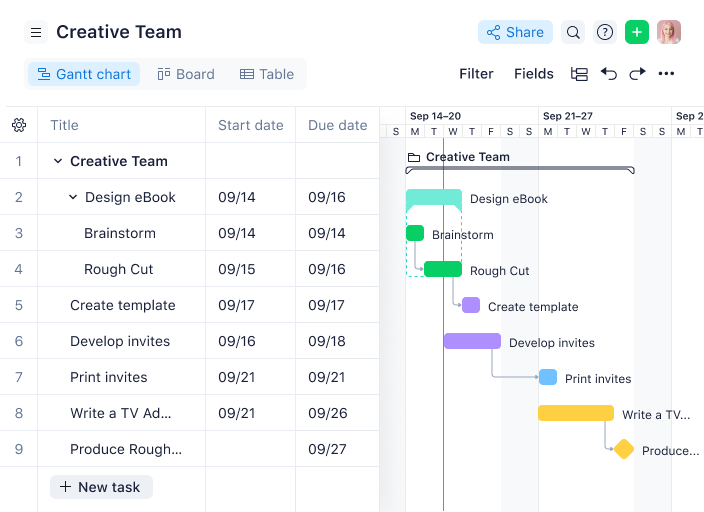
Wrike gives project managers in tech and digital teams a centralized platform to automate approvals, manage project workflows, and keep cross-functional work moving without bottlenecks.
Who Is Wrike Best For?
Wrike is a strong fit for mid-size to enterprise tech teams that need structured project delivery with built-in approval and review processes.
Why I Picked Wrike
Wrike earns its spot on my shortlist because of how deeply approval automation is built into its project workflows—not bolted on as an afterthought. I like that you can embed approvals directly into task and project workflows, so when a deliverable hits a specific status, the right approver is automatically notified without anyone having to chase them down. Wrike's dynamic request forms also do a lot of heavy lifting here—they use conditional logic to collect exactly the information approvers need upfront, which cuts down on back-and-forth before a sign-off even begins. The pending approvals dashboard gives my team a single view of everything waiting on a decision, so nothing quietly stalls mid-project.
Wrike Key Features
- Online proofing: Review and mark up images, videos, and documents directly within tasks, without downloading files or switching tools.
- Gantt chart view: Visualize project timelines, map task dependencies, and adjust schedules by dragging and dropping tasks on an interactive timeline.
- Custom workflow statuses: Define task stages that match your team's actual process, so work moves through clearly labeled steps from kickoff to completion.
- Resource bookings: Reserve team members for specific projects, estimate hours needed, and check availability before assigning work.
Wrike Integrations
Integrations include Salesforce, Microsoft Teams, Google Drive, Adobe Creative Cloud, Zoom, Tableau, Power BI, QuickBooks, Miro, and Google Sheets.
Pros and Cons
Pros:
- Attach files and track reviews in one task
- Automatic audit trail of decisions
- Define conditional approvals for specific scenarios
Cons:
- Extra setup of approval rules for non-standard cases
- May be overkill for simple sign-offs
New Product Updates from Wrike

Streamlining Workspaces with New Updates
Wrike announces custom space templates, AI Agents in Wrike Labs, and a new Guage widget to improve project management. For more information, visit Wrike's official site.
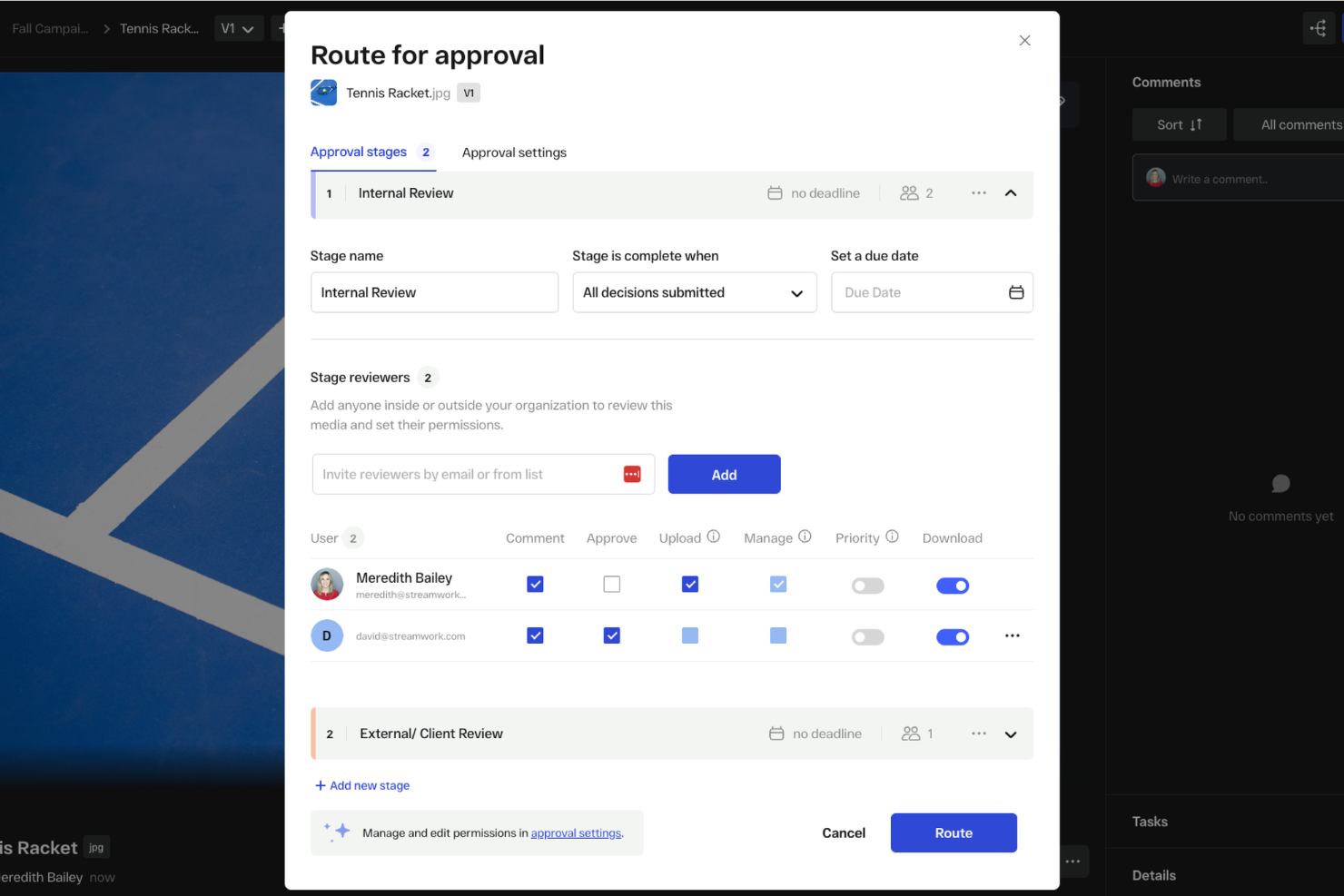
StreamWork is built for creative teams and project managers who need to coordinate complex approval workflows, centralize feedback, and keep projects moving with clear, trackable sign-offs at every stage.
Who Is StreamWork Best For?
StreamWork is a strong fit for creative and marketing teams that manage high volumes of visual content requiring structured, multi-stakeholder review and sign-off.
Why I Picked StreamWork
StreamWork earns its spot on my shortlist because of how well it handles multi-stage creative approvals without turning the process into a bottleneck. I like that you can map out distinct approval stages, assign specific reviewers to each one, and set deadlines per stage—so a campaign asset can move from a copywriter to a creative director to a legal reviewer in sequence, automatically. The approval routing updates in real time, so I can see exactly where a piece of content is stuck without chasing anyone down. On top of that, the version control ties directly into the approval history, so I always know who signed off on which version and when.
StreamWork Key Features
- Batch approvals with reusable templates: Run high-volume campaigns using pre-built approval templates that repeat across similar creative cycles without rebuilding workflows from scratch.
- Frame-accurate commenting: Leave time-stamped, pinpoint feedback directly on video frames, images, and documents so reviewers can annotate exactly what needs to change.
- Comment-to-task conversion: Turn any piece of feedback into an assignable task directly within the platform, keeping action items tied to the specific asset they reference.
- Reviewer access without logins: Share review links with external stakeholders or clients who can view and comment without creating an account or going through any setup.
StreamWork Integrations
Integrations include Asana, monday.com, Slack, Dropbox, Box, Google Drive, and Adobe Creative Cloud.
Pros and Cons
Pros:
- Built-in feedback tools on images, videos, and more
- Version control and asset stacking across reviews
- Custom multi-stage approval routes
Cons:
- Customization requires a learning curve
- Less suited for simple approval flows


Air is a digital asset management platform designed for project managers and creative teams who need to organize, collaborate on, and approve visual content with faster review cycles and less friction.
Who Is Air Best For?
Air is a strong fit for creative and marketing teams that manage high volumes of visual assets and need a structured review and approval process built into their content workflow.
Why I Picked Air
Air earns its spot on my shortlist because of how tightly it connects the approval process to the assets themselves. I like that version stacking groups every iteration of a file together, so when my team is reviewing a campaign visual, the approved version is always obvious and there's no risk of someone pulling an outdated file. Visual annotation lets reviewers pin comments directly on images or video timelines, which keeps feedback specific and eliminates the back-and-forth of trying to describe what needs changing. Kanban-style project management with custom fields lets me assign owners and track approval stages, so nothing stalls without a clear owner to follow up with.
Air Key Features
- Approval status tracking: Mark assets as approved, needs changes, or in review, with a full log of who approved what and when.
- Role-based access controls: Set view, comment, download, or edit permissions per user to keep in-progress work protected from the wrong eyes.
- Automatic metadata tagging: Air generates tags, smart summaries, and custom fields the moment an asset is uploaded, keeping your library organized without manual input.
- Share links for external stakeholders: Send a single link to give clients or partners access to approved assets without requiring an Air account.
Air Integrations
Integrations include Adobe Creative Cloud, Google Drive, Dropbox, Slack, Canva, Figma, Box, OneDrive, Microsoft Teams, and Asana.
Pros and Cons
Pros:
- Facial recognition automates photo tagging
- AI-powered search enables instant retrieval
- Centralized workflows streamline team approvals
Cons:
- Limited customization compared to other tools
- Users report inconsistent technical reliability
New Product Updates from Air

Air Adds Performance Analytics and Bulk Updates
Air introduces Performance Analytics and Bulk Updates, enabling you to analyze asset performance directly within the platform while updating multiple assets at once to improve efficiency and workflow speed. For more information, visit Air's official site.

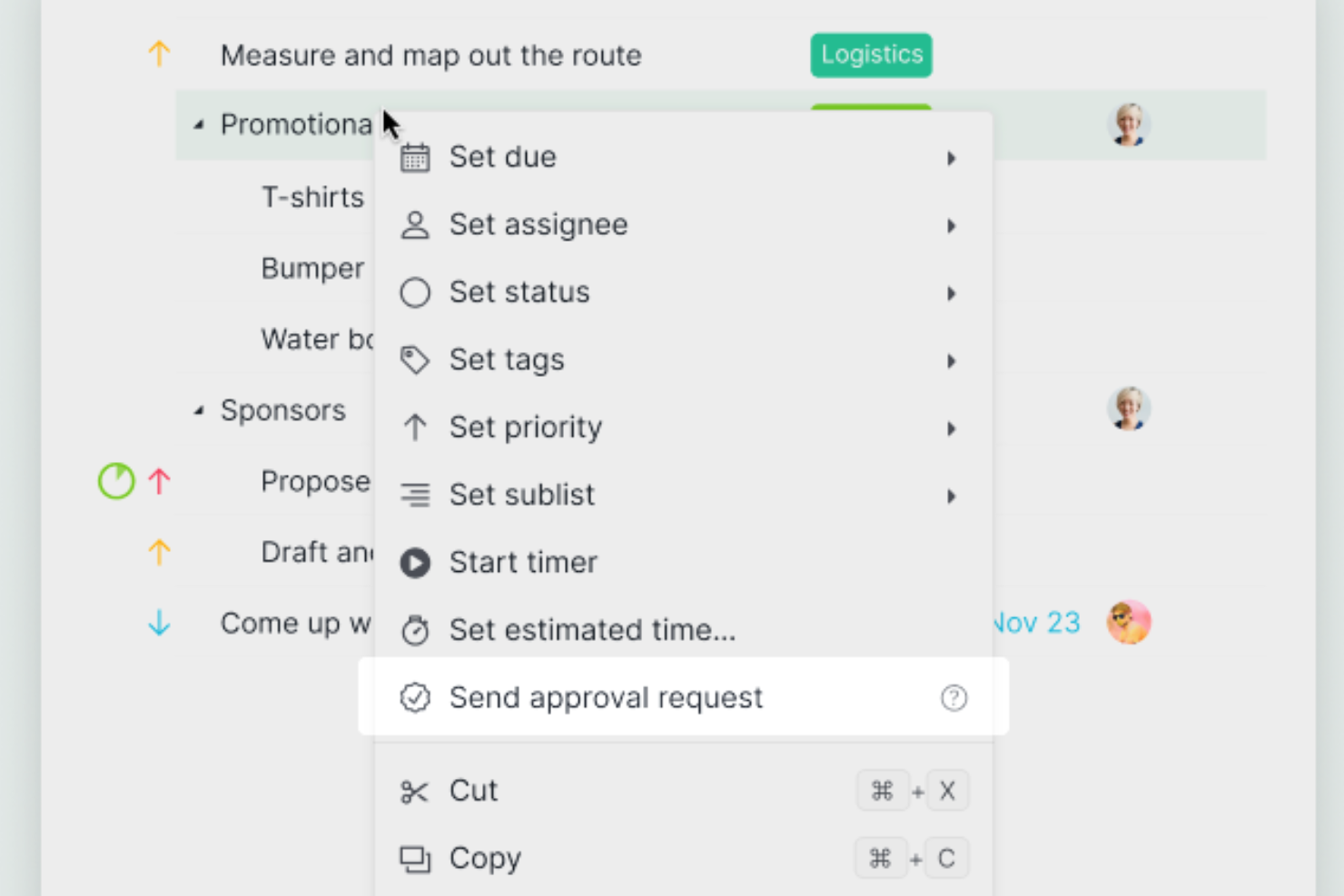
Quire is designed for teams that need granular control over task approvals within complex, multi-step projects. Its nested subtask structure lets you break down approval workflows into detailed, actionable steps, making it a fit for creative teams, agencies, and product development groups. If your approval process depends on tracking progress through multiple layers of review, Quire’s task-based approach keeps everything organized and visible.
Who is Quire Best For?
Quire supports project and task management teams at small to mid-sized organizations that need structured task approval workflows within a lightweight planning tool. It fits teams across industries that require clear sign-off checkpoints embedded in day-to-day task execution.
Why I Picked Quire
Quire takes a unique approach to approval workflows by letting you build deeply nested subtasks, so you can map out every step of a multi-stage review process. This structure is especially useful if your team needs to assign approvals at different levels or track dependencies between tasks. I appreciate how you can set up task-specific assignees and due dates, making it easy to see who is responsible for each approval. With Quire, you get a clear, visual breakdown of where every item stands in the approval chain.
Quire Key Features
In addition to its flexible subtask structure, Quire offers several other features that support approval workflows:
- Kanban Board View: Visualize tasks and approvals in a drag-and-drop board format.
- Task Comments: Collaborate and discuss approvals directly within each task.
- Custom Tags: Organize and filter tasks by approval status or reviewer.
- Permission Controls: Set user roles to manage who can approve, edit, or view tasks.
Quire Integrations
Integrations include Google Drive, Microsoft OneDrive, Dropbox, Box, Slack, Microsoft Teams, GitHub, Power BI, Google Calendar, and n8n.
Pros and Cons
Pros:
- Kanban view tracks approval status visually
- Task comments allow threaded approval discussions
- Nested subtasks support multi-stage approvals
Cons:
- Lacks audit trails for approval actions
- Cannot automate approval routing between users
New Product Updates from Quire
Quire Enhances Chat Editing and Text Formatting
Quire introduces updates to its chat functionality to improve collaboration and message formatting. These enhancements make it easier for teams to edit messages and structure text within conversations. For more information, visit Quire’s official site.
 .
.
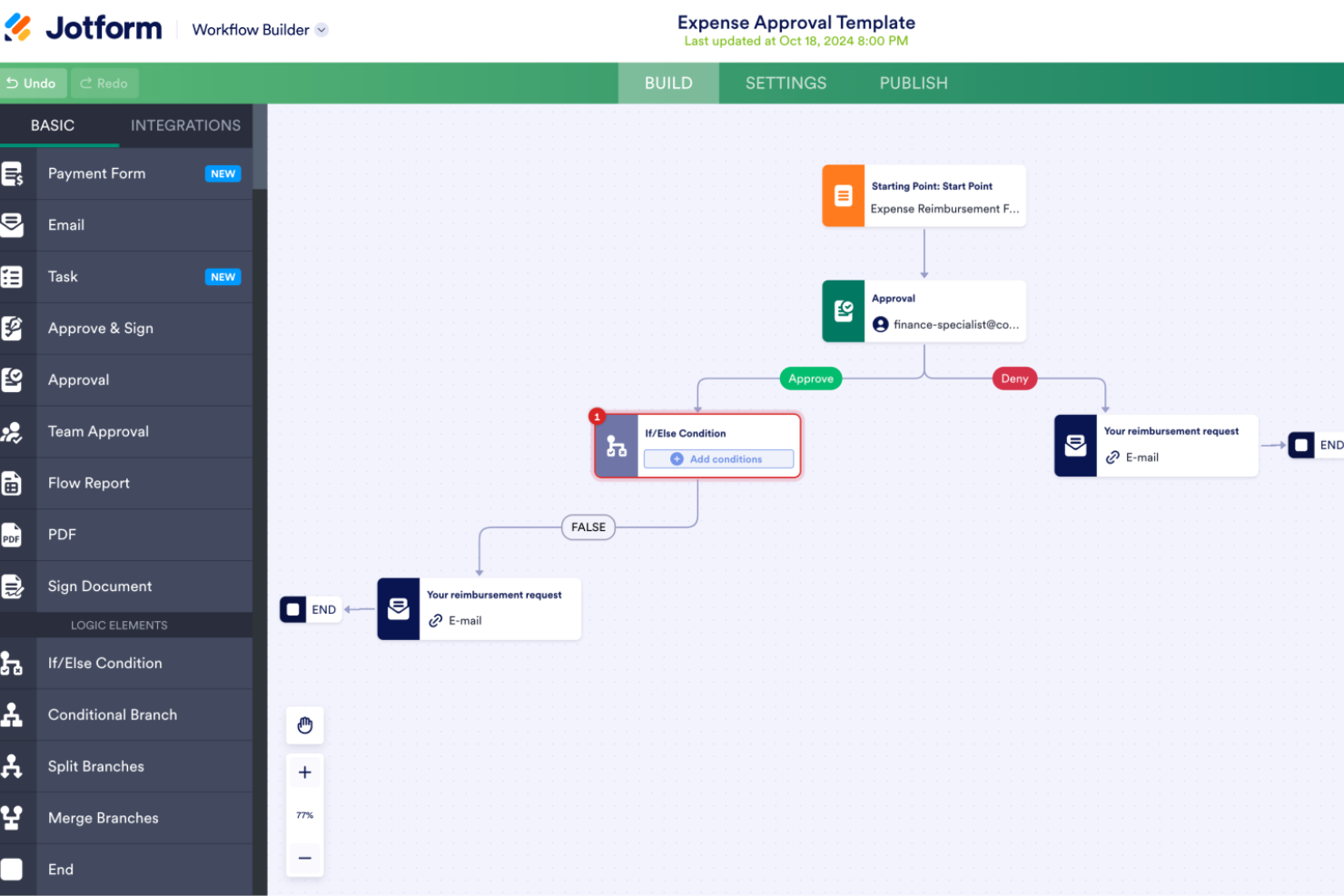
Jotform Workflows gives project managers and teams in any industry a way to automate approval processes, manage requests, and track project sign-offs using customizable forms and workflow automation.
Who Is Jotform Workflows Best For?
Jotform Workflows suits small to mid-sized teams that need to set up approval processes with minimal setup time and without relying on a developer or IT support.
Why I Picked Jotform Workflows
I picked Jotform Workflows as one of the best because my team can go from a blank canvas to a fully functioning approval process without delay. The drag-and-drop workflow builder lets you visually connect forms, approval steps, and conditional logic without writing a single line of code. I especially like the conditional logic branching, which lets me route requests differently based on submission data—so a high-budget project request automatically goes to a senior approver, while smaller requests move through a shorter path. The pre-built workflow templates also mean I'm not starting from scratch every time a new approval process comes up.
Jotform Workflows Key Features
- Approval tracking dashboard: Monitor the status of all pending, approved, and rejected requests from a single view.
- Automated email notifications: Send automatic alerts to approvers and submitters at each stage of the workflow.
- Multi-approver routing: Assign multiple approvers to a single step, with sequential or parallel approval options.
- E-signature collection: Gather legally binding signatures directly within the approval workflow without switching tools.
Jotform Workflows Integrations
Integrations include Google Drive, Dropbox, Slack, Microsoft Teams, Airtable, Square, PayPal, Stripe, and Jotform Tables.
Pros and Cons
Pros:
- Free plan available for initial testing and exploration
- Offers e-signature capabilities within workflows
- Supports conditional logic for advanced automation
Cons:
- Dependence on internet connectivity for data management
- Not all templates may suit specific business needs


Hive is a project management platform built for teams in fast-paced environments who need to manage approvals, automate workflows, and keep projects moving without bottlenecks.
Who Is Hive Best For?
Hive is a good fit for mid-sized teams in creative, marketing, or tech functions who need a single platform to manage projects and run internal approval processes.
Why I Picked Hive
I picked Hive as one of the best for internal approvals because it keeps the entire approval process inside the same workspace where your team is already managing tasks and projects. What I really like is the proofing and approvals feature—you can submit documents, images, or videos for review, annotate directly on the file, and compare versions side by side without ever leaving Hive. I also find the form intake feature genuinely useful for internal approval requests, since team members can submit work through a structured form that routes directly into a project. That means my team isn't chasing down requests over Slack or email—everything lands in one place with full context attached.
Hive Key Features
- Action cards: Create and assign tasks with due dates, dependencies, and priority levels directly within any project view.
- Workflow automation: Set up trigger-based rules to automatically assign tasks, update statuses, or send notifications when conditions are met.
- Multiple project views: Switch between Gantt, Kanban, calendar, and table views to track project progress in the format that works best for your team.
- Team messaging: Send direct messages or group chats tied to specific projects, keeping conversations connected to the work they reference.
Hive Integrations
Integrations include Google Drive, Google Calendar, Dropbox, QuickBooks, Zoom, Microsoft OneDrive, Microsoft Teams, Outlook Calendar, Jira, and Slack.
Pros and Cons
Pros:
- Comprehensive reporting features for project tracking
- Centralizes communication and project management
- Supports multi-stage approval processes
Cons:
- Navigation can be complex and overwhelming initially
- Data sync issues across different devices


Ziflow is an online proofing and approval workflow platform designed to help project managers streamline creative review cycles, manage feedback, and keep projects moving across distributed teams.
Who Is Ziflow Best For?
Ziflow is a strong fit for creative teams in marketing, advertising, and media who manage high volumes of visual content requiring structured review and sign-off.
Why I Picked Ziflow
Ziflow earns its spot on my shortlist because it's purpose-built for creative review cycles in a way that general project management tools simply aren't. I particularly like the automated approval routing, which lets me set up multi-stage workflows where assets move from designer to copywriter to legal to client without any manual handoffs. The annotation tools are useful—my team can mark up video, PDFs, and image files frame-by-frame in the browser. Version comparison is another feature I rely on, since Ziflow keeps every iteration in one place and shows exactly what changed between rounds.
Ziflow Key Features
- Reusable workflow templates: Build standardized review templates that automatically guide assets through the same approval steps every time.
- Campaign-level reviews: Manage all assets in a cross-channel campaign—images, video, audio, and web—within a single approval workflow.
- Compliance and audit trail: Generate secure records and electronic signatures that document every review decision for audit readiness.
- Real-time project dashboards: Monitor review status, feedback activity, and version history across all active proofs from a single dashboard.
Ziflow Integrations
Integrations include monday.com, Dropbox, Slack, Asana, Adobe Creative Cloud, Jira, ClickUp, Microsoft Teams, Wrike, and Google Drive.
Pros and Cons
Pros:
- Automated routing means less manual hand-offs
- Audit-ready version-history supports compliance
- Unlimited guest reviewers for external stakeholder input
Cons:
- Advanced features may require technical configuration
- Initial workflow setup takes significant time


IntelligenceBank is a workflow automation and digital asset management platform for marketing teams and project managers who centralize approvals, manage compliance, and streamline content collaboration across campaigns and projects.
Who Is IntelligenceBank Best For?
IntelligenceBank is a strong fit for marketing operations teams in mid-size to enterprise organizations that manage high volumes of content, assets, and multi-stakeholder approvals.
Why I Picked IntelligenceBank
I included IntelligenceBank on my shortlist because it connects approval workflows directly to compliance—something marketing operations teams genuinely need. I like how custom approval workflows sit inside the same platform as AI-powered compliance reviews, so when a piece of content moves through legal or brand sign-off, risk flags surface automatically rather than after the fact. The marketing work management module also lets my team run creative briefs, allocate tasks, and manage multi-stage approvals from Kanban boards and marketing calendars, keeping the full production cycle visible in one place. That end-to-end visibility—from brief to approved asset—is what makes IntelligenceBank a particularly good fit for marketing operations teams managing high volumes of content across multiple stakeholders.
IntelligenceBank Key Features
- Online proofing and annotation: Review and mark up creative assets directly in the platform, with threaded comments tied to specific areas of an image, video, or document.
- Version control: Track every iteration of an asset with a full version history, so approvers always review the latest file and can compare against previous versions.
- Role-based access controls: Set granular permissions by user role to control who can view, edit, upload, or approve assets at each stage of the workflow.
- Digital asset management: Store, search, and share all creative assets in a centralized library with AI-powered tagging and facial recognition for fast retrieval.
IntelligenceBank Integrations
Integrations include Adobe After Effects, Adobe InDesign, Figma, Salesforce Marketing Cloud, Microsoft Teams, Shopify, Contentful, Google Docs, and Asana.
Pros and Cons
Pros:
- Centralized brand portal with asset usage and permissions
- Create tasks directly from intake forms
- Version control across assets and approvals
Cons:
- Search and folder structure can be overwhelming
- Implementation requires significant internal resources


Process Street gives project managers in tech and digital teams a way to build, automate, and track approval workflows so they can manage complex processes, assign tasks, and ensure every step is completed with full visibility.
Who Is Process Street Best For?
Process Street is a good fit for operations and project teams at small to mid-sized companies that need to standardize and manage recurring approval processes without heavy technical setup.
Why I Picked Process Street
I picked Process Street as one of the best because I love how its drag-and-drop workflow builder lets my team design multi-step approval processes without writing a single line of code. My team can drag tasks into sequence, add conditional logic so the workflow branches based on specific inputs, and drop in stop tasks that block progress until a required approval is completed. That means a design review or budget sign-off can't get skipped—the workflow enforces the requirement. I also like that we can update a workflow mid-flight without disrupting runs already in progress; my team relies on this when approval requirements shift partway through a project.
Process Street Key Features
- Role-based task assignments: Assign specific approval steps to individuals or groups based on their role within the workflow.
- Audit trail logging: Every action, approval, and comment is automatically recorded with a timestamp for full process accountability.
- Form fields within tasks: Collect structured data directly inside a task, such as approval notes, file uploads, or sign-off confirmations.
- Workflow run dashboard: Monitor all active workflow runs in one view, with status indicators showing where each approval process currently stands.
Process Street Integrations
Integrations include Salesforce, Slack, Microsoft Teams, Google Sheets, Jira, Docusign, HubSpot, Mailchimp, Stripe, and BambooHR.
Pros and Cons
Pros:
- Automation features save time on repetitive tasks
- Facilitates compliance via audit-ready documentation
- Wide range of templates for various processes
Cons:
- Lacks advanced workflow customization
- Limited tools for sequential task management


Filestage is an approval workflow platform designed for project managers and creative teams who need to manage feedback, track versions, and streamline document or media approvals across multiple stakeholders.
Who Is Filestage Best For?
Filestage is a good fit for marketing and creative teams at mid-sized companies that manage high volumes of content approvals across multiple internal and external reviewers.
Why I Picked Filestage
Filestage earns its spot on my shortlist because unlimited reviewers are available on every plan—including the free tier—which means you're never paying extra to loop in a client, a legal stakeholder, or a last-minute approver. I like that reviewers don't even need an account to leave feedback; they just enter their email and start annotating directly on the file. That removes a real barrier when you're managing approvals across agencies, freelancers, and internal teams simultaneously. The reviewer groups feature also lets me segment who sees what at each stage, so a legal reviewer and a brand reviewer can work through the same file in parallel without stepping on each other.
Filestage Key Features
- Version comparison: Upload new file versions and compare them side-by-side with previous iterations to track changes across review cycles.
- Due dates for review steps: Assign deadlines to individual review stages so approvals don't stall without accountability.
- File annotation tools: Leave time-stamped comments directly on videos, PDFs, images, and other file types without switching to a separate tool.
- Approval status tracking: Monitor the approval status of every file across all projects from a centralized dashboard.
Filestage Integrations
Integrations include Asana, monday.com, Jira, Slack, Microsoft Teams, Adobe Premiere Pro, Adobe InDesign, Adobe After Effects, Figma, Google Drive, and Dropbox.
Pros and Cons
Pros:
- Automated approvals reduce manual steps
- Version comparison simplifies spotting changes
- Invite unlimited reviewers without extra licenses
Cons:
- Dashboard may lag with large video files
- Custom roles and permissions need advanced configuration


Admation is built for marketing and creative teams that need to manage complex approval workflows across multiple stakeholders. Its platform brings together project management, asset review, and approval tracking in one place, making it easier to coordinate feedback and version control. If your team juggles high volumes of creative assets and compliance requirements, Admation helps keep every step visible and accountable.
Who is Admation Best For?
Admation supports operations and creative review teams at small to mid-sized organizations that need structured workflows for routine approvals. It fits companies across industries that require consistent, repeatable sign-off processes for standard deliverables and review cycles.
Why I Picked Admation
Admation stands out for its ability to manage creative approvals across multiple stakeholders and projects. I picked it because its approval workflow tools let you set up multi-stage reviews, automate reminders, and track every version of creative assets in detail. The platform’s centralized feedback and markup features help teams consolidate input and avoid confusion during the review process. For marketing and creative teams handling high volumes of assets, Admation brings structure and transparency to every approval step.
Admation Key Features
Admation offers several other features that can help you boost workflow efficiency.
- Real-Time Project Tracking: This lets you monitor the progress of your projects as they move through the approval stages, so you get up-to-date information and better project visibility.
- Batched Approvals: You can expedite your review process by grouping similar items for approval, which reduces the time spent on individual reviews.
- Proxy Users: You can assign proxy users to manage approvals in your absence, which makes sure that critical tasks continue without interruption.
- Approval Checklists: This lets you incorporate checklists to keep stakeholders engaged, maintain compliance with legal requirements, and adhere to organizational standards.
Admation Integrations
Integrations are not publicly listed.
Pros and Cons
Pros:
- User-friendly interface and easy navigation
- Provides clear audit trails and customizable processes
- Templated briefs provide consistency
Cons:
- File uploads can sometimes be slow
- Limited search functionality


Birdview brings project and resource management together for service teams that need unified oversight of approvals, tasks, and capacity. It’s designed for professional services organizations and agencies that juggle multiple projects and require structured approval workflows across departments. With Birdview, teams can centralize requests, automate approval routing, and track every step from intake to delivery.
Who is Birdview Best For?
Birdview supports project and operations teams at small to mid-sized agencies and professional services firms that need structured approval workflows tied to project planning and delivery. It fits teams managing client-focused work with coordinated review and sign-off requirements across multiple stakeholders.
Why I Picked Birdview
What drew me to Birdview is how it combines project and resource management in one platform, making it easier for service teams to manage approvals alongside their day-to-day work. The unified dashboard lets you track approval requests, project progress, and resource allocation without switching tools. I appreciate that Birdview’s workflow automation allows you to set up multi-step approval chains and custom routing based on project type or client. This approach helps teams keep approvals visible and actionable, especially when managing multiple projects at once.
Birdview Key Features
Birdview also offers a range of other features that cater to your project management and workflow needs.
- Resource Planning: This lets you allocate resources effectively across projects so you can make sure you have the right people working on the right tasks at the right time.
- Project Management: You can plan, execute, and track projects from start to finish, as well as keep everything organized and on schedule.
- AI Assistant: The built-in AI assistant helps you automate routine tasks and provides insights. It also makes it easier for your team to focus on strategic activities rather than administrative tasks.
- Mobile App: You and your team can manage approvals and stay updated on project progress from anywhere to maintain flexibility and continuity in your workflow.
Birdview Integrations
Integrations include Microsoft Teams, Microsoft Project, Jira, Microsoft Excel, and Outlook.
Pros and Cons
Pros:
- Auditor-friendly logs show who approved what when
- Configure approval flows to tasks or milestones
- Enforce approval processes for deliverables and files
Cons:
- Learning curve for customizing workflows
- Smaller teams may find overhead too high


Moxo is a workflow automation platform designed for project managers and client-facing teams who need to coordinate approvals, manage documents, and track tasks securely within a branded digital portal.
Who Is Moxo Best For?
Moxo is a strong fit for service-based businesses and project managers who handle client-facing workflows across industries like financial services, legal, and consulting.
Why I Picked Moxo
I picked Moxo as one of the best because of how it handles approvals within a client-facing portal rather than keeping everything locked inside internal tools. What I like most is that external stakeholders—clients, partners, vendors—can enter a workflow, see exactly what action they need to take, and complete it without needing a login tutorial or a back-and-forth email chain. I also use Moxo's conditional branching to route approval steps dynamically based on form inputs or prior decisions, which means a client submitting incomplete documentation automatically triggers a review-revise-resubmit loop instead of stalling the whole process. Additionally, every action is captured in a detailed audit trail tied to specific steps, so I always have a timestamped record of who approved what and when.
Moxo Key Features
- Role-based routing: Automatically assigns workflow steps to the right participants based on permissions and logic rules, without manual handoffs.
- SLA timers and escalations: Triggers automatic escalations when deadlines are missed, keeping approval steps from going stale.
- Parallel workflow paths: Runs multiple workflow branches simultaneously, so teams aren't blocked waiting on unrelated approvals.
- Embeddable SDK: Extends Moxo's workflow functionality directly into your existing applications via iOS, Android, and JavaScript SDKs.
Moxo Integrations
Integrations include Salesforce, HubSpot, Box, Stripe, Formstack, Jotform, and Zoom.
Pros and Cons
Pros:
- Workflow templates let you repeat processes
- Multi-party approvals in the same portal
- Branded portals for client workflows
Cons:
- Initial setup and customization require significant time
- Workflow builder may require complex logic training

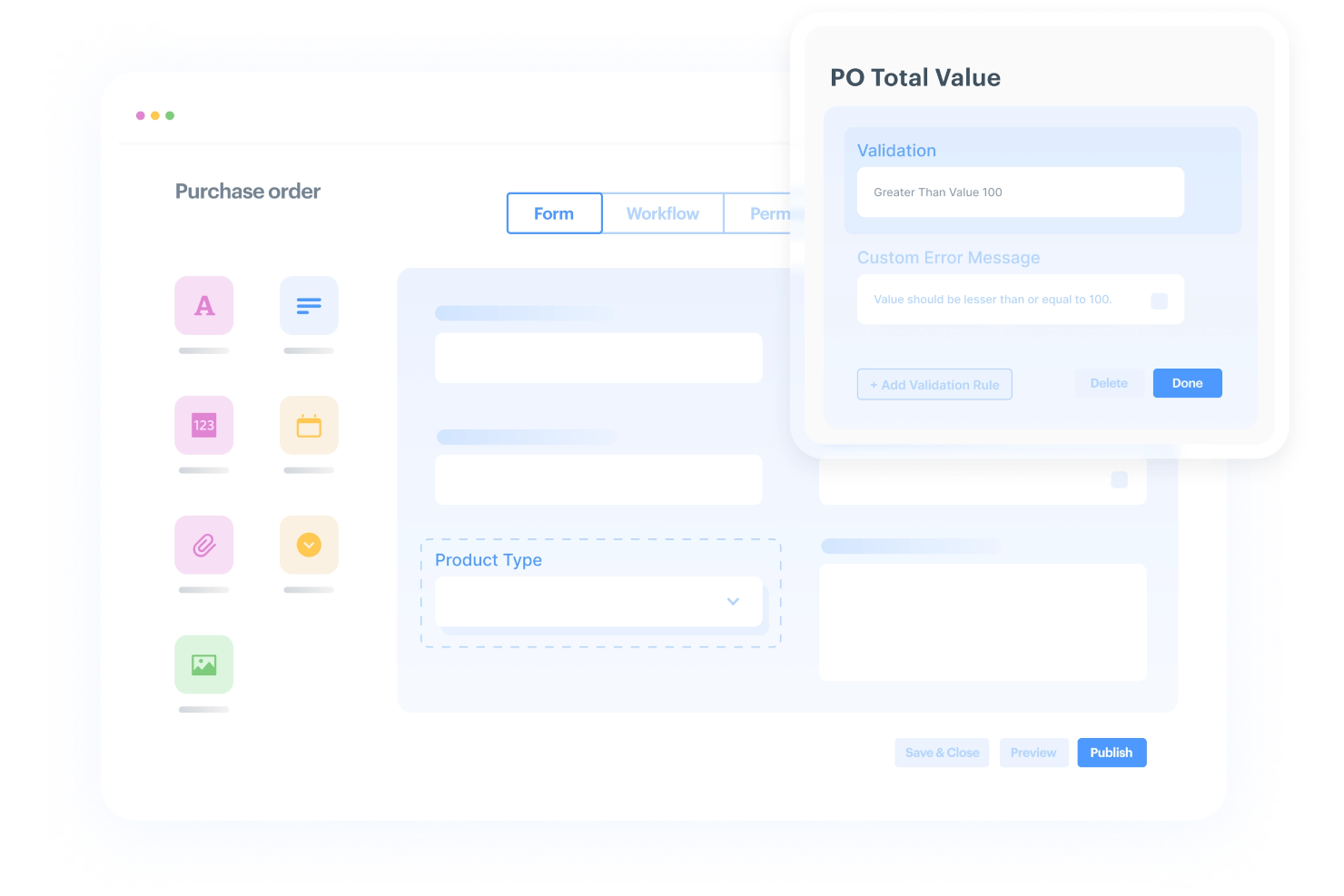
Kissflow Workflow gives project managers in tech and digital teams a flexible platform to automate, track, and manage approval workflows tailored to their unique processes and business needs.
Who Is Kissflow Workflow Best For?
Kissflow Workflow is a good fit for mid-size to enterprise teams that need to design and manage multi-step approval processes without relying on developer support.
Why I Picked Kissflow Workflow
Kissflow Workflow earns its spot on my shortlist because of how much control it gives you over building approval processes from scratch. I like that the drag-and-drop workflow builder lets my team map out multi-step approvals with conditional routing—so a purchase request above a certain threshold automatically escalates to a senior approver without any manual intervention. I also use the form builder to capture exactly the data needed at each approval stage, which cuts down on back-and-forth between reviewers. The real-time process tracker means I can see exactly where a request is stuck and who's responsible for the next action.
Kissflow Workflow Key Features
- Pre-built workflow templates: Access a library of ready-to-deploy templates to launch approval processes without building from scratch.
- Role-based access controls: Assign permissions at the workflow level so only the right people can view, edit, or approve specific requests.
- Kanban boards and calendar views: Visualize active approval requests across teams using Kanban boards or calendar layouts within a single dashboard.
- Audit logs: Maintain a full, immutable record of every approval action, timestamp, and decision for compliance and accountability tracking.
Kissflow Workflow Integrations
Integrations include SAP Business, Dynamics 365, Zendesk, Adobe, SQL Server, Twilio, Asana, Basecamp, QuickBooks, and Xero.
Pros and Cons
Pros:
- Low-code customization without full programming
- Track task status and approvals visually
- Deploy multiple workflow apps across teams
Cons:
- Permissions and role setup confusing for large teams
- Search and data-filtering inefficient at scale


Ravetree offers a centralized platform for teams that need built-in approval workflows alongside project management, time tracking, and client collaboration. It’s especially useful for agencies and service-based businesses that want to keep all approvals, files, and communications in one place. With Ravetree, you can manage project approvals, automate notifications, and maintain a clear audit trail for every decision.
Who is Ravteree Best For?
Ravetree supports project and client delivery teams at small to mid-sized professional services and creative firms that need integrated CRM and project approval workflows. It fits organizations that require coordinated client engagement and internal sign-off processes within a single work management platform.
Why I Picked Ravetree
Ravetree stands out for teams that want to manage approvals directly within their work management platform, without relying on external tools or add-ons. It's built-in approval workflows let you assign, track, and audit approvals for tasks, files, and projects all in one place. I like that you can automate notifications and reminders, so nothing slips through the cracks during the approval process. This centralized approach helps teams maintain transparency and accountability across every stage of their projects.
Ravetree Key Features
Ravetree offers a range of other features that make it useful for managing approval workflows.
- Time and Expense Tracking: You can easily keep track of billable hours and expenses, with options for approvals and detailed reporting to maintain accuracy and accountability.
- Resource Planning: This lets you manage your team's capacity, allocation, and utilization with features for time-off requests and customizable work schedules.
- Client Portals: You can provide your clients with real-time project status updates and direct communication channels, which eliminates the need for constant email exchanges.
- Requests: This lets you customize forms for both internal and external project requests, as well as streamline the intake process and prioritize tasks efficiently.
Ravetree Integrations
Integrations include Dropbox, Google Drive, OneDrive, QuickBooks, Stripe, HubSpot, Instagram, and Xero.
Pros and Cons
Pros:
- Built-in CRM lets you approve scope and client work together
- Custom workflows let you shape approvals by role
- Billing and expense tracking connected to approvals
Cons:
- Approval logic can complicate small team use
- Customization limited compared to enterprise tools


Pneumatic Workflow is designed for teams that want to automate multi-step approval processes without heavy IT involvement. It’s a strong fit for operations, HR, and finance teams that need to build, run, and track approval workflows with customizable steps and notifications. The platform’s flexibility lets you standardize approvals while adapting to changing business needs.
Who is Pneumatic Workflow Best For?
Pneumatic Workflow supports operations and process teams at small to mid-sized organizations that need tools to streamline structured approval processes. It fits companies across industries that require centralized oversight and coordination of review and sign-off workflows.
Why I Picked Pneumatic Workflow
What sets Pneumatic Workflow apart is its focus on flexible workflow automation with approval steps that you can tailor to your team’s needs. You can design multi-stage approval processes using a visual workflow builder, making it easy to map out each step and assign approvers. I appreciate that you can add conditional logic, so approvals can branch or loop based on responses or data inputs. This flexibility is especially useful for teams that need to adapt workflows as requirements change or as processes evolve over time.
Pneumatic Workflow Key Features
Pneumatic Workflow also offers several other capabilities that can improve your and your team's workflow management.
- Document Management: This lets you organize and store documents within workflows and makes it easy to access and reference the right files during the approval process.
- Automatic Notifications: You can keep your team informed with real-time updates on workflow progress and pending approvals, as well as make sure everyone stays on the same page.
- Task Automation: You can automate repetitive tasks, which helps free up your team's time to focus on more strategic activities within the approval process.
- Real-Time Collaboration Tools: This lets you facilitate team interactions and decision-making by allowing members to communicate and make changes within the workflow as they occur.
Pneumatic Workflow Integrations
Integrations are available via Zapier, Make, and Pneumatic's API.
Pros and Cons
Pros:
- Task logs provide approval audit trail capability
- Workflow templates are editable mid-stream
- Kick-off forms let external participants start processes
Cons:
- Basic reporting and analytics compared to other tools
- Conditional logic can be complex for layered processes


Tallyfy is a no-code workflow automation platform designed for teams that need to build and manage approval processes without IT support. It’s especially useful for operations, HR, and compliance teams looking to digitize and track multi-step approvals across departments. With Tallyfy, you can turn complex, manual approval chains into automated, auditable workflows.
Who is Tallyfy Best For?
Tallyfy supports operations and process teams at small to mid-sized organizations that need a flexible platform for experienced workflow builders to design and manage approval processes. It fits companies across industries that require structured, repeatable workflows with clear checkpoints and custom logic.
Why I Picked Tallyfy
What stands out about Tallyfy is its no-code approach to workflow automation, which makes it accessible for teams that want to build approval processes without technical barriers. I picked Tallyfy because it lets you design multi-step approval chains using a visual builder, so you can map out exactly who needs to approve what and when. The platform’s conditional logic and branching features help you create dynamic workflows that adapt to different scenarios or document types. For teams that need to digitize and track approvals across departments, Tallyfy offers a flexible way to automate and audit every step.
Tallyfy Key Features
Tallyfy offers several other features that make it valuable as an approval workflow software tool.
- Real-Time Status Tracking: You can monitor the progress of tasks and approvals instantly to maintain transparency and accountability in your workflows.
- Guest Access: The platform allows unlimited external participants to join approval processes without needing accounts. This facilitates collaboration with stakeholders outside your organization.
- Automation Capabilities: You can create automated workflows with conditional logic and set up complex processes with ease.
- Template Creation: You can create and customize templates for various processes, which increases efficiency and consistency across your team's workflows.
Tallyfy Integrations
Integrations include Tableau, Power BI, Google Analytics, Zapier, Make.com, and n8n.
Pros and Cons
Pros:
- Real-time tracking provides visibility into bottlenecks
- Guest access works for external reviewers
- Conditional logic supports branching based on inputs
Cons:
- May be overkill for small teams
- Complex to set up permissions and roles
Other Approval Workflow Software
Here are a few more tools that didn’t make the top list, but which are worth checking out if you didn’t find what you were looking for above.
- Gain
For collaborative approval workflows
- Oppolis Cloud
For Adobe Creative Cloud integration
- ReptonPOD
For tracking document approvals
- Miro
For visual collaboration & innovation
- Jotform
For dynamic form approval
- ClickUp
For project management workflows
- Smartsheet
For external approvers
- Celoxis
For pre-built workflow apps
- Screendragon
For no-code workflows
- Hub Planner by Milient
For resource-based approval tracking
- GoodDay
For advanced task visualization
- Formstack
For customizable online forms
- InRule
For no-code AI-powered automations
- Process Plan
For AI workflow analysis


Selection Criteria for Approval Workflow Software
When selecting the best approval workflow software to include on this list, I considered common buyer needs and pain points like automating manual approval processes and ensuring compliance with organizational policies. I also used the following framework to keep my evaluation structured and fair:
Core Functionality (25% of total score)
To be considered for inclusion on this list, each solution had to fulfill these common use cases:
- Automating approval processes
- Providing role-based access control
- Tracking approval histories
- Notifying stakeholders of pending approvals
- Offering customizable workflows
Additional Standout Features (25% of total score)
To help further narrow down the competition, I also looked for unique features, such as:
- Built-in analytics for process optimization
- Integration with digital signature tools
- AI-powered approval suggestions
- Offline approval capabilities
- Advanced workflow visualization
Usability (10% of total score)
To get a sense of the usability of each system, I considered the following:
- Simplified navigation and layout
- Minimal clicks required for key actions
- Clear workflow visualization
- An intuitive mobile interface
- Platform responsiveness
Onboarding (10% of total score)
To evaluate the onboarding experience for each platform, I considered the following:
- Availability of step-by-step tutorials
- Access to training videos and documentation
- Presence of interactive product tours
- Support for importing existing workflows
- Availability of live onboarding webinars
Customer Support (10% of total score)
To assess each software provider’s customer support services, I considered the following:
- Availability of 24/7 support
- Access to knowledgeable support agents
- Quality of self-service resources
- Response time for critical issues
- Availability of multiple communication channels
Value For Money (10% of total score)
To evaluate the value for money of each platform, I considered the following:
- Transparency of pricing structure
- Availability of free trials or demos
- Inclusion of essential features in base plans
- Cost-effectiveness of higher-tier plans
- Pricing competitiveness within the market
Customer Reviews (10% of total score)
To get a sense of overall customer satisfaction, I considered the following when reading customer reviews:
- Complaints about hidden fees or costs
- Frequency of praise for usability
- Feedback on reliability and uptime
- Comments on customer support experiences
- Examples of ROI achieved through the tool
How to Choose Approval Workflow Software
It’s easy to get bogged down in long feature lists and complex pricing structures. To help you stay focused as you work through your unique software selection process, here’s a checklist of factors to keep in mind:
| Factor | What to Consider |
|---|---|
| Scalability | Make sure the software can handle your team’s growth, whether it’s increasing users, processes, or requests. Look for flexible licensing or tiered pricing models. |
| Integrations | Check if the software connects with your existing tools like CRMs, ERPs, or document storage systems. Integrations can streamline your workflows and save your team time. |
| Customizability | Ensure you can tailor approval processes to match your team’s unique needs, like setting custom approval stages or notifications. |
| Ease of Use | Your team shouldn’t need extensive training. Look for intuitive interfaces and straightforward workflows to get started quickly. |
| Budget | Consider the total cost of the software, including subscription fees, training, and potential add-ons. Check whether it aligns with your financial constraints. |
| Security Safeguards | Confirm the software meets your organization’s security standards, via features like role-based permissions and compliance with regulations like GDPR or SOC 2. |
| Mobile Accessibility | Check if the software offers a mobile-friendly interface or app, so your team can approve requests on-the-go. |
| Reporting Features | Look for robust analytics tools to track bottlenecks, approval times, and process efficiency for better decision-making. |
Trends in Approval Workflow Software
In my research, I sourced countless product updates, press releases, and release logs from different approval workflow software vendors. Here are some of the emerging trends I’m keeping an eye on:
- AI-Driven Recommendations: Tools are now offering AI to suggest approvers or flag unusual requests. This helps teams save time and spot issues faster. For example, an AI might flag expense approvals that fall outside of normal spending patterns.
- Blockchain for Audit Trails: Some vendors are adopting blockchain to ensure tamper-proof approval records. This trend is especially useful for industries with strict compliance needs, like finance or healthcare, where secure and verifiable audit trails are essential.
- No-Code Workflow Design: More platforms now allow users to build and modify workflows without writing code. This lowers the barrier for non-technical users and makes it easier for teams to adjust workflows to fit their needs without IT support.
- Dynamic Approvals Based on Context: Approval paths that adjust based on conditions like urgency or budget thresholds are gaining popularity. For example, a low-budget request might require only one approval, while a high-budget one routes through multiple levels automatically.
- Embedded Analytics: Platforms are including real-time data on approval times, bottlenecks, and user activity. Teams can use this data to identify delays and make processes more efficient. For example, a dashboard might highlight that a specific approval step consistently slows down requests.
What is Approval Workflow Software?
Approval workflow software is a tool that automates and tracks the process of submitting, reviewing, and approving documents or tasks. It’s used by project managers, marketers, legal teams, and operations leads to eliminate approval delays, reduce errors, and maintain an audit trail.
These tools help teams route requests to the right people, set deadlines, and keep work flowing smoothly.
Features of Approval Workflow Software
When selecting approval workflow software, keep an eye out for these key features:
- Customizable workflows: You can design unique approval pathways that match your team’s real-life processes, so you’re not stuck adapting your style to a rigid software structure.
- Role-based access control: This lets you limit who can view, edit, or approve requests by assigning specific permissions, which reduces mistakes and keeps sensitive information secure.
- Automated notifications: You can instantly alert the right people when action is needed to cut down on back-and-forth emails and “I never saw that!” moments.
- Audit trail and tracking: This lets you access a clear record of every step, comment, and approval and makes it easy to trace decisions and meet compliance requirements.
- Mobile compatibility: You can submit, review, or approve requests from your phone or tablet, which lets you take quick action from anywhere when needed.
- Integration with existing tools: You should be able to connect to apps like email, CRM, or document management systems in order to keep your processes smooth and information up to date.
- Template library: This helps you quickly set up new workflows using ready-made templates that are tailored for common approval scenarios.
- Deadline management: You can set due dates and reminders for approvals so work doesn't drag on forever and projects keep moving forward.
AI Features to Look for in Approval Workflow Software
Beyond the standard software features listed above, many approval workflow solutions offer AI features like:
- Intelligent routing: This AI feature can analyze request details and automatically assign them to the right approver to save you manual work and reduce delays.
- Predictive analytics: You can get insights into potential bottlenecks or delays before they happen, proactively address issues, and keep things moving.
- Smart suggestions: This AI tool can recommend next steps or approvers based on past behavior, which makes your workflow more efficient and reduces decision fatigue.
- Automated document processing: You can use AI to extract key information from attached documents, so you don’t have to enter data manually.
- Anomaly detection: This AI tool can flag unusual patterns or outlier requests to help you catch errors or potential compliance issues early.
- Natural language processing: You can submit and review requests using plain language commands, which makes the system easier and faster to use.
- Sentiment analysis: This AI feature can analyze comments and feedback within the approval process to identify potential concerns or conflicts and let you address them proactively.
Benefits of Approval Workflow Software
Implementing approval workflow software provides several benefits for your team and your business. Here are a few you can look forward to:
- Faster approvals: Automates repetitive steps and sends real-time alerts to keep processes moving quickly.
- Improved accuracy: Reduces errors by ensuring all requests follow the same predefined steps and rules.
- Better transparency: Tracks every action with detailed audit logs, so you always know who approved what and when.
- Increased compliance: Helps your team stick to company policies by enforcing rules and creating clear approval trails.
- Enhanced collaboration: Makes it easier for teams to work together by providing a shared platform for reviewing and approving requests.
- Cost savings: Cuts down on manual work and delays, saving time and reducing operational costs.
- Scalability: Adapts to your growing business by handling more users, requests, or processes as needed.
Costs & Pricing of Approval Workflow Software
Selecting approval workflow software requires an understanding of the various pricing models and plans available. Costs vary based on features, team size, add-ons, and more. The table below summarizes common plans, their average prices, and typical features included in approval workflow software solutions:
Plan Comparison Table for Approval Workflow Software
| Plan Type | Average Price | Common Features |
|---|---|---|
| Free Plan | $0 | Basic workflow automation, limited users, email notifications, and simple reporting. |
| Personal Plan | $5-$25/user/month | Customizable workflows, role-based permissions, mobile access, and basic integrations. |
| Business Plan | $30-$70/user/month | Advanced workflow customization, audit trails, conditional logic, and analytics tools. |
| Enterprise Plan | $100-$200/user/month | Dynamic workflows, enterprise-grade security, API access, and dedicated support. |
Approval Workflow Software Frequently Asked Questions
Find answers to common questions other people ask about this topic.
How do approvals impact project execution?
Approvals directly affect project speed, accountability, and quality. Quick, transparent approvals help you avoid delays and keep tasks moving.
Brian Tracey, a recognized Canadian-American self-development author, once said “Every minute you spend in planning saves ten minutes in execution”. I believe this quote is accurate in the context of approval workflows in project management.
Making the time to plan and set up your approval workflows properly will save you dozens if not hundreds of hours a year during your project execution. Using approval workflow software ensures every decision is tracked and no step is skipped, helping you deliver projects on time.
What common mistakes should I avoid when setting up approval workflows?
The first thing is to avoid creating overly complex approval chains that slow things down. Have an approval for every step that needs it and make sure everyone knows their role. Unclear responsibilities will lead to delays.
Another one to be wary of is skipping automated reminders as they can lead to missed deadlines. Finally, failing to regularly review your process can let bottlenecks persist.
Once you are ready to go, it is best to test your workflow with a small group first to spot issues before rollout.
How do approval workflow tools help with audit trails and compliance?
Approval workflow tools automatically log every action, decision, and comment, creating a clear audit trail. This record helps you show compliance with company policies or regulations without extra paperwork.
If you ever need to prove who approved what, and when, you can easily access that history, which is ideal for regulated industries or client audits.
How can I optimize approval workflows for remote or hybrid teams?
To optimize for remote or hybrid teams:
- Use cloud-based approval software so everyone can access it anywhere.
- Set up automatic notifications to keep tasks visible and on track.
- Be clear about deadlines and responsibility at each step.
- Use integrations with chat or project tools like Slack or Teams to make approvals part of daily routines.
Can approval workflow software integrate with my existing project management tools?
Yes, most approval workflow platforms offer integrations with popular project management tools like Asana or ClickUp. Integrations let you trigger approvals from task progress, see status updates in one dashboard, and reduce manual work. Always check compatibility with your current tools before choosing a new system.
What's Next?
If you're in the process of researching hive alternative, connect with a SoftwareSelect advisor for free recommendations.
You fill out a form and have a quick chat where they get into the specifics of your needs. Then you'll get a shortlist of software to review. They'll even support you through the entire buying process, including price negotiations.
Related List of Tools: