
12 Best Moxo Alternatives in 2026

Moxo Alternatives Shortlist
Here's my pick of the 10 best software from the 12 tools reviewed.


A strong Moxo alternative gives your team flexible project management, secure client portal software, and integration with your existing project management tools like airtable or zoho. If you’re searching for Moxo alternatives for client management, you’re likely looking for platforms that can handle complex business processes, support cross-functional teams, and adapt to your specific needs. This list of options to help you compare leading choices—such as suitedash, calendly, and dubsado—ensures you find the right fit for your workflows, security requirements, and integration needs—without missing a beat on project delivery or client experience.
Best Moxo Alternatives Summary
This comparison chart summarizes pricing details for my top Moxo alternative selections to help you find the best one for your budget and business needs.
| Tool | Best For | Trial Info | Price | ||
|---|---|---|---|---|---|
| 1 | Best for robotic process automation tasks | 60-day free trial + free demo available | From $25/month | Website | |
| 2 | Best with pre-built integration recipes | Free demo available | Pricing upon request | Website | |
| 3 | Best for IT service process orchestration | Free demo available | Pricing upon request | Website | |
| 4 | Best for rapid application development | Free plan available | Pricing upon request | Website | |
| 5 | Best for document-centric process automation | 30-day free trial + free demo available | Pricing upon request | Website | |
| 6 | Best with CRM process integration | 30-day free trial + free plan + free demo available | From $25/user/month | Website | |
| 7 | Best for customer support workflow management | Free demo available | From $19/month (billed annually) | Website | |
| 8 | Best for low-code process design | Free demo + free trial available | Pricing upon request | Website | |
| 9 | Best for customizable workflow automation | Free plan available | Pricing upon request | Website | |
| 10 | Best for advanced BPMN and case management | Free trial available | Pricing upon request | Website |
What Is Moxo?
Moxo is a no-code workflow automation and communication platform designed to help small businesses manage projects, approvals, and secure communications in one place. It offers businesses features like task management, content management, and secure messaging to support client-facing processes and customer engagement. Teams use Moxo to centralize project activity, streamline client relationships, and maintain visibility across ongoing work, especially for business owners and freelancers in industries where secure collaboration and process transparency are essential.
Why You Can Trust Us
We’ve been testing and reviewing project management software since 2012. As project managers ourselves, we know how critical and difficult it is to make the right decision when selecting software.
We invest in deep research to help our audience make better software purchasing decisions. We’ve tested more than 2,000 tools for different project management use cases and written over 1,000 comprehensive software reviews. Learn how we stay transparent & our software review methodology.
-

Accelo
Visit WebsiteThis is an aggregated rating for this tool including ratings from Crozdesk users and ratings from other sites.4.4 -
Wrike
Visit WebsiteThis is an aggregated rating for this tool including ratings from Crozdesk users and ratings from other sites.4.2 -
Forecast
Visit WebsiteThis is an aggregated rating for this tool including ratings from Crozdesk users and ratings from other sites.4.6




Moxo Alternatives Reviews
Below are my detailed summaries of the best Moxo alternatives that made it onto my shortlist. My reviews offer a detailed look at the features, best use cases, and integrations of each platform to help you find the best one for you.
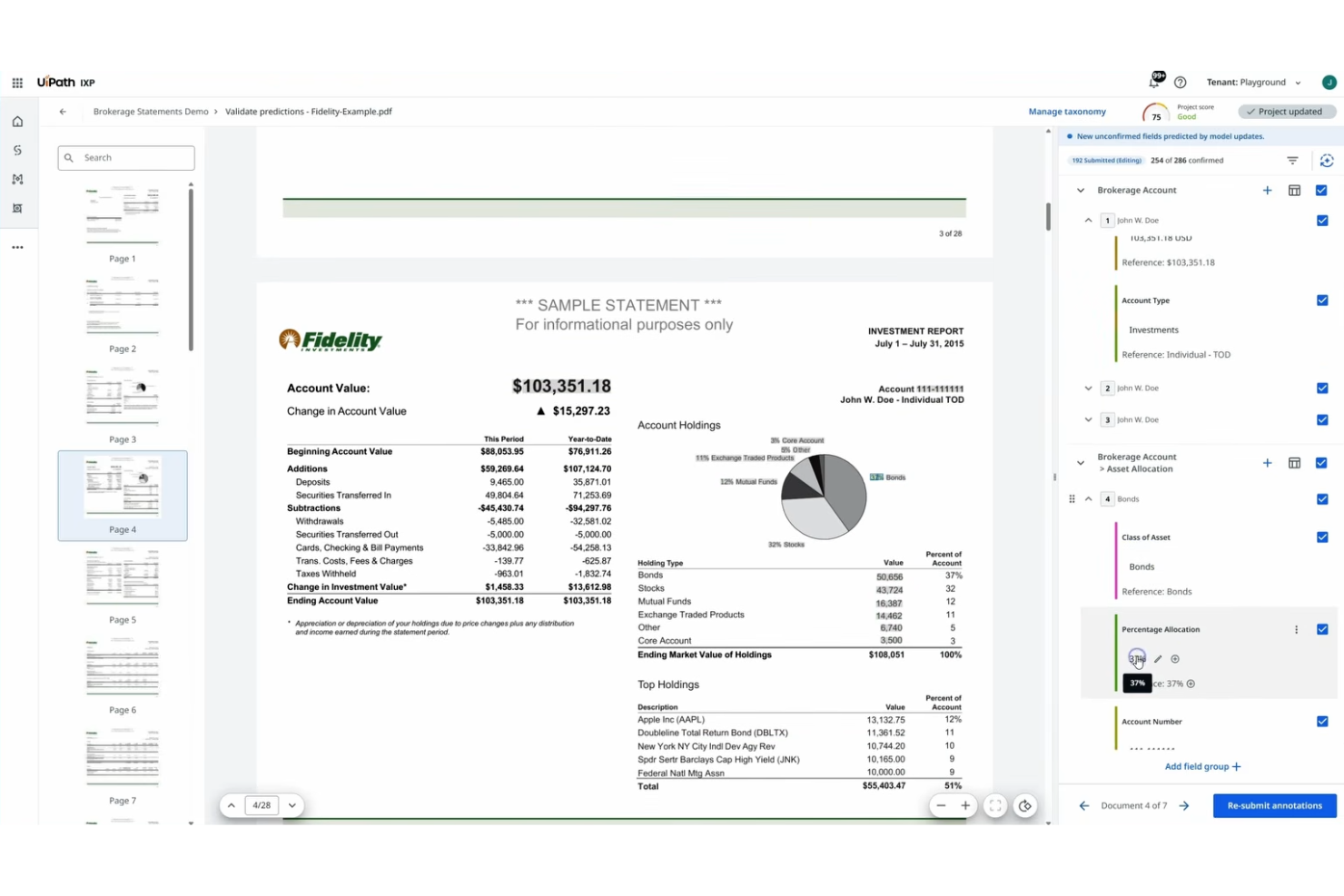
If your team needs to automate repetitive digital tasks across multiple systems, UiPath delivers a specialized platform for robotic process automation (RPA). It’s especially useful for operations, finance, and IT teams in large organizations that want to reduce manual work and improve process consistency. Unlike Moxo, UiPath focuses on building, deploying, and managing software robots that handle high-volume, rules-based workflows without human intervention.
Why UiPath Is a Good Moxo Alternative
For teams focused on automating repetitive, rules-based tasks, UiPath stands out as a strong alternative to Moxo. I picked UiPath because it offers a robust robotic process automation engine that lets you build, deploy, and manage software robots across desktop and web applications. Its drag-and-drop workflow designer and built-in recorder make it possible to automate complex processes without writing code. If your organization needs to eliminate manual data entry or streamline multi-step digital workflows, UiPath’s RPA capabilities go far beyond what Moxo provides.
UiPath Key Features
Some other features that make UiPath appealing include:
- AI Computer Vision: Automate tasks on virtual desktops and remote environments using advanced screen recognition.
- Orchestrator Dashboard: Monitor, schedule, and manage robots and processes from a centralized web interface.
- Marketplace for Prebuilt Components: Access reusable automation components and templates from the UiPath Marketplace.
- Role-Based Access Control: Set granular permissions for users and teams to manage automation securely.
UiPath Integrations
Integrations include SAP, Salesforce, ServiceNow, Microsoft 365, and Oracle.
Pros and Cons
Pros:
- Massive bot library
- High task accuracy
- Powerful AI features
Cons:
- Not for collaboration
- Lacks document sharing

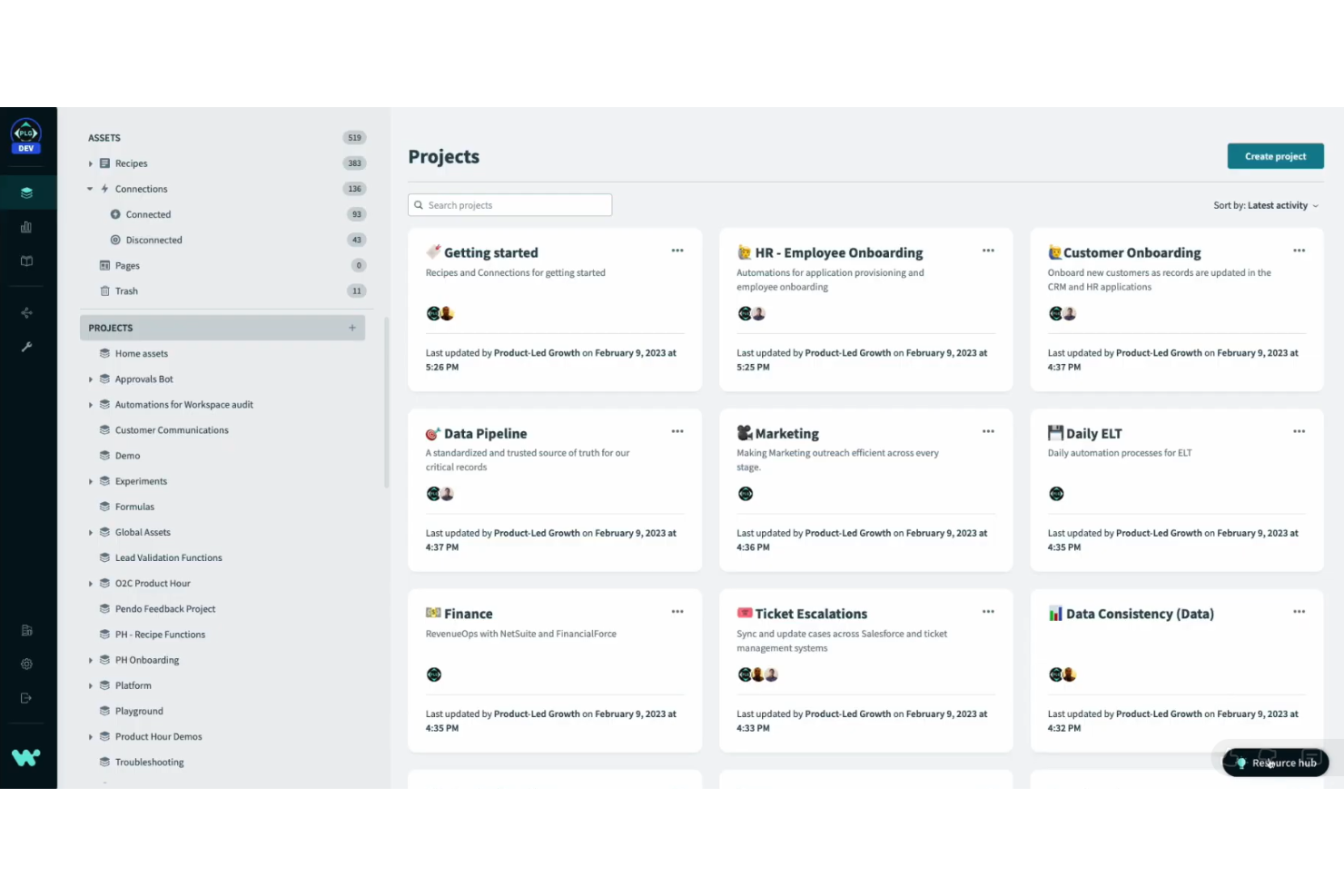
Workato is designed for teams that want to automate workflows quickly using pre-built integration recipes. It’s especially useful for IT, operations, and business teams that need to connect cloud apps and automate multi-step processes without heavy coding. Unlike Moxo, Workato offers a large library of ready-made recipes, making it easier to deploy complex automations across your tech stack.
Why Workato Is a Good Moxo Alternative
If you’re looking for a Moxo alternative that prioritizes speed and simplicity in automation, Workato stands out for its pre-built integration recipes. I picked Workato because its recipe library lets you automate common business processes without starting from scratch. You can customize these recipes to fit your workflows, and the platform supports multi-step automations that span multiple apps. For teams that want to accelerate automation projects, Workato’s ready-made recipes offer a clear advantage over building everything manually.
Workato Key Features
In addition to its recipe-driven automation, I also found these features worth noting:
- AI-Powered Data Mapping: Automatically map data fields between different apps using built-in AI suggestions.
- Role-Based Access Controls: Set granular permissions for users and teams to manage who can build, deploy, or monitor automations.
- On-Premise Agent: Connect cloud workflows to on-premise databases and applications securely through a dedicated agent.
- Real-Time Monitoring Dashboard: Track automation runs, errors, and performance metrics in a centralized dashboard.
Workato Integrations
Integrations include Salesforce, NetSuite, ServiceNow, Slack, and Snowflake.
Pros and Cons
Pros:
- Enterprise-grade scale
- Real-time data syncing
- No-code recipe builder
Cons:
- Lacks secure messaging
- Complex data mapping

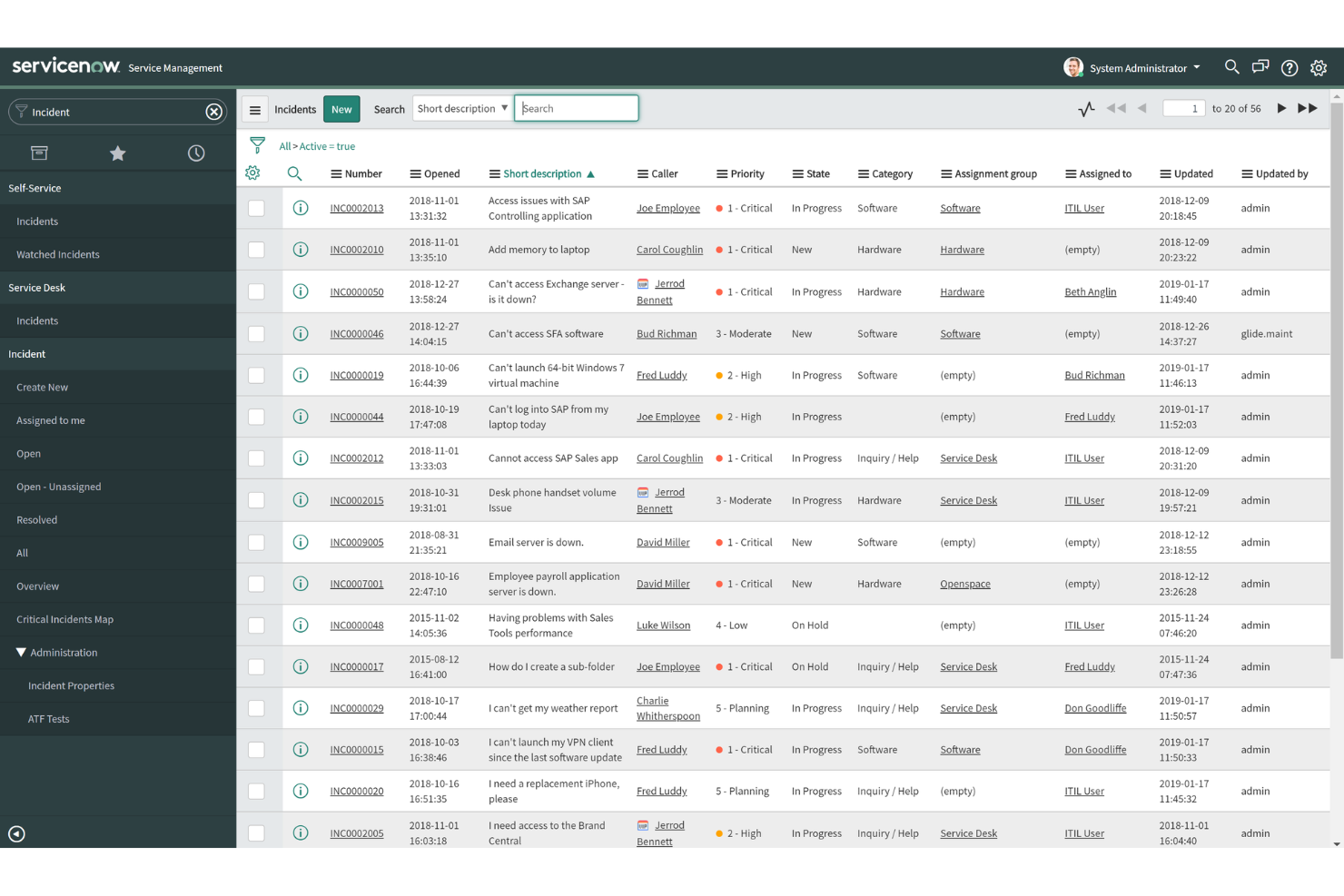
For teams that need to orchestrate complex IT service processes, ServiceNow offers a unified platform built for enterprise-scale operations. It’s especially useful for IT departments, managed service providers, and organizations with strict process and compliance needs. ServiceNow stands apart from Moxo by providing advanced automation, incident management, and workflow tools tailored for IT service delivery.
Why ServiceNow Is a Good Moxo Alternative
ServiceNow is a strong choice if you need to orchestrate IT service processes at scale, which is something Moxo doesn’t specialize in. I picked ServiceNow because it offers incident management, automated ticket routing, and configurable workflows designed specifically for IT operations. Its platform supports detailed process mapping and compliance tracking, making it a fit for organizations with complex IT requirements. If your team needs more than just client collaboration and wants deep IT service management, ServiceNow delivers the structure and automation you’re looking for.
ServiceNow Key Features
Some other features that set ServiceNow apart include:
- Knowledge Management: Create, organize, and share IT documentation and solutions in a centralized repository.
- Change Management: Track, approve, and implement IT changes with built-in risk assessment tools.
- Asset Management: Monitor and manage IT assets throughout their lifecycle from procurement to retirement.
- Virtual Agent: Deploy AI-powered chatbots to handle routine IT service requests and user inquiries.
ServiceNow Integrations
Integrations include Jira, Splunk, Microsoft Teams, Slack, and Workday.
Pros and Cons
Pros:
- Custom portal builder
- Strong SLA tracking
- Massive ecosystem
Cons:
- Slow to configure
- Mainly for internal IT


Appian is designed for teams that need to build and deploy business applications quickly, without heavy coding. It’s a strong fit for IT leaders, process owners, and digital transformation teams who want to automate workflows and unify data from multiple systems. Appian’s rapid application development tools help organizations deliver custom solutions faster than what’s possible with Moxo or other workflow-focused platforms.
Why Appian Is a Good Moxo Alternative
For teams that need to move fast, Appian offers rapid application development capabilities that go beyond what Moxo provides. I picked Appian because its low-code platform lets you design, build, and launch custom business apps in days instead of months. The drag-and-drop process modeler and reusable components help you automate workflows and adapt to changing requirements quickly. If you’re looking for a Moxo alternative that prioritizes speed and flexibility in application delivery, Appian is a strong choice.
Appian Key Features
Some other features that set Appian apart include:
- Robotic Process Automation (RPA): Automate repetitive tasks by integrating bots directly into workflows.
- Data Fabric: Connect and unify data from multiple sources without data migration.
- Mobile App Builder: Create and deploy mobile-ready applications from the same platform.
- Integrated Document Management: Store, manage, and collaborate on documents within your workflows.
Appian Integrations
AppianIntegrations include Salesforce, SAP, AWS, Blue Prism, and Microsoft SharePoint.
Pros and Cons
Pros:
- Visual process models
- Secure cloud hosting
- Mobile ready apps
Cons:
- Not a turnkey portal
- Complex for basic chat


Nintex is designed for teams that need to automate document-heavy processes across departments like HR, finance, and legal. It appeals to organizations that want to digitize approvals, signatures, and document generation without heavy IT involvement. Unlike Moxo, Nintex specializes in automating workflows that revolve around document creation, routing, and compliance.
Why Nintex Is a Good Moxo Alternative
For teams that need to automate document-driven workflows, Nintex offers a focused approach that sets it apart from Moxo. I picked Nintex because it lets you build automated processes for document generation, routing, and approval without coding. Its drag-and-drop workflow designer and built-in e-signature capabilities help teams manage contracts, forms, and compliance documents from start to finish. If your processes revolve around documents, Nintex brings automation and control that Moxo doesn’t provide.
Nintex Key Features
Some other features that make Nintex appealing include:
- Process Mapping: Visualize and document business processes to identify improvement opportunities.
- Robotic Process Automation (RPA): Automate repetitive, rules-based tasks across multiple systems.
- Mobile App Support: Access and manage workflows from mobile devices for on-the-go approvals.
- Analytics Dashboard: Monitor workflow performance and process metrics with built-in reporting tools.
Nintex Integrations
Integrations include Microsoft 365, SharePoint, Salesforce, Azure, DocuSign, Adobe Sign, Box, Dropbox, SAP, and Oracle.
Pros and Cons
Pros:
- No-code automation
- E-signature options
- Visual workflow logic
Cons:
- Less client focused
- UI feels outdated

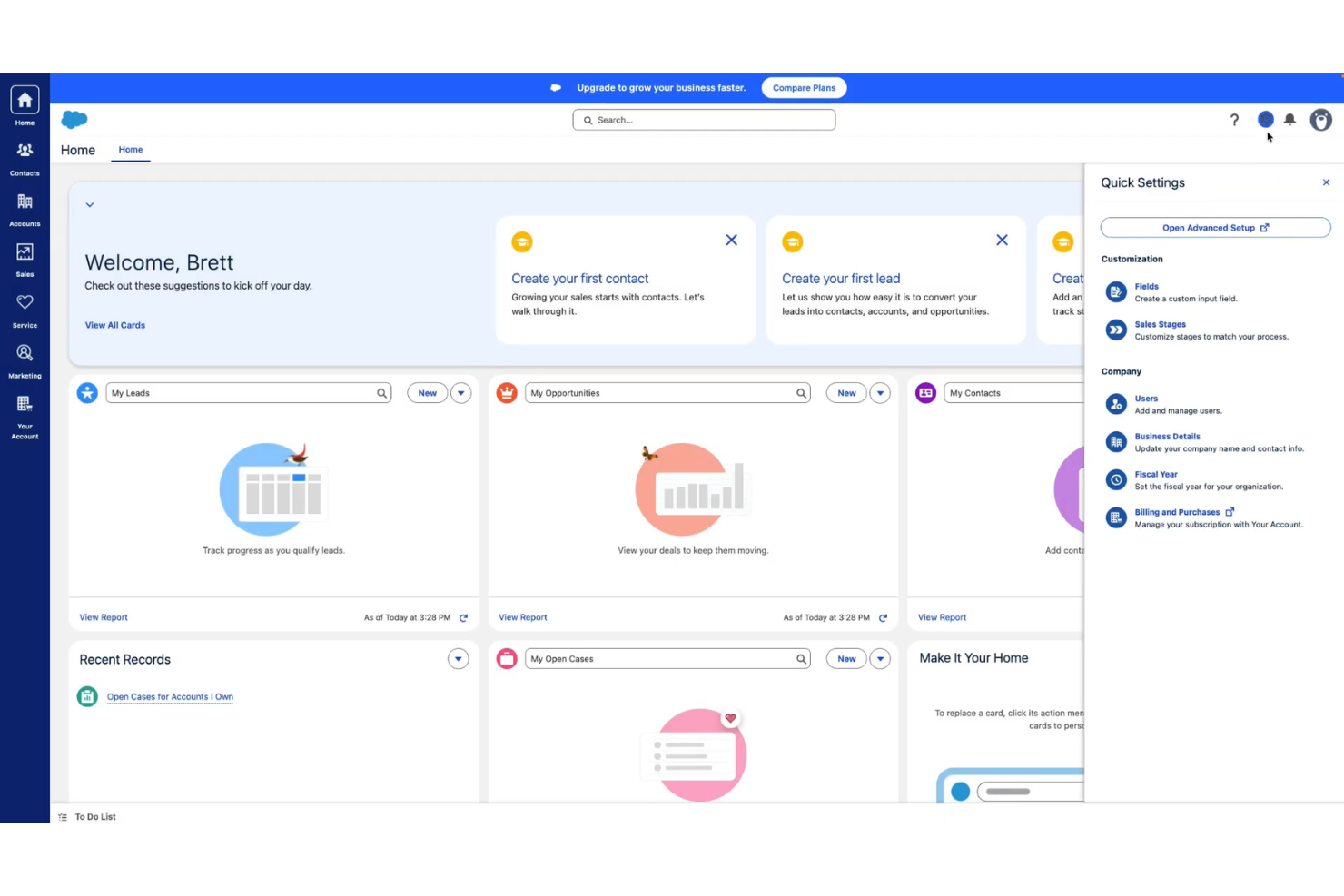
Salesforce is built for teams that want to connect client collaboration directly with CRM workflows. It’s a strong fit for sales, support, and account management teams that need to manage customer data, automate follow-ups, and track every client interaction in one place. Unlike Moxo, Salesforce brings advanced CRM process integration and automation to every stage of the customer journey.
Why Salesforce Is a Good Moxo Alternative
If you’re looking for a Moxo alternative that tightly connects client collaboration with CRM process integration, Salesforce is worth considering. I picked Salesforce because it lets you automate sales workflows, manage leads, and track every customer interaction directly within the platform. Its customizable dashboards and reporting tools help teams visualize pipeline progress and client engagement in real time. For organizations that want to unify communication and CRM data, Salesforce offers a level of process integration that Moxo doesn’t match.
Salesforce Key Features
Some other features that make Salesforce stand out include:
- Case Management: Organize, assign, and resolve customer service requests within a unified workspace.
- Custom App Builder: Design and deploy custom business apps using drag-and-drop tools.
- Chatter Collaboration: Enable real-time team discussions and file sharing directly within the platform.
- Workflow Rules: Set up automated triggers for tasks, notifications, and approvals based on specific criteria.
Salesforce Integrations
Integrations include Slack, Outlook, Gmail, QuickBooks, DocuSign, Mailchimp, HubSpot, Jira, Dropbox, and LinkedIn.
Pros and Cons
Pros:
- Deep analytics tools
- Automated follow-ups
- Huge app ecosystem
Cons:
- Feature bloat issues
- Not an instant chat

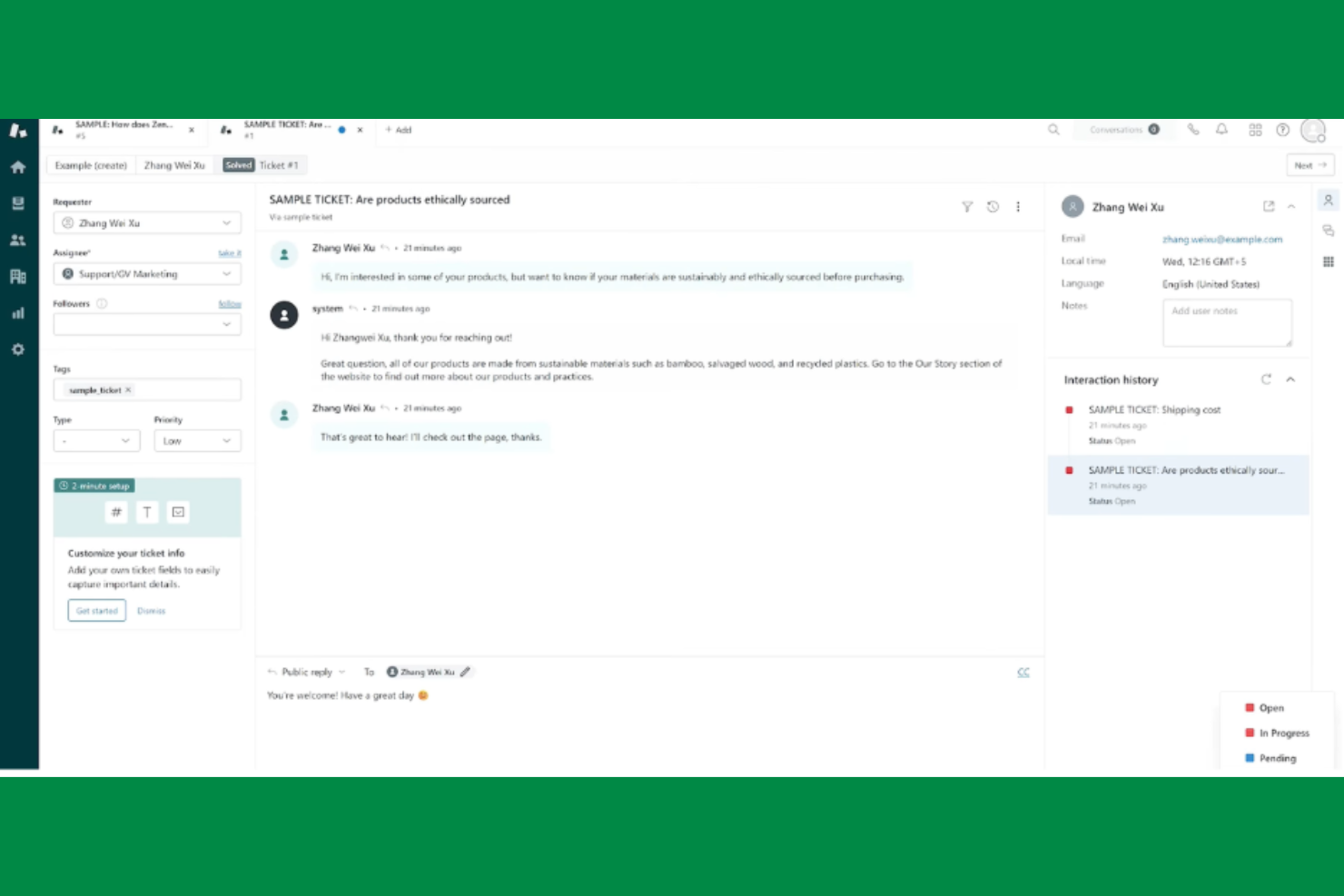
If your team needs to manage complex customer support workflows, Zendesk offers a platform built specifically for that purpose. It’s a strong fit for support teams in SaaS, ecommerce, and service-based businesses that need to handle high ticket volumes and multichannel communication. Unlike Moxo, Zendesk provides advanced ticket routing, automation, and reporting tools tailored for customer support operations.
Why Zendesk Is a Good Moxo Alternative
When your priority is managing customer support workflows, Zendesk brings a level of specialization that Moxo doesn’t match. I picked Zendesk because it offers advanced ticket management, automated workflow triggers, and customizable SLAs that help support teams stay organized and responsive. Its omnichannel support lets you handle requests from email, chat, social, and phone in one place. For teams focused on customer service operations, Zendesk’s workflow management features are purpose-built for high-volume, multichannel environments.
Zendesk Key Features
Some other features that make Zendesk a strong option include:
- Customizable Help Center: Build a branded self-service portal for customers to find answers and submit requests.
- Macros: Create reusable response templates to speed up agent replies.
- Customer Satisfaction Surveys: Collect feedback directly after ticket resolution to monitor service quality.
- Role-Based Permissions: Control access to sensitive data and workflows by user role.
Zendesk Integrations
Integrations include Salesforce, Slack, Jira, Shopify, and Mailchimp.
Pros and Cons
Pros:
- Fast time to value
- Easy client access Fast time to value
- Great knowledge bases
Cons:
- Costly add-on pricing
- Geared to support only

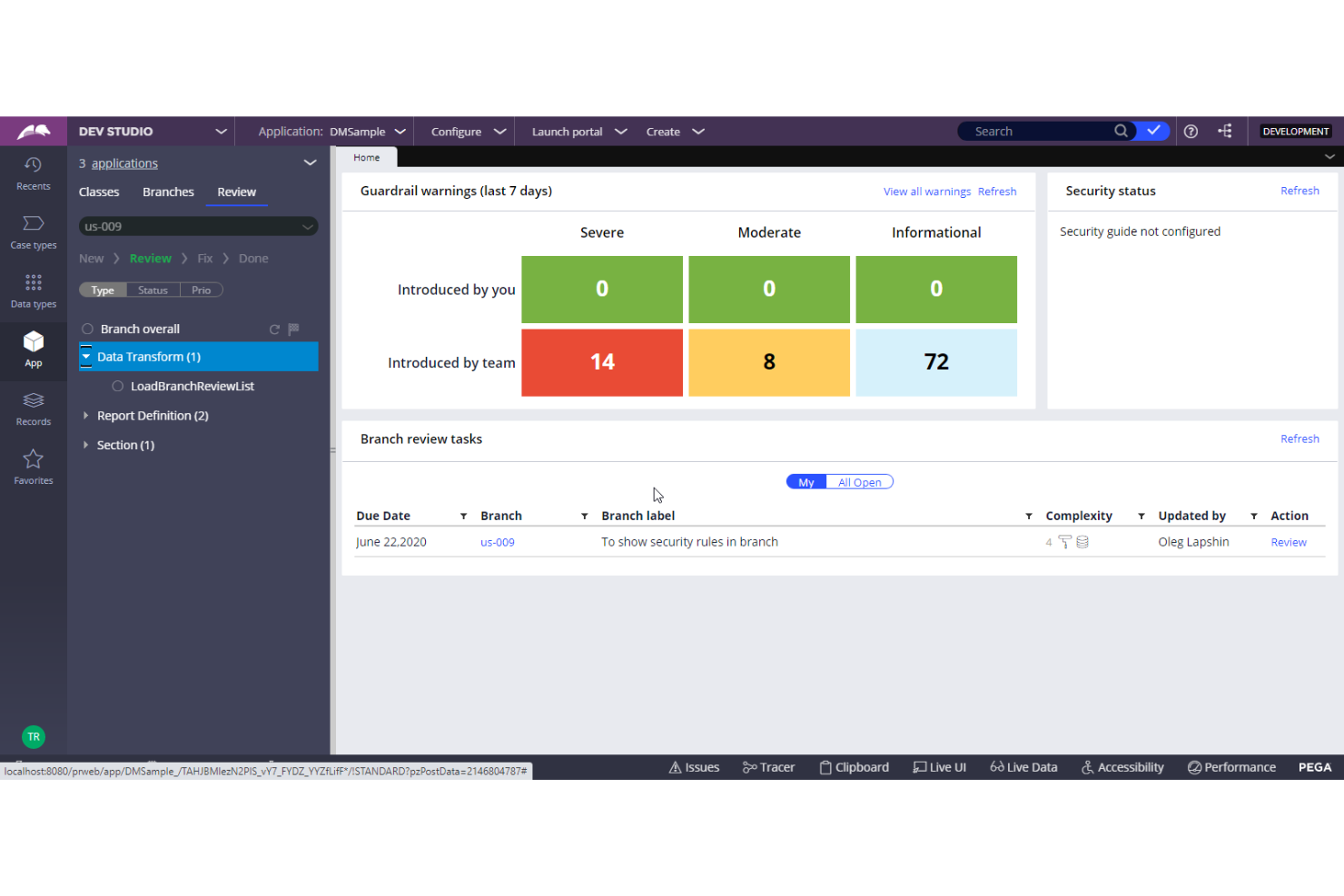
For teams seeking a low-code approach to process design, Pega offers a flexible platform that stands out from Moxo’s workflow tools. It’s built for business analysts, IT leaders, and operations teams who want to automate and orchestrate complex processes without heavy coding. Pega’s visual modeling and AI-driven decisioning help organizations adapt quickly to changing requirements and scale process automation across departments.
Why Pega Is a Good Moxo Alternative
Unlike Moxo, Pega is built for teams that want to design and automate business processes using a low-code platform. I picked Pega because its visual process modeling lets you map out workflows without deep technical skills, making it accessible to business users and IT alike. The platform’s AI-powered decisioning and case management features help you automate complex, multi-step processes that often require manual intervention in other tools. For organizations prioritizing low-code process design, Pega offers a flexible and scalable alternative to Moxo’s workflow management approach.
Pega Key Features
Some other features that make Pega a strong option include:
- Workflow Automation Designer: Build and modify process flows visually with drag-and-drop tools.
- Omnichannel Case Management: Manage cases and interactions across web, mobile, and chat channels.
- Business Rules Engine: Configure and update business logic without code changes.
- Real-Time Analytics Dashboard: Monitor process performance and key metrics as work progresses.
Pega Integrations
Integrations include Salesforce, SAP, AWS, DocuSign, and Cisco Webex.
Pros and Cons
Pros:
- Highly customizable
- Omnichannel support
- AI decisioning tools
Cons:
- Overkill for SMBs
- Long deployment times

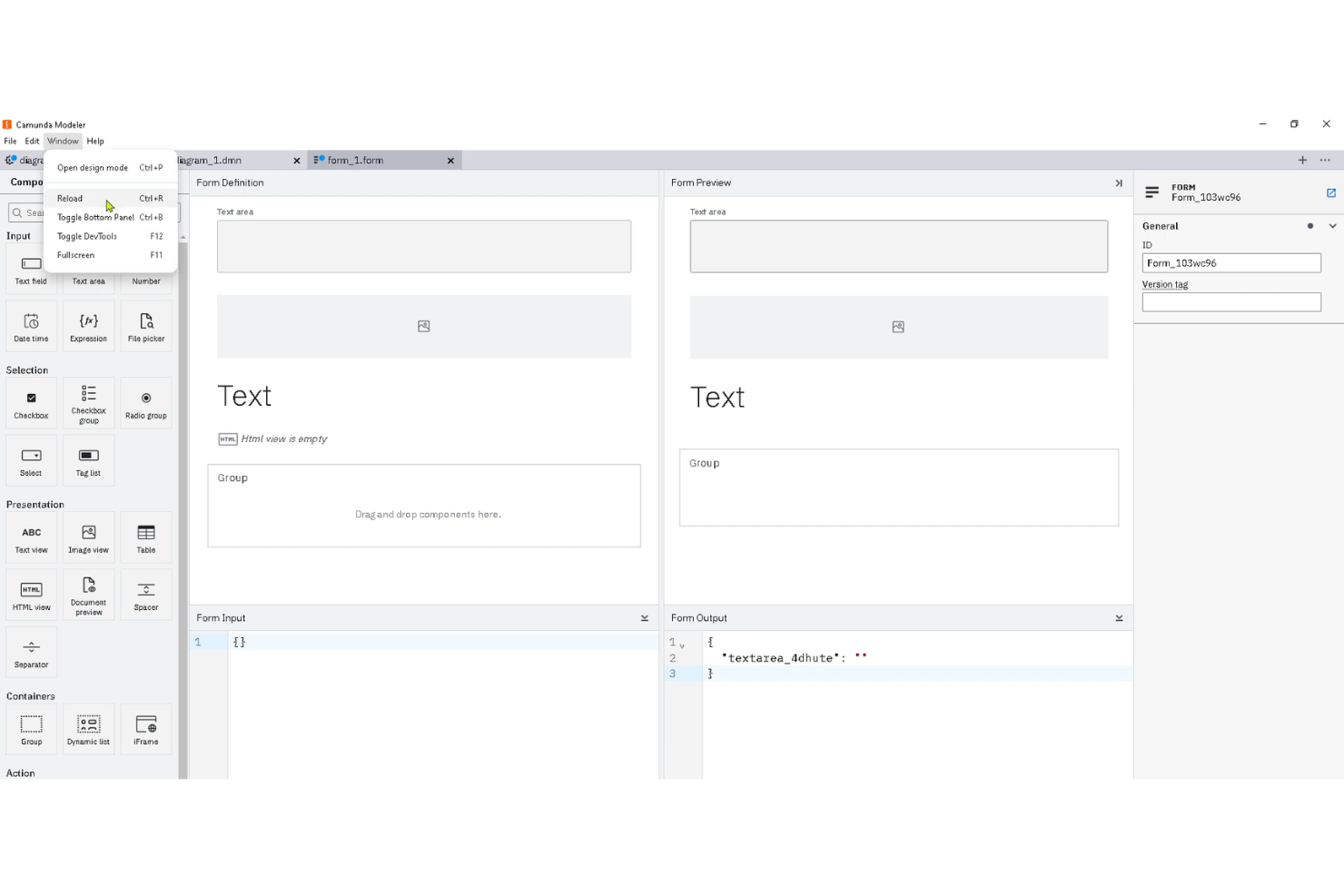
Camunda is a process orchestration platform built for teams that need deep customization and control over their workflows. It’s a strong fit for organizations with complex, multi-step processes or those in regulated industries that require precise automation logic. Camunda stands out from Moxo by offering advanced BPMN modeling and open architecture, giving technical teams more flexibility to design, automate, and monitor business processes end-to-end.
Why Camunda Is a Good Moxo Alternative
What sets Camunda apart as a Moxo alternative is its focus on customizable workflow automation. I picked Camunda for teams that need to design and automate highly specific business processes using BPMN modeling and decision tables. Its open architecture lets you tailor process logic and connect with existing systems, which is ideal for organizations with unique or regulated workflows. If you need granular control over automation, Camunda offers flexibility that goes beyond what Moxo provides.
Camunda Key Features
Some other features in Camunda that may interest teams looking for Moxo alternatives include:
- Process Versioning: Manage multiple versions of workflows to support iterative improvements and compliance requirements.
- Task List Application: Assign, track, and manage user tasks directly within a dedicated interface for human-in-the-loop processes.
- Process Analytics: Visualize process performance and bottlenecks with built-in dashboards and reporting tools.
- REST API Access: Integrate Camunda with external systems and trigger workflows programmatically using its robust REST API.
Camunda Integrations
Integrations include Spring Boot, Kafka, Elasticsearch, Slack, and Microsoft Teams.
Pros and Cons
Pros:
- Developer friendly
- Highly scalable engine
- Open-source options
Cons:
- Not a client workspace
- Hard for external users


For teams that need advanced process automation and case management, Flowable offers a flexible platform built around BPMN, CMMN, and DMN standards. It’s a strong fit for enterprises and regulated industries that require complex, rules-driven workflows and dynamic case handling. Unlike Moxo, Flowable gives you granular control over process modeling and decision logic, making it ideal for organizations with sophisticated automation needs.
Why Flowable Is a Good Moxo Alternative
When you need advanced BPMN and case management capabilities, Flowable offers a level of process modeling detail that Moxo doesn’t match. I picked Flowable because it supports BPMN for process automation, CMMN for case management, and DMN for decision modeling—all in one platform. You can design dynamic, rules-driven workflows that adapt to changing business scenarios and regulatory requirements. For organizations with complex, evolving processes, Flowable’s standards-based approach gives you the flexibility and control that simpler platforms can’t provide.
Flowable Key Features
Some other features that set Flowable apart include:
- REST API Support: Integrate Flowable with external systems and applications using its extensive REST API.
- Form Designer: Build custom forms for user tasks and data collection directly within the platform.
- Versioned Process Deployment: Manage and deploy multiple versions of processes to support iterative improvements and testing.
- User and Group Management: Assign roles, permissions, and responsibilities to users and groups for granular access control.
Flowable Integrations
Integrations include Spring Boot, Kafka, Elasticsearch, Microsoft Teams, and WhatsApp.
Pros and Cons
Pros:
- Good access controls
- Handles dynamic tasks
- Flexible architecture
Cons:
- No video conferencing
- Heavy IT setup needed
Other Moxo alternatives
Here are some additional Moxo alternatives options that didn’t make it onto my shortlist, but are still worth checking out:
- Virtuoso QA
For automated process testing
- Enate
For hybrid human and digital workflows


Moxo Alternatives Selection Criteria
When selecting the best Moxo alternatives to include in this list, I considered common buyer needs and pain points related to Moxo alternatives products, like managing secure client communications and automating workflow steps. I also used the following framework to keep my evaluation structured and fair:
Core Functionality (25% of total score)
To be considered for inclusion in this list, each solution had to fulfill these common use cases:
- Manage client communications in one place
- Assign and track tasks across teams
- Automate routine workflow steps
- Share and store documents securely
- Support multi-channel messaging
Additional Standout Features (25% of total score)
To help further narrow down the competition, I also looked for unique features, such as:
- Built-in e-signature collection
- White-label client portals
- Advanced workflow automation builders
- Real-time co-browsing or screen sharing
- Customizable approval processes
Usability (10% of total score)
To get a sense of the usability of each system, I considered the following:
- Simple and intuitive navigation
- Clean and modern interface design
- Minimal clicks to complete core actions
- Responsive design for mobile and desktop
- Clear labeling and helpful tooltips
Onboarding (10% of total score)
To evaluate the onboarding experience for each platform, I considered the following:
- Availability of step-by-step product tours
- Access to training videos and documentation
- Pre-built templates for common workflows
- In-app chatbots or guided setup
- Live or recorded onboarding webinars
Customer Support (10% of total score)
To assess each software provider’s customer support services, I considered the following:
- 24/7 live chat or phone support
- Fast response times to inquiries
- Access to a searchable help center
- Availability of dedicated account managers
- Community forums for peer support
Value For Money (10% of total score)
To evaluate the value for money of each platform, I considered the following:
- Transparent and predictable pricing
- Flexible plans for different team sizes
- No hidden fees or surprise charges
- Features included at each pricing tier
- Free trial or demo availability
Customer Reviews (10% of total score)
To get a sense of overall customer satisfaction, I considered the following when reading customer reviews:
- Positive feedback on reliability and uptime
- Reports of responsive customer support
- Comments on ease of adoption and training
- User satisfaction with feature set
- Constructive criticism and vendor responsiveness
Why Look for a Moxo Alternative?
While Moxo is a good choice of Moxo alternatives, there are a number of reasons why some users seek out alternative solutions. You might be looking for a Moxo alternative because…
- You need more advanced workflow automation
- Your team requires deeper integration options
- You want a more customizable client portal
- You need better support for large-scale deployments
- Your business operates in regions where Moxo is unavailable
If any of these sound like you, you’ve come to the right place. My list contains several Moxo alternatives options that are better suited for teams facing these challenges with Moxo and looking for alternative solutions.
Features
Here are some of the key features of Moxo, to help you contrast and compare what alternative solutions offer:
- Secure client communication channels
- Branded client portals
- Task assignment and tracking
- Document sharing and e-signature collection
- Workflow automation tools
- Real-time messaging and notifications
- Multi-party approvals and sign-offs
- Activity audit trails
- Mobile app for on-the-go access
- Customizable onboarding experiences