

10 Best Financial Project Management Software For 2026

Best Financial Project Management Software Tools Shortlist


Managing digital projects without real-time cost visibility leads directly to budget overruns and squeezed margins. Financial project management software solves this by pairing standard task tracking with live budget monitoring, expense logs, and profit forecasting so you always know your exact revenue standing.
I tested dozens of platforms to find the tools that handle billing rates, time tracking, and financial reporting alongside daily team workflows. Read through my top picks for 2026 to find the right platform for your team and keep your projects profitable.
Why Trust Our Software Recommendations
Our team has been testing and reviewing software since 2012. As project managers ourselves, we know how difficult—and important—it is to choose the right software.
For this guide, we evaluated tools using hands-on testing and independent research, scoring tools using our selection criteria. We also draw on insights from industry thought leaders and practicing project management experts.
Our reviews reflect our human editorial judgment, not a sales pitch.
Expert reviewers:
Financial Project Management Software Comparison Table
This comparison table summarizes pricing details for my top financial project management software selections:
| Tool | Best For | Trial Info | Price | ||
|---|---|---|---|---|---|
| 1 | Best for professional services firms | 14-day free trial | From $17/user/month | Website | |
| 2 | Best for agency project profitability tracking | 14-day free trial | From $10/user/month | Website | |
| 3 | Best for tracking budgets | Free plan available; 14-day free trial | From $10/user/month (billed annually) | Website | |
| 4 | Best for integrated portfolio tracking | 14-day free trial + free demo available | From $10/user/month (billed annually) | Website | |
| 5 | Best for real-time budget tracking | Free demo available | Pricing upon request | Website | |
| 6 | Best for financial oversight with time tracking | Free plan available; 15-day free trial | From $5/user/month | Website | |
| 7 | Best for managing complex billing schedules | Free trial available | From $16/user/month (billed annually) | Website | |
| 8 | Best with native Office and Teams integration | 30-day free trial | From $10/user/month (billed annually) | Website | |
| 9 | Best for accounting practice management | 14-day free trial | From $19/month (billed annually) | Website | |
| 10 | Best for onboarding project tracking | 14-day free trial + free demo available | From $19/user/month (billed annually) | Website |


Best Financial Project Management Software Reviews
Below are my detailed summaries of the best financial project management software that made it onto my shortlist. My reviews offer a detailed look at the key features, pros & cons, integrations, and ideal use cases of each tool to help you find the best one for you.

Scoro
Best for professional services firms
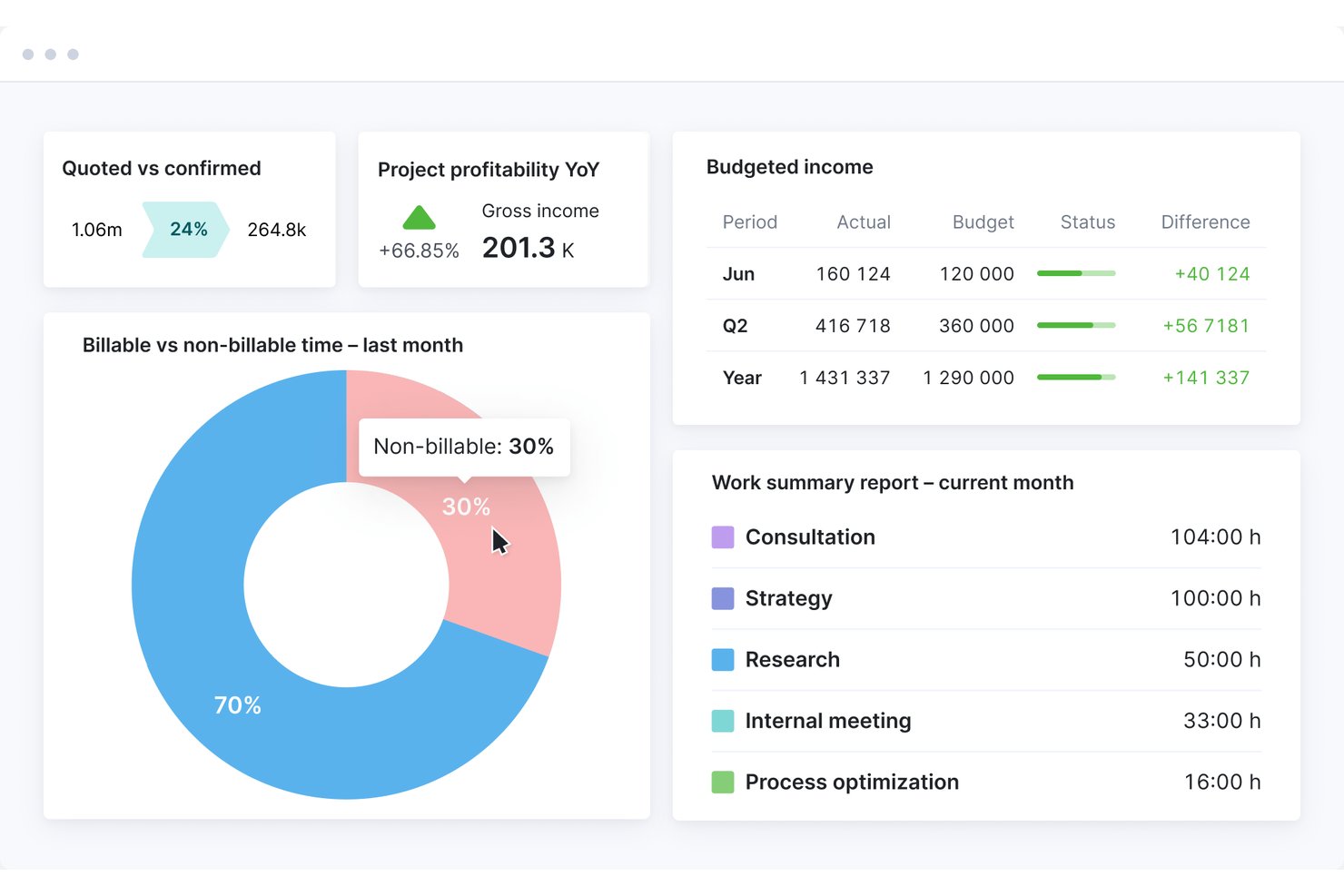
Scoro is a professional services automation platform that combines project budgeting, cost tracking, time and billing management, revenue forecasting, and profitability reporting in a single end-to-end system.
Who Is Scoro Best For?
Scoro fits agencies, consultancies, and other project-based service firms with 10–500 staff who need tight control over project finances and client billing.
Why I Picked Scoro
Scoro earns its spot on my shortlist because of how tightly it connects quoting to project financials. I love that I can build a quote using the estimation matrix, breaking deliverables down by role and effort, and that same data flows directly into budget tracking and profitability reporting. The Project Revenue Models (Fixed Fee, T&M Capped, T&M Uncapped) let my team track how revenue should accrue against what's actually been delivered, without manual reconciliation.
Scoro Key Features
- Resource capacity planner: Lets you allocate, view, and adjust team workloads and availability in real time across projects.
- Multi-currency support: Enables handling of international billing, reporting, and client transactions in multiple currencies with accurate conversions.
- Revenue recognition automation: Applies fixed-fee, time and materials, or custom rules to automate project revenue recognition.
- Client portal: Offers clients secure access to review project budgets, approve invoices, and monitor financial status online.
Scoro Integrations
Scoro offers native integrations with QuickBooks, Xero, Sage Intacct, Exact Online, Stripe, Expensify, Envoice, and Finbite, and connects with Zapier. An API is also available for custom integrations.
Pros and Cons
Pros:
- Quotes feed directly into project budgets
- Native billing models for T&M and fixed-fee
- Tracks project profitability in real time
Cons:
- Reporting dashboards have limited drill-down options
- Steeper setup for complex org structures
New Product Updates from Scoro

Scoro Adds Time Mobile App and ELI Improvements
Scoro adds the Scoro Time mobile app for iOS/Android to track time anywhere and expands ELI with attachments, smarter filtering, and trigger-based actions. For more information, visit Scoro's official site.

Best for agency project profitability tracking
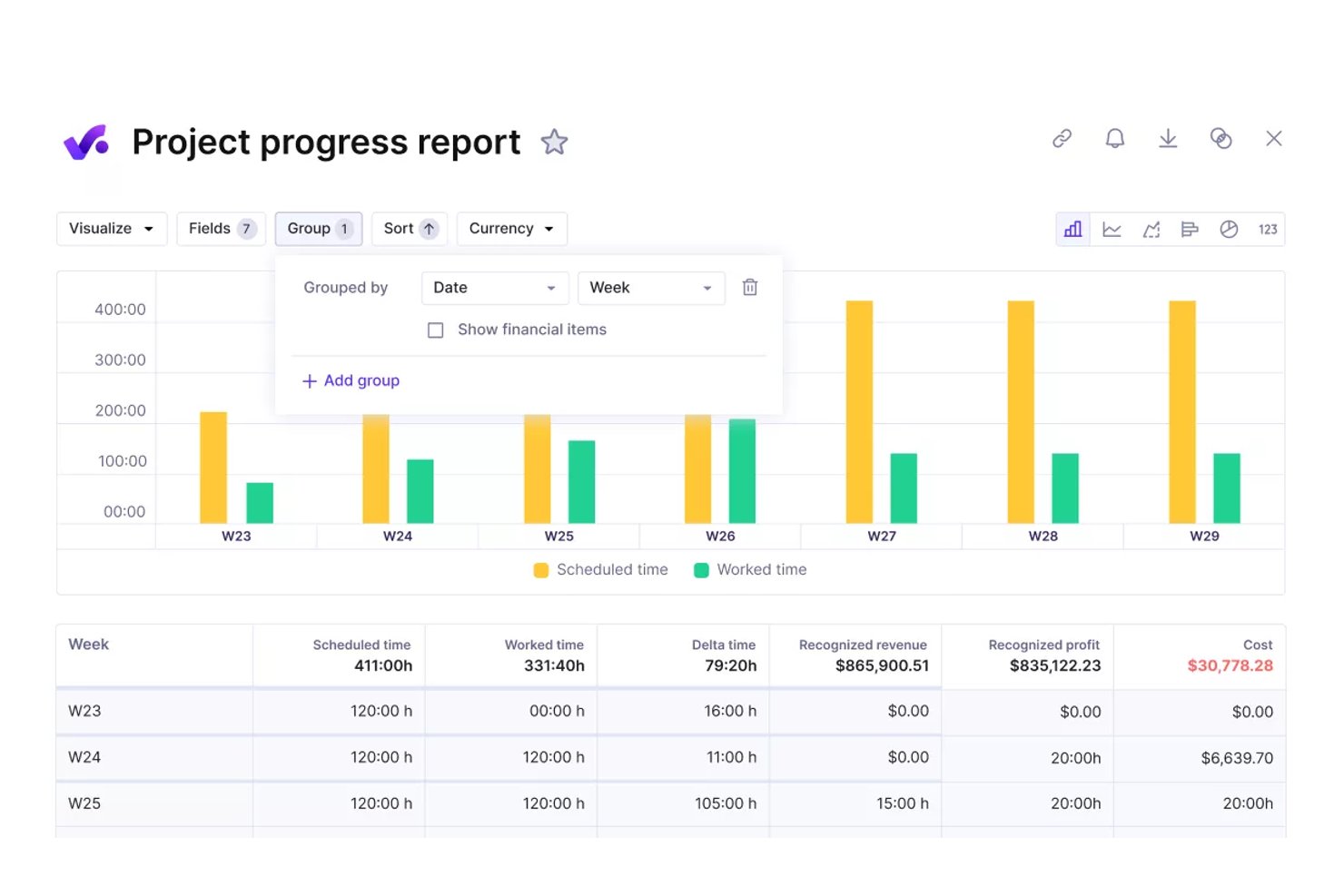
Productive is an agency management platform that combines project budgeting, real-time profitability tracking, time and billing management, resource planning, and financial reporting in a single system built for agencies and professional services teams.
Who Is Productive Best For?
Productive fits growing agencies and consultancies — typically 20 or more people — that need to move beyond spreadsheets and manage project finances alongside operations in one place.
Why I Picked Productive
Productive earns its spot as one of the best on my shortlist because it connects salary-based cost rates and overhead allocation directly to every project budget. Every hour logged instantly updates the project's profitability margin, so I can see which engagements are actually making money without manual reconciliation. The overhead spreading feature distributes facility costs and non-billable time across active budgets automatically, which is something most agency tools simply skip.
Productive Key Features
- Scenario builder: Simulate project outcomes and test financial scenarios before committing resources.
- Retainer management and invoicing: Manage recurring retainers with built-in tools for scheduling and generating invoices.
- Advanced reporting library: Access pre-built and customizable reports focused on financials, utilization, and project performance.
- Native accounting integrations: Sync data bidirectionally with platforms like QuickBooks Online, Xero, and Exact for centralized financials.
Productive Integrations
Productive offers native integrations with QuickBooks Online, Xero, Exact, e-conomic, Fortnox, Twinfield, and Zapier. An API is available for custom integrations.
Pros and Cons
Pros:
- Portfolio-level margin analysis across multiple clients
- Resource utilization linked directly to project financials
- Real-time budget burn tracked per project phase
Cons:
- Less suited for non-agency project structures
- Revenue recognition automation not available natively
New Product Updates from Productive
Productive Adds Voice Dictation, Slack Connector, Proposals, and Overtime
Productive adds voice dictation, a Slack Connector, proposal controls, and overtime tracking. These updates support faster AI interactions, client proposals, and time management. For more information, visit Productive’s official site.

Wrike
Best for tracking budgets
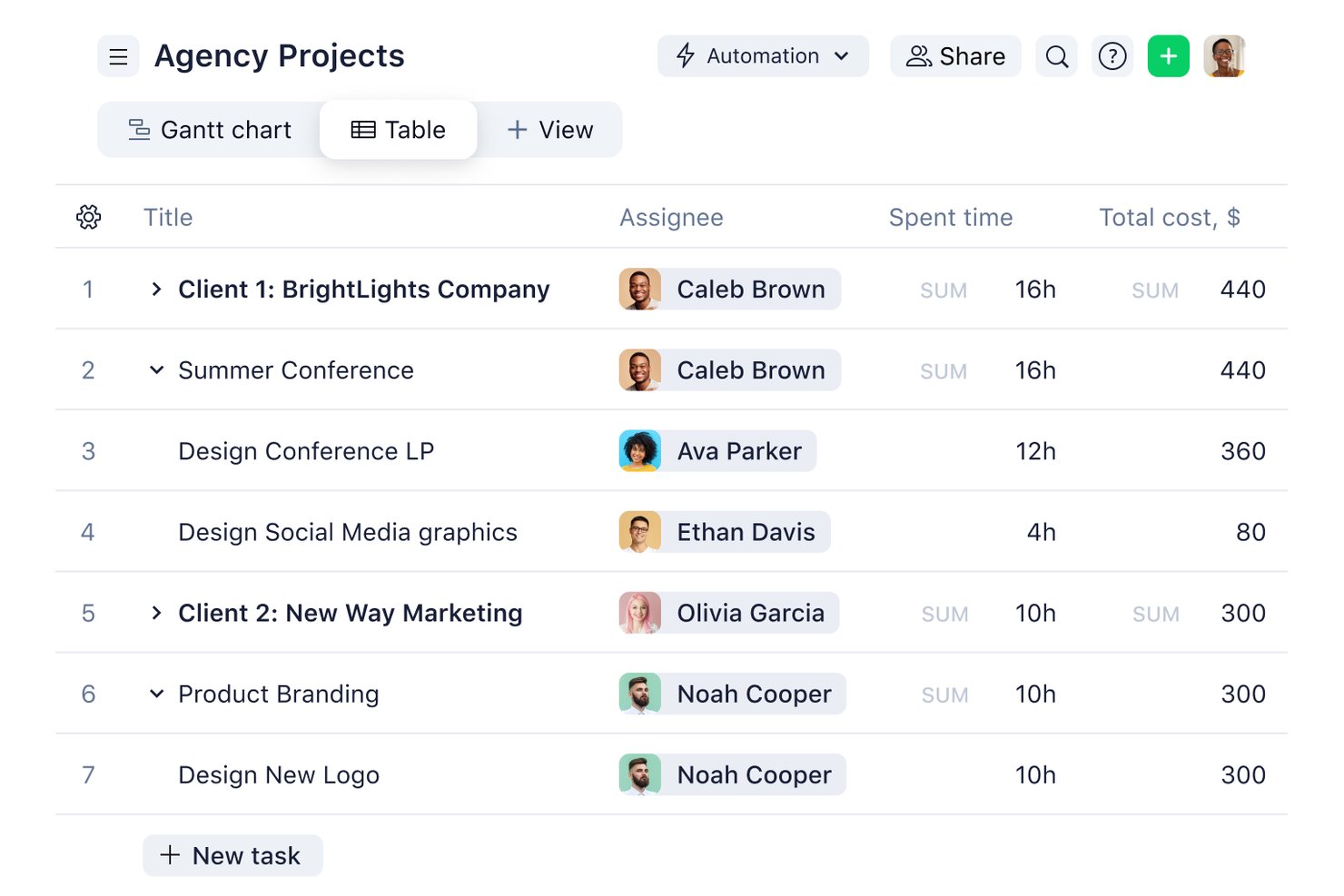
Wrike is a work management platform that combines project planning, task tracking, time logging, and budget monitoring with portfolio-level financial reporting across projects and teams.
Who Is Wrike Best For?
Wrike suits mid-size to enterprise professional services teams that need project management and financial tracking in a single platform.
Why I Picked Wrike
Wrike earns its spot on my shortlist because of how it handles budget tracking at both the project and portfolio level. I set custom hourly rates by job role or individual user, and Wrike automatically calculates planned versus actual fees as work gets logged. What I find especially useful is the real-time financial fields view, which surfaces budget variance across projects without any manual spreadsheet work.
Wrike Key Features
- AI-powered work intelligence: AI Agents identify project risks and generate insights for financial and execution planning.
- Customizable dashboards: Create role-based views for financial data, project statuses, and portfolio analytics.
- Resource capacity planning: Visualize and allocate team resources to optimize workload and margin performance.
- Native accounting integrations: Connect with QuickBooks, NetSuite, and others for two-way financial data sync.
Wrike Integrations
Wrike offers hundreds of integrations through its built-in integrations and marketplace, including tools like Google Workspace, Microsoft 365, Salesforce, and Slack. It also supports Zapier and provides an API for custom integrations.
Pros and Cons
Pros:
- Granular financial reporting at portfolio level
- Custom hourly rates configurable by individual role
- Real-time budget tracking across project portfolios
Cons:
- No native invoicing or client billing generation
- Advanced financial features locked behind higher-tier plans
New Product Updates from Wrike
Wrike Adds Klaxoon MCP Integration
Wrike’s Klaxoon MCP integration is now generally available, enabling AI agents to navigate between Wrike tasks and attached whiteboards, read task context, and manage whiteboard attachments via API. For more information, visit Wrike's official site.

Celoxis
Best for integrated portfolio tracking

Celoxis is a project and portfolio management platform with built-in project accounting, budget tracking, revenue forecasting, multi-currency support, time and expense management, and Earned Value Analysis for projects and portfolios.
Who Is Celoxis Best For?
Celoxis is well-suited for mid-size to enterprise teams managing multiple projects at once, where financial visibility and cross-project reporting play a central role in successful delivery.
Why I Picked Celoxis
I've included Celoxis in my top picks because its portfolio monitoring is genuinely built into the core platform, not bolted on as an afterthought. I can track schedules, budgets, margins, and custom KPIs from a single, drillable portfolio dashboard without exporting data or switching tools. What I find especially useful is the what-if analysis feature, which lets me model different portfolio mixes based on custom metrics and resource capacity before committing to a plan.
Celoxis Key Features
- Earned Value Analysis: Calculates cost performance index (CPI) and schedule performance index (SPI) in real time to measure project health against the baseline.
- Time and expense tracking: Capture billable and non-billable hours with smart timesheets and multi-level approval workflows that flow directly into project costs.
- Revenue forecasting: Estimate expected revenue, costs, and profit margins for both individual projects and the overall portfolio with built-in financial modeling.
- Resource cost tracking: Set cost rates for each resource and monitor actual spend against planned labor costs in all active projects.
Celoxis Integrations
Celoxis offers native integrations with Jira, Salesforce, Trello, Zendesk, Okta, Microsoft Project, Slack, Outlook, Google Drive, and more, with an API available for custom integrations.
Pros and Cons
Pros:
- Portfolio-level budget and risk roll-ups
- Supports hourly and fixed-price billing
- Built-in Earned Value Management for forecasting
Cons:
- Complex project templates are time-consuming to set up
- Mobile access needs improvement

Best for real-time budget tracking
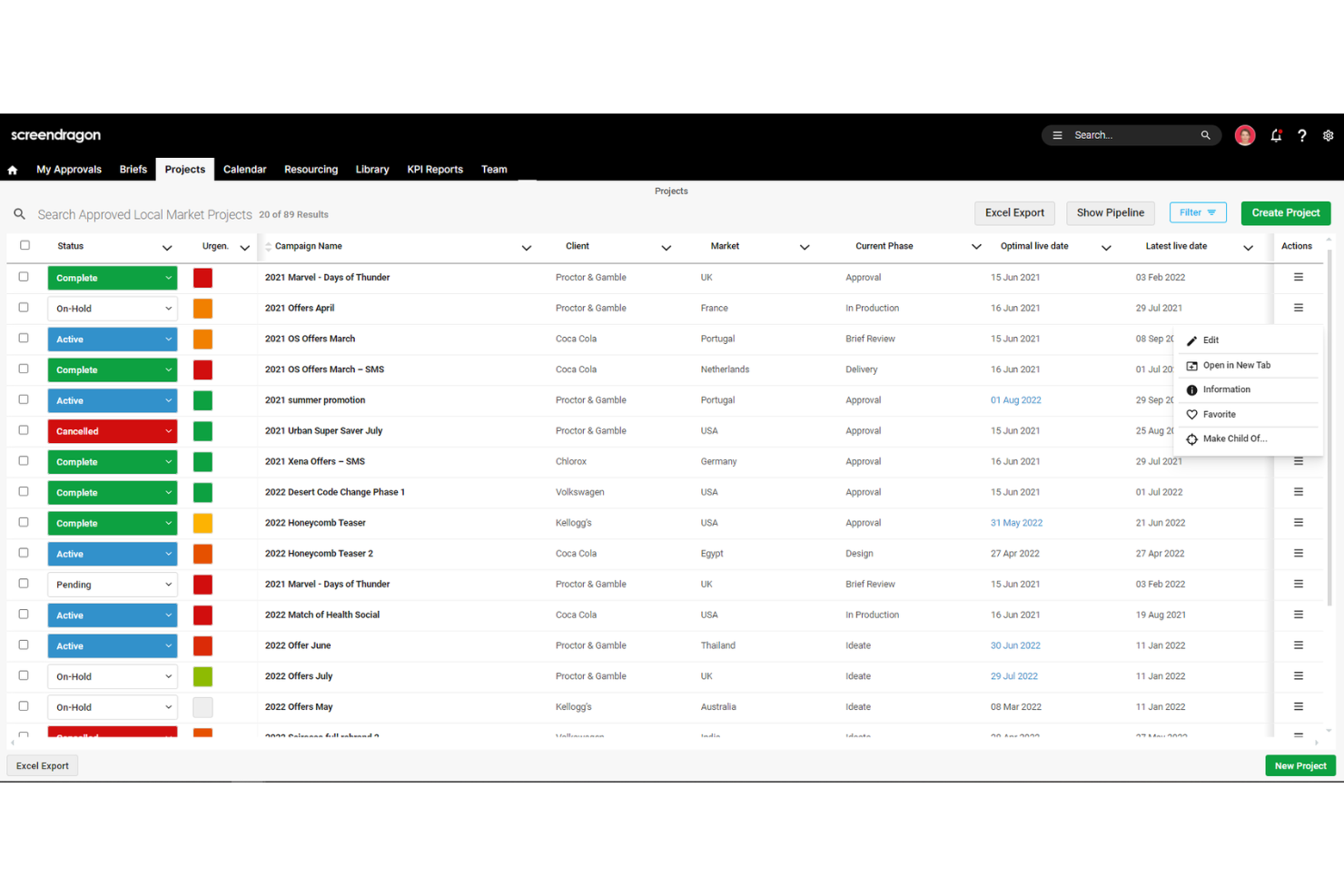
Screendragon is a work management platform designed for marketing, agency, and professional services teams.
Why I Picked Screendragon:
I like its comprehensive budget management capabilities. The platform allows you to compare estimated, budgeted, and actual costs in real-time, giving you a clear picture of your project's financial health. This feature helps identify potential budget overruns early, enabling timely corrective actions to keep your projects on track. Another reason I like Screendragon is its integrated resource management tool. It offers a 360-degree view of resource capacity, helping you see how much new work your team can handle and spot bottlenecks before they become issues.
Standout features & integrations:
Features include configurable workflows that automate task assignments and approvals, reducing manual intervention and speeding up project timelines. Additionally, the platform's online proofing tool allows for real-time collaboration on various media types, simplifying the review process and ensuring timely feedback.
Integrations include MS Power BI, Slack, MS Teams, Zapier, Google Drive, Trello, Microsoft 365, Box, Jira, Microsoft OneDrive, and PeopleSoft.
Pros and Cons
Pros:
- Can tailor the platform to your specific needs
- Good resource planning features
- Integrates various tools like project management and budget tracking
Cons:
- Time-consuming setup
- Platform's depth can feel a bit complex
New Product Updates from Screendragon
Screendragon Unveils New AI Hub
Screendragon introduced AI Hub, a new capability that lets teams build and manage AI agents directly within workflows. The update helps marketing teams automate tasks, maintain governance controls, and scale AI-driven operations more efficiently. For more information, visit Screendragon's official site.

Best for financial oversight with time tracking
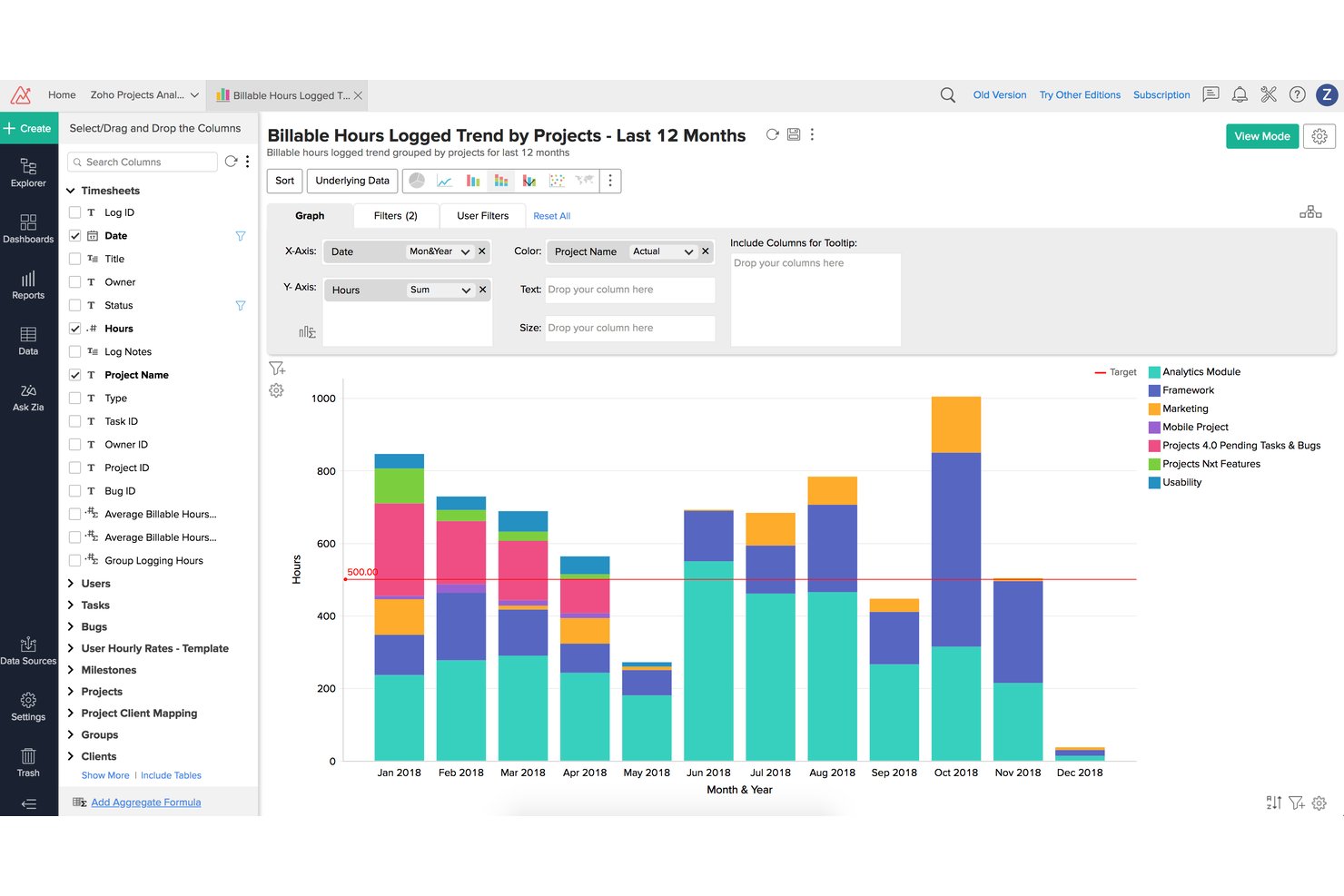
Zoho Projects is a project management platform that combines task planning, time tracking, budgeting, earned value management, and billing integration to support financial oversight across projects.
Who Is Zoho Projects Best For?
It's a strong fit for small to mid-sized professional services teams already running on the Zoho ecosystem who need time tracking tied directly to client billing.
Why I Picked Zoho Projects
Zoho Projects earns its spot on my shortlist because of how tightly it connects logged hours to financial outcomes. I like that the built-in EVM module calculates EAC, ETC, and CPI directly from timesheet data, giving me real variance visibility without exporting to a spreadsheet. Multi-level timesheet approvals mean I can enforce billing accuracy before hours ever reach an invoice.
Zoho Projects Key Features
- Portfolio dashboard: Gives a unified overview of multiple projects’ statuses and financials in one place.
- Project baseline management: Lets you set and compare multiple baselines to track schedule and budget changes.
- Custom roles and profiles: Enables granular access control for project, finance, and client stakeholders.
- Native Zoho Books and Zoho Invoice integration: Syncs with Zoho’s accounting tools for real-time financial data flow.
Zoho Projects Integrations
Zoho Projects offers native integrations with Zoho Books, Zoho Invoice, Zoho CRM, Slack, Google Drive, Microsoft Teams, GitHub, Bitbucket, Google Calendar, and Zapier. An API is available for custom integrations.
Pros and Cons
Pros:
- Built-in budget baseline tracking across phases
- Multi-level timesheet approvals enforce billing accuracy
- EVM metrics calculated directly from timesheets
Cons:
- EVM features locked behind higher-tier plans
- Reporting customization limited for complex needs
New Product Updates from Zoho Projects
Zoho Projects Adds CodeX Scripts for Custom Modules
Zoho Projects now supports CodeX Scripts for custom modules, enabling conditional logic and rules for creating, updating, and deleting records. For more information, visit Zoho Projects' official site.
 .
.
VOGSY
Best for managing complex billing schedules
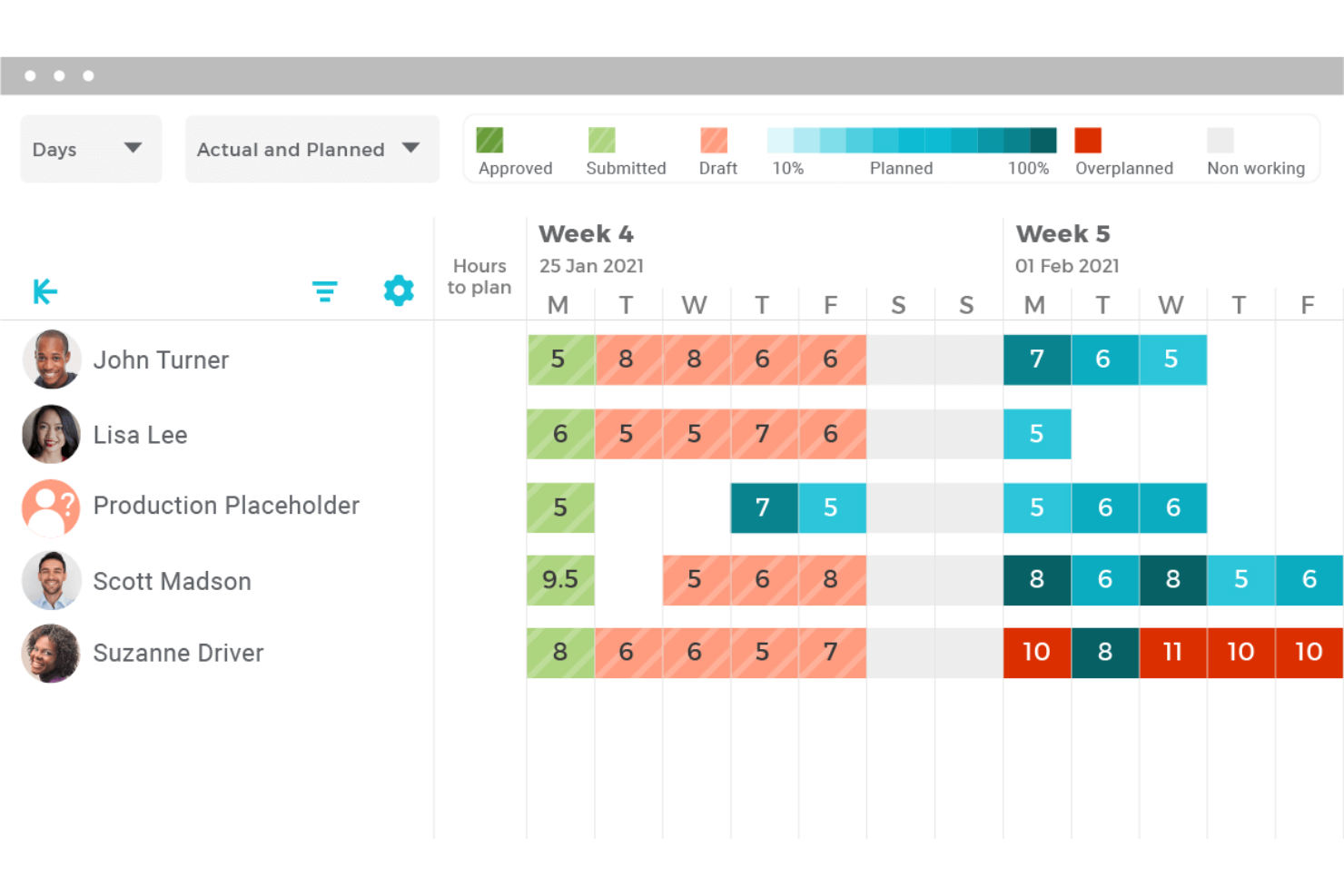
VOGSY is a professional services automation platform that combines project accounting, billing, resource management, time tracking, and financial reporting for services-based organizations.
Who Is VOGSY Best For?
VOGSY is a strong fit for mid-sized professional services firms managing multi-entity or multi-currency project portfolios across distributed teams.
Why I Picked VOGSY
VOGSY earns its spot as one of the best on my shortlist because of how it handles billing complexity that would break most project management tools. I love that a single project can carry multiple billing models at once, mixing hourly, fixed-price, and license-based arrangements across different deliverables. VOGSY's project accounting layer then ties those billing structures directly to multi-currency P&L reporting, so margin visibility doesn't lag behind invoicing activity.
VOGSY Key Features
- Resource capacity planning: Model and manage resource allocation, utilization rates, and capacity constraints across project teams.
- Multi-currency and multi-entity support: Run global project portfolios with native support for various currencies, tax regimes, and legal entities.
- Bidirectional ERP/accounting integrations: Sync data with systems like Xero, QuickBooks, Oracle, and Sage for unified project financials.
- Role-based permissions: Control financial visibility and approvals by user, project, or client segment.
VOGSY Integrations
VOGSY offers native integrations with Xero, QuickBooks Online, Sage, Oracle, Tally, Wave, ABSS, Omie, and Datev. An open API is available for custom integrations.
Pros and Cons
Pros:
- Built natively for professional services billing
- Real-time margin visibility tied directly to invoices
- Mixed billing models per single project
Cons:
- Reporting dashboards lack deep customization options
- Limited fit outside professional services firms
New Product Updates from VOGSY
VOGSY Adds Velocity Agent Verdicts for Quote Approvals
VOGSY adds Velocity agent verdicts for quote approval requests with risk levels, margin checks, discount analysis, and reasoning. This helps approvers assess quote risk before making a final decision. For more information, visit VOGSY’s official site.
 .
.
Best with native Office and Teams integration
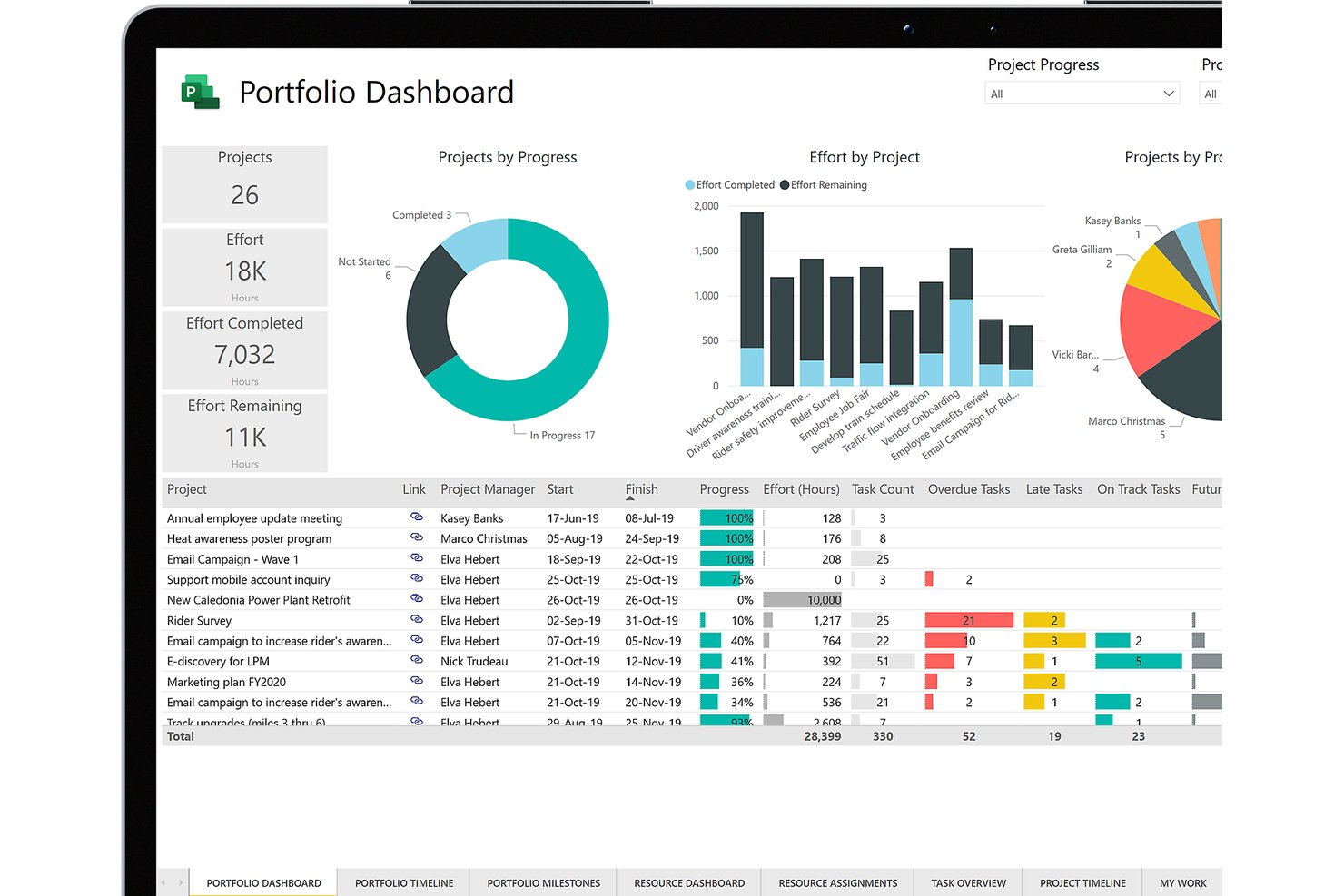
Microsoft Project is a project management platform that combines task scheduling, resource management, cost tracking, baseline budgeting, and earned value analysis across project portfolios.
Who Is Microsoft Project Best For?
Microsoft Project is a strong fit for enterprise PMO directors and large organizations already running the Microsoft 365 ecosystem who need portfolio-level project oversight.
Why I Picked Microsoft Project
Microsoft Project earns its spot on my shortlist because of how naturally its cost tracking lives inside tools my team already uses daily. I love that budget baselines and earned value analysis feed directly into Power BI dashboards without manual exports, giving my team real-time cost variance visibility across a full portfolio. Teams integration keeps budget conversations and file sharing tied directly to project tasks, so nothing falls through the cracks between a schedule update and a cost discussion.
Microsoft Project Key Features
- Gantt chart scheduling: Visualize and manage project timelines, dependencies, and milestones using interactive Gantt charts.
- Resource capacity planning: Allocate, balance, and monitor workloads across project teams to prevent over- or under-utilization.
- Baseline tracking: Set multiple budget and schedule baselines to compare planned versus actual performance at any stage.
- Portfolio reporting dashboards: Consolidate financial and status data for multiple projects for portfolio-level oversight in customizable dashboards.
Microsoft Project Integrations
Microsoft Project has native integrations across the Microsoft ecosystem, including Microsoft 365, Teams, Power BI, SharePoint, and Azure. An API is available for custom integrations.
Pros and Cons
Pros:
- Portfolio-level cost visibility across multiple projects
- Baseline budgeting with variance tracking included
- Earned value analysis built into the platform
Cons:
- Steep setup needed for financial reporting workflows
- No native invoicing or client billing capabilities

Best for accounting practice management
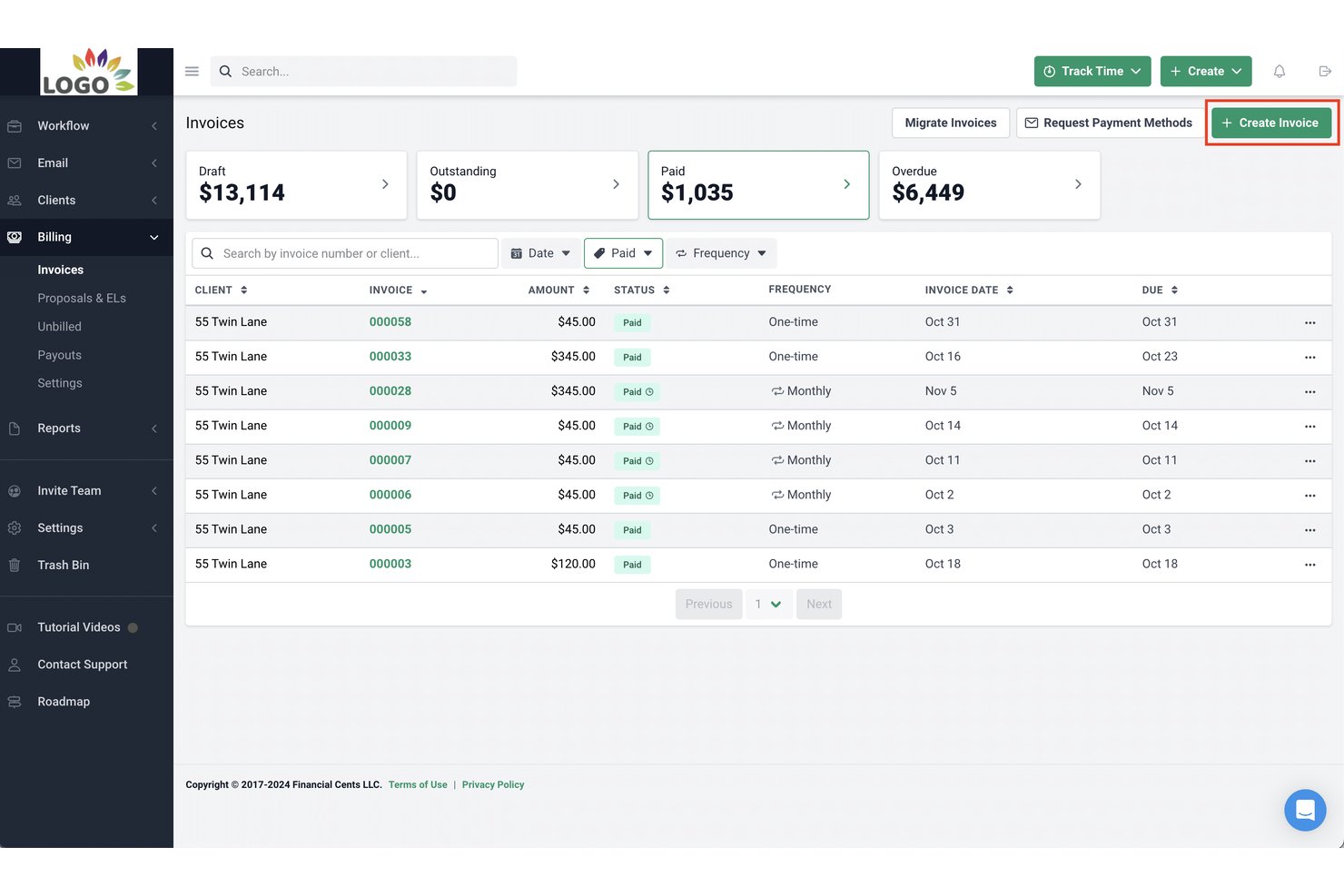
Financial Cents is an accounting practice management platform that combines client workflow tracking, time and billing, invoicing, and profitability reporting for small accounting and bookkeeping firms.
Who Is Financial Cents Best For?
Financial Cents is built for small accounting, bookkeeping, and tax firms — typically teams of 2 to 30 — that need to manage recurring client work in one place.
Why I Picked Financial Cents
I picked Financial Cents as one of the best because it's the only tool here built specifically around how accounting practices manage client work. The 250+ pre-built workflow templates cover bookkeeping, tax, and payroll engagements out of the box, with no configuration from scratch. I also like the AI File Validator, which checks each client upload against the request, accounting period, and client details, flagging wrong-year or wrong-account documents the moment they arrive.
Financial Cents Key Features
- Client CRM integration: Syncs client information with QuickBooks Online to connect records, documents, and invoices in one place.
- Passwordless client portal: Offers a secure, branded portal for document exchange and e-signature without client passwords.
- Reporting and capacity dashboard: Displays real-time team capacity, project statuses, and client-level profitability metrics.
- Pre-built accounting templates: Includes over 250 ready-to-use templates for bookkeeping, tax, and CAS workflows.
Financial Cents Integrations
Financial Cents offers native integration with QuickBooks Online and provides an API for custom integrations.
Pros and Cons
Pros:
- Real-time profitability visibility per client
- Recurring workflow templates for accounting engagements
- Time tracking tied to client invoicing
Cons:
- No multi-currency support for global teams
- Limited project budgeting depth for non-accounting firms

Rocketlane
Best for onboarding project tracking

Rocketlane is an AI-powered professional services automation (PSA) platform that covers project delivery, resource management, financial tracking, client portals, and time tracking in a single system.
Who Is Rocketlane Best For?
Rocketlane is a strong fit for professional services teams at B2B SaaS companies that need to manage client-facing project delivery alongside financials and resource planning.
Why I Picked Rocketlane
I picked Rocketlane as one of the best for onboarding project tracking because it's built from the ground up for client-facing implementation work, not adapted from a generic project tool. I like how milestone pacing gives my team a live read on whether each onboarding is on track or starting to drift, so we're course-correcting before a deadline slips. The Nitro Project Architect converts a SOW directly into a structured, execution-ready project plan, which means we're not rebuilding the same onboarding plan from scratch for every new customer. The dedicated client portal also keeps external stakeholders accountable for their tasks without my team having to chase them down over email.
Rocketlane Key Features
- Project budgeting: Set project-level budgets and track estimated vs. actual spend in real time across tasks and resources.
- Time tracking and timesheets: Log billable and non-billable hours directly against project tasks, with built-in timesheet approval workflows.
- Rate cards: Define role-based or project-specific bill rates to calculate revenue and margins accurately across your portfolio.
- Resource utilization reports: View capacity and utilization across your team to identify over-allocation or bench time before it affects delivery.
Rocketlane Integrations
Rocketlane offers native integrations with Slack, Salesforce, Jira, HubSpot, Google Calendar, and Outlook Calendar, and it connects with Zapier and Workato for broader workflow automation. An API is also available for custom integrations.
Pros and Cons
Pros:
- AI auto-generates delivery and handoff documents
- Client portal gives real-time project visibility
- Built-in financials with project-level profitability views
Cons:
- Mobile app has limited editing capabilities
- Custom reporting lacks calculated formula fields
New Product Updates from Rocketlane

Rocketlane Introduces Governance and Workforce Agents
Rocketlane introduces Governance Agents and Workforce Agents to automate delivery processes and recurring tasks. These updates help teams enforce rules and streamline project execution. For more information, visit Rocketlane’s official site.
 .
.Other Financial Project Management Software
Here are some additional financial project management options that didn’t make it onto my shortlist, but are still worth checking out:
- ProProfs Project
With simple client invoicing tools
- Adobe Workfront
For work automation
- Bonsai Agency Software
For agencies and consultancies
- Jetpack Workflow
For accounting firm efficiency
- Tempo Portfolio Manager
For predictive scheduling
- Ravetree
For billing and expenses
- Harvest
For intuitive time tracking
- Clarizen
For enterprise work management
- Smartsheet
For scalable project management
- ProWorkflow
For financial management integration


How I Evaluate Financial Project Management Software
I split my evaluation into baseline requirements—like whether a tool can track budget variance across project phases—and differentiators that separate strong options from the rest.
Core Functionality (Table Stakes For This List)
When I'm selecting tools for my list, I rank each one on a scale from 0 (does not offer the functionality) to 5 (excels in this area) for each core functionality listed below. Then, I calculate the tool's total score into a percentage. Each tool needs to achieve a minimum total score of 65% to be considered for inclusion.
- Project Budgeting: I look for multi-line budgets broken into phases, cost categories, and task-level allocations—not just a single dollar amount tied to the whole project.
- Cost & Expense Tracking: Real-time budget vs. actual views matter here, especially when labor, materials, and subcontractor costs all hit the same project.
- Time & Billing Management: I evaluate whether a tool supports configurable rate cards, billable vs. non-billable classification, and project-linked invoicing for T&M engagements.
- Financial Forecasting & EAC: Tools should calculate estimate-at-completion and estimate-to-complete figures automatically as actuals come in, not rely on manual spreadsheet updates.
- Profitability & Margin Reporting: I check for project-level P&L dashboards and the ability to roll up margin data across a full portfolio of active projects.
- Accounting System Integration: A native sync with platforms like QuickBooks, Xero, or NetSuite is what I look for—CSV exports alone aren't enough for finance teams.
Once I have a list of tools that meet the criteria, I consider what sets each platform apart.
Differentiating Factors (What Sets Vendors Apart)
Here's how I compare and contrast different vendors:
Standout Features
Revenue recognition is a big one—I look for tools that automate percentage-of-completion or milestone-based schedules so finance teams aren't reconciling this manually at month-end. Multi-currency and multi-entity support also matters for teams running projects across borders, where billing in one currency and reporting in another is routine. Resource capacity planning rounds things out by tying staffing costs directly to project margins, helping PMO leaders make smarter allocation decisions before a project goes over budget.
Beyond Features
Integration ecosystem is a major consideration—I check whether a tool connects natively with accounting platforms like QuickBooks or NetSuite, plus CRM and payroll systems, since project financials rarely live in isolation. Industry-specific fit also shapes my evaluation. A tool built for consulting firms with T&M billing works very differently from one designed for construction with cost-plus contracts. Finally, I look at how pricing scales—whether per seat, per project, or by entity—to make sure the model fits teams where finance users and project managers share the platform.
How to Choose Financial Project Management Software
It’s easy to get bogged down in long feature lists and complex pricing structures. To help you stay focused as you work through your unique software selection process, here’s a checklist of factors to keep in mind:
| Factor | What to Consider |
| Scalability | Make sure the tool can handle more projects, users, and data as your team grows. Look for flexible pricing and usage tiers. |
| Integrations | Check if the software connects easily with your existing tools—like QuickBooks, Excel, or your CRM—so you’re not duplicating work. |
| Customizability | You should be able to tailor reports, dashboards, and workflows to match your team’s financial tracking needs. |
| Ease of Use | The tool's interface should be intuitive enough that your team can start using it without much training or frustration. |
| Budget | Look at the total cost, including add-ons and user fees. Choose software that fits your budget without cutting out key features. |
| Security Safeguards | Confirm the platform uses encryption, role-based access, and audit logs to protect sensitive financial data. |
| Reporting Tools | You’ll want easy access to real-time data with customizable financial reports that help you make informed decisions. |
| Support Options | If issues come up, it helps to have access to live chat, a help center, or dedicated support that can get you back on track. |
Trends for Financial Project Management Software
In my research, I sourced countless product updates, press releases, and release logs from different financial project management software vendors. Here are some of the emerging trends I’m keeping an eye on:
- AI-Driven Forecasting: More tools now use machine learning to predict project costs, delays, and resource needs. This helps you make quicker decisions based on trends in your data, not guesswork.
- Real-Time Budget Adjustments: Some software now supports live budget changes based on actual spend. You can update financial plans without waiting for end-of-month reports.
- Granular Cost Tracking: Teams can now track costs at a more detailed level—by task, phase, or team member. This makes it easier to spot overspending and adjust plans in real time.
- Built-In Scenario Planning: More platforms let you run financial “what-if” scenarios to see how different choices might affect your budget. This helps you plan for both best- and worst-case outcomes.
- More Visual Financial Dashboards: Financial data is being presented in clearer, more interactive ways. You can see trends, progress, and issues without exporting spreadsheets or running custom reports.
What Is Financial Project Management Software?
Financial project management software is a specialized tool designed to manage and track the financial aspects of projects. It is used by project managers, finance teams, and stakeholders to plan, control, and monitor project costs and budgets.
The software includes features for budgeting, forecasting, expense tracking, and financial reporting. It is essential for users who need to maintain financial control over projects, ensuring costs stay within budget and financial objectives are met. In industries like manufacturing, financial project management software can also help manage production costs, supplier payments, and resource planning to align operational expenses with project goals.
Features of Financial Project Management Software
When selecting financial project management software, keep an eye out for the following key features:
- Permissions controls: Lets you manage who can view or edit financial data, protecting sensitive information.
- Budget tracking: Lets you set, monitor, and adjust project budgets in real time to avoid overspending.
- Expense logging: Allows your team to record and categorize costs so you can see where money is going.
- Invoicing tools: Helps you create, send, and track invoices tied to specific project milestones or hours worked.
- Resource cost allocation: Assigns financial values to team members, tools, or time so you can track true project costs.
- Forecasting tools: Uses past data to estimate future spending and help you plan ahead.
- Custom financial reports: Lets you build reports tailored to your needs so you can share insights with stakeholders.
- Time tracking integration: Connects logged hours to budgets and billing for accurate project accounting.
- Multi-currency support: Allows you to manage budgets and invoices in different currencies for global projects.
- Audit trail: Tracks all financial changes and approvals for accountability and compliance.
Benefits of Financial Project Management Software
Implementing financial project management software provides several benefits for your team and your business. Here are a few you can look forward to:
- Stronger audit trails: Logged financial changes and approval histories support compliance and accountability.
- Better budget control: Real-time tracking and alerts help you catch overspending early and stay within budget.
- Faster billing cycles: Built-in invoicing tools speed up how quickly you send bills and get paid.
- Improved forecasting: Historical data and trend analysis make it easier to plan future project costs.
- Increased visibility: Dashboards and reports show you exactly where your money’s going across projects.
- More accurate reporting: Custom financial reports reduce manual errors and give you data you can trust.
- Easier resource planning: Cost allocation tools help you match resources to budgets more effectively.
Costs & Pricing for Financial Project Management Software
Selecting financial project management software requires an understanding of the various pricing models and plans available. Costs vary based on features, team size, add-ons, and more. The table below summarizes common plans, their average prices, and typical features included in financial project management software solutions:
Plan Comparison Table For Financial Project Management Software
| Plan Type | Average Price | Common Features |
| Free | $0 | Basic task management, to-do lists, native calendar, limited users |
| Individual | $3.66 per month | Advanced boards, increased storage, improved customer support, third-party integrations |
| Small Business | $8.90 per month/user | Gantt chart view, embedded documents, automation, increased support, integration with other tools |
| Medium Business | $16.88 per month/user | Advanced security, unlimited users, real-time reporting, various project views |
| Enterprise | Negotiable | Custom permissions, advanced reporting, priority support, comprehensive feature set, minimum user policy |
Financial Project Management Software Frequently Asked Questions
What kind of data and analytics does financial project management software offer?
Financial project management software provides budget tracking, expense reporting, financial forecasting, and project profitability analysis. These tools offer insights into labor costs, cost rates, and project margins. Advanced analytics feature a portfolio dashboard to track KPIs, monitor revenue recognition, evaluate retainer agreements, and generate time reports to keep projects within budget.
How easy is it to update the plan in financial project management software, and who makes the changes?
Updating plans in financial project management software is generally user-friendly, with most modern solutions designed for easy adjustments to project plans, budgets, and schedules. Authorized users, such as project managers and financial analysts, can make changes, and the software often includes audit trails and change logs for accountability.
What activities are required to get the most benefit from financial project management software?
Maximizing benefits from financial project management software involves setting clear financial goals, consistently updating and reviewing financial data, and utilizing reporting and analytics for decision-making. Effective team training and integrating the software with other business systems are also key activities for leveraging the software’s full potential.
How is financial project management software different from other project management solutions?
Financial project management software focuses on financial aspects of project management, such as budgeting, cost tracking, and financial reporting, unlike general project management solutions that may concentrate on task assignment and scheduling. This specialization allows for more detailed financial management within projects.
How will financial project management software help solve the top three problems currently faced in projects?
Financial project management software addresses common project issues like budget overruns, inefficient resource allocation, and lack of financial visibility. It provides accurate budgeting, real-time cost tracking, and financial forecasting tools, enabling project managers to monitor financial performance and address issues proactively.
What kind of support and training does financial project management software offer?
Support and training for financial project management software can include online help centers, user guides, and customer support via phone, email, or live chat. Providers may offer webinars, online tutorials, and in-person training sessions, as well as community forums for user interaction. The availability and quality of these services are important considerations when selecting software.
How does financial project management software integrate with other business systems?
Financial project management software can integrate with project accounting software, CRM systems, ERP systems, and HR software. These integrations facilitate the seamless transfer of financial data, minimize manual data entry, and reduce errors. For example, integration with accounting software can streamline invoicing and expense tracking, while CRM integration can offer financial insights into customer projects.