

10 Best Enterprise AI Project Management Tools Reviewed in 2026

10 Best Enterprise AI Project Management Tools Shortlist


Enterprise AI project management tools use artificial intelligence to help large organizations plan, execute, and optimize complex projects. They address the challenge of managing massive data sets, distributed teams, and dynamic workflows, improving decision-making, risk prediction, and overall project visibility.
In my experience testing and reviewing software, I’ve found that these tools can significantly alleviate common project management headaches. You’ll discover how AI features can enhance your project planning and execution.
In this article, I’ll share my top picks for the best enterprise AI project management tools, giving you the insights you need to make an informed decision for your team.
Why Trust Our Software Recommendations
Our team has been testing and reviewing software since 2012. As project managers ourselves, we know how difficult—and important—it is to choose the right software.
For this guide, we evaluated tools using hands-on testing and independent research, scoring tools using our selection criteria. We also draw on insights from industry thought leaders and practicing project management experts.
Our reviews reflect our human editorial judgment, not a sales pitch.
Expert reviewers:
Enterprise AI Project Management Tools Comparison Table
This comparison table summarizes pricing details for my top enterprise AI project management tools selections.
| Tool | Best For | Trial Info | Price | ||
|---|---|---|---|---|---|
| 1 | Best for resource management | 14-day free trial + free demo available | From $10/user/month (billed annually) | Website | |
| 2 | Best for AI-powered portfolio visibility | Free plan available; 14-day free trial | From $9/user/month (billed annually) | Website | |
| 3 | Best for no-code enterprise workflow automation | Free demo available | Pricing upon request | Website | |
| 4 | Best for AI features included in all plans | Free plan available; 14-day free trial | From $10/user/month (billed annually) | Website | |
| 5 | Best for AI-driven project planning | Free demo available | Pricing upon request | Website | |
| 6 | Best AI for meeting notes | Free plan available | From $10.99/user/month (billed annually) | Website | |
| 7 | Best for GitHub integration | Free plan + 14-day free trial + free demo available | From $4.99/user/month (billed annually) | Website | |
| 8 | Best customizable task views | Free plan + 14-day free trial + free demo available | From $7/user/month (billed annually) | Website | |
| 9 | Best for team document collaboration | Free plan + free demo available | From $10/user/month (billed annually) | Website | |
| 10 | Best for agile project management | Free plan available; 7-day free trial | From $8.48/user/month | Website |


Best Enterprise AI Project Management Tool Reviews
Below are my detailed summaries of the best enterprise AI project management tools that made it onto my shortlist. My reviews offer a detailed look at the key features, pros & cons, integrations, and ideal use cases of each tool to help you find the best one for you.

Celoxis
Best for resource management

Celoxis is a comprehensive project management tool designed for businesses that require detailed resource management and planning capabilities. It caters to mid-sized and large enterprises, providing tools for project tracking, resource allocation, and financial management. Celoxis's AI features enhance decision-making by offering predictive analytics and automated scheduling.
Why I picked Celoxis: Celoxis excels in resource management, allowing your team to allocate resources efficiently across projects. Its AI-driven algorithms predict resource needs and help you optimize workload distribution. Celoxis also offers automated scheduling, reducing manual effort and improving project timelines. This focus on resource management makes it ideal for businesses with complex resource allocation needs.
Standout Features & Integrations
Features include interactive Gantt charts, customizable dashboards, and time tracking. These features help your team monitor project progress and manage tasks effectively. Celoxis also offers advanced reporting tools to provide insights into project performance.
Integrations include Salesforce, QuickBooks, Google Drive, Slack, Jira, Microsoft Project, Outlook, Excel, Zendesk, and Trello.
Pros and Cons
Pros:
- Advanced reporting tools
- Automated scheduling features
- Strong resource management capabilities
Cons:
- Low-tier lacks customization options
- Outdated interface layout may cause lags

Best for AI-powered portfolio visibility
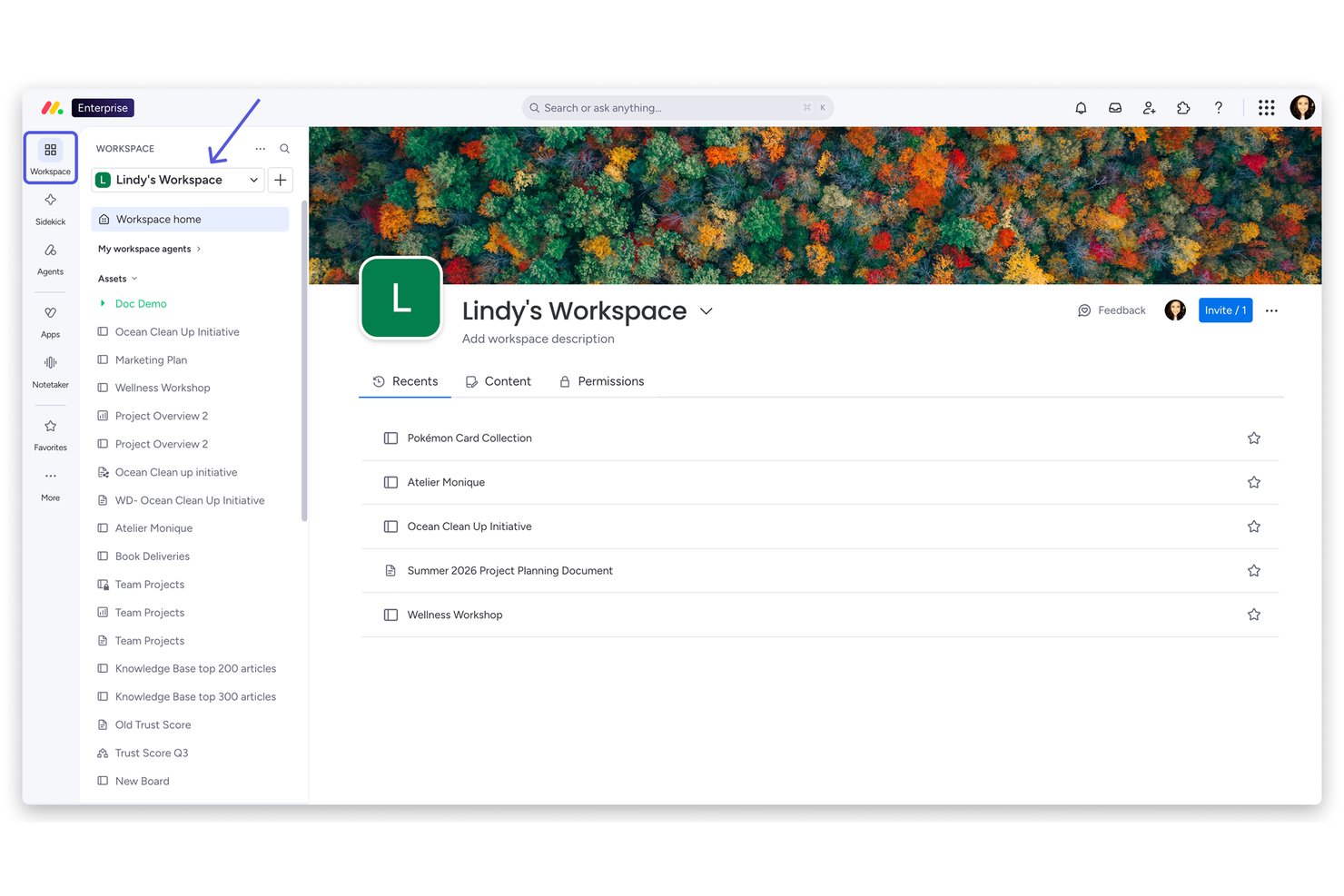
monday AI Workspace is an enterprise AI work platform that combines portfolio management, AI-powered task automation, resource planning, and cross-functional workflow orchestration across project and program teams.
Who Is monday AI Workspace Best For?
It's a strong fit for enterprise PMO teams and portfolio managers at large organizations running multiple cross-functional projects simultaneously.
Why I Picked monday AI Workspace
monday AI Workspace earns its spot on my shortlist because of how it handles portfolio visibility at scale. I love the Portfolio Dashboards, which surface real-time health snapshots across every active project without any manual status chasing. On top of that, monday sidekick lets me query project data in natural language and get instant executive-ready summaries, which cuts reporting prep significantly. The AI Smart Assignment in Capacity Manager also means my team can match the right people to the right work across a full portfolio, not just a single project.
monday AI Workspace Key Features
- AI workflow builder: Orchestrates custom automations across project and portfolio workflows using AI-powered logic and triggers.
- Advanced resource management: Assigns and monitors resources based on skills, workload, and availability across multiple projects.
- Portfolio dashboards: Displays live visual snapshots and data rollups from every project in an enterprise-wide workspace.
- Jira and Salesforce two-way sync: Maintains up-to-date project and portfolio data by synchronizing with key enterprise systems in real time.
monday AI Workspace Integrations
monday AI Workspace offers hundreds of native integrations, including Salesforce, Jira, HubSpot, Google Workspace, Slack, Microsoft Teams, GitHub, DocuSign, Stripe, Zoom, and connects with Zapier. An API is also available for custom integrations.
Pros and Cons
Pros:
- Supports Agile, Waterfall, and hybrid delivery methods
- Autonomous agents handle multi-step project tasks independently
- AI portfolio dashboards surface real-time project health
Cons:
- Complex enterprise setups require significant admin configuration
- AI features gated behind higher-tier plans
New Product Updates from monday AI Workspace
monday AI Workspace Adds Human Approval Routing
monday AI Workspace adds a human-in-the-loop approval block to AI Workflows, sending approval requests and routing workflow paths based on responses. For more information, visit monday AI Workspace's official site.

Best for no-code enterprise workflow automation
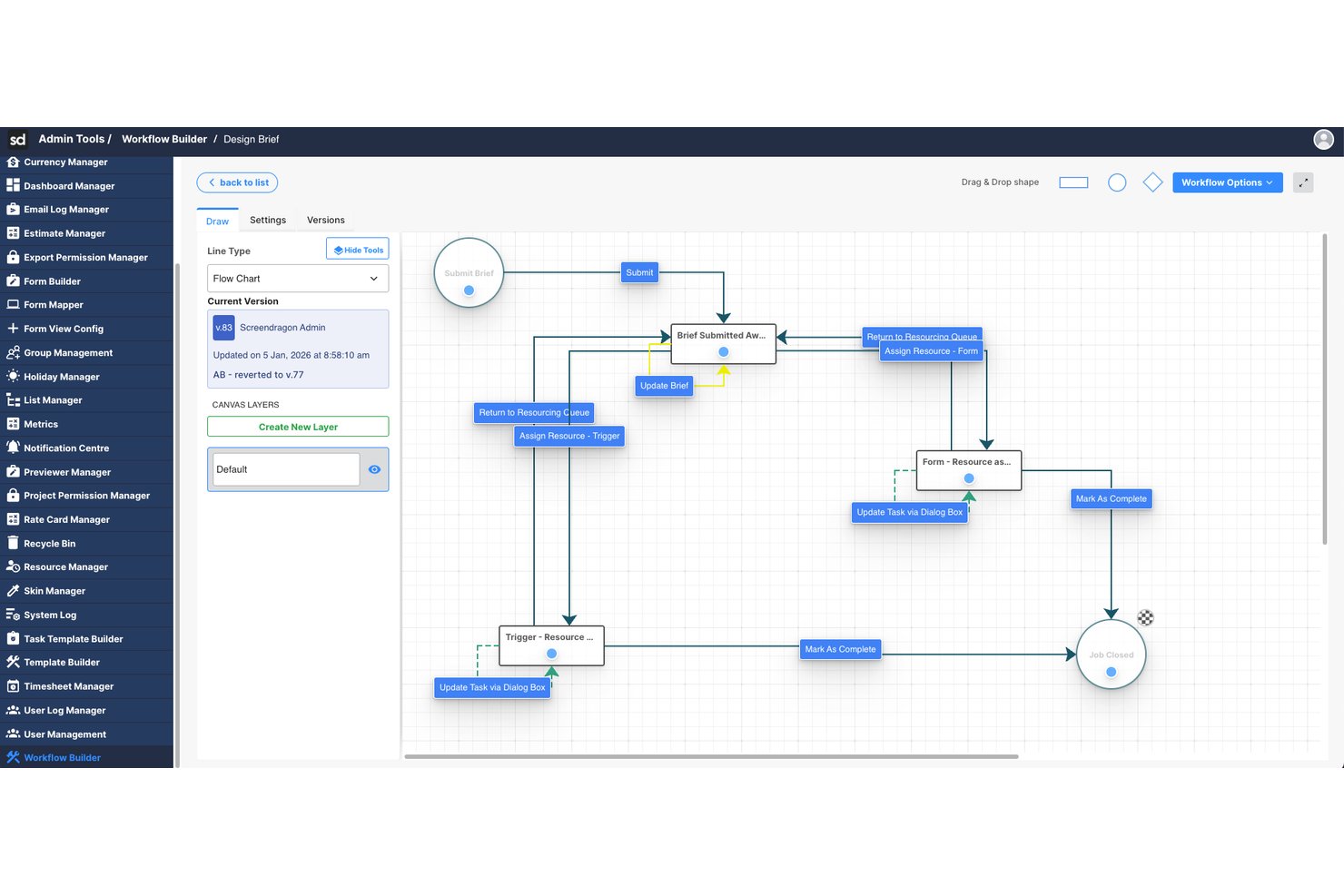
Screendragon is an enterprise work management platform that combines AI-powered workflow orchestration, resource planning, and project management with no-code automation tools built for large-scale marketing and creative operations.
Who Is Screendragon Best For?
Screendragon is well-suited for enterprise marketing teams, in-house agencies, and creative operations groups managing high volumes of work across multiple stakeholders.
Why I Picked Screendragon
Screendragon earns its spot on my shortlist because of its no-code workflow engine, which lets enterprise teams build and automate complex approval chains without any developer involvement. I also like the AI agent orchestration layer, which routes work across multiple AI models based on cost and performance needs. The smart resourcing feature rounds it out by auto-assigning team members based on skills, not just availability.
Screendragon Key Features
- AI governance controls: Offers oversight and management of AI usage, model routing, and workflow execution within the platform.
- Advanced operational reporting: Provides real-time dashboards and analytics across projects, people, budgets, and approvals.
- Enterprise integrations: Connects natively with platforms like SAP, Salesforce, PeopleSoft, Jira, and Microsoft 365.
- Role-based access controls: Supports enterprise-grade security with permissions for users, teams, and external partners.
Screendragon Integrations
Screendragon offers native integrations with SAP, PeopleSoft, Salesforce, Microsoft 365, Google Drive, Adobe Creative Cloud, Jira, Trello, Box, and Egnyte, and provides an API for custom integrations.
Pros and Cons
Pros:
- Skill-based resource assignment via AI
- AI agents handle multi-step tasks autonomously
- No-code workflow automation without developer support
Cons:
- AI predictive risk features are less mature
- Skewed toward marketing over broader PMO use
New Product Updates from Screendragon
Screendragon Unveils New AI Hub
Screendragon introduced AI Hub, a new capability that lets teams build and manage AI agents directly within workflows. The update helps marketing teams automate tasks, maintain governance controls, and scale AI-driven operations more efficiently. For more information, visit Screendragon's official site.

Wrike
Best for AI features included in all plans

Wrike is a work management platform designed for teams looking to enhance their project workflows. It primarily serves enterprises and teams that need deep automation and task management features. Wrike's AI capabilities, like Wrike Copilot, assist in real-time data analysis and task automation, providing substantial value to its users.
Why I picked Wrike: Wrike's AI features are included in all plans, making it accessible for various team sizes. The Wrike Copilot offers AI-driven insights to help you manage projects efficiently. It includes AI capabilities for data analysis, allowing your team to automate repetitive tasks. This makes Wrike a versatile choice for enhancing productivity across different industries.
Standout Features & Integrations
Features include task management, Gantt charts, and a visual collaboration platform. The platform provides templates for Agile and event management, helping your team get started quickly. Wrike also emphasizes user education through online courses and webinars.
Integrations include Google, Microsoft, Adobe Creative Cloud, Box, GitHub, JIRA, Salesforce, Zoom, Tableau, and MS Teams.
Pros and Cons
Pros:
- Strong user education resources
- Extensive project templates
- AI features in all plans
Cons:
- Automations are capped unless upgrading
- Complex folder-based structure
New Product Updates from Wrike
Wrike Adds Klaxoon MCP Integration
Wrike’s Klaxoon MCP integration is now generally available, enabling AI agents to navigate between Wrike tasks and attached whiteboards, read task context, and manage whiteboard attachments via API. For more information, visit Wrike's official site.

Forecast
Best for AI-driven project planning

Forecast is a project management and resource planning tool designed for teams seeking AI-driven insights to optimize their workflows. It is tailored for businesses that need to manage projects, resources, and budgets efficiently. Forecast's AI capabilities automate project planning and provide predictive analytics to enhance decision-making and resource allocation.
Why I picked Forecast: Forecast leverages AI to drive project planning and resource management, making it a top choice for teams looking to optimize operations. Its AI features include automated task scheduling and resource forecasting, which help you manage workloads effectively. Forecast's predictive analytics offer insights into project timelines and potential risks. This focus on AI-driven planning ensures your team can adapt quickly to changes and maintain productivity.
Standout Features & Integrations
Features include time tracking, budget management, and customizable dashboards. These features help your team monitor project progress and financial health. Forecast also offers a timeline view to visualize project schedules and dependencies.
Integrations include Slack, Google Calendar, Microsoft Teams, QuickBooks, Jira, Trello, Xero, Zapier, HubSpot, and Salesforce.
Pros and Cons
Pros:
- Predictive analytics for risk assessment
- Comprehensive resource management
- AI-driven project planning
Cons:
- Requires time to configure fully
- Higher cost for small teams

Asana
Best AI for meeting notes

Asana is a project management tool designed for teams that need to organize their work and manage tasks efficiently. It is popular among businesses of all sizes, offering tools for task tracking and project planning. Asana's AI capabilities focus on improving productivity by automating routine tasks and providing insights from project data.
Why I picked Asana: Asana excels in using AI to optimize meeting notes, helping your team capture and organize information effectively. Its AI features include automated task suggestions and timeline predictions, which can enhance your team's workflow. Asana also uses AI to provide insights into project progress and potential roadblocks. This focus on AI-driven meeting management makes it a valuable tool for teams looking to improve collaboration.
Standout Features & Integrations
Features include task dependencies, a timeline view, and project milestones. These features help you manage complex projects with multiple moving parts. Asana also offers a workload feature to help you balance team capacity.
Integrations include Slack, Microsoft Teams, Google Drive, Dropbox, Zoom, Salesforce, Jira, Trello, Zapier, and Adobe Creative Cloud.
Pros and Cons
Pros:
- Visual timeline and workload features
- Intuitive task dependencies
- Effective AI for meeting notes
Cons:
- Notifications overload without tuning
- Limited advanced field customization

Zenhub
Best for GitHub integration

Zenhub is a project management platform designed specifically for development teams using GitHub, helping them enhance productivity and collaboration. It integrates directly with GitHub, providing tools for issue tracking, sprint planning, and release management within the GitHub interface. Zenhub's AI capabilities include workflow automation and predictive analytics to optimize project timelines and resource allocation.
Why I picked Zenhub: Zenhub is distinguished by its quick integration with GitHub, making it an essential tool for development teams. Its AI features simplify workflow management by automating routine tasks and providing insights into project health. Zenhub's predictive analytics help your team identify potential bottlenecks and adjust plans accordingly. This deep integration with GitHub and AI-driven insights makes it a valuable asset for software development projects.
Standout Features & Integrations
Features include kanban boards, burndown charts, and milestone tracking. These tools provide your team with visual project management capabilities within GitHub. Zenhub also offers a reporting suite to analyze project performance and team productivity.
Integrations include GitHub, Slack, Microsoft Teams, Google Workspace, Jira, Trello, Asana, Zoom, Dropbox, and Salesforce.
Pros and Cons
Pros:
- Comprehensive reporting suite
- Effective workflow automation
- Seamless integration with GitHub
Cons:
- Limited use for non-developers
- Limited functionality outside GitHub


ClickUp is a versatile project management tool designed for teams seeking flexibility in managing tasks and projects. It serves a diverse user base, from small teams to large enterprises, offering tools for task management, goal setting, and workflow automation. ClickUp's AI capabilities enhance productivity by automating task assignments and providing insights into project performance.
Why I picked ClickUp: ClickUp offers highly customizable task views, allowing your team to tailor their workspace to fit specific needs. Its AI features include automation of repetitive tasks and smart suggestions for task prioritization. ClickUp's AI-driven tools help you optimize team productivity by analyzing workload and efficiency. This flexibility in customization sets it apart, making it suitable for various industries and project types.
Standout Features & Integrations
Features include time tracking, goal setting, and a built-in document editor. These features enable your team to manage projects comprehensively within a single platform. ClickUp also provides a whiteboard feature for visual collaboration and brainstorming.
Integrations include Slack, Google Drive, Microsoft Teams, Zoom, Dropbox, Trello, HubSpot, Salesforce, GitHub, and Outlook.
Pros and Cons
Pros:
- Built-in document editor
- Comprehensive project management features
- Highly customizable task views
Cons:
- Feature sprawl can be overwhelming
- Performance lag in large spaces

Notion is a versatile workspace tool designed for teams looking to collaborate and organize their work in one place. It appeals to a diverse range of users, from startups to large enterprises, by offering tools for note-taking, project management, and document collaboration. Notion's AI capabilities enhance productivity by automating workflows and providing intelligent search and organization features.
Why I picked Notion: Notion excels in team document collaboration with its unique blend of note-taking and project management features. Its AI tools help you organize information efficiently, making it easy to locate and manage content. Notion's templates and databases allow you to customize your workspace to fit your team's needs. This makes it an ideal choice for teams focused on effective document collaboration and management.
Standout Features & Integrations
Features include a flexible page layout, customizable templates, and a powerful database system. These features help you create a tailored workspace that fits your team's workflow. Notion also offers a web clipper tool to save and organize web content directly into your workspace.
Integrations include Slack, Google Drive, Figma, Microsoft Teams, GitHub, Trello, Asana, Zapier, Typeform, and Jira.
Pros and Cons
Pros:
- Intuitive database features
- Highly customizable workspace
- Excellent for document collaboration
Cons:
- Limited offline functionality
- Extensive permission slows large groups

Jira
Best for agile project management

Jira is a project management tool designed for software development teams that require agile methodologies like Scrum and Kanban. It is widely used by technical teams to plan, track, and release software projects. Jira's AI capabilities help teams automate workflows and predict project timelines, enhancing efficiency and collaboration.
Why I picked Jira: Jira is tailored for agile project management, making it a top choice for software development teams. Its AI features include smart automation rules that save time by automating repetitive tasks. Jira's predictive analytics provide insights into project progress, helping your team anticipate potential delays. These AI-driven capabilities make Jira an excellent fit for managing complex software projects.
Standout Features & Integrations
Features include customizable workflows, detailed reporting, and backlog prioritization. These tools help your team manage tasks efficiently and stay focused on project goals. Jira also offers a mobile app, allowing you to track projects on the go.
Integrations include Slack, GitHub, Bitbucket, Confluence, Microsoft Teams, Google Drive, Zoom, Trello, Salesforce, and Zendesk.
Pros and Cons
Pros:
- Detailed reporting and analytics
- Advanced automation capabilities
- Excellent for agile methodologies
Cons:
- Steep learning curve for non-technical teams
- Complex setup
Other Enterprise AI Project Management Tools
Here are some additional enterprise AI project management tools options that didn’t make it onto my shortlist, but are still worth checking out:
- Smartsheet
For spreadsheet-like interface
- TaskRay
With Salesforce-native integration
- Zoho Projects
For customizable workflows
- Taskade
For real-time team collaboration
- Microsoft Planner
For Microsoft ecosystem users
- Motion
For AI-driven scheduling
- Productive.io
For agency project management


How I Evaluate Enterprise AI Project Management Tools
Every tool on this list needs to go beyond AI branding—I look for platforms where AI actually cuts the manual work of running projects at scale, like auto-generating status reports or flagging at-risk deliverables before they slip. I split my evaluation into core functionality every tool must have to qualify and differentiating factors that separate one vendor from the next.
Core Functionality (Table Stakes For This List)
When I'm selecting tools for my list, I rank each one on a scale from 0 (does not offer the functionality) to 5 (excels in this area) for each core functionality listed below. Then, I calculate the tool's total score into a percentage. Each tool needs to achieve a minimum total score of 65% to be considered for inclusion.
- AI-Powered Task Automation: I check whether a tool can auto-generate tasks, assign owners, and adjust priorities based on project context rather than just running static if-then rules.
- Predictive Risk & Forecasting: I look for ML-driven signals that flag schedule slippage or budget overruns early, like alerting a PM weeks before a milestone is likely to miss.
- Intelligent Resource Management: The platform should recommend staffing decisions based on skills and capacity, not just show a utilization chart that PMs still interpret manually.
- Generative AI Reporting: I evaluate whether the tool produces natural-language project summaries and answers ad hoc questions, like "which workstreams are behind this sprint?"
- Enterprise Security & Scalability: SSO/SAML, role-based permissions, audit logging, and compliance certifications like SOC 2 or ISO 27001 all factor into my scoring here.
- Portfolio-Level Integrations: I look at native connectors to core enterprise systems like Jira, Salesforce, SAP, and Workday to confirm data flows into AI models cleanly.
Once I have a list of tools that meet this criteria, I consider what sets each platform apart.
Differentiating Factors (What Sets Vendors Apart)
Here's how I compare and contrast different vendors:
Standout Features
Scenario simulation is a big differentiator—I look for tools that let a PMO director model what happens to timelines and budgets if a key team gets reassigned before making the call. Cross-project dependency mapping matters just as much, especially when a delay in one product launch quietly blocks three other workstreams. I also evaluate whether a platform offers autonomous agents that handle recurring tasks like chasing status updates or summarizing standups without anyone prompting them.
Beyond Features
AI governance is a major consideration—I evaluate whether a vendor clearly discloses how project data trains its models and whether organizations can opt out or run AI in-tenant. Total cost of ownership also gets close attention, since some platforms gate their best AI features behind premium tiers or charge per-use credits that balloon at enterprise scale. I also check methodology flexibility, because a PMO running SAFe for engineering and Waterfall for compliance needs one tool that handles both under a single reporting layer.
How to Choose an Enterprise AI Project Management Tool
It’s easy to get bogged down in long feature lists and complex pricing structures. To help you stay focused as you work through your unique software selection process, here’s a checklist of factors to keep in mind:
| Factor | What to Consider |
| Scalability | Will the tool grow with your team? Consider user limits, and whether the tool can handle increased data and complexity as your projects scale. |
| Integrations | Does it connect with your existing tools? Check compatibility with software you already use to ensure smooth data flow and workflow continuity. |
| Customizability | Can you tailor it to your workflow? Look for options to customize dashboards, reports, and workflows to fit your team's processes and preferences. |
| Ease of use | Is it user-friendly? Evaluate the learning curve and whether team members can adopt it quickly without extensive training. |
| Implementation and onboarding | How long will it take to get started? Consider the time and resources needed for setup, data migration, and initial training for your team. |
| Cost | What’s the total cost? Compare subscription fees, hidden costs, and the value offered by different pricing tiers to match your budget. |
| Security safeguards | Is your data protected? Check for encryption, user access controls, and compliance with relevant data protection regulations to ensure your information is secure. |
| Support availability | What support options are available? Determine if you have access to timely help through chat, phone, or email, and if there are self-service resources like FAQs or forums. |
What Are Enterprise AI Project Management Tools?
Enterprise AI project management tools are software solutions designed to enhance project planning and execution by leveraging artificial intelligence. These tools are commonly used by project managers, team leaders, and IT professionals to improve efficiency and decision-making. Automation, predictive analytics, and resource optimization features help with managing tasks, anticipating project challenges, and allocating resources effectively. Overall, these tools provide significant value by improving productivity and enabling data-driven decisions.
Features of Enterprise AI Project Management Tools
When selecting enterprise AI project management tools, keep an eye out for the following key features:
- Automation: Automates repetitive tasks to save time and reduce errors, allowing your team to focus on more strategic work.
- Predictive analytics: Provides insights into project timelines and potential risks, helping you make informed decisions and anticipate challenges.
- Resource optimization: Analyzes resource allocation to ensure optimal use of team members and assets, improving project efficiency.
- Customizable dashboards: Allow you to tailor views and reports to fit your team’s specific needs, enhancing visibility and control.
- AI-driven insights: Offers data-driven recommendations for project management, improving decision-making, and strategy planning.
- Workflow automation: Consolidates processes by automating routine workflows, increasing productivity and consistency.
- Integration capabilities: Connects with existing tools and platforms to ensure quick data flow and collaboration across systems.
- Time tracking: Monitors time spent on tasks and projects, providing insights into productivity and resource allocation.
- Budget management: Tracks project budgets and expenses, helping you stay within financial constraints and make cost-effective decisions.
- Security safeguards: Ensures data protection with encryption and user access controls, maintaining the confidentiality and integrity of information.
Benefits of Enterprise AI Project Management Tools
Implementing enterprise AI project management tools provides several benefits for your team and your business. Here are a few you can look forward to:
- Increased efficiency: Automates routine tasks, freeing up time for your team to focus on high-priority activities.
- Improved decision-making: Provides predictive analytics and AI-driven insights, helping you make informed choices quickly.
- Enhanced resource allocation: Optimizes resource use by analyzing team capacity and project demands, ensuring efficient workload distribution.
- Better risk management: Identifies potential project risks early with AI capabilities, allowing for proactive mitigation strategies.
- Cost savings: Tracks budgets and expenses accurately, helping you identify cost-saving opportunities and stay within financial limits.
- Greater collaboration: Integrates with existing tools, facilitating data sharing and communication across your team.
- Scalability: Adapts to your growing business needs, providing the flexibility required to manage larger or more complex projects over time.
Costs and Pricing of Enterprise AI Project Management Tools
Selecting enterprise AI project management tools requires an understanding of the various pricing models and plans available. Costs vary based on features, team size, add-ons, and more. The table below summarizes common plans, their average prices, and typical features included in enterprise AI project management tools solutions:
Plan Comparison Table for Enterprise AI Project Management Tools
| Plan Type | Average Price | Common Features |
| Free Plan | $0 | Basic task management, limited integrations, and community support. |
| Personal Plan | $5-$15/user/month | Task management, basic automation, reporting features, and limited support. |
| Business Plan | $20-$40/user/ month | Advanced automation, project templates, time tracking, and priority support. |
| Enterprise Plan | $50-$100/user/ month | Custom integrations, advanced analytics, a dedicated account manager, and enhanced security. |
Enterprise AI Project Management Tools FAQs
Here are some answers to common questions about enterprise AI project management tools:
How do AI features impact project timelines?
AI features can significantly improve project timelines by automating scheduling and predicting potential delays. With AI, your team can analyze historical data to forecast project durations more accurately. This helps in allocating resources efficiently and identifying potential bottlenecks before they occur.
For instance, AI-driven scheduling tools can automatically adjust timelines based on real-time progress updates, ensuring your team stays on track. By reducing manual intervention, AI features also allow project managers to focus on strategic planning rather than day-to-day scheduling.
Can AI tools integrate with existing workflows?
Yes, AI tools can integrate with existing workflows through APIs and built-in connectors. When choosing an AI project management tool, check for compatibility with your current software stack, like CRM or ERP systems. Integration ensures data flows smoothly between platforms, reducing manual data entry and errors.
For example, integrating an AI tool with your CRM can automate client communication and updates. Most AI tools offer customizable integration options, making it easier for your team to maintain existing workflows while benefiting from AI enhancements.
Is data security a concern with AI project management tools?
Yes, data security is an essential consideration when using AI project management tools. These tools often handle sensitive project data, requiring robust security measures like encryption and access controls. Ensure the tool complies with industry standards such as GDPR or HIPAA if applicable.
Look for features like multi-factor authentication and regular security audits. It’s also wise to review the vendor’s data retention policies to understand how your data is stored and protected. By prioritizing security, you can safeguard your team’s information while leveraging AI capabilities.
What’s Next:
If you're in the process of researching enterprise AI project management tools, connect with a SoftwareSelect advisor for free recommendations.
You fill out a form and have a quick chat where they get into the specifics of your needs. Then you'll get a shortlist of software to review. They'll even support you through the entire buying process, including price negotiations.