





Accelo is a great choice for professional services teams seeking a unified platform to manage client communications, service delivery, resource utilization, billing, and project profitability.
If you’re comparing tools to replace a patchwork of spreadsheets, time-tracking software, and standalone billing systems, Accelo is a comprehensive professional services automation (PSA) platform built for B2B service teams that want one system to manage projects, resources, and client work. With Accelo, you’ll gain real-time visibility into project profitability, delivery risks, and actionable insights into bottlenecks that are slowing your teams down.
In this review, I’ll break down Accelo’s strengths, limitations, and whether its “quote-to-cash” approach fits the needs of teams that want reliable project resource management without increasing administrative overhead.
Accelo Evaluation Summary

- Pricing upon request
- Free demo available
Why Trust Our Software Recommendations
Our team has been testing and reviewing software since 2012. As project managers ourselves, we know how difficult—and important—it is to choose the right software.
For this guide, we evaluated tools using hands-on testing and independent research, scoring tools using our selection criteria. We also draw on insights from industry thought leaders and practicing project management experts.
Our reviews reflect our human editorial judgment, not a sales pitch.
Expert reviewers:
Accelo Overview
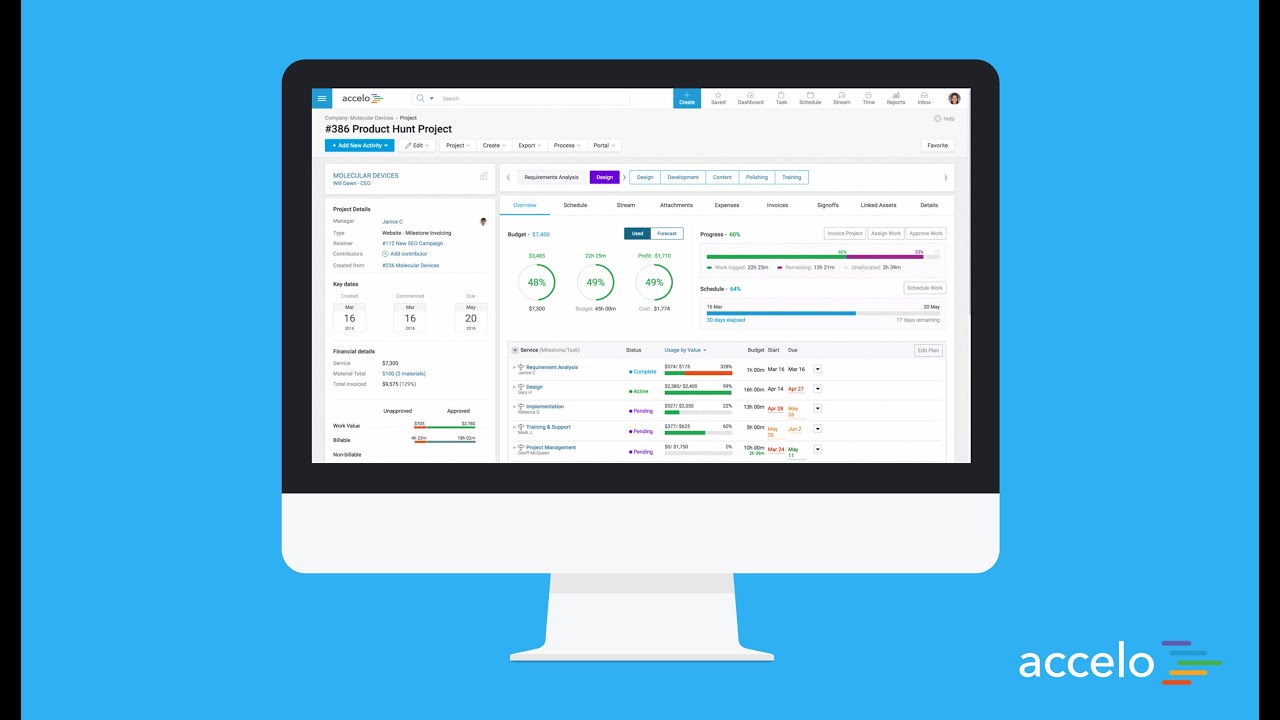
Accelo is a unified PSA platform for service teams that want their project management software, time tracking, client communication, and billing to work together rather than operate as disconnected workflows. Instead of stitching tools together, Accelo serves as a single source of truth where project plans, budgets, schedules, and client activity stay aligned as work moves from quote to kickoff to delivery.
What stands out is Accelo’s focus on operational control, AKA professional services automation (PSA), that guides service delivery across teams and directly affects profitability. Their niche is supporting a variety of work structures to address the full range of client work on a single platform. Built for teams that switch between handling recurring client work, multi-phase projects, one-time projects, ad-hoc requests, and ongoing retainers, Accelo provides transparency across the organization.
pros
-
Unifies operations in one platform, from project management and resource management, to CRM, billing, and time tracking.
-
Automates billable time capture, expense tracking, and invoicing workflows, and provides real-time visibility into budgets, utilization, and margins.
-
Adaptable to a wide range of service-based business models, including fixed-fee projects, ongoing retainers, or both.
cons
-
Accelo packs a lot of information into each screen, which can be overwhelming at first and may add to the learning curve for teams used to lightweight tools.
-
While standard reports cover most use cases, teams with niche metrics or complex multi-project views may find themselves wanting more flexibility.
-
While the mobile app allows time logging and basic project viewing, full project management and resource planning still require the web version.
Is Accelo Right For Your Needs?
Who Would be a Good Fit for Accelo?
Accelo tends to resonate with professional services teams that have outgrown lightweight project management software and now need tighter control over budgets, resources, service delivery and project profitability. Accelo is especially useful when you’re juggling a mix of project types—fixed-fee engagements, monthly retainers, ongoing support work—and you want a PSA platform that keeps financials and delivery aligned without adding enterprise-level complexity.
-
Engineering and Architectural Firms
Firms with multi-phase, highly structured projects benefit from Accelo’s configurable workflows and milestone tracking. Its ability to connect project resource management, budget burn, and time tracking gives engineering leaders a clearer sense of whether each phase is pacing toward its goals.
-
IT Services & Consulting Firms
IT and technology service providers often operate with recurring contracts, SLAs, and consulting projects running in parallel. Accelo’s real-time visibility into workloads, profitability, and contract performance helps leaders make better decisions about staffing, utilization, and whether a project is veering off plan.
-
Marketing, Advertising, and Creative Agencies
Agencies that manage a mix of campaign work, production schedules, and recurring client support appreciate how Accelo automates time capture, client updates, and budget alerts. The platform helps recover billable hours that often slip through the cracks and reduces the administrative load that creative teams typically struggle with.
-
Managed Service Providers
Benefit from Accelo’s ability to join ticketing, quoting, invoicing, and project management in one platform, streamlining workflows and saving significant time.
-
Legal and Financial Advisory Practices
The platform’s robust billing, retainer management, and reporting features help maintain compliance and client transparency.
-
Accounting & Business Consulting Firms
Consulting teams often rely on strong coordination between sales, delivery, and finance. Accelo’s integrated sales pipelines, scopes, and delivery workflows help reduce friction during handoffs and ensure actual work matches what was sold, making invoicing cleaner and client communication smoother.
Who Would be a Bad Fit for Accelo?
Accelo may not be the best choice for businesses that need industry-specific functionalities outside of professional services, or for anyone who needs a simpler, more intuitive tool. Also, if your business thrives on mobility, Accelo may be restrictive due to the mobile app’s lack of functionality compared to its desktop version.
-
Logistics Companies
Supply chain tracking and on-site resource planning, essential to logistics, aren’t supported by Accelo’s service-oriented design.
-
Solo Consultants
The platform can be overly complex and costly for individuals or very small teams with fewer clients.
-
Retail Businesses
You won’t find tools for sales tracking, stock control, or customer point-of-sale systems.
-
Education Institutions
Lacks student management and learning workflow features needed for academic setups.
-
Manufacturing Companies
Accelo lacks production planning, inventory management, and logistics features crucial to your workflows.
-
Large Enterprises
You might need deeper customization, advanced reporting, and ERP-level integrations that Accelo doesn’t offer.
Our Review Methodology
How We Test & Score Tools
We’ve spent years building, refining, and improving our software testing and scoring system. The rubric is designed to capture the nuances of software selection and what makes a tool effective, focusing on critical aspects of the decision-making process.
Below, you can see exactly how our testing and scoring works across seven criteria. It allows us to provide an unbiased evaluation of the software based on core functionality, standout features, ease of use, onboarding, customer support, integrations, customer reviews, and value for money.
Core Functionality (25% of final scoring)
The starting point of our evaluation is always the core functionality of the tool. Does it have the basic features and functions that a user would expect to see? Are any of those core features locked to higher-tiered pricing plans? At its core, we expect a tool to stand up against the baseline capabilities of its competitors.
Standout Features (25% of final scoring)
Next, we evaluate uncommon standout features that go above and beyond the core functionality typically found in tools of its kind. A high score reflects specialized or unique features that make the product faster, more efficient, or offer additional value to the user.
We also evaluate how easy it is to integrate with other tools typically found in the tech stack to expand the functionality and utility of the software. Tools offering plentiful native integrations, 3rd party connections, and API access to build custom integrations score best.
Ease of Use (10% of final scoring)
We consider how quick and easy it is to execute the tasks defined in the core functionality using the tool. High scoring software is well designed, intuitive to use, offers mobile apps, provides templates, and makes relatively complex tasks seem simple.
Onboarding (10% of final scoring)
We know how important rapid team adoption is for a new platform, so we evaluate how easy it is to learn and use a tool with minimal training. We evaluate how quickly a team member can get set up and start using the tool with no experience. High scoring solutions indicate little or no support is required.
Customer Support (10% of final scoring)
We review how quick and easy it is to get unstuck and find help by phone, live chat, or knowledge base. Tools and companies that provide real-time support score best, while chatbots score worst.
Customer Reviews (10% of final scoring)
Beyond our own testing and evaluation, we consider the net promoter score from current and past customers. We review their likelihood, given the option, to choose the tool again for the core functionality. A high scoring software reflects a high net promoter score from current or past customers.
Value for Money (10% of final scoring)
Lastly, in consideration of all the other criteria, we review the average price of entry level plans against the core features and consider the value of the other evaluation criteria. Software that delivers more, for less, will score higher.
Core Features
Project Management
Accelo supports structured project delivery with planning tools, task tracking, milestones, and budget visibility. Project managers can monitor progress in real time and keep scope, timelines, and resources aligned within one project management software platform.
Client Relationship Management (CRM)
Accelo’s built-in CRM keeps client data, pipelines, emails, and activity in one place, making it easier to track opportunities and maintain continuity as work moves from sales to delivery. For companies already using HubSpot CRM, Accelo integrates seamlessly, eliminating duplicate manual entry from prospect to contract to project delivery and invoicing.
Time Tracking and Billing
Billable hours flow directly from timesheets into project budgets and invoices. Automated billing rules help teams reduce admin overhead and ensure accurate, timely invoicing across projects and retainers.
Workflow Automation
Accelo automates repetitive tasks such as assignments, notifications, and status updates, so teams spend less time on manual processes and more time on client work.
Resource Management
The platform provides visibility into team capacity and availability, supporting more accurate scheduling and project resource management across simultaneous engagements.
Reporting and Analytics
Dashboards and configurable reports surface profitability, utilization, workload, and financial performance, giving leaders the insight needed for confident, data-driven decisions.

Standout Features
Quote-to-Cash Automation
Accelo simplifies the entire quote-to-cash process by connecting sales proposals, contracts, project delivery, billable hours, and invoicing in one automated workflow, reducing handoff errors, shortening billing cycles, and giving teams a clearer view of revenue as work progresses.
Client Portal
Accelo’s client portal provides a transparent, self-serve experience where clients can check project status, view invoices, approve work, and access shared communications. It reduces back-and-forth emails and helps build trust through consistent visibility.

Ease of Use
Accelo is approachable for most teams, but its all-in-one structure means there’s more to learn upfront than with lightweight project management software. New users may need time to get comfortable with the depth of features, especially if they’re coming from simpler tools or a patchwork of apps.
The payoff is that once teams understand how the pieces connect—projects, time, billing, and client activity—the platform becomes noticeably faster to work in. Clear documentation, in-app guidance, and responsive support help shorten the onboarding curve, and many users find that Accelo’s functionality ultimately streamlines their day-to-day workflow.

Onboarding
Accelo’s onboarding blends self-paced learning with hands-on support, so teams can move at their own speed while still getting expert guidance when it counts. The platform includes clear tutorials, step-by-step checklists, and a searchable help center that’s genuinely useful, not just superficial articles.
For businesses with more complex delivery models, Accelo offers personalized onboarding and training sessions. These tailored sessions walk teams through real workflows—projects, retainers, billing, and resource planning—so everyone understands how the system fits into their day-to-day work. Many teams reach meaningful value within a few weeks.

Customer Support
Accelo’s support team is responsive and knowledgeable, with multiple channels—live chat, email, and a detailed help center—available when you need them. Users often highlight how quickly issues are resolved and how practical the guidance is, especially during onboarding or workflow setup. The combination of searchable documentation, community forums, and real human expertise makes it easier for teams to stay productive without prolonged downtime.

Integrations
Accelo integrates with your existing tech stack, including popular platforms like HubSpot, Slack, Google Workspace, Microsoft 365, QuickBooks, Xero, and other communication and accounting apps. Data syncs cleanly between systems, reducing manual entry. For teams with unique requirements, Accelo’s API supports custom integrations to connect internal systems or specialized apps without patchwork workarounds.

Value for Money
Accelo offers strong value for service teams because it replaces a stack of separate tools—project management software, time tracking, CRM, billing, and reporting—with one connected platform. For organizations trying to reduce tool sprawl, this consolidation alone can lower costs and simplify operations. Add automation, real-time visibility, and fewer integration failures, and the return on investment becomes even greater as the team scales.
- Professional: Includes core project and client management, basic automation, and time tracking suitable for small teams beginning to centralize operations.
- Business: Adds retainer and ticket management features for growing service teams managing ongoing client work.
- Advanced: Provides enhanced automation, advanced reporting, and customization options tailored for scaling organizations with complex workflows.

Accelo Specs
- API
- Billing/Invoicing
- Budgeting
- CRM Integration
- Dashboards
- Data Export
- Data Import
- Document Management
- Expense Tracking
- External Integrations
- Financial Analysis
- Forecasting
- Gantt Charts
- Inventory Tracking
- Multi-Currency
- Multi-User
- Notifications
- Project Management
- Resource Management
- Scheduling
- Status Notifications
- Task Scheduling/Tracking
- Time Management
- Workflow Management
Accelo FAQs
How does Accelo help reduce tool sprawl?
Does Accelo offer a free trial?
How accurate is Accelo’s time tracking and profitability reporting?
How customizable is Accelo for specific business needs?
How does Accelo handle data security and compliance?
Can Accelo scale as my service business grows?
What makes Accelo different from other project management software or PSA tools?
Does Accelo support both project-based and retainer work?
Accelo Company Overview & History
Accelo is a professional services automation (PSA) platform designed to help service businesses manage projects, resources, billing, and client work in one connected system. For more than a decade, Accelo has focused specifically on the needs of agencies, consultancies, IT service providers, and other project-based organizations that rely on accurate time tracking, resource utilization, and profitability insights.
Accelo continues to invest in the professional services industry and strengthened its capabilities in 2025 with the acquisition of Forecast PSA, a leader in AI-driven forecasting and capacity planning. Today, Accelo is a leading solution for professional services automation, helping organizations around the world reduce operational overhead, gain a more predictive view of their work, and make data-driven decisions across the entire delivery cycle. Accelo is based in Denver, Colorado, with offices in Wollongong, Australia, the United Kingdom, and Denmark.
What's Next?
Want to connect with other digital project managers to share resources and best practices? Join our membership community and get access to 100+ templates, samples, and examples and connect with 100s of other digital project managers in Slack.