

10 Accelo Alternatives for Professional Services in 2026

Best Accelo Alternatives Shortlist


If you're feeling overwhelmed with managing projects, you're not alone. Many project managers struggle with keeping tasks organized and teams aligned. Accelo might not fit your needs perfectly, and that's okay.
Professional services automation software can ease these pains by offering features that match your specific challenges. In my experience, finding the right tool can make a big difference for your team's productivity and morale.
In this article, I'll share my top picks for Accelo alternatives. I've tested them thoroughly to ensure they meet diverse needs. You'll find clear, unbiased reviews that help you choose the best fit for your business.
What Is Accelo?
Accelo is a Professional Services Automation (PSA) software designed to help businesses manage client work efficiently. It's commonly used by consultants, accountants, and digital agencies who need to keep projects, clients, and finances organized. Project tracking, client management, and invoicing features help with maintaining productivity and enhancing client relationships. Accelo provides value by centralizing all aspects of client work into a single platform, making it easier for you and your team to manage projects from start to finish.
Best Accelo Alternatives Summary
This comparison chart summarizes pricing details for my top Accelo alternative selections to help you find the best one for your budget and business needs.
| Tool | Best For | Trial Info | Price | ||
|---|---|---|---|---|---|
| 1 | Best all-in-one solution for small businesses | Free plan available | From $6/user/month (billed annually) | Website | |
| 2 | Best for AI-powered project delivery | 14-day free trial + free demo available | From $19/user/month (billed annually) | Website | |
| 3 | Best for all-in-one client portals | 14-day free trial | From $19/month | Website | |
| 4 | Best for customizable workflows | 30-day free trial + free demo available | From $24/user/month | Website | |
| 5 | Best for team collaboration and goal tracking | Free plan available | From $10.99/user/month (billed annually) | Website | |
| 6 | Best for MSP workflows | Free demo available | Pricing upon request | Website | |
| 7 | Best for all-in-one project management | Free plan available | From $11.95/month | Website | |
| 8 | Best for client booking and billing | Free demo + 14-day free trial available | From $29/month (billed annually) | Website | |
| 9 | Best for architecture and engineering firms | Free demo available | From $45/month | Website | |
| 10 | Best for creative professionals needing CRM | 7-day free trial | From $7/month (billed annually) | Website |
Why Trust Our Software Recommendations
Our team has been testing and reviewing software since 2012. As project managers ourselves, we know how difficult—and important—it is to choose the right software.
For this guide, we evaluated tools using hands-on testing and independent research, scoring tools using our selection criteria. We also draw on insights from industry thought leaders and practicing project management experts.
Our reviews reflect our human editorial judgment, not a sales pitch.
Expert reviewers:
Best Accelo Alternatives Reviews
Below are my detailed summaries of the best Accelo alternatives that made it onto my shortlist. My reviews offer a detailed look at the key features, pros and cons, integrations, and ideal use cases of each tool to help you find the best one for you.

Flowlu
Best all-in-one solution for small businesses

Flowlu is an all-in-one online work management platform designed for small and medium businesses. Its main users include marketing agencies, IT departments, legal professionals, educational institutions, and event planners. It provides tools for project management, CRM, invoicing, financial management, and collaboration.
Why it's a good Accelo alternative: Flowlu offers a comprehensive suite of tools, making it ideal for small businesses looking for an all-in-one solution. It includes project and task management features, including Gantt charts and Kanban boards, that help you keep everything organized. Workflow automation and financial oversight provide you with efficiency and control over your operations, while its team communication tools foster collaboration and keep everyone on the same page.
Standout features and integrations:
Features include financial management tools that help you track expenses and revenues efficiently, and CRM features allow your team to manage customer relationships effectively. Automated workflows help you assign tasks, send notifications to team members, provide project updates, and create new projects.
Integrations include Slack, Google Calendar, Microsoft Outlook, QuickBooks, Xero, Dropbox, Mailchimp, Trello, and more.
Pros and Cons
Pros:
- Facilitates team communication
- Supports workflow automation
- All-in-one platform
Cons:
- The reporting module lacks customizability
- Occasional bugs with email integration

Best for AI-powered project delivery

Rocketlane is an agentic, all-in-one project management platform designed for teams that need to improve their project delivery processes. It's used by businesses aiming to enhance collaboration, transparency, and efficiency in project execution.
Why it's a good Accelo alternative: Rocketlane provides AI-powered project delivery tools that suit businesses focused on optimizing their project execution, with AI agents sharing in the operational workload. Project templates help your team standardize workflows and save time, and the platform's real-time collaboration tools ensure everyone stays aligned and informed throughout the project. Rocketlane's emphasis on AI-driven insights offers your team valuable data to refine project strategies and outcomes.
Standout features and integrations:
Features include timeline management that helps your team keep projects on schedule, and the platform's resource management tools ensure optimal allocation of your team's efforts. Customizable dashboards provide insights into project progress and performance.
Integrations include Slack, Salesforce, Microsoft Teams, Google Calendar, Jira, GitLab, HubSpot, Asana, Zapier, monday.com, and more.
Pros and Cons
Pros:
- Offers real-time data
- Supports project standardization
- AI-driven insights and automation
New Product Updates from Rocketlane

Rocketlane Introduces Governance and Workforce Agents
Rocketlane introduces Governance Agents and Workforce Agents to automate delivery processes and recurring tasks. These updates help teams enforce rules and streamline project execution. For more information, visit Rocketlane’s official site.
 .
.
Best for all-in-one client portals

SuiteDash is a comprehensive business management platform designed for small- to medium-sized businesses, providing tools for project management, CRM, and client portals. It's ideal for businesses that want to integrate multiple functions into a single platform.
Why it's a good Accelo alternative: SuiteDash offers an all-in-one solution that combines project management with CRM and client portals, making it ideal for a centralized business platform. Its client management features help your team maintain strong customer relationships. The platform's project tracking tools allow your team to manage tasks and deadlines effectively. SuiteDash's focus on integrating key business functions into one platform makes it a suitable choice for those looking to simplify their operations.
Standout features and integrations:
Features include customizable dashboards and secure file sharing, which ensures sensitive documents are exchanged safely. Automated billing and invoicing help optimize financial processes and reduce manual work.
Integrations include QuickBooks, Stripe, PayPal, Zapier, Google Calendar, Microsoft Office 365, Plaid, Slack, Zoom, WordPress, and more.
Pros and Cons
Pros:
- Simplifies financial processes
- Supports client management
- Unlimited users at all price levels
Cons:
- Limited customization for advanced needs
- Initial setup can be complex
Kintone
Best for customizable workflows

Kintone is a customizable workflow and collaboration platform used by teams to manage data and automate processes. It is popular among businesses that need tailored solutions for project management, data management, and collaboration.
Why it's a good Accelo alternative: Kintone offers customizable workflows, making it ideal for teams that need tailored project management solutions. You can create custom apps to fit your business processes and manage data efficiently, and the platform facilitates collaboration by allowing your team to share information and track tasks in real time. Its flexibility in adapting to various business needs makes it a suitable choice for those seeking a personalized approach.
Standout features and integrations:
Features include drag-and-drop app building, which allows your team to create custom applications without coding. The platform's reporting tools provide insights into performance and help with data-driven decisions, and its task management features help your team stay organized and on track.
Integrations include Slack, Zapier, Google Calendar, Dropbox, Salesforce, QuickBooks, Microsoft Office 365, HubSpot, Mailchimp, Box, and more.
Pros and Cons
Pros:
- Provides real-time task tracking
- Facilitates team collaboration
- Highly customizable workflows
Cons:
- Learning curve for customization
- Minimum of five users

Asana
Best for team collaboration and goal tracking

Asana is a project management platform designed to help teams organize and track their work efficiently. It's primarily used across various industries to manage projects, automate workflows, and track goals.
Why it's a good Accelo alternative: Asana focuses on supporting teamwork and tracking goals effectively. It offers project management, workflow automation, and goal tracking features, making it ideal for teams that need to stay aligned on objectives. Resource management and AI capabilities further assist in boosting productivity and clarity. Asana's user-friendly interface and collaboration tools make it a great choice for improving team communication.
Standout features and integrations:
Features include project management tools that allow you to create, organize, and prioritize tasks easily. Workflow automation helps your team reduce manual work and focus on what's important, and goal tracking ensures everyone is aligned and working towards the same objectives.
Integrations include Slack, Microsoft Teams, Google Drive, Dropbox, Salesforce, Zoom, Jira, Adobe Creative Cloud, Trello, Microsoft Outlook, and more.
Pros and Cons
Pros:
- User-friendly interface
- Easy to track goals
- Extensive team collaboration features
Cons:
- Can be expensive for larger teams
- Requires a slight learning curve

Best for MSP workflows

Autotask is a professional services automation software designed for managed service providers and IT service businesses. It helps with project management, service delivery, and billing to enhance operational efficiency.
Why it's a good Accelo alternative: Autotask offers integrated IT management, making it ideal for MSPs needing a complete solution. It includes project tracking and ticket management, helping you deliver services efficiently, and the software's billing and invoicing features help ensure accurate financial management.
Standout features and integrations:
Features include ticket management that helps your team handle service requests efficiently. Reporting tools provide insights into your business performance, aiding decision-making, and resource management ensures optimal allocation of your team's time and skills.
Integrations include QuickBooks, Xero, ConnectWise, Salesforce, Slack, Zapier, Microsoft Teams, Google Workspace, and more.
Pros and Cons
Pros:
- Project tracking capabilities
- Integrated IT management
- Tailored for MSPs
Cons:
- May not suit non-IT industries
- Requires setup and configuration
Avaza
Best for all-in-one project management

Avaza is an all-in-one project management and collaboration tool designed for businesses of all sizes. It supports project management, time tracking, expense management, and invoicing, making it a versatile solution for various teams.
Why it's a good Accelo alternative: Avaza offers detailed project management capabilities, making it ideal for businesses needing an all-in-one solution. It includes features such as task management and time tracking, which help your team stay organized and efficient. The software's expense management and invoicing tools provide financial oversight, and its user-friendly interface and project collaboration features make it suitable for teams looking to improve productivity.
Standout features and integrations:
Features include resource scheduling, which helps your team allocate resources effectively across projects. The software's reporting tools enable you to gain insights into project performance and make data-driven decisions, and file sharing allows your team to store and access project documents easily.
Integrations include Xero, QuickBooks, Slack, Google Drive, Dropbox, Zapier, Salesforce, Trello, Mailchimp, and more.
Pros and Cons
Pros:
- Includes time-tracking features
- Suitable for various business sizes
- Built-in invoicing and expense tracking
Cons:
- Automation options are limited
- May lack advanced features

vCita
Best for client booking and billing

vcita is a business management platform tailored for small businesses and service providers, offering tools for client management, billing, and scheduling. It's used by professionals who need to streamline client interactions and manage business operations efficiently.
Why it's a good Accelo alternative: vcita provides an agency client portal with online scheduling, allowing clients to book appointments at their convenience. The platform's billing and invoicing tools simplify financial management by automating payment processes. vcita's focus on client communication and business management makes it a suitable choice for agencies wanting an integrated solution.
Standout features and integrations:
Features include email marketing tools that help your team engage with clients and promote services. The CRM feature allows you to manage client relationships and keep track of interactions, and document sharing makes it easy to exchange important files with clients securely.
Integrations include QuickBooks, PayPal, Stripe, Zoom, Mailchimp, Google Calendar, WordPress, Facebook Messenger, Square, Zapier, and more.
Pros and Cons
Pros:
- Supports scheduling and billing
- Suitable for small businesses
- Offers a branded client portal for integrated invoice payments
Cons:
- May not suit larger organizations
- Automations are limited to higher payment tiers

Best for architecture and engineering firms
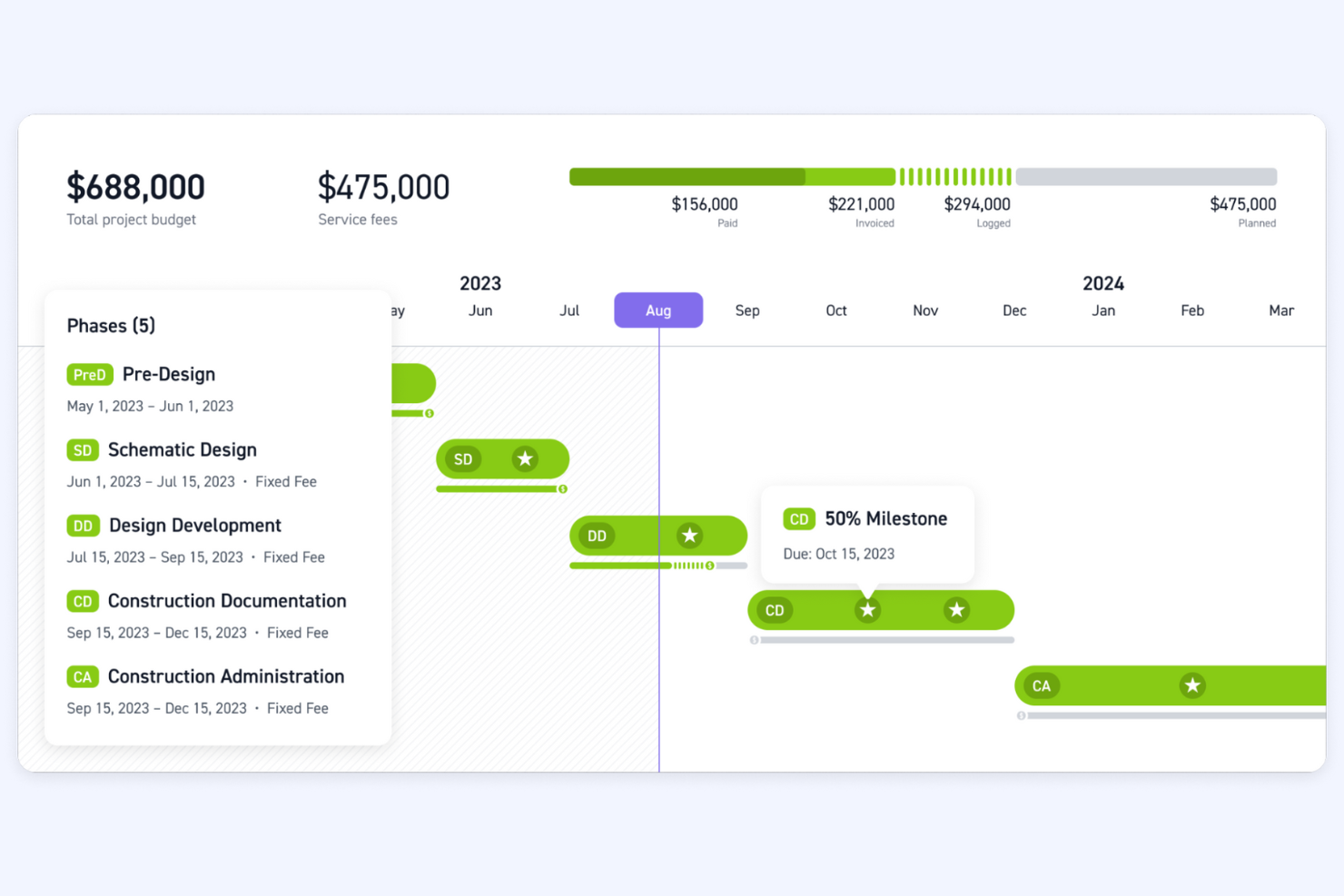
Monograph is a project management tool specifically designed for architecture and engineering firms. It helps with project tracking, resource management, and financial planning, making it a valuable asset for these industries.
Why it's a good Accelo alternative: Monograph offers specialized tools for architecture and engineering firms, focusing on project and resource management. Its extensive features help you manage complex projects efficiently and ensure your team is optimally utilized across projects. Monograph's emphasis on financial planning and industry-specific workflows makes it ideal for firms needing detailed oversight and planning capabilities.
Standout features and integrations:
Features include project timelines that allow your team to visualize project progress, budget tracking for keeping projects within financial limits, and resource allocation to ensure efficient use of your team's time and skills.
Integrations include QuickBooks.
Pros and Cons
Pros:
- Efficient resource allocation
- Supports financial planning
- Tailored for architecture and engineering
Cons:
- Not an all-in-one solution
- May not suit non-engineering and architectural industry use

Bloom
Best for creative professionals needing CRM

Bloom is a business management platform designed for creative professionals, offering tools for client management, project tracking, and invoicing. It's used by photographers, designers, and freelancers who need to manage their business operations efficiently.
Why it's a good Accelo alternative: Bloom caters to creative professionals by providing a suite of tools that simplify client management and project tracking. It features automated workflows to help streamline repetitive tasks and let you focus on creativity, and the platform's client portal allows for easy communication and collaboration. Bloom's integration of CRM and project management makes it a fitting choice for creatives seeking an all-in-one solution.
Standout features and integrations:
Features include customizable contracts for drafting and sending professional agreements quickly, while the invoicing feature ensures you can bill clients efficiently and keep track of payments. Booking management allows clients to schedule appointments, making it easier to organize your calendar.
Integrations include Google Calendar, QuickBooks, Stripe, PayPal, Square, Zapier, Mailchimp, Slack, Zoom, Xero, and more.
Pros and Cons
Pros:
- Simplifies project tracking
- Supports client management
- Tailored for creative professionals
Cons:
- Limited advanced features
- May not suit non-creative industries
Other Accelo Alternatives
Here are some additional Accelo alternatives that didn’t make it onto my shortlist, but are still worth checking out:
- Basecamp
For straightforward project management
- ConnectWise
For IT service firms
- Function Point
For creative agency management
- Ravetree
For integrated project management
- ManyRequests
For agency client portals
- StartingPoint
For workflow automation
- BigTime
For PSA with AI-driven insights
- Kantata
For professional services firms
- ClickUp
For customizable task management
- OneDesk
For unified helpdesk and project management


How I Evaluate Accelo Alternatives
I evaluate these tools in two layers: the core features—time logging, client billing, retainer management—that any Accelo replacement must nail, and the differentiators that separate good from great.
Core Functionality (Table Stakes For This List)
When I'm selecting tools for my list, I rank each one on a scale from 0 (does not offer the functionality) to 5 (excels in this area) for each core functionality listed below. Then, I calculate the tool's total score into a percentage. Each tool needs to achieve a minimum total score of 65% to be considered for inclusion.
- Project Management: I look for task assignments, dependencies, milestones, and multiple views like Gantt and Kanban that let you manage concurrent client projects.
- Time Tracking & Billing: Each tool should connect logged hours to billable rates and invoicing, so teams aren't exporting timesheets into a separate billing tool.
- Client & CRM Management: I check whether the platform stores client contacts, communication history, and deal stages in one place rather than requiring a standalone CRM.
- Retainer & Recurring Work: For agencies running ongoing retainers, I evaluate how each tool handles recurring billing, budget tracking, and rollover hours.
- Resource & Capacity Planning: Workload views and scheduling features matter here, especially for firms juggling multiple client accounts with a shared team.
- Financial Reporting & Profitability: I look at whether you can pull project margin, utilization, and budget-vs-actuals reports without exporting data to a spreadsheet.
Once I have a list of tools that meet this criteria, I consider what sets each platform apart.
Differentiating Factors (What Sets Vendors Apart)
Here's how I compare and contrast different vendors:
Standout Features
Client portals are a major differentiator. I look for tools that let clients view project status, approve deliverables, and access invoices without flooding your inbox. Quote-to-cash automation also matters for firms that want proposals to flow directly into active projects and billing cycles. Built-in ticketing is worth evaluating too, since many agencies juggle structured project work alongside ad-hoc client support requests that still need to be tracked and billed.
Beyond Features
Integrations matter a lot here. I check whether a tool connects natively to accounting platforms like QuickBooks or Xero, since double-entering invoices defeats the purpose of an all-in-one system. Pricing transparency is another factor I weigh. Some vendors lock billing or retainer features behind higher tiers, so I evaluate whether the plan you actually need is clearly priced. I also consider onboarding support, especially migration paths for teams moving off Accelo with existing client and project data.
Why Look For An Accelo Alternative?
While Accelo is a good choice of professional services automation software, there are a number of reasons why some users seek out alternative solutions. You might be looking for an Accelo alternative because…
- You need more customization options.
- Your team requires better integration capabilities.
- You're looking for more competitive pricing.
- You need support for a larger team size.
- Your business operates in regions with limited Accelo support.
- You want enhanced reporting features.
If any of these sound like you, you've come to the right place. My list contains several professional services automation software options that are better suited for teams facing these challenges with Accelo and looking for alternative solutions.
Accelo Key Features
Here are some of the key features of Accelo, to help you contrast and compare what alternative solutions offer:
- Automated workflows: Automate repetitive tasks to free up your team's time for more important work.
- Centralized client management: Manage all client interactions and data in one place for easy access and organization.
- Time tracking: Track time spent on tasks and projects to improve billing accuracy and project management.
- Project tracking: Set and monitor project timelines and deadlines to keep your team on schedule.
- Retainer management: Create and manage retainers to ensure consistent and predictable revenue streams.
- Sales forecasting: Forecast sales revenue to help your team plan and allocate resources effectively.
- Invoicing: Invoice clients in bulk to simplify your billing process and improve cash flow.
- KPI tracking: Generate and track key performance metrics to measure your team's success and identify areas for improvement.
- Quote-to-project conversion: Convert leads and quotes into projects to organize your sales and project management processes.
- Client communication: Collaborate and communicate with clients directly within the platform to improve transparency and client relationships.
What's Next:
If you're in the process of researching professional services automation software, connect with a SoftwareSelect advisor for free recommendations.
You fill out a form and have a quick chat where they get into the specifics of your needs. Then you'll get a shortlist of software to review. They'll even support you through the entire buying process, including price negotiations.