

10 Best Asana Alternatives Reviewed for 2026

10 Best Asana Alternatives Shortlist


If Asana isn’t meeting your needs, it might be time for a change. Maybe the pricing doesn’t work for your budget, the interface feels too complex, or you need features better suited to your workflow. Whatever the reasons, the right project management tool should support how your team operates, not force you to adjust.
I’ve tested and reviewed project management software across the industry. In this article, I’ll highlight the best alternatives to Asana, including their key features, strengths, and who they’re best for. Whether you need more flexibility, better collaboration, or a different user experience, there’s an option here that will fit your needs.
What is Asana?
Asana is a project management software that helps teams organize, track, and manage their work. It’s used by project managers, marketers, product teams, and other professionals who need to coordinate tasks, set deadlines, and keep projects on schedule.
The platform's task assignment, deadline tracking, and workflow automation features help teams stay organized, improve accountability, and reduce manual work. Overall, Asana makes it easier to manage projects, collaborate with your team, and keep everything on track.
Best Asana Alternatives Summary
This comparison chart summarizes pricing details for my top Asana alternative selections to help you find the best one for your budget and business needs.
| Tool | Best For | Trial Info | Price | ||
|---|---|---|---|---|---|
| 1 | Best for cross-team project visibility | 14-day free trial + free plan available | From $10/user/month (billed annually) | Website | |
| 2 | Best for portfolio project tracking | 14-day free trial + free demo available | From $10/user/month (billed annually) | Website | |
| 3 | Best for building flexible workflows | 14-day free trial | From $9/user/month (billed annually) | Website | |
| 4 | Best for AI-powered marketing workflow management | Free demo available | Pricing upon request | Website | |
| 5 | Best for comprehensive project visibility | 14-day free trial + free demo available | From $8/user/month (billed annually) | Website | |
| 6 | Best for platform customizability | Free plan available | From $7/user/month (billed annually) | Website | |
| 7 | Best for drag-and-drop interface | 15-day free trial + free plan + free demo available | From $4/user/month (billed annually) | Website | |
| 8 | Best for structured weekly marketing workflows | 14-day free trial | From $29/month | Website | |
| 9 | Best for task-centric teams | 14-day free trial | From $1.49/user/month (billed annually) | Website | |
| 10 | Best for workflow automation | Free demo | Pricing upon request | Website |

Why You Can Trust Us
We’ve been testing and reviewing project management software since 2012. As project managers ourselves, we know how critical and difficult it is to make the right decision when selecting software.
We invest in deep research to help our audience make better software purchasing decisions. We’ve tested more than 2,000 tools for different project management use cases and written over 1,000 comprehensive software reviews. Learn how we stay transparent & our software review methodology.
-

Celoxis
Visit WebsiteThis rating combines scores from multiple user review sites to reflect overall customer sentiment about the product.4.5 -
Smartsheet
Visit WebsiteThis rating combines scores from multiple user review sites to reflect overall customer sentiment about the product.4.5 -
Accelo
Visit WebsiteThis rating combines scores from multiple user review sites to reflect overall customer sentiment about the product.4.4




Best Asana Alternative Reviews
Below are my detailed summaries of the best Asana alternatives that made it onto my shortlist. My reviews offer a detailed look at the key features, pros & cons, integrations, and ideal use cases of each tool to help you find the best one for you.

Wrike
Best for cross-team project visibility

Wrike is a project management and collaboration software designed to cater to businesses of all sizes. It offers a platform that combines work management and project management capabilities, allowing users to manage tasks, projects, schedules, and processes all in one place. It also excels in cross-team project visibility, allowing teams to collaborate and track progress in real-time.
Why it's a good Asana alternative: Wrike offers a more robust suite of project management tools that are particularly beneficial for larger teams or more complex projects. It provides detailed project planning features like interactive Gantt charts, which allow users to visualize project timelines and dependencies. Additionally, Wrike offers better integrations and more advanced customization options, enabling users to tailor workflows, dashboards, and reports to fit their specific requirements,
Standout features & integrations:
Features include dashboards, cross-tagging, automation, approvals, proofing, custom item types, project resource planning, Kanban boards, Gantt charts, and dynamic request forms.
Integrations include popular tools like Slack, Gmail, Google Drive, Bitbucket, BambooHR, Amazon S3, DocuSign, ADP Workforce Now, Stripe, Cisco, Expensify, Zendesk, and over 400 more.
Pros and Cons
Pros:
- Many integrations available
- Easy-to-use task management
- Flexible project templates
Cons:
- Learning curve for new users
- Lack of in-platform chat option outside of third-party apps
New Product Updates from Wrike

Wrike Inbox Adds Search and Notification Filters
Wrike Inbox adds search across Incoming, Sent, and Archive, along with filters for Approvals and @mentions. The update helps users find specific notifications faster and apply bulk actions only to matched results. For more information, visit Wrike’s official site.
 .
.
Celoxis
Best for portfolio project tracking
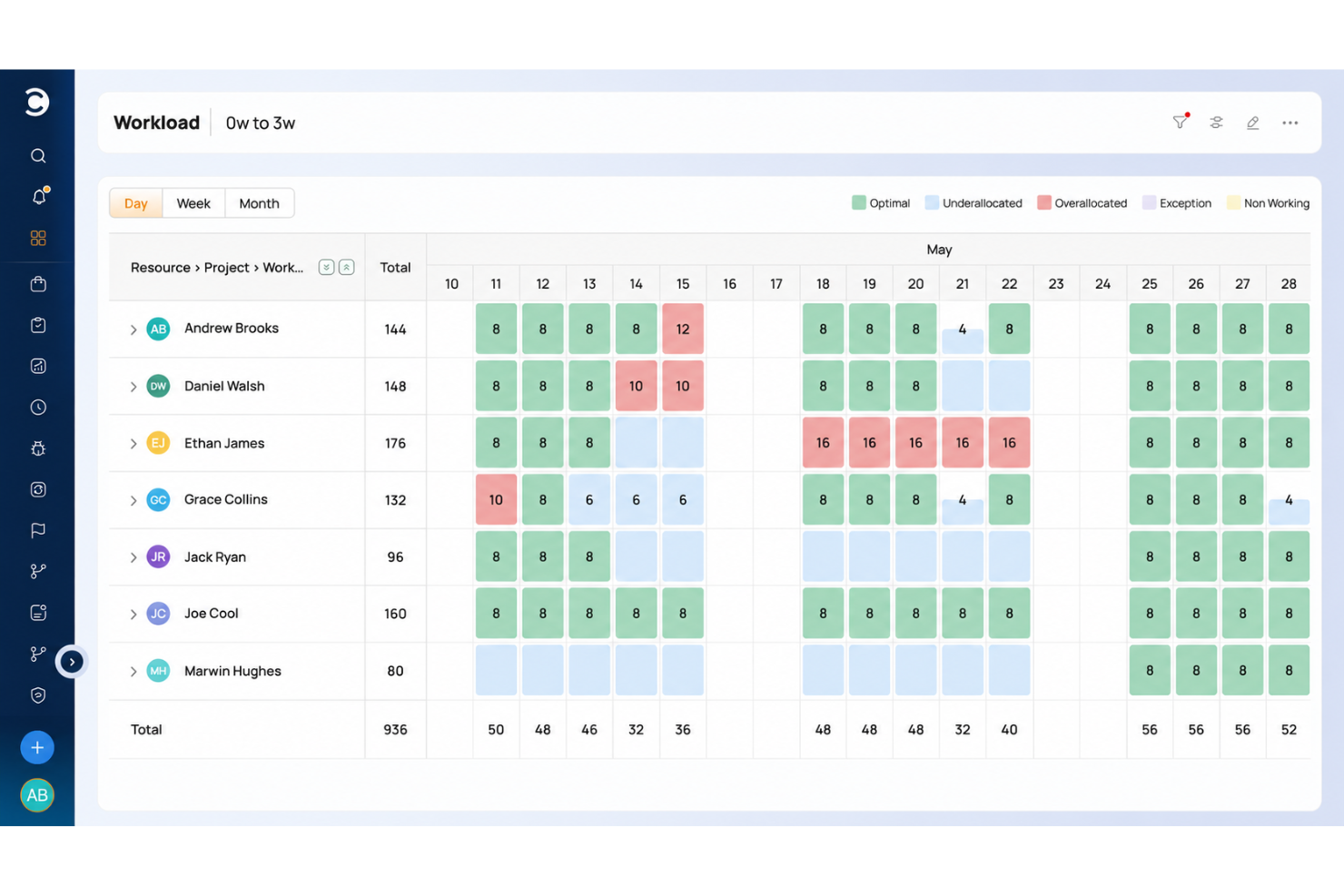
Celoxis is a project management platform that covers task management, portfolio tracking, resource planning, Gantt scheduling, time tracking, and custom reporting across teams and workstreams.
Who Is Celoxis Best For?
Celoxis is a good fit for mid-size to large teams that manage multiple concurrent projects and need structured oversight across portfolios, resources, and budgets.
Why I Picked Celoxis
I've included Celoxis in my top picks because its portfolio tracking goes well beyond a simple project list. I can monitor schedules, budgets, margins, and custom KPIs across every active project from a single portfolio dashboard, with drill-down capability so I'm never stuck looking at surface-level data. The what-if analysis feature is particularly useful when I need to model different project mixes against resource capacity before committing to a roadmap. Inter-project dependency tracking adds another layer of control that Asana simply doesn't offer at this level.
Celoxis Key Features
- Resource workload charts: Visualize team capacity and workload distribution across projects to spot over-allocation before it becomes a problem.
- Time and expense tracking: Log hours directly against tasks and projects, with built-in approval workflows for timesheets and expenses.
- Custom workflow apps: Build custom trackers for risks, issues, and change requests using configurable fields and statuses.
- Scheduled reports: Set up automated report delivery so stakeholders receive project updates without manual effort.
Celoxis Integrations
Celoxis offers native integrations with Google Drive, Microsoft Excel, Microsoft Project, Jira, Azure DevOps, QuickBooks Online, Salesforce, and Slack, along with SSO support through Microsoft Active Directory, Okta, OneLogin, and SAML 2.0. It also connects with Zapier and provides an API for custom integrations.
Pros and Cons
Pros:
- Role-based dashboards for different stakeholders
- Supports on-premise and cloud deployment
- Built-in resource workload and capacity views
Cons:
- Mobile app lacks full desktop functionality
- Only two task views available (Kantt, kanban)

Best for building flexible workflows

monday.com could be a solid alternative to Asana if you're looking for a flexible, visually oriented tool that adapts to how your team works. It lets you turn project plans into customizable boards, track tasks with clear statuses and dependencies, and build workflows that reflect real teams — whether you’re in marketing, sales, engineering, HR or operations.
Why I Picked monday.com
I picked monday.com because it stands out for its customizable workflows built around boards and flexible columns — giving your team the freedom to structure tasks exactly how you need. The ability to build boards for projects, pipelines, HR tasks, content calendars or even sales tracking makes it useful across departments. I also like that monday.com supports workflow automation: you can configure automations that trigger when statuses change or tasks are moved, which helps keep recurring or repetitive work from slipping through the cracks.
monday.com Key Features
In addition to its core workflow flexibility and automation, here are other features that make monday.com a strong Asana alternative:
- Multiple Board Views (Table, Kanban, Timeline, Gantt, Calendar, Chart): Lets your team choose how they want to view work — whether as lists, boards, timelines, or calendars.
- Work Docs: Lets you build documents or project plans right within the workspace, with live connections to board data (tasks, dates, status) so plans and execution stay in sync.
- Time Tracking: Monitor the time spent on tasks and projects, allowing for better resource management and productivity analysis.
- File Sharing: Collaborate seamlessly by sharing files directly within the platform, ensuring all team members have access to the latest documents and updates.
monday.com Integrations
Integrations include Slack, Gmail, Microsoft Teams, Jira, Zoom, Dropbox, Google Drive, Trello, HubSpot, and Salesforce. An open API is also available for custom integrations.
Pros and Cons
Pros:
- Extensive integration options improve workflow connectivity.
- Built-in automation reduces repetitive manual task updates and keeps workflows moving.
- monday.com makes it easy to build custom workflows across different teams and functions.
Cons:
- Without customization and thoughtful setup, boards can become messy as projects scale.
- Free and Basic plans are very limited and don’t include key views or automation features.
New Product Updates from monday AI Workspace
monday AI Workspace Adds Human Approval Routing
monday AI Workspace adds a human-in-the-loop approval block to AI Workflows, sending approval requests and routing workflow paths based on responses. For more information, visit monday AI Workspace's official site.
 .
.
Best for AI-powered marketing workflow management

Screendragon is a work management platform designed to help marketing, agency, and professional services teams enhance their operations. It combines project management, workflow automation, and resource management into one solution.
Why it's a good Asana alternative: One reason to consider Screendragon as an alternative to Asana is its advanced workflow automation capabilities. The platform allows you to create custom workflows that align with your team's specific processes, ensuring tasks are routed to the right people at the right time. This automation can reduce manual interventions, helping your team focus on more strategic activities. Another notable feature is Screendragon's resource management tools. With automated scheduling and capacity planning heatmaps, you can gain real-time insights into your team's workload and identify bottlenecks early.
Standout features & integrations:
Features include budget management, task management with Gantt charts and Kanban boards, digital asset management, time tracking, project templates, resource allocation, customizable dashboards, and approval workflows.
Integrations include MS Power BI, Slack, MS Teams, Zapier, Google Drive, Trello, Microsoft 365, Box, Jira, Microsoft OneDrive, and PeopleSoft.
Pros and Cons
Pros:
- Integrates various tools like project management and budget tracking
- Good resource planning features
- Can tailor the platform to your specific needs
Cons:
- The platform's depth can lead to complexity
- Time-consuming setup
New Product Updates from Screendragon
Screendragon Unveils New AI Hub
Screendragon introduced AI Hub, a new capability that lets teams build and manage AI agents directly within workflows. The update helps marketing teams automate tasks, maintain governance controls, and scale AI-driven operations more efficiently. For more information, visit Screendragon's official site.

Workzone
Best for comprehensive project visibility

Workzone offers project management solutions tailored to industries like marketing, healthcare, and manufacturing, making it a strong contender for those seeking an Asana alternative. It provides features focusing on project visibility and collaboration, ideal for teams managing multiple time-sensitive projects. Workzone helps teams stay organized and efficient by addressing challenges in task management and team collaboration.
Why I Picked Workzone
I picked Workzone as a compelling Asana alternative due to its project visibility and collaboration features. Its project visibility allows your team to gain real-time insights into project progress, ensuring everyone is aligned and informed. Additionally, Workzone's collaboration tools facilitate communication, making it easier for your team to work together and resolve issues as they arise. These features benefit teams managing complex projects with multiple stakeholders, ensuring tasks are completed on time and within scope.
Workzone Key Features
In addition to its project visibility and collaboration tools, Workzone offers several other features that enhance its appeal as an Asana alternative.
- Workload Management: This feature helps you allocate tasks effectively, ensuring that your team members are neither overwhelmed nor underutilized.
- Reporting on Key Metrics: Workzone provides detailed reports that help you track project performance and make informed decisions.
- Over 1,000 Pre-Built Templates: These templates allow your team to launch projects quickly, saving time on planning and setup.
- Proofing and Approvals: This feature streamlines the review process, making it easier to get feedback and approvals on project deliverables.
Workzone Integrations
Integrations include Slack, Microsoft Teams, Google Drive, Salesforce, Box, Dropbox, Outlook, QuickBooks, SharePoint, and Basecamp.
Pros and Cons
Pros:
- Structured request and workload management
- Built-in document proofing and approvals
- Strong project visibility and tracking
Cons:
- Mobile experience weaker than desktop
- Smaller integration ecosystem than competitors
New Product Updates from Workzone

Workzone Adds Forecasts to Project Baselines
Workzone adds Forecasts to Project Baselines for Enterprise users, comparing baseline snapshots with current project schedules. The feature helps teams anticipate project outcomes and identify potential scope, schedule, or cost overruns earlier. For more information, visit Workzone’s official site.
 .
.
ClickUp
Best for platform customizability

ClickUp is a comprehensive project management and productivity tool designed to streamline workflows and enhance team collaboration. It was designed to provide a more flexible alternative to existing project management solutions with a wide range of features that cater to various industries and team sizes.
Why it's a good Asana alternative: ClickUp sets itself apart with its high degree of customizability. ClickUp allows users to create custom task statuses and custom fields and tailor workflows to their specific needs, offering over 15 different project views, including unique options like Gantt charts and mind maps. This level of customization enables teams to adapt the tool to their preferred project management methodologies, whether it's Agile, Scrum, or another approach, making ClickUp a versatile solution for diverse project management needs.
Standout features & integrations:
Features include workload management, goal tracking, advanced time tracking, automation, task dependencies, mind maps, whiteboards, dashboards, custom permissions, assigned comments, sprints, and subtasks.
Integrations include Slack, Google Calendar, Gmail, GitHub, Zapier, Microsoft Teams, Outlook, HubSpot, Dropbox, Figma, OneDrive, and more.
Pros and Cons
Pros:
- Different views for visualizing projects
- Users can create as many workspaces, folders, and lists as needed
- Offers a free plan with many features
Cons:
- ClickUp’s hierarchical structure, while powerful, can become confusing
- Number of customization options may be overwhelming for new users
New Product Updates from ClickUp
ClickUp Adds Custom Fields, Slack Imports, and AI Notes
ClickUp adds Custom Fields by task type, Slack history imports into existing ClickUp locations, and in-meeting chat capture for AI Notetaker. These updates make it easier to organize task data, migrate Slack conversations, and keep more complete meeting records. For more information, visit ClickUp’s official site.
 .
.
Best for drag-and-drop interface

For teams seeking a reliable alternative to Asana, Zoho Projects offers a robust project management solution that caters to a diverse range of industries, from construction to IT. It provides tools that streamline project workflows, enhance collaboration, and offer insightful analytics, making it an ideal choice for enterprises, educational institutions, and software development teams. By emphasizing user privacy and integrating advanced functionalities like task automation and AI-driven insights, Zoho Projects addresses the complexities of modern project management, helping you and your team stay organized and efficient.
Why I Picked Zoho Projects
I picked Zoho Projects as an Asana alternative because of its emphasis on user privacy and advanced task automation capabilities. The platform allows you to automate routine tasks using a simple drag-and-drop interface, which can significantly reduce manual workload for your team. Additionally, Zoho Projects integrates AI-driven insights through Zia intelligence, offering predictive analytics that can inform better decision-making. These features cater directly to the needs of project managers looking for a tool that not only manages tasks but also enhances productivity and strategic planning.
Zoho Projects Key Features
In addition to its automation and AI capabilities, here are some other features Zoho Projects offers that make it a compelling Asana alternative:
- Gantt Charts: Visualize project timelines and dependencies, allowing for better planning and tracking of project milestones.
- Issue Tracking: Monitor and resolve project issues efficiently with a dedicated system for logging and managing bugs or obstacles.
- Time Tracking: Keep track of time spent on tasks and projects to ensure accurate billing and productivity assessments.
- Blueprints: Customize workflows with a drag-and-drop interface to reflect your team's unique processes and requirements.
Zoho Projects Integrations
Integrations include Google Drive, Slack, Microsoft Teams, Dropbox, GitHub, Bitbucket, Zoho CRM, Zoho Books, Zoho Desk, and Zoho Analytics.
Pros and Cons
Pros:
- Affordable pricing for growing teams
- Built-in time tracking and billing
- Strong automation and workflow customization
Cons:
- Mobile experience less fully featured
- Interface has steeper learning curve
New Product Updates from Zoho Projects

Zoho Projects Adds Time Log Grid View for Faster Tracking
Zoho Projects adds Time Log Grid View, a unified interactive grid for logging and reviewing hours across tasks and issues, helping teams enter time faster and identify work patterns more easily. For more information, visit Zoho Projects’ official site.
 .
.
Enji
Best for structured weekly marketing workflows

Enji is a marketing project management platform designed for small teams and solo marketers who want campaign planning, content creation, scheduling, and reporting in one place.
Who Is Enji Best For?
Enji is a strong fit for small marketing teams and solo marketers who need structured workflows built around campaigns and content.
Why I Picked Enji
I picked Enji because its guided weekly planning workflow offers more structure than a general-purpose project management tool like Asana. When you set up your marketing strategy, Enji asks which days you want to focus on marketing and automatically creates recurring tasks around that schedule. I also like that the planning tools connect directly to execution features. When it's time to complete a task, you can write content, schedule posts, and track progress from within the same workspace. You can also draft content, schedule social posts, and review performance metrics without switching between multiple tools.
Enji Key Features
- Campaign planner: Organize multi-channel campaigns with tasks, timelines, and content deadlines in a shared calendar.
- Content brief builder: Create standardized briefs for blogs, emails, and social campaigns.
- Goal tracking: Monitor quarterly marketing goals alongside active campaigns and completed work.
- Social media scheduler: Draft, schedule, and publish social content across multiple channels.
Enji Integrations
Enji offers native integrations with Canva, Google Analytics 4, LinkedIn, and Google Calendar. It also supports integrations through Zapier and provides API access for custom connections.
Pros and Cons
Pros:
- Strategy builder links goals to campaigns
- AI copywriter for quick content drafts
- Centralized, structured content brief creation
Cons:
- Limited visibility into feature update roadmap
- Not suitable for complex project dependencies

Best for task-centric teams

Freedcamp is a versatile project management tool that focuses on task organization and collaboration, making it ideal for teams that revolve around task completion and deadlines. Its design centers on enhancing task visibility and management, which justifies its position as the best tool for task-centric teams where task tracking and completion are critical.
Why it's a good Asana alternative: I selected Freedcamp as a top Asana alternative for its exceptional task management capabilities, which cater specifically to teams prioritizing task execution and tracking. Its task-centric approach provides a streamlined experience for managing complex projects, setting it apart from Asana by offering a more focused and simplified task management solution.
Standout features & integrations:
Features include detailed task lists, Kanban boards for Agile project management, and a calendar view for deadline tracking.
Integrations include popular tools like Google Drive, Dropbox, Slack, Trello, Google Sheets, Google Forms, MailChimp, Asana, OneDrive, and GitHub.
Pros and Cons
Pros:
- Intuitive design for easy adoption and use
- Affordable pricing structure for teams of all sizes
- Tailored features for superior task management
Cons:
- Can be too task-focused for projects needing broad feature sets
- Integrations may not cover all niche tools some teams use
- Limited advanced features for complex project planning

Best for workflow automation

Process Street is a powerful workflow automation and process management software designed for businesses looking to enhance and standardize their operations. It allows users to create, manage, and automate workflows through structured checklists and Standard Operating Procedures (SOPs).
Why it's a good Asana alternative: Process Street stands out as a strong alternative to Asana, particularly for its focus on workflow automation and process standardization. Unlike Asana, which is more suited for general project management, Process Street excels in automating repetitive tasks and ensuring operational consistency. Features like dynamic due dates, conditional logic, and in-depth checklist templates allow for greater customization and efficiency in managing workflows.
Standout features & integrations:
Features include task permissions, rich content support, form fields, approvals, task assignments, analytics, custom templates, audit trails, activity feeds, SLA management, recurring tasks, version control, and notifications.
Integrations include Slack, Zapier, Salesforce, Google Drive, Dropbox, Trello, Microsoft Teams, OneDrive, Google Calendar, Mailchimp, HubSpot, Airtable, Jira, Basecamp, Evernote, and QuickBooks.
Pros and Cons
Pros:
- Supports complex and dynamic workflows
- Pre-built templates for quick setup
- High levels of customization
Cons:
- Reports could be more in-depth
- Logic flow management can be confusing for new users
Other Asana Alternatives
Here are some additional Asana alternatives that didn’t make it onto my shortlist, but are still worth checking out:
- ProofHub
For integrated proofing and review
- awork
For visual project planning tools
- Redbooth
For HD video meeting integration
- Nutcache
For agile project planning
- Podio
For customizable workflows
- Adobe Workfront
For enterprise work management
- ProjectManager
For real-time project planning
- nTask
For risk management integration
- Ravetree
For integrated CRM features


How I Evaluate Asana Alternatives
I split my evaluation into two layers: the baseline capabilities every Asana alternative must have—like task hierarchy, multiple views, and automation—and the differentiators that signal the best fit.
Core Functionality (Table Stakes For This List)
When I'm selecting tools for my list, I rank each one on a scale from 0 (does not offer the functionality) to 5 (excels in this area) for each core functionality listed below. Then, I calculate the tool's total score into a percentage. Each tool needs to achieve a minimum total score of 75% to be considered for inclusion.
- Task & Project Management: I look for full task hierarchy—projects, tasks, subtasks, dependencies, milestones—so teams can map out a product launch or sprint backlog with clear ownership.
- Multiple Project Views: Each tool should offer at least list, board, calendar, and timeline/Gantt views so PMs can switch between sprint boards and roadmap timelines.
- Team Collaboration Tools: Comments, @mentions, file attachments, and activity feeds all matter here, especially for distributed teams coordinating handoffs between design and engineering.
- Workflow Automation: I evaluate whether a tool lets you build custom rules—like auto-assigning QA reviews when a task moves to "Ready for Testing"—without writing code.
- Reporting & Dashboards: Customizable dashboards that surface project health, workload distribution, and progress across a portfolio help PMs report status to leadership fast.
- Integrations & API: The tool needs to connect with the broader stack—Slack, GitHub, Google Workspace, Figma—plus offer an API and connectors like Zapier or Make.
Once I have a list of tools that meet this criteria, I consider what sets each platform apart.
Differentiating Factors (What Sets Vendors Apart)
Here's how I compare and contrast different vendors:
Standout Features
Resource and workload management is a big one—I check whether a tool lets you visualize team capacity so you can rebalance assignments before someone gets buried mid-sprint. Goal and OKR tracking matters when you need to tie daily tasks back to quarterly objectives and show leadership that work is moving the needle. I also look for native time tracking, especially for teams billing clients or measuring effort across multiple projects.
Beyond Features
Pricing structure matters a lot when comparing Asana alternatives—I evaluate whether a tool offers a usable free tier for small teams and how costs scale as headcount grows. Scalability ties directly into this; I check for enterprise controls like SSO and SCIM provisioning that growing organizations will need down the road. Security and compliance certifications like SOC 2 Type II and GDPR readiness also weigh in, especially for teams handling sensitive client data or working in regulated industries.
Why Look for an Asana Alternative?
While Asana is a good choice of project management software, there are a number of reasons why some users seek out alternative solutions. You might be looking for an Asana alternative because…
- You need a more budget-friendly option for your team
- The interface feels too complex or cluttered for your workflow
- You want better time tracking features built into the platform
- Your team needs advanced reporting and analytics tools
- You require an offline mode for managing tasks without internet access
- You need a project management tool that works better for client collaboration
If any of these sound like you, you’ve come to the right place. My list contains several project management software options that are better suited for teams encountering these challenges with Asana and looking for alternative solutions.
Asana Key Features
Here are some of the key features of Asana to help you compare and contrast with what alternative solutions offer:
- Task management: Create, assign, and set deadlines for tasks to help your team stay organized and on schedule.
- Multiple project views: Choose from list, board (Kanban), calendar, or timeline (Gantt chart) views to visualize work in the way that suits your team's workflow.
- Workflow automation: Automate routine tasks with customizable rules to reduce manual effort and minimize errors.
- Custom fields: Add specific data fields to tasks to capture all necessary information, tailoring Asana to your team's unique needs.
- Integrations: Connect Asana with tools like Slack, Gmail, and Zoom to centralize your work and enhance collaboration.
- Reporting and analytics: Utilize dashboards and reporting tools to monitor project progress and team performance, enabling data-driven decisions.
- Mobile access: Access your tasks and projects on-the-go with Asana's mobile apps for iOS and Android to keep your team connected anytime, anywhere.
- Security features: Use two-factor authentication, single sign-on support, and customizable user permissions to keep your data secure.
- AI capabilities: Leverage AI tools like AI Studio to design workflows with AI agents, enhancing productivity and efficiency.
- Goal tracking: Align your team's work with company objectives by setting and monitoring goals within Asana to ensure everyone stays focused on what matters most.
What's Next?
I hope this guide helps you find the right Asana alternative for your needs. If you know of a tool that should be on this list or have experiences to share, feel free to suggest and discuss. Your insights could greatly help others in their search for the ideal project management solution.
If you want to keep informed of more alternative content, software comparisons, and other PM topics, subscribe to the Insiders Newsletter now.