10 beste programvarer for prosjektstyring av markedsføring i 2026

10 Kortliste over den beste programvaren for markedsføringsprosjektstyring


Den beste programvaren for prosjektstyring innen markedsføring hjelper deg med å levere kampanjer og prosjekter i tide, innenfor budsjettet og i henhold til avtalt omfang. Uten dette verktøyet vil du oppleve misforståelser med kunder, overskridelse av tidsfrister og manglende klarhet rundt hvem som har ansvar for oppgavene – alt dette kan føre til at prosjektet mislykkes.
Jeg har brukt mine 15 års erfaring innen markedsføring og prosjektstyring til å evaluere mer enn 25 verktøy for prosjektstyring innen markedsføring. Les analysen min av hvert verktøy, viktige funksjoner og bruksområder nedenfor. Jeg hjelper deg med å finne det riktige verktøyet for å forbedre synlighet, ansvarlighet og samarbeid i markedsføringsprosjektene dine, samt følge med på teamets arbeidsmengde, hvor mye tid og budsjett som brukes, og prosjektets avkastning på investeringen.
Why Trust Our Software Recommendations
Our team has been testing and reviewing software since 2012. As project managers ourselves, we know how difficult—and important—it is to choose the right software.
For this guide, we evaluated tools using hands-on testing and independent research, scoring tools using our selection criteria. We also draw on insights from industry thought leaders and practicing project management experts.
Our reviews reflect our human editorial judgment, not a sales pitch.
Expert reviewers:
Sammenligningstabell for programvare for prosjektstyring innen markedsføring
Denne sammenligningstabellen oppsummerer prisdetaljene for mine beste utvalgte programmer for prosjektstyring innen markedsføring:
| Tool | Best For | Trial Info | Price | ||
|---|---|---|---|---|---|
| 1 | Best for end-to-end solutions | Free plan available | From $9/user/month (billed annually) | Website | |
| 2 | Best for agencies & professional services | 14-day free trial | From $10/user/month (billed annually) | Website | |
| 3 | Best for financial performance tracking | 14-day free trial | From $17/user/month | Website | |
| 4 | Best for scaling organizations | 14-day free trial | Pricing upon request | Website | |
| 5 | Best for AI-powered marketing project workflows | Free demo available | Pricing upon request | Website | |
| 6 | Best for full lifecycle service delivery | Free demo available | Pricing upon request | Website | |
| 7 | Best for various project views | Free plan + 14-day free trial + free demo available | From $5/user/month (billed annually) | Website | |
| 8 | Best for campaign goals and milestones | Free plan + 15-day free trial + free demo available | From $4/user/month (billed annually) | Website | |
| 9 | Best for solopreneurs and small business marketing | 14-day free trial | From $29/month | Website | |
| 10 | Best for code-free automations | 30-day free trial | From $35/user/month (billed annually) | Website |


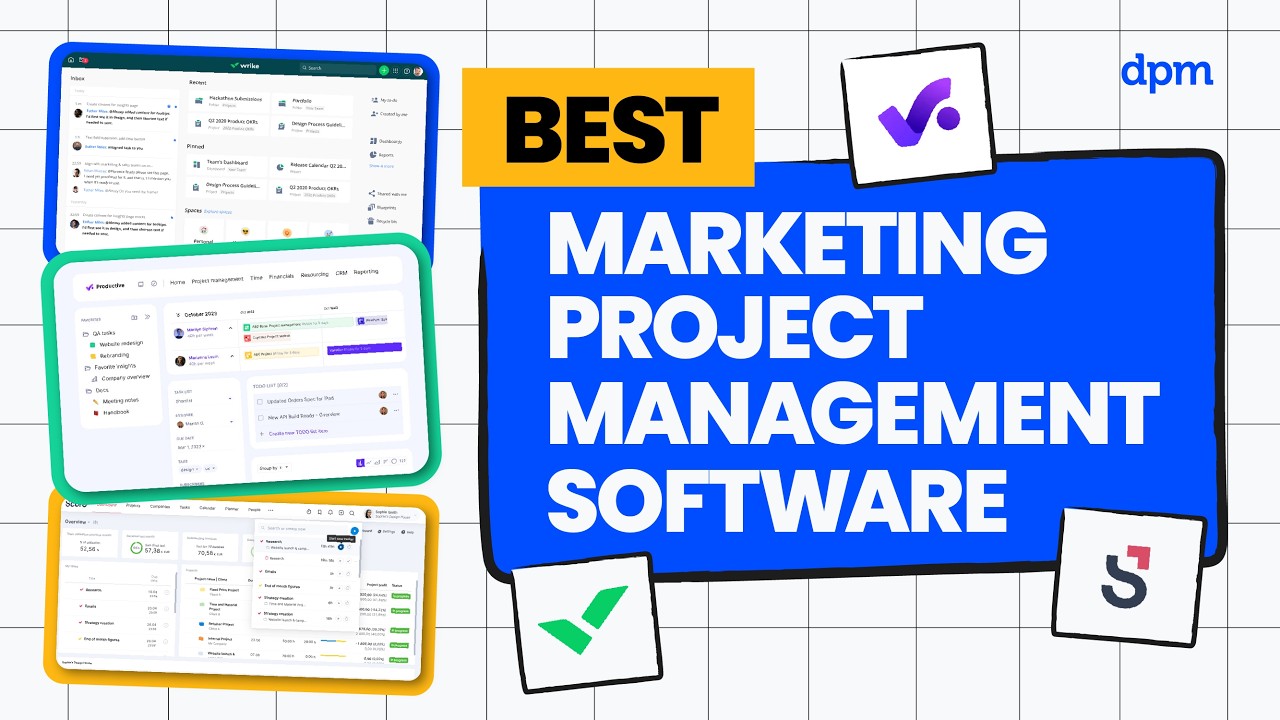
Anmeldelser av den beste programvaren for prosjektstyring innen markedsføring
Her er mine anmeldelser av den beste programvaren for prosjektstyring i markedsføringsbyråer som jeg har brukt.

Best for end-to-end solutions
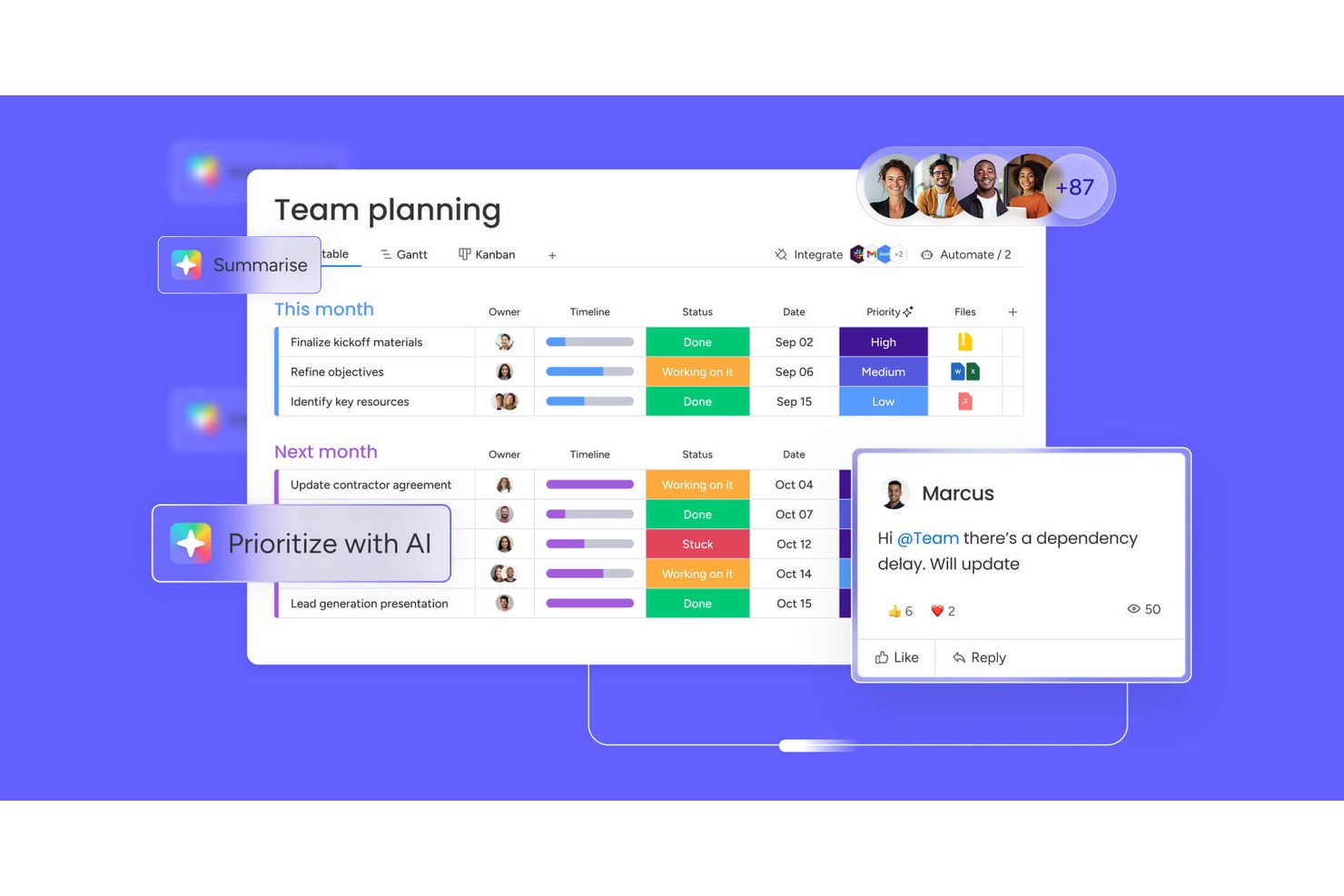
monday AI Workspace is a configurable work management platform that combines campaign planning, AI-powered workflows, resource management, and cross-team reporting across marketing projects and portfolios.
Who Is monday AI Workspace Best For?
It's a strong fit for mid-market to enterprise marketing operations and in-house agency teams managing multiple concurrent campaigns across cross-functional stakeholders.
Why I Picked monday AI Workspace
monday AI Workspace earns its spot on my shortlist because it's one of the few platforms where I can run a campaign from brief through launch without switching tools. I particularly like the AI Workflow Builder, which lets me chain agents and automations so tasks like brief intake and stakeholder updates run without manual intervention. The Human Approval Block makes this practical: I can embed approval gates directly inside a workflow, routing to the next stage automatically once sign-off lands.
monday AI Workspace Key Features
- Multiple planning views: Switch seamlessly between Gantt, Kanban, calendar, timeline, and table layouts for advanced campaign scheduling.
- Customizable intake forms: Capture, route, and triage creative briefs and marketing requests automatically within your workspace.
- Workload and capacity planning: Visualize and assign team resources based on availability and role across concurrent projects.
- Native marketing stack integrations: Connect directly with tools like Adobe Creative Cloud, HubSpot, Salesforce, and Google Ads to centralize campaign assets and activities.
monday AI Workspace Integrations
monday AI Workspace offers hundreds of native integrations, including Slack, Google Workspace, Microsoft 365, Salesforce, Jira, GitHub, Zoom, Dropbox, HubSpot, and Zendesk. It also supports Zapier and provides an API for custom integrations.
Pros and Cons
Pros:
- Cross-campaign portfolio views improve multi-project visibility
- Intake forms automate creative request routing
- AI-powered brief drafting speeds up campaign kickoff
Cons:
- Automation setup complexity grows with campaign scale
- Native proofing tools lag behind dedicated alternatives
New Product Updates from monday AI Workspace
monday AI Workspace Adds Human Approval Routing
monday AI Workspace adds a human-in-the-loop approval block to AI Workflows, sending approval requests and routing workflow paths based on responses. For more information, visit monday AI Workspace's official site.

Best for agencies & professional services

Productive is a well-rounded agency management software that gives you the tools and data you need to keep your agency and or professional services business running smoothly.
Danyon Togia, the Founder of the SEO agency Expert SEO, says Productive has been a great fit for his team. "Using Productive felt like finally having my internet, power, and gas bill all with one company," he says. It's made a big difference: "Having everything in one system meant less juggling, more focus, and a smoother workflow across every project for me and my team," he says.
Why I Picked Productive
Productive offers client and prospect management in the sales pipeline, which also lets you manage deal flow and get sales organized. The resource planning feature, time tracker, and task collaboration features help you make sure work is completed on time, bill clients accurately, and keep the team working together. You also get useful reports on profitability and costs to help with finance management, as well as real-time reports on margins, utilization, and individual employees’ or contractors’ history with the company and salary reports.
Productive Key Features
Productive also offers several features that can help you and your team improve your marketing project management processes.
- Task Management: You can streamlines task assignments and progress tracking so your team stays aligned with project goals.
- Client Portal: This provides a dedicated space for clients to view project updates and collaborate, which improves transparency and communication.
- Custom Dashboards: This lets you create personalized project data views and focus on the metrics that matter most.
- AI-Powered Insights: The artificial intelligence features offer predictive analytics and insights that help with proactive decision-making.
Productive Integrations
Integrations include Xero, QuickBooks, HubSpot, Jira, Slack, Zapier, Google Calendar, and Sage.
Pros and Cons
Pros:
- Flags projects trending off budget
- Lets you simulate staffing or budget changes
- Aligns delivery with financial tracking
Cons:
- Steep learning curve for full feature use
- Reporting depth can require setup
New Product Updates from Productive
Productive Adds Voice Dictation, Slack Connector, Proposals, and Overtime
Productive adds voice dictation, a Slack Connector, proposal controls, and overtime tracking. These updates support faster AI interactions, client proposals, and time management. For more information, visit Productive’s official site.

Scoro
Best for financial performance tracking
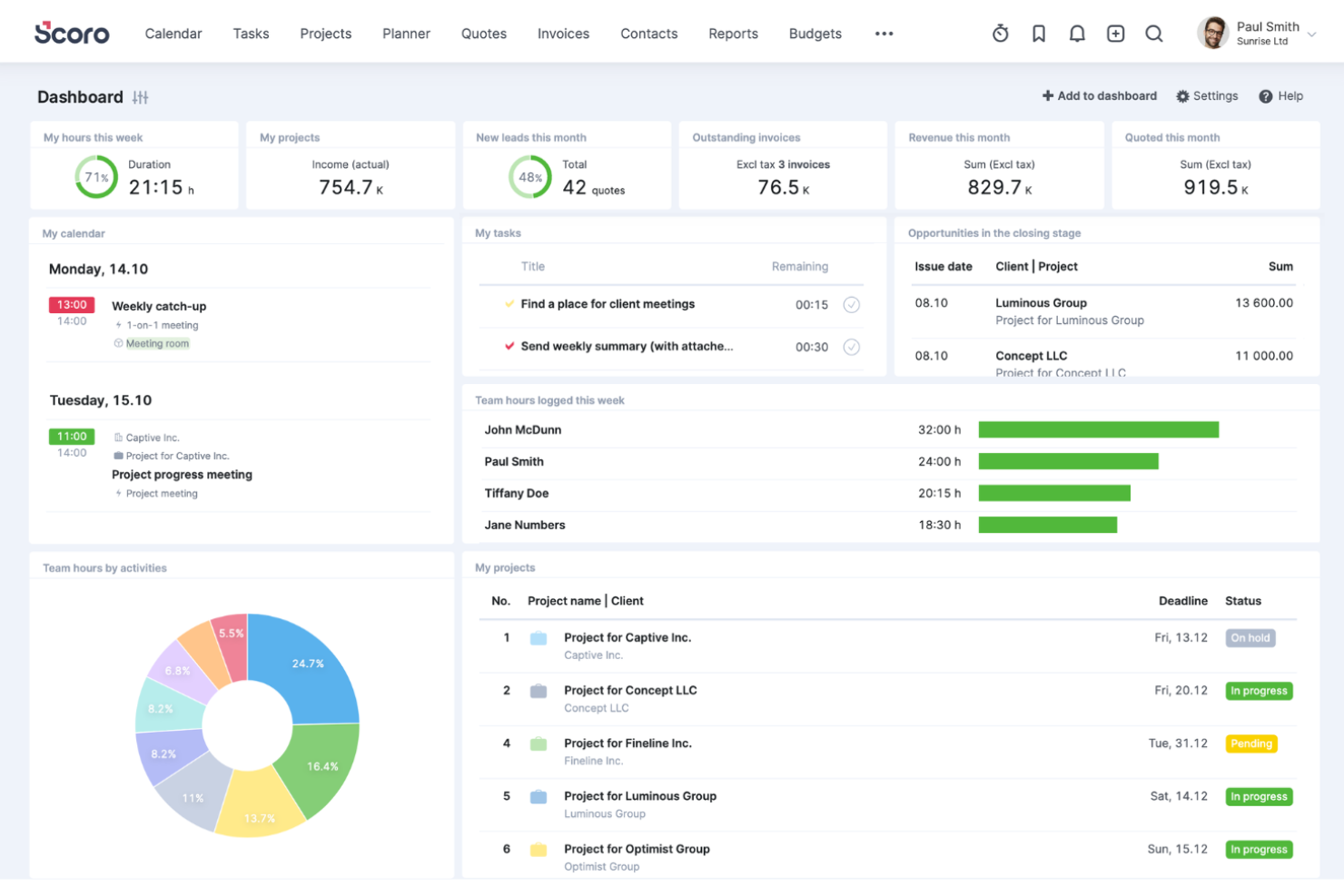
Scoro is a comprehensive work management software designed for different professional services, like marketing. It has a suite of tools to support the delivery of marketing projects from inception to billing.
Why I Picked Scoro
The platform is an all-in-one project management solution that provides control and visibility into every part of your marketing project, like quoting and invoicing, sales pipelines, customer accounts, resource planning, timelines, and task assignments. I liked that Scoro has an intuitive centralized dashboard that provides an overview of all marketing activities, allowing teams to track every campaign from beginning to execution.
Additionally, Scoro offers in-depth analytics and real-time reporting capabilities. Marketing managers can leverage these tools to assess campaign performance against KPIs and adjust strategies in real time.
Scoro Key Features
Scoro offers a variety of other tools that can further improve your team's marketing project management processes.
- Reporting and Analytics: Track and analyze profitability on a client, service, team, or project level with insights into agency performance and financials.
- Automation and Invoicing: Automate repetitive tasks and retainer invoicing to help your agency get paid faster and stay profitable.
- Collaboration Tools: Facilitate communication among team members through discussion threads and comments to keep everyone connected.
- Time and Calendar Management: Use built-in timers and a unified calendar to manage time tracking, meetings, and deadlines.
Scoro Integrations
Integrations include Google Calendar, HubSpot, Jira, Slack, Xero, QuickBooks, Zendesk, WooCommerce, Asana, Dropbox, PayPal, Expensify, Stripe, Mailchimp, Sage Intacct, Microsoft Exchange, and more. You can also connect to other apps through its Zapier integration.
Pros and Cons
Pros:
- Offers multi-currency and entity support
- Combines financials with project operations
- Links quotes directly to project plans
Cons:
- Customization in templates can be limited
- Interface may feel cluttered in deep use
New Product Updates from Scoro

Scoro Adds Time Mobile App and ELI Improvements
Scoro adds the Scoro Time mobile app for iOS/Android to track time anywhere and expands ELI with attachments, smarter filtering, and trigger-based actions. For more information, visit Scoro's official site.

Wrike
Best for scaling organizations
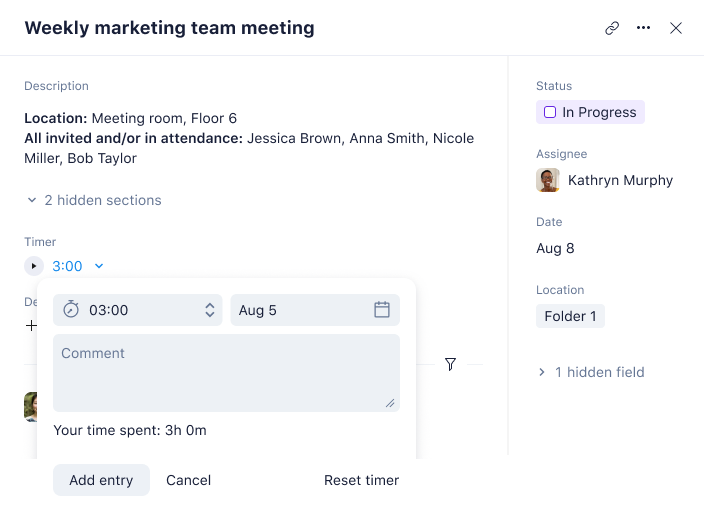
Wrike is an award-winning marketing project management platform that’s designed to improve marketing project management processes, enabling greater productivity and driving ROI.
I spoke with Nicola Leiper, Director & Head of Project Management at Espresso Translations, about her team's experience with Wrike. "Wrike rescued my largest client deal when our pharmaceutical project ran off the rails," she explains. "We were dealing with medical compliance timelines and regulatory questions stalling everything. I drew up a workflow in Wrike and could clearly see where the issue would spread and within minutes our whole team was in a better position," she says, alluding to some quick resource adjustments and problem solving.
Why I Picked Wrike
It’s highly configurable and scalable, and you can customize workflows, dashboards, reports, and request forms to maximize your effort. Wrike allows you to switch between Kanban boards, interactive drag-and-drop Gantt charts, and workload views for visualizing priorities.
It also features time and expense tracking, task and project management, visual proofing, templates for common marketing tasks, reporting, and resource management and allocation. Wrike is especially ideal for design and content collaboration with its highly visual interface and ability to communicate directly within tasks.
It even provides the option to create request and approval workflows and allows team members to edit and manage files and docs in one place.
Wrike Key Features
Wrike offers several other features that are invaluable for marketing project management.
- Resource Management: This feature helps you balance your team's workloads and make sure projects are completed on time without overburdening any member.
- Marketing Calendars: This provides global visibility into content production schedules and campaign timelines to make sure you get alignment across teams and projects.
- Dashboards: You can visually track the performance of your campaigns and events and get insights that help make informed decisions.
- Collaborative Proofing: You and your team can review and approve digital assets in one place, which helps streamline feedback and revisions.
Wrike Integrations
Integrations include 400+ pre-built native integrations, including the most popular file management software from Microsoft, Google, and Dropbox, along with sales and marketing software from Salesforce and Marketo, and creative apps from Adobe.
Pros and Cons
Pros:
- Strong proofing and asset review tools
- AI agents help offload routine tasks
- Handles complex workflows as teams scale
Cons:
- Some features locked behind add-ons
- Feature set may overwhelm small teams
New Product Updates from Wrike
Wrike Adds Klaxoon MCP Integration
Wrike’s Klaxoon MCP integration is now generally available, enabling AI agents to navigate between Wrike tasks and attached whiteboards, read task context, and manage whiteboard attachments via API. For more information, visit Wrike's official site.

Best for AI-powered marketing project workflows
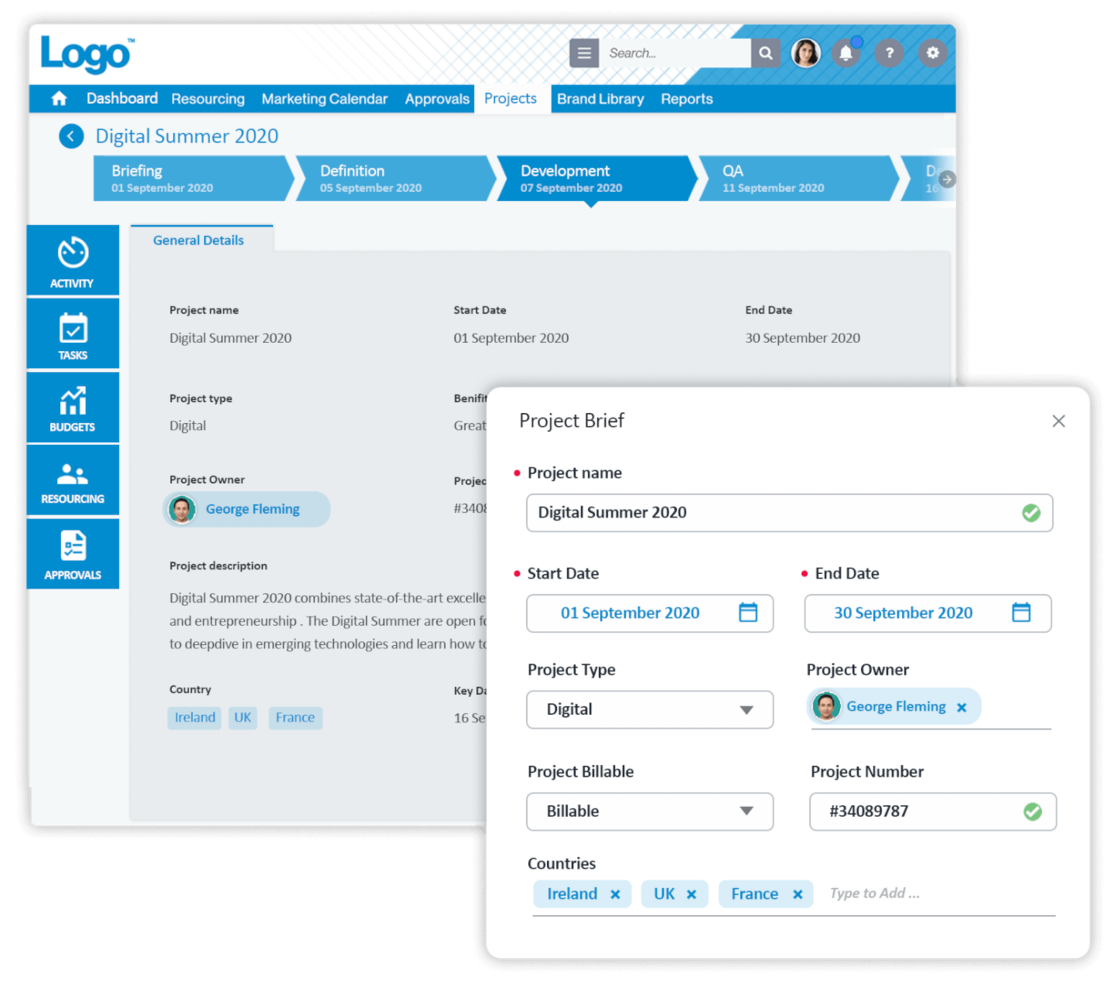
Screendragon is a highly configurable marketing project management software used and loved by Fortune 500 companies and global agencies like Kellogg’s, BP, The International Olympic Committee and McCann World Group.
I recently spoke with Gal Cohen, whose team uses Screendragon on their door repair and installation projects. "It brought all communication, tasks, and timelines into a single platform which has greatly enhanced the capacity of my team," he says. "The capability of having everything under one roof made it very easy to maintain order and deliver within the required deadlines," he explains.
Why I Picked Screendragon
Its AI-enhanced marketing workflows use automation to cut out repetitive tasks, speed up approvals, and simplify complex processes. This frees up creative and marketing teams to focus on higher-value work while keeping projects on track. Alongside its automation capabilities, Screendragon offers an easy-to-use, visual interface and robust end-to-end functionality. Teams also benefit from flexible customization options like branded UX, smart custom forms, personalized dashboards, and advanced permission levels—making it a strong fit for large, global organizations.
Additionally, task management allows for even more flexibility with visual Kanban boards, interactive Gantt charts and list views as options for interfaces.
Screendragon Key Features
Screendragon also offers several other features for marketing project management that cater to your team's needs.
- Customizable Dashboards: These let you personalize your reports and keep important metrics and project statuses front and center.
- Dynamic Forms: With this feature, you can create and modify forms to capture specific project data, and easily gather and analyze information tailored to your team's requirements.
- AI Resource Forecasting: This feature helps you predict and allocate resources effectively and minimize the risk of underutilization or overloading team members.
- Template Library: You get access to over 100 templates and samples that provide your team with a head start on projects, help maintain consistency, and save time on setup.
Screendragon Integrations
Integrations include leading ERP systems such as SAP and PeopleSoft. It offers thousands of integrations with popular apps through Zapier like Jira, Trello, Slack, Box, Google Drive, Office 365 and Microsoft Dynamics. It also has an open API that lets you set up custom integrations with any system.
Pros and Cons
Pros:
- Links creative reviews to project flows
- Enforces governance through audit trails
- Automates workload balancing across team members
Cons:
- Some modules may be overkill for small teams
- Setup and implementation require deep planning
New Product Updates from Screendragon
Screendragon Unveils New AI Hub
Screendragon introduced AI Hub, a new capability that lets teams build and manage AI agents directly within workflows. The update helps marketing teams automate tasks, maintain governance controls, and scale AI-driven operations more efficiently. For more information, visit Screendragon's official site.

Kantata
Best for full lifecycle service delivery

Kantata is a work management solution tailored to the needs of agencies and professional services teams. It helps you keep campaigns, client projects, and resources aligned in one place so your team can deliver work on time, on budget, and at scale.
I recently spoke with Cal Singh, the Head of marketing and partnerships at Equipment Finance Canada, about his team's use of Kantata. "We specifically used Kantata for keeping all the moving pieces of a marketing project tidy in one place," he says. This had a positive impact on projects and team morale: "We can see tasks, deadlines and team workloads together, making managing campaigns and partnerships (and our stress levels) clear and manageable," he explains.
Why I Picked Kantata
Kantata stood out to me because it unifies your projects, resources, and financials in a single system, supports the entire project lifecycle, and gives you a clear view of profitability and performance.
Its people-centric resource planning tools also make sure your designers, copywriters, and account managers are allocated effectively based on skill and availability, reducing burnout and improving outcomes. With real-time visibility into campaign progress, budget burn, and portfolio health, plus built-in business intelligence dashboards, your team can track productivity and client satisfaction while staying collaborative.
Kantata Key Features
Kantata offers several additional features that cater to marketing project management needs
- Project Templates: You can simplify project setup with customizable templates that are designed for various marketing activities, maintain consistency, and save time.
- Task Management: This lets you organize and prioritize tasks with ease, so you can provide your team with clear direction and improve overall productivity.
- Collaboration Tools: You can improve communication among team members and clients and foster a collaborative environment that drives project success.
- Reporting and Analytics: You can access detailed reports and analytics to monitor project performance, easily adjust strategies, and meet objectives.
Kantata Integrations
Integrations include Slack, Sage, Quickbooks, Expensify, BambooHR, NetSuite, Jira, Salesforce, Xero, and Google Workspace.
Pros and Cons
Pros:
- Supports multiple currencies and entities
- Unifies planning, delivery, and finance
- Detects project risk ahead of time
Cons:
- Customization complexity can increase with scale
- Implementation may require outside support
New Product Updates from Kantata

Kantata Adds Access Group Change History
Kantata adds Access Groups History, letting account administrators track changes to group details, membership, and permissions in Recent History. The update also makes these events available through the Subscribed Events API for broader monitoring. For more information, visit Kantata’s official site.
 .
.
Hive
Best for various project views

Hive is a project management tool and collaboration platform that powers companies like Starbucks, Uber, WeWork, and IBM. Hive is the world's first community built software, with a roadmap comprised entirely of customer-voted features.
Why I Picked Hive
With flexible project views, dependencies, and thousands of integrations, Hive streamlines your work in one centralized platform and offers much more than just Gantt charts. Used by teams of varying sizes, from 10 people to 1,000, Hive is a great option for a marketing team with for a diverse range of work styles.
Hive’s time-tracking, analytics, and flexible view capabilities allow for a transparent understanding of other team member’s work and upcoming projects. Hive also has full email integrations within their project management tool, which allows you to send and receive Gmail and Outlook messages from the app. Choose Hive if you’re in the market for a well-laid-out, comprehensive tool that can be scaled up or down based on team needs.
Hive Key Features
Hive offers a suite of additional features that are tailored for marketing teams.
- Proofing & Approvals: You can streamline the design feedback process with tools that centralize comments and revisions.
- Goals: This lets you set and visualize project milestones to make sure your marketing campaigns stay on track.
- Forms: You can collect feedback and client requests effortlessly, which facilitates better communication and project alignment.
- Resourcing: This lets you manage team assignments and visualize availability to maintain optimal resource allocation for your marketing projects.
Hive Integrations
Integrations include over a thousand third-party apps but requires a paid plan through Zapier to do so.
Pros and Cons
Pros:
- Provides project templates for consistent campaign execution
- Built-in client portals for improved communication and transparency
- Provides customizable workflows to fit diverse marketing needs
Cons:
- Complexity in setup requires onboarding time
- Limited customization in certain dashboard elements

Best for campaign goals and milestones
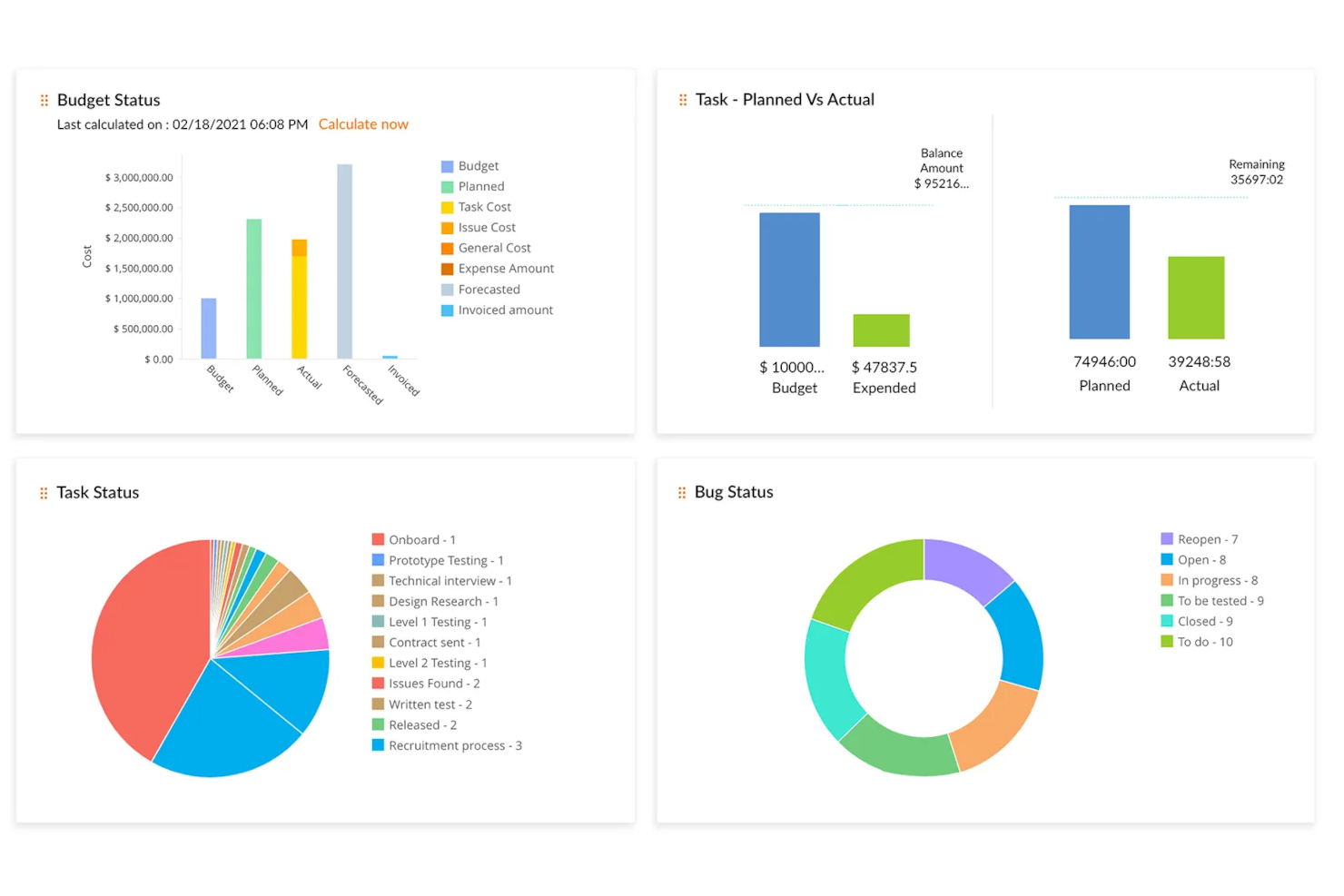
Zoho Projects is a cloud-based project management platform that's well-equipped for marketing teams. It has customizable features like individual views, custom project fields, project templates, and a reporting dashboard.
I spoke with Martin Cox, Director at the agency Postino, about how he and his team use this tool. "The software itself is fabulous—it is thorough, well put together, and seriously capable as a project management solution," he says. He mentioned a steep learning curve, but says it's a great tool "if you can get past this."
Why I Picked Zoho Projects
Marketing teams can break down their campaigns into smaller projects, tasks, and subtasks, which can be defined and assigned to the appropriate team members. Milestones and goals help team members see the bigger picture and track the progress and impact of their larger initiatives. Users can design visual workflows with the drag-and-drop Blueprints feature which can be saved and re-used for future projects.
The software's features cover project planning, scheduling, budgeting, and reporting. Marketing teams can use these tools to keep their projects and campaigns within budget, monitor their progress, and track each team member's time. Document collaboration allows marketing teams to easily organize and work on files with version control, notes, and revision history. The dashboard has pre-built and custom reporting abilities, allowing users to track the KPIs that are most important for them.
Zoho Projects Key Features
There are several other features of Zoho Projects that cater to the specific requirements of marketing teams.
- Integrations: Zoho Projects can connect seamlessly to other Zoho applications like CRM and analytics tools, which helps improve your overall project management process.
- Cloud Storage: This centralizes documents for easy access and organization and makes sure your team can collaborate effectively without the hassle of disorganized files.
- Custom Views and Dashboards: You can personalize your workspace for efficient task management and get a tailored project overview that suits your team's unique workflow.
- Recurring Tasks: This makes scheduling your recurring marketing activities easy, lets you automate repetitive tasks, and frees up your team to focus on more strategic initiatives.
Zoho Projects Integrations
Integrations include Box, Dropbox, GitHub, Google Workspace, Microsoft Teams, Slack, and Zendesk.
Pros and Cons
Pros:
- Resource workload insights built in
- Automated task transitions via blueprint rules
- Milestone visibility baked into project plans
Cons:
- AI features may need setup or configuration
- Some advanced features require higher plans
New Product Updates from Zoho Projects
Zoho Projects Adds CodeX Scripts for Custom Modules
Zoho Projects now supports CodeX Scripts for custom modules, enabling conditional logic and rules for creating, updating, and deleting records. For more information, visit Zoho Projects' official site.
 .
.
Enji
Best for solopreneurs and small business marketing

Enji is a marketing project management platform built for teams who want to plan, schedule, organize, and execute campaigns, content, and marketing workflows using dedicated calendars, templates, and guided processes.
Who Is Enji Best For?
Enji is a good fit for small marketing teams and freelance marketers who need a structured way to plan and manage campaigns without a complex setup.
Why I Picked Enji
Enji stands out for its built-in marketing content calendars and guided campaign planning workflows. When users create a marketing strategy in Enji, the platform automatically generates tasks and timelines tied to campaign goals, reducing the need to build workflows manually. The calendar combines marketing tasks, content planning, campaign management, and social scheduling into a single view with filters for different activity types. Users can draft content, schedule posts, manage tasks, and track campaign progress directly within the calendar interface. Enji also includes KPI dashboards that consolidate marketing performance data for ongoing reporting and analysis.
Enji Key Features
- AI content drafting: Enji uses AI to brainstorm content ideas and draft posts for every channel in your brand voice.
- Social media scheduling and publishing: Connect your social accounts, and Enji publishes scheduled posts automatically across platforms like Instagram, Pinterest, LinkedIn, and TikTok.
- KPI tracking dashboard: Enji pulls social and website analytics into one place so you can monitor performance without switching between tabs.
- Brand management: Store your brand voice, visuals, and key business details in one place to keep content consistent across campaigns.
Enji Integrations
Enji doesn't publicly list integrations.
Pros and Cons
Pros:
- Native scheduling for major social channels included
- Brand profile setup keeps messaging consistent
- AI-generated suggestions for content ideas and posts
Cons:
- Campaign templates are not industry-specific
- Bulk post uploading is not currently supported

Quickbase
Best for code-free automations
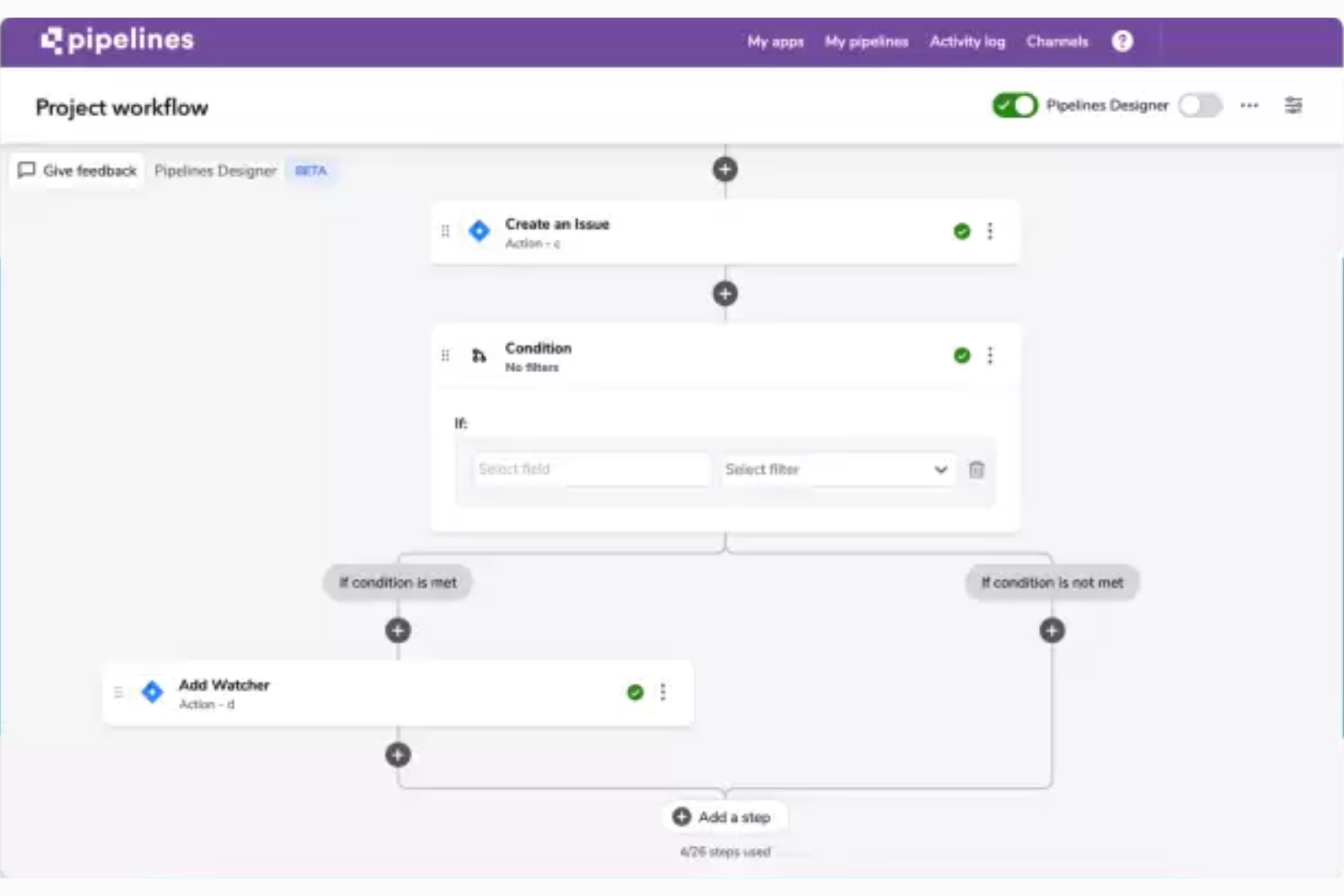
QuickBase is a project workflow management tool that helps you build customized business applications to facilitate various core business processes.
Jensen Savage, who uses Quickbase as the CEO of the marketing agency Savage Growth Partners, says that "Quickbase is highly customizable, which is especially useful if you are running complex projects or have to collaborate between departments or teams."
Why I Picked Quickbase
This software is versatile and user-friendly, making it suitable to virtually any business context. You can use the no-code builder to craft apps, integrations, and automations to support your marketing team's work. This can allow you to both alleviate manual workloads and ensure consistency in your processes.
When you're building a custom workflow or no-code automation in the software, you can establish clear rules and best practices for how to manage specific tasks. This will help your team create shared processes that everyone can easily adhere to. This is especially helpful if you're working across a portfolio or within an agency context.
Quickbase Key Features
Quickbase includes several other features that caters to the needs of your marketing teams.
- Resource Management: This feature lets your team allocate and monitor resources effectively, which maintains optimal utilization and minimizes bottlenecks in marketing campaigns.
- Task Oversight: You can assign, track, and manage tasks across your marketing projects to keep everyone aligned and on schedule.
- Document Storage: Quickbase provides a centralized location for storing and accessing important project documents, which keeps collaboration seamless and makes sure everyone has the most up-to-date information.
- Budget Tracking: You can keep a close eye on your marketing budget with Quickbase's budget tracking, which helps you manage costs and allocate funds where they are needed most.
Quickbase Integrations
Integrations include Outlook, Microsoft Teams, Google Workspace, Slack, Box, Dropbox, OneDrive, Trello, Asana, Jira, Zendesk, and Docusign.
Pros and Cons
Pros:
- Lets you build complex workflows without code
- Handles conditional logic & branching in pipelines
- Dashboards respond in real time
Cons:
- Steep learning curve for advanced workflows
- Interface can feel less modern than rivals
Annen programvare for prosjektstyring innen markedsføring
https://www.youtube.com/watch?v=oICi7bL1ZAk Hvis du ikke fant det du lette etter ovenfor, får du her noen flere gode alternativer.
- Miro
For visual collaboration
- ClickUp
Robust free plan
- Kintone
For building custom marketing apps
- Workzone
For intake, proofing and reviews
- Teamwork.com
For project visibility
- Adobe Workfront
For project workflows
- Bonsai Agency Software
For end-to-end agency projects
- Basecamp
For project boards
- Planview AdaptiveWork
For digital marketing
- Function Point
For usability and user experience
- Ravetree
For all-in-one marketing operations
- Workamajig Platinum
For teams of all sizes
- Height
For client collaboration
- Air
For AI-driven asset search
- GoodDay
For diverse project management methodologies
- RoboHead
For feedback collection features


Se videoen vår om de fem beste verktøyene for prosjektstyring innen markedsføring!


Relaterte anmeldelser av programvare for prosjektstyring
Hvis du fortsatt ikke har funnet det du leter etter her, kan du se på disse andre relaterte verktøyene som vi har testet og evaluert:
- Programvare for prosjektstyring
- Prosjektstyringsprogramvare for videoproduksjon
- Programvare for ressursstyring
- Programvare for automatisering av arbeidsflyt
- Programvare for tidsregistrering
- Programvare for oppgavestyring
- Samarbeidsverktøy
- Programvare for prosjektstyring innen PR
- Programvare for SEO-prosjektstyring
How I Evaluate Marketing Project Management Software
I evaluate tools across two layers: baseline requirements like campaign planning and creative proofing, and the differentiators that distinguish one option from another.
Core Functionality (Table Stakes For This List)
When I'm selecting tools for my list, I rank each one on a scale from 0 (does not offer the functionality) to 5 (excels in this area) for each core functionality listed below. Then, I calculate the tool's total score as a percentage. Each tool needs to achieve a minimum total score of 65% to be considered for inclusion.
- Campaign Planning & Scheduling: I check whether you can map a multi-channel campaign across Gantt, calendar, and board views with dependencies and milestones between tasks.
- Creative Workflow & Proofing: The review cycle matters—I look for visual annotations, version comparison, and structured approval routing for assets like ads and landing pages.
- Marketing Resource Management: Balancing workloads across designers, copywriters, and strategists requires capacity views, so I evaluate how each tool surfaces utilization data.
- Digital Asset Management: Teams juggle hundreds of files per campaign. I look for centralized asset libraries with versioning, tagging, and permissions beyond basic file attachments.
- Marketing Stack Integrations: A tool should connect to your creative apps, CRM, MAP, and social platforms—tools like Asana, monday.com, and Wrike each handle this differently.
- Marketing Reporting & Dashboards: I evaluate whether dashboards go beyond task completion to cover timeline health, team utilization, and campaign-level KPIs in one view.
Once I have a list of tools that meet the criteria, I consider what sets each platform apart.
Differentiating Factors (What Sets Vendors Apart)
Here's how I compare and contrast different vendors:
Standout Features
Intake automation is a big differentiator. When a product manager submits a campaign request through a structured form that auto-generates tasks and routes them to the right team, it cuts the back-and-forth that slows down kickoffs. I also evaluate AI capabilities—some tools now draft briefs or summarize feedback threads, which saves real time during review cycles. Stakeholder portals matter too, especially for teams fielding requests from sales or executives who need project visibility without a full license.
Beyond Features
I consider how well a tool fits your specific marketing team structure. A five-person content team has very different needs than a 50-person in-house agency running concurrent campaigns across brands. Time-to-value matters too—I look for prebuilt marketing templates like campaign launch playbooks and editorial calendars that get teams running fast. Pricing transparency rounds out my evaluation, particularly how vendors handle reviewer and stakeholder seats, since marketing teams typically have far more collaborators than licensed users.
Slik velger du programvare for prosjektstyring av markedsføring
Når du lager en kortliste over, prøver ut og velger programvare for prosjektstyring av markedsføring, bør du vurdere følgende:
- Hvilket problem prøver du å løse? Begynn med å identifisere mangelen på funksjonalitet innen prosjektstyring av markedsføring som du prøver å fylle, slik at du kan avklare hvilke funksjoner og hvilken funksjonalitet programvaren for prosjektstyring av markedsføring må tilby.
- Hvem trenger å bruke den? For å vurdere kostnader og krav bør du tenke på hvem som skal bruke programvaren, og hvor mange lisenser du trenger. Du må vurdere om det bare er markedsføringsteamet, eller hele organisasjonen, som trenger tilgang. Når dette er avklart, bør du vurdere om du prioriterer brukervennlighet for alle eller hastighet for de mest erfarne brukerne.
- Hvilke andre verktøy må den fungere sammen med? Avklar hvilke verktøy du erstatter, hvilke verktøy som skal beholdes, og hvilke verktøy du trenger å integrere med, for eksempel regnskaps-, CRM- eller HR-programvare. Dette kan være så spesifikt som å se etter programvare for prosjektstyring som integreres med Salesforce eller ganske enkelt programvare for prosjektstyring med CRM generelt. Du må avgjøre om verktøyene må integreres med hverandre, eller om du i stedet kan erstatte flere verktøy med ett samlet digitalt verktøy for prosjektstyring av markedsføring.
- Hvilke resultater er viktige? Tenk på hvilket resultat programvaren må levere for å regnes som vellykket, hvilken kapasitet du ønsker å oppnå, hva du ønsker å forbedre, og hvordan du skal måle suksess. Et eksempel på et resultat kan være muligheten til å få bedre oversikt over ytelsen.
- Hvordan vil den fungere i organisasjonen din? Vurder programvarevalget sammen med arbeidsflytene og leveringsmetodikken din. Evaluer hva som fungerer godt, og hvilke områder som skaper problemer. Alle virksomheter er forskjellige – ikke anta at et verktøy vil fungere i organisasjonen din bare fordi det er populært.
Trender innen programvare for prosjektstyring av markedsføring
Disse trendene viser ikke bare det raske innovasjonstempoet, men fremhever også områdene der markedsføringsteam etterspør bedre funksjonalitet og effektivitet.
- Økt bruk av utvidet virkelighet (AR) og virtuell virkelighet (VR): Flere verktøy for prosjektstyring av markedsføring integrerer teknologier for utvidet og virtuell virkelighet for å tilby oppslukende opplevelser for planlegging og visualisering. Dette viser en utvikling mot mer engasjerende og erfaringsbaserte planleggingsprosesser i programvare for prosjektstyring for markedsføringsbyråer.
- Funksjoner for sporing av bærekraft: I takt med det økende fokuset på samfunnsansvar integrerer noen av de beste verktøyene for prosjektstyring av markedsføring funksjoner som hjelper team med å spore bærekraften i kampanjene sine. Dette omfatter overvåking av karbonavtrykk, bærekraftig ressursbruk og etisk innkjøp. Stadig flere verktøy for reklamebyråer gir innsikt i markedsføringsaktivitetenes miljøpåvirkning.
- Blokkjedeteknologi for bedre sikkerhet og åpenhet: Plattformer for prosjektstyring av markedsføring tilbyr blokkjedeteknologi for å bidra til sikkerhet og åpenhet, særlig innen områder som budsjettering og pengebruk. Ved å bruke blokkjede kan disse prosjektstyringsverktøyene for markedsføring tilby manipulasjonssikre registreringer av transaksjoner og prosjektendringer, noe som skaper tillit blant interessenter og holder markedsføringsdata trygge.
- Tilpassede KI-assistenter for markedsføringsplanlegging: Mange verktøy tilbyr nå tilpassede KI-assistenter som er skreddersydd for prosjektstyring av markedsføring. Disse assistentene tilbyr personlig veiledning, automatiserer prioritering av oppgaver og gir innsikt basert på dataanalyse.
- Integrasjon med netthandelsplattformer: Ettersom netthandel fortsetter å dominere detaljhandelen, tilbyr verktøy for prosjektstyring av markedsføring i økende grad direkte integrasjoner med store netthandelsplattformer. Dette gjør det mulig å planlegge, gjennomføre og overvåke kampanjer som er direkte knyttet til salgskanaler på nettet, på en sømløs måte. Dette gjenspeiler det økende behovet for at markedsføringsarbeidet skal være tett knyttet til salgsresultatene.
Hva er programvare for prosjektstyring av markedsføring?
Programvare for prosjektstyring av markedsføring er et verktøy som hjelper markedsføringsteam med å planlegge, gjennomføre og følge opp prosjekter og kampanjer. Den kombinerer prosjektstyringsfunksjoner som oppgavetildeling, ressursallokering og fremdriftssporing med funksjoner som brukes av markedsføringsteam, for eksempel markedsføringskalendere, kampanjemaler og håndtering av markedsførings- og merkevaremateriell.
Programvare for prosjektstyring er én type programvare for markedsføringsbyråer som hjelper deg med å håndtere arbeidsmengder bedre, overholde tidsfrister og nå markedsføringsmålene, noe som betyr mer vellykkede kampanjer som har en meningsfull innvirkning på målgruppen.
Funksjoner i programvare for prosjektstyring innen markedsføring
Når du velger programvare for prosjektstyring innen markedsføring, bør du se etter følgende nøkkelfunksjoner:
- Oppgavehåndtering: Du kan organisere, tildele og prioritere oppgaver, slik at teamet ditt vet hva som må gjøres og når. Dette hjelper alle med å holde kursen og overholde tidsfrister.
- Samarbeidsverktøy: Du og teamet ditt kan kommunisere, dele oppdateringer og arbeide med dokumenter sammen i sanntid, slik at alle holder kontakten og prosjektene beveger seg smidig fremover.
- Ressursallokering: Dette lar deg overvåke og tildele ressurser (f.eks. personer, tid eller budsjetter), unngå flaskehalser og få mest mulig ut av teamets talenter.
- Tidsregistrering: Du kan holde oversikt over hvor lang tid oppgaver og prosjekter tar, noe som hjelper med fremtidig planlegging og lar deg se hvor teamet kan arbeide mer effektivt.
- Fildeling og lagring: Dette lar deg laste opp, lagre og dele prosjektfiler, slik at alle har enkel tilgang til de nyeste versjonene.
- Prosjektmaler: Du kan bruke ferdiglagde maler til å starte prosjekter raskt, standardisere arbeidsflytene dine og slippe å finne opp hjulet hver gang.
- Kalender og planlegging: Dette lar deg samle møter, tidsfrister og milepæler i en delt kalender, slik at hele teamet kan se hva som kommer og planlegge deretter.
- Budsjettsporing: Du kan overvåke prosjektutgifter og holde deg innenfor budsjettet ved å registrere kostnader, oppdage overskridelser tidlig og ta smarte beslutninger om pengebruk.
Vanlige KI-funksjoner i programvare for prosjektstyring innen markedsføring
I tillegg til standardfunksjonene i programvare for prosjektstyring innen markedsføring som er nevnt ovenfor, inkluderer mange av disse løsningene KI-funksjoner som:
- Automatisk oppgaveprioritering: Du kan bruke KI til å analysere tidsfrister, arbeidsmengde og avhengigheter, og deretter automatisk prioritere oppgaver for å holde viktig arbeid i fokus.
- Prediktive prosjekttidslinjer: Dette lar deg bruke KI til å forutsi ferdigstillelsesdatoer ved å gjennomgå tidligere resultater og nåværende fremdrift, slik at du kan sette realistiske forventninger.
- Intelligent ressursoptimalisering: Dette KI-verktøyet kan analysere teamets ferdigheter, kapasitet og tidligere aktivitet for å anbefale den beste ressursallokeringen for hvert prosjekt.
- Innholdsforslag og -optimalisering: Denne KI-funksjonen kan anbefale overskrifter, søkeord eller designelementer for markedsføringskampanjer basert på det som trender eller har vist seg å fungere godt.
- Automatisert rapportering: Du kan bruke KI til å samle viktige måltall og sette sammen lettfattelige rapporter som gir umiddelbar innsikt i prosjektets status.
Fordeler med programvare for prosjektstyring innen markedsføring
Nedenfor beskriver jeg fem hovedfordeler som den beste programvaren for markedsføringsstyring gir brukere og organisasjoner:
- Bedre samarbeid: Teammedlemmer kan kommunisere og samarbeide i sanntid. Ved å bruke et prosjektstyringsverktøy for markedsføring fjerner du kommunikasjonshindre og sørger for at alle er på samme side og arbeider sammen, uavhengig av hvor de fysisk befinner seg.
- Økt produktivitet: Automatisering og strømlinjeformede prosesser frigjør tid for teammedlemmer, slik at de kan fokusere på mer strategiske og kreative oppgaver. Dette øker den samlede produktiviteten og effektiviteten i organisasjonen.
- Bedre prosjektoversikt: Med sanntidsdashbord og rapporteringsfunksjoner får interessenter en helhetlig oversikt over prosjektets fremdrift. Dette lar deg ta informerte beslutninger raskt, justere strategier etter behov og sørge for at prosjektene ligger an til å nå tidsfrister og mål.
- Bedre ressursstyring: Programvaren lar deg allokere og spore ressurser bedre, inkludert budsjetter, tid og personell. Effektiv ressursstyring hjelper organisasjoner med å optimalisere ressursbruken, redusere sløsing og sørge for at prosjekter fullføres innenfor budsjettbegrensningene.
- Skalerbarhet: Programvare for prosjektstyring innen markedsføring kan vokse med virksomheten din og håndtere flere brukere, prosjekter og større kompleksitet over tid. Dette lar deg fortsette å bruke systemet etter hvert som virksomheten vokser, og unngå kostbare og tidkrevende programvarebytter eller oppgraderinger.
Kostnader og priser for programvare for prosjektstyring innen markedsføring
Her er en oversikt over vanlige abonnementsalternativer som kan hjelpe deg med å ta en informert beslutning:
Sammenligningstabell for programvare for prosjektstyring innen markedsføring
| Abonnementstype | Gjennomsnittspris | Vanlige funksjoner |
|---|---|---|
| Gratis | $0 | Tilgang for et begrenset antall brukere, grunnleggende prosjektstyringsfunksjoner, begrenset lagringsplass, brukerstøtte fra fellesskapet |
| Grunnleggende | $10-20 per bruker/måned | Tilgang for flere brukere, forbedrede prosjektstyringsverktøy, integrasjoner med andre verktøy, grunnleggende rapporteringsfunksjoner, brukerstøtte via e-post |
| Profesjonell | $20-50 per bruker/måned | Avanserte prosjektstyringsfunksjoner, tilpassbare oversikter og rapporter, samarbeidsverktøy, prioritert brukerstøtte, økt lagringsplass |
| Virksomhet | Tilpasset pris | Kan tilpasses organisasjonens størrelse og behov, avanserte sikkerhetsfunksjoner, dedikert kundeansvarlig, opplæring ved oppstart og løpende opplæring, ubegrenset lagring og integrasjoner |
Vanlige spørsmål om programvare for prosjektstyring innen markedsføring
Finn svar på vanlige spørsmål om dette emnet.
Hvordan kan programvare for prosjektstyring innen markedsføring hjelpe teamet mitt med å samarbeide bedre?
Programvare for prosjektstyring innen markedsføring hjelper teamet ditt med å samarbeide ved å samle kommunikasjon, filer og tilbakemeldinger på én plattform. Du kan tildele oppgaver, dele oppdateringer og gi tilbakemeldinger på kreativt innhold uten å måtte bytte mellom apper hele tiden. Varsler og delte kalendere sørger for at alle er samkjørte og reduserer misforståelser.
De fleste verktøy tilbyr funksjoner som kommentartråder, arbeidsflyter for godkjenning og versjonskontroll av dokumenter, slik at teamet kan samarbeide effektivt – selv om teamet jobber eksternt.
Kan verktøy for prosjektstyring innen markedsføring integreres med andre markedsføringsplattformer (som CRM, e-post og DAM)?
Ja, de fleste verktøy for prosjektstyring innen markedsføring kan integreres med populære plattformer som CRM-systemer, verktøy for e-postmarkedsføring og systemer for digital kapitalforvaltning. Dette lar deg synkronisere kontakter, automatisere oppretting av oppgaver basert på markedsføringsplanene dine og få tilgang til kreativt innhold uten å forlate prosjektoversikten.
Før du velger et verktøy, bør du sjekke integrasjonslisten. Du kan også bruke verktøy som Zapier til å opprette egendefinerte integrasjoner hvis det ikke finnes en direkte tilkobling.
Hva er den beste måten å lære opp markedsføringsteamet mitt i ny programvare for prosjektstyring på?
For å lære opp teamet ditt i den nye programvaren kan du begynne med en kort opplæringsøkt eller videogjennomgang av funksjonene teamet kommer til å bruke mest. Sett opp det første aktive prosjektet sammen, slik at teammedlemmene ser verktøyet i bruk. Tildel enkle oppgaver og oppmuntre til spørsmål.
Del veiledninger eller huskelister som referanse. Løpende støtte og fremheving av resultater – som raskere tilbakemeldinger eller tydelige tidsfrister – kan motivere teamet til å ta i bruk den nye plattformen.
Hvordan følger jeg med på kampanjeresultater og tidsfrister ved hjelp av programvare for prosjektstyring innen markedsføring?
Du kan bruke funksjoner i programvare for prosjektstyring innen markedsføring, som prosjektoversikter, tidslinjer og tilpassbare rapporter, til å følge markedsføringskampanjene dine fra start til slutt.
Sett tydelige milepæler og tidsfrister for hver fase. Mange verktøy lar deg knytte KPI-er eller måltall direkte til prosjekter, slik at du kan følge med på resultatene i sanntid. Automatiske påminnelser og fremdriftslinjer hjelper deg med å oppdage mulige forsinkelser tidlig.
Hvilke verktøy for prosjektstyring innen markedsføring egner seg for eksterne eller distribuerte team?
Mange verktøy for prosjektstyring innen markedsføring er utviklet med eksterne og distribuerte team i tankene. Se etter funksjoner som chat i sanntid, videointegrasjon, fildeling og skybasert tilgang fra alle enheter. Verktøy med tidssonehåndtering, asynkron kommunikasjon og mobilapper gjør det også enklere for eksterne team å holde kontakten og være produktive.
Hvor sikre er markedsføringsdataene mine når jeg bruker programvare for prosjektstyring?
De fleste anerkjente plattformer for prosjektstyring innen markedsføring tilbyr sterke sikkerhetsfunksjoner som datakryptering, rollebaserte tillatelser og regelmessige sikkerhetskopier. Velg verktøy med samsvarssertifiseringer som er relevante for bransjen din (f.eks. GDPR eller SOC 2). Sjekk leverandørens personvernerklæring og spør om alternativer for revisjonslogger eller enkel pålogging, som er gode verktøy for å holde markedsføringsdataene dine sikre.