

10 Best Marketing Agency Software Reviewed in 2026

Best Marketing Agency Software Shortlist


Managing a marketing agency can be a tough job. You juggle client demands, tight deadlines, and team coordination. It's easy to feel overwhelmed. That's where marketing agency software comes in. These tools can help you keep everything organized and running smoothly.
In my experience testing and reviewing software, I've found the best solutions that address these challenges. My goal is to give you an unbiased look at the top marketing agency software. I'll show you the features, benefits, and potential drawbacks of each tool.
As you read on, you'll discover which software suits your team's specific needs. Whether you're focused on collaboration, automation, or analytics, there's something here for you.
Why Trust Our Software Recommendations
Our team has been testing and reviewing software since 2012. As project managers ourselves, we know how difficult—and important—it is to choose the right software.
For this guide, we evaluated tools using hands-on testing and independent research, scoring tools using our selection criteria. We also draw on insights from industry thought leaders and practicing project management experts.
Our reviews reflect our human editorial judgment, not a sales pitch.
Expert reviewers:
Marketing Agency Software Comparison Table
This comparison table summarizes pricing details for my top marketing agency software selections:
| Tool | Best For | Trial Info | Price | ||
|---|---|---|---|---|---|
| 1 | Best for agency profitability insights | 14-day free trial | From $10/user/month | Website | |
| 2 | Best for all-in-one business management | 14-day free trial | From $17/user/month | Website | |
| 3 | Best for no-code custom automation | Free demo available | Pricing upon request | Website | |
| 4 | Best for tracking marketing metrics | 14-day free trial | From $20/month (billed annually) | Website | |
| 5 | Best for inbound marketing strategies | Free plan available | From $20/user/month | Website | |
| 6 | Best for email marketing automation | 14-day free trial | From $15/month (billed annually) | Website | |
| 7 | Best for AI-assisted remote team collaboration | Free plan + 14-day free trial available | From $9.99/user/month (billed annually) | Website | |
| 8 | Best for marketing automation tools | 14-day free trial | From $97/month | Website | |
| 9 | Best for managing client testimonials | Free plan available | From $9.99/month | Website | |
| 10 | Best for insurance agency workflows | Free demo available | Pricing upon request | Website |


Best Marketing Agency Software Review
Below are my detailed summaries of the best marketing agency software that made it onto my shortlist. My reviews offer a detailed look at the key features, pros and cons, integrations, and ideal use cases of each tool to help you find the best one for you.

Best for agency profitability insights
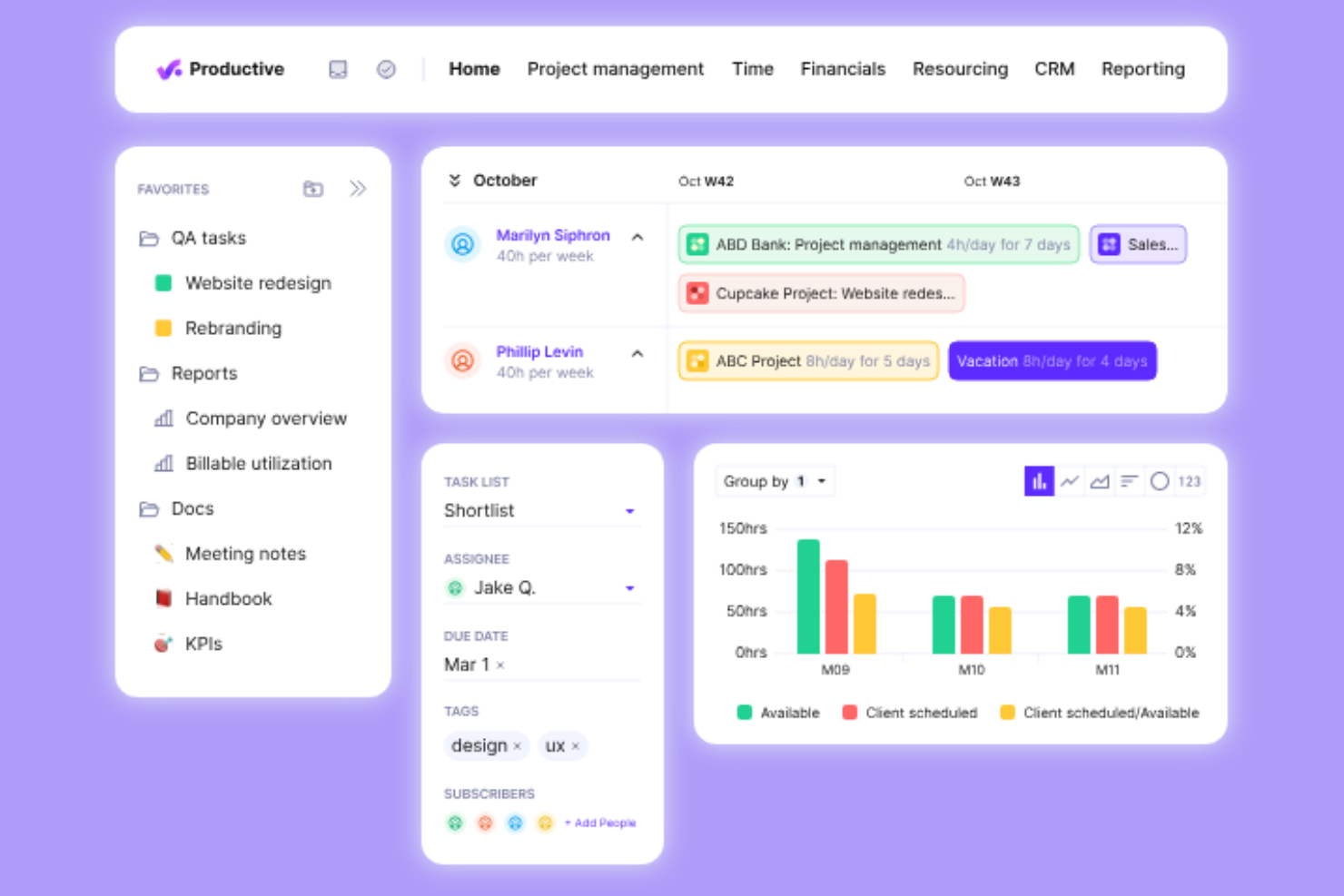
Productive is a professional services automation software designed for agencies and service businesses. It helps with resource planning, project management, and financial management.
Why I picked Productive: The tool provides real-time profitability tracking and growth forecasting, which is essential for agencies looking to increase profitability. Features such as automated task management and workflow automation set it apart. It integrates with tools such as Xero and Slack to provide a smooth workflow, as well as allowing you to connect to third-party apps via Open API. Productive also offers specific solutions for various roles, ensuring everyone in your team benefits.
Standout Features and Integrations:
Features include real-time profitability insights, automated task management, and tailored reporting on billable utilization. These features help you track financial performance and streamline your operations. The software also supports revenue forecasting, making it easier for you to plan for growth.
Integrations include Xero, Slack, QuickBooks, Jira, Zapier, and more.
Pros and Cons
Pros:
- Improves client communication
- Tailored reports for agencies
- Real-time profitability insights Tailored reports for agencies Improves client communication
Cons:
- Can be overwhelming for new users
- Limited customization options
New Product Updates from Productive
Productive Adds Voice Dictation, Slack Connector, Proposals, and Overtime
Productive adds voice dictation, a Slack Connector, proposal controls, and overtime tracking. These updates support faster AI interactions, client proposals, and time management. For more information, visit Productive’s official site.

Scoro
Best for all-in-one business management
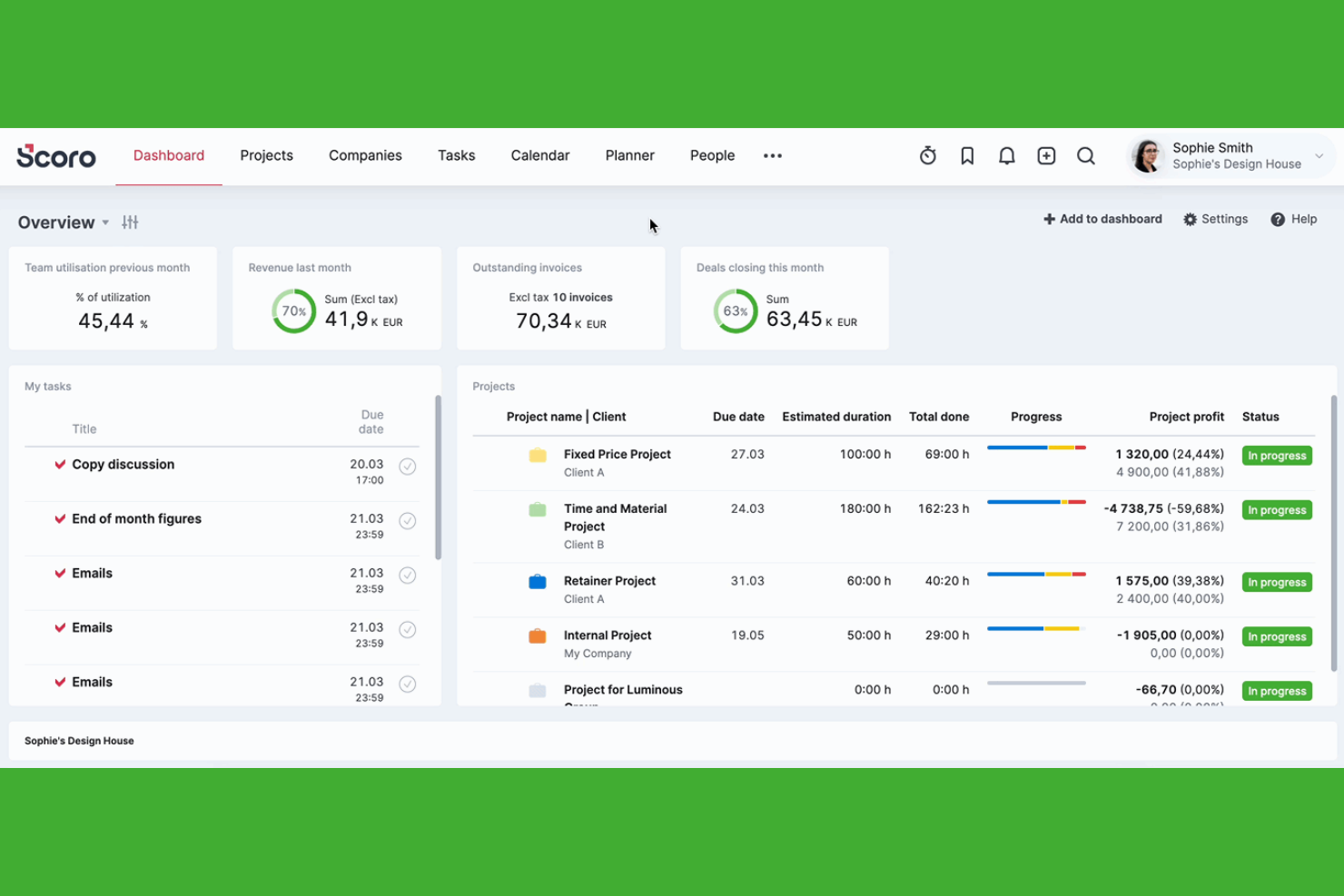
Scoro is a business management software tailored for agencies and professional service firms. It offers tools for project management, billing, and reporting to improve operational efficiency.
Why I picked Scoro: It provides an all-in-one solution that integrates project management with billing and reporting. The platform's real-time KPI dashboards give you insights into your business performance. Scoro's time tracking ensures accurate billing and resource allocation. The customizable reports help you tailor data presentations to suit your needs.
Standout Features and Integrations:
Features include project management tools that let you plan and track projects from start to finish. The billing feature simplifies invoicing and revenue tracking. Additionally, Scoro offers a CRM system to improve client relationships and sales pipeline management.
Integrations include Xero, QuickBooks, Dropbox, Google Calendar, Salesforce, and more.
Pros and Cons
Pros:
- Effective CRM system
- All-in-one management solution
- Real-time KPI dashboards
Cons:
- Configuration takes significant time
- Mobile app lacks full functionality
New Product Updates from Scoro

Scoro Adds Time Mobile App and ELI Improvements
Scoro adds the Scoro Time mobile app for iOS/Android to track time anywhere and expands ELI with attachments, smarter filtering, and trigger-based actions. For more information, visit Scoro's official site.

Best for no-code custom automation
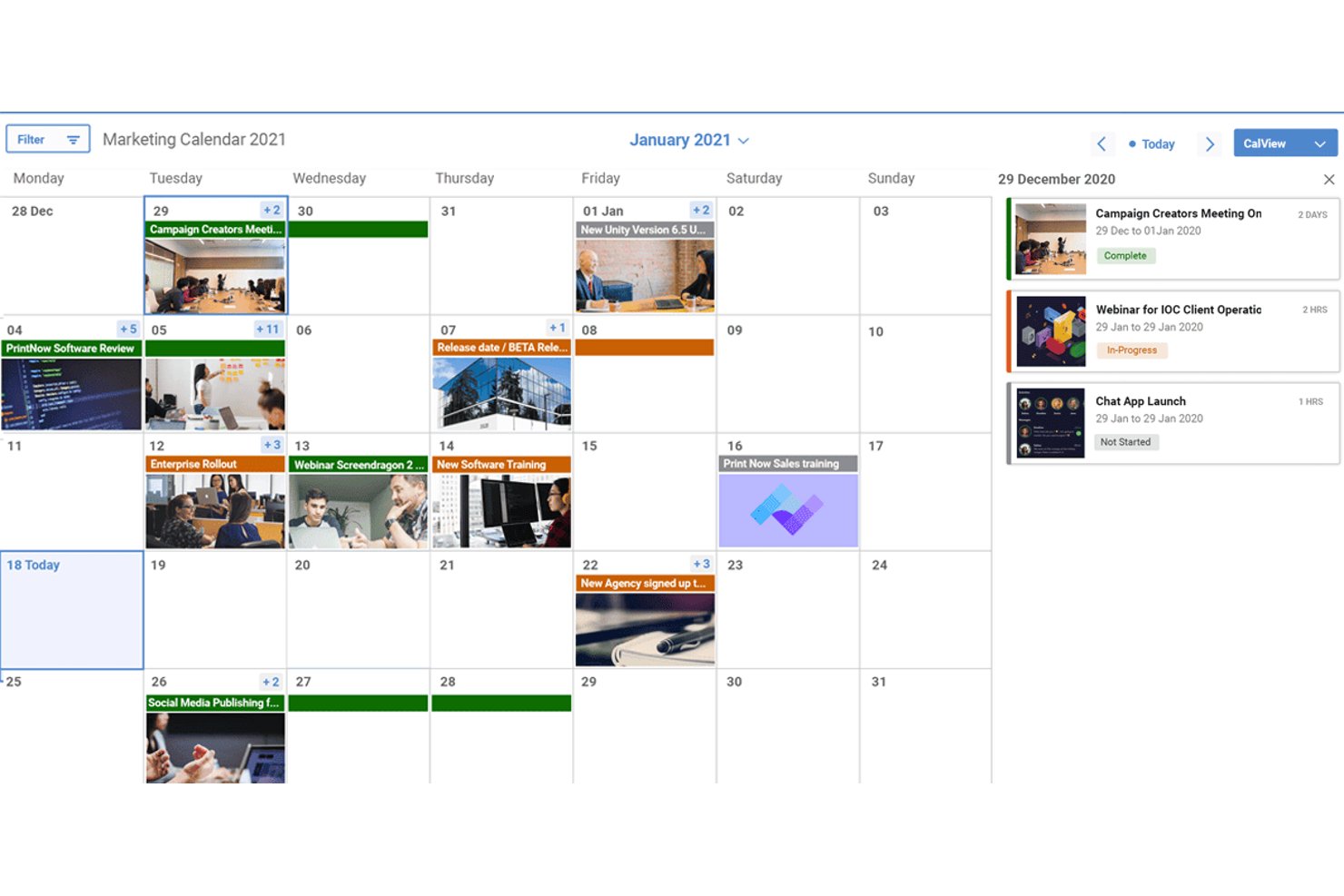
Screendragon is an enterprise work management platform built for marketing and agency operations, combining project management, resource planning, creative approvals, budget tracking, and AI-powered workflow orchestration in one system.
Who Is Screendragon Best For?
Screendragon suits mid-to-large marketing agencies and in-house agency teams managing high volumes of work across multiple clients, typically with 30 or more users.
Why I Picked Screendragon
Screendragon earns its spot as one of the best on my shortlist because its no-code workflow builder lets agency ops teams design, adjust, and govern custom processes without involving IT. I particularly like the dynamic forms feature, which replaces scattered email briefs with structured intake that triggers automated approval sequences. The side-by-side version compare and multi-stage approval routing are genuinely useful when managing creative reviews across multiple client accounts simultaneously.
Screendragon Key Features
- Resource capacity planning: Visual planner aggregates team availability and workloads across multiple concurrent projects.
- Campaign budget tracking: Real-time dashboards show project budgets, forecasted spend, and financial performance by campaign.
- Digital asset management: Centralized repository for storing, tagging, and reusing creative assets across client campaigns.
- Advanced permission controls: Role- and region-based access settings protect confidential client data in complex agency structures.
Screendragon Integrations
Screendragon offers native integrations with HubSpot, Microsoft Power BI, Ziflow, Brandfolder, Workato, and Smartsheet. An API is available for custom integrations.
Pros and Cons
Pros:
- Granular permissions protect sensitive cross-client data
- Multi-stage creative approvals with version control
- No-code workflow builder tailored for agencies
Cons:
- Reporting flexibility limited compared to competitors
- Onboarding new users takes considerable time
New Product Updates from Screendragon
Screendragon Unveils New AI Hub
Screendragon introduced AI Hub, a new capability that lets teams build and manage AI agents directly within workflows. The update helps marketing teams automate tasks, maintain governance controls, and scale AI-driven operations more efficiently. For more information, visit Screendragon's official site.

Best for tracking marketing metrics

AgencyAnalytics is an agency management software and reporting platform designed for marketing agencies looking to track and visualize marketing metrics. It serves digital marketers by offering tools for creating custom dashboards and automated reports.
Why I picked AgencyAnalytics: It excels in tracking marketing metrics, providing you with extensive data visualization options. Custom dashboards allow you to present data to suit your agency's needs. Automated reporting saves time and ensures you always have up-to-date information. The user-friendly drag-and-drop interface makes it easy to create reports without the need for technical skills.
Standout Features and Integrations:
Features include white-label reporting, which allows you to brand reports with your agency's logo. The SEO audit tool helps you analyze website performance and identify areas for improvement. Additionally, the rank tracker monitors search engine rankings to keep your team informed about SEO performance.
Integrations include Google Analytics, Facebook, Instagram, X Ads, and more.
Pros and Cons
Pros:
- SEO audit tools included
- White-label report capability
- Easy-to-use drag-and-drop interface
Cons:
- Frequent integration instability
- Requires setup time

HubSpot
Best for inbound marketing strategies
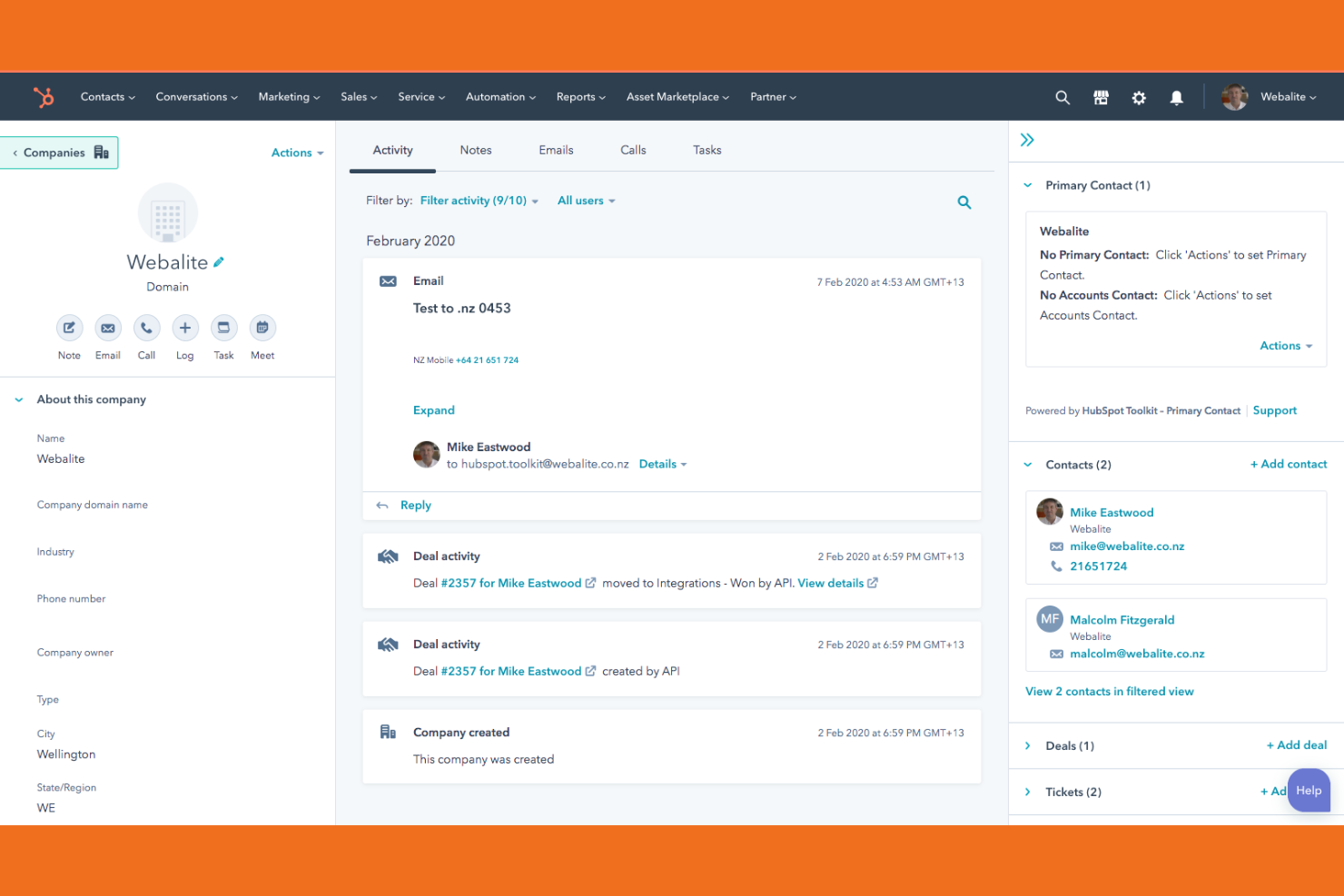
HubSpot is a customer relationship management (CRM) and marketing platform for inbound marketing, sales, and customer service. It serves marketing teams by providing tools to attract visitors, convert leads, and close customers.
Why I picked HubSpot: It excels in inbound marketing strategies, offering a suite of tools to manage content marketing, social media, customer relationships and retention. The CRM system is integrated, allowing your team to track leads and interactions proficiently. HubSpot's content management system helps you create and optimize marketing content for better engagement. The email marketing feature is strong, with automation options to nurture leads effectively.
Standout Features and Integrations:
Features include a landing page builder that lets you design pages without coding skills. The social media management tool helps you schedule and monitor posts across platforms. Additionally, the analytics dashboard provides insights into your marketing performance, helping you make data-driven decisions.
Integrations include Salesforce, Mailchimp, Shopify, Zoom, Slack, and more.
Pros and Cons
Pros:
- Content management features
- Strong email marketing tools
- Integrated CRM system
Cons:
- Annual contracts can be rigid
- Mandatory paid onboarding fees

Best for email marketing automation
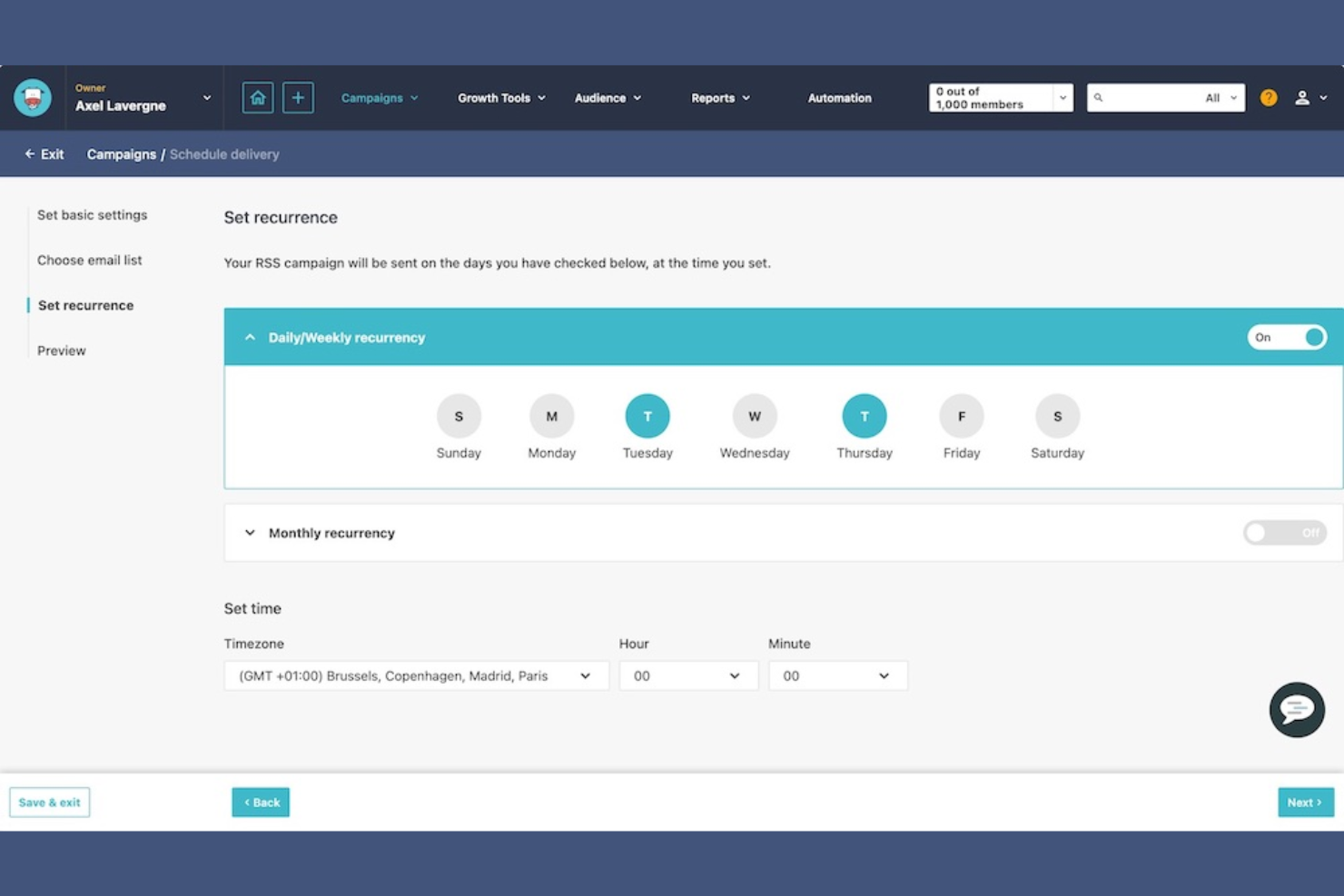
ActiveCampaign is a marketing automation platform that primarily serves small to medium-sized businesses. It focuses on email marketing, customer relationship management, and sales automation.
Why I picked ActiveCampaign: It excels in email marketing automation, offering advanced features to personalize your campaigns. The platform's automation workflows help you engage your audience effectively. Its segmentation tools allow you to target specific customer groups. ActiveCampaign also provides detailed analytics to track the performance of your campaigns.
Standout Features and Integrations:
Features include a drag-and-drop email builder that simplifies the creation of engaging emails. The platform's lead scoring feature helps you prioritize your sales efforts. Additionally, the site tracking tool enables you to understand how your contacts interact with your website.
Integrations include Shopify, Salesforce, WordPress, Zapier, WooCommerce, Facebook, and more.
Pros and Cons
Pros:
- Effective segmentation tools
- Detailed campaign analytics
- Advanced email automation workflows
Cons:
- Becomes costly as contact lists grow
- Phone support limited to top tiers

Best for AI-assisted remote team collaboration
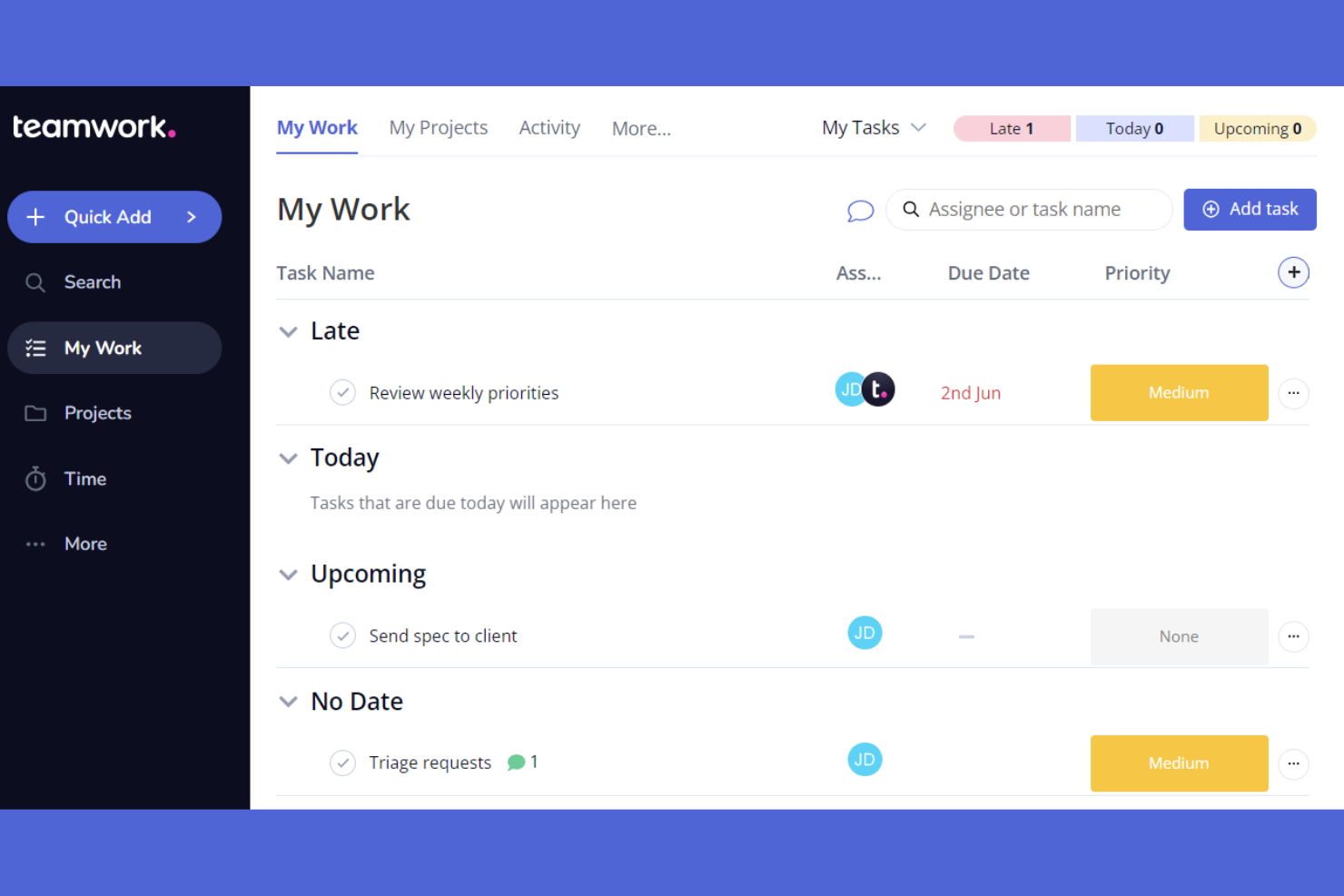
Teamwork.com is an AI-powered project management software tailored for teams working remotely. It helps with task management, team collaboration, and project tracking.
Why I picked Teamwork.com: It offers features that support remote collaboration, making it suitable for distributed teams. The built-in chat and file sharing features make communication easy. Teamwork.com also offers templates for various project types, improving its usability for remote teams.
Standout Features and Integrations:
Features include Gantt charts for project planning, a time tracking tool to monitor productivity, and workload management to balance team efforts. These features help you allocate resources effectively. The software also offers a client portal, which is useful for agencies that need to share updates with clients.
Integrations include Slack, HubSpot, Xero, Microsoft Office, ChatGPT, Stripe, and more.
Pros and Cons
Pros:
- Client portal access
- Integrated chat feature
- Customizable project templates
Cons:
- Higher tiers required for key tools
- Can feel cluttered with many projects

HighLevel is a marketing automation platform aimed at agencies and marketers. It facilitates lead management, client interaction, and campaign automation.
Why I picked GoHighLevel: The platform excels in providing marketing automation tools that simplify client communication and lead conversion. It offers a unified inbox to manage messages from various channels. Automated workflows save time and ensure consistent client follow-up. HighLevel also provides customizable dashboards to track key metrics, keeping your team informed.
Standout Features and Integrations:
Features include a funnel builder for creating sales funnels, an appointment scheduling system to manage bookings, and a membership area for client access. These features help to improve your marketing efforts by simplifying client interactions. The software also includes a CRM system to organize and track leads efficiently.
Integrations include Mailchimp, Stripe, Shopify, QuickBooks, and more.
Pros and Cons
Pros:
- Membership area feature
- Funnel builder included
- Unified inbox for messages
Cons:
- Occasional feature glitches
- Complex reporting options

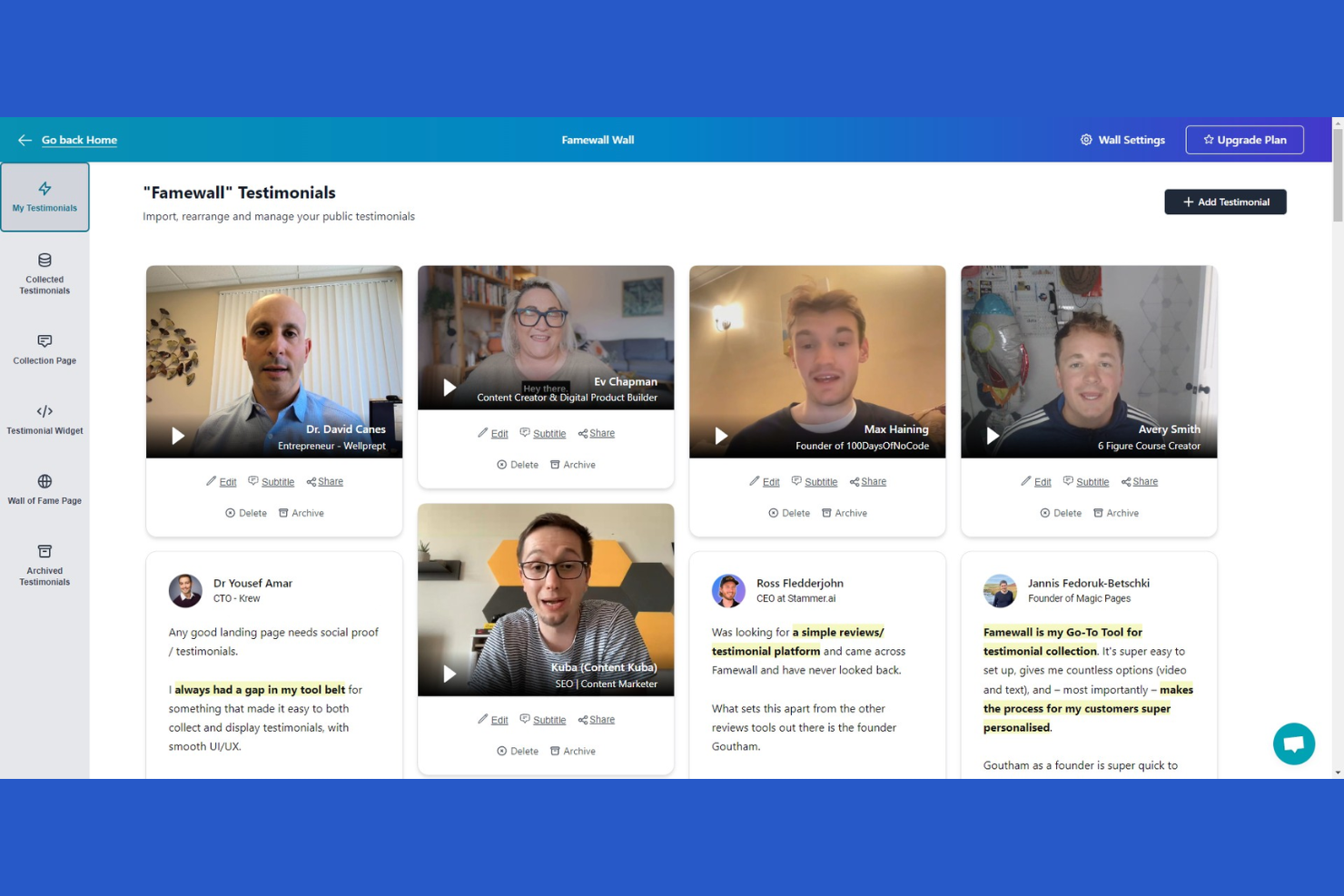
Famewall is a testimonial management platform aimed at businesses wanting to showcase customer feedback. It helps marketers and business owners collect, display, and manage testimonials effectively.
Why I picked Famewall: It specializes in managing client testimonials, providing tools to collect and display them on your website. The platform allows you to collect and manage testimonials for multiple projects in one place. The software also offers AI testimonial analytics to help you analyze client data and develop marketing strategies.
Standout Features and Integrations:
Features include customizable widgets that allow you to tailor the appearance of testimonials to match your brand. The software offers a simple link for collecting testimonials, making it easy for clients to submit feedback. Additionally, the moderation tools help you filter and select the best testimonials to display.
Pros and Cons
Pros:
- Moderation tools for quality control
- Simple link for collecting feedback
- Customizable testimonial widgets
Cons:
- Occasional syncing delays
- Limited analytics features

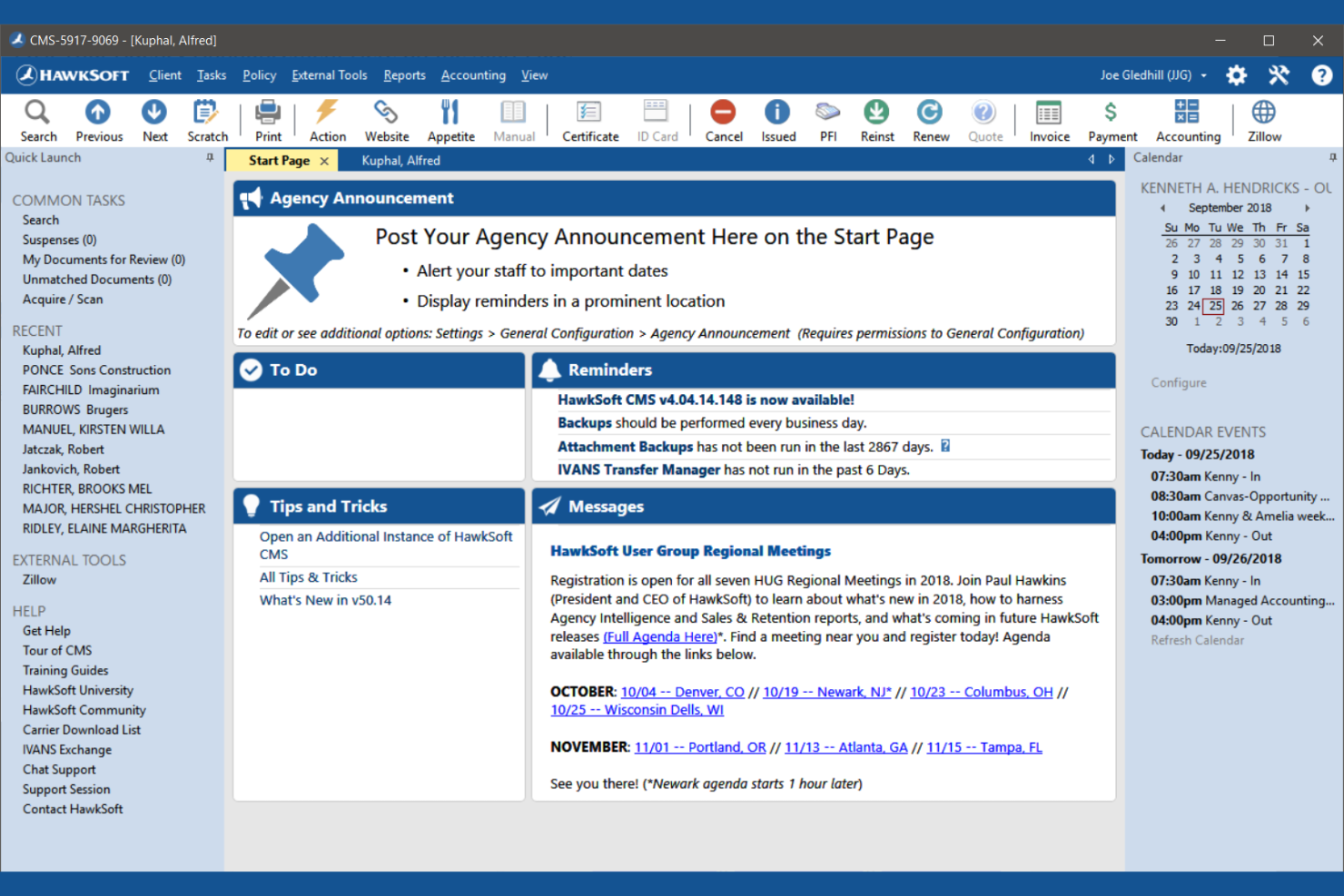
HawkSoft is a management system designed specifically for insurance agencies. It helps insurance professionals manage policies, track claims, and handle customer interactions efficiently.
Why I picked HawkSoft: It focuses on optimizing insurance agency workflows, providing tools to simplify policy, and claims management. The document management feature allows you to organize and access client files efficiently. HawkSoft's reporting tools offer insights into agency performance and operations. The system's client communication tools help maintain strong customer relationships.
Standout Features and Integrations:
Features include an intuitive dashboard that gives you a quick overview of your agency's operations. The task management feature helps you keep track of daily activities and deadlines. Additionally, the automated reminders ensure that you never miss important follow-ups with clients.
Integrations include ePayPolicy, Microsoft 365, QuickBooks, and more.
Pros and Cons
Pros:
- Detailed reporting capabilities
- Extensive document management
- Optimized for insurance workflows
Cons:
- Search requires specific email login
- Can be difficult to customize workflows
Other Marketing Agency Software
Here are some additional marketing agency software options that didn’t make it onto my shortlist, but are still worth checking out:
- Resource Guru
For resource scheduling needs
- Wrike
For project customization options


How I Evaluate Marketing Agency Software
I evaluate agency tools in two layers: core requirements like juggling 20+ client accounts without cross-contaminating data, and differentiators that make one platform genuinely better for your team.
Core Functionality (Table Stakes For This List)
When I'm selecting tools for my list, I rank each one on a scale from 0 (does not offer the functionality) to 5 (excels in this area) for each core functionality listed below. Then, I calculate the tool's total score into a percentage. Each tool needs to achieve a minimum total score of 65% to be considered for inclusion.
- Multi-Client Project Management: I look for separate client workspaces with distinct timelines, permissions, and templates so a retail campaign never bleeds into a healthcare client's board.
- Resource & Capacity Planning: Each tool should let you visualize who's overbooked and who's available, especially when a creative team is split across five active accounts.
- Time Tracking & Billing: I check whether time entries connect directly to tasks and billable rates, making it simple to log hours on a social media campaign and generate an invoice from the same data.
- Creative Proofing & Approvals: The platform should support annotations on images, videos, and PDFs with structured approval stages so client feedback doesn't get buried in email threads.
- Client Collaboration Portal: I evaluate whether external stakeholders can log in to view progress, upload briefs, and leave feedback without needing a full seat or seeing other client data.
- Campaign Budget Tracking: Budget-to-actuals tracking at the project level matters here, so you can spot a campaign trending over budget before it eats into your margin.
Once I have a list of tools that meet this criteria, I consider what sets each platform apart.
Differentiating Factors (What Sets Vendors Apart)
Here's how I compare and contrast different vendors:
Standout Features
White-label branding is a big differentiator. When your client portal carries your agency's logo and colors, it reinforces trust during every review cycle. Retainer management tools matter just as much, especially when you need to track monthly hour rollovers and flag scope creep before a client conversation gets awkward. I also look for built-in digital asset management so your team can tag, store, and reuse creative files across accounts instead of digging through shared drives.
Beyond Features
Integration depth with marketing tools is the first thing I check. An agency platform that connects to Google Ads, Meta, Adobe Creative Cloud, and your CRM keeps campaign data flowing without manual exports. Pricing transparency matters too—I evaluate whether client and guest seats inflate costs as your roster grows. Client confidentiality controls like granular permissions and SSO also deserve close attention when you're handling sensitive campaign data across competing brands.
How To Choose Marketing Agency Software
It’s easy to get bogged down in long feature lists and complex pricing structures. To help you stay focused as you work through your unique software selection process, here’s a checklist of factors to keep in mind:
| Factor | What To Consider |
|---|---|
| Scalability | Will the software grow with your agency? Consider if it can handle an increasing number of clients and projects without performance issues. |
| Integrations | Does it connect with your existing tools? Look for native integrations with CRM, email, and analytics platforms to avoid workflow disruptions. |
| Customizability | Can you tailor the software to fit your processes? Consider if it allows you to customize dashboards, reports, and workflows to match your agency's needs. |
| Ease of use | Is the interface intuitive for your team? Check if the software has a simple layout and easy navigation to reduce training time and improve adoption. |
| Implementation and onboarding | How quickly can you get started? Assess the availability of training materials, support, and resources to aid in a smooth transition to the new software. |
| Cost | Is the pricing within your budget? Compare the cost against features offered. Look for hidden fees or additional charges that might affect your budget. |
| Security safeguards | Does it protect your data? Ensure the software complies with data protection regulations and offers encryption, backups, and secure user access controls. |
| Support availability | When can you get help? Verify if the vendor offers 24/7 support and multiple contact options like chat, email, and phone to resolve issues promptly. |
What Is Marketing Agency Software?
Marketing agency software is a set of tools designed to help agencies manage projects, track campaigns, and collaborate with clients. Marketing professionals, project managers, and creative teams generally use these tools to increase productivity and deliver successful campaigns. Task management, client communication, and reporting features help with organizing workflows, maintaining client relationships, and analyzing performance. Overall, these tools provide agencies with the structure and insights needed to operate efficiently and achieve their goals.
Features
When selecting marketing agency software, keep an eye out for the following key features:
- Task management: Organizes and prioritizes tasks to keep projects on track and ensure deadlines are met.
- Client communication: Facilitates easy interaction with clients to maintain strong relationships and manage expectations.
- Reporting tools: Provide real-time reports and insights into campaign performance, helping teams make informed decisions and adjustments.
- Customizable dashboards: Allow users to tailor their view to focus on the most relevant data and metrics.
- Integration capabilities: Connect with other tools like CRM and email platforms to create a cohesive workflow.
- Time tracking: Monitors time spent on tasks and projects to improve productivity and billing accuracy.
- Automated workflows: Automate repetitive tasks to save time and reduce manual errors.
- Resource scheduling: Helps allocate resources efficiently to avoid conflicts and optimize team productivity.
- Security safeguards: Protect sensitive data with encryption and access controls to ensure compliance with regulations.
- Onboarding support: Provides training materials and resources to help teams transition smoothly to the new software.
Benefits
Implementing marketing agency software provides several benefits for your team and your business. Here are a few you can look forward to:
- Improved organization: Keep projects and tasks organized with task management features, ensuring nothing falls through the cracks.
- Better communication: Facilitate better client and team communication through integrated messaging and collaboration tools.
- Data-driven decisions: Offer reporting tools that provide insights into performance, helping you make informed strategic choices.
- Time efficiency: Automate repetitive tasks and track time spent on projects, saving time and boosting productivity.
- Resource optimization: Allocate resources effectively with scheduling tools, preventing conflicts and maximizing team output.
- Customization flexibility: Tailor dashboards and workflows to fit your agency's unique needs, improving usability.
- Data security: Protect sensitive information with security safeguards, ensuring compliance with data protection regulations.
Costs & Pricing
Selecting marketing agency software requires an understanding of the various pricing models and plans available. Costs vary based on features, team size, add-ons, and more. The table below summarizes common plans, their average paid plan prices, and typical features included in marketing agency software solutions:
Plan Comparison Table for Marketing Agency Software
| Plan Type | Average Price | Common Features |
|---|---|---|
| Free Plan | $0 | Basic task management, limited reporting, and basic client communication. |
| Personal Plan | $5-$25/user/month | Task management, client communication tools, and basic reporting capabilities. |
| Business Plan | $35-$800/month | Advanced reporting, team collaboration features, and integration with other tools. |
| Enterprise Plan | $145-$3600/month | Customizable dashboards, improved security features, and dedicated support and training options. |
Marketing Agency Software FAQs
Here are some answers to common questions about marketing agency software:
How do I know if my agency needs marketing agency software?
If your team struggles with managing multiple client campaigns and tracking performance, marketing agency software could help. Assess your current processes and identify areas where automation and better organization could improve efficiency. If you find frequent bottlenecks or errors, it’s likely time to consider software solutions.
Can marketing agency software integrate with my existing tools?
Yes, most marketing agency software offers integration capabilities with popular tools like CRM and SaaS systems, email platforms, and analytics tools. Check the software’s integration list to ensure it connects with your current tools. This compatibility helps maintain a smooth workflow and prevents data silos.
How secure is marketing agency software?
Security varies between providers, but most reputable software includes encryption, user access controls, and data backup features. Look for software that complies with data protection regulations relevant to your industry. Always inquire about the vendor’s security measures to ensure your data remains safe.
What should I consider before purchasing marketing agency software?
Before purchasing, evaluate your team’s needs, budget, and the software’s scalability. Consider the learning curve and whether your team can adapt quickly. Research user reviews and request demos to see the software in action. This exploration will help you make an informed decision.