I 10 migliori software gratuiti per la gestione delle risorse nel 2026

10 Elenco dei migliori software gratuiti per la gestione delle risorse


Fai fatica a capire chi sta lavorando su quali progetti, a dare priorità al lavoro per il tuo team o a rispettare le scadenze dei progetti, ma non hai i fondi per investire in software sofisticati? Esistono numerosi strumenti software gratuiti per la gestione delle risorse, disponibili per team e organizzazioni con un budget limitato.
Ecco le mie scelte tra i migliori strumenti software gratuiti per la gestione delle risorse presenti sul mercato, insieme ad alcune note sulla mia esperienza personale con ciascuno di essi, per aiutarti a semplificare il processo di scelta della soluzione più adatta.
Perché fidarsi dei nostri consigli sui software
Il nostro team testa e recensisce software dal 2012. In quanto project manager noi stessi, sappiamo quanto sia difficile — e importante — scegliere il software giusto.
Per questa guida, abbiamo valutato gli strumenti attraverso test pratici e ricerche indipendenti, assegnando un punteggio agli strumenti in base ai nostri criteri di selezione. Ci basiamo inoltre sulle competenze di leader di pensiero del settore e di professionisti attivi nella gestione dei progetti.
Le nostre recensioni riflettono il nostro giudizio editoriale umano, non un discorso di vendita.
Revisori esperti:
Tabella comparativa dei software gratuiti per la gestione delle risorse
Questa tabella comparativa riassume i dettagli sui prezzi delle mie migliori scelte di software gratuiti per la gestione delle risorse:
| Tool | Best For | Trial Info | Price | ||
|---|---|---|---|---|---|
| 1 | Ideale per una gestione redditizia delle risorse | Prova gratuita di 30 giorni disponibile | Da $7/utente pianificato/mese | Website | |
| 2 | Ideale per la gestione visiva del carico di lavoro | Prova gratuita di 14 giorni | A partire da $9/utente/mese (fatturazione annuale) | Website | |
| 3 | Ideale per visualizzazioni multiple delle risorse | Prova gratuita di 14 giorni + piano gratuito disponibile | A partire da $9.80 per utente al mese | Website | |
| 4 | Ideale per attività e membri illimitati | Piano gratuito + demo gratuita disponibile | Da $5 per utente al mese | Website | |
| 5 | Ideale per il monitoraggio delle attività in tempo reale | Piano gratuito + demo gratuita disponibile | Da $10,99 per utente al mese | Website | |
| 6 | Ideale per la gestione delle strutture | Prova gratuita disponibile | Da $100/mese | Website | |
| 7 | Ideale per team di sviluppo software | Prova gratuita di 7 giorni | Da $70 al mese | Website | |
| 8 | Ideale per la gestione di tempo e risorse | Prova gratuita di 7 giorni disponibile | Da $9/utente/mese (fatturato annualmente) | Website | |
| 9 | Miglior software RM open source | Prova gratuita di 15 giorni + piano gratuito + demo gratuita disponibile | Piano gratuito | Website | |
| 10 | Ideale per l'allocazione flessibile delle risorse | Prova gratuita di 30 giorni | Da $9,50/utente/mese (fatturazione annuale) | Website |


Panoramica dei migliori software gratuiti per la gestione delle risorse
Ecco una breve descrizione di ciascuno degli strumenti gratuiti per la gestione delle risorse presenti nel mio elenco. Ho incluso ciò che ciascuno strumento sa fare meglio, oltre a schermate che mostrano alcune delle funzionalità.

Ideale per una gestione redditizia delle risorse

Float è una piattaforma di gestione delle risorse progettata per team orientati ai progetti che necessitano di pianificazione visiva, gestione della capacità, monitoraggio del tempo e reportistica sulle consegne in un unico luogo.
Per chi è più indicato Float?
Float è una soluzione ideale per agenzie, studi di consulenza e team di servizi professionali che gestiscono più progetti e hanno bisogno di una visualizzazione condivisa e in tempo reale di come il tempo del team viene allocato tra i vari incarichi.
Perché ho scelto Float
Ho scelto Float perché collega direttamente le decisioni di pianificazione dello staff ai risultati dei progetti in un solo posto. Utilizzo la funzionalità di stima dei costi di progetto per simulare scenari di assegnazione risorse prima che inizi il lavoro—applicando tariffe di fatturazione e di costo per vedere come diverse scelte di staffing influiscono sui margini in tempo reale. Posso salvare una stima come baseline e confrontarla con i dati effettivi man mano che il progetto avanza, per individuare dove si è verificato uno scostamento del perimetro o dei margini. Il livello di reportistica riunisce in una sola vista in tempo reale dati su utilizzo, budget speso e redditività, così il mio team non deve assemblare fogli di calcolo per capire se un progetto è finanziariamente in linea.
Funzionalità principali di Float
- Pianificazione drag-and-drop: Assegna e modifica i compiti su una timeline visiva trascinando i blocchi nei calendari dei membri del team.
- Gestione della capacità: Visualizza le ore disponibili di ciascun membro rispetto al lavoro pianificato per rilevare immediatamente sovraccarichi o sotto-utilizzi.
- Monitoraggio ferie e festività: Registra permessi approvati e festività locali direttamente nel programma affinché la disponibilità sia sempre aggiornata.
- Dashboard di progetto in tempo reale: Monitora ore pianificate, tempo tracciato e avanzamento del budget per tutti i progetti attivi in un'unica vista.
Integrazioni di Float
Float offre integrazioni native con Slack, Google Calendar, Outlook, Microsoft Teams, Asana, Jira, Trello, QuickBooks, Xero e Harvest, e si collega con Zapier. È disponibile un'API per integrazioni personalizzate.
Cosa è gratuito?
Float offre una prova gratuita di 30 giorni con accesso a tutte le funzionalità e utenti illimitati. Dopo la prova, sarà necessario scegliere un piano a pagamento per continuare a utilizzare la piattaforma.
New Product Updates from Float.com

Float Adds Rate Cards and Multi-Currency Billing
Float introduced centralized rate cards to standardize bill rates across projects and added multi-currency support to bill clients consistently across regions. For more information, visit Float's official site.

Ideale per la gestione visiva del carico di lavoro
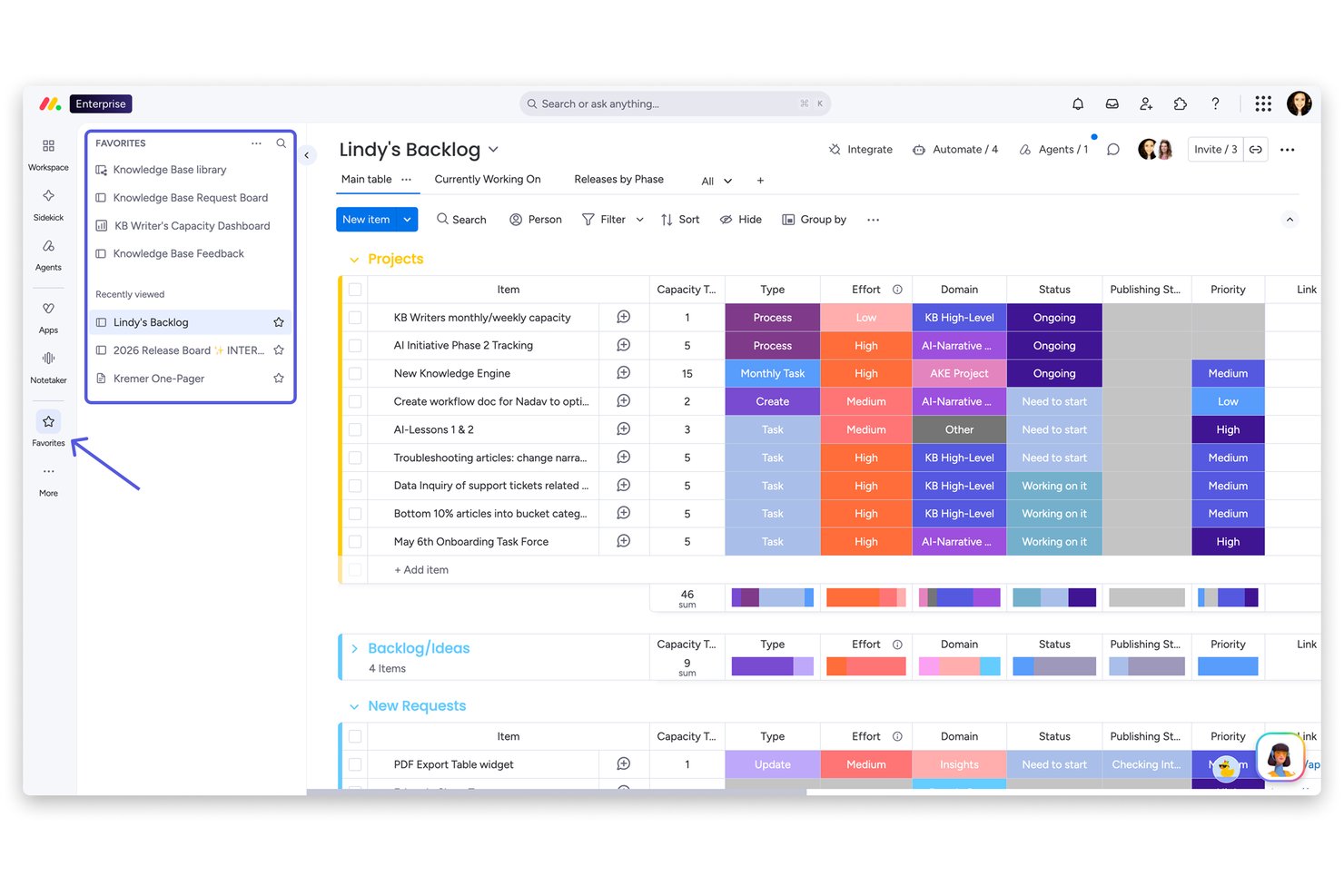
monday AI Workspace è una piattaforma di gestione del lavoro senza codice che combina assegnazione delle attività basata su bacheche, visualizzazioni del carico di lavoro, programmazione tramite Gantt e timeline, e automazioni assistite dall’IA per aiutare i team a pianificare, allocare e monitorare le risorse attraverso vari progetti.
A chi è destinato monday AI Workspace?
È particolarmente adatto a project manager e responsabili operativi di team in crescita che necessitano di un modo visivo e flessibile per gestire i carichi di lavoro su più progetti simultanei.
Perché ho scelto monday AI Workspace
Ho inserito monday AI Workspace tra le mie scelte perché apprezzo sinceramente come la vista Workload renda impossibile non notare i problemi di capacità. Le barre codificate per colore diventano rosse appena un membro del team è sovraccaricato, così posso riequilibrare le assegnazioni prima che la situazione degeneri. Uso anche la visualizzazione Timeline con drag-and-drop per spostare le attività tra le settimane senza dover mai lasciare la schermata di pianificazione.
Funzionalità principali di monday AI Workspace
- Tag per competenze e ruoli: Assegna tag per competenze, ruoli o certificazioni per abbinare la risorsa giusta al lavoro giusto.
- Dashboard multi-progetto: Visualizza dati consolidati sulle risorse e aggiornamenti di stato provenienti da più progetti su dashboard personalizzabili e condivisibili.
- Gestione assenze e ferie: Traccia permessi direttamente nel sistema, aggiornando automaticamente la capacità e prevenendo conflitti di pianificazione.
- Colonna di monitoraggio del tempo nativa: Registra le ore effettive lavorate per ogni attività con una colonna dedicata, semplificando la reportistica sull’utilizzo delle risorse.
Integrazioni di monday AI Workspace
monday AI Workspace offre centinaia di integrazioni native tramite il proprio sistema interno e marketplace, tra cui Slack, Salesforce, HubSpot, Google Workspace, Microsoft Teams, Jira, Asana, Trello, GitHub e Zoom. Supporta inoltre Zapier e fornisce un’API per integrazioni personalizzate.
Cosa è gratuito?
monday AI Workspace offre un piano gratuito per sempre fino a 2 utenti, con accesso a un massimo di 3 bacheche, documenti base e oltre 200 modelli. Le funzionalità principali come automazioni, monitoraggio del tempo, reportistica avanzata e integrazioni sono disponibili solo nei piani a pagamento, quindi il livello gratuito è più adatto a singoli o a team molto piccoli con esigenze leggere di tracciamento progetti.
Pros and Cons
Pros:
- La vista carico di lavoro segnala immediatamente i sovraccarichi
- La timeline con drag-and-drop copre più progetti
- Le automazioni assistite dall’IA riducono il lavoro manuale di pianificazione
Cons:
- Il piano gratuito è limitato a due utenti
- Il monitoraggio del tempo è disponibile solo nei piani a pagamento
New Product Updates from monday AI Workspace
monday AI Workspace Adds Human Approval Routing
monday AI Workspace adds a human-in-the-loop approval block to AI Workflows, sending approval requests and routing workflow paths based on responses. For more information, visit monday AI Workspace's official site.

Wrike
Ideale per visualizzazioni multiple delle risorse

Wrike è una piattaforma di gestione dei progetti che offre ai team strumenti per la pianificazione delle risorse, la gestione dei carichi di lavoro, il monitoraggio del tempo e diverse modalità per visualizzare e allocare le risorse.
Per chi è Wrike?
Wrike è adatto a team trasversali in organizzazioni di medie e grandi dimensioni che necessitano di una piattaforma centralizzata per gestire attività, progetti e capacità del team.
Perché ho scelto Wrike
Ho scelto Wrike tra i migliori per le molteplici modalità in cui permette di visualizzare gli stessi dati sulle risorse. La maggior parte degli strumenti consente solo una o due visualizzazioni, ma Wrike offre Board, Tabella, Gantt, Calendario, Grafico e altro ancora—passando rapidamente da una vista all'altra senza uscire dal progetto. Apprezzo particolarmente la vista carico di lavoro, che mostra a colpo d'occhio il carico di lavoro di ciascun membro del team, così posso individuare chi è sovraccaricato prima che diventi un problema. La funzione di prenotazione delle risorse mi permette anche di riservare tempo da una specifica persona o ruolo e verificare la loro disponibilità rispetto alle ore stimate: funzione veramente utile nella pianificazione di più progetti simultanei.
Caratteristiche principali di Wrike
- Monitoraggio del tempo: Registra le ore direttamente sulle attività e genera report di tempo per controllare come viene impiegato l'impegno del team sui progetti.
- Moduli di richiesta personalizzati: Crea moduli di acquisizione che indirizzano automaticamente il lavoro in arrivo al team o al progetto corretto al momento dell'invio.
- Dipendenze tra attività: Collega le attività affinché eventuali spostamenti di pianificazione ricadano automaticamente sul lavoro dipendente quando cambiano le tempistiche.
- Template di progetto: Salva e riutilizza le strutture di progetto, comprese le liste di attività, gli assegnatari e le tempistiche, per avviare nuovi progetti più velocemente.
Integrazioni di Wrike
Wrike offre centinaia di integrazioni tramite funzionalità integrate e il suo marketplace, inclusi strumenti come Google Workspace, Microsoft 365, Salesforce e Slack. Supporta anche Zapier e fornisce una API per integrazioni personalizzate.
Cosa è gratuito?
Wrike offre un piano gratuito per sempre per piccoli team fino a 5 utenti. Il piano gratuito include funzionalità base di gestione attività e progetti, ma limita l'accesso a funzionalità avanzate, flussi di lavoro personalizzati e la maggior parte delle integrazioni.
New Product Updates from Wrike
Wrike Adds Klaxoon MCP Integration
Wrike’s Klaxoon MCP integration is now generally available, enabling AI agents to navigate between Wrike tasks and attached whiteboards, read task context, and manage whiteboard attachments via API. For more information, visit Wrike's official site.

ClickUp
Ideale per attività e membri illimitati

Il piano gratuito di ClickUp offre attività e membri illimitati, il che lo rende una potente soluzione per la gestione dei progetti. Tuttavia, è limitato a cinque spazi—i gruppi di alto livello che puoi utilizzare per organizzare il lavoro—e 100 MB di spazio di archiviazione.
È facile creare attività e assegnarle ai membri del team. Puoi anche aggiungere dipendenze per assicurarti che il lavoro venga completato nell'ordine corretto. Se sei preoccupato per le scadenze, puoi utilizzare la funzione sprint per segnare le priorità e garantire che tutti sappiano cosa devono fare per terminare in tempo.
Il punto forte del piano gratuito è l'accesso al diagramma di Gantt, che ti aiuta a pianificare le attività e a visualizzare l'avanzamento del progetto. Questi mostrano informazioni da tutti i tuoi spazi, progetti e attività in una sola visualizzazione facile da leggere. Tuttavia, la funzionalità di diagramma di Gantt è limitata a 100 utilizzi al mese.
Il piano gratuito offre l'accesso a oltre 50 integrazioni native dello strumento, oltre che a Zapier. Tuttavia non puoi integrare archiviazione cloud esterna come Google Drive o Dropbox. Se desideri effettuare l'upgrade, il piano a pagamento costa $5 per utente al mese.
New Product Updates from ClickUp
ClickUp Adds Meetings Hub, Super Agent Templates, and ZoomInfo Integration
ClickUp adds a searchable Meetings Hub, new ways to clone and template Super Agents, and a ZoomInfo integration through the App Center. These updates improve meeting retrieval, agent reuse, and access to sales intelligence. For more information, visit ClickUp’s official site.

Asana
Ideale per il monitoraggio delle attività in tempo reale
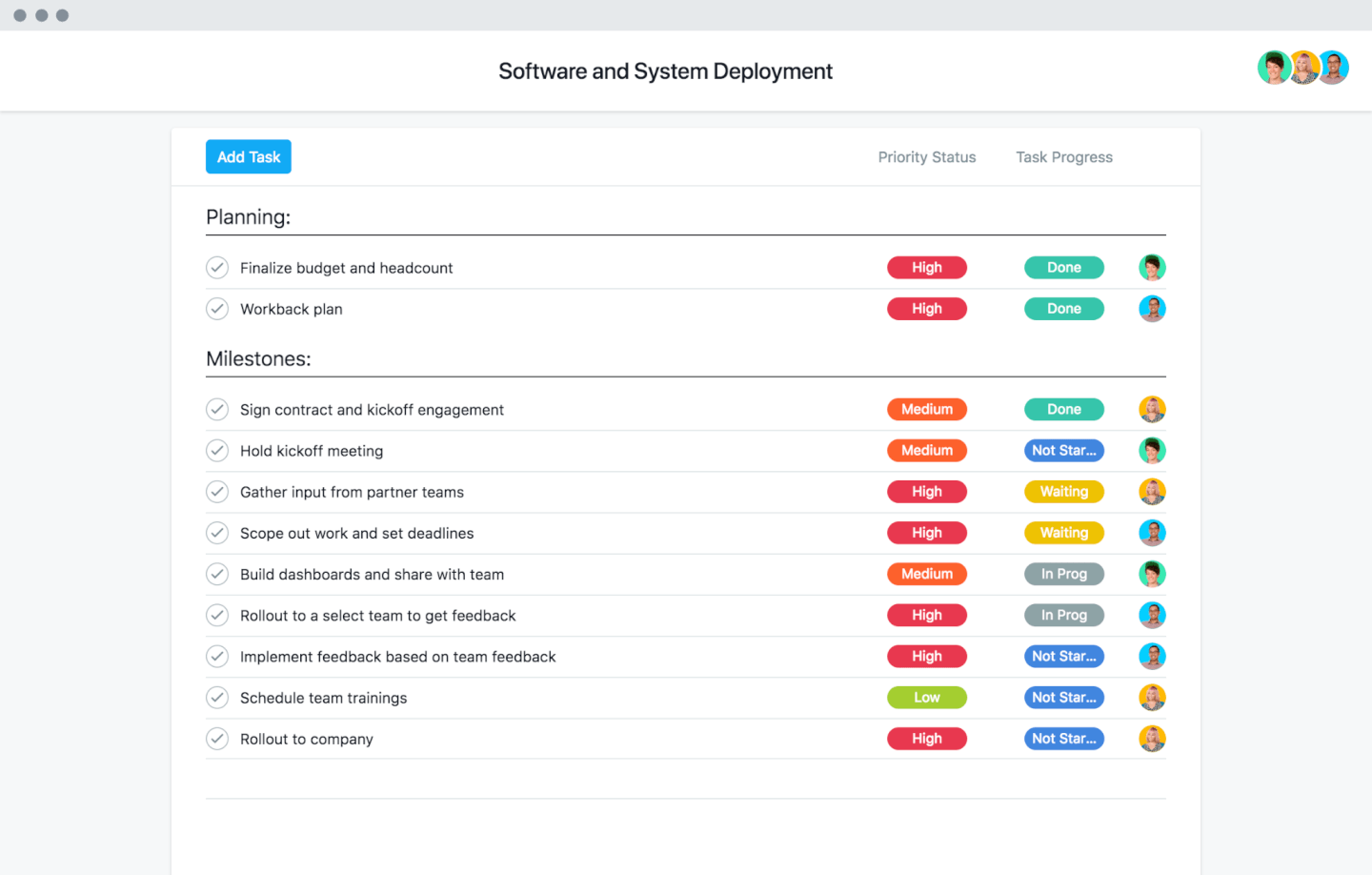
Asana è una piattaforma di gestione del lavoro per team che permette di organizzare progetti, assegnare attività, gestire carichi di lavoro e collaborare in tempo reale utilizzando viste a elenco, bacheca e calendario.
Per chi è ideale Asana?
Asana è adatta ai team trasversali che lavorano in ambito tecnologico e digitale e che necessitano di un metodo strutturato per gestire attività, progetti e carichi di lavoro tra prodotto, ingegneria e design.
Perché ho scelto Asana
Ho scelto Asana tra i migliori perché il monitoraggio delle attività in tempo reale è il suo vero punto di forza. Il mio team utilizza le viste progetto live di Asana per vedere esattamente chi sta lavorando su cosa, con lo stato delle attività aggiornato in tempo reale su elenchi, bacheche e cronologie. Apprezzo particolarmente la vista del carico di lavoro, che mostra a colpo d'occhio le attività assegnate a ciascun membro del team, così da poter individuare i colli di bottiglia prima che diventino blocchi. La funzione Le mie attività consente inoltre a ciascuno di dare priorità alle proprie attività senza perdere di vista il progetto generale.
Funzionalità principali di Asana
- Obiettivi e traguardi: Collega le singole attività agli obiettivi generali del team e monitora i progressi verso i traguardi direttamente all'interno di un progetto.
- Campi personalizzati: Aggiungi campi come priorità, budget o stato alle attività, così il tuo team raccoglie i dati corretti per ogni flusso di lavoro.
- Modelli di progetto: Avvia nuovi progetti utilizzando modelli preimpostati per flussi di lavoro comuni come la pianificazione degli sprint o i lanci di prodotto.
- Dipendenze tra attività: Segna le attività che attendono il completamento di altre, così il team conosce il giusto ordine di esecuzione prima di procedere.
Integrazioni di Asana
Asana offre oltre 200 integrazioni native, tra cui Slack, Google Drive, Microsoft Teams, Zoom, Dropbox, Salesforce, Jira Cloud, GitHub, Adobe Creative Cloud e Tableau. Si collega a Zapier e mette a disposizione una API per integrazioni personalizzate.
Cosa c'è di gratuito?
Asana offre un piano gratuito per sempre fino a 10 utenti. Il piano gratuito include attività, progetti e messaggi illimitati, ma l'accesso a funzionalità avanzate e ad alcune integrazioni è limitato.

Caspio
Ideale per la gestione delle strutture
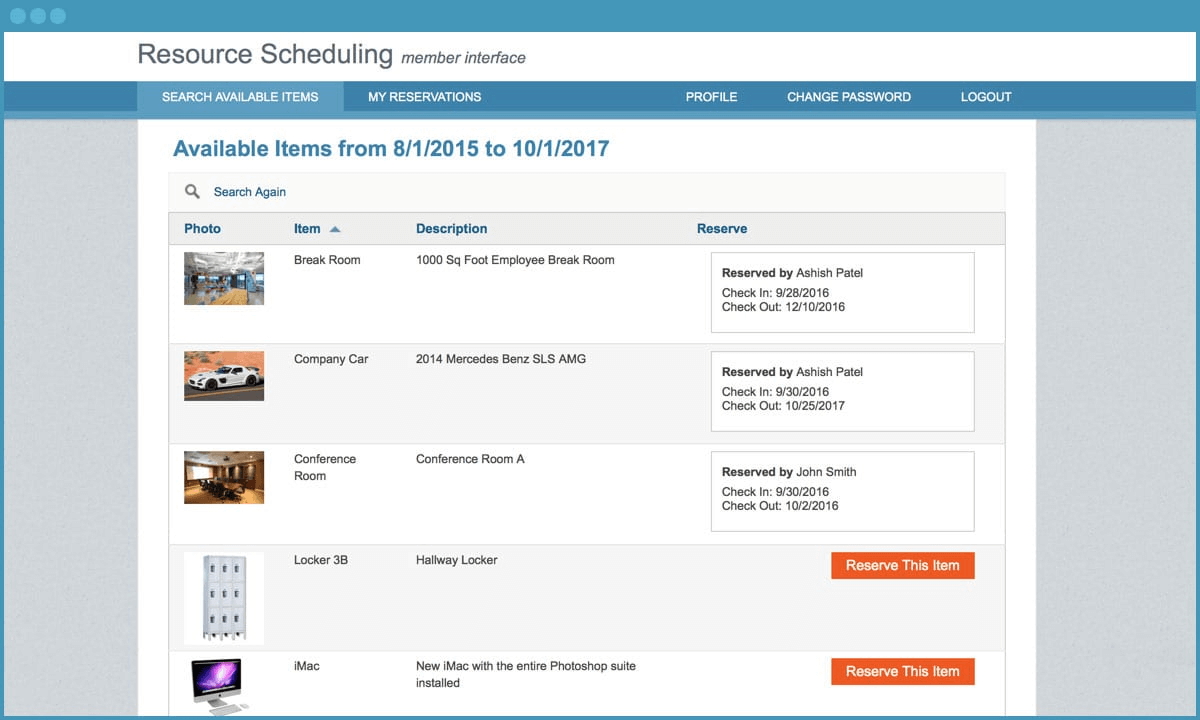
Caspio è un generatore di applicazioni no-code che ti consente di creare strumenti personalizzati per la gestione delle risorse, gestire database, automatizzare flussi di lavoro e impostare permessi utente per il tuo team.
Per chi è ideale Caspio?
Caspio è adatto a team e organizzazioni che hanno bisogno di creare app personalizzate per la gestione delle risorse senza doversi affidare a un team di sviluppo.
Perché ho scelto Caspio
Ho incluso Caspio tra le mie scelte migliori perché adoro come consenta ai team di gestione delle strutture di costruire esattamente l'app di tracciamento delle risorse di cui hanno bisogno, invece di costringerli a usare uno strumento preimpostato e rigido. Il marketplace include un modello di gestione delle risorse basato sui ruoli che traccia le risorse fisiche in più sedi — una necessità quotidiana per i facility manager quando gestiscono attrezzature, stanze e calendari di manutenzione. Uso anche le azioni attivate di Caspio per automatizzare le notifiche di manutenzione quando un record viene aggiornato, così nulla passa inosservato. Abbinando questo alle attività programmate per la pulizia ricorrente dei dati e gli aggiornamenti di stato, si crea un flusso di lavoro per la gestione delle strutture che automatizza la maggior parte delle attività di routine.
Funzionalità principali di Caspio
- Generatore visivo drag-and-drop per app: Progetta app personalizzate per il tracciamento delle risorse grazie a un’interfaccia punta-e-clicca, senza scrivere codice.
- Generazione di report con intelligenza artificiale: Descrivi ciò di cui hai bisogno in linguaggio naturale e Caspio genera automaticamente report e componenti dell’app a partire dai tuoi dati.
- Automazione dei flussi di approvazione: Crea flussi di revisione e approvazione multi-step con regole di escalation per gestire le richieste di risorse tra i vari team.
- Database cloud con Microsoft SQL Server: Archivia e interroga tutti i tuoi dati sulle risorse in un database strutturato e scalabile, supportato da un’infrastruttura di livello enterprise.
Integrazioni Caspio
Caspio offre integrazioni con email, SMS, PayPal e generazione PDF integrata, oltre al supporto all’importazione/esportazione programmata dei dati. Puoi collegarti a migliaia di altre app tramite Zapier e Make, ed è disponibile un’API per integrazioni personalizzate.
Cosa è gratis?
Caspio offre un piano gratuito per sempre con funzionalità di base, limitato a una sola app, fino a 500 record di dati e 50 MB di spazio di archiviazione file. Funzionalità avanzate, integrazioni e limiti di utilizzo più alti richiedono un piano a pagamento.

Jira
Ideale per team di sviluppo software
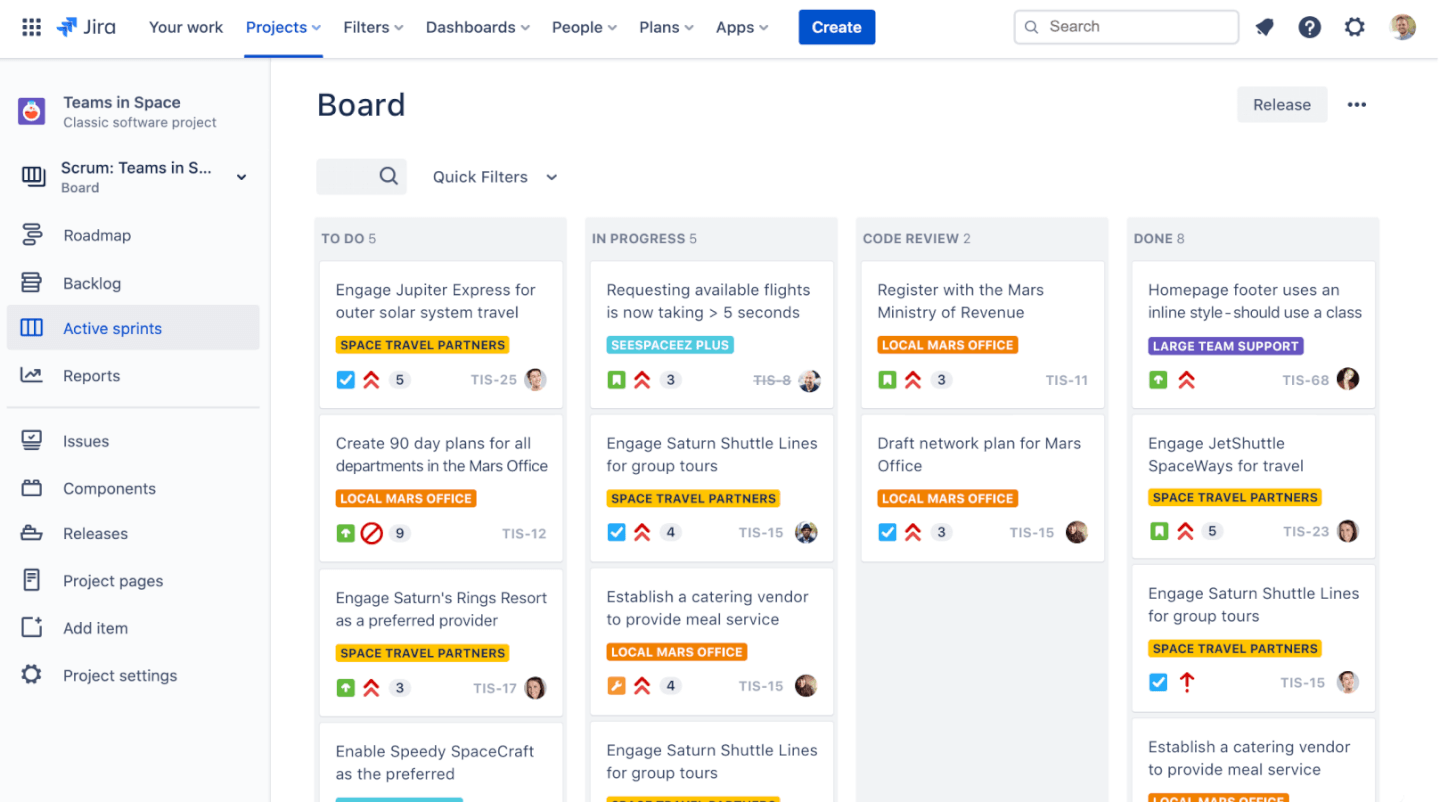
Jira è una piattaforma di gestione progetti e risorse progettata per i team che necessitano di tracciamento delle attività, bacheche agili, flussi di lavoro personalizzabili e visibilità sul carico di lavoro.
Per chi è più indicato Jira?
Jira è particolarmente adatto ai team di sviluppo software che lavorano in ambienti agili e hanno bisogno di gestire sprint, backlog e carichi di lavoro di ingegneria in un unico posto.
Perché ho scelto Jira
Ho inserito Jira nella mia lista perché è uno dei pochi strumenti gratuiti di gestione delle risorse creati specificamente per il modo in cui lavorano i team di sviluppo software. Mi piace che le bacheche Scrum e Kanban non siano solo ausili visivi: permettono al mio team di vedere in tempo reale chi sta lavorando su cosa, quanti compiti sono in corso e dove si stanno accumulando i lavori. La vista cronologica è particolarmente utile per mappare le dipendenze tra gli sprint, così posso vedere quando il ritardo di un team rischia di bloccarne un altro. Il monitoraggio della capacità e del carico di lavoro di Jira mi permette inoltre di individuare sovraccarichi prima che si trasformino in scadenze mancate.
Funzionalità principali di Jira
- Gestione del backlog: Organizza, assegna priorità e classifica le attività in un backlog strutturato che alimenta direttamente la pianificazione degli sprint.
- Flussi di lavoro personalizzati: Crea flussi di lavoro per le attività con stati e transizioni configurabili, per adattarsi a come il tuo team porta avanti il lavoro.
- Dashboard di reportistica: Accedi a report integrati come burndown chart, velocity chart e diagrammi di flusso cumulativo per monitorare i progressi del team.
- Regole di automazione: Imposta trigger di automazione no-code per gestire compiti ripetitivi come assegnazione delle attività, aggiornamenti di stato e notifiche.
Integrazioni di Jira
Jira offre oltre 3.000 integrazioni native tramite l'Atlassian Marketplace, tra cui GitHub, Slack, Microsoft Teams, Google Drive, Confluence, Bitbucket, Trello, Zendesk, Salesforce e Zoom. Include un'API per integrazioni personalizzate e si collega a Zapier.
Cosa è gratuito?
Jira offre un piano gratuito per sempre fino a 10 utenti. Il piano gratuito include funzionalità di base ma limita lo spazio di archiviazione a 2 GB e non include controlli amministrativi avanzati o supporto premium.

Ideale per la gestione di tempo e risorse

Bonsai Agency Software è una piattaforma completa progettata per aiutare le agenzie a gestire efficacemente le risorse. Offre strumenti per la pianificazione dei progetti, il monitoraggio del tempo e il controllo del budget, tutto all'interno di un'unica interfaccia.
Perché ho scelto Bonsai Agency Software: Gli strumenti di pianificazione e previsione delle risorse di Bonsai ti permettono di assegnare il lavoro in base alla capacità del tuo team e di monitorare l'utilizzo in tempo reale. Questo aiuta a garantire che i progetti siano adeguatamente gestiti dal punto di vista delle risorse e che le scadenze vengano rispettate.
Il tuo team può anche registrare facilmente le ore, offrendo una visione chiara dell'avanzamento dei progetti e dei contributi individuali. Puoi monitorare la disponibilità e l'utilizzo del team e impostare tariffe personalizzate fatturabili e di costo per membri, attività e progetti. Questo livello di dettaglio favorisce una fatturazione accurata e una pianificazione finanziaria precisa.
Funzionalità e integrazioni distintive di Bonsai Agency Software
Le funzionalità includono la previsione di carenze di personale prima che il tuo progetto inizi ufficialmente, il che può aiutarti ad avviare e completare i progetti nei tempi previsti e ad assumere in modo proattivo. Lo strumento offre inoltre solide capacità di reportistica che consentono di monitorare e prevedere la redditività in base al lavoro fatturato, alle tariffe orarie, al budget e ai margini attuali.
Le integrazioni includono QuickBooks Online, Zapier, Calendly, Xero, Stripe e PayPal.

Bitrix24
Miglior software RM open source

Bitrix24 è una piattaforma di gestione delle risorse che combina pianificazione dei progetti, monitoraggio dei carichi di lavoro, collaborazione di squadra e strumenti di gestione del tempo in un unico spazio di lavoro.
Per chi è ideale Bitrix24?
Bitrix24 è adatto a team di piccole e medie dimensioni che hanno bisogno di una piattaforma gratuita, tutto-in-uno, per gestire progetti, risorse e comunicazione del team senza dover pagare per più strumenti.
Perché ho scelto Bitrix24
Bitrix24 merita il suo posto nella mia lista perché è uno dei pochi strumenti di gestione delle risorse che offre pieno accesso al suo codice sorgente tramite l'edizione on-premise. Trovo questo particolarmente prezioso per i team che necessitano di adattare la piattaforma a specifici flussi di lavoro invece di adattare i propri processi al software. In pratica, il mio team può modificare elementi dell'interfaccia, creare integrazioni personalizzate tramite REST API e SDK, e persino aggiungere branding personalizzato—il tutto senza essere vincolato al ciclo di aggiornamenti del fornitore. Gli strumenti di gestione del carico di lavoro e di reportistica dei compiti sono inoltre solidi per monitorare come vengono effettivamente utilizzate le risorse nei vari progetti.
Funzionalità principali di Bitrix24
- Diagramma di Gantt: Visualizza le tempistiche dei progetti e le dipendenze delle attività su più progetti in un'unica vista.
- Monitoraggio del tempo: Registra il tempo speso su singole attività e genera report per monitorare la capacità del team.
- Calendario di pianificazione delle risorse: Pianifica i membri del team su attività e progetti per gestire la disponibilità ed evitare conflitti.
- Bacheca Kanban: Organizza e sposta le attività attraverso fasi di workflow personalizzate per monitorare l'avanzamento dei flussi di lavoro.
Integrazioni di Bitrix24
Bitrix24 si integra con strumenti come Google Workspace (Gmail, Calendar, Drive), Microsoft 365 (Outlook, OneDrive, Exchange), Dropbox, Box, Xero e Mailchimp. Offre inoltre un ampio marketplace di app e connettori per estendere le funzionalità, insieme a un'API per integrazioni personalizzate.
Cosa è gratuito?
Bitrix24 offre un piano gratuito per sempre per utenti illimitati con funzionalità base di gestione progetti, monitoraggio delle attività e comunicazione. Alcuni strumenti avanzati, spazio di archiviazione e integrazioni sono disponibili solo nei piani a pagamento.

Silverbucket
Ideale per l'allocazione flessibile delle risorse
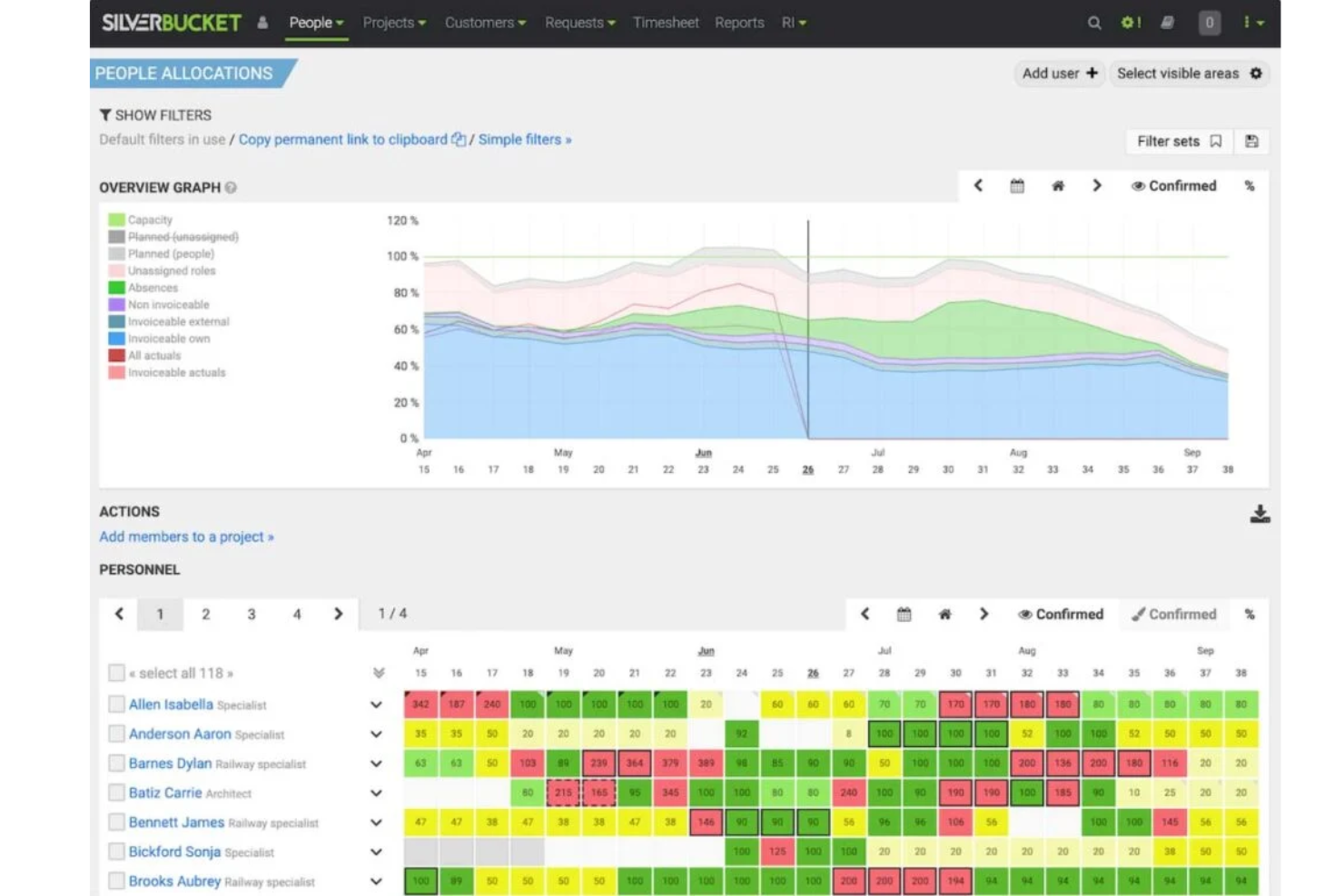
Silverbucket è una piattaforma di gestione delle risorse progettata per organizzazioni basate su progetti che hanno bisogno di pianificare, allocare e monitorare carichi di lavoro e competenze dei team su più progetti.
Per Chi è Migliore Silverbucket?
Silverbucket è ideale per aziende di servizi professionali di medie dimensioni, società di consulenza e organizzazioni ingegneristiche che necessitano di una visibilità strutturata su come le persone sono allocate nei progetti.
Perché Ho Scelto Silverbucket
Silverbucket si guadagna un posto tra i migliori della mia lista grazie al modo in cui gestisce la flessibilità nell’allocazione senza perdere struttura. Mi piace in particolare l’interfaccia drag-to-select, che consente di assegnare una percentuale di capacità su qualsiasi intervallo di date in pochi secondi — senza modali e senza cambiare contesto. Puoi assegnare a una persona specifica o inserire un ruolo placeholder da riempire successivamente tramite una richiesta di risorsa, proprio come avviene realmente nei flussi di progetto. È da segnalare anche la funzione di pianificazione degli scenari: puoi modellare allocazioni provvisorie su più offerte non confermate contemporaneamente, evidenziare conflitti di capacità prima che vengano firmati contratti e convertire quelle allocazioni provvisorie in confermate con un solo clic.
Funzionalità Principali di Silverbucket
- Corrispondenza basata sulle competenze: Valuta i candidati da 0 a 100 tenendo conto di disponibilità, competenze e requisiti di ruolo per individuare il miglior profilo possibile per ogni ruolo di progetto.
- Gestione di ferie e assenze: Tieni traccia di ferie e assenze direttamente nel pianificatore così che i dati di disponibilità riflettano chi è effettivamente libero prima di prendere decisioni di allocazione.
- Costruttore di esportazioni personalizzate: Seleziona qualsiasi combinazione di sezioni dati — utilizzo, ore, previsioni di ricavi o dati effettivi — ed esporta in PDF o Excel in un unico report.
- Timeline con diagramma di Gantt: Pianifica e monitora i compiti individuali dei progetti su una vista Gantt interattiva, collegata alla disponibilità delle risorse così che i piani restino ancorati alla capacità reale.
Integrazioni di Silverbucket
Silverbucket offre un'API per integrazioni personalizzate e può collegarsi a sistemi ERP tramite una configurazione personalizzata.Cosa è Gratuito?
Silverbucket offre una prova gratuita con accesso immediato senza necessità di carta di credito. Non viene menzionato un piano sempre gratuito; la prova offre accesso a tutte le funzionalità senza restrizioni su utenti o integrazioni durante il periodo di prova.
Altri software gratuiti per la gestione delle risorse
Ecco alcuni strumenti che non sono rientrati tra i primi 20, ma che vale la pena considerare se non hai trovato l’opzione giusta tra quelle precedenti.
- eResource Scheduler
Ideale per pianificazione e gestione finanziaria
- Acuity PPM
Ideale per offrire una visione centralizzata delle risorse di progetto
- Sinnaps
Ideale per la gestione del tempo
- Dovico
Ideale per monitorare i costi dei progetti
- Cirkus
Ideale per freelance e piccoli team
- Productive
Ideale per la gestione delle risorse in agenzia
- Celoxis
Ideale per la pianificazione delle risorse potenziata dall'IA
- Zoho Projects
Ottimo per funzioni di collaborazione nei progetti
- GoodDay
Ideale per la visibilità in tempo reale dei carichi di lavoro
- Runn
Ideale per la creazione di modelli personalizzati
- Hub Planner by Milient
Il miglior software di gestione delle risorse per aziende che lavorano su progetti


Recensioni correlate
Scopri questi strumenti strettamente correlati ai software per la gestione dei progetti che abbiamo testato e valutato:
- Software per la gestione delle risorse
- Software per la gestione dei flussi di lavoro
- Software per il monitoraggio del tempo
- Software per la gestione delle attività
- Strumenti di collaborazione
- Strumenti per la produttività
- Software per la pianificazione delle risorse
- Software per la gestione delle risorse per agenzie
- Strumenti di calendario per la gestione dei progetti e la pianificazione
- Software open source per la gestione delle risorse
- Alternative a Redmine
- Software gratuito per la gestione dei progetti
- Software per la gestione delle risorse multimediali
Come valuto il software gratuito di gestione delle risorse
Divido la mia valutazione in due livelli: le capacità di base che uno strumento deve possedere per qualificarsi, e i fattori differenzianti—come il monitoraggio delle assenze o la pianificazione di scenari—che distinguono le opzioni migliori.
Funzionalità di Base (Requisiti Minimi per Questa Lista)
Quando seleziono gli strumenti per la mia lista, valuto ciascuno su una scala da 0 (non offre la funzionalità) a 5 (eccelle in quest'area) per ogni funzionalità di base elencata di seguito. Poi, calcolo il punteggio totale dello strumento in percentuale. Ogni strumento deve raggiungere un punteggio totale minimo del 65% per essere considerato per l'inclusione.
- Assegnazione delle Risorse: Analizzo come ogni strumento gestisce l’assegnazione di persone a compiti e progetti—se supporta l’allocazione basata su ore o percentuali, oppure solo un semplice abbinamento nome-compito.
- Visibilità della Capacità e del Carico di Lavoro: Ogni strumento deve mostrare chi è sovraccarico e chi ha disponibilità, come una heatmap che segnala un designer impegnato al 140% mentre uno sviluppatore è fermo al 50%.
- Sequenza Temporale Visiva di Programmazione: Valuto se lo strumento offre una vista Gantt o timeline drag-and-drop dove puoi spostare le assegnazioni tra le settimane senza cambiare schermata.
- Disponibilità del Piano Gratuito: Lo strumento deve offrire un piano davvero gratuito—non una prova di 14 giorni—che includa funzionalità di gestione delle risorse con limiti utilizzabili di utenti o progetti.
- Monitoraggio delle Risorse su Più Progetti: Controllo se puoi vedere gli impegni di una singola risorsa su tutti i progetti attivi in un unico posto, invece che dover entrare in ogni progetto singolarmente.
- Monitoraggio del Tempo e Report sull’Utilizzo: Gli strumenti ricevono un punteggio più alto quando collegano le ore registrate alle allocazioni pianificate, così puoi confrontare il lavoro stimato di uno sviluppatore su uno sprint con il tempo effettivamente impiegato.
Dopo aver ottenuto una lista di strumenti che soddisfano questi criteri, considero cosa distingue ogni piattaforma.
Fattori Differenzianti (Cosa Distingue i Fornitori)
Ecco come confronto e metto a confronto i diversi fornitori:
Funzionalità Distintive
L’etichettatura di competenze e ruoli rappresenta un forte punto di differenziazione. Quando arriva un nuovo progetto, voglio filtrare le risorse disponibili per competenza invece di scorrere una lista di nomi. Il monitoraggio delle assenze e delle ferie è altrettanto importante, perché un piano di capacità che ignora le vacanze imminenti finirà per sovraccaricare il team in una settimana. Cerco anche la pianificazione di scenari, che consente di simulare “cosa succede se spostiamo questo sviluppatore sul Progetto B” prima di modificare la pianificazione reale di qualcuno.
Oltre le Funzionalità
I limiti dei piani gratuiti sono molto variabili, quindi verifico quanti utenti, progetti e risorse sono effettivamente inclusi prima di incontrare limitazioni a pagamento. Le integrazioni sono altrettanto importanti—se il tuo team lavora in sprint su Jira e comunica su Slack, uno strumento di gestione risorse che non si collega a nessuno dei due genera solo lavoro manuale in più. Valuto anche quanto rapidamente un nuovo utente riesca a pianificare le risorse. Template efficaci, guide integrate e documentazione accessibile fanno la differenza tra una rapida adozione e uno strumento che rimane inutilizzato.
Come scegliere un software gratuito per la gestione delle risorse
Ecco alcuni fattori da tenere a mente quando scegli uno strumento software gratuito per la gestione delle risorse:
| Fattore | Considerazioni |
|---|---|
| Ambito dell'offerta gratuita | Valuta cosa è incluso nella versione gratuita del software. Cerca limitazioni come il numero massimo di utenti, le dimensioni dello spazio di archiviazione o le funzionalità mancanti, per assicurarti che soddisfi le esigenze di base del tuo team. |
| Scalabilità | Considera se il software può crescere insieme al tuo team. Gli strumenti che offrono piani a pagamento o aggiornamenti modulari ti eviteranno di dover cambiare piattaforma in seguito. |
| Integrazioni | Assicurati che il software si integri con gli strumenti che già utilizzi, come Slack, Google Workspace o Trello, per ottimizzare i tuoi flussi di lavoro. |
| Facilità d'uso | Un'interfaccia intuitiva riduce i tempi di apprendimento. Scegli strumenti con dashboard intuitive e un onboarding rapido per il tuo team. |
| Personalizzazione | Cerca funzionalità come flussi di lavoro, etichette o dashboard personalizzate, adattabili ai processi specifici del tuo team. |
| Collaborazione | Verifica la presenza di funzionalità come calendari condivisi, aggiornamenti in tempo reale e assegnazione delle attività per mantenere il tuo team allineato. |
| Reportistica | Scegli un software che offra informazioni chiare e utili all'azione tramite report o dashboard visivi, anche nel piano gratuito. |
| Opzioni di supporto | Spesso gli strumenti gratuiti non offrono assistenza clienti. Verifica la disponibilità di risorse self-service come basi di conoscenza, forum o tutorial per aiutare il tuo team a risolvere i problemi. |
Che cos'è il software gratuito per la gestione delle risorse?
Il software gratuito per la gestione delle risorse si riferisce agli strumenti che consentono di pianificare, allocare e ottimizzare le risorse senza sostenere alcun costo per il software stesso. Queste soluzioni sono particolarmente preziose per le piccole e medie imprese, le organizzazioni senza scopo di lucro e le startup con vincoli di budget.
Il software gratuito per la gestione delle risorse include in genere funzionalità come la pianificazione dei progetti e delle risorse, l'assegnazione delle attività, il monitoraggio del tempo e gli strumenti di collaborazione. Questo tipo di strumento presenta spesso limitazioni relative alle funzionalità, allo spazio di archiviazione o al numero di utenti rispetto alle versioni premium, ma offre comunque capacità preziose ai team che cercano modi convenienti per migliorare i processi di gestione dei progetti e delle risorse.
Funzionalità del software gratuito per la gestione delle risorse
Esaminiamo le funzionalità comunemente presenti nei software per la gestione delle risorse e quali sono generalmente incluse nei piani gratuiti rispetto a quelli a pagamento.
Funzionalità tipiche del software gratuito per la gestione delle risorse
- Strumenti di pianificazione di base: consentono di assegnare risorse ad attività e progetti tramite la funzionalità di trascinamento.
- Monitoraggio della disponibilità delle risorse: aiuta a controllare quali membri del team o risorse sono disponibili per gli incarichi attuali o futuri.
- Report semplici: forniscono informazioni di base sull'utilizzo e sull'allocazione delle risorse, così puoi assicurarti che vengano impiegate in modo efficiente.
- Integrazione con strumenti comuni: si collegano a piattaforme popolari come Google Calendar o Slack per ottimizzare i flussi di lavoro.
- Accesso da dispositivi mobili: offre la possibilità di consultare pianificazioni o incarichi in mobilità tramite app mobili.
- Strumenti di collaborazione del team: includono calendari condivisi e bacheche delle attività per mantenere tutti informati e allineati.
- Gestione degli utenti: consente di aggiungere o rimuovere utenti e assegnare ruoli per controllare chi può accedere a risorse specifiche, ad esempio per i servizi IT.
Funzionalità tipiche del software a pagamento per la gestione delle risorse
- Strumenti avanzati di previsione: consentono di prevedere il fabbisogno futuro di risorse sulla base dei dati storici e delle pipeline dei progetti.
- Dashboard personalizzabili: offrono visualizzazioni e metriche personalizzate in base alle esigenze del singolo team o dell'azienda.
- Analisi dettagliate: forniscono informazioni approfondite sulle prestazioni, sui costi e sull'utilizzo delle risorse per prendere decisioni migliori.
- Autorizzazioni basate sui ruoli: garantiscono un accesso sicuro limitando le funzionalità o la visibilità dei dati in base ai ruoli degli utenti.
- Funzionalità di automazione: riducono le attività ripetitive come la riallocazione delle risorse o l'attivazione di notifiche.
- Integrazione con strumenti premium: si collegano a piattaforme avanzate come sistemi CRM, software di contabilità o soluzioni ERP.
- Monitoraggio del tempo e fatturazione: registrano le ore fatturabili e si integrano direttamente con gli strumenti di fatturazione per addebitare i costi ai clienti.
- Supporto prioritario: garantisce tempi di risposta più rapidi e l'accesso a team di supporto dedicati per la risoluzione dei problemi.
Vantaggi del software gratuito per la gestione delle risorse
L'implementazione di un software gratuito per la gestione delle risorse offre diversi vantaggi al tuo team e alla tua azienda. Eccone alcuni di cui potrai usufruire:
- Risparmio sui costi: Ottieni strumenti essenziali per la gestione delle risorse senza aumentare le spese, una soluzione ideale per piccoli team o startup.
- Organizzazione migliorata: Utilizza le funzionalità di pianificazione e gestione delle attività per mantenere progetti e risorse in un unico luogo, riducendo così la confusione.
- Migliore visibilità delle risorse: Tieni traccia di chi è disponibile e delle attività in corso per evitare di assegnare troppe attività o di utilizzare in modo insufficiente i membri del team.
- Collaborazione semplice: I calendari condivisi e gli strumenti per il team consentono a tutti di essere sempre aggiornati.
- Configurazione rapida: Molti strumenti gratuiti offrono interfacce intuitive e modelli che permettono di iniziare con il minimo sforzo.
- Integrazioni di base: Collegati a strumenti diffusi come Google Calendar o Slack per integrarli nel flusso di lavoro esistente.
- Accesso in mobilità: Le app mobili ti consentono di controllare gli orari e gestire le attività ovunque ti trovi, così tu e il tuo team potete rimanere produttivi.
Leggi di più: Vuoi gestire le risorse del tuo inventario? Consulta il nostro elenco completo dei software per la gestione delle risorse di inventario.
Costi e prezzi del software gratuito per la gestione delle risorse
Capisco che sei arrivato a questo articolo cercando le migliori opzioni di software per la gestione delle risorse disponibili gratuitamente. Tuttavia, poiché i piani gratuiti offrono solo funzionalità limitate, è molto probabile che in futuro dovrai passare a un piano superiore.
La tabella seguente riassume i piani più comuni, i relativi prezzi medi e le funzionalità tipicamente incluse nelle soluzioni software per la gestione delle risorse:
Tabella comparativa dei piani per il software di gestione delle risorse
| Tipo di piano | Prezzo medio | Funzionalità comuni |
|---|---|---|
| Piano gratuito | $0 | Strumenti di pianificazione di base, monitoraggio della disponibilità delle risorse, report semplici e funzionalità di collaborazione del team. |
| Piano personale | $5–$25/utente/mese | Pianificazione avanzata, integrazioni con strumenti di terze parti, visualizzazioni personalizzate e accesso all'app mobile. |
| Piano aziendale | $25–$50/utente/mese | Analisi dettagliate, monitoraggio del tempo, autorizzazioni basate sui ruoli e dashboard personalizzabili. |
| Piano per grandi aziende | $50–$100+/utente/mese | Previsioni avanzate, funzionalità di automazione, supporto prioritario e integrazioni a livello aziendale. |
Domande frequenti sul software gratuito per la gestione delle risorse