

Ho testato 10 software di automazione dei flussi di lavoro nel 2026: le mie scelte migliori

10 Elenco dei migliori software di automazione dei flussi di lavoro


Il miglior software di automazione dei flussi di lavoro consente di orchestrare processi end-to-end che attivano automaticamente azioni su più piattaforme in base alla logica condizionale e alle variazioni dello stato in tempo reale. Viene comunemente utilizzato per configurare account nei sistemi interni, gestire flussi di approvazione, assegnare attività di avvio ai team interfunzionali e aggiornare i record CRM. Senza questo strumento, i team sprecano ore in attività a basso valore, soffrono di problemi di comunicazione e subiscono ritardi nella consegna dei progetti.
Grazie ai miei oltre 20 anni di esperienza pratica nell'utilizzo e nel test di decine di piattaforme di automazione dei flussi di lavoro come project manager, ho visto quanto possa essere efficace lo strumento giusto. Dalla riduzione delle attività manuali all'accelerazione delle approvazioni di routine, il miglior software può aiutarti a concentrarti sul lavoro strategico e sulla comunicazione con i clienti invece che sulle attività amministrative ripetitive.
Ecco le mie scelte migliori, basate su test effettuati in situazioni reali. Ho evidenziato i punti di forza di ogni strumento, così puoi trovare rapidamente quello più adatto ai tuoi flussi di lavoro e ai tuoi obiettivi.
Perché fidarsi dei nostri consigli sui software
Il nostro team testa e recensisce software dal 2012. In quanto project manager noi stessi, sappiamo quanto sia difficile — e importante — scegliere il software giusto.
Per questa guida, abbiamo valutato gli strumenti attraverso test pratici e ricerche indipendenti, assegnando un punteggio agli strumenti in base ai nostri criteri di selezione. Ci basiamo inoltre sulle competenze di leader di pensiero del settore e di professionisti attivi nella gestione dei progetti.
Le nostre recensioni riflettono il nostro giudizio editoriale umano, non un discorso di vendita.
Confronta le specifiche fianco a fianco
Questa tabella di confronto riassume i dettagli di base di ciascuna delle mie migliori selezioni di software per l’automazione dei flussi di lavoro. Consulta fianco a fianco i dettagli sui prezzi e la disponibilità di prove gratuite o demo per trovare la piattaforma migliore per il tuo budget.
| Tool | Best For | Trial Info | Price | ||
|---|---|---|---|---|---|
| 1 | Ideale per la pianificazione di progetti guidata da AI | 14 giorni di prova gratuita | Da $6/utente/mese | Website | |
| 2 | Ideale per la collaborazione sicura con i clienti | Piano gratuito + demo gratuita disponibili | A partire da $99/mese | Website | |
| 3 | Ideale per l'automazione dei flussi di lavoro senza codice basata sull'AI | Demo gratuita disponibile | Prezzi disponibili su richiesta | Website | |
| 4 | Ideale per la personalizzazione dei flussi di lavoro aziendali | Demo gratuita disponibile | $40/user/month | Website | |
| 5 | Ideale per solide funzionalità di gestione API | Demo gratuita disponibile | Prezzo su richiesta | Website | |
| 6 | Il migliore per l'automazione documentale su Salesforce | Demo gratuita disponibile | Da $399/mese (fatturazione annuale) | Website | |
| 7 | Ideale per approfondimenti operativi focalizzati sulle agenzie | Prova gratuita di 14 giorni | From $10/user/month | Website | |
| 8 | Ideale per organizzazioni in crescita | Prova gratuita di 14 giorni + piano gratuito disponibile | A partire da $8/utente/mese | Website | |
| 9 | Ideale per processi trasversali | Prova gratuita di 15 giorni | Da $19/utente/mese (fatturato annualmente) | Website | |
| 10 | Ideale per LLM personalizzati | Versione di prova gratuita disponibile + demo gratuita | Prezzo su richiesta | Website |


Recensioni dei migliori software di automazione dei flussi di lavoro
Ecco una breve descrizione di ciascuna soluzione di automazione dei flussi di lavoro, con il relativo caso d’uso migliore e le funzionalità più rilevanti.

Ideale per la pianificazione di progetti guidata da AI
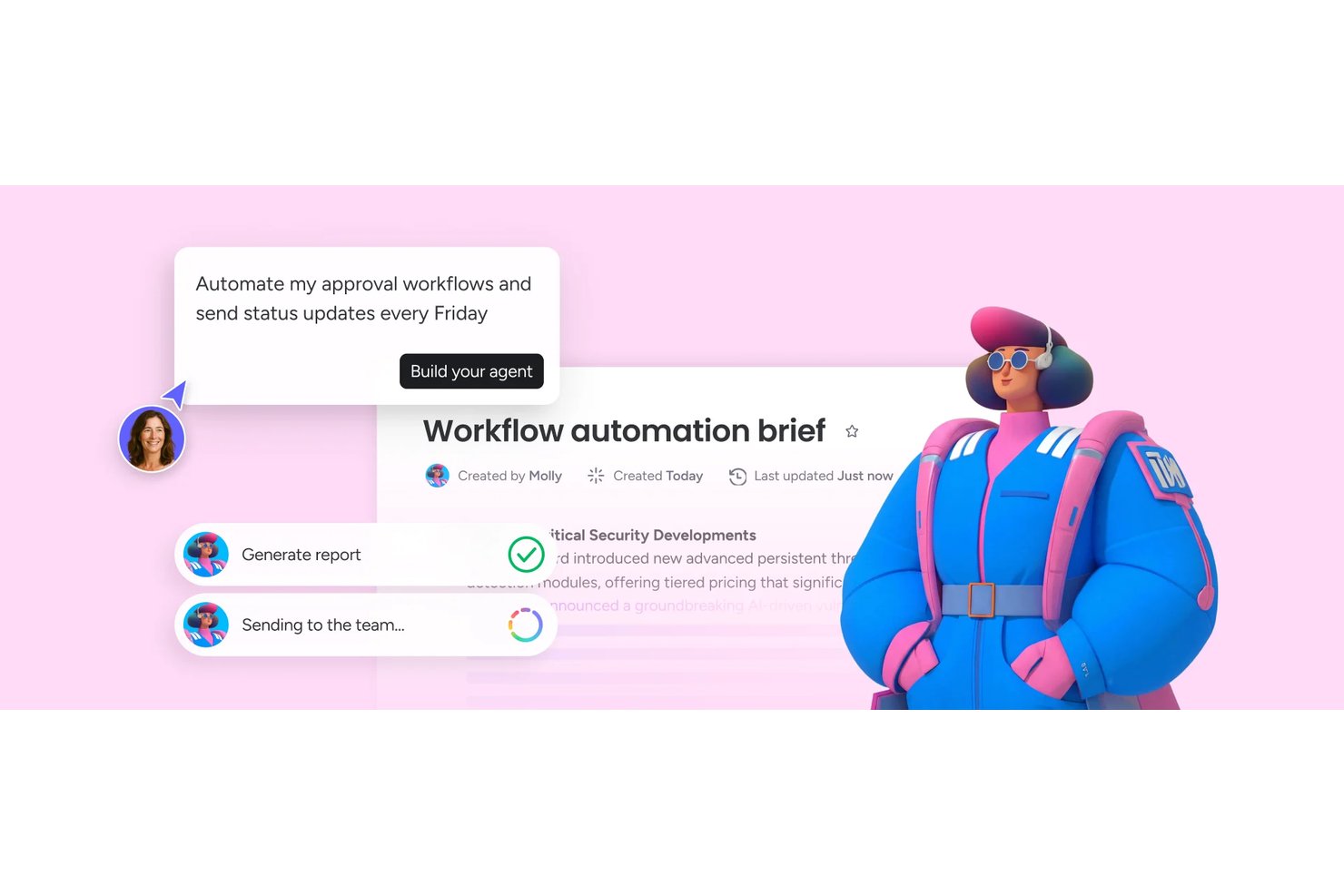
monday AI Workspace è una piattaforma di gestione del lavoro potenziata dall'AI che combina l'automazione dei flussi di lavoro senza codice, la pianificazione dei progetti, l'instradamento delle attività e l'integrazione tra strumenti diversi per aiutare i team a gestire e automatizzare il lavoro su progetti e dipartimenti.
Per chi è ideale monday AI Workspace?
È particolarmente indicato per direttori PMO e responsabili di programma in organizzazioni medio-grandi che coordinano flussi di lavoro tra più team e funzioni aziendali.
Perché ho scelto monday AI Workspace
Ho incluso monday AI Workspace nella mia lista perché il suo livello di pianificazione con AI va ben oltre la semplice assegnazione di task. Apprezzo in particolare gli agenti AI che individuano attivamente i rischi di progetto, aggiornano gli stati e instradano le attività senza attendere l'intervento umano. L'AI Workflow Builder (livello Pro e superiori) permette di orchestrare automazioni multi-step che collegano questi agenti tra diverse board, così una dipendenza segnalata in un progetto può generare automaticamente una riassegnazione in un altro.
Funzionalità chiave di monday AI Workspace
- Builder di workflow visuale: Progetta automazioni multi-step con un'interfaccia drag-and-drop e passaggi personalizzabili.
- Galleria di template: Accedi a centinaia di modelli di flussi di lavoro categorizzati per tipo di progetto e settore.
- Centro integrazioni native: Collega le board a oltre 70 strumenti di business e collaborazione con integrazioni preconfigurate.
- Builder di form personalizzati: Crea moduli dinamici di raccolta dati che avviano attività e approvazioni automatiche direttamente nei tuoi workflow.
Integrazioni di monday AI Workspace
monday AI Workspace offre oltre 70 integrazioni native, tra cui Slack, Salesforce, HubSpot, Google Workspace, Microsoft Teams, Jira, GitHub, Zoom, Trello e Zendesk. È inoltre compatibile con Zapier e fornisce un’API per integrazioni personalizzate.
Pros and Cons
Pros:
- Gli agenti AI individuano i rischi senza input manuale
- Builder di workflow no-code senza bisogno di sviluppatori
- Le automazioni coprono diverse board e portfoli
Cons:
- Le esecuzioni di automazione sono limitate nei piani base
- Le funzioni AI avanzate sono disponibili solo nei piani più alti
New Product Updates from monday AI Workspace
monday AI Workspace Adds Human Approval Routing
monday AI Workspace adds a human-in-the-loop approval block to AI Workflows, sending approval requests and routing workflow paths based on responses. For more information, visit monday AI Workspace's official site.

Moxo
Ideale per la collaborazione sicura con i clienti

Con un motore di automazione dei flussi di lavoro che include agenti AI, approvazioni multi-step, firme elettroniche, moduli e ramificazioni condizionali, Moxo è progettato specificamente per operazioni strutturate rivolte ai clienti.
Per chi è ideale Moxo?
Moxo è particolarmente adatto a team di servizi professionali nei settori finanziario, legale e della consulenza che gestiscono flussi di lavoro strutturati e ad alto valore aggiunto con clienti esterni.
Perché ho scelto Moxo
Ho incluso Moxo tra le mie scelte principali perché integra la sicurezza direttamente nello strato di collaborazione, non solo nell’infrastruttura. Ogni interazione con il cliente avviene all’interno di uno spazio di lavoro crittografato e controllato tramite accessi, così documenti sensibili, approvazioni e messaggi non circolano mai tramite thread di email non tracciati. Apprezzo particolarmente la funzione di audit trail, che registra ogni azione compiuta all’interno di un flusso di lavoro con una cronologia con data e ora e una conservazione fino a oltre sette anni, una caratteristica fondamentale nei settori regolamentati come quello finanziario e legale.
Caratteristiche principali di Moxo
- Agenti AI nei flussi di lavoro: Utilizza agenti AI all’interno dei flussi per revisionare documenti, preparare riepiloghi e suggerire prossime azioni senza intervento manuale.
- Ramificazioni condizionali: Costruisci percorsi decisionali basati sulla logica all’interno dei flussi di lavoro in modo che le diverse risposte dei clienti attivino automaticamente differenti passaggi successivi.
- Raccolta di firme elettroniche: Richiedi firme legalmente vincolanti direttamente all’interno di una fase del flusso di lavoro, mantenendo la fase di firma come parte del processo strutturato.
- Template di flussi: Usa modelli di workflow predefiniti dalla galleria template di Moxo per avviare processi ripetibili per i clienti senza doverli ricreare da zero ogni volta.
Integrazioni di Moxo
Moxo offre connettori di sincronizzazione dati con Salesforce, HubSpot, Microsoft Dynamics, Zoho, Wealthbox, Redtail, Filevine, Global Relay, Smarsh, Xero e Follow Up Boss. Supporta anche caricamenti di file da Google Drive, Dropbox, Box e OneDrive, e integrazioni native di calendario con Google Calendar e Outlook. Moxo si connette con Zapier e fornisce una REST API e webhooks per integrazioni personalizzate.
Pros and Cons
Pros:
- Firme elettroniche e moduli integrati nei flussi di lavoro
- Conforme agli standard SOC 2 Type II e GDPR
- Template di workflow riutilizzabili con logica condizionale
Cons:
- Nessuna funzione integrata per la rilevazione del tempo delle attività
- L’app mobile è meno performante rispetto alla versione desktop

Ideale per l'automazione dei flussi di lavoro senza codice basata sull'AI

Screendragon è una piattaforma di automazione dei flussi di lavoro senza codice progettata per le operazioni di marketing e creative. Combina la gestione dei progetti, la pianificazione delle risorse e i flussi di approvazione in un'unica piattaforma, aiutando i team a ridurre le inefficienze e a concentrarsi sulle attività ad alto valore.
Perché ho scelto Screendragon
Ho scelto Screendragon perché consente ai team di creare flussi di lavoro automatizzati su misura per le proprie esigenze senza scrivere codice. Altre funzionalità includono moduli personalizzati dinamici e la gestione digitale delle approvazioni, che possono contribuire a semplificare i processi complessi. Apprezzo il modo in cui integra l'AI e le regole di governance per assicurarsi che il team possa concentrarsi sulle attività ad alto impatto senza essere ostacolato da difficoltà amministrative.
Grazie ai controlli avanzati delle autorizzazioni e agli approfondimenti in tempo reale, Screendragon offre gli strumenti necessari per una gestione e una collaborazione efficaci, il che lo rende una scelta di spicco per marchi e agenzie globali.
Funzionalità principali di Screendragon
Screendragon offre diverse altre funzionalità che migliorano l'automazione dei flussi di lavoro per i team di marketing e creativi.
- Reportistica avanzata: fornisce informazioni dettagliate sulla visibilità dei progetti, consentendo di monitorare i progressi e le prestazioni delle varie campagne.
- Strumenti integrati per feedback e approvazioni: facilitano la collaborazione permettendo ai membri del team di fornire e ricevere feedback direttamente all'interno della piattaforma e semplificando il processo di approvazione.
- Gestione delle attività: consente di gestire le attività, allocare le risorse e monitorare il tempo, aiutando ad assicurarsi che tutti gli elementi del progetto siano coordinati in modo efficiente.
- Pannelli personalizzabili: consentono di adattare le visualizzazioni e la presentazione dei dati alle proprie esigenze specifiche. Offrono il controllo su come le informazioni vengono visualizzate e consultate dal team.
Integrazioni di Screendragon
Le integrazioni includono Microsoft Teams, Slack, SharePoint, Power BI, Google Workspace, Workday, Jira, SAP e migliaia di altre tramite API o Zapier.
Pros and Cons
Pros:
- Flussi di lavoro altamente personalizzabili per team complessi
- Strumenti integrati per la pianificazione delle risorse e del budget
- Agenti AI integrati direttamente nei flussi di lavoro dei progetti
Cons:
- L'onboarding, che richiede molto tempo, può ritardare la configurazione iniziale
- Complesso e non adatto a piccoli team o progetti semplici
New Product Updates from Screendragon
Screendragon Unveils New AI Hub
Screendragon introduced AI Hub, a new capability that lets teams build and manage AI agents directly within workflows. The update helps marketing teams automate tasks, maintain governance controls, and scale AI-driven operations more efficiently. For more information, visit Screendragon's official site.

Ideale per la personalizzazione dei flussi di lavoro aziendali
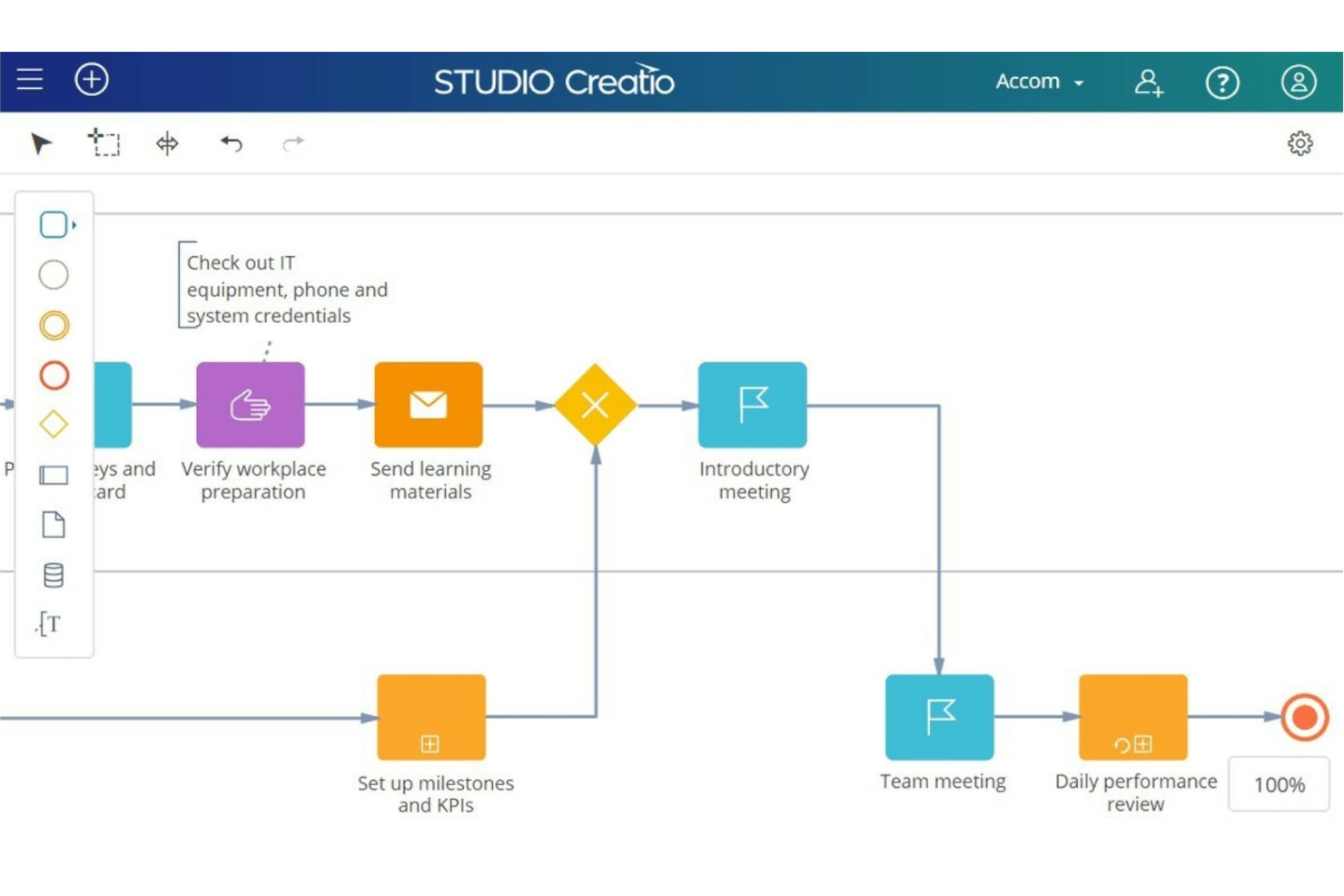
Studio Creatio è una piattaforma no-code che consente alle aziende di automatizzare i flussi di lavoro e creare applicazioni senza la necessità di una conoscenza approfondita della programmazione.
Perché ho scelto Studio Creatio
La piattaforma è altamente personalizzabile e offre un designer no-code, che include strumenti per creare e modificare pagine, visualizzazioni, modelli di dati, flussi di lavoro e integrazioni, tutto all’interno di un'unica area di lavoro. La piattaforma mette inoltre a disposizione soluzioni specifiche per settori come banche, cooperative di credito e assicurazioni.
Il software di automazione dei flussi di lavoro di Studio Creatio è parte integrante di questa piattaforma no-code. Gli utenti possono progettare, automatizzare e ottimizzare i flussi di lavoro con un’interfaccia visiva intuitiva che non richiede alcuna conoscenza di programmazione pregressa. Questa funzionalità rende la tecnologia accessibile a una vasta gamma di professionisti, contribuendo così alla trasformazione digitale della loro azienda.
Caratteristiche principali di Studio Creatio
Oltre alle capacità di personalizzazione, Studio Creatio offre varie altre funzionalità pensate per rispondere alle esigenze di automazione dei flussi di lavoro.
- Strumenti AI: Puoi migliorare i tuoi processi di automazione con tecnologie AI integrate che supportano algoritmi intelligenti e l’integrazione con OpenAI, mantenendo informato il processo decisionale.
- Creatio Marketplace: Puoi accedere a una vasta gamma di applicazioni e componenti pronti all'uso che possono essere facilmente integrati e personalizzati per soddisfare le specifiche esigenze aziendali.
- Scalabilità: Offre una scalabilità di livello enterprise che può supportare un gran numero di utenti, mantenendo alte prestazioni e affidabilità su tutti i flussi di lavoro.
- Designer di Processi BPMN 2.0: Questa funzionalità ti permette di automatizzare processi aziendali e flussi di lavoro complessi per rendere più efficienti le operazioni in vari dipartimenti.
Integrazioni di Studio Creatio
Le integrazioni includono Chat Master, PandaDoc, SharePoint, Jira, Calendly, Zoom, Shopify, Asterisk, Microsoft Teams, Zapier, Quickbooks e SAP BusinessOne.
Pros and Cons
Pros:
- Piattaforma completamente personalizzabile, adattabile a vari casi d’uso
- Il designer no-code facilita l'adozione anche per utenti non tecnici
- Supporto per raccomandazioni sui processi basate su AI
Cons:
- Può richiedere uno sforzo significativo in fase di pianificazione e progettazione dei flussi di lavoro
- Non ideale per team che cercano una soluzione pronta all’uso
New Product Updates from Creatio AI Studio
Creatio Studio Adds AI Automation for Chat Channels
Creatio Studio now supports channel-level Creatio.ai automation for chat channels like Facebook Messenger, Telegram, WhatsApp, and SMS, including out-of-the-box setup, assistant personality selection, and seamless human handoff. For more information, visit Creatio Studio's official site.

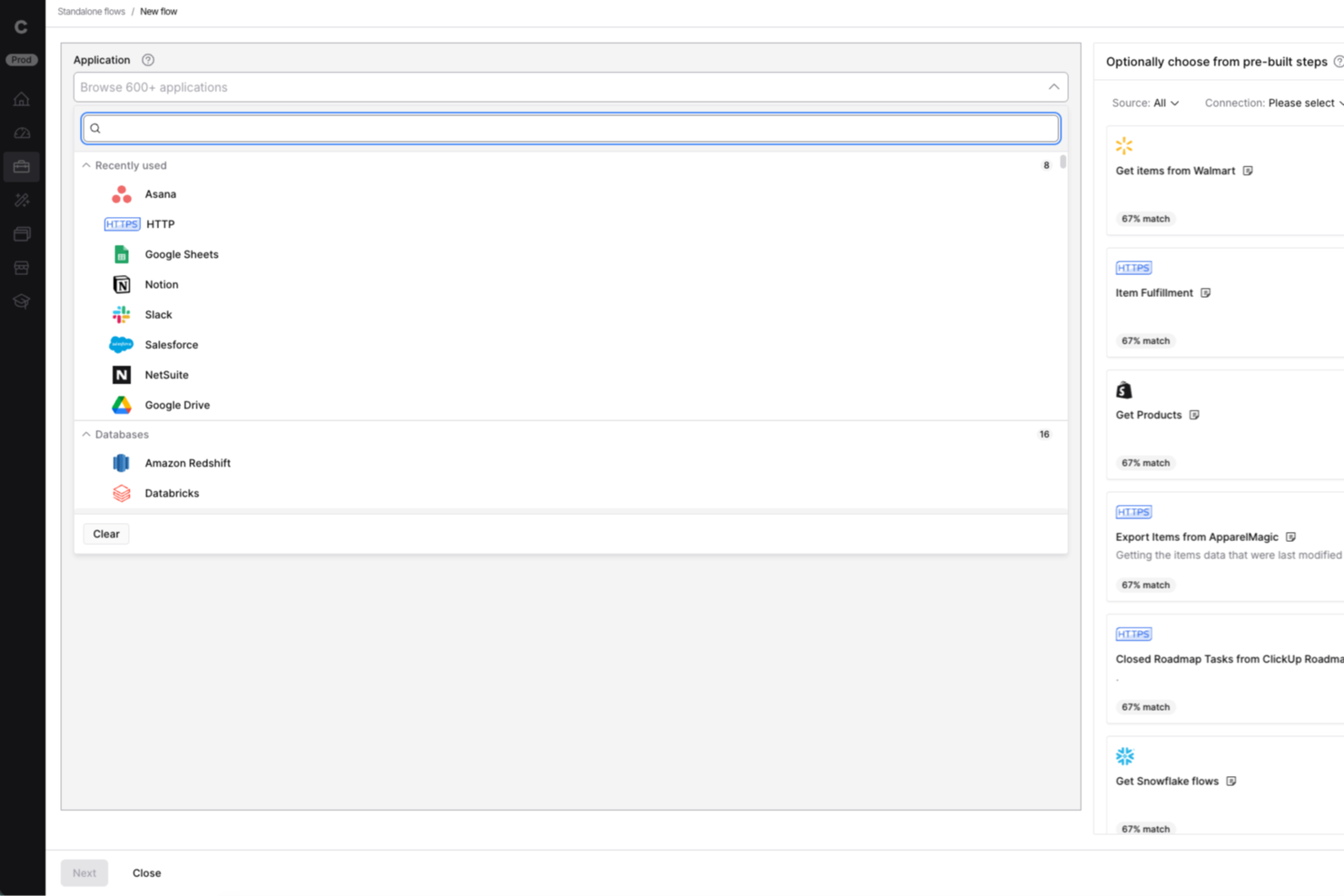
Celigo è una piattaforma di integrazione e automazione progettata per i team IT e i responsabili delle operazioni aziendali che hanno bisogno di connettere applicazioni cloud, automatizzare flussi di lavoro e gestire dati complessi all'interno dell'organizzazione.
Per chi è ideale Celigo?
Team IT e responsabili operativi di aziende di medie e grandi dimensioni che devono automatizzare e orchestrare flussi di lavoro tra più sistemi cloud e on-premises.
Perché ho scelto Celigo
Ho scelto Celigo tra i migliori perché le sue funzionalità di gestione API permettono al mio team di creare, monitorare e scalare integrazioni in tutta sicurezza. Utilizzo gli strumenti per il ciclo di vita delle API della piattaforma per creare, pubblicare e proteggere API personalizzate, così da collegare sistemi interni ed esterni. I monitoraggi e le analisi integrati ci aiutano a risolvere rapidamente i problemi e a mantenere i flussi di lavoro sempre operativi.
Funzionalità principali di Celigo
- Builder di flussi visuale: Progetta e automatizza flussi di lavoro con un'interfaccia drag-and-drop.
- Template di integrazione preconfigurati: Distribuisci connettori già pronti per le principali app SaaS e on-premises.
- Gestione avanzata degli errori: Monitora, risolvi e ripeti i passaggi che hanno fallito in un cruscotto centralizzato.
- Strumenti di trasformazione dati: Mappa, filtra e trasforma i dati tra sistemi senza bisogno di codice personalizzato.
Integrazioni di Celigo
Le integrazioni includono Salesforce, Microsoft Dynamics 365 Business Central, Oracle NetSuite, Walmart, SAP, Snowflake, Acumatica, Adobe, ADP e 3PL Central.
Pros and Cons
Pros:
- Consente controlli di accesso dettagliati per ruolo
- Fornisce un builder di workflow visuale per le integrazioni
- Include gestione automatizzata degli errori e avvisi
Cons:
- Alcuni connettori richiedono ulteriore configurazione
- Opzioni limitate di utilizzo offline o on-premises
New Product Updates from Celigo
Celigo Adds API Group Assignment During API Setup
Celigo adds API group assignment during create, clone, and move actions. This reduces extra setup steps by letting teams organize APIs before the relative URI is defined. For more information, visit Celigo’s official site.
 .
.
altaFlow
Il migliore per l'automazione documentale su Salesforce
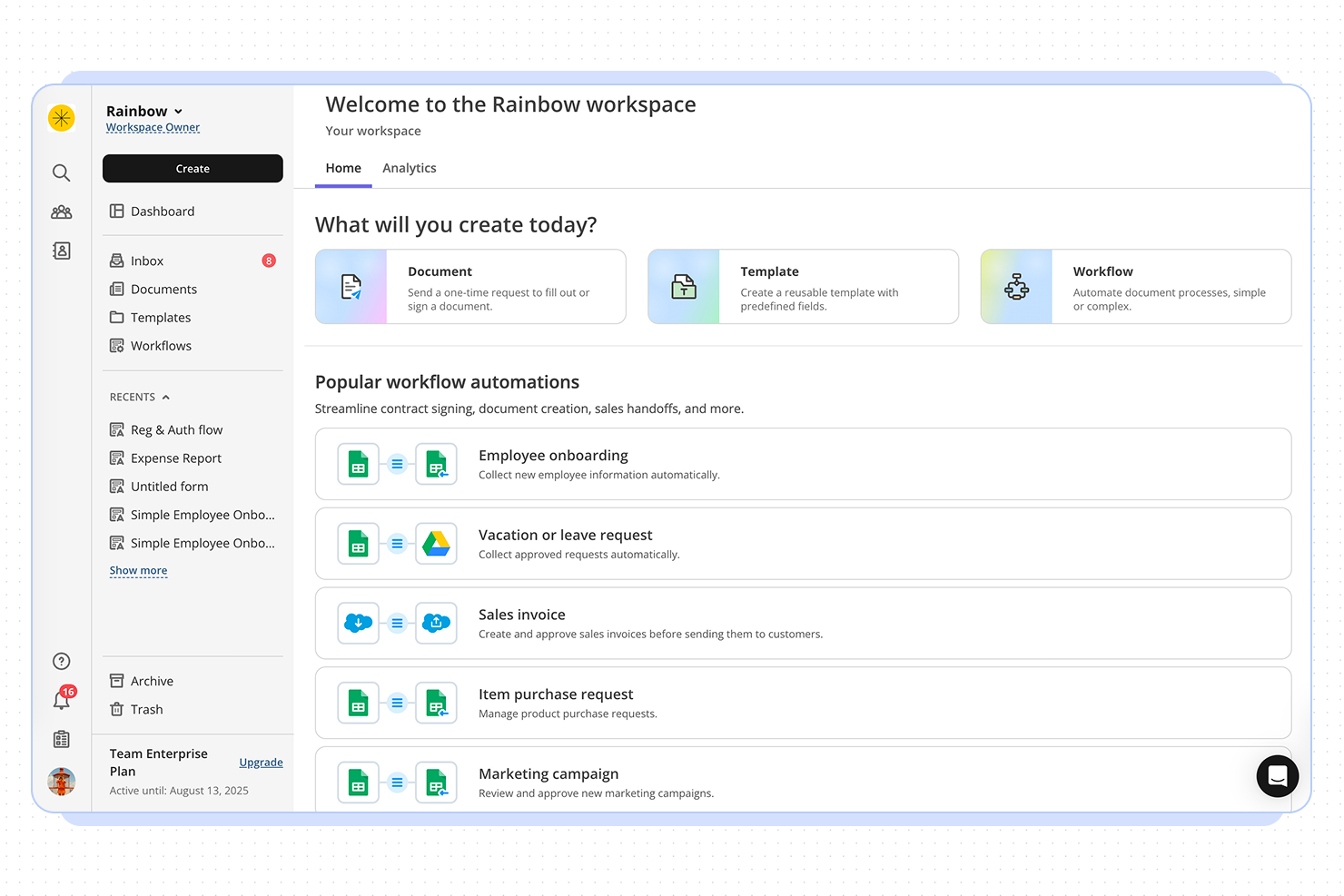
altaFlow offre automazione dei flussi di lavoro progettata per organizzazioni che necessitano di una gestione avanzata dei documenti e integrazione con sistemi CRM. È particolarmente adatto per team in settori regolamentati o che gestiscono processi di approvazione complessi. Se la tua azienda fa affidamento sull'automazione dei flussi documentali e sulla sincronizzazione dei dati tra diverse piattaforme, altaFlow risponde a queste esigenze con un focus su conformità e integrazione.
Per chi è meglio altaFlow?
altaFlow è indicato per medie e grandi aziende in settori regolamentati che necessitano di automatizzare i flussi di documenti e di un'integrazione stretta con sistemi CRM.
Perché ho scelto altaFlow
Per i team che richiedono una sofisticata automazione documentale su Salesforce, altaFlow si distingue nel panorama delle soluzioni di workflow automation. L'ho scelto perché offre la generazione nativa dei documenti e attivatori di workflow automatizzati direttamente all'interno di Salesforce, riducendo le attività manuali e garantendo coerenza nei processi. La piattaforma supporta anche la gestione dinamica dei modelli, permettendo agli utenti di creare, aggiornare e distribuire documenti basati su dati CRM in tempo reale. Questo focus sull'automazione documentale all'interno di Salesforce rende altaFlow una scelta strategica per le organizzazioni che dipendono da flussi documentali accurati e tempestivi.
Caratteristiche principali di altaFlow
Altre funzionalità di altaFlow a supporto dell'automazione dei flussi includono:
- Instradamento per approvazioni: Assegna documenti e attività alle persone giuste per revisione e approvazione in base a regole personalizzate.
- Audit trail: Tieni traccia di ogni azione e modifica all'interno dei flussi di lavoro per garantire conformità e trasparenza.
- Diramazione condizionale dei flussi: Configura flussi di lavoro che si adattano dinamicamente ai dati o all'input dell'utente.
- Controlli di accesso basati sui ruoli: Definisci permessi e livelli di accesso per garantire che le informazioni sensibili siano disponibili solo ai membri autorizzati del team.
Integrazioni di altaFlow
Le integrazioni includono Salesforce, NetSuite, SharePoint e HubSpot.
Pros and Cons
Pros:
- Audit trail dettagliato per il monitoraggio della conformità
- Generazione automatica di documenti da record Salesforce
- Il creatore di workflow personalizzati supporta processi complessi
Cons:
- Nessun piano gratuito o di prova disponibile
- Risorse di documentazione e supporto limitate

Ideale per approfondimenti operativi focalizzati sulle agenzie
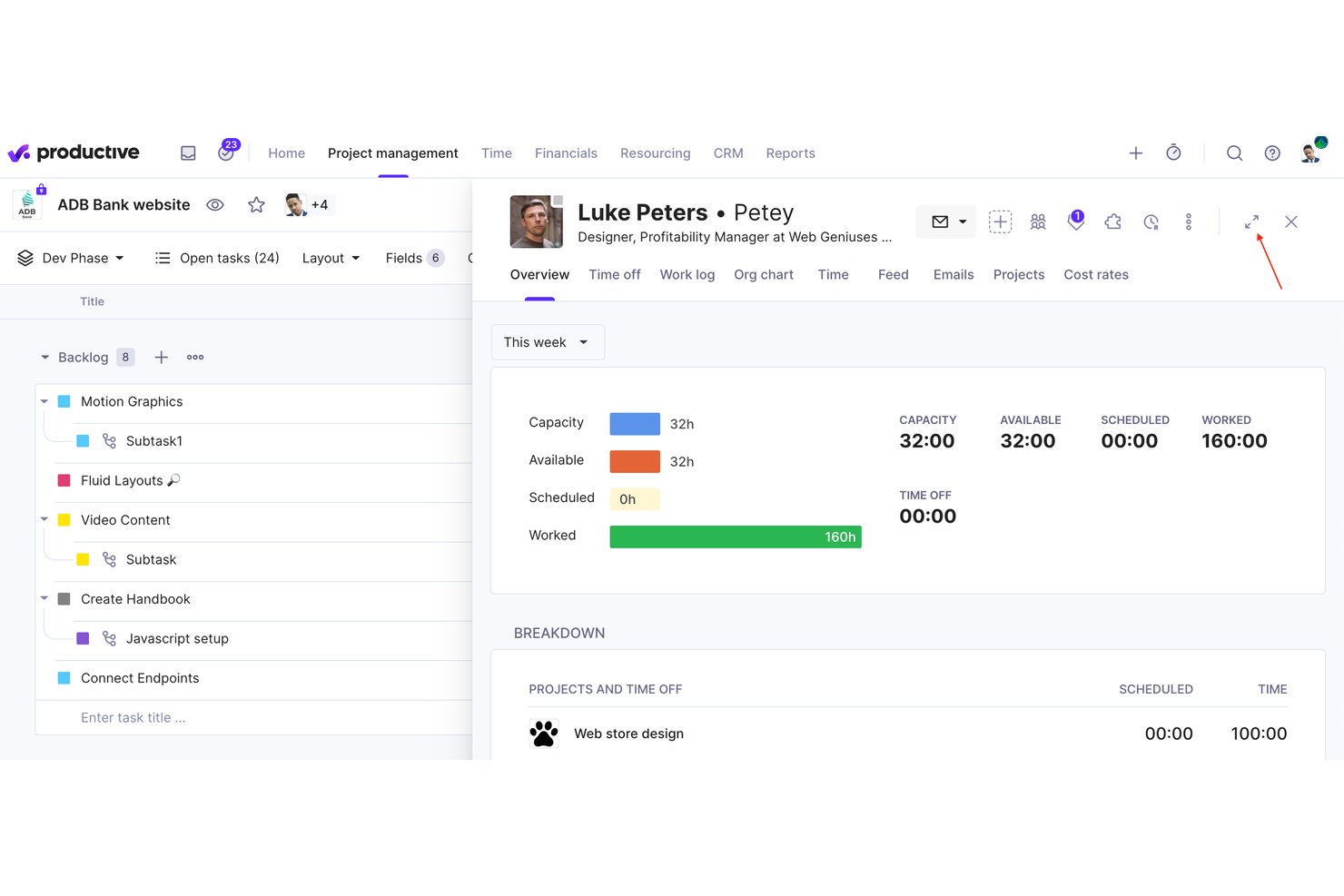
Productive è una piattaforma di gestione per agenzie che combina project management, pianificazione delle risorse, budgeting, fatturazione e automazione dei flussi di lavoro senza codice in un unico strumento.
Per chi è ideale Productive?
Productive è pensato per agenzie digitali e società di consulenza che hanno bisogno di gestire progetti, risorse e finanze senza dover passare da uno strumento all'altro.
Perché ho scelto Productive
Productive si guadagna il suo posto nella mia selezione perché offre alle agenzie dati in tempo reale sulla redditività a livello di progetto e cliente, non solo sui tassi di completamento delle attività. Apprezzo il modo in cui lo Scenario Builder consente di simulare diverse situazioni di impiego delle risorse o di budget prima di prendere decisioni definitive. Il modulo Automazioni senza codice gestisce flussi di lavoro ricorrenti come la fatturazione a canone e gli avvisi di budget, così nulla passa inosservato durante il progetto.
Caratteristiche principali di Productive
- Pianificazione delle risorse: Crea orari del personale e assegna risorse ai progetti utilizzando strumenti drag-and-drop per una gestione precisa del carico di lavoro.
- Monitoraggio del tempo: Rileva il tempo direttamente dalle attività tramite web, desktop o mobile, con approvazione dei timesheet integrata.
- Budgeting e fatturazione: Crea e gestisci più budget per progetto, genera fatture e rilascia note di credito all'interno della piattaforma.
- Open API e integrazioni: Collega Productive a oltre 1000 app o automatizza tramite Zapier, Xero, Slack, BambooHR e altri.
Integrazioni di Productive
Productive offre integrazioni native con Xero, QuickBooks Online, Exact, BambooHR, Personio, Rippling, Slack, Jira, HubSpot, Google Calendar e si collega con Zapier. Un'API aperta è disponibile per integrazioni personalizzate.
Pros and Cons
Pros:
- Approfondimenti sulle operazioni dell’agenzia aggiornati in tempo reale
- Gestione integrata di progetti, budget e risorse
- Automazione avanzata per flussi di lavoro complessi delle agenzie
Cons:
- Funzionalità avanzate disponibili solo nei piani superiori
- Meno adatto per aziende non agenziali
New Product Updates from Productive

Productive Adds Agent Triggers, Teams Integration, and Time Controls
Productive adds automated agent triggers, broader AI file support, Microsoft Teams integration, Resource Planner improvements, and new time entry controls. These updates expand automation while improving scheduling, collaboration, and time tracking. For more information, visit Productive’s official site.

Wrike
Ideale per organizzazioni in crescita

Wrike è una piattaforma di gestione del lavoro consolidata che include funzionalità avanzate per il miglioramento dei flussi di lavoro. Il motore di automazione mette in pilota automatico i processi aziendali quotidiani, eliminando attività ripetitive che fanno perdere tempo.
Perché ho scelto Wrike
Wrike è una scelta eccellente per le organizzazioni in crescita perché il suo motore di automazione facilita la gestione di carichi di lavoro sempre maggiori senza aumentare lo sforzo manuale. Quando il tuo team si espande, compiti ripetitivi come assegnare il lavoro, cambiare lo stato delle attività o inviare notifiche possono diventare una perdita di tempo. L'automazione basata su regole di Wrike ti permette di creare logiche “se-questo-allora-quello” nelle tue procedure, aiutandoti a mantenere il flusso delle attività anche in presenza di volumi crescenti.
Apprezzo anche i suggerimenti per l'automazione basati sull'intelligenza artificiale. Quando l'attività del team aumenta, è sempre più difficile accorgersi dove i processi rallentano o si interrompono. Wrike monitora questi schemi e consiglia regole di automazione per migliorare rapidità e coerenza—un vantaggio speciale quando stai inserendo nuove persone in squadra o lanci nuovi progetti frequentemente.
Funzionalità Principali di Wrike
Oltre alla sua scalabilità, Wrike offre numerose altre funzionalità per l'automazione dei flussi di lavoro.
- Flussi di lavoro personalizzabili: puoi adattare i flussi di lavoro alle tue procedure specifiche e assicurarti che le automazioni siano perfettamente allineate con le esigenze uniche del tuo team.
- Cross-tagging e aggiornamenti di stato: puoi automatizzare attività come il cross-tagging e l'aggiornamento dello stato, riducendo al minimo il rischio di saltare passaggi importanti e velocizzando i tuoi progetti.
- Monitoraggio del tempo: questo ti permette di tenere traccia del tempo impiegato per task e progetti così da gestire efficacemente le risorse.
- Integrazione con il calendario: puoi sincronizzare le attività e le scadenze con le app calendario più diffuse per mantenere l’agenda ordinata e aggiornata.
Integrazioni Wrike
Le integrazioni includono oltre 400 app cloud e on-premise, tra cui CRM, email, chat, archiviazione file e business intelligence. Se non trovi lo strumento che cerchi, puoi creare un’integrazione personalizzata utilizzando le API di Wrike.
Pros and Cons
Pros:
- Set di funzionalità completo per ogni esigenza di progetto
- Flussi di lavoro altamente personalizzabili
- Automatizza i processi di approvazione
Cons:
- La piattaforma richiede tempo per essere imparata
- Rischio di sovraccarico di notifiche se non configurato correttamente
New Product Updates from Wrike

Wrike Activity Reports Add Actor Type Details
Wrike’s Activity Report now displays actor type details, helping admins identify whether changes came from the UI, Automation, Wrike Agents, API, or AI via MCP. For more information, visit Wrike's official site.

Qntrl
Ideale per processi trasversali

Qntrl è un software avanzato di orchestrazione dei flussi di lavoro che migliora la produttività e l'efficienza sul luogo di lavoro. Alla base, automatizza i processi tra diverse applicazioni per ridurre l'inserimento manuale dei dati e accelerare i flussi di lavoro.
Perché ho scelto Qntrl
Ho scelto Qntrl per la sua forza nella gestione dei processi trasversali grazie a funzionalità come la modellazione dei processi basata su Blueprint, la raccolta dati tramite moduli e i controlli di accesso basati sui ruoli, che assicurano che le persone giuste siano coinvolte nei passaggi corretti.
Il costruttore di flussi di lavoro drag-and-drop permette agli utenti non tecnici di configurare e lanciare rapidamente processi end-to-end, mentre le transizioni parallele e le approvazioni per fase consentono a più team di collaborare simultaneamente senza colli di bottiglia. Con audit trail integrati e notifiche personalizzabili, Qntrl mantiene informati e responsabili tutti gli stakeholder interdipartimentali per l'intero ciclo di vita del flusso di lavoro.
Funzionalità principali di Qntrl
Qntrl offre anche una suite di altre funzionalità di automazione dei flussi di lavoro.
- Assegnazione automatica delle richieste: Puoi assegnare le richieste in base a gerarchie predefinite o dinamicamente tramite API, assicurando che le attività raggiungano le persone giuste senza intervento manuale.
- Automazione post-fase: Questa funzione consente di attivare automaticamente azioni dopo determinate fasi, come l'invio di notifiche o l'aggiornamento di campi, per semplificare le attività di follow-up.
- Regole aziendali: Puoi impostare regole specifiche che determinano il comportamento dei processi per mantenere la conformità e la coerenza tra i flussi di lavoro.
- Generazione di documenti: Puoi creare e condividere rapidamente documenti essenziali come ordini di acquisto o fatture per ridurre il tempo dedicato alla burocrazia.
Integrazioni di Qntrl
Le integrazioni includono Salesforce, Dropbox, MS Teams, Harvest, Google Sheets e Slack. Puoi anche creare tutte le integrazioni personalizzate che desideri utilizzando Webhooks e la sua API.
Pros and Cons
Pros:
- Capacità di integrazione estese, con oltre 500 connessioni
- Automazione avanzata, come l'instradamento condizionale
- Adotta protocolli di sicurezza robusti
Cons:
- Curva di apprendimento per le funzionalità più avanzate
- Troppi strumenti per i piccoli team

Nanonets
Ideale per LLM personalizzati

Nanonets è una piattaforma guidata dall’IA che automatizza l’elaborazione dei documenti e gestisce i flussi di lavoro in settori come finanza, sanità e logistica. Gestisce in modo efficiente attività come l’estrazione dei dati, l’elaborazione delle fatture e la gestione dei conti da pagare, minimizzando il lavoro manuale e riducendo i tempi di elaborazione.
Perché ho scelto Nanonets
Ho scelto Nanonets per le sue capacità basate sull’intelligenza artificiale in grado di automatizzare flussi di lavoro complessi tramite l’elaborazione del linguaggio naturale, consentendoti di gestire processi che interagiscono con diverse app e fonti di dati. La piattaforma supporta modelli di apprendimento linguistico personalizzati (LLM) per risposte e azioni su misura, migliorando la personalizzazione dei flussi di lavoro secondo le specifiche esigenze aziendali. Questo permette di progettare processi automatizzati e adattivi ai diversi ambienti di business.
Inoltre, Nanonets offre una funzione human-in-the-loop per approvazioni manuali, fornendo un ulteriore livello di precisione nei flussi automatizzati. È anche una piattaforma no-code, quindi puoi automatizzare questi processi senza competenze di programmazione.
Caratteristiche principali di Nanonets
Nanonets offre anche una varietà di altre funzionalità che la rendono interessante come strumento per l’automazione dei flussi di lavoro.
- Riconoscimento Ottico dei Caratteri Avanzato: Questa funzione consente di convertire diversi tipi di documenti in dati modificabili, ottimizzando le attività di elaborazione dei documenti.
- Automazione dei Flussi di Lavoro: Puoi impostare processi che gestiscono attività ripetitive, permettendo al tuo team di concentrarsi su attività più strategiche.
- Opzioni di caricamento file multiple: Questo ti consente di caricare e processare più documenti contemporaneamente, migliorando l’efficienza nella gestione di grandi volumi di dati.
- Capacità di estrazione dei dati: Puoi estrarre dati in modo accurato per ridurre gli errori e garantire che i tuoi processi mantengano elevati livelli di precisione.
Integrazioni di Nanonets
Le integrazioni includono QuickBooks, Salesforce, Google Sheets, Dropbox e Zapier.
Pros and Cons
Pros:
- Funzionalità di estrazione dati
- Compatibile con diversi linguaggi di programmazione
- API semplice per un'integrazione facile
Cons:
- Può non essere adatto a progetti di machine learning più ampi con grandi quantità di dati
- Meno opzioni di personalizzazione rispetto ad altri strumenti
Altri software di automazione dei flussi di lavoro
Ecco alcuni strumenti che non sono entrati tra i migliori, ma che meritano comunque di essere presi in considerazione.
- ClickUp
Ideale per la flessibilità dell'automazione dei flussi di lavoro
- Integrately
Ideale per un generatore di automazioni basato su AI
- Jira
Ideale per la gestione di progetti agili
- Camunda Platform
Ideale per automazione ad alto volume
- Bonsai Agency Software
Ideale per flussi di lavoro di agenzie e consulenze
- Kissflow Workflow
Ideale per utenti non tecnici
- Next Matter
Ideale per flussi di lavoro complessi
- Adobe Workfront
Ideale per una supervisione completa dei progetti
- Pneumatic Workflow
Ideale per workflow basati su modelli
- Boomi Flow
Ideale per automazione di flussi di lavoro low-code
- Miro
Ideale per workflow drag-and-drop
- Jotform Workflows
Ideale per la creazione di workflow no-code
- Smartsheet
Ideale per flussi di lavoro dinamici
- SysAid
Ideale per la gestione dei servizi IT
- Hive
Ideale per i principianti
- Kantata
Ideale per i servizi professionali
- StreamWork
Ideale per i flussi di lavoro creativi
- Parabola.io
Ideale per l'automazione di flussi di lavoro con grandi volumi di dati


Come Valuto i Software di Automazione dei Flussi di Lavoro
Divido la mia valutazione in due livelli: le capacità di base di trigger, instradamento e builder che uno strumento deve possedere e i fattori differenzianti—come l’automazione AI e la logica cross-progetto—che distinguono i migliori.
Funzionalità di Base (Requisiti Minimi Per Questa Lista)
Quando seleziono gli strumenti per la mia lista, ne valuto ognuno su una scala da 0 (non offre la funzionalità) a 5 (eccelle in quest’area) per ciascuna delle funzionalità di base elencate di seguito. Poi calcolo il punteggio totale dello strumento in una percentuale. Ogni strumento deve raggiungere un punteggio minimo totale del 65% per essere preso in considerazione.
- Builder Visuale di Flussi di Lavoro: Cerco una tela drag-and-drop su cui puoi mappare visivamente processi multi-step, come costruire una sequenza di kickoff sprint dalla raccolta delle richieste fino all’assegnazione dei compiti.
- Automazione Basata su Trigger: Ogni strumento dovrebbe permetterti di impostare trigger basati su eventi—cambi di stato, invio di moduli, scadenze—che avviano azioni senza intervento manuale.
- Logica Condizionale & Ramificazione: Valuto se uno strumento supporta regole if/then e ramificazioni multi-percorso, come indirizzare una richiesta di modifica a revisori diversi in base al livello del progetto.
- Instradamento di Attività & Approvazioni: La piattaforma dovrebbe assegnare automaticamente attività e instradare approvazioni basandosi su regole che definisci, incluse escalation se i responsabili non rispettano le scadenze.
- Integrazioni con Terze Parti: Verifico la presenza di connettori nativi con strumenti come Jira, Slack, Salesforce e HubSpot, oltre ad accesso API e supporto webhook per connessioni personalizzate.
- Template di Workflow & Riutilizzo: Una solida libreria di modelli e la possibilità di clonare e adattare i processi tra progetti sono importanti, specialmente per i PMO che gestiscono processi di consegna ricorrenti.
Quando ho una lista di strumenti che soddisfano i criteri, considero ciò che distingue ciascuna piattaforma.
Fattori Differenzianti (Cosa Distingue i Fornitori)
Ecco come confronto e metto a contrasto i diversi fornitori:
Funzionalità Distintive
L’automazione basata su AI è un grande fattore differenziante. Cerco strumenti che suggeriscono regole in base al comportamento passato o che ti permettono di descrivere un workflow in linguaggio naturale e generarlo automaticamente. Anche la gestione delle dipendenze tra progetti è fondamentale—i program manager hanno bisogno di automazioni che coprano più progetti, come attivare le attività di un team a valle quando una milestone a monte viene segnata come completata. Valuto anche dashboard di analytics in tempo reale che evidenziano tempistiche dei cicli e colli di bottiglia nei processi, offrendo ai PMO i dati necessari per migliorare i loro processi.
Oltre le Funzionalità
Il costo totale di proprietà è un aspetto che valuto con attenzione—limiti di esecuzione delle automazioni e tariffe per utente possono silenziosamente far lievitare i costi man mano che il tuo team cresce da un singolo scrum team a un PMO aziendale. Anche sicurezza e conformità pesano molto. Verifico la certificazione SOC 2 Type II, il supporto SSO/SAML e i controlli di accesso basati sui ruoli, soprattutto per team in settori regolamentati che gestiscono dati di progetto sensibili. La scalabilità completa il quadro—valuto quanto bene una piattaforma si comporta quando si eseguono centinaia di automazioni simultanee in un intero portafoglio di progetti.
Come scegliere il software di automazione dei flussi di lavoro
È facile perdersi in lunghi elenchi di funzionalità e strutture tariffarie complesse. Per aiutarti a rimanere concentrato mentre affronti il tuo specifico processo di selezione del software, ecco un elenco di fattori da tenere a mente:
| Fattore | Cosa considerare |
|---|---|
| Scalabilità | Assicurati che il software sia in grado di gestire flussi di lavoro, utenti e livelli di complessità crescenti con la crescita della tua azienda. Cerca piani tariffari a più livelli, funzionalità di livello aziendale e parametri di riferimento delle prestazioni per evitare che il sistema diventi rapidamente insufficiente. |
| Integrazioni | Lo strumento di automazione dovrebbe connettersi senza problemi al tuo attuale ecosistema software, inclusi CRM, ERP e strumenti di comunicazione come Slack o Microsoft Teams. Le integrazioni native e il supporto per le API sono fondamentali. |
| Personalizzazione | Scegli una soluzione che ti consenta di adattare i flussi di lavoro ai tuoi processi specifici. I generatori con funzionalità di trascinamento, la logica condizionale e le opzioni di automazione basate su script possono aiutarti a perfezionare l'automazione in base alle esigenze del tuo team. |
| Facilità d'uso | Un'interfaccia intuitiva con opzioni a basso codice o senza codice consente al tuo team di creare e modificare i flussi di lavoro senza l'intervento dell'IT. Cerca un cruscotto semplice e una configurazione intuitiva. |
| Budget | Considera sia i costi iniziali sia le spese a lungo termine, come costi di abbonamento, componenti aggiuntivi e costi di assistenza. Alcune piattaforme applicano un costo per utente, mentre altre aumentano i prezzi in base al volume di automazione. |
| Misure di sicurezza | Il software dovrebbe offrire accesso basato sui ruoli, crittografia dei dati e conformità a standard come il GDPR o SOC 2. Controlla i registri di audit e le politiche di backup per proteggere i dati sensibili dei flussi di lavoro. |
| Funzionalità di IA e automazione | Cerca automazione basata sull'IA, analisi predittive e attivatori intelligenti che migliorino l'efficienza. Funzionalità come l'estrazione automatica dei dati e il processo decisionale intelligente possono ridurre il lavoro manuale. |
| Supporto e affidabilità | Valuta le opzioni di assistenza clienti, le garanzie di operatività e i forum della community. Un sistema di supporto solido garantisce un'implementazione fluida e interruzioni minime quando si verificano problemi. |
Tendenze del software di automazione dei flussi di lavoro per il 2025
Nella mia ricerca, ho raccolto innumerevoli aggiornamenti di prodotto, comunicati stampa e registri delle versioni di diversi fornitori di software per l'automazione dei flussi di lavoro. Ecco alcune delle tendenze emergenti che sto tenendo d'occhio:
- Ottimizzazione dei processi basata sull'IA: L'IA viene ora utilizzata per analizzare i dati dei flussi di lavoro, identificare le inefficienze e suggerire miglioramenti. Alcuni strumenti regolano automaticamente l'assegnazione delle attività in base ai modelli di carico di lavoro o prevedono i ritardi prima che si verifichino.
- Generatori di flussi di lavoro senza codice: Un numero sempre maggiore di software per l'automazione intelligente dei processi semplifica l'automazione per gli utenti non tecnici grazie a generatori con funzionalità di trascinamento e modelli di flussi di lavoro. In questo modo i team possono creare automazioni complesse senza scrivere codice o ricorrere all'aiuto dell'IT.
- Strategie di iperautomazione: Le aziende combinano l'automazione dei flussi di lavoro, l'automazione dei processi robotici (RPA), l'IA e gli attivatori basati sugli eventi per ridurre il lavoro manuale nei processi aziendali. Ciò riduce l'intervento umano in attività ripetitive come la fatturazione e l'inserimento dei nuovi dipendenti.
- Controlli di governance e conformità: Con l'espansione dell'automazione in tutti i settori, vengono aggiunti controlli più rigorosi per la sicurezza dei dati, l'audit e la conformità. Le organizzazioni possono ora applicare autorizzazioni basate sui ruoli, mantenere registri dettagliati delle attività e automatizzare la reportistica sulla conformità.
- Monitoraggio dei flussi di lavoro in tempo reale: Le aziende richiedono una visibilità migliore sui processi automatizzati attraverso dashboard aggiornate in tempo reale, avvisi e analisi predittive. Il monitoraggio in tempo reale aiuta i team a individuare i malfunzionamenti dei flussi di lavoro, monitorare l'efficienza dei processi e apportare rapidamente modifiche per evitare colli di bottiglia.
Che cos'è il software di automazione dei flussi di lavoro?
Il software di automazione dei flussi di lavoro è uno strumento che automatizza attività ripetitive e processi a più fasi tra app, team e reparti.
Queste piattaforme aiutano i project manager a ridurre il lavoro manuale automatizzando approvazioni, notifiche, assegnazioni e trasferimenti di dati tra strumenti. Vengono utilizzate dai team operativi, di marketing, IT, delle risorse umane e da molti altri per semplificare i flussi di lavoro quotidiani, ridurre i ritardi e migliorare l'accuratezza dei processi. Che tu stia indirizzando richieste, pianificando attività o sincronizzando dati tra piattaforme, il software di automazione dei flussi di lavoro elimina gli ostacoli dal lavoro interfunzionale.
Tipi di automazione dei flussi di lavoro
L'automazione dei flussi di lavoro è utile in qualsiasi settore che tragga vantaggio da processi semplificati e maggiore efficienza. I principali tipi di automazione dei flussi di lavoro includono:
- Automazione dei flussi di lavoro del marketing: Il software per i flussi di lavoro dei contenuti automatizza attività come le campagne e-mail, la pubblicazione sui social media e la coltivazione dei lead.
- Automazione dei flussi di lavoro delle vendite: Il software per l'automazione dei processi aziendali aiuta ad automatizzare la gestione dei lead, l'approvazione dei contratti e il monitoraggio della pipeline di vendita.
- Automazione dei flussi di lavoro del servizio clienti: Il software per l'automazione dei processi automatizza l'assegnazione dei ticket, le richieste dei clienti e la raccolta dei feedback.
- Automazione dei flussi di lavoro delle risorse umane: Gli strumenti di automazione delle attività gestiscono l'inserimento dei dipendenti, le valutazioni delle prestazioni e le attività di conformità.
- Automazione dei flussi di lavoro finanziari: Automatizza l'approvazione delle spese, la fatturazione e le buste paga con gli strumenti di automazione dei processi aziendali.
- Automazione dei flussi di lavoro IT: Semplifica gli aggiornamenti dei sistemi, i processi di backup e le richieste di assistenza tramite gli strumenti di automazione dei processi IT.
- Automazione dei flussi di lavoro della catena di approvvigionamento: Aiuta ad automatizzare la gestione dell'inventario, l'elaborazione degli ordini e le comunicazioni con i fornitori.
- Automazione dei flussi di lavoro della produzione: Una piattaforma per l'automazione dei processi semplifica la programmazione della produzione, i controlli di qualità e il monitoraggio della manutenzione.
Funzionalità del software per l'automazione dei flussi di lavoro
Quando scegli il software per l'automazione dei flussi di lavoro, presta attenzione a queste funzionalità chiave:
- Creazione di flussi di lavoro tramite trascinamento: Puoi progettare e modificare visivamente i processi senza scrivere codice, trascinando gli elementi su un'area di lavoro. Questo rende la creazione, la modifica e la comprensione dei flussi di lavoro rapide e intuitive.
- Funzionalità di integrazione: Puoi collegare al sistema le app e i servizi che utilizzi già (ad es. CRM, e-mail, database e archiviazione cloud). Questo riduce il copia e incolla e il trasferimento manuale delle informazioni tra gli strumenti.
- Logica condizionale: Puoi impostare regole affinché il software indirizzi automaticamente le attività o attivi azioni in base ai dati, allo stato o ai criteri da te definiti. Ti aiuta a evitare decisioni manuali ripetitive e mantiene i processi fluidi.
- Assegnazione delle attività e notifiche: Ti consente di assegnare le attività ai membri del team appropriati e di impostare promemoria e notifiche automatici, così tutti rimangono al passo e vengono informati dell'avanzamento dei flussi di lavoro.
- Registri di controllo e report: Puoi monitorare ogni azione e modifica all'interno dei flussi di lavoro. È utile quando devi risolvere problemi, esaminare la produttività o dimostrare la conformità.
- Modelli personalizzabili: Ti consente di iniziare con modelli di flussi di lavoro predefiniti che puoi adattare alle tue esigenze e ti aiuta a diventare operativo più rapidamente.
- Autorizzazioni degli utenti e controllo degli accessi: Puoi impostare diversi livelli di accesso, in modo che solo le persone autorizzate possano visualizzare o modificare specifici flussi di lavoro o dati.
- Accesso da dispositivi mobili: Ti consente di gestire e monitorare i flussi di lavoro mentre sei in movimento, così puoi approvare richieste, riassegnare attività o ricevere aggiornamenti in qualsiasi momento e ovunque ti trovi.
Funzionalità AI comuni del software per l'automazione dei flussi di lavoro
Oltre alle funzionalità standard del software per l'automazione dei flussi di lavoro elencate sopra, molte di queste soluzioni stanno integrando funzionalità AI come:
- Assegnazione predittiva delle attività: Questo strumento AI può suggerire o assegnare automaticamente le attività in base alle abitudini del team, ai carichi di lavoro e alle scadenze, eliminando le congetture.
- Estrazione automatica dei dati: Questa funzionalità AI può analizzare e-mail, documenti o immagini, estrarre le informazioni chiave e inviarle alla destinazione corretta, riducendo l'inserimento manuale dei dati e gli errori.
- Raccomandazioni per l'ottimizzazione dei processi: Utilizzando i dati delle attività passate, questa funzionalità AI può identificare colli di bottiglia, inefficienze o errori ricorrenti e fornire suggerimenti mirati per velocizzare le operazioni.
- Elaborazione del linguaggio naturale: Puoi comunicare con le funzionalità AI utilizzando il linguaggio quotidiano, rendendo l'automazione accessibile a tutti i membri del team.
- Rilevamento delle anomalie: L'AI può monitorare continuamente l'attività dei flussi di lavoro, segnalare scadenze mancate o schemi irregolari e aiutarti a individuare i problemi prima che influiscano sulla produttività.
Alcuni strumenti sono molto più flessibili e consentono una personalizzazione più approfondita, soprattutto per quanto riguarda l’automazione e le formule. Altri, invece, sono più facili da usare e hanno un’interfaccia più intuitiva.

Vantaggi del software di automazione dei flussi di lavoro
L'implementazione di un software di automazione dei flussi di lavoro può offrire diversi vantaggi al tuo team e alla tua azienda. Eccone alcuni:
- Completamento più rapido delle attività: i flussi di lavoro automatizzati fanno avanzare le attività attraverso ogni fase senza ritardi, riducendo i colli di bottiglia e i tempi di attesa.
- Meno errori: l'automazione elimina l'inserimento manuale dei dati e i passaggi di consegne, riducendo il rischio di errori e incoerenze.
- Maggiore visibilità sui processi: i diagrammi dei flussi di lavoro e gli strumenti di monitoraggio consentono di vedere lo stato delle attività, facilitando l'individuazione delle inefficienze.
- Maggiore responsabilità: i registri di controllo e l'accesso basato sui ruoli garantiscono che le attività siano gestite dalle persone giuste e che le azioni siano completamente registrate.
- Risultati più uniformi: i flussi di lavoro standardizzati fanno rispettare regole e buone pratiche, così i processi vengono eseguiti nello stesso modo ogni volta.
- Meno tempo dedicato alle approvazioni: i flussi di approvazione automatizzati inviano immediatamente le richieste alle persone giuste e attivano i passaggi successivi una volta ottenuta l'approvazione.
- Maggiore facilità di scalabilità: i processi automatizzati si adattano alla crescita del team, gestendo una quantità maggiore di lavoro senza richiedere più attività manuali. Tuttavia, tieni presente che, se vuoi che la tua soluzione passi dall'automazione dei processi all'interno di un progetto a flussi di lavoro interdipendenti tra più sistemi, hai bisogno di un'opzione diversa. Gli strumenti di orchestrazione dei flussi di lavoro possono aiutarti a gestire automazioni più complesse tra sistemi e team.
Costi e prezzi del software di automazione dei flussi di lavoro
La scelta di un software di automazione dei flussi di lavoro richiede la comprensione dei vari modelli e piani tariffari disponibili. I costi variano in base alle funzionalità, alle dimensioni del team, ai componenti aggiuntivi e ad altri fattori. La tabella seguente riassume i piani più comuni, i relativi prezzi medi e le funzionalità tipicamente incluse nelle soluzioni software di automazione dei flussi di lavoro:
Tabella di confronto dei piani per il software di automazione dei flussi di lavoro
| Nome del piano | Prezzo (per utente/mese) | Funzionalità |
|---|---|---|
| Gratuito | $0 | Automazione di base, utenti e flussi di lavoro limitati, integrazioni di base |
| Base | $10 - $20 | Automazione delle attività, personalizzazione semplice dei flussi di lavoro, reportistica di base, utenti e flussi di lavoro limitati |
| Standard | $20 - $50 | Automazione avanzata, personalizzazione dei flussi di lavoro, reportistica e analisi, integrazioni, più utenti |
| Premium | $50 - $100 | Funzionalità avanzate di automazione dei flussi di lavoro, flussi di lavoro personalizzabili, reportistica avanzata, utenti illimitati |
Domande frequenti sul software di automazione dei flussi di lavoro
Trova le risposte alle domande più comuni su questo argomento.
Come automatizzo i miei flussi di lavoro?
Per automatizzare i flussi di lavoro di un progetto, inizia creando un diagramma del flusso di lavoro che delinei chiaramente ogni passaggio, dall’avvio al completamento dell’attività. Individua le azioni ripetitive, come l’assegnazione delle attività, gli aggiornamenti dello stato o la condivisione dei documenti, che potrebbero trarre vantaggio dall’automazione.\r\n\r\nSuccessivamente, scegli una piattaforma che supporti le funzionalità di automazione. Configura regole come “se un’attività viene contrassegnata come completata, notifica il membro successivo del team” oppure “se viene inviato un modulo, avvia il flusso di approvazione”. Automatizzare un flusso di approvazione è particolarmente utile per ridurre i ritardi e mantenere il lavoro in movimento. Inizia in piccolo, esegui test approfonditi e apporta le modifiche necessarie.
In che modo il software di automazione dei flussi di lavoro può integrarsi con i sistemi CRM esistenti?
Gli strumenti di automazione dei flussi di lavoro offrono spesso solide funzionalità di integrazione con i sistemi \u003ca href=\u0022https://thedigitalprojectmanager.com/tools/best-crm-software-for-professional-services/\u0022\u003eCRM\u003c/a\u003e per semplificare i processi e migliorare il flusso di dati tra le piattaforme. Queste integrazioni consentono in genere di automatizzare attività come l’inserimento dei dati, il monitoraggio dei contatti e la comunicazione con i clienti, così da garantire che le informazioni rimangano aggiornate tra i vari sistemi.
È possibile personalizzare il software di automazione dei flussi di lavoro per processi aziendali specifici?
Sì, molti strumenti di automazione dei flussi di lavoro sono progettati tenendo conto della personalizzazione, per rispondere alle esigenze specifiche di diversi processi aziendali. Questa flessibilità consente alle organizzazioni di adattare le funzionalità del software ai propri requisiti operativi, dai flussi di lavoro e moduli personalizzati alle regole di automazione specifiche.
Quanto sono scalabili queste soluzioni con la crescita di un'azienda?
Le soluzioni di automazione dei flussi di lavoro sono generalmente progettate pensando alla scalabilità, consentendo alle aziende di adattarsi e crescere senza superare i limiti del software. Queste piattaforme sono concepite per gestire quantità di lavoro crescenti e processi più complessi con l’espansione dell’azienda. La possibilità di aggiungere utenti, integrarsi con un numero maggiore di sistemi e automatizzare una gamma più ampia di attività permette a questi strumenti di crescere insieme alla tua azienda, garantendo che l’investimento rimanga conveniente nel lungo periodo.
In che modo gli strumenti di automazione dei flussi di lavoro influiscono sulle scadenze dei progetti e sull'allocazione delle risorse?
Gli strumenti di automazione dei flussi di lavoro velocizzano generalmente le attività ripetitive, riducono i colli di bottiglia e contribuiscono a distribuire il lavoro in modo più equilibrato all’interno del team. Semplificando approvazioni, passaggi di consegne e notifiche, è meno probabile che si superino le scadenze. Le funzionalità di pianificazione delle risorse possono inoltre aiutarti a monitorare i carichi di lavoro e a prevenire un utilizzo eccessivo o insufficiente delle risorse.
Come posso convincere il mio team ad adottare nuovi strumenti di automazione dei flussi di lavoro?
Inizia comunicando chiaramente i vantaggi e offrendo una formazione pratica. Coinvolgi i membri principali del team nella scelta e nei test del software, così saranno più motivati a utilizzarlo. Organizza un’introduzione graduale e fornisci supporto continuo. Metti in evidenza i risultati rapidi e mostra come l’automazione riduca il lavoro noioso, rendendo più semplici le loro attività.
Qual è il prossimo passo?
Assicurati di iscriverti alla newsletter di Digital Project Manager. Riceverai approfondimenti affascinanti su questo mondo in rapida evoluzione, insieme alle informazioni necessarie per eccellere professionalmente.