I 10 migliori software per il monitoraggio del tempo per la produttività nel 2026

10 Elenco dei migliori software per il monitoraggio del tempo


Il miglior software per il monitoraggio del tempo ti aiuta a controllare le ore dedicate ai progetti, fatturare accuratamente i clienti e gestire la produttività del team senza affidarti a fogli di calcolo o inseguire manualmente le schede attività. Se hai problemi con dati incoerenti provenienti dai freelance, progetti fuori budget o fatture inesatte a causa di strumenti di monitoraggio inadeguati, è il momento di fare un aggiornamento.
Con 20 anni di esperienza nella realizzazione di progetti digitali per marchi come Sony, Land Rover e Unilever, oltre a più di un decennio trascorso a testare piattaforme per il monitoraggio del tempo, so cosa distingue uno strumento affidabile. La soluzione giusta dovrebbe integrarsi con il tuo ecosistema di gestione dei progetti, supportare l'inserimento in tempo reale e consentire sia il monitoraggio manuale sia quello automatizzato.
In questa guida ho testato numerosi strumenti e selezionato 20 piattaforme di punta per aiutarti a trovare il software per il monitoraggio del tempo più adatto al tuo flusso di lavoro e capace di migliorare i tuoi risultati economici. Ho analizzato le funzionalità, le integrazioni e i prezzi di ogni strumento per determinare cosa lo distingue. In questo modo, puoi scegliere con sicurezza lo strumento che si allinea perfettamente alle esigenze del tuo team.
Perché fidarsi dei nostri consigli sui software
Il nostro team testa e recensisce software dal 2012. In quanto project manager noi stessi, sappiamo quanto sia difficile — e importante — scegliere il software giusto.
Per questa guida, abbiamo valutato gli strumenti attraverso test pratici e ricerche indipendenti, assegnando un punteggio agli strumenti in base ai nostri criteri di selezione. Ci basiamo inoltre sulle competenze di leader di pensiero del settore e di professionisti attivi nella gestione dei progetti.
Le nostre recensioni riflettono il nostro giudizio editoriale umano, non un discorso di vendita.
Revisori esperti:
Tabella comparativa dei software per il monitoraggio del tempo
Questa tabella comparativa riassume i dettagli dei prezzi delle mie migliori selezioni di software per il monitoraggio del tempo.
| Tool | Best For | Trial Info | Price | ||
|---|---|---|---|---|---|
| 1 | Ideale per il monitoraggio del tempo nei progetti | Prova gratuita di 14 giorni | Da $6/utente/mese | Website | |
| 2 | Ideale per ridurre il furto di tempo | Disponibile piano gratuito | A partire da $30/sede/mese | Website | |
| 3 | Ideale per il monitoraggio dettagliato del tempo | Prova gratuita di 14 giorni + demo gratuita disponibile | A partire da $19.90/utente/mese (fatturazione annuale) | Website | |
| 4 | Miglior rilevamento GPS delle presenze per team mobili | Prova gratuita di 14 giorni + demo gratuita disponibile | Da 29$/mese (fatturazione annuale) | Website | |
| 5 | Ideale per approfondimenti sulla redditività basati sul tempo | Prova gratuita di 14 giorni + demo gratuita disponibile | Da $10/mese (fatturazione annuale) | Website | |
| 6 | Ideale per piccoli team e piccole imprese | Prova gratuita di 30 giorni | A partire da $5/utente/mese | Website | |
| 7 | Ideale per la gestione completa e continua del monitoraggio del tempo | Non disponibile | Prezzo su richiesta | Website | |
| 8 | Ideale per la fatturazione dei progetti collegata al tempo a livello di attività | Piano gratuito + demo gratuita + prova gratuita di 14 giorni disponibili | A partire da $5/utente/mese (fatturati annualmente) | Website | |
| 9 | Ideale per la precisione nel monitoraggio del tempo offline | Prova gratuita di 14 giorni + demo gratuita disponibile | Da $6,42/utente/mese (fatturazione annuale) | Website | |
| 10 | Ideale per dashboard personalizzabili | 30 giorni di prova gratuita. Nessuna carta di credito richiesta. | Da $5.99/utente/mese | Website |


Recensioni dei migliori software per il monitoraggio del tempo
Ecco una breve panoramica delle migliori applicazioni per il monitoraggio del tempo, con schermate, funzionalità di spicco, integrazioni disponibili e altro ancora.

Ideale per il monitoraggio del tempo nei progetti
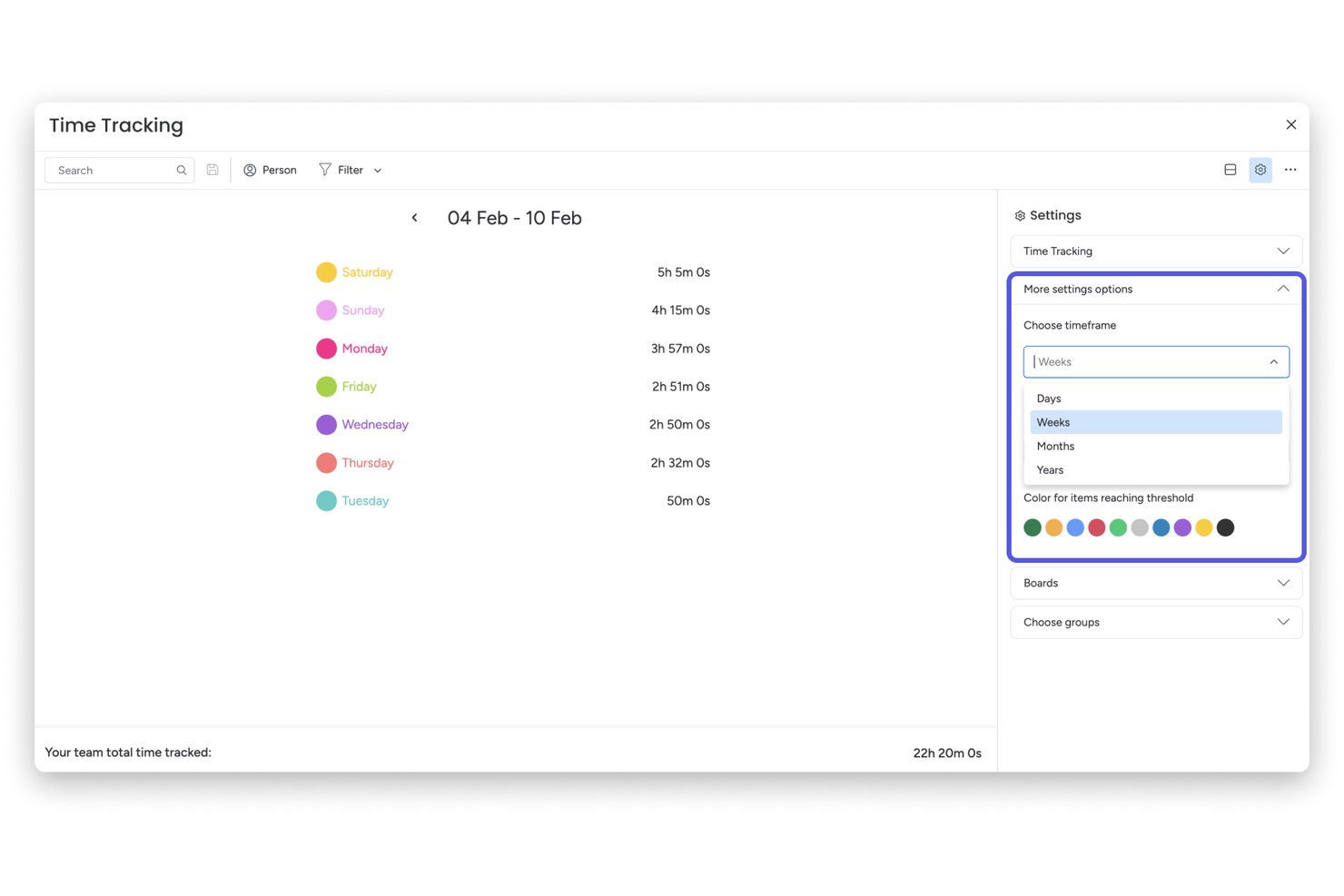
monday AI Workspace è una piattaforma di gestione progetti con monitoraggio del tempo integrato che consente ai team di registrare le ore sulle attività, monitorare i budget dei progetti e visualizzare la capacità lavorativa su tutti i progetti attivi.
Per chi è ideale monday AI Workspace?
È ideale per project manager e responsabili PMO in aziende di medie dimensioni che già utilizzano monday.com e desiderano una rilevazione del tempo collegata direttamente alle loro schede progetto.
Perché ho scelto monday AI Workspace
Ho scelto monday AI Workspace perché il modo in cui integra il monitoraggio del tempo direttamente nelle schede progetto è qualcosa che non ho visto fare altrove in modo così naturale. La Colonna di Monitoraggio del Tempo permette al mio team di avviare e fermare i timer all'interno dello stesso elemento in cui gestiscono le attività, così le ore registrate sono sempre collegate al reale contesto del progetto. Abbinato al Widget di Monitoraggio del Tempo sulle dashboard, posso vedere l'impegno e i tassi di consumo delle risorse tra i progetti senza mai lasciare la piattaforma.
Funzionalità principali di monday AI Workspace
- Bacheche personalizzabili: I team possono costruire schede progetto con colonne per stato, assegnatari, priorità e metriche personalizzate.
- Vista carico di lavoro: Visualizza le ore assegnate a ciascun membro su tutti i progetti per identificare sovraccarichi o capacità inutilizzata.
- Automazioni: Configura automazioni dei flussi di lavoro per azioni ricorrenti come cambi di stato o promemoria di registrazione ore.
- Dashboard e reportistica: Raccogli dati di progetto e di tempo in dashboard con widget per tracciare budget, carichi di lavoro e metriche chiave.
Integrazioni di monday AI Workspace
monday AI Workspace offre centinaia di integrazioni native, tra cui Slack, Google Workspace, Microsoft 365, Salesforce, Jira, GitHub, Zoom, Dropbox, HubSpot e Zendesk. Supporta anche Zapier e fornisce un'API per integrazioni personalizzate.
Pros and Cons
Pros:
- Il monitoraggio del tempo è collegato direttamente alle attività di progetto
- Visibilità sul carico di lavoro su tutti i progetti attivi
- I dati sul tempo vengono raccolti in dashboard visive
Cons:
- Nessuna rilevazione automatica del tempo in background disponibile
- I flussi di approvazione sono meno avanzati rispetto agli strumenti dedicati
New Product Updates from monday AI Workspace
monday AI Workspace Adds Human Approval Routing
monday AI Workspace adds a human-in-the-loop approval block to AI Workflows, sending approval requests and routing workflow paths based on responses. For more information, visit monday AI Workspace's official site.

Homebase
Ideale per ridurre il furto di tempo

Homebase è una piattaforma di gestione del team e rilevazione delle presenze progettata per le aziende con personale a ore, ideale per negozi al dettaglio, ristoranti e attività di servizi che desiderano tracciare le ore lavorate, gestire i turni e semplificare il processo di buste paga.
Per chi è più adatto Homebase?
Homebase è particolarmente indicato per piccole e medie imprese in settori basati sul lavoro orario come la ristorazione, il commercio al dettaglio e l’ospitalità.
Perché ho scelto Homebase
Homebase si è guadagnato un posto nella mia shortlist grazie al modo diretto in cui contrasta il furto di tempo nei contesti di lavoro a ore. Mi piace che il sistema di orologio scatti una foto del dipendente al momento dell’ingresso, così si può immediatamente verificare che sia la persona giusta a timbrare—e non un collega per suo conto. Questa funzione di prevenzione del 'buddy punching' è inclusa già nel piano gratuito, cosa rara. Inoltre, il tracciamento GPS consente di confermare che i dipendenti in remoto o sul campo siano effettivamente sul posto quando timbrano, invece di segnalare ore da luoghi completamente diversi.
Funzionalità principali di Homebase
- Fogli presenze automatizzati: Homebase converte automaticamente i dati di entrata e uscita in fogli presenze, evidenziando eventuali discrepanze per la revisione del responsabile.
- Avvisi su straordinari e pause: Imposta regole per soglie di straordinario e pause obbligatorie, e Homebase notifica i responsabili quando i dipendenti si avvicinano o superano questi limiti.
- Integrazione con il payroll: Esporta i dati delle presenze direttamente ai fornitori di servizi payroll, riducendo l’inserimento manuale e gli errori di calcolo.
- Messaggistica di squadra: Il sistema di messaggistica integrato consente ai responsabili di comunicare cambi turno, aggiornamenti e promemoria direttamente all’interno della piattaforma.
Integrazioni di Homebase
Le integrazioni includono Square, Toast, Clover, Shopify, QuickBooks, Gusto, ADP, Paychex, Heartland e Revel.
Pros and Cons
Pros:
- La timbratura con foto aiuta a prevenire il buddy punching
- Il tracciamento GPS verifica la presenza remota o in movimento
- Messaggistica di squadra integrata per la coordinazione dei turni
Cons:
- Opzioni limitate di personalizzazione dei report
- Nessuna funzione di rilevazione delle ore su base progetto

Scoro
Ideale per il monitoraggio dettagliato del tempo

Scoro è una piattaforma di gestione del lavoro progettata per team di servizi professionali e agenzie che necessitano di tracciare il tempo, gestire progetti e collegare i dati sulle ore direttamente alla fatturazione e ai report.
Per chi è Scoro?
Scoro è particolarmente indicato per società di servizi professionali—come consulenze, agenzie e fornitori di servizi IT—che hanno bisogno di collegare il monitoraggio del tempo ai budget di progetto e alla fatturazione dei clienti.
Perché scegliere Scoro
Scoro raccoglie dati dettagliati sulle ore e li utilizza nei report. I team possono registrare le ore in tre modi: con un timer in tempo reale, inserendo i dati a posteriori in un timesheet oppure lasciando che il calendario popoli automaticamente i report di lavoro dagli eventi pianificati. La funzione di pre-compilazione del timesheet si basa sull’elenco delle attività di ciascuna persona, eliminando le incertezze su cosa registrare. Questi dati temporali vengono poi utilizzati per la reportistica fatturabile vs. non fatturabile, consentendo di vedere esattamente come vengono distribuite le ore tra clienti, progetti e attività—e usare queste informazioni per migliorare la precisione della fatturazione.
Funzionalità principali di Scoro
- Monitoraggio del budget di progetto: Controlla i budget in tempo reale confrontandoli con le ore e le spese registrate per mantenere i progetti sotto controllo dal punto di vista economico.
- Fatturazione dalle ore registrate: Trasforma direttamente il tempo tracciato in fatture per i clienti senza re-inserire i dati manualmente.
- Report sull’utilizzo delle risorse: Visualizza i tassi di utilizzo dell’intero team per identificare risorse sovraccaricate o sotto-utilizzate nei progetti attivi.
- Gestione di attività e milestone: Organizza il lavoro in attività e milestone con assegnatari, scadenze e dipendenze.
Integrazioni di Scoro
Le integrazioni includono Google Calendar, Microsoft 365, Xero, QuickBooks, Zapier, Dropbox, Slack, HubSpot ed Exact.
Pros and Cons
Pros:
- Funzionalità complete di project management
- Capacità efficaci di monitoraggio del tempo
- Reportistica e analisi avanzate
Cons:
- Alcune funzioni di monitoraggio del tempo sono disponibili solo nei piani di livello superiore
- L'app mobile ha funzionalità limitate
New Product Updates from Scoro

Scoro Adds Time Mobile App and ELI Improvements
Scoro adds the Scoro Time mobile app for iOS/Android to track time anywhere and expands ELI with attachments, smarter filtering, and trigger-based actions. For more information, visit Scoro's official site.
Miglior rilevamento GPS delle presenze per team mobili

Connecteam è una piattaforma di gestione della forza lavoro pensata per aziende con dipendenti senza scrivania o mobili che necessitano di un sistema affidabile per il rilevamento delle presenze, la pianificazione e la comunicazione del team in un unico posto.
Per chi è più adatto Connecteam?
Connecteam è particolarmente indicato per piccole e medie imprese nei settori operativi come edilizia, vendita al dettaglio e ospitalità che gestiscono lavoratori a ore o a turni.
Perché ho scelto Connecteam
Ho scelto Connecteam tra i migliori per la qualità delle sue funzionalità di rilevamento GPS in condizioni reali sul campo. Mi piace in particolare la funzione breadcrumbs, che registra l'intero tragitto del dipendente durante il turno — non solo all'inizio. Questo significa che, se gestisci una squadra su più cantieri, puoi vedere esattamente dove si trovava ognuno e quando, senza dover contare sulle loro dichiarazioni. La funzione di geofencing va oltre, timbrando automaticamente l’uscita dei dipendenti quando escono dal raggio prestabilito del luogo di lavoro, riducendo così le frodi orarie senza necessità di interventi manuali dei responsabili.
Funzionalità chiave di Connecteam
- Gestione dei timesheet: Revisiona, modifica e approva i fogli presenze direttamente nell’app prima di esportare i dati alle paghe.
- Pianificazione dei turni: Crea e assegna turni a dipendenti o team specifici, con visibilità su disponibilità e conflitti.
- Monitoraggio delle ore straordinarie: Imposta regole personalizzate così che il sistema segnali automaticamente le ore che superano le soglie definite.
- Modalità chiosco: Permetti ai dipendenti di timbrare da un dispositivo condiviso tramite PIN, utile per postazioni fisse senza smartphone personali.
Integrazioni di Connecteam
Le integrazioni includono QuickBooks, Gusto, Xero, ADP, Wix, Lightspeed, PrismHR, Square e BambooHR.
Pros and Cons
Pros:
- Varietà di modalità di timbratura, inclusi app mobile, chiosco e badge NFC
- Possibilità di tracciare la posizione dei dipendenti e impostare le aree geolocalizzate (geofencing)
- Si possono impostare regole specifiche per pause, straordinari e tariffe orarie
Cons:
- Le notifiche push a volte sono ritardate
- La configurazione di ruoli e permessi può risultare poco intuitiva
New Product Updates from Connecteam

Connecteam Expands Break and Timesheet Controls
Connecteam adds flexible break thresholds, personalized policies, auto-end options, a centralized exceptions report, and improved timesheet issue visibility to help teams manage breaks and timesheets more effectively. For more information, visit Connecteam’s official site.
 .
.
Ideale per approfondimenti sulla redditività basati sul tempo

Productive è una piattaforma per la gestione dei progetti e il monitoraggio del tempo, progettata per agenzie e aziende di servizi che necessitano di collegare le ore tracciate ai budget di progetto, alla pianificazione delle risorse e alla redditività.
Per chi è ideale Productive?
Productive è particolarmente adatto ad agenzie e società di servizi professionali che fatturano ai clienti a ore e hanno bisogno di visibilità sui margini dei progetti.
Perché ho scelto Productive
Ho scelto Productive tra i migliori per il modo in cui collega direttamente il monitoraggio del tempo ai dati di redditività. Ogni ora che il tuo team registra su un servizio — fatturabile o meno — viene inserita direttamente nel monitoraggio del budget e nei report sui margini, quindi non devi aspettare un report finanziario per sapere a che punto è un progetto. Apprezzo particolarmente il report sul costo del lavoro, che confronta il tempo lavorato con il tempo fatturabile per risorsa, offrendoti un quadro chiaro di dove si perdono ore. Anche il livello di reportistica potenziato dall’intelligenza artificiale è davvero utile: puoi chiedergli di mostrarti la redditività per progetto o l’utilizzo del team senza dover costruire nessun report personalizzato da zero.
Funzionalità principali di Productive
- Monitoraggio del tempo con timesheet: Registra le ore manualmente o con un timer, direttamente su attività, progetti o servizi da una vista centralizzata delle schede attività.
- Pianificazione delle risorse: Pianifica i membri del team sui vari progetti utilizzando un pianificatore visivo di capacità che mostra disponibilità e carico di lavoro in tempo reale.
- Budget di progetto: Imposta limiti di budget per progetto e monitora le spese man mano che vengono registrate ore ed esborsi.
- Fatturazione: Genera le fatture direttamente dalle ore fatturabili registrate e inviale ai clienti senza uscire dalla piattaforma.
Integrazioni di Productive
Le integrazioni includono Jira, HubSpot, Xero, Google Calendar, Sage, Gmail, Microsoft Outlook, Slack, BugHerd e QuickBooks.
Pros and Cons
Pros:
- Dashboard e report personalizzabili
- Ottime funzionalità di pianificazione delle risorse
- Funzionalità complete per la gestione e la reportistica finanziaria
Cons:
- La configurazione iniziale e l’onboarding possono richiedere tempo
- Numero limitato di integrazioni
New Product Updates from Productive

Productive Adds Agent Triggers, Teams Integration, and Time Controls
Productive adds automated agent triggers, broader AI file support, Microsoft Teams integration, Resource Planner improvements, and new time entry controls. These updates expand automation while improving scheduling, collaboration, and time tracking. For more information, visit Productive’s official site.

actiTIME
Ideale per piccoli team e piccole imprese
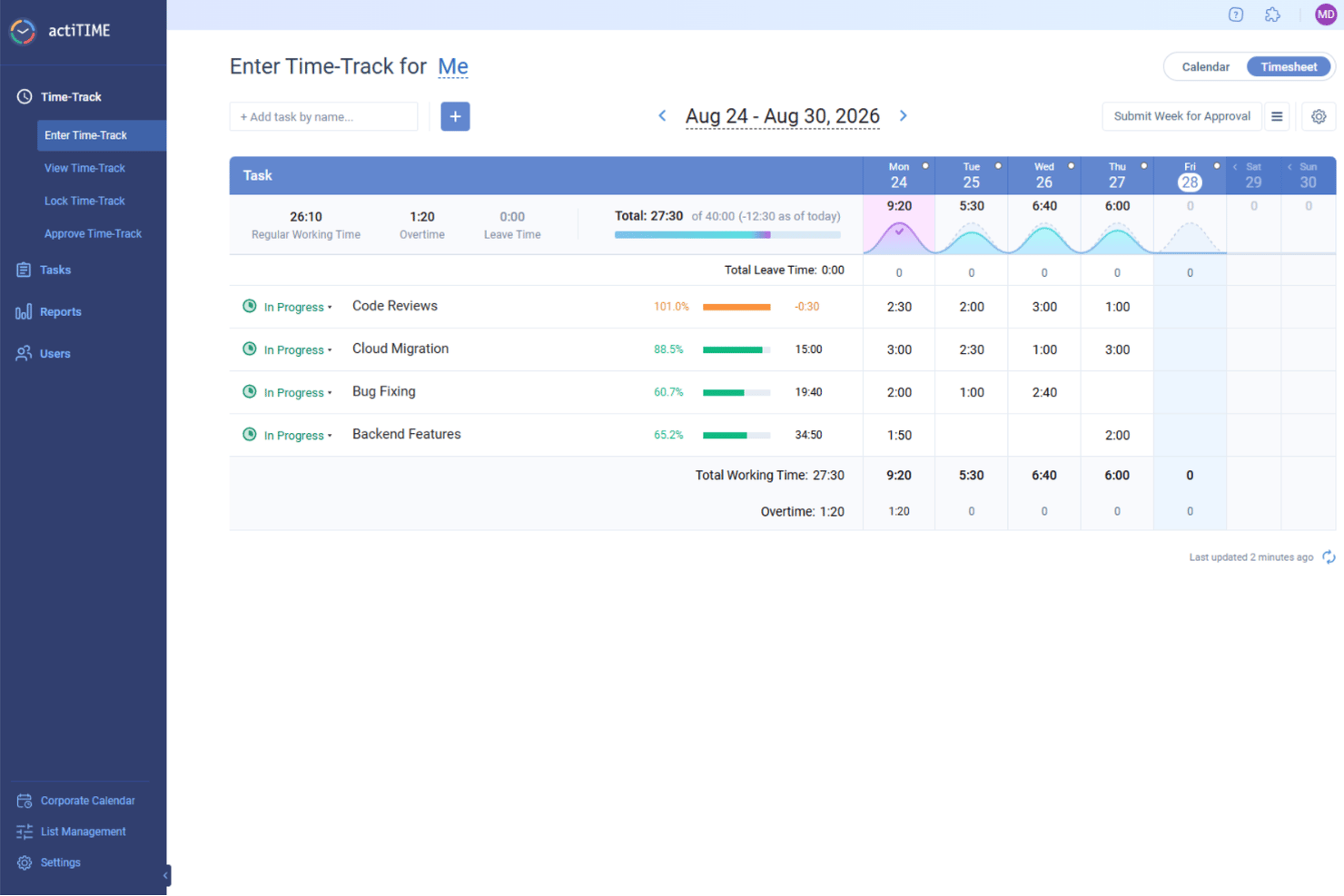
Se cerchi uno strumento per il monitoraggio del tempo progettato pensando ai piccoli team e alle piccole imprese, actiTIME merita di essere preso in considerazione. È progettato per i team che devono monitorare le ore, gestire le attività e controllare i costi dei progetti senza complessità aggiuntive. La piattaforma si distingue per la configurazione semplice, la reportistica flessibile e le funzionalità integrate per la gestione delle ferie.
A chi è più adatto actiTIME?
Supervisori di team e amministratori di piccole imprese che necessitano di un monitoraggio del tempo e di una reportistica semplici, senza implementazioni complesse o supporto di sistema dedicato.
Perché ho scelto actiTIME
Per i piccoli team e le piccole imprese, actiTIME offre un insieme mirato di funzionalità per il monitoraggio del tempo senza extra inutili. Ho scelto actiTIME perché consente di monitorare il tempo per cliente, progetto o attività, rendendo semplice capire dove vengono impiegate le ore. Lo strumento include inoltre una gestione integrata delle ferie, così puoi gestire assenze e vacanze insieme al normale monitoraggio del tempo. Gli strumenti di reportistica aiutano i piccoli team a controllare i costi dei progetti e la produttività senza perdersi nella complessità.
Funzionalità principali di actiTIME
Alcune delle altre funzionalità che rendono actiTIME utile per i piccoli team includono:
- Promemoria automatici: Invia notifiche per ricordare agli utenti di inviare i fogli presenze secondo la programmazione.
- Tariffe di fatturazione personalizzabili: Consente di impostare tariffe orarie diverse per vari clienti o progetti.
- App mobile: Permette agli utenti di monitorare il tempo e gestire le attività dai propri smartphone.
- Integrazione con QuickBooks: Sincronizza direttamente i dati sul monitoraggio del tempo con QuickBooks per semplificare la contabilità.
Integrazioni di actiTIME
Le integrazioni includono actiPLANS, plugin per Chrome, QuickBooks e Time Management Assistant. È inoltre disponibile un'API per integrazioni personalizzate.
Pros and Cons
Pros:
- Consente di impostare budget orari e monitorarli
- Supporta politiche di ferie a saldo fisso e a maturazione
- Fornisce report dettagliati e analisi dei dati
Cons:
- Non dispone di numerose integrazioni native
- Non dispone di funzionalità come la delimitazione geografica e il riconoscimento facciale
New Product Updates from actiTIME

actiTIME Visual Hour Indicator and Time-Track Report Redesign
actiTIME adds a wave-style hour indicator to the Timesheet and Calendar views and refreshes the Time-Track report for smoother navigation and clearer visuals. For more information, visit actiTIME's official site.

Kantata
Ideale per la gestione completa e continua del monitoraggio del tempo

Kantata è una piattaforma di gestione progetti e risorse pensata per i team di servizi professionali che devono monitorare il tempo, gestire i progetti e ottimizzare le risorse su complesse attività per i clienti.
Per chi è ideale Kantata?
Kantata è particolarmente adatta per aziende di servizi professionali di medie e grandi dimensioni—come società di consulenza, marketing e servizi IT—che devono gestire tempi e risorse su più progetti cliente simultaneamente.
Perché ho scelto Kantata
Ho scelto Kantata tra i migliori perché è uno dei pochi strumenti di monitoraggio del tempo che collega i dati sul tempo a tutte le altre fasi della gestione del progetto—dalla definizione iniziale fino alla fatturazione. Quello che apprezzo è che il monitoraggio di tempi e spese non è un modulo separato: alimenta direttamente la gestione finanziaria, così il mio team può vedere in tempo reale come le ore registrate influenzano i margini di progetto e il consumo del budget. Kantata offre inoltre workflow integrati per le schede attività con automazioni che rendono più semplice la chiusura dei periodi—un aspetto che il team finanziario con più progetti in contemporanea apprezzerà molto. In più, il livello di business intelligence mette in evidenza dati su utilizzo e compensi per tutto il portafoglio, rendendo il monitoraggio del tempo un vero input per scelte strategiche, non solo un semplice adempimento.
Funzionalità principali di Kantata
- Gestione delle risorse: Assegna e modifica la capacità del team tra i progetti usando strumenti visivi di pianificazione che riflettono la disponibilità in tempo reale.
- Previsione dei progetti: Modella costi e tempistiche previste rispetto a quelli reali per mantenere i progetti cliente sotto controllo prima che sorgano problemi.
- Permessi basati sui ruoli: Controlla chi può vedere, inserire o approvare i dati di progetto con impostazioni di accesso configurabili per i vari team.
- Dashboard clienti e progetti: Monitora lo stato di salute del progetto, le milestone e l'avanzamento da una vista centralizzata su tutto il tuo portafoglio.
Integrazioni di Kantata
Le integrazioni includono Salesforce, NetSuite, Jira, Slack, HubSpot, QuickBooks, Xero, BambooHR, Google Drive e Microsoft Teams.
Pros and Cons
Pros:
- Gli utenti possono registrare il tempo tramite timer, schede attività o direttamente sulle attività
- Le registrazioni del tempo possono essere riviste e approvate prima della fatturazione
- Gli amministratori possono applicare regole come l'obbligo di note o l'associazione ad attività
Cons:
- La configurazione di chi può registrare e approvare il tempo può risultare complessa
- Alcuni campi per il monitoraggio del tempo potrebbero non essere completamente personalizzabili
New Product Updates from Kantata

Kantata Adds Access Group Change History
Kantata adds Access Groups History, letting account administrators track changes to group details, membership, and permissions in Recent History. The update also makes these events available through the Subscribed Events API for broader monitoring. For more information, visit Kantata’s official site.
 .
.
Hive
Ideale per la fatturazione dei progetti collegata al tempo a livello di attività
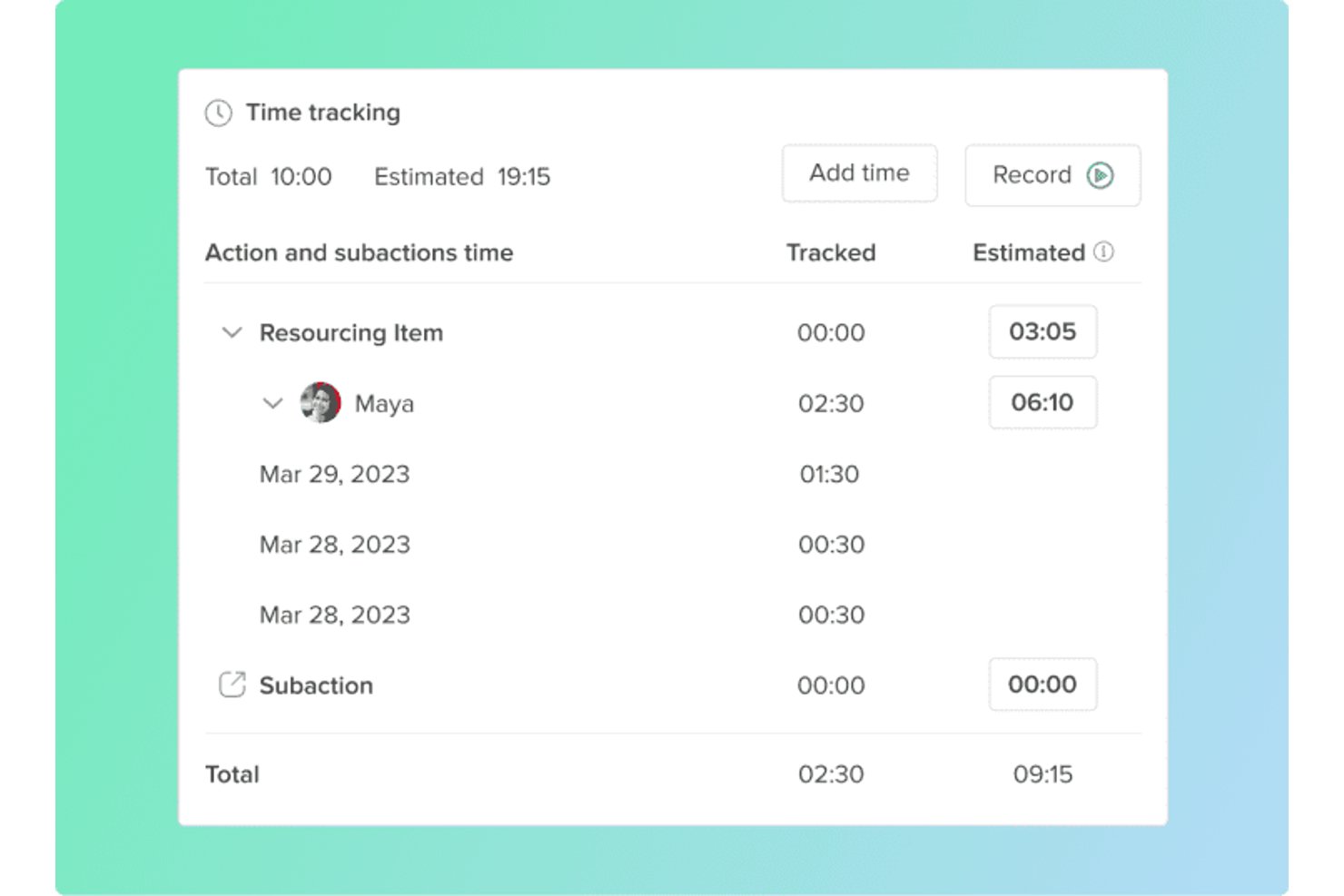
Hive è una piattaforma di gestione dei progetti con monitoraggio del tempo integrato, gestione dei fogli presenze, configurazione delle tariffe fatturabili, monitoraggio del budget e pianificazione della capacità delle risorse.
A chi è più adatto Hive?
Hive è particolarmente adatto alle agenzie e ai team di consulenza che necessitano di registrare il tempo a livello di attività e collegarlo direttamente alla fatturazione dei progetti.
Perché ho scelto Hive
Ho incluso Hive tra le mie scelte principali perché il tempo viene registrato direttamente sulle schede delle azioni, il che significa che ogni ora è associata a un'attività specifica all'interno di un progetto reale. Mi piace che sia possibile impostare tariffe di fatturazione e di costo separate a livello di persona, ruolo o progetto, così la fatturazione riflette l'ambito effettivo invece di approssimazioni forfettarie. Quando arriva il momento di fatturare, i fogli presenze approvati vengono inviati direttamente a QuickBooks, quindi non è necessaria alcuna esportazione manuale né un nuovo inserimento dei dati tra il tempo registrato e la fattura inviata.
Funzionalità principali di Hive
- Stime del tempo rispetto ai valori effettivi: Imposta stime del tempo sulle singole schede delle azioni e confrontale con le ore registrate nei report di monitoraggio dedicati.
- Monitoraggio dell'utilizzo: Misura le ore inviate da ciascun membro del team rispetto alla capacità impostata per monitorare il carico di lavoro e gli obiettivi di utilizzo.
- Vista delle risorse: Visualizza la capacità del team tra i vari progetti con indicatori codificati a colori che mostrano eccedenze o carenze e utilizza Ricerca capacità per cercare la disponibilità in base all'intervallo di date.
- Monitoraggio del consumo del budget del progetto: Monitora in tempo reale le ore fatturabili rispetto ai budget dei progetti, con colonne a livello di portafoglio che mostrano l'importo fatturato e il budget residuo.
Integrazioni di Hive
Hive offre integrazioni native con Jira, Jira Data Center, GitHub, Slack, Microsoft Teams, Google Calendar, Outlook Calendar, Google Drive e QuickBooks. Fornisce inoltre un'API pubblica e la connettività con Zapier.
Pros and Cons
Pros:
- Il tempo a livello di attività collega le ore ai risultati da consegnare
- Le tariffe fatturabili e di costo supportano la redditività
- Le viste della capacità evidenziano tempestivamente le lacune nel carico di lavoro
Cons:
- Nessun monitoraggio in background o offline documentato
- Le approvazioni dei fogli presenze non supportano flussi di lavoro a più passaggi

DeskTime
Ideale per la precisione nel monitoraggio del tempo offline

Con il monitoraggio automatico del desktop e l'inserimento manuale delle ore, DeskTime è una piattaforma di monitoraggio del tempo che rileva l'attività su app, URL e documenti, oltre al lavoro offline registrato tramite integrazioni con il calendario e inserimenti manuali.
Per chi è ideale DeskTime?
DeskTime è adatto a team di piccole e medie dimensioni che necessitano di visibilità su come vengono trascorse le ore lavorative in contesti distribuiti o ibridi.
Perché ho scelto DeskTime
La precisione nel monitoraggio del tempo offline è un aspetto in cui molti strumenti sono carenti, ma DeskTime lo gestisce meglio della maggior parte. Il mio team può registrare manualmente il tempo offline, suddividendolo per tipologia (come riunioni, chiamate o trasferte), così quel tempo non scompare dai registri. DeskTime si sincronizza inoltre con Google Calendar e Outlook per acquisire automaticamente gli eventi del calendario, il che significa che le riunioni programmate vengono rilevate senza che nessuno debba ricordarsi di registrarle in un secondo momento.
Funzionalità principali di DeskTime
- Timer Pomodoro: Timer di intervalli di lavoro integrato che alterna sessioni di concentrazione a brevi pause, registrando automaticamente questi periodi nel tempo monitorato.
- Modalità tempo privato: Permette agli utenti di mettere in pausa il monitoraggio automatico durante attività personali, così questi intervalli sono esclusi dai report sulla produttività.
- Pianificazione dei turni: I responsabili possono impostare le ore di lavoro previste per ciascun dipendente e confrontarle con il tempo effettivamente registrato.
- Tariffe di fatturazione: Assegna tariffe orarie ai membri del team, così il tempo di progetto tracciato viene convertito direttamente in calcoli sui costi.
Integrazioni di DeskTime
DeskTime offre integrazioni native con Google Calendar, Outlook Calendar, Jira, Asana, GitLab, Trello e Zapier. DeskTime mette inoltre a disposizione un'API per costruire integrazioni personalizzate.
Pros and Cons
Pros:
- Monitora automaticamente l'uso di app e URL
- Classifica i siti come produttivi o improduttivi
- Offusca schermate facoltative a tutela della privacy
Cons:
- Capacità limitate di monitoraggio su dispositivi mobili
- Le impostazioni del software non offrono una personalizzazione approfondita
Beebole
Ideale per dashboard personalizzabili
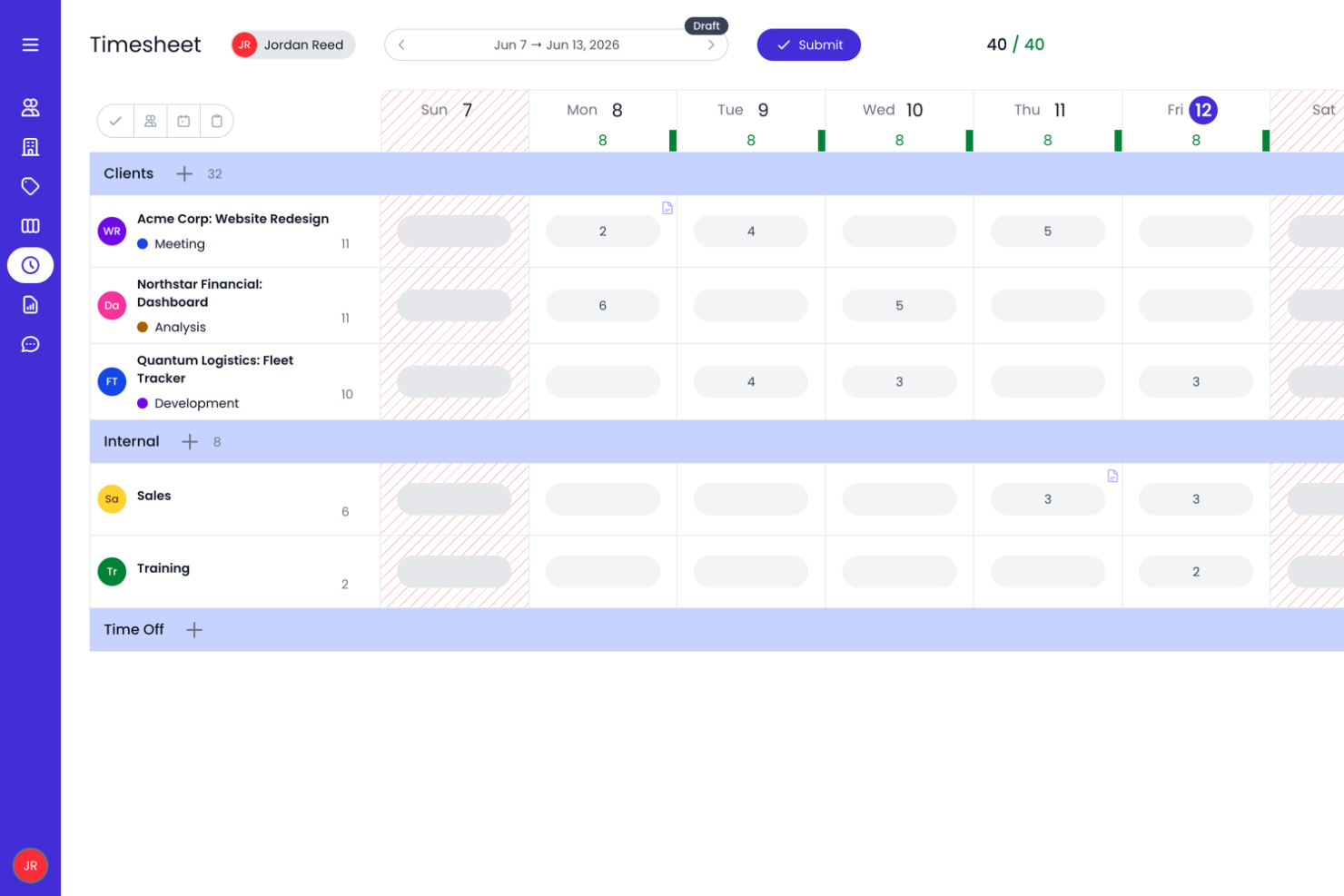
Beebole è una piattaforma di rilevamento delle ore progettata per aziende che hanno bisogno di monitorare le ore di progetto, gestire la produttività del team e generare report dettagliati a supporto della fatturazione e della pianificazione delle risorse.
Per Chi è Beebole?
Beebole è particolarmente adatto per aziende di medie dimensioni e team di servizi professionali che necessitano di una rilevazione flessibile delle ore con reportistica dettagliata su progetti e reparti.
Perché Ho Scelto Beebole
Beebole si è guadagnato un posto nella mia lista perché offre un controllo elevato sui dashboard di reportistica. Mi piace poter salvare report personalizzati direttamente sulla dashboard; così, quando ho bisogno di una panoramica in tempo reale delle ore di progetto, dello stato della fatturazione o della variazione del budget, tutto è già visibile. Il costruttore di dashboard KPI permette di evidenziare esattamente le metriche importanti per il team, che sia il monitoraggio della redditività su 50 progetti cliente o delle ore di straordinario per reparto. Esportare questi stessi report in Excel o Google Sheets mantiene i dati accessibili anche fuori dallo strumento. È inoltre possibile configurare tariffe di fatturazione e costi a livello di persona, progetto o attività e monitorare i budget dei progetti man mano che vengono registrate le ore, offrendo ai team maggiore visibilità sui costi dei progetti.
Funzionalità Principali di Beebole
- Flusso di approvazione dei timesheet: I responsabili possono rivedere, approvare o respingere i timesheet inviati direttamente dalla piattaforma prima che vengano bloccati per il pagamento o la fatturazione.
- Pianificazione delle risorse e gestione della capacità: Assegna il lavoro in base alla disponibilità del team e confronta le ore programmate con quelle effettivamente lavorate.
- Monitoraggio del budget e della redditività dei progetti: Imposta i budget per fatturazione, costi o ore e monitora le spese del progetto mentre vengono registrate le ore.
- Gestione assenze e permessi: Traccia ferie, giorni di malattia e altri tipi di permesso insieme alle ore lavorative in un'unica vista.
Integrazioni di Beebole
Le integrazioni includono Asana, BambooHR, Google Calendar, Outlook Calendar, Google Sheets, Excel, QuickBooks Online e un'API aperta per integrazioni personalizzate.
Pros and Cons
Pros:
- Possibilità di tracciare il tempo su vari progetti e attività
- È possibile impostare tariffe di fatturazione diverse per clienti, progetti e membri del team
- Funzione integrata di rilevamento PTO
Cons:
- Manca la fatturazione integrata
- Il piano gratuito è limitato a 5 utenti
- Factorial
Ideale per integrare i fogli presenze con l'elaborazione delle paghe
- Buddy Punch
Miglior rilevatore orario per tracciamento GPS e tramite immagini
- Resource Guru
Ideale per monitorare il tempo insieme alla pianificazione delle risorse
- Agendrix
Ideale per metodi di timbratura versatili
- Runn
Ideale per la visibilità in tempo reale della capacità
- Clockify
Ideale per il monitoraggio efficiente del tempo
- Traqq
Ideale per una versione gratuita ricca di funzionalità
- My Hours
Ideale per piccoli team e liberi professionisti
- TimeCamp
Ideale per il monitoraggio automatico del tempo
- ClickUp
Ideale per il suo tag tempo fatturabile
- TMetric
Ideale per l’archiviazione delle attività di 7 giorni
- Bonsai Agency Software
La migliore gestione integrata di tempo e risorse
- Timesheets.com
Ideale per contabili e addetti alla contabilità
- Harvest
Ideale per approfondimenti pratici
- FunctionFox
Ideale per team creativi e agenzie
- Deltek Replicon Time
Ideale per la rilevazione intelligente delle ore
- ProjectManager
Ideale per il monitoraggio del tempo in tempo reale
- Ravetree
Ideale per monitorare spese insieme al tempo
- eResource Scheduler
Ideale per la pianificazione integrata al monitoraggio delle presenze
- ExakTime
Ideale per squadre di lavoratori sul campo
- Bill4time
Ideale per le funzionalità di reportistica
- Actually
Rilevazione delle ore semplice per aziende che lavorano su progetti
- Deel HR
Ideale per mantenere le buste paga sincronizzate
- Insightful
Ideale per il monitoraggio di team remoti
- Toggl
Ideale per il bilanciamento dei carichi di lavoro
- Monitask
Ideale per team distribuiti
- Smartsheet
Ideale per il monitoraggio orario da mobile
- Apploye
Ideale per team ibridi
- ClickTime
Ideale per timesheet personalizzabili
- Hubstaff
Ideale per team distribuiti


Come valuto il software di rilevamento del tempo
Divido la mia valutazione tra ciò che uno strumento deve fare—registrare il tempo sui progetti, gestire le approvazioni e monitorare le tariffe fatturabili—e ciò che lo rende la scelta giusta per il tuo specifico team o flusso di lavoro.
Funzionalità principali (requisiti minimi per questa lista)
Quando seleziono gli strumenti per la mia lista, valuto ciascuno su una scala da 0 (non offre la funzionalità) a 5 (eccelle in quest’area) per ogni funzionalità principale elencata di seguito. Poi, calcolo il punteggio totale dello strumento in percentuale. Ogni strumento deve ottenere un punteggio totale minimo del 65% per essere considerato per l’inclusione.
- Rilevamento del tempo su progetto & attività: Verifico se puoi registrare le ore su progetti, attività e sotto-attività specifiche—tramite inserimento manuale, timer attivi o tracciamento in background—così nulla viene trascurato durante uno sprint intenso.
- Gestione dei fogli presenza: Un solido flusso di approvazione è fondamentale qui. Cerco funzioni di invio, revisione e blocco che permettano a un PM o responsabile di convalidare le ore settimanali prima che arrivino alla busta paga o alla fatturazione.
- Ore fatturabili & configurazione tariffe: Gli strumenti devono distinguere tra tempo fatturabile e non, e supportare la configurazione delle tariffe a livello di utente, ruolo, progetto o cliente—il tipo di flessibilità su cui si basa ogni giorno un’agenzia con più contratti a canone.
- Monitoraggio budget & utilizzo: Valuto quanto bene uno strumento collega il tempo registrato ai budget e alle stime di progetto, mettendo in evidenza burn rate, sforamenti e utilizzo per persona così da individuare deviazioni prima che intacchino i margini.
- Report & analisi: I report predefiniti sono un inizio, ma cerco anche filtri per progetto, cliente, membro del team e intervallo di date più opzioni di esportazione—perché responsabili e team finanziari quasi sempre richiedono i dati in un proprio formato.
- Integrazioni con strumenti di PM: Che il tuo team utilizzi Jira, Asana, Monday o ClickUp, valuto la profondità di ogni integrazione—specialmente la sincronizzazione bidirezionale che riporta il tempo registrato sulle attività senza reinserimenti manuali.
Una volta ottenuta la lista di strumenti che soddisfano i criteri, considero ciò che distingue ciascuna piattaforma.
Fattori differenzianti (cosa distingue i fornitori)
Ecco come confronto i diversi fornitori:
Funzionalità distintive
La pianificazione delle risorse e della capacità è essenziale—cerco strumenti che ti permettano di vedere chi è disponibile e assegnare compiti in base alle ore registrate e alla domanda prevista, non su ipotesi. Anche il rilevamento automatico del tempo è importante. Il rilevamento in background o la sincronizzazione con il calendario colmano le lacune che l’inserimento manuale lascia, soprattutto nei giorni pieni di cambi di contesto. Per i team di agenzie e consulenza, la fatturazione nativa chiude il cerchio tra ore tracciate e fatturazione cliente senza dover esportare i dati in un sistema separato.
Oltre le funzionalità
Pongo molta attenzione alle dimensioni del team e all’adattabilità al caso d’uso. Uno strumento creato per liberi professionisti non servirà a uno studio di consulenza di 50 persone che gestisce canoni, progetti a tariffa fissa e contratti T&M insieme. La struttura dei prezzi è altrettanto importante—valuto se i costi per utente restano ragionevoli man mano che il team cresce e se una versione gratuita consente ai gruppi più piccoli di testare davvero la piattaforma. Per settori regolamentati o fornitori di servizi governativi, controllo anche la conformità DCAA, la certificazione SOC 2 e i controlli di accesso basati sui ruoli.
Come scegliere un software per il monitoraggio del tempo
È facile perdersi in lunghi elenchi di funzionalità e strutture di prezzo complesse. Per aiutarti a rimanere concentrato mentre porti avanti il processo di selezione del software, ecco un elenco di fattori da tenere a mente:
| Fattore | Considerazioni |
| Scalabilità | Assicurati che il software sia in grado di gestire la crescita del tuo team. Cerca prezzi flessibili, utenti illimitati e funzionalità che supportino team numerosi, come autorizzazioni basate sui ruoli e reportistica aziendale. |
| Integrazioni | Scegli una soluzione che si colleghi agli strumenti che già utilizzi, come software per paghe, fatturazione, gestione dei progetti e risorse umane. Questo riduce l'inserimento manuale dei dati e mantiene fluidi i flussi di lavoro. |
| Personalizzazione | Le esigenze del tuo team sono uniche. Cerca report personalizzabili, regole di monitoraggio regolabili e autorizzazioni configurabili, in modo da allineare lo strumento ai tuoi processi aziendali. |
| Semplicità d'uso | Un sistema complesso rallenta l'adozione. Scegli un'interfaccia intuitiva con una configurazione minima, semplici opzioni per l'inserimento delle ore e un'app mobile facile da usare per il monitoraggio in mobilità. |
| Budget | Confronta i piani tariffari, i costi nascosti e le opzioni di prova gratuita. Valuta se lo strumento applica un costo per utente, per funzionalità oppure utilizza un modello a tariffa fissa adatto al tuo budget. |
| Misure di sicurezza | Proteggi i registri delle ore e i dati delle paghe sensibili con funzionalità come l'autenticazione a due fattori, i controlli degli accessi basati sui ruoli e l'archiviazione dei dati crittografata. |
| Accessibilità da dispositivi mobili | Se il tuo team lavora da remoto o sul posto, assicurati che il software disponga di un'app mobile efficace con monitoraggio offline, funzionalità GPS e sincronizzazione fluida. |
| Reportistica & analisi | Cerca informazioni dettagliate sulle ore lavorate, sui costi dei progetti e sulla produttività del team. Dashboard personalizzabili e report automatizzati ti aiutano a prendere decisioni basate sui dati. |
Tendenze dei software per il monitoraggio del tempo 2026
Nella mia ricerca ho raccolto innumerevoli aggiornamenti di prodotto, comunicati stampa e registri delle versioni di diversi fornitori di software per il monitoraggio del tempo. Ecco alcune delle tendenze emergenti che sto tenendo d'occhio:
- App mobili e geofencing: le app mobili per il monitoraggio del tempo nella gestione dei progetti sono sempre più popolari, soprattutto grazie alla tecnologia di geofencing. Questa consente registrazioni automatiche degli ingressi e il monitoraggio basato sulla posizione, per una registrazione più accurata del tempo nei diversi ambienti di lavoro.
- Identificazione biometrica: tecnologie come il riconoscimento facciale e la tecnologia biometrica dell'iride vengono adottate nelle moderne soluzioni per il monitoraggio del tempo per una maggiore facilità d'uso e una registrazione più accurata delle entrate e delle uscite.
- Monitoraggio del dispendio energetico: questo concetto emergente misura lo sforzo mentale e fisico profuso durante il lavoro e offre informazioni sul coinvolgimento e sul benessere dei dipendenti che vanno oltre il semplice monitoraggio del tempo.
- Integrazione con la tecnologia indossabile: i dispositivi indossabili come gli smartwatch possono ora monitorare le ore lavorate offrendo al contempo il monitoraggio dell'attività e della salute per sostenere il benessere dei dipendenti.
- IA avanzata e automazione: l'IA è ormai una funzionalità comune e in rapida evoluzione nei software per i fogli presenze, spesso utilizzata per automatizzare la registrazione del tempo, migliorare la precisione e analizzare i modelli di utilizzo del tempo.
Che cos'è un software per il monitoraggio del tempo?
Il software per il monitoraggio del tempo è uno strumento digitale che controlla e registra la quantità di tempo che singoli individui o team dedicano ad attività, progetti, clienti o mansioni.
In genere include funzionalità come timer, inserimento manuale del tempo, fogli presenze, reportistica e fatturazione. Questi strumenti aiutano ad aumentare la produttività, garantire una fatturazione accurata e ottenere informazioni utili per una migliore pianificazione e gestione delle risorse. Molti strumenti per il monitoraggio del tempo si integrano inoltre con strumenti di gestione dei progetti, per le paghe e di collaborazione, così da semplificare i flussi di lavoro e ridurre le attività amministrative.
Funzionalità dei software per il monitoraggio del tempo
Quando scegli un software per il monitoraggio del tempo, presta attenzione alle seguenti funzionalità principali:
- Acquisizione automatica del tempo: consenti al software di monitorare la tua attività in background, così non dovrai registrare manualmente l'inizio e la fine del lavoro. In questo modo le tue ore lavorate vengono registrate con precisione, anche quando dimentichi di farlo.
- Opzioni di inserimento manuale: aggiungi o modifica facilmente le registrazioni del tempo per il lavoro svolto offline o per correggere eventuali registrazioni mancanti, così i tuoi dati rifletteranno sempre la realtà.
- Categorizzazione di progetti e attività: organizza il tuo tempo per cliente, progetto o attività, per vedere esattamente come impieghi le tue ore e semplificare la reportistica.
- Monitoraggio delle ore fatturabili e non fatturabili: distingui tra ore fatturabili e non fatturabili per una fatturazione più accurata e una migliore comprensione di come impieghi il tuo tempo.
- Reportistica e analisi: genera report dettagliati per analizzare la produttività, individuare le tendenze e prendere decisioni informate sul tuo flusso di lavoro.
- Integrazioni con altri strumenti: sincronizza il software per il monitoraggio del tempo con app di gestione dei progetti, contabilità o calendario per semplificare i processi ed evitare il doppio inserimento dei dati.
- Promemoria e notifiche: configura avvisi che ti ricordino di monitorare il tempo o registrare le attività, così nulla verrà tralasciato.
- Accesso da dispositivi mobili: monitora le tue ore ovunque ti trovi utilizzando lo smartphone o il tablet: è perfetto per i team remoti o per chi è sempre in movimento.
Funzionalità comuni dell'IA nei software di monitoraggio del tempo
I moderni software di monitoraggio del tempo includono spesso funzionalità basate sull'IA progettate per rendere il flusso di lavoro ancora più fluido:
- Classificazione automatica delle attività: l'IA può analizzare la tua attività e categorizzare automaticamente le attività, riducendo l'ordinamento manuale e facendoti risparmiare tempo.
- Suggerimenti intelligenti per i fogli presenze: in base ai tuoi modelli di lavoro, l'IA può suggerire registrazioni del tempo o compilare le lacune, aiutandoti a completare i fogli presenze più rapidamente e con maggiore precisione.
- Analisi della produttività: l'analisi basata sull'IA evidenzia le tendenze, segnala le potenziali distrazioni e offre consigli personalizzati per aumentare la tua efficienza.
- Rilevamento delle anomalie: il software può individuare schemi insoliti, come registrazioni mancanti o orari incoerenti, e avvisarti affinché tu possa esaminarli prima che diventino un problema.
- Inserimento in linguaggio naturale: alcuni strumenti consentono di registrare il tempo o le attività utilizzando semplici comandi testuali, rendendo il processo ancora più intuitivo.
Vantaggi dei software di monitoraggio del tempo
L'implementazione di un software di monitoraggio del tempo può offrire diversi vantaggi al tuo team e alla tua azienda. Eccone alcuni che puoi aspettarti:
- Maggiore precisione: registra le ore lavorate fino al minuto, riducendo gli errori nelle buste paga e nella fatturazione.
- Fatturazione dei progetti più semplice: registra il tempo fatturabile per cliente o progetto, così puoi addebitare l'importo corretto senza fare supposizioni.
- Meno dispersioni di tempo: aiuta a individuare il tempo non tracciato o inattivo, così non perdi ore fatturabili.
- Team più produttivi: mostra come viene impiegato il tempo, aiutando i team a ridurre le distrazioni e a concentrarsi sul lavoro effettivo.
- Meno lavoro amministrativo: automatizza fogli presenze, approvazioni e report, così i responsabili dedicano meno tempo alla ricerca dei dati.
- Maggiore responsabilità: conserva un registro delle ore lavorate, aiutando i team remoti e sul campo a rimanere in linea con i propri obiettivi. Dai un'occhiata alle nostre selezioni dei migliori software di monitoraggio del tempo per team remoti.
- Maggiore controllo dei costi: monitora i costi della manodopera in tempo reale, così puoi adeguare i budget prima che si discostino dagli obiettivi.
Costi e prezzi dei software di monitoraggio del tempo
La scelta di un software di monitoraggio del tempo richiede la comprensione dei diversi modelli e piani tariffari disponibili. I costi variano in genere in base alle funzionalità, alle dimensioni del team, ai componenti aggiuntivi e ad altri fattori. La tabella seguente illustra i piani più comuni, i prezzi medi e le funzionalità generalmente incluse negli strumenti di monitoraggio del tempo:
Tabella di confronto dei piani per i software di monitoraggio del tempo
| Tipo di piano | Prezzo medio | Funzionalità comuni |
|---|---|---|
| Piano base/gratuito | Gratis | - Monitoraggio del tempo di base - Funzionalità di reportistica semplici - Numero limitato di utenti o progetti |
| Piano standard | $5 - $10 per utente/mese | - Funzionalità avanzate di monitoraggio del tempo - Reportistica e analisi di base - Integrazione con altri software - Assistenza limitata |
| Piano professionale | $10 - $20 per utente/mese | - Reportistica e analisi avanzate - Integrazione completa con la gestione dei progetti - Opzioni di assistenza avanzate - Funzionalità aggiuntive come fatturazione e pianificazione |
| Piano premium/aziendale | $20+ per utente/mese | - Funzionalità personalizzabili - Opzioni di sicurezza avanzate - Assistenza prioritaria - Integrazioni complete con i sistemi aziendali |
Dopo aver scelto il software, è una buona idea iniziare con una prova gratuita o un piano base per verificare quanto soddisfi le tue esigenze prima di passare a un piano più avanzato.
Le fasi in cui la tua azienda potrebbe voler aggiornare il proprio piano tariffario includono:
- Crescita del team: Quando aumenta il numero di dipendenti o membri del team, potrebbero essere necessarie licenze utente aggiuntive o funzionalità di gestione più complete.
- Aumento del volume dei progetti: Quando l'azienda inizia a gestire più progetti contemporaneamente, potrebbe essere necessario un monitoraggio e una reportistica avanzati.
- Esigenze di reportistica avanzate: Con la crescita dell'azienda, potrebbero essere necessari report più dettagliati e personalizzabili per ottenere informazioni migliori sull'utilizzo del tempo e sull'allocazione delle risorse.
- Requisiti di integrazione: Con la crescita dell'attività, potrebbe aumentare la necessità di integrare il software per il monitoraggio del tempo con altri sistemi, come piattaforme per paghe, fatturazione o gestione dei progetti.
- Funzionalità avanzate e automazione: Alla fine, l'azienda potrebbe aver bisogno di funzionalità più sofisticate, come il monitoraggio automatico del tempo, analisi avanzate e automazione dei flussi di lavoro, per migliorare efficienza e precisione.
Domande frequenti sul software per il monitoraggio del tempo
Trova le risposte alle domande più comuni su questo argomento.
Gli strumenti per il monitoraggio del tempo possono integrarsi con altri software di gestione dei progetti?
Sì, quasi tutti gli strumenti moderni per il monitoraggio del tempo si integrano con piattaforme popolari come Asana, Trello, Jira e Slack. Le integrazioni consentono di sincronizzare le attività, automatizzare l’inserimento del tempo e centralizzare la reportistica. Prima di scegliere uno strumento, verifica che supporti l’integrazione diretta o che fornisca un’API per il tuo flusso di lavoro di gestione dei progetti.
Qual è la differenza tra il monitoraggio automatico e manuale del tempo?
Il software per il monitoraggio automatico del tempo registra la tua attività in background, mentre gli strumenti manuali richiedono di avviare e arrestare i timer o inserire le ore. Molti responsabili di progetto utilizzano metodi automatici per una maggiore precisione, ma il monitoraggio manuale può essere utile per registrare attività offline o non digitali. Spesso, l’approccio migliore combina entrambi i metodi, così il team può monitorare il proprio tempo senza difficoltà, indipendentemente dal modo in cui lavora.
Il software per il monitoraggio del tempo offre app mobili?
Sì, la maggior parte dei principali software per il monitoraggio del tempo include app mobili per iOS e Android. Queste consentono al team di monitorare le ore da qualsiasi luogo, anche offline, e sono essenziali per il lavoro sul campo o per i team da remoto. Assicurati che l’app offra notifiche, tracciamento GPS e funzionalità di timer per supportare i dipendenti in movimento.
È facile monitorare il tempo di collaboratori e freelance con questi strumenti?
Sì, la maggior parte degli strumenti per il monitoraggio del tempo semplifica la gestione di collaboratori e freelance. Puoi invitarli come utenti, impostare il loro accesso ai progetti e monitorare separatamente le ore fatturabili rispetto a quelle dei dipendenti a tempo pieno. In questo modo ottieni report chiari per le fatture e i budget dei progetti, indipendentemente da chi fa parte del team.
Quanto sono scalabili le soluzioni per il monitoraggio del tempo per i team in crescita?
La maggior parte dei principali strumenti per il monitoraggio del tempo può crescere facilmente insieme al team. Cerca una gestione flessibile degli utenti, piani tariffari convenienti e supporto per l’inserimento collettivo degli utenti. I piani aziendali spesso includono controlli amministrativi avanzati, accesso alle API e supporto personalizzato se il team supera le funzionalità di base.
In che modo il monitoraggio del tempo può aiutare nella gestione dei rischi?
Il monitoraggio del tempo aiuta a individuare tempestivamente ritardi nei progetti, membri del team sovraccarichi di lavoro e costi imprevisti. Esaminando dati reali, puoi affrontare i colli di bottiglia, riequilibrare i carichi di lavoro ed evitare di non rispettare le scadenze. Il monitoraggio del tempo facilita il rispetto dei tempi e del budget del progetto.
Quali strumenti di reportistica dovrei cercare in uno strumento per il monitoraggio del tempo?
I responsabili di progetto utilizzano in genere report che mostrano il totale delle ore per progetto, i fogli presenze individuali, il tempo fatturabile rispetto a quello non fatturabile e il tempo impiegato per ciascuna attività o cliente. Questi report aiutano a individuare gli sforamenti, mantenere il lavoro in linea con i piani e prendere decisioni migliori sulla pianificazione dei progetti o sulla fatturazione. La maggior parte degli strumenti consente di esportare o programmare questi report per le paghe e la fatturazione.
In che modo gli strumenti per il monitoraggio del tempo gestiscono la privacy dei dati?
La maggior parte degli strumenti affidabili per il monitoraggio del tempo utilizza la crittografia e l’archiviazione cloud sicura per proteggere i tuoi dati. Verifica la disponibilità di opzioni per limitare l’accesso degli utenti ed esamina l’informativa sulla privacy del fornitore. Per i progetti sensibili, scegli piattaforme con certificazioni di conformità e standard chiari per la gestione dei dati.