

I 10 migliori software per la gestione delle risorse nel 2026 (oltre 10 testati)

10 Migliori Software per la Gestione delle Risorse: Shortlist


Il software per la gestione delle risorse ti aiuta a gestire il team di progetto e le altre risorse in modo da ottimizzare il tempo e l'utilizzo del tuo team, e completare i progetti nel rispetto dei tempi e del budget. Senza lo strumento giusto, ti scontrerai con vincoli di budget, conflitti di pianificazione e una mancanza di conoscenza su chi sta lavorando a cosa o quando sta lavorando.
Nei miei anni nella gestione dei progetti, ho visto tutto ciò che può andare storto nella gestione delle risorse. Gli strumenti di resource management riducono il tempo e lo sforzo necessari per risolvere questi problemi. A tal proposito, questi sono i miei consigli sui migliori software per la gestione delle risorse. Li ho recensiti uno ad uno e valutato se sono in grado di affrontare le sfide comuni della gestione delle risorse, così potrai trovare la soluzione più adatta ai tuoi progetti e team.
Perché fidarsi dei nostri consigli sui software
Il nostro team testa e recensisce software dal 2012. In quanto project manager noi stessi, sappiamo quanto sia difficile — e importante — scegliere il software giusto.
Per questa guida, abbiamo valutato gli strumenti attraverso test pratici e ricerche indipendenti, assegnando un punteggio agli strumenti in base ai nostri criteri di selezione. Ci basiamo inoltre sulle competenze di leader di pensiero del settore e di professionisti attivi nella gestione dei progetti.
Le nostre recensioni riflettono il nostro giudizio editoriale umano, non un discorso di vendita.
Revisori esperti:
Confronta Specifiche Fianco a Fianco
Confronta i prezzi e le specifiche di ciascun tool presente nella mia shortlist qui sotto.
| Tool | Best For | Trial Info | Price | ||
|---|---|---|---|---|---|
| 1 | Migliore gestione delle risorse con IA per studi di servizi professionali | Demo gratuita disponibile | Prezzo su richiesta | Website | |
| 2 | Ideale per la gestione delle risorse con visibilità finanziaria | Prova gratuita di 30 giorni | Da $7.50/utente/mese | Website | |
| 3 | Ideale per la pianificazione delle risorse e la gestione della capacità | Prova gratuita di 30 giorni | Prezzo su richiesta | Website | |
| 4 | La migliore pianificazione delle risorse e previsione della capacità | 14 giorni di prova gratuita | A partire da $12/utente/mese | Website | |
| 5 | Ideale per prevedere l'utilizzo del team | Prova gratuita di 14 giorni + dimostrazione gratuita disponibile | A partire da $17/utente/mese (con fatturazione annuale) | Website | |
| 6 | Ideale per una gestione delle risorse incentrata sulle persone | Demo gratuita disponibile | Prezzi personalizzati disponibili su richiesta | Website | |
| 7 | Ideale per la pianificazione della capacità del team in tempo reale | Prova gratuita di 14 giorni | A partire da $10/utente/mese | Website | |
| 8 | Ideale per la scalabilità | 14 giorni di prova gratuita | Da $9.80/utente/mese | Website | |
| 9 | Ideale per la visibilità delle risorse con mappe di calore | Prova gratuita di 30 giorni | A partire da 3 $/utente/mese | Website | |
| 10 | Ideale per una pianificazione semplice del carico di lavoro | 14 giorni di prova gratuita | From $10/user/month | Website |


Recensioni dei Migliori Software di Gestione Risorse
Qui sotto trovi le mie scelte per i migliori software e strumenti di gestione delle risorse. Ho fornito una panoramica dettagliata di ciascuno, incluse screenshot, funzionalità principali, integrazioni, oltre a pro e contro.

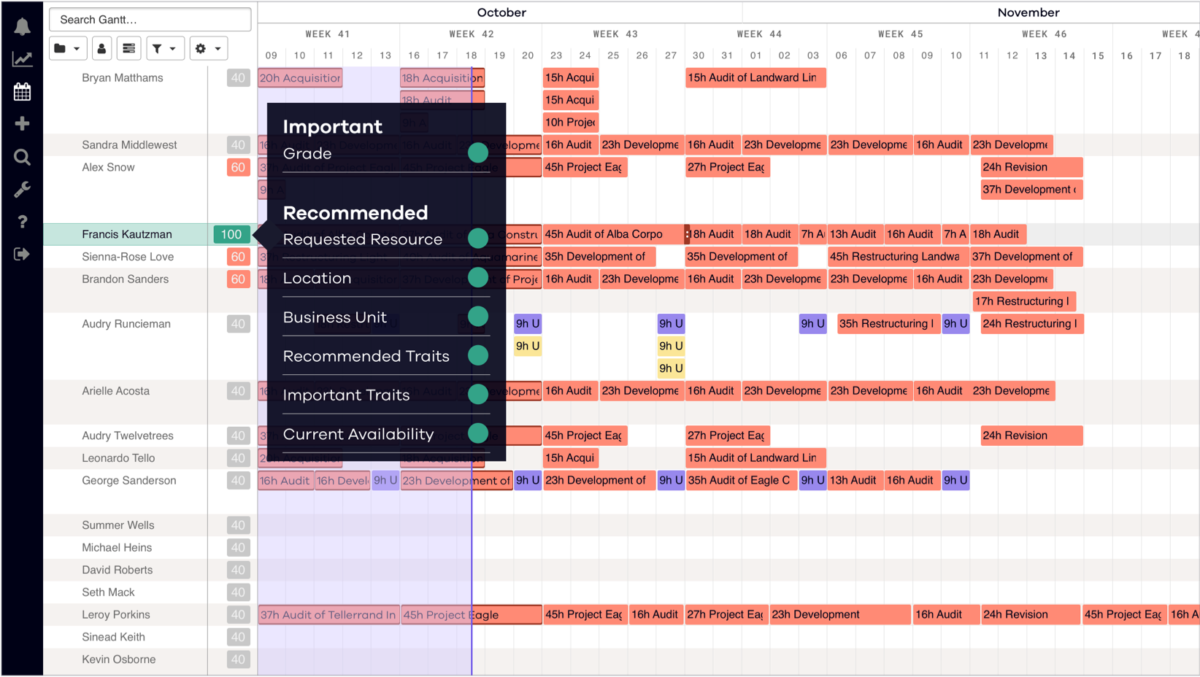
Dayshape è un software di gestione delle risorse potenziato dall'intelligenza artificiale per i servizi professionali. Le sue funzionalità di decisione automatica, flussi di lavoro e controlli trasformano il modo in cui i team pianificano, creano budget ed erogano gli incarichi.
Perché ho scelto Dayshape: Il software rende semplice assegnare la persona giusta, al momento giusto, tramite pianificazione assistita e automatica. Un'esclusiva funzionalità di IA elimina processi dispendiosi in termini di tempo e offre la sicurezza che le decisioni siano eque e oggettive, mentre le visualizzazioni gantt e di disponibilità danno una visione chiara del tasso di utilizzo e delle opzioni di assegnazione. Tre livelli di intelligenza artificiale rendono la soluzione scalabile man mano che i processi di gestione delle risorse dello studio maturano nel tempo.
Per ogni risorsa viene creato un punteggio di idoneità basato su criteri personalizzabili come livello, competenze, disponibilità, utilizzo e posizione geografica per garantire un'assegnazione ottimale delle risorse. Le dashboard configurabili forniscono anche una panoramica immediata dei livelli di capacità per previsioni accurate e risoluzione tempestiva dei conflitti.
I project manager possono anticipare o costruire e richiedere risorse per i piani nello stesso sistema in cui i resource manager allocano il personale al progetto. La funzionalità di finanziamenti in tempo reale degli incarichi utilizza i dati dal tuo sistema di rilevamento presenze e fatturazione per segnalare metriche di performance sotto soglia, così da rimanere nel budget e evitare sforamenti e rettifiche.
Caratteristiche principali e integrazioni di Dayshape
Caratteristiche includono il punteggio di idoneità delle risorse potenziato dall'IA che valuta possibili corrispondenze per gli incarichi sulla base di criteri come competenze, disponibilità e posizione per garantire l’allineamento ottimale delle risorse alle esigenze del progetto. Inoltre, la funzionalità di assegnazione self-service di Dayshape consente ai membri del team di gestire i propri programmi entro parametri definiti, aumentando l'autonomia pur mantenendo la precisione della pianificazione delle risorse.
Le integrazioni avvengono senza problemi con il tuo ERP, HR, sistemi di business intelligence o di gestione dello studio già esistenti. Dayshape elimina il lavoro duplicato e snellisce il ciclo di vita dell’engagement dall'inizio alla fine per massimizzare il profitto e la retention dei dipendenti.

Ideale per la gestione delle risorse con visibilità finanziaria
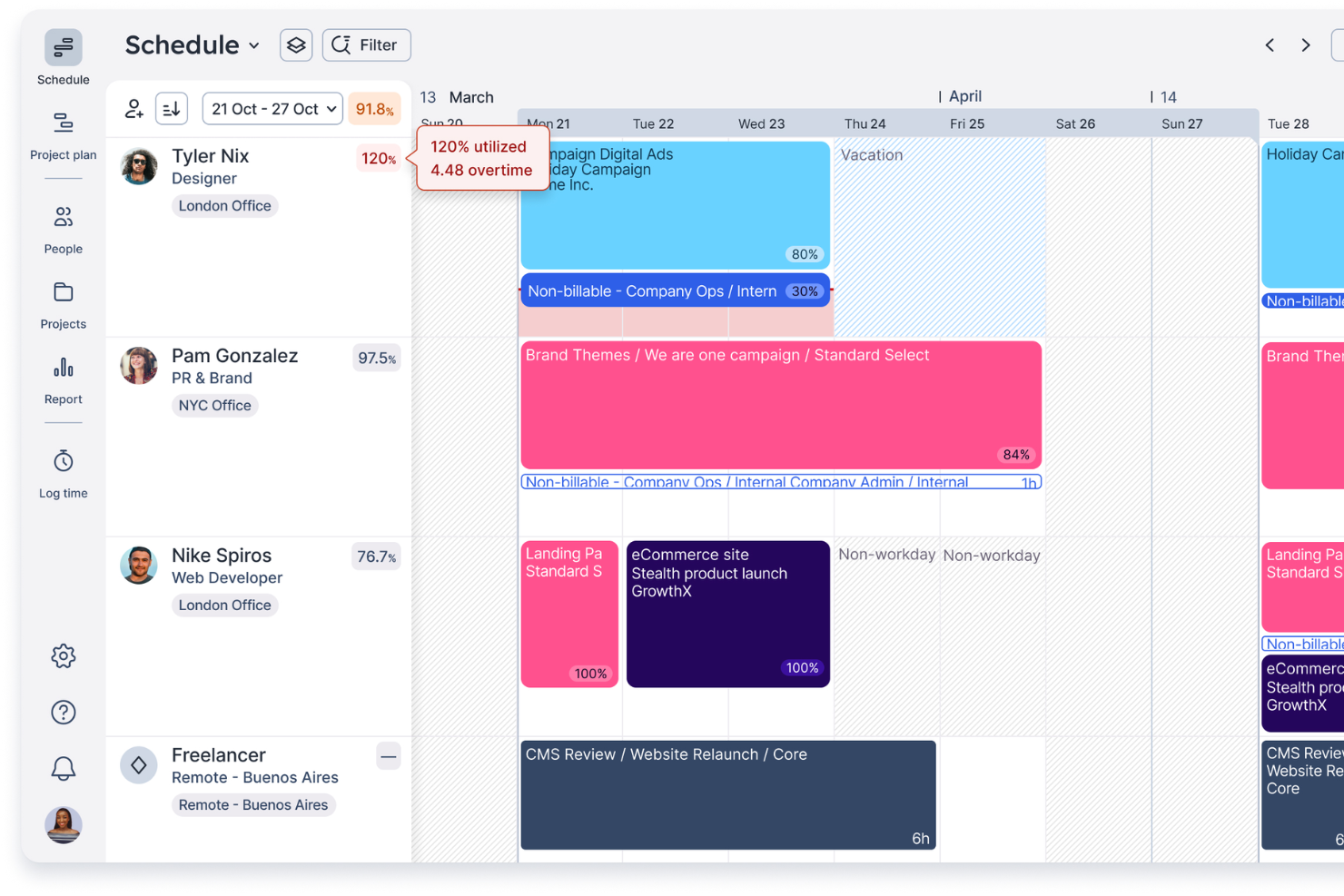
Float.com è un software di gestione delle risorse che aiuta i team di servizi professionali ad allocare, definire e monitorare il lavoro per i clienti, migliorando la loro redditività. Ottieni il contesto e i dati necessari per abbinare le persone giuste ai progetti giusti quando si gestisce il lavoro per i clienti.
Perché ho scelto Float.com
Ho scelto Float per la sua pianificazione rapida e visiva e per gli insight sulla consegna dei progetti. Puoi vedere a colpo d’occhio utilizzo, costi e tariffe fatturabili mentre pianifichi il lavoro. Le allocazioni a colori tramite trascinamento, le scorciatoie da tastiera e le visualizzazioni per ore o percentuale rendono la pianificazione delle risorse intuitiva. Inoltre, segnala conflitti come sovra-allocazioni, lavori provvisori o assenze. Float aiuta i team a prevedere la capacità e a monitorare l’impatto su ricavi, costi e margini delle decisioni di allocazione, fornendo visibilità sulla consegna dei progetti e sull’utilizzo del team.
Funzionalità principali di Float.com
Oltre alla sua eccellente pianificazione visiva e al monitoraggio in tempo reale della capacità, Float offre diverse altre funzionalità che possono aiutarti nella gestione delle risorse.
- Monitoraggio del Tempo: Il tuo team può registrare le ore direttamente sulla piattaforma, ottenendo dati accurati sul tempo impiegato per le varie attività e migliorando le stime dei progetti.
- Previsioni di Progetto: Gli strumenti di previsione di Float consentono di stimare i tempi e i budget di progetto, offrendo una chiara comprensione dei bisogni futuri di risorse e dei possibili risultati finanziari.
- Monitoraggio di Ruoli e Competenze: I ruoli, le competenze e la disponibilità delle persone sono sempre aggiornati in Float e visibili in tempo reale.
- Analisi Finanziaria: Gestisci i budget di progetto, traccia i margini, prevedi i ricavi e ottieni visibilità sull’impatto finanziario delle decisioni di allocazione delle risorse.
Integrazioni di Float.com
Le integrazioni includono Google Calendar, Outlook Calendar, Slack, Jira, Asana, Teamwork e Trello. Float offre anche un’applicazione Zapier che permette di connettersi a una libreria di oltre 1.000 app, come i tuoi sistemi di project management preferiti o il CRM.
Pros and Cons
Pros:
- App mobile per iOS e Android
- Forte contesto e dati per la gestione delle risorse
- Chat AI attiva 24/7 con supporto umano nei giorni feriali
Cons:
- Per il monitoraggio del tempo devi passare a un piano superiore
- Aggiornare l’elenco del personale/staff richiede tempo
New Product Updates from Float.com

Float Adds Rate Cards and Multi-Currency Billing
Float introduced centralized rate cards to standardize bill rates across projects and added multi-currency support to bill clients consistently across regions. For more information, visit Float's official site.

Saviom
Ideale per la pianificazione delle risorse e la gestione della capacità
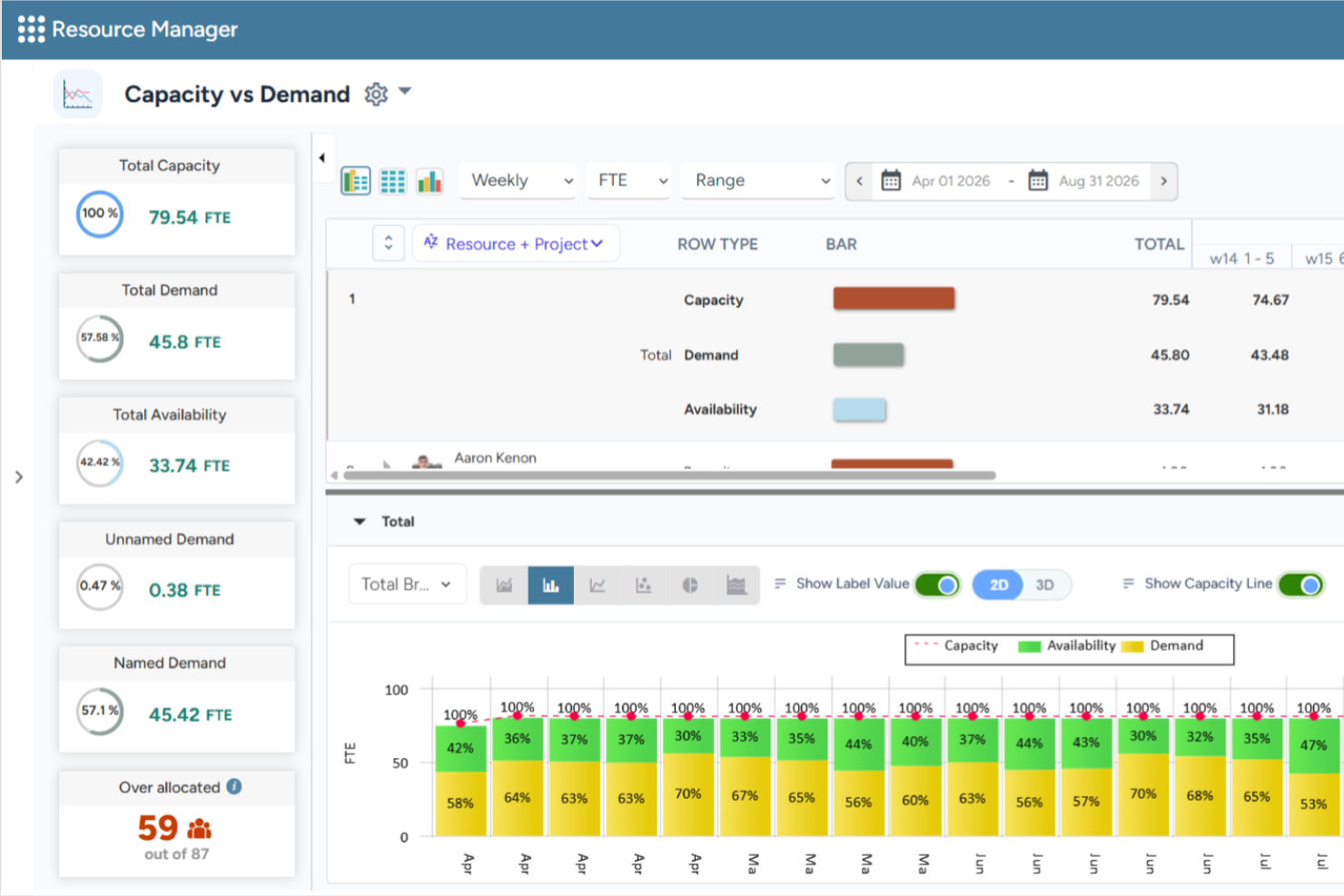
Saviom è un software di gestione delle risorse configurabile e scalabile, progettato per affrontare le sfide di allocazione delle risorse in tutti i settori. Può allineare la capacità delle risorse alle mutevoli richieste dei progetti attuali e futuri in programma. La piattaforma aiuta anche le organizzazioni a prevedere la domanda di risorse, ottimizzare l'utilizzo e supportare la pianificazione a lungo termine della forza lavoro su portafogli progetto complessi.
Perché ho scelto Saviom
Ho scelto Saviom per la sua suite di funzioni avanzate, come la programmazione multidimensionale, la pianificazione della capacità, l'ottimizzazione in tempo reale, la pianificazione dei talenti, la gestione del tempo e i report di business intelligence. La sua architettura software configurabile può essere personalizzata e scalata per soddisfare specifiche esigenze aziendali. Le dashboard specifiche per ruolo consentono inoltre ai vari stakeholder di accelerare il processo decisionale attraverso i confini di matrice. Mi piace anche che includa funzionalità di modellizzazione di scenari, permettendo ai team di confrontare diversi piani di allocazione delle risorse prima di apportare modifiche, oltre a strumenti di pianificazione finanziaria delle risorse che aiutano a prevedere i costi delle risorse e supportano le decisioni di staffing.
Funzionalità principali di Saviom
Oltre alle capacità di pianificazione e previsione, Saviom offre numerose altre funzionalità preziose per la gestione delle risorse.
- Pianificazione della capacità delle risorse: Prevedi la domanda futura di risorse, confrontala con la capacità disponibile e identifica potenziali carenze o eccedenze di capacità prima che impattino la consegna dei progetti.
- Modellizzazione di scenari: Confronta molteplici scenari di staffing e progetto prima di applicare modifiche ai piani di risorse live.
- Pianificazione dei talenti: Affronta proattivamente le carenze di competenze, prevede la domanda, mantieni un inventario delle competenze aggiornato e assicura che i team siano pronti per progetti attuali e futuri.
- Report, analisi e dashboard: Accedi a report di business intelligence personalizzabili in tempo reale e dashboard che offrono visibilità su utilizzo delle risorse, disponibilità e principali metriche della forza lavoro.
Integrazioni di Saviom
Sono disponibili integrazioni con le principali applicazioni aziendali, anche se non vengono menzionati esempi specifici.
Pros and Cons
Pros:
- Previsione e pianificazione della capacità multidimensionale
- Gestione delle risorse altamente configurabile e personalizzabile
- Report, analisi e dashboard flessibili in tempo reale
Cons:
- Meno adatto per le piccole aziende
- Le numerose funzionalità comportano una curva di apprendimento ripida

La migliore pianificazione delle risorse e previsione della capacità
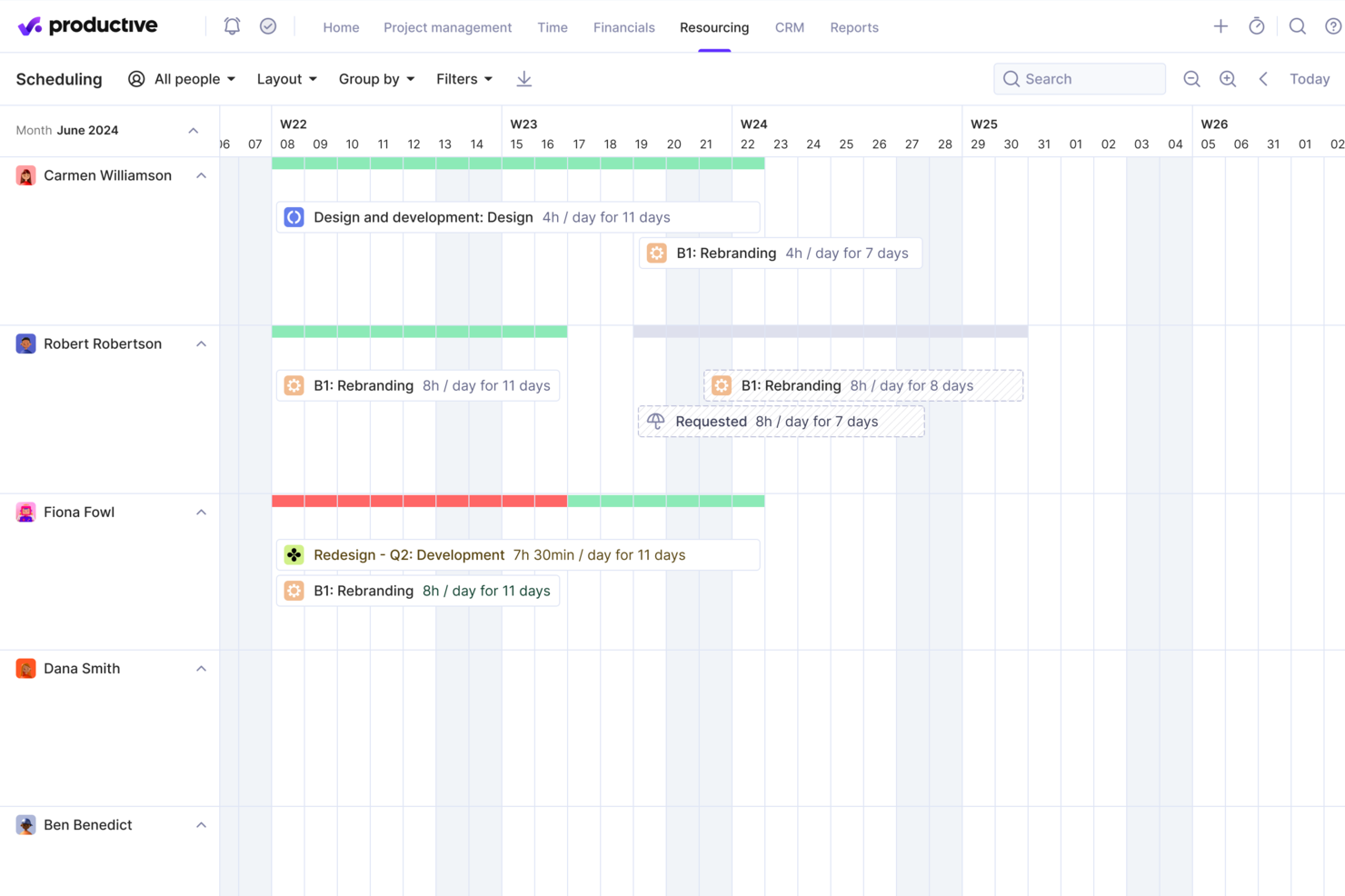
Productive è una piattaforma versatile che offre strumenti per semplificare la pianificazione e la collaborazione del team per le agenzie. Aiuta le aziende a gestire più flussi di lavoro e consente un monitoraggio e un'allocazione efficaci delle risorse tra i progetti. La piattaforma si rivolge anche ai team dei settori orientati ai servizi che necessitano di precisione nella pianificazione delle risorse e nella consegna dei progetti.
Perché ho scelto Productive
Productive offre strumenti di previsione avanzati che aiutano la tua agenzia a pianificare e allocare le risorse in modo efficace. La funzione di pianificazione della capacità consente di monitorare i carichi di lavoro e la disponibilità del team, aiutandoti a prendere decisioni migliori sui prossimi progetti.
Inoltre, il monitoraggio del tempo e le informazioni sulla redditività della piattaforma ti forniscono un quadro chiaro di come vengono utilizzate le risorse. Puoi anche modificare le pianificazioni e riassegnare i membri del team in tempo reale per mantenere produttività ed equilibrio.
Funzionalità principali di Productive
Ci sono anche diverse altre funzionalità che rendono Productive una scelta valida per la gestione delle risorse.
- Monitoraggio del tempo: Questa funzione consente al tuo team di registrare le ore di lavoro direttamente nel sistema e ottenere dati precisi per la fatturazione e l'analisi.
- Gestione del budget: Puoi gestire i budget dei progetti con facilità, monitorare spese e ricavi e mantenere il controllo finanziario.
- Fatturazione: Puoi creare e inviare fatture direttamente dalla piattaforma, semplificando il processo di fatturazione per i tuoi progetti.
- Gestione delle attività: Questa funzione ti aiuta a organizzare le attività con scadenze e priorità e a mantenere il tuo team allineato agli obiettivi di progetto.
Integrazioni di Productive
Le integrazioni includono Slack, QuickBooks Online, Xero, Zapier, HubSpot, Jira, Microsoft Teams, Google Workspace, Asana e Trello.
Pros and Cons
Pros:
- La gestione del tempo integrata può fatturare a più entità aziendali
- Ampia scelta di tag personalizzati
- Abbastanza facile impostare attività collaborative
Cons:
- Le funzionalità di fatturazione e preventivazione sono limitate
- L'app mobile potrebbe essere più veloce/più reattiva
New Product Updates from Productive

Productive Adds Agent Triggers, Teams Integration, and Time Controls
Productive adds automated agent triggers, broader AI file support, Microsoft Teams integration, Resource Planner improvements, and new time entry controls. These updates expand automation while improving scheduling, collaboration, and time tracking. For more information, visit Productive’s official site.

Scoro
Ideale per prevedere l'utilizzo del team
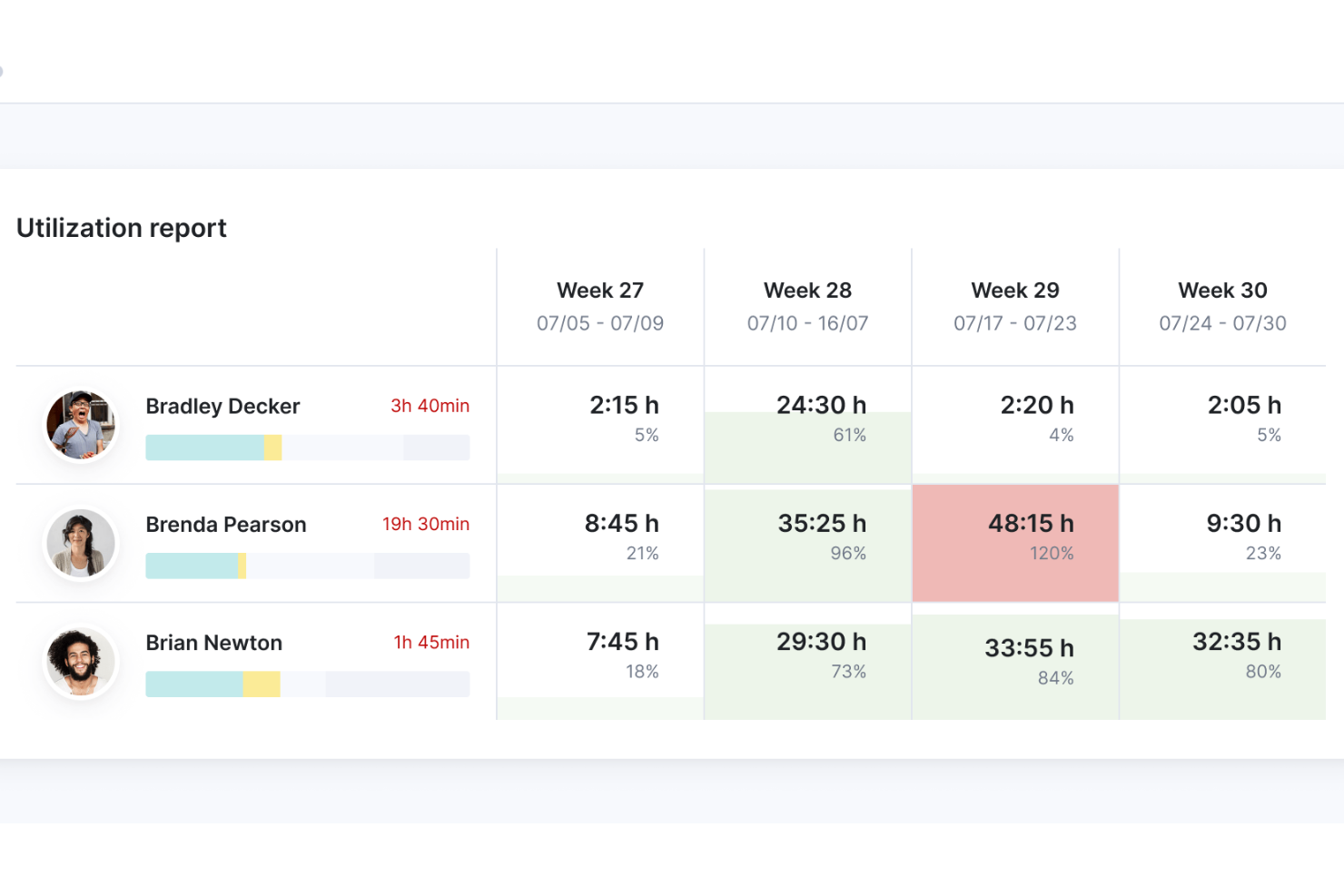
Scoro è un software per la gestione delle risorse che offre una suite di strumenti per aiutare le aziende a gestire progetti, finanze e risorse all'interno di un unico sistema.
Perché ho scelto Scoro
Apprezzo le solide funzionalità della piattaforma, che consentono agli utenti di pianificare e dare priorità al lavoro, distribuire le attività con un pianificatore basato sul trascinamento o una bacheca delle attività Kanban e gestire il tempo con calendari condivisi, schede attività e un rilevatore del tempo integrato. Scoro consente inoltre di monitorare le ore fatturabili e non fatturabili e garantisce la responsabilità del tempo dedicato al lavoro per i clienti.
Inoltre, la piattaforma dispone di strumenti completi per le previsioni, che permettono ai responsabili di ottenere una visione più chiara dei livelli di capacità attuali, delle carenze, delle scadenze e degli eventi e delle ferie pianificati. Questa capacità di previsione aiuta a evitare il sovrautilizzo o il sottoutilizzo del personale, portando a un migliore equilibrio del carico di lavoro e a una maggiore soddisfazione dei dipendenti.
Funzionalità principali di Scoro
Scoro offre diverse altre funzionalità che soddisfano le esigenze complete di gestione delle risorse.
- Gestione delle attività: Assegna e stabilisci la priorità delle attività in base alle competenze e alla disponibilità del team, per garantire che le persone giuste lavorino ai progetti giusti.
- Monitoraggio dei progetti: Monitora l'avanzamento dei progetti in tempo reale per mantenere sotto controllo scadenze e budget.
- Report e analisi: Genera report dettagliati per monitorare l'utilizzo delle risorse e le prestazioni dei progetti.
- Strumenti di collaborazione: Centralizza la comunicazione del team e la condivisione dei file per ridurre lo scambio di e-mail.
Integrazioni di Scoro
Le integrazioni includono HubSpot, Google Calendar, Microsoft Exchange, Xero, QuickBooks, Sage Intacct, Expensify, Stripe, Jira, Slack, Asana, Dropbox, PayPal e Zapier.
Pros and Cons
Pros:
- Fatture automatizzate
- Panoramica completa dell'utilizzo del team
- Gli approfondimenti basati sull'IA aiutano a prendere decisioni
Cons:
- Curva di apprendimento per i nuovi utenti
- Supporto limitato per le lingue diverse dall'inglese
New Product Updates from Scoro

Scoro Adds Time Mobile App and ELI Improvements
Scoro adds the Scoro Time mobile app for iOS/Android to track time anywhere and expands ELI with attachments, smarter filtering, and trigger-based actions. For more information, visit Scoro's official site.

Kantata
Ideale per una gestione delle risorse incentrata sulle persone
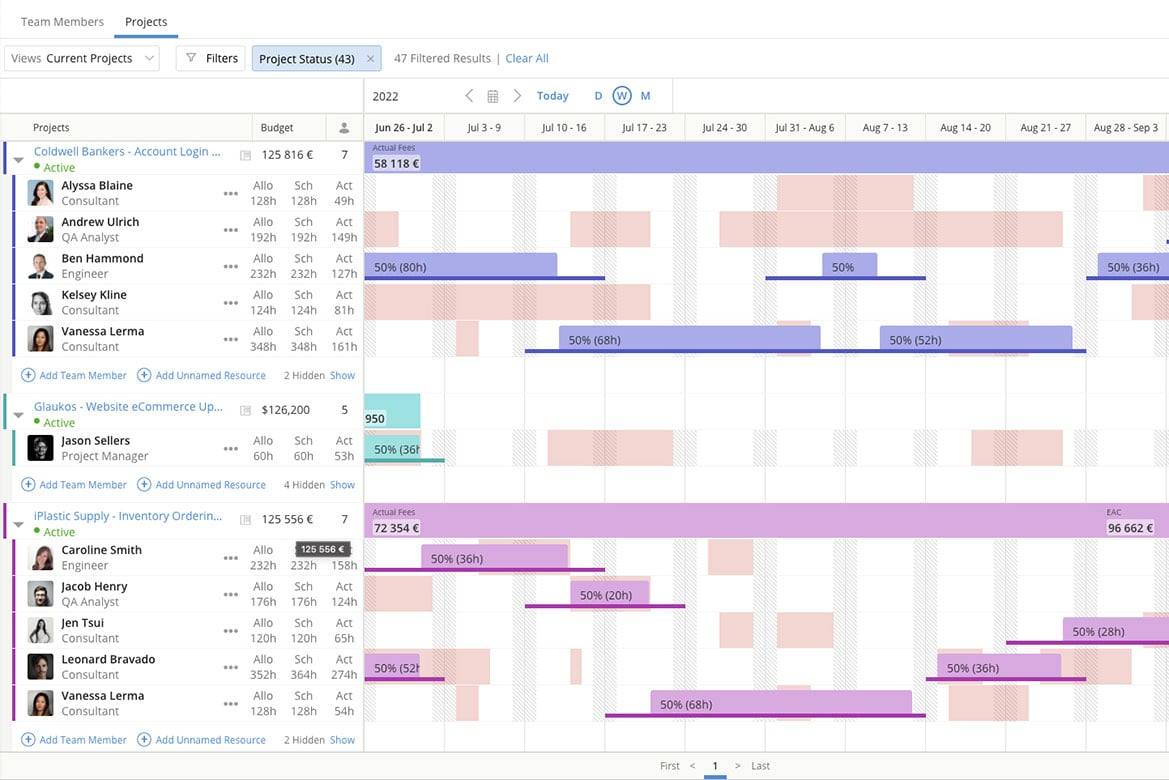
Kantata è una piattaforma di gestione delle risorse pensata per i team e le agenzie di servizi professionali. A differenza degli strumenti generici, unifica la gestione delle risorse, gli aspetti finanziari e la realizzazione dei progetti, mantenendo al contempo le persone al centro delle decisioni relative all'assegnazione del personale.
Di recente ho parlato con Daniel Vasilevski, direttore e proprietario di Pro Electrical, di come utilizza Kantata con il suo team. Utilizza questo strumento grazie al 'pannello di pianificazione delle risorse che mostra la disponibilità di tutti i membri del team per diversi lavori in un'unica interfaccia', afferma. 'Durante un lavoro di grandi dimensioni...una tempesta improvvisa ha causato 8 interventi urgenti in diversi sobborghi', racconta. 'Utilizzando il pannello di pianificazione delle risorse...potevo vedere dove si trovavano ciascuno dei miei 14 elettricisti e riassegnarne 4...senza compromettere il progetto', spiega. I vantaggi sono stati notevoli: 'Questo...ha ridotto i tempi di attesa dei clienti da...più di un giorno a meno di quattro ore. Ha inoltre permesso di risparmiare quasi 3.500 dollari in straordinari, poiché il carico di lavoro era distribuito in modo uniforme', afferma.
Perché ho scelto Kantata
Ciò che apprezzo di Kantata è il modo in cui il suo modulo di gestione delle risorse aiuta i responsabili a prendere decisioni relative all'assegnazione del personale, dando alle persone la stessa importanza delle esigenze del progetto. La piattaforma offre visibilità in tempo reale sulla capacità e sull'utilizzo, consentendo di bilanciare i carichi di lavoro e garantire che i membri del team giusti siano assegnati alle attività giuste. La pianificazione delle risorse basata sulle competenze facilita inoltre l'individuazione delle lacune, l'allineamento dei talenti alla domanda e la creazione di opportunità di crescita per i dipendenti. Questo approccio incentrato sulle persone non solo ottimizza l'efficienza, ma sostiene anche il coinvolgimento del team a lungo termine.
Caratteristiche principali di Kantata
Kantata offre diverse altre funzionalità che lo rendono uno strumento prezioso per la gestione delle risorse.
- Monitoraggio del tempo dei progetti: questa funzionalità consente al team di monitorare con precisione il tempo e le risorse, così da poter apportare modifiche informate ai piani dei progetti.
- Strumenti di collaborazione del team: questi strumenti aiutano a migliorare la comunicazione tra i membri del team, il coordinamento e i risultati dei progetti.
- Strumenti di analisi aziendale: sono disponibili analisi e report in tempo reale, che consentono di individuare le tendenze e prendere decisioni basate sui dati.
- Strumenti visivi di pianificazione dei progetti: questa funzionalità offre rappresentazioni visive delle attività e delle tempistiche per migliorare la comprensione e il coinvolgimento del team.
Integrazioni di Kantata
Le integrazioni includono Salesforce, SAP, Jira, Xero, BambooHR, Slack, Workday, QuickBooks, HubSpot e NetSuite.
Pros and Cons
Pros:
- Gestione delle risorse completamente integrata con la pianificazione generale
- Buone funzionalità di reportistica per i dati sulle risorse
- Gestione semplice della capacità
Cons:
- La creazione di report personalizzati può essere difficile senza formazione
- Le funzionalità avanzate sono disponibili solo nei piani premium e aziendali
New Product Updates from Kantata

Kantata Adds Access Group Change History
Kantata adds Access Groups History, letting account administrators track changes to group details, membership, and permissions in Recent History. The update also makes these events available through the Subscribed Events API for broader monitoring. For more information, visit Kantata’s official site.
 .
.
Runn
Ideale per la pianificazione della capacità del team in tempo reale
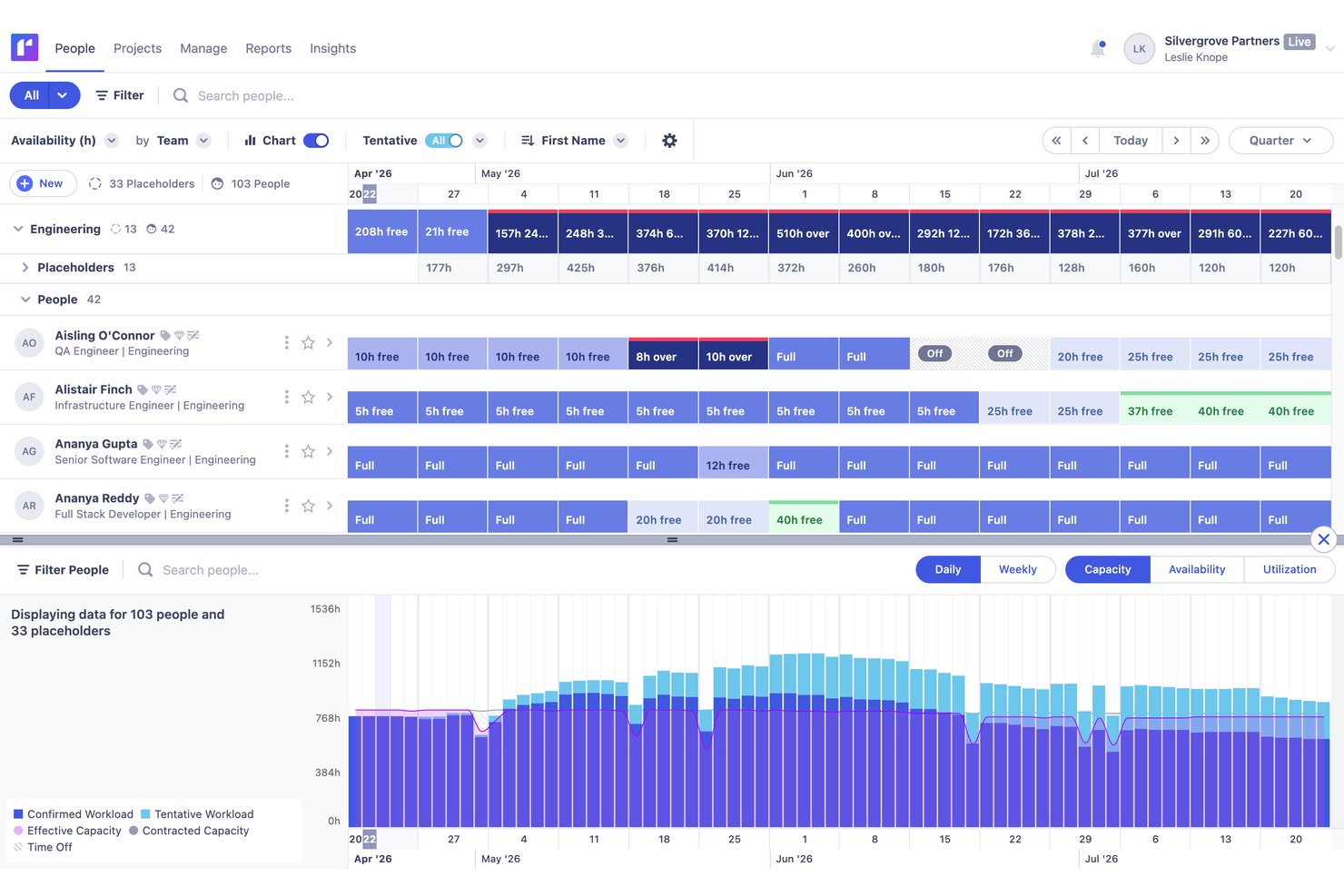
Runn è una piattaforma di gestione delle risorse progettata specificamente per la pianificazione visiva, la pianificazione della capacità in tempo reale, il monitoraggio dell'utilizzo e le previsioni finanziarie per i team che lavorano per progetti.
Per chi è più adatto Runn?
Runn è particolarmente adatto ai team che lavorano per progetti, soprattutto nei servizi professionali, nelle agenzie e negli uffici di gestione dei progetti (PMO), che necessitano di uno strumento dedicato alla pianificazione visiva e alla pianificazione della capacità in tempo reale.
Perché ho scelto Runn
Runn si è guadagnato un posto nella mia lista ristretta perché è progettato specificamente per la pianificazione della capacità in tempo reale, in un modo che gli strumenti di progetto più generici semplicemente non offrono. Mi piace molto il modo in cui i grafici della capacità di Runn evidenziano le allocazioni eccessive e insufficienti nel momento stesso in cui modifichi una pianificazione, così non lavori mai con dati obsoleti. Anche l'IA SmartMatch è davvero utile in questo contesto: consiglia le persone più adatte in base alle competenze e alla disponibilità aggiornata, invece di costringerti a confrontare manualmente i profili.
Funzionalità principali di Runn
- Pianificazione degli scenari: Crea e confronta scenari illimitati relativi al personale e ai progetti per valutare l'impatto delle modifiche prima di impegnarti in un piano.
- Fogli presenze nativi: Registra il tempo ogni giorno o ogni settimana, monitora le ore fatturabili e non fatturabili e confronta il tempo pianificato con quello effettivo per rendere più precise le previsioni future.
- Previsioni finanziarie: Collega le allocazioni delle risorse ai budget, ai listini tariffari e alle proiezioni dei margini, con supporto sia per i modelli di fatturazione a prezzo fisso sia per quelli a tempo e materiali.
- Risorse segnaposto: Aggiungi alla pianificazione le future assunzioni non ancora identificate, così le previsioni della capacità riflettono i piani di assunzione effettivi e non solo il team attuale.
Integrazioni di Runn
Runn elenca oltre 13 integrazioni con sistemi informativi delle risorse umane, tra cui BambooHR, Workday, HiBob, Gusto e ADP Workforce Now, oltre alle integrazioni con Harvest, Clockify e Jira. Supporta inoltre integrazioni personalizzate tramite la sua API pubblica e Zapier.
Pros and Cons
Pros:
- Visibilità in tempo reale della capacità rispetto alla domanda
- Pianificazione illimitata degli scenari per la modellazione delle risorse
- Abbinamento delle risorse basato sull'IA e sulle competenze
Cons:
- Nessuna app mobile nativa disponibile
- Controlli delle autorizzazioni limitati per le organizzazioni complesse

Wrike
Ideale per la scalabilità
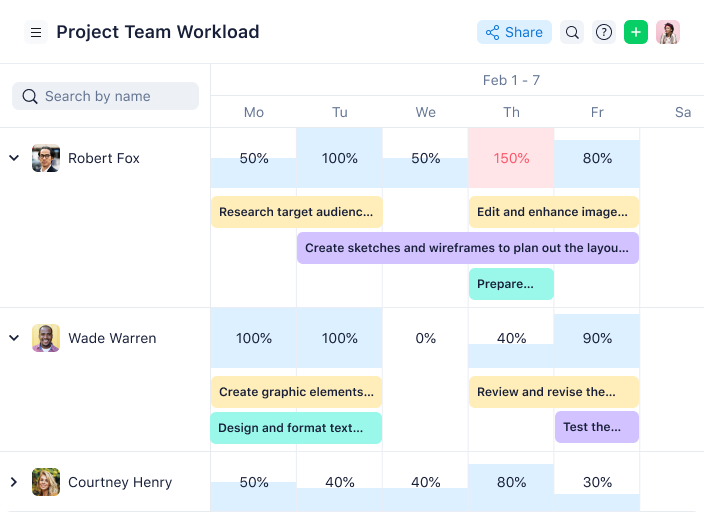
Wrike è un software di gestione delle risorse pluripremiato, scelto da oltre 20.000 organizzazioni in tutto il mondo. È adatto a team che vanno da cinque a un numero illimitato di membri, rendendolo facilmente scalabile. È altamente configurabile e permette di personalizzare flussi di lavoro, dashboard, report, moduli di richiesta e altro ancora.
Secondo Danilo Coviello, fondatore di Espresso Translations, Wrike è stato utile nella gestione di molteplici progetti presso la sua agenzia di traduzioni, 'Gestivamo 15 progetti e ci preoccupavamo sempre della ripartizione delle risorse. Le tempistiche che venivano rovinate dai colli di bottiglia ora vengono individuate da me...i ritardi nei progetti sono stati ridotti del 40% perché riesco a rilevare sovraccarichi in anticipo.'
Perché ho scelto Wrike
Wrike si è guadagnato un posto in questa lista grazie alla sua interfaccia e navigazione con spazi distinti, cartelle e attività. Questo lo rende utile sia per le piccole che per le grandi organizzazioni, e può essere scalato insieme alla crescita dell’azienda. Puoi passare rapidamente tra la schermata principale, fogli presenze, dashboard, calendari, report e un flusso per notifiche e messaggi. Mi piace anche che disponga di un solido flusso per richieste e approvazioni, che consente di standardizzare le richieste di lavoro in ingresso e tracciare i processi di approvazione in modo efficiente.
Inoltre, la Datahub della piattaforma centralizza e consolida i dati provenienti da più fonti, in modo che i team possano prendere decisioni più informate e basate sui dati. I fogli presenze offrono inoltre un modo semplice per monitorare le ore dei dipendenti e l’allocazione del tempo sui progetti, aiutando così a ottimizzare l’utilizzo delle risorse e fatturare in modo accurato.
Funzionalità principali di Wrike
Wrike offre diverse altre funzionalità che migliorano la capacità di gestire il tuo team e le risorse.
- Monitoraggio del tempo: Questa funzione consente di monitorare quanto tempo il team dedica alle attività, ottenere informazioni sulla produttività e aiutare a gestire le scadenze in modo più efficace.
- Modelli di progetto: Grazie a modelli di progetto personalizzabili, puoi snellire il flusso di lavoro e avviare rapidamente nuovi progetti con strutture predefinite adatte alle tue esigenze specifiche.
- Revisione collaborativa: Questo strumento permette ai membri del team di revisionare e annotare documenti e progetti direttamente all’interno di Wrike, migliorando la comunicazione e velocizzando il processo di approvazione.
- Reportistica in tempo reale: Puoi generare report in tempo reale che offrono una panoramica chiara sull’avanzamento dei progetti e sulla distribuzione delle risorse, per decisioni e pianificazione strategica migliori.
Integrazioni di Wrike
Le integrazioni includono oltre 400 integrazioni native predefinite, comprese quelle con i più diffusi software di gestione dei file di Microsoft, Google e Dropbox, oltre a software di vendita e marketing come Salesforce e Marketo.
Pros and Cons
Pros:
- La creazione di dashboard personalizzate è eccellente per un monitoraggio delle risorse molto specifico
- Buona varietà di visualizzazioni delle dashboard per soddisfare esigenze diverse degli utenti
- Le richieste di risorse e le approvazioni sono semplici e ben organizzate
Cons:
- Nessun monitoraggio del tempo nella versione gratuita dello strumento
- Le migliori funzionalità di gestione delle risorse sono limitate ai piani di livello superiore
New Product Updates from Wrike

Wrike Adds Quick Search to Table View
Wrike adds Quick Search to Table View with full-table search across titles, descriptions, and fields, plus highlighted matches. This helps users find tasks faster in large tables. For more information, visit Wrike’s official site.

Ideale per la visibilità delle risorse con mappe di calore
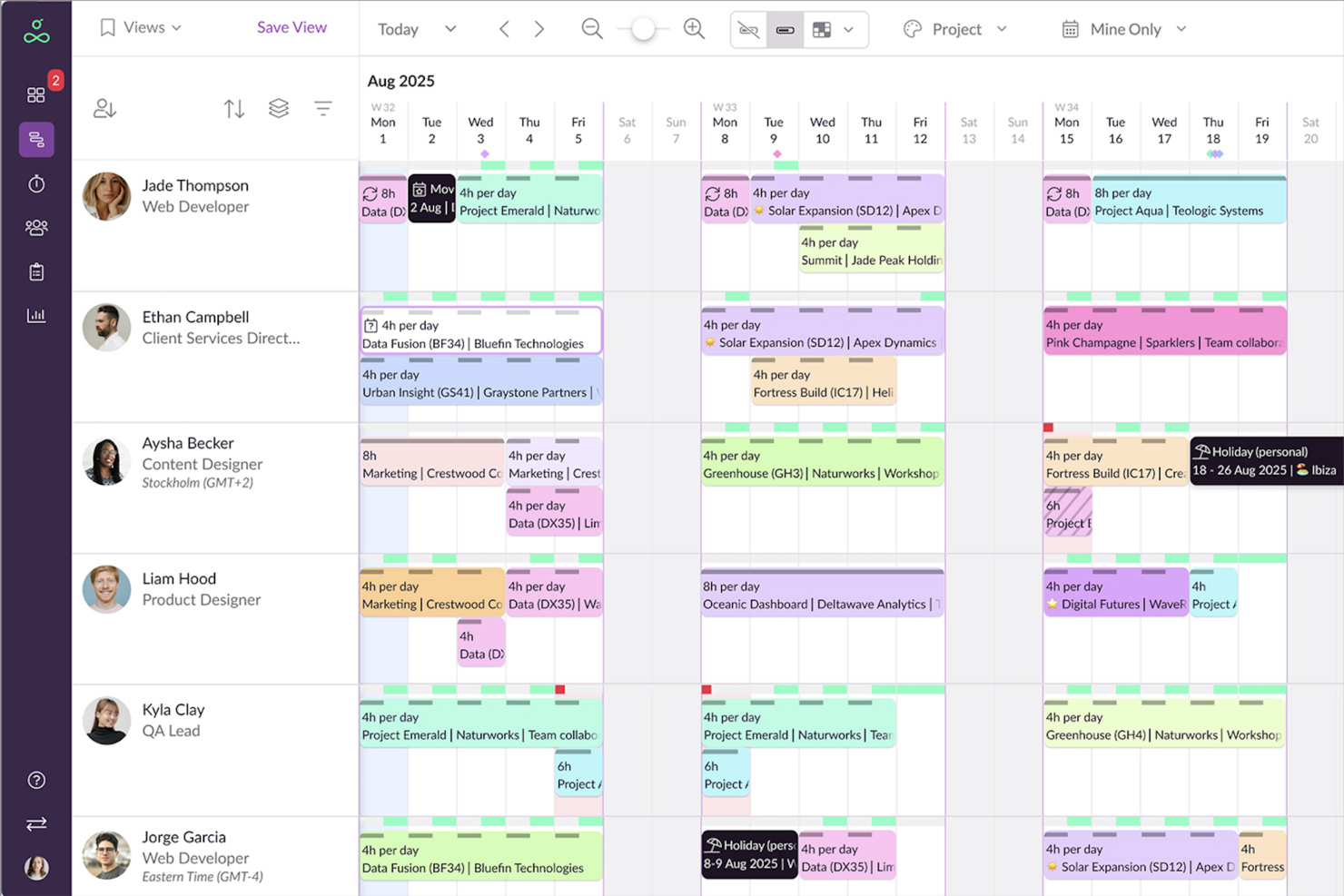
Resource Guru è un software per la gestione delle risorse progettato per aiutare i team a programmare, pianificare e monitorare il tempo dedicato a progetti e risorse. È adatto a settori come agenzie, edilizia, ingegneria e IT e offre una piattaforma centralizzata per coordinare persone, attrezzature e spazi per riunioni.
Di recente ho parlato con Trond Nyland, CEO e proprietario di Todus.no AS, del suo utilizzo di Resource Guru 'per assegnare attività a diversi progetti di e-commerce e immobiliari'. Secondo lui, 'ciò che si è distinto è stata la facilità con cui era possibile vedere a colpo d'occhio chi fosse disponibile'. Questo ha portato diversi vantaggi al suo team. 'Ci ha aiutato a rispettare le scadenze senza sottoporre il team a uno stress eccessivo', afferma.
Perché ho scelto Resource Guru
Ho scelto Resource Guru per la sua combinazione di flessibilità e precisione nella programmazione. La piattaforma gestisce persone, attrezzature e sale riunioni in un'unica visualizzazione, facilitando la pianificazione tra diversi tipi di risorse senza dover utilizzare più strumenti. I campi personalizzati avanzati e i filtri consentono di adattare la configurazione per riflettere competenze, sedi o altri attributi, mentre i flussi di lavoro di approvazione e le funzionalità di gestione dei conflitti riducono il rischio di doppie prenotazioni o richieste trascurate.
Ciò che distingue davvero Resource Guru per me è l'attenzione alla visibilità. Le visualizzazioni a mappa di calore offrono una lettura immediata della disponibilità, consentendo di vedere a colpo d'occhio dove la capacità è limitata o sottoutilizzata. I dashboard personalizzati e le e-mail riepilogative giornaliere mettono le informazioni giuste a disposizione di ogni membro del team, permettendo di prendere decisioni rapide e sicure sull'allocazione delle risorse senza essere sommersi dai dati.
Funzionalità principali di Resource Guru
Oltre alla programmazione delle risorse e al monitoraggio del tempo, Resource Guru offre diverse altre funzionalità che possono contribuire a rendere più efficiente la gestione delle risorse.
- Visualizzazione calendario: Questa funzionalità offre una panoramica visiva di tutti i progetti e le attività programmate, consentendo di valutare rapidamente la disponibilità del team e le tempistiche dei progetti.
- Campi personalizzati: È possibile adattare Resource Guru alle proprie esigenze specifiche aggiungendo campi personalizzati per categorizzare e gestire le risorse in base ai propri criteri.
- Reportistica dei progetti: Ottieni informazioni sulle prestazioni dei progetti tramite report dettagliati che aiutano ad analizzare l'utilizzo delle risorse e l'avanzamento dei progetti.
- Gestione delle assenze: È possibile gestire e monitorare facilmente le assenze dei membri del team e pianificare tenendo conto delle loro assenze senza interrompere i flussi di lavoro dei progetti.
Integrazioni di Resource Guru
Le integrazioni includono Google Sheets, Jira Software, Smartsheet, Asana, monday.com, Basecamp, Microsoft Outlook, Clockify, Google Calendar, Slack, Microsoft Teams e Teamwork.
Pros and Cons
Pros:
- E-mail riepilogative giornaliere sulle risorse
- Strumenti completi per la reportistica sull'utilizzo delle risorse
- Mappe di calore per ottenere rapidamente informazioni sulla capacità
Cons:
- Impossibilità di ordinare le risorse in base al livello di esperienza
- Profondità della reportistica limitata rispetto agli strumenti aziendali più grandi
New Product Updates from Resource Guru

Resource Guru Adds Flexible Total Hours Bookings
Resource Guru adds Total Hours bookings, letting teams allocate a fixed number of hours across a date range based on actual availability. The update helps schedules adapt automatically as bookings, leave, and availability change. For more information, visit Resource Guru’s official site.
 .
.
Ideale per una pianificazione semplice del carico di lavoro

monday.com è una piattaforma di lavoro flessibile che aiuta i team a comunicare nel contesto giusto e ad avere una visione d’insieme sui progetti in sospeso, sulle risorse disponibili e sulle tempistiche previste.
Lo strumento offre inoltre un enorme controllo sui tuoi progetti tramite la personalizzazione. Recentemente ho parlato con Ken Sarmadi, consulente sia per monday.com che per Asana. 'Se sei un maniaco del controllo e vuoi gestire tutto nel minimo dettaglio, monday.com è il tuo strumento,' afferma.
Perché ho scelto monday.com
Ho scelto monday.com principalmente per il suo design intelligente e l’interfaccia intuitiva. Secondo me, anche i membri del team che non hanno esperienza nella gestione delle risorse possono iniziare rapidamente a pianificare le tempistiche, assegnare la responsabilità dei progetti e gestire le attività. L’app di monday.com offre anche la flessibilità e le potenzialità per gestire il tuo team anche in mobilità, caratteristica che ritengo ottima per chi ha molti impegni. Puoi organizzare il tuo lavoro quotidiano, i progetti e i team, oltre a impostare automazioni dei flussi di lavoro, condividere documenti e creare grafici di Gantt per una maggiore chiarezza.
Funzionalità chiave di monday.com
Oltre a capacità eccezionali di gestione del carico di lavoro, monday.com offre diverse altre funzionalità per la gestione delle risorse.
- Visibilità Centralizzata: Fornisce una piattaforma unificata che offre chiarezza sull'allocazione delle risorse e contribuisce a migliorare l’allineamento e la comunicazione tra i membri del team.
- Monitoraggio delle Prestazioni: Permette di monitorare l’utilizzo delle risorse in modo da poter affinare le stime per i progetti futuri e migliorare l’efficienza operativa.
- Allocazione delle Risorse: monday.com ti consente di assegnare risorse in base alla disponibilità e alle esigenze delle attività, oltre a offrire utili strumenti visivi come i grafici di Gantt.
- Automazione: La piattaforma aiuta a migliorare i tuoi processi consentendoti di automatizzare attività ricorrenti, notifiche sui ritardi e riallocazioni per le attività quando la capacità cambia.
Integrazioni con monday.com
Le integrazioni includono Slack, Google Calendar, Jira, GitHub, Excel, Google Drive, Gmail, Trello, Dropbox, Typeform e Zapier.
Pros and Cons
Pros:
- Facile creare bacheche dedicate al monitoraggio operativo delle risorse
- Stato codificato a colori ideale per la visualizzazione delle risorse
- Dashboard altamente visive per una chiara supervisione dei progetti
Cons:
- I grafici di Gantt sono disponibili solo nei piani intermedi
- Il filtraggio delle attività può risultare restrittivo e confuso
New Product Updates from monday AI Workspace
monday AI Workspace Adds Human Approval Routing
monday AI Workspace adds a human-in-the-loop approval block to AI Workflows, sending approval requests and routing workflow paths based on responses. For more information, visit monday AI Workspace's official site.
Altre Recensioni di Software per la Gestione delle Risorse
Se non hai trovato quello che cercavi sopra, ecco altri strumenti software che potrebbero fare al caso tuo.
- Microsoft Project
Ideale per utenti Microsoft
- Rocketlane
Ideale per la collaborazione unificata con i clienti
- ClickUp
Le migliori visualizzazioni del carico di lavoro per comprendere la capacità del team
- Forecast
Ideale per ottimizzazione delle risorse guidata da intelligenza artificiale
- Anaplan
Ideale per la pianificazione degli scenari
- Meisterplan
Ideale per l’allocazione delle risorse basata sui ruoli
- ActiveCollab
Ideale per la fatturazione integrata
- Bonsai Agency Software
Ideale per l’ottimizzazione del carico di lavoro
- Birdview
Ideale per simulare il carico delle risorse
- Schedule It
Ideale per la pianificazione dei turni di lavoro
- Planview AdaptiveWork
Migliore strumento per la gestione delle risorse a livello aziendale
- elapseit
Ideale per le funzionalità che supportano dal kickoff alla fatturazione
- Polaris PSA By Replicon
Ideale per funzionalità combinate PSA e PPM
- Adobe Workfront
Ideale per l'allocazione strategica delle risorse
- PSOhub
Miglior PSA che si integra con i CRM
- ProjectManager
Ideale per il monitoraggio delle risorse tramite dashboard di progetto
- Parallax
Ideale per la gestione predittiva delle risorse
- Planview Vantage
Ideale per il livello PMO
- Mosaic
Ideale per la pianificazione della capacità e la previsione dell'organico
- Apache OFBiz
Ideale per la pianificazione delle risorse orientata al commercio
- Silverbucket
Ideale per il lavoro basato su progetti
- eResource Scheduler
Miglior modulo finanziario integrato
- Acuity PPM
Ideale per la gestione delle risorse del portafoglio progetti


Video guida agli strumenti di gestione delle risorse
Guarda il nostro video dedicato al software per la gestione delle risorse!


Recensioni correlate di software per la gestione delle risorse
Se ancora non hai trovato ciò che cerchi qui, dai un'occhiata anche a questi altri strumenti correlati che abbiamo testato e valutato:
- Software di Automazione dei Flussi di Lavoro
- Software di Monitoraggio del Tempo
- Software di Gestione delle Attività
- Strumenti di Collaborazione
- Creatore di Diagrammi di Gantt
- Software di Gestione delle Risorse Media
- Strumenti di Produttività
- Software di Pianificazione delle Risorse
- Software di Gestione delle Risorse Gratuito
- Software di Gestione delle Risorse di Marketing
- Software di Prenotazione delle Risorse
- Software di Gestione delle Risorse per Agenzie
- Software Open Source per la Gestione delle Risorse
- Software di Pianificazione delle Risorse Basato sul Web
- Strumenti di Gestione delle Risorse di Magazzino
Come Valuto il Software di Gestione delle Risorse
Divido ogni valutazione in due livelli: le funzionalità di base indispensabili come la pianificazione visiva e il monitoraggio dell'utilizzo, e i fattori distintivi che rivelano se uno strumento si adatta realmente al tuo flusso di lavoro.
Funzionalità Principali (Requisiti Fondamentali per Questo Elenco)
Quando seleziono gli strumenti per il mio elenco, valuto ciascuno su una scala da 0 (non offre la funzionalità) a 5 (eccelle in quest'area) per ogni funzionalità principale elencata di seguito. Quindi, calcolo il punteggio totale dello strumento in percentuale. Ogni strumento deve ottenere un punteggio totale minimo del 65% per essere considerato nell'inclusione.
- Pianificazione e Assegnazione delle Risorse: Valuto se è possibile trascinare e rilasciare assegnazioni su una timeline visiva, suddividere le assegnazioni tra progetti e individuare conflitti di prenotazione prima che causino ritardi.
- Pianificazione della Capacità: Ogni strumento dovrebbe mostrare la capacità a livello di team e individuale rispetto al lavoro già assegnato, così puoi segnalare il sovraccarico durante la pianificazione degli sprint o le revisioni trimestrali di portafoglio.
- Monitoraggio dell'Utilizzo: Cerco una suddivisione automatica tra ore fatturabili e non, a livello individuale e di team, con tassi target configurabili basati su come la tua organizzazione definisce la produttività.
- Gestione di Competenze e Disponibilità: Profili ricercabili delle risorse con competenze, ruoli, ferie e costi o tariffe fatturabili sono fondamentali qui—soprattutto quando devi trovare uno specifico insieme di competenze su una grande squadra.
- Previsione della Domanda e Pianificazione del Pipeline: Gli strumenti che ti permettono di modellare le esigenze di risorse sia su progetti confermati che su quelli potenziali ti aiutano a pianificare nuove assunzioni o investimenti su collaboratori esterni prima che le lacune diventano urgenti.
- Rilevazione delle Ore e Reporting degli Effettivi: Controllo se le ore registrate sono collegate alle allocazioni pianificate, fornendoti dati di scostamento tra pianificato ed effettivo che puoi usare nelle retrospettive di progetto o nelle revisioni di fatturazione al cliente.
Una volta che ho un elenco di strumenti che soddisfano i criteri, considero cosa distingue ciascuna piattaforma.
Fattori Distintivi (Cosa Distingue i Fornitori)
Ecco come confronto e metto a confronto i diversi fornitori:
Funzionalità Distintive
La pianificazione di scenari è un importante elemento distintivo—cerco strumenti che ti permettano di modellare due o tre opzioni di staffing affiancate prima di impegnare risorse su un nuovo progetto. Anche la previsione finanziaria direttamente collegata alle allocazioni è molto importante, soprattutto per le società di servizi che monitorano il margine per ogni incarico. Le heatmap di portafoglio completano il quadro, fornendo ai responsabili PMO una panoramica unica su dove si trovano colli di bottiglia e carenze di competenze tra lavoro attuale e futuro.
Oltre le Funzionalità
La profondità di integrazione è una delle prime cose che verifico. Uno strumento di gestione risorse che non si sincronizza con la tua piattaforma di project management—che sia Jira, Asana o Microsoft Project—genera una doppia immissione di dati che ostacola l'adozione. Valuto anche quanto bene ogni strumento si adatta alla crescita. Un'agenzia di dieci persone e una società di consulenza globale con centinaia di risorse fatturabili hanno esigenze molto diverse riguardo al supporto multi-entità e alle gerarchie dei ruoli. La flessibilità nei report completa il tutto; cerco strumenti che si colleghino a piattaforme di BI come Power BI o Tableau in modo che la leadership possa integrare i dati sulle risorse nelle revisioni aziendali più ampie.
Come Scegliere un Software di Gestione delle Risorse
È facile perdersi tra lunghi elenchi di funzionalità e strutture di prezzi complesse. Per aiutarti a mantenere il focus durante il tuo processo di selezione, ecco un elenco di fattori da tenere in considerazione:
| Fattore | Cosa Considerare |
|---|---|
| Scalabilità | Assicurati che il software possa crescere insieme al tuo team. Scegli opzioni in grado di gestire l'aumento di risorse, utenti e progetti senza compromettere prestazioni o usabilità. |
| Integrazioni | Verifica che il software si integri facilmente con gli strumenti già utilizzati dal tuo team, come piattaforme di project management, CRMs o software di contabilità. |
| Personalizzazione | Scegli un software che consenta di adattare flussi di lavoro, permessi e reportistica alle necessità specifiche del tuo team e dei requisiti del settore. |
| Semplicità d'Uso | Opta per una piattaforma con un'interfaccia intuitiva e una curva di apprendimento ridotta, così il tuo team potrà adottarla rapidamente senza frustrazioni. |
| Budget | Assicurati che i prezzi siano in linea con il tuo budget per il software. Valuta i costi totali, incluse le tariffe di abbonamento, le integrazioni aggiuntive e i potenziali costi di crescita. |
| Misure di Sicurezza | Dai priorità ai software che offrono funzionalità di sicurezza robuste come crittografia, controllo degli accessi e aggiornamenti regolari per proteggere i dati sensibili del tuo team. |
| Opzioni di Supporto | Cerca un servizio clienti affidabile tramite canali come chat, email o telefono, oltre all’accesso a knowledge base o forum della community per l’auto-assistenza. |
| Strumenti di Reportistica | Verifica che il software disponga di funzionalità di reportistica dettagliate per aiutarti ad analizzare l'uso delle risorse e migliorare l’efficienza nel tempo. |
Vale la pena sottolineare perché le integrazioni sono particolarmente importanti:
Ci sono sempre delle limitazioni con questi strumenti. A volte hai dei requisiti imprescindibili che il software non può soddisfare nativamente, ed è in questi casi che le persone iniziano a cercare integrazioni o soluzioni alternative.

Tendenze nel Software di Gestione delle Risorse
Nella mia ricerca, ho esaminato innumerevoli aggiornamenti di prodotto, comunicati stampa e log di rilascio di diversi fornitori di software per la gestione delle risorse. Ecco alcune delle tendenze emergenti che sto monitorando:
- Allocazione delle risorse guidata dall'AI: I software stanno implementando funzionalità di intelligenza artificiale in grado di prevedere le necessità di personale e assegnare risorse in base alle competenze, disponibilità e priorità di progetto. Questo aiuta i team a evitare sovraccarichi, sotto-utilizzo e colli di bottiglia nei progetti complessi.
- Pianificazione di scenari e modellazione: Le funzionalità per testare scenari "what-if" stanno diventando standard. Questi strumenti permettono di gestire i rischi e modificare rapidamente i piani, visualizzando l’impatto di variazioni come lo spostamento delle scadenze o la riallocazione delle risorse senza interrompere i progetti attivi.
- Mappatura delle competenze e monitoraggio dello sviluppo: Le piattaforme stanno integrando funzionalità per mappare le competenze dei membri del team e monitorarne la crescita nel tempo. Potrai assicurarti che le persone giuste siano assegnate ai compiti giusti e sostenere lo sviluppo professionale del team.
- Analisi del carico di lavoro in tempo reale: I cruscotti in tempo reale possono offrire una visibilità immediata sui carichi di lavoro e la capacità del team, sostituendo la necessità di report statici. Puoi individuare rapidamente squilibri e adeguare le assegnazioni per mantenere i progetti regolari.
- Sostenibilità e monitoraggio ambientale: Gli strumenti di gestione delle risorse iniziano a offrire funzionalità per il monitoraggio delle metriche di sostenibilità. Ciò può aiutare la tua azienda a ridurre gli sprechi e migliorare l’impatto ambientale.
Cos'è il Software di Gestione delle Risorse?
Il software di gestione delle risorse è uno strumento che ti aiuta ad allocare, pianificare e ottimizzare le risorse (come il personale, le attrezzature e i materiali) per raggiungere gli obiettivi e i traguardi di progetto. L’obiettivo principale è garantire che le risorse giuste siano disponibili al momento giusto, nelle giuste quantità e nei luoghi corretti per completare le attività di progetto rispettando budget e tempistiche.
Se gestisci team specializzati, potresti aver bisogno di una variante, come software di gestione delle risorse per l’ingegneria, per gestire il personale tecnico, gli strumenti e le scadenze in progetti di sviluppo prodotto o costruzione.
Funzionalità del Software di Gestione delle Risorse
Quando scegli un software per la gestione delle risorse, presta attenzione alle seguenti caratteristiche chiave:
- Pianificazione delle risorse: Assegna rapidamente persone, risorse o blocchi di tempo a diversi progetti, così i membri del team lavorano sugli elementi giusti al momento giusto.
- Pianificazione della capacità: Visualizza a colpo d’occhio quanta attività può gestire il tuo team, aiuta a evitare il burnout assicurando carichi di lavoro realistici e individua opportunità dove i membri sono sotto-utilizzati.
- Monitoraggio dei progetti: Tieni facilmente traccia di quali risorse sono assegnate a quali progetti, dell’avanzamento del lavoro e del rispetto delle scadenze, per evitare sorprese nel corso del progetto.
- Visualizzazione della timeline: Diagrammi di Gantt, calendari o altre timeline visive ti aiutano a individuare conflitti, sovrapposizioni e la disponibilità dei membri del team.
- Report di utilizzo: Controlla istantaneamente quanto sono impegnate le tue risorse, assicurati che nessuno sia sovraccarico o sotto-utilizzato e riequilibra i carichi per prevenire il burnout.
- Monitoraggio delle competenze: Mantieni un inventario aggiornato delle competenze e delle certificazioni del tuo team e abbina le persone ai progetti in base alle reali competenze, non solo alla disponibilità.
- Gestione del budget: Tieni traccia delle spese rispetto ai budget di progetto o di risorsa, mantieni il controllo dei costi e giustifica ogni risorsa con fiducia.
- Monitoraggio del tempo: Registra le ore lavorate su compiti o progetti, comprendi lo sforzo effettivo rispetto alle stime e fattura facilmente i clienti e previeni i progetti futuri.
- Controlli dei permessi: Determina chi può vedere, modificare o approvare le assegnazioni di risorse per mantenere al sicuro le informazioni sensibili e prevenire cambi accidentali.
Funzionalità AI Comuni nel Software di Gestione delle Risorse
Oltre alle funzionalità standard dei software di gestione delle risorse elencate sopra, molte di queste soluzioni stanno integrando caratteristiche basate sull’IA come:
- Assegnazione automatica delle risorse: L’IA analizza i requisiti di progetto, le scadenze e la disponibilità dello staff per suggerire o assegnare automaticamente le risorse più adatte e ridurre il margine di errore manuale.
- Previsioni predittive della capacità: Utilizzando dati storici, l’IA prevede i periodi in cui potresti avere carenza o eccesso di risorse, così puoi intervenire su assunzioni o assegnazioni prima che sorgano problemi.
- Rilevamento intelligente dei conflitti: L’IA individua potenziali conflitti di pianificazione o sovraccarichi di risorse prima che diventino un problema e invia avvisi proattivi per aiutarti a prevenire criticità.
- Abbinamento intelligente delle competenze: L’IA analizza i profili del tuo team e abbina automaticamente i talenti giusti a ciascun progetto o attività.
- Reportistica automatica: I report generati dall’IA aggregano dati su utilizzo, capacità e costi, così puoi interpretare facilmente le informazioni sulle tue risorse.
Vantaggi del Software di Gestione delle Risorse
Ecco cinque principali vantaggi dell’utilizzo di software per la pianificazione delle risorse:
- Allocazione efficiente delle risorse: Fornendo informazioni sulla disponibilità e sul carico di lavoro delle risorse, i software di pianificazione aiutano a garantire un’allocazione ottimale delle risorse, a minimizzare i colli di bottiglia e a massimizzare la produttività.
- Visibilità in tempo reale: Grazie ad aggiornamenti in tempo reale su allocazione delle risorse e avanzamento dei progetti, avrai una migliore visibilità sulle tempistiche e sull’utilizzo delle risorse. Questo ti consente di prendere decisioni informate e apportare modifiche tempestive.
- Pianificazione e previsione migliorate: I programmi di allocazione delle risorse facilitano una pianificazione e previsione accurate grazie all’analisi dei dati storici e delle tendenze, aiutandoti ad anticipare i futuri bisogni e allocare le risorse in modo efficace.
- Migliore collaborazione e comunicazione: Centralizzando le informazioni sulle risorse e facilitando la collaborazione tra i membri del team, il software favorisce una migliore comunicazione, coordinamento e allineamento delle risorse agli obiettivi di progetto. Questo si traduce anche in risultati di progetto migliori.
- Performance del progetto ottimizzata: Il software per l’utilizzo delle risorse aiuta a ottimizzare le performance dei progetti assicurando che le risorse giuste siano disponibili al momento giusto, riducendo i ritardi e aumentando velocità e qualità della consegna.
Costi e Prezzi del Software di Gestione delle Risorse
Di seguito una panoramica delle tipologie più comuni di piani software per la gestione delle risorse, i relativi prezzi medi e le funzionalità offerte, per aiutarti a scegliere la soluzione più adatta a te:
| Tipo di piano | Prezzo medio | Funzionalità comuni |
|---|---|---|
| Gratuito | $0 | Pianificazione di base delle risorse, progetti limitati, reportistica di base |
| Base | $10 - $20/user/month | Pianificazione migliorata, rilevazione dei tempi, analisi di base |
| Professionale | $20 - $40/user/month | Pianificazione avanzata delle risorse, collaborazione in tempo reale, suite completa di gestione progetti |
| Enterprise | Custom Pricing | Integrazioni personalizzate, funzionalità di sicurezza avanzate, onboarding e supporto personalizzato |
È sempre possibile effettuare l’upgrade del proprio piano, se necessario. Le situazioni più comuni in cui l’azienda potrebbe voler passare a un piano superiore includono:
- Aumento della dimensione del team: Quando il team cresce oltre i limiti dell’attuale piano, potresti aver bisogno di licenze utente o posti aggiuntivi.
- Crescente complessità dei progetti: Se i progetti diventano più complessi, potrebbero essere necessarie funzionalità avanzate come reportistica e analisi migliorate.
- Necessità di un supporto migliore: Potresti aver bisogno di livelli di supporto più elevati, come assistenza 24/7 o account manager dedicati, per mantenere tutto funzionante e risolvere rapidamente eventuali problemi.
- Maggiore richiesta di spazio di archiviazione: Quando la capacità di archiviazione dell’attuale piano non è più sufficiente, a causa della creazione di file di progetto, documenti e dati, sarà necessario effettuare un upgrade.
- Integrazioni e personalizzazioni: Quando hai bisogno di più integrazioni con altri software o di opzioni di personalizzazione disponibili solo con i piani di fascia superiore, sarà necessario passare a un piano superiore.
Domande frequenti sul software di gestione delle risorse
Trova risposte alle domande più comuni sulla gestione delle risorse e sui software di gestione delle risorse.
Posso ancora utilizzare i fogli di calcolo per la gestione delle risorse?
No, non dovresti utilizzare i fogli di calcolo per la gestione delle risorse perché il monitoraggio delle risorse diventa lento, manuale e soggetto a errori. Gli strumenti dedicati alla gestione delle risorse ti aiutano a monitorare i carichi di lavoro, ottenere maggiore visibilità e gestire i cambiamenti. Queste piattaforme possono anche automatizzare processi come l’assegnazione delle risorse, mostrare immediatamente la disponibilità e semplificare la reportistica per te e il tuo team.
Jira può essere utilizzato per la gestione delle risorse e quali sono i suoi limiti?
Sì, puoi monitorare attività e incarichi in Jira, ma le sue funzionalità di gestione delle risorse sono limitate. Non offre visualizzazioni integrate per l’utilizzo o la capacità, e dovrai utilizzare plugin o integrazioni per una pianificazione più avanzata. Uno strumento specializzato di gestione delle risorse è molto più efficace.
In che modo queste soluzioni software facilitano la collaborazione tra team remoti?
Gli strumenti di gestione delle risorse offrono a tutti una visione chiara di chi sta facendo cosa e quando. Questo è particolarmente utile per il lavoro da remoto. Funzionalità come calendari condivisi, aggiornamenti in tempo reale e comunicazione centralizzata aiutano a ridurre la confusione e mantengono i team distribuiti allineati. I membri del team possono facilmente passarsi il lavoro e tenere traccia dei progressi.
Esistono opzioni di prezzo flessibili o sconti per organizzazioni non profit?
Sì, alcuni fornitori di software di gestione delle risorse offrono sconti o tariffe speciali per organizzazioni non profit. Controlla i siti web dei fornitori o contatta direttamente il reparto vendite per verificare se sei idoneo e richiedere per conto della tua organizzazione.
Quali integrazioni dovrei cercare in un software di gestione delle risorse?
Cerca integrazioni con gli strumenti che utilizzi già, come software di project management (es. Asana, Trello), calendari, piattaforme di comunicazione (es. Slack, Microsoft Teams) e software HR o di rilevazione presenze. Le integrazioni possono farti risparmiare tempo, ridurre gli aggiornamenti manuali e offrirti una visione completa della disponibilità delle risorse.
In che modo il software di gestione delle risorse aiuta a prevenire il burnout del team?
Questi strumenti ti consentono di tracciare i carichi di lavoro per individuare quando qualcuno rischia il burnout o ha troppi incarichi. Puoi vedere l’allocazione tra i vari progetti, gestire le assenze e bilanciare le assegnazioni. L’accesso ai dati in tempo reale ti aiuta a ridistribuire i compiti e promuovere abitudini lavorative più sane per il tuo team.
Quali sono gli errori più comuni durante l’implementazione del software di gestione delle risorse?
Gli errori comuni da evitare durante l’implementazione di un software di gestione delle risorse includono il saltare la formazione del team, non personalizzare le impostazioni e non mantenere aggiornati i dati sulle risorse. Inoltre, non coinvolgere tutte le parti interessate può portare a una scarsa adozione. Prevedi un onboarding chiaro, assegna responsabilità e aggiorna regolarmente i dati per ottenere il massimo dal tuo strumento.
Vale la pena investire nelle funzionalità AI per il software di gestione delle risorse?
Sì, vale la pena investire nelle funzionalità AI per il software di gestione delle risorse. Le funzioni basate su intelligenza artificiale possono automatizzare la programmazione, prevedere la domanda e suggerire l’allocazione ottimale delle risorse. Se il tuo team si occupa di programmazione complessa o priorità mutevoli, l’AI può farti risparmiare tempo e migliorare la precisione. Assicurati che si integri con i tuoi flussi di lavoro e casi d’uso e non adottarla solo perché è di tendenza.
Cosa succede ora?
Vuoi entrare in contatto con altri digital project manager per condividere risorse e best practice? Unisciti alla nostra community riservata e ottieni l’accesso a oltre 100 modelli, esempi e template, e connettiti su Slack con centinaia di altri digital project manager.