

Ho provato 10 software di gestione delle attività: ecco cosa funziona nel 2026

10 Elenco dei migliori software per la gestione delle attività


Il software per la gestione delle attività aiuta i team a rimanere allineati, rispettare le scadenze ed evitare che qualcosa venga trascurato, organizzando le attività in un unico luogo centralizzato. Risolve problemi comuni come responsabilità poco chiare, scarsa visibilità sui progressi e comunicazione inefficiente tra i team. Che tu stia gestendo collaboratori da remoto, progetti in rapida evoluzione o un elenco di attività in crescita, lo strumento giusto può portare struttura e chiarezza nel tuo flusso di lavoro.
In The Digital Project Manager, abbiamo esaminato centinaia di strumenti per la gestione dei progetti e valutato in modo approfondito 25 diverse piattaforme software per la gestione delle attività. Abbiamo analizzato tutto, dalla facilità d'uso e dalla personalizzazione alle funzionalità di collaborazione e alla scalabilità, così non dovrai perdere tempo a testare strumenti che non si adattano al tuo team.
In questa guida troverai un elenco curato delle migliori opzioni di software per la gestione delle attività disponibili oggi. Che tu stia cercando qualcosa di visivo, flessibile, conveniente o progettato per crescere, questo elenco ti aiuterà a scegliere lo strumento più adatto alle tue esigenze.
Perché fidarsi dei nostri consigli sui software
Il nostro team testa e recensisce software dal 2012. In quanto project manager noi stessi, sappiamo quanto sia difficile — e importante — scegliere il software giusto.
Per questa guida, abbiamo valutato gli strumenti attraverso test pratici e ricerche indipendenti, assegnando un punteggio agli strumenti in base ai nostri criteri di selezione. Ci basiamo inoltre sulle competenze di leader di pensiero del settore e di professionisti attivi nella gestione dei progetti.
Le nostre recensioni riflettono il nostro giudizio editoriale umano, non un discorso di vendita.
Tabella comparativa dei migliori software per la gestione delle attività
Ecco una comoda tabella che puoi utilizzare per confrontare tutti gli strumenti appena illustrati. Se invece vuoi ampliare la tua ricerca oltre questi strumenti, continua a scorrere!
| Tool | Best For | Trial Info | Price | ||
|---|---|---|---|---|---|
| 1 | Ideale per il rilevamento dei rischi basato sull'AI | 14 giorni di prova gratuita | A partire da $6/utente/mese | Website | |
| 2 | Ottimo per i modelli integrati | Prova gratuita di 14 giorni | A partire da $9.80/utente/mese | Website | |
| 3 | Ideale per la gestione centralizzata delle attività di agenzia | Prova gratuita di 14 giorni + demo gratuita disponibile | Da $10/mese (fatturazione annuale) | Website | |
| 4 | Ideale per team di marketing digitale | 14 giorni di prova gratuita. Nessuna carta di credito richiesta. | Da $12/utente/mese | Website | |
| 5 | Ideale per la gestione delle risorse | Prova gratuita di 15 giorni + piano gratuito + demo gratuita disponibile | A partire da $4/utente/mese (fatturazione annuale) | Website | |
| 6 | Ideale per l'automazione dei flussi di lavoro aziendali | Demo gratuita disponibile | Prezzi su richiesta | Website | |
| 7 | Ideale per la personalizzazione | Prova gratuita di 30 giorni | Da $35/utente/mese (fatturato annualmente) | Website | |
| 8 | Ideale per elenchi di attività annidate | 30 giorni di prova gratuita + piano gratuito disponibile | Gratuito | Website | |
| 9 | Ideale per la collaborazione di squadra | Prova gratuita + piano gratuito + demo gratuita disponibili | Da $8.25/utente/mese | Website | |
| 10 | Miglior piano gratuito robusto | Piano gratuito + demo gratuita disponibile | Gratis per sempre con piani a pagamento a partire da $5/mese | Website |


Recensioni dei migliori software per la gestione delle attività
È il momento di esaminare più approfonditamente questi strumenti, le loro funzionalità avanzate, i prezzi e molto altro.

Ideale per il rilevamento dei rischi basato sull'AI
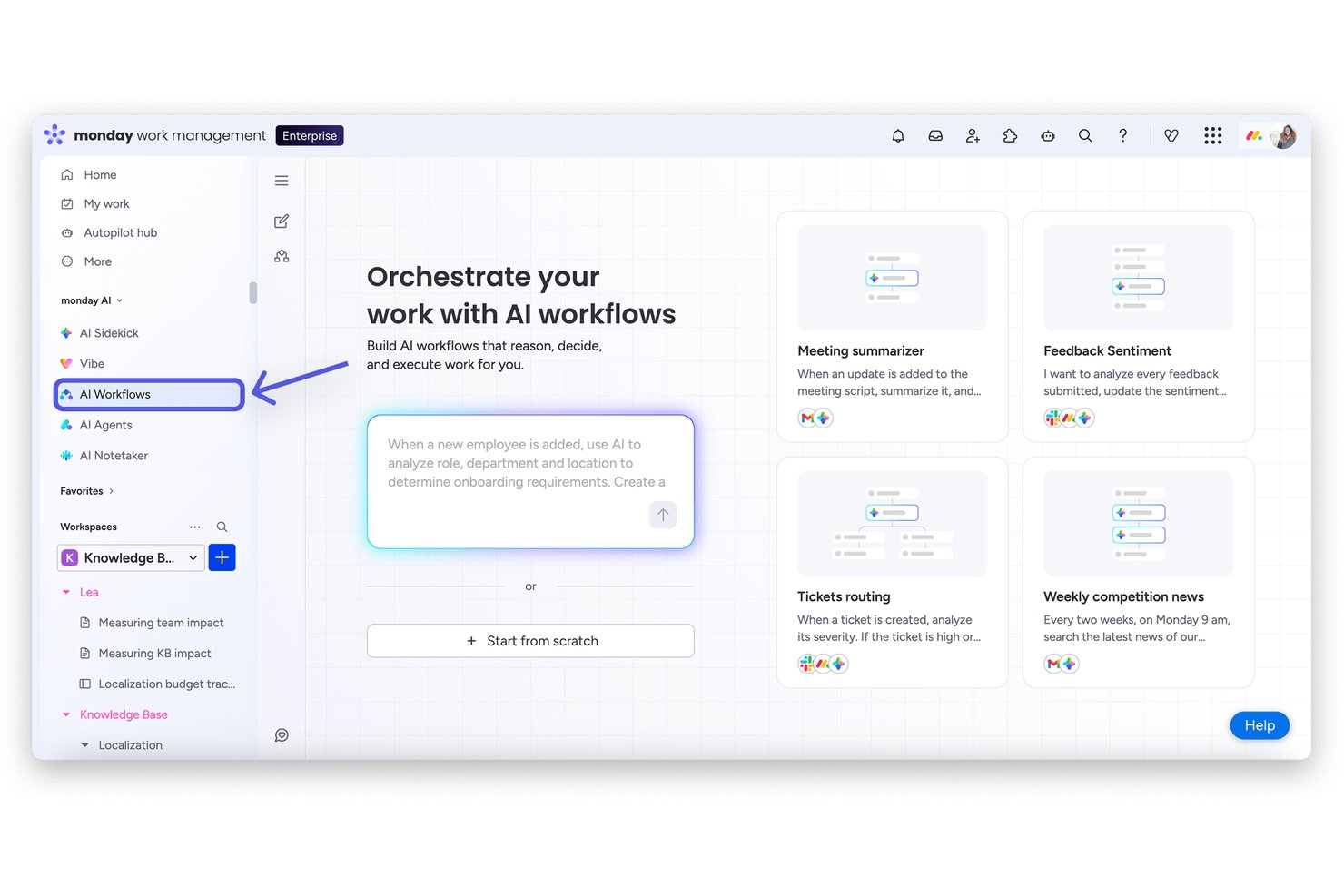
monday AI Workspace è una piattaforma di gestione del lavoro nativa per l'AI che combina la creazione e l'assegnazione delle attività, il monitoraggio dei progetti in più visualizzazioni, l'automazione dei flussi di lavoro e la visibilità sui portafogli interfunzionali in un unico spazio di lavoro connesso.
Per chi è più adatto monday AI Workspace?
È particolarmente adatto ai team di medie e grandi dimensioni che coordinano il lavoro tra più reparti, in particolare ai responsabili degli uffici di gestione dei progetti e ai responsabili delle operazioni che supervisionano portafogli di progetti complessi e articolati in più flussi di lavoro.
Perché ho scelto monday AI Workspace
monday AI Workspace si è guadagnato un posto nella mia rosa di candidati grazie al modo in cui gestisce i rischi prima che diventino problemi. L'AI monitora le dipendenze tra le attività e il carico delle risorse nelle diverse bacheche, quindi segnala proattivamente i conflitti. Ho visto segnalare un'allocazione eccessiva di una risorsa durante uno sprint, un problema che sarebbe stato facile non notare fino allo slittamento di una scadenza. Il Generatore di flussi di lavoro AI rafforza ulteriormente questa funzione automatizzando la risposta, riassegnando le attività o attivando avvisi senza richiedere interventi manuali.
Funzionalità principali di monday AI Workspace
- Bacheche con più visualizzazioni: Passa dalla visualizzazione a elenco, sequenza temporale, Gantt, Kanban, calendario o carico di lavoro per visualizzare i progetti in modo flessibile.
- Pannelli di report personalizzati: Crea pannelli KPI in tempo reale che aggregano i dati tra team e progetti.
- Autorizzazioni avanzate: Imposta livelli di accesso granulari per utenti, ospiti e collaboratori esterni su bacheche e pannelli.
- Monitoraggio nativo del tempo: Registra le stime temporali, monitora il lavoro effettivo sulle attività ed esporta direttamente i fogli presenze dalla piattaforma.
Integrazioni di monday AI Workspace
monday AI Workspace offre centinaia di integrazioni native tramite le integrazioni integrate e il marketplace, tra cui Slack, Salesforce, HubSpot, Google Workspace, Microsoft 365, Zoom, Jira, GitHub, Dropbox e Adobe Creative Cloud. Supporta inoltre Zapier e mette a disposizione un'API per le integrazioni personalizzate.
Pros and Cons
Pros:
- L'AI segnala i conflitti tra le risorse prima che si aggravino
- La visualizzazione del carico di lavoro mostra la capacità del team nei diversi progetti
- Le regole di automazione senza codice riducono gli aggiornamenti manuali dello stato
Cons:
- Le funzionalità AI sono disponibili solo nei piani di livello superiore
- Le bacheche possono diventare disordinate nei progetti di grandi dimensioni
New Product Updates from monday AI Workspace
monday AI Workspace Adds Human Approval Routing
monday AI Workspace adds a human-in-the-loop approval block to AI Workflows, sending approval requests and routing workflow paths based on responses. For more information, visit monday AI Workspace's official site.

Wrike
Ottimo per i modelli integrati
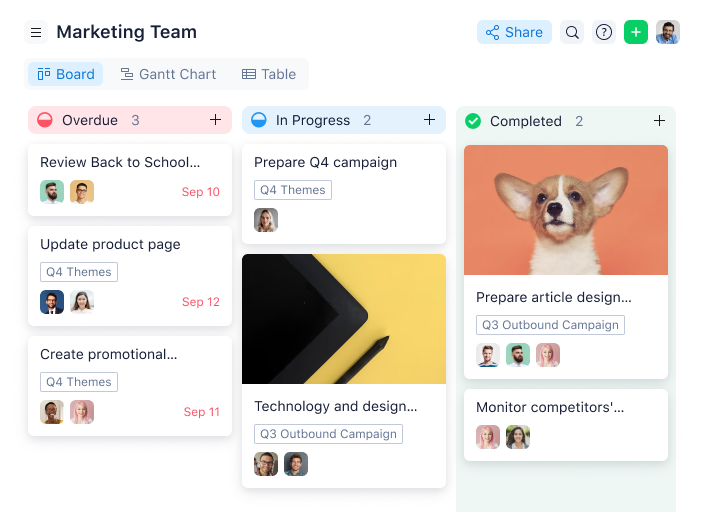
Wrike è una soluzione di gestione collaborativa del lavoro progettata per semplificare la pianificazione, il monitoraggio e l’esecuzione dei progetti. Offre strumenti per organizzare i flussi di lavoro, gestire le risorse e migliorare la collaborazione tra i membri del team, rendendolo adatto a una varietà di processi aziendali. Le sue funzionalità personalizzabili e le integrazioni aiutano i team ad adattare la piattaforma alle proprie esigenze operative specifiche.
Ad esempio, Mircea Dima, CEO e Fondatore di AlgoCademy, ha condiviso la sua esperienza: “Utilizzo Wrike per coordinare i nostri processi di sviluppo e i progetti di team. La possibilità di personalizzare Wrike e utilizzare i diagrammi di Gantt ci ha aiutato a rimanere organizzati e sulla strada giusta. La sua capacità di gestire orari in continuo cambiamento e monitorare i progressi ha reso il nostro processo di gestione dei progetti molto più efficiente, e il mio team ha potuto concentrare tutti gli sforzi sulla consegna dei risultati senza essere bloccati nei dettagli.”
Perché ho scelto Wrike: Oltre al fatto che le funzionalità di Wrike possono essere configurate secondo le esigenze di ciascun team, lo strumento offre anche una varietà di soluzioni specifiche a seconda del tipo di team o organizzazione — compresi i team di marketing e i team di servizi professionali.
Wrike dispone di funzionalità che permettono di andare oltre la semplice gestione delle attività, come l’automazione dei flussi di lavoro. E se gestite risorse che richiedono l’approvazione del cliente, la piattaforma include il sistema di revisione tra le sue proposte, così da poter caricare file e richiedere feedback al cliente senza uscire da Wrike.
Caratteristiche distintive e integrazioni di Wrike
Le funzionalità includono moduli di richiesta personalizzati che consentono ai team di raccogliere dettagli delle attività in anticipo e assegnarli automaticamente ai flussi di lavoro giusti in base a logiche predefinite. Inoltre, la capacità di Wrike di impostare dipendenze tra attività con linee temporali che si aggiornano automaticamente assicura che le schedulazioni di progetto rimangano allineate anche in caso di cambiamenti, riducendo i ritardi e migliorando il coordinamento delle attività.
Le integrazioni includono oltre 400 integrazioni native preconfigurate con i software di gestione file più popolari di Microsoft, Google e Dropbox, insieme a software di vendita e marketing come Salesforce e Marketo, e altri. È inoltre disponibile un’API per creare integrazioni personalizzate.
Pros and Cons
Pros:
- Diversi modi per visualizzare gli stessi dati
- Modellazione delle attività completa e a 360°
- Molte opzioni e possibilità di personalizzazione
Cons:
- Nessun sotto-attività nel piano gratuito
- Nessun accesso offline
New Product Updates from Wrike

Wrike Activity Reports Add Actor Type Details
Wrike’s Activity Report now displays actor type details, helping admins identify whether changes came from the UI, Automation, Wrike Agents, API, or AI via MCP. For more information, visit Wrike's official site.

Ideale per la gestione centralizzata delle attività di agenzia

Productive è un sistema di gestione agenziale tutto-in-uno progettato per gestire vari aspetti delle operazioni dell'agenzia, tra cui la gestione dei progetti, la pianificazione delle risorse, il monitoraggio finanziario e il coinvolgimento dei clienti. La piattaforma offre vantaggi migliorando l'efficienza nella consegna dei progetti, ottimizzando i processi di fatturazione ai clienti e centralizzando la comunicazione.
Perché ho scelto Productive: Mi piacciono le sue solide funzionalità di pianificazione delle risorse e monitoraggio del tempo. Questi strumenti permettono alle agenzie di allocare le risorse in modo efficace, monitorare il tempo impiegato sui compiti e assicurarsi che i progetti rimangano nei tempi previsti. L'integrazione delle funzionalità di gestione finanziaria, come la pianificazione del budget e la fatturazione, ne aumenta ulteriormente l'utilità offrendo una visione in tempo reale della redditività dei progetti.
La piattaforma consente inoltre ai membri dell'agenzia e ai clienti di commentare i progetti, consultare lo stato dei budget e restare aggiornati sull'avanzamento dei lavori. Questa trasparenza favorisce una migliore comunicazione e garantisce che tutte le parti interessate siano sempre allineate. Inoltre, le capacità di automazione e intelligenza artificiale di Productive aiutano ad automatizzare attività ripetitive e generare documentazione con il supporto dell'AI.
Caratteristiche e integrazioni distintive di Productive
Le funzionalità includono la previsione dei ricavi, che consente alle agenzie di stimare i ricavi grazie a report dettagliati, facilitando una migliore pianificazione finanziaria. La funzionalità di monitoraggio della redditività permette inoltre di valutare la profittabilità dei progetti tramite la libreria di report e di creare report personalizzati per analizzare le prestazioni del team.
Le integrazioni includono Slack, Jira, Google Calendar, MS Outlook, HubSpot CRM, Zapier, BambooHR, Xero, QuickBooks, Fortnox, Sage, Personio, CharlieHR, Factorial e Humaans.io.
Pros and Cons
Pros:
- Solide capacità di gestione progetti
- Ottime funzionalità di gestione finanziaria
- Dashboard personalizzabili
Cons:
- Le numerose funzionalità possono richiedere un periodo di apprendimento
- Workflow delle attività limitati nei piani base
New Product Updates from Productive

Productive Adds Agent Triggers, Teams Integration, and Time Controls
Productive adds automated agent triggers, broader AI file support, Microsoft Teams integration, Resource Planner improvements, and new time entry controls. These updates expand automation while improving scheduling, collaboration, and time tracking. For more information, visit Productive’s official site.
Hive
Ideale per team di marketing digitale
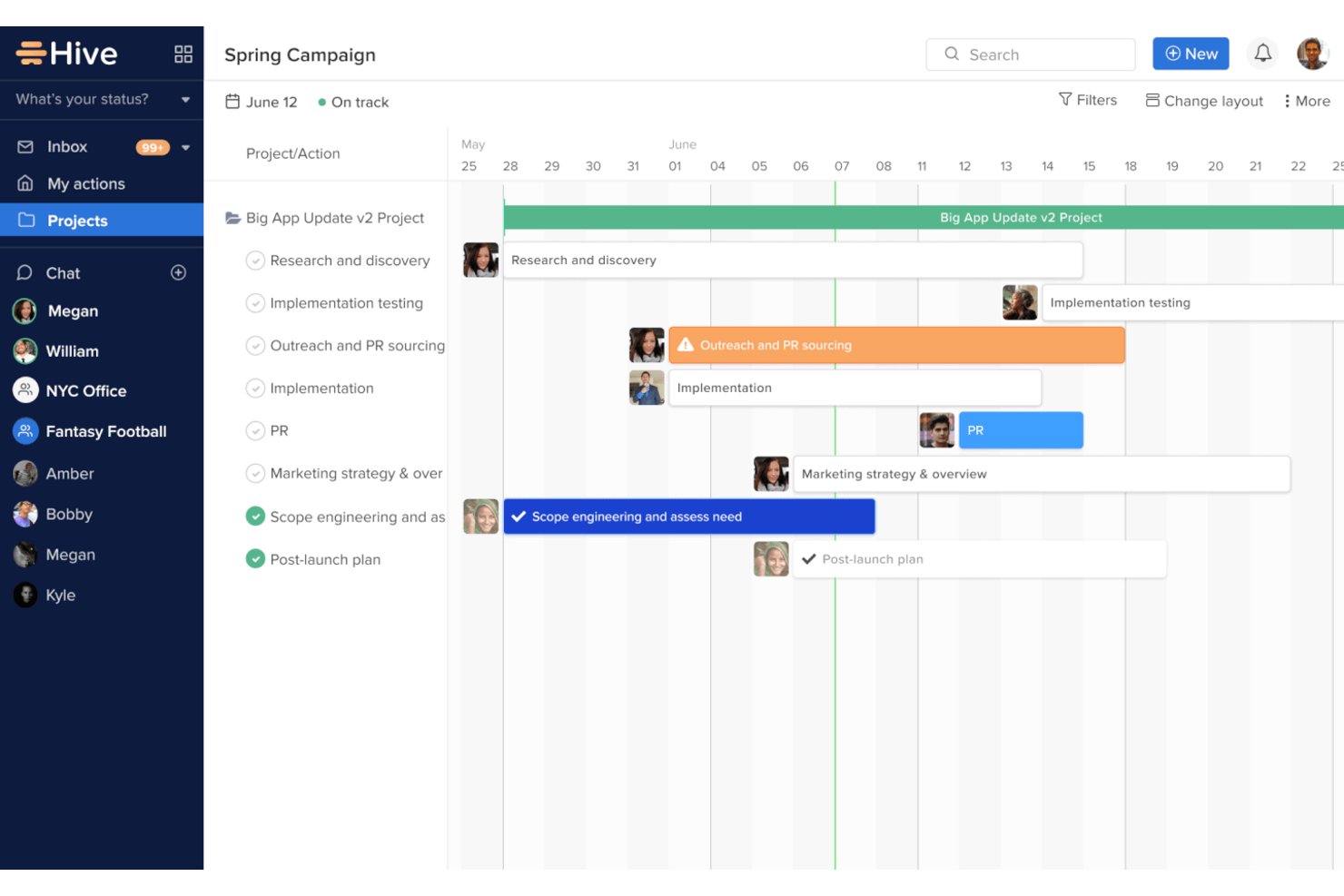
Hive è una piattaforma collaborativa progettata per aiutare i team a pianificare, eseguire e monitorare i propri progetti in modo efficiente. I suoi strumenti si rivolgono a un'ampia gamma di settori, con particolare attenzione nel consentire ai team di lavorare insieme senza problemi e rispettare le scadenze.
Perché ho scelto Hive: La versatilità di Hive la rende particolarmente preziosa per i team di marketing che gestiscono campagne frenetiche. I suoi strumenti di revisione e approvazione integrati aiutano a semplificare i cicli di feedback, mentre le visualizzazioni di progetto flessibili permettono di passare tra i layout Kanban, Gantt e calendario. Hive offre anche il monitoraggio del tempo integrato direttamente nelle attività, fornendo al team una visione chiara di come viene impiegato il tempo. La possibilità di automatizzare azioni ricorrenti riduce ulteriormente lo sforzo manuale, consentendo di concentrarsi su creatività e strategia.
Caratteristiche e integrazioni principali:
Le funzionalità includono le schede azione, che permettono agli utenti di raggruppare sottoattività, file e note in un unico punto centrale per una migliore gestione dei compiti. Inoltre, l’assistente AI per i progetti di Hive può prevedere le scadenze e suggerire assegnazioni di attività, rendendola una scelta all’avanguardia per i team che vogliono anticipare i tempi.
Le integrazioni includono Google Drive, Dropbox, Slack, Microsoft Teams, Zoom, Jira, Salesforce, OneDrive, Asana e Box.
Pros and Cons
Pros:
- Sistema di revisione e approvazione integrato
- Opzioni flessibili di visualizzazione dei compiti
- Supporta molteplici metodologie di progetto
Cons:
- Può risultare complesso per i team più piccoli
- Alcune funzioni richiedono impostazioni aggiuntive

Ideale per la gestione delle risorse
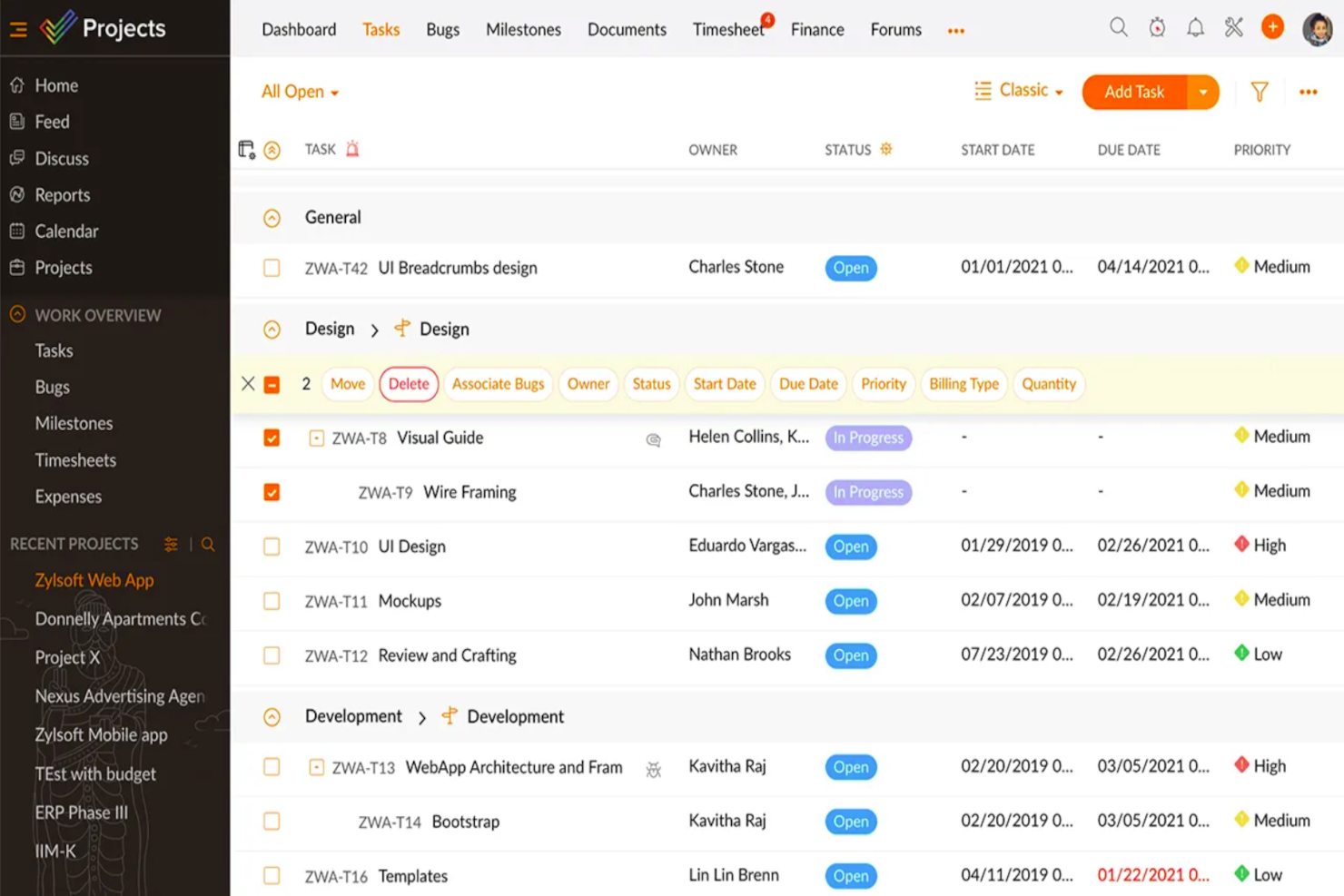
Zoho Projects è un software di gestione progetti con funzionalità di gestione delle attività che consentono ai team di collaborare in tempo reale su compiti e progetti. Per Miguel Angel Gongora Meza, Fondatore & Direttore di Evolution Treks Peru, si è rivelato particolarmente utile nella gestione di itinerari ampi e complessi: “L'esperienza più piacevole con Zoho Projects è stata che ha semplificato itinerari complicati con tappe visibili. È stato facile definire le attività con una scadenza e seguirle in un unico posto. Il piano di tour di 7 giorni comprendeva 15 membri dello staff e più di 30 viaggiatori. Mi ha aiutato a imparare come anticipare i rischi e affrontarli prima che diventassero problemi.”
Perché ho scelto Zoho Projects
Ho scelto Zoho Projects per le sue eccellenti capacità di gestione delle risorse, essenziali per qualsiasi team che desidera ottimizzare la distribuzione del carico di lavoro. I diagrammi di Gantt intuitivi della piattaforma offrono una rappresentazione visiva delle tempistiche di progetto, permettendo di gestire facilmente le dipendenze tra le attività e identificare quelle critiche. Inoltre, la funzione di rilevamento del tempo registra le ore lavorate, facilitando una fatturazione accurata e un'efficace allocazione delle risorse. Queste funzionalità sono fondamentali per i team che vogliono mantenere la produttività e rispettare le scadenze dei progetti.
Funzionalità principali di Zoho Projects
Oltre alle sue capacità di gestione delle risorse, Zoho Projects offre numerose altre funzionalità preziose:
- Automazione delle attività: Ottimizza il flusso di lavoro con la gestione automatizzata delle attività che riduce l'intervento manuale nei processi di routine.
- Monitoraggio dei problemi: Gestisci efficacemente le problematiche di progetto con un sistema dedicato che aiuta a prioritizzare e risolvere rapidamente i problemi.
- Strumenti di collaborazione del team: Migliora la comunicazione con chat integrata, forum e funzionalità di condivisione documenti.
- Dashboard personalizzabili: Personalizza la panoramica del progetto per mostrare i dati più rilevanti, aiutandoti a monitorare i principali indicatori di prestazione.
Integrazioni di Zoho Projects
Le integrazioni includono Google Drive, Dropbox, Microsoft Teams, GitHub, Slack, Zoho CRM, Zoho Desk, Zoho Invoice e Microsoft Outlook Calendar.
Pros and Cons
Pros:
- Offre una dettagliata suddivisione delle attività per una migliore organizzazione.
- Fornisce un monitoraggio preciso del tempo dedicato alle attività, facilitando l'analisi della produttività.
- Si integra perfettamente con altre app Zoho e strumenti di terze parti per un flusso di lavoro più efficiente.
Cons:
- Per i nuovi utenti può apparire complesso a causa delle numerose possibilità di personalizzazione.
- Spazio di archiviazione limitato nei piani di fascia bassa
New Product Updates from Zoho Projects
Zoho Projects Adds CodeX Scripts for Custom Modules
Zoho Projects now supports CodeX Scripts for custom modules, enabling conditional logic and rules for creating, updating, and deleting records. For more information, visit Zoho Projects' official site.
 .
.
Ideale per l'automazione dei flussi di lavoro aziendali

Screendragon è una piattaforma di gestione dei flussi di lavoro no-code progettata per i team aziendali di marketing e creative ops, che combina automazione dei compiti, approvazioni digitali, pianificazione delle risorse, moduli personalizzati e reportistica in tempo reale in un unico sistema.
Per chi è più indicato Screendragon?
Screendragon è particolarmente adatto a team aziendali di marketing, agenzie e reparti creative ops che necessitano di una gestione dei flussi di lavoro controllata e ad alto volume su larga scala.
Perché ho scelto Screendragon
Ho selezionato Screendragon tra i miei preferiti perché apprezzo molto come il suo costruttore di flussi di lavoro visuale e no-code permetta al mio team di progettare processi complessi e multi-step da zero senza il supporto degli sviluppatori. In pratica, questo significa che posso impostare instradamenti condizionali, assegnazioni automatiche dei compiti basate su disponibilità o competenze e passaggi specifici per regione per campagne globali. Mi piace anche che Screendragon gestisca grandi volumi senza problemi: i team che eseguono centinaia di flussi di lavoro simultanei possono monitorare lo stato in tempo reale tramite report automatizzati personalizzati e dashboard individuali.
Funzionalità principali di Screendragon
- Pianificazione e programmazione delle risorse: Assegna il lavoro ai membri del team in base a disponibilità o competenze, con visibilità sulla capacità del team.
- Controllo delle versioni e revisione: Confronta versioni di documenti e risorse affiancate e annota i file direttamente sulla piattaforma.
- Moduli personalizzati dinamici: Crea moduli di raccolta dati strutturati con campi personalizzati, layout e logica condizionale collegata a passaggi automatizzati del workflow.
- Permessi basati sui ruoli: Controlla la visibilità dei dati e l’accesso ai compiti a livello granulare per rispecchiare la struttura decisionale del tuo team.
Integrazioni di Screendragon
Screendragon offre integrazioni preconfigurate che si collegano agli strumenti già utilizzati dai tuoi team, tra cui Aprimo, Microsoft Power BI, Google Cloud Platform Storage, HubSpot, Amazon S3, Sitecore, Ziflow, Brandfolder, Smartsheet e Workato. Si integra anche con Jira, Google Drive, Egnyte, Box, Adobe, OneDrive, Salesforce, Microsoft Dynamics 365, SAP, Microsoft 365 e Trello. Sono disponibili un’API e un Connection Manager per integrazioni personalizzate con qualsiasi sistema dotato di API aperta.
Pros and Cons
Pros:
- Moduli dinamici che consolidano diversi tipi di input
- Monitoraggio visivo dei carichi di lavoro e dell’allocazione delle risorse
- Configurazione dei workflow e dei moduli senza codice
Cons:
- Talvolta caricamento lento tra una schermata e l’altra
- Opzioni limitate per archiviazione e recupero dei documenti
New Product Updates from Screendragon
Screendragon Unveils New AI Hub
Screendragon introduced AI Hub, a new capability that lets teams build and manage AI agents directly within workflows. The update helps marketing teams automate tasks, maintain governance controls, and scale AI-driven operations more efficiently. For more information, visit Screendragon's official site.

Ideale per la personalizzazione

Quickbase offre una soluzione unica per chi cerca di semplificare la gestione di progetti complessi. Se sei un professionista nei settori delle costruzioni, delle telecomunicazioni o della vendita al dettaglio, la capacità di Quickbase di centralizzare i dati dei progetti e migliorare la collaborazione del team può aiutarti a mantenere i tuoi progetti in linea con le tempistiche e il budget. La funzionalità di sviluppo low-code della piattaforma ti permette di personalizzare le applicazioni in base alle tue esigenze specifiche senza richiedere una conoscenza approfondita della programmazione, rendendola una scelta interessante per le organizzazioni che desiderano ottimizzare i propri processi di gestione dei progetti.
Perché ho scelto Quickbase
Ho scelto Quickbase per l'eccellente personalizzazione offerta, che lo rende una scelta di spicco tra i software di gestione delle attività. Una delle caratteristiche principali è la capacità di sviluppare applicazioni low-code, permettendoti di adattare flussi di lavoro e applicazioni alle esigenze specifiche del tuo progetto senza particolari conoscenze di programmazione. Inoltre, la possibilità di centralizzare i dati offre al tuo team una visibilità in tempo reale sull'avanzamento dei progetti, migliorando la collaborazione e il processo decisionale. Queste funzionalità rendono Quickbase una scelta ideale per le organizzazioni che necessitano di una soluzione per la gestione delle attività flessibile e adattabile.
Funzionalità principali di Quickbase
Oltre alla personalizzazione, Quickbase offre diverse funzionalità che migliorano la gestione delle attività:
- Automazioni: Semplifica i compiti ripetitivi automatizzando i flussi di lavoro, riducendo lo sforzo manuale e minimizzando gli errori.
- Accesso da mobile: Gestisci le tue attività e i tuoi progetti ovunque ti trovi grazie alle funzionalità mobili di Quickbase, rimanendo sempre connesso.
- Integrazioni: Collega Quickbase con altri strumenti e piattaforme che usi quotidianamente, creando un flusso di lavoro integrato nella tua organizzazione.
- Strumenti di reporting: Genera report dettagliati per ottenere informazioni sulle prestazioni dei progetti, aiutandoti a prendere decisioni informate e ottimizzare i tuoi processi.
Integrazioni di Quickbase
Le integrazioni includono Salesforce, Google Drive, Slack, Microsoft Office 365, Dropbox, DocuSign, Mailchimp, Zendesk, QuickBooks e HubSpot. Inoltre, Quickbase offre accesso API per integrazioni personalizzate in base alle tue esigenze specifiche.
Pros and Cons
Pros:
- Altamente personalizzabile per adattarsi ai diversi contesti aziendali
- Offre sviluppo di applicazioni low-code, permettendo il coinvolgimento anche degli utenti non tecnici.
- Altamente personalizzabile per adattarsi ai diversi contesti aziendali
Cons:
- Non tutte le integrazioni sono disponibili con tutti i piani
- Alcune funzionalità sono disponibili come componenti aggiuntivi a pagamento

Quire
Ideale per elenchi di attività annidate

Quire è un software di gestione progetti pluripremiato per team remoti che punta a semplificare i flussi di lavoro e favorire la comunicazione e la collaborazione. Le sue funzionalità di collaborazione e gestione dei progetti includono condivisione di file, gestione degli allegati, commenti sui compiti, assegnazione di più responsabili, aggiornamenti in tempo reale e una suite di reportistica flessibile. Direi che è una soluzione completa.
Perché ho scelto Quire: Ho scelto Quire perché è pensato per i team che fanno fatica a trasformare grandi obiettivi in attività più gestibili. Nella mia esperienza, aiuta a creare e monitorare compiti e sottocompiti all'interno di ciascuna voce di progetto principale. Le tre principali modalità di visualizzazione di Quire sono l'elenco delle attività annidate, la vista Kanban e la vista cronologia. Il software aiuta inoltre gli utenti a gestire e monitorare le loro attività sia che lavorino da soli che in squadra.
Funzionalità e integrazioni principali di Quire
Funzionalità includono elenchi di attività annidate infiniti che consentono agli utenti di suddividere progetti complessi in livelli granulari di compiti e sottocompiti per una migliore organizzazione e chiarezza. Inoltre, la modalità focus di Quire permette agli utenti di isolare compiti o sottocompiti specifici in un'interfaccia pulita e priva di distrazioni, favorendo una maggiore concentrazione sul lavoro prioritario.
Integrazioni includono Slack, Github, Google Workspace, Microsoft e molte altre opzioni; inoltre, migliaia di integrazioni rese disponibili tramite Zapier (potrebbe essere necessario un piano a pagamento).
Pros and Cons
Pros:
- Timer pomodoro integrato
- Puoi ricevere notifiche di commenti sulle attività sul tuo dispositivo mobile
- Visualizzazione multipla delle attività
Cons:
- Nessuna vista cronologica nella versione gratuita
- Nessuna gestione delle risorse
New Product Updates from Quire

Quire Adds Custom Dashboard View and Revamps Overview
Quire adds Dashboard View, customizable widgets, task lists, charts, and a revamped Overview tab to help teams monitor project health and organize key work in one place. For more information, visit Quire’s official site.
 .
.
Ideale per la collaborazione di squadra
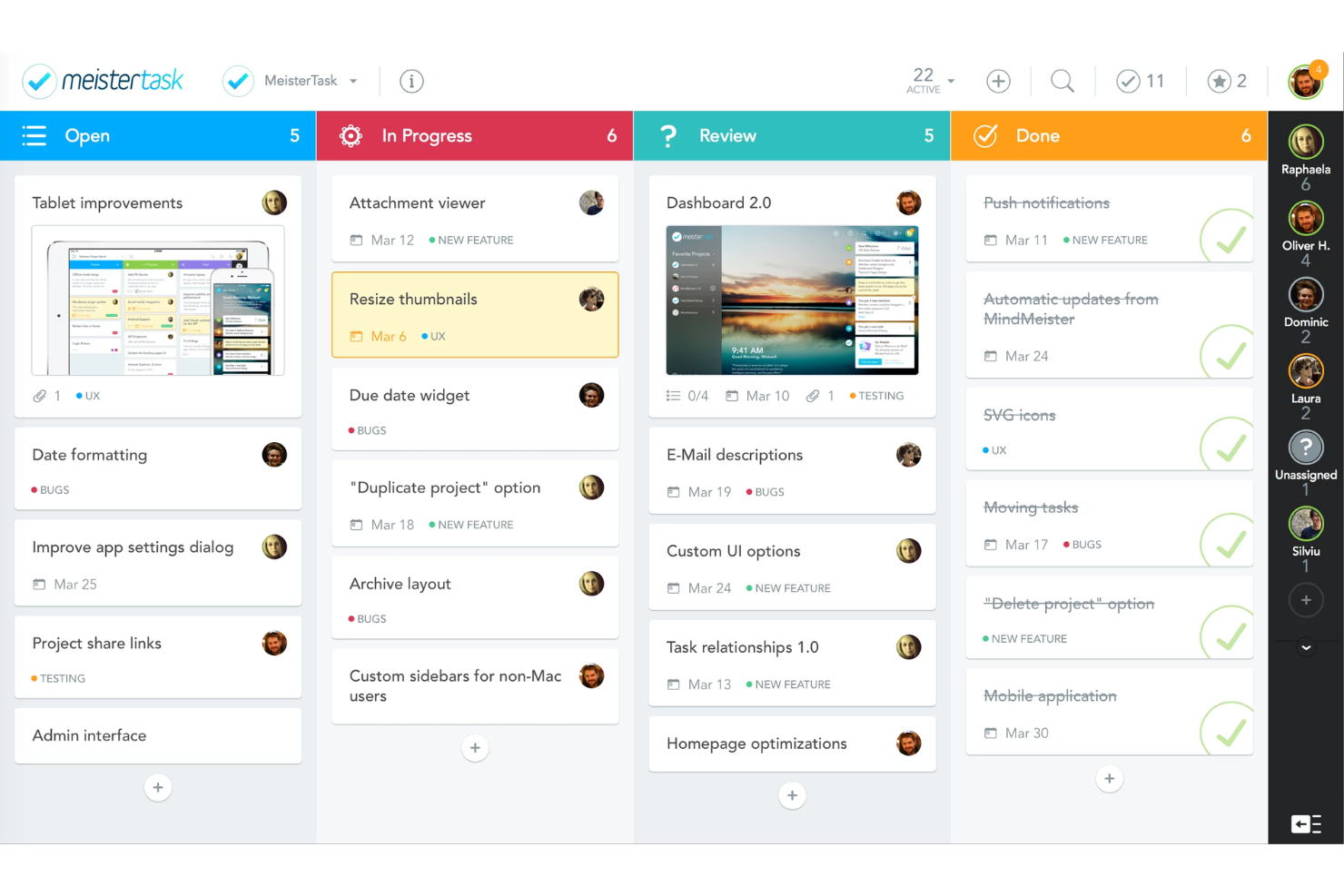
MeisterTask è progettato per team creativi e professionisti del marketing, offrendo un'interfaccia intuitiva in stile Kanban per visualizzare i progetti e migliorare la collaborazione senza bisogno di un onboarding esteso. Concentrandosi sulla semplificazione dei flussi di lavoro e riducendo la dipendenza da riunioni ed email, MeisterTask aiuta il tuo team a rimanere organizzato e produttivo, rendendolo la soluzione ideale per chi cerca uno strumento facile da usare per gestire i compiti in modo efficace.
Perché ho scelto MeisterTask
Ho scelto MeisterTask perché eccelle nel favorire la collaborazione di squadra, fondamentale per qualsiasi strumento di gestione delle attività. Le sue bacheche in stile Kanban permettono al tuo team di visualizzare chiaramente compiti e flussi di lavoro, facilitando una migliore comunicazione e coordinamento. Inoltre, gli aggiornamenti in tempo reale assicurano che tutti siano informati sull'avanzamento dei progetti senza continue riunioni. La possibilità di automatizzare le attività ripetitive incrementa ulteriormente la produttività, permettendo al team di concentrarsi su attività più strategiche.
Caratteristiche principali di MeisterTask
Oltre ai punti di forza collaborativi, MeisterTask offre diverse funzionalità che supportano una gestione efficiente delle attività:
- Assegnazione delle attività: Assegna facilmente le attività ai membri del team e imposta le scadenze per garantire responsabilità e completamento puntuale.
- Monitoraggio del tempo: Monitora il tempo impiegato nelle attività per migliorare produttività e distribuzione delle risorse.
- Dashboard personalizzabili: Crea dashboard personalizzate per visualizzare le attività e i progetti più rilevanti per il tuo team.
- Attività ricorrenti: Automatizza le attività ripetitive impostandole per ripetersi a intervalli specificati, riducendo il carico di lavoro manuale.
Integrazioni di MeisterTask
Le integrazioni includono Slack, Microsoft Teams, Google Drive, Dropbox, GitHub, Bitbucket, Box, Zapier, Microsoft Outlook e MindMeister. È disponibile anche un'API per integrazioni personalizzate.
Pros and Cons
Pros:
- Funzionalità timeline in stile Gantt per pianificare le attività su calendario
- Include la possibilità di automatizzare passaggi ricorrenti
- Interfaccia intuitiva e facile da usare
Cons:
- Non è possibile creare sotto-attività, solo elementi checklist
- Attività ricorrenti riservate agli utenti a pagamento

ClickUp
Miglior piano gratuito robusto

Per i team che cercano una soluzione affidabile per la gestione delle attività, ClickUp si distingue come una piattaforma dinamica progettata per trasformare la gestione del vostro flusso di lavoro. Risponde a esigenze diverse integrando la gestione delle attività, la documentazione e la comunicazione in un unico spazio unificato, rendendolo una scelta ideale per agenzie creative, startup tecnologiche e team di marketing. Automatizzando le attività ripetitive e dando priorità a ciò che conta davvero, ClickUp aiuta il tuo team a rimanere organizzato e concentrato, assicurando che i progetti vengano completati in modo efficiente e puntuale.
Perché ho scelto ClickUp
Ho scelto ClickUp perché il suo piano gratuito offre un ricco set di funzionalità che rispondono a diverse esigenze di gestione delle attività, rendendolo un'opzione interessante per team di ogni dimensione. Con attività personalizzabili, sotto-attività e checklist, puoi facilmente gestire e organizzare i tuoi progetti. Il piano include strumenti di collaborazione come chat in tempo reale e condivisione di documenti, fondamentali per un lavoro di squadra efficace. Inoltre, ClickUp si integra con oltre 1.000 strumenti, garantendo che i flussi di lavoro del tuo team rimangano ininterrotti ed efficienti.
Caratteristiche principali di ClickUp
Oltre al suo robusto piano gratuito, ClickUp offre una varietà di funzionalità che migliorano la gestione delle attività per il tuo team.
- Diagrammi di Gantt: Visualizza le tempistiche dei progetti e le dipendenze per gestire meglio il flusso di lavoro e le scadenze del tuo team.
- Monitoraggio del tempo: Tieni traccia di quanto tempo richiedono le attività grazie al monitoraggio integrato, aiutandoti a ottimizzare la produttività.
- Monitoraggio degli obiettivi: Imposta, monitora e gestisci gli obiettivi del tuo team con il monitoraggio degli obiettivi, assicurando allineamento e progresso verso i traguardi principali.
- Automazioni: Semplifica le attività ripetitive impostando automazioni che attivano azioni in base a condizioni specifiche, risparmiando tempo ed energie al tuo team.
Integrazioni di ClickUp
Le integrazioni includono Google Calendar, Slack, Zoom, Microsoft Teams, HubSpot, GitHub, Dropbox, OneDrive, Salesforce ed Evernote.
Pros and Cons
Pros:
- Oltre 50 widget per personalizzare la dashboard
- Facile conversione dei nodi mappa in attività
- Spazio di archiviazione illimitato per i file in tutti i livelli di account a pagamento
Cons:
- L'app mobile può essere un po' lenta
- Le opzioni di personalizzazione dettagliata rendono la configurazione lunga
New Product Updates from ClickUp
ClickUp Adds Meetings Hub, Super Agent Templates, and ZoomInfo Integration
ClickUp adds a searchable Meetings Hub, new ways to clone and template Super Agents, and a ZoomInfo integration through the App Center. These updates improve meeting retrieval, agent reuse, and access to sales intelligence. For more information, visit ClickUp’s official site.
Altri software per la gestione delle attività
Eccone altri che non sono entrati nell’elenco principale. Se hai bisogno di ulteriori suggerimenti su strumenti pratici per la gestione delle attività, dai un’occhiata a questi.
- Nifty
Ideale per il monitoraggio delle milestone
- Plaky
Ideale per utenti illimitati
- Kintone
Ideale per flussi di lavoro personalizzati
- Backlog
Ideale per sviluppatori
- Google Workspace
Ideale per la sincronizzazione delle attività tra dispositivi
- ProofHub
Ideale per il tracciamento visivo delle attività
- Teamwork.com
Ideale per il monitoraggio dei progetti
- Jira
Ideale per la gestione di progetti agili
- Bonsai Agency Software
La migliore per la gestione di attività e risorse nelle agenzie
- beSlick
Ideale per il miglioramento dei processi
- Birdview
Ideale per monitoraggio individuale e di team
- Basecamp
Ideale per uso personale
- FunctionFox
Ideale per team creativi
- Deltek Replicon Time
Ideale per attività fatturabili e non fatturabili
- ProjectManager
Ideale per dashboard in tempo reale
- Confluence
Ideale per la condivisione delle conoscenze in team
- Jira Service Management
Ideale per team IT e di servizi
- Ravetree
Ideale per framework di progetto versatili
- Height
Ideale per la gestione di attività interfunzionali
- Swit
Ideale per la chat integrata
- GanttPRO
Ideale per cronologie con diagrammi di Gantt
- Miro
Ideale per la collaborazione visiva
- Smartsheet
Ideale per organizzazioni in crescita
- Connecteam
Ideale per l'utilizzo da mobile
- Workzone
Ideale per gestire i cicli di vita dei progetti
- Ayoa
Ideale per lavagne attività online
- Celoxis
Ideale per approfondimenti di progetto in tempo reale
- Hubstaff
Ideale per reportistica e analisi delle attività
- Accelo
Ideale per più tipologie di progetti
- ProWorkflow
Ideale per il monitoraggio del tempo e la pianificazione delle risorse


Come Valuto il Software di Gestione delle Attività
Scompongo ogni valutazione in due livelli: la base che uno strumento deve soddisfare—assegnazione delle attività, dipendenze, monitoraggio dei progressi—e i fattori che differenziano un buon candidato da quello giusto.
Funzionalità di Base (Requisiti Minimi per Questa Lista)
Quando seleziono gli strumenti per la mia lista, valuto ciascuno su una scala da 0 (non offre la funzionalità) a 5 (eccelle in quest'area) per ogni funzionalità di base elencata di seguito. Poi calcolo il punteggio totale dello strumento come percentuale. Ogni strumento deve raggiungere un punteggio totale minimo del 75% per essere preso in considerazione.
- Creazione e Assegnazione delle Attività: Verifico se è possibile creare attività con assegnatari, date di scadenza, priorità e descrizioni—e se azioni massive e modelli velocizzano la configurazione per cicli di sprint ricorrenti o avvii di campagne.
- Molteplici Visualizzazioni delle Attività: Passare da una board Kanban per i daily standup a un diagramma di Gantt per aggiornamenti agli stakeholder è una reale esigenza di workflow, quindi valuto quante tipologie di visualizzazione offre ogni strumento e se sono possibili viste salvate.
- Dipendenze e Sottoattività: Cerco la possibilità di suddividere gli epic in sottoattività e di collegare le attività tramite dipendenze, ad esempio bloccando una revisione QA finché l'attività di sviluppo non viene contrassegnata come completata.
- Monitoraggio dei Progressi e Stati: Colonne di stato personalizzate che riflettono le reali fasi del tuo workflow sono più importanti di un semplice toggle completato/non completato, quindi valuto se gli strumenti offrono stati personalizzabili, monitoraggio della percentuale di completamento e riepiloghi a livello di progetto.
- Collaborazione sulle Attività: I team che lavorano su fusi orari diversi hanno bisogno di comunicare nel contesto, quindi cerco commenti, @mention, allegati di file e log delle attività direttamente all'interno di ogni scheda attività.
- Notifiche e Avvisi di Scadenza: Valuto se lo strumento invia promemoria tempestivi su più canali—email, in-app e push mobile—e se gli utenti possono personalizzare quali eventi attivano gli avvisi, per evitare il sovraccarico di notifiche.
Una volta compilato l'elenco degli strumenti che soddisfano i criteri, considero cosa distingue ciascuna piattaforma.
Fattori di Differenziazione (Cosa Distingue i Fornitori)
Ecco come confronto e metto a confronto i diversi fornitori:
Funzionalità Distintive
L'automazione del workflow è un fattore di grande distinzione—valuto se uno strumento consente di creare regole no-code che assegnano automaticamente le attività o spostano gli elementi tra le fasi quando cambia lo stato. Anche le visualizzazioni di carico di lavoro e capacità sono fondamentali. Vedere chi è sovraccarico prima che inizi uno sprint aiuta a prevenire il burnout e scadenze mancate. Valuto inoltre le dashboard personalizzabili per la reportistica, in particolare se puoi creare viste che evidenziano tassi di burn-down o trend di completamento senza esportare dati in un foglio di calcolo.
Oltre le Funzionalità
Le integrazioni determinano quanto bene uno strumento si adatta al tuo stack esistente, quindi verifico le connessioni native a Slack, Jira, GitHub e piattaforme di archiviazione file che il tuo team usa quotidianamente. Anche la trasparenza dei prezzi conta—valuto se le funzionalità essenziali di gestione delle attività sono accessibili nei piani base o bloccate dietro offerte enterprise. Considero inoltre il supporto all'onboarding, in particolare se il fornitore offre modelli predefiniti per workflow comuni come lo sprint planning o il lancio di prodotti che aiutano le squadre a essere operative dal primo giorno.
Come scegliere un software per la gestione delle attività
Quando si seleziona un software per la gestione delle attività, è facile perdersi in lunghi elenchi di funzionalità e strutture tariffarie complesse. Per aiutarti a rimanere concentrato mentre affronti il tuo processo di selezione del software, ecco un elenco di fattori da tenere a mente:
| Fattore | Cosa considerare |
| Scalabilità | Assicurati che il software possa crescere insieme al tuo team. Cerca limiti utente flessibili, flussi di lavoro avanzati e funzionalità di livello aziendale come il controllo degli accessi basato sui ruoli e la gestione del carico di lavoro. |
| Integrazioni | Verifica se il software si collega agli strumenti che già utilizzi, come Slack per la comunicazione, Google Drive per la condivisione dei file e le piattaforme CRM per l'allineamento dei progetti, così da ottimizzare il tuo flusso di lavoro. |
| Personalizzazione | Il tuo team ha bisogno di visualizzazioni delle attività adattabili, campi personalizzati e automazione dei flussi di lavoro che si adattino ai tuoi processi, invece di costringerti ad adeguarti al software. |
| Semplicità d'uso | Cerca un'interfaccia intuitiva, funzionalità di trascinamento e un tempo minimo di formazione iniziale. Un sistema macchinoso rallenterà il tuo team invece di aiutarlo a lavorare più velocemente. |
| Budget | Considera sia i costi iniziali sia quelli a lungo termine, inclusi i prezzi per utente, le limitazioni delle funzionalità nei piani inferiori e i costi nascosti per componenti aggiuntivi o integrazioni. |
| Misure di sicurezza | Assicurati che il software includa la crittografia dei dati, i controlli degli accessi e la conformità agli standard di settore come GDPR o SOC 2, soprattutto se gestisci informazioni sensibili. |
| Funzionalità di collaborazione | Il tuo team dovrebbe poter commentare le attività, usare le @menzioni per coinvolgere i colleghi e condividere facilmente i file. Funzionalità come gli aggiornamenti in tempo reale e l'accesso da dispositivi mobili possono inoltre migliorare il lavoro di squadra. |
| Automazione | Cerca l'automazione delle attività basata su regole, la pianificazione delle attività ricorrenti e i trigger dei flussi di lavoro per ridurre il lavoro manuale e aumentare l'efficienza. |
I team cercano sempre di centralizzare le proprie attività e i propri dati. I migliori strumenti sono quelli in grado di gestire sia la gestione delle attività sia la collaborazione sui documenti, senza diventare opprimenti.

Tendenze nei software di gestione delle attività nel 2025
Nella mia ricerca ho raccolto innumerevoli aggiornamenti dei prodotti, comunicati stampa e registri delle versioni di diversi fornitori di software per la gestione delle attività. Ecco alcune delle tendenze emergenti che sto tenendo d'occhio:
- Collaborazione incentrata sulla privacy: Sempre più team vogliono controllare chi può vedere cosa, soprattutto negli spazi di lavoro condivisi. Le funzionalità più recenti consentono agli utenti di impostare accessi basati sui ruoli, limitare le attività sensibili o creare gruppi di attività privati all'interno di progetti più ampi.
- Suggerimenti per le attività basati sull'intelligenza artificiale: Sempre più piattaforme utilizzano l'intelligenza artificiale per consigliare scadenze, stabilire la priorità delle attività e assegnare automaticamente il lavoro sulla base di modelli precedenti. Questo aiuta i team a concentrarsi sulle attività ad alto impatto senza dover ordinare manualmente gli elenchi o apportare modifiche. Puoi anche prendere in considerazione i gestori di attività basati sull'intelligenza artificiale, che offrono funzionalità di intelligenza artificiale più estese.
- Bilanciamento predittivo del carico di lavoro: Alcuni strumenti ora analizzano la capacità del team e suggeriscono di ridistribuire le attività prima che i carichi di lavoro diventino ingestibili. Rilevando tempestivamente gli squilibri nel carico di lavoro, i manager possono prevenire il burnout e assicurarsi che i progetti rimangano in linea con i piani.
- Elementi di gamification: I fornitori stanno aggiungendo badge, monitoraggio dei progressi e ricompense per i risultati raggiunti al fine di mantenere gli utenti coinvolti e motivati. Questi elementi incoraggiano il completamento puntuale delle attività e rendono il lavoro di routine più interattivo.
- Creazione di attività tramite comandi vocali e chat: I team possono ora aggiungere e gestire le attività utilizzando assistenti vocali o input basati sulla chat. Questo facilita la raccolta di idee mentre si è in movimento, la creazione di attività durante le riunioni o l'aggiornamento rapido dei progressi senza dover navigare nei menu.
Che cos'è un software di gestione delle attività?
Il software di gestione delle attività è uno strumento che aiuta singoli utenti e team a organizzare, stabilire la priorità e monitorare le attività durante tutto il ciclo di vita di un progetto.
Consente agli utenti di assegnare responsabilità, impostare scadenze e monitorare i progressi in un unico luogo centralizzato, riunendo le funzioni di gestione delle attività comunemente presenti nei software di gestione dei progetti. Semplificando l'esecuzione delle attività e migliorando la visibilità, risolve problemi comuni come scadenze mancate, flussi di lavoro frammentati e responsabilità poco chiare, rendendo i team più produttivi e allineati.
Funzionalità dei software di gestione delle attività
Quando scegli un software di gestione delle attività, presta attenzione alle seguenti funzionalità fondamentali:
- Creazione e assegnazione delle attività: questa funzione consente di aggiungere rapidamente nuove attività e assegnarle a te stesso o ai membri del team. Puoi facilmente tenere traccia di chi è responsabile di cosa, rendendo difficile che qualcosa venga trascurato.
- Monitoraggio delle scadenze: visualizza esattamente quando deve essere completata ogni attività e ricevi promemoria quando le scadenze si avvicinano. Questo ti aiuta a evitare il panico dell'ultimo minuto e mantiene i progetti in movimento.
- Strumenti di definizione delle priorità: organizza le attività in base alla loro urgenza o importanza, così saprai sempre cosa richiede prima la tua attenzione. Puoi dedicare meno tempo a decidere da dove iniziare e più tempo a portare a termine le attività.
- Funzioni di collaborazione: comunica direttamente sulle attività tramite commenti, condivisione di file e aggiornamenti in tempo reale. Non devi preoccuparti di perdere il lavoro o di non vedere i feedback in mezzo a una moltitudine di email.
- Monitoraggio dei progressi: ottieni una visione d'insieme dello stato di ogni attività, da “non iniziata” a “in corso” fino a “completata”. Questo rende semplice monitorare l'avanzamento e individuare tempestivamente i colli di bottiglia.
- Notifiche e avvisi: rimani aggiornato con notifiche istantanee quando le attività vengono aggiornate, assegnate o completate. Non rischierai di perdere aggiornamenti o modifiche importanti.
- Funzionalità di integrazione: collega il software agli strumenti che già utilizzi, come calendari, email o app di messaggistica. Questo significa meno aggiornamenti manuali e più tempo risparmiato durante la giornata.
- Report e analisi: genera report per individuare le tendenze della produttività, misurare le prestazioni del team e identificare le aree di miglioramento. Queste informazioni ti permettono di prendere più facilmente decisioni migliori sul tuo modo di lavorare.
- Accesso da dispositivi mobili: gestisci le attività da qualsiasi dispositivo, che tu sia alla scrivania o in movimento. Non sei legato al computer (perché a volte l'ispirazione, o le scadenze, arrivano fuori dall'ufficio).
- Flussi di lavoro personalizzabili: adatta il software ai processi specifici del tuo team, sia che tu gestisca sprint agili sia che segua una semplice lista di cose da fare. Questa flessibilità ti aiuta a lavorare come preferisci, invece di costringerti a utilizzare un sistema rigido.
Funzionalità comuni dell'intelligenza artificiale nei software di gestione delle attività
I moderni software di gestione delle attività spesso includono funzioni basate sull'intelligenza artificiale progettate per rendere il tuo flusso di lavoro ancora più fluido:
- Suggerimenti intelligenti sulle attività: l'intelligenza artificiale può consigliare attività in base alle tue abitudini o alla cronologia del progetto, aiutandoti a ricordare le attività ricorrenti e a rimanere organizzato senza sforzi aggiuntivi.
- Definizione automatica delle priorità: alcuni strumenti utilizzano l'intelligenza artificiale per classificare automaticamente le attività in base all'urgenza o all'importanza, così puoi concentrarti su ciò che conta di più.
- Elaborazione del linguaggio naturale: aggiungi rapidamente attività digitando o parlando in linguaggio naturale: l'intelligenza artificiale interpreterà ciò che inserisci e creerà l'attività corretta per te.
- Scadenze predittive: l'intelligenza artificiale può stimare quanto tempo potrebbero richiedere le attività o segnalare quando rischi di non rispettare una scadenza, avvisandoti prima che si verifichino problemi.
- Promemoria automatici: ricevi promemoria e notifiche proattivi in base ai tuoi schemi di lavoro, così non perderai mai un aggiornamento importante.
- Informazioni basate sui dati: l'intelligenza artificiale analizza le tendenze della tua produttività e suggerisce modi per ottimizzare il flusso di lavoro o migliorare la collaborazione del team.
- Automazione del flusso di lavoro: configura regole basate sull'intelligenza artificiale per assegnare automaticamente le attività, aggiornare gli stati o inviare notifiche in base ai trigger che definisci.
Vantaggi dei software di gestione delle attività
L'implementazione di un software di gestione delle attività può offrire diversi vantaggi al tuo team e alla tua azienda. Eccone alcuni che puoi aspettarti:
- Maggiore organizzazione: mantiene tutte le attività, le scadenze e le priorità in un unico posto, così nulla viene perso o dimenticato.
- Maggiore produttività: aiuta i team a concentrarsi sul lavoro giusto definendo le priorità, monitorando i progressi e riducendo il tempo dedicato agli aggiornamenti manuali.
- Migliore collaborazione: consente ai membri del team di condividere attività, lasciare commenti e allegare file, mantenendo tutte le comunicazioni del progetto in un unico posto.
- Meno scadenze non rispettate: invia promemoria e monitora le date di scadenza, rendendo più facile rispettare il programma.
- Responsabilità più chiare: assegna le attività a persone specifiche, così tutti sanno chi è responsabile di cosa.
- Flussi di lavoro più efficienti: utilizza automazioni, attività ricorrenti e dipendenze per ridurre i colli di bottiglia e accelerare i processi.
- Migliore distribuzione del carico di lavoro: mostra chi è sovraccarico e chi ha capacità disponibile, aiutando i responsabili a distribuire le attività in modo equo.
Costi e prezzi dei software di gestione delle attività
Per molti team, il costo è un fattore fondamentale nella scelta di un software di gestione delle attività. La maggior parte delle piattaforme offre una gamma di piani progettati per team di dimensioni ed esigenze diverse, dai singoli utenti alle aziende.
Nel complesso, i prezzi rientrano generalmente in fasce prevedibili, rendendo più semplice valutare le funzionalità in rapporto al proprio budget. Comprendere questi schemi può aiutarti a evitare di pagare troppo per funzionalità comuni o di rinunciare a quelle fondamentali.
Ecco una panoramica dei tipi di piano più comuni e di ciò che includono:
Tabella comparativa dei piani per il software di gestione delle attività
| Tipo di piano | Prezzo medio | Funzionalità comuni |
|---|---|---|
| Base | $0 - $10 al mese | - Attività e progetti limitati - Gestione di base delle attività - Alcuni strumenti di collaborazione - Reportistica di base |
| Professionale | $10 - $30 al mese | - Gestione avanzata delle attività - Strumenti di collaborazione avanzati - Integrazione con altri software - Reportistica e analisi |
| Aziendale | $30 - $60 al mese | - Gestione completa dei progetti - Flussi di lavoro personalizzati - Opzioni di integrazione avanzate - Analisi e reportistica dettagliate |
| Per grandi aziende | Prezzo personalizzato | - Funzionalità personalizzabili - Opzioni di sicurezza avanzate - Assistenza personalizzata - Soluzioni scalabili per team di grandi dimensioni |
| Gratuito | $0 | - Attività limitate - Funzionalità di base - Adatto a singoli utenti o piccoli team |
Ogni piano è progettato per esigenze diverse degli utenti, con funzionalità avanzate disponibili nei livelli superiori. I piani gratuiti, sebbene limitati, sono utili per testare uno strumento prima di sottoscriverlo.
Comprendere cosa offre ogni livello può aiutarti a valutare quanto bene il software potrà adattarsi alla crescita del tuo team.
Potresti dover aggiornare il tuo piano quando:
- Aumento delle dimensioni del team: con la crescita dell'azienda e l'aggiunta di nuovi dipendenti o team, il livello di prezzo attuale potrebbe non supportare il numero maggiore di utenti, rendendo necessario un passaggio a un piano superiore per includere tutti.
- Necessità di funzionalità avanzate: quando l'azienda necessita di funzionalità più avanzate, come reportistica avanzata, flussi di lavoro personalizzati o integrazioni con altri strumenti aziendali, potrebbe essere necessario passare a un livello di prezzo superiore.
- Maggiore volume di progetti: se l'azienda inizia a gestire contemporaneamente un numero maggiore di progetti, i limiti del livello attuale potrebbero essere superati.
- Requisiti di assistenza migliorati: con l'aumentare della complessità delle operazioni, l'azienda potrebbe aver bisogno di opzioni di assistenza clienti migliori, come supporto 24 ore su 24, 7 giorni su 7, gestione dedicata dell'account o tempi di risposta più rapidi.
- Esigenze di sicurezza e conformità: le aziende che gestiscono dati sensibili o operano in settori regolamentati potrebbero aver bisogno di piani di livello superiore con crittografia avanzata e certificazioni di conformità per rispettare gli standard di sicurezza.
Quando scegli un piano, considera le dimensioni del team, la complessità dei progetti, le esigenze di integrazione e la scalabilità. Bilanciare questi fattori con il budget ti aiuterà a trovare lo strumento di gestione delle attività più adatto.
Novità e aggiornamenti importanti del prodotto
Di seguito troverai le nostre note di rilascio e il nostro punto di vista sugli aggiornamenti più recenti e rilevanti dei software di gestione delle attività. Scopri cosa è ora possibile fare grazie ai rilasci di funzionalità, ai miglioramenti e agli aggiornamenti delle app web, desktop e mobili. Scopri le novità, se sono interessanti oppure no, e perché sono importanti per la gestione delle attività.
Aggiornamenti del software di gestione delle attività del primo trimestre 2025
Note sugli aggiornamenti di monday.com
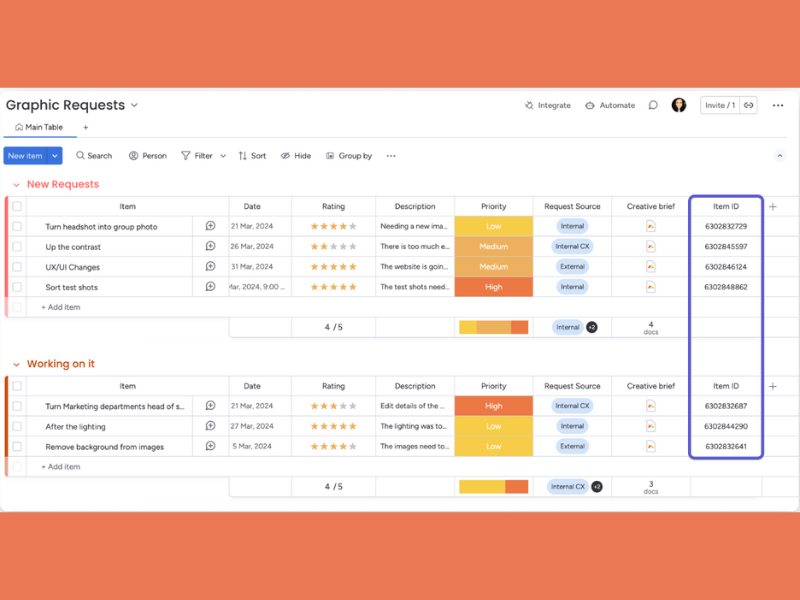
Il 2 marzo, monday.com ha rilasciato la colonna ID elemento, che assegna un identificativo univoco a ciascun elemento di una bacheca. Gli ID possono essere generati casualmente (impostazione predefinita) o definiti dall'utente.
L'opzione "Chiave personalizzata" consente ai team di utilizzare identificativi specifici del progetto, facilitando il monitoraggio e la ricerca degli elementi sulla base di convenzioni familiari.
Questa funzionalità è particolarmente utile per i team che necessitano di un'identificazione precisa, come i responsabili di progetto che monitorano le attività, gli sviluppatori che gestiscono i problemi o i team operativi che controllano le scorte.
Verdetto: Promosso! Automazione + Organizzazione + Personalizzazione = Successo
Note sugli aggiornamenti di Zoho Projects
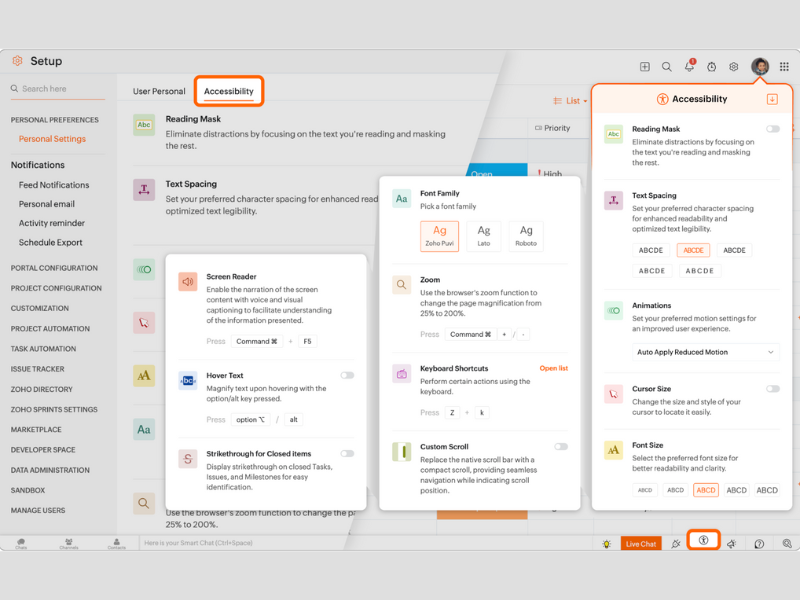
Zoho Projects ha introdotto nuove funzionalità di accessibilità per supportare gli utenti con esigenze visive, uditive e sensoriali. Tra queste figurano una maschera di lettura per ridurre le distrazioni, una spaziatura del testo personalizzabile, controlli per le animazioni e impostazioni regolabili per il cursore e i caratteri. Strumenti aggiuntivi come il supporto per i lettori di schermo, l'ingrandimento del testo al passaggio del mouse e il barramento degli elementi completati migliorano l'usabilità.
Le impostazioni possono essere personalizzate tramite Configurazione, la barra degli strumenti Accesso rapido o la pagina di disconnessione, consentendo agli utenti di personalizzare la propria esperienza.
Questi aggiornamenti supportano gli utenti con disabilità visive, difficoltà cognitive o che utilizzano tecnologie assistive, dimostrando l'impegno di Zoho a favore dell'inclusività e della conformità agli standard di accessibilità.
Verdetto: Ottimo! L'accessibilità sarà sempre un tema attuale e di tendenza.
Note sull'aggiornamento di ClickUp
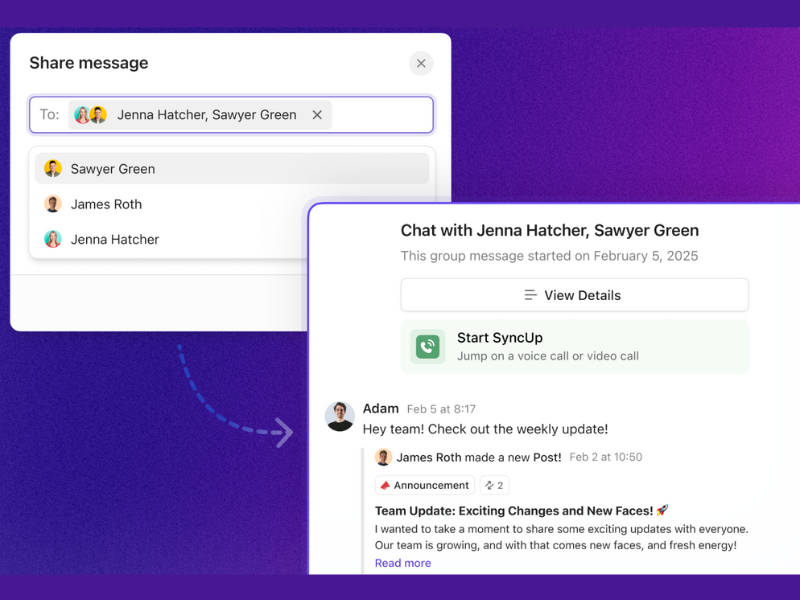
Il 7 febbraio, la versione 3.46 di ClickUp ha aggiunto funzionalità per migliorare la collaborazione e la gestione dei dati. Gli utenti possono ora condividere messaggi nelle nuove chat di gruppo, rendendo più semplice entrare in contatto con i colleghi con cui non avevano interagito in precedenza. Anche la configurazione dei cruscotti è stata semplificata, dando priorità ai campi specifici della posizione durante la selezione dell'origine dati.
L'aggiornamento migliora le funzionalità delle tabelle, consentendo la formattazione in blocco delle celle, così da applicare contemporaneamente stili come il corsivo o il colore a intere righe o colonne.
Questi miglioramenti sono utili per project manager, analisti e team che si affidano a strumenti collaborativi e alla visualizzazione dei dati, poiché semplificano la comunicazione e la personalizzazione.
Verdetto: No. Una comunicazione e un'organizzazione migliori sono sempre positive, ma, rispetto agli aggiornamenti di altri prodotti, queste nuove funzionalità sono un po' basilari.
Note sull'aggiornamento di Productive

Il 18 febbraio, Productive ha lanciato un editor dello stile dei documenti che consente agli utenti di personalizzare i PDF esportati in modo che rispecchino il proprio marchio. Offre il controllo su tipografia, disposizione, formattazione, tabelle e combinazioni di colori, inclusi caratteri, margini, intestazioni e piè di pagina personalizzati.
Un pannello di anteprima in tempo reale mostra aggiornamenti istantanei in documenti come fatture e proposte. Gli utenti possono passare il mouse sulle sezioni per visualizzare in anteprima le modifiche e aggiungere i colori del marchio tramite un selettore o inserendo valori RGB, HSL o HEX esatti.
Questa funzionalità aiuta le aziende a mantenere un aspetto curato e coerente con il marchio nei documenti destinati ai clienti, risultando particolarmente utile per i team di marketing, i responsabili del marchio e il personale amministrativo.
Verdetto: Ottimo! Dopotutto, l'identità del marchio è tutto.
Note sull'aggiornamento di Wrike
Ecco una versione più concisa:
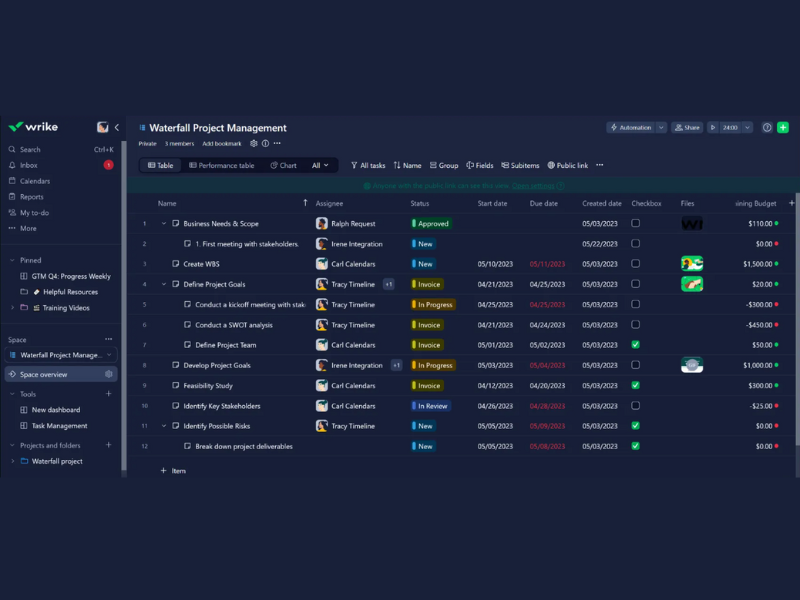
A gennaio 2024, Wrike ha introdotto aggiornamenti per migliorare l'esperienza utente e le funzionalità. La nuova modalità scura riduce l'affaticamento degli occhi e offre un'interfaccia più elegante. La vista tabella ora supporta i link pubblici, consentendo agli utenti di condividere viste specifiche con parti interessate esterne, senza bisogno di un account Wrike.
Anche i moduli di richiesta hanno ricevuto importanti aggiornamenti, tra cui il supporto per tutti i blueprint, i tipi di elemento personalizzati e le domande di follow-up condizionali. Gli utenti possono ora convertire i moduli a livello di account in moduli a livello di spazio, ottenendo maggiore flessibilità.
Questi miglioramenti aiutano i responsabili di progetto e gli amministratori, migliorando la condivisione dei dati, la personalizzazione e l'usabilità complessiva.
Verdetto: No. La modalità scura è ottima per gli occhi, ma non è particolarmente nuova o diversa.
Note sugli aggiornamenti di Miro
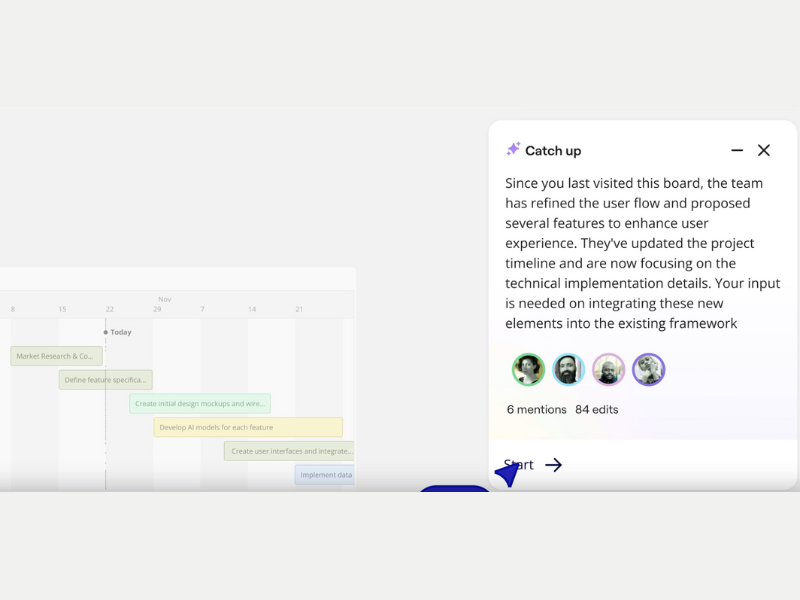
A gennaio 2025, Miro ha lanciato il recupero degli aggiornamenti (BETA), uno strumento basato sull'intelligenza artificiale che riepiloga le modifiche alle bacheche ed evidenzia i commenti principali, aiutando i team a rivedere rapidamente gli aggiornamenti e a stabilire le priorità delle attività senza dover esaminare ogni singola modifica.
Miro ha inoltre introdotto le copie sincronizzate, che consentono agli utenti di incorporare il contenuto di una bacheca in un'altra con sincronizzazione in tempo reale. Gli aggiornamenti apportati all'originale vengono riflessi automaticamente in tutte le istanze, garantendo coerenza e riducendo il lavoro manuale.
Queste funzionalità sono particolarmente utili per responsabili di progetto, designer e team interfunzionali: semplificano la collaborazione, mantengono aggiornate le informazioni e riducono al minimo il tempo dedicato agli aggiornamenti.
Verdetto: Di tendenza! L'intelligenza artificiale sta diventando sempre più comune, ma secondo noi è ancora una nuova tendenza molto in voga.
Note sugli aggiornamenti di Nifty
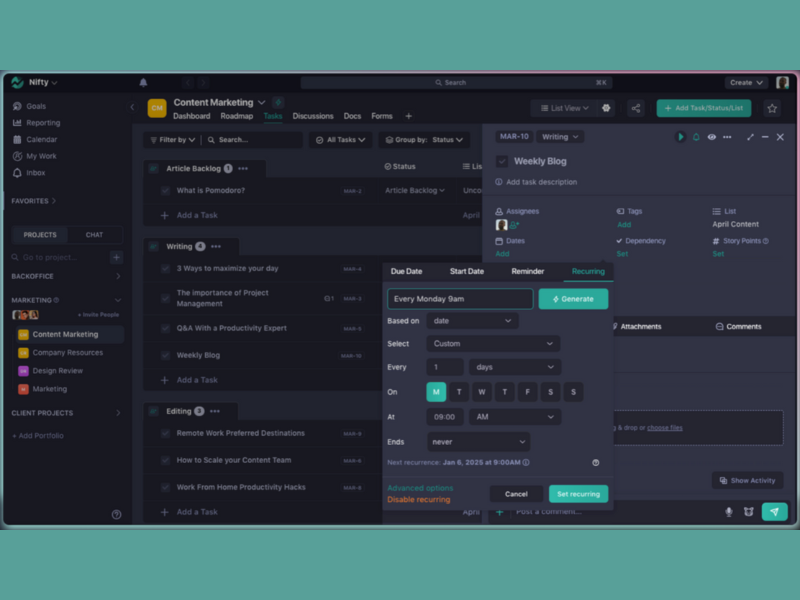
Il 3 gennaio, Nifty ha rilasciato nuove funzionalità per migliorare la pianificazione delle attività e l'automazione dei flussi di lavoro. Le Attività ricorrenti consentono ora agli utenti di automatizzare le attività su base giornaliera, settimanale, mensile o personalizzata, riducendo l'inserimento manuale e favorendo routine coerenti.
Nifty ha inoltre aggiunto un campo Differenza tra date per calcolare il numero di giorni tra due date, aiutando i team a monitorare con maggiore precisione scadenze, durate e attività sensibili al fattore tempo.
Questi aggiornamenti aiutano i responsabili di progetto e i responsabili di team che si affidano a flussi di lavoro ricorrenti e a una pianificazione precisa per rimanere produttivi e rispettare le scadenze.
Verdetto: Di tendenza! L'automazione potrebbe non essere una novità, ma è sicuramente di moda.
Note sugli aggiornamenti di Kintone
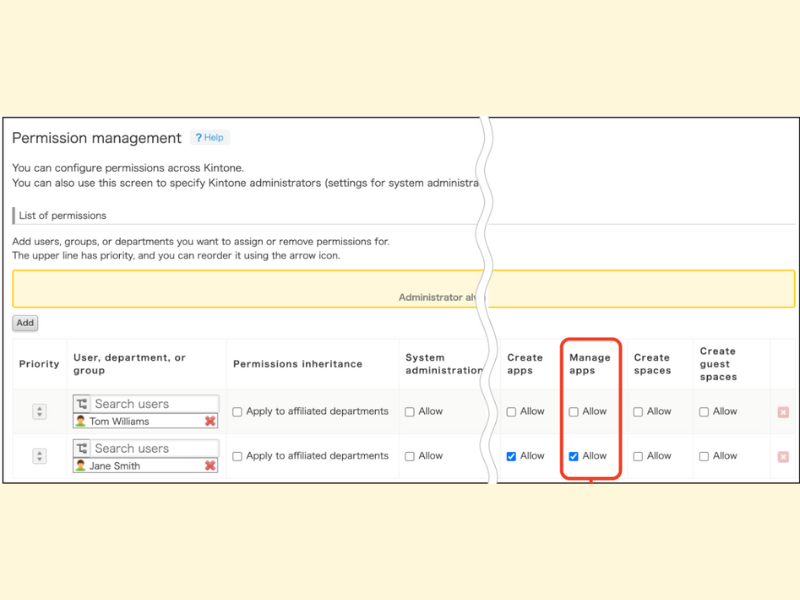
A marzo 2025, Kintone ha introdotto aggiornamenti per migliorare la governance e l'usabilità. Un importante aggiornamento consente agli amministratori di limitare la gestione delle app, garantendo che solo gli utenti autorizzati possano configurare le impostazioni e mantenendo un controllo centralizzato.
Anche le notifiche di errore nella pagina Autorizzazioni per i record sono state migliorate, fornendo messaggi più chiari per semplificare la risoluzione dei problemi.
Queste modifiche offrono agli amministratori di sistema e ai team IT maggiore supervisione, sicurezza ed efficienza nella gestione degli ambienti Kintone.
Verdetto: No. La gestione delle autorizzazioni è fondamentale per la sicurezza, ma non è particolarmente innovativa.
Note sugli aggiornamenti di Teamwork.com
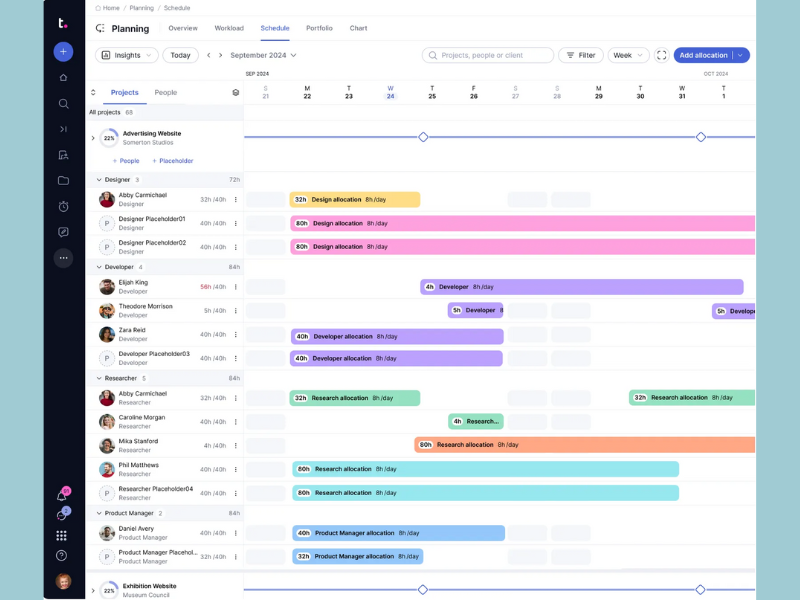
A febbraio 2025, Teamwork ha aggiunto nuove funzionalità per migliorare la gestione dei progetti e la pianificazione delle risorse. I segnaposto consentono agli utenti di assegnare ruoli alle attività senza indicare persone specifiche, aiutando i responsabili a pianificare i carichi di lavoro, evitare un'allocazione eccessiva e supportare le decisioni di assunzione.
Una nuova Visualizzazione clienti offre un pannello di controllo centralizzato con informazioni sulla redditività, sui budget, sulle ore fatturabili e sullo stato generale dei progetti.
Questi aggiornamenti aiutano i responsabili di progetto, le squadre finanziarie e i responsabili dei clienti ad allocare meglio le risorse e a monitorare le prestazioni dei clienti.
Verdetto: Eccellente! Più informazioni puoi fornire a te stesso e al cliente, meglio è.
Note sugli aggiornamenti di Height
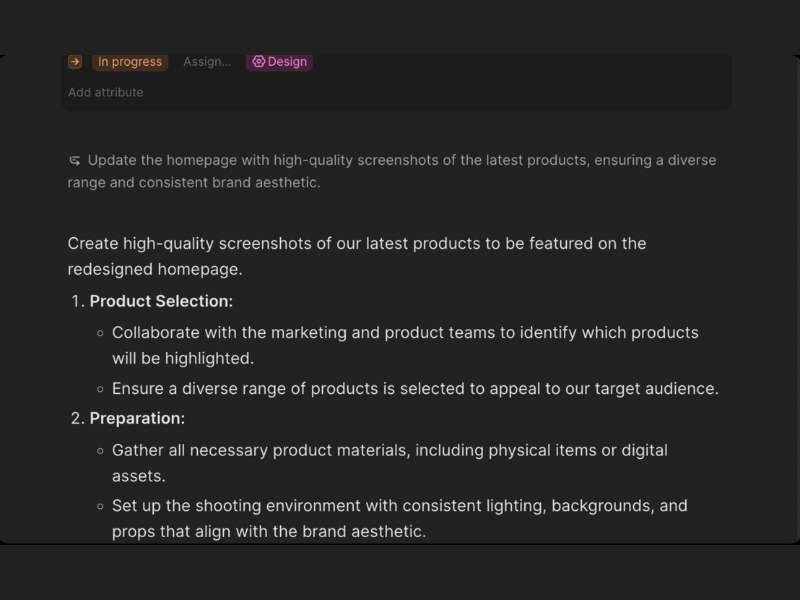
A gennaio 2025, Height ha rilasciato aggiornamenti per potenziare la gestione dei progetti e la collaborazione. I blocchi di riepilogo in tempo reale ora generano riepiloghi aggiornati nella parte superiore di progetti, attività e documenti, mantenendo le squadre informate senza aggiornamenti manuali.
Le attività a cui sono state aggiunte sottoattività vengono ora convertite automaticamente in progetti, aggiungendo struttura e abilitando funzionalità come i controlli dei progetti. Anche il Menu di condivisione riprogettato chiarisce le autorizzazioni dei membri rispetto a quelle degli ospiti e semplifica la condivisione tramite e-mail o link.
Queste funzionalità aiutano i responsabili di progetto e le squadre a semplificare la gestione delle attività, migliorare la visibilità e collaborare in modo più efficiente.
Verdetto: Eccellente! Le migliori automazioni offrono chiarezza e fanno risparmiare tempo, proprio come queste nuove funzionalità.
E adesso?
Iscriviti alla newsletter di DPM per ricevere aggiornamenti regolari ogni volta che pubblichiamo nuove guide pratiche e articoli sulla gestione digitale dei progetti.