

I 10 migliori strumenti di gestione dei progetti per le piccole imprese 2026

10 Il miglior software di gestione dei progetti per le piccole imprese: selezione


Il miglior software di gestione dei progetti per le piccole imprese ti aiuta a organizzare le attività, fissare le scadenze, assegnare le responsabilità e mantenere tutti aggiornati. Senza lo strumento giusto, finirai per destreggiarti tra infinite conversazioni via email o fogli di calcolo sparsi e avrai difficoltà a monitorare i progressi, condividere file e comunicare con il tuo team.
Da oltre 20 anni lavoro come project manager presso agenzie e in piccoli team e so quanto lo strumento giusto possa rendere più fluidi i progetti, ridurre lo stress e liberare tempo da dedicare al lavoro strategico. Ecco le mie scelte per il miglior software di gestione dei progetti per le piccole imprese, per aiutarti ad affrontare le principali sfide della gestione dei progetti e trovare la soluzione più adatta ai tuoi team, progetti e alla tua attività.
Perché fidarsi dei nostri consigli sui software
Il nostro team testa e recensisce software dal 2012. In quanto project manager noi stessi, sappiamo quanto sia difficile — e importante — scegliere il software giusto.
Per questa guida, abbiamo valutato gli strumenti attraverso test pratici e ricerche indipendenti, assegnando un punteggio agli strumenti in base ai nostri criteri di selezione. Ci basiamo inoltre sulle competenze di leader di pensiero del settore e di professionisti attivi nella gestione dei progetti.
Le nostre recensioni riflettono il nostro giudizio editoriale umano, non un discorso di vendita.
Revisori esperti:
Tabella comparativa: strumenti di gestione dei progetti per le piccole imprese
Confronta i prezzi e le specifiche principali dei miei migliori strumenti di gestione dei progetti per le piccole imprese nella tabella seguente.
| Tool | Best For | Trial Info | Price | ||
|---|---|---|---|---|---|
| 1 | Ideale per flessibilità e integrazioni | 14 giorni di prova gratuita | A partire da $6/utente/mese | Website | |
| 2 | I migliori strumenti flessibili per l'allocazione del lavoro | Prova gratuita di 10 giorni. Non è richiesta alcuna carta di credito | A partire da $4/utente/mese, con fatturazione annuale | Website | |
| 3 | Ideale per la gestione dinamica del lavoro senza codice | Prova gratuita di 30 giorni | Prezzi su richiesta | Website | |
| 4 | Ideale per suddivisioni complesse dei progetti | Piano gratuito disponibile | A partire da $10.95/utente/mese | Website | |
| 5 | Ideale per brainstorming, ideazione e gestione delle attività | Prova gratuita + piano gratuito + demo gratuita disponibili | A partire da $13/utente/mese (con fatturazione annuale) | Website | |
| 6 | Ideale per flussi di lavoro del team personalizzabili | Piano gratuito + demo gratuita disponibile | A partire da $5/utente/mese | Website | |
| 7 | Ideale per gestire clienti e attività in un unico hub | Prova gratuita di 14 giorni + demo gratuita + piano gratuito disponibile | A partire da $10/utente/mese (con fatturazione annuale) | Website | |
| 8 | Ideale per la definizione degli obiettivi e il monitoraggio degli OKR | Prova gratuita di 30 giorni | Da $10.99/utente/mese | Website | |
| 9 | Ideale per chi è alle prime armi con la gestione dei progetti | Prova gratuita di 30 giorni | A partire da 99 $/mese per utenti illimitati | Website | |
| 10 | Ideale per il monitoraggio e gli approfondimenti sui progetti in tempo reale | Prova gratuita di 30 giorni | A partire da $15/utente/mese | Website |


Recensioni del miglior software di gestione dei progetti per le piccole imprese
Ecco una breve descrizione di ciascuno dei migliori software di gestione per le piccole imprese inclusi nella mia lista, insieme a schermate, funzionalità principali e casi d’uso più indicati.

Ideale per flessibilità e integrazioni
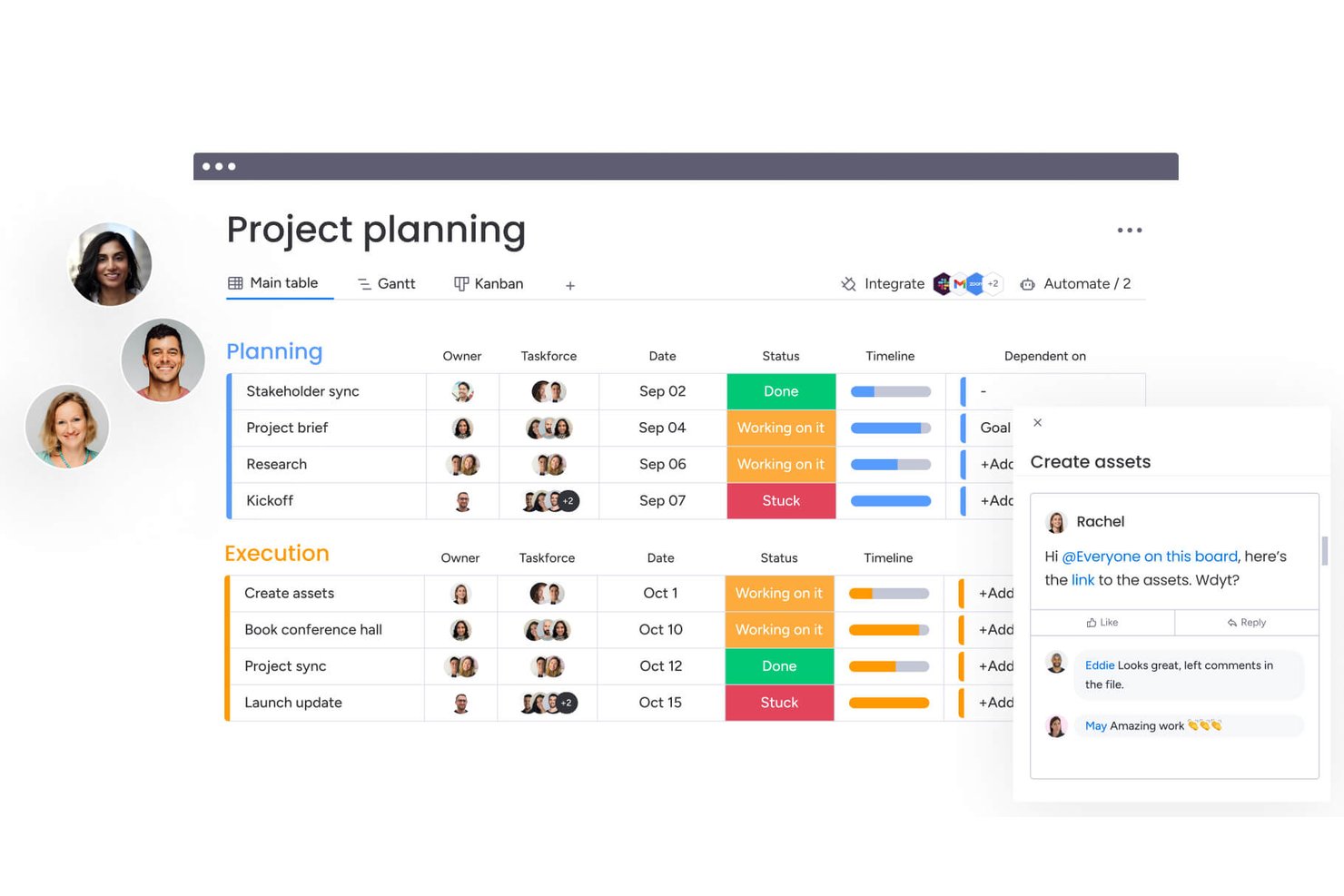
monday AI Workspace è una piattaforma di gestione dei progetti che combina bacheche personalizzabili, viste di pianificazione visiva, automazione senza codice e un centro di integrazioni con oltre 850 applicazioni.
Per chi è più adatto monday AI Workspace?
monday AI Workspace è adatto ai titolari di piccole imprese e ai responsabili dei team che hanno bisogno di una configurazione altamente adattabile per il monitoraggio dei progetti, senza dover ricorrere al personale tecnico per implementarla.
Perché ho scelto monday AI Workspace
monday AI Workspace si è guadagnato un posto nella mia rosa di candidati perché l'automazione senza codice e un centro di integrazioni con oltre 850 applicazioni consentono ai piccoli team di creare flussi di lavoro connessi senza aver bisogno di uno sviluppatore. Mi piace soprattutto il modo in cui il generatore di automazioni gestisce il lavoro reale: quando lo stato di un'attività cambia in 'Completato', può inviare automaticamente una notifica a un cliente, spostare l'elemento in un nuovo gruppo e assegnare un'attività successiva con una sola regola. La funzione delle bacheche condivisibili consente inoltre di offrire ai clienti una visualizzazione chiara dei progressi del progetto, con autorizzazioni controllate, senza esporre le colonne interne.
Funzionalità principali di monday AI Workspace
- Colonne dello stato: I campi di stato personalizzabili consentono di impostare e aggiornare gli stati delle attività in ogni bacheca, offrendo all'intero team una visione condivisa dell'avanzamento del lavoro.
- Oltre 200 modelli: I modelli di bacheca predefiniti coprono casi d'uso dal marketing all'informatica, così puoi avviare un progetto senza doverlo creare da zero.
- Accesso degli ospiti: Invita collaboratori esterni, come clienti o collaboratori a contratto, solo a bacheche specifiche, mantenendo separato il lavoro interno da ciò che possono vedere.
- Colonna per il monitoraggio del tempo: Un cronometro integrato di avvio/arresto nel piano Pro registra le ore direttamente su ogni attività, con inserimento manuale e riepilogo dagli elementi secondari all'elemento principale.
Integrazioni di monday AI Workspace
monday AI Workspace offre oltre 850 integrazioni e applicazioni, tra cui Slack, Gmail, Google Calendar, Microsoft Teams, HubSpot, QuickBooks, GitHub e Dropbox. Supporta inoltre connessioni personalizzate tramite la propria API/SDK e Zapier.
Pros and Cons
Pros:
- Le bacheche si adattano ai flussi di lavoro in evoluzione
- Gli aggiornamenti delle attività mantengono file e decisioni riuniti
- I modelli aiutano i team ad avviare i progetti più rapidamente
Cons:
- Gli strumenti per tempistiche e automazione richiedono un piano superiore
- I pannelli di controllo e i rapporti richiedono una configurazione accurata
New Product Updates from monday AI Workspace
monday AI Workspace Adds Human Approval Routing
monday AI Workspace adds a human-in-the-loop approval block to AI Workflows, sending approval requests and routing workflow paths based on responses. For more information, visit monday AI Workspace's official site.

I migliori strumenti flessibili per l'allocazione del lavoro
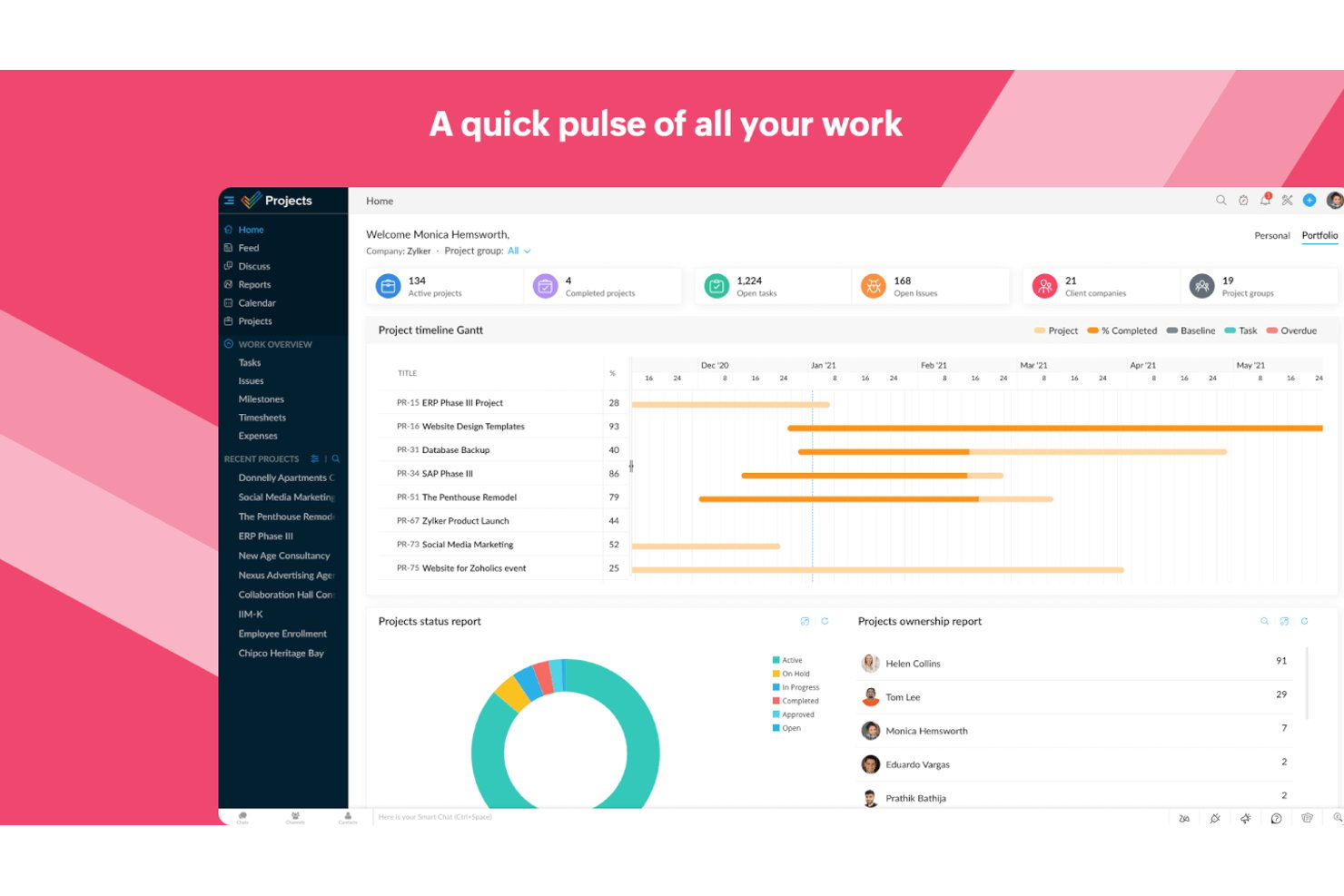
Zoho Projects è una piattaforma di gestione dei progetti per piccoli team che riunisce in un unico luogo il monitoraggio delle attività, i diagrammi di Gantt, la gestione delle risorse, il monitoraggio del tempo e l'automazione dei flussi di lavoro.
Per chi è più adatto Zoho Projects?
Zoho Projects è una soluzione particolarmente adatta ai piccoli team che fanno già parte dell'ecosistema Zoho e hanno bisogno di gestire i carichi di lavoro, monitorare il tempo e mantenere i progetti in corso senza sostenere costi da grandi aziende.
Perché ho scelto Zoho Projects
Zoho Projects rientra nella mia lista ristretta perché i suoi strumenti di gestione delle risorse offrono ai piccoli team una visione davvero chiara di chi sta gestendo troppo lavoro, prima che diventi un problema. Mi piace il fatto che sia possibile visualizzare le ore pianificate rispetto a quelle effettive per persona e riassegnare le attività direttamente dal rapporto sul carico di lavoro. L'integrazione con Zoho People fa un passo in più, consentendo di verificare la disponibilità del personale prima di assegnare qualsiasi attività, così non è necessario indovinare chi ha disponibilità.
Funzionalità principali di Zoho Projects
- Modelli di attività: Definisci le fasi di approvazione e assegna i membri del team a passaggi specifici del flusso di lavoro per mantenere le attività all'interno di un processo strutturato.
- Monitoraggio del tempo integrato: Registra le ore fatturabili e non fatturabili direttamente sulle attività utilizzando cronometri o inserimenti manuali, quindi invia i fogli presenze approvati a Zoho Invoice o Zoho Books.
- Generatore di automazioni: Configura regole del flusso di lavoro, regole aziendali e SLA che attivano automaticamente azioni o escalation quando vengono soddisfatte determinate condizioni delle attività.
- Rapporti tra progetti: Riunisci in un unico rapporto i dati relativi ad attività, problemi e budget provenienti da più progetti per monitorare le prestazioni complessive del team e la spesa.
Integrazioni di Zoho Projects
Zoho Projects offre oltre 20 integrazioni native, tra cui Zoho CRM, Zoho Books, Zoho Invoice, Zoho People, Google Sheets, Microsoft Teams, Slack, GitHub e Figma. Supporta inoltre più di 50 integrazioni del marketplace e Zapier.
Pros and Cons
Pros:
- I rapporti sul carico di lavoro evidenziano i membri del team sovraccarichi
- Il confronto tra ore pianificate ed effettive guida le riassegnazioni
- Le dipendenze dei diagrammi di Gantt chiariscono le scadenze variabili
Cons:
- La configurazione dei progetti può richiedere impostazioni ripetitive del team
- Le schermate dense possono rendere meno visibili le azioni di routine
New Product Updates from Zoho Projects
Zoho Projects Adds CodeX Scripts for Custom Modules
Zoho Projects now supports CodeX Scripts for custom modules, enabling conditional logic and rules for creating, updating, and deleting records. For more information, visit Zoho Projects' official site.
 .
.
Ideale per la gestione dinamica del lavoro senza codice
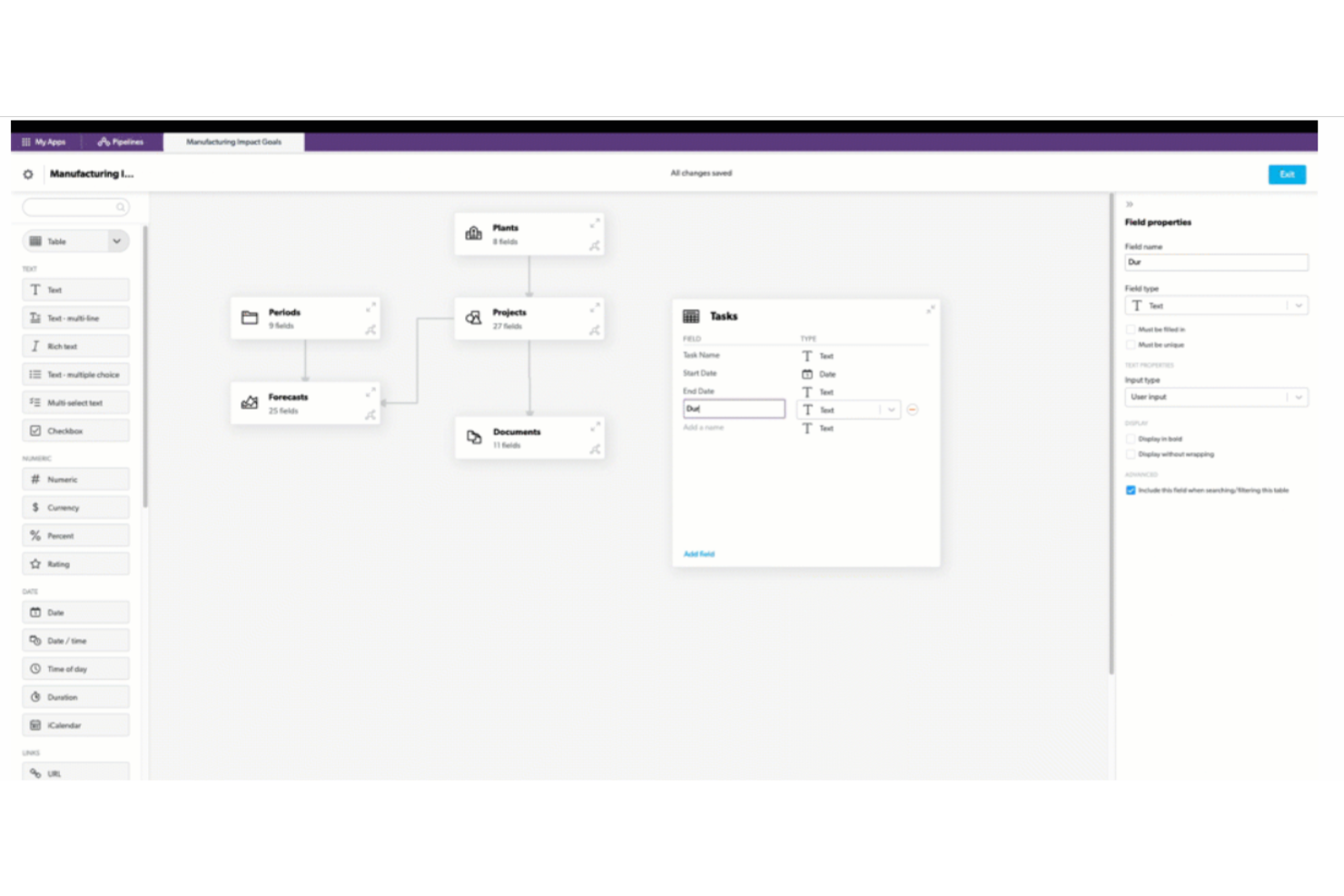
Quickbase è una piattaforma per la creazione di app senza codice che consente ai team di progettare flussi di lavoro personalizzati per la gestione dei progetti, automatizzare l'instradamento delle attività e monitorare il lavoro su più progetti tramite dashboard, report e viste configurabili.
Per chi è più adatto Quickbase?
Quickbase è particolarmente adatto ai piccoli team dei settori caratterizzati da un intenso utilizzo delle operazioni, come edilizia, servizi sul campo o sanità, che devono sostituire fogli di calcolo frammentati con un'app per i flussi di lavoro creata su misura.
Perché ho scelto Quickbase
Ho scelto Quickbase come una delle soluzioni migliori perché consente ai piccoli team di sostituire un groviglio di fogli di calcolo con un'app per i flussi di lavoro creata su misura, senza scrivere una sola riga di codice. Apprezzo in particolare la funzionalità Flussi di lavoro IA, che consente di descrivere un processo in linguaggio naturale e di affidare a Quickbase la creazione dell'automazione. Anche il modello App iniziale per la gestione dei progetti offre ai team un punto di partenza concreto, con assegnazione delle attività, controlli di avanzamento e instradamento delle approvazioni già integrati.
Caratteristiche principali di Quickbase
- Pipeline di Quickbase: Un progettista visivo di flussi di lavoro con funzionalità di trascinamento che collega le app Quickbase a strumenti esterni come Slack, QuickBooks e Jira.
- Autorizzazioni basate sui ruoli: I controlli di accesso possono essere impostati a livello di app, modulo o campo per gestire ciò che ogni membro del team può visualizzare e modificare.
- Dashboard in tempo reale: Le dashboard personalizzate mostrano i dati aggiornati dei progetti, il rischio del portafoglio e il carico di lavoro delle risorse su tutte le attività in corso.
- Libreria di modelli per le app: Quickbase Exchange offre modelli preconfigurati per la gestione dei progetti, il monitoraggio del tempo e le operazioni sul campo, che i team possono implementare e adattare.
Integrazioni di Quickbase
Quickbase offre oltre 40 canali di integrazione preconfigurati, tra cui Slack, Microsoft Teams, QuickBooks, Google, Dropbox, Salesforce, Jira e Procore. Fornisce inoltre API RESTful e Tabelle connesse per integrazioni personalizzate e dati sincronizzati.
Pros and Cons
Pros:
- Le app personalizzate si adattano ai flussi di lavoro dei progetti insoliti
- I modelli riuniscono i fogli di calcolo dei progetti frammentati
- Le dashboard mostrano i rischi del portafoglio e i carichi di lavoro delle risorse
Cons:
- I team devono configurare le app prima di monitorare il lavoro
- Le schermate affollate complicano la collaborazione quotidiana

Quire
Ideale per suddivisioni complesse dei progetti
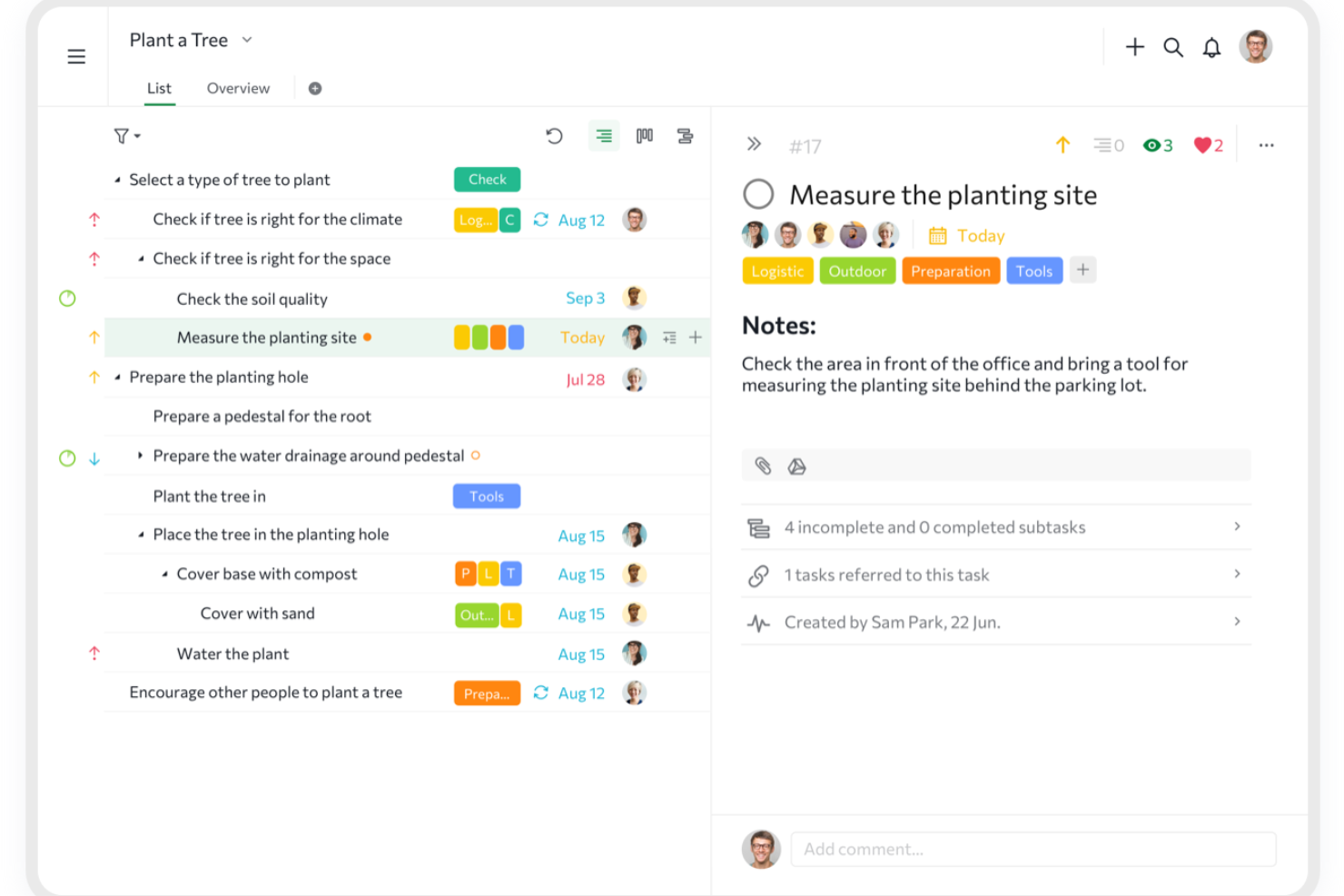
Quire è uno strumento di gestione dei progetti basato su gerarchie illimitate di attività nidificate, che combina viste elenco, Kanban, sequenza temporale e dashboard con funzionalità di collaborazione integrate come canali di chat, documenti e monitoraggio tra progetti.
Per chi è più adatto Quire?
Quire è particolarmente adatto ai responsabili delle operazioni di piccole imprese e ai team leader che devono suddividere grandi progetti in attività organizzate su più livelli senza sostenere costi da grandi aziende.
Perché ho scelto Quire
Ho scelto Quire come uno dei migliori strumenti perché la sua gerarchia illimitata di attività nidificate è davvero diversa da qualsiasi altra soluzione a questo livello di prezzo. Puoi suddividere un progetto in attività, sottoattività e sotto-sottoattività per tutti i livelli necessari al tuo lavoro, il che lo rende particolarmente utile quando un singolo risultato comprende una dozzina di elementi interconnessi. Mi piace molto anche la funzionalità Cartelle intelligenti, che riunisce le attività di più progetti in un'unica vista, così nulla sfugge tra i diversi flussi di lavoro.
Funzionalità principali di Quire
- Canali di chat integrati: Ogni progetto dispone di canali di chat dedicati, così le conversazioni del team restano collegate al lavoro e non sepolte nelle e-mail.
- Link di condivisione pubblici: Genera link di progetto di sola visualizzazione per clienti o stakeholder, senza che sia richiesto un account, con una data di scadenza opzionale.
- Monitoraggio del tempo con timer Pomodoro: Registra le ore direttamente nelle attività usando un cronometro o un timer Pomodoro, con report sul tempo disponibili nei piani a pagamento.
- Oltre 20 modelli di progetto: Una galleria gratuita di modelli copre casi d'uso che vanno dai progetti agili ai registri dei rischi, così il tuo team può iniziare rapidamente.
Integrazioni di Quire
Quire offre integrazioni native con Google Drive, Microsoft OneDrive, Microsoft Teams, Slack, GitHub, Dropbox, Box e Google Calendar. Supporta inoltre connessioni personalizzate tramite la sua API REST e Zapier.
Pros and Cons
Pros:
- Gli alberi di attività profondi fanno chiarezza nelle suddivisioni complesse dei progetti
- Passare dalla struttura al Kanban è semplice
- Commenti e chat mantengono le discussioni del team vicino alle attività
Cons:
- Nessun generatore nativo visivo di regole di automazione
- Il lavoro da mobile dipende da una connettività affidabile
New Product Updates from Quire
Quire Adds Custom Field Locking and Comment Reaction API Support
Quire adds custom field locking and API support for reading and setting emoji reactions on comments. These updates give teams more control over field data and expand comment interaction options for developers. For more information, visit Quire’s official site.
 .
.
Ideale per brainstorming, ideazione e gestione delle attività

MeisterTask è uno strumento di gestione dei progetti basato su Kanban che combina monitoraggio delle attività, collaborazione del team, automazione e note in un unico spazio di lavoro.
Per chi è più adatto MeisterTask?
MeisterTask è adatto ai piccoli team che desiderano uno spazio di lavoro intuitivo basato su Kanban, che combini monitoraggio delle attività, note e automazione senza una curva di apprendimento ripida.
Perché ho scelto MeisterTask
Ho scelto MeisterTask come uno dei migliori perché la sua integrazione con MindMeister supporta concretamente il brainstorming e l'ideazione in un modo che la maggior parte degli strumenti per le attività non offre. È possibile allegare mappe mentali direttamente alle attività e trasformare un ramo della mappa mentale in un'attività con un solo clic, rendendo semplice passare dall'idea all'esecuzione senza cambiare contesto. Il generatore di automazioni senza codice incluso nei piani Pro gestisce inoltre automaticamente i passaggi ripetitivi, come lo spostamento delle attività tra progetti o l'attivazione di notifiche.
Funzionalità principali di MeisterTask
- Relazioni tra attività: Contrassegna le attività come correlate, duplicate, bloccate o bloccanti, così il team può visualizzare direttamente sulla bacheca le dipendenze.
- Conversione delle email in attività: Trasforma le email in arrivo da Gmail o Outlook in attività senza uscire dalla posta in arrivo.
- Monitoraggio del tempo integrato: Registra il tempo dedicato a qualsiasi attività con un timer o tramite inserimento manuale in ogni piano, compreso quello gratuito.
- Galleria di modelli: Scegli tra oltre 60 modelli di progetto già pronti, tra cui bacheche agili, strumenti per il monitoraggio del budget e la pianificazione delle risorse, disponibili in tutti i piani.
Integrazioni di MeisterTask
MeisterTask offre integrazioni native con Google Workspace, Slack, Microsoft Teams, MindMeister, Google Drive, Dropbox, GitHub e Zendesk. Il piano Pro include un'API per le integrazioni personalizzate e MeisterTask supporta anche Zapier, Pabbly Connect, Unito e Integrately.
Pros and Cons
Pros:
- Le mappe mentali trasformano le idee in attività assegnate
- I modelli aiutano i piccoli team a iniziare in modo organizzato
- Le relazioni tra attività chiariscono il lavoro bloccato
Cons:
- La pianificazione tramite sequenza temporale richiede l'accesso a un piano di livello superiore
- I controlli limitati della bacheca ostacolano i flussi di lavoro in evoluzione

ClickUp
Ideale per flussi di lavoro del team personalizzabili
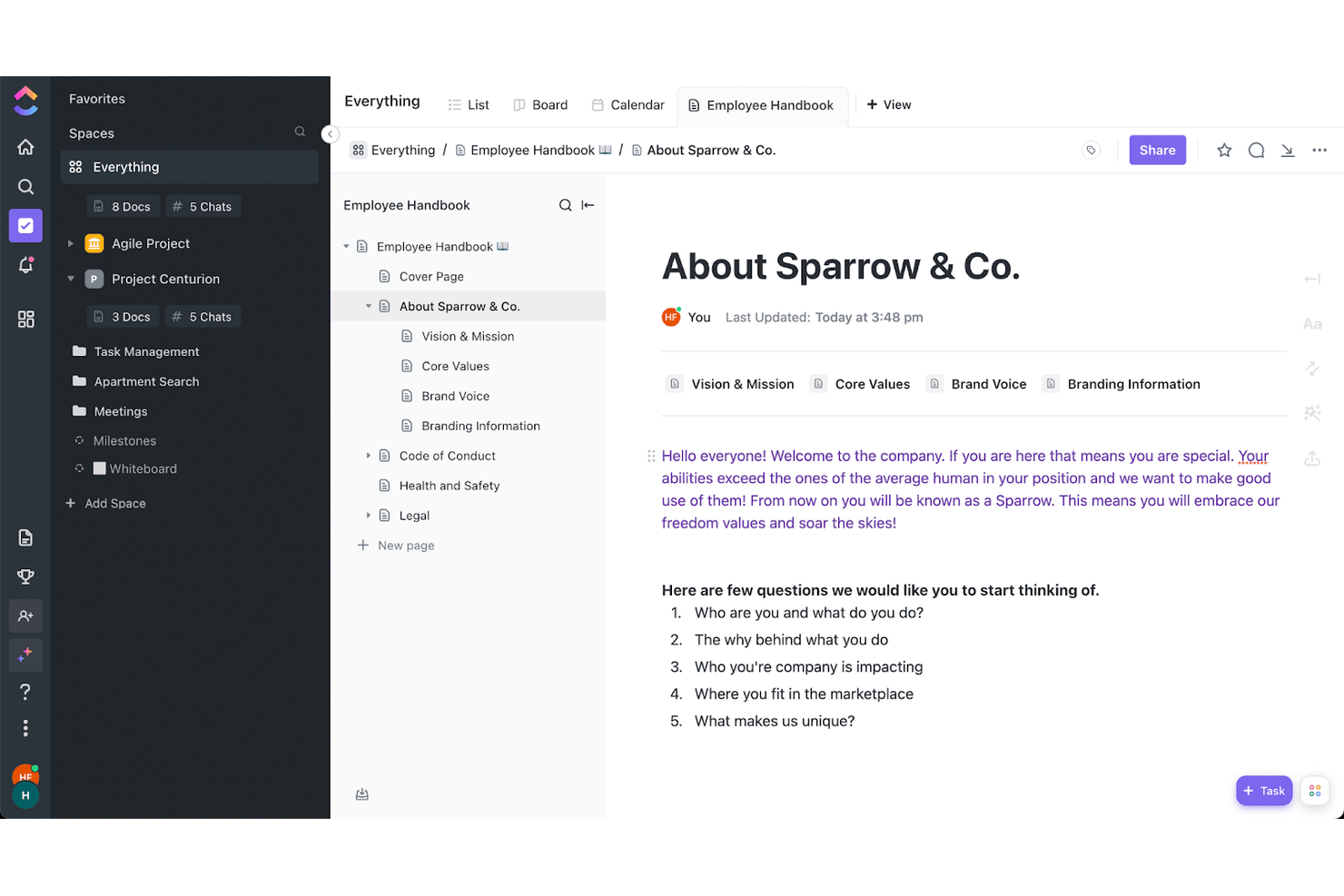
ClickUp è una piattaforma di gestione dei progetti che riunisce il monitoraggio delle attività, le visualizzazioni per la pianificazione, il monitoraggio del tempo e la collaborazione del team in un unico spazio di lavoro altamente personalizzabile.
Per chi è più indicato ClickUp?
ClickUp è una soluzione ideale per i piccoli team che hanno bisogno di un'unica piattaforma per gestire attività, documenti, monitoraggio del tempo e reportistica per i clienti senza pagare diversi strumenti.
Perché ho scelto ClickUp
ClickUp si è guadagnato un posto nella mia lista ristretta perché la profondità di personalizzazione che offre ai piccoli team non ha eguali in questa fascia di prezzo. Mi piace il fatto che sia possibile creare lo spazio di lavoro esattamente secondo il modo di lavorare del proprio team, che si tratti di una bacheca Kanban per il lavoro di sprint, di un diagramma di Gantt con monitoraggio delle dipendenze per i progetti dei clienti o di una mappa mentale per la pianificazione. Il generatore di automazioni 'Quando → Allora' consente inoltre di configurare l'assegnazione delle attività e gli aggiornamenti dello stato senza scrivere una sola riga di codice.
Funzionalità principali di ClickUp
- Monitoraggio nativo del tempo: Registra le ore direttamente nelle attività con timer integrati, contrassegna il tempo come fatturabile, imposta le tariffe orarie e invia i fogli presenze settimanali per l'approvazione del responsabile.
- Dashboard per i clienti: Condividi esternamente dashboard di progetto aggiornate in tempo reale con autorizzazioni dettagliate, così i clienti possono visualizzare i progressi senza dover accedere a ClickUp.
- Oltre 1.000 integrazioni: Collega ClickUp direttamente a strumenti come Slack, GitHub, HubSpot, Figma e Google Drive dall'hub delle integrazioni.
- Documenti e wiki collaborativi: Crea e modifica documenti all'interno di ClickUp, collegali alle attività e usali come base di conoscenza condivisa per il tuo team.
Integrazioni di ClickUp
ClickUp offre più di 1.000 integrazioni native, tra cui Slack, Google Drive, HubSpot, GitHub, Figma, Google Calendar e Microsoft Teams. Supporta inoltre integrazioni personalizzate tramite la sua API e Zapier.
Pros and Cons
Pros:
- Le attività illimitate aiutano a mantenere organizzati i piccoli team
- Il monitoraggio e l'approvazione del tempo fatturabile sono adatti ai freelance
- Le visualizzazioni flessibili supportano i cambiamenti nei piani di progetto
Cons:
- L'interfaccia ricca di elementi può disorientare gli utenti alle prime armi
- Gli spazi di lavoro di grandi dimensioni possono presentare rallentamenti nella dashboard
New Product Updates from ClickUp
ClickUp Adds Meetings Hub, Super Agent Templates, and ZoomInfo Integration
ClickUp adds a searchable Meetings Hub, new ways to clone and template Super Agents, and a ZoomInfo integration through the App Center. These updates improve meeting retrieval, agent reuse, and access to sales intelligence. For more information, visit ClickUp’s official site.

Nifty
Ideale per gestire clienti e attività in un unico hub
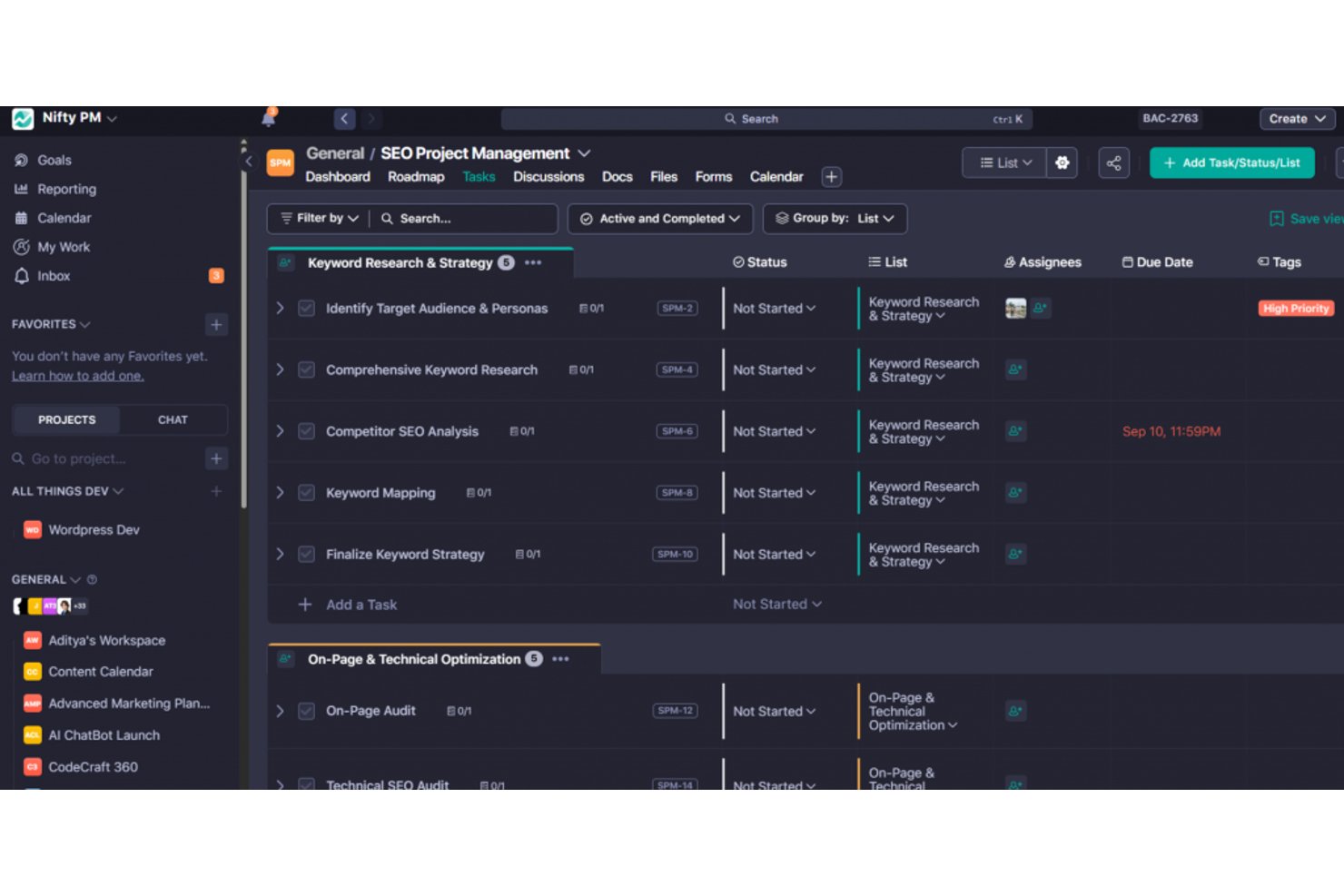
Nifty è una piattaforma per la gestione dei progetti che riunisce attività, traguardi, roadmap, chat del team, documenti e accesso dei clienti in un unico spazio di lavoro.
A chi è più adatto Nifty?
Nifty è particolarmente adatto a freelance e piccoli team che devono gestire il lavoro per i clienti e le attività interne senza dover utilizzare diversi strumenti.
Perché ho scelto Nifty
Ho incluso Nifty tra le mie scelte migliori perché è uno dei pochi strumenti che mantiene davvero il lavoro per i clienti e le attività interne nello stesso posto, senza costringerti a collegare strumenti separati. Apprezzo in particolare il funzionamento dell'accesso ospiti: i clienti entrano in progetti specifici, non vedono i traguardi interni e possono persino ricevere attività o approvarle tramite lo stato 'Approvazione ospite'. I link pubblici ai progressi consentono ai clienti di monitorare la consegna senza dover creare un account.
Funzionalità principali di Nifty
- Monitoraggio dei traguardi: Imposta i traguardi del progetto con un riepilogo automatico dei progressi, così puoi vedere a colpo d'occhio lo stato delle consegne di ogni progetto.
- Generatore di flussi di lavoro AI: Descrivi un progetto in linguaggio naturale e Nifty genera per te gli elenchi di attività, gli stati, i campi personalizzati e le visualizzazioni.
- Monitoraggio del tempo e ore fatturabili: Registra il tempo per attività o membro del team, monitora i costi ed esporta i fogli delle ore in formato CSV o PDF direttamente dalla piattaforma.
- Generatore di automazioni senza codice: Crea regole se/allora con modelli preimpostati per assegnare automaticamente le attività, impostare le scadenze, pubblicare messaggi o spostare il lavoro quando vengono soddisfatte le condizioni di attivazione.
Integrazioni di Nifty
Nifty offre integrazioni native con Slack, Google Drive e Calendar, Microsoft 365, Zoom, Webex, Harvest, Miro, Typeform e Figma. Supporta inoltre un'API aperta e Zapier.
Pros and Cons
Pros:
- Attività, traguardi e dipendenze restano collegati
- I clienti vedono solo il lavoro dei progetti a cui sono stati invitati
- I modelli e le importazioni velocizzano la configurazione dei piccoli team
Cons:
- I revisori segnalano bug che compromettono l'affidabilità delle attività
- Le notifiche sono inaffidabili e i report non sono abbastanza dettagliati

Asana
Ideale per la definizione degli obiettivi e il monitoraggio degli OKR
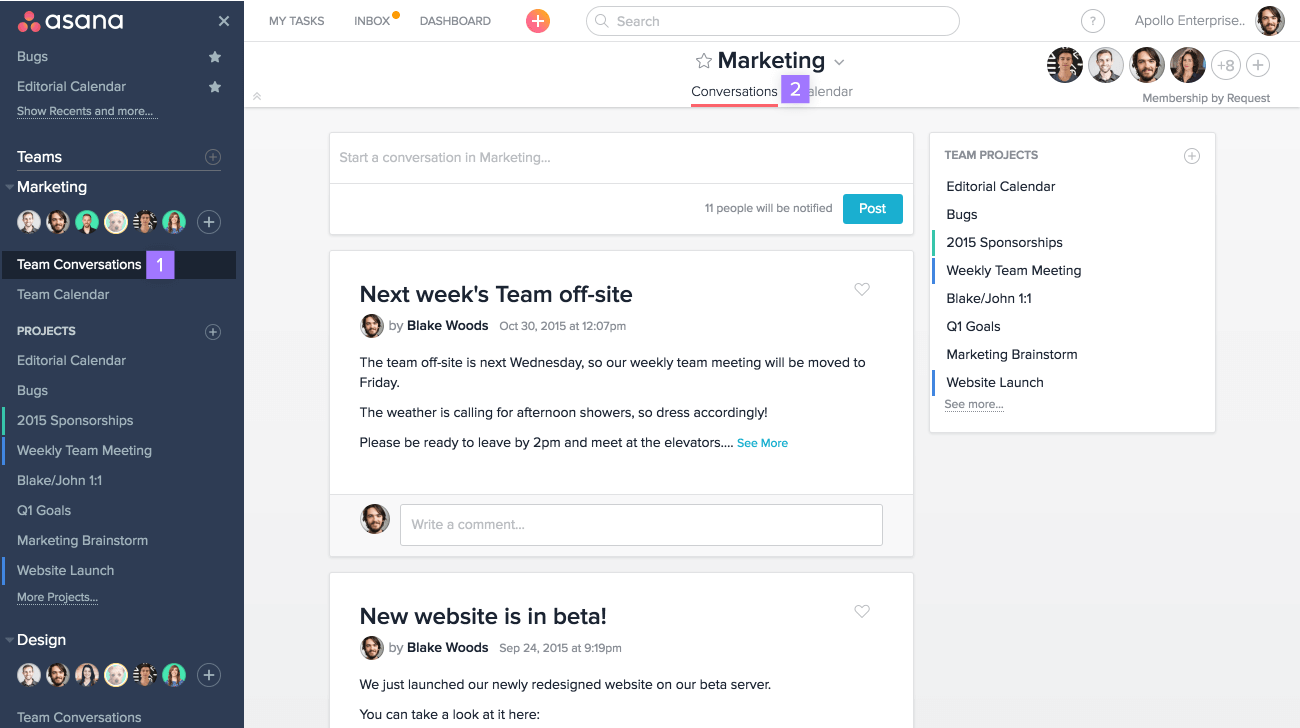
Asana è una piattaforma di gestione dei progetti che combina monitoraggio delle attività, definizione degli obiettivi, automazione dei flussi di lavoro e reportistica interfunzionale in un unico spazio di lavoro.
Per chi è più adatta Asana?
Asana è adatta ai titolari di piccole imprese e ai responsabili delle operazioni che devono collegare il lavoro quotidiano agli obiettivi aziendali più ampi, in particolare ai team che gestiscono gli OKR tra diversi reparti.
Perché ho scelto Asana
Asana si è guadagnata un posto nella mia selezione perché la sua infrastruttura per la definizione degli obiettivi è più avanzata di quella offerta dalla maggior parte degli strumenti di gestione dei progetti. Apprezzo in particolare il modo in cui gli obiettivi si collegano direttamente ai progetti e ai portafogli attivi, così l'avanzamento viene aggiornato automaticamente man mano che il lavoro procede, senza dover effettuare controlli manuali. Puoi strutturare gli OKR a livello aziendale, di team o individuale, con sotto-obiettivi che confluiscono negli obiettivi principali su periodi trimestrali o personalizzati.
Funzionalità principali di Asana
- Gestione su più progetti: assegna una singola attività a più progetti contemporaneamente, così il lavoro rimane visibile tra i team senza duplicazioni.
- Regole di automazione: attiva azioni automatiche in base alle modifiche delle attività, alle scadenze o all'invio di moduli per ridurre il follow-up manuale.
- Modelli predefiniti: scegli tra modelli di progetto già pronti per marketing, risorse umane, IT e operazioni, per avviare rapidamente nuovi progetti.
- Ospiti gratuiti illimitati: invita collaboratori esterni con i piani Starter e superiori senza aggiungere postazioni a pagamento.
Integrazioni di Asana
Asana elenca oltre 100 integrazioni, tra cui Slack, Microsoft Teams, Google Drive, Microsoft 365, Jira Cloud, Azure DevOps, GitHub, HubSpot e Salesforce. Offre inoltre un'API pubblica e la connettività con Zapier.
Pros and Cons
Pros:
- Gli obiettivi si collegano direttamente all'avanzamento dei progetti attivi
- L'assegnazione delle attività riduce la necessità di sollecitare i responsabili
- Le automazioni riducono le attività amministrative ripetitive dei progetti
Cons:
- Gli obiettivi e i portafogli richiedono piani di livello superiore
- Le notifiche frequenti possono ingombrare le caselle di posta dei team

Basecamp
Ideale per chi è alle prime armi con la gestione dei progetti
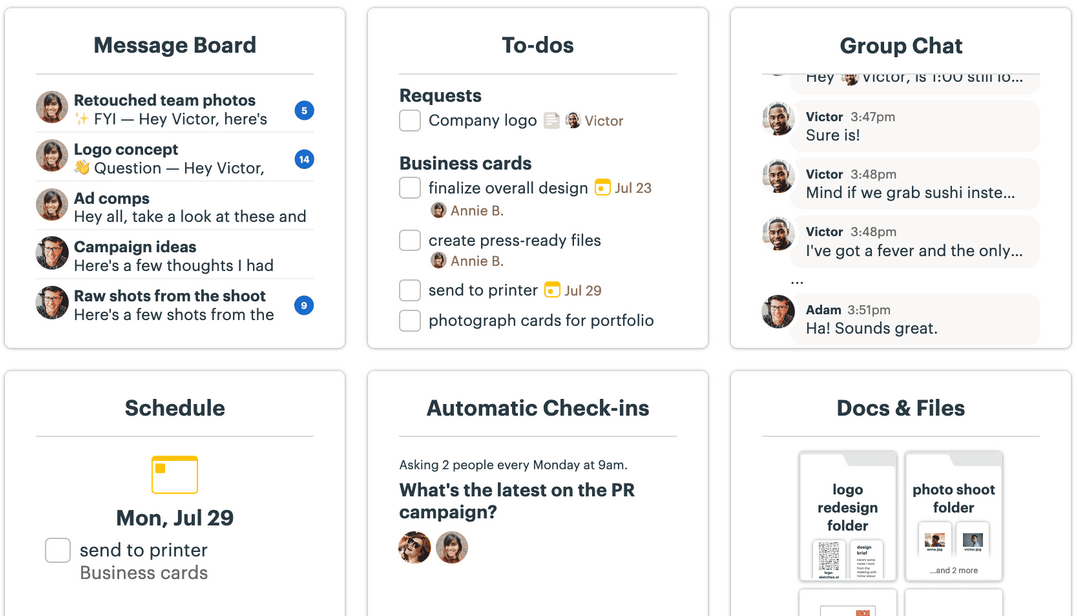
Basecamp è una piattaforma di gestione dei progetti per piccoli team che riunisce elenchi di attività, bacheche kanban, messaggistica, archiviazione dei file e strumenti di collaborazione con i clienti in un unico spazio di lavoro condiviso.
Per chi è più adatto Basecamp?
Basecamp è ideale per liberi professionisti, imprenditori individuali e piccoli team che si avvicinano per la prima volta agli strumenti di gestione dei progetti e desiderano un unico luogo in cui gestire attività, file e comunicazioni con i clienti senza una curva di apprendimento ripida.
Perché ho scelto Basecamp
Ho incluso Basecamp tra le mie scelte principali perché è davvero pensato per i team che si avvicinano per la prima volta ai software di gestione dei progetti e hanno bisogno di qualcosa che funzioni senza dover consultare un manuale. Mi piace il fatto che ogni progetto abbia una propria pagina in cui convivono elenchi di attività, una Tabella delle schede in stile kanban e una chat di gruppo, così non è necessario cercare informazioni tra schede diverse. I Grafici delle colline sono ciò che lo distingue davvero: invece di un complesso rapporto sullo stato di avanzamento, si trascina un punto per mostrare se il lavoro è ancora in fase di definizione o se si sta semplicemente completando.
Funzionalità principali di Basecamp
- Controlli di visibilità per i clienti: Imposta ciò che i clienti possono vedere per ogni progetto, nascondendo le attività interne o il lavoro non ancora completato prima della condivisione.
- Chat Campfire: Uno strumento di chat di gruppo integrato in ogni progetto, così il team può avere conversazioni rapide senza uscire da Basecamp.
- Verifiche automatiche: Domande ricorrenti inviate al team secondo una pianificazione per sostituire le riunioni quotidiane e mantenere tutti allineati.
- Documenti e file: Un'area integrata per l'archiviazione di documenti e file, con monitoraggio delle versioni e supporto per contenuti collegati da Google Docs, Dropbox e Figma.
Integrazioni di Basecamp
Basecamp supporta integrazioni con Google Drive e Docs, Dropbox, Figma, Zoom, Microsoft Teams, Harvest, Toggl e Clockify. Offre inoltre un'API pubblica, una CLI, Unito e Zapier.
Pros and Cons
Pros:
- I team avviano i progetti con una formazione minima
- Attività, file e conversazioni rimangono riuniti
- I controlli di visibilità per i clienti sono adatti ai piccoli team di servizi
Cons:
- Mancano dipendenze e priorità per i lavori complessi
- Le funzionalità limitate di reportistica rendono più difficile la supervisione del portafoglio progetti

Ideale per il monitoraggio e gli approfondimenti sui progetti in tempo reale
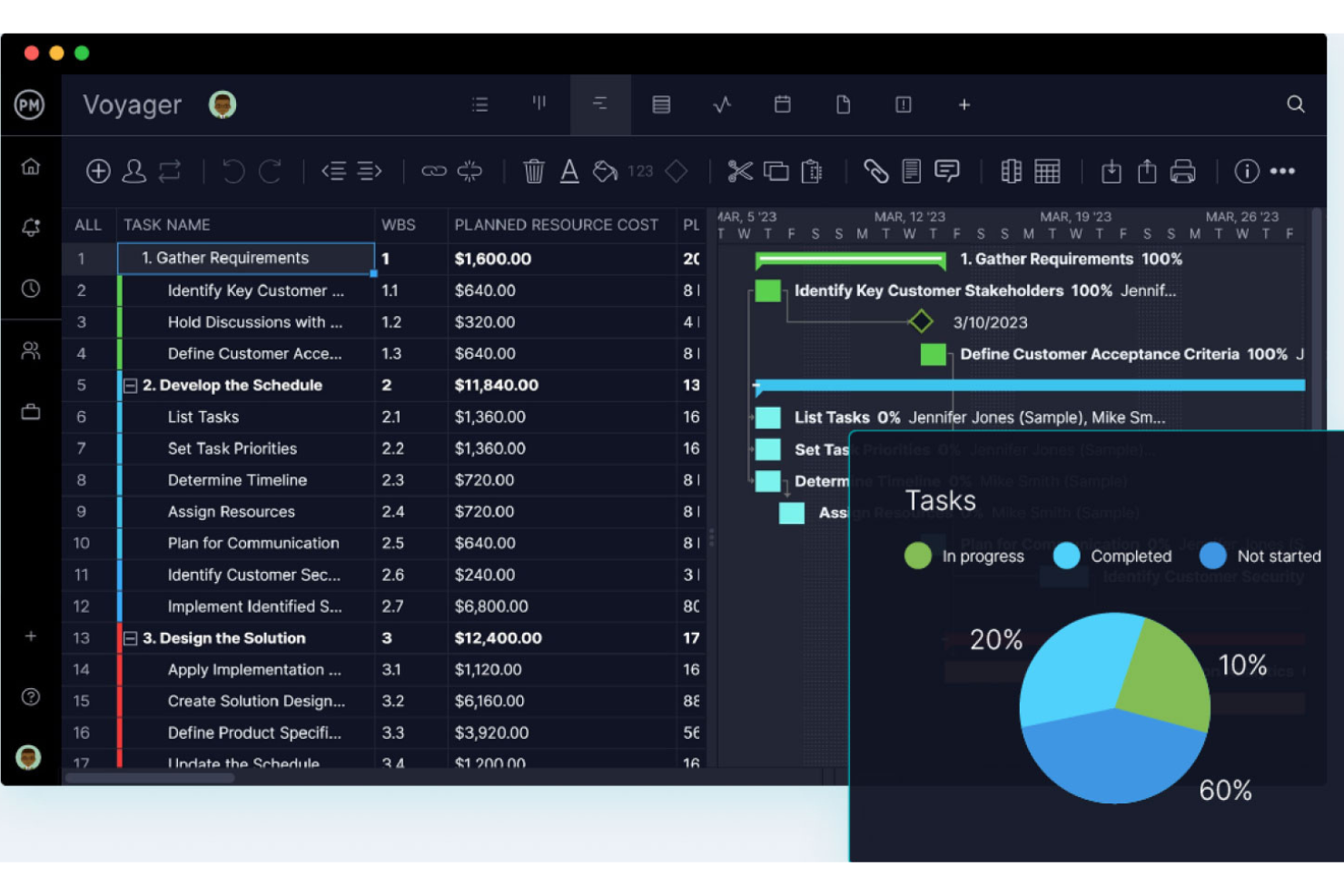
ProjectManager è una piattaforma di gestione dei progetti per piccoli team che riunisce diagrammi di Gantt, bacheche Kanban, dashboard in tempo reale, monitoraggio del tempo e reportistica in un unico spazio di lavoro centralizzato.
Per chi è più indicato ProjectManager?
ProjectManager è particolarmente adatto ai piccoli team che devono monitorare più progetti contemporaneamente e desiderano una visibilità in tempo reale sull'avanzamento, sul carico di lavoro e sui costi senza dover creare dashboard da zero.
Perché ho scelto ProjectManager
Ho scelto ProjectManager come una delle soluzioni migliori perché le sue dashboard automatiche offrono ai piccoli team una visibilità in tempo reale sullo stato dei progetti, sul carico di lavoro e sui costi senza alcuna configurazione manuale. Apprezzo molto la possibilità di monitorare l'avanzamento pianificato rispetto a quello effettivo delle attività e di visualizzare il percorso critico nella vista Gantt, così i ritardi nella pianificazione vengono individuati tempestivamente. Le dashboard del portafoglio riuniscono più progetti in un'unica vista, una funzione che trovo davvero utile quando gestisco contemporaneamente diversi flussi di lavoro.
Funzionalità principali di ProjectManager
- Più viste dei progetti: Passa dalle viste Gantt, Elenco, Foglio, Bacheca e Calendario su qualsiasi piano, con modifiche sincronizzate in tempo reale tra tutte le viste.
- Licenze gratuite illimitate per gli ospiti: Condividi l'accesso in sola lettura ai progetti con clienti o stakeholder su ogni piano, senza costi aggiuntivi.
- Gestione del carico di lavoro e delle risorse: Visualizza come è distribuito il lavoro nel team per poter riassegnare le attività prima che le scadenze subiscano ritardi.
- Oltre 75 modelli predefiniti: Avvia rapidamente i progetti utilizzando modelli pronti per piani IT, sprint, monitoraggio dei rischi e altro ancora.
Integrazioni di ProjectManager
ProjectManager offre integrazioni con Slack, Microsoft Teams, QuickBooks Online, Jira, Google Drive, Microsoft 365 e Azure DevOps, oltre a più di 1.000 app tramite Zapier. La sua API pubblica è disponibile su ogni piano per integrazioni personalizzate.
Pros and Cons
Pros:
- Le dashboard automatiche mostrano lo stato del progetto e il carico di lavoro
- Le linee di base dei diagrammi di Gantt evidenziano tempestivamente i ritardi nella pianificazione
- Cinque viste sincronizzate supportano diversi flussi di lavoro del team
Cons:
- L'automazione e i fogli presenze completi richiedono piani superiori
- L'accesso dei clienti è limitato agli ospiti con autorizzazione di sola lettura
Altri software di gestione dei progetti per le piccole imprese
Ecco alcuni altri strumenti di gestione dei progetti per le piccole imprese che non sono entrati nella mia selezione, ma che vale la pena prendere in considerazione.
- Hive
Ideale per la configurazione e il monitoraggio dei progetti assistiti dall'AI
- GoodDay
Ideale per i registri del tempo associati alle attività e le tariffe fatturabili
- Wrike
Ideale per la gestione da remoto degli orari e dei carichi di lavoro
- Celoxis
Ideale per la reportistica del portafoglio tra progetti
- Trello
Ideale per bacheche Kanban gratuite con automazione
- Ravetree
Ideale per la gestione dei progetti in una piattaforma tutto-in-uno
- Hubstaff Tasks
Il miglior strumento di gestione di progetti Agile facile da usare
- Plaky
Ideale per la gestione visiva delle attività
- TeamGantt
Ideale per diagrammi di Gantt semplici ed economici


Software di gestione dei progetti correlati
Se non hai ancora trovato quello che cerchi, dai un'occhiata a questi altri strumenti correlati che abbiamo testato e valutato:
Come Valuto il Software di Gestione Progetti per Piccole Imprese
Divido la mia valutazione in due livelli: criteri di base che ogni strumento deve soddisfare, e fattori differenzianti come l’accesso ospite per i clienti o la rilevazione del tempo integrata, che contano davvero per i piccoli team.
Funzionalità Base (Requisiti Fondamentali per Questo Elenco)
Quando seleziono gli strumenti per la mia lista, valuto ciascuno su una scala da 0 (funzionalità assente) a 5 (eccelle in quest’area) per ogni funzionalità di base elencata di seguito. Calcolo quindi il punteggio totale dello strumento in percentuale. Ogni strumento deve raggiungere un punteggio minimo totale del 65% per essere considerato per l'inclusione.
- Gestione delle Attività e dei Progetti: Valuto come ogni strumento gestisce la creazione di attività, sottoattività, dipendenze e stati personalizzati—ad esempio la pianificazione del lancio di un prodotto nei flussi di lavoro di design, sviluppo e QA.
- Viste Multiple dei Progetti: Che si tratti di una bacheca Kanban per uno sprint o di un diagramma di Gantt per un progetto cliente, cerco almeno due viste funzionali tra cui i team possano scegliere.
- Strumenti di Collaborazione di Team: Verifico la presenza di funzionalità di comunicazione contestuale come commenti a livello di attività, @menzioni e allegati, così che le conversazioni rimangano legate al lavoro.
- Monitoraggio del Carico di Lavoro e delle Risorse: Nei piccoli team le risorse si esauriscono in fretta; quindi cerco strumenti che diano visibilità su chi è assegnato a cosa—viste grafiche del carico di lavoro o indicatori di capacità che segnalano il sovraccarico.
- Reportistica e Dashboard: Valuto se lo strumento mostra metriche sulla salute del progetto come i tassi di completamento delle attività e i compiti in ritardo attraverso dashboard condivisibili durante una riunione di aggiornamento.
- Prezzi e Scalabilità Adatti alle PMI: I prezzi devono essere adatti sia a una startup di cinque persone sia a un team che cresce fino a 30, quindi cerco piani gratuiti o soluzioni entry-level convenienti con funzionalità base sbloccate.
Una volta ottenuta la lista degli strumenti che rispondono a questi criteri, considero cosa distingue ogni piattaforma.
Fattori Differenzianti (Cosa Distingue i Fornitori)
Ecco come confronto i diversi fornitori:
Caratteristiche Distintive
L’automazione senza codice è fondamentale—cerco strumenti che permettano di assegnare automaticamente attività o attivare cambi di stato al passaggio di una consegna di fase, risparmiando ai piccoli team ore di gestione manuale ogni settimana. La rilevazione del tempo collegata direttamente alle attività è un altro aspetto importante, specialmente per chi gestisce clienti con tariffazione oraria. L’accesso clienti o ospiti può essere decisivo per le attività di servizi che devono condividere i progressi dei progetti con referenti esterni senza dover acquistare utenti aggiuntivi.
Oltre le Funzionalità
Valuto la rapidità con cui un piccolo team può passare dall’iscrizione all’avvio del primo progetto. Un onboarding self-service con configurazione guidata e modelli pronti significa che non bisogna aspettare una chiamata commerciale per cominciare. Anche la copertura delle integrazioni è importante—verifico la presenza di connessioni native con strumenti come Google Workspace, Slack e QuickBooks, perché le piccole imprese difficilmente hanno tempo per creare soluzioni personalizzate. Valuto anche la trasparenza dei prezzi, cercando costi chiari per utente senza brutte sorprese o feature essenziali bloccate nei piani inferiori.
Come scegliere un software di gestione dei progetti per piccole imprese
Quando stili una lista dei candidati, provi e selezioni un software di gestione dei progetti per piccole imprese, considera quanto segue:
- Quale problema stai cercando di risolvere? Inizia identificando la lacuna nelle funzionalità di gestione dei progetti che stai cercando di colmare, così da chiarire quali caratteristiche e funzionalità deve offrire il software di gestione dei progetti. In quanto piccola impresa, è inoltre una buona idea essere consapevoli dei problemi che non stai cercando di risolvere: non vuoi finire per pagare caratteristiche e funzionalità di cui non hai bisogno.
- Chi dovrà utilizzarlo? Per valutare costi e requisiti, considera chi utilizzerà il software e di quante licenze avrai bisogno. Valuta se sarà necessario l'accesso solo per i responsabili di progetto o per l'intera organizzazione. Considera se dare la priorità alla facilità d'uso per tutti oppure alla velocità per gli utenti esperti del software di gestione dei progetti.
- Con quali altri strumenti deve funzionare? Chiarisci quali strumenti stai sostituendo, quali resteranno in uso e con quali strumenti dovrai integrarlo, come software di contabilità, software per i database dei clienti o software per le risorse umane. Potresti anche decidere di sostituire più strumenti con un unico strumento consolidato di gestione dei progetti, come un software di gestione dei progetti con funzionalità CRM.
- Quali risultati sono importanti? Considera il risultato che il software deve produrre per essere considerato efficace. Rifletti sulle capacità che vuoi acquisire, su ciò che vuoi migliorare e su come misurerai il successo. Ad esempio, un risultato potrebbe essere la possibilità di ottenere una maggiore visibilità sulle prestazioni.
- Come funzionerebbe all'interno della tua organizzazione? Valuta la scelta del software insieme ai tuoi flussi di lavoro e alla metodologia di erogazione (ad esempio, se utilizzi principalmente modalità di lavoro agili, potresti scegliere un software agile di gestione dei progetti). Valuta cosa funziona bene e quali aree stanno causando problemi. Ricorda che ogni impresa è diversa: non dare per scontato che uno strumento funzionerà nella tua organizzazione solo perché è popolare. Cerca un software che offra funzionalità semplici e un buon rapporto qualità-prezzo per la tua piccola impresa.
Tendenze del software di gestione dei progetti per piccole imprese nel 2025
Qui ho individuato diverse tendenze che ritengo continueranno a essere importanti, per le piccole imprese e non solo, con l'evoluzione della gestione dei progetti per piccoli team.
- Integrazione con strumenti di IA e automazione: si sta verificando un evidente orientamento verso l'integrazione delle funzionalità di intelligenza artificiale e automazione nei software di gestione dei progetti. Queste funzionalità automatizzano le attività ripetitive, forniscono analisi predittive per migliorare il processo decisionale e aumentano l'efficienza della gestione delle attività.
- Crescita della gestione dei progetti da dispositivi mobili: l'importanza delle applicazioni mobili è aumentata, con aggiornamenti incentrati sull'offerta di funzionalità complete sulle piattaforme mobili. Questa tendenza soddisfa le esigenze dei team che devono accedere agli strumenti di gestione dei progetti in mobilità.
- Maggiore attenzione alla sicurezza e alla conformità: poiché il software di gestione del lavoro per le piccole imprese diventa sempre più centrale nelle attività aziendali, si presta maggiore attenzione alla sicurezza dei dati e alla conformità a normative come il GDPR. Questa tendenza è particolarmente importante per le piccole imprese che potrebbero non disporre di ampie risorse interne per la sicurezza informatica, ma che devono comunque proteggere i dati sensibili dei progetti e dei clienti.
- Funzionalità di apprendimento integrate: alcuni strumenti stanno iniziando a integrare funzionalità di apprendimento e sviluppo, come l'accesso a corsi online, l'integrazione con piattaforme di formazione o risorse per lo sviluppo delle competenze relative alla gestione dei progetti.
Che cos'è il software di gestione dei progetti per le piccole imprese?
Il software di gestione dei progetti per le piccole imprese è uno strumento che aiuta piccole aziende, team e startup a pianificare, eseguire e monitorare i progetti. Questi strumenti forniscono una piattaforma centralizzata per le attività relative ai progetti, aiutandoti a migliorare le operazioni e la collaborazione e a mantenere i progetti in linea con i piani. Le funzionalità includono la gestione delle attività per le piccole imprese, il monitoraggio delle tempistiche, l'allocazione delle risorse e la gestione del budget.
Vengono generalmente utilizzati da titolari di piccole imprese, responsabili di team e fondatori di startup che devono gestire attività, scadenze e budget senza un'eccessiva complessità. Questo tipo di software di gestione dei progetti è inoltre solitamente più intuitivo ed economico rispetto ai sistemi aziendali, risultando così accessibile anche in presenza di risorse limitate.
Funzionalità del software di gestione dei progetti per le piccole imprese
Ecco alcune funzionalità fondamentali da ricercare quando selezioni un software di gestione dei progetti per una piccola impresa.
- Interfaccia intuitiva: un design semplice e intuitivo è essenziale. In questo modo tutti i membri del team possono navigare nel software e utilizzarlo in modo efficiente, indipendentemente dalla loro familiarità con la tecnologia.
- Gestione delle attività: consente di creare, assegnare e monitorare le attività. Questa funzionalità è fondamentale per mantenere i progetti organizzati e garantire che tutti conoscano le proprie responsabilità.
- Strumenti di collaborazione: facilitano la comunicazione tra i membri del team. Funzionalità come la messaggistica interna all'app, la condivisione dei file e le sezioni per i commenti sono fondamentali per mantenere un dialogo chiaro e continuo.
- Monitoraggio del tempo: consente ai team di registrare il tempo impiegato per le attività. Questa funzionalità di gestione dei progetti è utile per la fatturazione, la definizione del budget e la comprensione della produttività del team.
- Pianificazione dei progetti: offre visualizzazioni del calendario e diagrammi di Gantt per rappresentare visivamente le tempistiche. Una pianificazione efficace è fondamentale per garantire che i progetti procedano secondo i piani e che le scadenze vengano rispettate. Puoi anche consultare qui il software di gestione dei progetti con diagrammi di Gantt.
- Condivisione e gestione dei file: centralizza i documenti in un'unica posizione accessibile. In questo modo tutti i file relativi ai progetti rimangono organizzati e immediatamente disponibili per i membri del team.
- Contabilità dei progetti: aiuta a monitorare le finanze dei progetti. Questa funzionalità è essenziale per mantenere il progetto entro il budget e monitorare le spese e l'avanzamento finanziario.
- Report personalizzabili: genera report personalizzati su vari aspetti del progetto. Questa funzionalità offre informazioni sullo stato del progetto, sulle prestazioni del team e sulle aree di miglioramento.
- Accessibilità da dispositivi mobili: garantisce che il software sia accessibile da diversi dispositivi. Questo è fondamentale per i membri del team che devono accedere alle informazioni sui progetti in mobilità.
- Funzionalità di integrazione: consente al software di connettersi facilmente con altri strumenti, come la tua posta elettronica o il software di contabilità. Questa funzionalità garantisce un flusso di lavoro fluido e riduce al minimo la necessità di utilizzare più piattaforme.
- Gestione dei clienti: centralizza le comunicazioni con i clienti e le interazioni relative ai progetti. Questa funzionalità aiuta i team a gestire in modo efficiente feedback, approvazioni e aspettative dei clienti.
I piani per le piccole imprese, o i sistemi di gestione delle agenzie, offrono in genere funzionalità scalabili che crescono insieme al tuo team, prezzi convenienti adatti ai budget limitati e un'assistenza dedicata per affrontare qualsiasi difficoltà possa presentarsi. Tuttavia, se sei un team composto da una sola persona, potresti voler cercare un software personale per la gestione dei progetti, che privilegia solide funzionalità di gestione delle attività rispetto alla scalabilità.
Vantaggi del software di gestione dei progetti per piccoli team
Ecco cinque vantaggi principali che si distinguono per utenti e organizzazioni.
- Collaborazione migliorata: centralizzando discussioni, documenti e attività, puoi assicurarti che tutti siano sulla stessa lunghezza d'onda. Questo favorisce un ambiente collaborativo che supera le barriere geografiche e temporali.
- Organizzazione migliorata: questo software ti permette di categorizzare le attività, impostare scadenze e monitorare i progressi in tempo reale, assicurandoti che ogni elemento sia al posto giusto e riducendo significativamente il rischio di trascurare dettagli importanti.
- Maggiore efficienza: l'automazione delle attività di routine e la disponibilità di una tabella di marcia chiara per ogni fase del progetto consentono ai team di lavorare in modo più efficiente e di concentrare gli sforzi dove sono più necessari.
- Migliore gestione delle risorse: comprendere la disponibilità e il carico di lavoro dei membri del team consente di distribuire le attività in modo da ottimizzare la produttività e prevenire il burnout, così le risorse vengono utilizzate in modo efficiente.
- Migliore processo decisionale: avendo accesso a dati in tempo reale e report personalizzabili, puoi prendere decisioni strategiche basate su informazioni accurate. Questo migliora i risultati e ti aiuta a evitare errori costosi.
Costi e prezzi del software di gestione dei progetti per piccole imprese
In quanto piccola impresa, può essere allettante scegliere il piano tariffario più economico disponibile e chiudere la questione. Tuttavia, potresti ottenere effettivamente il massimo valore da un piano leggermente più costoso che offre funzionalità più complete.
Ecco una panoramica dei prezzi e dei piani generali che puoi aspettarti di trovare nella ricerca del software di gestione dei progetti più adatto a te.
Tabella comparativa dei piani per il software di gestione dei progetti per piccole imprese
| Tipo di piano | Prezzo medio | Funzionalità comuni |
|---|---|---|
| Gratuito | $0 | Gestione di base delle attività, utenti limitati, strumenti essenziali di collaborazione, accesso all'assistenza della community |
| Base | $10 - $20/utente/mese | Gestione avanzata delle attività, accesso ampliato per gli utenti, modelli di progetto, assistenza via e-mail |
| Standard | $25 - $35/utente/mese | Strumenti completi per la pianificazione dei progetti, report avanzati, integrazioni con altri software, assistenza telefonica |
| Premium/Pro | $50 - $65/utente/mese | Analisi complete, assistenza prioritaria, integrazioni personalizzate, funzionalità di sicurezza avanzate |
| Enterprise | Prezzo personalizzato | Funzionalità personalizzabili, account manager dedicato, sicurezza di livello aziendale, integrazioni illimitate |
Se hai un budget davvero limitato, esistono molti strumenti gratuiti per la gestione dei progetti che offrono funzionalità essenziali e possono crescere insieme alla tua impresa.
- Software di gestione dei progetti
- Software di gestione delle risorse
- Software di gestione delle attività
- Strumenti di collaborazione
- Software di monitoraggio dei progetti
- Software di pianificazione dei progetti
- Software di gestione dei progetti per organizzazioni non profit
- Software di gestione dei progetti con dipendenze
- Software di gestione dei progetti per piccoli team
- Software di gestione dei progetti per Windows
- Software di gestione dei progetti per Mac
- Sistema di gestione dei ticket per i progetti
- Software di gestione dei progetti legali
- Software di gestione dei progetti per startup
- Gestione dei progetti per team da remoto
Come Valuto il Software di Gestione Progetti per Piccole Imprese
Divido la mia valutazione in due livelli: criteri di base che ogni strumento deve soddisfare, e fattori differenzianti come l’accesso ospite per i clienti o la rilevazione del tempo integrata, che contano davvero per i piccoli team.
Funzionalità Base (Requisiti Fondamentali per Questo Elenco)
Quando seleziono gli strumenti per la mia lista, valuto ciascuno su una scala da 0 (funzionalità assente) a 5 (eccelle in quest’area) per ogni funzionalità di base elencata di seguito. Calcolo quindi il punteggio totale dello strumento in percentuale. Ogni strumento deve raggiungere un punteggio minimo totale del 65% per essere considerato per l'inclusione.
- Gestione delle Attività e dei Progetti: Valuto come ogni strumento gestisce la creazione di attività, sottoattività, dipendenze e stati personalizzati—ad esempio la pianificazione del lancio di un prodotto nei flussi di lavoro di design, sviluppo e QA.
- Viste Multiple dei Progetti: Che si tratti di una bacheca Kanban per uno sprint o di un diagramma di Gantt per un progetto cliente, cerco almeno due viste funzionali tra cui i team possano scegliere.
- Strumenti di Collaborazione di Team: Verifico la presenza di funzionalità di comunicazione contestuale come commenti a livello di attività, @menzioni e allegati, così che le conversazioni rimangano legate al lavoro.
- Monitoraggio del Carico di Lavoro e delle Risorse: Nei piccoli team le risorse si esauriscono in fretta; quindi cerco strumenti che diano visibilità su chi è assegnato a cosa—viste grafiche del carico di lavoro o indicatori di capacità che segnalano il sovraccarico.
- Reportistica e Dashboard: Valuto se lo strumento mostra metriche sulla salute del progetto come i tassi di completamento delle attività e i compiti in ritardo attraverso dashboard condivisibili durante una riunione di aggiornamento.
- Prezzi e Scalabilità Adatti alle PMI: I prezzi devono essere adatti sia a una startup di cinque persone sia a un team che cresce fino a 30, quindi cerco piani gratuiti o soluzioni entry-level convenienti con funzionalità base sbloccate.
Una volta ottenuta la lista degli strumenti che rispondono a questi criteri, considero cosa distingue ogni piattaforma.
Fattori Differenzianti (Cosa Distingue i Fornitori)
Ecco come confronto i diversi fornitori:
Caratteristiche Distintive
L’automazione senza codice è fondamentale—cerco strumenti che permettano di assegnare automaticamente attività o attivare cambi di stato al passaggio di una consegna di fase, risparmiando ai piccoli team ore di gestione manuale ogni settimana. La rilevazione del tempo collegata direttamente alle attività è un altro aspetto importante, specialmente per chi gestisce clienti con tariffazione oraria. L’accesso clienti o ospiti può essere decisivo per le attività di servizi che devono condividere i progressi dei progetti con referenti esterni senza dover acquistare utenti aggiuntivi.
Oltre le Funzionalità
Valuto la rapidità con cui un piccolo team può passare dall’iscrizione all’avvio del primo progetto. Un onboarding self-service con configurazione guidata e modelli pronti significa che non bisogna aspettare una chiamata commerciale per cominciare. Anche la copertura delle integrazioni è importante—verifico la presenza di connessioni native con strumenti come Google Workspace, Slack e QuickBooks, perché le piccole imprese difficilmente hanno tempo per creare soluzioni personalizzate. Valuto anche la trasparenza dei prezzi, cercando costi chiari per utente senza brutte sorprese o feature essenziali bloccate nei piani inferiori.
Come scegliere un software di gestione dei progetti per piccole imprese
Quando stili una lista dei candidati, provi e selezioni un software di gestione dei progetti per piccole imprese, considera quanto segue:
- Quale problema stai cercando di risolvere? Inizia identificando la lacuna nelle funzionalità di gestione dei progetti che stai cercando di colmare, così da chiarire quali caratteristiche e funzionalità deve offrire il software di gestione dei progetti. In quanto piccola impresa, è inoltre una buona idea essere consapevoli dei problemi che non stai cercando di risolvere: non vuoi finire per pagare caratteristiche e funzionalità di cui non hai bisogno.
- Chi dovrà utilizzarlo? Per valutare costi e requisiti, considera chi utilizzerà il software e di quante licenze avrai bisogno. Valuta se sarà necessario l'accesso solo per i responsabili di progetto o per l'intera organizzazione. Considera se dare la priorità alla facilità d'uso per tutti oppure alla velocità per gli utenti esperti del software di gestione dei progetti.
- Con quali altri strumenti deve funzionare? Chiarisci quali strumenti stai sostituendo, quali resteranno in uso e con quali strumenti dovrai integrarlo, come software di contabilità, software per i database dei clienti o software per le risorse umane. Potresti anche decidere di sostituire più strumenti con un unico strumento consolidato di gestione dei progetti, come un software di gestione dei progetti con funzionalità CRM.
- Quali risultati sono importanti? Considera il risultato che il software deve produrre per essere considerato efficace. Rifletti sulle capacità che vuoi acquisire, su ciò che vuoi migliorare e su come misurerai il successo. Ad esempio, un risultato potrebbe essere la possibilità di ottenere una maggiore visibilità sulle prestazioni.
- Come funzionerebbe all'interno della tua organizzazione? Valuta la scelta del software insieme ai tuoi flussi di lavoro e alla metodologia di erogazione (ad esempio, se utilizzi principalmente modalità di lavoro agili, potresti scegliere un software agile di gestione dei progetti). Valuta cosa funziona bene e quali aree stanno causando problemi. Ricorda che ogni impresa è diversa: non dare per scontato che uno strumento funzionerà nella tua organizzazione solo perché è popolare. Cerca un software che offra funzionalità semplici e un buon rapporto qualità-prezzo per la tua piccola impresa.
Tendenze del software di gestione dei progetti per piccole imprese nel 2025
Qui ho individuato diverse tendenze che ritengo continueranno a essere importanti, per le piccole imprese e non solo, con l'evoluzione della gestione dei progetti per piccoli team.
- Integrazione con strumenti di IA e automazione: si sta verificando un evidente orientamento verso l'integrazione delle funzionalità di intelligenza artificiale e automazione nei software di gestione dei progetti. Queste funzionalità automatizzano le attività ripetitive, forniscono analisi predittive per migliorare il processo decisionale e aumentano l'efficienza della gestione delle attività.
- Crescita della gestione dei progetti da dispositivi mobili: l'importanza delle applicazioni mobili è aumentata, con aggiornamenti incentrati sull'offerta di funzionalità complete sulle piattaforme mobili. Questa tendenza soddisfa le esigenze dei team che devono accedere agli strumenti di gestione dei progetti in mobilità.
- Maggiore attenzione alla sicurezza e alla conformità: poiché il software di gestione del lavoro per le piccole imprese diventa sempre più centrale nelle attività aziendali, si presta maggiore attenzione alla sicurezza dei dati e alla conformità a normative come il GDPR. Questa tendenza è particolarmente importante per le piccole imprese che potrebbero non disporre di ampie risorse interne per la sicurezza informatica, ma che devono comunque proteggere i dati sensibili dei progetti e dei clienti.
- Funzionalità di apprendimento integrate: alcuni strumenti stanno iniziando a integrare funzionalità di apprendimento e sviluppo, come l'accesso a corsi online, l'integrazione con piattaforme di formazione o risorse per lo sviluppo delle competenze relative alla gestione dei progetti.
Che cos'è il software di gestione dei progetti per le piccole imprese?
Il software di gestione dei progetti per le piccole imprese è uno strumento che aiuta piccole aziende, team e startup a pianificare, eseguire e monitorare i progetti. Questi strumenti forniscono una piattaforma centralizzata per le attività relative ai progetti, aiutandoti a migliorare le operazioni e la collaborazione e a mantenere i progetti in linea con i piani. Le funzionalità includono la gestione delle attività per le piccole imprese, il monitoraggio delle tempistiche, l'allocazione delle risorse e la gestione del budget.
Vengono generalmente utilizzati da titolari di piccole imprese, responsabili di team e fondatori di startup che devono gestire attività, scadenze e budget senza un'eccessiva complessità. Questo tipo di software di gestione dei progetti è inoltre solitamente più intuitivo ed economico rispetto ai sistemi aziendali, risultando così accessibile anche in presenza di risorse limitate.
Funzionalità del software di gestione dei progetti per le piccole imprese
Ecco alcune funzionalità fondamentali da ricercare quando selezioni un software di gestione dei progetti per una piccola impresa.
- Interfaccia intuitiva: un design semplice e intuitivo è essenziale. In questo modo tutti i membri del team possono navigare nel software e utilizzarlo in modo efficiente, indipendentemente dalla loro familiarità con la tecnologia.
- Gestione delle attività: consente di creare, assegnare e monitorare le attività. Questa funzionalità è fondamentale per mantenere i progetti organizzati e garantire che tutti conoscano le proprie responsabilità.
- Strumenti di collaborazione: facilitano la comunicazione tra i membri del team. Funzionalità come la messaggistica interna all'app, la condivisione dei file e le sezioni per i commenti sono fondamentali per mantenere un dialogo chiaro e continuo.
- Monitoraggio del tempo: consente ai team di registrare il tempo impiegato per le attività. Questa funzionalità di gestione dei progetti è utile per la fatturazione, la definizione del budget e la comprensione della produttività del team.
- Pianificazione dei progetti: offre visualizzazioni del calendario e diagrammi di Gantt per rappresentare visivamente le tempistiche. Una pianificazione efficace è fondamentale per garantire che i progetti procedano secondo i piani e che le scadenze vengano rispettate. Puoi anche consultare qui il software di gestione dei progetti con diagrammi di Gantt.
- Condivisione e gestione dei file: centralizza i documenti in un'unica posizione accessibile. In questo modo tutti i file relativi ai progetti rimangono organizzati e immediatamente disponibili per i membri del team.
- Contabilità dei progetti: aiuta a monitorare le finanze dei progetti. Questa funzionalità è essenziale per mantenere il progetto entro il budget e monitorare le spese e l'avanzamento finanziario.
- Report personalizzabili: genera report personalizzati su vari aspetti del progetto. Questa funzionalità offre informazioni sullo stato del progetto, sulle prestazioni del team e sulle aree di miglioramento.
- Accessibilità da dispositivi mobili: garantisce che il software sia accessibile da diversi dispositivi. Questo è fondamentale per i membri del team che devono accedere alle informazioni sui progetti in mobilità.
- Funzionalità di integrazione: consente al software di connettersi facilmente con altri strumenti, come la tua posta elettronica o il software di contabilità. Questa funzionalità garantisce un flusso di lavoro fluido e riduce al minimo la necessità di utilizzare più piattaforme.
- Gestione dei clienti: centralizza le comunicazioni con i clienti e le interazioni relative ai progetti. Questa funzionalità aiuta i team a gestire in modo efficiente feedback, approvazioni e aspettative dei clienti.
I piani per le piccole imprese, o i sistemi di gestione delle agenzie, offrono in genere funzionalità scalabili che crescono insieme al tuo team, prezzi convenienti adatti ai budget limitati e un'assistenza dedicata per affrontare qualsiasi difficoltà possa presentarsi. Tuttavia, se sei un team composto da una sola persona, potresti voler cercare un software personale per la gestione dei progetti, che privilegia solide funzionalità di gestione delle attività rispetto alla scalabilità.
Vantaggi del software di gestione dei progetti per piccoli team
Ecco cinque vantaggi principali che si distinguono per utenti e organizzazioni.
- Collaborazione migliorata: centralizzando discussioni, documenti e attività, puoi assicurarti che tutti siano sulla stessa lunghezza d'onda. Questo favorisce un ambiente collaborativo che supera le barriere geografiche e temporali.
- Organizzazione migliorata: questo software ti permette di categorizzare le attività, impostare scadenze e monitorare i progressi in tempo reale, assicurandoti che ogni elemento sia al posto giusto e riducendo significativamente il rischio di trascurare dettagli importanti.
- Maggiore efficienza: l'automazione delle attività di routine e la disponibilità di una tabella di marcia chiara per ogni fase del progetto consentono ai team di lavorare in modo più efficiente e di concentrare gli sforzi dove sono più necessari.
- Migliore gestione delle risorse: comprendere la disponibilità e il carico di lavoro dei membri del team consente di distribuire le attività in modo da ottimizzare la produttività e prevenire il burnout, così le risorse vengono utilizzate in modo efficiente.
- Migliore processo decisionale: avendo accesso a dati in tempo reale e report personalizzabili, puoi prendere decisioni strategiche basate su informazioni accurate. Questo migliora i risultati e ti aiuta a evitare errori costosi.
Costi e prezzi del software di gestione dei progetti per piccole imprese
In quanto piccola impresa, può essere allettante scegliere il piano tariffario più economico disponibile e chiudere la questione. Tuttavia, potresti ottenere effettivamente il massimo valore da un piano leggermente più costoso che offre funzionalità più complete.
Ecco una panoramica dei prezzi e dei piani generali che puoi aspettarti di trovare nella ricerca del software di gestione dei progetti più adatto a te.
Tabella comparativa dei piani per il software di gestione dei progetti per piccole imprese
| Tipo di piano | Prezzo medio | Funzionalità comuni |
|---|---|---|
| Gratuito | $0 | Gestione di base delle attività, utenti limitati, strumenti essenziali di collaborazione, accesso all'assistenza della community |
| Base | $10 - $20/utente/mese | Gestione avanzata delle attività, accesso ampliato per gli utenti, modelli di progetto, assistenza via e-mail |
| Standard | $25 - $35/utente/mese | Strumenti completi per la pianificazione dei progetti, report avanzati, integrazioni con altri software, assistenza telefonica |
| Premium/Pro | $50 - $65/utente/mese | Analisi complete, assistenza prioritaria, integrazioni personalizzate, funzionalità di sicurezza avanzate |
| Enterprise | Prezzo personalizzato | Funzionalità personalizzabili, account manager dedicato, sicurezza di livello aziendale, integrazioni illimitate |
Se hai un budget davvero limitato, esistono molti strumenti gratuiti per la gestione dei progetti che offrono funzionalità essenziali e possono crescere insieme alla tua impresa.