

10 Best Basecamp Alternatives & Competitors in 2026

10 Best Basecamp Alternatives Shortlist


The best Basecamp alternatives give you more advanced task management, deeper reporting, and broader integrations. If you’ve outgrown Basecamp’s simplicity or want more control over how you organize projects, the right tool will help you better plan and track projects, keep an eye on billable hours, and monitor resource utilization.
I've used my 15+ years of experience in project management to test Basecamp alternatives and determine the best options to help you keep in contact with clients, customize workflows to your needs, and deliver projects with measurable impact. Below, I highlight strengths and key differences, pros and cons, and ideal use cases.
What are Basecamp Alternatives?
Basecamp alternatives are project management and collaboration tools that help teams organize work, share updates, and keep track of tasks. They offer similar features to Basecamp, but might have a more user-friendly interface, additional features that Basecamp lacks, or more customization to fit your needs.
Alternatives to Basecamp are popular with project managers, business owners, and remote teams that want simple ways to manage projects, stay connected, and reduce time spent flipping between different apps.
Why Trust Our Software Recommendations
Our team has been testing and reviewing software since 2012. As project managers ourselves, we know how difficult—and important—it is to choose the right software.
For this guide, we evaluated tools using hands-on testing and independent research, scoring tools using our selection criteria. We also draw on insights from industry thought leaders and practicing project management experts.
Our reviews reflect our human editorial judgment, not a sales pitch.
Expert reviewers:
Basecamp Alternatives Comparison Table
This comparison chart summarizes pricing details for my top Basecamp alternative selections.
| Tool | Best For | Trial Info | Price | ||
|---|---|---|---|---|---|
| 1 | Best for scaling organizations | Free plan + 14-day free trial + free demo available | From $10/user/month (billed annually) | Website | |
| 2 | Best for customization | Free plan + 14-day trial available | From $9/user/month (billed annually) | Website | |
| 3 | Best for easy migration from Basecamp | Free plan + 15-day free trial + free demo available | From $4/user/month (billed annually) | Website | |
| 4 | Best free plan for a Basecamp alternative | Free plan + free trial + free demo available | From $12/user/month | Website | |
| 5 | Best for working with clients | 14-day free trial available | From $19/month | Website | |
| 6 | Best for multiple project and task views | Free plan + 14-day trial + demo available | From $5/user/month (billed annually) | Website | |
| 7 | Best for agile project management | Free plan available | From $4/user/month (billed annually) | Website | |
| 8 | Best for integration of ideation and task management | Free plan + 14-day free trial available | From €17.50/user/month | Website | |
| 9 | Best for ease of use & client collaboration | Free plan + 14-day free trial available | From $10/user/month (billed annually) | Website | |
| 10 | Best for budget-friendly project management | Free plan available | From $1.49 | Website |


Best Basecamp Alternative Reviews
Here are my detailed summaries of each alternative to Basecamp and what makes them good alternatives.

Wrike
Best for scaling organizations
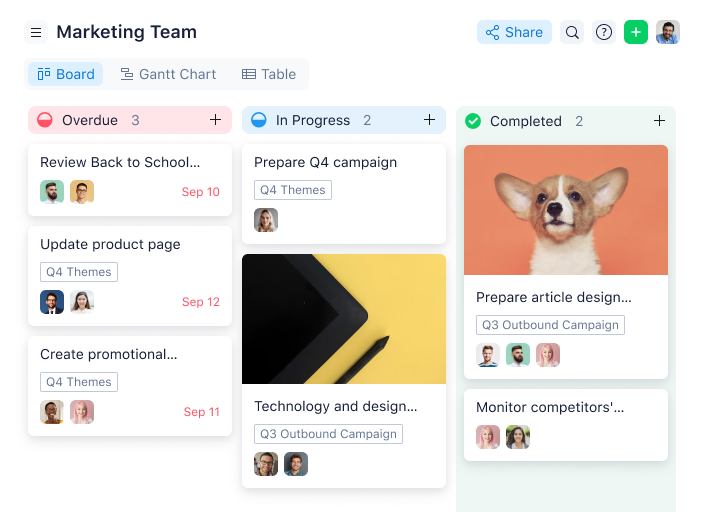
Wrike is an award-winning, easy-to-use project management software trusted by 20,000+ organizations worldwide. This project planning tool is suitable for teams of anywhere from five to an unlimited number of team members. It's highly configurable, allowing users to customize workflows, recurring tasks, dashboards, reports, request forms, and more.
Wrike's simple interface enables users to switch between Kanban boards, one-click Gantt charts, and traditional workload views, allowing them to choose how to visualize their priorities. Wrike also comes with project management features such as project templates, task lists; subtasks; task dependencies; calendars; shared workflows; file sharing; image, video, and web proofing; and real-time collaboration. Unlock advanced insights with performance reporting tools, resource management and allocation, time tracking, and more.
Wrike has an easy-to-use, intuitive interface and navigation with distinct spaces for every folder and task list. Managing projects is made easy by simply toggling from the home screen to timesheets, dashboards, calendars, reports, and the activity stream for notifications and messages.
This project management solution also offers a variety of different yet specific project management features depending on the type of team or organization - whether you're a creative team, a marketing team or a professional service team.
Wrike offers 400+ pre-built native integrations, including integrations with the most popular file management software from Microsoft, Google, and Dropbox, along with sales and marketing software from Salesforce and Marketo.
New Product Updates from Wrike

Wrike Redesigns AI Agent Builder
Wrike redesigns its AI Agent Builder with a side-by-side setup, Scopes, sentence-style triggers and actions, and clearer filters. These changes make it easier to configure, test, and manage agent behavior. For more information, visit Wrike’s official site.

Best for customization
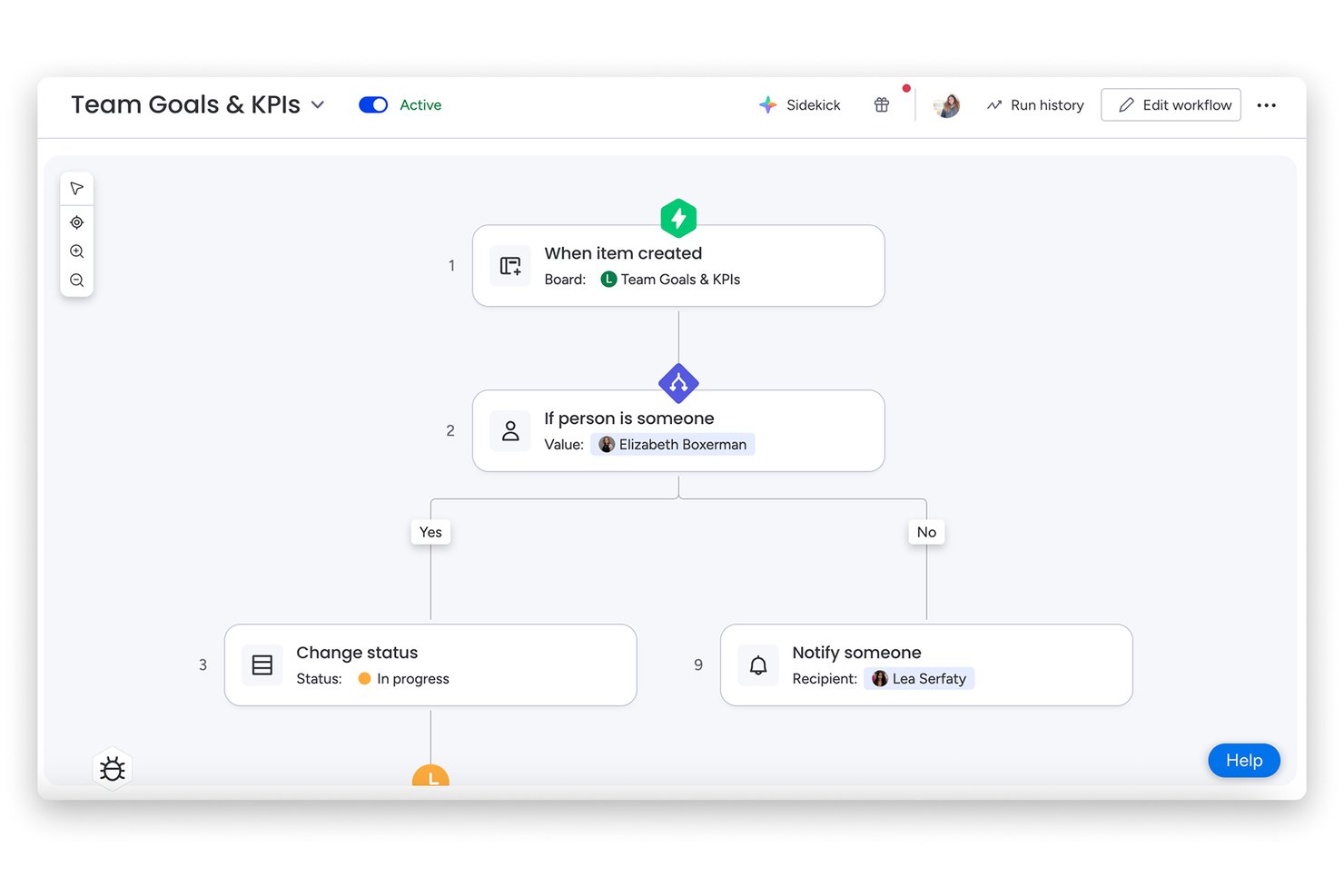
monday AI Workspace is a visual project management platform suited to teams that have outgrown simple tools and need multi-view project tracking, workflow automation, and AI-assisted execution all in one place.
Who Is monday AI Workspace Best For?
It's a strong fit for operations teams and project managers who need to coordinate work across multiple departments or functions without building everything from scratch.
Why monday AI Workspace Is a Good Basecamp Alternative
I picked monday AI Workspace for this list because the customization goes well beyond column names and color themes. You can chain automation triggers to custom column types, so when a status changes on one board, linked boards update automatically. The AI workflow builder extends this further, letting me configure intelligent task routing based on live board data without writing a single line of code.
monday AI Workspace Key Features
- AI-powered sidekick: Generate tasks, summaries, meeting notes, and project updates directly from your boards.
- Visual timeline and Gantt views: Manage deadlines, milestones, and dependencies on interactive project schedules.
- Multi-product suite (Work Management, CRM, dev, service): Switch between different modules to handle a variety of business workflows.
- Guest and client access: Invite external users with controlled permissions for project collaboration and feedback.
monday AI Workspace Integrations
monday AI Workspace offers hundreds of native integrations through its built-in integrations and marketplace, including Slack, Salesforce, HubSpot, Google Workspace, Outlook, Microsoft Teams, GitHub, Jira, Dropbox, and Zoom. It also supports Zapier and provides an API for custom integrations.
Pros and Cons
Pros:
- Multiple project views including Gantt and timeline
- AI task generation speeds up project setup
- Highly customizable boards, fields, and workflows
Cons:
- Free plan limits automation and advanced features
- Can feel overwhelming for very small teams
New Product Updates from monday AI Workspace
monday AI Workspace Adds Human Approval Routing
monday AI Workspace adds a human-in-the-loop approval block to AI Workflows, sending approval requests and routing workflow paths based on responses. For more information, visit monday AI Workspace's official site.

Best for easy migration from Basecamp
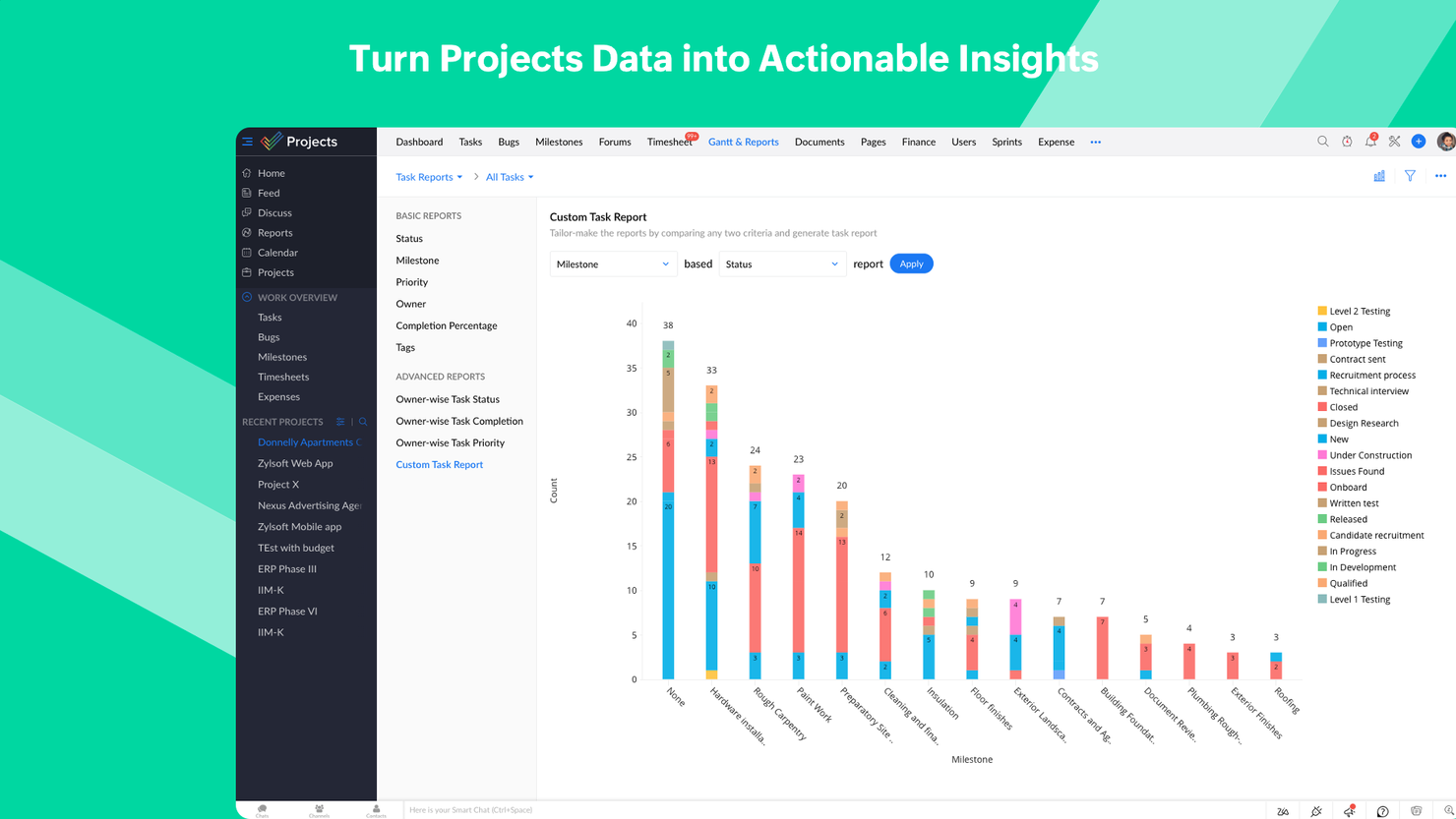
If you are looking for a user-friendly yet feature-rich upgrade from Basecamp, then Zoho Projects is a great option. If you are already a Basecamp user, Zoho Projects allows direct migration from Basecamp. With customizations and reporting capabilities, this tool is a logical step up.
Schedule work items as tasks and set dates, or do it with the intuitive click and drag Gantt chart interface. Go beyond scheduling and analyze timelines with critical path and baseline. The integrated social feed, chat rooms and forums give ample options for starting conversations. Add to that, the documents module that supports file sharing, version history, and collaborative file creation. Zoho Projects is one of the few PM tools that allow creation of dependencies between projects.
Fully customize the dashboards to suit your needs. Integrate with Zoho Analytics and create over 50 types of charts and reports. Export Gantt charts to PDF, and task to XLS/CSV. The interface and modules are highly customizable. All aspects of the UI from theme colors to arrangement and visibility of the various modules can be changed to suit a user's preferences. Zoho projects also offer free onboarding for its customers and a comprehensive online help guide for all users.
Being part of the Zoho's ecosystem allows Projects to connect to several of Zoho's own services such as Zoho Books, Zoho CRM, and Zoho's finance suite. The new Zoho marketplace allows 3rd party integrations as well. Zapier connections are also supported. Zoho Projects stands out in cases where there are multiple hand-offs involved. It is especially popular among IT companies, consultants and education organizations.
Starts from $4/user/month billed annually. Also has a freemium version up to 3 users for 2 projects and a 10-day free trial. No credit card information is required.
New Product Updates from Zoho Projects
Zoho Projects Adds CodeX Scripts for Custom Modules
Zoho Projects now supports CodeX Scripts for custom modules, enabling conditional logic and rules for creating, updating, and deleting records. For more information, visit Zoho Projects' official site.
 .
.
ClickUp
Best free plan for a Basecamp alternative
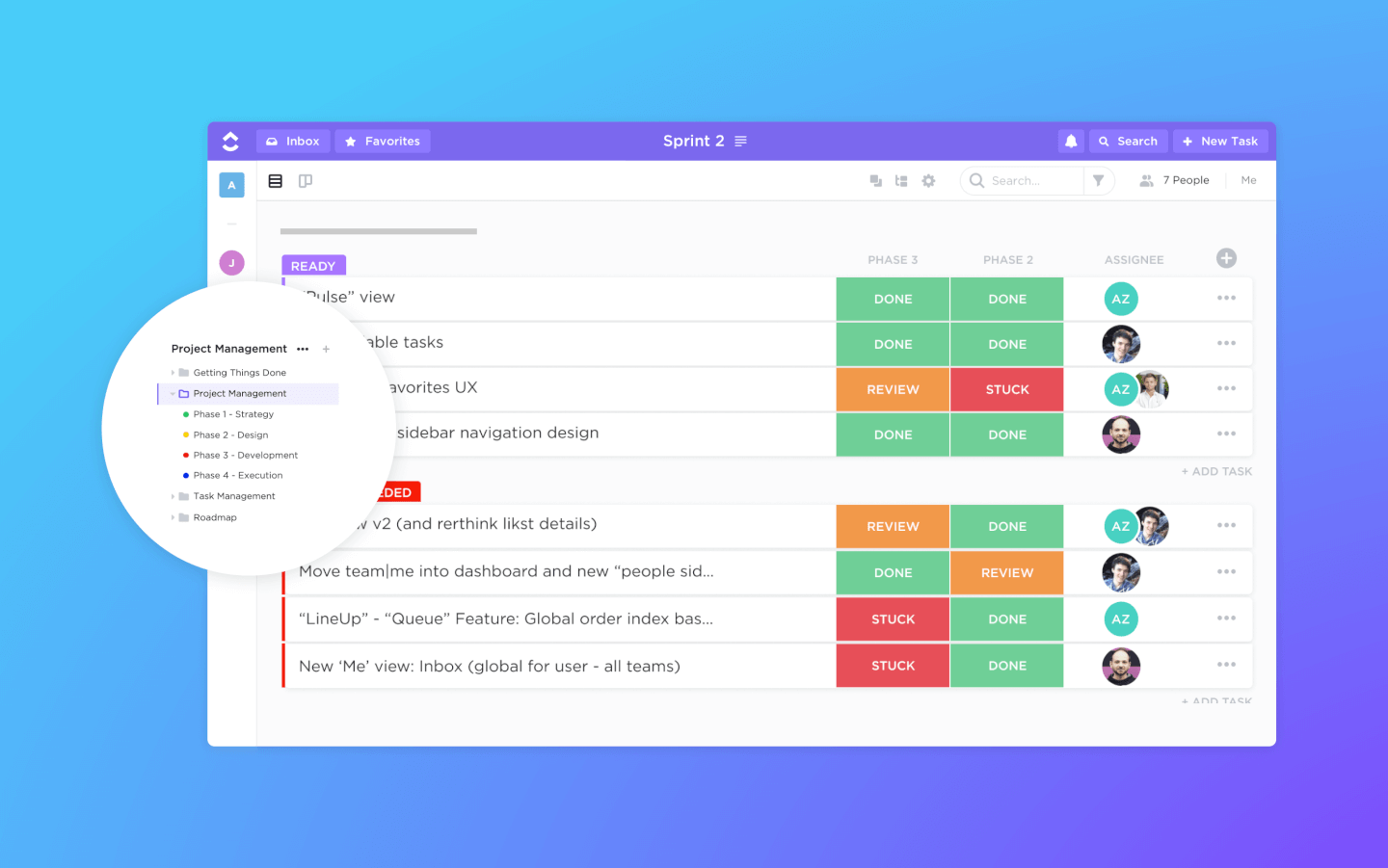
ClickUp is a project management tool with powerful features for managing and completing all your team's projects in one platform. Users can plan projects, schedule tasks, and manage resources in a centralized workspace, as well as communicate and collaborate with team members and guests.
Project scheduling features include Gantt charts, calendars, and timelines for visualizing tasks. Users can also schedule time and tasks, track deadlines, set time estimates, and track time.
ClickUp also includes features for creating, sharing, and collaborative editing for Wikis and documents. Users can comment on documents and tasks, assign comments, and chat with other team members for increased communication and collaboration. Reporting features include the ability to create custom dashboards, as well as six built-in report types for team reporting.
ClickUp offers native integrations with Slack, G Suite, Dropbox, and many more tools, as well as over 1,000+ integrations through Zapier. ClickUp's free plan is robust and includes all primary features. The unlimited plan starts at $5 a month per user and offers additional functionality.
New Product Updates from ClickUp
ClickUp Adds Meetings Hub, Super Agent Templates, and ZoomInfo Integration
ClickUp adds a searchable Meetings Hub, new ways to clone and template Super Agents, and a ZoomInfo integration through the App Center. These updates improve meeting retrieval, agent reuse, and access to sales intelligence. For more information, visit ClickUp’s official site.

Best for working with clients
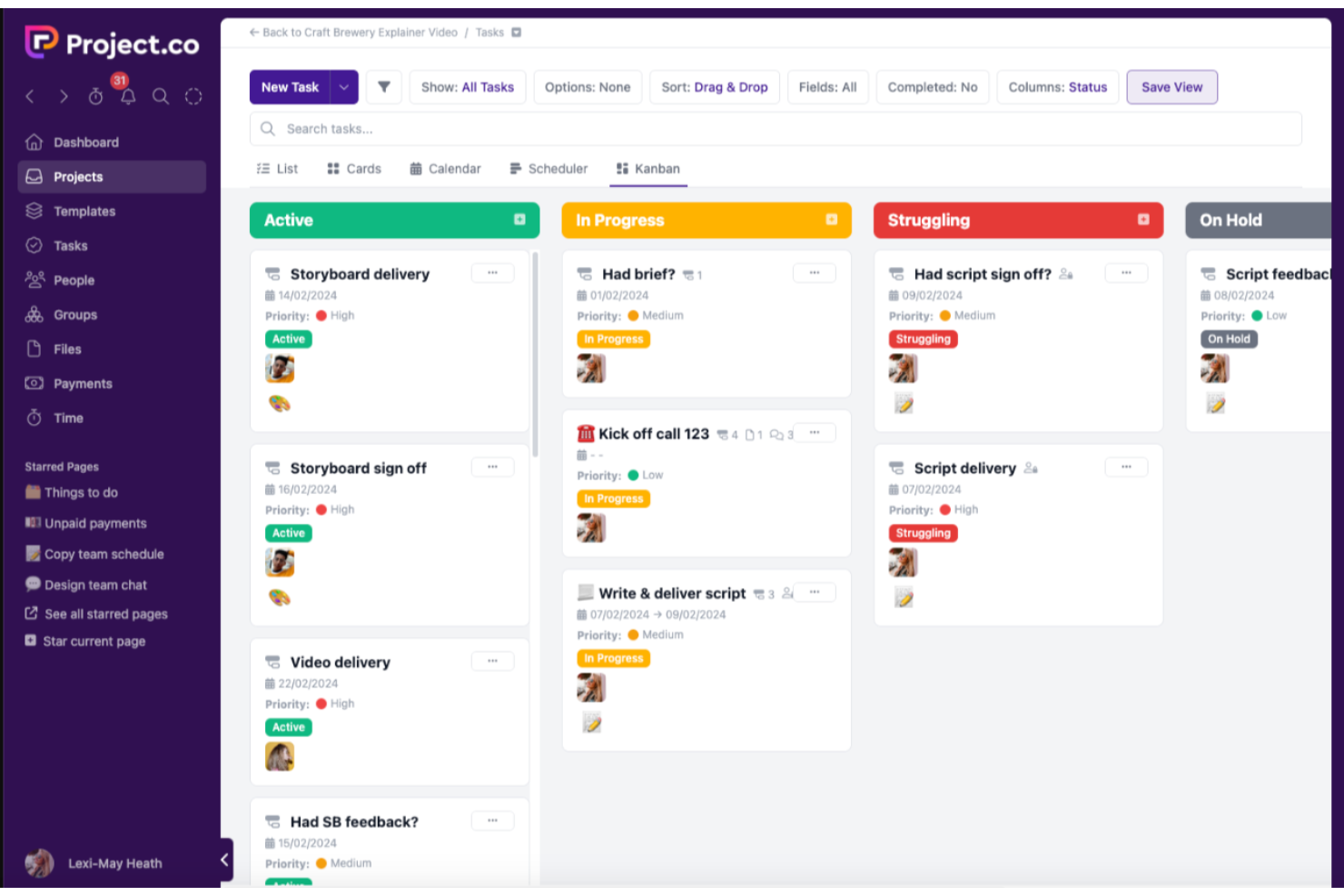
Both Project.co and Basecamp are similar when it comes to their capabilities, feature sets, and deployment strategy. Like Basecamp, Project.co is also a project management platform that is tailored for team collaboration and communication. They’re both deployed via the cloud and offer a wide variety of support options, which include a comprehensive knowledge base solution.
However, Project.co is a client-facing project management system where every aspect at every stage of every active project is easily accessible from one location, bringing multiple teams, team members, and clients all together in a unified platform.
Every project that is created and being developed in Project.co is broken down into a few sections, which include the project overview, a discussion page, and the team members and contributors of the project. This eliminates the need to sift through hundreds of emails, scroll through endless threads, or scour a lengthy spreadsheet just to find specific information about the project.
When it comes to ease of use, both Basecamp and Project.co are the same, in the sense that they are indeed simple to use but can deliver powerful features and capabilities to most small and midsize teams.
Hive
Best for multiple project and task views
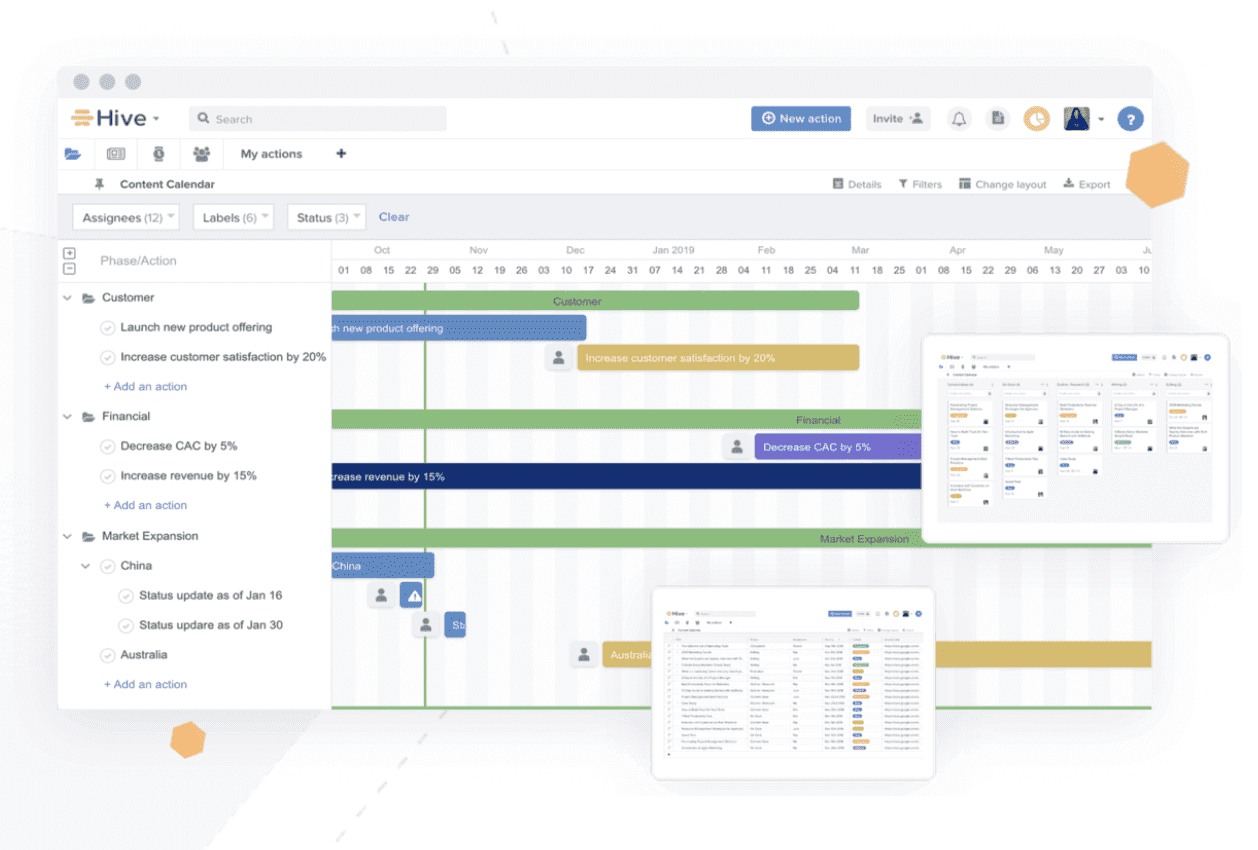
Hive is a robust tool for project management, collaboration, and flexible task coordination that puts Basecamp to shame. It lets users organize projects in a Gantt chart, Kanban board, table, or calendar, and also easily switch between each layout, depending on the communication style users prefer. Updates are reflected across all project views so the whole team is informed the moment changes are implemented.
Hive enables users to easily collaborate by sending messages directly to individuals or groups, using a much more aesthetically pleasing inbox system than you’re used to with Basecamp. Need to share a document? Upload it directly to a task, project, or message. Hive’s Forms feature eliminates constant emails and collects all necessary information through simple fill-in-the-blanks.
It’s worth noting that if you’re switching to Hive from another tool, you can import tasks from tools including Asana, Trello, Basecamp, Smartsheet, and a few others.
Hive integrates with Google Drive, Salesforce, Jira, Dropbox, Slack, Zoom, One Drive, Box, and more than one thousand other tools through Zapier.
Hive costs from $12/user/month.

GoodDay
Best for agile project management

For teams seeking an alternative to Basecamp, GoodDay provides a dynamic work management platform with strong support for agile project management. Ideal for businesses of all sizes, it offers customizable features that adapt to different industries and workflows. You can manage projects more effectively with tools that address specific workflow challenges, ensuring your team's productivity and collaboration are always at their peak.
Why I Picked GoodDay
I picked GoodDay because it shines in agile project management, giving teams the tools they need to run sprints, manage backlogs, and work iteratively. Its customizable workflows and project templates let you tailor processes to your business needs, supporting both structure and flexibility. With robust permission controls and user role settings, GoodDay also makes it easy to manage access and responsibilities, making it a strong choice for teams seeking a Basecamp alternative.
GoodDay Key Features
In addition to its agile project management, GoodDay offers:
- Big Screens: Enhance workplace transparency by displaying key project metrics and progress in a visible format for the entire team.
- Request Forms: Facilitate cross-departmental collaboration by allowing teams to submit and manage work requests efficiently.
- Gantt Charts: Visualize project timelines and dependencies to ensure your team stays on track and meets deadlines.
- Custom Work Items: Tailor your project management experience by creating unique work items that align with your organization's specific needs.
GoodDay Integrations
Integrations include Google Drive, Google Calendar, Dropbox, Box.com, GitHub, GitLab, Slack, Gmail, and Google Docs.
Pros and Cons
Pros:
- Offers strong visual tools like Gantt charts and Kanban boards
- Includes comprehensive project templates for easy setup
- Enhances cross-departmental collaboration with request forms
Cons:
- Some users report occasional performance issues
- Mobile app functionality could be improved
Best for integration of ideation and task management

MeisterTask asserts its position as a strong competitor to Basecamp in the project management software market through its unique blend of visually appealing design, intuitive usability, and innovative features that cater specifically to enhancing team productivity and project workflow. Unlike Basecamp, which adopts a more straightforward, list-based approach to project management, MeisterTask offers a dynamic, Kanban-style interface that allows for a more visual and flexible management of tasks.
One of MeisterTask’s standout features is its deep integration with MindMeister, an online mind mapping tool. This integration facilitates a seamless transition from the initial brainstorming and planning stages directly into actionable tasks and projects within MeisterTask. This feature is particularly unique in the project management space, offering teams a cohesive platform for both ideation and execution. Such a capability is invaluable for creative and strategic planning, where the journey from concept to completion is often nonlinear and requires a flexible, integrated toolset to manage effectively.
MeisterTask places a strong emphasis on automation, with features designed to streamline repetitive tasks and processes. This not only helps in reducing manual effort but also ensures that projects move forward smoothly and efficiently. The automation capabilities in MeisterTask go beyond simple task assignments and due date reminders, offering custom rule configurations that can trigger a series of actions based on specific criteria.
MeisterTask’s commitment to security and privacy is evident through its GDPR compliance and end-to-end encryption for task comments and discussions. This focus on data protection is an essential factor for businesses operating in sensitive industries or those that prioritize data security. While Basecamp also values privacy and security, MeisterTask’s approach provides users with peace of mind through transparent policies and robust security measures, making it an attractive option for teams that require a high level of data protection alongside powerful project management capabilities.
Nifty
Best for ease of use & client collaboration
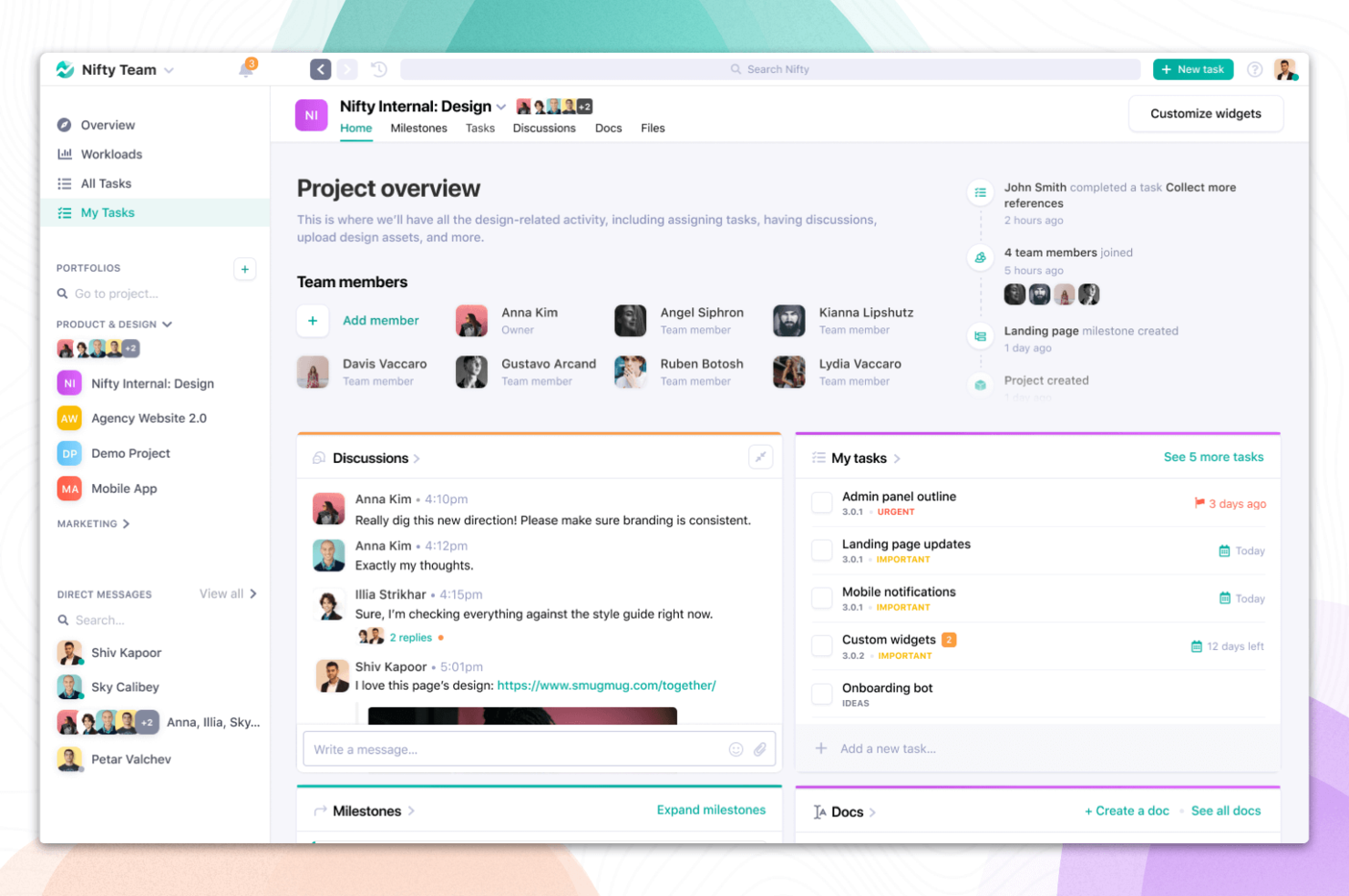
Nifty is a project management and collaboration hub that allows teams to plan, track, and deliver projects. Nifty's comes packed with project planning features such as discussions, milestones, task dependencies, docs, and files ensure project members and stakeholders are aligned on project objectives. The tool also includes direct messaging, which is great for facilitating team-wide communication from planning to delivery. Nifty's built-in reporting provides a global overview of project statuses and team member workloads, making sure your decisions are aligned with your business plan.
Nifty allows you to import your existing data from Basecamp as well as from CSV & Excel files, so you can quickly establish your workflow on Nifty. Nifty also offers built-in integrations with Google Docs, Sheets, and Presentations. Custom third party project embeds and workflow automations, along with connections to over 1000 additional applications through Zapier.
Nifty starts at $39/month.

Freedcamp
Best for budget-friendly project management
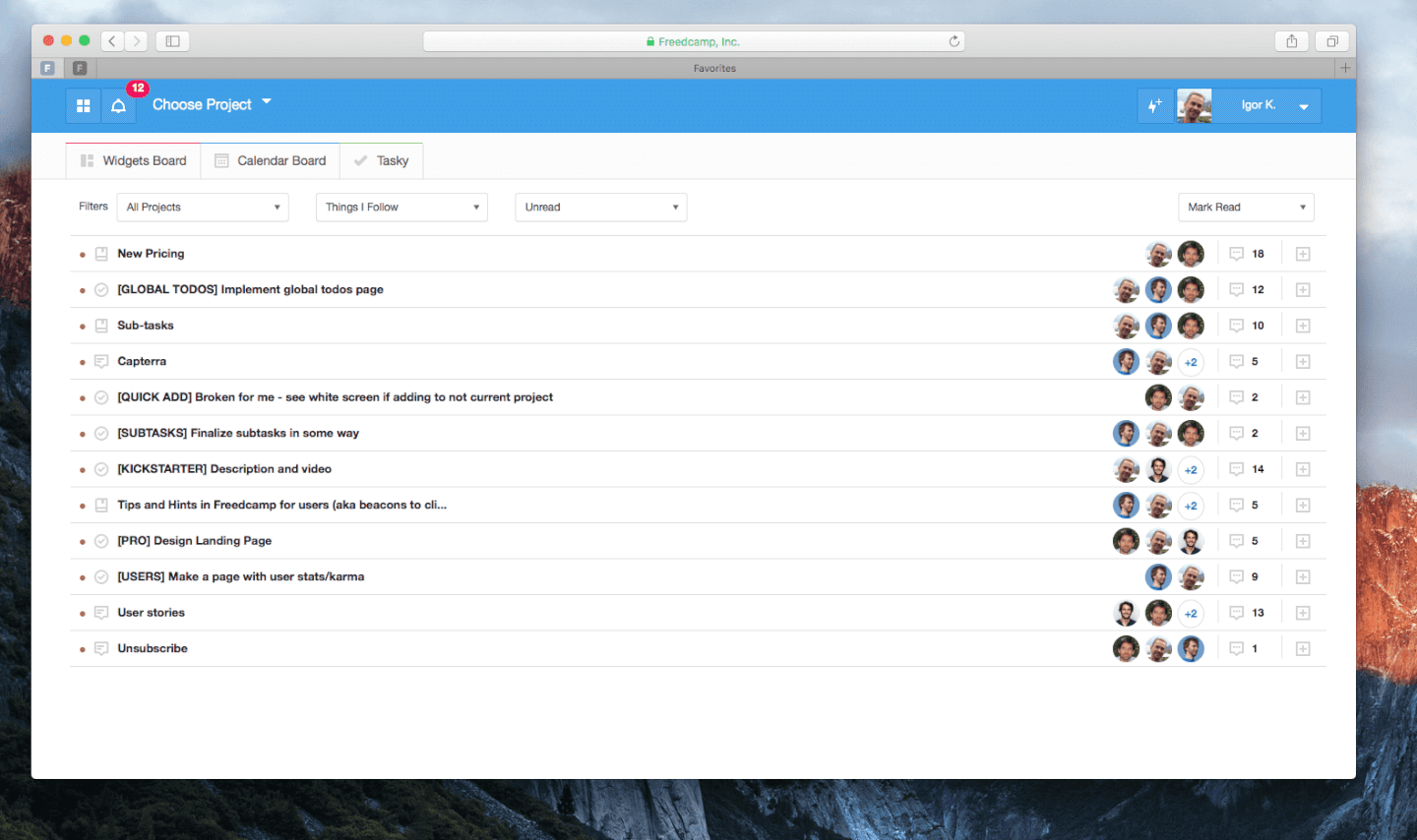
Freedcamp is a great Basecamp alternative software, providing useful collaboration features through a simple visual interface. The app enables you to track, mark up and follow your tasks, using a Kanban board and an interactive Gantt chart. It offers the option to categorize your tasks by who, when, and how the tasks are being done.
With Freedcamp’s messaging and task-overview boards, you will be able to assign members, provide them with necessary files, assign deadlines, and add sub-tasks. The built-in calendar allows you to create and customize events, tasks, and milestones.Freedcamp also has a general discussion board.
Freedcamp integrations include all of the standards: Jira, Slack, Trello, GitHub, and many others. It also syncs easily with the entire Google ecosystem, which means you can sync your Google Calendar with Freedcamp’s built-in one to keep your updates consistent across platforms and enable more report-generating possibilities.
Freedcamp costs from $3.49/user/month.
Other Basecamp Alternatives
Here are some additional Basecamp alternatives that didn’t make it onto my shortlist, but which are still worth checking out:
- Baserow
Basecamp alternative for open source, flexible databases
- Backlog
Basecamp alternative for software development
- Workzone
For personalized onboarding support
- Shortcut
For agile-specific frameworks
- Avaza
For extra features like timesheets and expense tracking
- Teamwork.com
For content collaboration
- Bonsai Agency Software
For managing projects, clients and finances in one
- Nutcache
For visually organizing tasks
- Yanado
For Gmail users
- Intervals
For small teams and small businesses
- Ravetree
Basecamp alternative for agencies
- Pneumatic Workflow
For streamlining digital projects
- Stackfield
For EU data privacy and compliance


How I Evaluate Basecamp Alternatives
I evaluate Basecamp alternatives in two layers: the core task management and collaboration features an agency or PMO can't operate without, and the differentiators that determine the best fit.
Core Functionality (Table Stakes For This List)
When I'm selecting tools for my list, I rank each one on a scale from 0 (does not offer the functionality) to 5 (excels in this area) for each core functionality listed below. Then, I calculate the tool's total score into a percentage. Each tool needs to achieve a minimum total score of 75% to be considered for inclusion.
- Task & Project Management: I look for multiple project views like boards, lists, and timelines so teams can plan a sprint in Kanban while stakeholders track the same work on a Gantt chart.
- Team Collaboration & Messaging: Whether it's threaded discussions on a deliverable or a quick group message, I check that conversations stay connected to the project context.
- File Sharing & Document Storage: Teams need a central place to store and organize assets per project. I evaluate how each tool handles version control, file search, and folder structures.
- Scheduling & Milestone Tracking: I look at how each tool handles calendars, deadlines, and milestone markers so a team lead can spot a slipping launch date before it derails downstream work.
- Client & External Collaboration: For agencies and consultancies, I evaluate guest access controls. The right tool lets you share a project with a client without exposing internal notes or budgets.
- Third-Party Integrations: I check for native connections to tools like Slack, Google Workspace, GitHub, and Figma, plus broader connectivity through Zapier, Make, or an open API.
Once I have a list of tools that meet this criteria, I consider what sets each platform apart.
Differentiating Factors (What Sets Vendors Apart)
Here's how I compare and contrast different vendors:
Standout Features
No-code automation is one of the first things I evaluate. A tool that can auto-assign tasks when a status changes or trigger a Slack notification when a milestone is hit saves PMs hours of manual follow-up each week. I also look at native time tracking with billable rates, which matters for agencies reconciling logged hours against client budgets. Custom dashboards round out my evaluation—PMO directors need real-time portfolio views they can share with leadership without exporting a spreadsheet.
Beyond Features
Pricing model matters a lot when comparing Basecamp alternatives. Some tools charge per user, which can get expensive fast for a 50-person team, while others offer flat-rate plans that keep costs predictable. I also consider team size fit—a tool built for enterprise PMOs can overwhelm a 10-person startup, and vice versa. Onboarding deserves attention too. I look at whether a platform offers migration support, pre-built templates, and guided setup so your team isn't spending weeks recreating projects from scratch.
Why Look for a Basecamp Alternative?
While Basecamp is a good choice for project management and team collaboration software, there are a number of reasons why some users seek out alternative solutions. You might be looking for a Basecamp alternative because…
- You need advanced task management features like dependencies or subtasks
- You want more integrations with the other tools your team already uses
- You need better reporting or analytics to track project progress
- You prefer a different pricing model, like per-user billing
- You need stronger time tracking or invoicing capabilities
- You want more customization options for workflows and permissions
Basecamp Key Features
Here are some of the key features of Basecamp, to help you contrast and compare what alternative solutions offer:
- To-Do Lists: Create and assign tasks to team members, set due dates, and track progress to ensure everyone knows their responsibilities.
- Message Boards: Post announcements, pitch ideas, or start discussions in a centralized place to keep all team communication organized and accessible.
- Campfires: Engage in real-time group chats for quick questions or spontaneous conversations to reduce the need for lengthy email threads.
- Schedules: Manage project timelines by setting milestones, deadlines, and events to help your team stay on track and meet important dates.
- Docs & Files: Upload, store, and share documents and files in a centralized location to ensure everyone has access to the latest versions.
- Automatic Check-ins: Set up recurring questions to gather status updates from your team, keeping everyone informed without scheduling additional meetings.
- Hill Charts: Visualize project progress to identify potential obstacles and ensure tasks are moving forward as planned.
- Client Access: Invite clients to specific projects, allowing them to view progress, provide feedback, and collaborate directly within Basecamp.
- Reports: Generate insights into project performance, track overdue tasks, and monitor team activity to maintain accountability and transparency.
- Integrations: Connect Basecamp with other tools your team uses, such as time tracking or accounting software, to create a more cohesive workflow.