

10 Best AI Workflow Automation Software Reviewed in 2026

Best AI Workflow Automation Software Shortlist


The best AI workflow automation software eliminates manual, repetitive tasks (like status updates, data entry, approvals, and task assignments) so you can focus on high-impact work. Challenges like shifting deadlines, misaligned teams, scattered tools, and manual handoffs can lead to missed dependencies and stalled progress, but AI workflow tools can help you address this.
I’ve personally tested and reviewed dozens of tools to identify the most efficient, reliable platforms. Using my experience in workflow optimization, I’ve curated this list to help you choose automation software that’s practical, scalable, and built to support real project execution.
Why Trust Our Software Recommendations
Our team has been testing and reviewing software since 2012. As project managers ourselves, we know how difficult—and important—it is to choose the right software.
For this guide, we evaluated tools using hands-on testing and independent research, scoring tools using our selection criteria. We also draw on insights from industry thought leaders and practicing project management experts.
Our reviews reflect our human editorial judgment, not a sales pitch.
Expert reviewers:
AI Workflow Automation Software Comparison Table
This comparison table summarizes pricing details for my top AI workflow automation software selections:
| Tool | Best For | Trial Info | Price | ||
|---|---|---|---|---|---|
| 1 | Best for generative AI project planning | 14-day free trial | From $10/user/month (billed annually) | Website | |
| 2 | Best for real-time profitability insights | 14-day free trial + free demo available | From $10/month (billed annually) | Website | |
| 3 | Best for client interaction management | Free plan available | From $99/month | Website | |
| 4 | Best for AI-driven workflow management | Free demo available | Pricing upon request | Website | |
| 5 | Best for workflow optimization | Free demo | Pricing upon request | Website | |
| 6 | Best with 1,000+ prebuilt connectors | 30-day free trial | Pricing upon request | Website | |
| 7 | Best for enterprise integrations | Free plan available | From $100/month | Website | |
| 8 | Best for custom workflow creation | Free trial available | From €20/month (billed annually) | Website | |
| 9 | Best for easy process documentation | Free demo available | Pricing upon request | Website | |
| 10 | Best for task automation | 7-day free trial | From $4.60/user/month (billed annually) | Website |


Best AI Workflow Automation Software Reviews
Read my detailed summary of each of my picks for the best AI workflow automation software. I cover key features, pros & cons, integrations, and use cases so you can find the right fit.

Wrike
Best for generative AI project planning

Wrike streamlines team workflows by using AI to automate planning and daily tasks. This tool is particularly appealing to businesses aiming to automate routine tasks and focus on strategic initiatives. By leveraging Wrike's capabilities, you can address challenges in resource allocation, team collaboration, and project planning, ensuring your projects run smoothly and efficiently.
Why I Picked Wrike
I picked Wrike for its innovative use of generative AI, which transforms how you handle project planning and communication. Its AI features generate project plans, translate comments, and summarize meetings, aligning perfectly with the needs of teams looking to automate redundant tasks. Additionally, Wrike's customizable request forms and real-time dashboards offer the flexibility to adapt workflows to your specific requirements, enhancing overall efficiency.
Wrike Key Features
In addition to generative AI, Wrike offers:
- Mind Mapping: Allows your team to visualize project ideas and plans, fostering creativity and clarity in planning stages.
- Unlimited Workflows: Provides the flexibility to create as many workflows as needed, tailoring them to different projects or departments.
- Project Blueprints: Enables you to standardize project processes, ensuring consistency and efficiency across recurring tasks.
- Multiple Visualization Options: Offers various ways to view project data, such as Gantt charts and Kanban boards, aiding in better project tracking and management.
Wrike Integrations
Integrations include NetSuite, QuickBooks, Jira, Google Workspace, Salesforce, Microsoft Teams, Slack, Adobe Creative Cloud, Dropbox, and Box.
Pros and Cons
Pros:
- Automates routine tasks, enhancing project efficiency
- Improves team collaboration with shared workflows
- Provides real-time task tracking and updates
Cons:
- Users report unintuitive interface
- The platform and automations take time to learn and set up
New Product Updates from Wrike

Wrike Adds Quick Search to Table View
Wrike adds Quick Search to Table View with full-table search across titles, descriptions, and fields, plus highlighted matches. This helps users find tasks faster in large tables. For more information, visit Wrike’s official site.

Best for real-time profitability insights
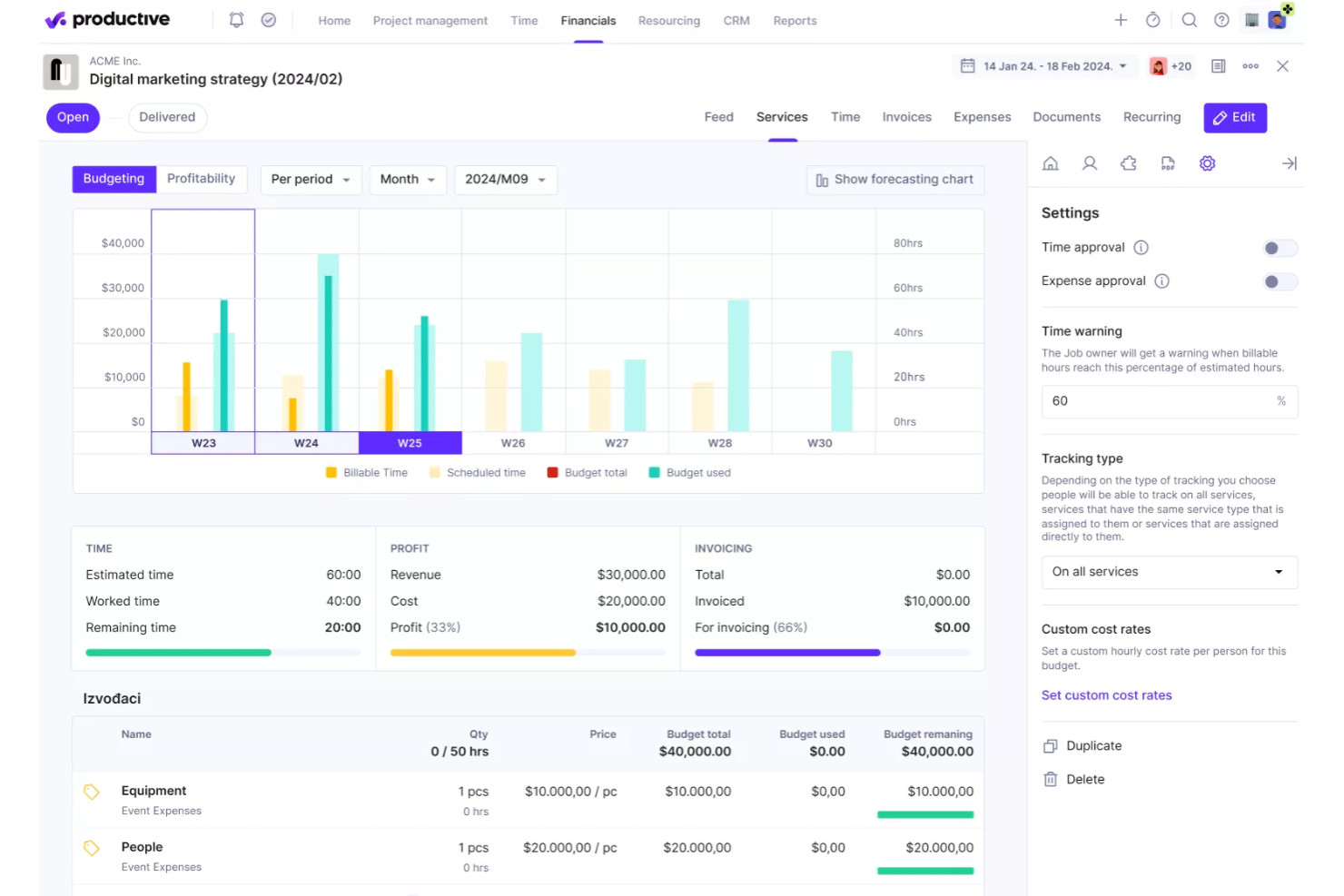
Productive is designed to help agencies streamline operations by combining project management, resource planning, and financial tracking in one platform. With features that support real-time profitability insights, it allows teams to monitor project budgets, utilization, and revenue performance while managing workflows more efficiently. This makes it a practical choice for organizations that want better visibility into both their operational processes and financial outcomes.
Why I Picked Productive
I picked Productive for its real-time profitability insights, which allow teams to monitor project margins, budgets, and financial performance as work progresses. This helps agencies understand whether projects are profitable and make adjustments before issues impact revenue. The platform also supports resource planning to ensure projects are staffed with the right team members based on availability and workload. In addition, Productive includes automated reporting and forecasting tools that help teams analyze performance data and plan future work more effectively.
Productive Key Features
In addition to real-time profitability insights, some other features of Productive include:
- Gantt Charts: Visualize project timelines and dependencies to improve planning and execution.
- Time Tracking: Monitor billable and non-billable hours directly linked to project budgets.
- Invoicing: Automate invoice creation based on tracked time and project budgets.
- Sales CRM: Manage client interactions and sales pipelines within the platform.
Productive Integrations
Integrations include QuickBooks, HubSpot, Slack, Xero, Jira, and Google Calendar. An API and Zapier connection are also available for additional integrations.
Pros and Cons
Pros:
- Flexible configuration supports different agency workflows and operational needs
- Clear dashboards improve team collaboration and project performance monitoring
- Project visibility tools help teams track budgets, progress, and resource usage
Cons:
- Reporting tools require manual configuration to generate detailed project insights
- Interface layout can feel overwhelming when managing large numbers of projects
New Product Updates from Productive

Productive Adds Agent Triggers, Teams Integration, and Time Controls
Productive adds automated agent triggers, broader AI file support, Microsoft Teams integration, Resource Planner improvements, and new time entry controls. These updates expand automation while improving scheduling, collaboration, and time tracking. For more information, visit Productive’s official site.

Moxo
Best for client interaction management

Moxo is a client interaction management platform that helps improve client communication and engagement, operational efficiency, and project collaboration. It serves industries like finance, real estate, and legal services.
Why I picked Moxo: It excels in managing client interactions and is ideal if you need efficient communication channels. The platform provides secure messaging and document sharing features to keep client data safe. You can set up client portals as centralized hubs for communication and collaboration. Moxo's task management tools keep your team organized and help them stay responsive to client needs.
Standout features & integrations:
Features include digital forms that capture client input, task automation that reduces manual tasks, and the ability to track progress with built-in dashboards.
Integrations include Salesforce, Slack, Box, Docusign, QuickBooks, and HubSpot.
Pros and Cons
Pros:
- Strong client engagement tools
- Centralized communication hub
- Secure client portals
Cons:
- Learning curve for new users
- Limited customization options

Best for AI-driven workflow management

Screendragon is a no-code workflow management platform that uses AI and automation to simplify complex business processes. It’s ideal for marketing, operations, and enterprise teams that need to manage multiple projects, approvals, and resources without getting bogged down by manual tasks. By combining visual workflow design with intelligent automation, it helps teams stay efficient and focused on strategic work.
Why I picked Screendragon: I picked Screendragon for its strong AI-driven workflow management capabilities. The platform uses embedded AI agents to automate repetitive tasks and manage complex workflows end-to-end. I also liked how it combines no-code flexibility with enterprise-grade security, so you can build and scale workflows that match your organization’s exact needs. If your team handles high-volume approvals or global campaigns, Screendragon can help reduce manual effort while maintaining visibility and control.
Standout features & integrations:
Features include a visual workflow builder for creating custom automations, digital approval management that speeds up decision-making, and workflow analytics that provide real-time insights into team performance.
Integrations include Jira, Google Drive, Box, Adobe, OneDrive, Salesforce, Microsoft Dynamics 365, SAP, and NetSuite.
Pros and Cons
Pros:
- Enterprise-ready with strong security
- AI agents automate complex tasks
- Customizable no-code workflow builder
Cons:
- Steep learning curve for new users
- Setup can take time
New Product Updates from Screendragon
Screendragon Unveils New AI Hub
Screendragon introduced AI Hub, a new capability that lets teams build and manage AI agents directly within workflows. The update helps marketing teams automate tasks, maintain governance controls, and scale AI-driven operations more efficiently. For more information, visit Screendragon's official site.
Kissflow
Best for workflow optimization

Kissflow serves as a versatile solution for teams seeking to enhance their operational efficiency through AI-powered workflow automation. Its low-code/no-code platform empowers users across industries, from healthcare to finance, to develop internal applications and automate complex processes without extensive coding knowledge.
Why I Picked Kissflow
I picked Kissflow for its AI capabilities, which are pivotal for any team aiming to automate and optimize workflows intelligently. The platform leverages machine learning models and predictive analytics to optimize process execution, ensuring tasks are dynamically assigned and resources are efficiently utilized. Additionally, its cognitive automation features reduce manual intervention, allowing you to focus on strategic initiatives rather than routine tasks.
Kissflow Key Features
In addition to its AI capabilities, I also found these features beneficial for your team:
- App and Process Builders: These tools allow you to create customized workflows tailored to your unique business needs.
- Workflow Orchestration: This feature ensures seamless task allocation and process management across your organization.
- Boards and Project Views: Flexible boards and multiple project views (like Kanban or list) that help teams track work and priorities.
- Templates: With industry-specific templates, you can quickly deploy solutions that align with best practices in your field.
Kissflow Integrations
Integrations include Slack, Google Workspace, Microsoft Teams, QuickBooks, Salesforce, Zapier, Dropbox, DocuSign, Jira, and Trello.
Pros and Cons
Pros:
- Cloud-based access lets teams work remotely and approve tasks from anywhere.
- Low-code/no-code capabilities let teams build workflows and apps without developer dependency.
- Easy drag-and-drop workflow design lets non-technical users automate processes with minimal help.
Cons:
- Workflow edits after approval can be restrictive or require restart.
- Limited deep customization makes highly specialized workflows harder to build.

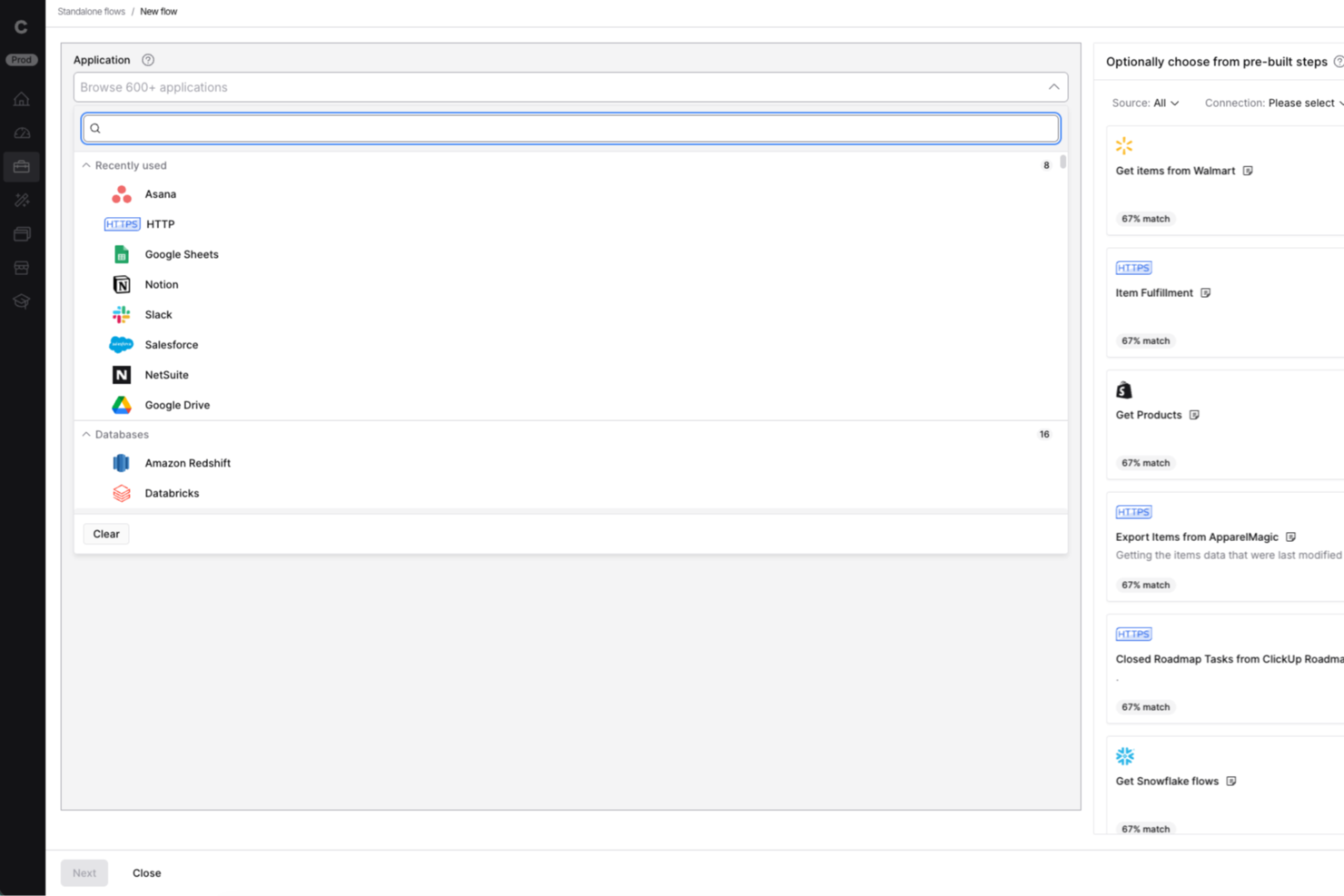
Celigo is an ai workflow automation platform built for IT teams and operations leaders who need to connect apps, automate complex business processes, and manage integrations at scale across their organization.
Who Is Celigo Best For?
IT teams and operations leaders at mid-sized to large enterprises who need to automate and orchestrate workflows across multiple business systems.
Why I Picked Celigo
I picked Celigo as one of the best because its library of 1,000+ prebuilt connectors lets my team automate workflows across dozens of SaaS apps without custom development. I can quickly connect Salesforce, NetSuite, Shopify, and more, then orchestrate data flows between them. This saves us weeks on integration projects and lets us focus on optimizing business processes instead of building connectors from scratch.
Celigo Key Features
- AI-powered error management: Automatically detects, flags, and helps resolve integration errors in real time.
- Visual flow builder: Lets you design, map, and automate workflows using a drag-and-drop interface.
- Role-based access controls: Assigns permissions and restricts access to sensitive workflows and data.
- Workflow monitoring dashboard: Provides real-time visibility into process status, throughput, and performance metrics.
Celigo Integrations
Integrations include Salesforce, Microsoft Dynamics 365 Business Central, Oracle NetSuite, Walmart, SAP, Snowflake, Acumatica, ADP, Adobe, and 3M.
Pros and Cons
Pros:
- Real-time monitoring and error alerting included
- SOC 2 Type II and GDPR compliance features
- Built-in data transformation and mapping tools
Cons:
- Limited AI-specific automation templates
- Advanced features require higher-tier pricing
New Product Updates from Celigo
Celigo Adds API Group Assignment During API Setup
Celigo adds API group assignment during create, clone, and move actions. This reduces extra setup steps by letting teams organize APIs before the relative URI is defined. For more information, visit Celigo’s official site.
 .
.
Workato
Best for enterprise integrations

Workato is an integration platform as a service (iPaaS) for enterprise users across IT, finance, HR, and marketing. You can use it to automate business processes, integrate your apps, and improve operational efficiency.
Why I picked Workato: It offers enterprise-grade integrations, which makes it suitable for large organizations. The platform offers a no-code interface with over 1200 pre-built connectors. You can automate complex workflows and manage APIs, and the ability to create custom AI assistants and agents adds flexibility to your operations.
Standout features & integrations:
Features include version control so you can manage changes safely, role-based access to support cross-functional teams, and granular error monitoring to help you resolve failures.
Integrations include Salesforce, Slack, HubSpot, Marketo, ServiceNow, NetSuite, QuickBooks, Microsoft Dynamics 365, Zendesk, and Jira.
Pros and Cons
Pros:
- Custom agent creation
- No-code automation platform
- Extensive pre-built connectors
Cons:
- Can be complex for small teams
- Limited customer support hours

n8n
Best for custom workflow creation

n8n is an AI workflow automation platform for technical teams like IT, security, development, and sales. It helps you build multi-step AI agents and integrate various applications to perform business functions like employee onboarding and security incident management.
Why I picked n8n: The platform's flexibility in custom workflow creation sets it apart. Users can build workflows using either the visual interface or code, which makes it adaptable to different skill levels. It supports over 500 integrations, so you can connect various tools, and the option for self-hosting or a cloud solution adds more versatility.
Standout features & integrations:
Features include a visual workflow builder that simplifies complex tasks, support for both no-code and code-savvy users, and the ability to run and debug workflows efficiently.
Integrations include Google Sheets, Slack, MySQL, HubSpot, Salesforce, GitHub, Jira, Airtable, Trello, and Microsoft Teams.
Pros and Cons
Pros:
- Extensive integration capabilities
- Low-code and self-hosting options
- Flexible workflow creation
Cons:
- Can be complex for beginners
- Requires technical knowledge

Best for easy process documentation

Process Street is a compliance operations platform that helps you automate and track business processes. It's ideal for operations, compliance, and HR teams in industries like healthcare and technology. The platform centralizes compliance documentation and transforms policies with AI-powered workflows.
Why I picked Process Street: It excels in simplifying process documentation and makes it easy for teams to manage standard operating procedures. Its standout features include centralized policy management and real-time task visibility. The platform's AI-driven workflows also help you improve operational efficiency.
Standout features & integrations:
Features include workflow automation that simplifies repetitive tasks, project management capabilities to keep your team organized, and AI tools that transform manual processes.
Integrations are not listed publicly on Process Street’s website.
Pros and Cons
Pros:
- Compliance monitoring
- Centralized policy management
- Easy process documentation
Cons:
- Some integrations need improvement
- Limited customization options

TimeHero
Best for task automation

TimeHero is a task management and automation tool for teams that want to boost productivity and manage tasks efficiently. You can use it to automate scheduling and task management and optimize your workflows.
Why I picked TimeHero: It focuses on task automation and is a great choice for teams that want to streamline their work processes. The platform can automatically schedule tasks based on priorities and deadlines to help your team stay on track. Its predictive scheduling adjusts tasks dynamically as priorities change. TimeHero's collaborative features keep everyone informed and aligned on the project goals.
Standout features & integrations:
Features include workload forecasting that helps you see team capacity, project planning tools that link tasks to larger goals, and visual timelines for tracking progress in real time.
Integrations include Google Calendar, Gmail, Trello, Slack, Asana, Evernote, and Basecamp.
Pros and Cons
Pros:
- Boosts team communication
- Collaborative tools
- Automatic task rescheduling
Cons:
- Limited customization options
- Initial setup can be time-consuming
Other AI Workflow Automation Software
Here are some additional AI workflow automation software options that didn’t make it onto my shortlist, but which are still worth checking out:
- Tonkean
For operations teams
- Adobe Workfront
For marketing teams
- Camunda
For BPMN and DMN modeling
- Jitterbit
For data integration tasks
- Forms On Fire
For mobile data collection
- elvex
For AI-powered knowledge workflows
- Miro
For visual collaboration
- Jotform Workflows
For no-code workflow customization
- GoodDay
For task dependency management
- Parabola.io
For data-heavy workflows
- Asana
For managing cross-functional projects
- Zapier
For simple app-to-app automations
- ClickUp
For customizing workflow views
- monday.com
For visual task management


How I Evaluate AI Workflow Automation Software
Every tool on this list needs to do more than bolt on an AI label—I look for platforms where AI drives real outcomes, like auto-generating status reports or flagging at-risk sprints before they derail. I split my evaluation into core functionality every tool must have to qualify and differentiating factors that separate the best fits from the rest.
Core Functionality (Table Stakes For This List)
When I'm selecting tools for my list, I rank each one on a scale from 0 (does not offer the functionality) to 5 (excels in this area) for each core functionality listed below. Then, I calculate the tool's total score into a percentage. Each tool needs to achieve a minimum total score of 65% to be considered for inclusion.
- AI-Assisted Workflow Builder: I evaluate whether the platform lets you describe a workflow in plain language and get a usable automation back, like typing "assign QA tasks when dev marks a ticket done."
- Project Task Automation: Each tool should automate core PM actions like creating subtasks, reassigning work when priorities shift, or updating status fields across dependent tasks.
- Trigger-Based Conditional Logic: I look for event-driven triggers paired with branching logic, such as kicking off a risk review workflow when a milestone slips past its planned date.
- Native PM Integrations: The tool needs to connect with platforms teams already use. I check for depth of integration with tools like Jira, Asana, ClickUp, Slack, and Google Workspace.
- Generative AI Outputs: I evaluate whether AI can produce useful project artifacts within workflows, like drafting a sprint summary from completed tickets or generating stakeholder update emails.
- Predictive Intelligence: The platform should surface forward-looking insights, such as flagging resource bottlenecks or forecasting delivery risk based on velocity trends and historical data.
Once I have a list of tools that meet the criteria, I consider what sets each platform apart.
Differentiating Factors (What Sets Vendors Apart)
Here's how I compare and contrast different vendors:
Standout Features
Autonomous AI agents set tools apart. I look for platforms where an agent can triage requests, route tasks, and update stakeholders on its own. That kind of hands-off coordination saves PMs hours each week. A conversational interface matters too—PMs should be able to type "show me blocked tasks this sprint" and get answers without building a report. Prebuilt PM templates for sprint kickoffs or risk reviews help teams get running in minutes rather than configuring workflows from scratch.
Beyond Features
AI transparency is a big deal when workflows make decisions on your behalf. I check whether a platform shows why it flagged a deadline as at-risk or reassigned a task, and whether it offers approval gates before AI actions execute. Security and data governance matter just as much—I evaluate controls over what project data AI models can access and whether the vendor supports SOC 2 Type II and regional data residency. Pricing structures also get close attention, since AI-heavy usage can drive costs up fast if token consumption or workflow runs aren't priced predictably.
How to Choose AI Workflow Automation Software
It’s easy to get bogged down in long feature lists and complex pricing structures. To help you choose the right AI workflow automation software, here’s a checklist of factors to keep in mind:
| Factor | What to Consider |
|---|---|
| Scalability | Can the software grow with your business? Consider whether it supports additional users and workflows without a hitch. Check whether it can handle increased data volume efficiently. |
| Integrations | Does it connect with your existing tools (i.e. accounting software or CRM tool)? Make sure it offers native integrations with your key software systems. Avoid tools that require costly third-party solutions for integration. |
| Customizability | Can you tailor it to fit your workflows? Look for software that allows modifications without needing a developer. Check whether it supports custom fields and interfaces. |
| Ease of use | Is the interface intuitive for your team? Avoid tools with a steep learning curve. Test the navigation and user experience before committing. |
| Implementation and onboarding | How quickly can your team get up to speed? Evaluate the training materials and support offered during onboarding. Check for interactive guides and tutorials. |
| Cost | Does it fit your budget? Compare pricing plans and check for hidden fees. Consider the value provided in basic plans versus premium options. |
| Security safeguards | Is your data protected? Make sure the software complies with industry standards like GDPR. Check for encryption and role-based access controls. |
| Support availability | Is help available when you need it? Look for 24/7 support options and quick response times. Check whether they offer multiple support channels like chat and phone. |
What Is AI Workflow Automation Software?
AI workflow automation software is a tool that automates repetitive tasks and processes using artificial intelligence. It's commonly used by project managers, IT professionals, and operations teams to increase efficiency and reduce manual and routine tasks.
Features like task automation, real-time analytics, and integrations with existing tools help you manage workflows, improve productivity, and keep teams aligned. Overall, these tools save you time so you can focus on more strategic tasks.
Features of AI Workflow Automation Software
When selecting AI workflow automation software, keep an eye out for the following key features:
- Task automation: Automates repetitive tasks and frees up time for more strategic work.
- Real-time analytics: Provides insights into workflow performance and helps you make data-driven decisions.
- Customizable workflows: Lets you tailor your processes to fit your specific business needs without requiring a developer.
- Integrations: Connects with existing tools to maintain a smooth flow of information across platforms.
- Scalability: Supports growth by handling increased data volume and additional users seamlessly.
- Security safeguards: Protects sensitive data with encryption and role-based access controls.
- Collaboration tools: Improves team communication and coordination with features like shared workspaces and chat.
- Mobile access: Lets team members manage workflows and tasks from mobile devices.
- User-friendly interface: Offers ease of use with an intuitive design and reduces the learning curve for new users.
- Performance reporting: Offers detailed reports to track productivity and identify areas for improvement.
Benefits of AI Workflow Automation Software
Implementing AI workflow automation software provides several benefits for your team and your business. Here are a few you can look forward to:
- Increased efficiency: Automates repetitive tasks, so your team can focus on more valuable work.
- Improved decision-making: Provides real-time analytics to help you make informed choices based on data.
- Better collaboration: Offers tools that improve communication and coordination on your team.
- Scalability: Supports business growth by handling more data and users easily.
- Time savings: Reduces manual work and frees up time for strategic initiatives.
- Better data security: Keeps sensitive information protected with strong security measures.
- Flexibility: Customizable workflows let you adapt processes to fit changing business needs.
Costs and Pricing of AI Workflow Automation Software
Costs for AI workflow automation software vary based on features, team size, add-ons, and more. Here are common plans, average prices, and typical features included in AI workflow automation solutions:
Plan Comparison Table for AI Workflow Automation Software
| Plan Type | Average Price | Common Features |
|---|---|---|
| Free Plan | $0/user/month | Basic task automation, limited app integrations, and community support. |
| Personal Plan | $5-$25/user/month | Task automation, basic reporting, more integrations, and email support. |
| Business Plan | $30-$75/user/month | Advanced workflow automation, real-time analytics, better security, and chat support. |
| Enterprise Plan | $100+/user/month | Customizable workflows, dedicated support, full integrations, and advanced analytics. |
AI Workflow Automation Software FAQs
Here are the answers to common questions about AI workflow automation software:
What are common challenges with implementing AI workflow automation tools?
Common challenges include integration with existing systems and resistance to change from team members. You may face a learning curve, so training and support resources are crucial. Make sure your goals are clear so you can align the software with your business processes.
How does AI workflow automation software improve productivity?
AI workflow automation software boosts productivity by automating repetitive tasks so your team can focus on strategic work. It provides real-time analytics so you can make informed decisions, and the collaboration tools help connect different departments and streamline communication.
What industries benefit most from AI workflow automation software?
Industries like finance, healthcare, and manufacturing benefit from AI workflow automation tools. These sectors deal with large volumes of repetitive tasks and data processing, so automation is essential for efficiency. The software helps streamline processes, reduce errors, and improve compliance.
How can AI workflow automation software improve data security?
AI workflow automation tools can help boost data security via encryption and role-based access controls. It makes sure only authorized users can access sensitive information. Regular updates and compliance with industry standards like GDPR further protect data from breaches and unauthorized access.
What should you consider during the onboarding process?
During onboarding, assess the availability of training resources like tutorials and webinars. Check for interactive product tours and support from the vendor to ease the transition. Make sure your team understands the software’s features and benefits to maximize its potential and integrate it into daily operations effectively.