



Moxo vs. Process Street: Comparison & Expert Reviews in 2026



A workflow can look perfectly organized in a document and still fall apart in practice. Tasks get skipped, approvals arrive late, and teams discover during an audit that the documented process and the one people actually followed were two different things.
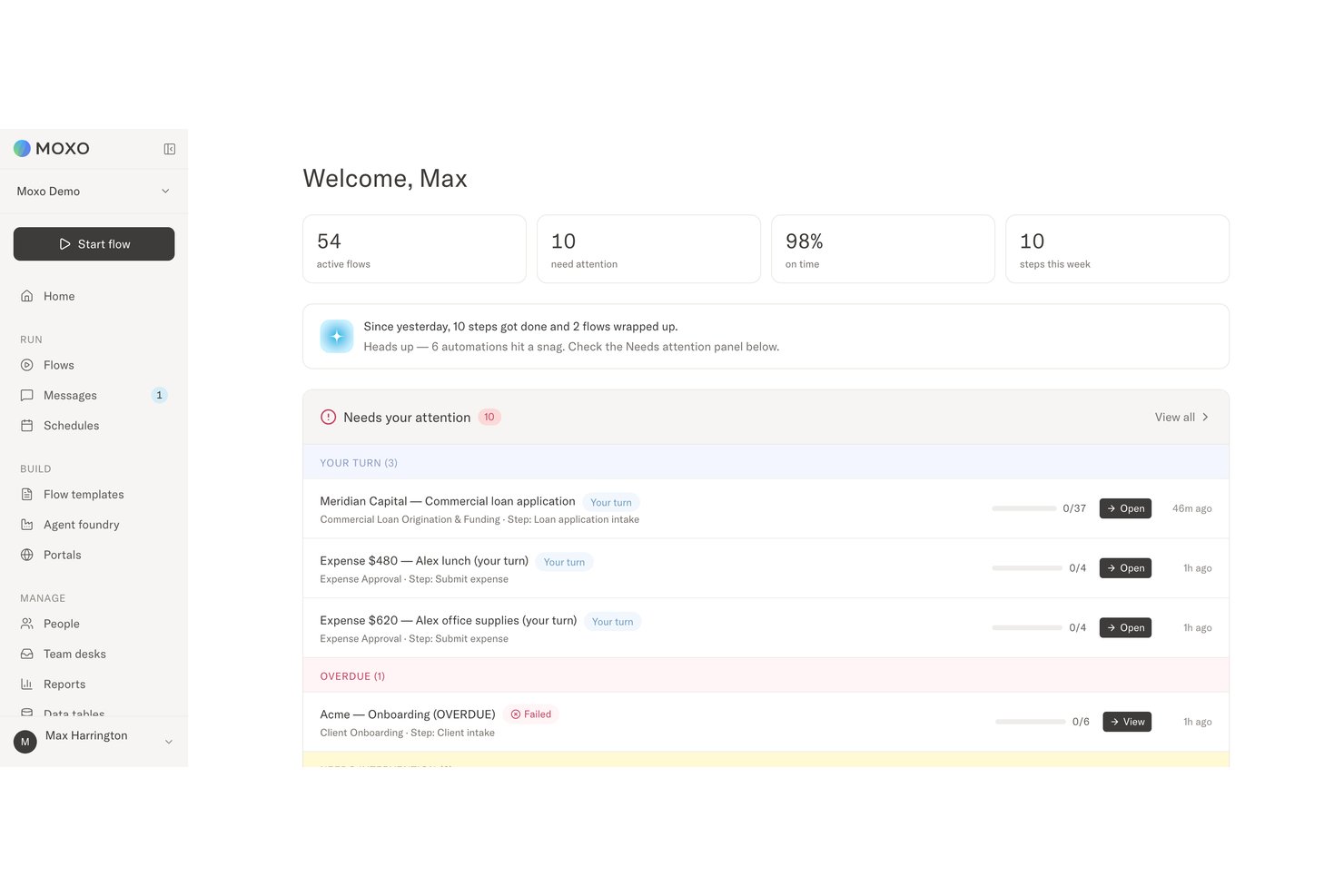
Moxo and Process Street are workflow automation platforms, but they approach automation differently. Moxo orchestrates work across employees, external stakeholders, AI agents, and connected systems. Process Street operates as a compliance operations platform, connecting policies and SOPs to controlled execution, monitoring, and audit-ready evidence.
In this detailed comparison, I’ve evaluated Moxo and Process Street to help you decide which tool better fits your workflow automation needs.
Moxo vs. Process Street: An Overview
Moxo
Process Street

Why Trust Our Software Recommendations
Our team has been testing and reviewing software since 2012. As project managers ourselves, we know how difficult—and important—it is to choose the right software.
For this guide, we evaluated tools using hands-on testing and independent research, scoring tools using our selection criteria. We also draw on insights from industry thought leaders and practicing project management experts.
Our reviews reflect our human editorial judgment, not a sales pitch.
Expert reviewers:
Moxo vs. Process Street Pricing Comparison
| Moxo | Process Street | |
|---|---|---|
| Free Trial | Free trial available | Free demo available |
| Pricing | From $5,000/year (billed annually) | Pricing upon request |
Moxo vs. Process Street Pricing & Hidden Costs
Moxo publishes Free, Business, and Pro pricing, while Enterprise uses a custom quote. Costs rise when teams need more flows and AI credits or move to higher tiers for custom portals, supervisor agents, APIs, SSO, and audit logs. Process Street uses quote-based Startup, Pro, and Enterprise plans, with costs shaped by users, guests, automation volume, API usage, storage, reporting, security, and support.
Moxo is easier to estimate upfront, although its advanced orchestration and governance features sit in higher tiers. Process Street may offer more flexibility for larger deployments, but its quote-based model makes the final cost harder to predict. Both can also involve added costs for implementation, integrations, training, managed workflows, or increased usage.
Moxo vs. Process Street Feature Comparison
| Moxo | Process Street | |
|---|---|---|
| API | ||
| Access Management | ||
| Analytics | ||
| Approval Workflows | ||
| Audit Trail | ||
| Batch Permissions & Access | ||
| Business Rules Mining | ||
| Compliance Tracking | ||
| Custom Reports | ||
| Customer Management | ||
| Data Export | ||
| Data Import | ||
| Document Management | ||
| External Integrations | ||
| Form Builder | ||
| Multi-User | ||
| Notifications | ||
| Process Modeling | ||
| Process Reporting | ||
| Project Management | ||
| Reports | ||
| Risk Assessment | ||
| Roadmapping | ||
| White-label | ||
| Workflow Management |
Moxo vs. Process Street Integrations
| Integration | Moxo | Process Street |
|---|---|---|
| Slack | ✅ | ✅ |
| Microsoft Teams | ✅ | ✅ |
| Google Sheets | ✅ | ✅ |
| Salesforce | ✅ | ✅ |
| Dropbox | ✅ | ✅ |
| DocuSign | ✅ | ✅ |
| HubSpot | ✅ | ✅ |
| Jira | ✅ | ✅ |
| API | ✅ | ✅ |
| Zapier | ✅ | ✅ |
Both platforms support common business applications through built-in connections, Zapier, webhooks, and APIs. Moxo uses integrations to coordinate data and actions across multi-party workflows, while Process Street connects operational processes with the systems used to manage policies, evidence, and compliance. Connection methods and plan requirements can vary, so teams should confirm the available actions for each app.
Moxo vs. Process Street Security, Compliance & Reliability
| Factor | Moxo | Process Street |
|---|---|---|
| Data Protection | Uses a multi-tenant architecture with KMS-encrypted storage and encryption in transit and at rest. Private cloud and on-premises deployments are also available for organizations with stricter data-sovereignty requirements. | Encrypts web traffic using TLS 1.2 or higher and stores data through AWS RDS and S3. Its infrastructure includes database replication, backups, and regional data-residency options. |
| Compliance & Privacy | Maintains SOC 2 Type II and SOC 3 certifications, undergoes regular third-party audits, and includes controls supporting GDPR requirements. | Maintains SOC 2 Type II and ISO 27001 certifications and supports GDPR, CCPA, HIPAA with a BAA, and AWS CIS requirements. |
| Identity & Access | Supports SAML 2.0 SSO and granular role-based permissions across employees, external stakeholders, and AI agents, helping teams control who can view information, complete actions, or make decisions at each workflow stage. | Supports SSO, SCIM provisioning, role-based permissions, guest access, and sharing controls across workflows, folders, templates, and process data. |
| Auditability | Maintains immutable audit logs covering workflow actions, approvals, exceptions, timestamps, and accountable participants, with audit trails designed for retention of seven years or more. | Records task completions, assignments, approvals, comments, and workflow activity, giving compliance teams evidence that required procedures were followed. |
| Reliability | Uses layered network, system, and physical security controls, regular backups, third-party testing, and flexible deployment options to protect workflow availability and data integrity. | Uses built-in redundancy, synchronous database replication, separate backups, continuous monitoring, and recovery measures designed to withstand infrastructure failures. |
Both platforms provide strong security and governance for enterprise workflow automation. Moxo applies permissions and accountability across employees, external participants, and AI agents, with immutable logs capturing decisions and escalations. By comparison, Process Street offers a broader documented compliance portfolio and focuses on proving that policies, controls, and required procedures were followed.
Moxo vs. Process Street Ease of Use
| Factor | Moxo | Process Street |
|---|---|---|
| User Interface | Uses guided flows and custom portals so employees, clients, vendors, and other participants see only the messages, files, decisions, and actions relevant to them. | Presents processes as structured tasks, forms, approvals, and checklists, making each required step easy to follow and complete. |
| Onboarding | Supports self-serve setup using templates, its no-code workflow builder, or uploaded documents and diagrams, with guided implementation available for larger deployments. | Provides templates, tutorials, and a no-code builder that help teams launch straightforward SOP and compliance workflows without much technical help. |
| Workflow Setup | Its no-code workflow builder generates roles, branching logic, data references, deadlines, and escalation rules from process descriptions, documents, or diagrams. Advanced multi-party and agent-based workflows still require careful planning. | Lets teams build processes with task assignments, conditional logic, approvals, enforced order, and dynamic due dates through a familiar visual setup. |
| Ongoing Support | Includes in-app assistance and a knowledge base, with customer success support and forward-deployed engineering available on higher tiers. | Offers email and chat support, with higher plans adding dedicated success management, training, process consulting, and custom integration services. |
From an ease-of-use perspective, Moxo offers a guided experience for complex, multi-party workflows, with custom portals and role-specific actions that keep employees and external stakeholders focused on what they need to complete. Process Street is quicker to grasp for teams turning SOPs, policies, and compliance requirements into controlled, step-by-step workflows. For organizations managing branching logic, AI agents, and several participant groups, Moxo’s depth may be worth the additional setup, while teams prioritizing straightforward compliance execution may find Process Street simpler to adopt.
Moxo vs Process Street: Pros & Cons
Moxo
- Agentic AI handles preparation, validation, routing, and monitoring
- Custom portals keep external participants aligned
- Human-in-the-loop controls, SLA rules, and audit trails reinforce accountability
- Advanced workflow design requires an adjustment period
- Less common integrations may require Zapier, Composio, or APIs
- Reporting focuses on process operations rather than customizable BI
Process Street
- You can create workflows with its intuitive no-code builder, making setup a breeze.
- It offers customizable templates, helping your team standardize processes quickly.
- The checklist feature keeps your team organized and ensures nothing gets missed.
- Advanced users might find it lacks some complex automation options compared to other tools.
- It may require more customization for industry-specific needs.
- Some users feel the mobile app lacks the full functionality of the desktop version.
Best Use Cases for Moxo and Process Street
Moxo
- Professional Services Firms Accounting, legal, consulting, and marketing firms can manage client onboarding, document collection, approvals, and recurring service delivery.
- Financial Services and Insurance Banks, lenders, wealth managers, and insurers can coordinate applications, compliance checks, exception reviews, signatures, and client decisions.
- Healthcare Administration Healthcare organizations can manage provider credentialing, intake, document verification, acknowledgements, and approval-heavy processes.
- B2B SaaS Customer Operations Customer success and implementation teams can coordinate onboarding, account reviews, renewals, and service requests across customers and internal specialists.
- Real Estate and Construction Firms Moxo helps organize contracts, approvals, vendor requirements, project documentation, and communication between clients, brokers, contractors, and internal staff.
- Manufacturing and Logistics Operations Operations teams can use Moxo for vendor onboarding, order fulfillment, compliance checks, document requests, and other multi-party workflows.
Process Street
- Human Resources Streamline onboarding and training processes with customizable templates that ensure consistency.
- Finance Teams Maintain compliance and accuracy in routine tasks with easy-to-use checklists.
- IT Departments Implement and manage standard operating procedures without needing complex coding skills.
- Small Businesses Quickly set up workflows using the intuitive no-code builder, perfect for teams without IT support.
- Customer Support Ensure consistent responses and follow-ups with organized checklist features.
- Marketing Teams Manage campaign workflows efficiently with customizable templates and process tracking.
Who Should Use Moxo, And Who Should Use Process Street?
If you need workflow automation software for complex processes across employees, clients, vendors, AI agents, and connected systems, Moxo is likely the better fit. It suits professional services, financial services, healthcare, and other regulated organizations that need custom client portals, accountable approvals, audit trails, and human oversight.
If, instead, you need a compliance operations platform for turning policies, SOPs, and repeatable tasks into controlled workflows, Process Street may be the stronger choice. It works well for HR, finance, IT, customer support, and operations teams that need reusable templates, enforced task order, conditional logic, evidence collection, and proof that required procedures were completed.
Differences Between Moxo and Process Street
| Moxo | Process Street | |
|---|---|---|
| AI Agent Architecture | Uses Agent Foundry to create agents for preparation, validation, review, routing, and monitoring, with supervisor agents able to review outputs and escalate exceptions to humans. | Uses Cora to generate workflows, monitor execution, enforce controls, flag risks, and identify missing or delayed compliance steps. |
| Decision Governance | Keeps people accountable for approvals, exceptions, compliance sign-offs, and other judgment calls, while recording decisions, participants, context, and timestamps in immutable audit trails. | Connects policies to operational workflows, requiring evidence, tracking control completion, flagging risks, and maintaining audit histories to demonstrate that required procedures were followed. |
| External Participant Experience | Provides custom portals configured for clients, vendors, partners, and other participants, with access to relevant messages, files, resources, and assigned actions through accounts or magic links. | Supports external participation through guests, shared forms and pages, task assignments, and workflow run links, but offers a less specialized workspace experience. |
| Primary Workflow Scope | Orchestrates complex processes across employees, external stakeholders, AI agents, and connected systems, while keeping people accountable for critical decisions. | Connects policies, SOPs, approvals, and recurring operations to controlled workflows that enforce required steps and preserve audit evidence. |
| Workflow Design Model | Its no-code workflow builder generates structured flows from plain-language descriptions, documents, or diagrams, including roles, branching, data references, deadlines, human actions, AI agents, and escalation rules. | Generates workflows from process descriptions or documents, then lets users refine tasks, forms, approvals, assignments, conditional logic, enforced order, and dynamic due dates. |
| Visit MoxoOpens new window | Read Process Street ReviewOpens new window |
Similarities Between Moxo and Process Street
| Automation and Notifications | Both route work based on conditions, trigger follow-up actions, enforce deadlines, and notify participants when tasks, submissions, or decisions need attention. |
|---|---|
| Forms and Data Collection | Both collect structured information, questionnaires, files, and supporting evidence at specific workflow stages rather than relying on scattered emails. |
| Integrations and Extensibility | Both connect with third-party business systems and support Zapier and APIs for transferring data and triggering actions across a broader software stack. |
| Reusable Workflow Templates | Both let teams create and reuse standardized templates for recurring processes such as onboarding, service delivery, reviews, and compliance checks. |
| Task and Approval Management | Both support assigned tasks, due dates, approval steps, role-based ownership, and structured handoffs to keep workflows moving with clear accountability. |
| Visit MoxoOpens new window Read Process Street ReviewOpens new window | |